

2026 İçin En İyi 10 Kurumsal Süreç Otomasyonu Yazılımı

10 En İyi Kurumsal Süreç Otomasyonu Yazılımları Kısa Listesi


Kurumsal süreç otomasyonu yazılımı, operasyonlarını kolaylaştırmak isteyen büyük şirketler için değerli bir varlıktır. Doğru yazılımla, işlerin sorunsuz ve verimli şekilde ilerlemesini sağlamak için temel iş süreçlerini hızlandırabilir ve standartlaştırabilirsiniz. Ancak, özellikle çok sayıda seçenek mevcut olduğunda doğru akıllı süreç otomasyonu aracını bulmak zor olabilir.
Proje yönetimi yazılımları konusundaki deneyimimi kullanarak, mevcut en iyi kurumsal süreç otomasyonu yazılımlarından birkaçını test edip karşılaştırdım. Ardından sonuçlarımı, işletmelerin kendilerine özgü ihtiyaçları için en iyi yazılımı bulmalarına yardımcı olacak ayrıntılı incelemelerde derledim. İster otomasyona yeni başlıyor olun ister konunun tüm ayrıntılarına hâkim olun, aşağıdaki listede işletmeniz için doğru kurumsal süreç otomasyonu yazılımını bulacağınızdan eminim.
Why Trust Our Software Recommendations
Our team has been testing and reviewing software since 2012. As project managers ourselves, we know how difficult—and important—it is to choose the right software.
For this guide, we evaluated tools using hands-on testing and independent research, scoring tools using our selection criteria. We also draw on insights from industry thought leaders and practicing project management experts.
Our reviews reflect our human editorial judgment, not a sales pitch.
Expert reviewers:
Kurumsal Süreç Otomasyonu Yazılımları Karşılaştırma Tablosu
Bu karşılaştırma tablosu, en iyi kurumsal süreç otomasyonu yazılımı seçimlerimin fiyatlandırma ayrıntılarını özetlemektedir:
| Tool | Starting Price | Website | |
|---|---|---|---|
| Best for managing dynamic workloads | 4.3 out of 5 | $10/user/month Free plan + 14-day trial + demo available | Book Demo |
| Best for highly customizable process automation | 4.7 out of 5 | $40/user/month Free demo available | Book Demo |
| Best for SAP process automation | 4.7 out of 5 | Pricing upon request Free demo available | Website |
| Best for handling complex automation tasks | 4.6 out of 5 | $10,000 Free trial available | Website |
| Best for native Salesforce document automation | 4.5 out of 5 | $399/month Free demo available | Website |
| Best for cross-departmental workflows | 4.6 out of 5 | $9/user/month Free plan + 14-day trial available | Book Demo |
| Best for customizable app building | 4.3 out of 5 | Pricing upon request Free demo | Website |
| Best with 1,000+ prebuilt app connectors | — | Pricing upon request 30-day free trial available | Website |
| Best for AI-powered document automation | 4.9 out of 5 | Pricing upon request Free trial available + free demo | Website |
| Best for building no-code app integrations | 4.7 out of 5 | $19.99/month Free plan available; 14-day free trial | Book Demo |
En İyi Kurumsal Süreç Otomasyonu Yazılımları İncelemeleri
Aşağıda, her bir kurumsal süreç otomasyonu yazılımına ilişkin ayrıntılı analizlerimi ve genel değerlendirmelerimi bulabilirsiniz. Her aracın artılarını ve eksilerini, özelliklerini ve en uygun kullanım alanlarını açıklayacağım.

Wrike
Best for managing dynamic workloads

Wrike is a robust enterprise process automation platform that helps teams reduce manual work by automating recurring tasks and coordinating complex workflows across departments. It’s designed to support large organizations with dynamic workloads, giving you full visibility into projects, goals, and performance—all in one place.
Why I picked Wrike: I picked Wrike because of its AI-powered planning features. You can identify risks early and allocate resources intelligently, which helps prevent delays. I also like how it centralizes information from across departments, making it easier for you to spot dependencies and align teams without wasting time on status checks. Plus, its flexibility means you can manage creative, operational, or technical work all in the same platform.
Standout Features & Integrations:
Features include customizable request forms to collect project intake info up front, real-time dashboards to track performance metrics, and full-featured mobile apps for managing work on the go. Wrike also offers enterprise-grade security features like access controls and encrypted storage to keep your data safe.
Integrations include Salesforce, Adobe Creative Cloud, Microsoft Teams, Tableau, Power BI, Zoom, Google Drive, Microsoft SharePoint, Klaxoon, QuickBooks, Google Sheets, and more through Wrike Integrate and API access.
Pros and Cons
Pros:
- Built-in mobile and desktop access
- Smart AI risk detection
- Flexible workflows for any team
Cons:
- Advanced features take time to learn
- Complex automations require setup
New Product Updates from Wrike

Wrike Redesigns Workspace Search With New Filters
Wrike introduces a redesigned Workspace Search interface with recent search shortcuts, item type and location filters, and parent-task context. These updates help users find relevant work items and navigate search results efficiently. For more information, visit Wrike’s official site.
 .

Best for highly customizable process automation

Studio Creatio is a no-code platform designed to automate workflows and build applications without requiring technical expertise. It empowers users to create customized business solutions using pre-built components.
Why I picked Studio Creatio: I like its robust no-code platform, which allows users to create and customize applications and workflows without the need for coding. This feature is particularly beneficial for organizations looking to empower non-technical users to develop tailored business solutions efficiently. The ability to design, execute, and monitor complex business processes is possible through the platform's intuitive no-code designer and BPMN 2.0-driven Process Designer.
Standout Features & Integrations:
Features include composable architecture, built-in validation tools for easier debugging, a marketplace for ready-to-use apps, multi-level architecture scalability, AI automation, an integrated development environment (IDE) for developers, and a mobile app.
Integrations include Microsoft Excel, Gmail, Mailchimp, Google Calendar, Microsoft Word, Tableau, Microsoft Outlook, Meta for Business, Twitter/X, Google Contacts, Brandwatch, and Asterisk.
Pros and Cons
Pros:
- Versatile for a wide range of business functions
- No-code platform for non-technical users
- Highly customizable to meet specific organizational needs
Cons:
- Initial learning curve for those unfamiliar with no-code platforms
- Customization can be time-consuming
New Product Updates from Creatio AI Studio
Creatio Studio Expands AI App-Building Capabilities
Creatio Studio adds expanded AI coding agents, AI-generated pivot tables, and built-in analytics for generated apps. These updates let users build more UI, logic, and reporting components from natural-language prompts. For more information, visit Creatio Studio’s official site.
 .

Best for SAP process automation
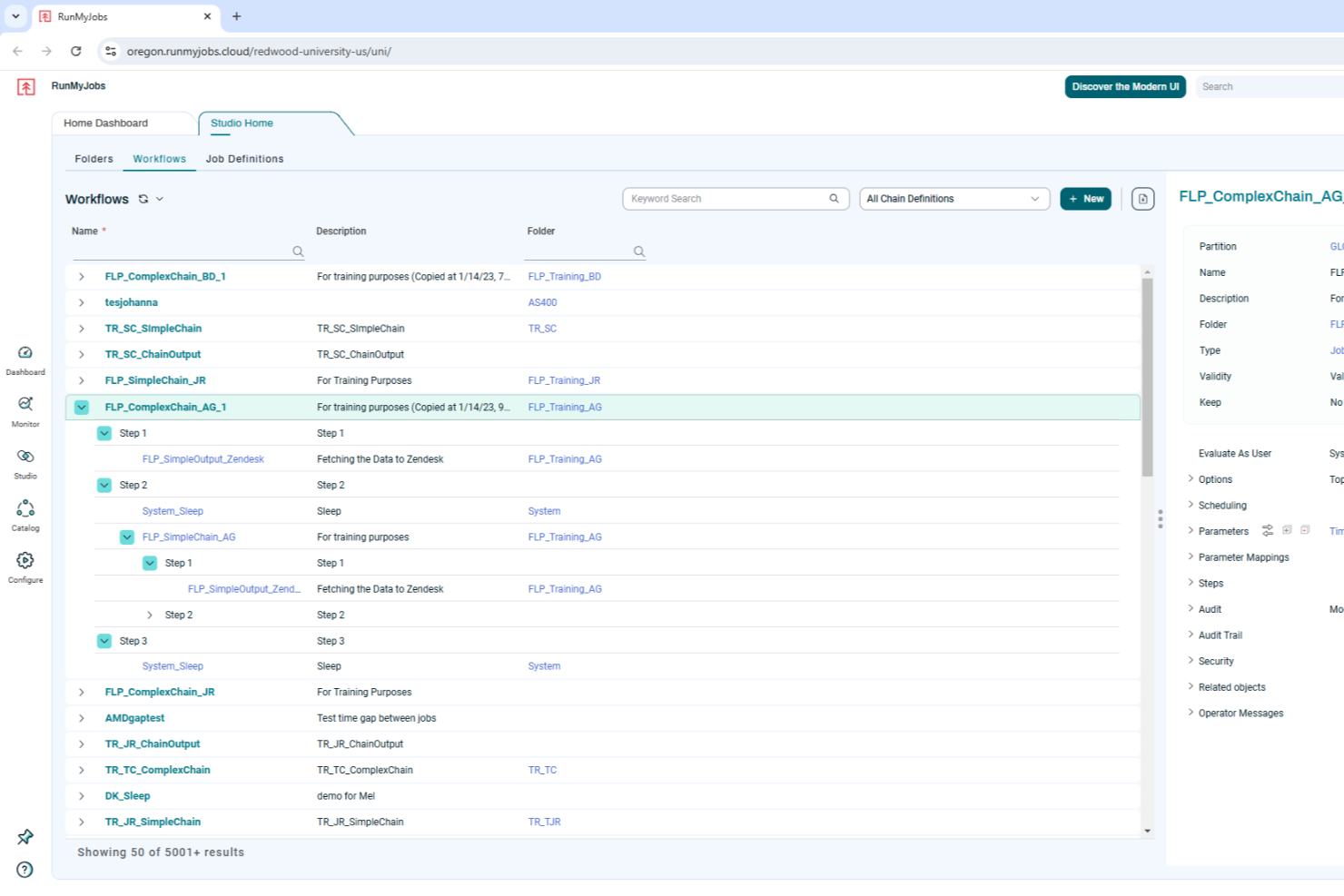
RunMyJobs by Redwood is designed for businesses seeking to optimize their operational workflows through enterprise process automation. It offers tailored solutions for industries reliant on SAP systems, addressing the complexities of integrating and automating critical business processes. By leveraging its cloud-native architecture and low-code interface, RunMyJobs can transform how your team manages workload automation, making it a compelling choice for businesses aiming to enhance efficiency and reliability in their operations.
Why I Picked RunMyJobs by Redwood
I picked RunMyJobs by Redwood for its unique ability to seamlessly integrate with SAP systems, a crucial feature for enterprises heavily reliant on these applications. Its cloud-native architecture supports hybrid environments, ensuring your team can automate processes across both on-premise and cloud systems. Additionally, the low-code interface allows users to design and implement automation workflows without extensive technical expertise, making it accessible for various team members.
RunMyJobs by Redwood Key Features
In addition to its SAP integration capabilities, I also found several other features worth highlighting:
- Job Scheduling: Automates the scheduling of complex workflows, ensuring tasks are executed at the right time without manual intervention.
- Real-Time Monitoring: Provides live insights into ongoing processes, helping your team to quickly identify and resolve issues.
- Resource Management: Efficiently allocates resources to various tasks, optimizing performance and reducing downtime.
- Task Monitoring: Keeps track of task progress and completion, offering a comprehensive view of workflow efficiency.
RunMyJobs by Redwood Integrations
Integrations include SAP ERP, Oracle, ServiceNow, AWS services, Microsoft Azure, Google Cloud, Salesforce, IBM z/OS, Kubernetes, and Apache Kafka.
Pros and Cons
Pros:
- Real-time workflow visibility
- Strong hybrid environment support
- Deep native SAP automation
Cons:
- Limited non ERP focus
- Setup can be complex

Best for handling complex automation tasks
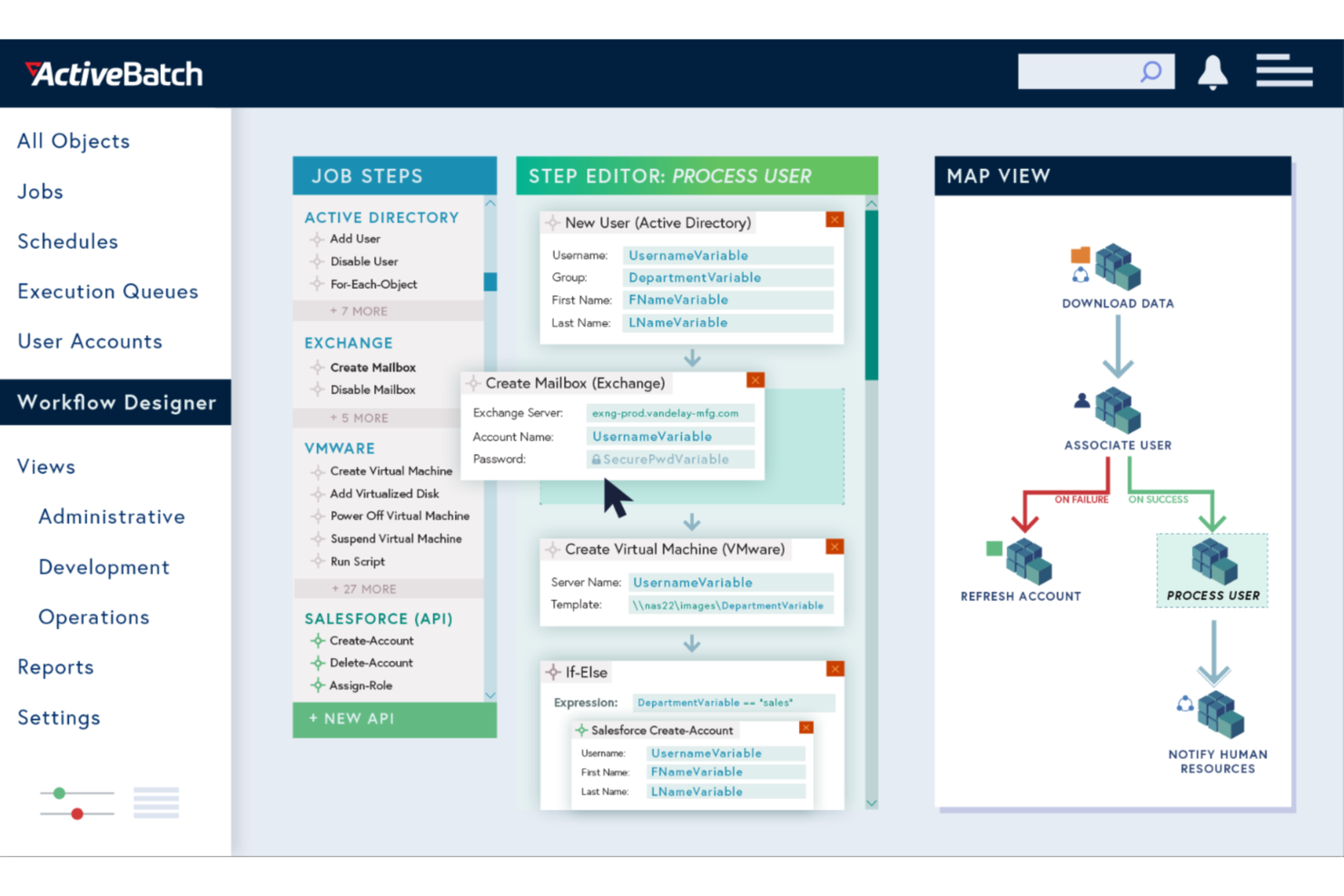
ActiveBatch empowers your business to automate and orchestrate complex IT and business processes with ease. This enterprise process automation software is ideal for industries looking to eliminate mundane tasks and improve operational efficiency. By seamlessly integrating with a wide range of platforms, ActiveBatch helps you focus on strategic initiatives rather than time-consuming manual processes.
Why I Picked ActiveBatch
I picked ActiveBatch for its exceptional ability to handle intricate process automation tasks through features like its Job Step Library and Event-Driven Scheduling. These features enable your team to automate workflows without extensive coding, which is crucial for businesses aiming to optimize operations. The platform's real-time monitoring and customizable alerts ensure that processes run smoothly, reducing the risk of errors and downtime. ActiveBatch's robust security measures further protect your data, making it a reliable choice for enterprise environments.
ActiveBatch Key Features
In addition to its automation capabilities, I also found several other features that make ActiveBatch stand out:
- User-Friendly Interfaces: Provides intuitive access through a web-based console and self-service portal for remote management.
- SLA Management: Automates monitoring and management of service level agreements to ensure optimal performance.
- Reporting and Monitoring: Features customizable alerts and comprehensive monitoring to prevent job failures.
- High Availability: Offers dynamic or manual failover to combat outages.
ActiveBatch Integrations
Integrations include Microsoft SQL Server, ServiceNow, SharePoint, Microsoft Azure, VMware, Oracle, Amazon Web Services (AWS), Google Cloud Platform (GCP), SAP, and IBM i.
Pros and Cons
Pros:
- Broad enterprise system integrations
- Event-driven scheduling flexibility
- Low-code workflow automation design
Cons:
- Complex setup for small teams
- Steep learning curve initially

altaFlow
Best for native Salesforce document automation

altaFlow is an enterprise process automation platform built for organizations that rely on Salesforce and need secure, compliant workflow management. It’s designed for teams in regulated industries who want to automate document handling, approvals, and audit trails without custom code.
Who Is altaFlow Best For?
Large enterprises in regulated industries that need to automate complex document workflows and maintain strict compliance within Salesforce environments.
Why I Picked altaFlow
I picked altaFlow because it offers native Salesforce document automation that goes beyond basic workflow triggers. My team uses altaFlow to generate, route, and store documents directly within Salesforce, eliminating the need for external tools or manual uploads. I appreciate how it supports complex approval chains and ensures every document is audit-ready. In practice, that means we can automate contract creation and compliance documentation without leaving our CRM.
altaFlow Key Features
- No-code workflow builder: Design and deploy automated workflows using a drag-and-drop interface without writing code.
- Role-based access controls: Set granular permissions for users and teams to manage sensitive process steps.
- Automated audit trails: Track every action and document change for compliance and reporting.
- E-signature integration: Collect legally binding signatures within automated workflows directly from Salesforce.
altaFlow Integrations
Integrations include Salesforce, NetSuite, SharePoint, and more.
Pros and Cons
Pros:
- Supports granular, role-based access controls
- Built-in e-signature collection in workflows
- No-code workflow builder for rapid deployment
Cons:
- Primarily focused on Salesforce-centric environments
- Fewer prebuilt workflow templates than competitors

Best for cross-departmental workflows
monday AI Workspace is an AI-native work management platform that combines visual workflow automation, cross-departmental process orchestration, and no-code app building across project management, service, CRM, and dev workflows.
Who Is monday AI Workspace Best For?
It's a strong fit for enterprise PMO teams and operations leads managing complex, multi-department workflows across product, IT, HR, finance, and marketing functions.
Why I Picked monday AI Workspace
I picked monday AI Workspace as one of the best because it's built from the ground up to connect work across departments that typically operate in silos. The AI workflow builder orchestrates agents, triggers, and actions spanning marketing, IT, finance, and PMO on a single platform. I also lean on the native app builder, which lets my team create approval workflows and project intake portals without any engineering support.
monday AI Workspace Key Features
- AI agent workforce: Deploy specialized AI agents to execute and automate project tasks directly within workflows.
- AI-powered dashboards: Build custom dashboards for real-time project tracking, SLA measurement, and performance analytics.
- Role-based permissions: Set granular user and admin controls with audit logs and SCIM provisioning for enterprise governance.
- No-code API and integration hub: Connect with Jira, Slack, Google Workspace, and over 200 enterprise apps using built-in connectors and open APIs.
monday AI Workspace Integrations
monday AI Workspace offers hundreds of native integrations through its built-in integrations and marketplace, including Slack, Jira, GitHub, Google Workspace, Outlook, and HubSpot. It also supports Zapier and provides an API for custom integrations.
Pros and Cons
Pros:
- Unifies PMO, IT, HR, and marketing workflows
- No-code builder requires no developer involvement
- Automates multi-step cross-department workflows
Cons:
- Complex workflows require initial configuration time
- Automation depth lags dedicated iPaaS platforms
New Product Updates from monday AI Workspace
monday AI Workspace Adds Human Approval Routing
monday AI Workspace adds a human-in-the-loop approval block to AI Workflows, sending approval requests and routing workflow paths based on responses. For more information, visit monday AI Workspace's official site.
 .
Kissflow
Best for customizable app building

Kissflow is a low-code/no-code enterprise process automation platform that enables teams to build internal applications, automate workflows, and manage operations from a single workspace. Designed to empower both technical and non-technical users, it helps organizations streamline processes and enhance productivity at scale.
Why I picked Kissflow: I picked Kissflow for its balance of simplicity and enterprise functionality. It allows you to create customized applications and workflows without relying heavily on IT resources, which is ideal for automating complex internal processes. I also like its built-in governance tools that maintain compliance and visibility across large-scale automation projects.
Standout Features & Integrations:
Features include AI-assisted app development for faster solution building, workflow orchestration for cross-department automation, and over 100 pre-built templates to accelerate deployment.
Integrations include Salesforce, HubSpot, Slack, Microsoft Dynamics CRM, Microsoft Teams, Zendesk, Jira Software Cloud, Dropbox, Smartsheet, Google Forms, Twilio, and Mailchimp.
Pros and Cons
Pros:
- AI tools support intelligent development
- Extensive integrations enhance workflow connectivity
- Low-code platform enables rapid automation
Cons:
- Reporting features remain fairly basic
- Mobile app lacks full functionality
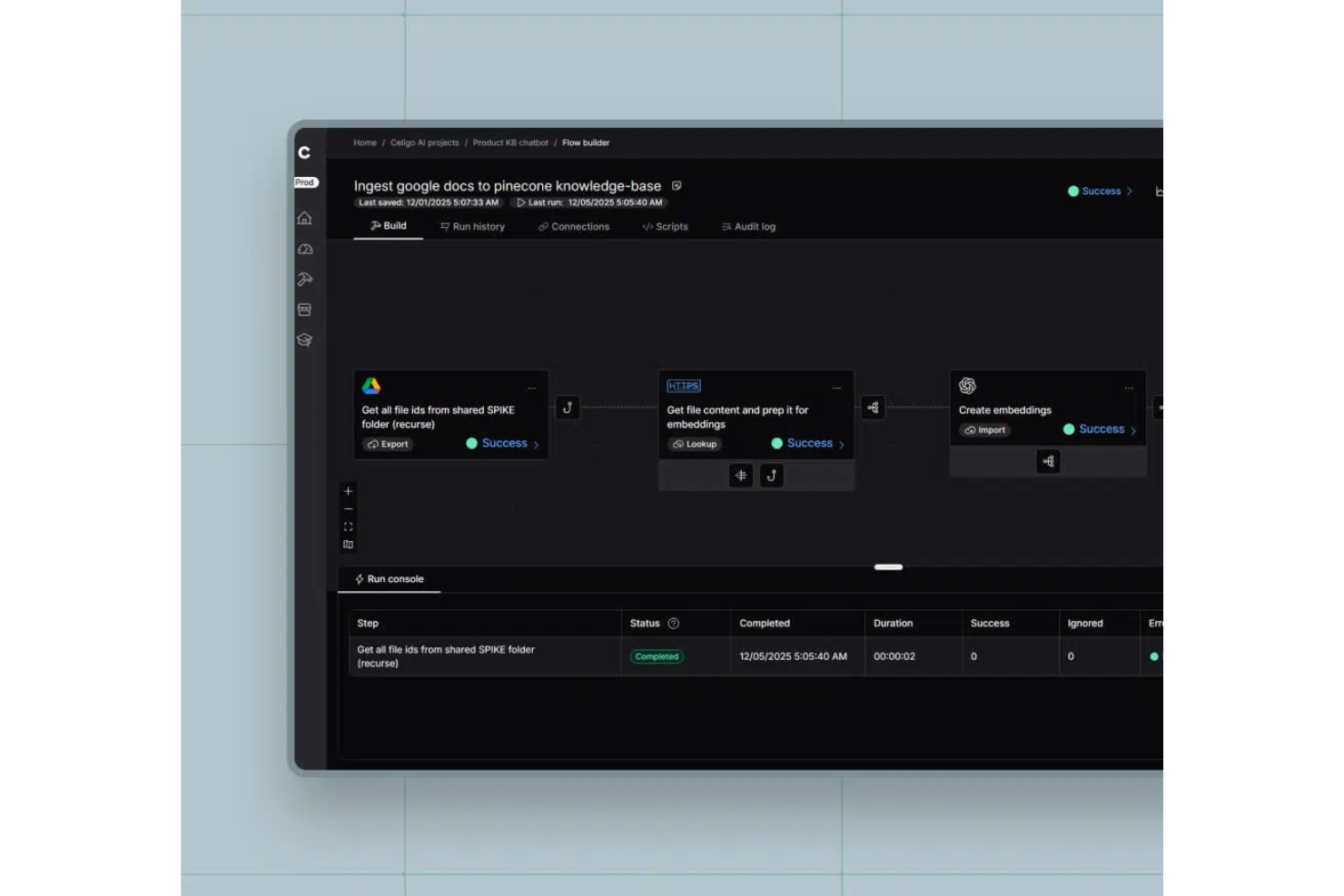
Celigo is an enterprise process automation platform that connects cloud apps, automates workflows, manages data integrations, and provides centralized monitoring for complex business processes.
Who Is Celigo Best For?
Large enterprises and IT teams that need to automate and manage integrations across multiple cloud applications and business systems.
Why I Picked Celigo
I picked Celigo as one of the best because its library of 1,000+ prebuilt app connectors lets my team automate processes across nearly any SaaS platform we use. I can quickly connect Salesforce, NetSuite, Shopify, and dozens of other systems without custom development. This scale of ready-made connectors means we can orchestrate complex, multi-app workflows and adapt as our tech stack evolves.
Celigo Key Features
- Workflow designer: Build, visualize, and manage automated workflows using a drag-and-drop interface.
- Error management dashboard: Monitor, troubleshoot, and resolve integration errors from a centralized dashboard.
- Role-based access control: Assign permissions and manage user roles for secure process automation.
- Audit logging: Track changes and user actions across integrations for compliance and transparency.
Celigo Integrations
Celigo offers 1,000+ native prebuilt connectors, including Salesforce, NetSuite, Shopify, Microsoft Dynamics 365, SAP, QuickBooks, Amazon, HubSpot, Snowflake, Jira, and Slack. An API is available for custom integrations.
Pros and Cons
Pros:
- Provides detailed audit logs for compliance
- Supports granular role-based access control
- Offers 1,000+ prebuilt app connectors
Cons:
- Initial setup can be time-consuming
- Advanced features require higher-tier plans
New Product Updates from Celigo
Celigo Expands Storage, Data Imports, and Connection Management
Celigo adds a standalone storage connector, optimized Azure Synapse imports, NetSuite OAuth 2.0, flexible file templates, and expanded MCP access controls. These updates help teams manage files, process data, and secure integrations. For more information, visit Celigo’s official site.
 .

TrailHQ
Best for AI-powered document automation

Nanonets is an AI-powered platform focused on automating document processing and data extraction workflows, aiding industries like finance, healthcare, and logistics.
Why I picked Nanonets: Nanonets excels in enterprise automation through its advanced AI capabilities, enabling businesses to automate intricate workflows that involve multiple applications and data sources. By leveraging custom Language Learning Models (LLMs), the platform supports highly tailored automation that adapts to the specific requirements of various enterprise-level workflows, making it ideal for complex and dynamic operational settings. For example, it can handle process automation for data extraction, invoice processing, and document approval.
Standout Features & Integrations:
Features include AI-powered insights from unstructured data, GDPR, SOC 2, and HIPAA compliance, a no-code platform for more user accessibility, and a human-in-the-loop feature, adding a level of oversight for processes that require manual verification.
Integrations include Salesforce, SAP, Quickbooks, Google Sheets, Dropbox, and Zapier.
Pros and Cons
Pros:
- Automated data extraction features
- Compatible with multiple programming languages
- Simple API for easy integration
Cons:
- Compared to more advanced tools, Nanonets offers fewer customization options
- May not be suitable for more extensive machine learning projects with very large datasets

Zapier
Best for building no-code app integrations

Zapier is a popular AI orchestration platform that helps organizations coordinate workflows across thousands of apps and AI tools. It streamlines processes by automating repetitive work and coordinating actions between systems, enabling teams to build scalable workflows without relying on custom development.
Why I picked Zapier: I chose Zapier for this list because of its ability to orchestrate workflows across a vast ecosystem of applications and AI tools without requiring coding skills. Zapier supports multi-step workflows that combine business logic, app integrations, and AI-driven actions, making it easier to manage complex processes across teams. Its no-code approach keeps automation accessible across business teams, while its scale and flexibility make it well-suited for organizations operating across large, interconnected toolsets.
Standout Features & Integrations:
Features include multi-step workflows with conditional logic, AI-assisted workflow creation with Zapier Copilot, support for AI actions, Agents, and Chatbots, and built-in tools like Zapier Tables and Forms for managing workflow data. Governance features such as permissions, audit logs, and security controls support deploying automations across teams.
Integrations include Salesforce, HubSpot, Slack, OpenAI, Microsoft Dynamics CRM, Microsoft Teams, Zendesk, Jira Software Cloud, and Mailchimp.
Pros and Cons
Pros:
- User-friendly interface with a visual canvas for mapping workflows
- Integrates with a multitude of apps and AI tools
- No-code workflows accessible to non-technical users
Cons:
- Free plan limited to two-step workflows
- No mobile app
Diğer Kurumsal Süreç Otomasyonu Yazılımları
Aşağıda kısa listeme aldığım ek kurumsal süreç otomasyonu yazılımlarının bir listesi yer almaktadır. İlk 10’a girememiş olsalar da hâlâ değerlidir ve daha fazla araştırmaya değerdir.
- UiPath
For driving digital transformation
- Nintex
For robotic process automation (RPA)
- IBM Cloud Pak for Business Automation
For AI analytics and insights
- Pega
For AI-powered decisioning
- Automation Anywhere
For building custom AI agents
- Process Runner
For SAP data automation
- Camunda
For end-to-end process orchestration
- Tungsten Automation
For automated invoicing
- SAP Signavio
For business process transformation
- Bizagi
For low-code process automation


İlgili Proje Yönetimi Yazılımı İncelemeleri
Aradığınızı burada hâlâ bulamadıysanız, test edip değerlendirdiğimiz diğer ilgili araçlara göz atın:
- Proje Yönetimi Yazılımı
- Kaynak Yönetimi Yazılımı
- İş Akışı Otomasyonu Yazılımı
- Zaman Takibi Yazılımı
- Görev Yönetimi Yazılımı
- İş Birliği Araçları
- Gantt Şeması Oluşturucu
- Verimlilik Araçları
- Proje Takibi Yazılımı
- Proje Planlama Yazılımı
- Geliştiriciler İçin Proje Yönetimi Yazılımı
How I Evaluate Enterprise Process Automation Software
I look at these tools in two layers—whether they can actually orchestrate process management intake, approvals, and cross-system hand-offs, and what separates the leaders from the rest.
Core Functionality (Table Stakes For This List)
When I'm selecting tools for my list, I rank each one on a scale from 0 (does not offer the functionality) to 5 (excels in this area) for each core functionality listed below. Then, I calculate the tool's total score into a percentage. Each tool needs to achieve a minimum total score of 65% to be considered for inclusion.
- Visual Workflow Builder: I evaluate whether you can map out multi-step processes—like a project intake-to-kickoff sequence—using drag-and-drop steps rather than writing code from scratch.
- Enterprise System Integrations: The tool should connect to the systems your teams already use, so I check for prebuilt connectors to PM, ITSM, ERP, and CRM platforms alongside open API access.
- Conditional Logic & Rules Engine: Real project workflows branch constantly, so I look for support for triggers, decision points, and loops—like auto-escalating a blocked task when an SLA threshold is missed.
- Approval & Task Routing: I check how the platform handles multi-tier approvals and dynamic assignment, such as routing a change request through a review chain based on budget impact or risk level.
- Process Analytics & Monitoring: Dashboards that surface where work stalls matter here—I evaluate whether you can track SLAs, spot bottleneck patterns, and filter by team, portfolio, or process type.
- Governance & Audit Controls: Enterprise deployments need role-based access, version history, and audit logs, so I look at how granularly the platform lets you control who can edit, publish, or view each workflow.
Once I have a list of tools that meet the criteria, I consider what sets each platform apart.
Differentiating Factors (What Sets Vendors Apart)
Here's how I compare and contrast different vendors:
Standout Features
I look for AI capabilities that go beyond basic triggers—like auto-classifying incoming project requests or flagging at-risk workflows before delays cascade. Process mining is another differentiator, especially when a platform can analyze execution logs to surface where handoffs stall between teams. I also evaluate citizen developer support, since PMO teams benefit when business users can build their own automations inside governed sandboxes rather than waiting on IT backlogs.
Beyond Features
Total cost of ownership matters here because licensing models vary widely—some vendors charge per workflow run, others per user, and the difference compounds fast when you're automating across a 200-person PMO. I also evaluate implementation complexity, since enterprise rollouts often require certified partners and phased onboarding that can stretch timelines. Security and compliance certifications like SOC 2 Type II and ISO 27001 are worth checking early, especially if your automations touch sensitive project financials or regulated client data.
Kurumsal Süreç Otomasyonu Yazılımı Nasıl Seçilir?
Kendinize özgü yazılım seçim sürecinizi yürütürken aşağıdaki noktaları göz önünde bulundurun:
- İşletmenizin İhtiyaçlarını Anlayın: Bir otomasyon aracı seçmeden önce, iş süreci yönetimiyle ilgili işletme hedeflerinizi ve amaçlarınızı net bir şekilde tanımlayın. Otomatikleştirmek istediğiniz belirli manuel süreçleri ve ulaşmak istediğiniz sonuçları belirleyin. Örneğin, yinelenen sözleşmeler veya müşteri raporları oluşturmak iş akışınızın bir parçasıysa, bu görevleri kolaylaştırmak için belge oluşturma yazılımı içeren veya bu yazılımla entegre olabilen platformlara öncelik verin.
- Kullanım Kolaylığı: İşletmenizde platformu kaç kişinin kullanacağını ve farklı kullanıcılar için ne kadar erişilebilir olacağını değerlendirin. İş süreçlerinizi otomatikleştirecek ve yönetecek bir geliştirici ekibiniz yoksa, kullanıcı dostu sürükle ve bırak arayüzüne sahip, kod gerektirmeyen bir otomasyon aracı arayabilirsiniz.
- Entegrasyonlar: Yazılımın sunduğu yerel entegrasyonları ve mevcut teknoloji ekosisteminizle bağlantı kurup kuramayacağını inceleyin. Birçok kurumsal otomasyon çözümü, popüler CRM, ERP ve iletişim platformlarının yanı sıra diğer temel araçlarla da çeşitli entegrasyonlar sunar. Bununla birlikte, çoğunda özel kurulum gerektiren bir API de bulunur. Bu nedenle bunun sizin için uygun olup olmadığını veya doğrudan kullanıma hazır bir çözüme ihtiyaç duyup duymadığınızı değerlendirin.
- Ölçeklenebilirlik: Herhangi bir kurumsal otomasyon platformu; karmaşık süreçleri, yüksek iş yüklerini, geniş bir kullanıcı tabanını ve artan veri hacimlerini işleyebilmelidir. Bununla birlikte, işletmeniz hâlâ büyüme aşamasındaysa, ekip üyelerinizin mevcut ihtiyaçlarını karşılayacak ve siz büyüdükçe sizinle birlikte ölçeklenebilecek bir çözüm arıyor olabilirsiniz.
- Güvenlik ve Uyumluluk: Otomasyon genellikle hassas verilerin ve kritik iş süreçlerinin işlenmesini içerir. Bir çözüm seçerken veri şifreleme, kullanıcı erişim denetimleri ve denetim izleri gibi özellikleri inceleyerek güvenliğe öncelik verin. Otomasyon çözümünün HIPAA veya GDPR gibi sektörel düzenlemelere ve veri koruma standartlarına uygun olduğundan emin olun.
Kurumsal Süreç Otomasyonu Yazılımındaki Eğilimler
Kurumsal süreç otomasyonu teknolojisinde fark ettiğim bazı eğilimleri ve bunların gelecek açısından ne anlama gelebileceğini burada bulabilirsiniz. En önemli içgörüleri ortaya çıkarmak için sayısız ürün güncellemesini, basın bültenini ve sürüm günlüğünü inceledim.
- Yapay Zekâ Odaklı Otomasyon: Yapay zekâ odaklı otomasyon giderek yaygınlaşıyor. Daha akıllı karar alma ve öngörüsel analiz olanağı sağlıyor. Bu eğilim önem taşıyor çünkü insan hatalarını azaltıyor ve verimliliği artırıyor.
- Düşük Kodlu Platformlar: Düşük kodlu platformlar daha popüler hâle geldi. Kullanıcıların çok az kodlama bilgisiyle uygulamalar oluşturmasını sağlıyorlar. Bu durum yazılım geliştirmeyi demokratikleştiriyor ve dağıtım sürelerini kısaltıyor.
- Hiper Otomasyon: Bu yaklaşım, karmaşık iş süreçlerini otomatikleştirmek için birden fazla teknolojinin kullanılmasını içerir. Yapay zekâyı, makine öğrenimini ve robotik süreç otomasyonunu bir araya getirir. Bu eğilim önemlidir çünkü bir kuruluş içindeki mümkün olan her görevi otomatikleştirmeyi amaçlar.
Kurumsal Süreç Otomasyonu Yazılımı Nedir?
Kurumsal süreç otomasyonu yazılımı, bir kuruluş genelindeki karmaşık iş süreçlerini otomatikleştirerek operasyonları kolaylaştırır, manuel çabayı azaltır ve verimliliği artırır. Tekrarlayan görevleri otomatikleştirmek ve çeşitli iş sistemlerini entegre etmek için genellikle operasyon yöneticileri, BT departmanları ve iş analistleri tarafından kullanılır.
Temel bileşenler arasında iş akışı otomasyonu, veri entegrasyonu ve analiz bulunur. İş akışı otomasyonu iş süreçlerini tanımlar ve yönetir, veri entegrasyonu sistemler arasındaki kesintisiz veri akışını sağlar, analiz ise süreç performansı ve iyileştirme alanları hakkında içgörüler sunar.
Kurumsal Süreç Otomasyonu Yazılımının Özellikleri
Kurumsal süreç otomasyonu yazılımı seçerken, aşağıdakiler gibi işletme başarısını önemli ölçüde etkileyebilecek çeşitli temel özellikleri göz önünde bulundurun:
- Kodsuz ve Düşük Kodlu Geliştirme: Bu özellik, sınırlı programlama becerisine sahip kullanıcıların sürükle ve bırak yöntemiyle kural tabanlı modelleme kullanarak süreçler oluşturmasına ve özelleştirmesine olanak tanır. Teknik olmayan personelin kapsamlı kodlama bilgisine ihtiyaç duymadan iş akışlarını otomatikleştirmesini sağlar.
- İş Akışı Yönetimi: Güçlü iş akışı yönetimi özellikleri; dijital formlar oluşturulmasını, kapsamlı raporlama ve analiz yapılmasını, veri ve BT sistemi bağlantısını ve dinamik görev atamasını mümkün kılar. Bu, tüm iş süreçlerinin düzenli ve verimli bir şekilde yönetilmesini sağlar ve manuel görevleri azaltır.
- Belge İşleme: Yazılım, belgeleri süreçlerinize bağlamanıza, belge yönlendirmesini otomatikleştirmenize, elektronik imzalarla onayları hızlandırmanıza ve sürüm oluşturma ile arşivleme özellikleri sunmanıza olanak tanımalıdır. Bu özellik, belgelerin düzenli ve kolayca erişilebilir tutulması açısından önemlidir. Belirli akıllı belge işleme yazılımlarını burada bulabilirsiniz.
- Uçtan Uca Otomasyon ve Orkestrasyon: Hem insan hem de sistem tabanlı görevlerin sorunsuz bir şekilde entegre edilmesi de dahil olmak üzere, süreçlerin baştan sona kapsamlı biçimde otomatikleştirilmesi ve orkestre edilmesi, operasyonel verimliliği en üst düzeye çıkarmak için gereklidir.
- API Entegrasyonu: Uygulama programlama arayüzleri (APIs), harici uygulamalar ve sistemlerle sorunsuz etkileşim kurulmasını, verilerin tek bir yerde merkezileştirilmesini ve süreçlerin birleştirilmesini sağlar. Bu özellik, yazılımın mevcut sistemlerle entegre olabilmesini güvence altına almak için hayati önem taşır.
- Robotik Süreç Otomasyonu (RPA): Robotik Süreç Otomasyonu (RPA), tekrarlayan görevlerin verimli bir şekilde otomatikleştirilmesi için kritik öneme sahiptir. Bu özellik, yazılımın otomasyon ortamına RPA botlarını dahil etmesini ve böylece üretkenliği artırmasını sağlar.
- Güvenlik Özellikleri: Veri şifreleme, erişim denetimleri ve uyumluluk sertifikaları dahil olmak üzere güçlü güvenlik önlemleri, hassas bilgileri korumak ve yasal düzenlemelere uyumu sağlamak için gereklidir.
- Gerçek Zamanlı Analiz: Gerçek zamanlı analiz ve raporlama özellikleri sunulabilmesi, süreç performansının izlenmesine, darboğazların belirlenmesine ve veriye dayalı kararlar alınmasına yardımcı olur. Bu özellik, sürekli iyileştirme ve stratejik planlama açısından kritik öneme sahiptir.
- Özelleştirilebilir Otomasyon İş Akışları: Yazılım, karmaşık iş süreçlerini otomatikleştirmek için tetikleyiciler, eylemler ve koşullu mantık içeren özelleştirilebilir otomasyon iş akışları sunmalıdır. Bu esneklik, işletmelerin yazılımı kendi özel ihtiyaçlarına göre uyarlamasına olanak tanır.
- Üçüncü Taraf Uygulamalarla Entegrasyon: CRM, ERP ve diğer kurumsal sistemler gibi üçüncü taraf uygulamalar ve hizmetlerle sorunsuz entegrasyon, kuruluş genelinde birleşik ve verimli bir iş akışı oluşturmak için önemlidir.
Kurumsal Süreç Otomasyonu Yazılımının Faydaları
Kurumsal düzeyde bir süreç otomasyon sistemi uyguladığınızda elde etmeyi bekleyebileceğiniz bazı faydalar şunlardır:
- Artan Verimlilik: Rutin görevlerin otomatikleştirilmesi, bunları tamamlamak için gereken zaman ve çabayı azaltarak çalışanların daha stratejik faaliyetlere odaklanmasını sağlar.
- Maliyet Tasarrufu: Manuel iş gücünü en aza indirip hataları azaltan otomasyon yazılımı, kuruluşların operasyonel maliyetlerden tasarruf etmesine ve kârlılıklarını artırmasına yardımcı olur.
- Geliştirilmiş Doğruluk: Otomasyon, görevlerin tutarlı ve doğru biçimde gerçekleştirilmesini sağlayarak insan hatası riskini azaltır ve veri bütünlüğünü güçlendirir.
- Geliştirilmiş Uyumluluk: Yazılım, mevzuat gerekliliklerine uyacak şekilde programlanabilir ve böylece tüm süreçlerin sektör standartlarına ve yasal zorunluluklara uygun olmasını sağlar.
- Ölçeklenebilirlik: İşletmeler büyüdükçe otomasyon yazılımı, önemli ölçüde ek kaynak gerektirmeden artan iş yüklerini karşılayacak şekilde kolayca ölçeklendirilebilir.
Kurumsal Süreç Otomasyonu Yazılımının Maliyetleri ve Fiyatlandırması
Aşağıdaki tabloda yaygın planlar, bunların ortalama fiyatları ve tipik özellikleri özetlenmektedir.
Kurumsal Süreç Otomasyonu Yazılımı İçin Plan Karşılaştırma Tablosu
| Plan Türü | Ortalama Fiyat | Yaygın Özellikler |
|---|---|---|
| Ücretsiz Plan | $0 | Temel otomasyon araçları, sınırlı entegrasyonlar, topluluk desteği |
| Kişisel Plan | $25 - $50/ay | Sınırsız bireysel otomasyon çalıştırma, önceden oluşturulmuş entegrasyonlar, temel analiz |
| İşletme Planı | $100 - $500/ay | Gelişmiş otomasyon araçları, çok kullanıcılı destek, geliştirilmiş güvenlik, öncelikli destek |
| Kurumsal Plan | $1,000+/ay | Özel entegrasyonlar, özel destek, gelişmiş analiz, kurumsal düzeyde güvenlik |
Kurumsal Süreç Otomasyonu Yazılımı SSS
Kurumsal süreç otomasyonu hakkında sıkça sorulan sorulardan bazıları şunlardır:
Kurumsal süreç otomasyonu yazılımını mevcut sistemlerle nasıl entegre edebilirim?
Kurumsal süreç otomasyonu yazılımının mevcut sistemlerle entegre edilmesi genellikle farklı yazılım uygulamaları arasındaki iletişimi sağlamak için API’lerin (Uygulama Programlama Arayüzleri) kullanılmasını içerir. Çoğu kurumsal süreç otomasyonu aracı, bu entegrasyonu kolaylaştırmak için kapsamlı API belgeleri ve destek sunar. Ayrıca bazı platformlar, ERP, CRM ve İKY yazılımları gibi popüler kurumsal sistemler için entegrasyon sürecini basitleştirebilecek hazır bağlayıcılar sağlar.
Kurumsal süreç otomasyonunun yatırım getirisini nasıl ölçebilirim?
Kurumsal süreç otomasyonunun yatırım getirisini ölçmek için zaman tasarrufu, maliyet azaltma, hata azalması, verimlilik artışı ve müşteri memnuniyetindeki iyileşmeler gibi KPI’ları takip edin. Bu ölçütler, otomasyon çalışmalarının verimliliği ve etkililiği hakkında net bir görünüm sağlar.
Kurumsal süreç otomasyonunu uygularken karşılaşılan yaygın zorluklar nelerdir?
Yaygın zorluklar arasında çalışanların yerleşik iş akışlarındaki değişikliklere direnmesi, karmaşık süreçleri otomatikleştirmenin zorluğu ve otomasyonun etkililiğini engelleyebilecek düşük veri kalitesi bulunur. Ayrıca eski sistemlerle entegrasyon zor olabilir ve otomatikleştirilmiş süreçler sürekli bakım ve güncelleme gerektirir.
Kurumsal süreç otomasyonu yazılımını kullanırken düzenlemelere uyumu nasıl sağlayabilirim?
Düzenlemelere uyumu sağlamak için ilgili gereksinimler hakkında güncel bilgi sahibi olun ve otomatikleştirilmiş süreçleri belgelemek üzere denetim izleri uygulayın. Veri güvenliği önlemlerinin mevcut olduğundan emin olun, düzenli uyum denetimleri gerçekleştirin ve çalışanları en iyi uygulamalar konusunda eğitin.
Kurumsal süreç otomasyonu yazılımının bakımı için en iyi uygulamalar nelerdir?
Yazılımın en son yamalar ve sürümlerle düzenli olarak güncellendiğinden emin olun ve otomatikleştirilmiş süreçleri performans ve sorunlar açısından sürekli izleyin. İş akışlarının kapsamlı belgelerini tutun, çalışanlara sürekli eğitim verin ve kullanıcı görüşlerini toplamak ve gerekli düzenlemeleri yapmak için bir geri bildirim döngüsü oluşturun.
Otomatikleştirilmiş süreçlerdeki istisnaları ve hataları nasıl ele alabilirim?
Güçlü hata işleme mekanizmaları uygulayın ve sorunlar hakkında personeli bilgilendirmek için uyarılar ayarlayın; böylece gerektiğinde manuel müdahaleye olanak tanıyın. Temel sorunları ele almak için kök neden analizi gerçekleştirin ve geri bildirim ile hata analizine dayanarak otomatikleştirilmiş süreçleri sürekli iyileştirin.
Kurumsal süreç otomasyonu yazılımı veri güvenliğini nasıl ele alır?
Çoğu kurumsal süreç otomasyonu yazılımı çözümü, hassas bilgileri korumak için şifreleme, role dayalı erişim kontrolleri ve GDPR ile HIPAA gibi sektör standartlarına uyum gibi güçlü güvenlik özellikleri sunar. Ayrıca sürekli veri koruması ve uyumu sağlamak için kapsamlı denetim izleri ve düzenli güvenlik güncellemeleri sağlarlar.
Yazılım gerçek zamanlı veri işlemeyi destekliyor mu?
Evet, birçok kurumsal süreç otomasyonu aracı gerçek zamanlı veri işleme ve analitiği destekleyerek güncel içgörüler ve raporlama sağlar. Bu araçlar, işletmelerin iş akışlarını ve performans ölçütlerini gerçekleştiği anda izlemesine olanak tanır; böylece anında düzenlemeler yapılabilir ve daha bilinçli kararlar alınabilir. Bu gerçek zamanlı özellik, kuruluşların değişikliklere hızlı bir şekilde yanıt vermesini ve operasyonlarında en iyi verimliliği korumasını sağlar.