

2026 İçin En İyi 10 Finansal Proje Yönetimi Yazılımı

En İyi Finansal Proje Yönetimi Yazılım Araçları Kısa Listesi


Dijital projeleri gerçek zamanlı maliyet görünürlüğü olmadan yönetmek doğrudan bütçe aşımlarına ve daralan kâr marjlarına yol açar. Finansal proje yönetimi yazılımı, standart görev takibini canlı bütçe izleme, gider kayıtları ve kâr tahminiyle bir araya getirerek bu sorunu çözer; böylece gerçek gelir durumunuzu her zaman tam olarak bilirsiniz.
Ekiplerin günlük iş akışlarının yanı sıra faturalandırma oranlarını, zaman takibini ve finansal raporlamayı da yönetebilen araçları bulmak için onlarca platformu test ettim. Ekibiniz için doğru platformu bulmak ve projelerinizi kârlı tutmak üzere 2026 için en iyi seçimlerime göz atın.
Why Trust Our Software Recommendations
Our team has been testing and reviewing software since 2012. As project managers ourselves, we know how difficult—and important—it is to choose the right software.
For this guide, we evaluated tools using hands-on testing and independent research, scoring tools using our selection criteria. We also draw on insights from industry thought leaders and practicing project management experts.
Our reviews reflect our human editorial judgment, not a sales pitch.
Expert reviewers:
Finansal Proje Yönetimi Yazılımları Karşılaştırma Tablosu
Bu karşılaştırma tablosu, en iyi finansal proje yönetimi yazılımı seçimlerim için fiyatlandırma ayrıntılarını özetlemektedir:
| Tool | Starting Price | Website | |
|---|---|---|---|
| Best for professional services firms | 4.5 out of 5 | $17/user/month 14-day free trial | Book Demo |
| Best for agency project profitability tracking | 4.6 out of 5 | $10/user/month 14-day free trial | Book Demo |
| Best for tracking budgets | 4.3 out of 5 | $10/user/month Free plan + 14-day trial + demo available | Book Demo |
| Best for integrated portfolio tracking | 4.5 out of 5 | $10/user/month 14-day free trial | Website |
| Best for real-time budget tracking | 4.6 out of 5 | Pricing upon request Not available | Book Demo |
| Best for financial oversight with time tracking | 4.3 out of 5 | Pricing upon request Free plan + 15-day trial + demo available | Website |
| Best for managing complex billing schedules | 4.6 out of 5 | $16/user/month Free trial available | Website |
| Best with native Office and Teams integration | 4.7 out of 5 | £679.99 one-time purchase Not available | Website |
| Best for accounting practice management | 4.8 out of 5 | $19/month 14-day free trial | Website |
| Best for onboarding project tracking | 4.8 out of 5 | $49/user/month 14-day free trial | Website |
En İyi Finansal Proje Yönetimi Yazılımları İncelemeleri
Kısa listeme giren en iyi finansal proje yönetimi yazılımlarına ilişkin ayrıntılı özetlerim aşağıdadır. İncelemelerim, her aracın temel özelliklerine, artılarına ve eksilerine, entegrasyonlarına ve ideal kullanım alanlarına ayrıntılı bir bakış sunarak sizin için en uygun olanı bulmanıza yardımcı olur.

Scoro
Best for professional services firms
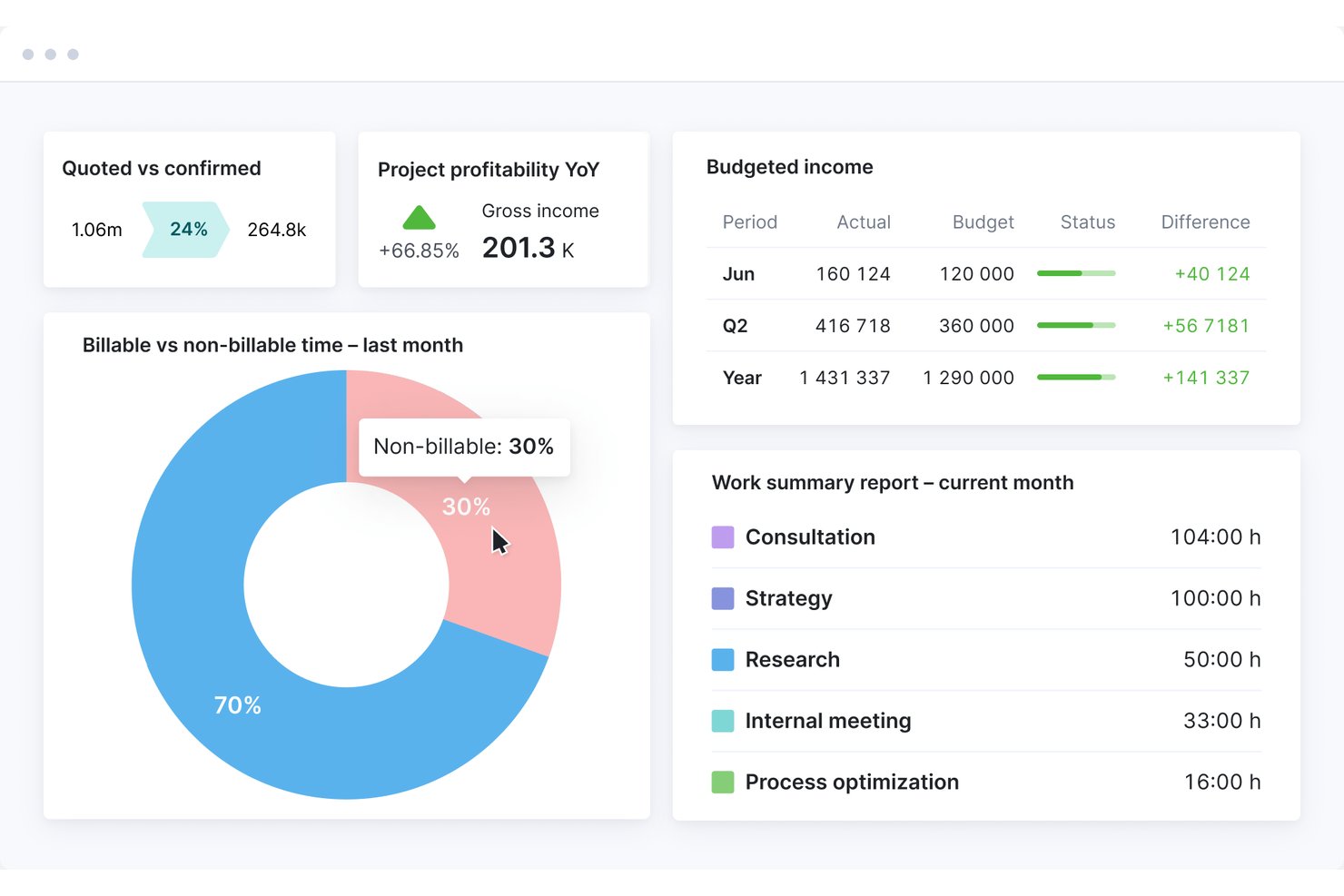
Scoro is a professional services automation platform that combines project budgeting, cost tracking, time and billing management, revenue forecasting, and profitability reporting in a single end-to-end system.
Who Is Scoro Best For?
Scoro fits agencies, consultancies, and other project-based service firms with 10–500 staff who need tight control over project finances and client billing.
Why I Picked Scoro
Scoro earns its spot on my shortlist because of how tightly it connects quoting to project financials. I love that I can build a quote using the estimation matrix, breaking deliverables down by role and effort, and that same data flows directly into budget tracking and profitability reporting. The Project Revenue Models (Fixed Fee, T&M Capped, T&M Uncapped) let my team track how revenue should accrue against what's actually been delivered, without manual reconciliation.
Scoro Key Features
- Resource capacity planner: Lets you allocate, view, and adjust team workloads and availability in real time across projects.
- Multi-currency support: Enables handling of international billing, reporting, and client transactions in multiple currencies with accurate conversions.
- Revenue recognition automation: Applies fixed-fee, time and materials, or custom rules to automate project revenue recognition.
- Client portal: Offers clients secure access to review project budgets, approve invoices, and monitor financial status online.
Scoro Integrations
Scoro offers native integrations with QuickBooks, Xero, Sage Intacct, Exact Online, Stripe, Expensify, Envoice, and Finbite, and connects with Zapier. An API is also available for custom integrations.
Pros and Cons
Pros:
- Quotes feed directly into project budgets
- Native billing models for T&M and fixed-fee
- Tracks project profitability in real time
Cons:
- Reporting dashboards have limited drill-down options
- Steeper setup for complex org structures
New Product Updates from Scoro

Scoro Adds Time Mobile App and ELI Improvements
Scoro adds the Scoro Time mobile app for iOS/Android to track time anywhere and expands ELI with attachments, smarter filtering, and trigger-based actions. For more information, visit Scoro's official site.
 .

Best for agency project profitability tracking
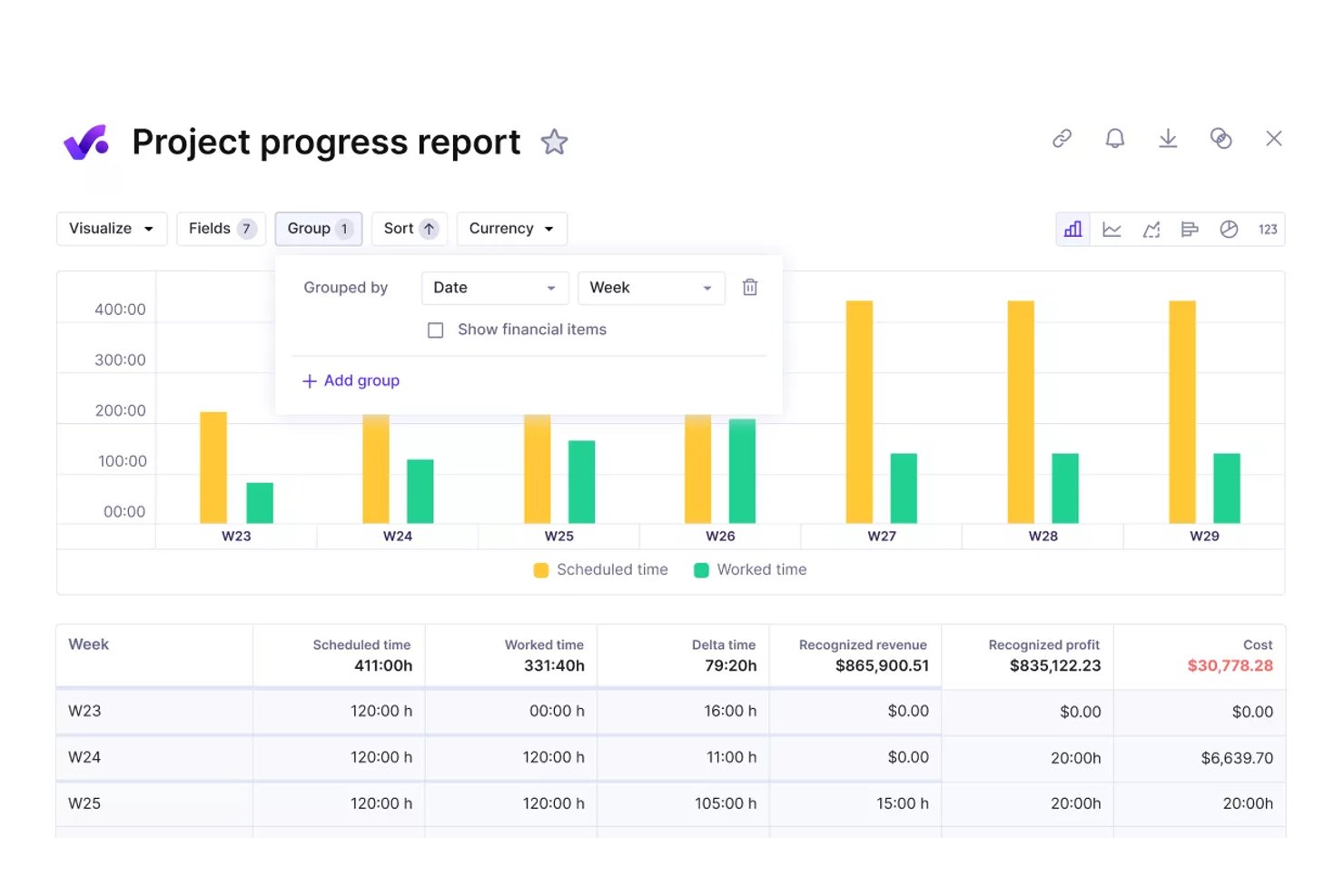
Productive is an agency management platform that combines project budgeting, real-time profitability tracking, time and billing management, resource planning, and financial reporting in a single system built for agencies and professional services teams.
Who Is Productive Best For?
Productive fits growing agencies and consultancies — typically 20 or more people — that need to move beyond spreadsheets and manage project finances alongside operations in one place.
Why I Picked Productive
Productive earns its spot as one of the best on my shortlist because it connects salary-based cost rates and overhead allocation directly to every project budget. Every hour logged instantly updates the project's profitability margin, so I can see which engagements are actually making money without manual reconciliation. The overhead spreading feature distributes facility costs and non-billable time across active budgets automatically, which is something most agency tools simply skip.
Productive Key Features
- Scenario builder: Simulate project outcomes and test financial scenarios before committing resources.
- Retainer management and invoicing: Manage recurring retainers with built-in tools for scheduling and generating invoices.
- Advanced reporting library: Access pre-built and customizable reports focused on financials, utilization, and project performance.
- Native accounting integrations: Sync data bidirectionally with platforms like QuickBooks Online, Xero, and Exact for centralized financials.
Productive Integrations
Productive offers native integrations with QuickBooks Online, Xero, Exact, e-conomic, Fortnox, Twinfield, and Zapier. An API is available for custom integrations.
Pros and Cons
Pros:
- Portfolio-level margin analysis across multiple clients
- Resource utilization linked directly to project financials
- Real-time budget burn tracked per project phase
Cons:
- Less suited for non-agency project structures
- Revenue recognition automation not available natively
New Product Updates from Productive
Productive Adds Email and Calendar Integrations for Agents
Productive adds Gmail, Outlook, Google Calendar, and Outlook Calendar connectors for its AI agents. These integrations let agents manage emails and create calendar events directly within Productive. For more information, visit Productive’s official site.
 .

Wrike
Best for tracking budgets
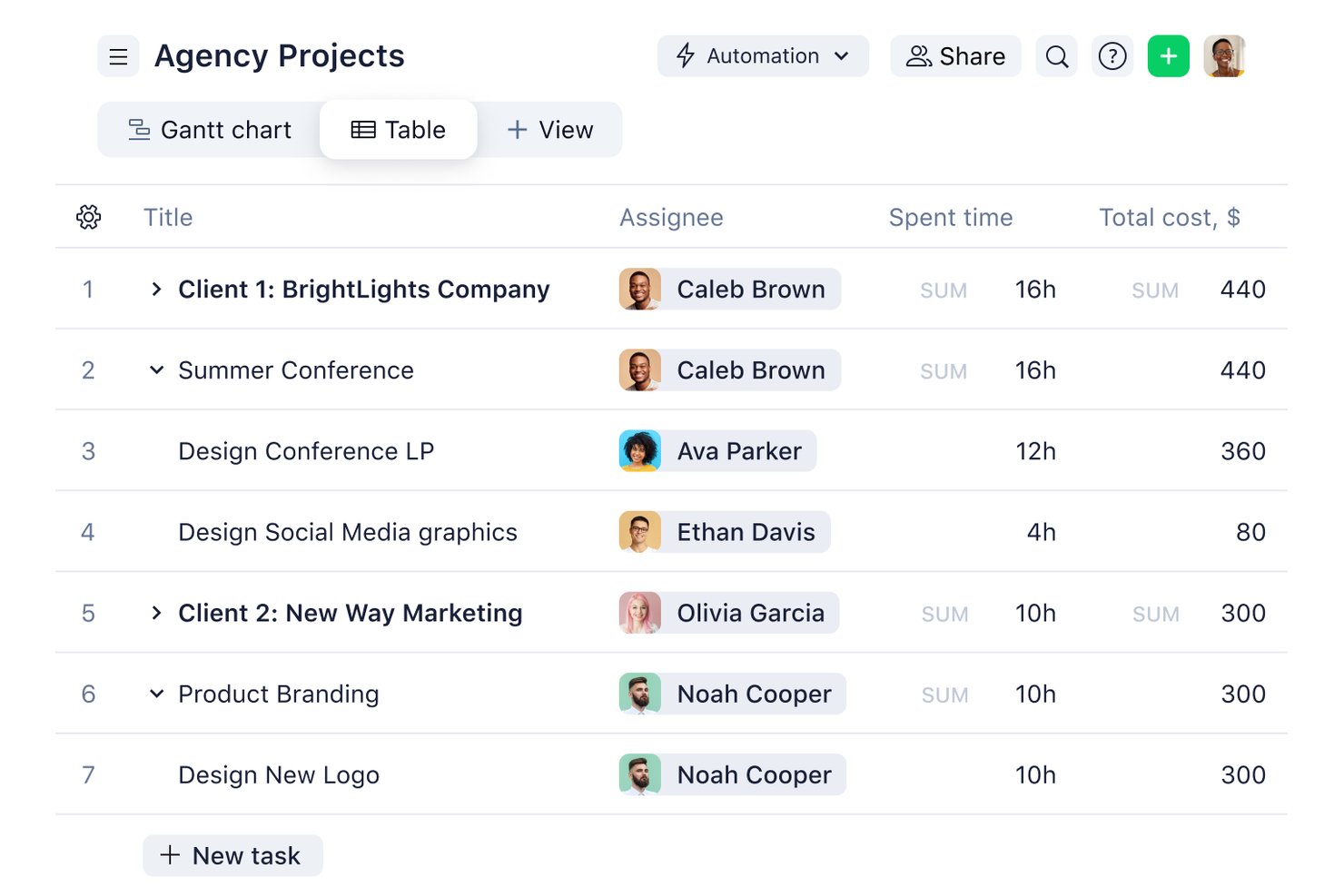
Wrike is a work management platform that combines project planning, task tracking, time logging, and budget monitoring with portfolio-level financial reporting across projects and teams.
Who Is Wrike Best For?
Wrike suits mid-size to enterprise professional services teams that need project management and financial tracking in a single platform.
Why I Picked Wrike
Wrike earns its spot on my shortlist because of how it handles budget tracking at both the project and portfolio level. I set custom hourly rates by job role or individual user, and Wrike automatically calculates planned versus actual fees as work gets logged. What I find especially useful is the real-time financial fields view, which surfaces budget variance across projects without any manual spreadsheet work.
Wrike Key Features
- AI-powered work intelligence: AI Agents identify project risks and generate insights for financial and execution planning.
- Customizable dashboards: Create role-based views for financial data, project statuses, and portfolio analytics.
- Resource capacity planning: Visualize and allocate team resources to optimize workload and margin performance.
- Native accounting integrations: Connect with QuickBooks, NetSuite, and others for two-way financial data sync.
Wrike Integrations
Wrike offers hundreds of integrations through its built-in integrations and marketplace, including tools like Google Workspace, Microsoft 365, Salesforce, and Slack. It also supports Zapier and provides an API for custom integrations.
Pros and Cons
Pros:
- Granular financial reporting at portfolio level
- Custom hourly rates configurable by individual role
- Real-time budget tracking across project portfolios
Cons:
- No native invoicing or client billing generation
- Advanced financial features locked behind higher-tier plans
New Product Updates from Wrike

Wrike Redesigns Workspace Search With New Filters
Wrike introduces a redesigned Workspace Search interface with recent search shortcuts, item type and location filters, and parent-task context. These updates help users find relevant work items and navigate search results efficiently. For more information, visit Wrike’s official site.
 .

Celoxis
Best for integrated portfolio tracking

Celoxis is a project and portfolio management platform with built-in project accounting, budget tracking, revenue forecasting, multi-currency support, time and expense management, and Earned Value Analysis for projects and portfolios.
Who Is Celoxis Best For?
Celoxis is well-suited for mid-size to enterprise teams managing multiple projects at once, where financial visibility and cross-project reporting play a central role in successful delivery.
Why I Picked Celoxis
I've included Celoxis in my top picks because its portfolio monitoring is genuinely built into the core platform, not bolted on as an afterthought. I can track schedules, budgets, margins, and custom KPIs from a single, drillable portfolio dashboard without exporting data or switching tools. What I find especially useful is the what-if analysis feature, which lets me model different portfolio mixes based on custom metrics and resource capacity before committing to a plan.
Celoxis Key Features
- Earned Value Analysis: Calculates cost performance index (CPI) and schedule performance index (SPI) in real time to measure project health against the baseline.
- Time and expense tracking: Capture billable and non-billable hours with smart timesheets and multi-level approval workflows that flow directly into project costs.
- Revenue forecasting: Estimate expected revenue, costs, and profit margins for both individual projects and the overall portfolio with built-in financial modeling.
- Resource cost tracking: Set cost rates for each resource and monitor actual spend against planned labor costs in all active projects.
Celoxis Integrations
Celoxis offers native integrations with Jira, Salesforce, Trello, Zendesk, Okta, Microsoft Project, Slack, Outlook, Google Drive, and more, with an API available for custom integrations.
Pros and Cons
Pros:
- Portfolio-level budget and risk roll-ups
- Supports hourly and fixed-price billing
- Built-in Earned Value Management for forecasting
Cons:
- Complex project templates are time-consuming to set up
- Mobile access needs improvement

Best for real-time budget tracking
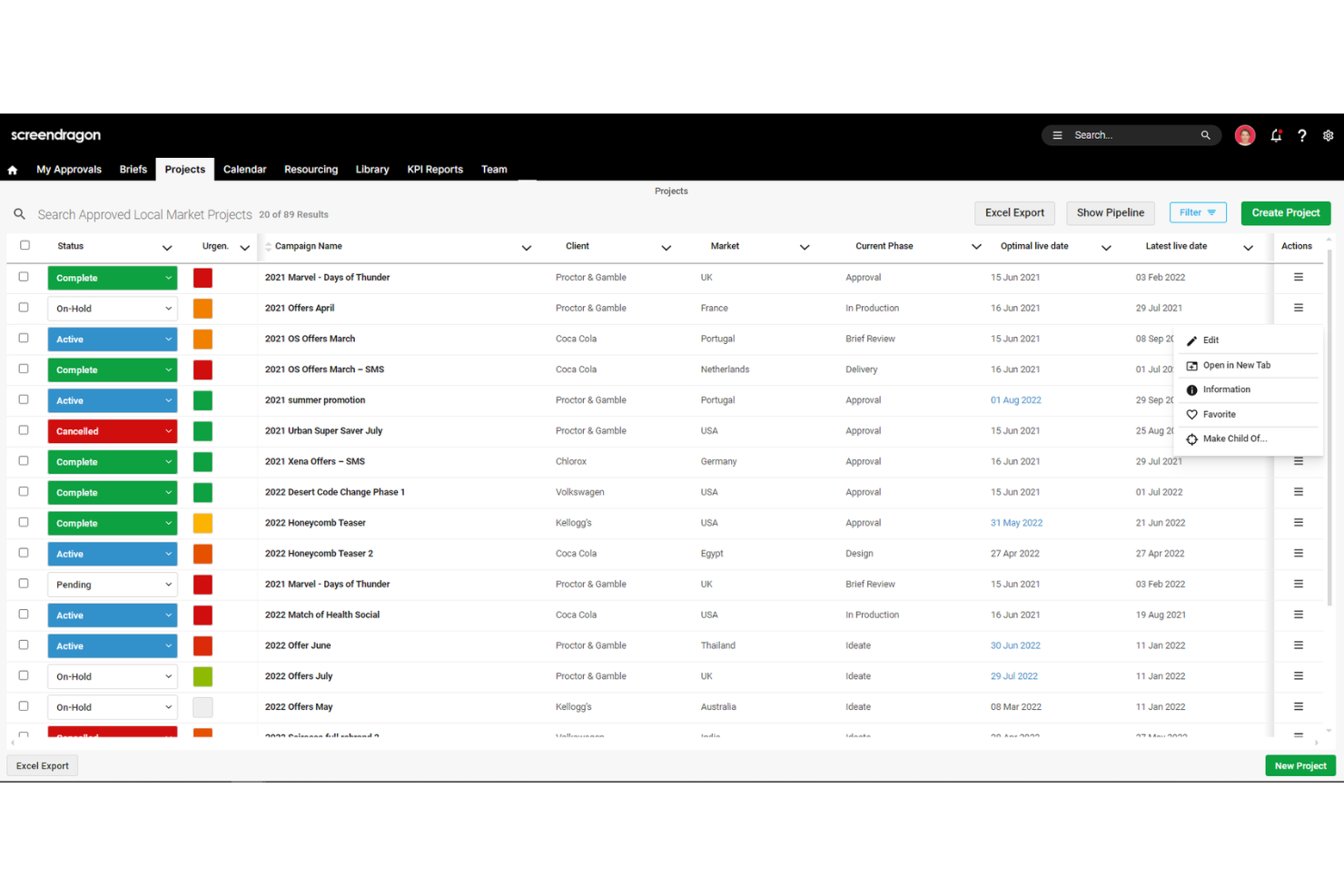
Screendragon is a work management platform designed for marketing, agency, and professional services teams.
Why I Picked Screendragon:
I like its comprehensive budget management capabilities. The platform allows you to compare estimated, budgeted, and actual costs in real-time, giving you a clear picture of your project's financial health. This feature helps identify potential budget overruns early, enabling timely corrective actions to keep your projects on track. Another reason I like Screendragon is its integrated resource management tool. It offers a 360-degree view of resource capacity, helping you see how much new work your team can handle and spot bottlenecks before they become issues.
Standout features & integrations:
Features include configurable workflows that automate task assignments and approvals, reducing manual intervention and speeding up project timelines. Additionally, the platform's online proofing tool allows for real-time collaboration on various media types, simplifying the review process and ensuring timely feedback.
Integrations include MS Power BI, Slack, MS Teams, Zapier, Google Drive, Trello, Microsoft 365, Box, Jira, Microsoft OneDrive, and PeopleSoft.
Pros and Cons
Pros:
- Can tailor the platform to your specific needs
- Good resource planning features
- Integrates various tools like project management and budget tracking
Cons:
- Time-consuming setup
- Platform's depth can feel a bit complex

Best for financial oversight with time tracking
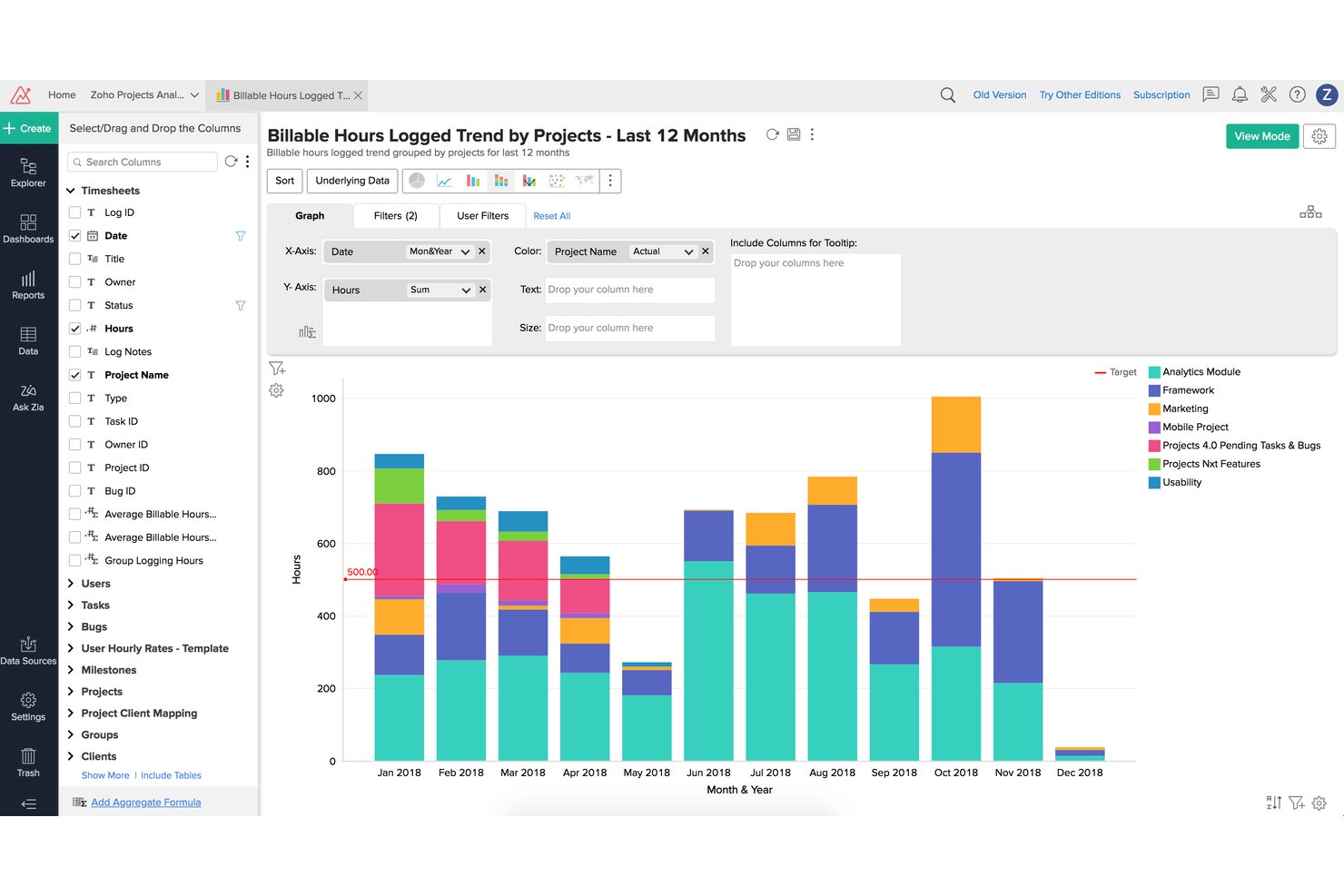
Zoho Projects is a project management platform that combines task planning, time tracking, budgeting, earned value management, and billing integration to support financial oversight across projects.
Who Is Zoho Projects Best For?
It's a strong fit for small to mid-sized professional services teams already running on the Zoho ecosystem who need time tracking tied directly to client billing.
Why I Picked Zoho Projects
Zoho Projects earns its spot on my shortlist because of how tightly it connects logged hours to financial outcomes. I like that the built-in EVM module calculates EAC, ETC, and CPI directly from timesheet data, giving me real variance visibility without exporting to a spreadsheet. Multi-level timesheet approvals mean I can enforce billing accuracy before hours ever reach an invoice.
Zoho Projects Key Features
- Portfolio dashboard: Gives a unified overview of multiple projects’ statuses and financials in one place.
- Project baseline management: Lets you set and compare multiple baselines to track schedule and budget changes.
- Custom roles and profiles: Enables granular access control for project, finance, and client stakeholders.
- Native Zoho Books and Zoho Invoice integration: Syncs with Zoho’s accounting tools for real-time financial data flow.
Zoho Projects Integrations
Zoho Projects offers native integrations with Zoho Books, Zoho Invoice, Zoho CRM, Slack, Google Drive, Microsoft Teams, GitHub, Bitbucket, Google Calendar, and Zapier. An API is available for custom integrations.
Pros and Cons
Pros:
- Built-in budget baseline tracking across phases
- Multi-level timesheet approvals enforce billing accuracy
- EVM metrics calculated directly from timesheets
Cons:
- EVM features locked behind higher-tier plans
- Reporting customization limited for complex needs
New Product Updates from Zoho Projects
Zoho Projects Adds CodeX Scripts for Custom Modules
Zoho Projects now supports CodeX Scripts for custom modules, enabling conditional logic and rules for creating, updating, and deleting records. For more information, visit Zoho Projects' official site.
 .

VOGSY
Best for managing complex billing schedules
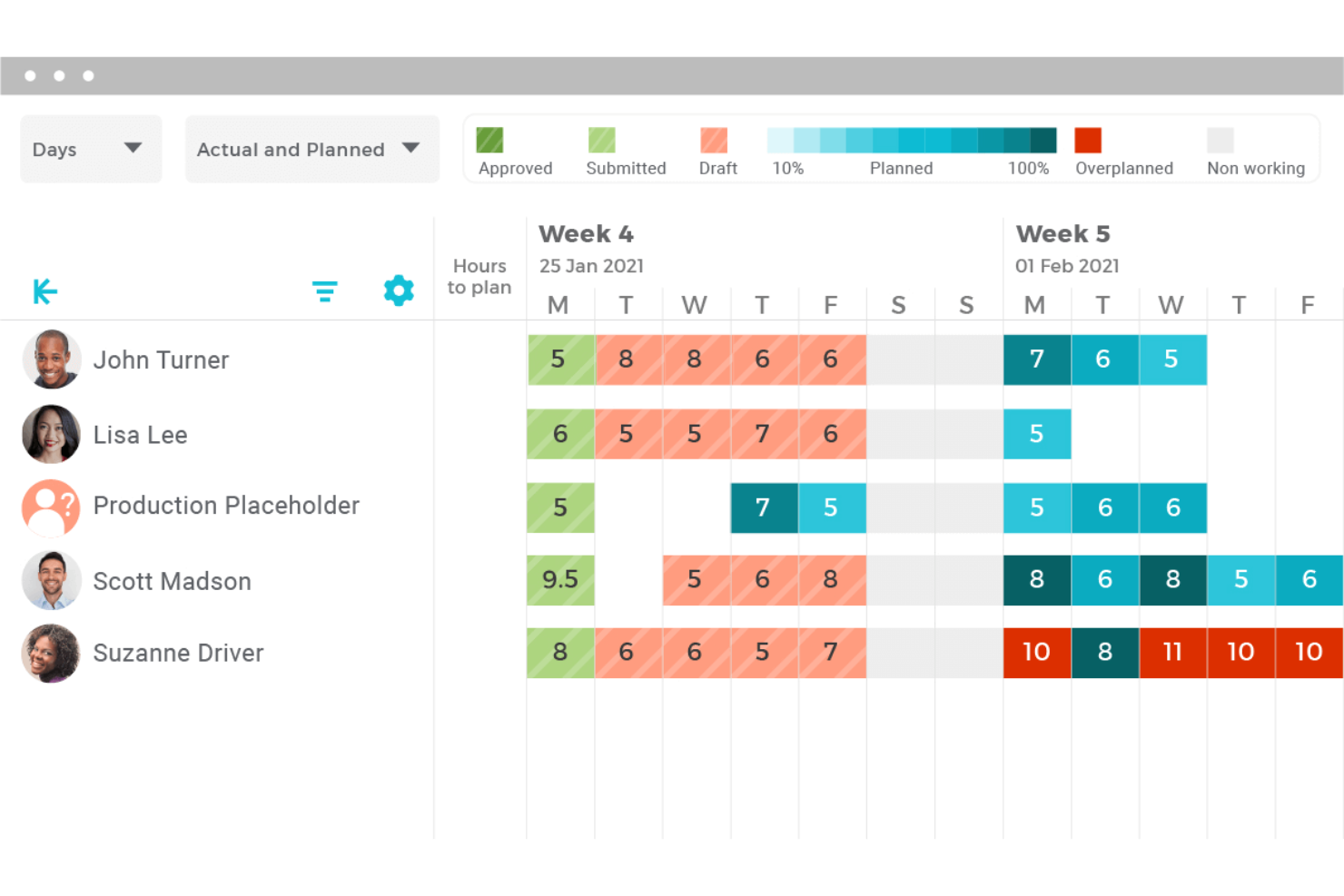
VOGSY is a professional services automation platform that combines project accounting, billing, resource management, time tracking, and financial reporting for services-based organizations.
Who Is VOGSY Best For?
VOGSY is a strong fit for mid-sized professional services firms managing multi-entity or multi-currency project portfolios across distributed teams.
Why I Picked VOGSY
VOGSY earns its spot as one of the best on my shortlist because of how it handles billing complexity that would break most project management tools. I love that a single project can carry multiple billing models at once, mixing hourly, fixed-price, and license-based arrangements across different deliverables. VOGSY's project accounting layer then ties those billing structures directly to multi-currency P&L reporting, so margin visibility doesn't lag behind invoicing activity.
VOGSY Key Features
- Resource capacity planning: Model and manage resource allocation, utilization rates, and capacity constraints across project teams.
- Multi-currency and multi-entity support: Run global project portfolios with native support for various currencies, tax regimes, and legal entities.
- Bidirectional ERP/accounting integrations: Sync data with systems like Xero, QuickBooks, Oracle, and Sage for unified project financials.
- Role-based permissions: Control financial visibility and approvals by user, project, or client segment.
VOGSY Integrations
VOGSY offers native integrations with Xero, QuickBooks Online, Sage, Oracle, Tally, Wave, ABSS, Omie, and Datev. An open API is available for custom integrations.
Pros and Cons
Pros:
- Built natively for professional services billing
- Real-time margin visibility tied directly to invoices
- Mixed billing models per single project
Cons:
- Reporting dashboards lack deep customization options
- Limited fit outside professional services firms
New Product Updates from VOGSY
VOGSY Adds Velocity Agent Verdicts for Quote Approvals
VOGSY adds Velocity agent verdicts for quote approval requests with risk levels, margin checks, discount analysis, and reasoning. This helps approvers assess quote risk before making a final decision. For more information, visit VOGSY’s official site.
 .

Best with native Office and Teams integration
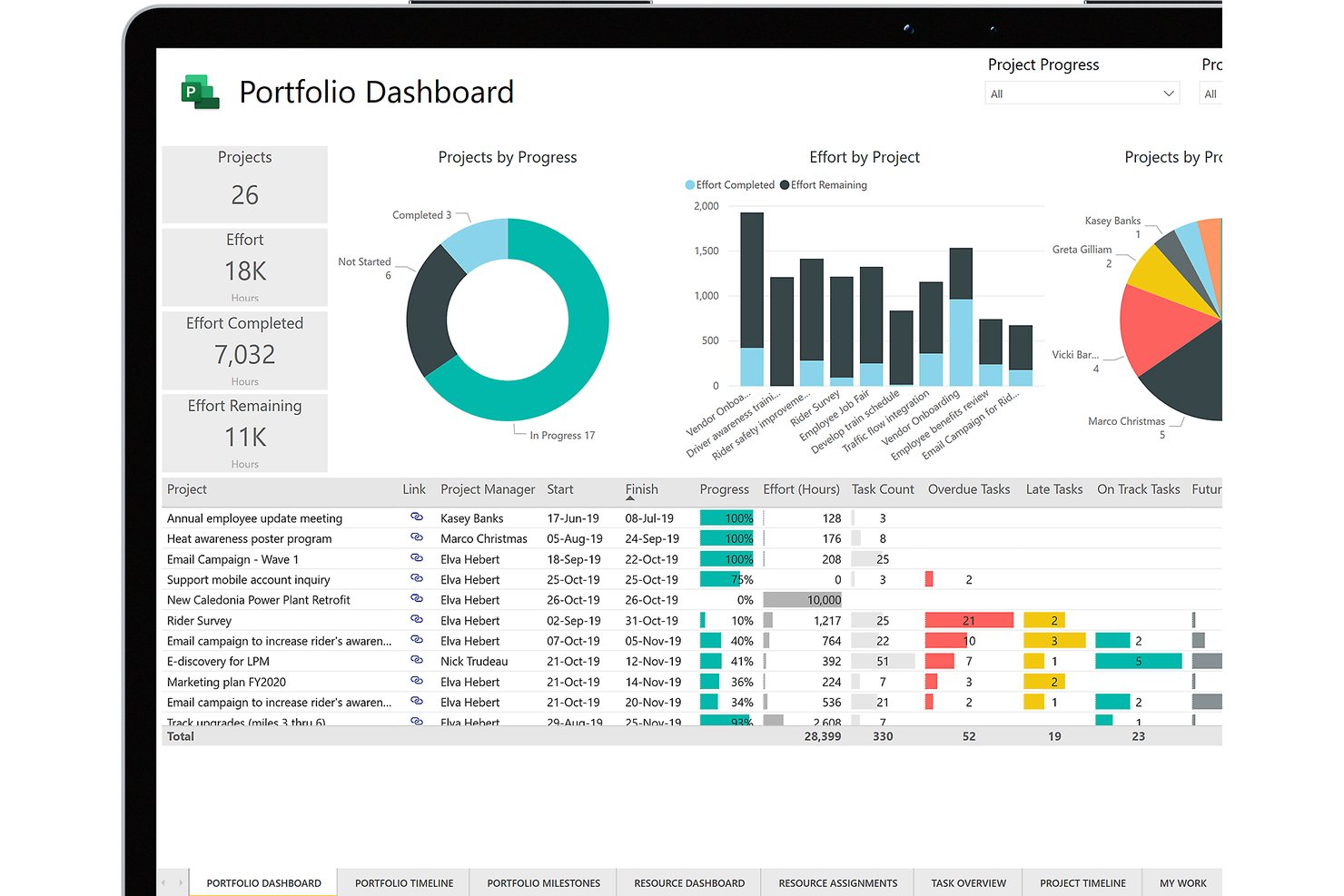
Microsoft Project is a project management platform that combines task scheduling, resource management, cost tracking, baseline budgeting, and earned value analysis across project portfolios.
Who Is Microsoft Project Best For?
Microsoft Project is a strong fit for enterprise PMO directors and large organizations already running the Microsoft 365 ecosystem who need portfolio-level project oversight.
Why I Picked Microsoft Project
Microsoft Project earns its spot on my shortlist because of how naturally its cost tracking lives inside tools my team already uses daily. I love that budget baselines and earned value analysis feed directly into Power BI dashboards without manual exports, giving my team real-time cost variance visibility across a full portfolio. Teams integration keeps budget conversations and file sharing tied directly to project tasks, so nothing falls through the cracks between a schedule update and a cost discussion.
Microsoft Project Key Features
- Gantt chart scheduling: Visualize and manage project timelines, dependencies, and milestones using interactive Gantt charts.
- Resource capacity planning: Allocate, balance, and monitor workloads across project teams to prevent over- or under-utilization.
- Baseline tracking: Set multiple budget and schedule baselines to compare planned versus actual performance at any stage.
- Portfolio reporting dashboards: Consolidate financial and status data for multiple projects for portfolio-level oversight in customizable dashboards.
Microsoft Project Integrations
Microsoft Project has native integrations across the Microsoft ecosystem, including Microsoft 365, Teams, Power BI, SharePoint, and Azure. An API is available for custom integrations.
Pros and Cons
Pros:
- Portfolio-level cost visibility across multiple projects
- Baseline budgeting with variance tracking included
- Earned value analysis built into the platform
Cons:
- Steep setup needed for financial reporting workflows
- No native invoicing or client billing capabilities

Best for accounting practice management
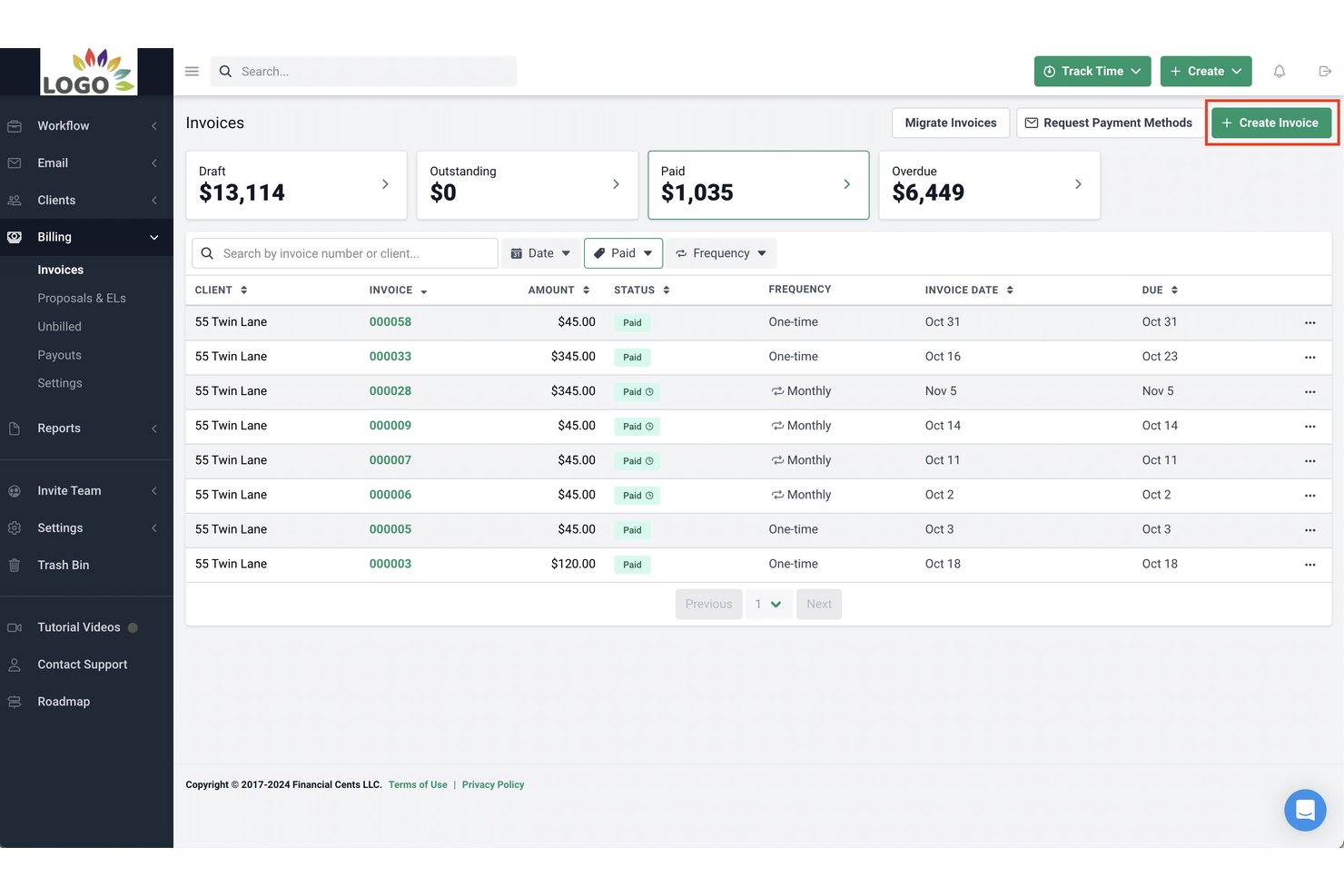
Financial Cents is an accounting practice management platform that combines client workflow tracking, time and billing, invoicing, and profitability reporting for small accounting and bookkeeping firms.
Who Is Financial Cents Best For?
Financial Cents is built for small accounting, bookkeeping, and tax firms — typically teams of 2 to 30 — that need to manage recurring client work in one place.
Why I Picked Financial Cents
I picked Financial Cents as one of the best because it's the only tool here built specifically around how accounting practices manage client work. The 250+ pre-built workflow templates cover bookkeeping, tax, and payroll engagements out of the box, with no configuration from scratch. I also like the AI File Validator, which checks each client upload against the request, accounting period, and client details, flagging wrong-year or wrong-account documents the moment they arrive.
Financial Cents Key Features
- Client CRM integration: Syncs client information with QuickBooks Online to connect records, documents, and invoices in one place.
- Passwordless client portal: Offers a secure, branded portal for document exchange and e-signature without client passwords.
- Reporting and capacity dashboard: Displays real-time team capacity, project statuses, and client-level profitability metrics.
- Pre-built accounting templates: Includes over 250 ready-to-use templates for bookkeeping, tax, and CAS workflows.
Financial Cents Integrations
Financial Cents offers native integration with QuickBooks Online and provides an API for custom integrations.
Pros and Cons
Pros:
- Real-time profitability visibility per client
- Recurring workflow templates for accounting engagements
- Time tracking tied to client invoicing
Cons:
- No multi-currency support for global teams
- Limited project budgeting depth for non-accounting firms

Rocketlane
Best for onboarding project tracking

Rocketlane is an AI-powered professional services automation (PSA) platform that covers project delivery, resource management, financial tracking, client portals, and time tracking in a single system.
Who Is Rocketlane Best For?
Rocketlane is a strong fit for professional services teams at B2B SaaS companies that need to manage client-facing project delivery alongside financials and resource planning.
Why I Picked Rocketlane
I picked Rocketlane as one of the best for onboarding project tracking because it's built from the ground up for client-facing implementation work, not adapted from a generic project tool. I like how milestone pacing gives my team a live read on whether each onboarding is on track or starting to drift, so we're course-correcting before a deadline slips. The Nitro Project Architect converts a SOW directly into a structured, execution-ready project plan, which means we're not rebuilding the same onboarding plan from scratch for every new customer. The dedicated client portal also keeps external stakeholders accountable for their tasks without my team having to chase them down over email.
Rocketlane Key Features
- Project budgeting: Set project-level budgets and track estimated vs. actual spend in real time across tasks and resources.
- Time tracking and timesheets: Log billable and non-billable hours directly against project tasks, with built-in timesheet approval workflows.
- Rate cards: Define role-based or project-specific bill rates to calculate revenue and margins accurately across your portfolio.
- Resource utilization reports: View capacity and utilization across your team to identify over-allocation or bench time before it affects delivery.
Rocketlane Integrations
Rocketlane offers native integrations with Slack, Salesforce, Jira, HubSpot, Google Calendar, and Outlook Calendar, and it connects with Zapier and Workato for broader workflow automation. An API is also available for custom integrations.
Pros and Cons
Pros:
- AI auto-generates delivery and handoff documents
- Client portal gives real-time project visibility
- Built-in financials with project-level profitability views
Cons:
- Mobile app has limited editing capabilities
- Custom reporting lacks calculated formula fields
Diğer Finansal Proje Yönetimi Yazılımları
Kısa listeme giremeyen ancak yine de göz atmaya değer bazı ek finansal proje yönetimi seçenekleri şunlardır:
- ProProfs Project
With simple client invoicing tools
- Adobe Workfront
For work automation
- Bonsai Agency Software
For agencies and consultancies
- Jetpack Workflow
For accounting firm efficiency
- Tempo Portfolio Manager
For predictive scheduling
- Ravetree
For billing and expenses
- Harvest
For intuitive time tracking
- Clarizen
For enterprise work management
- Smartsheet
For scalable project management
- ProWorkflow
For financial management integration


How I Evaluate Financial Project Management Software
I split my evaluation into baseline requirements—like whether a tool can track budget variance across project phases—and differentiators that separate strong options from the rest.
Core Functionality (Table Stakes For This List)
When I'm selecting tools for my list, I rank each one on a scale from 0 (does not offer the functionality) to 5 (excels in this area) for each core functionality listed below. Then, I calculate the tool's total score into a percentage. Each tool needs to achieve a minimum total score of 65% to be considered for inclusion.
- Project Budgeting: I look for multi-line budgets broken into phases, cost categories, and task-level allocations—not just a single dollar amount tied to the whole project.
- Cost & Expense Tracking: Real-time budget vs. actual views matter here, especially when labor, materials, and subcontractor costs all hit the same project.
- Time & Billing Management: I evaluate whether a tool supports configurable rate cards, billable vs. non-billable classification, and project-linked invoicing for T&M engagements.
- Financial Forecasting & EAC: Tools should calculate estimate-at-completion and estimate-to-complete figures automatically as actuals come in, not rely on manual spreadsheet updates.
- Profitability & Margin Reporting: I check for project-level P&L dashboards and the ability to roll up margin data across a full portfolio of active projects.
- Accounting System Integration: A native sync with platforms like QuickBooks, Xero, or NetSuite is what I look for—CSV exports alone aren't enough for finance teams.
Once I have a list of tools that meet the criteria, I consider what sets each platform apart.
Differentiating Factors (What Sets Vendors Apart)
Here's how I compare and contrast different vendors:
Standout Features
Revenue recognition is a big one—I look for tools that automate percentage-of-completion or milestone-based schedules so finance teams aren't reconciling this manually at month-end. Multi-currency and multi-entity support also matters for teams running projects across borders, where billing in one currency and reporting in another is routine. Resource capacity planning rounds things out by tying staffing costs directly to project margins, helping PMO leaders make smarter allocation decisions before a project goes over budget.
Beyond Features
Integration ecosystem is a major consideration—I check whether a tool connects natively with accounting platforms like QuickBooks or NetSuite, plus CRM and payroll systems, since project financials rarely live in isolation. Industry-specific fit also shapes my evaluation. A tool built for consulting firms with T&M billing works very differently from one designed for construction with cost-plus contracts. Finally, I look at how pricing scales—whether per seat, per project, or by entity—to make sure the model fits teams where finance users and project managers share the platform.
Finansal Proje Yönetimi Yazılımı Nasıl Seçilir?
Uzun özellik listeleri ve karmaşık fiyatlandırma yapıları içinde kaybolmak kolaydır. Kendinize özgü yazılım seçimi sürecinizde ilerlerken odağınızı korumanıza yardımcı olmak için göz önünde bulundurmanız gereken faktörleri içeren bir kontrol listesi hazırladım:
| Faktör | Dikkat Edilmesi Gerekenler |
| Ölçeklenebilirlik | Ekip büyüdükçe aracın daha fazla projeyi, kullanıcıyı ve veriyi işleyebildiğinden emin olun. Esnek fiyatlandırma ve kullanım kademeleri arayın. |
| Entegrasyonlar | Çalışmaları tekrarlamamak için yazılımın QuickBooks, Excel veya CRM'niz gibi mevcut araçlarınıza kolayca bağlanıp bağlanmadığını kontrol edin. |
| Özelleştirilebilirlik | Raporları, gösterge tablolarını ve iş akışlarını ekibinizin finansal takip ihtiyaçlarına uyacak şekilde uyarlayabilmelisiniz. |
| Kullanım Kolaylığı | Aracın arayüzü, ekibinizin fazla eğitim almadan veya zorluk yaşamadan kullanmaya başlayabileceği kadar sezgisel olmalıdır. |
| Bütçe | Eklentiler ve kullanıcı ücretleri de dâhil olmak üzere toplam maliyeti inceleyin. Temel özellikleri gözden çıkarmadan bütçenize uygun bir yazılım seçin. |
| Güvenlik Önlemleri | Hassas finansal verileri korumak için platformun şifreleme, rol tabanlı erişim ve denetim günlükleri kullandığını doğrulayın. |
| Raporlama Araçları | Bilinçli kararlar almanıza yardımcı olan özelleştirilebilir finansal raporlarla gerçek zamanlı verilere kolayca erişebilmek isteyeceksiniz. |
| Destek Seçenekleri | Sorunlar ortaya çıktığında, yeniden yolunuza devam etmenizi sağlayabilecek canlı sohbete, yardım merkezine veya özel destek hizmetine erişiminizin olması faydalıdır. |
Finansal Proje Yönetimi Yazılımı Trendleri
Araştırmam sırasında farklı finansal proje yönetimi yazılımı sağlayıcılarının sayısız ürün güncellemesini, basın bültenini ve sürüm kaydını inceledim. İşte takip ettiğim yeni ortaya çıkan trendlerden bazıları:
- Yapay Zekâ Destekli Tahmin: Artık daha fazla araç, proje maliyetlerini, gecikmeleri ve kaynak ihtiyaçlarını tahmin etmek için makine öğrenimini kullanıyor. Bu, varsayımlar yerine verilerinizdeki trendlere dayanarak daha hızlı kararlar almanıza yardımcı olur.
- Gerçek Zamanlı Bütçe Düzenlemeleri: Bazı yazılımlar artık gerçek harcamalara dayalı anlık bütçe değişikliklerini destekliyor. Ay sonu raporlarını beklemeden finansal planları güncelleyebilirsiniz.
- Ayrıntılı Maliyet Takibi: Ekipler artık maliyetleri görev, aşama veya ekip üyesi bazında daha ayrıntılı bir düzeyde takip edebiliyor. Bu, fazla harcamaları tespit etmeyi ve planları gerçek zamanlı olarak düzenlemeyi kolaylaştırır.
- Dahili Senaryo Planlaması: Daha fazla platform, farklı seçimlerin bütçenizi nasıl etkileyebileceğini görmek için finansal “ne olurdu” senaryoları çalıştırmanıza olanak tanıyor. Bu, hem en iyi hem de en kötü durum sonuçlarına yönelik plan yapmanıza yardımcı olur.
- Daha Görsel Finansal Panolar: Finansal veriler daha anlaşılır ve etkileşimli şekillerde sunuluyor. Elektronik tabloları dışa aktarmadan veya özel raporlar çalıştırmadan trendleri, ilerlemeyi ve sorunları görebilirsiniz.
Finansal Proje Yönetimi Yazılımı Nedir?
Finansal proje yönetimi yazılımı, projelerin finansal yönlerini yönetmek ve takip etmek için tasarlanmış özel bir araçtır. Proje yöneticileri, finans ekipleri ve paydaşlar tarafından proje maliyetlerini ve bütçelerini planlamak, kontrol etmek ve izlemek için kullanılır.
Yazılım; bütçeleme, tahmin, gider takibi ve finansal raporlama özelliklerini içerir. Maliyetlerin bütçe dahilinde kalmasını ve finansal hedeflere ulaşılmasını sağlayarak projeler üzerindeki finansal kontrolü sürdürmesi gereken kullanıcılar için vazgeçilmezdir. Üretim gibi sektörlerde finansal proje yönetimi yazılımı, operasyonel giderleri proje hedefleriyle uyumlu hâle getirmek için üretim maliyetlerinin, tedarikçi ödemelerinin ve kaynak planlamasının yönetilmesine de yardımcı olabilir.
Finansal Proje Yönetimi Yazılımının Özellikleri
Finansal proje yönetimi yazılımı seçerken aşağıdaki temel özelliklere dikkat edin:
- İzin kontrolleri: Hassas bilgileri koruyarak finansal verileri kimlerin görüntüleyebileceğini veya düzenleyebileceğini yönetmenizi sağlar.
- Bütçe takibi: Fazla harcamaları önlemek için proje bütçelerini gerçek zamanlı olarak belirlemenizi, izlemenizi ve düzenlemenizi sağlar.
- Gider kaydı: Ekibinizin maliyetleri kaydetmesine ve kategorilere ayırmasına olanak tanıyarak paranın nereye gittiğini görmenizi sağlar.
- Faturalandırma araçları: Belirli proje kilometre taşlarına veya çalışılan saatlere bağlı faturalar oluşturmanıza, göndermenize ve takip etmenize yardımcı olur.
- Kaynak maliyeti tahsisi: Gerçek proje maliyetlerini takip edebilmeniz için ekip üyelerine, araçlara veya zamana finansal değerler atar.
- Tahmin araçları: Gelecekteki harcamaları tahmin etmek ve önceden plan yapmanıza yardımcı olmak için geçmiş verileri kullanır.
- Özel finansal raporlar: İhtiyaçlarınıza uygun raporlar oluşturmanızı ve içgörüleri paydaşlarla paylaşmanızı sağlar.
- Zaman takibi entegrasyonu: Doğru proje muhasebesi için kaydedilen saatleri bütçelere ve faturalandırmaya bağlar.
- Çoklu para birimi desteği: Küresel projeler için bütçeleri ve faturaları farklı para birimleriyle yönetmenizi sağlar.
- Denetim izi: Hesap verebilirlik ve uyumluluk için tüm finansal değişiklikleri ve onayları takip eder.
Finansal Proje Yönetimi Yazılımının Faydaları
Finansal proje yönetimi yazılımını uygulamak, ekibiniz ve işletmeniz için çeşitli faydalar sağlar. İşte yararlanmayı bekleyebileceğiniz bazı faydalar:
- Daha güçlü denetim izleri: Kaydedilen finansal değişiklikler ve onay geçmişleri uyumluluğu ve hesap verebilirliği destekler.
- Daha iyi bütçe kontrolü: Gerçek zamanlı takip ve uyarılar, fazla harcamaları erkenden fark etmenize ve bütçe dahilinde kalmanıza yardımcı olur.
- Daha hızlı faturalandırma döngüleri: Dahili faturalandırma araçları, faturaları ne kadar hızlı göndereceğinizi ve ödeme alacağınızı hızlandırır.
- Geliştirilmiş tahmin: Geçmiş veriler ve trend analizi, gelecekteki proje maliyetlerini planlamayı kolaylaştırır.
- Daha fazla görünürlük: Panolar ve raporlar, projeler genelinde paranızın tam olarak nereye gittiğini gösterir.
- Daha doğru raporlama: Özel finansal raporlar manuel hataları azaltır ve güvenebileceğiniz veriler sunar.
- Daha kolay kaynak planlaması: Maliyet tahsisi araçları, kaynakları bütçelerle daha etkili biçimde eşleştirmenize yardımcı olur.
Finansal Proje Yönetimi Yazılımı için Maliyetler ve Fiyatlandırma
Finansal proje yönetimi yazılımı seçmek, mevcut çeşitli fiyatlandırma modelleri ve planlarının anlaşılmasını gerektirir. Maliyetler özelliklere, ekip büyüklüğüne, eklentilere ve daha fazlasına bağlı olarak değişir. Aşağıdaki tablo, finansal proje yönetimi yazılımı çözümlerinde yaygın olarak sunulan planları, ortalama fiyatlarını ve tipik olarak dahil edilen özellikleri özetlemektedir:
Finansal Proje Yönetimi Yazılımı için Plan Karşılaştırma Tablosu
| Plan Türü | Ortalama Fiyat | Yaygın Özellikler |
| Ücretsiz | $0 | Temel görev yönetimi, yapılacaklar listeleri, yerleşik takvim, sınırlı sayıda kullanıcı |
| Bireysel | $3.66 ay başına | Gelişmiş panolar, artırılmış depolama alanı, geliştirilmiş müşteri desteği, üçüncü taraf entegrasyonları |
| Küçük İşletme | $8.90 ay/kullanıcı başına | Gantt grafiği görünümü, gömülü belgeler, otomasyon, artırılmış destek, diğer araçlarla entegrasyon |
| Orta Ölçekli İşletme | $16.88 ay/kullanıcı başına | Gelişmiş güvenlik, sınırsız kullanıcı, gerçek zamanlı raporlama, çeşitli proje görünümleri |
| Kurumsal | Görüşülebilir | Özel izinler, gelişmiş raporlama, öncelikli destek, kapsamlı özellik seti, minimum kullanıcı politikası |
Finansal Proje Yönetimi Yazılımı Sıkça Sorulan Sorular
Finansal proje yönetimi yazılımı ne tür veriler ve analizler sunar?
Finansal proje yönetimi yazılımı bütçe takibi, gider raporlama, finansal tahmin ve proje kârlılığı analizi sunar. Bu araçlar işgücü maliyetleri, maliyet oranları ve proje marjları hakkında içgörüler sağlar. Gelişmiş analiz özellikleri; portföy gösterge tablosu ile KPI’ları takip etmeyi, gelir muhasebeleştirmesini izlemeyi, sabit ücretli sözleşmeleri değerlendirmeyi ve projeleri bütçe dâhilinde tutmak için zaman raporları oluşturmayı mümkün kılar.
Finansal proje yönetimi yazılımında planı güncellemek ne kadar kolaydır ve değişiklikleri kim yapar?
Finansal proje yönetimi yazılımında planları güncellemek genellikle kullanıcı dostudur; modern çözümlerin çoğu proje planlarında, bütçelerde ve takvimlerde kolayca değişiklik yapılabilmesi için tasarlanmıştır. Proje yöneticileri ve finansal analistler gibi yetkili kullanıcılar değişiklik yapabilir. Yazılımda genellikle hesap verebilirlik amacıyla denetim izleri ve değişiklik günlükleri bulunur.
Finansal proje yönetimi yazılımından en yüksek faydayı sağlamak için hangi faaliyetler gereklidir?
Finansal proje yönetimi yazılımından elde edilen faydaları en üst düzeye çıkarmak; net finansal hedefler belirlemeyi, finansal verileri düzenli olarak güncelleyip incelemeyi ve karar alma süreçlerinde raporlama ile analizlerden yararlanmayı gerektirir. Etkili ekip eğitimi ve yazılımın diğer iş sistemleriyle entegre edilmesi de yazılımın tüm potansiyelinden yararlanmak için önemli faaliyetlerdir.
Finansal proje yönetimi yazılımı diğer proje yönetimi çözümlerinden nasıl farklıdır?
Finansal proje yönetimi yazılımı, görev atama ve zamanlama üzerine yoğunlaşabilen genel proje yönetimi çözümlerinin aksine bütçeleme, maliyet takibi ve finansal raporlama gibi proje yönetiminin finansal yönlerine odaklanır. Bu uzmanlaşma, projeler dâhilinde daha ayrıntılı finansal yönetim olanağı sağlar.
Finansal proje yönetimi yazılımı, projelerde şu anda karşılaşılan en önemli üç sorunun çözümüne nasıl yardımcı olur?
Finansal proje yönetimi yazılımı; bütçe aşımları, kaynakların verimsiz tahsisi ve finansal görünürlük eksikliği gibi yaygın proje sorunlarını ele alır. Doğru bütçeleme, gerçek zamanlı maliyet takibi ve finansal tahmin araçları sunarak proje yöneticilerinin finansal performansı izlemesini ve sorunları proaktif bir şekilde ele almasını sağlar.
Finansal proje yönetimi yazılımı ne tür destek ve eğitim sunar?
Finansal proje yönetimi yazılımı için destek ve eğitim; çevrim içi yardım merkezlerini, kullanıcı kılavuzlarını ve telefon, e-posta ya da canlı sohbet yoluyla müşteri desteğini içerebilir. Sağlayıcılar web seminerleri, çevrim içi eğitimler ve yüz yüze eğitim oturumlarının yanı sıra kullanıcıların etkileşim kurabileceği topluluk forumları da sunabilir. Yazılım seçerken bu hizmetlerin kullanılabilirliği ve kalitesi önemli hususlardır.
Finansal proje yönetimi yazılımı diğer iş sistemleriyle nasıl entegre olur?
Finansal proje yönetimi yazılımı; proje muhasebesi yazılımı, CRM sistemleri, ERP sistemleri ve İK yazılımlarıyla entegre olabilir. Bu entegrasyonlar finansal verilerin sorunsuz şekilde aktarılmasını kolaylaştırır, manuel veri girişini en aza indirir ve hataları azaltır. Örneğin, muhasebe yazılımıyla entegrasyon faturalandırma ve gider takibini kolaylaştırabilirken CRM entegrasyonu müşteri projeleri hakkında finansal içgörüler sunabilir.