

10 Best AI Schedule Generator in 2026

10 Best AI Schedule Generators Shortlist


An AI schedule generator is workforce software that uses demand forecasts, staff availability, and workplace rules to create employee shift plans. The tools in this guide focus on workforce scheduling, not personal calendars or project-task schedules, and vary in their forecasting, automation, and compliance features. I evaluated 10 options to help you compare how they handle shift coverage, labor planning, and staffing across locations.
Why Trust Our Software Recommendations
Our team has been testing and reviewing software since 2012. As project managers ourselves, we know how difficult—and important—it is to choose the right software.
For this guide, we evaluated tools using hands-on testing and independent research, scoring tools using our selection criteria. We also draw on insights from industry thought leaders and practicing project management experts.
Our reviews reflect our human editorial judgment, not a sales pitch.
Expert reviewers:
Comparison Table: AI Schedule Generators
Compare pricing and specs side by side for the AI schedule generators that made it onto my shortlist.
Score legend (out of 5)
- Excellent 4.5–5
- Good 4–4.4
- Average 3–3.9
- Below average 2–2.9
- Poor 1–1.9
| Tool | Starting Price | Website | |||||||
|---|---|---|---|---|---|---|---|---|---|
| Best for matching labor spend to demand | 3.7 out of 5 | 4 | 4 | 4 | 3 | 4 | 3 | $6.50/user/month 31-day free trial available | Website |
| Best for demand-led, rule-based shift teams | 3.7 out of 5 | 4 | 4 | 4 | 3 | 4 | 3 | $3.75/employee/month Free trial + free demo available | Website |
| Best for turning labor plans into local shifts | 4.3 out of 5 | 5 | 5 | 5 | 3 | 4 | 4 | Pricing upon request Free demo available | Website |
| Best for auditable union compliance | 4.0 out of 5 | 4 | 5 | 4 | 3 | 4 | 4 | Pricing upon request Free demo available | Website |
| Best for site-level forecast model blending | 3.7 out of 5 | 4 | 4 | 5 | 3 | 4 | 2 | Pricing upon request Free demo available | Website |
| Best for workforce plans in your own app | 3.7 out of 5 | 4 | 5 | 2 | 3 | 5 | 3 | Pricing upon request 14-day free trial available | Website |
| Best for compliance-led shift operations | 3.8 out of 5 | 4 | 5 | 4 | 3 | 4 | 3 | Pricing upon request Free demo available | Website |
| Best for demand-based labor cost planning | 3.7 out of 5 | 4 | 4 | 4 | 3 | 4 | 3 | Pricing upon request Free demo available | Website |
| Best for demand-led labor planning | 3.8 out of 5 | 4 | 5 | 4 | 3 | 4 | 3 | Pricing upon request Free demo available | Website |
| Best for demand-led staffing across locations | 3.7 out of 5 | 4 | 4 | 4 | 3 | 4 | 3 | Pricing upon request Free demo available | Website |
AI Schedule Generator Reviews
Below are my reviews of the best AI schedule generators on my shortlist. Each overview covers features, scheduling capabilities, and pricing to help you choose the right workforce scheduling tool.

Deputy
Best for matching labor spend to demand
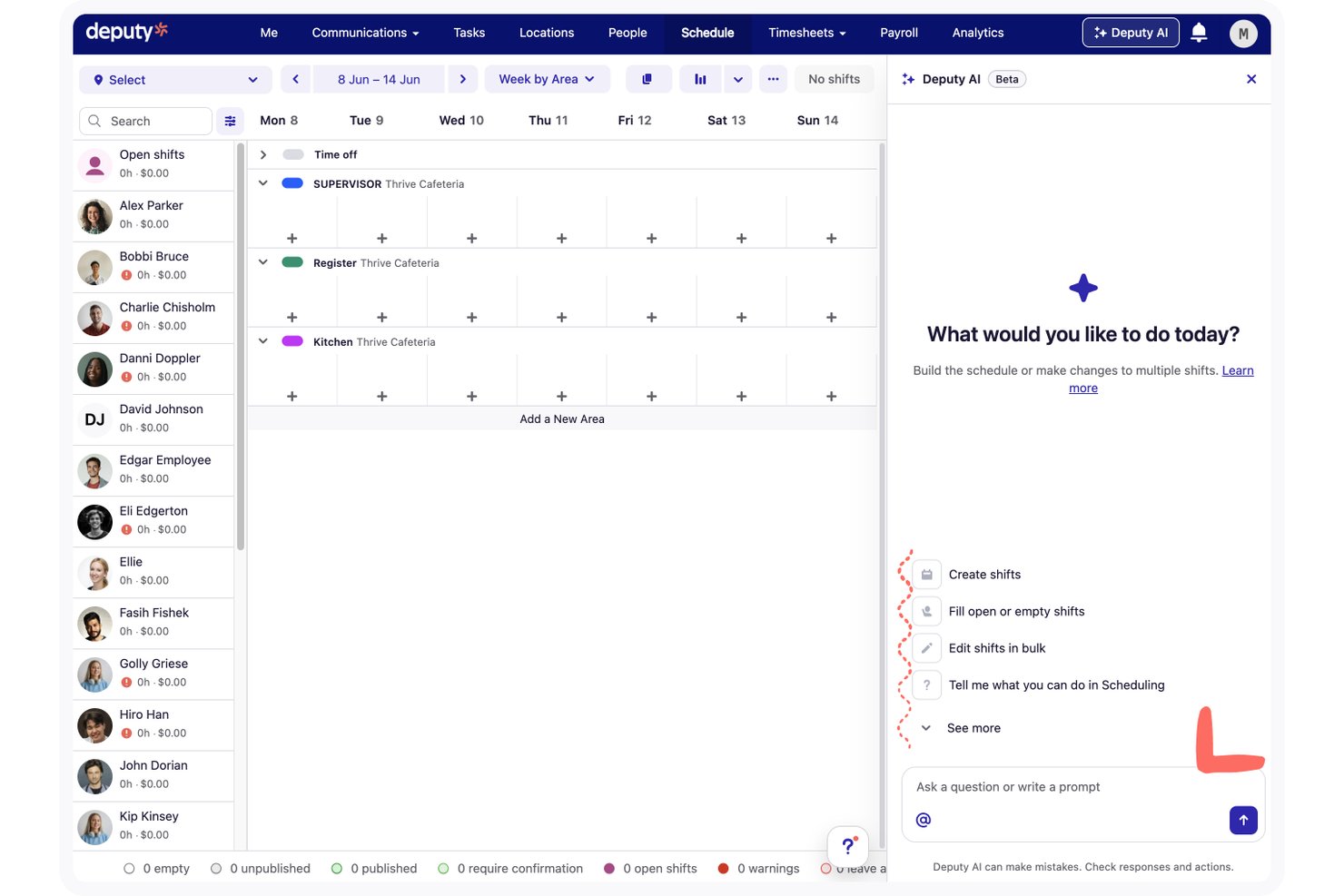
- Deputy is a workforce scheduling platform that combines employee scheduling, labor compliance tools, and time and attendance tracking for shift-based teams. Auto-scheduling and demand forecasting require the Core plan or higher.
Who Is Deputy Best For?
Deputy is a strong fit for operations managers and team leads in shift-based industries like retail, hospitality, and healthcare who need to align staffing levels with real demand.
Why I Picked Deputy
Deputy earns its spot on my shortlist because its Smart Scheduling tools directly connect labor spend to real demand signals. I love how the auto-scheduling workflow pulls in POS sales data and wage-to-sales ratios to build and fill shifts, so your roster reflects actual business volume rather than guesswork. The demand forecasting layer lets you set hour and wage budgets, then compare actuals against targets in real time.
Deputy Key Features
- Shift templates: Create reusable templates for weeks, months, or custom periods to replicate schedules without rebuilding them from scratch.
- Labor compliance rules: Configure minimum rest periods, maximum weekly hours, overtime thresholds, and fair workweek rules that apply automatically during scheduling.
- Deputy AI conversational agent (beta): Uses text or voice prompts to create, edit, fill, or publish schedules after manager confirmation. Some capabilities may not be available to every customer.
- Micro-scheduling: Break shifts into segments across areas or locations so employees have a detailed, task-level work plan within a single shift.
Deputy Integrations
Deputy integrates with Xero, QuickBooks, Square, Lightspeed, and Clover. APIs and webhooks are available for custom integrations.
Pros and Cons
Pros:
- Conversational prompts handle quick schedule changes
- Copies rosters forward with conflict warnings
- Drafts schedules from demand and availability
Cons:
- Generated actions require manager confirmation
- AI drafts can miss availability

Humanity
Best for demand-led, rule-based shift teams
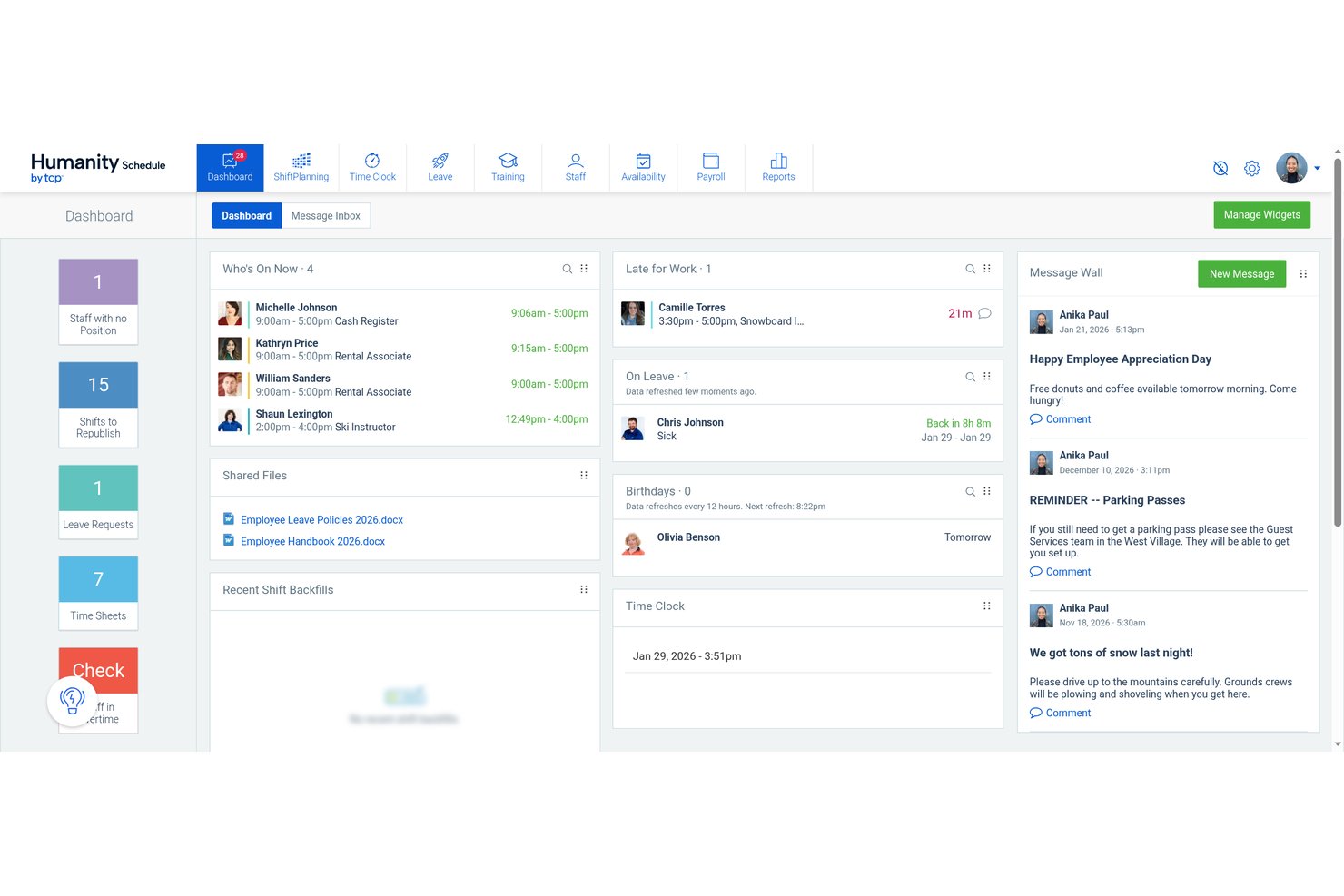
- Humanity Schedule is an employee scheduling platform with automated shift generation and configurable compliance rules. AI demand scheduling requires the Professional plan or higher.
Who Is Humanity Best For?
Humanity works best for operations managers and workforce administrators in shift-heavy industries who need demand forecasting and compliance rule enforcement built into their scheduling workflow.
Why I Picked Humanity
I picked Humanity as one of the best because its Demand Scheduler genuinely sets it apart for shift-heavy operations. It forecasts staffing demand weeks out using AI, so you're building schedules around when you actually need people, not guessing. I also like that configurable scheduling rules enforce labor law and collective bargaining agreement compliance automatically during schedule generation, catching conflicts before they become violations.
Humanity Key Features
- Employee self-service portal: Employees can view their schedules, trade shifts, release shifts, and submit time-off requests directly from their mobile devices.
- Scheduling insights and reporting: View how your schedule decisions affect labor costs, budgets, and workforce performance through reports and real-time data.
- Payroll and HCM integrations: Connect Humanity to payroll and HR platforms like Workday, ADP WorkforceNow, BambooHR, Paychex, and QuickBooks via native integrations or the open API.
- Mobile manager tools: Post open shifts and approve employee requests from the mobile app, which also supports Apple Watch.
Humanity Integrations
Humanity integrates with Workday, Oracle, ADP Workforce Now, BambooHR, Paychex, and QuickBooks. Open API access is available as an add-on.
Pros and Cons
Pros:
- Matches available, qualified staff to shifts
- Applies labor and shift rules during generation
- Forecasts staffing demand weeks ahead
Cons:
- Mobile app can load slowly or glitch
- AI-generated schedule edits sometimes need correction

Legion
Best for turning labor plans into local shifts
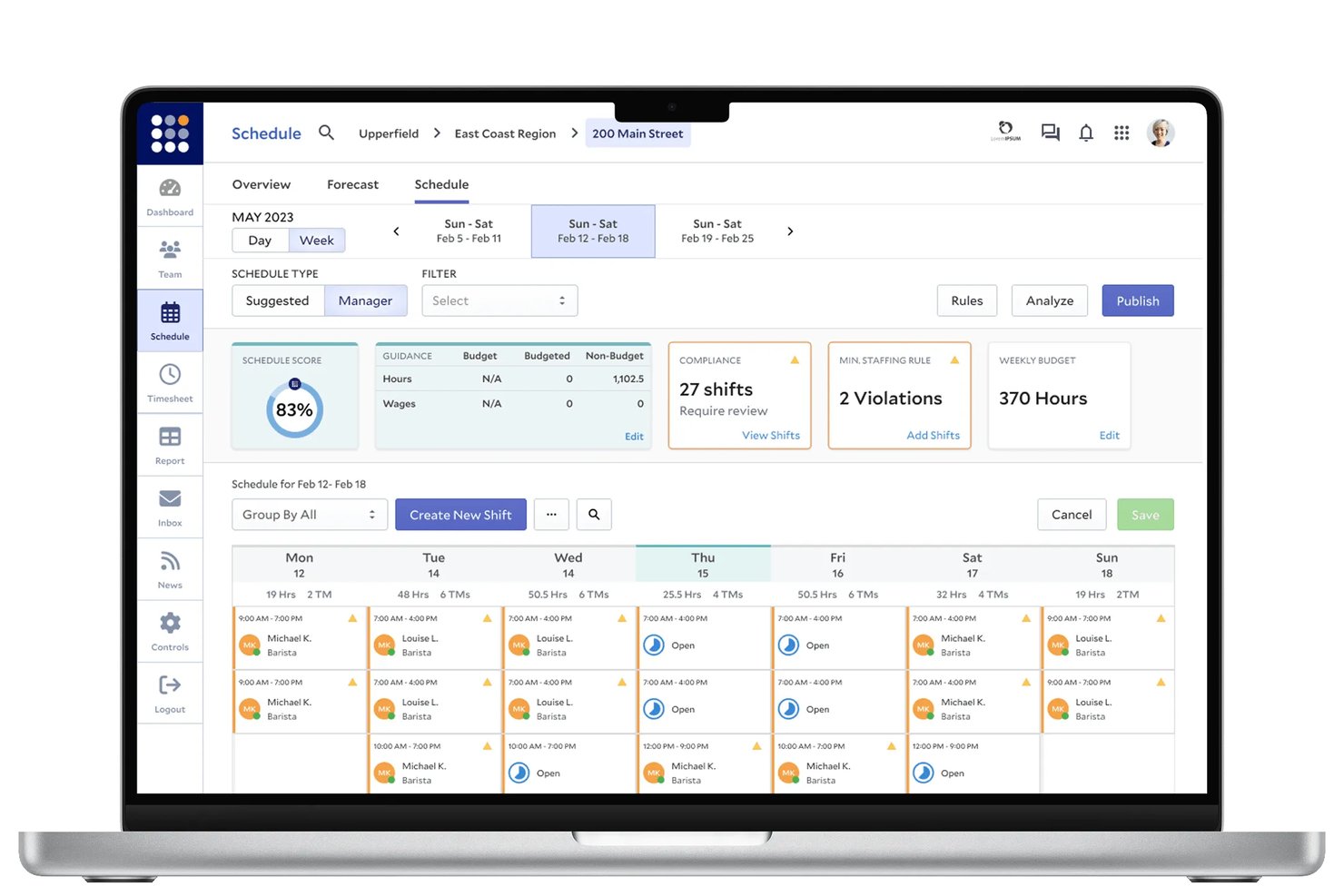
Legion is an AI-native workforce management platform that generates demand-based schedules, automates labor planning, and handles time and attendance for frontline organizations across multiple locations.
Who Is Legion Best For?
Legion is a strong fit for operations managers and workforce administrators at multi-location frontline organizations—think retail chains, restaurants, and hospitality groups—that need demand-driven scheduling at scale.
Why I Picked Legion
I picked Legion as one of the best because its AI-driven forecasting builds a separate machine-learning model for each location, factoring in weather, holidays, and local events, then feeds that directly into automated schedule creation. What I really like is how the Legion Schedule Optimization layer converts those forecasts into fully built schedules in under 30 seconds, applying skills, availability, labor budgets, and compliance rules simultaneously. The AI agents then handle publishing, callout coverage, and shift-swap requests within your configured policies, so labor plans don't just stay on paper.
Legion Key Features
- Employee productivity-driven scheduling: Places employees on shifts based on skills, productivity ratings, and development needs alongside budget and coverage targets.
- What-if scenario modeling: Lets you compare wage changes, operating hour adjustments, and headcount shifts against your live labor plan before committing.
- Schedule Score: Measures schedule quality in real time, flagging compliance risk, overtime exposure, and coverage gaps across locations.
- Legion mobile app: Gives frontline employees direct access to shift offers, availability settings, time-off requests, and shift swaps from iOS or Android.
Legion Integrations
Legion integrates with Accu-Time Systems, GT Clocks, and Synel for time-clock connectivity. APIs are available for custom integrations.
Pros and Cons
Pros:
- Employees can swap shifts in the app
- Managers report posting schedules in minutes
- Builds forecasts for each location
Cons:
- Auto-scheduling may ignore marked unavailability
- Generated schedules can miss coverage needs

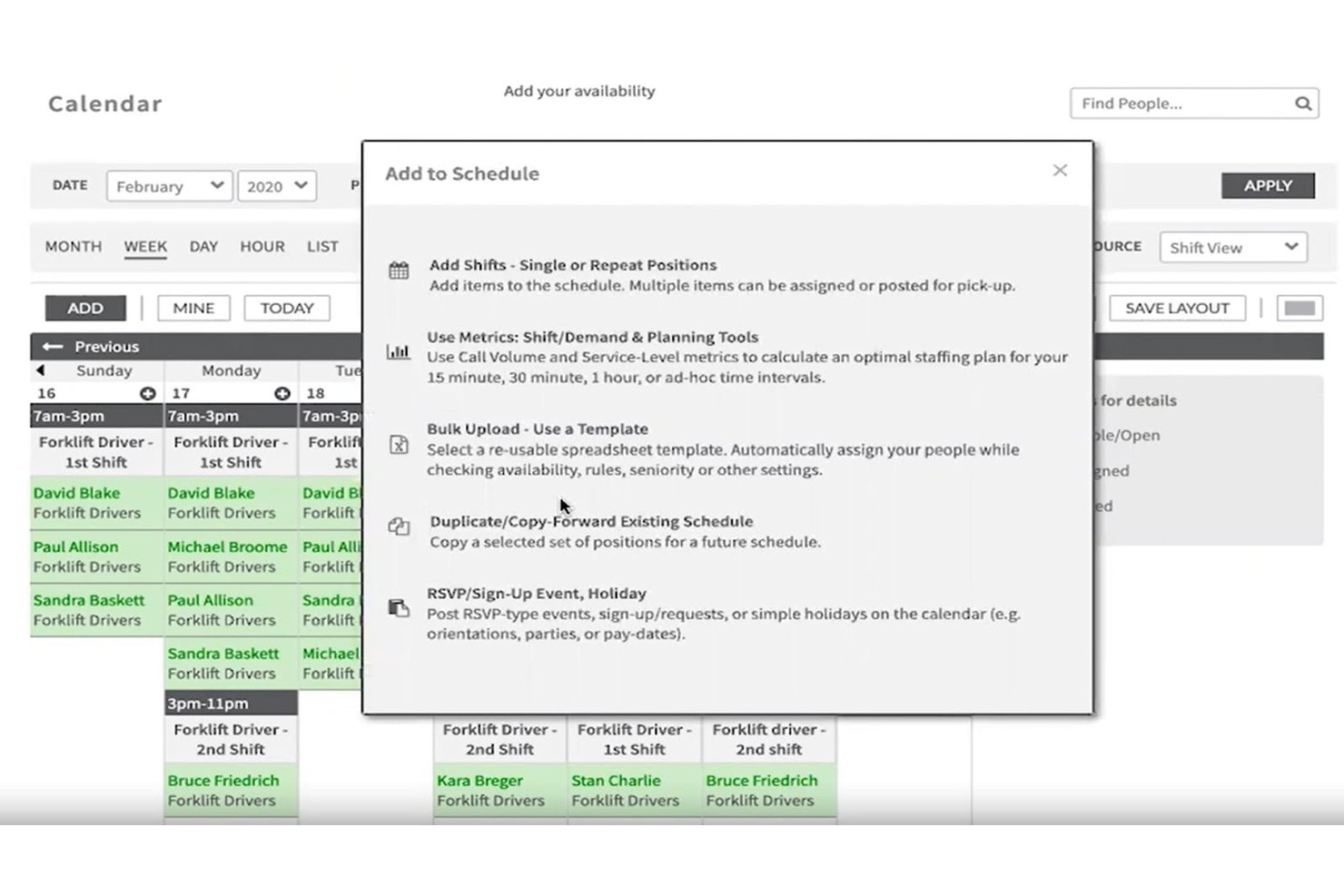
UKG Shiftboard is a workforce scheduling tool built for complex, compliance-heavy operations, covering automated shift generation, demand-based staffing plans, coverage gap management, and leave and timesheet workflows.
Who Is UKG Shiftboard Best For?
UKG Shiftboard is a strong fit for operations managers and workforce administrators in unionized, high-compliance industries like manufacturing and healthcare.
Why I Picked UKG Shiftboard
I've included UKG Shiftboard in my top picks because its compliance audit trail is something I haven't seen handled this thoroughly elsewhere. Every scheduling action is logged, every overridden violation is recorded with a justification, and union contract rules are enforced directly within the schedule generation engine. I particularly like how it distributes overtime using seniority, job classification, and shift-refusal history, keeping fairness traceable and defensible during audits.
UKG Shiftboard Key Features
- Demand-based staffing plans: Converts production and service targets into specific jobs, shifts, and skill-mix requirements to align headcount with operational demand.
- Coverage gap management: Displays staffing levels across operating areas and surfaces a list of available, qualified workers to fill open shifts.
- Leave request and balance tracking: Lets workers submit leave requests and view real-time leave balances, then automatically updates schedules and triggers backfill when leave is approved.
- Automated timesheet validation: Workers submit timesheets online, and the system flags entries with errors or deviations before routing them through approval and payroll export workflows.
UKG Shiftboard Integrations
UKG Shiftboard integrates with UKG Pro Workforce Management. Its SchedulePro REST API supports custom connections with HR, payroll, and time and attendance systems.
Pros and Cons
Pros:
- Reviewers report easier shift coordination
- Overtime allocation considers seniority and shift refusals
- Union rules shape automated schedules
Cons:
- Mobile app reports freezes and calendar glitches
- No documented machine-learning schedule generation

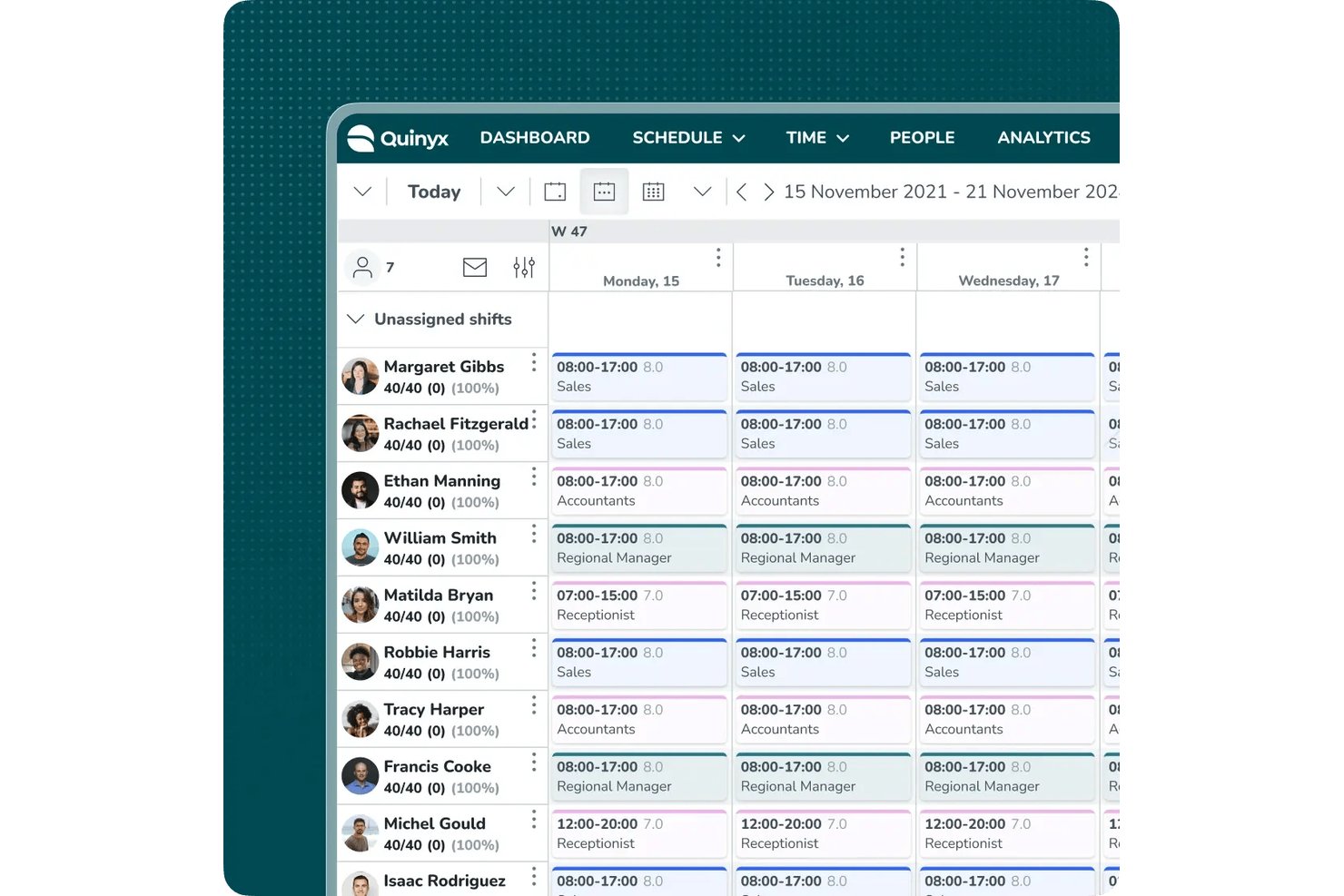
Quinyx is an AI-powered workforce management platform that generates demand-aligned schedules using automated forecasting, constraint-based shift assignment, and multi-site planning across frontline teams.
Who Is Quinyx Best For?
Quinyx is a strong fit for multi-site operations managers in retail, logistics, and hospitality who need demand-driven scheduling across large frontline workforces.
Why I Picked Quinyx
I've included Quinyx in my top picks because its forecast model blending is genuinely impressive at the site level. The platform pulls from more than 20 AI and statistical models, combining sales, foot traffic, and transaction data to build location-specific demand forecasts, then feeds those directly into Auto-Schedule. I particularly like that you can select or blend forecast models per location, so a high-traffic retail site and a quieter logistics depot aren't forced into the same forecasting logic.
Quinyx Key Features
- Auto-Assign: Matches open shifts to qualified employees based on skills, certifications, and availability without manual review.
- Compliance and budget flagging: Flags rule violations, unavailability conflicts, and cost overruns in real time as schedules are built.
- Employee self-service: Lets employees view schedules, submit time-off requests, swap shifts, and pick up open shifts via mobile or web.
- Payroll-ready timesheets: Exports manager-approved time and attendance records directly to connected payroll systems like ADP, Workday, and SAP.
Quinyx Integrations
Quinyx integrates with ADP, Workday, SAP, Cappy, and DailyPay. APIs are available for custom integrations.
Pros and Cons
Pros:
- Employees can view and swap shifts
- Matches schedules to forecasted staffing needs
- Blends forecast models for each site
Cons:
- Large schedules can run slowly
- Reporting filters and exports feel limited
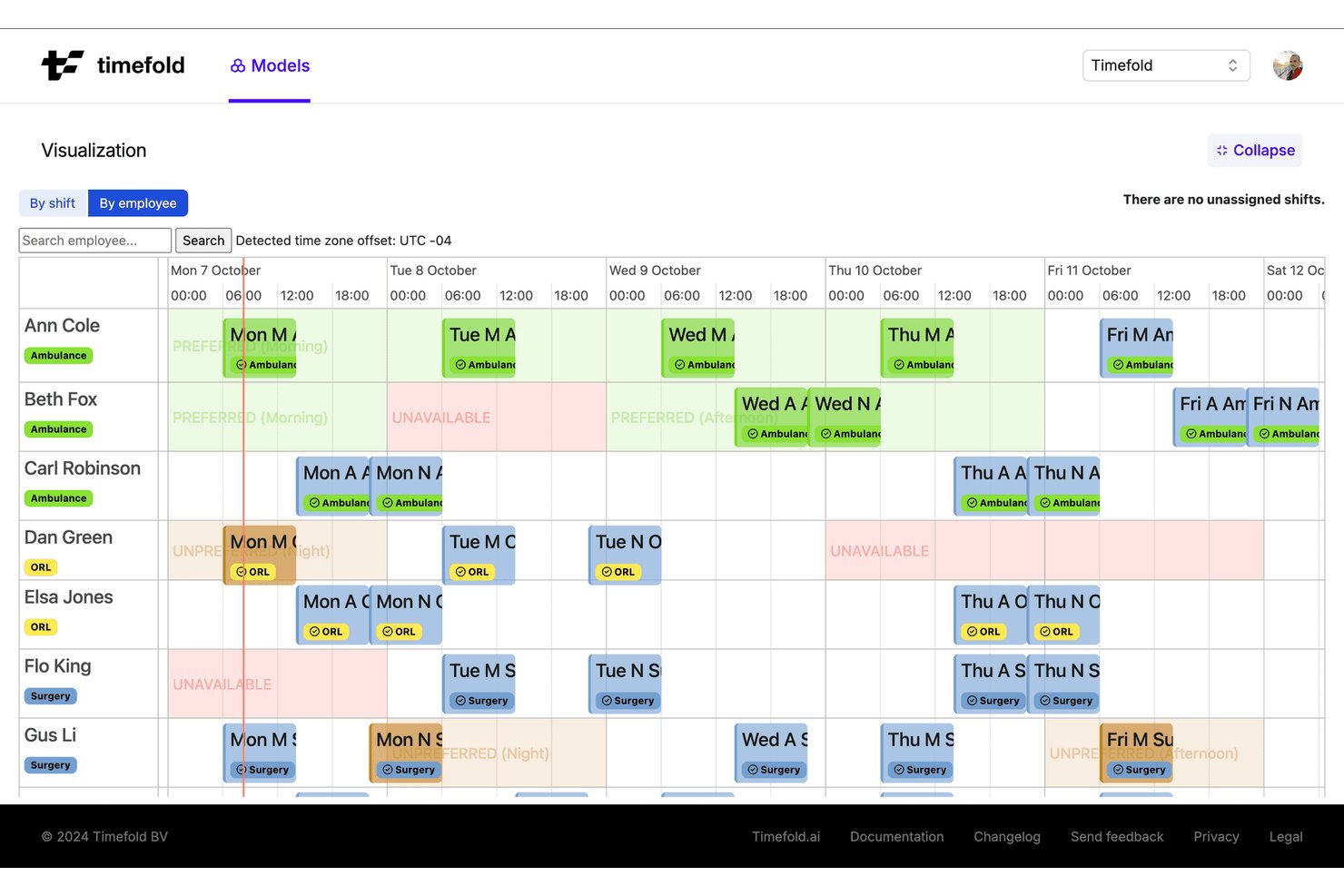
Timefold is an AI-powered shift scheduling API that automatically assigns employees to shifts by optimizing across demand curves, labor-law constraints, skills, availability, fairness, and cost at scale.
Who Is Timefold Best For?
Timefold is a strong fit for engineering and operations teams building scheduling logic directly into their own workforce management platforms or internal tools.
Why I Picked Timefold
I picked Timefold as one of the best because it's built specifically for teams embedding scheduling logic directly into their own platforms, not for teams using an off-the-shelf app. Its constraint engine simultaneously handles labor-law rules, contracted hours over rolling windows, skill matching, and fair rotation logic at scales up to 500,000 shifts. The Horizon tier adds what-if scenario simulation and an Efficiency X-Ray to detect workload gaps before a schedule goes live.
Timefold Key Features
- Demand-based shift assignment: Assigns employees to shifts based on hourly demand curves to avoid over- or understaffing across your schedule.
- Employee contracts tracking: Monitors contracted hours against fixed periods and rolling windows to keep schedules within agreed terms.
- Pairing and separation rules: Requires specific employees to share a shift or keeps defined employees on separate shifts based on configured rules.
- Score analysis and constraint UI: Surfaces which constraints are influencing your schedule results so you can inspect trade-offs and tune configurations.
Timefold Integrations
Timefold connects with HR, payroll, and workforce systems through its REST API. It supports webhooks, server-sent events, and polling for returning scheduling results.
Pros and Cons
Pros:
- Automated rosters often need only small adjustments
- Balances contracted hours across rolling windows
- Optimizes shifts around demand, skills, and availability
Cons:
- Complex rules take technical setup and testing
- Requires a custom interface for frontline teams
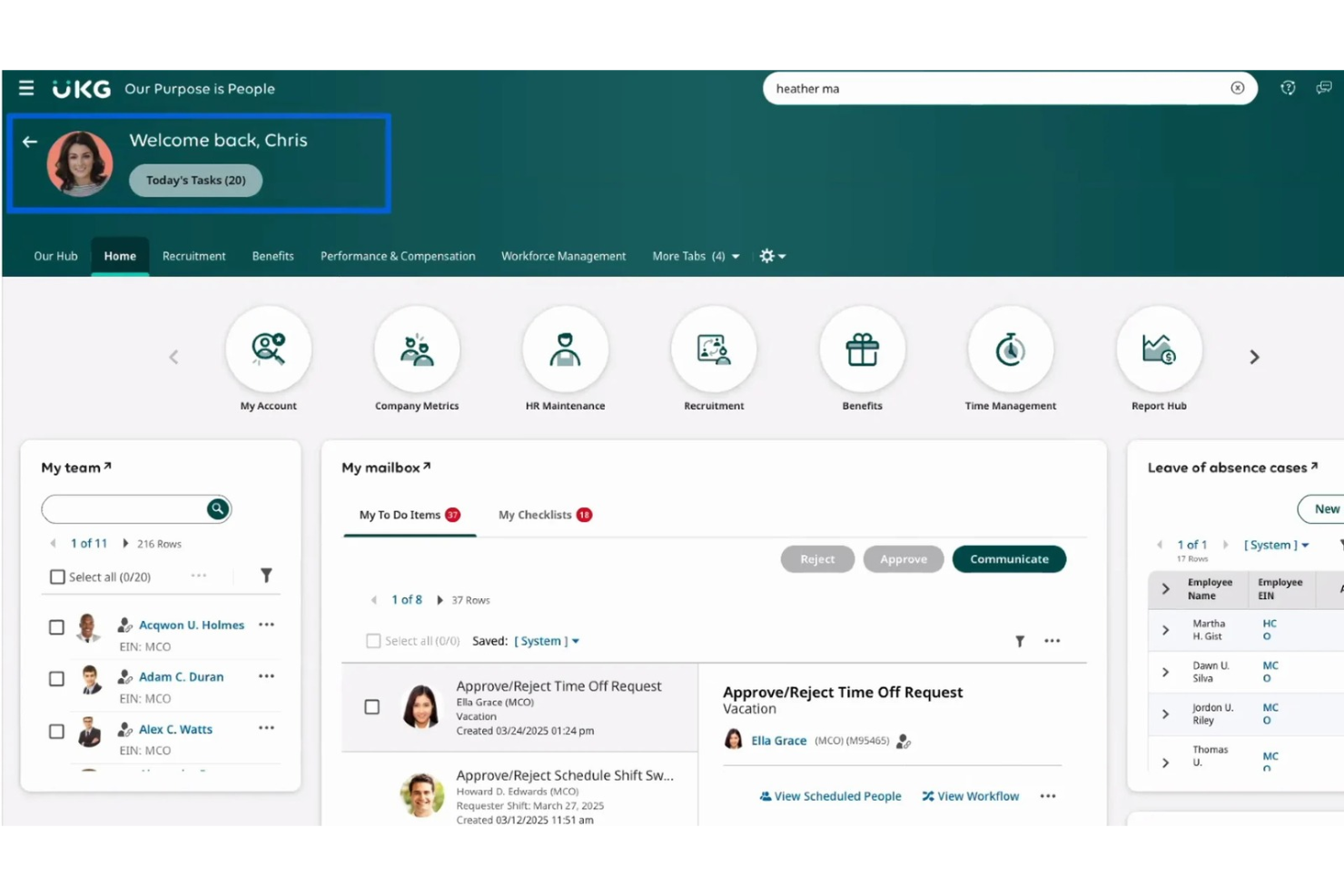
UKG Pro Workforce Management is an enterprise workforce management platform that combines AI-driven scheduling, ML-based demand forecasting, automated time tracking, and real-time compliance monitoring for shift-based operations.
Who Is UKG Pro Workforce Management Best For?
UKG Pro Workforce Management is a strong fit for large, shift-based organizations where multi-layer compliance rules, demand forecasting, and real-time labor visibility are non-negotiable.
Why I Picked UKG Pro Workforce Management
I picked UKG Pro Workforce Management because its compliance depth is genuinely unmatched for shift-heavy operations. The scheduling engine automatically enforces fair-workweek laws, rest periods, overtime caps, and fatigue rules in real time, so non-compliant shifts get flagged before they're ever published. Layered on top of that, ML-based demand forecasting breaks workload projections down into 15-minute intervals, letting the auto-scheduler fill shifts against predicted demand rather than gut instinct.
UKG Pro Workforce Management Key Features
- Employee schedule self-service: Employees can submit availability, pick up open shifts, and swap shifts with coworkers directly from a mobile device.
- UKG Bryte AI insights: Surfaces workforce insights, personalized recommendations, and risk alerts to help managers make intraday staffing decisions.
- Customizable reporting and predictive analytics: Generates configurable reports using people and work data to assess labor costs, productivity, and workforce trends.
- Automated workforce scheduling: Generates employee schedules using demand forecasts, employee availability, skills, and configurable work rules to help managers balance staffing coverage and labor requirements.
UKG Pro Workforce Management Integrations
UKG Pro Workforce Management integrates with Zoom Workplace for Frontline and UKG Shiftboard. APIs are available for custom integrations.
Pros and Cons
Pros:
- Reviewers praise reporting and timecard tools
- Scheduling weighs skills, availability, fatigue, and cost
- 15-minute forecasts match shifts to demand
Cons:
- Reported app login issues hinder schedule access
- WFM module complicates simple scheduling tasks
Rippling
Best for demand-based labor cost planning
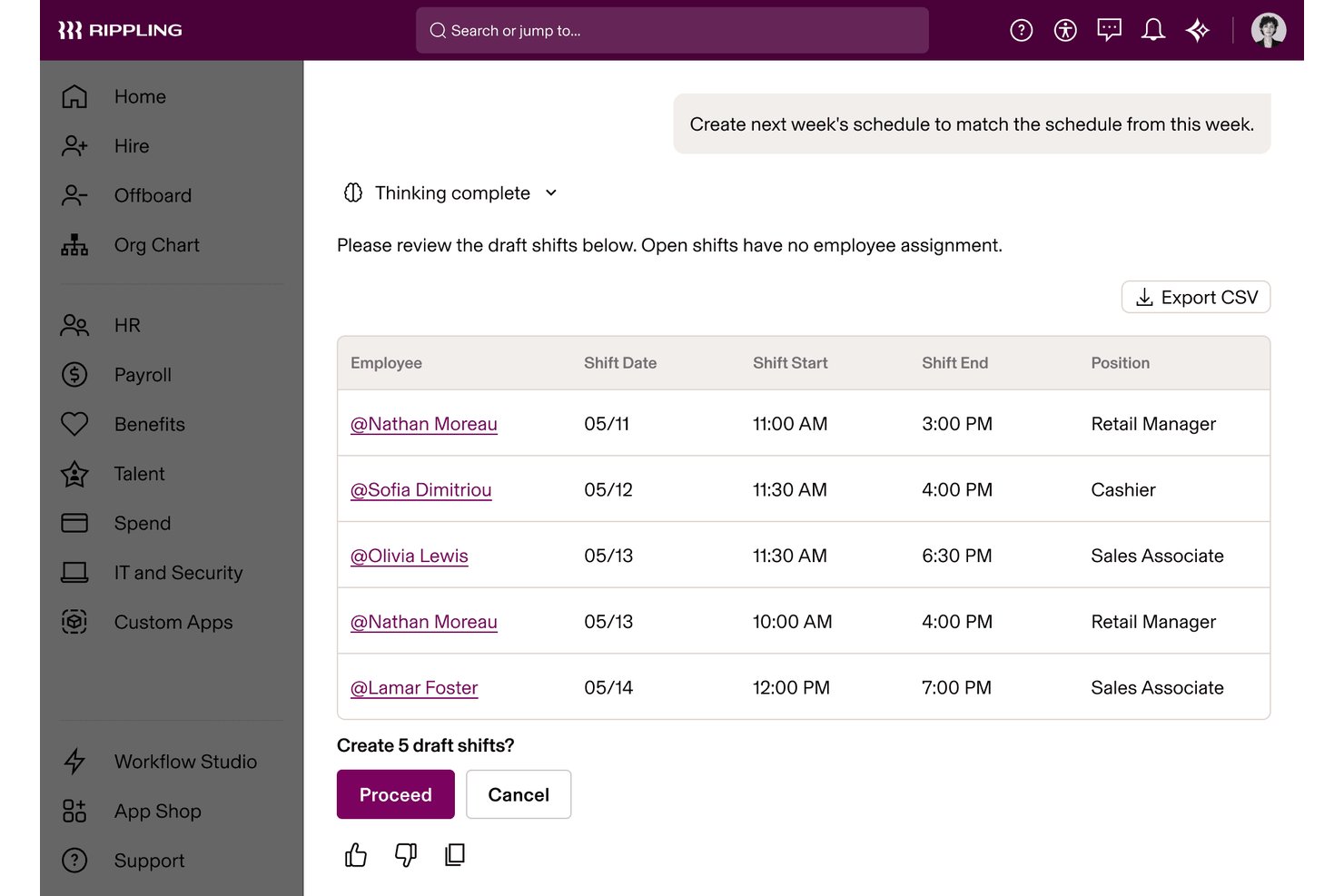
Rippling Scheduling is an AI-driven workforce scheduling tool that builds shift schedules from sales forecasts and employee availability, with built-in labor-cost tracking and compliance checks.
Who Is Rippling Best For?
Rippling Scheduling is a strong fit for operations managers and HR administrators at mid-sized to larger businesses that need scheduling tied directly to payroll, compliance, and labor-cost tracking.
Why I Picked Rippling
I picked Rippling as one of the best because its AI builds schedules directly from sales forecasts, so staffing levels are matched to anticipated demand rather than gut instinct. I especially like that every draft schedule includes real-time labor cost tracking against pay rates and budgets, letting managers catch overtime costs before publishing. Compliance checks for missed breaks and location-specific labor laws run automatically on every schedule.
Rippling Key Features
- Availability and eligibility matching: When building schedules, Rippling pulls each employee's availability, approved time off, certifications, and role eligibility to filter who can fill a shift.
- Custom scheduling policies: Set self-enforcing rules, like certification requirements or hour limits, that apply automatically every time a schedule is generated.
- Shift swap and mobile clock-in: Employees can view shifts, swap with teammates, and clock in directly from the Rippling mobile app.
- Rippling Chat integration: Teams can share published schedules and create communication channels directly from those schedules within the platform.
Rippling Integrations
Rippling integrates with Slack and Zendesk. Its Scheduling API supports custom integrations and requires the Rippling API SKU.
Pros and Cons
Pros:
- Callout suggestions show coverage and cost impacts
- Drafts track labor costs against budgets
- Forecast-based drafts factor availability and certifications
Cons:
- Employee preferences aren't documented as scheduling inputs
- Scheduling requires payroll and time modules
New Product Updates from Rippling

Rippling Launches AI Workforce Scheduling Agent
Rippling introduces Workforce Scheduling Agent, which uses AI, POS sales forecasts, and employee data to generate schedules and recommend staffing adjustments. This helps businesses manage shift coverage and labor costs. For more information, visit Rippling’s official site.
 .
Best for demand-led labor planning
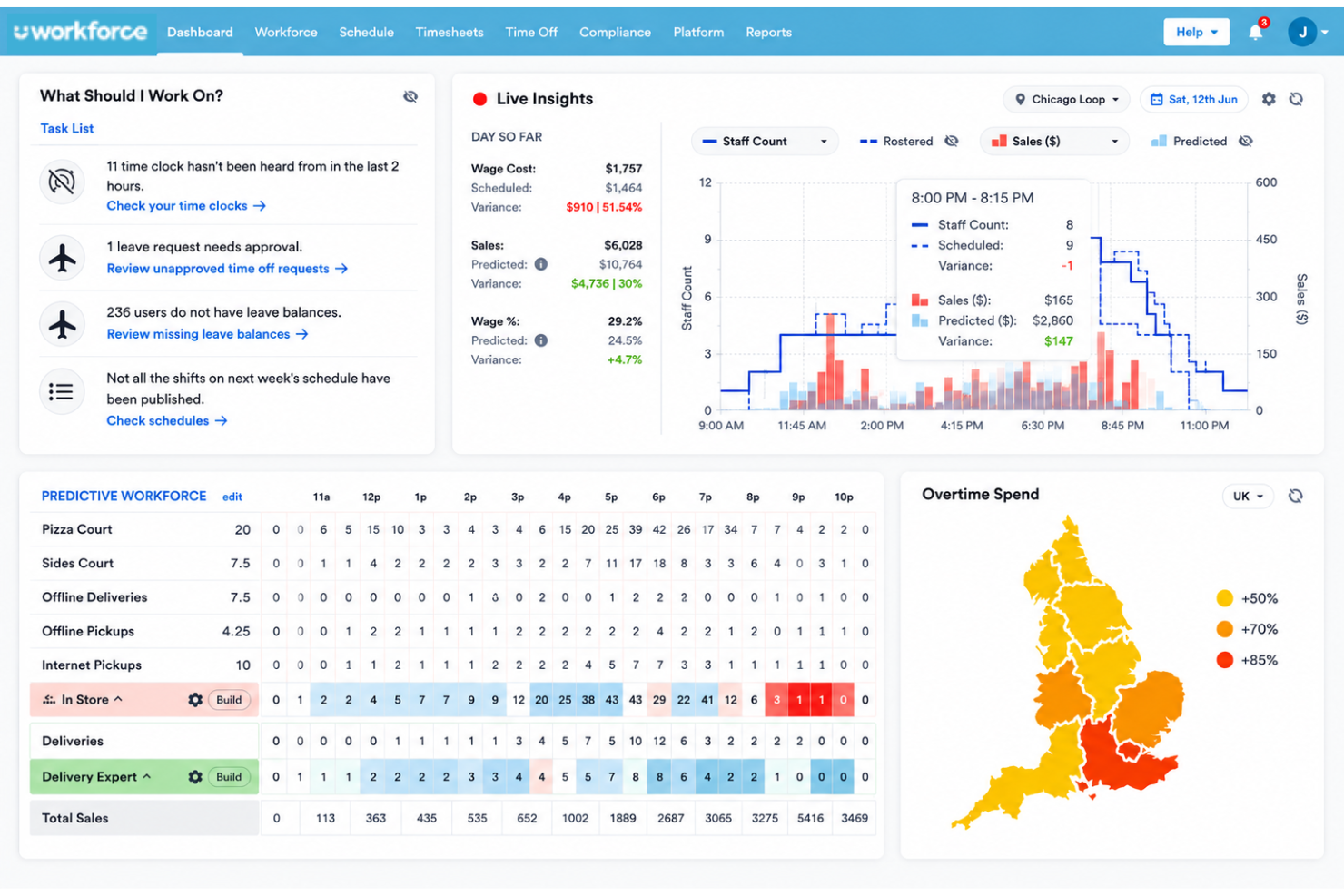
Workforce.com is a scheduling and workforce management platform built for hourly teams, combining AI schedule generation, demand-based labor forecasting, and shift management tools across web and mobile.
Who Is Workforce.com Best For?
Workforce.com is a strong fit for operations managers and team leads overseeing large hourly workforces across multiple locations who need scheduling tied directly to demand data.
Why I Picked Workforce.com
I've included Workforce.com in my top picks because its AI Scheduling Agent builds schedules directly from demand signals, like POS sales data and weather inputs, rather than just availability alone. The Labor Forecasting module uses machine learning to translate that data into staffing ratios, so your schedule reflects what's actually happening in the business. I particularly like that you can set standing validation rules to enforce labor-law compliance automatically across every generated schedule.
Workforce.com Key Features
- Shift bidding: Offer open shifts for employees to bid on directly through the platform.
- Fair Workweek compliance: Automatically apply scheduling rules for advance notice, maximum work hours, and minimum rest between shifts.
- POS sales-data integration: Import POS sales data to inform demand forecasts and feed into schedule generation.
- Mobile shift management: Approve PTO requests, edit shifts, manage shift swaps, and receive overtime and missed-break alerts from the mobile app.
Workforce.com Integrations
Workforce.com integrates with Toast, Square, Shopify, Workday, and UKG. An API is available for custom integrations.
Pros and Cons
Pros:
- Compliance rules check generated schedules automatically
- Templates and copying ease recurring schedule builds
- Sales forecasts shape demand-based staffing schedules
Cons:
- Reviewers request clearer shift-coverage suggestions
- No automatic rebalancing when demand shifts
Rotageek
Best for demand-led staffing across locations
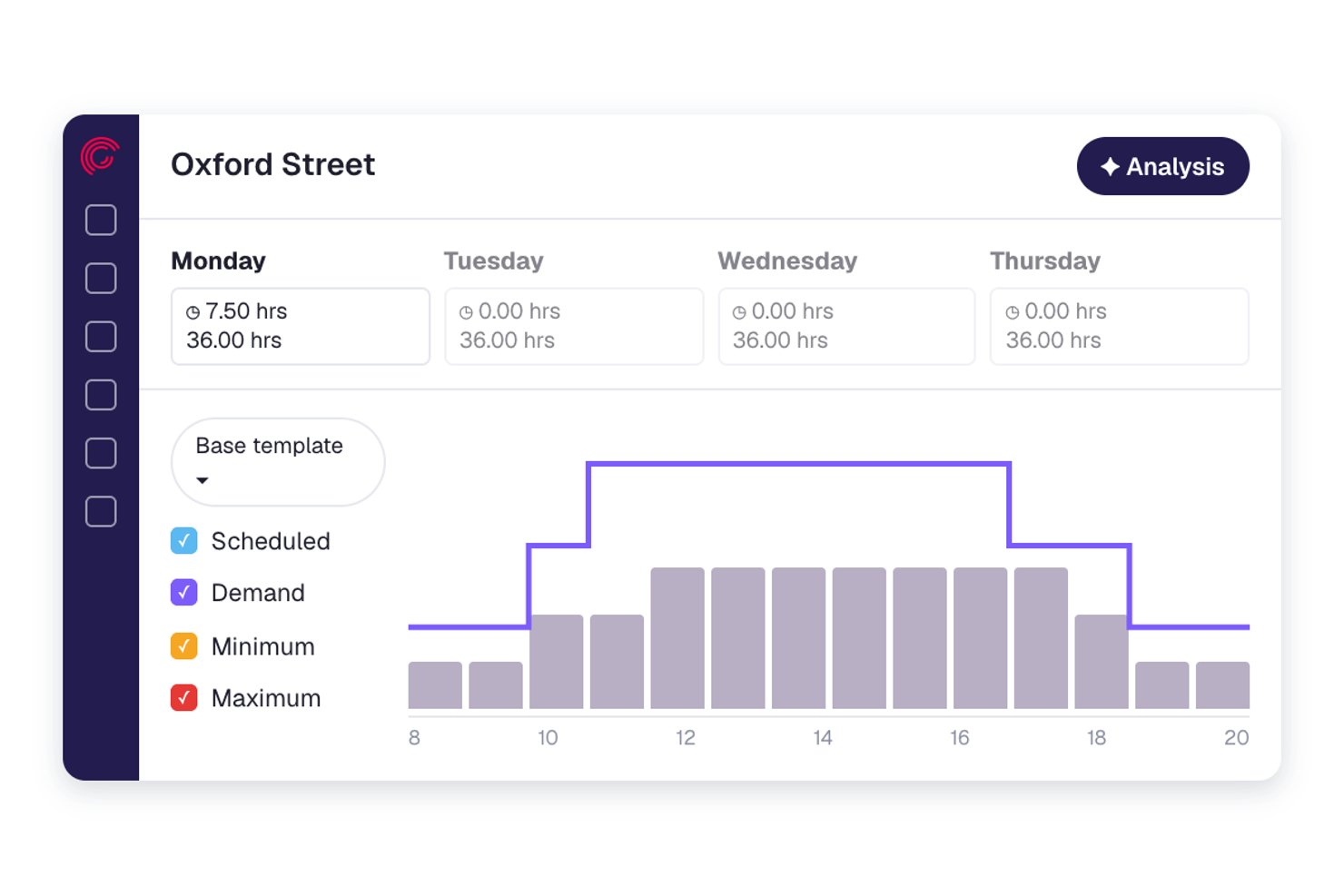
Rotageek is an AI-powered workforce scheduling platform that generates staff rotas automatically from demand forecasts, budgets, contracts, and availability, with added modules for time and attendance, leave management, and labour planning.
Who Is Rotageek Best For?
Rotageek is a strong fit for multi-site operations managers in retail, hospitality, and healthcare who need to match staffing levels directly to forecasted demand across locations.
Why I Picked Rotageek
I picked Rotageek as one of the best because its auto-scheduling engine builds rotas directly from AI-generated demand forecasts, pulling in sales, footfall, and booking data to match staffing levels to actual predicted need across every location. I love that the Forecasting module accounts for local events, weather, and bank holidays, then feeds that signal straight into schedule generation. The fit-to-demand score on every draft schedule makes it easy to spot gaps before publishing.
Rotageek Key Features
- Vacant shift broadcasting: Create and broadcast open shifts to employees at the current location or nearby stores when forecast demand can't be met with the current rota.
- Timesheet approval workflow: Audit and validate worked hours against scheduled shifts, apply pay rules and rounding logic, then bulk-approve timesheet entries for payroll export.
- Employee availability and shift preferences: Let staff set their availability windows and working preferences directly in the app, feeding that data into schedule generation.
- Labour budget visibility: Display labour budgets and real-time budget variance alongside the rota so managers can see cost impact as they build or review schedules.
Rotageek Integrations
Rotageek integrates with IRIS, Zellis, TimeMoto, Grosvenor Technology, and Appointedd. It supports APIs, webhooks, and secure file transfer for custom integrations.
Pros and Cons
Pros:
- Predefined shifts simplify rota creation
- Fit-to-demand scores flag coverage gaps
- Forecasts feed directly into draft rotas
Cons:
- Template-built rotas sometimes need corrections
- Generated drafts still need manager review
Other AI Schedule Generators
Here are a few additional AI schedule generators that didn’t make my shortlist but are still worth checking out:
- When I Work
For day-to-day shift coverage
- Homebase
For hourly teams tying shifts to payroll
- Planday
For multi-site rota and cost planning
- Paycor
For demand-based labor cost control
- Connecteam
For frontline schedules tied to daily work
- Ubeya
For coordinating event and agency crews
- Assembled
For staffing human, BPO, and AI support
- QGenda
For staffing guided by census and acuity
- Shiftbase
For multi-site labour-cost planning
- Fourth
For restaurant demand-to-labor planning


How I Evaluate AI Schedule Generators
To make this list, a tool’s AI needs to handle shift scheduling, like forecasting staffing needs and generating shifts around availability. From there, I evaluate three things. Core functionality carries the most weight, like capturing availability and applying work rules. Then I look at standout features, like mobile shift swapping, and what a tool offers beyond its feature set, like payroll integration.
Core Functionality (Table Stakes For This List)
When I'm selecting tools for my list, I score each one on a scale from 0 (does not offer the functionality) to 5 (excels in this area) for each core functionality listed below. I then convert the total into a percentage to help assess each tool's overall fit, with extra weight on any functionalities I’ve deemed essential.
- Schedule Generation (Essential): I look for automated schedules that weigh demand, availability, and coverage needs, such as building shifts for a busy period.
- Availability & Constraints (Essential): I check whether generation accounts for time off, skills, and preferences so a shift goes to an available, qualified person.
- Conflict Resolution: I assess how clearly tools flag overlaps or coverage gaps and whether they suggest practical fixes, such as a qualified replacement.
- Demand Forecasting: I look for forecasts based on historical or current demand that help teams plan staffing for busy and quiet periods.
- Schedule Rebalancing: I consider how tools handle a late absence or demand change, including whether they can adjust affected shifts without rebuilding the plan.
- Rules & Compliance: I check how automatically tools apply configurable rules, such as rest periods, shift limits, and fair distribution of hours.
Once I have a list of tools that meet the criteria, I consider what sets each platform apart.
Differentiating Factors (What Sets Vendors Apart)
Here's how I compare and contrast different vendors:
Standout Features
I look for mobile shift swapping that lets employees trade shifts without waiting on a manager for every change. Real-time labor cost tracking also matters. Tools like Deputy and Workforce.com update projected costs as you build shifts, which helps you catch budget overruns before a schedule goes live. I also evaluate multi-location scheduling, specifically whether one dashboard can handle coverage rules that differ by site.
Beyond Features
I check whether a tool connects to your existing payroll and time-tracking stack, since manual data transfers between scheduling and payroll create errors that hit every pay cycle. Transparency in AI decisions also matters. If a supervisor can't explain why someone got a weekend shift, trust breaks down fast, so I look for audit trails or shift-assignment rationale. I also evaluate how vendors handle employee data privacy, especially GPS clock-in data and forecast modeling built on historical availability.
How to Choose AI Schedule Generator
Choose a schedule generator by testing how its proposed shifts handle your demand, staff constraints, workplace rules, and location-specific needs.
| If your priority is… | Look for… |
|---|---|
| Fewer availability conflicts | A trial schedule that respects time off, skills, and preferences |
| Coverage that matches demand | A forecast you can compare with historical staffing needs |
| Consistent rule application | A clear way to configure and review work rules |
| Planning across locations | A schedule view that lets you check site-specific coverage and costs |
How to Vet Your Shortlist
- Run a schedule trial: Provide each vendor the same four-week sample with demand, availability, time off, and required skills; note any constraint violations.
- Test a late absence: During a trial, remove one scheduled employee and record which shifts change and any coverage gaps left unresolved.
- Request a rule document: Ask for a written list of configurable work rules, then compare it with your team’s applicable policies and scheduling limits.
- Trace one assignment: Request a sample audit record or assignment explanation, then check how it accounts for availability, preferences, and location.
- Decision filter: Use the pilot schedule to choose between centralized, forecast-led planning and greater local manager control; favor the model that fits your need for consistent coverage or site-level exceptions.
What Is an AI Schedule Generator?
An AI schedule generator is workforce software that creates employee shift plans based on demand forecasts, staff availability, and workplace rules. It can help managers plan coverage while accounting for time off, skills, and scheduling constraints. Unlike personal calendar or project-planning tools, it focuses on assigning staff to shifts.
Features
Here are the main features I look for in an AI schedule generator:
- Schedule generation: Builds employee shifts around forecast demand, coverage needs, and staff availability. Managers can review the proposed plan and adjust assignments before publishing.
- Availability and constraints: Accounts for employee availability, time off, skills, and preferences when assigning shifts. This helps prevent assigning someone to a shift they can’t work or aren’t qualified to cover.
- Demand forecasting: Uses historical or current demand data to estimate staffing needs for different periods. Managers can compare forecasts with planned coverage and adjust staffing for busy or quiet times.
- Conflict detection: Flags overlaps, coverage gaps, or other scheduling problems. Some tools also suggest qualified replacements, giving managers a starting point when a shift needs coverage.
- Rules and compliance: Applies configurable workplace rules, such as rest periods, shift limits, and fair distribution of hours. Managers can review how those rules affect the schedule before it’s finalized.
- Schedule rebalancing: Adjusts affected shifts when an employee calls out or demand changes. This can help managers see which assignments need attention without rebuilding the full schedule.
- Shift swapping: Lets employees request or arrange shift trades through the scheduling tool. Approval controls can help managers check that a swap preserves coverage and follows workplace rules.
- Labor cost tracking: Shows projected labor costs as managers create or revise shifts. This helps them compare a schedule with budget targets before publishing it.
Benefits
Here are a few common benefits AI schedule generators can offer:
- Demand-aligned coverage: Forecasting and schedule generation help match staffing levels to expected demand.
- Fewer availability conflicts: Availability, time-off, skill, and preference rules guide shift assignments.
- More consistent rule application: Configurable work rules can account for rest periods, shift limits, and hour distribution.
- Faster response to changes: Schedule rebalancing and conflict alerts help managers address absences or coverage gaps.
- Clearer labor costs: Projected labor cost tracking lets managers review budget impact while building schedules.
- More employee flexibility: Shift-swapping features let employees request trades while managers check coverage and rules.
- Better multi-location visibility: Shared scheduling views help managers review coverage and site-specific requirements across locations.
Pricing
Pricing varies by team size, features, and add-ons. Here are typical price ranges for AI schedule generators:
Plan Comparison Table for AI Schedule Generators
| Plan Type | Average Price | Common Features |
|---|---|---|
| Free Plan | $0 | Basic schedule creation, limited team members, and manual shift adjustments. |
| Personal Plan | $2–$5/user/month | Availability settings, schedule access, and shift notifications. |
| Business Plan | $5–$15/user/month | AI-assisted scheduling, demand forecasts, labor cost tracking, and shift swapping. |
| Enterprise Plan | $15–$30/user/month or custom | Multi-location scheduling, configurable work rules, advanced reporting, and dedicated support. |
FAQs
Here are answers to common questions about AI schedule generators:
Does an AI schedule generator replace a manager?
No, an AI schedule generator should support manager decisions, not own them. It can propose assignments based on configured demand, availability, and rules, but managers still need to review exceptions. For example, a forecast might miss a product launch, planned maintenance window, or expected surge in support tickets. Keep approval with someone who understands those changes. Check whether the vendor lets you edit schedules and records changes, so your team can address unusual cases without accepting an unsuitable recommendation.
What data does an AI schedule generator need?
Most tools need staffing demand by time period, employee availability, time off, skills or qualifications, and scheduling rules. Some products can also use historical demand or sales data to forecast required coverage; others rely on information you enter manually. Start with a representative sample and confirm how the system handles missing or outdated records. Ask whether it imports data from your existing tools, how often it refreshes, and which fields it requires before you rely on its recommendations.
Can AI-generated schedules be fair?
AI scheduling can support fairer shift distribution, but it doesn’t guarantee it. Configure rules for hour limits, rest periods, and preferences, then check how desirable and less desirable shifts are distributed over time. A schedule that meets coverage needs can still assign evenings or weekends to the same people repeatedly. Ask the vendor what factors influence assignments and whether you can review assignment history or override recommendations. During a pilot, compare several scheduling cycles and gather employee feedback before expanding use.