

10 Best AI Backlog Management Software in 2026

Best AI Backlog Management Software Shortlist


AI backlog management software uses machine learning to help you organize, prioritize, and refine your project backlog so you can focus on delivering real value. If you’re struggling to keep up with shifting priorities, overflowing tasks, and complex project threads, these tools offer clarity and control, even when the pressure is on.
This list will help you compare the top solutions, understand where AI adds the most impact, and choose the right platform to keep your backlog under control—no matter how fast things change.
Why Trust Our Software Recommendations
Our team has been testing and reviewing software since 2012. As project managers ourselves, we know how difficult—and important—it is to choose the right software.
For this guide, we evaluated tools using hands-on testing and independent research, scoring tools using our selection criteria. We also draw on insights from industry thought leaders and practicing project management experts.
Our reviews reflect our human editorial judgment, not a sales pitch.
Expert reviewers:
AI Backlog Management Software Comparison Table
This comparison table summarizes pricing details for my AI backlog management software selections.
| Tool | Best For | Trial Info | Price | ||
|---|---|---|---|---|---|
| 1 | Best for cross-functional collaboration | Free plan + 14-day free trial + free demo available | From $8.50/user/month (billed annually) | Website | |
| 2 | Best for lightning-fast issue tracking | Free plan available | From $10/user/month (billed annually) | Website | |
| 3 | Best for visual story mapping | 14-day free trial + free demo available | From $9/user/month (billed annually) | Website | |
| 4 | Best native GitHub integration | Free plan + 14-day free trial + free demo available | From $4.99/user/month (billed annually) | Website | |
| 5 | Best for collecting user feedback | 14-day free trial + free demo available | Pricing upon request | Website | |
| 6 | Best for roadmap visualization | 30-day free trial + free demo available | From $9/user/month | Website | |
| 7 | Best for feature prioritization | Free demo available | Pricing upon request | Website | |
| 8 | Best built-in AI for task insights | Free plan available | From $9/user/month | Website | |
| 9 | Best for custom workflow automation | 7-day free trial + free plan available | From $7.91/user/month | Website | |
| 10 | Best integration with Microsoft ecosystem | Free plan available | From $6/user/month | Website |
Best AI Backlog Management Software Reviews
Below are my detailed summaries of the best AI backlog management software that made it onto my shortlist. My reviews offer a detailed look at the features, capabilities, and integrations of each platform to help you find the best one for you.

Shortcut
Best for cross-functional collaboration
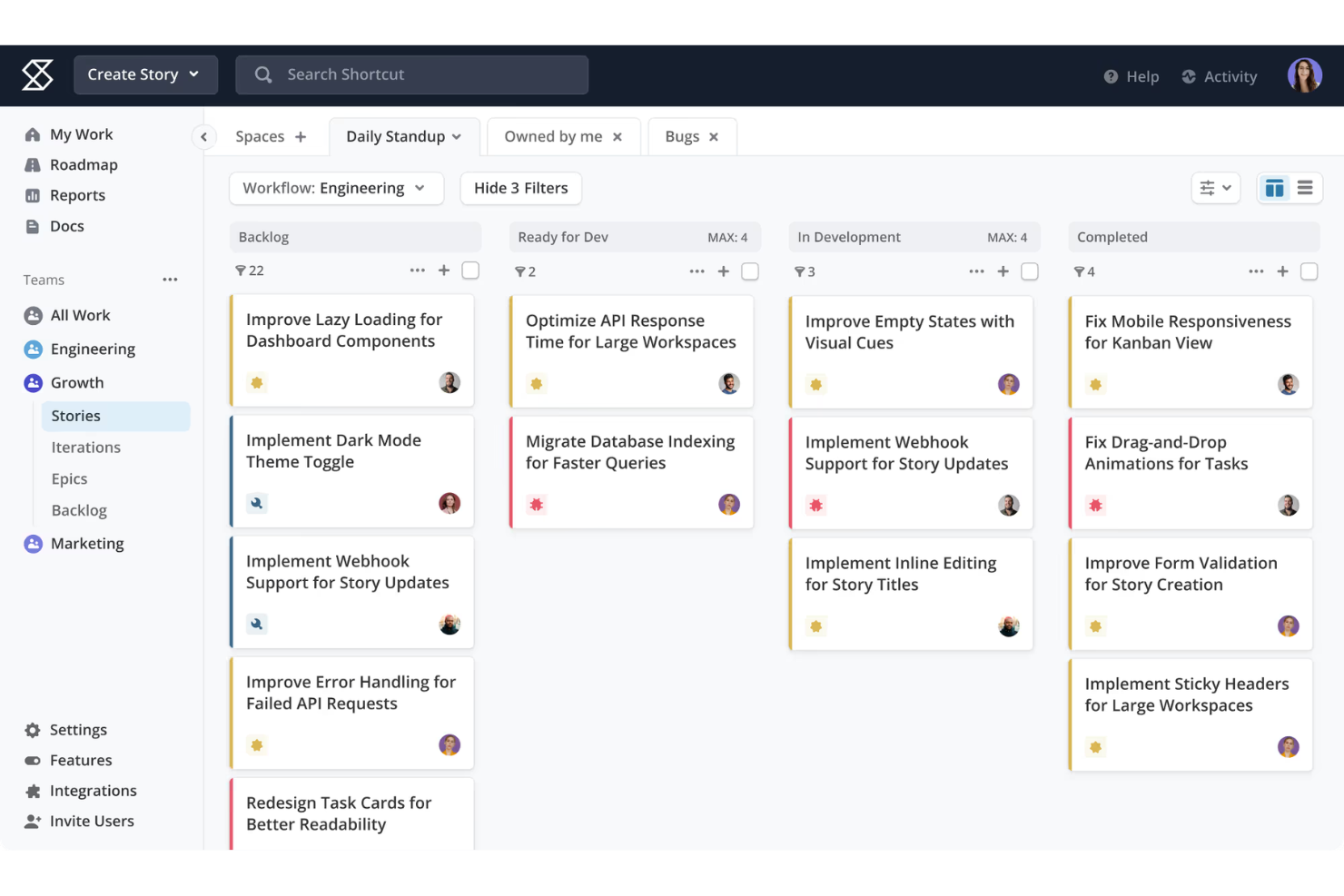
Shortcut is a project management platform that organizes work across stories, epics, and milestones, with shared roadmaps and workflow views designed to keep product, engineering, and design teams aligned.
Who Is Shortcut Best For?
Shortcut is a natural fit for mid-sized product teams where engineers, designers, and product managers share the same backlog and roadmap.
Why I Picked Shortcut
I've included Shortcut in my top picks because it's the only tool where product managers, engineers, and designers genuinely work inside the same system without workarounds. Stories connect directly to epics and milestones, so my team can see how individual backlog items tie to a broader release without switching views.
I also rely on its Objectives feature to link project work to company goals, which keeps cross-functional priorities visible at every level of the backlog.
Shortcut Key Features
- Iterations: Time-box work into weekly sprints to prioritize and track what your team needs to focus on.
- Work in progress limits: Set story limits per workflow state to prevent tasks from stacking up across the backlog.
- Custom fields: Add structured metadata to stories to enforce a consistent intake and triage process.
- Korey AI agent: Scope tasks, generate specs, and create stories directly from a chat interface inside Shortcut.
Shortcut Integrations
Shortcut offers 50+ native integrations, including GitHub, GitLab, Slack, Figma, Sentry, Notion, Miro, Google Drive, Zendesk, and Productboard. It also connects with Zapier and provides an API for custom integrations.
Pros and Cons
Pros:
- Built-in docs connect to tracked stories
- Shared roadmaps span multiple team workspaces
- Stories link directly to epics and milestones
Cons:
- Limited fit for agency-style multi-client work
- Reporting options lack advanced customization

Linear
Best for lightning-fast issue tracking
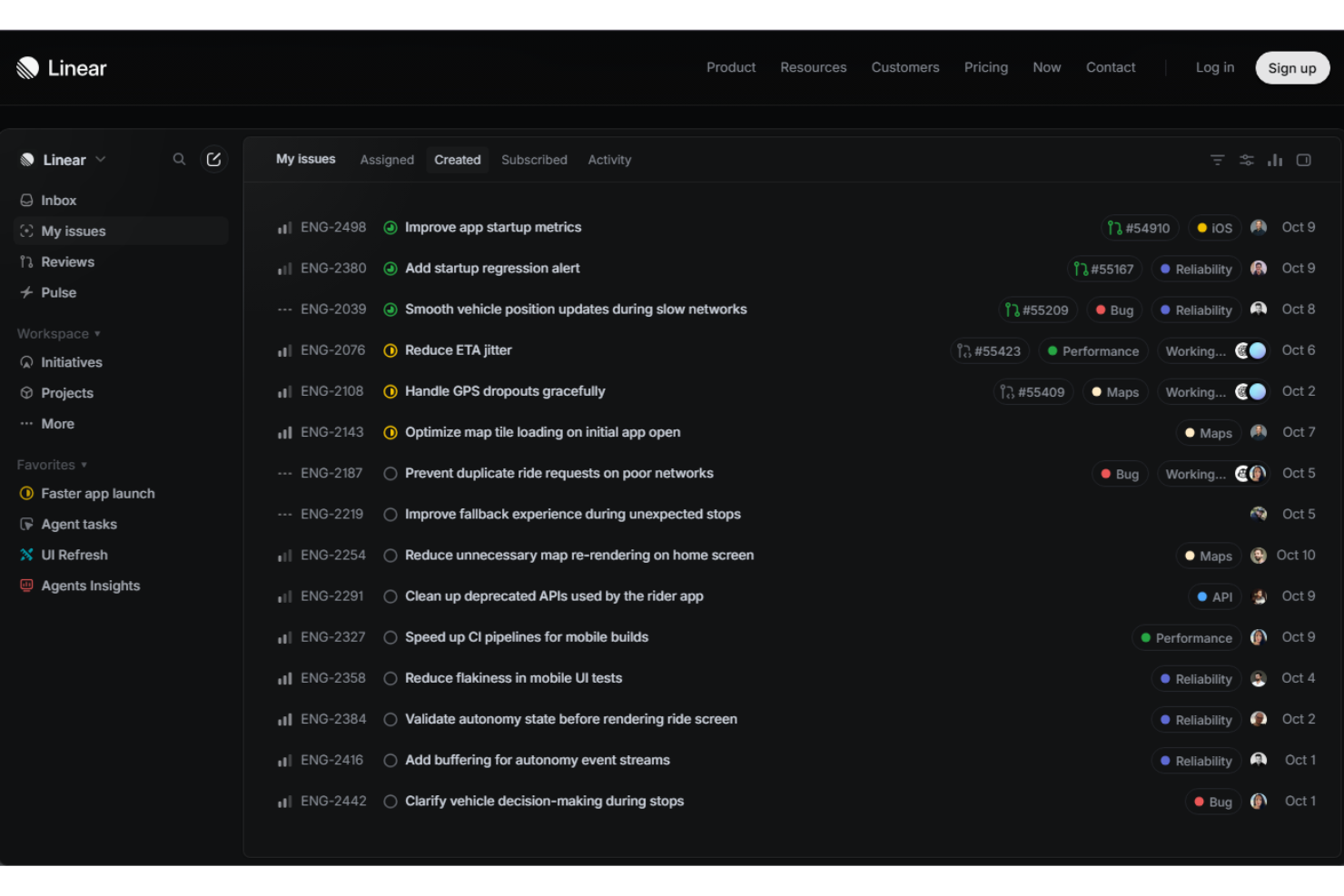
Linear is a project and issue tracking platform built for software teams, combining AI-assisted triage, cycle planning, and backlog prioritization in a minimal, keyboard-first interface.
Who Is Linear Best For?
Linear is a strong fit for fast-moving product and engineering teams at startups and scale-ups that prioritize speed over process overhead.
Why I Picked Linear
I've included Linear in my top picks because no other tool in this space matches its raw speed for creating and triaging issues. The command palette lets me file a detailed issue in under 10 seconds without touching a mouse. Linear's AI also drafts issue descriptions and auto-suggests labels during triage, so my team spends less time writing tickets and more time closing them.
The triage inbox keeps incoming requests separate from active cycles, which keeps the backlog clean without manual effort.
Linear Key Features
- Cycles: Time-box work into fixed iterations with automatic carry-over of incomplete issues to the next cycle.
- Sub-issues: Break parent issues into smaller child tasks, keeping complex backlog items organized within a single thread.
- Project milestones: Group issues under milestone markers to track progress toward a specific release or goal.
- Git automation: Automatically update issue status when a linked pull request is merged, opened, or closed.
Linear Integrations
Linear offers 250+ integrations through its integration directory, including GitHub, GitLab, Slack, Figma, Notion, Intercom, Zendesk, Sentry, Salesforce, and Google Sheets. It also connects with Zapier and provides an API for custom integrations.
Pros and Cons
Pros:
- Code commits automatically close connected tasks
- Fixed column rules block process bikeshedding
- Keyboard-driven navigation speeds up issue triage
Cons:
- No native time tracking for backlog items
- Issues only support a single assignee per task

Best for visual story mapping

StoriesOnBoard is a product management platform built around user story mapping, with AI-assisted backlog building, release planning, prioritization frameworks, and roadmap creation.
Who Is StoriesOnBoard Best For?
StoriesOnBoard is a strong fit for product managers and owners who structure their backlog around user journeys rather than task lists.
Why I Picked StoriesOnBoard
StoriesOnBoard earns its spot on my shortlist because the 2D story map is where your backlog actually lives, not just a visualization layered on top of it. I can map user goals across the horizontal axis and break them into individual stories on the vertical axis, so scope gaps show up visually before any work starts. The AI layer builds on that structure directly, generating user stories and acceptance criteria from the map context rather than a blank prompt.
StoriesOnBoard Key Features
- Prioritization frameworks: Apply MoSCoW or Kano scoring to rank stories by business value and effort.
- Release planning: Schedule stories into releases based on priority, estimation, and team capacity.
- Reusable story map templates: Save maps as templates to give repeating projects a pre-structured starting point.
- Feedback management: Collect user insights from email, Slack, or Intercom and link them directly to backlog items.
StoriesOnBoard Integrations
StoriesOnBoard offers native two-way sync integrations with Jira, Azure DevOps, Trello, GitHub, GitHub Enterprise, and Pivotal Tracker, plus connections with Slack, Figma, Confluence, and Notion. It also connects with Zapier and provides an API for custom integrations.
Pros and Cons
Pros:
- Built-in persona filtering on story maps
- Two-way sync with major issue trackers
- AI generates stories from the map context
Cons:
- Narrower scope than all-in-one platforms
- Limited real-time multi-user editing

Zenhub
Best native GitHub integration
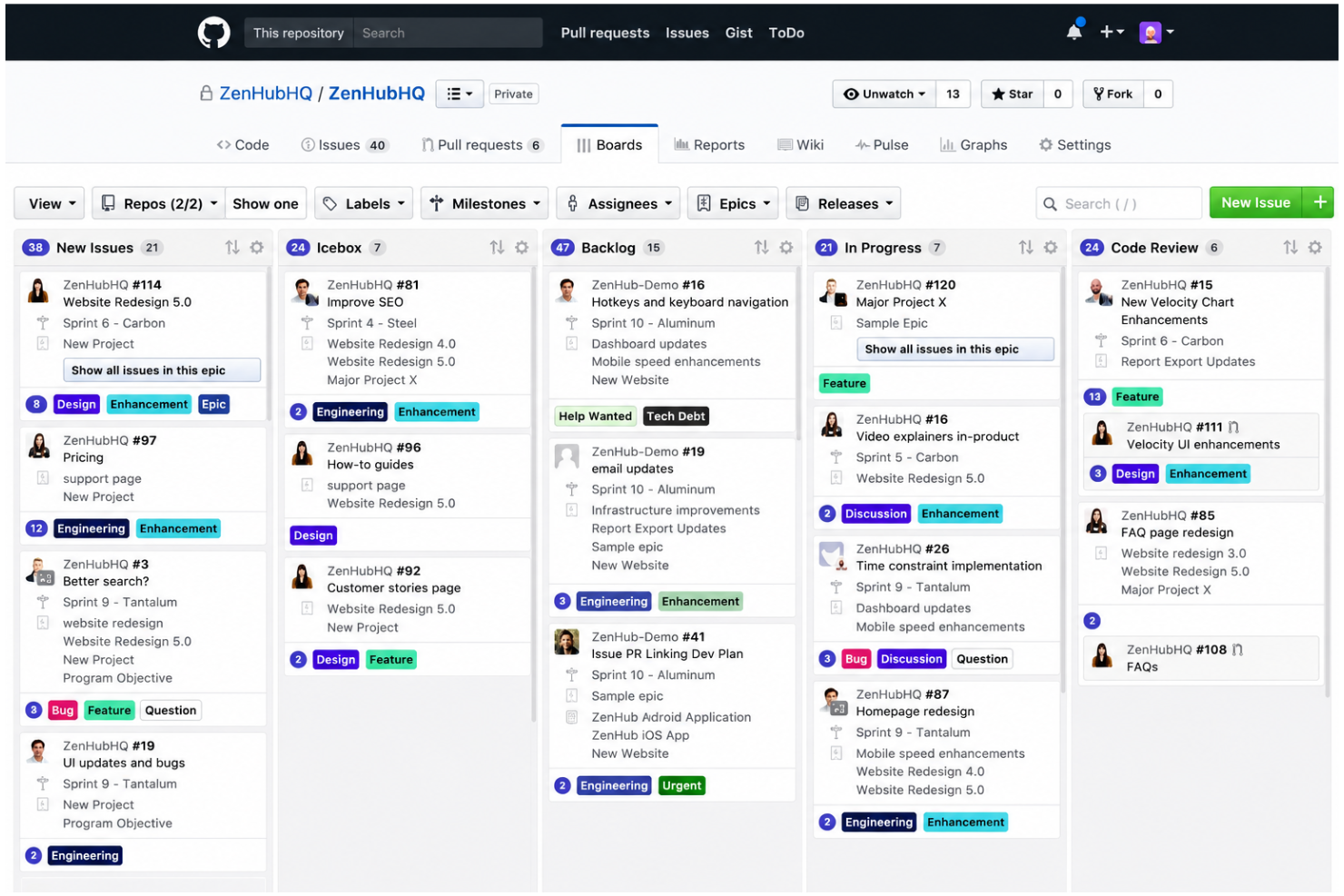
Zenhub is a project management platform built natively inside GitHub, combining sprint planning, backlog management, roadmapping, and AI-powered issue prioritization in a single workspace.
Who Is Zenhub Best For?
Zenhub is a natural fit for engineering-led teams that live in GitHub and want backlog management and sprint planning without switching to a separate tool.
Why I Picked Zenhub
Zenhub earns its spot on my shortlist because it's the only backlog management tool that runs directly inside GitHub, not just alongside it. I like that GitHub issues, pull requests, and sprint boards are all one object, so there's no syncing lag or duplicate data.
The AI-assisted issue labelling and sprint planning mean my team spends less time triaging and more time building. That two-way GitHub connection is something tools like Jira simply can't replicate natively.
Zenhub Key Features
- Multi-repo boards: Combine issues from multiple GitHub repositories into a single unified sprint board.
- Epics: Group related GitHub issues into larger bodies of work to track progress across a release or initiative.
- Roadmaps: Visualize epic timelines and dependencies across teams on a shared, drag-and-drop roadmap.
- Burndown reports: Track sprint progress in real time with automatically generated burndown and velocity charts.
Zenhub Integrations
Zenhub integrates natively with GitHub, Slack, Notion, Figma, Miro, and Loom. It also offers a GraphQL API for custom integrations, webhook support for real-time event notifications, and an MCP server for connecting with AI clients like Claude and Cursor.
Pros and Cons
Pros:
- Built-in planning poker for sprint estimation
- Multi-repo boards consolidate cross-repo work
- AI labels auto-suggest issue categorization
Cons:
- Non-technical work fits poorly in Zenhub
- High cross repository overhead
ProdPad
Best for collecting user feedback
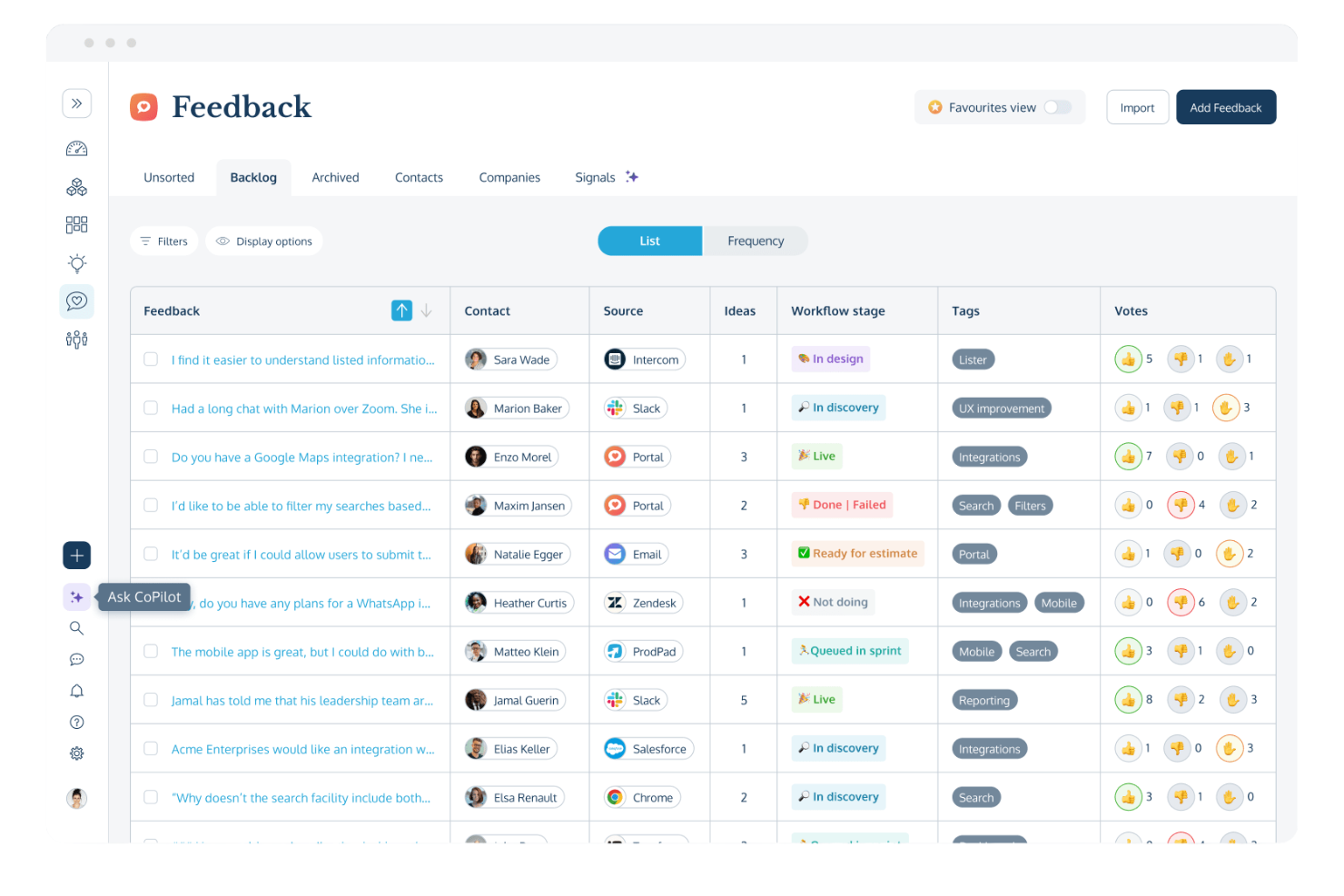
ProdPad is a product management platform built around continuous discovery, combining a feedback inbox, idea management, and a lean roadmap to connect customer insights directly to backlog decisions.
Who Is ProdPad Best For?
ProdPad suits product managers at mid-sized SaaS companies who need a structured way to capture, triage, and act on a continuous stream of customer feedback.
Why I Picked ProdPad
I picked ProdPad as one of the best because its feedback-to-backlog pipeline is the tightest I've seen in this category. Every idea in the backlog links directly to the customer feedback that supports it, so when a stakeholder challenges a priority, the evidence is already attached.
I also like Signals, ProdPad's AI feature that automatically surfaces themes across your feedback inbox, so you can spot patterns in minutes rather than spending hours tagging and sorting manually.
ProdPad Key Features
- CoPilot PM: An AI assistant that drafts specs from linked feedback, summarizes customer requests, and suggests initiatives using your team's actual product data.
- Now-Next-Later roadmap: A date-free roadmap format that lets you publish separate views for different audiences from one source of truth.
- OKRs and objectives: Link backlog initiatives directly to business objectives, set target outcomes before building, and track actuals after shipping.
- Workflow stages: Define custom stages that move ideas from raw to ready, with scoring models that standardize how your team prioritizes across the backlog.
ProdPad Integrations
ProdPad offers native integrations with Jira, Azure DevOps, GitHub, Linear, Trello, Slack, Microsoft Teams, Salesforce, Intercom, and Confluence. It also connects with Zapier and provides an API with custom webhooks for building custom integrations.
Pros and Cons
Pros:
- Lean roadmaps support outcome-focused plans
- Links customer feedback directly to decisions
- Continuous discovery framework utilization
Cons:
- Standard charts lack timeline-style views
- Lacks a native changelog feature

Aha!
Best for roadmap visualization

Aha! is a product management platform that covers the full delivery cycle, from idea management and customer discovery to feature prioritization, visual roadmapping, and prototyping.
Who Is Aha! Best For?
Aha! suits enterprise product teams managing multiple product lines, where different stakeholders need tailored views of the same roadmap.
Why I Picked Aha!
I picked Aha! as one of the best because its roadmap visualization depth is genuinely unmatched. You can build portfolio roadmaps that display plans across multiple products on a single timeline, then publish separate views filtered by team, initiative, or release for different audiences. I also like the strategic roadmap layer, which ties high-level initiatives directly to features on the same visual timeline so nothing floats without context.
Aha! Key Features
- Ideas portal: Collect and centralize feature requests from customers and internal teams in a dedicated submission portal.
- Prioritization scorecards: Score backlog items against custom criteria like business value, effort, and strategic fit.
- Capacity planning: Assign estimates to features and track team workload against scheduled releases.
- Aha! Notebooks: Create shared documents for product specs, meeting notes, and planning briefs directly inside the platform.
Aha! Integrations
Aha! offers 65+ native integrations, including Jira, Azure DevOps, GitHub, GitLab, Salesforce, Slack, Microsoft Teams, Zendesk, Figma, and Confluence. It also connects with Zapier and provides an API for custom integrations.
Pros and Cons
Pros:
- Audience-specific roadmap views per stakeholder group
- Custom scoring formulas for value vs. effort
- Visualized delivery pipeline mapping
Cons:
- Requires manual environment configuration
- Per-maker pricing scales up quickly with larger teams

Best for feature prioritization

Productboard is a product management platform that centralizes customer feedback, prioritizes feature ideas against business objectives, and maps them to roadmaps and delivery-ready specs.
Who Is Productboard Best For?
Productboard is a strong fit for product managers at mid-size to enterprise SaaS companies who own the backlog and need to justify prioritization decisions to stakeholders.
Why I Picked Productboard
Productboard earns its spot on my shortlist because its feature prioritization model is built directly on top of customer signal data, not gut instinct. I like that its AI-powered feedback categorization automatically links incoming insights to related feature ideas in the backlog, so when I'm scoring what to build next, each item already has evidence behind it.
On top of that, custom prioritization formulas let me weight factors like revenue impact, strategic fit, and effort into a single, auditable score.
Productboard Key Features
- Collaborative docs: Write and share product specs directly inside Productboard, with context from linked feature ideas and feedback.
- Dependency tracking: Map relationships between feature ideas to surface blockers before work reaches engineering.
- Product portal: Give stakeholders and customers a dedicated space to submit feature requests and vote on ideas.
- Release planning: Group features into release milestones and track delivery progress against roadmap commitments.
Productboard Integrations
Productboard offers native integrations with Jira, Azure DevOps, GitHub, Trello, Shortcut, Slack, Microsoft Teams, Salesforce, Zendesk, and Intercom, along with design tools like Figma and Miro and analytics platforms like Amplitude and Mixpanel. It also connects with Zapier and provides an API for custom integrations.
Pros and Cons
Pros:
- Supports granular resource allocation
- Strategic initiative dependency mapping
- Links customer feedback directly to feature ideas
Cons:
- Significant administrative infrastructure needed
- Jira sync requires ongoing manual discipline
Best built-in AI for task insights
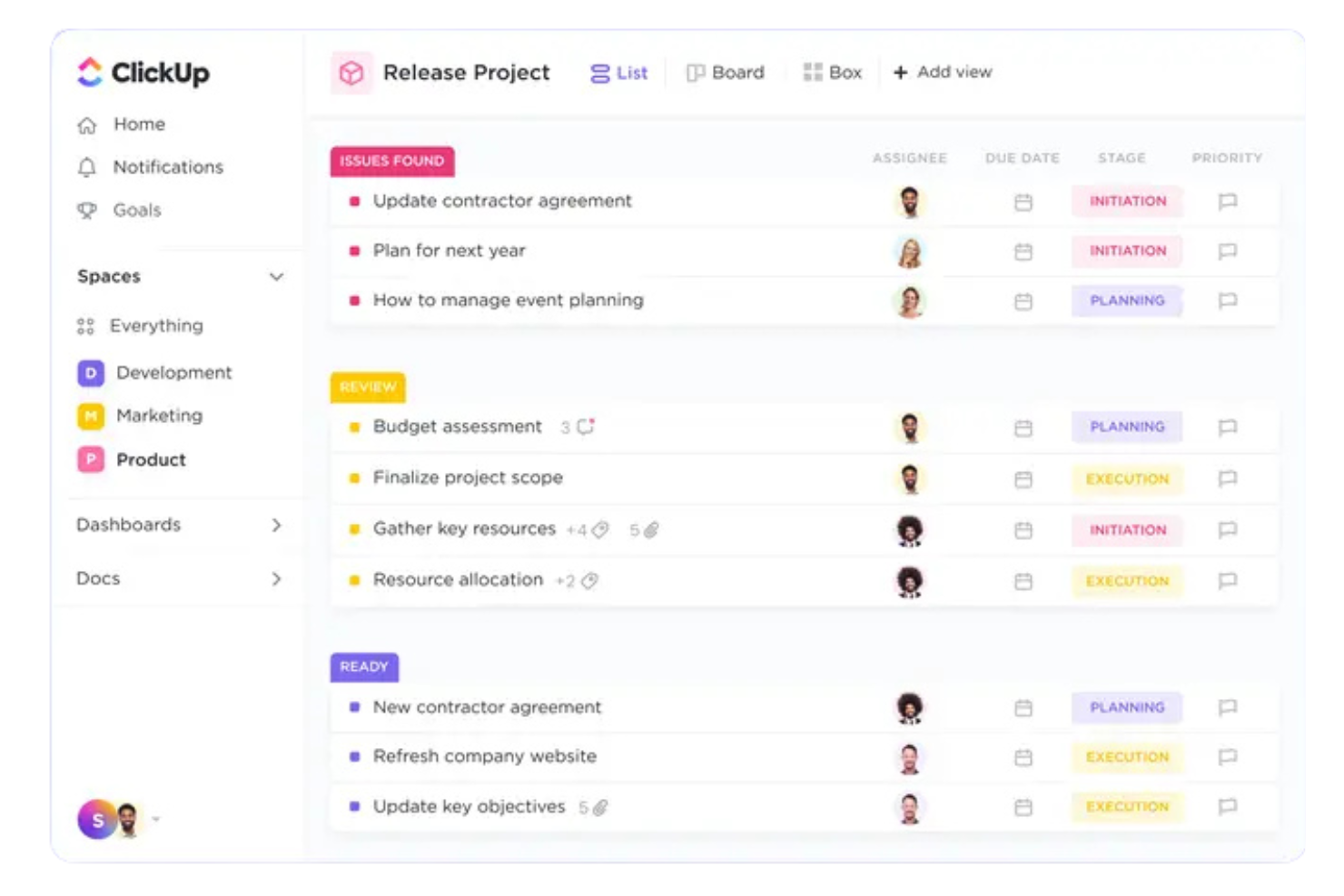
ClickUp Brain is an AI layer built into the ClickUp platform that generates task summaries, surfaces backlog insights, answers questions about project status, and automates updates across tasks and docs.
Who Is ClickUp Brain Best For?
ClickUp Brain is a strong fit for product and engineering teams managing large backlogs inside ClickUp who want AI-driven task context without adopting a separate tool.
Why I Picked ClickUp Brain
I've included ClickUp Brain in my top picks because it genuinely stands out as the best built-in AI for task insights. I like how its ambient intelligence feature surfaces related tasks and context before you ask, which makes backlog prioritization feel proactive rather than reactive.
The deep search capability lets me query across my workspace, connected apps, and the web in one prompt, and I can visualize sprint velocity data as rendered charts without leaving ClickUp.
ClickUp Brain Key Features
- AI tasks: Structured work units with state, owners, and dependencies that carry forward as your backlog evolves.
- Goals: Cascading objectives mapped down to live execution across tasks and sprints.
- AI channels: Topic-scoped streams with retained conversational memory for async backlog discussions.
- Persistent memory: Brain retains your role, workflows, and preferences and applies them automatically across sessions.
ClickUp Brain Integrations
ClickUp offers 1,000+ integrations through its native library and App Center, including Slack, GitHub, GitLab, Bitbucket, Jira, Microsoft Teams, Google Drive, HubSpot, Figma, and Sentry. It also connects with Zapier and provides an API for custom integrations.
Pros and Cons
Pros:
- Auto-generates subtasks from task descriptions
- Switch between multiple LLMs per task
- Natural language queries against real project data
Cons:
- Cannot upload external files for analysis
- AI knowledge limited to ClickUp workspace data

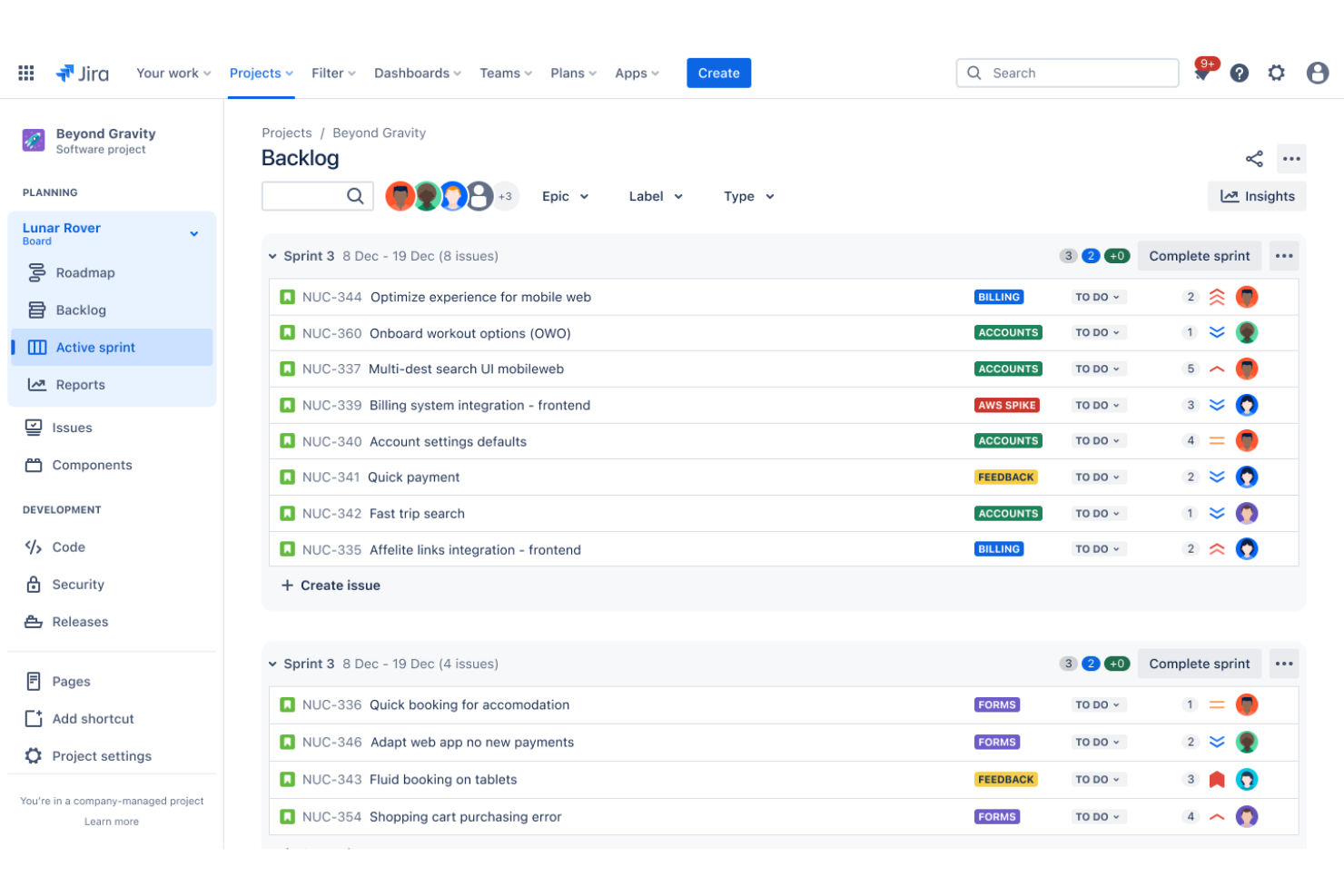
Jira is an agile project management platform built by Atlassian that combines issue tracking, sprint planning, backlog management, and AI-assisted workflow automation across Scrum and Kanban environments.
Who Is JIRA Best For?
Jira is a strong fit for software engineering and product teams at mid-size to enterprise companies that run agile delivery at scale.
Why I Picked JIRA
Jira earns its spot on my shortlist because of how far its workflow automation has come with Rovo AI built in. I like that you can use natural language to create automation rules directly in Jira, so when a sprint item changes status, a reminder fires, or a backlog item gets auto-assigned, it happens without any manual configuration.
Rovo AI also breaks down large work items into assignable tasks automatically, which cuts real time out of backlog grooming sessions.
JIRA Key Features
- Backlog prioritization view: Drag and drop issues directly in the backlog to reorder priorities before sprint planning.
- AI issue summarization: Rovo AI condenses long issue threads and comment histories into a summary you can act on.
- JQL filtering: Use Jira Query Language to build precise backlog filters by assignee, priority, label, or sprint status.
- Dependency tracking: Link related issues to surface blockers and visualize dependencies across the backlog.
JIRA Integrations
Jira offers over 3,000 marketplace integrations through the Atlassian Marketplace, including Slack, Microsoft Teams, GitHub, Confluence, Bitbucket, Google Sheets, Figma, Jenkins, Miro, and Zendesk. It also connects with Zapier and has an API for custom integrations.
Pros and Cons
Pros:
- AI-powered work item decomposition
- Granular backlog filtering with JQL
- Natural language automation rule creation
Cons:
- Complex setup for non-technical teams
- AI features limited to premium plans

Azure Boards is an agile project tracking tool within Azure DevOps that combines Kanban boards, sprint backlogs, scrum planning, and work item tracking across software development teams.
Who Is Azure Boards Best For?
Azure Boards is a natural fit for software engineering teams already running their CI/CD pipelines and repositories inside Azure DevOps.
Why I Picked Azure Boards
I picked Azure Boards because no other backlog tool connects work items to live pipeline runs the way it does inside Azure DevOps. When a build fails, I can trace it directly to the linked backlog item without switching tools.
I also like how Microsoft Copilot surfaces work item suggestions and sprint summaries natively, keeping AI-assisted backlog decisions inside the same environment where my team ships code.
Azure Boards Key Features
- Multi-level backlogs: Manage epics, features, and user stories across separate backlog views within a single project.
- Delivery plans: Visualize sprint schedules and backlog items across multiple teams on a shared timeline.
- Custom process templates: Configure work item types, fields, and workflows using Agile, Scrum, or CMMI templates.
- Velocity charts: Track team output per sprint to inform backlog sizing and future sprint commitments.
Azure Boards Integrations
Azure Boards has native integrations across the Microsoft ecosystem, including GitHub, Microsoft Teams, and Azure Pipelines, and connects to external services like Jenkins, Trello, and Slack through service hooks. It also offers access to 1,000+ extensions through the Visual Studio Marketplace and provides a REST API for custom integrations.
Pros and Cons
Pros:
- Built-in sprint velocity forecasting
- Deeply customizable work item hierarchies
- Direct traceability from backlog to builds
Cons:
- Limited AI unless using MCP server
- No native backlog scope enforcement
Other AI Backlog Management Software
Here are some additional AI backlog management software options that didn’t make it onto my shortlist, but are still worth checking out:
- airfocus
Modular prioritization tools
- Craft.io
For structured requirements management
- Dragonboat
Portfolio context visibility at scale
- Zeda.io
For automated customer feedback analysis
- Digital.ai Agility
For enterprise compliance standards
- Copilot4DevOps
Native AI automation for Azure DevOps
- Roadmunk by Tempo
For boardroom-ready roadmap presentations
- ChatPRD
For AI-powered PRD generation
- Backlogify
For turning Figma designs into user stories


How I Evaluate AI Backlog Management Software
To earn a spot on this list, a tool's AI needs to do real work—not just slap a priority label on tickets you'd already triaged yourself. I evaluate each option across two layers: the core functionality it must deliver to qualify, and the differentiating factors that set the strongest contenders apart.
Core Functionality (Table Stakes For This List)
When I'm selecting tools for my list, I rank each one on a scale from 0 (does not offer the functionality) to 5 (excels in this area) for each core functionality listed below. Then, I calculate the tool's total score as a percentage. Each tool needs to achieve a minimum total score of 65% to be considered for inclusion.
- AI backlog prioritization: I look for AI that ranks items using weighted criteria like value, effort, and risk, not just basic sorting rules with an AI label on top.
- AI story generation: The tool should produce full user stories with acceptance criteria from a prompt or existing context, like converting a feature request into sprint-ready tickets.
- Backlog hygiene automation: I evaluate how well the AI catches duplicates, flags stale tickets, and suggests bulk cleanup actions to keep a growing backlog manageable.
- Effort and delivery forecasting: Strong tools predict sprint completion and delivery timelines from historical velocity, not just average story points across a fixed window.
- Backlog item management: This covers the foundation. I check for hierarchy support, custom fields, and multiple views like boards, lists, and timelines for organizing work.
- PM and dev tool integrations: Two-way sync with tools like Jira, Azure DevOps, and GitHub keeps backlog data current across your delivery and planning stack.
Once I have a list of tools that meet these criteria, I consider what sets each platform apart.
Differentiating Factors (What Sets Vendors Apart)
Here's how I compare and contrast different vendors:
Standout Features
Dependency and risk detection are major separators. I look for tools that surface cross-team blockers and capacity conflicts before sprint planning, so you're not scrambling mid-sprint. Voice-of-customer synthesis also carries weight. The best options pull feedback from support tickets and CRM data to auto-suggest backlog items tied to recurring pain points. Natural language story generation rounds things out, where raw inputs like customer interviews become structured stories with acceptance criteria.
Beyond Features
AI transparency is something I evaluate closely. When the AI reprioritizes your backlog or flags items for archival, you need clear reasoning you can present in a sprint review or stakeholder sync. I also check integration depth—bidirectional sync with tools like Jira or Azure DevOps is where backlog data lives, and one-way connections create drift fast. Data privacy policies matter too, especially whether a vendor uses your backlog data to train shared models or keeps it isolated to your tenant.
How to Choose AI Backlog Management Software
It’s easy to get bogged down in long feature lists and complex pricing structures. To help you stay focused as you work through your unique software selection process, here’s a checklist of factors to keep in mind:
| Factor | What to Consider |
|---|---|
| Scalability | Can the platform handle your current and future backlog size, team count, and growth plans without slowing down or adding administrative overhead? |
| Integrations | Will the tool actually connect—bidirectionally—with your existing PM, dev, or feedback platforms, or will you be stitching together siloed data by hand? |
| Customizability | How much control do you have over prioritization models, workflows, and reporting—can you adapt the system to match your process, or are you locked into defaults? |
| Ease of use | Will users across product, engineering, and design pick it up quickly, or will complex interfaces and terminology require lots of training and reinforcement? |
| Implementation and onboarding | How long will it realistically take to migrate your backlog, configure automations, and get teams to meaningful adoption—are predictable onboarding resources included? |
| Cost | Have you accounted for the full cost, including per-seat fees, storage tiers, and optional support? Are there minimum commitments or extra charges for integrations? |
| Security safeguards | Does the tool offer features like SSO, audit trails, and usage-based access controls? Can you verify how your data is isolated, backed up, and deleted if needed? |
| Vendor transparency | Can the vendor clearly explain how AI models use your data, provide audit logs for AI-driven changes, and let you adjust or override the system’s automatic actions? |
What is AI Backlog Management Software?
AI backlog management software is a digital tool that uses artificial intelligence to help teams prioritize, organize, and refine product backlogs. These platforms automate routine backlog tasks, generate user stories, forecast delivery timelines, and identify low-value or duplicate items—all based on your team’s data and configurable criteria.
Features of AI Backlog Management Software
When selecting AI backlog management software, keep an eye out for the following key features:
- AI backlog prioritization: Uses machine learning to automatically rank and reorder backlog items based on criteria like value, risk, and dependencies, saving teams from manual sorting.
- Story generation from raw data: Converts customer feedback, support tickets, or conversations into structured user stories and acceptance criteria, making it easier to populate actionable backlogs.
- Effort and delivery forecasting: Predicts story points, sprint velocities, or delivery dates using historical data, allowing for more reliable planning and stakeholder reporting.
- Backlog hygiene automation: Detects and flags duplicate, stale, or low-quality backlog items, and recommends merges or archival, keeping your backlog focused and manageable.
- Dependency and risk detection: Surfaces hidden interdependencies, blockers, or capacity conflicts by analyzing relationships and historical work patterns in your backlog.
- Integration with PM tools: Syncs natively with platforms like Jira, Azure DevOps, and GitHub to keep backlog data up to date across your broader workflow and avoid data silos.
- Custom prioritization frameworks: Allow you to apply and tweak models like RICE, WSJF, or custom scoring, aligning backlog order with your unique business goals and processes.
- Voice-of-customer insight: Aggregates and analyzes feedback from sources like CRM and support tools, suggesting new backlog items that map to recurring user pain points.
- Automated reporting and insights: Created dynamic dashboards and summaries highlighting trends, risks, and priorities across large or complex backlogs.
- Role-based access controls: Let you define who can view, edit, or approve changes, helping maintain process integrity and meet compliance needs.
Benefits of AI Backlog Management Software
Implementing AI backlog management software provides several benefits for your team and your business. Here are a few you can look forward to:
- Greater prioritization accuracy: AI ranks backlog items by real, weighted impact and dependencies, helping teams focus on what drives the business forward.
- Faster user story creation: Automatically generating structured stories and acceptance criteria from raw input speeds up backlog grooming and sprint prep.
- Cleaner, healthier backlogs: AI-driven hygiene keeps your backlog free of duplicates, outdated, or irrelevant items, reducing maintenance overhead.
- Improved forecasting: Predictive analytics help you estimate delivery timelines, sprint capacity, and resource needs with more confidence.
- Better alignment with customer needs: By surfacing recurring issues from feedback tools and analytics, teams can address real user pain points more effectively.
- Smooth integration with workflows: Native connections to PM, dev, and feedback platforms ensure your backlog reflects the most current context and priorities.
- Stronger process governance: Role-based controls and transparent AI reasoning make it easier to maintain compliance and defend decisions to stakeholders.
Costs and Pricing of AI Backlog Management Software
Selecting AI backlog management software requires an understanding of the various pricing models and plans available. Costs vary based on features, team size, add-ons, and more. The table below summarizes common plans, their average prices, and typical features included in AI backlog management software solutions:
Plan Comparison Table for AI Backlog Management Software
| Plan Type | Average Price | Common Features |
|---|---|---|
| Free Plan | $0 | Basic backlog management, limited AI prioritization, single integration, and support for small teams. |
| Personal Plan | $5–$25/user/month | AI story generation, effort forecasting, integrations with two or more PM tools, and basic reporting. |
| Business Plan | $20–$60/user/month | Advanced prioritization, backlog hygiene automation, custom workflows, and support for mid-sized to large teams. |
| Enterprise Plan | $40–$120/user/month | Full API access, bidirectional integrations, voice-of-customer features, SSO/SAML, dedicated support, and audit trails. |
AI Backlog Management Software FAQs
Here are some answers to common questions about AI backlog management software:
How does AI backlog management software improve prioritization?
AI backlog management software uses machine learning models and advanced AI capabilities to analyze value, risk, effort, and dependencies for each item, so your backlog reflects changing business needs and resource constraints—not just manual estimates.
Can AI backlog management software integrate with Jira or GitHub?
Yes, most AI backlog management software offers native, bidirectional integration with platforms like Jira, GitHub, Azure DevOps, and other popular PM tools to keep your backlog up to date across systems. This helps agile teams align their day-to-day task management with broader strategic goals and the overall product roadmap.
Is my data used to train the software’s AI?
This depends on the vendor. Some use your data only within your account, while others may use anonymized data from all customers to improve their AI models. Always review the vendor’s privacy policy and data security documentation.
What onboarding support is usually provided?
Many providers offer guided onboarding, backlog migration, and access to templates or configuration best practices to ease the initial learning curve. Enterprise plans often include dedicated customer support, live training for all team members, and expert assistance to help teams adopt AI-powered workflows.
How does the software handle duplicate or stale backlog items?
AI-driven systems regularly scan your backlog to detect duplicate, outdated, or low-value items and suggest merging, archiving, or reviewing them, making backlog refinement much less manual. By automating these repetitive tasks, a product owner can focus on deeper workflow optimization and clearing workflow bottlenecks.
Can I customize prioritization frameworks in AI backlog tools?
Yes, most platforms let you select or adjust prioritization models like RICE or WSJF, or create custom scoring methods that fit your organization’s methodologies and criteria. These user-friendly AI tools provide clear data metrics—such as predictive burndown charts—that ultimately drive smarter decision-making throughout the entire product development lifecycle and boost overall team productivity.