

10 Ferramentas de Gestão de Projetos de Desenvolvimento de Software em 2026

Seleção das principais ferramentas de gestão de projetos de desenvolvimento de software


A maioria das ferramentas de gestão de projetos não foi criada para programadores — foi adaptada para eles. É por isso que tantas equipas continuam a acabar por combinar fluxos de trabalho entre ferramentas de acompanhamento de problemas, repositórios de código e ferramentas de conversação, só para se manterem alinhadas.
Quando o planeamento do seu sprint está num local, o código noutro e as atualizações num terceiro local completamente diferente, as coisas começam a falhar. A ferramenta certa de gestão de projetos de desenvolvimento de software resolve esse problema. Reúne o seu planeamento, acompanhamento e colaboração num sistema que reflete realmente a forma como o trabalho de desenvolvimento é realizado — quer esteja a executar sprints Agile, a gerir lançamentos ou a coordenar atividades entre as equipas de produto e engenharia.
Neste guia, analisei as melhores opções para o ajudar a simplificar os fluxos de trabalho, reduzir a alternância entre contextos e manter a sua equipa em movimento, sem os obstáculos habituais.
Why Trust Our Software Recommendations
Our team has been testing and reviewing software since 2012. As project managers ourselves, we know how difficult—and important—it is to choose the right software.
For this guide, we evaluated tools using hands-on testing and independent research, scoring tools using our selection criteria. We also draw on insights from industry thought leaders and practicing project management experts.
Our reviews reflect our human editorial judgment, not a sales pitch.
Expert reviewers:
Tabela de comparação das ferramentas de gestão de projetos de desenvolvimento de software
Esta tabela de comparação resume os detalhes de preços das minhas principais escolhas de software de gestão de projetos para desenvolvimento de software:
| Tool | Best For | Trial Info | Price | ||
|---|---|---|---|---|---|
| 1 | Best for Agile teams avoiding enterprise complexity | Free plan + 30-day free trial available | From $7.65/user/month (billed annually) | Website | |
| 2 | Best for integrated client collaboration tools | 14-day free trial | From $10/user/month (billed annually) | Website | |
| 3 | Best for planning large-scale development initiatives | Not available | Pricing upon request | Website | |
| 4 | Best for built-in team discussions | 14-day free trial | From $45/month (billed annually) | Website | |
| 5 | Best for tracking billable hours and profitability | Free plan + 14-day free trial + free demo available | From $9.99/user/month (billed annually) | Website | |
| 6 | Best for a customizable agile workflow engine | Free plan + 7-day free trial available | From $8.48/user/month | Website | |
| 7 | Best for all-in-one work management with AI | Free plan + trial + demo available | From $12/user/month | Website | |
| 8 | Best for creative agency project and client management | Free demo available | From $49/user/month | Website | |
| 9 | Best for agency resource and budget planning | 14-day free trial | From $10/user/month (billed annually) | Website | |
| 10 | Best for portfolio-level dashboards and reporting | 30-day free trial + demo available | From $9/user/month (billed annually) | Website |


Análises das ferramentas de gestão de projetos de desenvolvimento de software
Apresentamos abaixo os meus resumos detalhados das melhores ferramentas de gestão de projetos de desenvolvimento de software que entraram na minha seleção. As minhas análises oferecem uma visão detalhada das funcionalidades, integrações e melhores casos de utilização de cada plataforma, para o ajudar a encontrar a melhor opção para si.

Quire
Best for Agile teams avoiding enterprise complexity
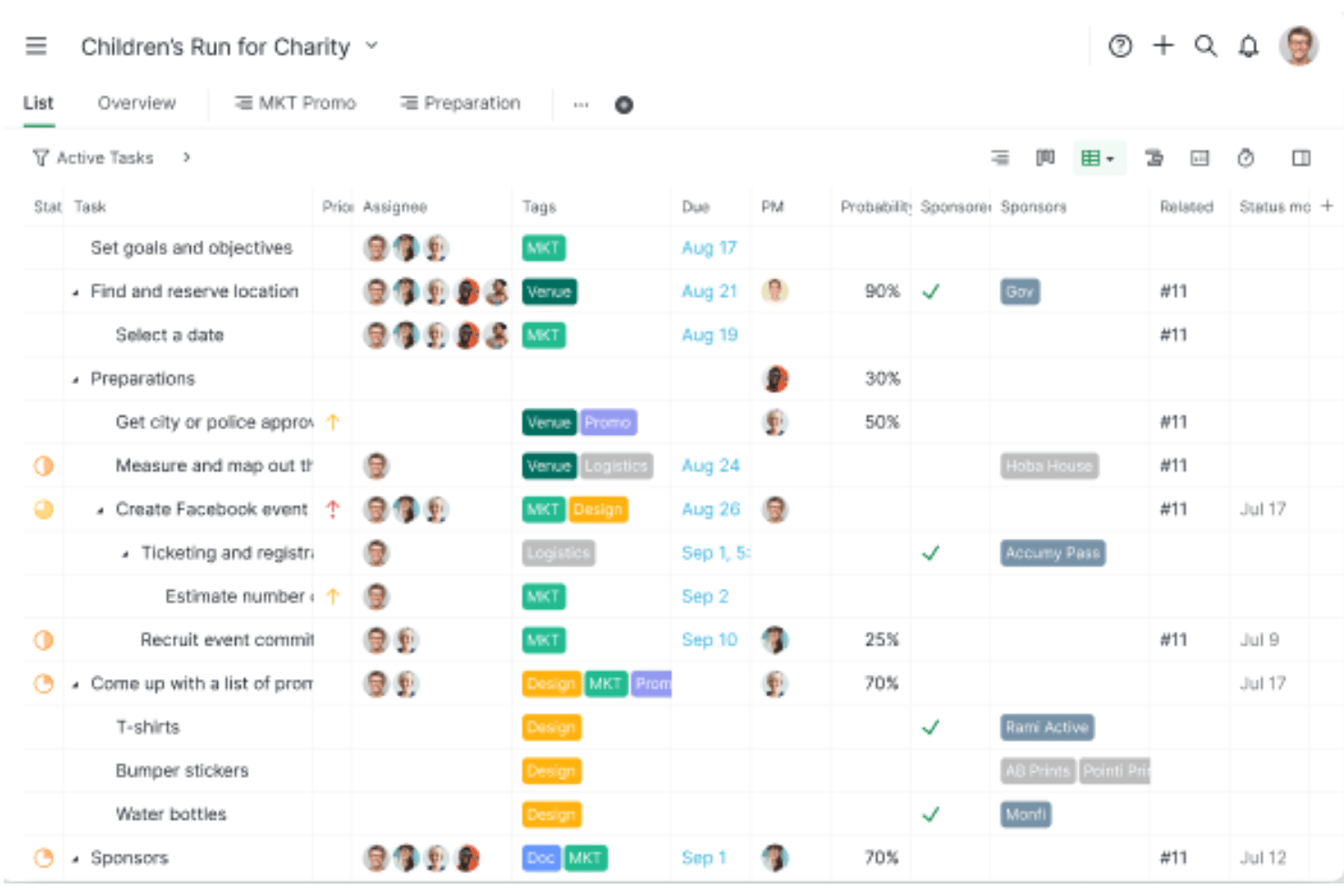
Quire is a project management tool built around a nested task hierarchy, offering Kanban boards, sprint sublists, Timeline (Gantt) views, and native GitHub integration for software teams.
Who Is Quire Best For?
Quire suits small dev teams and early-stage startups that want Agile-friendly task management without the overhead of enterprise tools like Jira.
Why I Picked Quire
I've included Quire in my top picks because it gives Agile teams a genuinely lightweight alternative to tools like Jira, without sacrificing the structural depth dev teams actually need. I particularly like how the nested task hierarchy maps naturally to epics, stories, and bugs, and how sprint sublists let you pull backlog items into a focused sprint board without any clunky setup. The native GitHub integration, available even on the free plan, means commits and issues stay linked to tasks from day one.
Quire Key Features
- Nested task hierarchy: Break down epics, stories, and bugs into unlimited levels of subtasks, keeping parent-child relationships visible across every project view.
- Timeline view: Schedule tasks and milestones on a Gantt-style timeline with dependency linking, giving you a clear picture of sprint pacing and delivery windows.
- Smart Folders: Aggregate multiple projects into a single portfolio view for cross-team tracking and reporting without duplicating work.
- MCP server: Connect AI assistants like Claude directly to Quire via a first-party Model Context Protocol server to create, update, and query tasks using natural language.
Quire Integrations
Quire offers native integrations with GitHub, Slack, Microsoft Teams, Google Drive, Google Calendar, and Dropbox. It also provides a REST API for custom integrations and supports Zapier.
Pros and Cons
Pros:
- Customizable statuses support varied development workflows
- Native GitHub integration for code traceability
- Nested task hierarchy for structuring epics and bugs
Cons:
- Lacks native CI/CD and DevOps integrations
- No built-in burndown or velocity charts
New Product Updates from Quire
Quire Adds Custom Field Locking and Comment Reaction API Support
Quire adds custom field locking and API support for reading and setting emoji reactions on comments. These updates give teams more control over field data and expand comment interaction options for developers. For more information, visit Quire’s official site.
 .

Celoxis
Best for integrated client collaboration tools
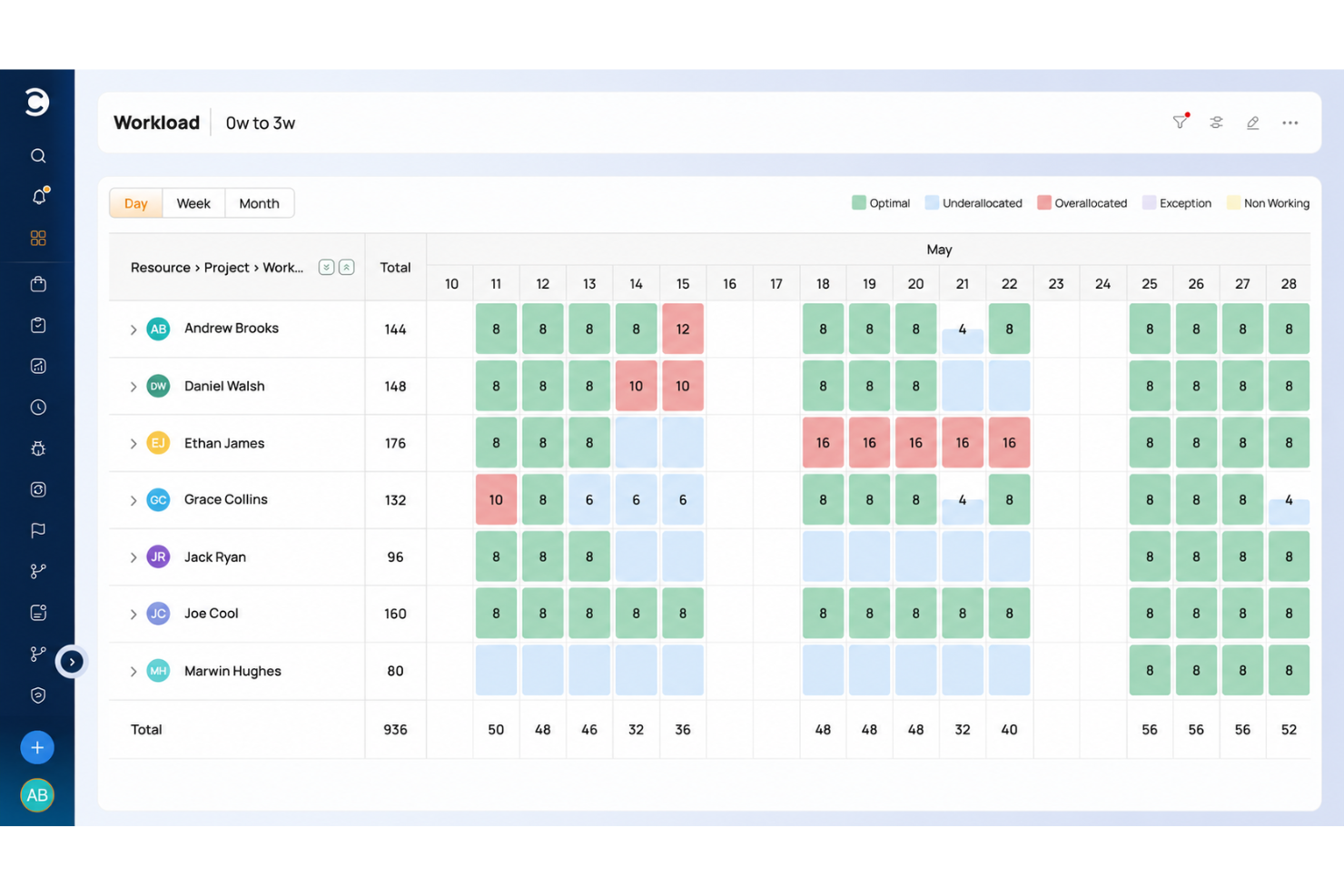
Celoxis is a project portfolio management platform that combines Gantt scheduling, resource management, request intake, budgeting, and portfolio tracking with native integrations for development tools like Jira, GitHub, and Azure DevOps.
Who Is Celoxis Best For?
Celoxis is a good fit for mid-size to enterprise project management offices (PMOs) that need to manage multiple projects, portfolios, and cross-functional teams from a single platform.
Why I Picked Celoxis
I picked Celoxis as one of the best because of how it handles client visibility without requiring additional seat licenses. The free, fully customizable client portal lets clients log in to their own personalized dashboards, where they can track progress, review reports, and exchange comments directly on tasks. I also like that you can share reports and schedule automated PDF delivery to clients on a recurring basis, which cuts down on the manual status update cycle that eats into a dev PM's time.
Celoxis Key Features
- Interactive Gantt charts: Build multi-project timelines with task dependencies, critical path highlighting, and automatic schedule recalculation.
- Resource workload management: View team capacity across projects using workload heatmaps, and reassign tasks directly from the chart.
- Time and expense tracking: Log hours against specific tasks and run multi-level approval workflows before billing.
- Bug and issue tracking app: Use a built-in workflow app to log, assign, and resolve bugs without leaving your project workspace.
Celoxis Integrations
Celoxis offers native integrations with Google Drive, Microsoft Excel, Microsoft Project, Salesforce, Jira, Zendesk, Slack, QuickBooks Online, and more. It also connects with Zapier, and an API is available for custom integrations.
Pros and Cons
Pros:
- On-premise and cloud deployment options
- Interactive Gantt charts with auto-rescheduling
- Built-in financial tracking with revenue forecasting
Cons:
- Dashboards slow with large project loads
- UI feels dated and menu-heavy
Best for planning large-scale development initiatives
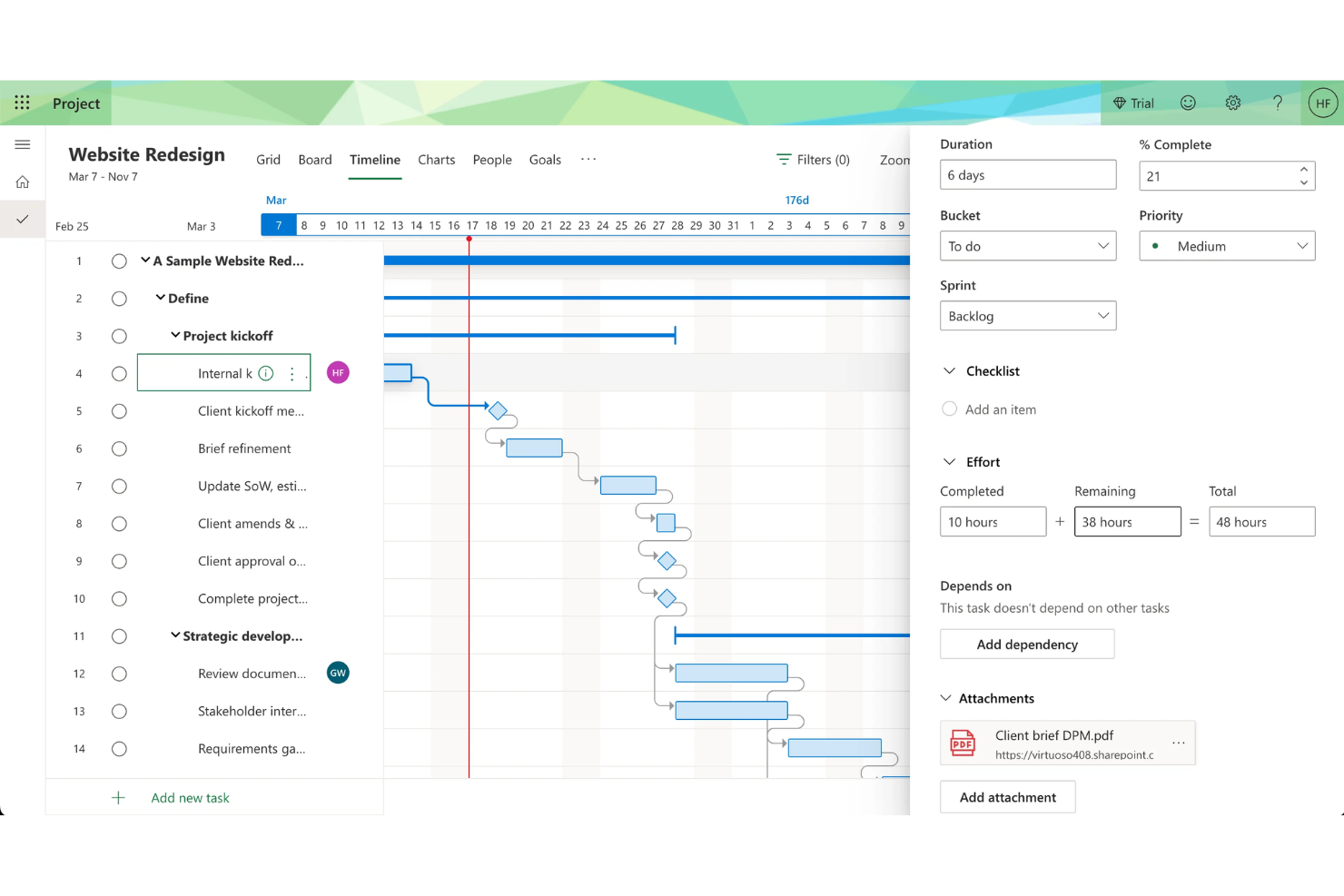
Microsoft Project is a project management platform for software teams that provides timeline planning, resource allocation, dependency mapping, and portfolio management in a single workspace.
Who Is Microsoft Project Best For?
Enterprise project managers and PMOs who need to coordinate complex, multi-team software development initiatives.
Why I Picked Microsoft Project
Microsoft Project is built for complexity. I picked Microsoft Project as one of the best because I rely on its Gantt charts and timeline views to map out dependencies and milestones for multi-phase software projects. My team uses its resource management features to allocate developer hours and balance workloads across overlapping initiatives. I like how the critical path analysis helps us spot bottlenecks before they impact delivery.
Microsoft Project Key Features
- Portfolio selection and optimization: Evaluate and prioritize multiple projects based on strategic impact.
- Built-in project templates: Start new projects quickly with pre-configured templates for common workflows.
- Timesheet submission: Track actual work hours and update progress directly within the platform.
- Integration with Microsoft 365: Sync tasks, calendars, and files with Microsoft Teams, Outlook, and SharePoint.
Microsoft Project Integrations
Microsoft Project has native integrations across the Microsoft ecosystem, including Microsoft 365, Teams, Outlook, SharePoint, Power BI, Power Apps, and Power Automate. An API is available for custom integrations.
Pros and Cons
Pros:
- Integrates natively with Microsoft 365 suite
- Offers advanced resource allocation tools
- Handles complex project dependencies and hierarchies
Cons:
- Steep pricing for smaller teams
- Lacks built-in Agile board views

ProofHub
Best for built-in team discussions
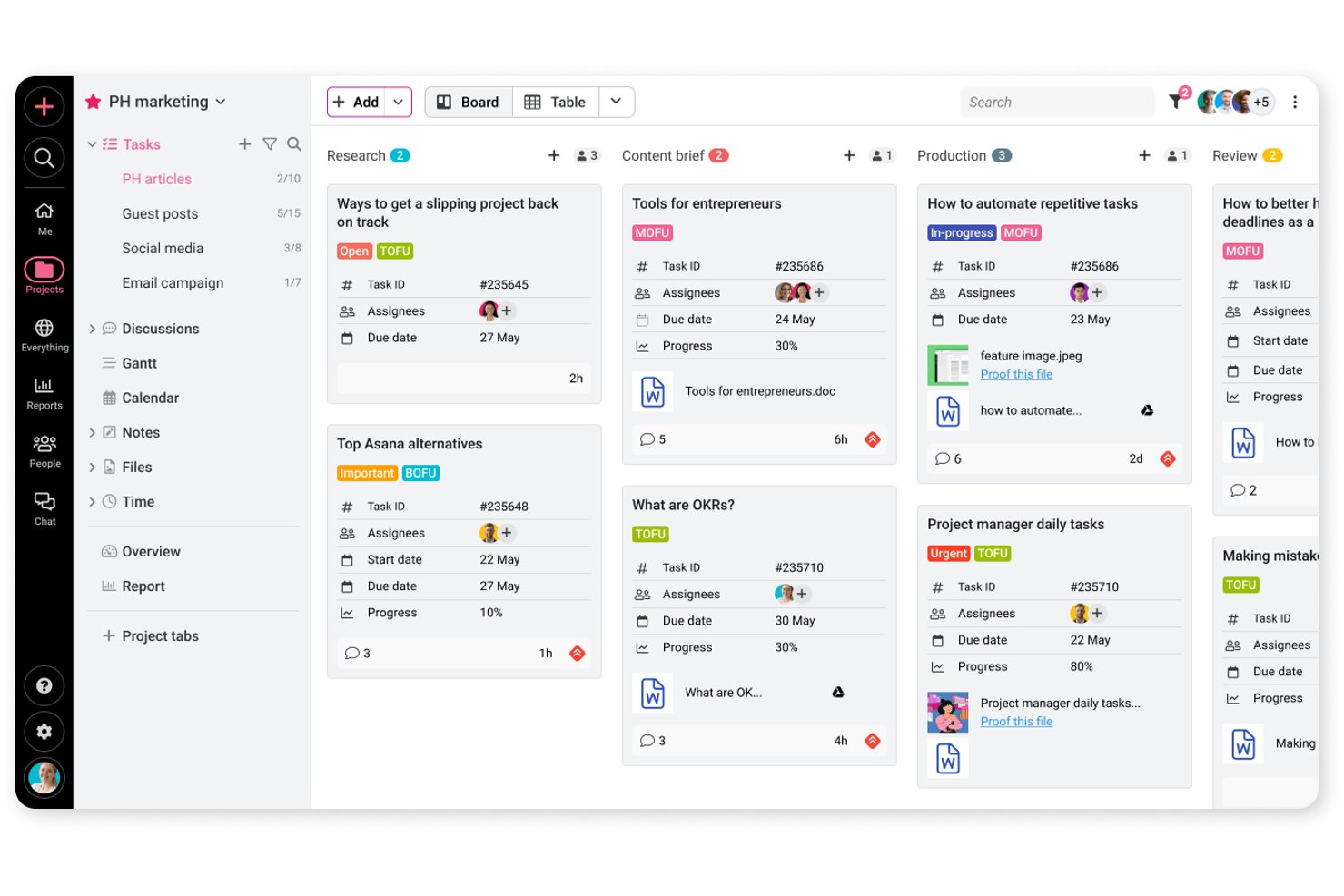
ProofHub is a project management and team collaboration platform that covers task tracking, Gantt scheduling, file proofing, and built-in discussions across Agile and Waterfall workflows.
Who Is ProofHub Best For?
ProofHub suits creative and marketing teams that need file proofing, threaded discussions, and task tracking in one place without paying per seat.
Why I Picked ProofHub
I've included ProofHub in my top picks because built-in team discussions aren't an afterthought here—they're threaded, tied directly to tasks and files, and keep feedback out of your inbox. I particularly like the proofing tools: you can annotate a design file, resolve comments, and formally approve the asset without leaving the project. When a client needs to review a deliverable, a shared proofing link lets them leave feedback without needing a ProofHub account.
ProofHub Key Features
- Agile and Waterfall workflows: ProofHub supports both Agile and Waterfall methodologies, including backlog planning, task dependencies, and release-progress tracking for development teams.
- Custom roles and permissions: Assign section-level access controls to team members, limiting visibility to assigned projects or specific areas like files, timesheets, and reports.
- Gantt chart with dependencies: Map tasks over time, set dependencies between them, and track completion progress directly within the Gantt view.
- Time tracking and timesheets: Log time manually or with timers, attach entries to specific tasks, and generate time reports across projects.
ProofHub Integrations
ProofHub offers nine documented native integrations, including Slack, Google Calendar, iCal, Box, Dropbox, OneDrive, QuickBooks, FreshBooks, and FreshBooks Classic. Ultimate Control includes API access for custom integrations, but native GitHub, GitLab, Jira, or Azure DevOps connections aren’t documented.
Pros and Cons
Pros:
- Proofing keeps design approvals in project context
- Gantt dependencies clarify delivery blockers
- Discussions keep development decisions with tasks
Cons:
- Timelines don’t recalculate automatically from dependencies
- Resource reports track time, not capacity

Best for tracking billable hours and profitability
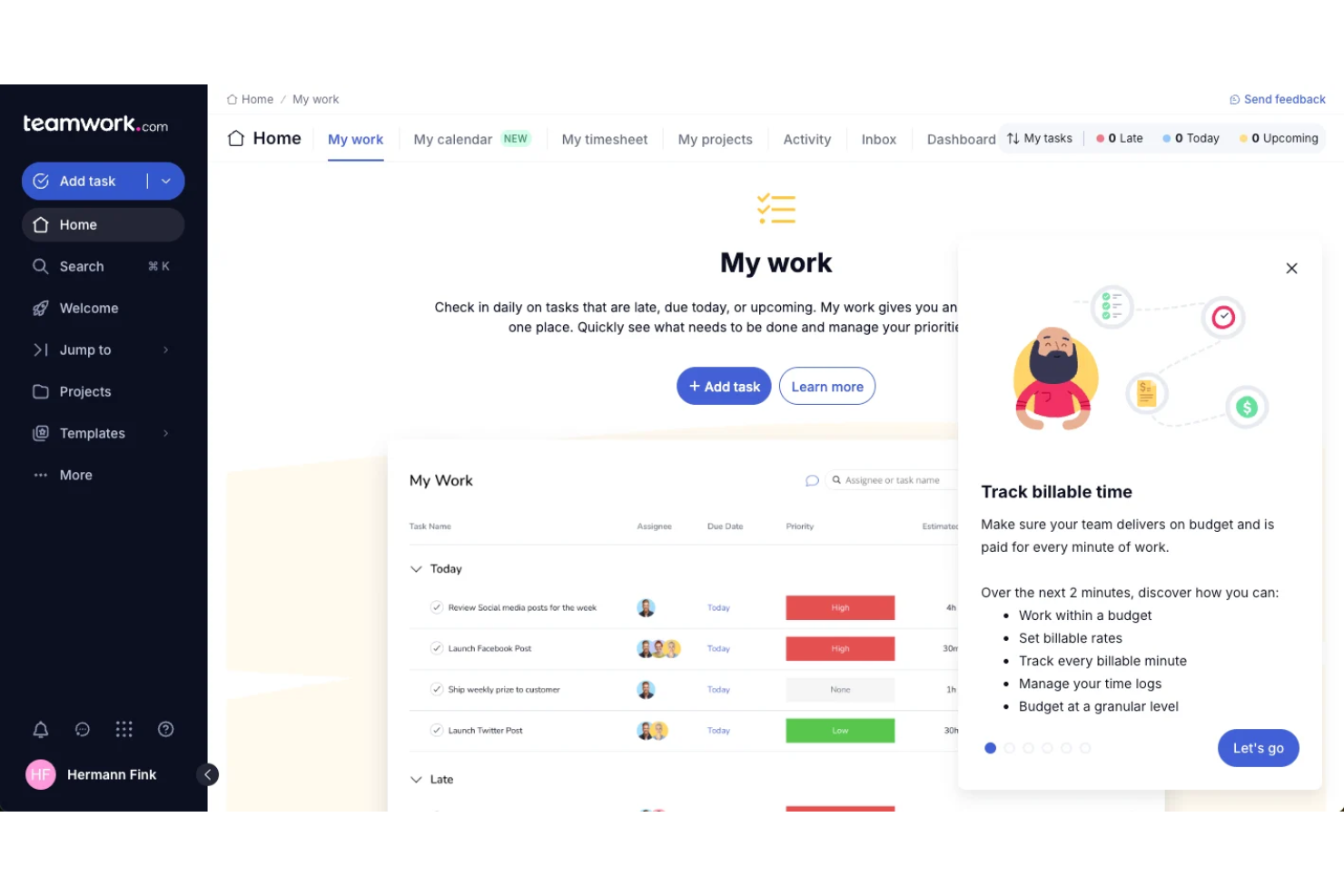
Teamwork.com is a project management platform for software teams that combines task management, time tracking, billing, resource scheduling, and client collaboration in one system.
Who Is Teamwork.com Best For?
Agencies and client services teams looking to track billable hours and project profitability.
Why I Picked Teamwork.com
Most tools treat time tracking as an add-on. Teamwork makes it central. I included it because it’s one of the few platforms that connects project execution directly to billable hours and profitability—making it a better fit for agencies and client-facing teams.
Teamwork.com Key Features
- Task dependencies: Set and visualize dependencies between tasks to manage project flow.
- Gantt chart view: Plan and adjust project timelines with interactive Gantt charts.
- Milestone tracking: Track key project milestones and deadlines in one place.
- Client portal: Give clients access to project updates, files, and communications.
Teamwork.com Integrations
Teamwork.com offers 150+ native integrations, including Slack, Microsoft Office, Harvest, Xero, BugHerd, HubSpot, Stripe, and ChatGPT, and connects with Zapier. An API is available for custom integrations.
Pros and Cons
Pros:
- Client portal supports external collaboration
- Profitability dashboard for project financials
- Built-in time tracking for billable work
Cons:
- Resource management is less advanced than peers
- Limited Agile board customization options
Jira
Best for a customizable agile workflow engine

Jira is a software development project management tool from Atlassian that provides issue tracking, sprint planning, backlog management, and customizable workflows for Agile teams.
Who Is Jira Best For?
Agile software development teams that need detailed sprint, backlog, and issue tracking.
Why I Picked Jira
If you need strict Agile processes, Jira still sets the standard. Compared to more flexible tools, it gives you deeper control over sprint structure, backlog grooming, and issue tracking. I chose it because it handles complexity better than most—especially for teams managing multiple squads, detailed workflows, and large backlogs.
Jira Key Features
- Advanced permissions: Control user access and project visibility at a granular level.
- Marketplace apps: Extend functionality with thousands of add-ons from the Atlassian Marketplace.
- Automation engine: Set up custom rules to automate repetitive project management tasks.
- Release management: Track, schedule, and manage software releases within your projects.
Jira Integrations
Jira offers native integrations with Confluence, Bitbucket, Trello, GitHub, Slack, Microsoft Teams, Google Drive, Dropbox, Zendesk, and Salesforce, and provides an API for custom integrations.
Pros and Cons
Pros:
- Detailed reporting and dashboard capabilities
- Highly customizable workflows for development teams
- Advanced sprint and backlog management tools
Cons:
- Can feel slow with large projects
- Complex setup for new users

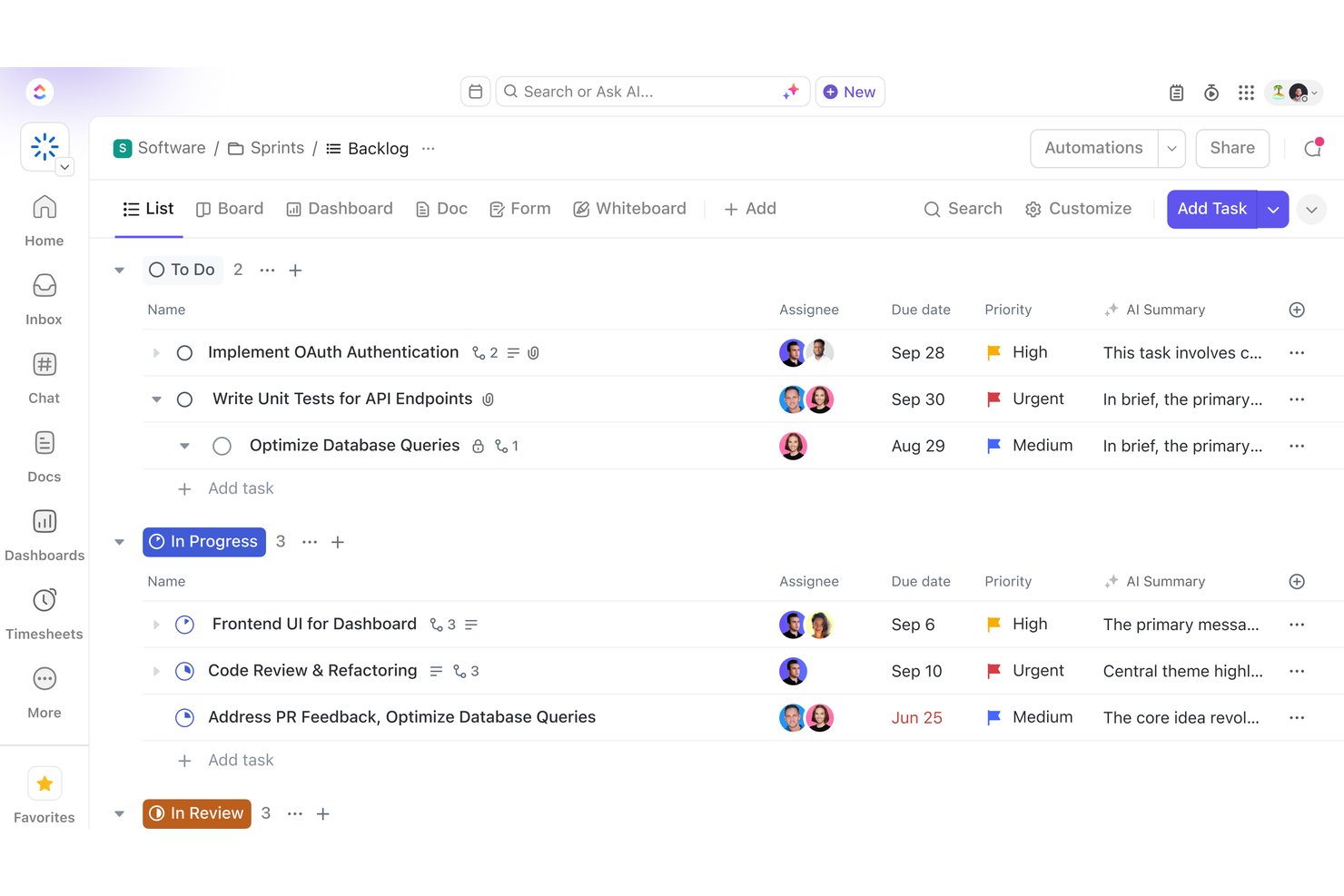
ClickUp is an all-in-one work management platform that combines task tracking, project scheduling, sprint planning, Docs, Dashboards, and built-in AI across software development and cross-functional team workflows.
Who Is ClickUp Best For?
ClickUp suits cross-functional teams that want to manage software development, creative work, and client delivery in a single workspace without stitching together multiple tools.
Why I Picked ClickUp
I've included ClickUp in my top picks because it's one of the few tools that genuinely consolidates software development and cross-functional project work without forcing you to stitch together separate apps. I especially like how ClickUp Brain sits across your entire workspace, so you can ask it to summarize sprint activity, draft a project update, or surface blockers from task comments in seconds. The GitHub and GitLab integrations automatically update linked task statuses when a pull request merges, which keeps your board accurate without any manual work.
ClickUp Key Features
- Sprint planning and reporting: Manage time-boxed sprints with backlogs, spillover handling, sprint points, and per-assignee reporting built directly into your workspace.
- Workload view: See each team member's daily, weekly, or monthly capacity alongside their assigned tasks so you can spot and fix over-allocation across projects.
- Proofing on images, videos, and PDFs: Pin timestamped comments directly to a specific frame or location in a file so reviewers can give precise, contextual feedback.
- Custom automations: Set trigger-and-condition rules to automatically change task statuses, reassign work, or post comments when defined events occur in your workflow.
ClickUp Integrations
ClickUp lists 1,000+ integrations, including native connections with GitHub, GitLab, Bitbucket, Jira, Sentry, Bugsnag, LambdaTest, Figma, and Slack. It supports a REST API, webhooks, OAuth, an MCP Server, and Zapier.
Pros and Cons
Pros:
- Proofing pins feedback to design assets
- Sprint reports connect effort with delivery
- Configurable statuses map software delivery stages
Cons:
- Specialized metrics may need reporting workarounds
- Dense workspaces can slow team adoption

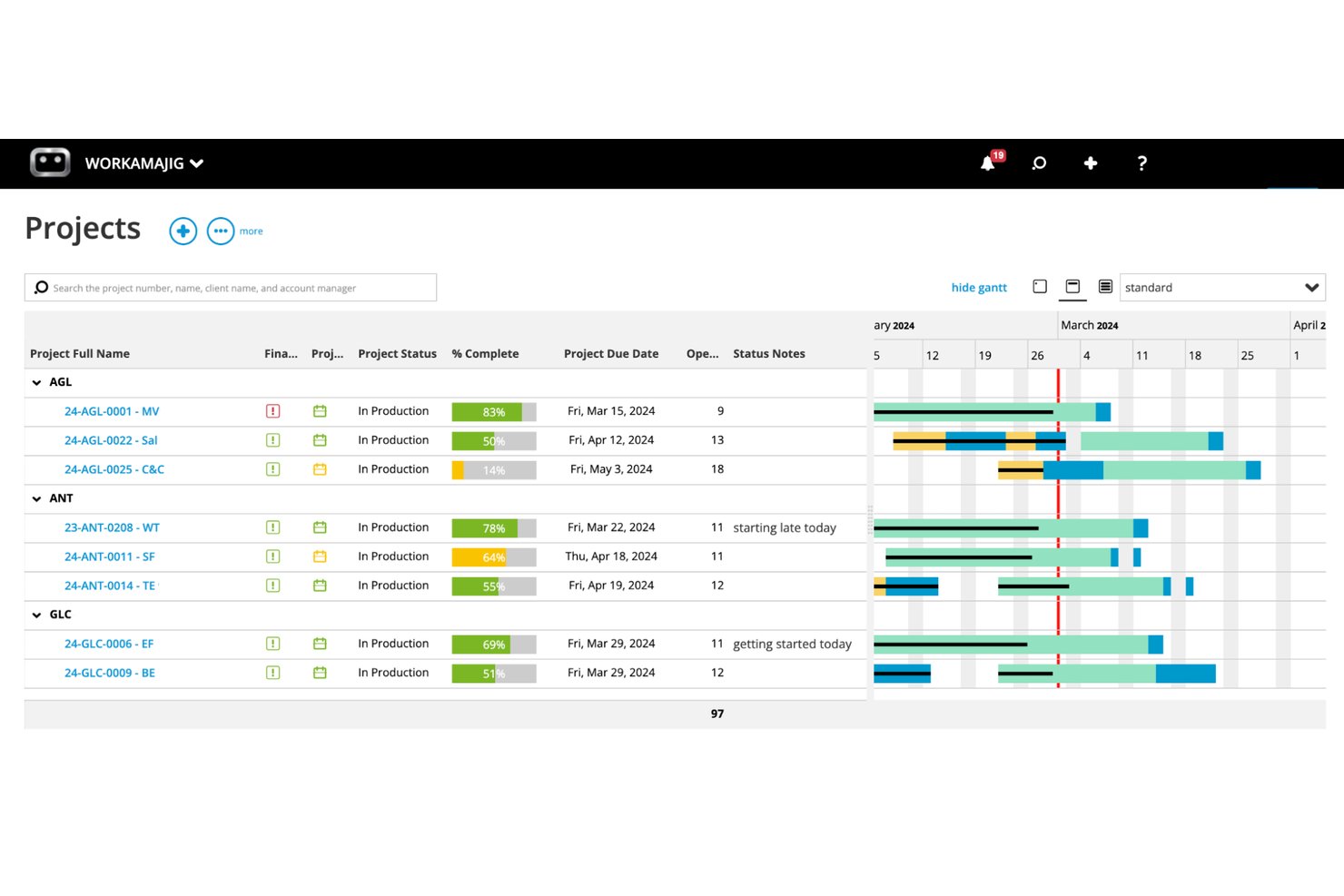
Workamajig is an all-in-one agency management platform that combines project management, resource scheduling, time tracking, client portals, and financial reporting for creative agencies and in-house marketing teams.
Who Is Workamajig Best For?
Workamajig is built for creative agencies and in-house marketing teams that need to manage client projects, creative reviews, and agency finances in one place.
Why I Picked Workamajig
I've included Workamajig in my top picks because it's purpose-built for creative agencies that need project management and client financials in one place. I particularly like its structured client approval workflows, where you can route deliverables through sequential reviewers so a project manager signs off before the account manager, keeping review cycles from going sideways. Time logged against tasks feeds directly into invoicing and budget-vs-actuals reporting, so I can see project profitability without jumping between systems.
Workamajig Key Features
- Resource scheduling dashboard: View employee hours, weekly allocations, and utilization across active projects, with workload rebalancing and capacity caps that account for PTO and holidays.
- Project budget vs. actuals tracking: Compare budgets against real costs with breakdowns by item, type, task, or person, pulling directly from logged time, materials, and expenses.
- Sales CRM with project estimation: Capture sales opportunities and convert them into detailed, branded estimates based on labor, resources, and expenses before turning them into live projects.
- Configurable security groups: Set role-based access controls for clients, vendors, and freelancers, with admin-level control over portal areas, file actions, session timeouts, and two-factor authentication.
Workamajig Integrations
Workamajig lists 11 integrations, including Jira, Slack, Google, Microsoft, and HubSpot. It also supports API-based custom integrations and Zapier.
Pros and Cons
Pros:
- Capacity views surface workload, availability, and PTO
- Logged hours connect project budgets to billing
- Sequential client approvals clarify stakeholder handoffs
Cons:
- Schedule changes can be cumbersome on shifting projects
- Technical tracking lacks depth for software teams

Best for agency resource and budget planning
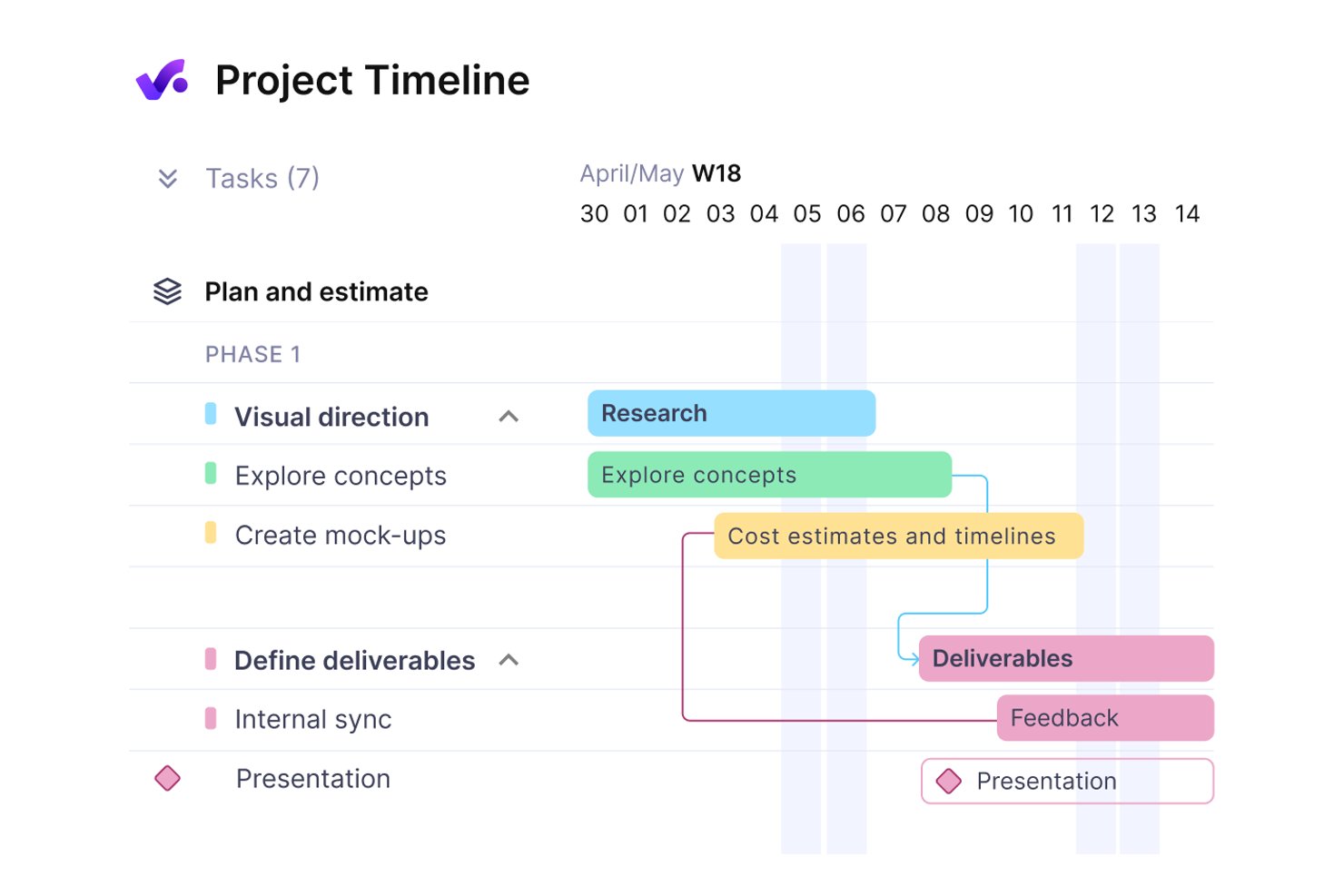
Productive is a professional services management platform that brings together project and task management, resource planning, time tracking, budgeting, and invoicing in a single workspace.
Who Is Productive Best For?
Productive is a strong fit for agency operations leads and client services directors who need resource planning, time tracking, and financial management in one place.
Why I Picked Productive
I picked Productive as one of the best because it handles resource planning and budget tracking in a way that's genuinely connected to project work. I love how the Resource Planner shows team capacity alongside bookings and time off, so you can see exactly who's available before committing to a scope. The budget-overrun controls are also a standout: time entries get blocked or flagged at the service limit, which keeps billable hours honest against client scopes without relying on manual checks.
Productive Key Features
- Client collaborator roles: Invite clients to projects with tiered permission levels that control what tasks, comments, budgets, and time entries they can view.
- Automated workflow triggers: Set up automations using object creation, time-based events, or Slack messages as triggers to create tasks, update fields, or add comments.
- Jira integration: Connect Jira with Productive so time entries update in sync with activity logged in Jira.
- AI-powered timesheet autofill: Analyze calendar events and past time entries to automatically populate team timesheets.
Productive Integrations
Productive offers native integrations with Jira, Slack, Google Calendar, Microsoft Outlook, and Gmail. It also provides an open API, webhooks, and Zapier for custom connectivity.
Pros and Cons
Pros:
- Client permissions keep project work visible
- Budgets connect tracked hours to client scopes
- Resource plans expose cross-project team capacity
Cons:
- Reports can require spreadsheet cleanup
- Task editing makes bulk updates cumbersome
New Product Updates from Productive
Productive Adds Voice Dictation, Slack Connector, Proposals, and Overtime
Productive adds voice dictation, a Slack Connector, proposal controls, and overtime tracking. These updates support faster AI interactions, client proposals, and time management. For more information, visit Productive’s official site.
Smartsheet
Best for portfolio-level dashboards and reporting

Smartsheet is a collaborative work management platform for software teams that combines project tracking, resource management, reporting, and workflow automation in a spreadsheet-style interface.
Who Is Smartsheet Best For?
Portfolio managers and PMOs at mid-size to large organizations who need advanced reporting and dashboard capabilities.
Why I Picked Smartsheet
Smartsheet bridges the gap between spreadsheets and project management tools. It’s more structured than Excel but more flexible than traditional PM platforms. I picked it for teams managing multiple projects who need high-level reporting without fully committing to rigid Agile systems.
Smartsheet Key Features
- Automated workflows: Set up rule-based automations for approvals, alerts, and task assignments.
- Gantt chart view: Visualize project timelines and dependencies in a drag-and-drop interface.
- Form builder: Collect structured project requests or bug reports directly into sheets.
- Cell-level comments: Add context and discussion to specific tasks or deliverables.
Smartsheet Integrations
Smartsheet offers native integrations with Jira, Microsoft Teams, Slack, Google Drive, Salesforce, Docusign, ServiceNow, Box, and Tableau. It also connects with Zapier and provides an API for custom integrations.
Pros and Cons
Pros:
- Gantt charts visualize dependencies and timelines
- Automated workflows handle repetitive project tasks
- Portfolio dashboards show cross-project status clearly
Cons:
- Limited support for code repository integrations
- No built-in burndown or velocity charts
New Product Updates from Smartsheet

Smartsheet Adds Non-Plan User Management in Admin Center
Smartsheet adds a Non plan users tab to the Seat types and true-up page in Admin Center. This lets system admins review non-plan users and add them to the plan or remove them from the organization in one place. For more information, visit Smartsheet’s official site.
Outras ferramentas de gestão de projetos de desenvolvimento de software
Eis algumas opções adicionais de ferramentas de gestão de projetos de desenvolvimento de software que não entraram na minha seleção, mas que ainda vale a pena conhecer:
- Hive
For creative proofing and dev tool workflows
- Wrike
For advanced analytics and customization
- Zoho Projects
For time tracking with invoicing
- ProjectManager
For real-time workload management
- Airtable
For customizable workflow automation
- OpenProject
For self-hosted deployment options
- GoodDay
For multi-view project dashboards
- monday dev
For dev and product team sprint planning
- Notion
With AI agents for knowledge and tasks


How I Evaluate Software Development Project Management Tools
I split my evaluation into three parts, weighting core functionality most: assign tasks, track deadlines, and map dependencies. Next, I look for features like creative proofing and GitHub integrations. Finally, I consider onboarding, support, and pricing value for client teams.
Core Functionality (Table Stakes For This List)
When I'm selecting tools for my list, I score each one on a scale from 0 (does not offer the functionality) to 5 (excels in this area) for each core functionality listed below. I then convert the total into a percentage to help assess each tool's overall fit, with extra weight on any functionalities I’ve deemed essential.
- Task & Workflow Management (Essential): I look for assignable tasks, dependencies, subtasks, and configurable stages that can handle handoffs from design to development.
- Project Planning & Scheduling (Essential): I assess timeline views, milestones, and dependency mapping, including how clearly teams can reschedule phases when requirements shift.
- Resource & Capacity: I check whether workload views show allocation across projects, so leads can spot conflicts before assigning another deliverable.
- Collaboration & File Sharing: I look for task-level comments, notifications, and file sharing that keep design feedback and delivery discussions tied to the work.
- Client & Stakeholder Collaboration: I consider guest access, shared project views, and approval workflows for client reviews and deliverable sign-off.
- Time & Budget Tracking: I check whether teams can log time against tasks and compare it with estimates to monitor client scope and project budgets.
Once I have a list of tools that meet the criteria, I consider what sets each platform apart.
Differentiating Factors (What Sets Vendors Apart)
Here's how I compare and contrast different vendors:
Standout Features
I look for native dev tool integrations that sync with repositories and design platforms like GitHub or Figma. A two-way sync between a Kanban board and a repo's pull requests keeps developers from toggling between tools. I also evaluate creative proofing capabilities—markup, annotation, and version comparison built into the platform shorten review cycles that otherwise sprawl across email threads. Automated workflow triggers round out the picture; I check whether rules can move tasks between stages or notify stakeholders when a status changes, cutting manual upkeep on busy multi-project boards.
Beyond Features
I evaluate how well a platform handles hybrid teams—agencies and dev shops juggle internal staff, freelancers, and client stakeholders, so permission tiers and flexible seat licensing matter. Integration depth is equally important; a one-way Jira export is far less useful than a two-way sync that keeps both boards current. I also check onboarding support, since billable teams can't afford weeks of ramp-up when a new client engagement starts next Monday.
Como escolher ferramentas de gestão de projetos de desenvolvimento de software
É fácil ficar preso a listas extensas de funcionalidades e estruturas de preços complexas. Para o ajudar a manter-se focado enquanto analisa o seu processo específico de seleção de software, eis uma lista de fatores a ter em conta:
| Fator | O que deve considerar |
| Escalabilidade | A ferramenta conseguirá acompanhar a dimensão da sua equipa e o volume de projetos à medida que cresce? Verifique os limites de utilizadores e de projetos. |
| Integrações | Estabelece ligação nativa às ferramentas que já utiliza, como repositórios de código, ferramentas de conversação e plataformas de documentação? |
| Possibilidade de personalização | Pode adaptar os fluxos de trabalho, campos e permissões aos processos e à terminologia da sua equipa? |
| Facilidade de utilização | A sua equipa irá adotá-la rapidamente ou a formação e o suporte serão uma necessidade constante? |
| Implementação e integração inicial | Quanto tempo será necessário para começar a utilizar a ferramenta? Existem ferramentas de migração, modelos ou apoio à integração inicial? |
| Custo | Os níveis de preços são claros e previsíveis à medida que as suas necessidades mudam? Tenha atenção às taxas por utilizador e aos custos dos complementos. |
| Medidas de segurança | A ferramenta oferece SSO, encriptação de dados e controlos de acesso baseados em funções para proteger dados sensíveis dos projetos? |
| Disponibilidade do suporte | Existe ajuda disponível quando precisa dela — especialmente durante fases críticas dos projetos ou fora do horário normal? |
O que é a gestão de projetos para desenvolvimento de software?
A gestão de projetos para o desenvolvimento de software é o processo de organizar, atribuir e acompanhar o trabalho através de listas de tarefas, subtarefas e listas de afazeres, para entregar projetos de software dentro do prazo. As aplicações de gestão de projetos ajudam as equipas a coordenar o trabalho, gerir um portefólio de projetos e acompanhar métricas, mantendo simultaneamente as tarefas de desenvolvimento ligadas a fluxos de trabalho empresariais mais abrangentes, como sistemas de CRM e armazenamento de ficheiros.
Estas ferramentas são utilizadas por pequenas equipas e organizações de maior dimensão para gerir tudo, desde projetos simples a desenvolvimentos complexos. As equipas utilizam-nas para atribuir tarefas, monitorizar o progresso através de painéis e elementos visuais, e manter-se ligadas através do acesso a aplicações móveis. Embora algumas plataformas tenham uma curva de aprendizagem, muitas permitem um número ilimitado de utilizadores e configurações flexíveis que se adaptam a diferentes fluxos de trabalho de desenvolvimento.
Funcionalidades das ferramentas de gestão de projetos de desenvolvimento de software
Ao selecionar ferramentas de gestão de projetos de desenvolvimento de software, procure as seguintes funcionalidades essenciais:
- Gestão de tarefas: Permite criar, atribuir e acompanhar tarefas ou problemas, para que todos saibam o que tem de ser feito e por quem.
- Gráficos de Gantt: Permitem visualizar cronogramas de projetos, dependências e marcos, ajudando as equipas a planear e ajustar os calendários à medida que o trabalho avança.
- Quadros Kanban ou Ágeis: Disponibilizam uma interface de arrastar e largar para gerir o trabalho em colunas, suportando fluxos de trabalho Ágeis como Scrum ou Kanban.
- Alocação de recursos: Acompanha as cargas de trabalho e a disponibilidade dos membros da equipa, facilitando o equilíbrio das atribuições e evitando estrangulamentos.
- Acompanhamento do tempo: Regista as horas dedicadas a tarefas ou projetos, permitindo uma faturação, previsão e análise do desempenho precisas.
- Ferramentas de colaboração: Disponibilizam conversas, comentários ou partilha de ficheiros integrados, mantendo a comunicação e a documentação centralizadas.
- Relatórios e análises: Geram relatórios em tempo real sobre o progresso, a velocidade e o estado dos projetos, ajudando as equipas e as partes interessadas a manterem-se informadas.
- Capacidades de integração: Ligam-se a repositórios de código, pipelines de CI/CD e outras ferramentas para simplificar os fluxos de trabalho de desenvolvimento.
- Controlos de permissões: Permitem definir funções de utilizador e níveis de acesso, protegendo informações sensíveis e apoiando as necessidades de conformidade.
- Notificações automatizadas: Enviam alertas ou lembretes sobre prazos, alterações de estado ou atualizações importantes, reduzindo o acompanhamento manual.
Benefícios das ferramentas de gestão de projetos de desenvolvimento de software
A implementação de ferramentas de gestão de projetos de desenvolvimento de software proporciona vários benefícios à sua equipa e à sua empresa. Eis alguns dos benefícios que pode esperar:
- Maior visibilidade dos projetos: Os painéis centralizados e as funcionalidades de criação de relatórios facilitam o acompanhamento, em tempo real, do progresso, dos prazos e dos estrangulamentos.
- Melhor colaboração entre equipas: As ferramentas de comunicação integradas e os espaços de trabalho partilhados mantêm todos alinhados e reduzem os erros de comunicação.
- Resolução mais rápida de problemas: O acompanhamento de tarefas e as notificações automatizadas ajudam as equipas a identificar, atribuir e resolver rapidamente erros ou bloqueios.
- Entregas mais previsíveis: O planeamento de cronogramas, a alocação de recursos e a gestão de dependências apoiam a conclusão dos projetos dentro do prazo.
- Maior responsabilização: Os controlos de permissões e os registos de atividade clarificam as responsabilidades e facilitam a auditoria das ações dos projetos.
- Fluxos de trabalho simplificados: As integrações com repositórios de código e ferramentas de CI/CD reduzem o trabalho manual e mantêm os processos de desenvolvimento ligados.
- Tomada de decisões baseada em dados: As funcionalidades de análise e criação de relatórios fornecem informações que ajudam as equipas a definir prioridades e a alocar recursos de forma eficaz.
Custos e preços das ferramentas de gestão de projetos de desenvolvimento de software
A seleção de ferramentas de gestão de projetos de desenvolvimento de software requer uma compreensão dos vários modelos de preços e planos disponíveis. Os custos variam consoante as funcionalidades, a dimensão da equipa, os complementos e outros fatores. A tabela abaixo resume os planos comuns, os respetivos preços médios e as funcionalidades normalmente incluídas nas soluções de ferramentas de gestão de projetos de desenvolvimento de software:
Tabela de comparação de planos para ferramentas de gestão de projetos de desenvolvimento de software
| Tipo de plano | Preço médio | Funcionalidades comuns |
| Plano gratuito | $0 | Gestão básica de tarefas, utilizadores limitados, relatórios simples e apoio da comunidade. |
| Plano pessoal | $5-$15/utilizador/mês | Acompanhamento de tarefas e projetos, integrações básicas, armazenamento limitado e apoio por e-mail. |
| Plano empresarial | $15-$30/utilizador/mês | Relatórios avançados, gestão de recursos, automatização de fluxos de trabalho, integrações e apoio prioritário. |
| Plano empresarial de grande escala | $30-$60/utilizador/mês | Permissões personalizadas, segurança reforçada, análise avançada, integração dedicada e apoio abrangido por SLA. |
Perguntas frequentes sobre ferramentas de gestão de projetos de desenvolvimento de software
Eis algumas respostas a perguntas comuns sobre ferramentas de gestão de projetos de desenvolvimento de software:
Qual é a diferença entre as ferramentas de gestão de projetos de desenvolvimento de software e as ferramentas gerais de gestão de projetos?
As ferramentas de gestão de projetos de desenvolvimento de software incluem funcionalidades adaptadas a equipas de programação, como o acompanhamento de problemas, integrações com repositórios de código e quadros Agile. As ferramentas gerais de gestão de projetos concentram-se mais no acompanhamento de tarefas e no planeamento, sem estas capacidades específicas de desenvolvimento.
Estas ferramentas são compatíveis com metodologias Agile e em cascata?
Sim, a maioria das ferramentas de gestão de projetos de desenvolvimento de software é compatível com abordagens Agile e em cascata. Normalmente, é possível alternar entre quadros Kanban, sprints Scrum e gráficos de Gantt para adaptar o fluxo de trabalho às preferências da sua equipa.
Como é que estas ferramentas ajudam na colaboração entre equipas com diferentes funções?
Estas ferramentas centralizam a comunicação, a documentação e a atribuição de tarefas, facilitando o alinhamento entre programadores, designers e gestores de produto. Funcionalidades como quadros partilhados, comentários e anexos de ficheiros ajudam a manter todos informados.
Existem riscos de segurança associados às ferramentas de gestão de projetos baseadas na nuvem?
Sim, as ferramentas baseadas na nuvem podem apresentar riscos de segurança se não forem configuradas corretamente. Procure soluções com encriptação, SSO e controlos de acesso baseados em funções, e reveja sempre as certificações de conformidade do fornecedor e as políticas de tratamento de dados.
O que devo ter em conta ao migrar de outra ferramenta?
Planeie a migração de dados, a formação dos utilizadores e os ajustes aos fluxos de trabalho. Verifique se a nova ferramenta disponibiliza utilitários de importação, apoio à integração e documentação para ajudar a sua equipa a fazer a transição sem problemas e sem perder o histórico importante do projeto.