

Productive AI Features: From AI Assistant to Autonomous Agents


Automation: Productive's AI automates tedious tasks like time tracking and bulk updates, boosting efficiency for teams.
Centralization: AI integration within Productive connects operational and financial data for insightful project health analysis.
Skills: Reusable AI skills ensure consistent, efficient prompts for resource evaluations and budget summaries.
Agents: Autonomous agents execute workflows independently, transforming project management with minimal human intervention.
Integration: MCP support links Productive to other tools, enhancing AI capability across entire software ecosystems.
Project managers in professional services already carry a lot. Productive's AI is built to carry the rest—handling the operational overhead behind the scenes so delivery teams can spend their time on work that actually moves things forward.
Productive's AI features are built around a clear premise: the busywork that slows agencies down—time tracking, task updates, resource checks, stale project maintenance—shouldn't require human attention. Rather than layering a generic chatbot on top of disconnected project management tools, Productive embeds AI directly into its all-in-one PSA platform, where it has access to the operational, financial, and relationship data that makes AI genuinely useful.
Bernie Vrbat, who works closely with agencies and consultancies at Productive, walked through the platform's AI capabilities during The Future of AI in Project Management showcase. Here's an overview of what Productive's AI can do.

Deep Dive Into Productive's AI Features
1. The AI Assistant: A Hub for Operational Work
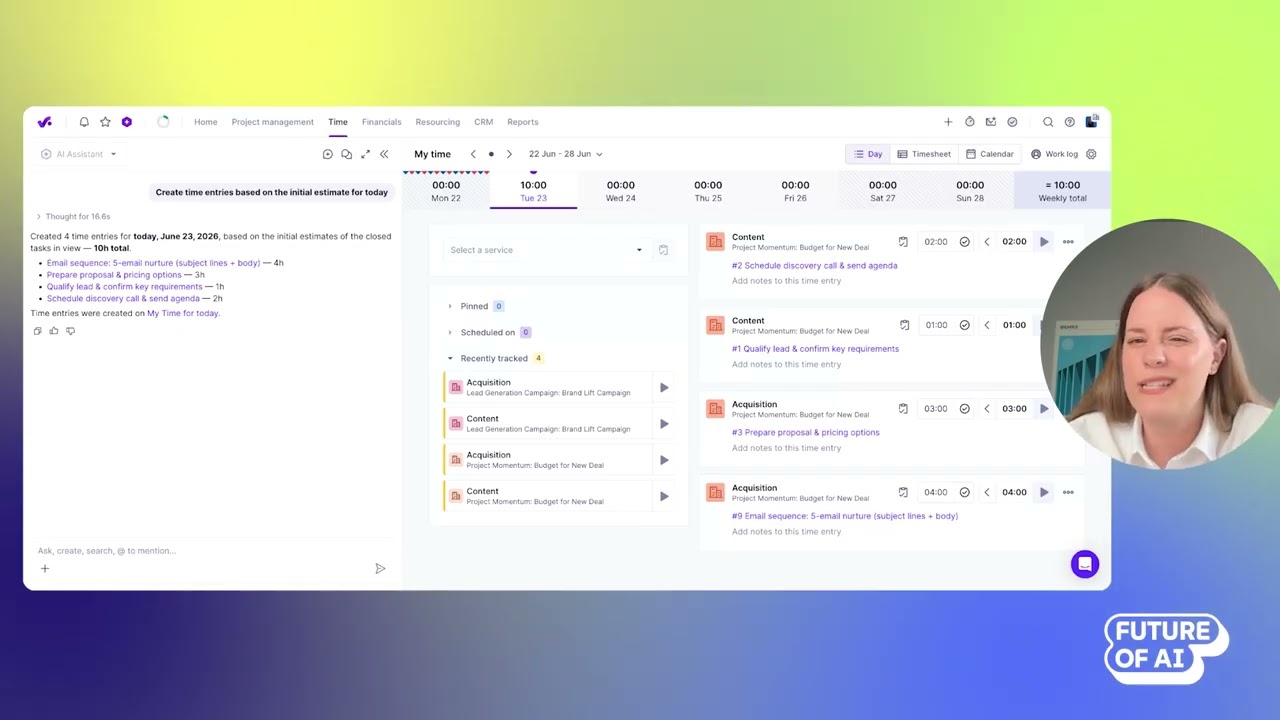
Productive's AI assistant lives in the sidebar of your account—accessible at any point, across any area of the platform.
Because Productive already centralizes project, resource, budget, and financial data, the assistant doesn't need to be fed context every time. It picks up where you are and works with the data already in the system. That means a project manager can ask a question—like whether a project is healthy—and get a breakdown grounded in real delivery data.
During the showcase, three use cases were demonstrated: automated time tracking, bulk task updates, and AI-generated project health reports.
For time tracking, the assistant can log time entries against completed tasks in a single prompt—no hunting through menus required. For bulk updates, it can change task statuses across an entire project at once (useful when a roadblock hits and everything needs to be paused). For reporting, it can assess project health across multiple data sources simultaneously—and crucially, it shows its work, so project managers can verify the numbers behind the interpretation.
With AI you always need to leave a little margin of error. So here we’re not going for one hundred percent accuracy but transparency.

How to get the most value from Productive's AI assistant:
- Let context do the work: The assistant reads the screen you're on—you don't have to re-explain the situation every time.
- Use it for bulk operations: Rate card updates, cost rate changes, mass status shifts—high-frequency admin tasks that previously required manual effort across multiple records.
- Verify AI-generated insights: Every project health report includes the underlying data and sources, so you can audit what the system used to reach its conclusion.

2. Skills: Reusable AI Instructions for Consistent Output
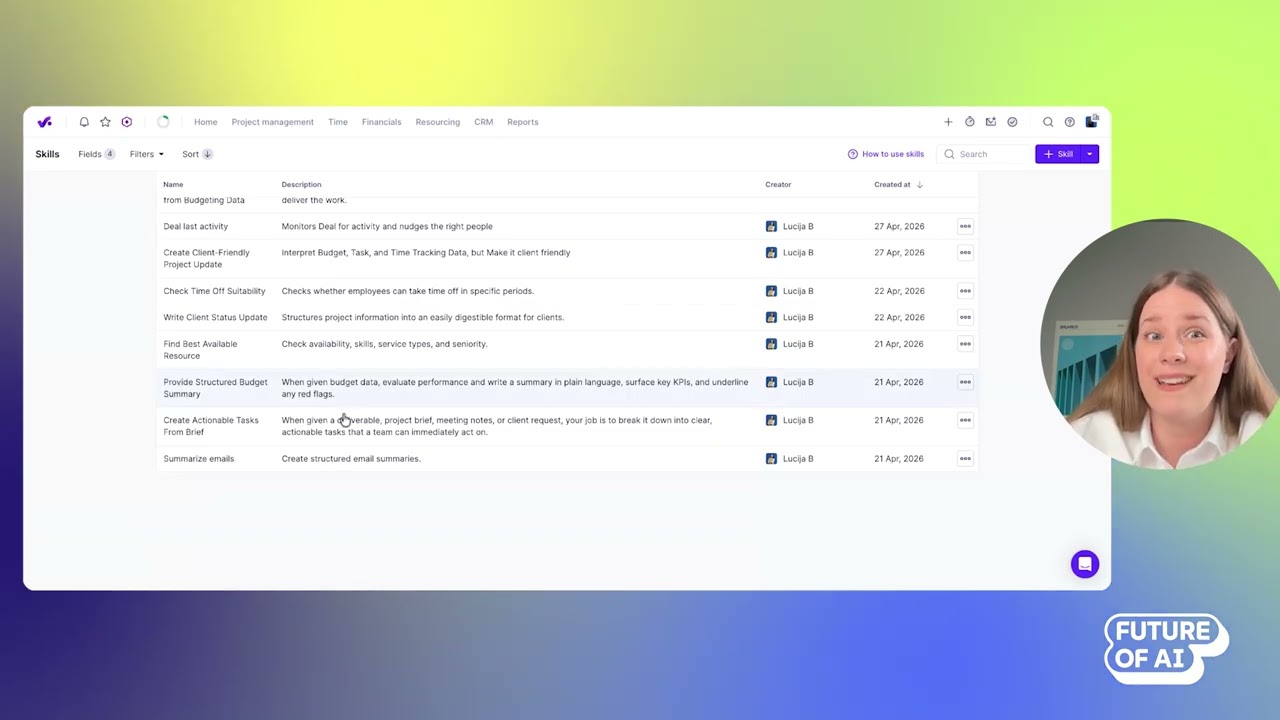
Skills are Productive's answer to the problem of repeating the same detailed prompts over and over.
If you've found a prompt that works—whether for evaluating resource availability, summarizing budget performance, or generating structured email updates—Skills let you save it once and reuse it whenever you need it. More importantly, Skills can be shared across the organization, so the whole team benefits from well-crafted prompts, not just the person who wrote them.
During the demo, a resource-finding skill was shown in action: given instructions around availability, seniority, service type, and skills, the assistant surfaced the best available match for a project—and verified that the recommendation held up against the actual resourcing data.
Skills can also be set to auto-activate, meaning the assistant will automatically apply relevant skill knowledge when you ask a question—without you having to locate and manually trigger the right skill.
Instead of having one person in the organization that knows how to prompt AI, suddenly you can have the whole team of experts equipped with top-notch prompts.
- Bernie Vrbat, Productive
Best practices for using skills in Productive:
- Invest in detailed prompts: The more specific the skill instructions, the better and more consistent the output.
- Share across the team: Skills are an organizational asset—standardizing how AI interprets your processes means consistent results regardless of who's running them.
- Use the assistant to improve your skills: You can ask the AI to review a skill and suggest improvements before activating it.
3. Agents: Autonomous Workflows That Run Without You

Agents are where Productive's AI moves from answering questions to actually doing work on its own.
Like Skills, Agents are configured in plain language—no code required. But where a skill requires a human to trigger it, an agent operates independently. It can work through multiple steps, make decisions along the way, and act across different tools—without requiring someone to be in the loop at every stage.
Two Agents were demonstrated during the showcase. The first was a conversational Office and Admin Assistant—configured to reference a company handbook and answer questions about policies, learning budgets, and other HR-adjacent topics. It can also link to task templates on the spot, so a request doesn't just get answered but gets turned into something actionable.
The second was a Stale Task Watcher: an automated agent that runs every morning at 9 a.m., scans all projects for tasks with no recent activity, and pings the relevant people to follow up. During the demo, it identified and flagged 18 inactive tasks in a single run—the kind of batch operation that would otherwise require a project manager to work through manually.
The benefit of creating an Agent like this is one, that it provides a bit of a more personal touch, and people can connect to it. Another is that Agents can have their own Connectors, which allow them to work across different MCP-supported tools.
How to get started with agents:
- Start simple: A straightforward agent—like one that monitors a single condition and pings the right people—is a fast way to see real operational impact.
- Set precise scope: Agents can be restricted to specific projects and data, so you control exactly what they can see and act on.
- Review the audit trail: Every agent run is logged, showing what it did and when. That transparency makes it easier to trust—and refine—agent behavior over time.
4. Agent Governance and Permissions
As agents become more autonomous, the question of control matters.
Productive addresses this through granular permissions. Administrators can define exactly what level of access each agent has—which data it can read, which projects it can touch, and whether it can take action or only surface information. Agents can also be scoped to specific projects, preventing them from straying into areas they shouldn't.
Every agent run is logged with a full activity trail, so teams can see precisely what the agent did—and when. During the demo, a run from three hours earlier showed which tasks had been flagged and what action the agent had taken on each one.
On data privacy, Productive's AI operates under GDPR, CCPA, and SOC 2 compliance standards. Customer data is not used to train Productive's models or any third-party models it works with.
Maintaining control as AI takes on more:
- Use project-level scoping: Restrict agent access to only the projects where it's relevant.
- Monitor runs regularly: The activity log gives you visibility into what agents are doing—treat it as a routine check, not just a troubleshooting tool.
- Layer permissions thoughtfully: Match agent access to the sensitivity of the task, not just the convenience of broader access.
5. MCP Integration: Connecting Productive to Your Wider Tool Stack
Productive supports Model Context Protocol (MCP), an emerging standard that allows large language models to connect securely to business systems and understand what data and actions are available to them.
In practical terms, this means teams can connect Productive to other MCP-supported tools—calendars, document storage, communication platforms—and interact with data across all of them through a single interface. Productive also has its own official MCP server, which means users can connect their preferred LLM (Claude or ChatGPT, for example) and ask questions about Productive data directly from within that tool.
With AI there are endless possibilities. You can work in Productive from your LLM of choice.
- Bernie Vrbat, Productive
Getting the most out of MCP in Productive:
- Connect tools that are already in use: If other platforms in your stack have their own MCP servers, they can be linked to Productive so AI can read and act on data across systems.
- Use your preferred LLM: Teams already working in Claude or ChatGPT can access Productive data from within those interfaces.
- Manage connector permissions centrally: Just as with agents, control which tools are connected and what access each one has.
6. AI Notetaker: Meeting Context That Feeds Directly Into Projects

Productive recently released an integrated AI notetaker that captures meeting action items, generates a full transcript, and allows users to turn those items directly into tasks within the platform.
This matters because it removes the gap between what gets discussed and what gets done. Meeting notes in a separate tool require manual transfer. Notes inside Productive can become tasks in the same workflow, connected to the same projects and data that agents and skills are already working with.
Making the most of the AI notetaker:
- Create tasks immediately: Don't let action items sit in a transcript—turn them into assigned tasks before the meeting window closes.
- Connect to active projects: Because notetaker output lives inside Productive, it can feed directly into the agent and skill workflows already in place.
Productive AI Features vs. Other Tools
Productive's approach prioritizes depth of integration over breadth of surface-level features.
- Tools like Asana or Monday.com offer task management with AI add-ons, but their AI typically operates on project data alone.
- Platforms like Harvest or Toggl handle time tracking but don't connect it to resourcing, budgets, or delivery health in the same system.
- Productive differentiates itself by holding operational, financial, and relationship data in a single platform—and building AI on top of that combined context.
The result is AI that can answer a question about project health by drawing on time tracked, budget consumed, task status, and team capacity at the same time—without requiring data to be pulled from multiple sources and reconciled manually.
What's Next for Productive's AI
Productive's near-term roadmap includes Artifacts—the ability to turn AI-generated responses into visual outputs like dashboards, PDFs, or HTML reports, rather than just text.
On the agent side, event-triggered agents are in development: agents that activate automatically when something changes in the system, rather than running on a fixed schedule. The goal is agents that are proactive—flagging issues and reaching out for input when they hit a decision point, rather than waiting for someone to ask.
We didn’t want to just bolt AI on. We wanted to look at where AI could make a real difference—not just automating one-off tasks, but helping you manage and analyze business workflows.
Looking further out, Bernie sees project upkeep—updating task statuses, monitoring progress, shifting timelines when something slips—as the first operational area that will move fully into the hands of AI.
Want more AI feature breakdowns and access to events like the Future of AI in Project Management showcase? Create a free account to stay connected with The Digital Project Manager.

