Forecast, an Accelo Company, AI Features: From Risk Detection to Resource Matching

![DPM – [Product] Features – Forecast, an Accelo Company AI Features-31330](https://thedigitalprojectmanager.com/wp-content/uploads/2026/03/DPM-–-Product-Features-–-Forecast-an-Accelo-Company-AI-Features-31330-792x446.png)
Forecast, an Accelo Company's AI features are built around a core belief: professional services firms shouldn't have to scale by adding headcount. AI should help them deliver more, more predictably, without those constraints.
Rather than bolting a generic AI assistant onto an existing platform, Forecast was built with an AI foundation from the beginning. This professional services automation (PSA) software uses real operational data—project performance, resource availability, time tracking, and financials—to give teams proactive visibility into risks before they become problems.
Joe DiPaulo, CEO of Accelo and Forecast, an Accelo company, explains the strategic intent: the goal is to move professional services leaders from being reactive to having a genuinely proactive business. Below is an overview of Forecast's key AI capabilities.
Deep Dive into Forecast, an Accelo Company's Features

1. Forecast's AI Engine for Proactive Risk Detection
Forecast surfaces live delivery intelligence through Nova Insights, its built-in AI analysis layer.
Nova Insights continuously monitors all activity across the system—active projects, hours tracked, task completions, invoicing, and resource assignments—and proactively flags risks as they emerge. Rather than waiting for a project manager to run a report, the system alerts teams to potential issues in real time.
For example, Nova Insights can identify when resources on a project are falling behind their availability commitments and project both a budget variance and a likely delivery date slip—giving teams early warning while there's still time to course correct.
Beyond surfacing the risk, Forecast also generates "assists"—suggested actions a project manager can take to address the problem. The system estimates the number of hours needed for specific roles and surfaces available resources to fill those gaps, allowing immediate action from the same screen.

How to get the most value from Nova Insights:
- Act early, not late: Use AI-flagged risks to intervene while the project is still recoverable, not after the deadline has passed.
- Drill into detail: Nova Insights allows managers to move from high-level flags to task-level analysis in a few clicks.
- Use assists as a starting point: Let the AI recommend resource adjustments, then apply your judgment before confirming changes.
The system has what we call ‘assists’ where it can suggest how you might be able to resolve some of those challenges to get the project back on course.

2. AI-Powered Resource Planning and Capacity Management
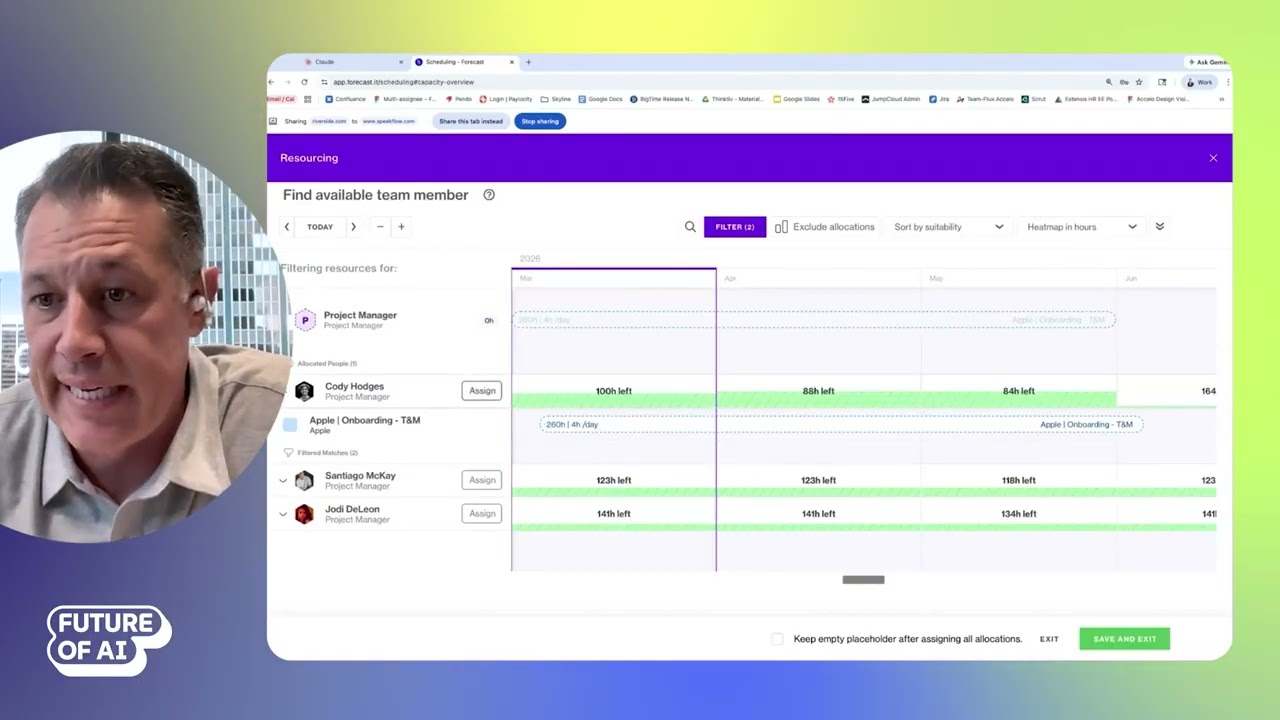
One of Forecast's foundational AI capabilities is intelligent resource matching—helping resource managers assign the right people to the right work without manually scanning spreadsheets or availability calendars.
The platform's capacity planning view gives a high-level picture of team workload by month, week, or quarter, and supports filtering by project, client, or team. When unassigned work exists, Forecast's AI recommends the top candidates for each open role, ranked by availability, skill set, role fit, billing rates, and historical task performance.
The system learns from delivery history. If a more junior team member consistently performs well on senior-level tasks, that pattern is factored into future recommendations—making the matching smarter over time.
Resource managers can drag and drop assignments to model different capacity scenarios and see how changes affect team load before committing.
Best practices for AI-assisted resource planning:
- Trust the recommendations as a shortlist, not a mandate: The AI narrows the field; you make the final call based on context the system may not have.
- Load historical data during onboarding: Forecast's implementation team helps customers import one to two years of project history to accelerate model accuracy from day one.
- Use placeholders to create demand signals: When a project needs a role that isn't yet filled, placeholders feed into the capacity view and trigger resource recommendations proactively.
3. MCP Workflow Orchestration: Connecting Forecast to Any LLM
One of Forecast's most distinctive AI features is its support for Model Context Protocol (MCP)—an emerging standard that allows large language models to securely connect to business systems and interact with their data.
Through MCP, customers can connect their preferred AI tools, whether that's Claude, ChatGPT, Microsoft Copilot, or Gemini, directly to Forecast's operational data. This allows teams to query project status, resource availability, billing data, and time logs through natural language, without logging into the PSA platform or building custom integrations.
For example, a resource manager can ask "Who's available next week?" and receive a ranked list of team members with their available hours—data that would otherwise require navigating multiple screens or running a manual report. Similarly, a leader can query a full breakdown of billable and non-billable time for a client and receive a detailed summary in seconds, across tens of thousands of hours of logged data.
Forecast treats MCP as a governed, secure capability. Customers authenticate individually, and all data returned is scoped to their own account—no cross-customer data exposure. The feature is currently in beta but is actively being rolled out.

How teams can use Forecast's MCP integration effectively:
- Use your LLM of choice: Forecast's MCP layer is platform-agnostic—customers aren't locked into a specific AI tool.
- Replace meeting prep with a prompt: Leadership and delivery managers can get cross-project visibility and reporting summaries on demand, without waiting for someone to pull a dashboard.
- Design custom workflows: Teams can use MCP to build AI-driven workflows that pull Forecast data alongside other connected tools, creating richer context for decisions.
"The combination of having a system of record and AI allowing customers to connect any LLM they want into this—to get the most value out of not just Forecast, but a group of systems—is what makes this powerful," says DiPaulo.
The combination of having a system of record and AI allowing customers to connect any LLM they want into this—to get the most value out of not just Forecast, but a group of systems—is what makes this powerful.
4. Built with an AI Foundation from Day One
Unlike platforms that retrofitted AI features onto existing infrastructure, Forecast was built with AI from its inception—founded around machine learning models designed to help teams with resourcing and capacity planning long before generative AI entered the mainstream.
This matters for practical reasons. The AI capabilities in Forecast run on structured, consistent operational data that lives inside the platform. When teams track time, complete tasks, log invoices, and update projects, that data feeds directly into the models—there is no export, no manual input, and no integration lag.
DiPaulo draws a direct contrast to using a general-purpose AI tool with a data dump: "A general AI tool is outside of an operational system. It can provide context, it can do some analysis, but it doesn't typically have all of the inputs in real time that are coming from across your organization."
A general AI tool is outside of an operational system. It can provide context, it can do some analysis, but it doesn’t typically have all of the inputs in real time that are coming from across your organization.
That real-time operational context is what allows Forecast's AI to produce recommendations that are grounded in what's actually happening—not assumptions or stale exports.
Best practices for leveraging Forecast's AI architecture:
- Centralize operations in the platform: The more consistently teams use Forecast for time tracking, task management, and project updates, the more accurate the AI's outputs become.
- Minimize manual overrides: Inconsistent data entry undermines accuracy. Trust the system and adjust processes rather than the data.
Forecast AI Features vs. Other Tools
Forecast's capabilities prioritize AI delivery intelligence, resource optimization, and governed workflow orchestration over lightweight configuration or general-purpose flexibility.
- Task management tools emphasize configurable interfaces and flexible automation, but lack the deep PSA operational context Forecast provides.
- Platforms that only focus on scenario planning and resource forecasting, can't offer the same breadth of delivery execution capabilities as Forecast.
- General AI tools like ChatGPT or Copilot can be powerful for analysis, but operate outside the operational system—missing real-time project, resource, and financial context that makes recommendations actionable.
Forecast differentiates by acting as both the system of record and the AI layer simultaneously. Because the same platform that runs delivery also powers the intelligence, the gap between insight and action is narrow. When the AI flags a risk or recommends a resource, the manager can act on it immediately—within the same workflow.
For teams managing complex, billable work at scale, this integrated approach creates compounding leverage: better resource utilization, earlier risk intervention, and margin protection without adding operational overhead.

The Future of AI in Professional Services Automation
Forecast's roadmap points toward AI becoming a true operational participant in professional services delivery—not just surfacing information, but helping execute work.
DiPaulo sees the near-term future as one where AI agents take on repeatable delivery tasks—drafting proposals, generating invoices, flagging exceptions, and supporting software development teams through coding workflows. The underlying model is the same: remove administrative burden, allow humans to focus on client relationships and high-value judgment, and help firms scale without proportional headcount growth.
Looking further ahead, DiPaulo anticipates AI agents acting as functional workers within professional services organizations—taking on defined scopes of work under human oversight.
Future developments are likely to include:
- Automated proposal and invoice generation with human review workflows
- Deeper agile and sprint-based delivery support, particularly for software and technical agencies
- MCP capabilities extended to Accelo, bringing the same workflow orchestration to the full platform
- Broader agent-based task execution across the delivery lifecycle
As AI matures, platforms like Forecast—built on operational data from day one—are well positioned to move beyond prediction and into intelligent execution.
Request a demo and see Forecast's AI in action today.
Want more AI feature breakdowns and access to events like the Future of AI in Project Management showcase? Create a free account to stay connected with The Digital Project Manager.