

6 Examples of AI in Project Management

AI Magic in Project Management: AI can help you with automation and predictive insights for everything from risk management to scheduling and planning.
Stress Less: AI can alleviate pressure on you and support decision-making, so you can focus on more strategic aspects of your projects.
Possibilities to Spare: Generative AI can also help with scenario planning by letting you visualize and explore a variety of project possibilities effortlessly.
“I’m overwhelmed—can you just give me a few practical examples of artificial intelligence in project management today?”
I get asked this almost every day, usually by someone showing visible signs of fatigue and stress. The pressure to “figure out AI” is real. Here’s what I tell them.
AI Is Well-Suited For Project Management—Kinda
From a project manager’s standpoint, generative AI is capable of a very useful level of natural language processing, machine learning, image generation, light research, and a bit of data analysis and math.

But it’s not self-aware, it’s not great at innovating creative ideas from scratch, and it’s not going to automatically deliver great results without a bit of training, feedback, and clear direction.
Agentic AI is built on the same technology, but can be configured to proactively take action without being prompted. It’s not self-aware or alive, either.

Get Certified In AI-Enhanced Project Delivery
Our program arms you with the mindset, skill set, and tool set to secure your future as an AI-wielding digital project leader.
Examples of AI in Project Management
My approach to using AI in my projects is based on where I feel the most drag in my projects versus what AI is actually good at. My stack rank of use cases for AI in project management goes like this:

1. Identifying & Managing Risks
Risk management can keep your project from smashing into those proverbial icebergs, but it’s all too often people’s least favorite thing to do.
The good news is that AI is an excellent tool for risk management: it quite literally has access to nearly all the publicly documented data on how projects have gone wrong (or right) in the past. It may not exactly be an oracle, but it’s certainly a great thought-starter to get people reacting to and dialoguing about project risks.
Here’s how we used it on a recent project:
- The problem: The team was struggling to identify risks, little less risk response strategies, for our ecommerce website migration project.
- The solution: We fed ChatGPT 4o some non-confidential details about our project and asked it to come up with some potential risks and ways we might be able to address them to help improve the project outcome and make it a success.
- The results: The output sparked conversation amongst the team immediately. Sure, it started with “Nah, that would never happen. What could happen, though, is…” but before you knew it, we had a prioritized risk register with clear owners who understood the risk and how to monitor it.
To start working this into your workflow:
- Select a suitable AI tool that complies with your organization’s AI policies.
- Craft your initial prompt with your project details and use it as context for the large language model (LLM) you’re using.
- Bring the output to your next risk-focused team meeting.
- Update the risk register with your team based on their reactions to the identified risks
- Repeat this process at a regular cadence using the latest risk register as an input
| Do | Don't |
|---|---|
| Provide context about the nature of the project and its goals. | Don’t upload sensitive project details or personally-identifiable information. |
| Upload an example risk register to help your LLM format its output in a usable way. | Don’t use the output as-is without reviewing and discussing it with the team. |
| Refine the results with feedback and other details. | Don’t have it replace human conversation. Risk assessment and ownership are team sports. |
| Consider a purpose-built tool like RAIDLog.com. | Don’t do this only once at the beginning of your project and never again. |
Here’s the prompt:
“Act as a member of the project team at a digital agency responsible for a high-profile website migration project for a client. The objective of the project is to migrate a shoe retailer’s ecommerce site from Shopify to Wordpress. We are currently completing the design phase and are about to move into an iterative technical implementation phase with bi-weekly releases to our UAT environment for client review. Time is of the essence as we’ve only got 10 weeks before the planned go-live date. Could you help identify some risks that could negatively impact our project success and some response strategies we could use to avoid, transfer, or accept those risks? Format your response in a table that can be pasted into our risk register in Excel.”
Here was our output:
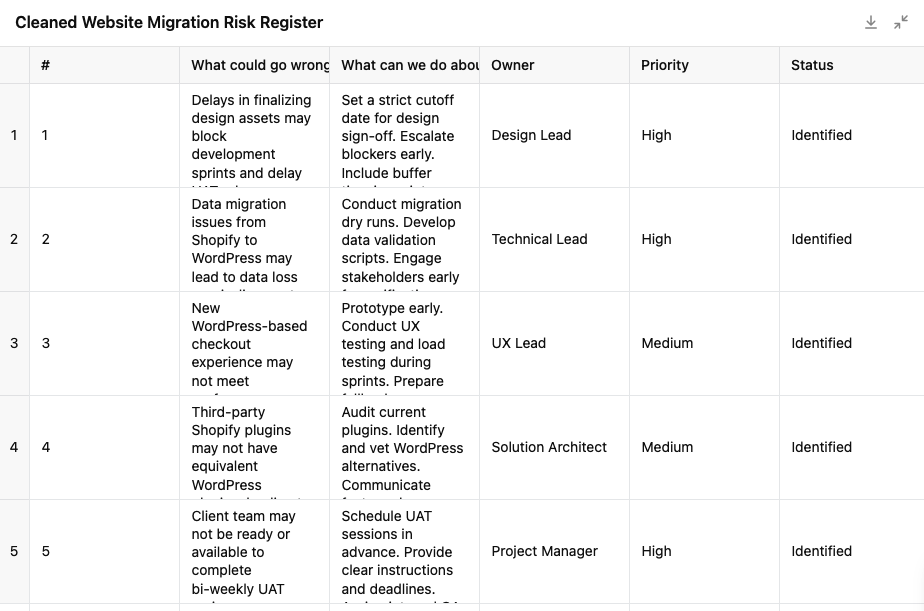
🔷Here’s the file we uploaded as an example: Basic Risk Register Template For LLMs — Google Sheets. An Excel version is also available here: Basic Risk Register Template For LLMs - Excel
2. Streamlining Project Status Reporting
Using status reports to gather and surface key information for your stakeholders may feel administrative, but it’s actually strategic AF. The only problem is… it’s a lot of work. And it’s probably not your only project.
AI can help save you time and bring better consistency to your project status reports.
Here’s how we did it on a recent program:
- The problem: We had many small projects on the go for the same client, and we were spending more time creating status reports than thinking critically about the information within them.
- The solution: We trained a custom GPT using a basic status report template and some examples, and had it pull in information from a spreadsheet that contained anecdotal team member updates as well as data from our project management software.
- The results: Not only did we end up spending significantly less time copying and pasting updates into a status report, but we were able to generate some sound options to resolve project blockers that then allowed us to be more strategic in our communications with our client, rather than simply reporting on the weather.
To start working this into your workflow:
- Select a suitable AI system that aligns with your organization’s AI policies.
- Set up a customized model (a GPT in ChatGPT, a Gem in Gemini, a Project in Claude, a Space in Perplexity, etc.).
- Train it with your project status report template as well as past examples of status reports.
- Define a persona for it to act as that works for the team.
- Give it a purpose.
- Create a spreadsheet with project updates and metrics.
- Ask the team to update directly into that sheet.
- Run the customized model weekly for each project.
| Do | Don't |
|---|---|
| Use a consistent template or structure for your project status reports. | Don’t upload sensitive data to an open LLM. |
| Match your updates sheet with the fields in the project status report. | Don’t include irrelevant metrics or data in your input if you don’t need to. |
| Set clear expectations with the team about what their updates should contain. | |
| Agree on a regular reporting cadence and deadline for updates with your teams. | |
| Review all status reports for errors or hallucinations every time. |
Here’s an example configuration:
“You are a project management AI. Your job is to help our project management team create succinct, but impactful project status reports using a consistent structure similar to the template attached. I will supply relevant details such as updates from the team as well as the latest data from our project management system. Use the second attachment as an example to guide the level of detail and metrics required. Format your output as a downloadable .docx. Pause if any inputs or instructions are unclear.”
Here’s the prompt:
“Please generate a project status report based on the report provided. Note the date range referenced in the attachment. I will fill in the Action Items section.”
🔷 Here are the example project documents we trained it on and an example input:
- Status report template
- Example status report for reference (PDF)
- Team & project updates spreadsheet: Google Sheet and PDF
And here’s the output:
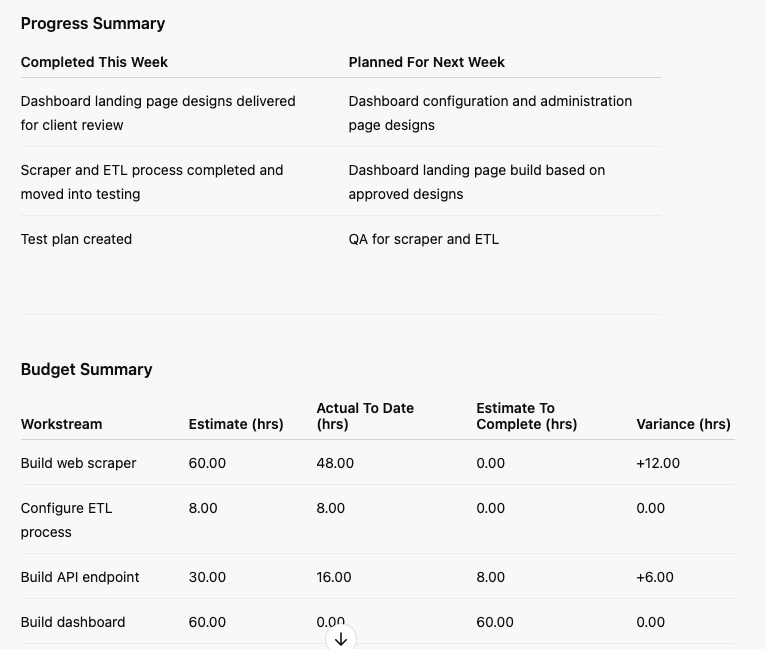
3. Supporting Project Decision-Making
Projects are a compendium of thousands of critical decisions, each of which could take your project off the rails, and most of which you don’t even have the authority to make. Instead, you’re facilitating decision-making by influence.
AI can act as a mini project decision simulator and generate scenarios that you can review and bring to your team to help shape recommendations to your decision-maker stakeholders.
Here’s an example from our community:
- The problem: A member of our community hit a crossroads on a recent project—a new ecommerce platform became available mid-way through a website redesign. The new platform supported features that would need to be built from scratch on the current platform. Meanwhile, the clock was ticking on a Black Friday campaign, and the new platform couldn’t be procured, configured, and implemented in time. There were pros and cons to each option, and the project manager needed to make a quick decision.
- The solution: They rallied the team and came up with a few options. Then they ran it through Claude for a deeper analysis.
- The results: They were able to make a strong AI-driven recommendation to the client based on the team’s and Claude’s combined analyses.
To start working this into your workflow:
- Select a suitable AI tool (or specific AI project management tool) that aligns with your organization’s AI policies.
- Craft a persona for your prompt.
- Add context about the project and the decision to be made.
- Include any options you’ve already identified.
- Craft your prompt to suggest other options.
- Use the output to have a discussion with your team and tailor accordingly.
- Present the options to your stakeholder(s) with a strong recommendation backed by the team.
| Do | Don't |
|---|---|
| Provide information about the project goals. | Don’t make a blind decision based on your tool’s recommendation. |
| Try different personas that may align better with your stakeholders. | Don’t provide sensitive or personally-identifiable information into an open LLM. |
| Use the tool to challenge or question your recommendations. | Don’t include any parts of the analysis that aren’t quite relevant to your project. |
Here’s the prompt:
“Act as a project management AI. Your role is to generate and critically evaluate different scenarios for key project decisions we encounter.
Our current project is an ecommerce website redesign for a client in the children's footwear retail space.
We have the opportunity to switch to a different ecommerce platform that allows for deeper personalization and predictive analytics for customer buying habits. However, this would increase the budget and extend the timeline past a key selling window (Black Friday).
On the other hand, if we continue with the current platform, it's likely we will need to still migrate to the new platform as a separate project of a similar budget next year to achieve the goal of having a more personalized shopping experience for our customers and steadily increasing revenue through dynamic upsells.
Could you weigh the benefits and drawbacks of the two options?
Also, please feel free to suggest options that we haven't thought of yet.
Please format your output as bullet points that can be discussed as a team and shared with our executive sponsor.”
Here was our output:
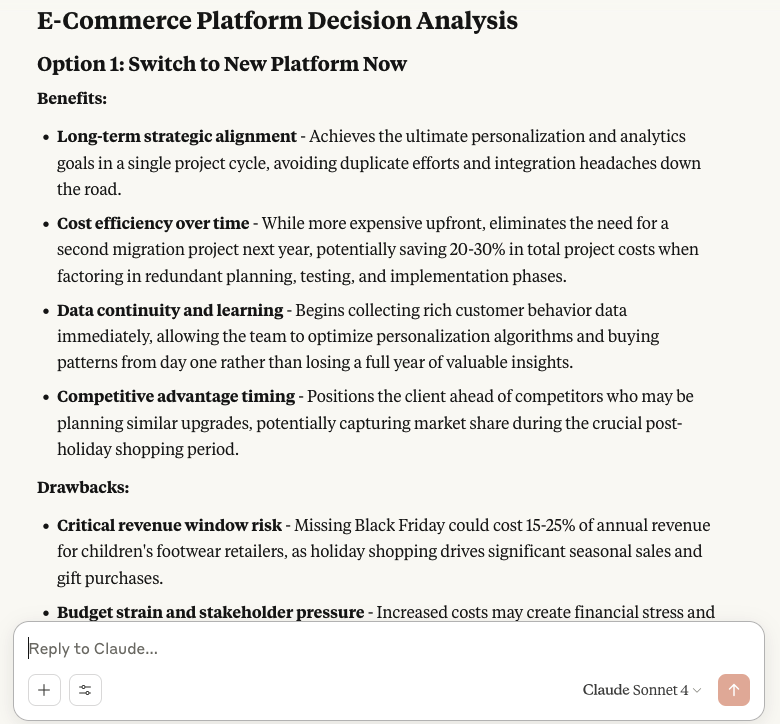
4. Project KPI Trends Analysis
Project health metrics are great, but on longer projects, it can be difficult to zoom out to understand bigger-picture trends. AI can help you find patterns and make recommendations on where to look to isolate the root cause.
Let’s take an example from our community:
- The problem: On one of our members’ Scrum-based projects, they noticed the team’s velocity varied pretty widely between sprints. After ruling out their estimation process as the source, they were curious if there could be another cause.
- The solution: They turned to ChatGPT to see if it could identify any trends that could lead them to anything conclusive by feeding it a spreadsheet of historical sprint data.
- The results: Based on the suggestions, they identified an opportunity to improve the way work was handed-off between teams that weren’t as accustomed to the Scrum method, such as the stakeholders from the HR team. It wasn’t the only factor, but it did improve collaboration.
To start working this into your workflow:
- Select a suitable AI system that aligns with your organization’s AI policies.
- Export the historical project data that you want analyzed.
- Provide the project context in your prompt and describe the data being uploaded.
- Give the output a bit of a sense check and refine if needed.
- Take it to your team as a starting point for discussion.
| Do | Don't |
|---|---|
| Provide good, clean project data with no personally-identifiable information in it. | Don’t lead your LLM to the conclusion just to justify your hunch. |
| Experiment with your prompt to get different perspectives. | Don’t jump to conclusions based on the output. Data analysis is arguably not generative AI’s specialty just yet. |
| Don’t use AI output to place blame. Use its response as a starting point for dialogue. |
Here’s the prompt:
“Act as a project management AI. Your job is to identify trends in our project data, generate insights from that data, and propose mitigation strategies for identified risks.
Our project is using the Scrum methodology to develop an employee knowledge-sharing and networking platform. Our team includes full-stack developers, UX/UI designers, and a member of the HR team who will be acting as the product owner.
Our sprint velocity has been oscillating throughout the project, and we are trying to isolate some reasons why.
Could you analyze the data attached and see if there are any correlations that may be impacting our velocity?
Format your output as bullet points that can be easily shared with the team over Slack.”
🔷Here’s an example input (simplified, not the exact one used by our member) and a CSV version you can upload directly to your LLM to give this a spin.
Here is a simplified output:
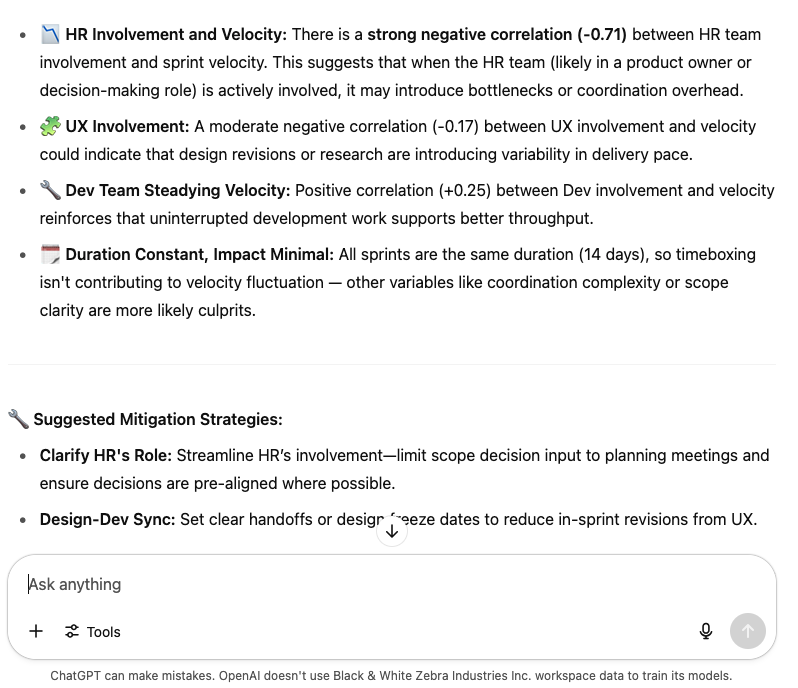
5. Scheduling & Planning
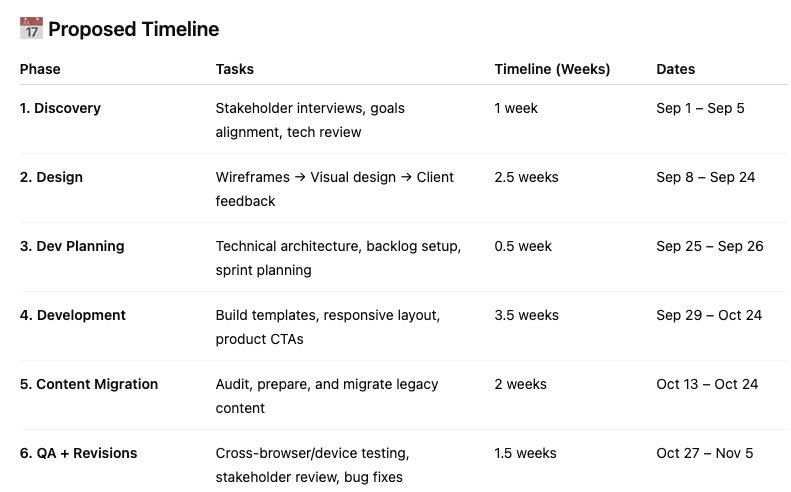
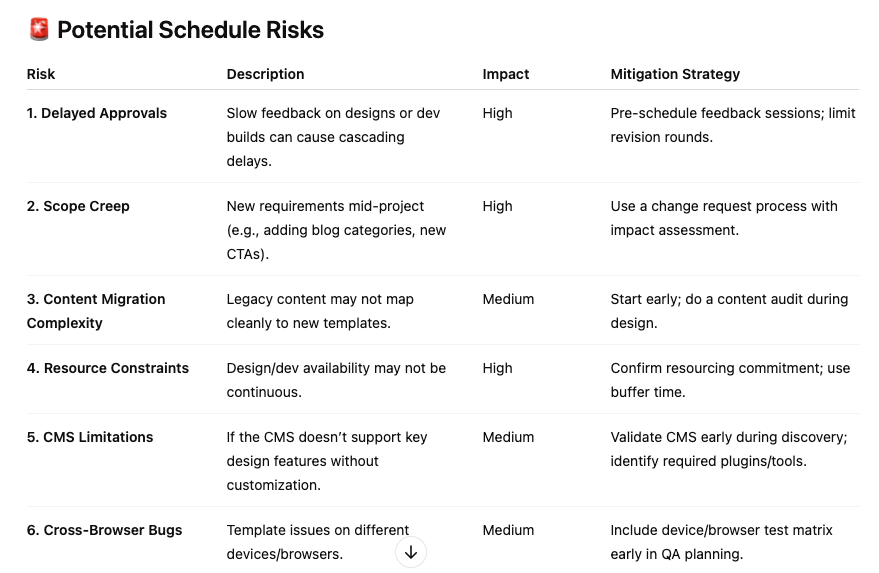
When you’re leading a project, everyone expects you to have a crystal ball—even you! AI may not be that crystal ball, but it can help kickstart project planning, validate or push back against deadlines, test a prospective client’s budget appetite, or give the team something to react to in the planning phase.
Let’s take the example of creating a high-level ballpark timeline for your project:
- The problem: I was asked to deliver a project with a compressed timeline, but my gut told me it wasn’t feasible. Before I involved the team, I wanted to sense-check the timeline and give the team something to react to rather than starting from a blank slate.
- The solution: I used a combination of ChatGPT and Tom’s Planner to produce a first draft of a timeline for the project based on the project brief. Then I took it to the team to discuss, refine, and ultimately invalidate the feasibility of the timeline.
- The results: We used a combination of AI’s recommendations and our own analysis to make a case for moving the deadline out by 3 weeks to get the work done without adding risk.
To start working this into your workflow:
- Select a suitable AI-powered tool that aligns with your organization’s AI policies.
- Upload your project brief or provide the project context in your prompt, including the proposed approach, timeline, deliverables, and team shape.
- Give the output a bit of a sense check and refine if needed.
- Take it to your team as a starting point for discussion.
| Do | Don't |
|---|---|
| Provide as much detail and context as you can. | Don’t take the first response—give it feedback and refine it! |
| Try different tools to get different takes, where possible. | Don’t plan in a vacuum! Project planning is a team sport! |
| Use your AI-generated project plan to drive creative conversations with your team |
Here’s the prompt:
“I've been asked to lead a blog redesign project involving the design and development of a new homepage template and a new blog post template.
The client is a baby shoe retailer. They would like to start by Sep 1 and launch the new blog by Nov 16. Some content migration will also be required.
Their goal is to improve the performance of the blog: increasing average visit duration, average page views per session, and click throughs to product pages, as well as decreasing blog post bounce rate.
I am not confident that the timeline being requested is feasible.
Could you help me create a project plan for this project along with a list of potential schedule risks?”
Here’s the output:
6. Automating Repetitive, Manual Administrative Tasks
It’s no secret that project management can be repetitive—or, as I like to call it “rhythmic”. As the project leader, you set the pace on a continuous cycle of routine tasks for communications, planning, prioritization, and pivots.
But just like your heart keeps pumping without you having to think about it, there’s plenty of opportunities to give AI the reins for repetitive tasks.
Let’s take the example of how we set up our weekly roll-ups for the internal team:
- The problem: Project managers were spending over an hour every Friday summarizing the week’s project progress for their project teams. It paid dividends in terms of team morale, but it was a drag to put together.
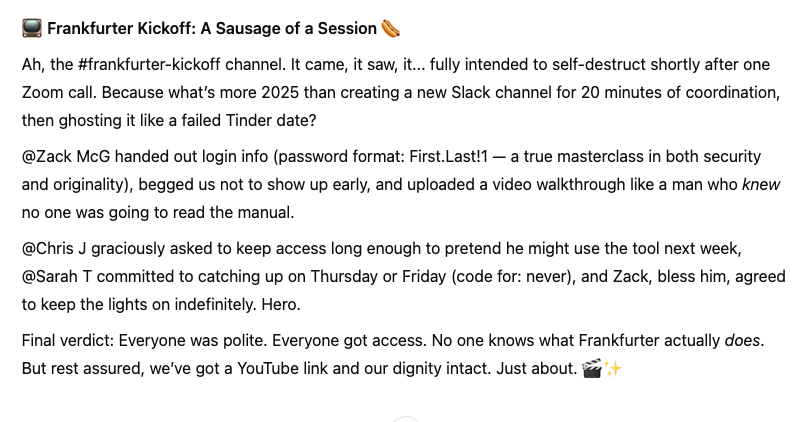
- The solution: We used a third-party extension (Waves) for Slack that would keep an archive of conversations. Then we piped the full transcripts into a custom GPT to generate a summary (using Zapier). It was trained to be cheeky, dry, and sarcastic—think TARS from Interstellar or K2SO from Rogue One. The draft would be sent back to Slack via Zapier for the project manager to tailor, copy, paste, and send.
- The results: Each project manager ended up saving at least 45 minutes every Friday, which of course they used to play Cards Against Humanity with the HR team.
To start working this into your workflow:
- Make sure your organization’s policies will allow the transfer of Slack conversations into third-party tools.
- Leverage a tool like Waves (or, if you have Slack’s AI-powered features enabled, you might be able to use the Summarize function).
- Create a custom GPT or project within your organization’s LLM and train it with the tone that would be appropriate for internal team communications.
- Use a no-code integrator like Make or Zapier to design the process and schedule it to run.
- Refine as needed.
| Do | Don't |
|---|---|
| Be transparent with the team about how AI is being used to summarize conversations in Slack. | Don’t try to surface DM conversations to the team using this method. Privacy matters. |
| Train your model to keep things appropriate to your culture—have it remove cuss words, references to illicit drugs, and awkward phrasings that might not fit out of their original context. | Don’t try to summarize the channel where all the tool notifications come through. No one wants a roll-up of Jira tickets that got closed—not on a Friday, anyway. |
| Give project managers a chance to review and edit the message before sending. | Don’t include personally-identifiable information or sensitive data in your open LLMs. |
| Encourage project managers to add their own personal style and flair (manually, or by training their models). |
Here’s the prompt:
“Act as a dry, sarcastic British stand-up comedian.
Create a brief summary of the chat transcript attached. It’s okay to leave in names as this will only be used internally.
Format the output as a brief message that I could share with the team via Slack. Feel free to include a tasteful amount of emojis.”
Here was our output:
What’s Next?
These are just a few of my favorite examples of how AI can add efficiencies to your project management practice right away. But are they the only ones? Heck no! If you’re new to incorporating AI in your projects and initiatives, use these as a starting point, and then get creative with it.
Or if you’re ready to start formalizing this into your organization’s project management practice, discuss and prioritize with your team to decide what standard operating procedures (SOPs) will make the most impact using an appropriate level of effort.
Oh, and did I mention that our AI project management experts at DPM built a practical, hands-on course for this exact purpose? You can level up your team’s AI-enabled project delivery practice through our Mastering AI in Digital Projects micro-credential.


