

De 10 beste Salesforce-integrerte prosjektstyringsprogrammene

Beste prosjektstyringsprogramvare som integreres med Salesforce – kortliste


Prosjektstyringsprogramvare som kobles sømløst til Salesforce, kan endre spillereglene. Den kan hjelpe deg med å spare tid på dataregistrering, enkelt trekke ut viktig innsikt og håndtere flaskehalser før de blir et problem. Men med så mange alternativer på markedet kan det virke overveldende å finne den riktige løsningen for deg og teamet ditt.
Med mange års erfaring med å administrere digitale prosjekter og bruke prosjektstyringsverktøy har jeg testet en rekke verktøy for å finne dem som faktisk fungerer godt med Salesforce. Verktøy som effektiviserer kommunikasjonen, sikrer sanntidsoppdateringer av data og hjelper team med å samarbeide bedre.
Hvorfor du kan stole på våre programvareanbefalinger
Teamet vårt har testet og anmeldt programvare siden 2012. Vi er selv prosjektledere, så vi vet hvor vanskelig og hvor viktig det er å velge riktig programvare.
I denne guiden har vi vurdert verktøyene gjennom praktisk testing og uavhengig research og gitt dem poeng ut fra våre utvelgelseskriterier. Vi bygger også på innsikt fra ledende eksperter i bransjen og erfarne prosjektledere.
Anmeldelsene våre bygger på vår egen redaksjonelle vurdering. De er ikke et salgsargument.
Ekspertanmeldere:
Sammenligningstabell for prosjektstyringsprogramvare integrert med Salesforce
| Tool | Best For | Trial Info | Price | ||
|---|---|---|---|---|---|
| 1 | Best with advanced onboarding automation | Free demo available | Pricing upon request | Website | |
| 2 | Best for robust reporting tools | Free plan + 14-day trial + demo available | From $10/user/month (billed annually) | Website | |
| 3 | Best for visual project management | Free plan + 14-day free trial + free demo available | From $8/user/month (billed annually) | Website | |
| 4 | Best for AI-driven sales-to-delivery handoff | Free plan + 14-day free trial + free demo available | From $9/user/month (billed annually) | Website | |
| 5 | Best for unified global project oversight | Free trial available | From $16/user/month (billed annually) | Website | |
| 6 | Best for native Salesforce project delivery | 30-day free trial | From $25/user/month (billed annually) | Website | |
| 7 | Best for client onboarding tied to CRM deals | 14-day free trial | From $49/user/month (billed annually) | Website | |
| 8 | Best for portfolio-scale services delivery tracking | Free demo available | Pricing upon request | Website | |
| 9 | Best for end-to-end services delivery financials | Free demo available | Pricing upon request | Website | |
| 10 | Best for services delivery inside Salesforce | Free demo available | Pricing upon request | Website |


Anmeldelser av den beste prosjektstyringsprogramvaren som integreres med Salesforce
Å utforske prosjektstyringsprogramvare som integreres med Salesforce, kan forbedre effektiviteten og samarbeidet i teamet ditt betydelig. Her gir jeg detaljerte oversikter over de beste verktøyene som integreres sømløst med Salesforce, og som er utviklet for å optimalisere prosjektarbeidsflytene og datahåndteringen din.

TaskRay
Best with advanced onboarding automation
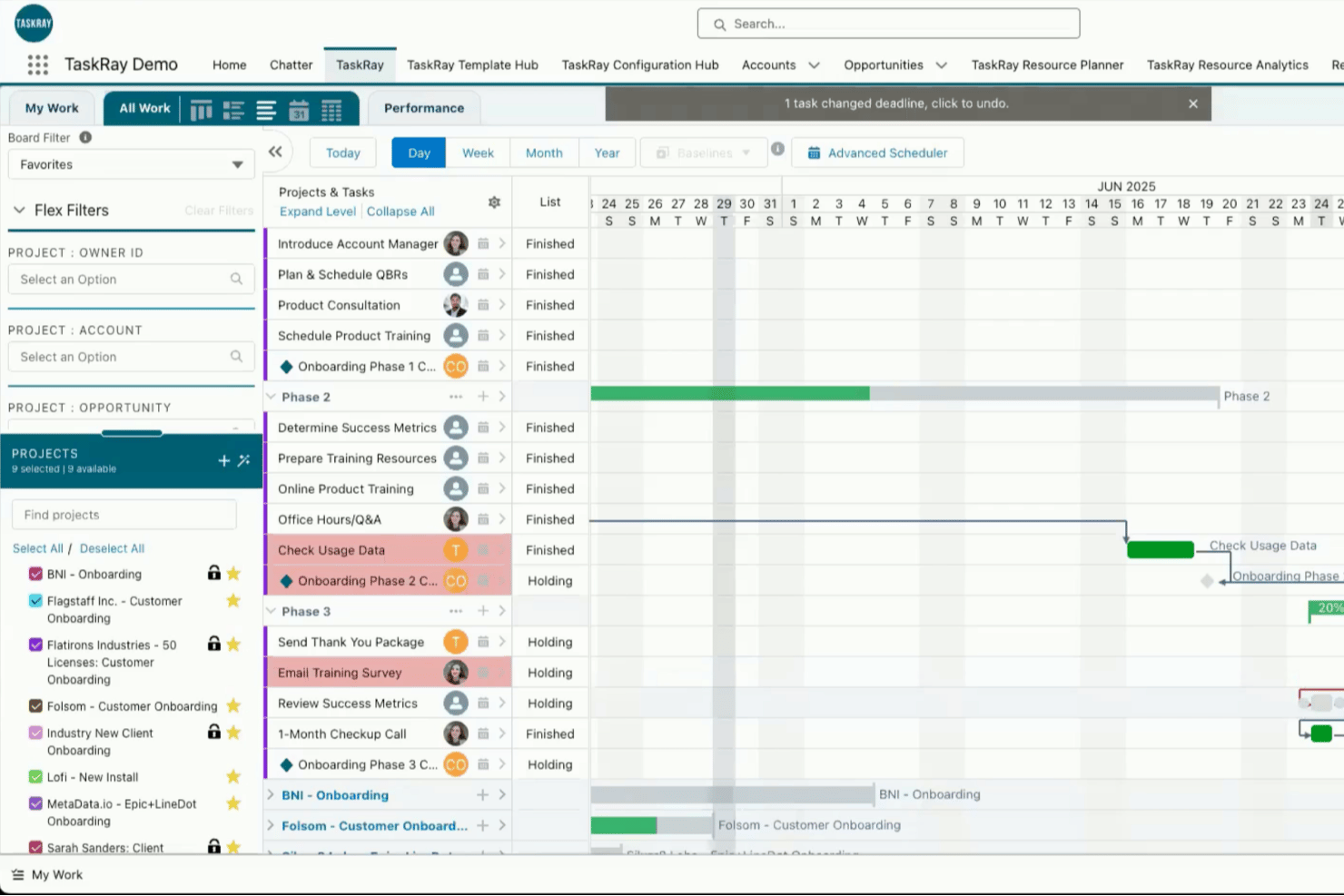
TaskRay is a Salesforce-native project management platform that runs as a managed package inside Salesforce, offering task tracking, multi-view project management, onboarding automation, resource planning, and external stakeholder collaboration—all built directly on Salesforce records and objects.
Who Is TaskRay Best For?
TaskRay is a strong fit for sales operations and customer success teams that manage post-sale delivery entirely within Salesforce.
Why I Picked TaskRay
TaskRay earns its spot on my shortlist because no other tool automates the sales-to-delivery handoff quite like it does inside Salesforce. I'm particularly drawn to the packaged Create Project from Opportunity flow, which fires automatically when a deal hits Closed Won and builds a full project from a template without any manual setup. Pair that with customer onboarding scores and Sales/Customer Success handoff workflows baked into the Starter plan, and you've got a genuinely structured onboarding automation engine, not just a task list.
TaskRay Key Features
- Salesforce object mapping: Link projects and tasks to standard or custom Salesforce objects, including Accounts, Campaigns, Cases, and Contacts, via configurable lookup relationships.
- Resource Planner: Visualize team utilization on a timeline, review availability, distribute unassigned work, and adjust assignments on active projects.
- Collaboration Connect: Send assigned tasks to external stakeholders by email so they can update status and leave comments without a Salesforce login.
- Timer and timesheet: Track billable and non-billable time directly within Salesforce using built-in timers and timesheet records.
TaskRay Integrations
TaskRay is native to Salesforce, including Sales Cloud, Service Cloud, Experience Cloud, and CPQ, and integrates with Jira, Slack, Microsoft Teams, Gmail, and Outlook. It supports Salesforce APIs, invocable Apex actions, and global Apex methods for custom integrations.
Pros and Cons
Pros:
- Reviewers value clear milestone and status visibility
- Opportunity triggers launch templated onboarding projects
- Keeps delivery work on Salesforce records
Cons:
- Reviewers report friction editing dates and dependencies
- Setup can challenge teams unfamiliar with Salesforce

Wrike
Best for robust reporting tools

Wrike is a project management platform that connects task tracking, Gantt-based planning, workload management, and reporting with a native Salesforce managed-package integration for linking CRM records directly to project work.
Who Is Wrike Best For?
Wrike is a strong fit for project and program managers at mid-sized companies who need multi-view project tracking, workload visibility, and Salesforce record linking in one platform.
Why I Picked Wrike
I picked Wrike as one of the best because its reporting and dashboard tools give project managers real visibility into work tied to Salesforce records, without having to chase updates across tools. I like that you can build custom dashboards with configurable widgets, run real-time reports on project status, and view workload charts that flag overloaded team members across projects. The Salesforce widget surfaces linked tasks and their statuses directly on Salesforce records, so delivery progress is visible right where deals live.
Wrike Key Features
- Salesforce managed package: Installs directly into Salesforce Classic or Lightning and adds a widget to your record page layouts, showing linked Wrike tasks and statuses without leaving Salesforce.
- Automated project launch on deal close: Triggers associated Wrike tasks when a Salesforce deal closes, using an optional template copied to a new folder tied to that record.
- Multi-view project tracking: Switch between Gantt, board, table, calendar, and chart views to manage tasks, dependencies, and milestones across projects.
- Scrum boards and backlog management: Prioritize and track sprint work using shared Scrum boards and Agile dashboards alongside your standard project views.
Wrike Integrations
Wrike offers 400+ application integrations, including a native Salesforce managed package and marketplace connections with Jira, GitHub, Slack, Microsoft Teams, Google Sheets, Tableau, and Power BI. Its REST API, OAuth 2.0, webhooks, and Unito-powered paid sync support custom or two-way connectivity.
Pros and Cons
Pros:
- Workload charts flag overloaded team members
- Dependencies and Gantt views clarify delivery timelines
- Dashboards surface project status without update chasing
Cons:
- Advanced cross-project reporting may require spreadsheet exports
- Complex workspace setup can confuse new teams
New Product Updates from Wrike
Wrike Expands Gantt Planning, Approvals, and AI Work Intake
Wrike adds cross-project Gantt dependencies, flexible approval routing, and AI work intake through Wrike MCP. These updates give teams more control over planning, decision-making, and incoming work. For more information, visit Wrike’s official site.

Miro
Best for visual project management

Miro is a visual collaboration platform that combines an infinite canvas with project planning tools, including Kanban boards, timelines, Gantt charts, and tables. Plus a third-party Salesforce integration for importing and updating CRM records directly on the board.
Who Is Miro Best For?
Miro is a strong fit for project managers and cross-functional teams in tech who want a visual workspace for planning, mapping, and tracking work across distributed teams.
Why I Picked Miro
I picked Miro as one of the best because its infinite canvas brings visual project management to life in a way few tools can match. I love how teams can run Kanban boards, Gantt charts, and timelines all in one shared workspace, then pull Salesforce Leads and Contacts directly onto the canvas via the Salesforce for Miro app to keep account context visible alongside project work. It's especially useful when planning sprints or mapping delivery workflows while referencing live CRM records without switching tools.
Miro Key Features
- Infinite canvas: An expandable shared workspace where teams can organize project work, diagrams, and planning artifacts without space limits.
- Real-time board collaboration: Multiple team members can edit, comment, and update boards simultaneously for distributed teams.
- Blocking and blocked-by dependencies: Timeline records can be linked with dependency relationships to surface sequencing constraints across project work.
- Two-way integrations with dev tools: Business plan includes bidirectional sync with Jira, Asana, Linear, ClickUp, and Azure for sprint planning and roadmapping.
Miro Integrations
Miro lists 250+ integrations, including native connections with Jira, Asana, Linear, ClickUp, and Azure DevOps, plus the Salesforce for Miro marketplace app. It also supports Zapier and REST APIs for custom integrations.
Pros and Cons
Pros:
- Templates speed sprint and account planning
- Live collaboration keeps distributed teams aligned
- Visual boards clarify cross-functional project dependencies
Cons:
- Limited capacity planning and utilization reporting
- No project delivery view inside Salesforce
New Product Updates from Miro
Miro Adds Japan Data Residency for Enterprise Customers
Miro has introduced Japan data residency for enterprise customers, offering in-region storage for production data, backups, and metadata, plus in-region compute infrastructure. For more information, visit Miro's official site.

Best for AI-driven sales-to-delivery handoff
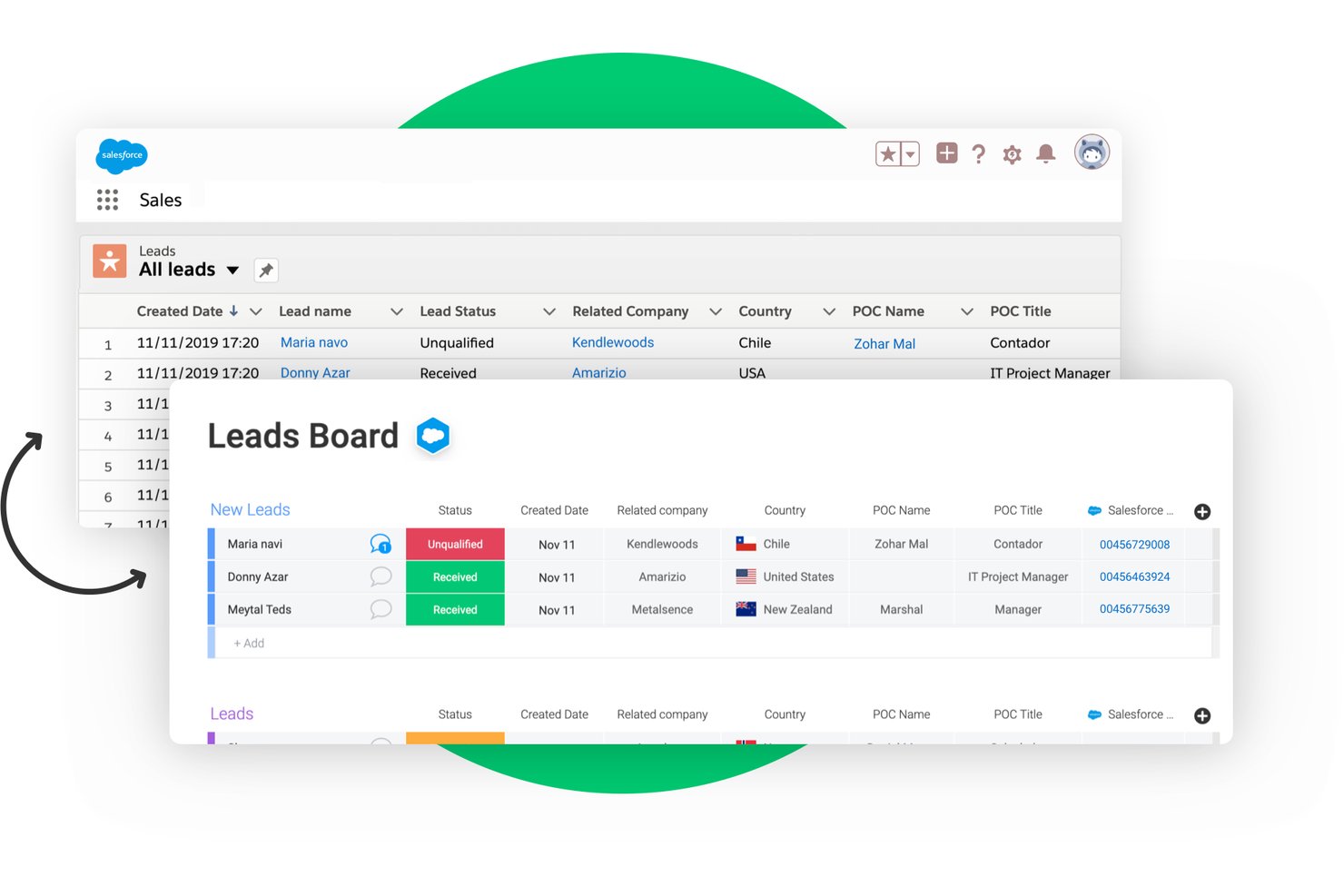
monday AI Workspace is an AI-powered work management platform that brings together project planning, task tracking, resource management, workflow automation, and Salesforce integration into a single connected workspace.
Who Is monday AI Workspace Best For?
monday AI Workspace is a strong fit for project and program managers at mid-to-large organizations who need a flexible, AI-assisted workspace to coordinate delivery across multiple teams and workstreams.
Why I Picked monday AI Workspace
I picked monday AI Workspace because it handles the messy transition from a closed-won deal to active delivery better than most tools in its class. Once a Salesforce Opportunity syncs into monday, AI agents can automatically generate project boards from templates, flag deadline risks, and send stakeholder updates without manual setup. I also like that Gantt views, task dependencies, and resource planning all live in the same workspace, so project managers aren't stitching together separate tools to run delivery.
monday AI Workspace Key Features
- AI agent workforce: Deploy pre-built AI agents for PMO tasks, including flagging blockers, tracking task progress, and sending stakeholder updates automatically.
- Portfolio management: Connect multiple project boards into a unified portfolio view showing health, progress, and timeline data across all workstreams.
- Task dependencies: Set Finish-to-Start, Start-to-Start, Finish-to-Finish, and Start-to-Finish relationships between tasks with configurable action modes.
- Salesforce object mapping: Map monday columns to Salesforce standard and custom object fields, including Opportunities, Accounts, Leads, and Contacts, with two-way sync.
monday AI Workspace Integrations
monday AI Workspace documents 850+ integrations and apps, including native Salesforce, HubSpot, QuickBooks, Slack, Microsoft Teams, GitHub, GitLab, Google Calendar, and Outlook integrations. It also provides GraphQL and SDK access for custom integrations.
Pros and Cons
Pros:
- Portfolio resource views surface capacity constraints
- Dependencies and Gantt views expose schedule risk
- Visual boards clarify cross-team delivery status
Cons:
- Financial tracking omits billing and margin controls
- Resource planning requires Enterprise access
New Product Updates from monday AI Workspace
monday AI Workspace Adds Human Approval Routing
monday AI Workspace adds a human-in-the-loop approval block to AI Workflows, sending approval requests and routing workflow paths based on responses. For more information, visit monday AI Workspace's official site.

VOGSY
Best for unified global project oversight

VOGSY is a professional services ERP that connects project management, resource planning, time tracking, invoicing, and CRM synchronization—including with Salesforce—in a single platform built for services-focused teams.
Who Is VOGSY Best For?
VOGSY suits professional services teams managing projects across multiple countries who need resource planning, billing, and financials in one place.
Why I Picked VOGSY
I picked VOGSY as one of the best because it handles the full arc of a professional services engagement—from pipeline to invoice—across multiple countries and currencies in a single platform. When a deal closes in your CRM, VOGSY's sales agent can immediately propose a resourced project plan, complete with deliverables, booked team, hours, and a billing model, ready for approval. I also like how its planning view places opportunity bookings directly alongside live projects, so you can spot capacity conflicts before they become problems.
VOGSY Key Features
- CRM synchronization: Syncs organization, contact, and opportunity data between your CRM and VOGSY, with bidirectional updates for organization records.
- Multi-currency and multi-company support: Manage projects across multiple countries, currencies, and legal entities with consolidated base-currency reporting.
- Flexible billing models: Supports time-and-materials, fixed-price, retainer, subscription, and mixed billing within a single project.
- AI-powered capacity planning: Matches skills to open work, flags overloaded or available staff, and proposes project staffing for review and approval.
VOGSY Integrations
VOGSY offers native integrations with Salesforce, Jira, Trello, Xero, Sage, NetSuite, QuickBooks Online, Google Workspace, and Microsoft 365. Its REST API supports custom connections.
Pros and Cons
Pros:
- Reviewers praise responsive onboarding support
- Margin forecasts connect delivery with finances
- Opportunity bookings appear beside active projects
Cons:
- Sales teams lack embedded delivery visibility
- Project tasks don’t sync into CRM
New Product Updates from VOGSY
VOGSY Adds Velocity Agent Verdicts for Quote Approvals
VOGSY adds Velocity agent verdicts for quote approval requests with risk levels, margin checks, discount analysis, and reasoning. This helps approvers assess quote risk before making a final decision. For more information, visit VOGSY’s official site.
 .

Best for native Salesforce project delivery
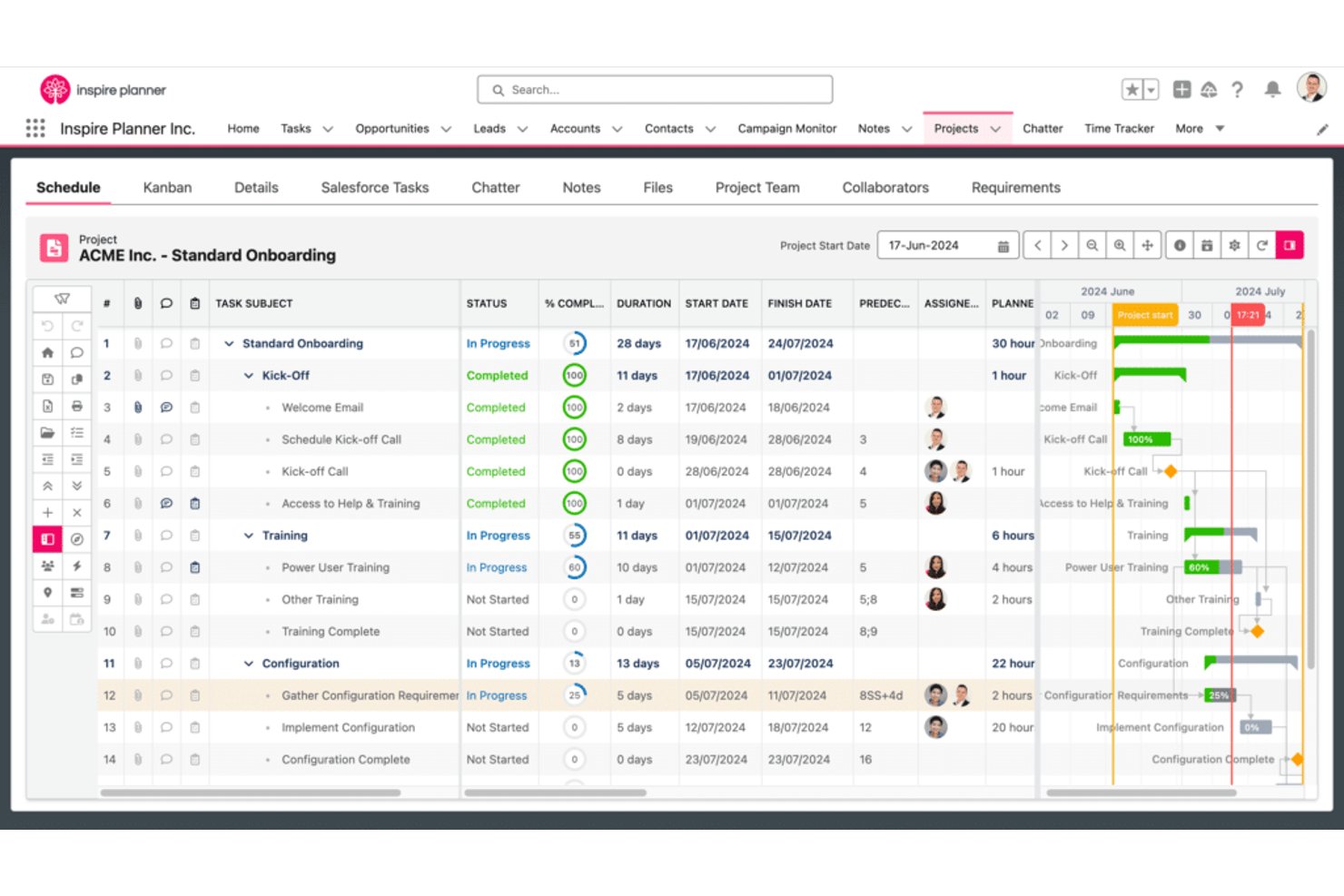
Inspire Planner is a 100% Salesforce-native project management app that supports waterfall and agile delivery, with Gantt, Kanban, and portfolio views, resource management, time tracking, and project financials—all built directly on your Salesforce org.
Who Is Inspire Planner Best For?
Inspire Planner is a strong fit for Salesforce-native teams that manage client delivery directly from their CRM, especially those running implementation or onboarding projects tied to closed deals.
Why I Picked Inspire Planner
I picked Inspire Planner as one of the best because it's the only tool on my list that lives entirely inside Salesforce, with no syncing to an external app. What I love most is the Opportunity-to-project Flow: when a deal closes, a project automatically spins up, linked to the Account and Opportunity, with templates stitched directly from the products on that deal. I also rely on the resource utilization views to track capacity across active projects without ever leaving my Salesforce org.
Inspire Planner Key Features
- Gantt chart with critical path: An interactive Gantt view displays dependencies, milestones, baselines, and critical path mapping across your project schedule.
- Agile backlog and sprint planning: Organize backlog items, create user stories, and group work into prioritized sprints with burnup, burndown, and velocity charts.
- External Project Portal: Share project schedules with external contacts so they can view tasks and update status, effort, and comments without a Salesforce license.
- Project financials tracking: Track budgets, expenses, earned value, and cost variance with automatic cost calculations based on effort and resource rates.
Inspire Planner Integrations
Inspire Planner offers native integrations across Salesforce, including Salesforce Tasks, Opportunities, Chatter, Reports and Dashboards, Flow, Process Builder, and the Salesforce mobile app. It supports custom integrations through the standard Salesforce API.
Pros and Cons
Pros:
- Reviewers praise responsive customer support
- Portfolio views show progress and resource allocation
- Gantt charts clarify task dependencies
Cons:
- Resource load leveling has reported gaps
- No invoicing or portfolio-level cost rollups
Best for client onboarding tied to CRM deals
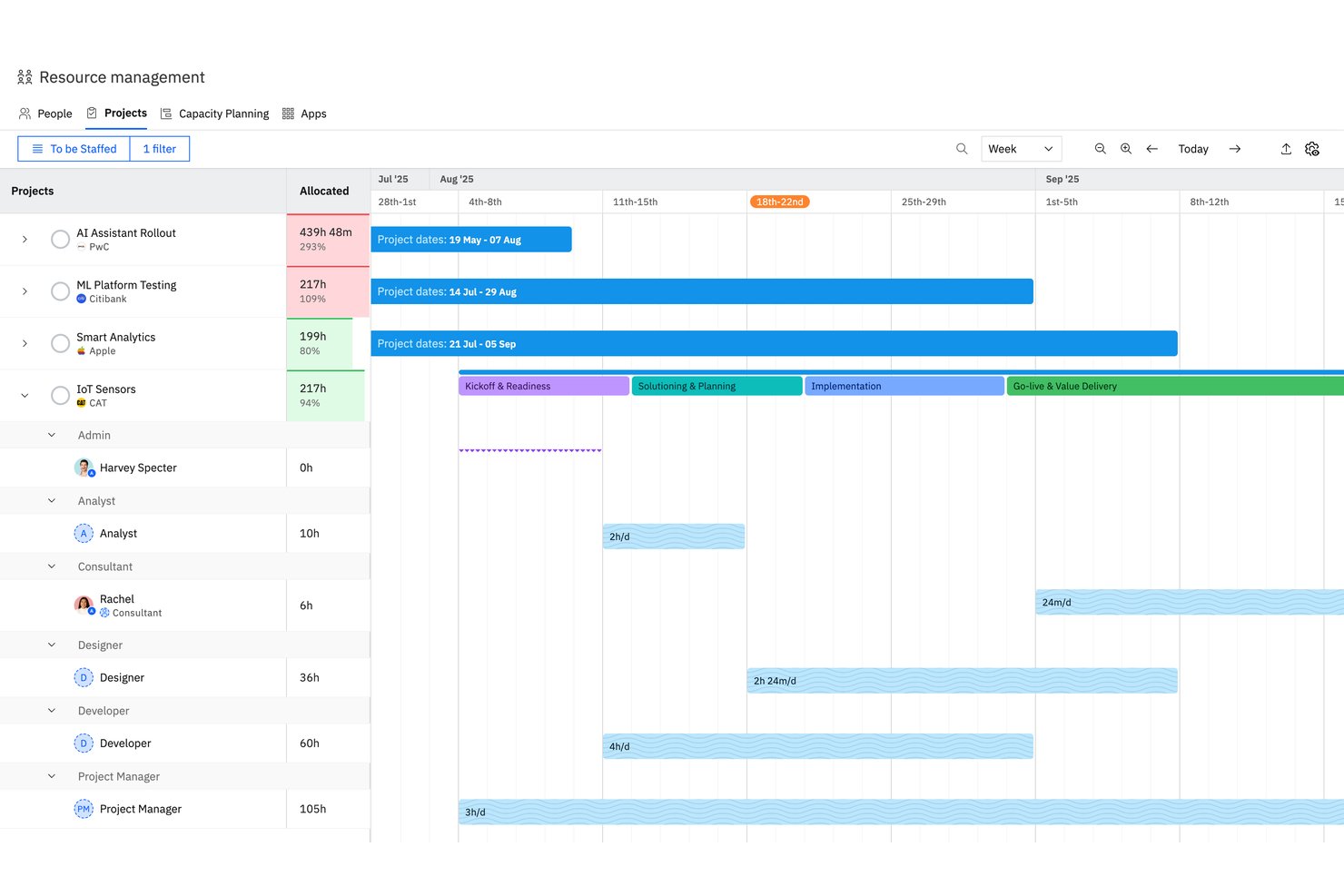
Rocketlane is a professional services automation (PSA) platform that combines project management, resource planning, client portals, and financial tracking—built specifically for services teams that run structured delivery workflows tied to CRM deals.
Who Is Rocketlane Best For?
Rocketlane is a strong fit for professional services teams that need to manage structured client delivery workflows directly connected to their CRM pipeline.
Why I Picked Rocketlane
I picked Rocketlane as one of the best because it's purpose-built for the exact moment a Salesforce deal closes: it automatically spins up a project using deal data, routing it to the right template based on Salesforce fields like SKU, Product Family, or Region. I also love that you can soft-book roles and skills against a deal before it's even won, then convert those soft allocations to hard commitments the moment it closes.
Rocketlane Key Features
- Branded customer portal: Clients can log in via magic link to view project progress, complete approvals, and collaborate directly within a white-labeled portal.
- PSA-grade financial tracking: Teams can manage rate cards, project budgets, margins, revenue recognition, and invoicing from within the same platform.
- Gantt, Kanban, and List views: Project work can be visualized and managed across multiple layout options, with sprint planning, epics, and backlogs included.
- Salesforce sync error notifications: Configurable email alerts notify admins of integration errors, with an in-app log surfacing the last 100 automation error entries.
Rocketlane Integrations
Rocketlane offers native integrations with Salesforce, Jira, Slack, HubSpot, Google Calendar, Outlook Calendar, and Snowflake. It also supports Workato, Zapier, and an API for custom integrations.
Pros and Cons
Pros:
- Customers track progress in branded portals
- Soft-booking helps forecast delivery capacity
- Automates deal-to-project handoffs with templates
Cons:
- Reporting options may not fit team cadence
- Setup can complicate CRM handoffs
Best for portfolio-scale services delivery tracking
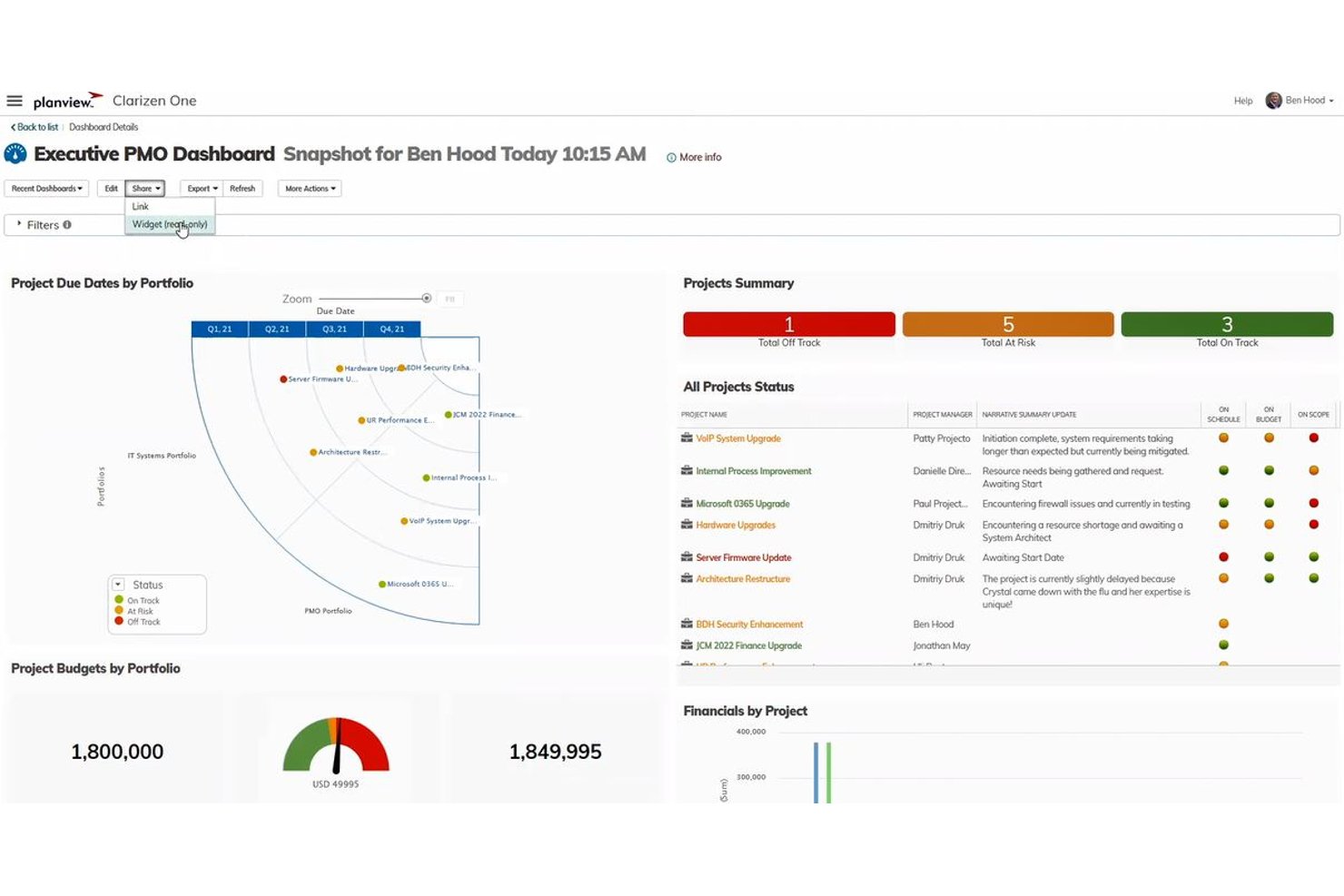
Planview AdaptiveWork is a portfolio and work management platform that connects Salesforce CRM to professional services delivery through project planning, resource management, financial tracking, and bidirectional data sync.
Who Is Planview AdaptiveWork Best For?
Planview AdaptiveWork is a strong fit for professional services teams that need to connect a Salesforce sales pipeline directly to project delivery, resource planning, and financial tracking at the portfolio level.
Why I Picked Planview AdaptiveWork
I picked Planview AdaptiveWork because it's built specifically for professional services teams that need to manage delivery at the portfolio level, not just the project level. Its dedicated Salesforce Edition connects opportunity data directly to project creation, so when a deal moves forward, your delivery team can trigger a full project plan without re-entering CRM context. I also appreciate how the financial tracking layer ties timesheets, rate cards, and revenue forecasting back to Salesforce dashboards showing active backlog and profitability trends by engagement.
Planview AdaptiveWork Key Features
- Hybrid work management: Supports waterfall, agile/Scrum, and hybrid delivery methods within a single workspace, with connections to external tools like Jira.
- AI-powered sentiment analysis: Scans project communications and status updates in real time to flag potential delivery risks before they escalate.
- Rate card configuration: Defines resource billing, cost, and revenue rates by role, user, or project to support accurate client invoicing.
- External collaborator portal: Gives clients or external stakeholders access to projects, files, and conversations without requiring a full platform license.
Planview AdaptiveWork Integrations
Planview AdaptiveWork offers native integrations with Salesforce, Salesforce Chatter, and SharePoint. It also connects with Jira, Microsoft Teams, and Slack, supports Zapier, and provides an API for custom integrations.
Pros and Cons
Pros:
- Budget and time tracking support services profitability
- Resource forecasts expose cross-project capacity constraints
- Portfolio views connect schedules, workload, and financials
Cons:
- Sync can misattribute activity or behave inconsistently
- Large plans make schedule changes cumbersome

Certinia
Best for end-to-end services delivery financials
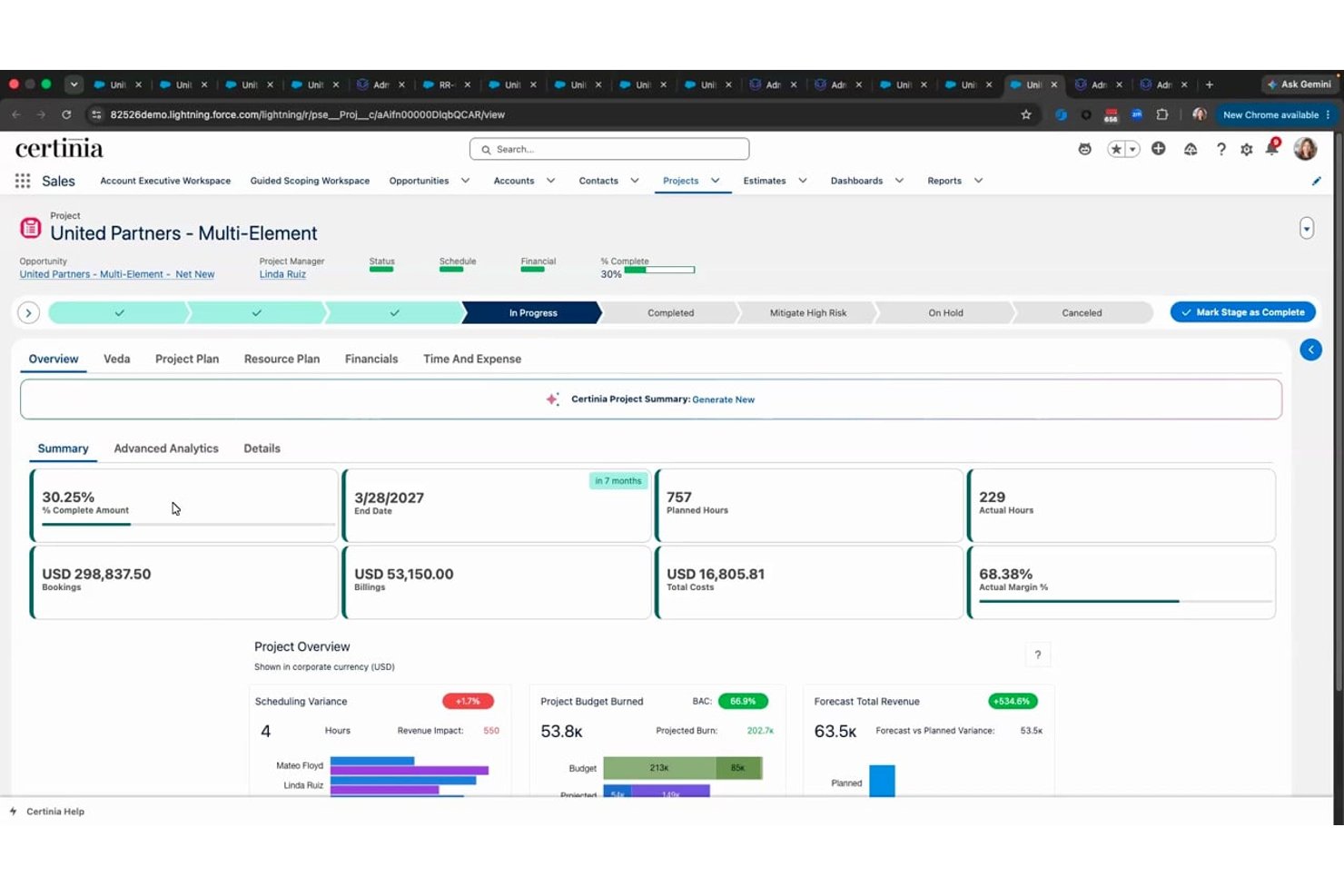
Certinia Professional Services Cloud is a Salesforce-native PSA platform that connects project management, resource scheduling, services estimation, billing, and financial tracking within your existing Salesforce environment.
Who Is Certinia Best For?
Certinia is a strong fit for professional services leaders who need to manage the full delivery lifecycle. From estimation and resourcing to billing and revenue recognition, users can monitor this all without leaving Salesforce.
Why I Picked Certinia
Certinia earns its spot on my shortlist because it's purpose-built to manage the full financial arc of services delivery, from initial estimation through revenue recognition, directly within Salesforce. I particularly like how Services Estimation lets you model resource roles, margins, and expenses before a deal closes, then converts that estimate directly into a project once the opportunity is won. Connected to Services Financials, my team can track bookings, backlog, and rate realization in real time.
Certinia Key Features
- Resource request management: Submit, track, and fulfill resource requests from scoping through project delivery using configurable best-fit assignment criteria.
- Project Gantt component: View and edit project tasks, dependencies, milestones, and assignments directly on a Salesforce project record using a built-in Lightning component.
- Multi-model billing support: Bill clients across time-and-materials, fixed-fee, subscription, and product-sale models within a single billing system.
- Services Communities: Give clients and partners role-based, branded access to project data, timecards, expenses, and invoices through Salesforce Experience Cloud sites.
Certinia Integrations
Certinia Professional Services Cloud is native to Salesforce and lists integrations with Concur (SAP), Docusign, Microsoft Outlook, MuleSoft, Avalara, and Expensify. It also supports REST and SOAP APIs for custom integrations.
Pros and Cons
Pros:
- Billing and forecasting connect project finances
- Resource utilization spans staffing and workloads
- Salesforce-native project tasks update shared records
Cons:
- Performance can slow with large datasets
- Configuration often needs Salesforce administrator expertise

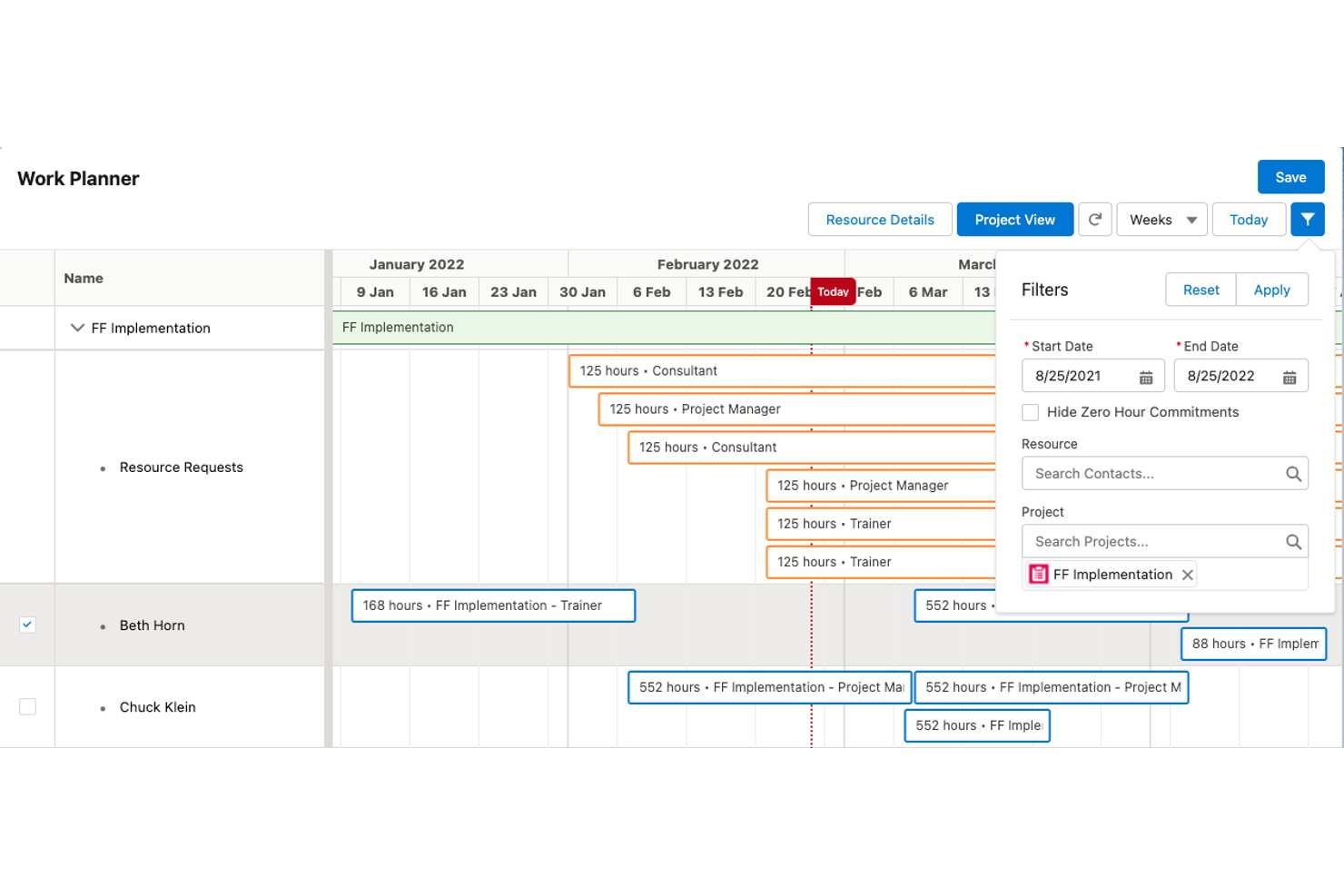
Certinia PS Cloud is a Salesforce-native professional services automation platform that covers project management, resource planning, services estimation, billing, and financial tracking—all within the Salesforce environment.
Who Is Certinia PS Cloud Best For?
Certinia PS Cloud is built for professional services teams that run their entire delivery operation—from resource planning to billing—inside Salesforce.
Why I Picked Certinia PS Cloud
I picked Certinia PS Cloud because it's the only tool on this list that doesn't integrate with Salesforce—it runs entirely inside it, sharing the same records, data model, and UI. I love that project managers can embed a live Gantt directly on a Salesforce project record, tracking task dependencies, milestones, and resource assignments without ever leaving the platform. The Work Planner adds real staffing depth, showing over- and under-allocation across your team so you can drag and reschedule assignments on the spot.
Certinia PS Cloud Key Features
- Services estimation: Model resource roles, seniority, discounts, and expenses to build profit-aligned quotes using best-practice templates and historical data.
- Multiple billing models: Support time-and-materials, fixed-fee, subscription, and product-sales billing from a single centralized invoicing workflow.
- Skills and experience analytics: Use analytics dashboards to view team capabilities and allocate resources based on skills, experience, and availability.
- Shared opportunity pipeline views: Give delivery teams real-time visibility into the sales pipeline so resource planning can begin before a deal closes.
Certinia PS Cloud Integrations
Certinia PS Cloud integrates natively with Salesforce CRM and lists integrations with Avalara, AvidXchange, Concur, DocuSign, Expensify, Microsoft Outlook, and MuleSoft. RESTful APIs and SOAP-based web services support custom integrations.
Pros and Cons
Pros:
- Project financials connect delivery, billing, and margins
- Work Planner exposes allocation gaps and utilization
- Gantt tracks dependencies, milestones, and task status
Cons:
- Reviewers report dated screens and slow performance
- Custom handoffs require Apex development
Annen prosjektstyringsprogramvare som integreres med Salesforce
Nedenfor finner du en liste over ytterligere prosjektstyringsprogramvare som integreres med Salesforce, og som jeg tok med på kortlisten. Selv om de ikke kom med på topplisten, er de fortsatt verdifulle og verdt å undersøke nærmere.
- Mission Control
For opportunity-to-project scoping by line item
- Kantata
For professional services automation
- Smartsheet
For spreadsheet-style Salesforce project sync
- Scoro
For PSA teams bridging quotes and delivery
- Hive
For Salesforce-triggered project creation
- ClickUp
For all-in-one project management
- Jira
For AI-powered task automation
- Asana
For cross-team task tracking tied to CRM data


How I Evaluate Project Management Tools That Integrate With Salesforce
I split my evaluation into three parts, weighting core functionality most: link projects to Salesforce, sync updates both ways, and show delivery status there. Next, I look for differentiators like opportunity templates or PSA financial tracking. Finally, I consider setup support, Salesforce license fit, and pricing value for handoffs.
Core Functionality (Table Stakes For This List)
When I'm selecting tools for my list, I score each one on a scale from 0 (does not offer the functionality) to 5 (excels in this area) for each core functionality listed below. I then convert the total into a percentage to help assess each tool's overall fit, with extra weight on any functionalities I’ve deemed essential.
- Native Salesforce Integration (Essential): I look for an officially supported Salesforce connection that links delivery work to CRM records, rather than relying only on generic automation.
- Task & Project Tracking (Essential): For a closed-won implementation, I check for assigned tasks, due dates, milestones, and timeline views teams can manage outside Salesforce.
- Bidirectional Data Sync: I assess whether status or date changes made in either system return to the other, reducing duplicate updates during delivery.
- Salesforce Object Mapping: I look for configurable links to Opportunities, Accounts, Cases, and custom objects so each project retains its customer context.
- Salesforce Visibility: I check whether sales can see current project status, tasks, and progress inside Salesforce without switching tools.
- Resource & Workload Management: Across active engagements, I look for team-level workload views that reveal assignments and capacity before new work is committed.
Once I have a list of tools that meet the criteria, I consider what sets each platform apart.
Differentiating Factors (What Sets Vendors Apart)
Here's how I compare and contrast different vendors:
Standout Features
I look for tools built as native Salesforce managed packages, since they inherit org-level security and work inside Lightning without iframe workarounds. Pre-built opportunity templates matter just as much—when a deal closes, a mapped template can spin up a project with the right tasks, contacts, and line items already attached. I also check for client-facing portal access so stakeholders can track progress without needing a license.
Beyond Features
I evaluate how cleanly a tool moves a closed-won deal into an active project—whether contacts, line items, and notes carry over automatically or require manual re-entry. A bad handoff undoes the whole point of connecting your PM tool to Salesforce. I also check Salesforce edition compatibility, since some integrations need Enterprise-level API access that teams on Professional edition won't have. For services teams, I look at whether the vendor is purpose-built for PSA work like billing and utilization tracking, or just generic project management with a connector added on.
Slik velger du prosjektstyringsprogramvare som integreres med Salesforce
Når du går gjennom din egen unike prosess for valg av programvare, bør du ha følgende punkter i bakhodet:
- Tilpasning og skalerbarhet: Programvaren bør tilpasses organisasjonens behov og vokse sammen med virksomheten. Tilpasning omfatter å legge til bestemte objekter og felt, mens skalerbarhet sikrer at programvaren kan håndtere flere prosjekter og brukere over tid.
- Støtte for metoder: Velg programvare som samsvarer med teamets prosjektstyringsmetoder, enten det er smidig, fossefallsmodellen eller en hybrid. De riktige verktøyene, for eksempel Gantt-diagrammer eller smidige tavler, er avgjørende for å støtte teamets foretrukne prosesser.
- Brukeropplevelse og samarbeid: Et brukervennlig grensesnitt er viktig, i tillegg til funksjoner som styrker teamarbeidet. (For eksempel diskusjonsfora og dokumentdeling.) Integrasjon med samarbeidsplattformer som Chatter, e-post, Microsoft Teams eller Slack kan forbedre kommunikasjonen ytterligere og holde teamene på rett spor.
- Rapportering og analyse: Avansert rapportering og analyse er viktig for å overvåke prosjektets status og veilede beslutninger. Tilpassbare rapporter og oversikter gir verdifull innsikt i prosjektmålinger og hjelper ledere med proaktiv prosjektoppfølging.
Disse vurderingene tar for seg ulike utfordringer og krav, fra datahåndtering og tilpasning til metodekompatibilitet, teamsamarbeid og innsiktsfull analyse for velinformerte beslutninger.
Etter hvert som koblingen mellom prosjektstyringsprogramvare og Salesforce-integrasjon fortsetter å utvikle seg, kan virksomheter forvente økt effektivitet og mer strømlinjeformede arbeidsprosesser. Ved å ta i bruk disse trendene kan selskaper ta bedre informerte beslutninger og oppnå bedre prosjektresultater.
Salesforce-baserte løsninger kontra Salesforce-integrasjon: Hva er forskjellen?
Ikke alle Salesforce-integrasjoner fungerer på samme måte. Integrasjonstypen kan påvirke hvordan data flyttes mellom systemer, hvor mye oppsett som kreves, og hvor teamet administrerer prosjekter.
Salesforce-basert: Prosjektstyringsverktøyet er bygget direkte på Salesforce-plattformen, slik at CRM- og prosjektdata oppbevares i samme miljø. Dette er ofte best for Salesforce-sentrerte team som ønsker tett sammenkoblede arbeidsflyter for salg og levering.
Innebygd Salesforce-kobling: Prosjektstyringsverktøyet fungerer separat, men tilbyr en offisiell integrasjon med Salesforce. Avhengig av koblingen kan team synkronisere salgsmuligheter, kontoer, kontakter, egendefinerte felt og prosjektoppdateringer mellom de to plattformene.
Tredjepartsintegrasjon: Salesforce kobles til prosjektstyringsverktøyet gjennom en tjeneste som Zapier, Make eller Workato. Dette kan fungere godt for enkle automatiseringer, men funksjonalitet og vedlikeholdskrav avhenger av tredjepartsplattformen.
Når du sammenligner verktøy, bør du ikke bare kontrollere om Salesforce-integrasjon er tilgjengelig. Se på hvilke data som kan synkroniseres, om synkroniseringen går begge veier, og om arbeidsflyter som å gjøre en lukket salgsmulighet om til et prosjekt kan automatiseres.
Hva er prosjektstyringsprogramvare som integreres med Salesforce?
Prosjektstyringsprogramvare som integreres med Salesforce, kombinerer funksjonene i prosjektstyringsverktøy med Salesforces omfattende funksjoner for administrasjon av kunderelasjoner (CRM). Ved å koble sammen disse systemene kan team administrere prosjekter direkte fra Salesforce og få tilgang til oppgaver, tidslinjer, ressurser og analyser, samtidig som de opprettholder en samlet oversikt over kundeinteraksjoner, salgsdata og prosjektfremdrift.
Funksjoner
Når du sammenligner prosjektstyringsprogramvare som integreres med Salesforce, bør du fokusere på funksjoner som kobler salgsdata sammen med prosjektleveransen og reduserer manuelt arbeid mellom systemene:
- Sanntidssynkronisering av data: Holder kunde-, salgsmulighets- og prosjektinformasjon konsistent mellom Salesforce og prosjektstyringsverktøyet.
- Arbeidsflytautomatisering: Automatiserer handlinger mellom systemer, for eksempel å opprette et prosjekt når en salgsmulighet får statusen Lukket – vunnet, eller oppdatere Salesforce når en prosjektmilepæl er fullført.
- Støtte for egendefinerte felt og objekter: Gjør det mulig for integrasjonen å fungere med Salesforce-feltene og -objektene teamet faktisk bruker, inkludert egendefinerte konfigurasjoner.
- Synkronisering begge veier: Gjør det mulig å flytte informasjon både til og fra Salesforce, slik at salgs- og leveringsteam kan arbeide med oppdaterte data uten å måtte gjenta oppdateringer.
- Prosjektmaler: Standardiserer overgangen fra salg til levering ved automatisk å bruke gjenbrukbare prosjektplaner på nye kunder eller salgsmuligheter.
- Rapportering på tvers av plattformer: Kobler Salesforce-data med prosjektstatus, ressurser, tid eller økonomisk informasjon for å gi bedre oversikt gjennom hele kundelivssyklusen.
De viktigste funksjonene avhenger av hvor tett salgs- og prosjektarbeidsflytene må kobles sammen. Prioriter integrasjoner som reduserer manuelle overleveringer, samtidig som begge teamene får tilgang til informasjonen de trenger.
Fordeler med prosjektstyringsprogramvare som integreres med Salesforce
Integrering av prosjektstyringsprogramvare med Salesforce kan bidra til å koble sammen salgs- og leveransesidene av virksomheten. Viktige fordeler omfatter:
- Smidigere overlevering fra salg til prosjekt: Overfører automatisk kunde- og salgsmulighetsdata til nye prosjekter, noe som reduserer manuelt oppsett og tap av informasjon.
- Felles kundeoversikt: Gir salgs-, kundeansvarlige og prosjektteam tilgang til relevant kunde- og prosjektinformasjon gjennom hele livssyklusen.
- Mindre manuell dataregistrering: Synkroniserer informasjon mellom systemer for å redusere doble oppdateringer, feil og tiden som brukes på å vedlikeholde poster.
- Bedre prosjekt- og CRM-rapportering: Kombinerer Salesforce-data med prosjektstatus, ressurs-, tids- eller økonomisk informasjon for å gi et tydeligere bilde av kunde- og prosjektresultater.
- Mer konsekvente arbeidsflyter: Automatiserer prosesser som å opprette prosjekter fra lukkede salgsmuligheter, tildele arbeid og oppdatere Salesforce etter hvert som prosjektene utvikler seg.
Til syvende og sist bidrar integrasjonen til å bygge bro mellom å vinne arbeid i Salesforce og å levere det gjennom prosjektstyringsplattformen.
Trender
Integrasjoner mellom Salesforce og prosjektstyringsverktøy blir stadig mer automatiserte og sammenkoblede. Viktige trender omfatter:
- Automatiserte overleveringer fra salg til prosjekt: Flere verktøy kan automatisk opprette prosjekter, oppgaver og arbeidsflyter når salgsmuligheter i Salesforce når viktige stadier.
- Dypere toveis synkronisering: Integrasjonene utvides utover enkel kontaktsynkronisering for å holde salgsmuligheter, kontoer, egendefinerte felt og prosjektoppdateringer samkjørte på tvers av plattformer.
- AI-drevet arbeidsflytautomatisering: AI brukes i økende grad til å automatisere oppgaver, oppsummere prosjektaktivitet og fremheve relevant CRM- og prosjektinformasjon.
- Samlet rapportering for salg og levering: Team ønsker i økende grad å koble sammen CRM- og prosjektdata, slik at de kan følge kunde-, leverings-, ressurs- og økonomiske resultater samlet.
Disse trendene gjør integrasjonsdybde og automatisering til stadig viktigere faktorer når man skal velge prosjektstyringsprogramvare for Salesforce.
Kostnader og priser
Når man velger prosjektstyringsprogramvare som integreres med Salesforce, bør programvarekjøpere være oppmerksomme på de ulike tilgjengelige abonnementene og prisalternativene. En forståelse av abonnementstypene, gjennomsnittsprisene og de vanligste funksjonene kan hjelpe kjøpere med å ta en informert beslutning som samsvarer med virksomhetens behov og budsjettbegrensninger. Her er en oversikt over hvor mye ulike typer prosjektstyringsprogramvare kan koste:
Sammenligningstabell for prosjektstyringsprogramvare som integreres med Salesforce
| Abonnementstype | Gjennomsnittspris | Vanlige funksjoner |
| Gratisalternativ | $0 | Grunnleggende prosjektoppfølging, begrensede integrasjoner og viktige samarbeidsverktøy |
| Startnivå | $5 - $15/bruker/måned | Oppgavehåndtering, grunnleggende rapportering, enkle integrasjoner med Salesforce og begrenset brukerstøtte |
| Mellomnivå | $15 - $35/bruker/måned | Forbedret prosjektoppfølging, rapporteringsfunksjoner, flere Salesforce-integrasjoner og prioritert brukerstøtte |
| Premium | $35+/bruker/måned | Avansert prosjektstyring, omfattende rapportering, full Salesforce-integrasjon og dedikert brukerstøtte |
Husk at du bør vurdere hvor omfattende Salesforce-integrasjon du trenger, samt kompleksiteten i prosjektstyringsfunksjonene organisasjonen din har behov for, når du vurderer et abonnement.
Prosjektstyringsprogramvare som integreres med Salesforce – vanlige spørsmål
Her er noen vanlige spørsmål om prosjektstyringsprogramvare som integreres med Salesforce.
Kan jeg registrere tid og utgifter i prosjektstyringsverktøy som integreres med Salesforce?
Ja, mange prosjektstyringsverktøy som integreres med Salesforce, tilbyr funksjoner for tids- og utgiftsregistrering. Disse funksjonene gjør det mulig for team å registrere timer og utgifter som er direkte knyttet til prosjektoppgaver. Informasjonen kan deretter vises og administreres i Salesforce for nøyaktig fakturering og rapportering.
Er det mulig å tilpasse integrasjonen mellom Salesforce og prosjektstyringsprogramvare?
Det er ofte mulig å tilpasse prosjektstyringsprogramvare som integreres med Salesforce. Avhengig av programvaren kan du kanskje tilpasse integrasjonen slik at den passer til arbeidsflyten din, for eksempel med egendefinerte felt, prosjektmaler og automatiserte utløsere som er tilpasset forretningsprosessene dine.
Hvordan påvirker integrering av prosjektstyringsprogramvare med Salesforce rapporteringsmulighetene?
Integrering av prosjektstyringsprogramvare med Salesforce kan forbedre rapporteringsmulighetene ved å kombinere salgs- og prosjektdata. Dette gjør det mulig å opprette omfattende rapporter som gir innsikt i prosjektresultater, ressursfordeling og virksomhetens generelle tilstand.
Finnes det prosjektstyringsløsninger som er innebygd i Salesforce?
Ja, det finnes prosjektstyringsløsninger som er utviklet direkte på Salesforce-plattformen. Disse løsningene tilbyr dyp integrasjon og kan utnytte Salesforces eksisterende funksjoner og datastruktur, noe som gir en mer helhetlig opplevelse.
Hvordan fungerer datasikkerheten med integrert prosjektstyring og Salesforce?
Datasikkerheten i integrerte prosjektstyrings- og Salesforce-systemer håndteres vanligvis gjennom robuste sikkerhetsprotokoller, inkludert brukertillatelser, kryptering og samsvar med bransjestandarder. Det er viktig å gjennomgå sikkerhetstiltakene i prosjektstyringsverktøyet for å sikre at det oppfyller kravene i organisasjonen din.
Kan jeg administrere prosjekter på farten med Salesforce-integrert prosjektstyringsprogramvare?
Mange prosjektstyringsverktøy som integreres med Salesforce, tilbyr mobilapper eller mobiltilpassede grensesnitt. Dette gjør det mulig for teammedlemmer å administrere prosjekter, få tilgang til data og samarbeide hvor som helst og når som helst ved hjelp av mobilenheten sin.
Har Salesforce innebygd prosjektstyring?
Salesforce tilbyr grunnleggende funksjoner for oppgaver og arbeidsflyter, men team bruker vanligvis et integrert prosjektstyringsverktøy for mer avansert planlegging, samarbeid og ressursstyring.
Kan Salesforce og prosjektstyringsprogramvare synkronisere begge veier?
Ja, enkelte integrasjoner støtter toveis synkronisering, slik at data og oppdateringer kan flyttes mellom Salesforce og prosjektstyringsplattformen.
Kan Salesforce automatisk opprette et prosjekt når en salgsmulighet avsluttes?
Ja. Mange Salesforce-integrasjoner for prosjektstyring kan automatisk opprette et prosjekt når en salgsmulighet får statusen Avsluttet vunnet, selv om det nøyaktige oppsettet varierer fra verktøy til verktøy.