

De 10 beste programmene for ressursstyring for profesjonelle tjenester, gjennomgått i 2026

Beste programvare for ressursstyring for profesjonelle tjenester – kortliste


Med det store utvalget av programvare for ressursstyring på markedet kan det være krevende å finne den perfekte løsningen for virksomheten din innen profesjonelle tjenester. Du ønsker å fordele og utnytte ressursene dine mer presist, men sliter med å finne det best egnede verktøyet. Du kan være trygg på at jeg er her for å gjøre denne beslutningen enklere for deg. Med utgangspunkt i min omfattende erfaring med digital prosjektstyring og praktiske bruk av en rekke plattformer for ressursstyring hjelper jeg deg med å finne det riktige valget. Her er mine anbefalinger av den beste programvaren for ressursstyring for profesjonelle tjenester.
Why Trust Our Software Recommendations
Our team has been testing and reviewing software since 2012. As project managers ourselves, we know how difficult—and important—it is to choose the right software.
For this guide, we evaluated tools using hands-on testing and independent research, scoring tools using our selection criteria. We also draw on insights from industry thought leaders and practicing project management experts.
Our reviews reflect our human editorial judgment, not a sales pitch.
Expert reviewers:
Sammenligningstabell for programvare for ressursstyring for profesjonelle tjenester
Tabellen nedenfor sammenligner prisdetaljene for mine beste utvalgte programmer for ressursstyring for profesjonelle tjenester.
| Tool | Best For | Trial Info | Price | ||
|---|---|---|---|---|---|
| 1 | Best for all-in-one professional service automation | 14-day free trial | From $17/user/month | Website | |
| 2 | Best for agencies | 14-day free trial | From $10/user/month (billed annually) | Website | |
| 3 | Best for configurable permissions management | Free demo available | Pricing upon request | Website | |
| 4 | Best for workload visualization | 14-day free trial | Pricing upon request | Website | |
| 5 | Best for people-centric resourcing | Free demo available | Pricing upon request | Website | |
| 6 | Best for automated invoicing | 21-day free trial + free demo available | From $17.10/user/month (billed annually) | Website | |
| 7 | Best for work management integration | Free demo available | Pricing upon request | Website | |
| 8 | Best integrated time and resource management | Free 7-day trial available | From $9/user/month (billed annually) | Website | |
| 9 | Best for AI-powered time tracking | Free trial + demo available | From $6/user/month | Website | |
| 10 | Best for real-time project insights | 30-day free trial | From $15/user/month (billed annually) | Website |


Anmeldelser av den beste programvaren for ressursstyring for profesjonelle tjenester
Her er mine detaljerte vurderinger av hver programvare på denne listen, inkludert hva de gjør bra, og hvilke bruksområder som passer best for hver av dem.

Scoro
Best for all-in-one professional service automation

Scoro is a comprehensive work management solution designed to bring structure to your work, offering a suite of features across project management, CRM, billing, and reporting.
Why I Picked Scoro:
I chose Scoro for its robust all-in-one platform that integrates various aspects of professional service automation into one system. Its comprehensive feature set distinguishes it from other resource management tools by providing a unified solution for project management, CRM, and financials. I believe Scoro is best for professional service automation because it offers a centralized platform that simplifies the management of the entire project lifecycle, from quoting to billing, ensuring that all processes are seamlessly connected.
Standout features & integrations:
Scoro's standout features include real-time Gantt charts, a drag-and-drop planner, and detailed reporting capabilities that provide insights into project progress and financial performance. The software also offers a time tracker, sales pipeline management, and automated billing, which are essential for optimizing resource utilization and improving profitability.
Scoro integrates natively with a variety of tools, including Google Calendar, Microsoft Exchange, Xero, QuickBooks, Sage Intacct, Exact Online, Expensify, Stripe, Jira, and more.
Pros and Cons
Pros:
- Customizable to fit specific business needs
- Real-time data and reporting for informed decision-making
- All-in-one platform for various business processes
Cons:
- Pricing can be higher compared to some other tools, especially for smaller teams
- May require time for onboarding and full system adoption
- Minimum of 5 user seats required for all packages
New Product Updates from Scoro

Scoro Adds Time Mobile App and ELI Improvements
Scoro adds the Scoro Time mobile app for iOS/Android to track time anywhere and expands ELI with attachments, smarter filtering, and trigger-based actions. For more information, visit Scoro's official site.

Best for agencies

Productive is an all-in-one agency management software designed for a wide range of businesses, including marketing and design agencies and consulting firms.
Why I Picked Productive:
I like that its resource planning feature lets your team allocate resources effectively across different projects, ensuring workloads are balanced and deadlines are met. With resource planning, you can see who’s working on what and when helping identify potential bottlenecks or periods of underutilization.
Standout features & integrations:
Features include project management, revenue forecasting, client collaboration, onboarding support, custom reporting, project templates, flexible invoicing, and growth metrics.
Integrations include Jira, HubSpot, Xero, Google Calendar, Sage, Zapier, Outlook/Microsoft Calendar, Slack, BugHerd, QuickBooks, Fortnox, and Personio.
Pros and Cons
Pros:
- Robust resource planning and tracking capabilities
- Comprehensive features for financial management and reporting
- Sales CRM feature for tracking opportunities
Cons:
- May not be ideal for businesses just wanting a resourcing function
- Could have more integrations
New Product Updates from Productive
Productive Adds Voice Dictation, Slack Connector, Proposals, and Overtime
Productive adds voice dictation, a Slack Connector, proposal controls, and overtime tracking. These updates support faster AI interactions, client proposals, and time management. For more information, visit Productive’s official site.
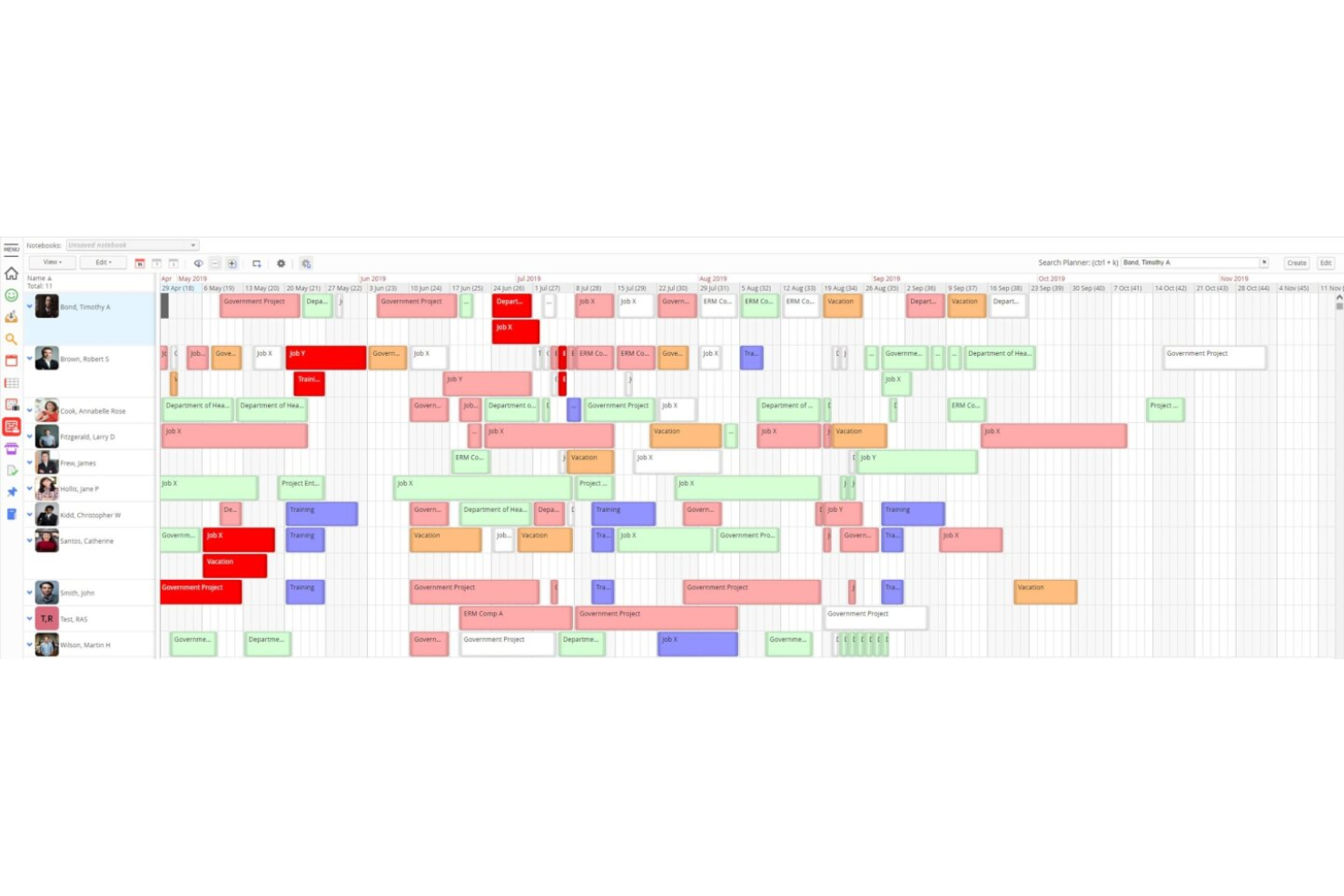
Retain is a resource planning and scheduling platform built for professional services firms, combining skills-based allocation, capacity planning, utilisation tracking, and built-in timesheets in a single system.
Who Is Retain Best For?
Retain is a strong fit for mid-to-large accounting, consulting, and engineering firms that need enterprise-grade resource planning across complex, multi-office structures.
Why I Picked Retain
I picked Retain as one of the best because its permissions model is genuinely built for the organizational complexity you find in large professional services firms. Administrators can define role-based access at a granular level, so a department head sees their team's capacity while a junior coordinator has booking rights only within their scope. I also like that workflow configurations and system notifications are adjustable per role, meaning approval chains for skills updates or booking changes can mirror how your firm actually operates.
Retain Key Features
- Skills-based resource allocation: Match people to projects using a structured taxonomy of up to 30,000 skills, powered by Lightcast.
- AI suitability matching: Automatically surface the best-fit resources for a role based on skills, availability, and experience.
- Built-in timesheets: Auto-fill timesheets from existing bookings and compare scheduled hours against actuals.
- Utilisation dashboards: Track billable and non-billable utilisation across teams, departments, and time periods.
Retain Integrations
Retain offers integrations that connect resource planning data across HR, CRM, and finance systems, with native synchronization with Microsoft 365 and support for middleware platforms like MuleSoft and Azure Logic Apps. Integrations include Salesforce, Microsoft Dynamics 365, Workday, SAP, Oracle, Oracle NetSuite OpenAir, BambooHR, SugarCRM, Employment Hero, and Thomson Reuters GoFileRoom. An API is available for custom integrations.
Pros and Cons
Pros:
- AI suitability matching for staffing requests
- Granular role-based permission profiles
- On-premises and cloud deployment options
Cons:
- Session timeouts disrupt scheduling workflows
- Built-in reporting needs manual workarounds

Wrike
Best for workload visualization

Wrike is a cloud-based project management tool that helps teams organize tasks, manage resources, and collaborate effectively.
Why I Picked Wrike:
Wrike's resource management capabilities are particularly beneficial for professional services teams. The platform offers workload charts that let you visualize each team member's assignments, making it easier to balance tasks and prevent burnout. This feature ensures that work is distributed evenly, allowing your team to operate efficiently and meet project deadlines. Additionally, Wrike provides resource allocation tools that help you assign the right people to the right tasks based on their availability and skill sets.
Standout features & integrations:
Features include time tracking, customizable workflows, real-time collaboration, document sharing, task dependencies, Gantt charts, workload management, request forms, dashboards, reporting tools, file proofing, and approval processes.
Integrations include QuickBooks, Skyvia, Power BI, Google Sheets, Miro, Salesforce, Tableau, Microsoft Teams, MediaValet, Zoom, Adobe Creative Cloud, and Google Drive.
Pros and Cons
Pros:
- Scalable for growing teams
- Custom workflows, dashboards, and reports
- Offers diverse project management tools
Cons:
- No built-in chat feature
- Learning curve due to extensive features
New Product Updates from Wrike
Wrike Adds Klaxoon MCP Integration
Wrike’s Klaxoon MCP integration is now generally available, enabling AI agents to navigate between Wrike tasks and attached whiteboards, read task context, and manage whiteboard attachments via API. For more information, visit Wrike's official site.

Kantata
Best for people-centric resourcing

Kantata is a comprehensive resource and project management platform built for consultants, agencies, and professional services teams. It centralizes project delivery, financial data, team collaboration, and reporting.
Why I Picked Kantata:
I like that Kantata takes a people-first approach to resource planning, helping firms balance workloads and match the right skills to the right projects. Its forecasting and capacity planning tools provide real-time visibility into staffing needs, so you can make adjustments quickly to avoid overbooking or underutilization. This ensures teams stay productive and engaged, while projects remain profitable and on track.
Standout features & integrations:
Kantata offers many other features, like automated staffing recommendations based on availability and skill sets, scenario planning for testing resourcing options before committing, and a detailed skills inventory to identify gaps or development opportunities. It also provides time and expense tracking, plus collaboration tools like task boards and shared calendars to keep work connected across teams.
Integrations include Microsoft Teams, Asana, Trello, Zapier, Google Workspace, Salesforce, Slack, QuickBooks, Jira, HubSpot, Xero, NetSuite, Harvest, FreshBooks, Toggl, and Dropbox.
Pros and Cons
Pros:
- Forecasting capabilities for financials and capacity
- Analytics and reporting features
- Project planning and resource allocation Gantt charts
Cons:
- Setup process can be complicated
- Custom reports can be difficult to create
New Product Updates from Kantata

Kantata Adds Access Group Change History
Kantata adds Access Groups History, letting account administrators track changes to group details, membership, and permissions in Recent History. The update also makes these events available through the Subscribed Events API for broader monitoring. For more information, visit Kantata’s official site.
 .
.
Best for automated invoicing

Projectworks is a cloud-based professional services automation (PSA) platform built for consulting, architecture, engineering, and similar firms. It combines project visibility, financial oversight, and resource planning to help teams optimize utilization and profitability.
Why I Picked Projectworks:
I picked Projectworks because its automated invoicing removes much of the admin burden around billing, ensuring invoices are accurate and issued on time. I also like that it links directly with accounting platforms like Xero and QuickBooks, so financial data stays consistent across systems. Plus, the real-time project reporting helps you keep a close eye on budgets, profitability, and resource use, which is essential for professional services firms.
Standout features & integrations:
Projectworks offers features like time and expense tracking, resource allocation across projects, and live dashboards that replace error-prone spreadsheets. Its automated invoicing system ensures billable hours and project costs flow directly into accurate invoices, saving you time and reducing mistakes.
Integrations include Xero, QuickBooks, HubSpot, Salesforce, 12d Synergy, MYOB, Jira, Azure DevOps, Employment Hero, Zapier, Direct Data Connection, and API Connection.
Pros and Cons
Pros:
- Live dashboards for project oversight
- Accurate time and expense tracking
- Automates billing with accounting sync
Cons:
- Learning curve for new users
- Requires minimum 10-seat plan

Best for work management integration

Workfront is adept at facilitating team collaboration and project completion. It stands out for its ability to integrate work management across various business functions.
Why I Picked Workfront:
I selected Workfront because it excels in unifying work management tasks and processes, which is crucial for maintaining consistency and efficiency across departments. Its integration capabilities are particularly impressive, setting it apart from other project management tools.
I judge Workfront to be best for work management integration due to its comprehensive system that aligns with strategic objectives, streamlines collaboration, and boosts productivity through its ability to connect with key applications.
Standout features & integrations:
Workfront's key features include strategic planning tools, task prioritization, and work process automation. It supports a variety of work methodologies, such as Agile and Scrum, and integrates natively with a suite of applications, including Adobe Creative Cloud, Marketo Engage, and more, to facilitate efficient workflows.
Pros and Cons
Pros:
- Supports various work methodologies like Agile and Scrum
- Integrates with Adobe Creative Cloud and other enterprise applications
- Centralized management of work across different functions
Cons:
- Implementation could be complex for smaller teams
- May require a conversation with sales to understand all features
- Pricing is not transparent on the website
Best integrated time and resource management

Bonsai Agency Software is an all-in-one platform designed to help agencies manage resources, projects, and finances efficiently. It offers tools for project planning, time tracking, and budget management, enabling your team to deliver projects on time and within budget.
Why I Picked Bonsai Agency Software:
I like that Bonsai offers resource planning and forecasting. You can allocate work based on your team's capacity, monitor workloads in real-time, and predict staff shortages before new projects begin. Additionally, Bonsai's time-tracking and timesheet tools allow your team to log hours, providing you with a clear view of project progress, capacity, and budgets at all times. With the ability to set custom billable and cost rates for team members, tasks, and projects, you can maintain accurate financial records and make informed decisions about resource allocation.
Standout features & integrations:
Features include client management, proposal generation, contract management, scheduling, forms and questionnaires, task management, expense tracking, invoicing, payments, reporting and analytics, team collaboration tools, and a client portal.
Integrations include Gmail, Google Calendar, Zapier, Slack, QuickBooks Online, Calendly, ClickUp, Trello, Google Drive, Google Sheets, Xero, and HubSpot.
Pros and Cons
Pros:
- Integrates time and budget tracking to assess profitability
- Good resource forecasting capabilities
- Professional-looking client portal
Cons:
- Mobile app could be enhanced with additional features
- Some features may not be suitable for businesses with high volume operations

Best for AI-powered time tracking
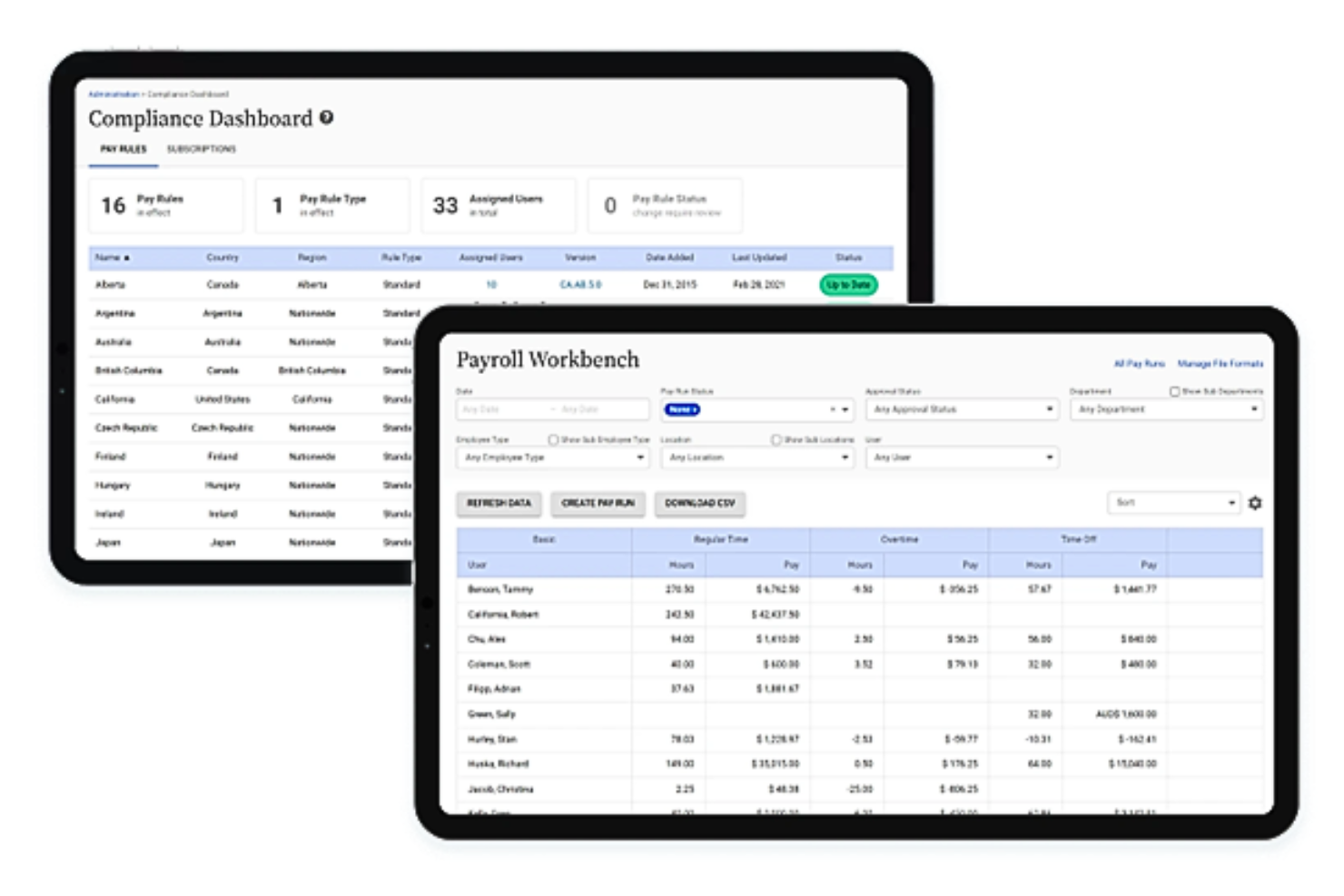
Replicon specializes in time tracking and project management solutions. It stands out for its AI-powered time tracking.
Why I Picked Replicon:
I selected Replicon because it employs artificial intelligence to enhance the time tracking process. Its AI-powered feature, ZeroTime™, sets it apart from other resource management software by automatically capturing time data, which is why I judge it to be best for AI-powered time tracking. This functionality frees employees from manual time entry, improving productivity and ensuring precise project billing and compliance.
Standout features & integrations:
Replicon's key features include ZeroTime™ for automated time capture, customizable timesheet options for different activities and roles, and comprehensive compliance services for payroll and regulations. It integrates with a variety of work apps, such as Slack, Jira, Asana, and Zoom, facilitating pre-populated timesheets and data control.
Pros and Cons
Pros:
- Comprehensive compliance services for payroll and regulations
- Configurable timesheet options for diverse work scenarios
- AI-driven automatic time tracking with ZeroTime
Cons:
- Extensive features may necessitate a learning period for newcomers
- Necessity to engage with sales for comprehensive pricing and packages
- Lack of transparent pricing information on the website

Best for real-time project insights

ProjectManager is a comprehensive tool designed for project and work management. It is best for providing real-time insights into projects, enabling teams to plan, track, and collaborate effectively.
Why I Picked ProjectManager:
I chose ProjectManager for its robust feature set that caters to a variety of industries and use cases, from manufacturing to IT to professional services. Its versatility and ability to provide real-time data on work progress make it a standout choice for gaining insights into projects. I believe ProjectManager is best for real-time project insights because it offers live dashboards, detailed reporting, and advanced resource management, which are essential for making informed decisions quickly.
Standout features & integrations:
ProjectManager boasts a suite of features that enhance project visibility and control. Gantt charts, Kanban boards, task lists, and workflow automation are among its most important tools. These features facilitate project planning, scheduling, and execution, while promoting transparency and collaboration among team members.
ProjectManager integrates natively with over 1,000 business and project management apps, including Google (for task management within Gmail, syncing to Google Drive and Google Calendars), Microsoft (for importing and round-tripping of Microsoft Project plans, Excel files, and CSV files), Zapier (for connecting with Salesforce), Slack (for sharing project conversations), Jira (for task updates), and offers a custom API for more advanced integrations.
Pros and Cons
Pros:
- Extensive app integrations for enhanced productivity
- Versatile feature set suitable for various industries and project types
- Real-time dashboards and reporting for instant project insights
Cons:
- Enterprise pricing is not transparent and requires direct contact
- Annual billing required for the best pricing
- Higher cost compared to basic project management software
Annen programvare for ressursstyring for profesjonelle tjenester du bør vurdere
Nedenfor finner du en liste over flere programmer for ressursstyring for profesjonelle tjenester som jeg vurderte, men som ikke kom med på topplisten. De er absolutt verdt å sjekke ut.
- Parallax
For margin-focused resource management
- eResource Scheduler
For utilization tracking
- Clarizen
For scalable project management
- BigTime
For firm productivity and profitability
- Accelo
For service operations automation
- Screendragon
AI-powered resourcing and forecasting for PSA
- Float.com
For capacity planning features
- GoodDay
For integrating resource planning
- Saviom
For enterprise resource optimization
- Hub Planner by Milient
For resource management
- Dayshape
For AI-driven resource management
- Smartsheet
Good for spreadsheet-like interface
- Asana
For work management with AI
- monday AI Workspace
Good for workflow customization
- ProofHub
For resource collaboration
- Forecast
Good for AI resource planning


How I Evaluate Resource Management Software for Professional Services
I split my evaluation into two layers: the baseline features a tool needs to staff consultants and track utilization, and the differentiators that separate good from great.
Core Functionality (Table Stakes For This List)
When I'm selecting tools for my list, I rank each one on a scale from 0 (does not offer the functionality) to 5 (excels in this area) for each core functionality listed below. Then, I calculate the tool's total score into a percentage. Each tool needs to achieve a minimum total score of 65% to be considered for inclusion.
- Resource Scheduling & Allocation: I look for visual scheduling tools where you can drag and drop consultants onto client engagements by week or month, not just assign tasks in a backlog.
- Capacity & Utilization Tracking: Real-time dashboards that break down billable vs. non-billable hours per person matter here, especially for spotting bench risk before it hits margins.
- Skills & Availability Management: I check whether you can search the resource pool by skill tags, certifications, or seniority to match the right consultant to a client engagement quickly.
- Demand Forecasting & Pipeline Planning: The tool should let you forecast staffing needs from both confirmed and tentative projects so you can plan hiring or subcontracting ahead of time.
- Time Tracking & Billable Hours: Timesheets need to tie directly to projects and tasks with approval workflows, giving you a clear view of planned vs. actual hours per engagement.
- Project Financials & Profitability: I evaluate whether the platform connects cost rates and bill rates to each allocation so you can track project margins and revenue forecasts in real time.
Once I have a list of tools that meet this criteria, I consider what sets each platform apart.
Differentiating Factors (What Sets Vendors Apart)
Here's how I compare and contrast different vendors:
Standout Features
Scenario planning is a big one for me. I want to model what happens if a deal closes early or a key consultant leaves mid-project before making real staffing changes. CRM integration adds another layer here, pulling weighted pipeline deals into demand forecasts so resource managers aren't caught off guard by a sudden ramp. I also look for AI-powered resource matching that recommends consultants based on skills, past project work, and availability rather than relying on a manager's memory.
Beyond Features
PSA ecosystem integrations matter a lot here. A resourcing tool that doesn't sync with your ERP or accounting system means someone is manually reconciling timesheets against invoices every billing cycle. I also evaluate how well a platform fits different firm sizes—a 30-person agency has very different needs than a 500-consultant firm operating across multiple regions and currencies. Reporting rounds out my evaluation. I check for pre-built professional services KPIs like utilization, realization, and project margin, plus connectors to tools like Power BI or Tableau.
Slik velger du programvare for ressursstyring for profesjonelle tjenester
Det er lett å gå seg vill i lange funksjonslister og komplekse prismodeller. For å hjelpe deg med å holde fokus mens du går gjennom den unike prosessen med å velge programvare, har jeg laget en sjekkliste over faktorer du bør ha i tankene:
| Faktor | Hva du bør vurdere |
|---|---|
| Skalerbarhet | Vil programvaren vokse sammen med virksomheten din? Vurder om den kan håndtere et økende antall brukere eller prosjekter uten ytelsesproblemer. Se etter løsninger som støtter fremtidig vekst. |
| Integrasjoner | Kan den integreres med verktøyene du bruker i dag? Sjekk om den enkelt kan kobles til CRM-systemet, regnskapssystemet og andre viktige systemer for å unngå forstyrrelser i arbeidsflyten. |
| Tilpasningsmuligheter | Kan du tilpasse den til prosessene dine? Sørg for at programvaren tillater endringer som samsvarer med de spesifikke arbeidsflytene og forretningsbehovene dine. |
| Brukervennlighet | Er grensesnittet intuitivt? Vurder hvor raskt teamet ditt kan komme i gang. Et brukervennlig design reduserer opplæringstiden og øker produktiviteten. |
| Implementering og innføring | Hvor smidig er overgangen? Se etter tydelige ressurser for innføring, for eksempel veiledninger og kundestøtte, for å gjøre overgangen enklere og minimere nedetid. |
| Kostnad | Passer prisen med budsjettet ditt? Sammenlign prisnivåer og skjulte gebyrer. Sørg for at kostnaden samsvarer med verdien og funksjonene som tilbys. |
| Sikkerhetstiltak | Hvor sikre er dataene dine? Bekreft at programvaren oppfyller bransjestandarder for databeskyttelse, inkludert kryptering og regelmessige sikkerhetsrevisjoner. |
| Tilgjengelig kundestøtte | Når kan du få hjelp? Sjekk om kundestøtte er tilgjengelig i arbeidstiden din og gjennom de foretrukne kanalene dine, for eksempel telefon, e-post eller chat. |
Trender innen programvare for ressursstyring for profesjonelle tjenester
Her er noen aktuelle og interessante trender jeg legger merke til innen programvare for ressursstyring for profesjonelle tjenester.
- Integrasjon med kunstig intelligens og maskinlæring: Kunstig intelligens og maskinlæring integreres i stadig større grad i programvare for ressursstyring. Denne trenden muliggjør prediktiv analyse og smartere ressursfordeling, og kan forbedre effektiviteten og prosjektresultatene betydelig.
- Vekt på sanntidsdata: Sanntidsdata blir en standardfunksjon i verktøy for ressursstyring. Dette gjør det mulig for ledere å ta informerte beslutninger raskt, slik at prosjektene forblir smidige og tilpasningsdyktige ved endringer.
- Forbedret brukeropplevelse gjennom tilpasning: Tilpasningsmulighetene i plattformer for ressursstyring blir stadig flere, slik at brukerne kan skreddersy grensesnitt og arbeidsflyter etter sine spesifikke behov. Denne trenden er interessant fordi den ivaretar ulike typer virksomheter innen profesjonelle tjenester og forbedrer brukerengasjementet.
- Tilgjengelighet på mobile enheter: Mobil tilgjengelighet blir stadig vanligere i programvare for ressursstyring og støtter en voksende arbeidsstyrke som jobber eksternt og på farten. Dette gjør det mulig for teammedlemmer å oppdatere og få tilgang til informasjon hvor som helst.
- Fokus på samarbeidsverktøy: Samarbeidsverktøy integreres stadig tettere i programvare for ressursstyring. Disse verktøyene kan legge til rette for bedre kommunikasjon og teamarbeid, og bidra til å bryte ned siloer i organisasjoner.
Disse trendene legger grunnlaget for mer dynamisk og responsiv ressursstyring innen profesjonelle tjenester.
Hva er programvare for ressursstyring for profesjonelle tjenester?
Programvare for ressursstyring for profesjonelle tjenester er et verktøy som hjelper virksomheter med å fordele og administrere ressurser som tid, personer og budsjetter på en effektiv måte. Fagpersoner som prosjektledere og teamledere bruker disse verktøyene til å øke produktiviteten og sørge for at prosjektene gjennomføres uten problemer. Funksjoner for planlegging, tidsregistrering og rapportering bidrar til å optimalisere ressursene, overholde tidsplaner og ta informerte beslutninger. Samlet sett gir disse verktøyene betydelig verdi ved å forbedre effektiviteten og prosjektresultatene.
Funksjoner
Når du velger programvare for ressursstyring for profesjonelle tjenester, bør du se etter følgende viktige funksjoner:
- Ressursfordeling: En funksjon som også finnes i mer omfattende programvare for prosjektstyring, og som fordeler ressurser effektivt til prosjekter for å sikre optimal bruk av teammedlemmer og andre ressurser.
- Prosjektplanlegging: Bidrar til å planlegge tidsplaner og oppgaver for prosjekter, slik at alt holdes på sporet og er organisert.
- Tidsregistrering: Overvåker tiden som brukes på oppgaver og prosjekter, gir innsikt i produktiviteten og bidrar til å håndtere tidsfrister.
- Rapportering og analyse: Gir innsikt i prosjektresultater og ressursutnyttelse, og bidrar til datadrevne beslutninger.
- Budsjettstyring: Følger opp prosjektutgifter og budsjetter, bidrar til å unngå overforbruk og sikrer økonomisk kontroll.
- Tilpassbare instrumentbord: Gjør det mulig å tilpasse visningene, slik at teamet kan fokusere på de mest relevante dataene og måleverdiene.
- Oppgavestyring: Organiserer oppgaver og prioriteringer og sørger for at alle teammedlemmer kjenner ansvarsområdene sine.
- Mobil tilgang: Gjør det mulig å administrere ressurser og prosjekter hvor som helst, og støtter fjernarbeid og fleksibilitet.
- Samsvarsstyring: Sørger for at alle prosjekter følger bransjeregler og standarder, og reduserer risikoen.
- Samarbeidsverktøy: Legger til rette for kommunikasjon og teamarbeid, slik at teamene lettere kan samarbeide effektivt.
Fordeler
Implementering av programvare for ressursstyring for profesjonelle tjenester gir flere fordeler for teamet og virksomheten din. Her er noen av fordelene du kan se frem til:
- Forbedret effektivitet: Optimaliserer ressursallokering og oppgavehåndtering, slik at teamet ditt kan jobbe smartere og raskere.
- Forbedret samarbeid: Tilbyr verktøy som legger til rette for kommunikasjon og samarbeid, slik at alle holder kontakten og er informert.
- Bedre beslutningstaking: Gir innsikt gjennom rapportering og analyse, slik at du kan utvikle og justere datadrevne strategier.
- Kostnadskontroll: Sporer budsjetter og utgifter, bidrar til å forhindre overforbruk og sikrer at prosjektene forblir økonomisk bærekraftige.
- Økt fleksibilitet: Tilbyr mobiltilgang, slik at teamet ditt kan administrere prosjekter hvor som helst og støtte fjernarbeid.
- Overholdelse av forskrifter: Bidrar til å følge bransjestandarder og forskrifter, og reduserer risikoen for manglende etterlevelse.
- Tidsbesparelser: Effektiviserer prosesser som planlegging og tidsregistrering, slik at du får mer tid til strategiske aktiviteter.
Kostnader og priser
Ved valg av ressursstyringsprogramvare for profesjonelle tjenester er det viktig å forstå de ulike prismodellene og abonnementene som er tilgjengelige. Kostnadene varierer basert på funksjoner, teamstørrelse, tillegg og mer. Tabellen nedenfor oppsummerer vanlige abonnementer, gjennomsnittsprisene deres og typiske funksjoner som er inkludert i løsninger for ressursstyringsprogramvare for profesjonelle tjenester:
Sammenligningstabell for ressursstyringsprogramvare for profesjonelle tjenester
| Abonnementstype | Gjennomsnittspris | Vanlige funksjoner |
|---|---|---|
| Gratisabonnement | $0 | Grunnleggende oppgavehåndtering, begrenset brukertilgang og minimal lagringsplass. |
| Personlig abonnement | $5-$25/user/month | Oppgavehåndtering, tidsregistrering og grunnleggende rapporteringsfunksjoner. |
| Bedriftsabonnement | $30-$60/user/month | Avansert rapportering, prosjektplanlegging, ressursallokering og integrasjoner. |
| Virksomhetsabonnement | $70-$120/user/month | Tilpassbare instrumentpaneler, omfattende analyse, forbedrede sikkerhetsfunksjoner og dedikert kundestøtte. |
Vanlige spørsmål om ressursstyringsprogramvare for profesjonelle tjenester
Her er noen svar på vanlige spørsmål om ressursstyringsprogramvare for profesjonelle tjenester:
Hvordan bidrar ressursstyringsprogramvare til beslutningstaking?
Ressursstyringsprogramvare hjelper deg med å ta informerte beslutninger ved å gi deg sanntidsdata og analyser. Den fremhever områder som kan forbedres, og lar deg fordele ressurser mer effektivt. Med denne informasjonen kan du justere strategier og optimalisere prosjektresultater.
Hvilke faktorer påvirker kostnadene for ressursstyringsprogramvare?
Kostnaden påvirkes av programvarens funksjoner, omfang og funksjonalitet. Undersøk om opplæring og kundestøtte er inkludert i prisen. Funksjoner som avansert analyse eller integrasjonsmuligheter kan øke kostnaden, så vurder hva teamet ditt faktisk trenger.
Hvor enkelt kan ressursstyringsprogramvare integreres med eksisterende verktøy?
Hvor enkelt integrasjonen kan gjennomføres, varierer fra programvare til programvare, men den er avgjørende for å opprettholde en effektiv arbeidsflyt. Undersøk om programvaren støtter eksisterende verktøy som CRM- eller regnskapssystemer. En problemfri integrasjon sikrer tilgjengelige data og reduserer manuell dataregistrering.
Har ressursstyringsprogramvare innebygde funksjoner for tidsregistrering?
Ja, de fleste løsninger for ressursstyringsprogramvare inkluderer tidsregistrering for å overvåke ressursutnyttelsen. Denne funksjonen hjelper deg med å håndtere arbeidsmengder og tidsfrister effektivt, slik at teamet ditt forblir produktivt og prosjektene holder tidsplanen.
Hvilken støtte er tilgjengelig etter implementering av ressursstyringsprogramvare?
Støtte etter implementering kan omfatte opplæring, veiledninger og kundeservice. Bekreft om støtte er tilgjengelig i tidssonen din og gjennom de kanalene du foretrekker. Løpende hjelp sikrer at teamet ditt kan utnytte programvarens funksjoner fullt ut.