

10 beste systemer for AI-byråstyring gjennomgått i 2026

Kortliste over de beste systemene for AI-byråstyring


Verktøy for AI-byråstyring hjelper byråer med å holde oversikt over kundeoppdrag, prosjektfrister og interne prosesser ved å automatisere repetitive oppgaver, gi bedre oversikt og effektivisere samarbeidet. Enten du håndterer flere kunder, skiftende prioriteringer eller et hybridteam, kan den rette AI-drevne plattformen skape struktur i kaoset.
Jeg har testet og gjennomgått ledende programvare for AI-byråstyring for å finne verktøy som faktisk støtter team i høyt tempo. Fra prosjektoppfølging og ressursfordeling til automatisert rapportering og kundekommunikasjon er hvert verktøy i denne veiledningen utviklet for å hjelpe byråer med å levere godt arbeid – raskere og med færre problemer.
Hvorfor du kan stole på våre programvareanbefalinger
Teamet vårt har testet og anmeldt programvare siden 2012. Vi er selv prosjektledere, så vi vet hvor vanskelig og hvor viktig det er å velge riktig programvare.
I denne guiden har vi vurdert verktøyene gjennom praktisk testing og uavhengig research og gitt dem poeng ut fra våre utvelgelseskriterier. Vi bygger også på innsikt fra ledende eksperter i bransjen og erfarne prosjektledere.
Anmeldelsene våre bygger på vår egen redaksjonelle vurdering. De er ikke et salgsargument.
Ekspertanmeldere:
Sammenligningstabell for systemer for AI-byråstyring
Denne sammenligningstabellen oppsummerer prisdetaljene for mine beste utvalgte systemer for AI-byråstyring:
| Tool | Best For | Trial Info | Price | ||
|---|---|---|---|---|---|
| 1 | Best for AI-driven decision-making | 14-day free trial | From $17/user/month | Website | |
| 2 | Best with real-time resource allocation insights | 14-day free trial | From $10/user/month (billed annually) | Website | |
| 3 | Best for client-to-invoice project billing | Free plan + 14-day trial + demo available | From $5/user/month (billed annually) | Website | |
| 4 | Best for workflow tracking across client projects | Free demo available | Pricing upon request | Website | |
| 5 | Best for AI-powered agency management | Free demo available | Pricing upon request | Website | |
| 6 | Best for onboarding projects | 14-day free trial | From $49/user/month (billed annually) | Website | |
| 7 | Best for process automation | Free demo available | From $15/user/month | Website | |
| 8 | Best for CRM integration | 30-day free trial | From $25/user/month | Website | |
| 9 | Best for agency profitability | 14-day free trial | From $10/user/month (billed annually) | Website | |
| 10 | Best for insurance industry | Free demo available | Pricing upon request | Website |


Anmeldelser av de beste systemene for AI-byråstyring
Nedenfor finner du mine detaljerte sammendrag av de beste systemene for AI-byråstyring som kom med på kortlisten. Anmeldelsene mine gir en grundig gjennomgang av de viktigste funksjonene, fordelene og ulempene, integrasjonene og ideelle bruksområdene for hvert verktøy, slik at du kan finne det beste alternativet for deg.

Scoro
Best for AI-driven decision-making

Scoro is designed for teams looking to elevate their agency management with AI-driven insights and automation. It caters to businesses needing project tracking, resource allocation, and financial oversight. By addressing the complexities of AI integration, Scoro appeals to those seeking efficiency and agility in their operations.
Why I Picked Scoro
I picked Scoro for its integration of AI capabilities that enhance decision-making and operational efficiency. The AI engine, ELI, stands out by interpreting complex business data and providing actionable insights. Additionally, Scoro's advanced quoting and resource planning features support precise financial management and resource allocation.
Scoro Key Features
In addition to its AI-powered insights, I also found several features that enhance its functionality:
- Time Tracking: Allows you to monitor billable and non-billable hours, ensuring accurate billing and resource allocation.
- Reporting and Dashboards: Provides real-time visibility into project progress and financial health, aiding in informed decision-making.
- Invoicing: Automates billing processes, reducing manual entry and errors while ensuring timely payments.
- Collaboration Tools: Facilitates seamless communication within teams, keeping everyone aligned and informed.
Scoro Integrations
Integrations include Google Calendar, Microsoft Exchange, Xero, QuickBooks, Sage Intacct, Exact Online, Expensify, Stripe, HubSpot, and Jira.
Pros and Cons
Pros:
- Strong financial management tools
- Advanced resource planning capabilities
- AI powered business insights
Cons:
- Steep learning curve initially
- Higher pricing for small teams
New Product Updates from Scoro

Scoro Adds Time Mobile App and ELI Improvements
Scoro adds the Scoro Time mobile app for iOS/Android to track time anywhere and expands ELI with attachments, smarter filtering, and trigger-based actions. For more information, visit Scoro's official site.

Best with real-time resource allocation insights
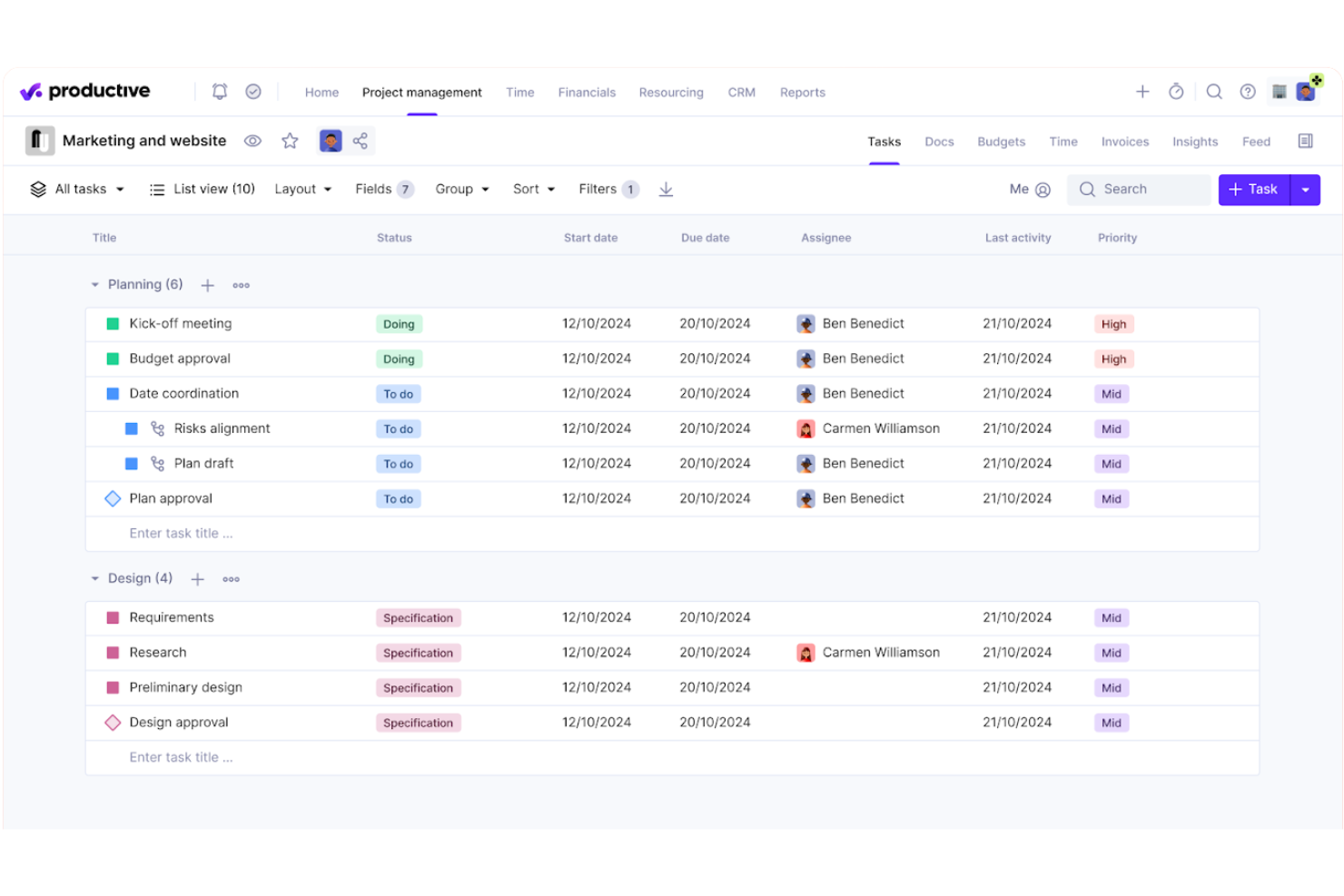
Productive is a professional services automation platform built for agencies that combines project management, resource planning, time tracking, and financial oversight—including budgeting, invoicing, and profitability reporting—in a single system.
Who Is Productive Best For?
Productive is a strong fit for digital agencies and consultancies that need to manage people, projects, and finances without stitching together multiple tools.
Why I Picked Productive
Productive earns its spot on my shortlist because of how clearly it surfaces resource data across an active portfolio. The resource planning view shows team availability, workload, and scheduled time off together, so I can catch allocation gaps before they become delivery problems. I also like the AI Reporting layer, which pulls margin and cost data instantly, and the Scenario Builder for modelling capacity before committing to new work.
Productive Key Features
- AI Assistant: Lets you draft project specs, generate content, and summarize documents right inside the platform.
- Recurring budgets: Support setting up repeating budgets for retainers or long-term projects.
- HRIS and invoicing integrations: Connect to tools like BambooHR, Personio, QuickBooks, and Xero to sync financials and HR data.
- Customizable reporting: Build dashboards and reports using custom fields for detailed insights into agency operations.
Productive Integrations
Productive offers native integrations with Slack, QuickBooks, HubSpot, Google Calendar, Xero, Jira, BambooHR, Personio, CharlieHR, BreatheHR, and Sage. An API is available for custom integrations.
Pros and Cons
Pros:
- Scenario modeling for resource planning
- Built-in AI assistant for automations
- Real-time insights into project profitability
Cons:
- Some features locked behind higher plans
- Report customization requires advanced setup
New Product Updates from Productive
Productive Adds Voice Dictation, Slack Connector, Proposals, and Overtime
Productive adds voice dictation, a Slack Connector, proposal controls, and overtime tracking. These updates support faster AI interactions, client proposals, and time management. For more information, visit Productive’s official site.
Hive
Best for client-to-invoice project billing
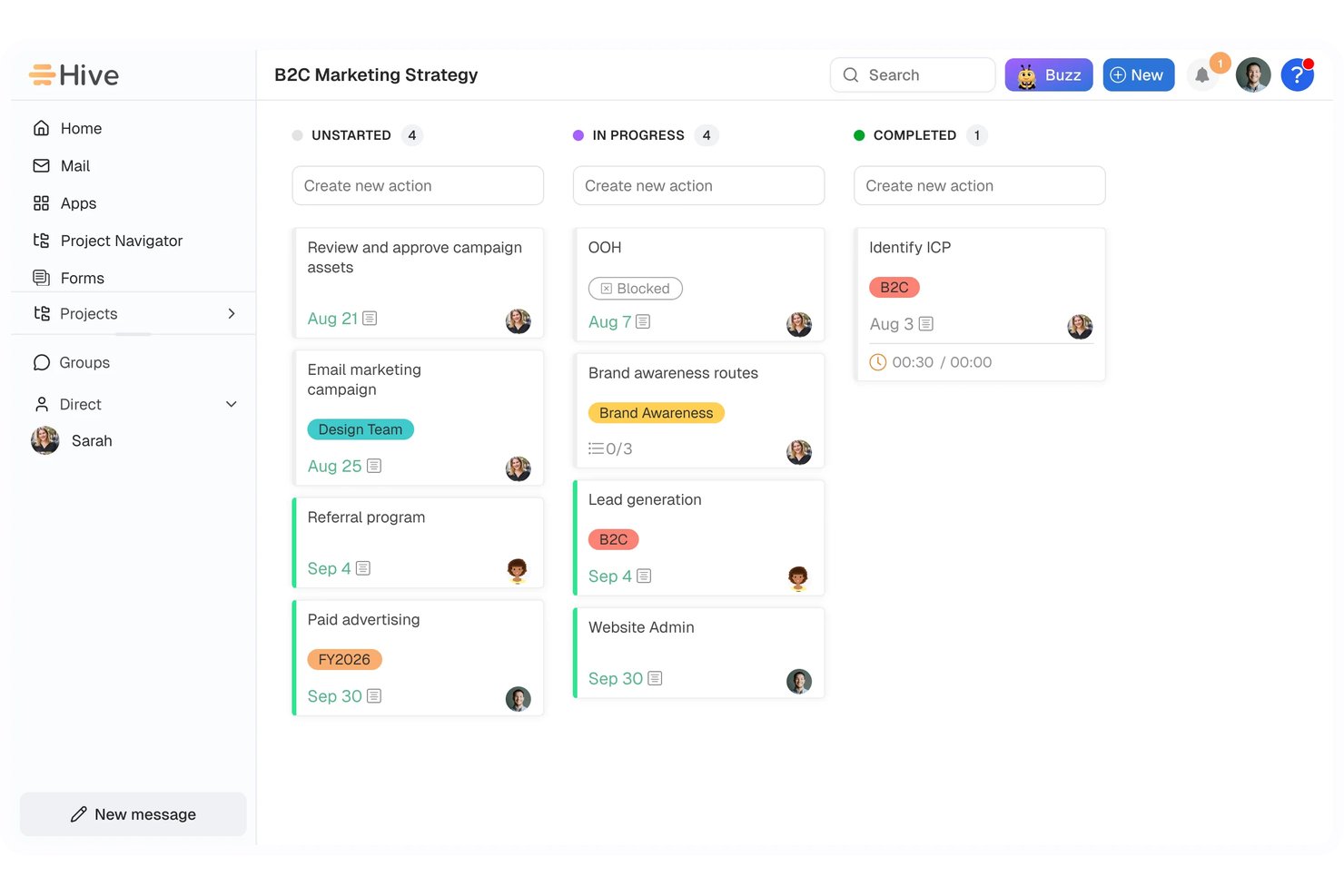
Hive is an AI-powered project and client management platform that combines task planning, CRM, resource scheduling, workflow automation, time tracking, and integrated invoicing through its Finance module.
Who Is Hive Best For?
Hive is a strong fit for agency owners and operations managers who need project delivery and client billing connected in a single workspace.
Why I Picked Hive
I've included Hive in my top picks because its Finance module creates a direct path from logged project hours to a sent invoice, which is exactly what I want from a client-to-invoice billing setup. When a project wraps, billable time flows into a worksheet, gets reviewed, and converts into a customer invoice without leaving the workspace. I also like that CRM margin checks let you price an opportunity and verify gross margin before the work even starts, keeping profitability visible from proposal to payment.
Hive Key Features
- Buzz AI workflow builder: Describe a process in plain English and Buzz generates a multi-step workflow for your review before it runs.
- Proofing and approvals: Mark up documents, video, and live pages directly in Hive and manage the full review and sign-off process in one place.
- CRM pipeline coach: Get an AI-generated summary of pipeline risks, opportunities, and recommended next steps based on your live deal data.
- 13-week cash forecast: Finance projects cash position using your billing pipeline, accounts receivable, accounts payable, and planned adjustments.
Hive Integrations
Hive lists over 1,000 integrations, including native connections to QuickBooks, Slack, Jira, GitHub, Google Drive, Dropbox, Microsoft Teams, and Zoom. It also offers an API and integrations through Zapier or an iPaaS, including HubSpot and FreshBooks.
Pros and Cons
Pros:
- Workflow recipes reduce repeat coordination
- Capacity views clarify team workload
- Client work connects directly to billing
Cons:
- Time and expense updates require manual steps
- Staffing recommendations aren’t AI-driven

Accelo
Best for workflow tracking across client projects

Accelo is a PSA platform that uses AI to connect project management, resource planning, time tracking, financial reporting, and client billing for agencies managing multiple engagements at once.
Who Is Accelo Best For?
Accelo is a strong fit for mid-size agencies and professional services firms managing multiple client engagements simultaneously across project, retainer, and support work.
Why I Picked Accelo
Accelo is one of my top picks because I love how it connects every stage of client work in one place, from the moment a quote is approved through to the final invoice. My team uses Accelo to track project milestones, dependencies, and scope in real time, and the AI surfaces project risks before they become delivery problems. I also rely on the scope creep tracking to catch out-of-scope work early and log change orders before unplanned hours quietly eat into margins.
Accelo Key Features
- AI-assisted resourcing: Assign team members to project tasks based on skill, availability, and workload using AI-powered recommendations.
- Automated timesheets: Accelo captures time spent on tasks and emails automatically, reducing manual time entry across active projects.
- Retainer tracking: Monitor retainer utilization and performance across recurring client accounts alongside one-time project work.
- Project templates: Launch new client projects from pre-built templates with auto-populated tasks, timelines, and role assignments.
Accelo Integrations
Accelo offers 30+ native integrations, including Salesforce, HubSpot, Jira, Slack, Google Workspace, Microsoft 365, QuickBooks, Xero, Sage Intacct, and GitHub. It also connects with Zapier and provides a RESTful API for custom integrations.
Pros and Cons
Pros:
- Automated time capture logs billable hours
- AI flags scope creep and margin risk
- Connects quote-to-cash workflow in one platform
Cons:
- Implementation requires weeks of guided onboarding
- Mobile app lacks full desktop functionality
New Product Updates from Accelo

Accelo Rebuilds Mobile App for Project and Time Management
Accelo rebuilds its mobile app with task management, new work creation, and mobile timesheets for Forecast customers. This helps teams keep project and time data current while working away from a desktop. For more information, visit Accelo’s official site.

Best for AI-powered agency management
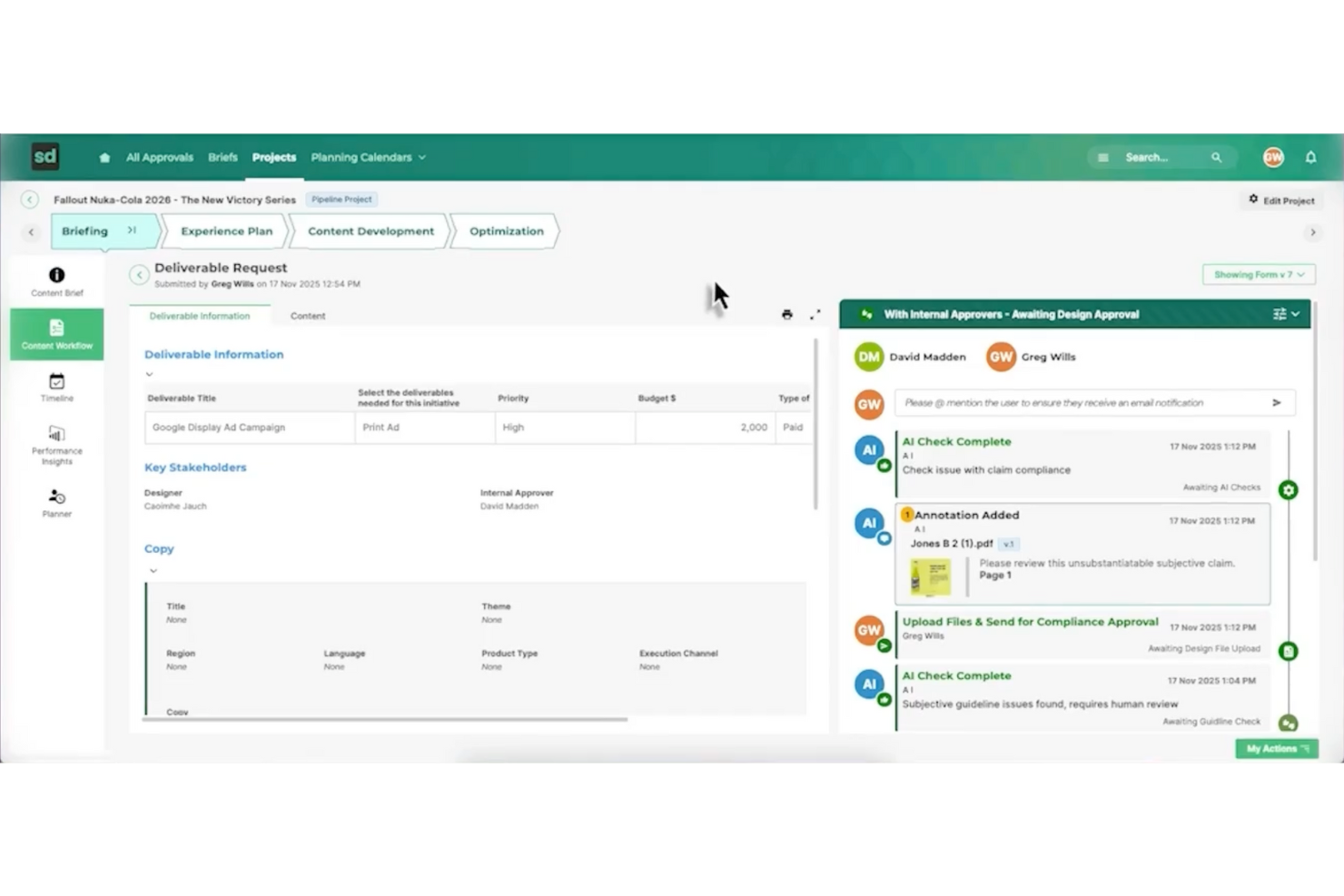
Screendragon is an AI agency management system built for marketing and creative operations that need AI-driven workflow automation. It offers a no-code platform that helps teams manage tasks, approvals, and project flows in one place. With real-time visibility into work progress, Screendragon supports better day-to-day coordination and more efficient project execution.
Why I Picked Screendragon
I picked Screendragon for its unique ability to seamlessly integrate AI-driven workflow automation with project and resource management. This system excels at automating complex workflows without programming knowledge, a significant advantage for teams aiming to improve efficiency. Additionally, its real-time insights and enterprise-grade security add functionality that directly addresses the needs of agencies managing multiple projects and teams. These features make Screendragon a compelling choice for anyone seeking a comprehensive AI agency management solution.
Screendragon Key Features
In addition to AI-driven workflow automation, Screendragon offers:
- Visual Workflow Builder: Allows you to create and customize workflows visually, simplifying the process of managing complex tasks.
- Dynamic Custom Forms: Enables your team to design forms that adapt to your specific operational needs, ensuring data collection is both relevant and efficient.
- Advanced Permission Controls: Provides robust security measures by allowing you to set detailed access permissions, safeguarding sensitive information.
- Proofing and Version Control: Facilitates creative workflows by enabling easy review and version tracking of creative content, ensuring consistency and quality.
Screendragon Integrations
Integrations include Adobe Creative Cloud, Slack, Microsoft Teams, SharePoint, Salesforce, JIRA, Workday, Oracle, SAP, and Google Workspace.
Pros and Cons
Pros:
- Project and resource management features help centralize work details
- Collaborative tools that improve team coordination and project visibility
- Flexible customization lets teams tailor workflows and project structures
Cons:
- Reporting and manual report creation can feel limited or complex
- The admin console and settings may be confusing for new users
New Product Updates from Screendragon
Screendragon Unveils New AI Hub
Screendragon introduced AI Hub, a new capability that lets teams build and manage AI agents directly within workflows. The update helps marketing teams automate tasks, maintain governance controls, and scale AI-driven operations more efficiently. For more information, visit Screendragon's official site.
Best for onboarding projects
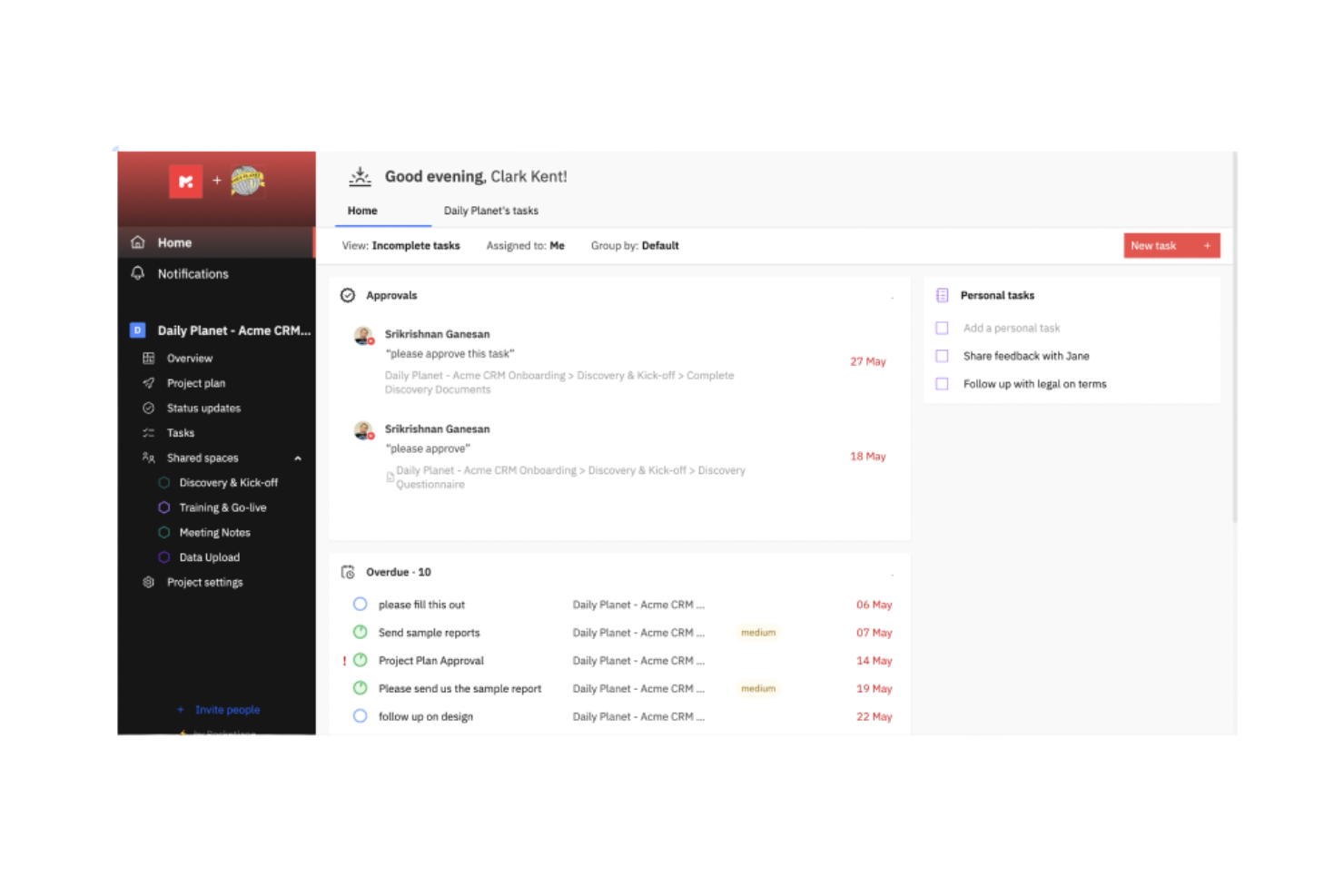
Rocketlane is a project management and customer onboarding software designed for businesses that want to enhance their project delivery and client interactions. It serves professional services teams by providing tools for efficient project tracking and customer collaboration.
Why I picked Rocketlane: Rocketlane specializes in onboarding projects, offering features like collaborative project planning and customer-facing dashboards. Its standout function is the AI-driven client updates, which keep your clients informed without manual effort. The platform also provides real-time financial insights to help your team manage resources effectively. The ability to automate time logging and integrate project data ensures that your onboarding processes are both efficient and transparent.
Standout Features & Integrations:
Features include AI-driven automations that simplify task allocation and resource planning. Time tracking is integrated to provide real-time insights into project profitability. Additionally, the tool offers collaborative workspaces that enhance communication between your team and clients.
Integrations include Salesforce, HubSpot, Slack, Microsoft Teams, Google Workspace, Trello, Asana, QuickBooks, Jira, and Zoom.
Pros and Cons
Pros:
- Detailed reporting tools
- Efficient onboarding support
- Easy to navigate interface
Cons:
- Limited day view on the schedule
- Occasional lag with large data

Creatio
Best for process automation
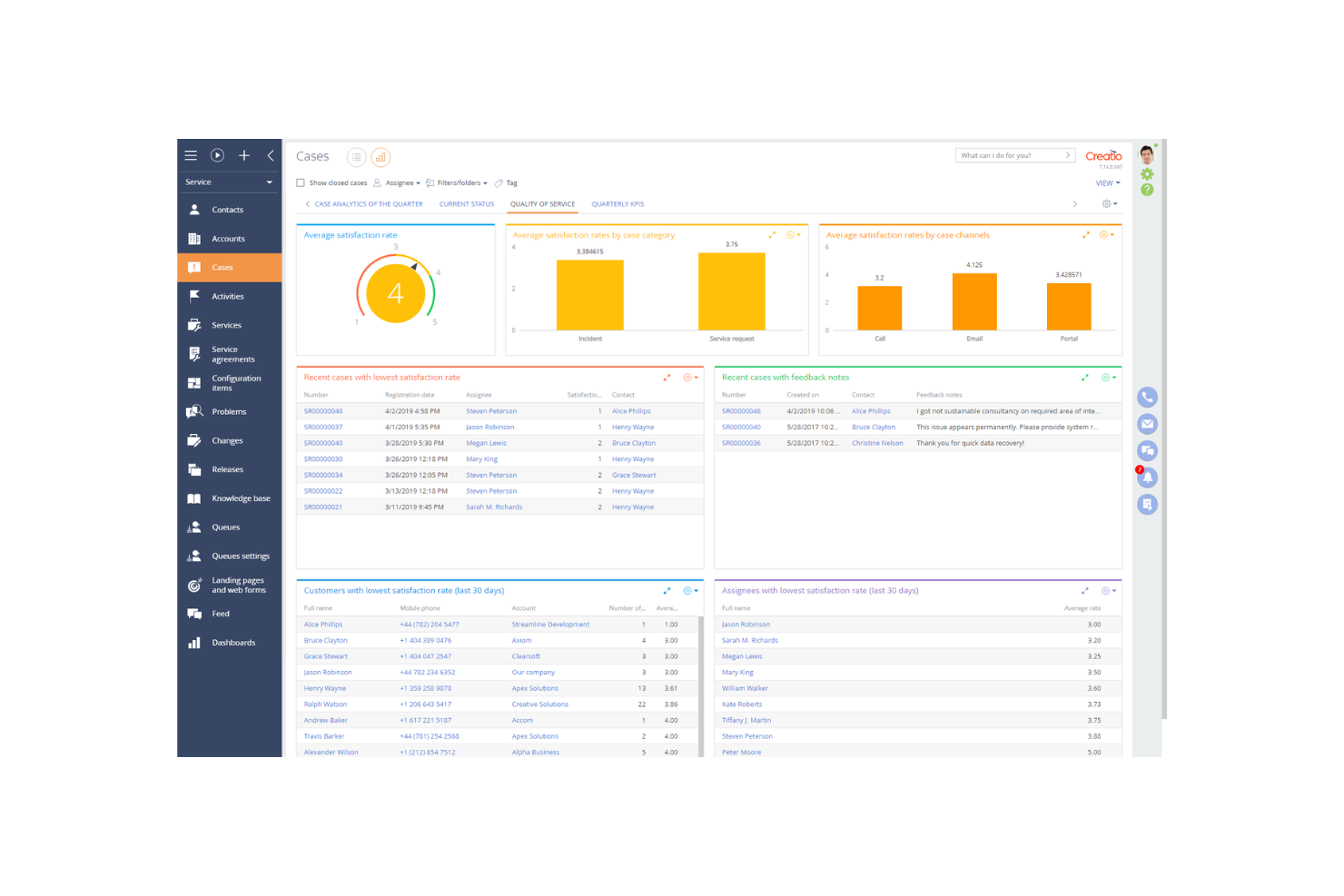
Creatio is a low-code platform designed for businesses looking to automate processes and enhance customer relationship management. It primarily serves mid-sized to large enterprises, offering tools for sales, marketing, and service automation.
Why I picked Creatio: Creatio excels in process automation, providing a platform that allows you to create workflows without extensive coding knowledge. The drag-and-drop interface simplifies the creation of custom processes. With its robust CRM capabilities, your team can manage customer interactions effectively. The platform's flexibility ensures it adapts to various business needs, making it a versatile choice for automation.
Standout Features & Integrations:
Features include the low-code process designer that simplifies workflow creation. The CRM tools offer a comprehensive view of customer interactions and data. Additionally, the marketing automation features help you manage campaigns and track results efficiently.
Integrations include Microsoft Outlook, Google Workspace, Mailchimp, Zapier, DocuSign, LinkedIn, Slack, QuickBooks, Facebook, and Twilio.
Pros and Cons
Pros:
- Flexible process automation
- Strong CRM capabilities
- Low-code platform for easy customization
Cons:
- Requires training for full utilization
- Complexity in initial setup

Best for CRM integration
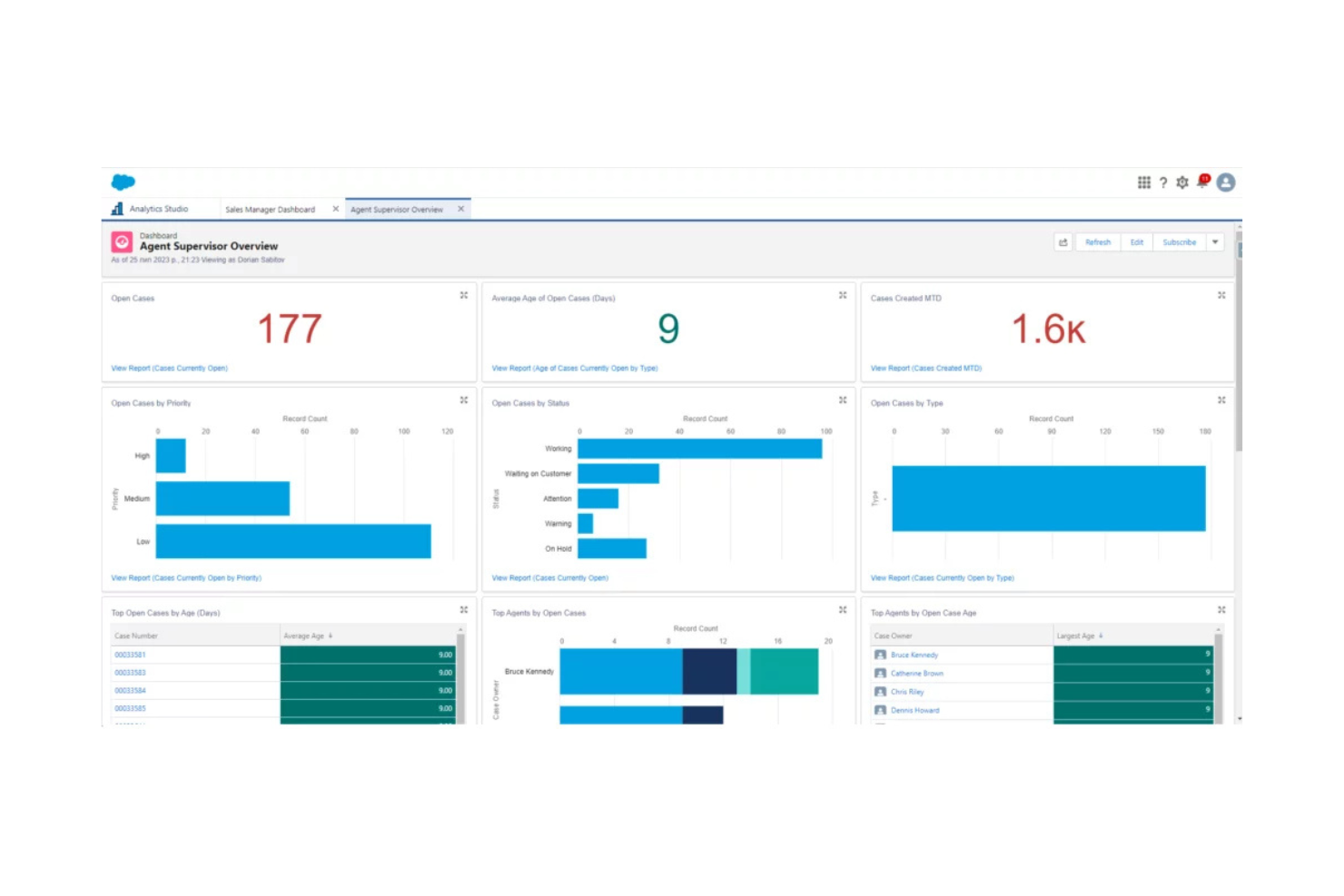
Salesforce is a cloud-based customer relationship management (CRM) platform used by businesses across various industries to manage customer interactions, sales, and data analytics. It helps companies improve customer service, automate sales processes, and enhance team collaboration.
Why I picked Salesforce: Salesforce excels in CRM integration, offering a platform that connects with numerous business tools to streamline your operations. The customizable dashboards give you insights into customer data and sales performance. With its automation capabilities, your team can handle repetitive tasks efficiently. The platform's scalability ensures it grows with your business, adapting to changing needs.
Standout Features & Integrations:
Features include customizable dashboards that let you track key metrics and performance indicators. The automation tools help manage repetitive tasks, freeing up your team for more strategic work. Additionally, the platform's scalability ensures it can grow with your business, adapting to your evolving needs.
Integrations include Mailchimp, QuickBooks, Slack, Dropbox, Google Workspace, Microsoft Outlook, LinkedIn Sales Navigator, DocuSign, Zoom, and HubSpot.
Pros and Cons
Pros:
- Extensive customization options
- Strong data analytics capabilities
- Highly scalable for growing businesses
Cons:
- Requires training for new users
- Can be complex to set up
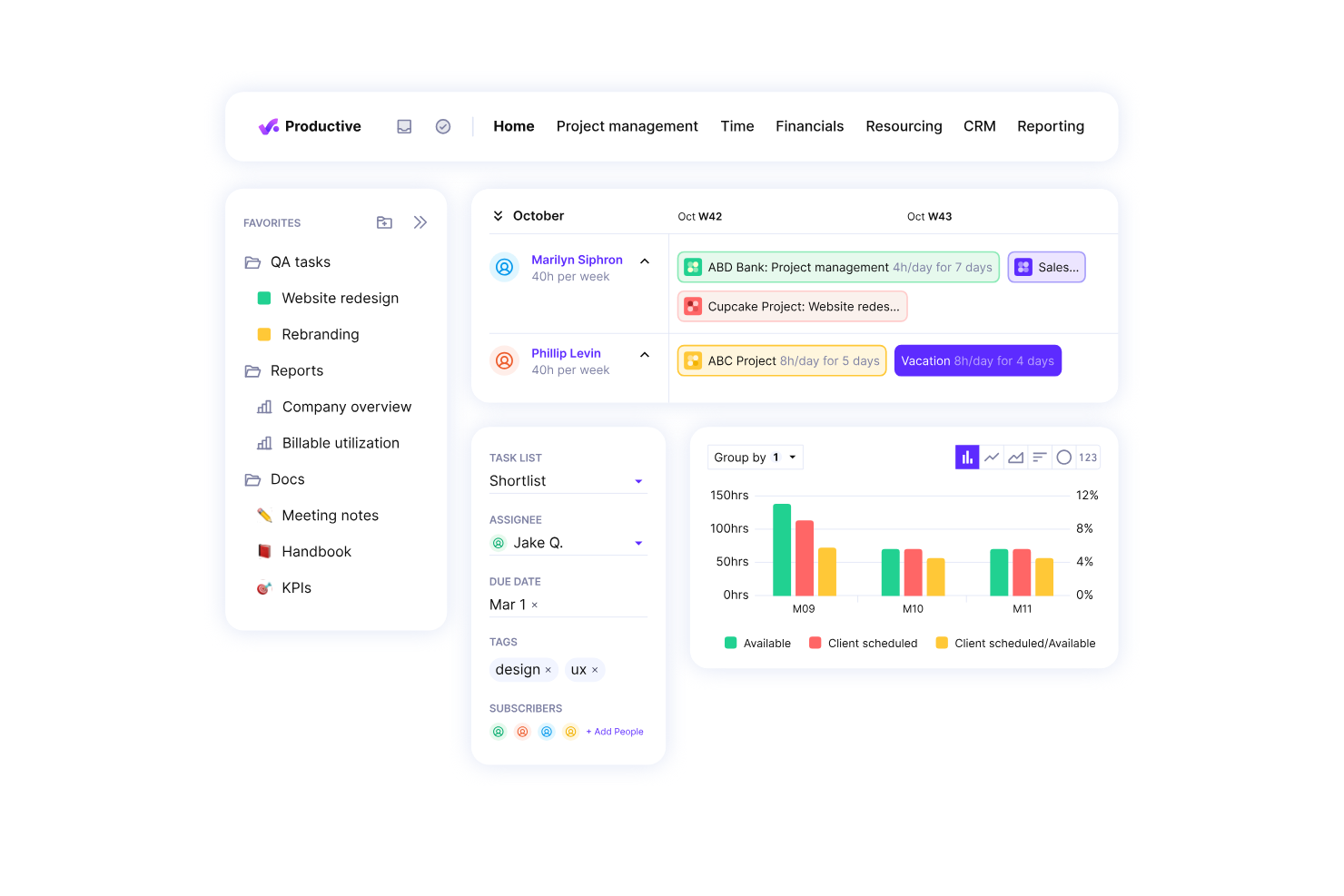
Productive.io is a professional services automation software designed for agencies and service businesses. It excels in resource planning, project management, and financial management, making it ideal for those focused on improving profitability.
Why I picked Productive.io: Productive.io is tailored for agencies aiming to boost profitability. It offers real-time profitability tracking, which helps your team make informed decisions quickly. Features like budgeting and invoicing are integrated, allowing you to handle financial aspects efficiently. The platform's growth forecasting tools ensure you can plan for future success without missing a beat.
Standout Features & Integrations:
Features include detailed project tracking that helps you monitor progress at every stage. The budgeting tools allow for precise financial planning, ensuring that your projects remain profitable. Additionally, the time tracking feature integrates seamlessly with your workflow to provide accurate billing.
Integrations include Xero, Slack, QuickBooks, Jira, Trello, Google Workspace, Microsoft Teams, Asana, HubSpot, and Zoom.
Pros and Cons
Pros:
- Effective resource planning
- Real-time profitability tracking
- Detailed financial insights
Cons:
- Complex setup for large teams
- May require training for new users


Applied Systems provides software solutions specifically designed for the insurance industry, offering tools for agency management, policy administration, and customer engagement. It serves insurance agencies and brokers by streamlining their operations and improving client interactions.
Why I picked Applied Systems: Applied Systems is tailored for the insurance industry with its comprehensive agency management capabilities. It offers policy management features that help your team handle client policies efficiently. The customer engagement tools ensure you maintain strong relationships with your clients. Its emphasis on industry-specific needs makes it a reliable choice for insurance professionals.
Standout Features & Integrations:
Features include automated policy management that simplifies handling client policies. The client communication tools enhance engagement by offering multiple channels for interaction. Additionally, the reporting feature provides insights into agency performance, helping you make informed decisions.
Integrations include Microsoft 365, Salesforce, DocuSign, QuickBooks, Vertafore, IBM, Oracle, Adobe Sign, Google Workspace, and Slack.
Pros and Cons
Pros:
- Strong client communication tools
- Efficient policy management
- Tailored for insurance agencies
Cons:
- Complex for new users
- Pricing details not transparent
Andre systemer for AI-byråstyring
Her er noen flere alternativer for systemer for AI-byråstyring som ikke kom med på kortlisten min, men som likevel er verdt å undersøke:
- EZLynx
For insurance quoting
- Equisoft
For financial services
- monday.com
For team collaboration
- Attio
For contact management


How I Evaluate AI Agency Management Systems
Every tool on this list needs to deliver AI that actually moves the needle—automating client workflows, surfacing project risks, or forecasting capacity—not just slapping a chatbot on a dashboard. I split my evaluation into two layers: the core functionality a platform must have to qualify, and the differentiating factors that separate good options from great ones.
Core Functionality (Table Stakes For This List)
When I'm selecting tools for my list, I rank each one on a scale from 0 (does not offer the functionality) to 5 (excels in this area) for each core functionality listed below. Then, I calculate the tool's total score into a percentage. Each tool needs to achieve a minimum total score of 65% to be considered for inclusion.
- Agency Project Management: I look for multi-client workspace organization, milestone tracking, and dependency mapping that lets teams run concurrent engagements without cross-project confusion.
- AI Automation Engine: Each tool should automate real agency workflows like generating meeting notes, creating follow-up tasks, or drafting status updates rather than offering basic rule triggers.
- Resource & Capacity Management: I evaluate how well the platform tracks team utilization across active retainers and projects, including workload views that flag overallocation before it causes burnout.
- Time Tracking & Billing: The tool needs to connect billable hours to client invoicing, supporting common agency billing models like retainers, fixed-fee, and time-and-materials engagements.
- AI Forecasting & Insights: I check whether AI surfaces useful predictions around budget burn, delivery risk, or capacity shortfalls—not just dashboards that repackage data you already have.
- Client Collaboration Portal: Agencies need a client-facing layer for approvals, feedback, and reporting. I look for portals that reduce back-and-forth emails and keep stakeholders informed.
Once I have a list of tools that meet the criteria, I consider what sets each platform apart.
Differentiating Factors (What Sets Vendors Apart)
Here's how I compare and contrast different vendors:
Standout Features
Predictive risk alerts are a major differentiator. I look for tools that flag scope creep or timeline slippage early enough to adjust before a client escalation hits. Profitability intelligence matters just as much, especially platforms tracking margins per client or project in real time. I also evaluate whether a tool offers AI agent workflows that autonomously handle multi-step tasks like drafting weekly client reports from live project data.
Beyond Features
Integration ecosystems matter a lot for agencies. I check whether a platform connects natively with accounting tools like QuickBooks or Xero and creative tools like Figma, since broken sync between billing and project data creates real headaches. AI trust and data governance is another factor I weigh—agencies handle sensitive client work, so I look for clear policies on how AI models use that data. Pricing model alignment also deserves attention, particularly whether client or collaborator seats are included or billed separately.
Slik velger du et system for AI-byråstyring
Det er lett å gå seg vill i lange funksjonslister og komplekse prismodeller. For å hjelpe deg med å holde fokus mens du går gjennom den unike prosessen din for valg av programvare, får du her en sjekkliste over faktorer du bør ha i tankene:
| Faktor | Hva du bør vurdere |
|---|---|
| Skalerbarhet | Kan verktøyet vokse sammen med byrået ditt? Vurder om det kan håndtere økt arbeidsmengde og flere brukere uten at det går ut over ytelsen. Se etter alternativer som tilbyr skalerbare prisplaner. |
| Integrasjoner | Kan det integreres med verktøyene du allerede bruker? Vurder hvor enkelt det er å koble til eksisterende plattformer som CRM-systemer, e-post og verktøy for prosjektstyring. |
| Tilpasningsmuligheter | Kan du tilpasse programvaren til arbeidsflytene dine? Kontroller om det er mulig å endre dashbord, rapporter og prosesser slik at de passer byråets behov. |
| Brukervennlighet | Er grensesnittet intuitivt for teamet ditt? En bratt læringskurve kan forsinke innføringen. Test programvaren for å sikre at den er brukervennlig for alle teammedlemmer. |
| Implementering og innføring | Hvor raskt kan du komme i gang? Vurder ressursene som kreves til oppsett og opplæring. Se etter programvare med en enkel innføringsprosess og tilgjengelig kundestøtte. |
| Kostnad | Passer det inn i budsjettet ditt? Sammenlign de totale eierkostnadene, inkludert abonnementsavgifter, oppsettskostnader og eventuelle skjulte kostnader. Se etter verdi, ikke bare lave priser. |
| Sikkerhetstiltak | Beskytter det dataene dine? Vurder sikkerhetstiltakene som er på plass, for eksempel kryptering og tilgangskontroller, for å sikre at informasjon om kunder og byrået forblir trygg. |
| Tilgjengelig kundestøtte | Er det enkelt å få hjelp? Kontroller om leverandøren tilbyr kundestøtte døgnet rundt, live-chat eller dedikerte kundeansvarlige som kan bistå når det oppstår problemer. |
Hva er et AI-system for byråstyring?
Et AI-system for byråstyring er en programvareløsning som er utviklet for å hjelpe byråer med å administrere prosjekter, ressurser og kundeinteraksjoner på en effektiv måte. Disse verktøyene brukes vanligvis av prosjektledere, teamledere og byråledere for å øke produktiviteten og forbedre samarbeidet.
Funksjoner for tidsregistrering, oppgavetildeling og kundekommunikasjon bidrar til å håndtere arbeidsmengder, overholde tidsfrister og opprettholde kundetilfredsheten. Samlet sett gir disse verktøyene byråer muligheten til å arbeide mer effektivt og levere bedre resultater til kundene sine.
Funksjoner i et AI-system for byråstyring
Når du velger et AI-system for byråstyring, bør du se etter følgende viktige funksjoner:
- Prosjektstyring: Bidrar til å organisere og følge opp prosjekter fra start til slutt, slik at oppgavene blir fullført i tide.
- Tidsregistrering: Overvåker hvor mye tid som brukes på oppgaver, gir innsikt i produktiviteten og bidrar til nøyaktig fakturering.
- Oppgavetildeling: Gjør det mulig å delegere ansvar tydelig, slik at teammedlemmene vet hva de skal gjøre.
- Kundekommunikasjon: Legger til rette for kontakt med kundene og holder dem informert og engasjert gjennom hele prosjektforløpet.
- Rapportering og analyse: Gir innsikt i prosjektresultater og byråets drift, og bidrar til datadrevne beslutninger.
- Tilpasningsmuligheter: Lar deg tilpasse programvaren til byråets spesifikke arbeidsflyter og behov, noe som forbedrer brukervennligheten.
- Integrasjoner: Kobler seg til andre verktøy byrået bruker, effektiviserer driften og samler data på ett sted.
- Sikkerhetstiltak: Beskytter sensitiv informasjon med kryptering og tilgangskontroller og sikrer personvernet for dataene.
- Automatisering: Reduserer manuelt arbeid ved å automatisere repetitive prosesser, slik at det frigjøres tid til strategisk arbeid.
Fordeler med et AI-system for byråstyring
Implementering av et AI-system for byråstyring gir flere fordeler for teamet og virksomheten din. Her er noen av fordelene du kan se frem til:
- Forbedret effektivitet: Automatiseringsfunksjoner reduserer manuelle oppgaver, slik at teamet ditt kan fokusere på strategisk arbeid.
- Bedre samarbeid: Verktøy for oppgavetildeling og kundekommunikasjon hjelper teamet ditt med å samarbeide og holde kundene oppdatert.
- Bedre beslutningstaking: Rapportering og analyse gir innsikt i resultater, slik at du kan ta informerte valg.
- Økt produktivitet: Tidsregistrering bidrar til å identifisere flaskehalser og sikrer at ressursene brukes effektivt.
- Tilpasset løsning: Tilpasningsmulighetene lar deg skreddersy systemet etter byråets behov, slik at det blir enklere å bruke.
- Sentraliserte operasjoner: Integrasjoner kobler sammen de eksisterende verktøyene dine, effektiviserer prosessene og holder dataene samlet på ett sted.
Kostnader og priser for AI-byråstyringssystem
Valg av et AI-byråstyringssystem krever en forståelse av de ulike prismodellene og abonnementene som er tilgjengelige. Kostnadene varierer basert på funksjoner, teamstørrelse, tillegg og mer. Tabellen nedenfor oppsummerer vanlige abonnementer, gjennomsnittsprisene deres og typiske funksjoner som inngår i løsninger for AI-byråstyringssystemer:
Sammenligningstabell for abonnementer for AI-byråstyringssystem
| Abonnementstype | Gjennomsnittspris | Vanlige funksjoner |
|---|---|---|
| Gratisabonnement | $0 | Grunnleggende prosjektstyring, oppgavetildeling og begrensede integrasjoner. |
| Personlig abonnement | $5-$25/bruker/måned | Prosjektstyring, tidsregistrering, oppgavetildeling og grunnleggende rapportering. |
| Forretningsabonnement | $30-$60/bruker/måned | Avansert rapportering, kundekommunikasjon, integrasjoner og tilpasningsmuligheter. |
| Virksomhetsabonnement | $75-$150/bruker/måned | Full tilpasning, prioritert brukerstøtte, avanserte sikkerhetsfunksjoner og omfattende analyse. |
Vanlige spørsmål om systemer for AI-byråstyring
Her er noen svar på vanlige spørsmål om systemer for AI-byråstyring:
Hvordan integrerer jeg et system for AI-byråstyring med eksisterende verktøy?
Integrering av et system for AI-byråstyring med de nåværende verktøyene dine innebærer å kontrollere kompatibiliteten med programvareøkosystemet ditt. De fleste systemer tilbyr API-er eller innebygde integrasjoner med populære verktøy som CRM-systemer, e-postplattformer og prosjektstyringsprogramvare. Sørg for å vurdere hvor enkelt det er å integrere systemet, samt eventuell teknisk støtte leverandøren tilbyr.
Hva bør jeg ta hensyn til når det gjelder datasikkerhet?
Datasikkerhet er avgjørende når du velger et system for AI-byråstyring. Se etter systemer med robust kryptering, tilgangskontroller og samsvar med personvernforordninger som GDPR. Spør om leverandørens sikkerhetsprotokoller og hvordan de håndterer datainnbrudd, slik at du kan sikre at kundeinformasjonen din forblir trygg.
Kan systemer for AI-byråstyring håndtere eksterne team?
Ja, mange systemer for AI-byråstyring støtter fjernarbeid ved å tilby skybasert tilgang, mobilapper og funksjoner for samarbeid. Disse verktøyene bidrar til å holde teamet ditt tilkoblet, slik at de kan administrere prosjekter, kommunisere og få tilgang til data fra hvor som helst. Se etter funksjoner som forbedrer samarbeid og tilkobling på avstand.
Hvordan forbedrer systemer for AI-byråstyring kommunikasjonen med kunder?
Disse systemene forbedrer kommunikasjonen med kunder ved å samle kontaktinformasjon på ett sted, spore interaksjoner og tilby kommunikasjonsverktøy som e-postmaler og chat. Dette hjelper teamet ditt med å opprettholde jevnlig kontakt med kundene og sikre rettidige oppdateringer og svar, noe som forbedrer kundetilfredsheten og kundelojaliteten.
Hvor omfattende tilpasninger er mulig?
Graden av tilpasning varierer mellom systemene, men de fleste tilbyr muligheter for å tilpasse dashbord, arbeidsflyter og rapporter. Vurder hvor enkelt det er å tilpasse systemet til byråets spesifikke behov. Noen systemer kan kreve teknisk bistand for mer avanserte tilpasninger, så ta hensyn til teamets kompetanse.
Hva er de vanligste utfordringene under implementeringen?
Vanlige utfordringer omfatter datamigrering, opplæring av brukere og tilpasning av arbeidsflyter til det nye systemet. For å redusere disse utfordringene bør du sørge for at leverandøren tilbyr omfattende ressurser for innføring, for eksempel veiledninger, webinarer og brukerstøtte. Planlegg en overgangsperiode der teamet ditt kan bli kjent med det nye systemet uten press.