

10 beste prosjektstyringsprogrammer med Jira-integrasjon i 2026

Kortliste over de beste programvarene for prosjektstyring med Jira-integrasjon


Det er ikke uvanlig å finne organisasjoner som bruker flere verktøy for prosjektstyring. Et verktøy som Jira har sitt spesifikke bruksområde og er kanskje ikke det ideelle valget for personer utenfor utviklingsteam. Derfor kan programvare for prosjektstyring med Jira-integrasjon utgjøre en forskjell i arbeidsflytene dine. Heldigvis finnes det mange alternativer, men det betyr også at det raskt kan bli overveldende.
Med utgangspunkt i min omfattende erfaring med å lede digitale prosjekter og teste ulike verktøy for prosjektstyring har jeg satt sammen denne listen over de beste alternativene du kan velge mellom.
Why Trust Our Software Recommendations
Our team has been testing and reviewing software since 2012. As project managers ourselves, we know how difficult—and important—it is to choose the right software.
For this guide, we evaluated tools using hands-on testing and independent research, scoring tools using our selection criteria. We also draw on insights from industry thought leaders and practicing project management experts.
Our reviews reflect our human editorial judgment, not a sales pitch.
Expert reviewers:
Sammenligningstabell for programvare for prosjektstyring med Jira-integrasjon
Denne sammenligningstabellen oppsummerer prisopplysningene for mine beste utvalgte programmer for prosjektstyring med Jira-integrasjon:
| Tool | Best For | Trial Info | Price | ||
|---|---|---|---|---|---|
| 1 | Best for comprehensive agency project management | 14-day free trial | From $10/user/month (billed annually) | Website | |
| 2 | Best for agile project management | 14-day free trial | Pricing upon request | Website | |
| 3 | Best for bottleneck visualization | 30-day free trial + free demo available | From €22.5/month (billed annually) | Website | |
| 4 | Best for client-access project portals | 14-day free trial + free demo available | From $10/user/month (billed annually) | Website | |
| 5 | Best for issue tracking features | Free plan + 15-day free trial + free demo available | From $4/user/month (billed annually) | Website | |
| 6 | Best for two-way synchronization with Jira | 15-day free trial | From $1/user/month (12 user minimum) | Website | |
| 7 | Best for issue tracking & project planning | Free trial available | From $16/user/month (billed annually) | Website | |
| 8 | Best for real-time updates with visual dashboards | Free plan + 14-day free trial available | From $8/user/month (billed annually) | Website | |
| 9 | Best for mid-sized agencies and consultancies | Free demo available | Pricing upon request | Website | |
| 10 | Best for all-in-one collaboration | 30-day free trial and free plan available | From $35/month | Website |


Anmeldelser av de beste programmene for prosjektstyring med Jira-integrasjon
Her er mine 10 beste verktøy for prosjektstyring som kan integreres med Jira. Hver anmeldelse gir en omfattende analyse av funksjonene, styrkene og svakhetene til hvert verktøy, samt de ideelle bruksområdene for disse integrerte løsningene.

Best for comprehensive agency project management

Productive is an agency-focused project management platform that covers resource planning, time tracking, budgeting and profitability, invoicing, forecasting, and financial reporting—all in one place.
Who Is Productive Best For?
Productive is a strong fit for digital agencies, consultancies, and professional services firms that need to manage projects alongside budgets, capacity, and client billing.
Why I Picked Productive
Productive stands out because it covers the full agency operation—not just tasks and timelines, but budgets, resource capacity, profitability, and invoicing in a single platform. I really like that the Jira integration sits inside Productive's time tracking module, so time logged against Jira issues feeds directly into project budgets and profitability reports. That connection means agency teams using Jira for dev work don't have to reconcile hours manually. I also find the budgeting and profitability views especially useful—you can see in real time whether a project is tracking toward margin or burning through budget too fast.
Productive Key Features
- Gantt chart scheduling: Visualize project timelines, set task dependencies, and adjust schedules by dragging and dropping tasks across the chart.
- Sales pipeline CRM: Track leads, manage deals, and convert won opportunities directly into projects without switching tools.
- Automated invoicing: Generate invoices from tracked time and expenses, then send them to clients from within the platform.
- Custom reporting: Build reports across projects, budgets, and team utilization using filters and saved report templates.
Pros and Cons
Pros:
- Good financial management capabilities
- Customizable dashboards for reporting
- Ability to track project profitability
Cons:
- Initial setup can be time-consuming
- Could benefit from more integrations
New Product Updates from Productive
Productive Adds Voice Dictation, Slack Connector, Proposals, and Overtime
Productive adds voice dictation, a Slack Connector, proposal controls, and overtime tracking. These updates support faster AI interactions, client proposals, and time management. For more information, visit Productive’s official site.

Wrike
Best for agile project management

Wrike is a cloud-based project management platform that combines task tracking, Kanban and Gantt views, workload management, workflow automation, and a native two-way Jira sync for cross-team visibility.
Who Is Wrike Best For?
Wrike is a strong fit for mid-size to enterprise teams that run cross-functional projects across product, engineering, and marketing, especially where Jira and non-Jira teams need to work in sync.
Why I Picked Wrike
I picked Wrike as one of the best because it handles agile delivery without forcing every team member into Jira. My team can run sprints, manage backlogs, and track work in Wrike while Jira issues sync automatically in both directions. I especially like how you can map Wrike's custom statuses directly to Jira issue types, so engineering sprints and product workstreams stay connected without manual updates.
Wrike Key Features
- Gantt chart timeline view: Visualize project schedules, set dependencies, and adjust timelines by dragging and dropping tasks directly on the chart.
- Workload management: View team capacity across all active tasks, spot overallocation, and rebalance assignments from a single dashboard.
- Custom request forms: Build intake forms that automatically generate and route tasks to the right projects when submitted.
- No-code workflow automation: Set up trigger-based rules to auto-assign tasks, change statuses, or send notifications without writing any code.
Pros and Cons
Pros:
- Good proofing tools
- Dynamic Gantt charts for project organization and tracking
- Powerful AI and automation
Cons:
- No in-app chat function aside from in-task commenting and mentions
- Can be complex to customize to your unique needs
New Product Updates from Wrike
Wrike Adds Klaxoon MCP Integration
Wrike’s Klaxoon MCP integration is now generally available, enabling AI agents to navigate between Wrike tasks and attached whiteboards, read task context, and manage whiteboard attachments via API. For more information, visit Wrike's official site.

Epicflow
Best for bottleneck visualization
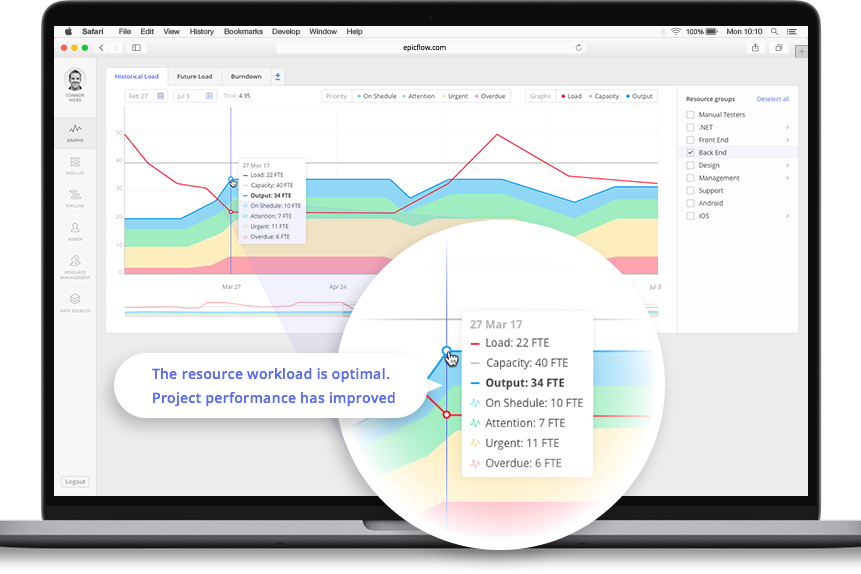
Epicflow is an AI-based multi-project resource management and portfolio planning platform that integrates with Jira to add capacity planning, bottleneck detection, and resource allocation on top of your existing project workflows.
Who Is Epicflow Best For?
Epicflow is a strong fit for project management offices and resource managers overseeing multiple concurrent projects across engineering or product development teams.
Why I Picked Epicflow
Epicflow earns its spot on my shortlist because of how it surfaces bottlenecks across a Jira-connected portfolio. I particularly like the Future Load Graph, which maps predicted resource demand so my team can spot capacity crunches before they stall delivery. The current bottleneck graphs pinpoint exactly where workload is piling up across projects, making it easy to act before a delay becomes a missed deadline.
Epicflow Key Features
- What-if scenario analysis: Simulate the impact of scope changes, new project additions, or shifted priorities before committing to a new plan.
- Competence-based resource allocation: Assign tasks based on team members' skills and current availability across all active projects simultaneously.
- Historical Load Graph: Review past workload distribution to identify recurring patterns of overallocation or underutilization across your team.
- Epica AI assistant: Get automated planning prompts, alerts, and prioritization suggestions based on live project and resource data.
Pros and Cons
Pros:
- Capacity-based planning with forecasting
- Maintains workflows via Jira integration
- Advanced what-if scenario modeling
Cons:
- Depends on Jira for core execution
- Limited native integrations beyond PM tools

Celoxis
Best for client-access project portals
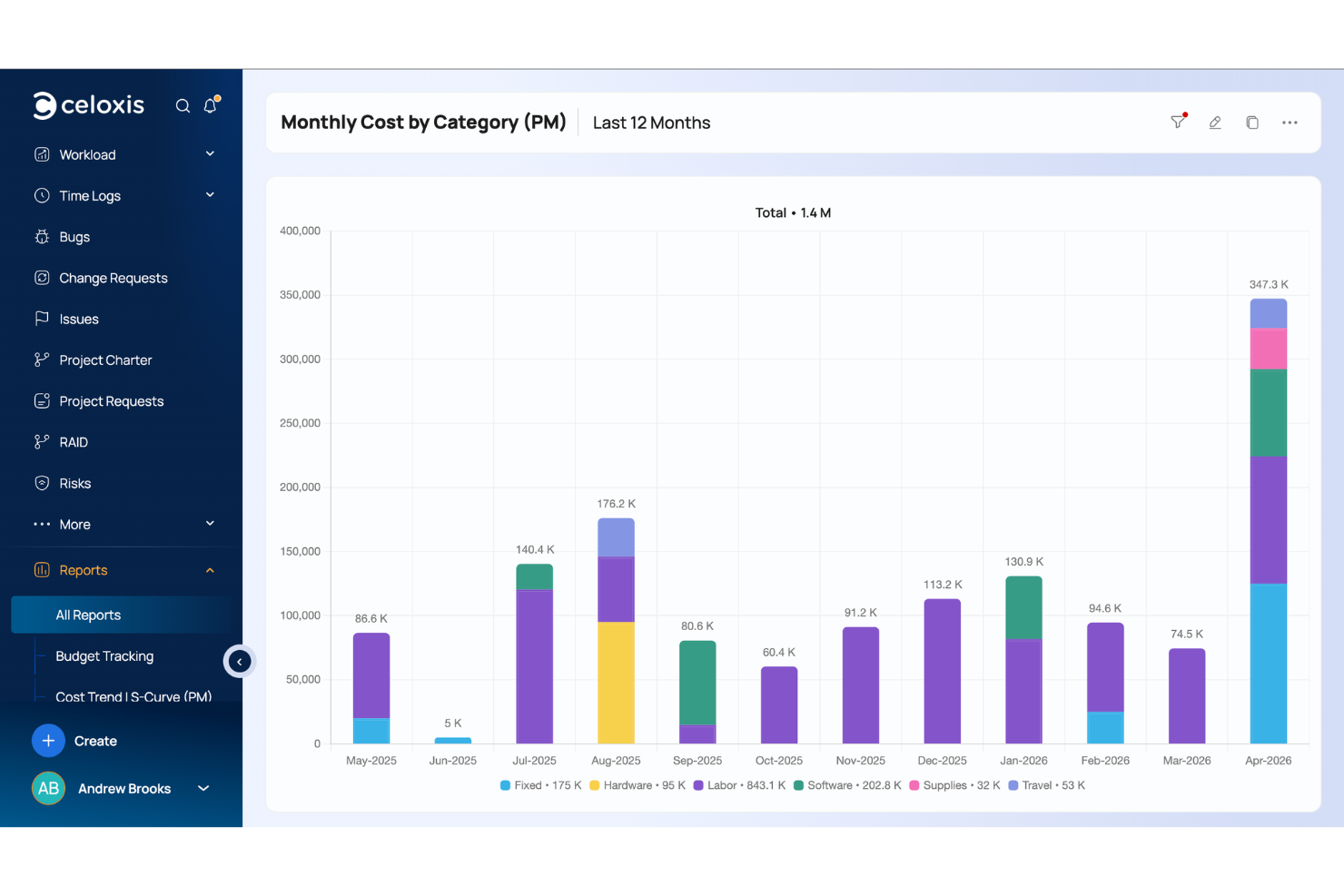
Celoxis is a project management and portfolio management platform with a native Jira integration that links development progress and resource utilization to project plans, Gantt charts, resource management, time and expense tracking, and BI-style reporting dashboards.
Who Is Celoxis Best For?
Celoxis is well-suited for mid-to-large organizations running multiple concurrent projects that need a single platform connecting engineering work in Jira to broader project planning and financials.
Why I Picked Celoxis
I picked Celoxis as one of the best because of how it handles client visibility without adding to your licensing costs. The client portal is free and fully customizable, letting clients log in to view shared reports, join project discussions, and participate in business workflows like issue tracking or approvals. What I find especially useful is the client hierarchy system: you can create nested client structures to partition access, so there's no risk of one client accidentally seeing another's projects. For teams running Jira-connected projects, clients get a window into real delivery progress, not a manually curated status update.
Celoxis Key Features
- Jira sync: Brings Jira issues, sprints, story points, worklogs, and assignees into Celoxis task plans.
- Interactive Gantt chart: Lets you visualize project schedules with drag-and-drop task editing and automatic recalculation of dependencies.
- Resource workload chart: Shows team capacity and allocation across all active projects in one chart.
- Custom dashboard widgets: Create project dashboards using drill-down charts, KPI tiles, and scheduled email reports.
Celoxis Integrations
Celoxis offers native integrations with Jira, Salesforce, Trello, Zendesk, Okta, Microsoft Project, Slack, Outlook, Google Drive, and more, with an API available for custom integrations.
Pros and Cons
Pros:
- Available as both cloud and on-premise solutions
- Replicates advanced Microsoft Project scheduling online
- Built-in custom formula fields for reporting
Cons:
- Interface feels dated
- Steep learning curve for users

Best for issue tracking features
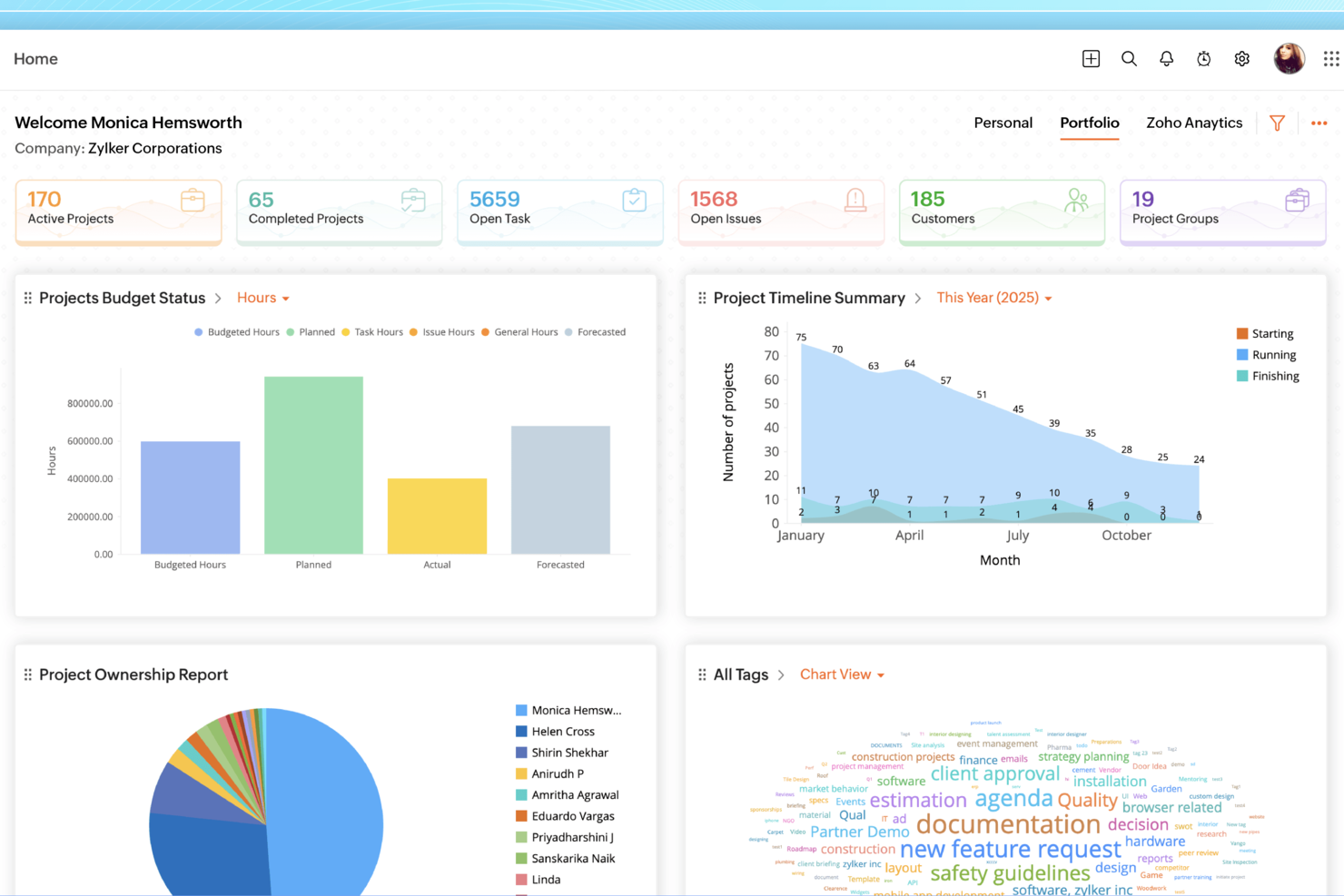
Zoho Projects is a project management platform that combines task tracking, Gantt charts, time logging, issue tracking, and workflow automation with a Jira integration that connects your Zoho projects directly to Jira tickets.
Who Is Zoho Projects Best For?
Zoho Projects is a good fit for small to mid-sized teams already using other Zoho products who want project management and issue tracking in one connected workspace.
Why I Picked Zoho Projects
I've included Zoho Projects in my top picks because its issue tracking module is one of the more fully built-out I've seen in a project management tool. I like that you can define custom workflows and statuses, set up SLA rules with escalation paths, and log bugs directly from external websites. The Kanban board for issues lets my team drag cards between columns tied to specific issue statuses like severity and classification, making triage much faster than digging through a flat list.
Zoho Projects Key Features
- Gantt chart with critical path: Visualize task dependencies and automatically highlight the sequence of tasks that determine your project's end date.
- Jira integration: Connect Zoho Projects to your Jira account via the Zoho Marketplace to link Jira tickets directly to tasks.
- Timesheet logging: Track time at the task level and generate timesheet reports across projects for billing or internal review.
- Resource utilization chart: See each team member's workload across all active projects in a single view.
Pros and Cons
Pros:
- Custom workflows fit diverse teams
- Strong task and time tracking
- Native Jira task synchronization support
Cons:
- Interface can feel overwhelming initially
- Jira setup requires configuration effort
New Product Updates from Zoho Projects
Zoho Projects Adds CodeX Scripts for Custom Modules
Zoho Projects now supports CodeX Scripts for custom modules, enabling conditional logic and rules for creating, updating, and deleting records. For more information, visit Zoho Projects' official site.
 .
.
Best for two-way synchronization with Jira
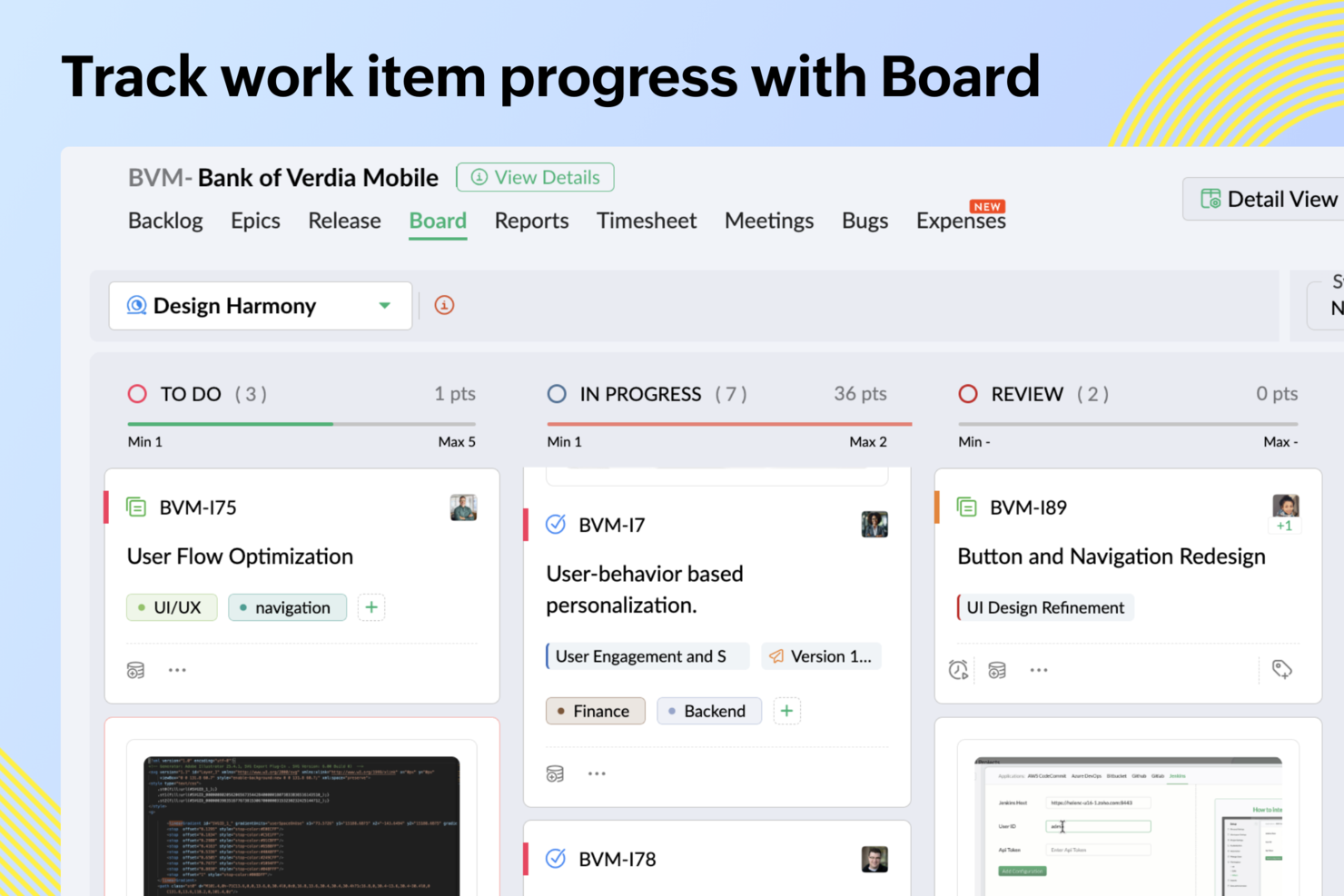
Zoho Sprints is an agile project management tool that covers sprint planning, backlog management, scrum and Kanban boards, time tracking, and release management—with a native Jira integration built directly into the platform.
Who Is Zoho Sprints Best For?
Zoho Sprints is a good fit for agile software development teams that already use other Zoho products and need a dedicated scrum tool with a direct Jira connection.
Why I Picked Zoho Sprints
Zoho Sprints earns its spot on my shortlist because of how thoroughly its Jira integration handles the details that usually fall through the cracks. When my team creates a work item in Zoho Sprints, it automatically appears in Jira—with statuses, priorities, tags, and assignees all mapped across. I especially like that comments sync with a custom header showing the author and source, so neither team loses the conversation thread. File attachments sync automatically too, which means no one is hunting for the latest design file or spec doc in a separate tool.
Zoho Sprints Key Features
- Sprint planning board: Build sprints from your backlog using epics and user stories, with drag-and-drop prioritization across columns.
- Burndown and velocity charts: Track sprint progress and team delivery speed using built-in agile reports updated in real time.
- Release management: Plan and monitor releases with a dedicated timeline view that connects to CI/CD pipelines like Jenkins and GitLab.
- Timesheet tracking: Log hours directly against work items and sprints, with approval workflows for team time submissions.
Pros and Cons
Pros:
- Strong integration with Zoho suite
- Built-in Scrum and Kanban boards
- Two-way Jira issue synchronization
Cons:
- Limited advanced dependency management
- Interface feels dated to some
New Product Updates from Zoho Sprints
Zoho Sprints Adds Dashboard View for Custom Modules
Zoho Sprints adds a Dashboard view for custom modules with charts and tables for visualizing module records. This gives teams a clearer way to review custom data. For more information, visit Zoho Sprints’ official site.
 .
.
VOGSY
Best for issue tracking & project planning

VOGSY is a professional services automation platform built for global service firms that connects project management, resource planning, time tracking, and financial controls—including a native Jira integration for syncing issues and project data.
Who Is VOGSY Best For?
VOGSY is a strong fit for professional services firms—like consulting, IT services, and agencies—that need to manage client projects alongside Jira-based development workflows.
Why I Picked VOGSY
I've included VOGSY in my top picks because its Jira integration goes deeper than a simple data sync. When your dev team logs time directly on Jira issues using the VOGSY add-on, those hours flow automatically into the right billable activities in VOGSY—keeping budgets and margins accurate without manual reconciliation. I also like that you can view real-time Jira issue status, assignees, and sprint data from within a VOGSY project, which makes cross-team project planning much easier to manage in one place.
VOGSY Key Features
- Work breakdown structure: Build out projects with deliverables, tasks, and milestones to define scope and track progress at a granular level.
- Project planning chart: Manage and visualize project schedules in an interactive chart, including dependencies and timeline tracking.
- Project templates: Save existing project structures as reusable templates to replicate setup for new client engagements.
- Mixed billing methods: Run a single project with a combination of time & materials, fixed price, retainer, and subscription billing.
Pros and Cons
Pros:
- Real-time global financial overview
- Fast setup and onboarding
- Robust resource planning tools
Cons:
- Limited mobile functionality
- Basic customization options feel restrictive
New Product Updates from VOGSY
VOGSY Adds Velocity Agent Verdicts for Quote Approvals
VOGSY adds Velocity agent verdicts for quote approval requests with risk levels, margin checks, discount analysis, and reasoning. This helps approvers assess quote risk before making a final decision. For more information, visit VOGSY’s official site.
 .
.
Miro
Best for real-time updates with visual dashboards
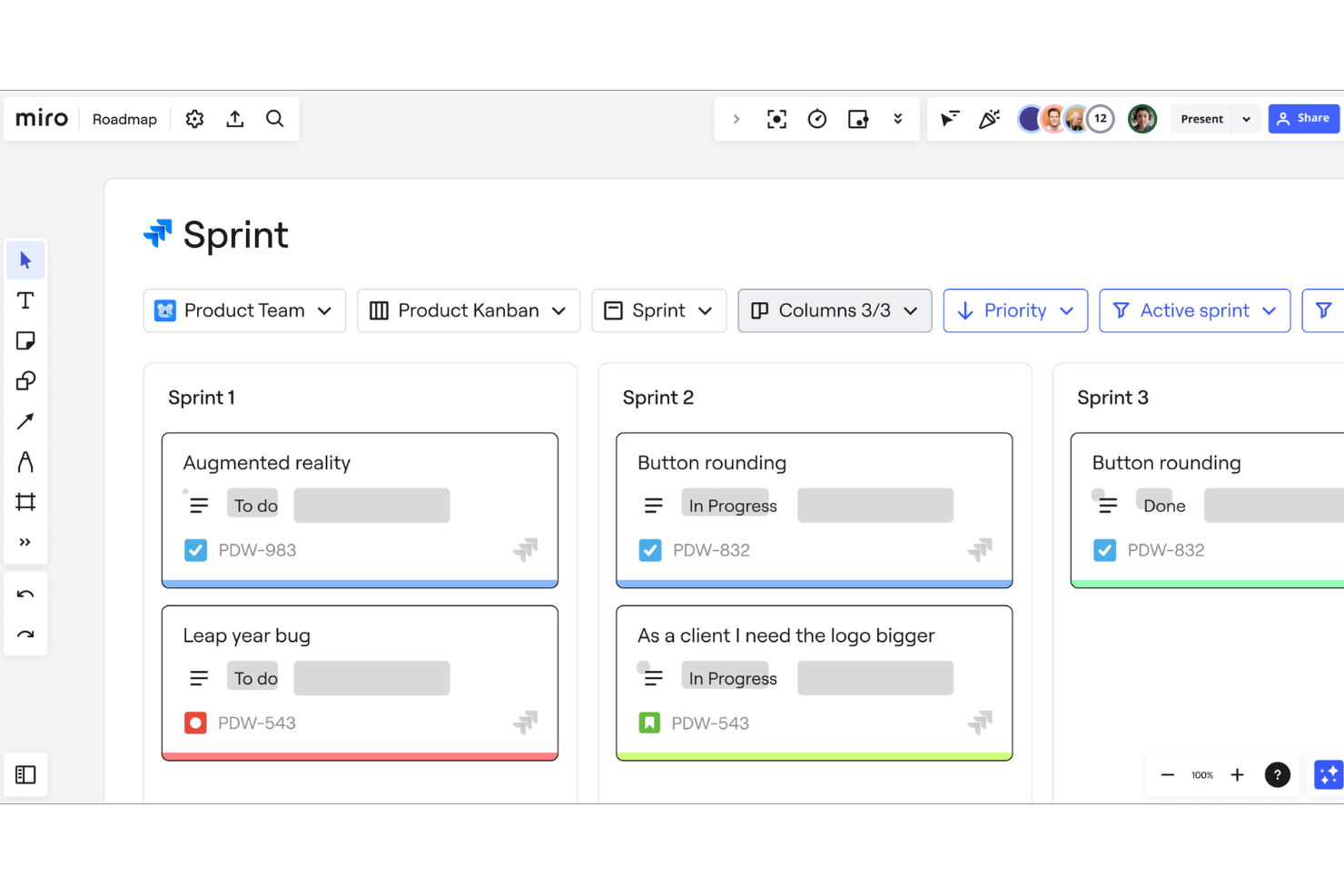
Miro is a visual collaboration platform that combines an infinite canvas workspace with project planning tools like Kanban boards, timelines, and Gantt charts, plus a two-way Jira integration for syncing issues directly into visual workflows.
Who Is Miro Best For?
Miro is a strong fit for cross-functional teams in product, design, and engineering who need a shared visual workspace to plan, map, and track work alongside their Jira workflows.
Why I Picked Miro
I picked Miro as one of the best because of how its Jira Cards surface live issue data (status, assignee, and priority) directly on the canvas. When a sprint status changes in Jira, the card updates in real time without any manual syncing. I build visual dashboards on the infinite canvas that pull these cards together with timelines and sticky notes, giving my team one shared view of project progress across multiple workstreams.
Miro Key Features
- Two-way issue creation: Convert any Miro sticky note or shape directly into a Jira issue without leaving the canvas, and vice versa.
- Built-in Kanban boards: Create and manage Kanban boards natively in Miro, with drag-and-drop card management and customizable columns for sprint workflows.
- Sprint planning templates: Pre-built sprint planning and retrospective templates that teams can populate and run directly within the Miro workspace.
- Contextual comments and @mentions: Leave threaded comments and tag teammates anywhere on the canvas to flag decisions, blockers, or feedback in context.
Pros and Cons
Pros:
- Infinite whiteboard
- Customizable templates for workflows and dashboards
- Real-time collaboration features
Cons:
- Highly customizable nature may take time to get used to
- Some integrations are limited to higher-tier plans
New Product Updates from Miro
Miro Adds Japan Data Residency for Enterprise Customers
Miro has introduced Japan data residency for enterprise customers, offering in-region storage for production data, backups, and metadata, plus in-region compute infrastructure. For more information, visit Miro's official site.

Forecast
Best for mid-sized agencies and consultancies

Forecast is an AI-powered project and resource management platform designed to help teams manage projects more effectively. Its integration with Jira ensures project tasks, sprints, and time entries stay synchronized across both tools, giving project managers full visibility into progress and potential risks.
Why I Picked Forecast: I picked Forecast because its predictive capabilities go beyond standard project tracking. The platform uses AI to forecast resource needs, predict project risks, and flag capacity issues before they become problems. When paired with Jira, Forecast provides a comprehensive view of both development work, project delivery, and profitability, allowing you to make informed decisions faster.
If you want a project management tool that helps you stay one step ahead of issues, Forecast is a strong choice.
Standout features & integrations:
Features include AI-assisted project scoping, automated time tracking, utilization reports, Gantt charts, invoicing, budget management, revenue recognition, and capacity overviews.
Integrations include Jira Cloud, Azure DevOps, GitHub, GitLab, Slack, MS Teams, Salesforce, HubSpot, QuickBooks, Xero, Sage Intacct, BambooHR, Google Calendar, Google Drive, Trello, and Zapier.
Pros and Cons
Pros:
- Predictive analytics for better decision-making
- Integration with leading platforms like Jira and QuickBooks
- AI-driven resource and project planning
Cons:
- Annual commitment is needed for the best pricing
- Minimum user requirements may exclude small teams
Backlog
Best for all-in-one collaboration
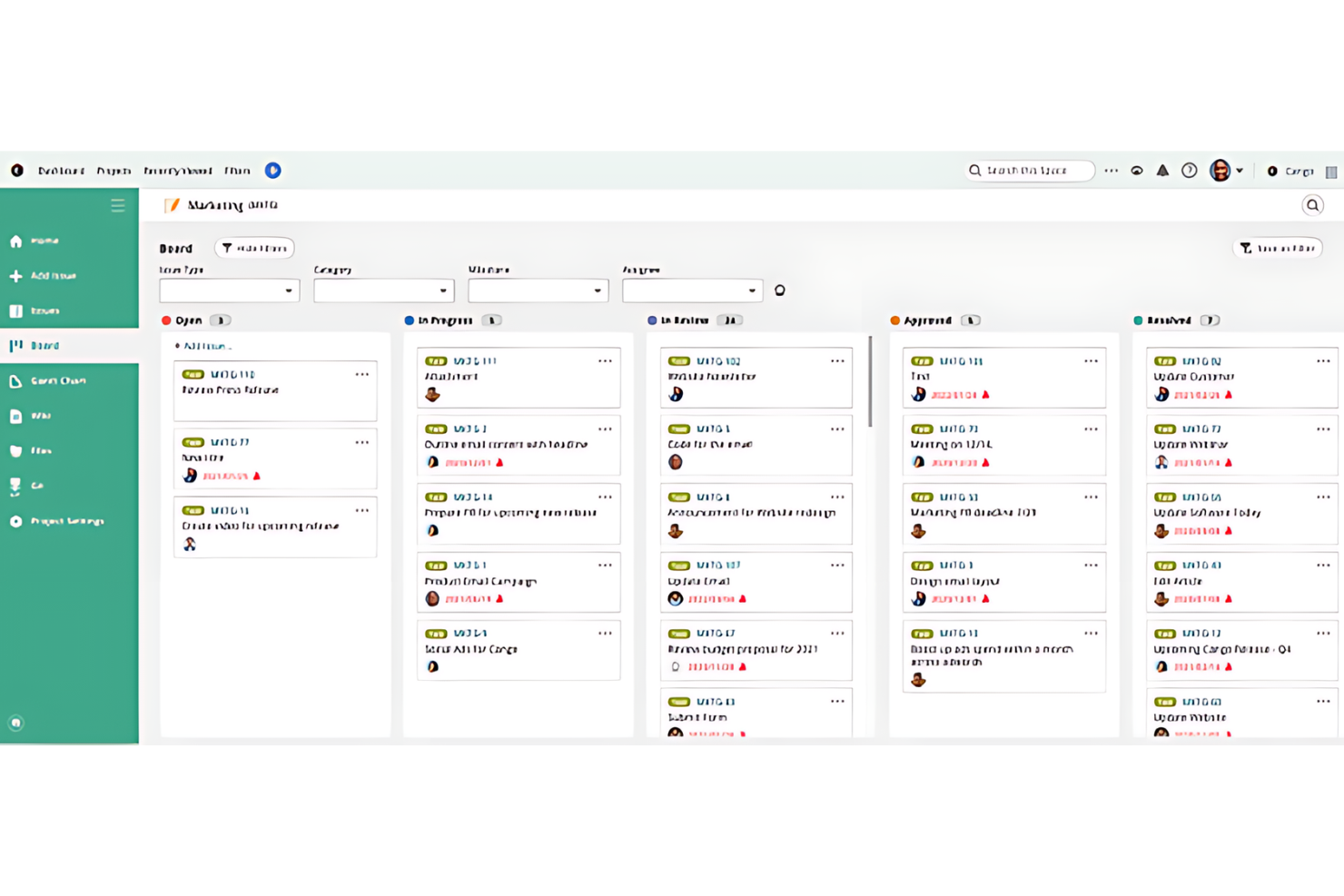
Backlog is a project management platform that combines issue tracking, task management, built-in Git/SVN version control, wikis, and team collaboration tools in a single workspace.
Who Is Backlog Best For?
Backlog is a strong fit for software development teams that want project management, code hosting, and issue tracking without juggling multiple tools.
Why I Picked Backlog
Backlog is one of my top picks because I love that it keeps code, tasks, and documentation in one place rather than spreading them across separate tools. My team is able to tie commits directly to issues, so there's a clear paper trail from a bug report to the code fix. The built-in wiki also means documentation lives alongside the actual work, not in a disconnected knowledge base. That tight connection between version control, issue tracking, and wikis is what makes the "all-in-one" case genuinely compelling here.
Backlog Key Features
- Gantt charts: Visualize project timelines, set milestones, and map task dependencies in a drag-and-drop chart view.
- Kanban boards: Manage tasks across customizable status columns with WIP limits to control workload.
- Burndown charts: Track sprint progress automatically against your team's planned vs. actual work over time.
- Jira importer: Migrate existing Jira projects, issues, and data directly into Backlog without manual re-entry.
Pros and Cons
Pros:
- Features customizable issue-tracking
- Includes built-in code management tools
- Integrates multiple project management functions
Cons:
- Some features require a learning curve
- The free plan is limited to 10 users and 1 project
Andre programmer for prosjektstyring med Jira-integrasjon du bør vurdere
Nedenfor finner du en liste over flere programmer for prosjektstyring med Jira-integrasjon som ikke kom med på topplisten, men som likevel er verdt å sjekke ut.
- Birdview
For scaling on demand
- ProjectManager
For project planning and scheduling
- OnePlan
For project portfolio management
- GoodDay
For flexible project methodologies
- Trello
For visual project management
- GanttPRO
For Gantt chart creation
- Scoro
For professional services management
- Hubstaff
For integrated time tracking
- Hive
For real-time collaboration
- Quickbase
For dynamic work management
- GoodDay
For customizable workspaces
- Smartsheet
For spreadsheet-like project tracking
- Basecamp
For remote team collaboration


Relaterte anmeldelser av programvare for prosjektstyring
Hvis du fortsatt ikke har funnet det du leter etter her, kan du se nærmere på disse andre relaterte verktøyene som vi har testet og evaluert:
- Programvare for automatisering av arbeidsflyt
- Programvare for oppgavehåndtering
- Programvare for prosjektsporing
How I Evaluate Project Management Software With Jira Integration
I split my evaluation into baseline criteria—native Jira sync, bidirectional field mapping, cross-tool views—and differentiators that separate tools built for hybrid engineering and PMO teams.
Core Functionality (Table Stakes For This List)
When I'm selecting tools for my list, I rank each one on a scale from 0 (does not offer the functionality) to 5 (excels in this area) for each core functionality listed below. Then, I calculate the tool's total score into a percentage. Each tool needs to achieve a minimum total score of 65% to be considered for inclusion.
- Native Jira Integration: I check whether the tool connects to Jira through its own built-in integration rather than relying on a third-party connector like Zapier or Unito.
- Bidirectional Data Sync: Updates to assignees, statuses, or priorities should flow both ways so a dev closing a Jira issue triggers a status change in the PM tool automatically.
- Field & Status Mapping: I evaluate how much control you get when mapping Jira workflows to PM tool statuses, especially for custom fields like story points or sprint labels.
- Cross-Tool Project Views: Teams mixing Jira-based engineering work with non-Jira marketing or design tasks need unified Gantt, Kanban, or timeline views that pull from both sources.
- Task & Workflow Management: Beyond syncing with Jira, the tool itself needs solid task management with assignments, dependencies, and deadlines for non-dev workstreams.
- Cross-Project Reporting: I look for dashboards that aggregate delivery metrics across Jira sprints and non-Jira projects so a PMO lead can report on portfolio health in one place.
Once I have a list of tools that meet this criteria, I consider what sets each platform apart.
Differentiating Factors (What Sets Vendors Apart)
Here's how I compare and contrast different vendors:
Standout Features
Cross-tool automation matters a lot here. I look for rules engines that trigger actions across both Jira and the PM tool—like auto-assigning a QA task when a Jira issue moves to "In Review." Portfolio resource management is another separator, especially for TPMs balancing developer capacity across sprints and non-engineering projects. I also evaluate multi-instance Jira support, which is a real differentiator for orgs managing separate Jira instances after acquisitions or across client accounts.
Beyond Features
Pricing structure matters more than usual in this category. I check whether a vendor offers low-cost viewer seats so executives and stakeholders can access Jira-synced dashboards without inflating your bill. The broader integration ecosystem is worth evaluating too—tools that connect natively with Confluence, Slack, and GitHub give engineering-heavy teams a tighter workflow loop. For enterprise buyers, I also consider security posture, specifically SOC 2 Type II compliance and SSO/SAML support that aligns with existing Atlassian identity setups.
Slik velger du programvare for prosjektstyring med Jira-integrasjon
Mens du arbeider deg gjennom den unike prosessen din for valg av programvare, bør du ha følgende punkter i tankene:
- Enkel integrering: Programvaren må integreres sømløst med de eksisterende verktøyene og systemene dine, spesielt Jira. Dette kan hjelpe teamet ditt med å unngå å måtte håndtere komplekse oppsett og sikrer en jevn dataflyt mellom applikasjonene.
- Brukervennlighet: Programvaren bør være enkel å bruke og intuitiv å navigere i, ettersom et komplekst grensesnitt kan forsinke prosjektfremdriften og frustrere teammedlemmene. Verktøy med et ryddig brukergrensesnitt og enkel navigering sikrer at alle teammedlemmer kan bruke det effektivt, noe som øker produktiviteten.
- Samarbeidsfunksjoner: Effektivt samarbeid er avgjørende i prosjektstyring. Velg programvare som forbedrer kommunikasjon og samarbeid, med funksjoner som oppdateringer i sanntid, delte oversikter og kommentartråder. Dette er særlig nyttig for eksterne team eller prosjekter som involverer flere avdelinger, ettersom det kan bidra til å sikre at alle er på samme side.
- Tilpasningsmuligheter: Ulike prosjekter har ulike behov, så muligheten til å tilpasse arbeidsflyter, oversikter og rapporter sikrer at programvaren kan tilpasses ulike prosjektkrav. Denne fleksibiliteten er avgjørende for organisasjoner som håndterer ulike prosjekttyper og størrelser, ettersom den gjør det mulig å tilpasse verktøyet til deres spesifikke prosesser.
- Skalerbarhet: Programvaren bør kunne vokse sammen med organisasjonen din, så se etter løsninger som kan håndtere et økende antall prosjekter, brukere og datamengder. Dette er avgjørende for virksomheter som forventer vekst eller håndterer store, komplekse prosjekter som krever robuste styringsverktøy, slik at programvaren fortsatt er effektiv når behovene øker.
Trender innen prosjektstyringsprogramvare i 2025
Prosjektstyringsverktøy utvikler seg raskt for å møte behovene til moderne prosjektstyringsteam. Her er noen sentrale trender som påvirker prosjektstyringsverktøy i 2025.
- Integrering av AI og maskinlæring: Prosjektstyringsprogramvare benytter i økende grad AI og maskinlæring. Plattformer som monday.com integrerer for eksempel disse teknologiene for å tilby prediktiv analyse og automatisering av oppgaver. Innføringen av AI-drevne apper kan også forbedre beslutningstaking og effektiviteten i arbeidsflyten.
- Forbedret optimalisering for fjernarbeid og hybridarbeid: Overgangen til fjernarbeid og hybride arbeidsmodeller har også fått prosjektstyringsverktøyene til å tilpasse seg. Funksjoner som støtter fleksibilitet og tilkobling, for eksempel allsidige tavlevisninger og tidsregistrering i monday.com, blir stadig mer standardiserte.
- Samarbeid og kommunikasjon i sanntid: Samarbeid i sanntid er ofte avgjørende for prosjektteam når de forsøker å overholde tidsfrister. Derfor inkluderer prosjektstyringsprogramvare i økende grad kommunikasjonsfunksjoner i sanntid, som tavlediskusjoner og Workdocs i monday.com. Disse verktøyene suppleres av tredjepartsapper som forbedrer samarbeidet på tvers av ulike plattformer.
- Prosjektgjennomsiktighet og ansvarlighet: Gjennomsiktighet og ansvarlighet i prosjektstyring blir også stadig viktigere. Verktøy som monday.com legger til rette for opprettelse av offentlig tilgjengelig dokumentasjon og kunnskapsbaser. Denne trenden sikrer at interessenter har tilgang til oppdatert prosjektinformasjon og kan opprettholde ansvarligheten i prosjektet.
Som disse trendene viser, utvikler prosjektstyringsprogramvare – inkludert programvare med Jira-integrering – seg mot mer intelligente og samarbeidsorienterte løsninger som gjør det mulig for team å arbeide mer effektivt og produktivt.
Hva er prosjektstyringsprogramvare med Jira-integrering?
Prosjektstyringsprogramvare med Jira-integrering er et digitalt verktøy som kobler prosjektstyringsfunksjoner sammen med Jira – en populær programvare for prosjektstyring og feilsporing utviklet av Atlassian og brukt av team til å planlegge, spore og administrere arbeidet sitt. Den kan brukes av prosjektledere, utviklingsteam og organisasjoner som ønsker å samordne prosjektstyringsarbeidet med teknisk feilsporing. Programvaren brukes til å samkjøre prosjektoppgaver med utviklingssykluser, følge fremdriften og administrere ressurser effektivt.
Komponentene i denne programvaren kan omfatte prosjektplanlegging, oppgavehåndtering, ressursallokering og fremdriftssporing, alt integrert med Jiras system for feilsporing og smidig prosjektstyring. Denne integreringen gir også en samlet oversikt over prosjektets tidslinjer og utviklingsrelaterte problemer, noe som legger til rette for kommunikasjon og koordinering mellom teammedlemmene.
Funksjoner i prosjektstyringsprogramvare med Jira-integrering
Prosjektstyringsprogramvare med Jira-integrering kan forbedre effektiviteten og resultatene av prosjektstyringen betydelig. Ved å integreres med Jira kan disse programvareløsningene tilby en rekke funksjoner som støtter team i å levere prosjekter på en vellykket måte. Her er noen viktige funksjoner du bør vurdere:
- Samarbeid i sanntid: Å ha samarbeidsverktøy er avgjørende for at teammedlemmer skal kunne arbeide sammen samtidig, opprettholde tydelig kommunikasjon og sikre at alle er samkjørte, noe som er viktig for at prosjektet skal lykkes.
- Automatisering av oppgaver: Automatisering av rutineoppgaver effektiviserer repetitive oppgaver, sparer tid og reduserer risikoen for menneskelige feil. Dette gjør det også mulig for team å fokusere på mer komplekse prosjektaspekter.
- Tilpassbare arbeidsflyter: Denne funksjonen tilpasser prosjektstyringsprosessen til spesifikke teambehov. Tilpassede arbeidsflyter gjør det mulig for team å arbeide på den måten som passer prosjektet best, noe som øker effektiviteten og produktiviteten.
- Avansert rapportering: Med avansert rapportering kan team få innsikt i prosjektets resultater, slik at de kan ta datadrevne beslutninger og holde interessenter informert om prosjektets fremdrift.
- Tidsregistrering: Dette kan hjelpe team med budsjettering, estimering av fremtidige prosjekter og å sikre at ressursene brukes effektivt.
- Ressursstyring: Effektiv ressursstyring sikrer at hver oppgave har nødvendig bemanning og verktøy, og forhindrer flaskehalser.
- Brukertillatelser: Ved å administrere brukertillatelser kan prosjektledere opprettholde sikkerheten og sikre at teammedlemmer har riktig tilgangsnivå.
- Fildeling og vedlegg: Sentralisert fildeling sikrer at alle teammedlemmer har tilgang til de nyeste versjonene av dokumenter, noe som er avgjørende for å opprettholde konsistens.
- Integrasjon med andre verktøy: Integrasjon med verktøy som CRM, versjonskontroll og kommunikasjonsplattformer legger til rette for en mer helhetlig arbeidsflyt.
- Mobiltilgjengelighet: Mobiltilgjengelighet er viktig for teammedlemmer som trenger å holde seg oppdatert og bidra til prosjekter hvor som helst.
Disse funksjonene, kombinert med muligheten til å bruke Jira, skaper et utmerket miljø for å administrere prosjekter av alle størrelser og kompleksitetsnivåer. Integrasjonen legger til rette for en mer sammenkoblet og responsiv tilnærming til prosjektstyring, slik at team raskt kan tilpasse seg endringer og opprettholde et høyt ytelsesnivå gjennom hele prosjektets livssyklus.
Fordeler med prosjektstyringsprogramvare med Jira-integrasjon
Prosjektstyringsprogramvare med Jira-integrasjon tilbyr fordeler som kan forbedre effektiviteten og virkningen av prosjektstyringen i en organisasjon betydelig. Ved å kombinere funksjonene i prosjektstyringsverktøy med Jiras spesialiserte funksjoner kan du forvente en mer helhetlig og kontrollert prosjektstyringsprosess. Her er flere fordeler potensielle kjøpere bør vurdere:
- Bedre samarbeid: Integrering av Jira med prosjektstyringsprogramvare gjør det mulig for teammedlemmer å kommunisere og samarbeide om oppgaver og problemer i sanntid, noe som fremmer et mer sammensveiset teammiljø.
- Sentralisert informasjon: Brukere drar nytte av å ha én felles kilde til sannhet for prosjektinformasjon, noe som reduserer forvirring og sikrer at alle er samkjørte.
- Bedre oversikt: Integrasjonen gir tilgang til dashbord og rapporteringsverktøy som gir ledere og interessenter en omfattende oversikt over prosjektstatus, tidslinjer og ressursallokering.
- Effektiviserte arbeidsflyter: Automatisering av arbeidsflyter og sammenkobling av oppgaver mellom Jira og prosjektstyringsprogramvaren eliminerer manuell registrering og hjelper team med å arbeide mer effektivt.
- Bedre ressursstyring: Med integrert ressursstyringsprogramvare kan ledere enkelt spore og administrere ressurser på tvers av prosjekter, slik at arbeidsmengden balanseres og ressursene ikke overbelastes.
Integrering av Jira i prosjektstyringsprogramvare kan være et smart strategisk tiltak for organisasjoner som ønsker å forbedre prosjektstyringskapasiteten, inkludert samarbeid, informasjonsstyring, prosjektoversikt, effektivitet i arbeidsflyten og ressursstyring.
Kostnader og priser for prosjektstyringsprogramvare med Jira-integrasjon
Det er viktig å forstå prismodeller når du velger prosjektstyringsprogramvare – med eller uten Jira-integrasjon. Ulike abonnementer dekker ulike behov og budsjetter, så det er viktig å velge det som passer best med teamets krav når det gjelder både funksjoner og pris. En grundig vurdering av de tilgjengelige prisalternativene kan derfor bidra til at du finner en løsning som passer organisasjonens unike behov og budsjettbegrensninger.
Denne veiledningen gir en oversikt over vanlige prisplaner for prosjektstyringsprogramvare med Jira-integrasjon.
Sammenligningstabell for prisplaner for prosjektstyringsprogramvare med Jira-integrasjon
| Plantype | Gjennomsnittspris | Vanlige funksjoner |
| Gratis | $0 | Grunnleggende oppgavehåndtering, begrenset antall brukere, grunnleggende integrasjoner |
| Grunnleggende | Fra $7/bruker/måned | Oppgavehåndtering, begrenset antall prosjekter, standardintegrasjoner, grunnleggende rapportering |
| Standard | Fra $12/bruker/måned | Avansert oppgavehåndtering, ubegrenset antall prosjekter, samarbeid i sanntid, avanserte integrasjoner, tilpassbare arbeidsflyter |
| Premium | Fra $25/bruker/måned | Alle standardfunksjoner, avansert rapportering og analyse, prioritert brukerstøtte, forbedrede sikkerhetsfunksjoner |
| Bedrift | Priser på forespørsel | Alle premiumfunksjoner, dedikert kundeansvarlig, tilpassede integrasjoner, sikkerhet på bedriftsnivå, samsvarsfunksjoner |
Når du sammenligner planer, bør du vurdere teamstørrelsen, nødvendige funksjoner og budsjettbegrensninger for å avgjøre hvilken plan som passer best for teamet ditt.
Vanlige spørsmål om prosjektstyringsprogramvare med Jira-integrasjon
Hva er Jira, og hvorfor integrere det med prosjektstyringsprogramvare?
Jira er et populært verktøy for sporing av problemer og prosjekter, utviklet for team av alle typer, fra programvareutvikling til smidig prosjektstyring. Ved å integrere Jira med prosjektstyringsprogramvare kan oppgaver og prosjekter synkroniseres, slik at team kan følge fremdriften på en helhetlig måte og holde arbeidsflytene oppdatert på tvers av ulike plattformer.
Er det mulig å automatisere arbeidsflyter mellom Jira og integrert prosjektstyringsprogramvare?
Ja, mange prosjektstyringsverktøy som integreres med Jira, tilbyr automatiseringsfunksjoner. Dette kan omfatte automatisk opprettelse av oppgaver, statusoppdateringer og varsler basert på utløsere i Jira. Automatisering bidrar til å redusere manuell registrering og sørger for at begge systemene viser den mest oppdaterte informasjonen.
Hvordan konfigurerer jeg integrasjonen mellom Jira og prosjektstyringsprogramvare?
Konfigurering av integrasjonen innebærer vanligvis at du installerer et tillegg eller bruker en innebygd integrasjonsfunksjon i prosjektstyringsprogramvaren. Du må autentisere Jira-kontoen din og konfigurere innstillingene slik at de samsvarer med kravene til arbeidsflyten din. Det er viktig å se i dokumentasjonen eller hjelpressursene til det aktuelle prosjektstyringsverktøyet for detaljerte instruksjoner.
Kan jeg spore tiden som brukes på oppgaver i Jira via integrert prosjektstyringsprogramvare?
Ja, enkelte prosjektstyringsverktøy tilbyr tidsregistreringsfunksjoner som kan synkroniseres med Jira. Dette gjør det mulig for teammedlemmer å registrere tid mot oppgaver i prosjektstyringsprogramvaren, slik at den også gjenspeiles i Jira. Denne funksjonen er særlig nyttig for team som må overvåke tid med tanke på fakturering eller produktivitetsanalyse.
Hva bør jeg gjøre hvis jeg får problemer med integrasjonen?
Hvis du støter på utfordringer med integrasjonen, bør du først kontrollere integrasjonsinnstillingene og forsikre deg om at de er riktig konfigurert. Hvis problemet vedvarer, kan du se i brukerstøtten eller hjelpedokumentasjonen som følger med prosjektstyringsprogramvaren. Du kan også kontakte kundestøtten for hjelp eller se etter fora der lignende problemer kan ha blitt diskutert og løst.