10 beste Mavenlink-alternativer for prosjektstyring i 2026

Kortliste over de beste alternativene til Mavenlink


Hvis du vurderer alternativer til Mavenlink, er du ikke alene. Kanskje prisen ikke passer budsjettet ditt, eller funksjonene ikke virker som en god match for teamets behov. Uansett er det frustrerende når verktøyene du er avhengig av, ikke gir resultatene du forventer.
I denne artikkelen deler jeg de beste alternativene til Mavenlink som jeg har testet. Hvert av dem tilbyr unike funksjoner som forhåpentligvis passer bedre med forretningsmålene dine. Når du er ferdig, bør du ha en tydeligere idé om hvilket verktøy som kan passe best for teamet ditt.
Hvorfor du kan stole på våre programvareanbefalinger
Teamet vårt har testet og anmeldt programvare siden 2012. Vi er selv prosjektledere, så vi vet hvor vanskelig og hvor viktig det er å velge riktig programvare.
I denne guiden har vi vurdert verktøyene gjennom praktisk testing og uavhengig research og gitt dem poeng ut fra våre utvelgelseskriterier. Vi bygger også på innsikt fra ledende eksperter i bransjen og erfarne prosjektledere.
Anmeldelsene våre bygger på vår egen redaksjonelle vurdering. De er ikke et salgsargument.
Ekspertanmeldere:
Sammenligningstabell over alternativer til Mavenlink
Denne sammenligningstabellen oppsummerer prisdetaljene for mine beste utvalgte alternativer til Mavenlink:
| Tool | Best For | Trial Info | Price | ||
|---|---|---|---|---|---|
| 1 | Best for a fully-packed free plan | 14-day free trial | From $10/user/month (billed annually) | Website | |
| 2 | Best for project management with built-in KPI tracking | 14-day free trial + free demo available | From $17/user/month | Website | |
| 3 | Best for ease of use | Free plan available | From $9/user/month (billed annually) | Website | |
| 4 | Best for advanced workflow automation | Free demo available | Pricing upon request | Website | |
| 5 | Best for A&E firm billing and financials | Free demo available | Pricing upon request | Website | |
| 6 | Best for better reporting & analytics | Free demo available | Pricing upon request | Website | |
| 7 | Best for creative agency billing and WIP tracking | Free demo available | From $49/user/month | Website | |
| 8 | Best for Salesforce-native services delivery | Free demo available | Pricing upon request | Website | |
| 9 | Best for IT consulting firms needing WIP visibility | Free demo available | Pricing upon request | Website | |
| 10 | Best for agency billing and revenue recognition | 14-day free trial + free demo available | From $10/user/month (billed annually) | Website |


De 10 beste alternativene til Mavenlink sammenlignet
Jeg har gått gjennom flere prosjektstyringsverktøy og valgt ut de beste alternativene til Mavenlink som kommer nær programmets funksjonalitet. For hvert av dem går jeg gjennom noen fordeler og ulemper, informasjon om prøveperioder og kostnader, samt gir en ekspertvurdering av hvert verktøy.

Wrike
Best for a fully-packed free plan
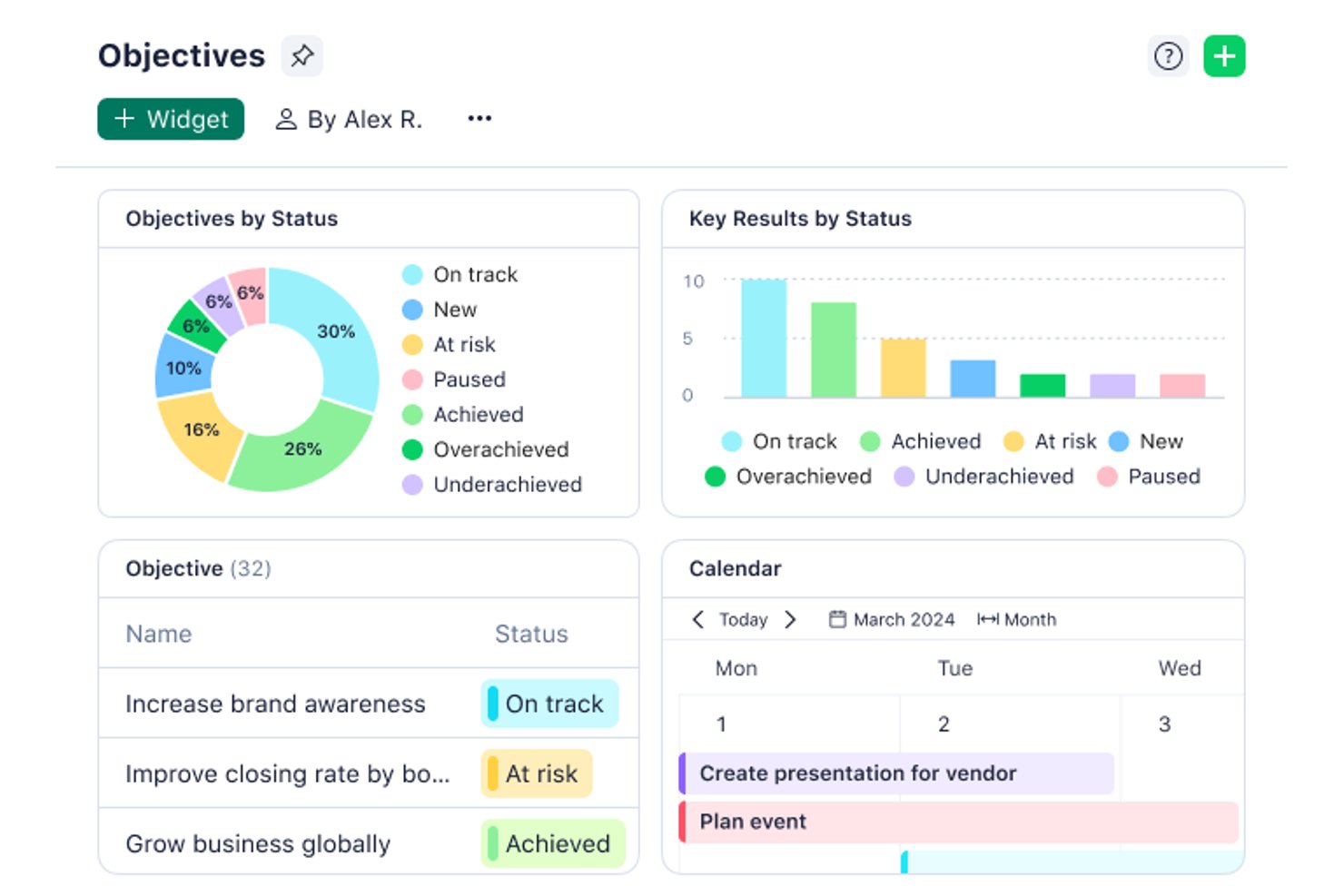
Wrike is a work management platform for professional services teams that need to coordinate client projects, balance workloads, and track timelines and dependencies across delivery teams.
Who Is Wrike Best For?
Wrike suits small project and cross-functional teams that want to coordinate tasks and timelines with a feature-rich free plan.
Why I Picked Wrike
Wrike earns a place among Mavenlink alternatives as Best for a fully-packed free plan. I appreciate that its free tier supports coordinating tasks, timelines, and dependencies, which helps a services team map client work and spot scheduling conflicts.
Wrike Key Features
- Time tracking: Log hours against project tasks.
- Workload charts: View assigned effort and team capacity.
- Request forms: Collect project intake details and create work items.
- Proofing and approvals: Annotate files and review versions.
Wrike Integrations
Wrike lists 400+ prebuilt connectors, including Slack, Salesforce, Jira, GitHub, Google, Microsoft Teams, Zoom, and Dropbox; it also supports Zapier. Wrike offers an API for custom integrations and Wrike Integrate as an add-on.
Pros and Cons
Pros:
- Dependencies and timelines clarify delivery sequencing
- Request forms standardize client project intake
- Workload charts expose team capacity
Cons:
- Cross-project reporting and calculations remain limited
- Dense interface complicates day-to-day navigation
New Product Updates from Wrike
Wrike Adds Klaxoon MCP Integration
Wrike’s Klaxoon MCP integration is now generally available, enabling AI agents to navigate between Wrike tasks and attached whiteboards, read task context, and manage whiteboard attachments via API. For more information, visit Wrike's official site.

Scoro
Best for project management with built-in KPI tracking
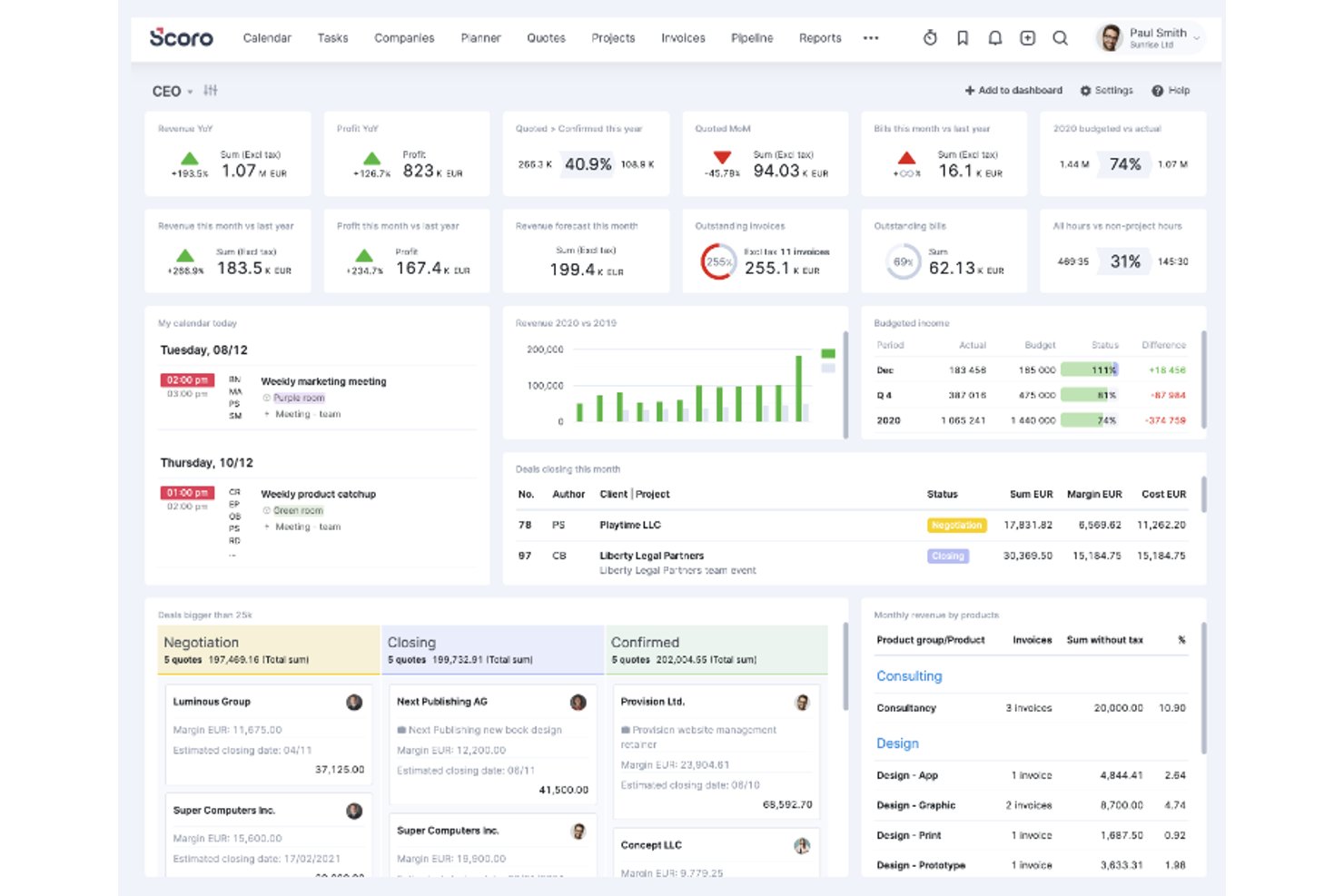
For professional-services teams juggling client work, budgets, and deadlines, Scoro brings project planning, resource management, and financial workflows into one platform.
Who Is Scoro Best For?
Scoro suits project and operations managers at professional-services firms who need to connect delivery plans, team capacity, and business performance metrics.
Why I Picked Scoro
I picked Scoro as my choice for “Best for project management with built-in KPI tracking” because its dashboards turn delivery data into visible measures. I like how bookmarked reports track project profitability and utilization, while result or ratio metrics put those figures on dashboards. That helps me spot margin or capacity issues while work is underway.
Scoro Key Features
- Task management: Create and assign tasks within projects.
- Resource capacity planning: Forecast team capacity and balance workloads.
- Time and cost tracking: Record time and costs against project work.
- Client billing: Issue invoices as part of the project lifecycle.
Scoro Integrations
Scoro’s app marketplace lists integrations with Jira, Asana, Slack, Microsoft Teams, Google Calendar, Google Drive, Xero, QuickBooks, HubSpot, and Salesforce. It also supports Zapier and offers an API for custom integrations.
Pros and Cons
Pros:
- Links estimates, tracked time, and invoicing
- Forecasts team capacity and utilization
- Connects project delivery data with profitability dashboards
Cons:
- Project views and task workflows need fewer clicks
- Initial setup can require significant configuration
New Product Updates from Scoro

Scoro Adds Time Mobile App and ELI Improvements
Scoro adds the Scoro Time mobile app for iOS/Android to track time anywhere and expands ELI with attachments, smarter filtering, and trigger-based actions. For more information, visit Scoro's official site.

Best for ease of use
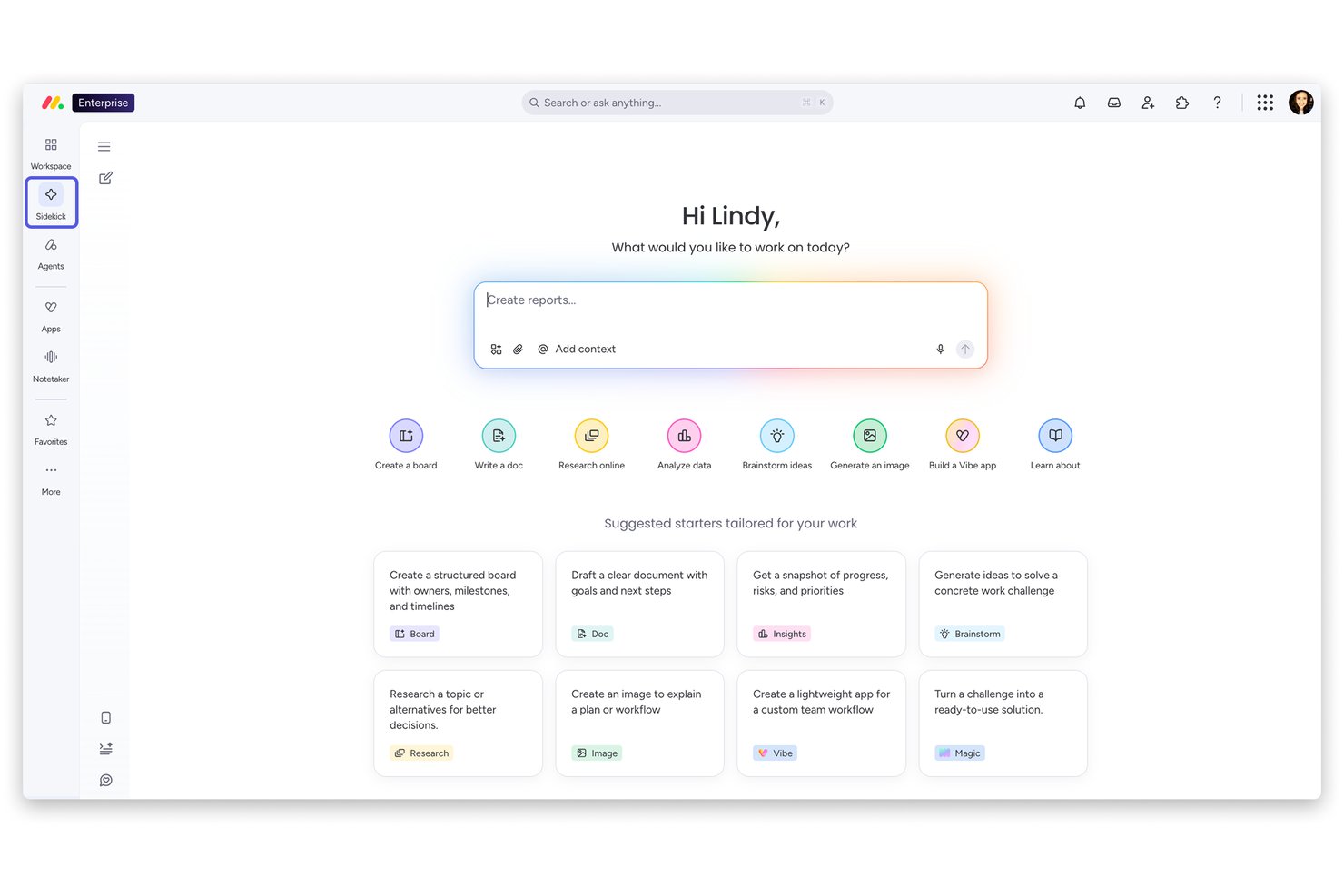
monday AI Workspace gives product, engineering, and digital teams a visual place to plan projects, assign work, and track dependencies as priorities change.
Who Is monday AI Workspace Best For?
Project managers who want an approachable, visual way to coordinate contributors and make everyday work easier to follow are a good fit for monday AI Workspace.
Why I Picked monday AI Workspace
I picked monday AI Workspace as Best for ease of use because its visual project views make owners, tasks, and dependencies easy to scan. I like how product and engineering teams can track linked work as priorities shift, so a changed delivery date is visible in the plan.
monday AI Workspace Key Features
- WorkForms: Collect project requests and send submissions to a project approval pipeline.
- Cross-board automations: Create or move project items across boards when approval or status changes.
- Milestones: Mark key project events in Timeline and Gantt views.
- Budget tracking: Record expenses in Numbers columns and compare costs with approved budgets in charts.
monday.com Integrations
monday.com lists 850+ integrations and apps, including Slack, Gmail, Google Calendar, Outlook, Microsoft Teams, GitHub, GitLab, Salesforce, and HubSpot. It also connects with Zapier and offers a GraphQL API for custom integrations.
Pros and Cons
Pros:
- Dashboards summarize progress across project boards
- Custom workflows adapt to changing project processes
- Visual timelines clarify task dependencies
Cons:
- Recurring task setup can feel cumbersome
- Advanced portfolio forecasting is limited
New Product Updates from monday AI Workspace
monday AI Workspace Adds Human Approval Routing
monday AI Workspace adds a human-in-the-loop approval block to AI Workflows, sending approval requests and routing workflow paths based on responses. For more information, visit monday AI Workspace's official site.

Best for advanced workflow automation
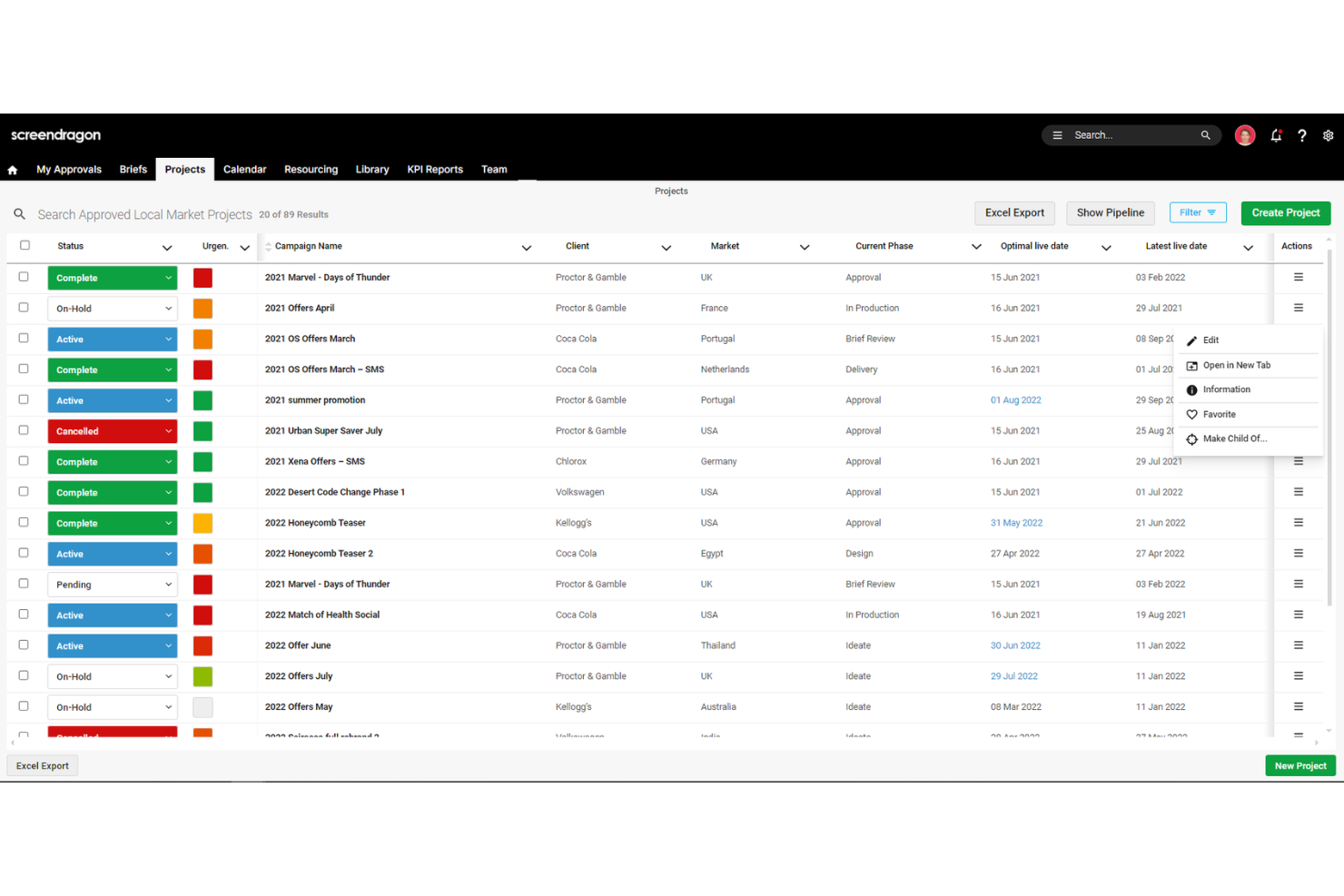
Screendragon is a work management platform for marketing and creative teams that brings project planning, collaboration, and approvals together to help coordinate campaigns and keep deliverables on track.
Who Is Screendragon Best For?
Screendragon suits marketing operations teams that coordinate multi-step creative production across departments.
Why I Picked Screendragon
I picked Screendragon as a Mavenlink alternative for its “Best for advanced workflow automation” fit. Its no-code visual workflow builder supports conditional routing and configurable stages, so campaign assets can follow different review paths by market. I also like its sequential or parallel approvals with online proofing, which keeps feedback and decisions attached to each version.
Screendragon Key Features
- Role-based permissions: Set access rules down to individual fields.
- Dynamic briefs: Configure brief fields, language, and layout by team, client, or market.
- Reports and dashboards: View project status, milestones, and performance data.
- Integrations: Connect tools such as Jira Software, Google Drive, and Microsoft 365.
Screendragon Integrations
Screendragon offers pre-built integrations with Aprimo, Smartsheet, HubSpot, Microsoft Teams, Microsoft Power BI, Google Cloud Platform Storage, Amazon S3, Sitecore, Ziflow, and Brandfolder. It also provides a REST API and a Universal API Connector for connecting with systems that expose a standard API.
Pros and Cons
Pros:
- Responsive support helps tailor workflows
- Resource and budget visibility spans projects
- Conditional workflows adapt to campaign paths
Cons:
- Configuration and admin setup take time
- Complex approval chains can run slowly
New Product Updates from Screendragon
Screendragon Unveils New AI Hub
Screendragon introduced AI Hub, a new capability that lets teams build and manage AI agents directly within workflows. The update helps marketing teams automate tasks, maintain governance controls, and scale AI-driven operations more efficiently. For more information, visit Screendragon's official site.

BQE Core
Best for A&E firm billing and financials
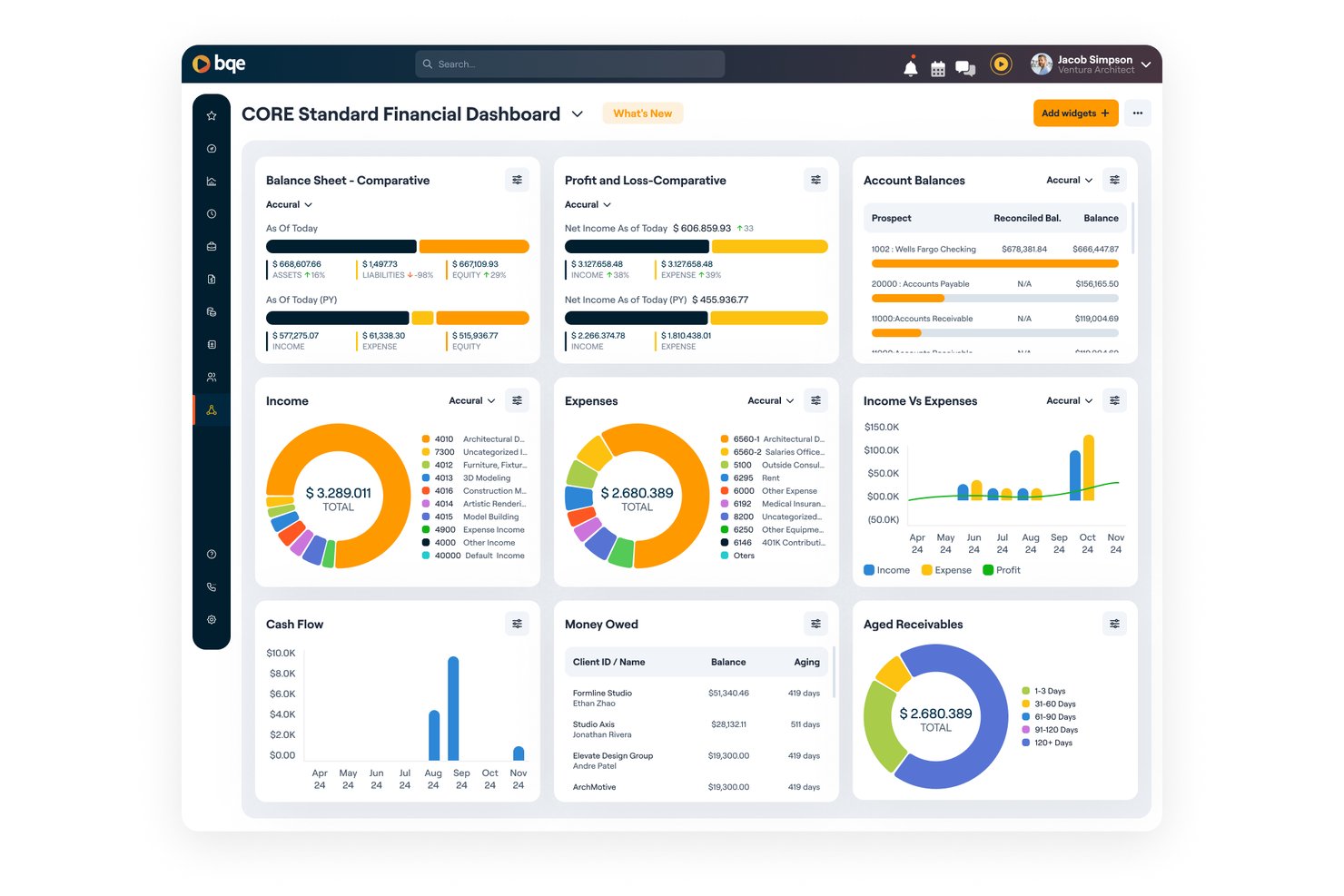
BQE Core is a professional services automation platform for architecture and engineering firms that brings project planning, time and expense tracking, staffing, and financial management into one system.
Who Is BQE Core Best For?
BQE Core suits architecture and engineering firms that need project-based billing and financial oversight tied to client work.
Why I Picked BQE Core
I picked BQE Core because its project-based billing and financial oversight suit architecture and engineering work. I like that teams can track time and expenses against client projects, then connect that activity with staffing and financial management. That makes it a focused option among Mavenlink alternatives when A&E billing and project finances need to stay tied together.
BQE Core Key Features
- Customer relationship management: Track prospects, client relationships, and business development opportunities.
- Proposal builder: Create proposals to support project pursuits.
- Project dashboards: View project status and progress in real time.
- Reporting and analytics: Generate reports to review project and business performance.
BQE Core Integrations
BQE CORE integrates with QuickBooks, DocuSign, Power BI, Xero, Google, Microsoft, and Zapier. It also provides an open API for custom integrations.
Pros and Cons
Pros:
- Custom reports show project performance
- Time entries feed billing and invoicing
- A&E project budgets link to financials
Cons:
- Slow screens and time-entry inconsistencies reported
- Onboarding and setup can feel complex

Parallax
Best for better reporting & analytics
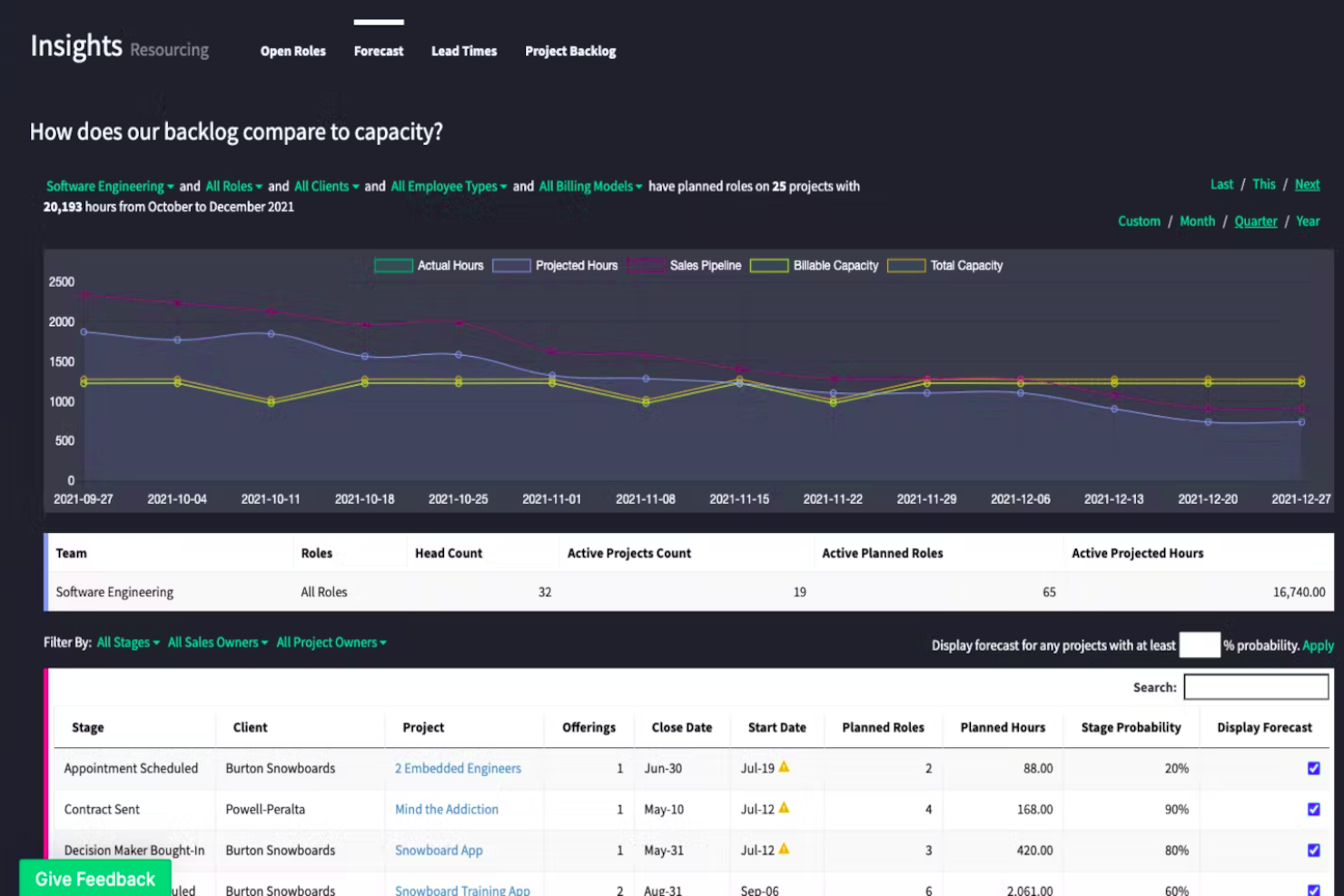
Parallax is professional services automation software for digital services firms, connecting resource planning, project delivery, and financials to help teams manage capacity and profitability—Best for better reporting & analytics.
Who Is Parallax Best For?
Parallax suits operations and resource-planning teams at digital services firms coordinating staffing, project delivery, and financial performance.
Why I Picked Parallax
I picked Parallax, Best for better reporting & analytics, as a Mavenlink alternative because it combines CRM deals and time-tracking data with capacity, revenue, and margin forecasts. I like that project teams can compare performance against plan and get alerts when margins slip, helping them spot delivery risks before projects close.
Parallax Key Features
- Skills-based matching: Match people to project needs based on their skills and availability.
- Hiring planning: See upcoming staffing needs early enough to plan hiring ahead.
- Pricing insights: Use past project performance, client insights, and market trends to shape proposal pricing.
- Parallax Pipeline: Track prospective work within Parallax as an in-platform pipeline option.
Parallax Integrations
Parallax offers native integrations with Salesforce, HubSpot, Pipedrive, Copper, Zoho, Harvest, Clockify, Toggl, Asana, and Jira. It also provides an API for custom integrations.
Pros and Cons
Pros:
- Cuts spreadsheet work in resource planning
- Surfaces capacity gaps before staffing decisions
- Connects pipeline forecasts with project margins
Cons:
- Large team views can load slowly
- Setup demands substantial data cleanup and onboarding

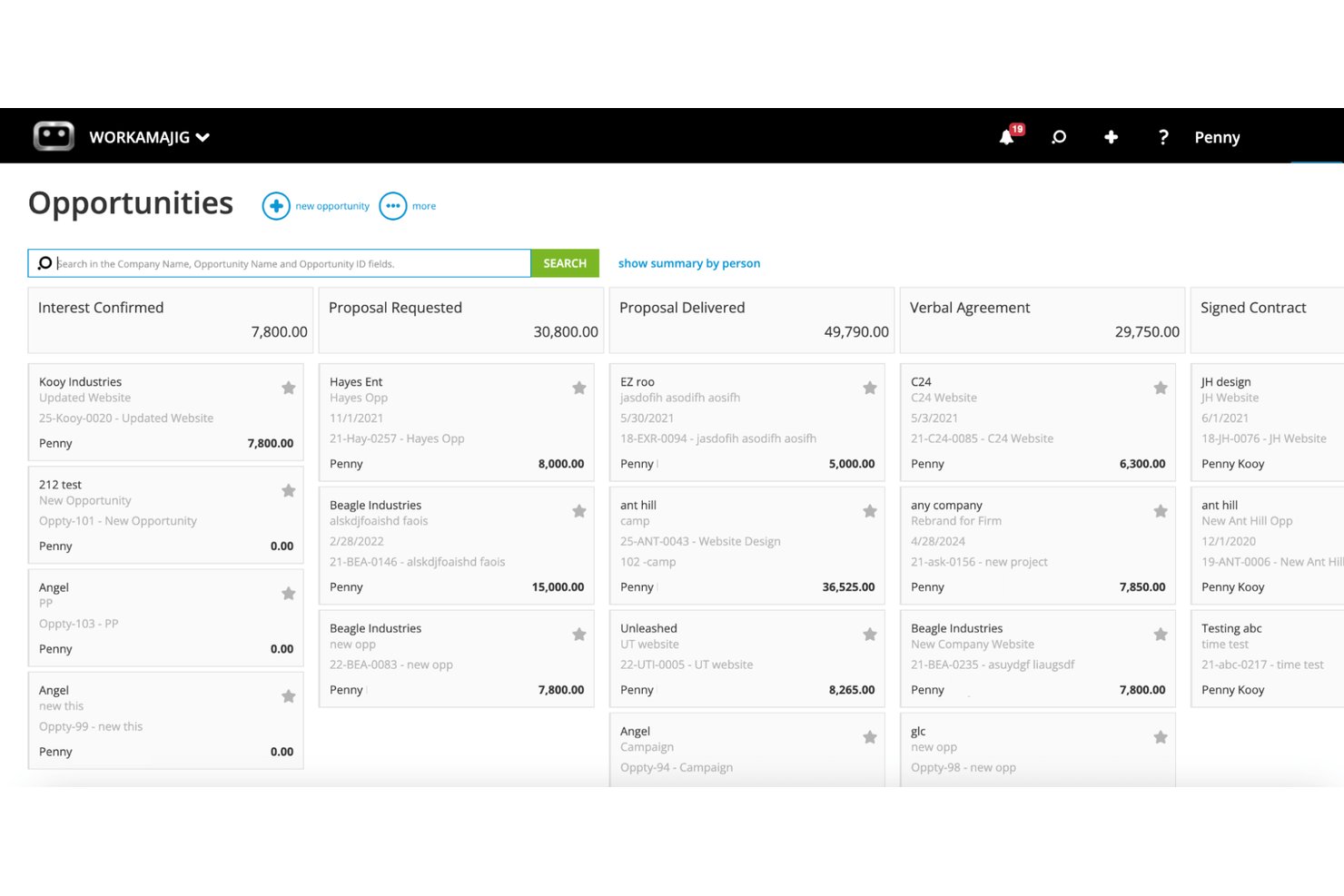
Workamajig is project management software for creative agencies that connects project planning, team collaboration, and financial workflows to help teams coordinate client work and track delivery.
Who Is Workamajig Best For?
Workamajig suits creative agencies that need to manage client-project billing, budgets, and work in progress alongside delivery.
Why I Picked Workamajig
I picked Workamajig as a Mavenlink alternative because it’s Best for creative agency billing and WIP tracking. I like that it connects client-project budgets and billing with delivery, so I can keep project work and financial status in view together.
Workamajig Key Features
- Sales CRM: Track opportunities and turn them into projects.
- Resource scheduling: Assign work and view team availability and overbooking.
- Task and time tracking: Log time against project tasks and estimates.
- Digital proofing: Review and approve creative work within the platform.
Workamajig Integrations
Workamajig documents integrations with Google Calendar, Outlook/Exchange, Slack, Avalara, AvidXchange, Edenred Pay, Strata, Mediaocean, Bionic, and GaleForce. It also supports Zapier and offers REST and JSON APIs for custom integrations.
Pros and Cons
Pros:
- Creative proofing and approval stay in workflow
- Live visibility into project profitability and WIP
- Project budgets connect directly to agency accounting
Cons:
- Navigation and reporting can feel cumbersome
- Timesheets and project updates take extra clicks

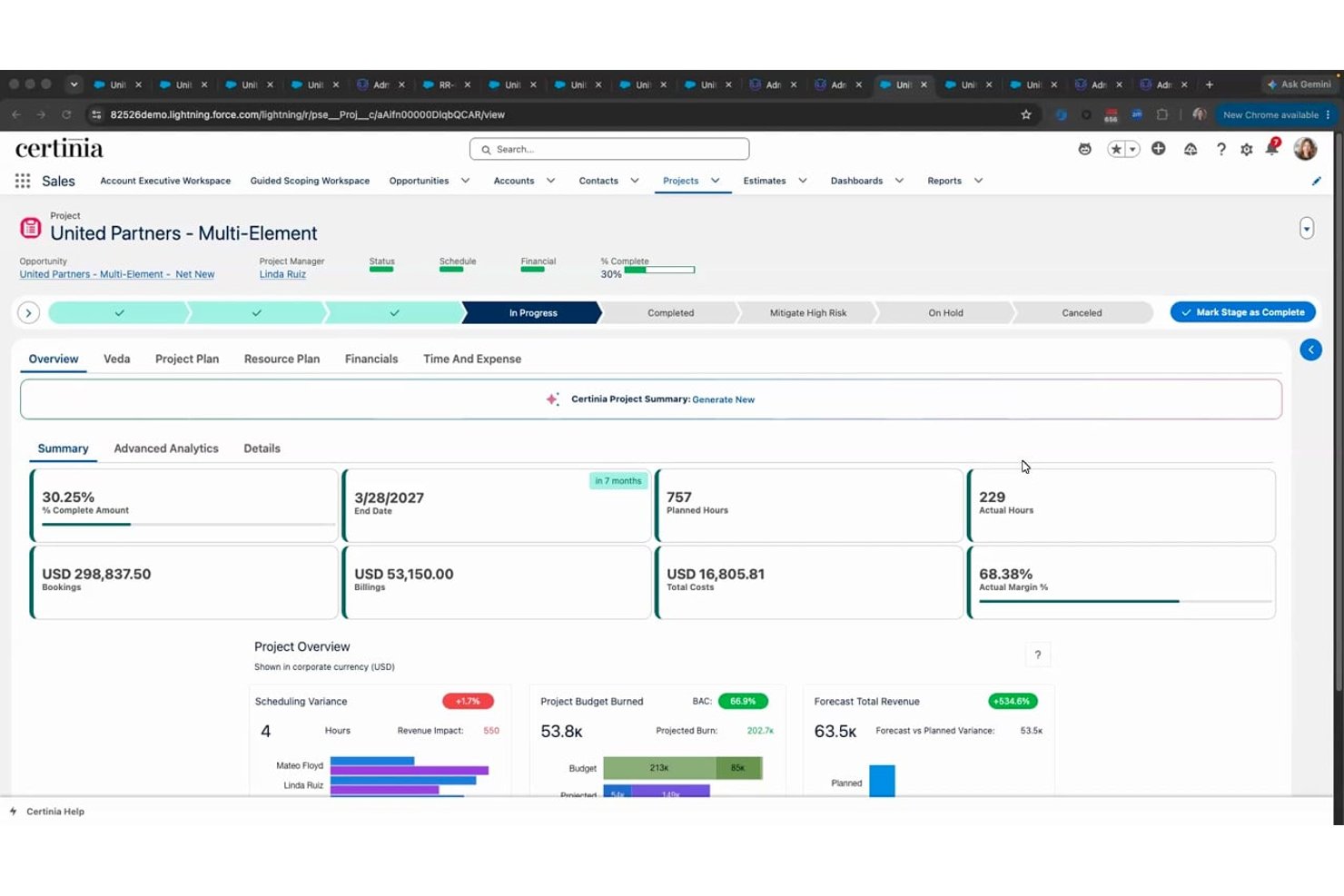
Certinia PS Cloud is a project management platform for professional services teams that need to coordinate client work, staffing, timelines, and project finances, making it Best for Salesforce-native services delivery.
Who Is Certinia PS Cloud Best For?
Certinia PS Cloud suits professional services operations leaders and project managers who manage client engagements and staffing within Salesforce.
Why I Picked Certinia PS Cloud
I picked Certinia PS Cloud because it is Best for Salesforce-native services delivery. I like how it brings client engagements, staffing, timelines, and project finances into Salesforce, so I can track delivery and resource needs alongside the client work they support.
Certinia PS Cloud Key Features
- Project templates: Create projects from reusable templates.
- Risk and issue tracking: Record and manage risks and issues on project records.
- Timecard approvals: Submit timecards for review and approval.
- Customer communities: Give customers secure access to project information and reports.
Certinia PS Cloud Integrations
Certinia PS Cloud is built natively on Salesforce and works with other apps on the Salesforce platform. Certinia lists 24 partner integrations, including Microsoft Outlook, Concur, DocuSign, Expensify, Avalara, and Jitterbit, and provides REST and SOAP APIs for custom integrations.
Pros and Cons
Pros:
- Flexible workflows support complex services operations
- Project financials expose costs and margins
- Resource forecasting connects staffing with demand
Cons:
- Complex reports can slow with large datasets
- Navigation feels dated and hard to follow
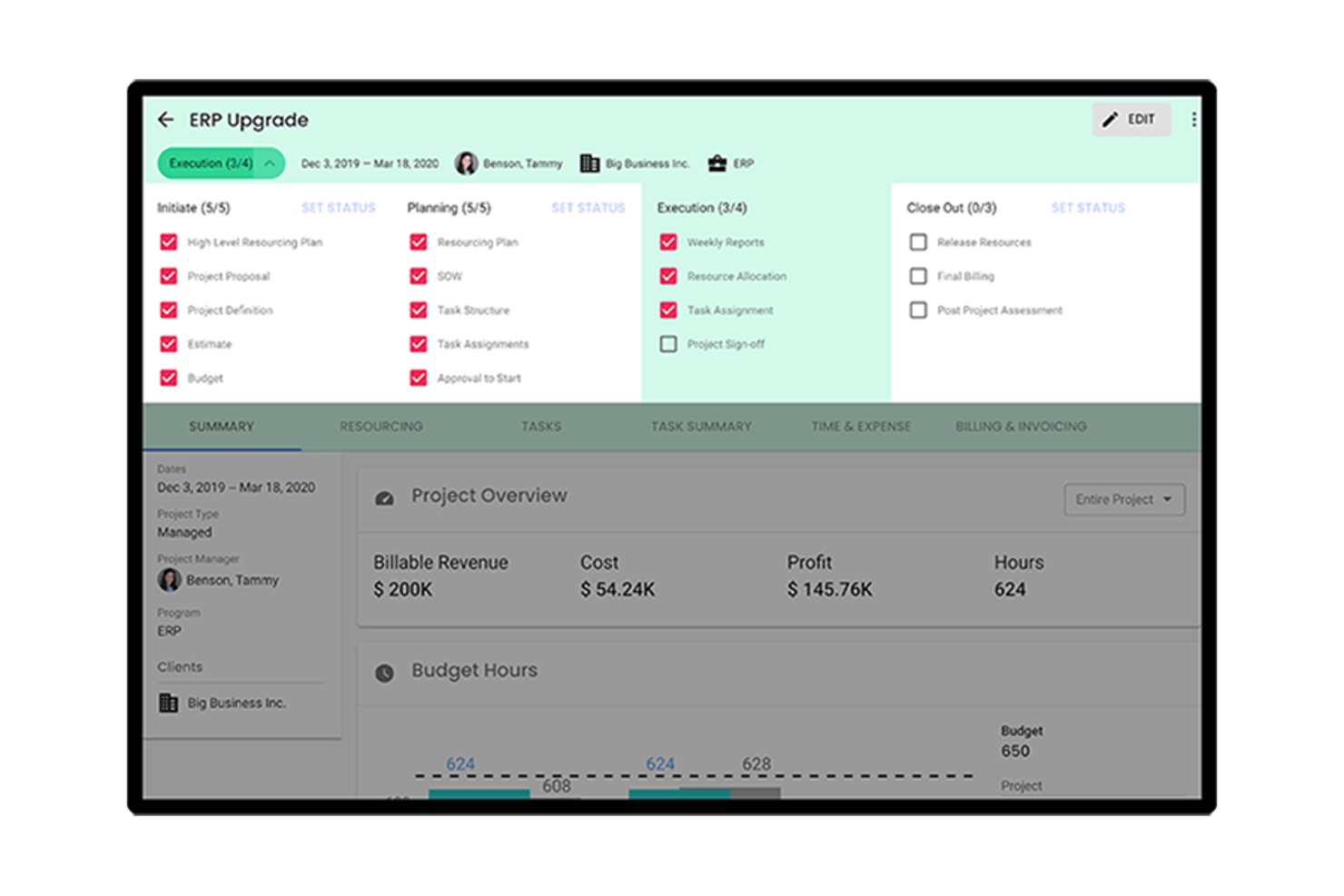
Polaris is Deltek’s PSA platform for IT consulting firms that need to connect project delivery, resource planning, time and expense, and financial workflows.
Who Is Polaris Best For?
Polaris suits IT consulting project managers and finance teams that need a clearer view of work in progress across active client engagements.
Why I Picked Polaris
I picked Polaris as a Mavenlink alternative because it’s best for IT consulting firms needing WIP visibility. I like how it connects project delivery and time and expense with financial workflows, so I can track work in progress across active client engagements. Resource planning adds context when I review delivery and financial status together.
Polaris Key Features
- Configurable project templates: Set up reusable workflows and task hierarchies for project engagements.
- Certification tracking: Record employee certifications alongside skills and availability.
- Project dashboards: Review project health, utilization, profitability, and delivery metrics.
- Business intelligence integrations: Connect Polaris data with Tableau and Power BI.
Polaris Integrations
Deltek lists six out-of-the-box Polaris integrations: Jira, QuickBooks Online, Salesforce, Xero, Zendesk, and BambooHR. Polaris also offers an API for custom integrations and connects with Tableau and Power BI for reporting.
Pros and Cons
Pros:
- Helpful, responsive customer support
- Flexible timesheets and project-level tracking
- Connects project status with financial visibility
Cons:
- Clock adjustments require confusing manual steps
- Reports can retain deleted time

Productive
Best for agency billing and revenue recognition
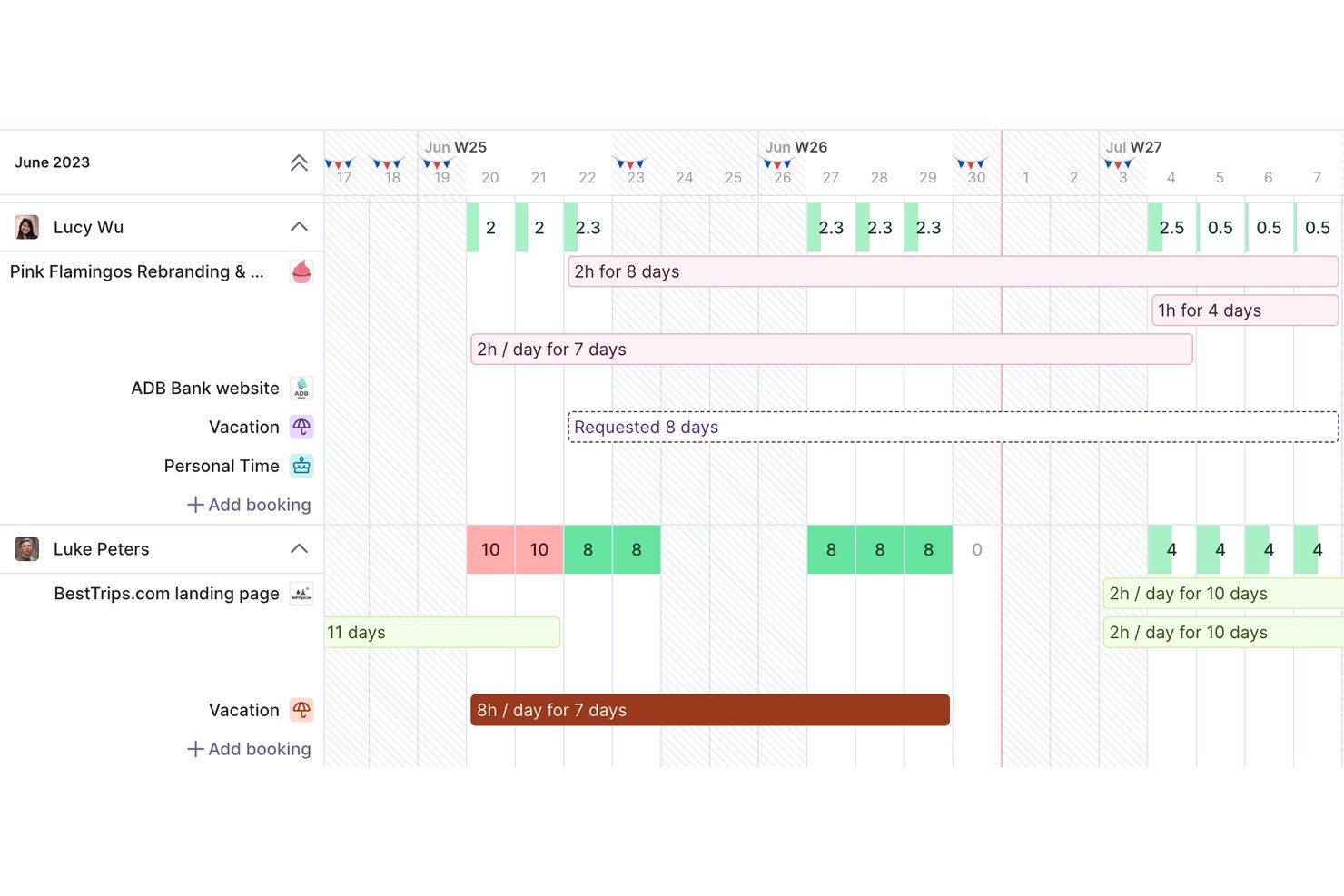
Productive is a professional services automation platform for agencies and consulting teams, bringing project planning, resource scheduling, time tracking, and budgets into one workspace to help teams coordinate delivery and monitor project health.
Who Is Productive Best For?
Productive is a good fit for project managers at agencies and consultancies who coordinate client work, team capacity, and project budgets in one workspace.
Why I Picked Productive
I picked Productive because it’s a strong fit for agency billing and revenue recognition. Project budgets and time tracking connect delivery work to client charges, while revenue recognition helps track earned income by project. That makes it a relevant Mavenlink alternative when you need financial visibility alongside project delivery.
Productive Key Features
- Sales pipeline: Track deals through stages and manage sales forecasts.
- Gantt charts: View project schedules and task timelines.
- Docs: Create and share project documents within Productive.
- Expense management: Record project expenses as billable or non-billable costs.
Productive Integrations
Productive documents integrations with Xero, QuickBooks Online, Exact, Visma e-conomic, Sage, Jira, Slack, Google Calendar, and Outlook, and it connects with Zapier. It also offers an open API for custom integrations.
Pros and Cons
Pros:
- Combines resource planning with delivery workflows
- Shows client profitability and billable utilization
- Connects time tracking with project budgets
Cons:
- Proposal builder offers limited design flexibility
- Reporting customization can feel limited
New Product Updates from Productive
Productive Adds Voice Dictation, Slack Connector, Proposals, and Overtime
Productive adds voice dictation, a Slack Connector, proposal controls, and overtime tracking. These updates support faster AI interactions, client proposals, and time management. For more information, visit Productive’s official site.
Andre alternativer til Mavenlink
Her er noen flere alternativer til Mavenlink som ikke kom med på kortlisten min, men som likevel er verdt å se nærmere på:
- Celoxis
For managing a project portfolio
- Hive
For stronger collaborative and teamwork features
- Teamwork.com
For agency time tracking and billing
- Accelo
For professional service automation
- Ravetree
For client-facing project portals
- BigTime
For quote-to-cash billing in consulting firms
- Rocketlane
For customer collaboration and onboarding
- Netsuite OpenAir
For ERP-native revenue recognition
- Birdview PSA
For Microsoft-stack billing workflows
- Ruddr
For AI-native time-to-invoice billing


Hva er alternativer til Mavenlink?
Alternativer til Mavenlink er programvare for prosjektstyring og teamsamarbeid. De tilbyr funksjonalitet som ligner på Mavenlink, men varierer når det gjelder funksjoner, brukergrensesnitt og prismodeller. Disse verktøyene hjelper med å styre prosjekter, følge opp oppgaver og legge til rette for teamkommunikasjon og ressursstyring.
Fordelene med og bruksområdene for alternativer til Mavenlink omfatter tilpasningsmuligheter som dekker spesifikke prosjekt- og teamkrav, et bredt utvalg funksjoner som passer til ulike prosjekttyper, og ofte mer kostnadseffektive løsninger. De forbedrer teamsamarbeidet, kan skaleres i takt med virksomhetens vekst og tilbyr vanligvis mange integrasjonsmuligheter med andre forretningsverktøy.
Mavenlink
Mavenlink er et allsidig prosjektstyringsverktøy som samler de viktigste systemene for planlegging, gjennomføring, prosjektregnskap og analyse i ett enkelt driftsmiljø. Det har moduler for prosjektstyring, regnskap, ressursstyring, forretningsanalyse og teamsamarbeid. I tillegg tilbyr det et system med dashbord, funksjoner for løpende tids- og utgiftsregistrering og et godt dokumentasjonssystem. Alle disse førsteklasses funksjonene leveres gjennom et enkelt og minimalistisk design.
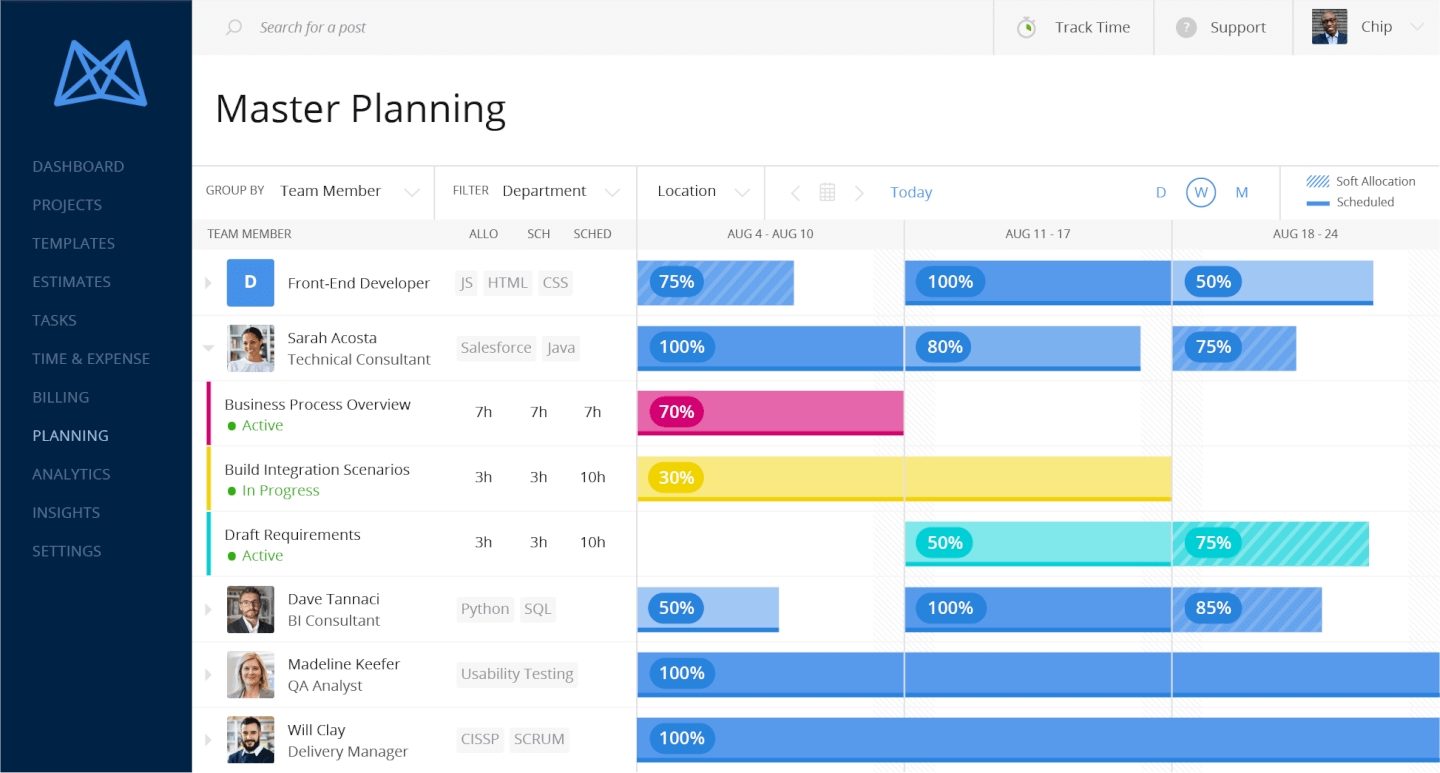
Mavenlink krysser av alle boksene når det gjelder funksjoner for ressursstyring. Modulen for ressursstyring tilbyr utnyttelsesgrad og marginer i sanntid på prosjekt- og til og med oppgavenivå. Noen viktige funksjoner omfatter ressursprognoser, kapasitetsstyring, kompetansestyring, scenarioplanlegging og rollebasert planlegging.
Hvis vi ser nærmere på de øvrige funksjonene, tilbyr BI-modulen innebygde rapporter, egendefinert rapportering, trendanalyse, datavisualisering samt dataintegrasjon med andre systemer. Programvaren tilbyr også flere regnskapsverktøy enn mange andre løsninger, med prosjektkostnadsberegning, budsjettstyring for prosjekter og oppgaver, sporing av utnyttelsesgrad og marginer i sanntid, fakturering, priskort og robuste integrasjoner med økonomisystemer i bakkant. Den har også gode kontekstuelle samarbeidsfunksjoner for kommunikasjon i både private og offentlige diskusjoner rundt oppgaver, prosjekter og mange andre prosjektobjekter.
Jeg kunne fortsatt lenge med å beskrive Mavenlinks funksjoner, fordi det virkelig er for mange til å liste opp – det er en omfattende løsning for ressursstyring som, til tross for at det krever tid å bli virkelig fortrolig med den, har fått anerkjennelse for å være enkel å bruke og lære. Dessuten utnytter selskapet sin ekspertise innen profesjonelle tjenester som en del av tilbudet, og tilbyr Mavenlink BI-konsulenter som kan bygge rapporter spesifikt for virksomheten din. De tilbyr også gode opplæringsressurser som kan bidra til å redusere risikoene og kostnadene ved implementering.
Mavenlink har en unik tilnærming til integrasjoner. Som en del av sin «API-først-strategi» har de bygget en løsning som ikke krever en tredjepart for å integrere med apper. De tilbyr en integrasjonsplattform (kalt M-Bridge) som er utviklet for å forenkle integrasjonen mellom Mavenlink og andre forretningsapper som CRM, HCM og økonomiprogramvare. På toppen av M-Bridge-plattformen tilbyr Mavenlink flere ferdigbygde integrasjoner med disse verktøyene: Expensify, G Suite, Xero, Salesforce, NetSuite, Jira, HubSpot, Slack, Concur, Dynamics 365, Qualtrics, QuickBooks og Sage Intacct.
Mavenlink koster fra $19/bruker/måned og tilbyr en gratis prøveperiode på 10 dager.
How I Evaluate Mavenlink Alternatives
I split my evaluation into baseline criteria—billable project delivery, resource tracking, and invoicing—and differentiators that separate tools for professional services teams.
Core Functionality (Table Stakes For This List)
When I'm selecting tools for my list, I rank each one on a scale from 0 (does not offer the functionality) to 5 (excels in this area) for each core functionality listed below. Then, I calculate the tool's total score into a percentage. Each tool needs to achieve a minimum total score of 65% to be considered for inclusion.
- Project Planning & Delivery: I evaluate whether the tool supports full project lifecycles with Gantt charts, dependencies, milestones, and templates suited to client-facing delivery work.
- Resource Management: Capacity planning and skills-based staffing matter here—I look for allocation views that help you balance workloads across multiple concurrent projects.
- Time & Expense Tracking: Every services team needs accurate billable hour capture, so I check for timesheets, expense logging, and approval workflows tied to project budgets.
- Project Financials & Billing: Tools should handle budgeting, margin tracking, and invoicing across billing models like T&M, fixed fee, and milestone-based—similar to what Kantata and Scoro offer.
- Reporting & Dashboards: Real-time visibility into utilization rates, project health, and profitability is key, so I look for configurable reports and dashboards with drill-down capability.
- Integrations & Collaboration: I check for native connectors to accounting and CRM platforms, plus in-app communication features like comments, file sharing, or client workspaces.
Once I have a list of tools that meet this criteria, I consider what sets each platform apart.
Differentiating Factors (What Sets Vendors Apart)
Here's how I compare and contrast different vendors:
Standout Features
Scenario planning is a big differentiator—I look for tools that let you model staffing changes or incoming projects against current capacity before making commitments. Pipeline-to-delivery integration also matters. When a CRM deal closes, the best platforms auto-generate a project with pre-set budgets and roles, cutting out manual handoffs. Client portals round this out by giving external stakeholders a place to review deliverables and approve work without needing a full license.
Beyond Features
Pricing transparency is something I evaluate closely—PSA tools vary widely in how they bundle modules, and some charge extra for resourcing or financials that you'd expect as standard. I also consider integration depth, especially native connectors to accounting platforms like QuickBooks or Xero, since clean financial data flow is the backbone of project profitability tracking. For global services firms, multi-currency support and SOC 2 compliance can make or break a shortlist decision during procurement review.
Hvorfor kan du trenge et alternativ til Mavenlink?
Utformingen er for tungvint for nye brukere eller eksterne samarbeidspartnere
Mavenlinks rotete grensesnitt gir en langsom læringskurve som ikke passer for et arbeidsområde der nye teammedlemmer eller samarbeidspartnere stadig kommer til og forsvinner. Mavenlink er definitivt et verktøy der tidligere erfaring med prosjektstyringsprogramvare vil være en fordel.
Du trenger bedre funksjoner for teamsamarbeid
Bortsett fra å legge igjen kommentarer og korrekturmerknader er det egentlig ikke mye du kan gjøre i Mavenlink fra et samarbeidsperspektiv. Samarbeidsfunksjoner du kanskje savner, og som du finner i andre løsninger, omfatter chat, integrert e-post og meldingstavler.
Det blir for dyrt å betale for verktøyet
Mavenlinks mange funksjoner forsvarer kostnaden, men verktøyet ligger i den dyrere enden, noe en stor virksomhet enkelt kan dekke. Hvis du styrer et lite team eller en oppstartsbedrift, vil du finne tilstrekkelig funksjonalitet i andre apper til en lavere pris. Mavenlink tilbyr dessuten ikke en gratisversjon, i motsetning til enkelte av konkurrentene.
Viktige funksjoner for et godt alternativ til Mavenlink
Tidsregistrering
Mavenlink tilbyr en komplett løsning for tidsregistrering, med flere måter å registrere tid på, opprette timelister og generere ytelsesrapporter. Selv om tidsregistrering ikke er en obligatorisk funksjon i prosjektstyringsprogramvare, bør et godt alternativ kunne tilby tilsvarende funksjonalitet.
Fakturering og betaling
Dette er to funksjoner den neste prosjektstyringsløsningen din trenger hvis du også planlegger å fakturere kundene dine fra appen. Alle Mavenlink-abonnementer inkluderer fakturering og løsninger for nettbetaling, så jeg vil se etter programvarealternativer som også oppfyller disse kravene (enten direkte eller gjennom tillegg).
Ressursplanlegging
Ressursforming, hard og myk ressursallokering og prognostisering av tilgjengelighet i sanntid er bare noen av de avanserte funksjonene for ressursplanlegging du bør se etter når du vurderer andre prosjektstyringsverktøy. Disse alternativene er bare tilgjengelige med de dyrere Mavenlink-abonnementene, så du bør vurdere en rimeligere løsning med tilsvarende alternativer for ressursstyring.
Avanserte rapporteringsfunksjoner
Rapporteringen i Mavenlink er svært imponerende og egner seg selv for de mest komplekse prosjektene. Alle andre verktøy du vurderer, bør ha en rapporteringspakke som dekker oppgaver, prosjekter, porteføljer, tidsregistrering og budsjettering, i tillegg til andre ressurstyper.