

10 beste KI-arbeidsflytverktøy vurdert i 2026

Kortliste over de beste AI-verktøyene for arbeidsflyt


Å lede prosjekter i dag innebærer å koordinere oppgaver, følge fremdriften på tvers av team og tilpasse seg raskt når planene endres. Verktøy for arbeidsflyt kan hjelpe, men AI-verktøy for arbeidsflyt tar dette et skritt videre ved å automatisere rutineoppgaver, identifisere ineffektivitet og gi innsikt som støtter bedre planlegging og gjennomføring.
Basert på min erfaring med å teste disse plattformene er det AI-funksjonene som utgjør forskjellen. De kan varsle om potensielle flaskehalser, anbefale neste steg og hjelpe team med å holde seg samkjørte uten konstant manuell oppfølging. I denne artikkelen fremhever jeg de beste tilgjengelige AI-verktøyene for arbeidsflyt, med fokus på funksjonene og fordelene som gir en merkbar forbedring av den daglige prosjektstyringen.
Du finner tydelige og upartiske anmeldelser basert på praktisk research, slik at du kan velge løsningen som best støtter teamet og prosjektene dine.
Why Trust Our Software Recommendations
Our team has been testing and reviewing software since 2012. As project managers ourselves, we know how difficult—and important—it is to choose the right software.
For this guide, we evaluated tools using hands-on testing and independent research, scoring tools using our selection criteria. We also draw on insights from industry thought leaders and practicing project management experts.
Our reviews reflect our human editorial judgment, not a sales pitch.
Expert reviewers:
Sammenligningstabell for AI-verktøy for arbeidsflyt
Denne sammenligningstabellen oppsummerer prisopplysningene for mine beste utvalgte AI-verktøy for arbeidsflyt.
| Tool | Best For | Trial Info | Price | ||
|---|---|---|---|---|---|
| 1 | Best for AI-driven risk identification & reporting | Free plan available | From $9/user/month (billed annually) | Website | |
| 2 | Best for embedding workflows in client portals | Free demo available | From $5,000/year (billed annually) | Website | |
| 3 | Best for customizable approval process flows | Free demo available | Pricing upon request | Website | |
| 4 | Best for AI-driven task prioritization | 14-day free trial | Pricing upon request | Website | |
| 5 | Best with 1,000+ prebuilt connectors | 30-day free trial | Pricing upon request | Website | |
| 6 | Best for AI automation in complex processes | Free plan + free demo available | From $9/month (billed annually) | Website | |
| 7 | Best for open-source workflow customization | Free trial available | From €20/month (billed annually) | Website | |
| 8 | Best AI roadmap-planning tool for product managers | 30-day free trial + free demo available | From $9/user/month | Website | |
| 9 | Best for AI orchestration | Free plan available | From $19.99/month (billed annually) | Website | |
| 10 | Best for enterprises integrating AI systems | 30-day free trial | Pricing upon request | Website |


Anmeldelser av de beste AI-verktøyene for arbeidsflyt
Nedenfor finner du mine detaljerte sammendrag av de beste AI-verktøyene for arbeidsflyt som kom med på kortlisten. Anmeldelsene mine gir et detaljert innblikk i de viktigste funksjonene, fordeler & ulemper, integrasjonene og ideelle bruksområdene for hvert verktøy, slik at du kan finne det beste alternativet for deg.

Best for AI-driven risk identification & reporting
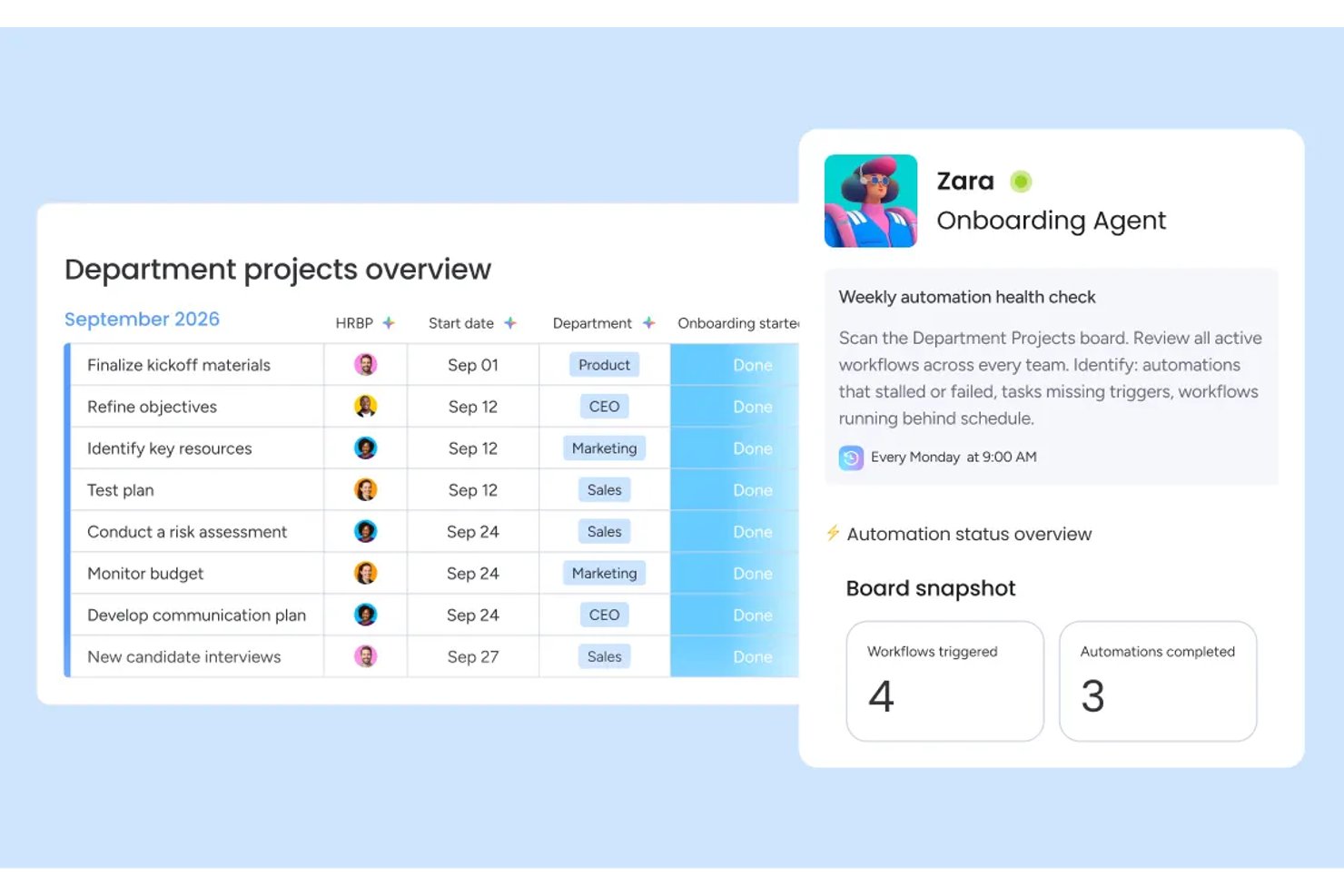
monday AI Workspace is an AI-native work management platform that blends workflow automation, agentic task execution, generative project planning, and predictive portfolio intelligence in one environment.
Who Is monday AI Workspace Best For?
It's a strong fit for mid-to-large enterprise teams and PMO-led organizations that need portfolio-level AI oversight across multiple concurrent projects.
Why I Picked monday AI Workspace
monday AI Workspace earns its spot on my shortlist because of how it handles risk before it becomes a problem. I love the AI-powered risk insights feature, which scans dependencies across active boards and flags delays before they cascade. The portfolio-level AI reporting then pulls that data into executive-ready dashboards, so I'm not digging through individual boards to piece together project health.
monday AI Workspace Key Features
- AI workflow builder: Lets you orchestrate multi-step, condition-based automations across teams and tools using AI-driven rules.
- Sidekick AI assistant: Provides a natural language interface for querying project data, updating tasks, and managing workstreams.
- Vibe app builder: Enables no-code creation of custom business applications directly within your workspace.
- AI meeting notetaker: Automatically records, transcribes, and summarizes meetings so action items are captured and shared.
monday AI Workspace Integrations
monday AI Workspace offers hundreds of native integrations through its built-in integrations and marketplace, including Slack, Jira, Google Workspace, Microsoft Teams, Salesforce, HubSpot, Asana, Trello, GitHub, and Zoom. It also supports Zapier and provides an API for custom integrations.
Pros and Cons
Pros:
- No-code custom AI agents for any workflow
- Portfolio-level AI reporting across multiple projects
- AI risk flags surface before delays cascade
Cons:
- Overwhelming for small teams with simple workflows
- AI features locked behind higher-tier plans
New Product Updates from monday AI Workspace
monday AI Workspace Adds Human Approval Routing
monday AI Workspace adds a human-in-the-loop approval block to AI Workflows, sending approval requests and routing workflow paths based on responses. For more information, visit monday AI Workspace's official site.

Moxo
Best for embedding workflows in client portals
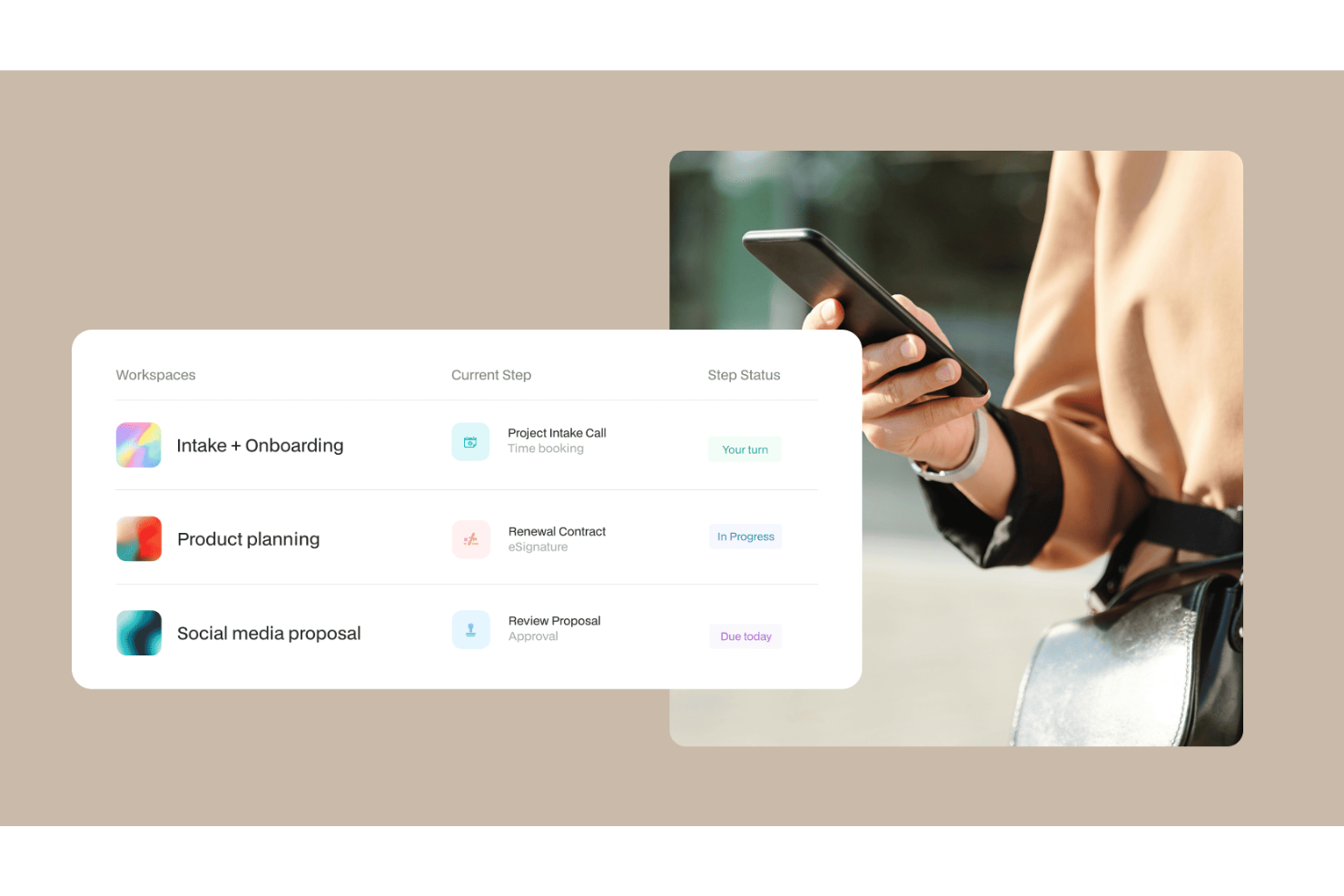
Moxo is an AI workflow platform that combines a visual workflow builder with AI agents to orchestrate multi-step business processes across both internal teams and external clients within a branded portal environment.
Who Is Moxo Best For?
Moxo is a strong fit for client-facing teams in financial services, legal, and professional services who need to manage external stakeholders within structured workflows.
Why I Picked Moxo
I've included Moxo in my top picks because it's one of the few AI workflow tools that lets you embed entire process flows directly into your own app or website. Using its SDKs for iOS, Android, and JavaScript, my team can surface structured workflows (document collection, approvals, eSignatures) inside a fully branded client portal, so clients complete steps without ever leaving your product. The white-label customization goes deep: logo, colors, UI components, and feature visibility are all configurable at an organizational level.
Moxo Key Features
- AI workflow agents: Moxo's Assist, Automate, and Amplify agents handle task preparation, validation, and escalation within active workflows.
- Conditional workflow logic: Build branching paths, loops, and parallel tracks in the visual workflow builder based on step outcomes or input data.
- SLA timers: Set time-based triggers on individual workflow steps to automatically escalate or reassign tasks when deadlines are missed.
- Secure in-app messaging: Send encrypted messages, files, and alerts directly within the workflow context, without switching to external tools.
Moxo Integrations
Moxo offers direct integrations with Salesforce, HubSpot, Microsoft Dynamics, Zoho, Wealthbox, Redtail, Filevine, Global Relay, Smarsh, Xero, and Follow Up Boss, plus file upload integrations with Google Drive, Dropbox, Box, and OneDrive, and calendar syncing with Google Calendar and Outlook. It connects with Zapier, and a REST API with webhooks is available for custom integrations.
Pros and Cons
Pros:
- SOC 2 Type II and GDPR compliant
- White-label branding for client-facing portals
- Built-in eSignatures, forms, and approvals in one workspace
Cons:
- Task tracking lacks depth for internal projects
- No built-in time tracking for tasks

Best for customizable approval process flows

Screendragon is a no-code workflow management platform built for enterprise marketing and creative operations teams, combining AI agents, visual workflow automation, dynamic form-based intake, digital approval management, and real-time reporting.
Who Is Screendragon Best For?
Screendragon is a strong fit for enterprise marketing, agency, and creative operations teams that need structured, scalable workflow management across complex, multi-stakeholder projects.
Why I Picked Screendragon
I've included Screendragon in my top picks because its digital approval workflow management is genuinely configurable in ways most tools don't allow. You can build multi-step approval loops directly into your no-code workflow design, with conditional routing that sends work to different reviewers based on specific criteria. I also like that every approval decision is captured in an automated audit trail, with side-by-side version comparison and in-platform markup, so there's no ambiguity about what was reviewed, by whom, or when.
Screendragon Key Features
- AI Hub: Build, deploy, and govern custom AI agents directly within your workflows for tasks like briefing, content generation, and compliance checking.
- Dynamic form builder: Create custom intake forms with conditional logic to capture structured project information at the start of any workflow.
- Real-time workflow analytics: Access custom dashboards and reports that surface workload, bottleneck, and process performance data across active workflows.
- AI resource forecasting: Use Screendragon's AI Resourcing Agent to model and predict resource demand based on active project pipelines.
Screendragon Integrations
Screendragon offers pre-built integrations that connect with tools teams already use, including Aprimo, Microsoft Power BI, Google Cloud Platform Storage, HubSpot, Amazon S3, Sitecore, Ziflow, Vidmob, Brandfolder, Smartsheet, and Workato. Additional integrations shown on their site include Jira, Google Drive, Egnyte, Box, Adobe, OneDrive, NetSuite, Salesforce, Microsoft Dynamics 365, SAP, Microsoft 365, and Trello. An API and a Connection Manager are available for connecting Screendragon to any system with an open API.
Pros and Cons
Pros:
- Dynamic forms with conditional field logic
- Granular role-based permission controls
- Built-in AI agents for workflow automation
Cons:
- Requires dedicated onboarding time investment
- Enterprise-focused, complex for smaller teams
New Product Updates from Screendragon
Screendragon Unveils New AI Hub
Screendragon introduced AI Hub, a new capability that lets teams build and manage AI agents directly within workflows. The update helps marketing teams automate tasks, maintain governance controls, and scale AI-driven operations more efficiently. For more information, visit Screendragon's official site.

Wrike
Best for AI-driven task prioritization

For those looking for an AI-driven workflow solution, Wrike stands out for its mix of automation and collaboration tools. It works well for enterprises and teams of all sizes that want to improve operations and simplify project management. By automating routine tasks and strengthening team collaboration, Wrike helps teams handle complex projects more efficiently.
Why I Picked Wrike
I picked Wrike for its strong integration of AI into workflow management. Its Copilot feature is a key highlight; it helps teams prioritize tasks and generate insights that support better decision-making. The platform also lets users automate processes using natural language commands, which reduces time spent on repetitive work and frees teams to focus on more strategic tasks. These capabilities make Wrike a solid choice for teams that want to boost productivity with AI-driven tools.
Wrike Key Features
In addition to its AI-driven capabilities, Wrike offers several other features that enhance workflow management:
- Customizable Dashboards: Tailor the interface to your team's needs, providing a personalized view of projects and priorities.
- Gantt Charts: Visualize project timelines and dependencies with interactive Gantt charts, making it easier to manage complex projects.
- Time Tracking: Keep track of time spent on tasks and projects for accurate billing and productivity analysis.
- In-Platform Email: Communicate with external stakeholders directly within the platform, ensuring seamless project updates and collaboration.
Wrike Integrations
Integrations include Microsoft Teams, Google Workspace, Zoom, Slack, Dropbox, Outlook, Salesforce, HubSpot, Jira, and Adobe Creative Cloud.
Pros and Cons
Pros:
- Customizable real-time dashboards
- No-code workflow automation tools
- AI-powered task prioritization
Cons:
- Pricing may challenge small teams
- Advanced features require higher tiers
New Product Updates from Wrike
Wrike Adds Klaxoon MCP Integration
Wrike’s Klaxoon MCP integration is now generally available, enabling AI agents to navigate between Wrike tasks and attached whiteboards, read task context, and manage whiteboard attachments via API. For more information, visit Wrike's official site.

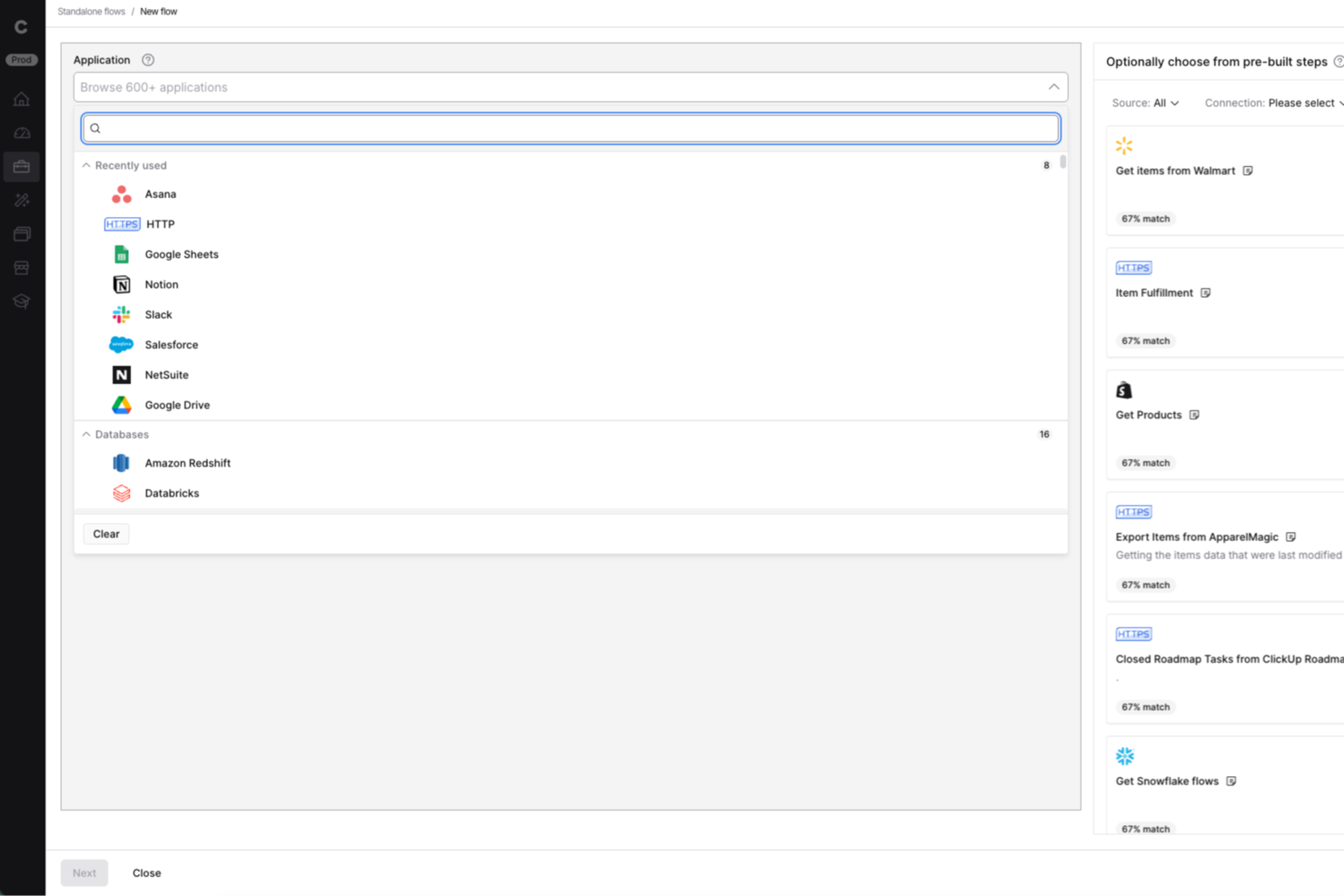
Celigo is an integration and automation platform designed for IT teams and business operations leaders who need to connect cloud apps, automate workflows, and manage data across multiple systems without heavy coding.
Who Is Celigo Best For?
Mid-sized to large businesses with complex integration needs across multiple cloud applications and departments.
Why I Picked Celigo
I picked Celigo as one of the best because having access to over 1,000 prebuilt connectors lets my team connect cloud apps like Salesforce, NetSuite, and Shopify in minutes. I can quickly automate workflows between our CRM, ERP, and ecommerce platforms without custom development. This huge connector library means we spend less time building integrations from scratch and more time optimizing our processes.
Celigo Key Features
- AI-guided flow builder: Build and customize integration workflows using AI-driven suggestions and automation.
- Error management dashboard: Monitor, diagnose, and resolve integration errors from a centralized dashboard.
- Role-based access controls: Set granular permissions for users and teams to manage integrations securely.
- Real-time data synchronization: Keep data consistent across connected systems with automated, real-time syncing.
Celigo Integrations
Integrations include Salesforce, Microsoft Dynamics 365 Business Central, Oracle NetSuite, Walmart, SAP, Snowflake, Acumatica, ADP, Adobe, and 3PL Central.
Pros and Cons
Pros:
- Detailed audit logs for compliance tracking
- Multi-environment support for safe testing
- Granular access controls for sensitive workflows
Cons:
- Advanced features require higher-tier pricing
- No free-forever plan available
New Product Updates from Celigo
Celigo Adds SuiteTax and Variant Publishing for Shopify–NetSuite
Celigo adds NetSuite SuiteTax support and variant-level sales channel publishing to its Shopify–NetSuite integration. These updates improve tax handling and give merchants more control over how product variants are published. For more information, visit Celigo’s official site.
 .
.
Make
Best for AI automation in complex processes

Make is a visual automation platform for teams that need to design complex, multi-step workflows. It supports developers and technical users by combining workflow automation with AI agents, generative AI functions, and real-time orchestration tools.
Why I picked Make: Make offers a visual programming interface that simplifies the creation of detailed workflows. You can integrate its generative AI capabilities to enhance process automation, making it easier to manage complex tasks. Its interface, AI agent capabilities, and support for branching logic help teams manage processes that require detailed automation. It also offers templates and a wide range of AI-supported integrations.
Standout features & integrations:
Features include a user-friendly drag-and-drop builder that allows you to orchestrate workflows without coding. You can set up triggers and actions to automate repetitive tasks effectively. The platform also supports real-time monitoring, letting you track workflow performance and make adjustments as needed.
Integrations include Google Workspace, Slack, Google Gemini, Trello, Dropbox, Shopify, HubSpot, ChatGPT, Mailchimp, Salesforce, QuickBooks, and Asana.
Pros and Cons
Pros:
- Real-time monitoring for workflow adjustments
- Supports complex automation needs
- Customizable workflows with visual interface
Cons:
- Can be overwhelming for beginners
- Requires learning for advanced features

n8n
Best for open-source workflow customization

n8n is an open-source workflow automation software that caters to developers and tech-savvy teams looking for flexibility in building custom workflows. It supports AI workflows, custom code, and self-hosting, making it suitable for organizations requiring flexibility and data control.
Why I picked n8n: n8n offers AI features like automated decision-making and data processing, which allow you to create tailored workflows that fit specific business needs. Its support for custom JavaScript/Python code, built-in AI nodes, LangChain compatibility, and extensive triggers enables technical teams to tailor advanced automation to their needs. Self-hosting also offers additional control over data handling.
Standout features & integrations:
Features include a visual workflow editor, which makes it easy to design complex workflows without coding. You can use webhook triggers to initiate workflows based on real-time events. The tool also provides built-in error handling to ensure processes run smoothly, minimizing disruptions.
Integrations include Slack, Google Sheets, Trello, GitHub, Discord, Airtable, Dropbox, Twitter, Shopify, and Notion.
Pros and Cons
Pros:
- Intuitive visual workflow editor
- Supports self-hosting for greater control
- Highly customizable through its open-source framework
Cons:
- Limited support compared to competitor tools
- Requires technical knowledge for setup

Aha!
Best AI roadmap-planning tool for product managers

Aha! is a product management software designed for product managers to create strategic roadmaps and manage product development. It caters to teams looking to align product strategy with execution using AI-driven insights and planning tools.
Why I picked Aha!: Aha! supports product managers who need structured planning tools that use AI assistance. Its predictive analytics, AI-supported whiteboards, and strategic planning capabilities help teams prioritize work and adjust roadmaps efficiently. The platform also offers an AI assistant across roadmapping and whiteboard tools, helping teams analyze data and create documentation more quickly. These capabilities make it a strong fit for product managers who need to align strategy with execution.
Standout features & integrations:
Features include goal tracking to align your team’s efforts with company objectives, idea management to capture and prioritize customer feedback, and custom workflows to adapt processes to your team's needs.
Integrations include Jira, Slack, Microsoft Teams, Salesforce, GitHub, Asana, Trello, Azure DevOps, Google Analytics, and Confluence.
Pros and Cons
Pros:
- Customizable workflows for varied needs
- Effective idea management system
- Strong support for strategic planning
Cons:
- Reporting lacks customization options
- Slight learning curve for new users


Zapier is an AI orchestration platform that helps teams connect and automate workflows across thousands of apps and AI tools—without code. It's used by organizations of all sizes, from fast-growing startups to large enterprises, to coordinate work across marketing, sales, RevOps, IT, and operations
Why I picked Zapier: Zapier is well-suited for teams that need to build, adapt, and scale automations quickly across many tools. Its AI Copilot helps users design multi-step workflows using natural language, reducing the effort required to coordinate complex processes. Pre-built templates and an accessible interface support fast setup, while more advanced logic, AI actions, and admin controls allow larger organizations to manage and orchestrate workflows across departments without heavy technical overhead.
Standout features & integrations:
Features include AI-driven workflow creation, a visual editor for building automations, AI agents and chatbots for task execution, and Tables for organizing workflow data. It allows you to automate repetitive tasks through workflows called "Zaps," which connect thousands of apps to run tasks without code, saving time and reducing manual effort.
Integrations include Google Sheets, Slack, Trello, Gmail, LinkedIn, Salesforce, HubSpot, Dropbox, Asana, Microsoft Teams, and more.
Pros and Cons
Pros:
- Integrates with thousands of apps and AI tools
- No-code workflows accessible to non-technical users
- Scales well from two-step automations to complex, cross-team systems
Cons:
- Free plan limited to two-step workflows
- No mobile app


Boomi Flow is a low-code application development platform designed for enterprises looking to automate workflows and integrate systems across various departments. Its main users are large organizations that need to connect disparate systems and automate complex business processes using AI-driven tools.
Why I picked Boomi Flow: Boomi Flow fits enterprise teams that need to connect multiple systems while maintaining consistent workflow logic. Its AI-supported automation and ability to create applications that route data between ERPs, CRMs, and internal tools make it effective for handling enterprise-scale processes. Its AI-assisted automation helps enterprises manage complex integrations and decision flows.
Standout features & integrations:
Features include a visual design interface for building applications without extensive coding. You can easily leverage dynamic workflows to adapt to changing business needs. The platform also supports mobile app deployment, allowing you to extend functionality to mobile devices.
Integrations include Salesforce, SAP, Oracle, Microsoft Dynamics 365, NetSuite, Workday, ServiceNow, Slack, Google Workspace, and AWS.
Pros and Cons
Pros:
- Mobile app deployment capabilities
- Scalable for large enterprise needs
- Strong support for complex integrations
Cons:
- Can be complex for small teams
- Requires time for initial setup
Andre AI-verktøy for arbeidsflyt
Her er noen flere alternativer for AI-verktøy for arbeidsflyt som ikke kom med på kortlisten, men som likevel er verdt å ta en titt på:


How I Evaluate AI Workflow Tools
Every tool on this list needs to do more than slap an AI label on basic automations—I look for platforms that actually save PMs time on things like building project plans, routing approvals, or flagging risks before they derail a sprint. I split my evaluation into core functionality every tool must have to qualify and differentiating factors that separate good options from great ones.
Core Functionality (Table Stakes For This List)
When I'm selecting tools for my list, I rank each one on a scale from 0 (does not offer the functionality) to 5 (excels in this area) for each core functionality listed below. Then, I calculate the tool's total score into a percentage. Each tool needs to achieve a minimum total score of 65% to be considered for inclusion.
- AI Workflow Automation: I look for tools that go beyond basic if-then rules to trigger multi-step workflows with AI logic, like auto-routing a design review to the right approver based on project context.
- Generative Task Creation: A good tool here lets you type a high-level objective and get back a structured plan with subtasks and dependencies, not just a generic to-do list.
- Predictive Project Intelligence: I evaluate whether the AI surfaces useful forecasts, like flagging that a sprint is likely to slip based on team velocity trends or unresolved blockers.
- AI Summarization & Insights: Tools earn points here when they can distill a week's worth of async updates or a 45-minute standup recording into clear next steps your stakeholders can act on.
- Native PM Integrations: Whether a tool connects to platforms like Jira, Asana, or monday.com with real two-way sync matters, so AI actions actually flow back into the systems teams already use.
- Conversational AI Assistant: I check whether you can query project status or update tasks through natural language, like asking "What's blocking the Q3 launch?" and getting a real answer.
Once I have a list of tools that meet this criteria, I consider what sets each platform apart.
Differentiating Factors (What Sets Vendors Apart)
Here's how I compare and contrast different vendors:
Standout Features
I pay close attention to whether a tool lets you build custom AI agents for recurring rituals like sprint retrospectives or stakeholder digest emails. Cross-tool orchestration is another big differentiator—the best platforms can kick off actions across your CRM, docs, and dev tools in a single workflow run. I also evaluate workflow analytics dashboards that show automation ROI and time saved, since that's the data PMO leaders need to justify the investment.
Beyond Features
Data security and AI governance matter a lot here—I check whether a vendor is clear about how project data is handled and whether it trains external LLMs. For PMO directors managing sensitive roadmaps, that's a real concern. Pricing transparency is another factor I weigh, especially around AI credit models that can spike costs as automation usage grows. I also look at time-to-value: does the tool ship prebuilt PM workflow templates, or does your team need weeks of setup before a single automation runs?
Slik velger du AI-verktøy for arbeidsflyt
Det er lett å gå seg vill i lange funksjonslister og komplekse prisstrukturer. For å hjelpe deg med å holde fokus mens du går gjennom den unike prosessen med å velge programvare, får du her en sjekkliste over faktorer du bør ha i mente:
| Faktor | Hva du bør vurdere |
|---|---|
| Skalerbarhet | Vil verktøyet vokse med virksomheten din? Sjekk om det kan håndtere økte datamengder og flere brukere uten problemer. Vurder om valget ditt er fremtidssikret, slik at du unngår kostnadene ved å bytte senere. |
| Integrasjoner | Kan det kobles til de nåværende systemene dine? Sørg for at det støtter appene du allerede bruker, slik at du unngår kostbare midlertidige løsninger. |
| Tilpasningsmuligheter | Kan du tilpasse det til arbeidsflytene dine? Se etter verktøy som lar deg tilpasse prosesser uten at du trenger en utvikler. |
| Brukervennlighet | Er det brukervennlig for teamet ditt? En bratt læringskurve kan bremse innføringen, så prioriter intuitive grensesnitt. |
| Implementering og opplæring | Hvor raskt kan du komme i gang? Vurder tiden og ressursene som kreves for oppsett og opplæring. Verktøy med veiledet oppstart sparer tid. |
| Kostnad | Hva er de totale eierkostnadene? Ta høyde for skjulte gebyrer og sammenlign prisplanene for å sikre at løsningen passer budsjettet ditt. |
| Sikkerhetstiltak | Beskytter det dataene dine? Se etter kryptering, tilgangskontroller og samsvar med personvernforordninger for å holde informasjonen din trygg. |
| Tilgjengelig kundestøtte | Er det hjelp tilgjengelig når du trenger det? Vurder leverandørens åpningstider og kontaktkanaler, for eksempel chat eller telefon, slik at du får hjelp raskt. |
Hva er AI-verktøy for arbeidsflyt?
AI-verktøy for arbeidsflyt er programvareløsninger som automatiserer og optimaliserer forretningsprosesser ved hjelp av kunstig intelligens. Disse verktøyene brukes vanligvis av fagfolk innen områder som prosjektledelse, markedsføring og drift for å øke effektiviteten og nøyaktigheten. Funksjoner for automatisering, prediktiv analyse og naturlig språkbehandling bidrar til å redusere manuelle oppgaver, forbedre beslutningstaking og legge til rette for kommunikasjon. Alt i alt gir disse verktøyene betydelig verdi ved å frigjøre tid til strategisk arbeid og minimere feil.
Funksjoner
Når du velger AI-verktøy for arbeidsflyt, bør du se etter følgende viktige funksjoner:
- Automatiseringsmuligheter: Automatiser gjentakende oppgaver for å redusere den manuelle arbeidsmengden og øke effektiviteten.
- Prediktiv analyse: Bruk data til å forutsi resultater og ta informerte beslutninger raskt.
- Naturlig språkbehandling: Legg til rette for kommunikasjon ved å tolke og svare på inndata i menneskelig språk.
- AI-drevet beslutningstaking: Støtt strategisk planlegging med innsikt og anbefalinger generert av AI.
- Tilpassbare arbeidsflyter: Tilpass prosesser til spesifikke forretningsbehov uten programmeringskompetanse.
- Visuell arbeidsflytbygger: Utform og administrer arbeidsflyter ved hjelp av et intuitivt dra-og-slipp-grensesnitt.
- Integrasjonsmuligheter: Koble til eksisterende verktøy for å sikre en jevn informasjonsflyt på tvers av systemer.
- Sanntidsovervåking: Følg med på arbeidsflytens ytelse og gjør nødvendige justeringer underveis.
- Sikkerhetstiltak: Beskytt sensitive data med kryptering og overholdelse av personvernregelverk.
- Mobil tilgang: Administrer arbeidsflyter på farten med støtte for mobilapper for økt fleksibilitet.
Fordeler
Implementering av AI-verktøy for arbeidsflyt gir flere fordeler for teamet og virksomheten din. Her er noen av fordelene du kan se frem til:
- Økt effektivitet: Automatiser gjentakende oppgaver og frigjør tid til mer strategisk arbeid.
- Bedre beslutningstaking: Bruk prediktiv analyse og AI-innsikt til å ta informerte valg raskt.
- Forbedret kommunikasjon: Legg til rette for samhandling med naturlig språkbehandling, slik at det blir enklere å administrere oppgaver og prosjekter.
- Større tilpasningsmuligheter: Tilpass arbeidsflyter for å oppfylle spesifikke behov uten teknisk kompetanse.
- Bedre datasikkerhet: Beskytt sensitiv informasjon med avanserte sikkerhetstiltak og funksjoner for overholdelse av regelverk.
- Tilpasning i sanntid: Overvåk arbeidsflyter i sanntid og juster prosessene etter behov for å opprettholde produktiviteten.
- Fleksibilitet på farten: Få tilgang til og administrer arbeidsflyter fra mobile enheter, slik at arbeidet kan fortsette sømløst hvor som helst.
Kostnader og priser
Å velge AI-verktøy for arbeidsflyt krever en forståelse av de ulike prismodellene og abonnementene som er tilgjengelige. Kostnadene varierer basert på funksjoner, teamstørrelse, tillegg og mer. Tabellen nedenfor oppsummerer vanlige abonnementer, gjennomsnittsprisene deres og typiske funksjoner som er inkludert i løsninger med AI-verktøy for arbeidsflyt:
Sammenligningstabell for abonnementer for AI-verktøy for arbeidsflyt
| Abonnementstype | Gjennomsnittspris | Vanlige funksjoner |
|---|---|---|
| Gratisabonnement | $0 | Grunnleggende automatisering, begrensede integrasjoner og brukerstøtte fra fellesskapet. |
| Personlig abonnement | $9-$2,347/user/month | Forbedret automatisering, flere integrasjoner og grunnleggende analysefunksjoner. |
| Bedriftsabonnement | $16-$3,293/user/month | Avansert automatisering, førsteklasses integrasjoner, verktøy for teamsamarbeid og prioritert brukerstøtte. |
| Abonnement for større virksomheter | $29-$3600/user/month | Tilpassede arbeidsflyter, sikkerhet på bedriftsnivå, dedikert kontoadministrasjon og avanserte analysefunksjoner. |
Vanlige spørsmål om verktøy for AI-arbeidsflyter
Her er svar på vanlige spørsmål om verktøy for AI-arbeidsflyter:
Hvordan integrerer jeg verktøy for AI-arbeidsflyter med de nåværende systemene mine?
Ja, de fleste verktøy for AI-arbeidsflyter er utviklet for å integreres med eksisterende systemer. Du bør undersøke verktøyets integrasjonsmuligheter for å sikre at det kan kobles til programvaren du bruker nå, for eksempel CRM-, e-post- og prosjektstyringsplattformer. Se etter verktøy som tilbyr API-støtte eller ferdigbygde koblinger. Hvis du får problemer med kompatibiliteten, bør du vurdere å bruke mellomvareløsninger for å bygge bro over gapet. Test integrasjonene i et kontrollert miljø for å unngå forstyrrelser. Denne tilnærmingen bidrar til å opprettholde smidig drift samtidig som du tar i bruk ny teknologi.
Kan verktøy for AI-arbeidsflyter håndtere komplekse arbeidsflyter?
Ja, mange verktøy for AI-arbeidsflyter er utviklet for å håndtere komplekse arbeidsflyter. De tilbyr funksjoner som betinget logikk, forgrenede baner og automatisering i flere trinn for å håndtere innviklede prosesser. Når du setter opp arbeidsflyten, bør du kartlegge den for å identifisere viktige punkter for automatisering. Bruk verktøyets visuelle verktøy for å organisere oppgaver og sikre at hvert trinn er tilpasset virksomhetens behov. Gå jevnlig gjennom og juster arbeidsflytene for å optimalisere ytelsen og tilpasse dem til endringer i driften.
Hvor sikre er verktøy for AI-arbeidsflyter når det gjelder databeskyttelse?
Verktøy for AI-arbeidsflyter prioriterer datasikkerhet gjennom kryptering, tilgangskontroller og tiltak for å sikre samsvar. Før du velger et verktøy, bør du vurdere sikkerhetsfunksjonene og sikre at de er i tråd med organisasjonens retningslinjer for databeskyttelse. Kontroller om verktøyet følger bransjestandarder som GDPR eller HIPAA, dersom det er relevant. Implementer rollebaserte tilgangskontroller for å begrense datatilgangen til autoriserte brukere. Gå jevnlig gjennom og oppdater sikkerhetsinnstillingene for å beskytte dataene dine mot potensielle trusler.
Hvordan kan verktøy for AI-arbeidsflyter bidra til å redusere prosjektforsinkelser?
Verktøy for AI-arbeidsflyter bidrar til å redusere prosjektforsinkelser ved å automatisere rutineoppgaver, sende påminnelser i tide og flagge flaskehalser. De forenkler godkjenninger og overleveringer mellom teammedlemmer, slik at ingenting blir oversett. Sanntidsvarsler og fremdriftssporing holder alle samkjørte, noe som gjør det enklere å oppdage og løse problemer før de forsinker prosjektet.
Hva er de vanligste utfordringene ved å ta i bruk verktøy for AI-arbeidsflyter?
Vanlige utfordringer omfatter motstand mot endringer i teamet, integrasjonsproblemer med eksisterende programvare og en læringskurve for nye funksjoner. Du kan møte vanskeligheter med datamigrering eller være usikker på hvilke prosesser som bør automatiseres først. Overvinn dette ved å tilby opplæring, begynne med enkle arbeidsflyter, involvere viktige interessenter tidlig og velge verktøy med gode ressurser for brukerstøtte.
Hva skjer videre:
Hvis du undersøker verktøy for AI-arbeidsflyter, kan du ta kontakt med en SoftwareSelect-rådgiver for gratis anbefalinger.
Du fyller ut et skjema og tar en kort prat der de går gjennom detaljene i behovene dine. Deretter får du en kortliste over programvare du kan vurdere. De støtter deg til og med gjennom hele kjøpsprosessen, inkludert prisforhandlinger.