

10 migliori strumenti gratuiti di gestione dei progetti con IA recensiti nel 2026

Selezione dei migliori strumenti gratuiti di gestione dei progetti con IA


Cercare lo strumento di IA giusto per gestire i propri progetti con un budget limitato è un vero esercizio di equilibrio. Scadenze ravvicinate, risorse limitate e la necessità di coordinare il team aumentano ulteriormente la pressione.
Ecco le mie scelte tra i migliori strumenti gratuiti di gestione dei progetti con IA, che offrono funzionalità innovative e utili basate sull’IA per organizzare le attività, migliorare la collaborazione e mantenere i progetti in linea con gli obiettivi, senza costi aggiuntivi. Ho esaminato e valutato ogni strumento e di seguito fornisco la mia opinione sincera.
Perché fidarsi dei nostri consigli sui software
Il nostro team testa e recensisce software dal 2012. In quanto project manager noi stessi, sappiamo quanto sia difficile — e importante — scegliere il software giusto.
Per questa guida, abbiamo valutato gli strumenti attraverso test pratici e ricerche indipendenti, assegnando un punteggio agli strumenti in base ai nostri criteri di selezione. Ci basiamo inoltre sulle competenze di leader di pensiero del settore e di professionisti attivi nella gestione dei progetti.
Le nostre recensioni riflettono il nostro giudizio editoriale umano, non un discorso di vendita.
Revisori esperti:
Riepilogo dei migliori strumenti gratuiti di gestione dei progetti con IA
Ogni strumento di gestione dei progetti con IA presente nel mio elenco offre una versione gratuita oltre a piani a pagamento, qualora si desideri effettuare un upgrade. Ecco i costi di base di ciascuno degli strumenti inclusi nella mia selezione:
| Tool | Best For | Trial Info | Price | ||
|---|---|---|---|---|---|
| 1 | Ideale per visualizzare l’avanzamento dei progetti | Piano gratuito disponibile | A partire da $9/utente/mese (fatturato annualmente) | Website | |
| 2 | Ideale per flussi di lavoro dei progetti assistiti dall'IA | Piano gratuito + prova gratuita di 14 giorni + dimostrazione gratuita disponibile | A partire da $10/utente/mese (con fatturazione annuale) | Website | |
| 3 | Ideale per piccoli team | Prova gratuita di 15 giorni + piano gratuito + demo gratuita disponibile | Da $4/utente/mese (fatturazione annuale) | Website | |
| 4 | Ideale per la programmazione interattiva tramite diagrammi di Gantt | Prova gratuita di 14 giorni | A partire da $7/utente/mese (fatturazione annuale) | Website | |
| 5 | Ideale per insight supportati dall'IA | Prova gratuita di 14 giorni + piano gratuito + demo gratuita disponibile | Da $5/utente/mese (fatturazione annuale) | Website | |
| 6 | Ideale per la collaborazione flessibile tra team | Piano gratuito disponibile | Da $10/utente/mese (fatturato annualmente) | Website | |
| 7 | Ideale per l’editing documenti potenziato dall’AI | Piano gratuito + demo gratuita disponibili | Da $7/utente/mese (fatturazione annuale) | Website | |
| 8 | Ideale per la collaborazione di team remoti | Piano gratuito disponibile | Da $4/utente/mese (fatturati annualmente) | Website | |
| 9 | Ideale per il tracciamento dei bug | Piano gratuito + prova gratuita di 30 giorni disponibile | Da $35/mese (fino a 30 utenti) | Website | |
| 10 | Ideale per la collaborazione con i clienti | Prova gratuita di 30 giorni + demo gratuita disponibile | Da $9.99/utente/mese (fatturato annualmente) | Website |


Recensioni dei migliori strumenti gratuiti di gestione dei progetti con IA
Ecco i miei riepiloghi approfonditi di ciascuno strumento gratuito di gestione dei progetti con IA incluso nel mio elenco. Analizzo funzionalità, vantaggi e svantaggi, integrazioni e casi d’uso per aiutarti a scegliere la soluzione più adatta. Alcuni strumenti offrono una versione completamente gratuita, mentre altri mettono a disposizione una prova gratuita limitata nel tempo: in ogni recensione ho indicato cosa è gratuito.

Ideale per visualizzare l’avanzamento dei progetti

monday.com è una piattaforma flessibile di gestione dei progetti pensata per i team di tecnologia, marketing e operazioni che desiderano organizzare il lavoro, automatizzare le attività con l’AI e mantenere i progetti in movimento con una chiara visibilità.
Per Chi È Più Adatto monday.com?
monday.com è adatto ai team interfunzionali di aziende di medie dimensioni che necessitano di un luogo centralizzato in cui gestire progetti tra prodotto, ingegneria e marketing.
Perché Ho Scelto monday.com
monday.com si guadagna un posto nella mia shortlist per la capacità di offrire visibilità sui progetti a tutti i livelli. Amo le dashboard personalizzabili che raccolgono dati in tempo reale da tutte le board, permettendo al mio team di vedere lo stato delle attività, la distribuzione del carico di lavoro e l’avanzamento delle tappe fondamentali in un unico posto, senza dover scavare tra le viste dei singoli progetti. L’analizzatore di rischi basato su AI è utile: segnala in modo proattivo le attività in scadenza e evidenzia le dipendenze che potrebbero compromettere la consegna. La vista di gestione del portafoglio collega più progetti dando una panoramica di alto livello che permette di capire immediatamente quali sono in linea e quali no.
Funzionalità Principali di monday.com
- Generazione automatica delle attività tramite AI: Scompone automaticamente gli obiettivi del progetto in compiti operativi grazie all’AI, partendo da un brief o una descrizione del progetto.
- Vista diagramma di Gantt: Visualizza le timeline dei progetti, la durata delle attività e le dipendenze con un formato Gantt drag-and-drop.
- Gestione del carico di lavoro: Mostra i compiti assegnati e la capacità di ogni membro del team attraverso i progetti per aiutare a bilanciare la distribuzione del lavoro.
- Costruttore di automazioni: Permette di creare regole trigger-azione senza codice per gestire aggiornamenti ricorrenti delle attività, notifiche e cambiamenti di stato.
Integrazioni di monday.com
Le integrazioni includono Salesforce, QuickBooks, HubSpot, Zendesk, Active Directory, GitHub, GitLab, Slack, Gmail e Microsoft Teams.
Cosa È Gratuito?
monday.com offre un piano gratuito a vita per un massimo di 2 utenti. Questo piano include fino a 3 board, integrazioni limitate e funzionalità di base adatte a piccoli team o individui.
Pros and Cons
Pros:
- Board di progetto visive altamente personalizzabili
- Ampia integrazione con app di terze parti
- Sicurezza e conformità di livello enterprise
Cons:
- Limiti alle automazioni a seconda del piano
- Flussi di lavoro complessi richiedono tempo di apprendimento
New Product Updates from monday AI Workspace
monday AI Workspace Adds Human Approval Routing
monday AI Workspace adds a human-in-the-loop approval block to AI Workflows, sending approval requests and routing workflow paths based on responses. For more information, visit monday AI Workspace's official site.

Wrike
Ideale per flussi di lavoro dei progetti assistiti dall'IA

Wrike offre ai responsabili di progetto e alle squadre interfunzionali uno spazio di lavoro flessibile con funzionalità di IA integrate, per aiutare a organizzare le attività, gestire le scadenze e collaborare ai progetti senza il consueto lavoro manuale ripetitivo.
Per chi è più adatto Wrike?
Wrike è una soluzione adatta alle squadre di medie e grandi dimensioni nei settori tecnologico, del marketing e dei servizi professionali che necessitano di flussi di lavoro strutturati per i progetti, con pianificazione ed esecuzione assistite dall'IA.
Perché ho scelto Wrike
Ho scelto Wrike per la sua capacità di combinare il monitoraggio essenziale dei progetti con funzionalità di IA accessibili in ogni piano tariffario, compresa l'offerta gratuita. Con il piano gratuito, si ottiene accesso immediato ad AI Essentials, che gestisce la redazione dei contenuti, i riepiloghi dei commenti, l'assistenza all'avvio, Whiteboard AI e la definizione delle priorità della posta in arrivo sui dispositivi mobili, insieme al protocollo del contesto del modello (MCP) di Wrike, che collega direttamente i dati dello spazio di lavoro ai modelli di IA esterni. Per le squadre che scelgono di passare a un piano superiore, i piani avanzati sbloccano funzionalità di automazione come Wrike Copilot, un generatore di agenti IA e la generazione in linguaggio naturale per i moduli di raccolta delle richieste e le regole di automazione.
Funzionalità principali di Wrike
- Redazione e modifica dei contenuti con l'IA: genera descrizioni iniziali delle attività, scrive documenti guida per i progetti, perfeziona il tono della prosa e corregge la grammatica all'interno delle attività.
- Riepiloghi intelligenti dei commenti: condensa lunghe conversazioni tra attività di progetti complessi in elenchi concisi delle principali azioni da intraprendere.
- Whiteboard AI: assiste nelle sessioni di brainstorming trasformando le idee in schede di attività operative direttamente sulle lavagne digitali visive.
- Definizione delle priorità della posta in arrivo sui dispositivi mobili: utilizza l'IA per ordinare ed evidenziare automaticamente le notifiche urgenti sui dispositivi mobili.
Integrazioni di Wrike
Le integrazioni includono Salesforce, Microsoft Teams, Google Drive, Microsoft SharePoint, Zoom, Adobe Creative Cloud, QuickBooks, Power BI, Tableau e Miro.
Cosa è gratuito?
Wrike offre un piano gratuito senza scadenza con utenti illimitati e 2 GB di spazio di archiviazione per account, oltre a una prova di 14 giorni delle funzionalità a pagamento senza necessità di carta di credito.
Pros and Cons
Pros:
- Suggerisce automaticamente la priorità delle attività
- Prevede proattivamente i rischi dei progetti
- Redige e modifica contenuti con l'IA generativa
Cons:
- Le previsioni necessitano di dati accurati sui progetti
- L'IA avanzata richiede un piano a pagamento
New Product Updates from Wrike

Wrike Adds Quick Search to Table View
Wrike adds Quick Search to Table View with full-table search across titles, descriptions, and fields, plus highlighted matches. This helps users find tasks faster in large tables. For more information, visit Wrike’s official site.

Ideale per piccoli team

Zoho Projects offre alle squadre tecniche e alle piccole imprese un modo gratuito per organizzare le attività, monitorare i progressi e utilizzare funzionalità basate sull'IA per gestire i progetti con meno impegno manuale.
Per Chi È Meglio Zoho Projects?
Zoho Projects è particolarmente adatto a piccoli team che necessitano di uno strumento di project management strutturato e ricco di funzionalità senza un grande budget.
Perché Ho Scelto Zoho Projects
Ho scelto Zoho Projects come uno dei migliori perché consente ai piccoli team di avere un piano gratuito realmente efficace senza obbligarli ad effettuare un upgrade solo per portare a termine le attività. Il piano gratuito supporta fino a 5 utenti e include diagrammi di Gantt, gestione delle attività e persino lo Zoho MCP Server, che collega i modelli di IA ai dati dei progetti per interpretare il contesto ed eseguire azioni da comandi in linguaggio naturale. Nel piano Premium a pagamento, Zia aggiunge la creazione di attività con IA, riepiloghi e insight che aiutano le piccole squadre a lavorare più velocemente senza la necessità di un project manager dedicato. Mi piace anche che il piano gratuito includa l'automazione dei workflow (50 esecuzioni/mese), così anche una squadra snella può automatizzare aggiornamenti di stato o notifiche di routine fin dal primo giorno.
Caratteristiche Principali di Zoho Projects
- Monitoraggio del tempo: Registra le ore direttamente sulle attività e genera timesheet per monitorare come viene utilizzato il tempo del team.
- Issue tracker: Crea, assegna e dai priorità a bug o blocchi affinché nulla venga ignorato durante uno sprint o un ciclo di rilascio.
- Modelli di progetto: Avvia nuovi progetti da modelli predefiniti per evitare lavori ripetitivi nelle fasi iniziali.
- Grafico di utilizzo delle risorse: Visualizza la distribuzione del carico di lavoro tra i membri del team per individuare un sovraccarico prima che diventi un problema.
Integrazioni di Zoho Projects
Le integrazioni comprendono Zoho CRM, Zoho Desk, Zoho Analytics, Zoho People, Google Calendar, Microsoft Teams, Slack, Dropbox, GitHub e Jira.
Cosa È Gratuito?
Zoho Projects offre un piano gratuito per sempre fino a 3 utenti e 2 progetti. Il piano gratuito include funzionalità di base per la gestione delle attività ma limita l'accesso agli strumenti avanzati e alla maggior parte delle integrazioni.
Pros and Cons
Pros:
- Adatto ai piccoli team
- Include il monitoraggio dei problemi (issue tracking)
- Offre modelli di progetto
Cons:
- Opzioni di personalizzazione limitate
- Può richiedere tempo di configurazione
New Product Updates from Zoho Projects
Zoho Projects Adds CodeX Scripts for Custom Modules
Zoho Projects now supports CodeX Scripts for custom modules, enabling conditional logic and rules for creating, updating, and deleting records. For more information, visit Zoho Projects' official site.
 .
.
GanttPRO
Ideale per la programmazione interattiva tramite diagrammi di Gantt
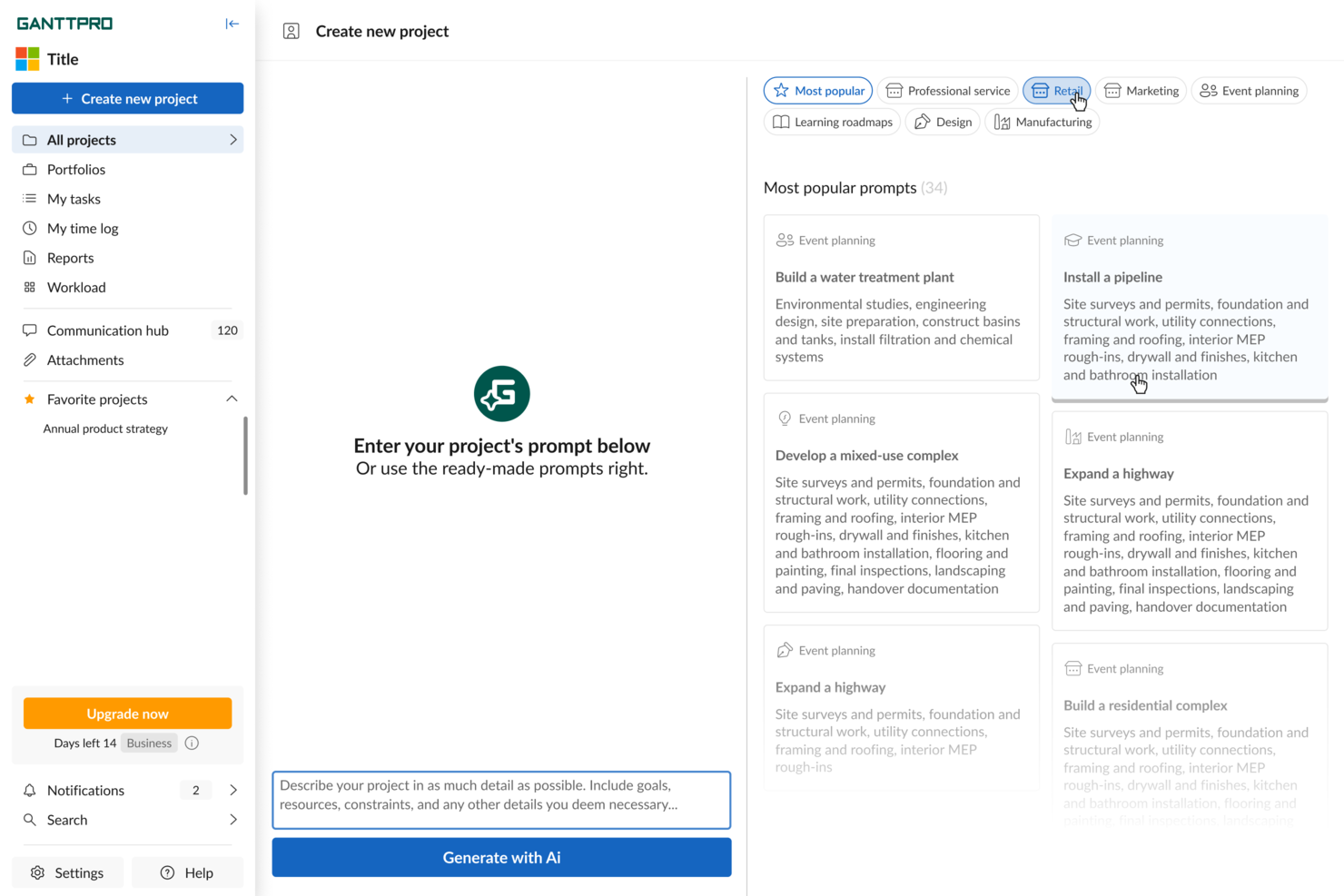
GanttPRO è un software di project management che consente di pianificare i progetti utilizzando diagrammi di Gantt con funzionalità drag-and-drop, gestire le risorse, assegnare le attività, impostare dipendenze ed esportare le linee temporali per il tuo team.
Per chi è ideale GanttPRO?
GanttPRO è adatto a project manager e leader di team che necessitano di una pianificazione visiva della timeline senza una curva di apprendimento complessa.
Perché ho scelto GanttPRO
GanttPRO è tra le mie scelte principali perché adoro come i suoi diagrammi di Gantt interattivi gestiscono la programmazione in tempo reale. Il mio team può trascinare e rilasciare le attività per spostare le date e la funzione di auto-programmazione ricalcola istantaneamente le attività dipendenti e le timeline. Quando uno sprint slitta o una scadenza cambia, non devo aggiornare manualmente ogni attività a valle. Faccio anche affidamento sulla funzionalità del percorso critico, che evidenzia esattamente quali attività influenzeranno la data di consegna finale in caso di ritardo.
Funzionalità principali di GanttPRO
- Assegnazione delle attività e ruoli: Assegna compiti a membri specifici del team, imposta i ruoli e definisci i livelli di accesso direttamente all'interno della timeline del progetto.
- Tracciamento delle baseline: Salva una baseline del progetto per confrontare il piano originale con i progressi reali mentre il lavoro avanza.
- Vista board: Passa dal diagramma di Gantt a una vista a board in stile Kanban per gestire le attività per stato senza uscire dalla piattaforma.
- Tracciamento del tempo: Registra il tempo dedicato alle singole attività direttamente in GanttPRO per monitorare l'impegno rispetto al programma di progetto.
Integrazioni di GanttPRO
GanttPRO offre integrazioni native con Jira Cloud, Google Drive, Slack e Microsoft Teams. È disponibile un'API per integrazioni personalizzate.
Cosa è gratuito?
GanttPRO offre una prova gratuita di 14 giorni con accesso a tutte le funzionalità premium e senza necessità di carta di credito. Non è previsto un piano gratuito per sempre: dopo la prova, è necessario un abbonamento a pagamento per continuare a utilizzare il software.
Pros and Cons
Pros:
- Esporta le timeline come PDF, PNG e XML
- Visualizzazione integrata del carico di lavoro e della capacità delle risorse
- Programmazione interattiva tramite diagramma di Gantt drag-and-drop
Cons:
- Interfaccia focalizzata principalmente sulla vista Gantt
- Nessun strumento integrato di budget o monitoraggio dei costi
Hive
Ideale per insight supportati dall'IA
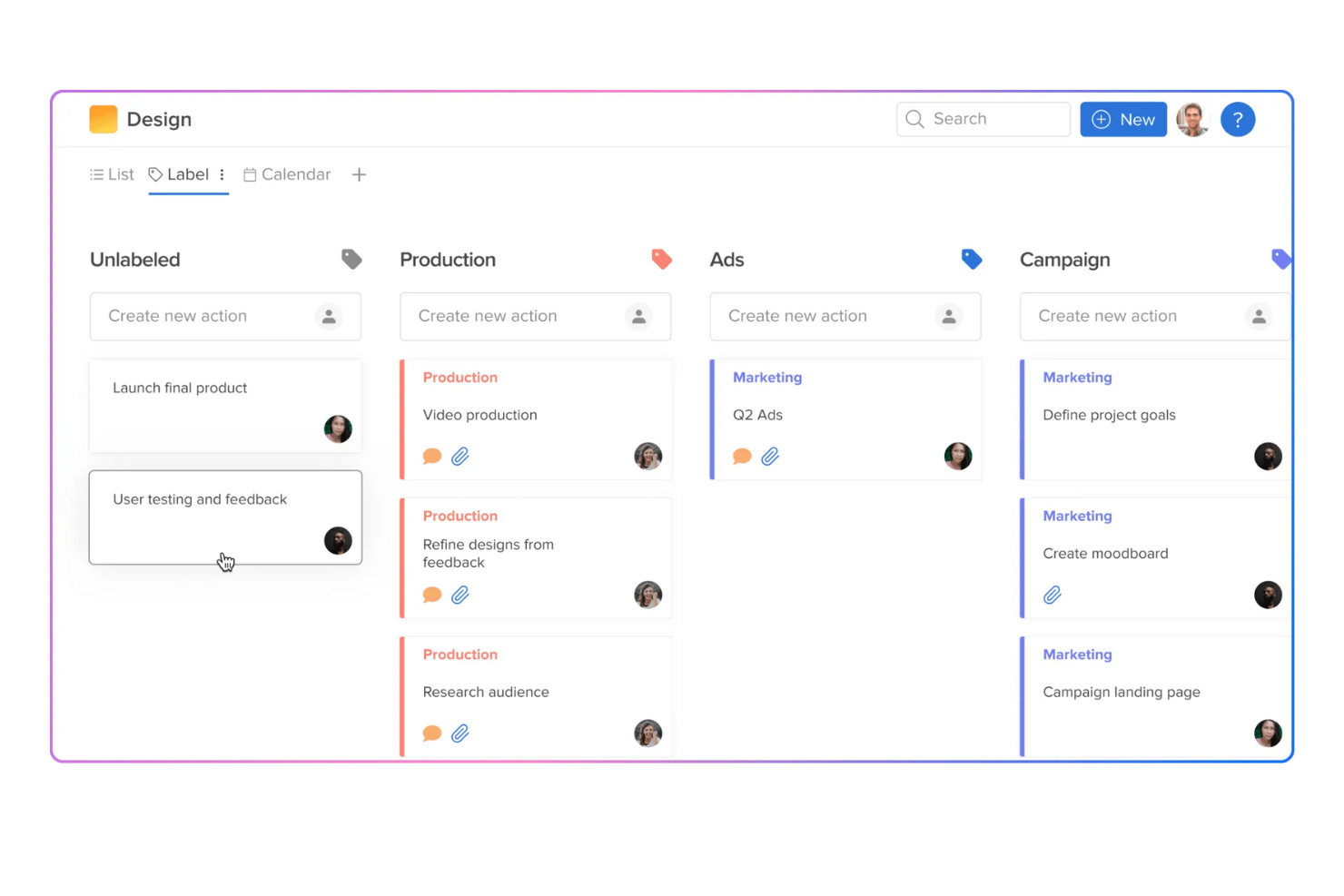
Hive è una piattaforma di gestione progetti pensata per i team che operano in settori dal ritmo serrato e che vogliono automatizzare i flussi di lavoro, gestire le attività e sfruttare l'IA per mantenere i progetti in pista senza ulteriore sforzo manuale.
Per chi è ideale Hive?
Hive è perfetto per team piccoli o di medie dimensioni nel settore creativo, marketing o tecnologico che hanno bisogno di uno strumento di gestione progetti flessibile con funzionalità IA integrate.
Perché ho scelto Hive
Hive merita un posto nella mia lista ristretta per come le sue funzionalità IA trasformano i dati grezzi dei progetti in insight azionabili. Mi piace in particolare HiveMind, l'assistente IA integrato della piattaforma, che il mio team usa per generare automaticamente task, riassumere lo stato dei progetti e scrivere contenuti direttamente all'interno delle attività. Mi affido anche ai dashboard analitici di Hive per individuare squilibri di carico di lavoro tra i membri del team prima che diventino problemi. Questa combinazione di insight predittivi e assistenza contestuale tramite IA lo distingue dagli strumenti di project management gratuiti più semplici.
Funzionalità principali di Hive
- Visualizzazioni multiple dei progetti: Passa da Gantt, Kanban, calendario e tabella, adattando la visualizzazione al metodo del tuo team.
- Monitoraggio del tempo: Registra le ore direttamente sulle attività e utilizza i timesheet integrati per monitorare la capacità del team.
- Revisione e approvazioni: Carica file e raccogli feedback con strumenti di annotazione già presenti nella piattaforma.
- Gestione delle risorse: Visualizza la disponibilità dei membri e assegna le attività in base al carico di lavoro corrente tra i progetti attivi.
Integrazioni Hive
Le integrazioni includono Google Drive, Google Calendar, Dropbox, QuickBooks, Zoom, Microsoft OneDrive, Microsoft Teams, Outlook Calendar, Jira e Slack.
Cosa offre la versione gratuita?
Hive offre un piano gratuito per sempre per massimo 2 utenti con attività e progetti illimitati. Alcune funzionalità avanzate e integrazioni sono disponibili solo nei piani a pagamento.
Pros and Cons
Pros:
- Insight sui progetti potenziati dall'IA
- Funzione email integrata
- Template di progetto personalizzabili
Cons:
- Restrizioni sul numero di utenti
- Accesso offline limitato
Notion
Ideale per la collaborazione flessibile tra team
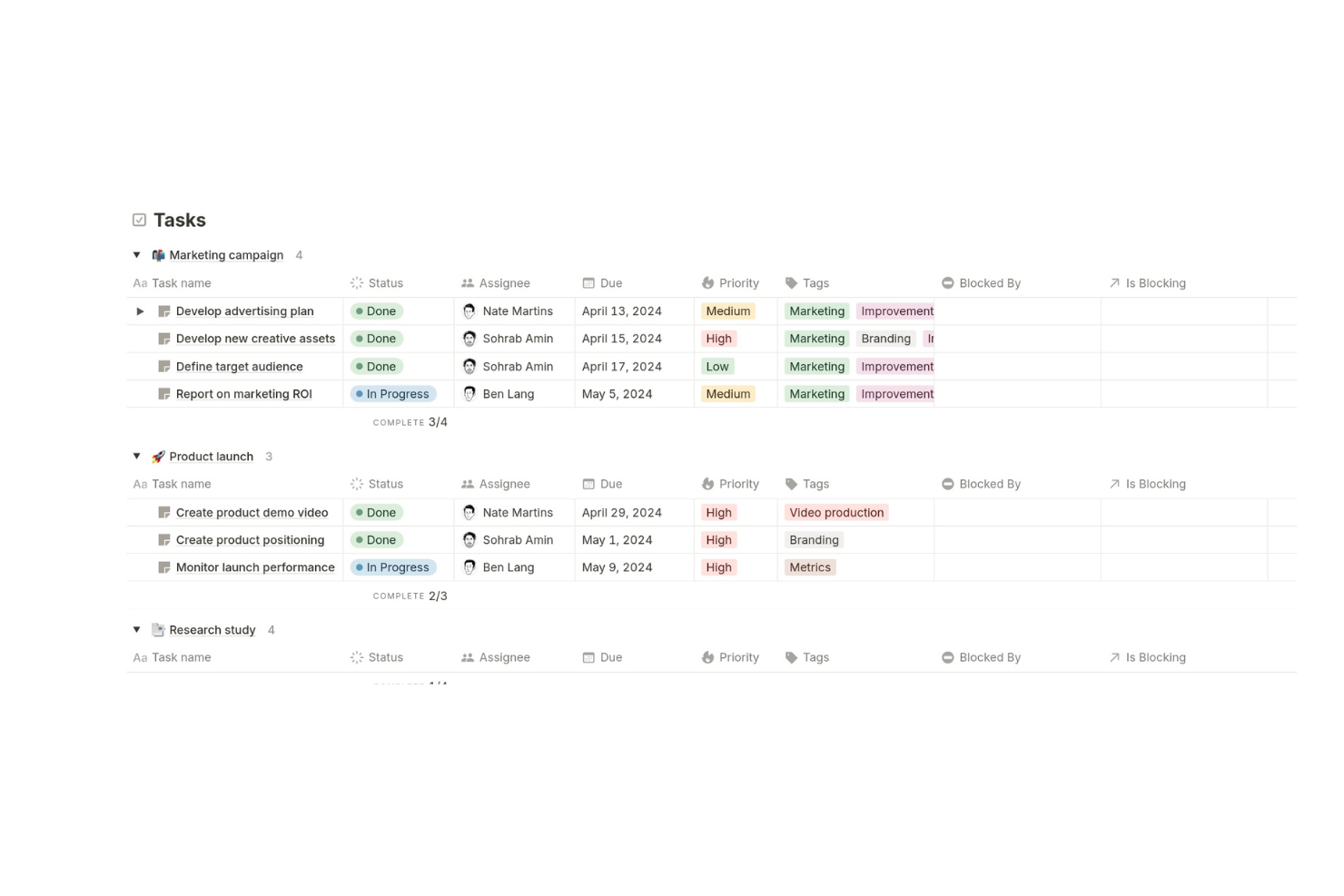
Notion offre ai project manager e ai team digitali uno spazio di lavoro flessibile per organizzare progetti, automatizzare attività con l'IA e collaborare in tempo reale, tutto su un'unica piattaforma che si adatta a diversi flussi di lavoro e dimensioni del team.
Per chi è più indicato Notion?
Notion è una soluzione ideale per team piccoli e medi nei settori tecnologici e digitali che necessitano di uno spazio di lavoro personalizzabile in grado di gestire sia il monitoraggio dei progetti che la documentazione in un unico posto.
Perché ho scelto Notion
Notion merita il suo posto nella mia lista perché è uno dei pochi strumenti gratuiti di gestione progetti con IA che collega davvero l'esecuzione dei progetti con la conoscenza del team in un unico spazio. Apprezzo la funzione di AI Autofill che compila automaticamente user story, risultati chiave e aggiornamenti di stato nei database di progetto, permettendo così al mio team di dedicare meno tempo all'inserimento manuale dei dati e più al lavoro vero e proprio. I Synced Blocks sono un'altra funzionalità su cui faccio affidamento: modifichi un contenuto una sola volta e si aggiorna ovunque appaia nello spazio di lavoro, il che mantiene allineati i team distribuiti senza il consueto ping-pong di comunicazioni. Per i team trasversali che gestiscono documenti, sprint e roadmap contemporaneamente, questa flessibilità connessa è difficile da replicare.
Funzionalità chiave di Notion
- Note riunione con IA: Trascrive automaticamente le riunioni, riassume i punti chiave ed evidenzia le azioni direttamente all'interno dello spazio di lavoro Notion.
- Agente Notion: Completa in autonomia attività multi-step utilizzando il contesto del tuo spazio di lavoro e delle app collegate come Slack e Google Drive.
- Database di progetto: Organizza le attività con sotto-attività, dipendenze e proprietà personalizzate in una vista database completamente configurabile.
- Teamspaces: Crea spazi condivisi o privati per specifici team, mantenendo documenti di progetto, attività e wiki organizzati per gruppo.
Integrazioni Notion
Le integrazioni includono Slack, Jira, GitHub, Asana, Google Drive, Figma, Trello, Miro, Typeform e Gitlab.
Cosa è gratis?
Notion offre un piano gratuito per sempre per singoli con pagine e blocchi illimitati, ma per i team il piano gratuito prevede un numero limitato di blocchi prima di dover effettuare l'upgrade. Gli upload di file sono limitati a 5MB per file e le integrazioni sono di base.
Pros and Cons
Pros:
- Supporta diverse visualizzazioni di progetto
- Le funzionalità IA aumentano la produttività
- Si integra con molti strumenti popolari
Cons:
- Curva di apprendimento per i nuovi utenti
- Funzionalità offline limitata

ClickUp
Ideale per l’editing documenti potenziato dall’AI
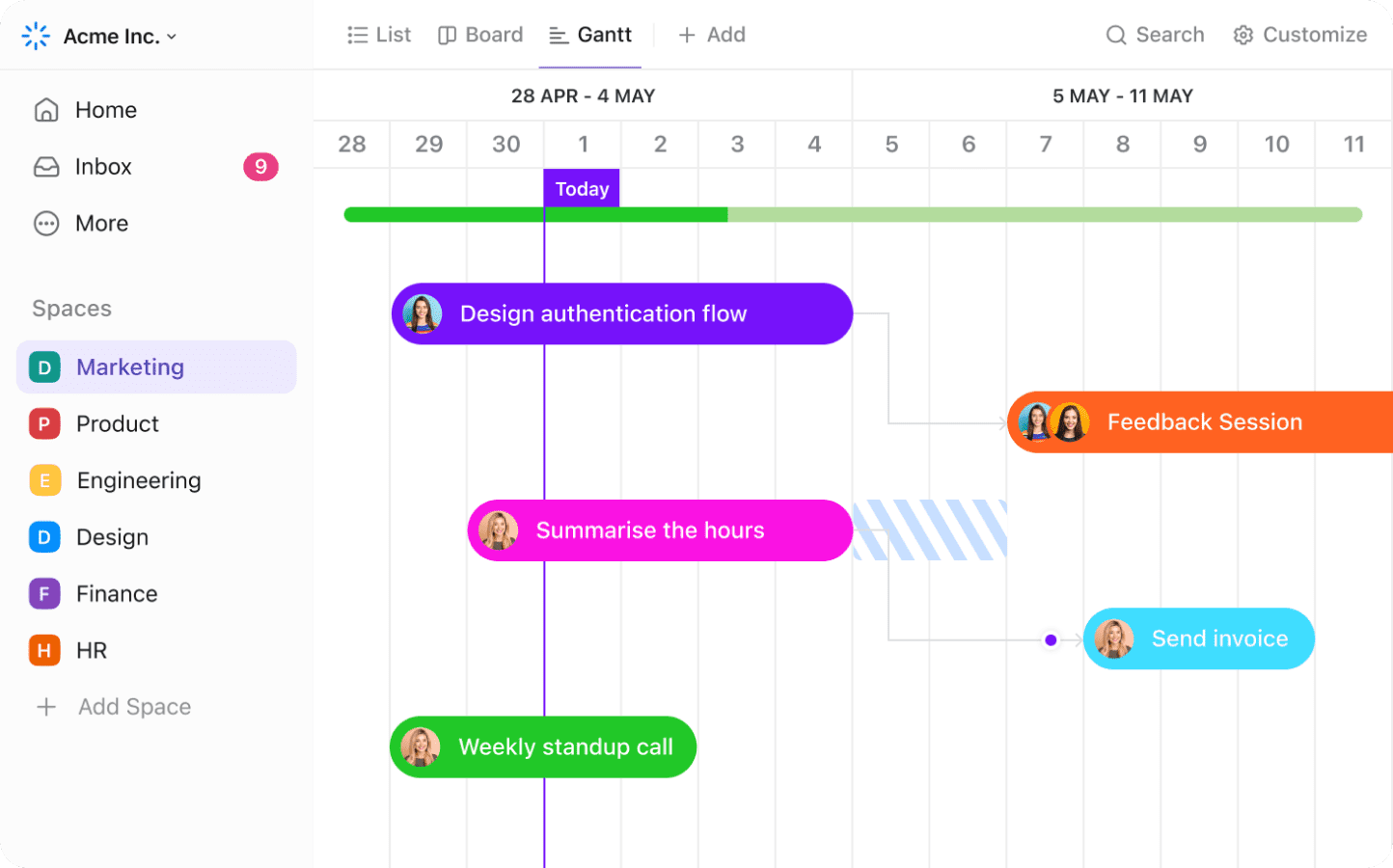
ClickUp è una piattaforma di gestione progetti che combina gestione delle attività, strumenti AI integrati, creazione di documenti, lavagne digitali, monitoraggio degli obiettivi e funzioni di automazione dei flussi di lavoro per team digitali alla ricerca di un centro progetti versatile.
Per chi è ideale ClickUp?
ClickUp si adatta perfettamente a team interfunzionali in ambienti tecnologici e digitali che hanno bisogno di una sola piattaforma per gestire attività, documenti e obiettivi.
Perché ho scelto ClickUp
Ho incluso ClickUp tra le mie migliori scelte per come i suoi strumenti di scrittura AI siano perfettamente integrati direttamente nell'editor di documenti. Il mio team utilizza ClickUp Docs per redigere briefing di progetto, scrivere SOP e costruire wiki, e l'assistente AI può riscrivere, riassumere o espandere i contenuti senza lasciare la pagina. Mi piace anche che i documenti siano collegabili ad attività e progetti, così un documento di pianificazione di sprint, ad esempio, rimane connesso al lavoro reale che descrive. Questo forte legame tra documenti e dati di progetto in tempo reale è ciò che distingue ClickUp da strumenti in cui i documenti sembrano un'aggiunta secondaria.
Funzionalità chiave di ClickUp
- Sotto-attività generate dall’AI: L'intelligenza artificiale di ClickUp può suddividere automaticamente un'attività principale in sotto-attività in base alla descrizione.
- Lavagne digitali: Crea diagrammi visivi, flowchart e bacheche di brainstorming direttamente in ClickUp e connettili alle attività.
- Campi personalizzati: Aggiungi campi dati come menu a tendina, date o punteggio delle priorità a qualsiasi attività per fornire il contesto necessario al tuo team.
- Gestione degli sprint: Imposta sprint con date di inizio e fine definite, assegna punti e monitora la velocità tra un ciclo e l'altro.
Integrazioni ClickUp
ClickUp offre più di 50 integrazioni native, tra cui Slack, GitHub, GitLab, Bitbucket, Google Drive, Dropbox, OneDrive, Zoom, Microsoft Teams, Outlook e Calendar. Si collega inoltre con Zapier e mette a disposizione un’API per integrazioni personalizzate.
Cosa è gratuito?
ClickUp offre un piano gratuito per sempre senza necessità di carta di credito. Alcune funzionalità avanzate, capacità AI e limiti di utilizzo possono essere applicati, ma gli strumenti principali per la gestione progetti, documenti e collaborazione sono disponibili gratuitamente per un numero illimitato di utenti.
Pros and Cons
Pros:
- Monitoraggio obiettivi e funzionalità OKR nativi inclusi
- Scrittura AI e riassunto integrati nei Documenti
- Workflow di stato personalizzabili anche nel piano gratuito
Cons:
- I diagrammi Gantt sono disponibili solo nei piani a pagamento
- Nessun permesso avanzato o ruoli granulari nella versione gratuita
New Product Updates from ClickUp
ClickUp Adds Meetings Hub, Super Agent Templates, and ZoomInfo Integration
ClickUp adds a searchable Meetings Hub, new ways to clone and template Super Agents, and a ZoomInfo integration through the App Center. These updates improve meeting retrieval, agent reuse, and access to sales intelligence. For more information, visit ClickUp’s official site.

Taskade
Ideale per la collaborazione di team remoti

Taskade è una piattaforma di gestione progetti potenziata dall'IA, pensata per i team che desiderano organizzare attività, automatizzare i flussi di lavoro e collaborare in tempo reale, diventando così una scelta popolare per startup, agenzie e team distribuiti che cercano uno spazio di lavoro flessibile e tutto-in-uno.
Per chi è ideale Taskade?
Taskade è perfetto per team remoti di piccole e medie dimensioni che necessitano di uno spazio di lavoro unico per la gestione delle attività, la collaborazione in tempo reale e la produttività assistita dall'IA.
Perché ho scelto Taskade
Ho scelto Taskade come uno dei migliori perché tiene i team distribuiti connessi all'interno di uno spazio di lavoro condiviso. Quando il mio team è diviso tra diversi fusi orari, la modifica collaborativa in tempo reale consente a tutti di lavorare sullo stesso progetto simultaneamente—senza conflitti di versione o domande su 'chi ha il file più aggiornato'. Apprezzo anche il fatto che gli agenti IA di Taskade non siano semplici assistenti di chat; sono addestrati sui dati reali dello spazio di lavoro, quindi quando un membro remoto chiede a un agente un aggiornamento sul progetto, questo attinge dal contesto attuale invece di fornire una risposta generica. La chat integrata per il team è posizionata accanto ad attività e documenti, così la collaborazione remota non richiede di saltare da uno strumento all'altro.
Funzionalità principali di Taskade
- Generatore di flussi di lavoro IA: Crea automaticamente flussi di lavoro di progetto, elenchi di attività e scalette partendo da un semplice prompt testuale.
- Vista mappa mentale: Visualizza la struttura del progetto e le relazioni tra le attività in un formato di mappa mentale interattiva e modificabile.
- Agenti IA personalizzati: Crea e implementa agenti IA assegnati a progetti specifici o attività ricorrenti all'interno dello spazio di lavoro.
- Modelli di progetto: Scegli da una libreria di modelli preimpostati che coprono sprint, roadmap, note di riunione e altro ancora.
Integrazioni di Taskade
Le integrazioni includono Slack, Discord, Microsoft Teams, Gmail, Google Drive, Dropbox, OneDrive, HubSpot, Stripe e Shopify.
Cosa è gratuito?
Taskade offre un piano gratuito per sempre che include attività, progetti e membri illimitati. Alcune funzionalità avanzate, crediti AI e integrazioni premium sono riservati ai piani a pagamento.
Pros and Cons
Pros:
- Strumenti di collaborazione in tempo reale
- Supporta sistemi di produttività personalizzati
- Oltre 500 modelli personalizzabili
Cons:
- Potrebbe non essere adatto a grandi aziende
- Alcune funzionalità possono risultare complesse
Backlog
Ideale per il tracciamento dei bug

Backlog è una piattaforma di gestione progetti per team di sviluppo software e dipartimenti IT che hanno bisogno di gestire compiti, monitorare bug e collaborare sul codice in un unico posto.
Per chi è ideale Backlog?
Backlog è particolarmente adatto ai team di sviluppo software che necessitano di uno strumento unico per il tracciamento dei progetti, il controllo delle versioni e la gestione dei bug.
Perché ho scelto Backlog
Backlog merita un posto nella mia shortlist per come il suo workflow di tracciamento dei bug sia integrato nell'esperienza di gestione progetti più ampia. Quando il mio team segnala un bug, possiamo assegnargli un tipo, una priorità e uno stato, quindi collegarlo direttamente ad un commit Git o SVN—così da avere una chiara e tracciabile linea dal problema segnalato alla soluzione nel codice. Mi piace anche che l'assistente AI aiuti a prioritizzare i bug e riduca il lavoro ripetitivo di categorizzazione e aggiornamento delle segnalazioni. Questa combinazione di tracciamento strutturato dei problemi e triage assistito dall'intelligenza artificiale è davvero utile quando si gestisce un backlog di bug su più progetti attivi.
Caratteristiche principali di Backlog
- Gantt chart: Visualizza le tempistiche dei progetti, imposta dipendenze e modifica le scadenze trascinando e rilasciando le attività direttamente sul grafico.
- Bacheche Kanban: Gestisci l'avanzamento delle attività attraverso colonne personalizzabili per mantenere il lavoro in movimento in ogni fase del workflow.
- Wiki: Crea e condividi la documentazione di progetto, le note delle riunioni e le specifiche in una wiki integrata, ricercabile e con controllo delle versioni.
- Monitoraggio delle milestone: Raggruppa le attività sotto milestone per monitorare i progressi verso le date di consegna chiave su più progetti.
Integrazioni di Backlog
Le integrazioni includono Cacoo, Slack, Redmine Importer e Jira Importer.
Cosa è gratuito?
Backlog offre un piano gratuito per sempre per un massimo di 10 utenti e 1 progetto. Questo piano include funzionalità base di gestione progetto e segnalazioni, ma limita lo spazio di archiviazione e le funzionalità avanzate.
Pros and Cons
Pros:
- Strumenti efficaci per il tracciamento dei bug
- Workflow personalizzabili
- Controllo versione integrato
Cons:
- Capacità di archiviazione limitata
- Limiti nel numero di progetti

Teamwork.com
Ideale per la collaborazione con i clienti
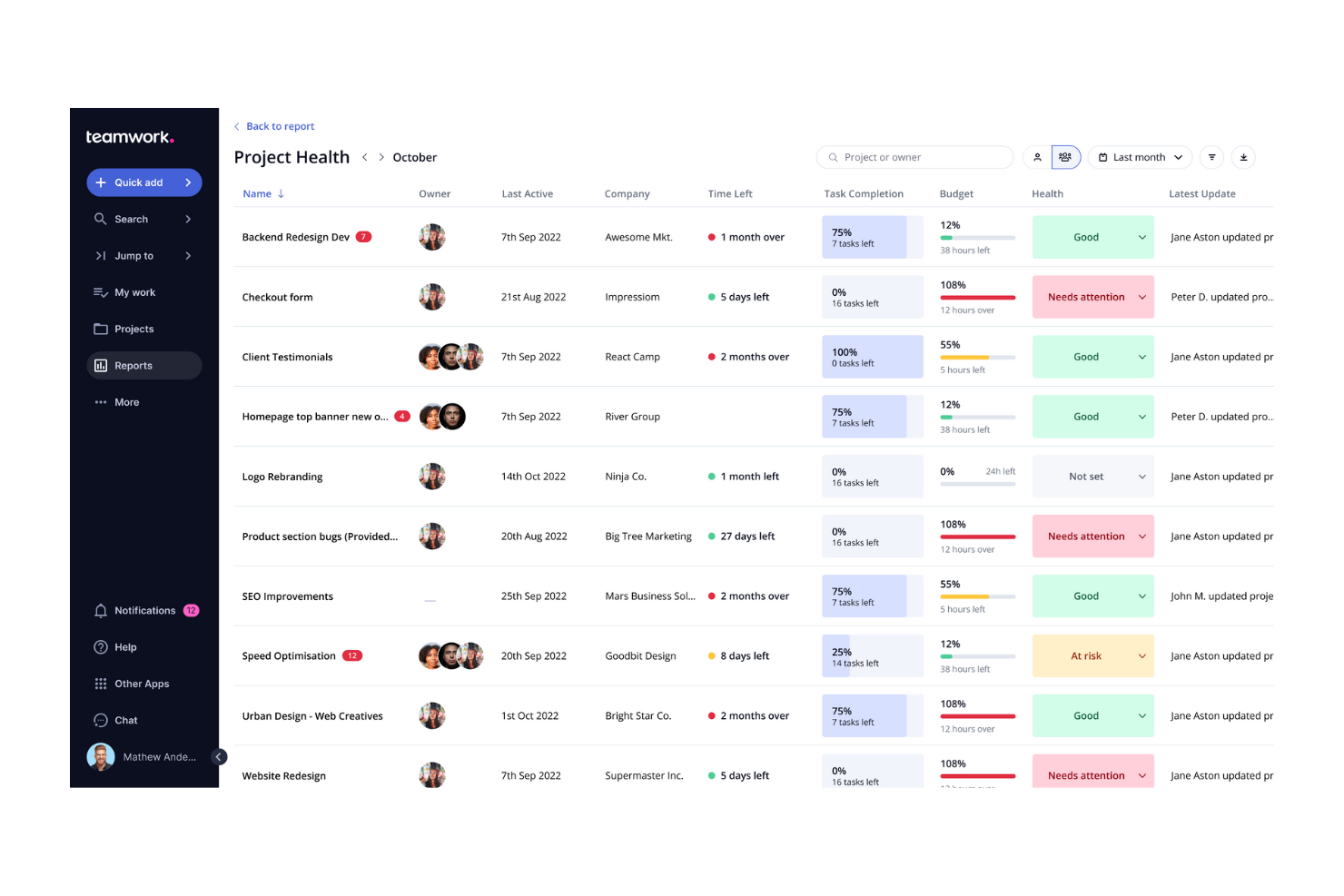
Teamwork.com è una piattaforma di gestione dei progetti progettata per agenzie, società di consulenza e team di servizi che necessitano di strumenti potenziati dall’IA per organizzare progetti, gestire attività e mantenere il lavoro dei clienti in linea.
Per chi è migliore Teamwork.com?
Teamwork.com è ideale per agenzie e team di servizi orientati al cliente che gestiscono più progetti e necessitano di flussi di lavoro strutturati per mantenere l’organizzazione.
Perché ho scelto Teamwork.com
Teamwork.com si è guadagnato un posto nella mia lista grazie alla sua capacità di facilitare la collaborazione con i clienti senza aggiungere complessità al flusso di lavoro. La funzione Utenti Clienti consente di aggiungere un numero illimitato di clienti ai tuoi progetti senza costi aggiuntivi: possono lasciare commenti, registrare ore e contribuire alle attività, mentre tu controlli esattamente cosa possono vedere. Mi piace anche la vista Clienti, che raggruppa metriche chiave come redditività, ore fatturabili e stato di salute del progetto per ogni account cliente in un'unica dashboard, così non sei mai impreparato prima di una chiamata con il cliente. TeamworkAI può trasformare un brief caotico di un cliente in un progetto completamente strutturato con attività, tempistiche e suggerimenti di team in pochi secondi.
Caratteristiche principali di Teamwork.com
- Diagrammi di Gantt: Visualizza le tempistiche dei progetti, imposta dipendenze tra attività e monitora le scadenze su più progetti contemporaneamente.
- Automazioni workflow: Crea regole di automazione personalizzate per gestire i passaggi ripetitivi del tuo processo, oppure scegli dalla galleria di modelli di automazione predefiniti.
- Report sullo stato di salute dei progetti: Ottieni una panoramica di tutti i progetti attivi con indicatori di stato individuali per individuare i problemi prima che peggiorino.
- Moduli: Raccogli richieste e feedback da clienti o colleghi che vengono automaticamente convertiti in attività all’interno dei tuoi progetti.
Integrazioni di Teamwork.com
Le integrazioni includono Slack, ChatGPT, Microsoft Office, Harvest, DropBox, Google Drive, Box, BugHerd, Xero e HubSpot.
Cosa è gratuito?
Teamwork.com offre un piano gratuito per sempre con funzionalità limitate per un massimo di 5 utenti e 2 progetti. Alcune funzionalità avanzate e integrazioni sono disponibili solo sui piani a pagamento.
Pros and Cons
Pros:
- Monitoraggio dettagliato dei progetti
- Accesso e feedback dei clienti
- Strumenti avanzati di reportistica
Cons:
- Funzionalità limitate nel piano gratuito
- Opzioni di automazione limitate
Altri strumenti gratuiti di gestione dei progetti con IA
Ecco alcune ulteriori opzioni di strumenti di gestione dei progetti con IA che offrono anch’essi piani o prove gratuite. Se non hai trovato quello che cercavi sopra, dai un’occhiata a questi:
- Jira
Ideale per lo sviluppo agile
- Project Insight
Ideale per la gestione di portafogli progetti
- Bitrix24
Ideale per CRM integrato
- Odoo
Ideale per l’integrazione modulare
- Project Libre
Ideale per progetti open source
- Miro
Ideale per la collaborazione visiva potenziata dall'IA
- Smartsheet
Ideale con controlli di sicurezza di livello aziendale
- GoodDay
Ideale per spazi di lavoro personalizzabili


Come valuto le piattaforme gratuite di gestione progetti con AI
Valuto ogni strumento su due livelli: i criteri di base che ne qualificano l'inserimento nell'elenco e i fattori differenzianti che contano quando un responsabile di team remoto ha bisogno di una bozza automatica di piano di progetto grazie all'AI gratuitamente.
Funzionalità principali (Requisiti fondamentali per questa lista)
Quando seleziono gli strumenti per la mia lista, assegno a ciascuno un punteggio da 0 (non offre la funzionalità) a 5 (eccelle in quest'area) per ogni funzionalità principale elencata di seguito. Successivamente, calcolo il punteggio totale dello strumento in percentuale. Ogni piattaforma deve raggiungere un punteggio minimo totale del 65% per essere considerata.
- Disponibilità piano gratuito: Verifico se lo strumento offre davvero un piano gratuito, e non solo una prova a tempo, e se dà alle piccole squadre abbastanza flessibilità per gestire progetti reali con funzionalità AI incluse.
- Funzionalità AI native: Strumenti come ClickUp e Asana hanno l'AI integrata, quindi cerco capacità proprie della piattaforma come generazione automatica di task o riepiloghi, invece di una semplice integrazione API di terze parti.
- Gestione di task e progetti: Valuto se si possono creare task con assegnatari, scadenze, sotto-attività e dipendenze—gli elementi base per pianificare un lancio prodotto o un ciclo sprint.
- Viste multiple dei progetti: Che sia una bacheca Kanban per uno sprint di design o una timeline per una consegna a un cliente, cerco almeno due o tre tipologie di viste disponibili nel piano gratuito.
- Collaborazione di squadra: La vera collaborazione prevede commenti, menzioni @ e spazi condivisi. Controllo che gli utenti del piano gratuito possano invitare membri del team e lavorare insieme senza immediati limiti di posti.
- Automazione AI e workflow: Cerco automazioni AI-driven come la generazione automatica di sotto-task da una breve descrizione o il cambio automatico di stato al verificarsi di certe condizioni, non solo regole base if-then.
Dopo aver identificato gli strumenti che soddisfano questi criteri, considero ciò che differenzia ciascuna piattaforma.
Fattori differenzianti (Cosa distingue i fornitori)
Ecco come confronto le varie piattaforme:
Funzionalità distintive
Per me è fondamentale la creazione di progetti tramite linguaggio naturale. Uno strumento che mi permette di scrivere "programma il redesign di un sito web in sei sprint" e genera automaticamente la suddivisione in task, fa risparmiare ore di lavoro manuale. Cerco anche insight predittivi sui rischi: AI che segnala scadenze in slittamento o membri del team sovraccarichi prima che diventino un ostacolo. Per i team remoti, un assistente AI alle riunioni che estrae i punti d'azione dalle trascrizioni delle chiamate e li trasforma in task assegnati colma il divario tra conversazione ed esecuzione.
Oltre le funzionalità
La privacy dei dati e la governance dell'AI sono cruciali quando i dati di progetto del tuo team alimentano un modello AI. Controllo se i fornitori spiegano come vengono gestiti i prompt e i contenuti dei progetti e se c'è la possibilità di rinunciare all'addestramento dei modelli. Un altro fattore chiave è la profondità di integrazione: uno strumento gratuito che si collega a Slack, GitHub o Google Workspace mantiene il flusso di lavoro intatto senza costosi upgrade. Valuto anche la trasparenza del piano gratuito, soprattutto se limiti d'uso dell'AI e vincoli di posti sono esplicitati dall'inizio, così che i team non rimangano spiazzati a metà progetto.
Come scegliere uno strumento gratuito di gestione dei progetti con IA
Le funzionalità complesse e i diversi livelli di prezzo possono rendere difficile capire cosa offra realmente uno strumento gratuito di gestione dei progetti con IA. Per aiutarti a rimanere sulla buona strada mentre scegli il software giusto, ecco alcuni fattori chiave da considerare:
| Fattore | Cosa considerare |
|---|---|
| Ambito dell'offerta gratuita | Controlla cosa è incluso nel piano gratuito. Verifica le limitazioni relative a funzionalità, utenti e progetti per assicurarti che soddisfi le esigenze del tuo team senza costi imprevisti. |
| Scalabilità | Assicurati che lo strumento possa crescere insieme al tuo team. Considera se offre piani a pagamento con funzionalità che supportano progetti più grandi e un numero maggiore di utenti man mano che il team si espande |
| Integrazioni | Verifica se lo strumento si collega agli altri software che utilizzi. Le integrazioni con strumenti come Slack, Google Workspace o Trello possono migliorare la produttività ottimizzando i flussi di lavoro |
| Facilità d'uso | Valuta l'interfaccia utente e la curva di apprendimento. Uno strumento facile da usare farà risparmiare tempo al team e ridurrà le esigenze di formazione |
| Personalizzazione | Determina se puoi adattare lo strumento al tuo flusso di lavoro. Dashboard, flussi di lavoro e report personalizzabili possono aiutare ad allineare lo strumento ai processi del tuo team. |
| Opzioni di assistenza | Considera il livello di assistenza fornito. L'accesso all'assistenza via chat, email o telefono può essere fondamentale, soprattutto quando inizi a utilizzare lo strumento o affronti problemi tecnici |
| Sicurezza | Valuta le misure di sicurezza adottate. Per i team che gestiscono dati sensibili, funzionalità come la crittografia e la conformità alle normative sulla protezione dei dati sono essenziali. |
| Accesso da dispositivi mobili | Controlla se lo strumento dispone di un'app mobile o di un sito ottimizzato per dispositivi mobili. Ciò consente ai membri del team di gestire i progetti ovunque si trovino e aumenta flessibilità e reattività |
Cosa sono gli strumenti gratuiti di gestione dei progetti con IA?
Gli strumenti gratuiti di gestione dei progetti con IA sono piattaforme software che aiutano i team a pianificare, monitorare e gestire il lavoro in modo più efficiente grazie alle funzionalità di IA. Di solito offrono piani o versioni di prova gratuiti con funzionalità di base presenti anche nei software di gestione delle attività, come il monitoraggio delle attività, la collaborazione tra team e la creazione di report.
Questi strumenti sono utili per project manager, responsabili di team e freelance che devono tenere sotto controllo attività e scadenze. Grazie a funzionalità come l'automazione delle attività, gli aggiornamenti in tempo reale e l'integrazione con altre app, rendono più semplice gestire i carichi di lavoro e mantenere tutti sincronizzati.
Funzionalità degli strumenti gratuiti di gestione dei progetti con IA
Di seguito sono elencate le funzionalità comunemente presenti negli strumenti di gestione dei progetti con IA e quelle generalmente incluse nei piani gratuiti rispetto a quelli a pagamento.
Funzionalità generalmente gratuite degli strumenti di gestione dei progetti con IA
- Gestione delle attività: consente di creare e assegnare attività e aiuta i team a rimanere organizzati e nei tempi previsti.
- Strumenti di collaborazione: offre funzionalità di chat e condivisione dei file per facilitare la comunicazione e il coordinamento del team.
- Monitoraggio dei progetti: aiuta a controllare i progressi e le scadenze per assicurarsi che i progetti vengano completati nei tempi previsti.
- Report di base: offre report semplici per monitorare le metriche dei progetti e le prestazioni del team.
- Supporto alle integrazioni: si collega ad app popolari come Slack e Google Drive per migliorare le funzionalità e ottimizzare i flussi di lavoro.
- Lavagne Kanban: consentono di visualizzare attività e flussi di lavoro per migliorare la gestione dei progetti e la definizione delle priorità delle attività.
- Monitoraggio del tempo: consente ai team di registrare le ore dedicate alle attività, facilitando l'analisi della produttività.
- Gestione dei documenti: archivia e condivide i documenti relativi ai progetti per mantenere informati tutti i membri del team.
Funzionalità generalmente a pagamento degli strumenti di gestione dei progetti con IA
- Report avanzati: fornisce analisi dettagliate e approfondimenti per aiutarti a prendere decisioni basate sui dati.
- Flussi di lavoro personalizzati: consente di creare processi su misura per soddisfare esigenze aziendali specifiche.
- Gestione delle risorse: ottimizza l'allocazione delle risorse del team per migliorare efficienza e produttività.
- Gestione del portafoglio progetti: offre strumenti per gestire più progetti contemporaneamente e avere una panoramica di tutte le attività dei progetti.
- Strumenti di automazione: ottimizza le attività e i processi ripetitivi per risparmiare tempo e ridurre gli errori.
- Diagrammi di Gantt: fornisce tempistiche dettagliate dei progetti e delle dipendenze per migliorare la pianificazione e l'esecuzione.
- Autorizzazioni basate sui ruoli: controlla l'accesso a informazioni e funzionalità sensibili per mantenere i dati al sicuro e protetti.
- Approfondimenti basati sull'IA: utilizza l'intelligenza artificiale per fornire raccomandazioni e previsioni volte al successo del progetto.
Vantaggi degli strumenti gratuiti di gestione dei progetti basati sull'IA
L'implementazione di strumenti gratuiti di gestione dei progetti basati sull'IA offre diversi vantaggi al tuo team e alla tua azienda. Eccone alcuni:
- Risparmio sui costi: accedi alle funzionalità essenziali di gestione dei progetti senza spendere denaro, una soluzione ideale per i team con budget limitati.
- Migliore collaborazione: utilizza gli strumenti integrati di chat e condivisione dei file per migliorare la comunicazione e il lavoro di squadra tra i team remoti o distribuiti.
- Maggiore organizzazione: gestisci efficacemente le attività e le scadenze, mantieni i progetti nei tempi previsti e riduci il rischio di non rispettare le scadenze.
- Flessibilità: personalizza i flussi di lavoro e i pannelli di controllo in base alle esigenze del tuo team, anche con le versioni gratuite, per mantenere l'allineamento con i tuoi processi.
- Facilità di integrazione: collegati alle app più diffuse per ampliare le funzionalità e creare un flusso di lavoro più integrato senza costi aggiuntivi.
- Gestione del tempo: monitora il tempo dedicato alle attività per individuare le inefficienze e migliorare la produttività senza dover investire in strumenti aggiuntivi.
- Scalabilità: inizia con un piano gratuito e passa alle funzionalità a pagamento man mano che il tuo team cresce, così potrai espanderti gradualmente senza un impegno finanziario immediato.
Costi e prezzi degli strumenti gratuiti di gestione dei progetti basati sull'IA
Capisco che tu sia arrivato a questo articolo cercando le migliori opzioni di strumenti di gestione dei progetti basati sull'IA disponibili gratuitamente. Tuttavia, poiché i piani gratuiti offrono solo funzionalità limitate, è molto probabile che in futuro dovrai passare a un piano superiore.
La tabella seguente riassume i piani più comuni, i relativi prezzi medi e le funzionalità generalmente incluse nelle soluzioni di gestione dei progetti basate sull'IA:
Tabella comparativa dei piani per gli strumenti di gestione dei progetti basati sull'IA
| Tipo di piano | Prezzo medio | Funzionalità comuni |
|---|---|---|
| Piano gratuito | $0 | Gestione delle attività, strumenti di collaborazione di base, monitoraggio limitato dei progetti e reportistica di base. |
| Piano personale | $5 - $15/utente/mese | Gestione avanzata delle attività, funzionalità di collaborazione migliori, più integrazioni e monitoraggio del tempo. |
| Piano aziendale | $15 - $25/utente/mese | Flussi di lavoro personalizzati, report e analisi dettagliati, gestione delle risorse e assistenza prioritaria. |
| Piano aziendale avanzato | $25 - $50/utente/mese | Funzionalità di sicurezza avanzate, gestione completa del portafoglio progetti, gestione dedicata dell'account e opzioni di personalizzazione complete. |
Domande frequenti sugli strumenti gratuiti di gestione dei progetti con IA
Ecco alcune risposte alle domande più comuni sugli strumenti gratuiti di gestione dei progetti con IA:
Come posso scegliere lo strumento gratuito di gestione dei progetti con IA più adatto?
Inizia identificando le esigenze e gli obiettivi specifici del tuo team. Considera le funzionalità di cui hai bisogno, come la gestione delle attività, la collaborazione e la reportistica. Valuta i limiti del piano gratuito, come il numero massimo di utenti o progetti, e assicurati che lo strumento possa adattarsi alla crescita del tuo team. Prova diverse opzioni per trovare quella più adatta.
Gli strumenti gratuiti di gestione dei progetti con IA sono sicuri?
La maggior parte degli strumenti gratuiti di gestione dei progetti con IA offre funzionalità di sicurezza di base, come la crittografia e l’autenticazione degli utenti. Tuttavia, i piani gratuiti potrebbero non includere le opzioni di sicurezza avanzate disponibili nelle versioni a pagamento. Valuta le misure di sicurezza offerte e assicurati che soddisfino i requisiti del tuo team per la protezione dei dati.
Posso integrare gli strumenti gratuiti di gestione dei progetti con IA con altri software?
Sì, molti strumenti gratuiti di gestione dei progetti con IA offrono integrazioni con app popolari come Slack, Google Workspace e Trello. Verifica le integrazioni specifiche disponibili nel piano gratuito per assicurarti che lo strumento scelto sia compatibile con quelli già in uso, poiché alcune integrazioni potrebbero essere limitate ai piani a pagamento.
Come gestiscono l'archiviazione dei dati gli strumenti gratuiti di gestione dei progetti con IA?
Gli strumenti gratuiti di gestione dei progetti con IA offrono generalmente una capacità di archiviazione limitata. Monitora l’utilizzo dei dati e valuta il passaggio a un piano superiore se le tue esigenze di archiviazione superano i limiti del piano gratuito. Alcuni strumenti offrono opzioni per l’integrazione con soluzioni di archiviazione esterne come Google Drive o Dropbox.
Quali opzioni di supporto sono disponibili per gli strumenti gratuiti di gestione dei progetti con IA?
Le opzioni di supporto per gli strumenti gratuiti di gestione dei progetti con IA includono generalmente l’accesso a risorse online come domande frequenti, forum della comunità e supporto via e-mail di base. La chat dal vivo e il supporto telefonico sono spesso riservati ai piani a pagamento. Valuta il supporto disponibile per assicurarti che soddisfi le esigenze del tuo team.
Gli strumenti gratuiti di gestione dei progetti con IA offrono l'accesso da dispositivi mobili?
Molti strumenti gratuiti di gestione dei progetti con IA offrono app mobili o siti web ottimizzati per dispositivi mobili, così puoi gestire i progetti ovunque ti trovi. Verifica se il piano gratuito include l’accesso da dispositivi mobili e se l’app supporta le funzionalità necessarie per rimanere produttivo lontano dalla scrivania.
E adesso?
Vuoi entrare in contatto con altri responsabili di progetto digitali per condividere risorse e buone pratiche? Iscriviti alla nostra comunità per accedere a oltre 100 modelli, materiali ed esempi e per entrare in contatto su Slack con centinaia di altri responsabili di progetto digitali.