

I 10 migliori strumenti di IA per la gestione dei progetti di costruzione 2026

Selezione dei migliori strumenti di intelligenza artificiale per la gestione dei progetti di costruzione


Gli strumenti di intelligenza artificiale per la gestione dei progetti di costruzione possono aiutarti a semplificare i programmi complessi, monitorare le spese e migliorare la comunicazione del team. Quando inevitabilmente ti trovi ad affrontare difficoltà come scadenze strette, budget limitati e continui problemi di coordinamento, questi strumenti possono farti risparmiare moltissimo tempo e fatica.
In questo articolo ti presenterò i migliori strumenti di intelligenza artificiale per la gestione dei progetti di costruzione. Ogni recensione è imparziale e basata su ricerche approfondite, per aiutarti a trovare la soluzione più adatta ai tuoi progetti e ai tuoi team.
Perché fidarsi delle nostre recensioni dei software
Testiamo e recensiamo software per la gestione dei progetti dal 2012. Essendo noi stessi responsabili di progetto, sappiamo quanto sia importante e difficile prendere la decisione giusta nella scelta di un software. Investiamo in ricerche approfondite per aiutare il nostro pubblico a prendere decisioni migliori sull'acquisto dei software.
Abbiamo testato più di 2.000 strumenti per diversi casi d'uso della gestione dei progetti e scritto oltre 1.000 recensioni complete di software. Scopri come garantiamo la trasparenza & dai un'occhiata alla nostra metodologia di recensione dei software.
Tabella comparativa: strumenti di intelligenza artificiale per la gestione dei progetti di costruzione
Questa tabella comparativa riassume i dettagli dei prezzi degli strumenti di intelligenza artificiale per la gestione dei progetti di costruzione che ho selezionato:
| Tool | Best For | Trial Info | Price | ||
|---|---|---|---|---|---|
| 1 | Ideale per dashboard personalizzabili | Prova gratuita di 14 giorni + piano gratuito disponibile | Da $9/utente/mese (fatturazione annuale) | Website | |
| 2 | Migliore con una piattaforma a database unico | Demo gratuita disponibile | Prezzo su richiesta | Website | |
| 3 | Ideale per la visibilità dei progetti in edilizia | Prova gratuita di 14 giorni + piano gratuito disponibile | Da $10/utente/mese (fatturazione annuale) | Website | |
| 4 | Ideale per il tracciamento di progetti multi-fase | Prova gratuita di 15 giorni + piano gratuito + demo gratuita disponibile | A partire da $4/utente/mese (fatturazione annuale) | Website | |
| 5 | Ideale per la collaborazione nei progetti | Demo gratuita disponibile | Prezzo su richiesta | Website | |
| 6 | Ideale per la pianificazione edilizia | Demo gratuita disponibile | Prezzo su richiesta | Website | |
| 7 | Ideale per la gestione documentale | Demo gratuita disponibile | Prezzo su richiesta | Website | |
| 8 | Ideale per il monitoraggio dei cantieri | Demo gratuita disponibile | Prezzo su richiesta | Website | |
| 9 | Ideale per la lettura dei piani | Prova gratuita di 7 giorni disponibile | Da $299/utente/mese (fatturato annualmente) | Website | |
| 10 | Ideale per l'analisi predittiva | Demo gratuita disponibile | Prezzo su richiesta | Website |


Recensioni dei migliori strumenti di intelligenza artificiale per la gestione dei progetti di costruzione
Di seguito trovi i miei riepiloghi dei migliori strumenti di intelligenza artificiale per la gestione dei progetti di costruzione. Analizzo funzionalità principali, vantaggi & svantaggi, integrazioni e casi d’uso ideali, così puoi trovare la soluzione più adatta alle esigenze e al budget della tua azienda.

Ideale per dashboard personalizzabili
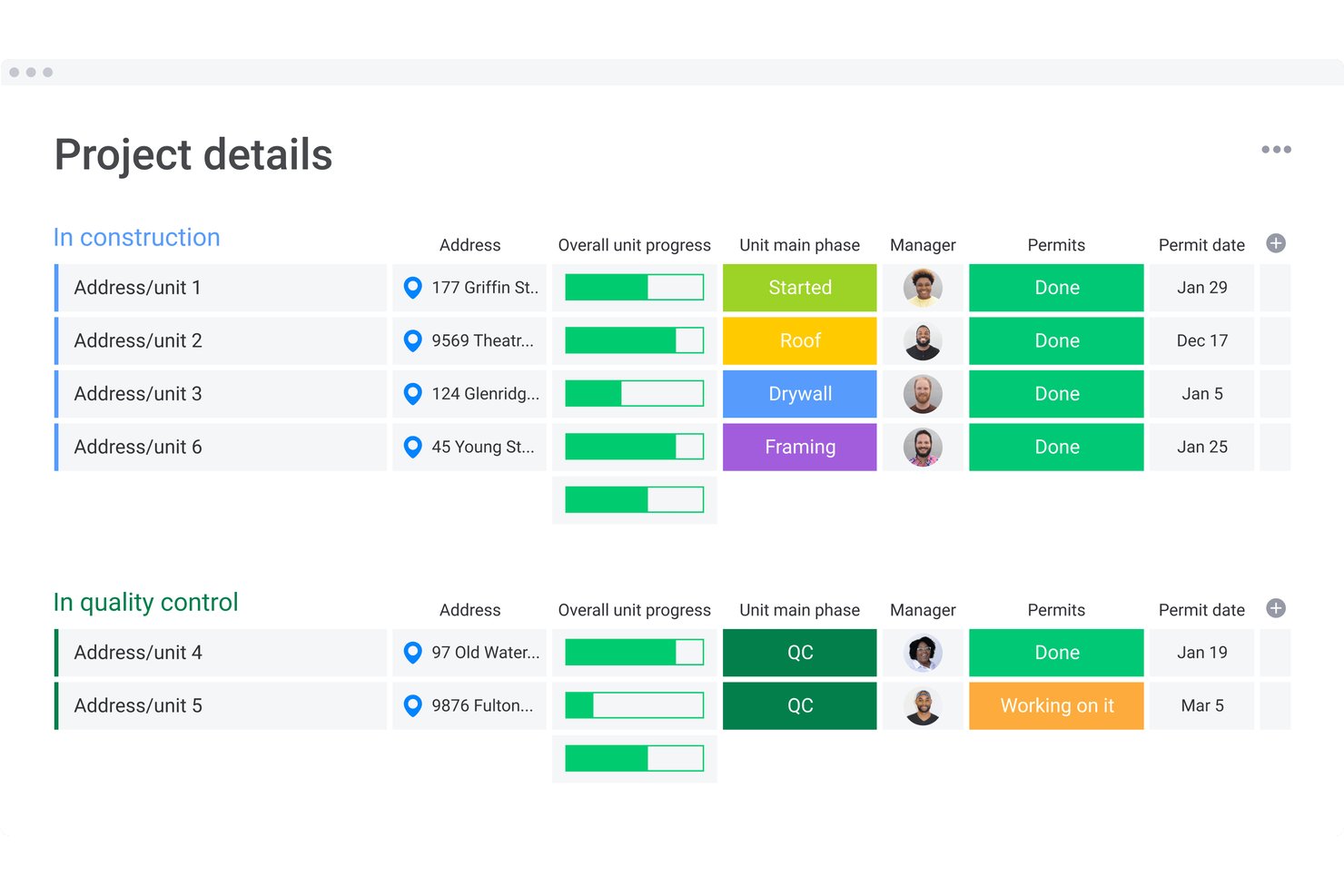
monday AI Workspace è una piattaforma configurabile per la gestione del lavoro che combina pianificazione assistita dall'IA, monitoraggio del budget, flussi di lavoro automatizzati e dashboard in tempo reale per coordinare progetti edilizi tra team d'ufficio e squadre sul campo.
Per chi è più indicato monday AI Workspace?
È particolarmente adatto ai team PMO del settore edilizio e ai dirigenti delle operazioni che gestiscono più progetti dal lato ufficio dell'azienda.
Perché ho scelto monday AI Workspace
Ho scelto monday AI Workspace tra i migliori perché la personalizzazione della dashboard è più approfondita rispetto alla maggior parte degli strumenti di questo settore. Posso sovrapporre cronologie Gantt, widget di riepilogo budget e tracker di milestone su più bacheche di progetto in un'unica vista. Gli agenti AI di monday poi evidenziano direttamente su queste dashboard gli avvisi di variazione dei costi e i segnali di ritardo, così il mio team non deve inseguire aggiornamenti di stato su report separati.
Funzionalità chiave di monday AI Workspace
- Agenti AI per il monitoraggio del budget: Segnalano automaticamente variazioni di costo e mettono in evidenza tendenze tra i progetti edilizi attivi.
- Promemoria automatici delle milestone: Invia notifiche ai membri del team quando si avvicinano milestone critiche del progetto.
- Bacheche per l'allocazione delle risorse: Mappano e visualizzano gli incarichi di squadre, attrezzature e materiali per ogni fase del progetto.
- Automazione personalizzata dei flussi di lavoro: Impostano trigger condizionali per attività e approvazioni senza usare il codice, adattando i processi alle esigenze variabili dei cantieri.
Integrazioni di monday AI Workspace
monday AI Workspace offre centinaia di integrazioni native, tra cui Slack, Google Workspace, Microsoft 365, Salesforce, Jira, GitHub, Zoom, Dropbox, HubSpot e Zendesk. Supporta anche Zapier e mette a disposizione un'API per integrazioni personalizzate.
Pros and Cons
Pros:
- Configurazione di dashboard e bacheche altamente flessibile
- Gli agenti AI riducono la rendicontazione manuale dello stato
- Si adatta a portfolio di più progetti
Cons:
- Non progettato specificamente per i flussi di lavoro dell'edilizia
- Acquisizione limitata di dati di cantiere nelle funzioni native
New Product Updates from monday AI Workspace
monday AI Workspace Adds Human Approval Routing
monday AI Workspace adds a human-in-the-loop approval block to AI Workflows, sending approval requests and routing workflow paths based on responses. For more information, visit monday AI Workspace's official site.

CMiC
Migliore con una piattaforma a database unico

CMiC offre una piattaforma unificata di gestione delle costruzioni progettata per appaltatori e team di progetto impegnati in costruzioni complesse. Il sistema integra il controllo dei progetti, la gestione finanziaria e le operazioni di cantiere in un unico luogo, aiutando i team a ridurre i silos di dati e a migliorare il processo decisionale. Se hai bisogno di una soluzione che colleghi i flussi di lavoro del progetto con analisi e automazioni in tempo reale, CMiC è pensato per te.
Per chi è più adatto CMiC?
CMiC è particolarmente indicato per imprese di costruzione di medie e grandi dimensioni e appaltatori che necessitano di una piattaforma integrata per gestire progetti, finanze e operazioni sul campo.
Perché ho scelto CMiC
Per i team di gestione di progetti edili che richiedono dati affidabili e in tempo reale in ogni fase del progetto, ho scelto CMiC per la sua piattaforma a database unico. Questa architettura unificata consente di archiviare tutti i dati relativi a progetto, finanza e cantiere in un solo luogo, riducendo errori ed eliminando la necessità di trasferimenti manuali di dati. Apprezzo come questa impostazione favorisca le analisi basate sull'intelligenza artificiale, permettendo al sistema di analizzare informazioni aggiornate da ogni flusso di lavoro senza silos di dati. Con tutto centralizzato, i team possono prendere decisioni più rapide e informate e mantenere coerenza tra i vari progetti.
Caratteristiche principali di CMiC
Altre funzionalità di CMiC che supportano la gestione dei progetti edili includono:
- Gestione RFI e sottomissioni: Traccia, gestisci e rispondi alle richieste di informazioni e alle sottomissioni direttamente all'interno della piattaforma.
- Applicazioni mobili per il cantiere: Permetti alle squadre in campo di accedere ai dati di progetto, inviare resoconti giornalieri e aggiornare l'avanzamento da qualsiasi cantiere.
- Monitoraggio delle varianti: Tieni sotto controllo e gestisci le varianti collegate agli ordini di modifica grazie a flussi di approvazione integrati e tracciabilità completa.
- Pianificazione delle risorse: Assegna manodopera, attrezzature e materiali su più progetti utilizzando uno strumento di pianificazione centralizzato.
Integrazioni di CMiC
Le integrazioni includono SmartBarrel, Procore, Viewpoint, Plexxis, ComputerEase, Sage, Foundation, Power BI, Oracle Cloud e Arcoro.
Pros and Cons
Pros:
- Offre controlli avanzati su finanze e costi
- Supporta tracciabilità dettagliata per la conformità
- Include strumenti integrati di previsione e pianificazione delle risorse
Cons:
- Le funzioni dell'app mobile sono limitate rispetto al desktop
- La creazione di report personalizzati può risultare complessa

Wrike
Ideale per la visibilità dei progetti in edilizia

Wrike è una piattaforma di gestione progetti progettata per team di costruzione e appaltatori che devono coordinare progetti complessi, gestire risorse e mantenere tutti allineati con aggiornamenti in tempo reale e automazione basata sull'intelligenza artificiale.
Per Chi è Ideale Wrike?
Wrike è particolarmente adatto per aziende di costruzione di medie e grandi dimensioni che necessitano di un controllo centralizzato dei progetti tra più team, cantieri e flussi di lavoro.
Perché Ho Scelto Wrike
Wrike merita un posto nella mia lista per la sua gestione eccellente della visibilità dei progetti in contesti edilizi complessi e su più fasi. Apprezzo in particolare i cruscotti in tempo reale, che permettono al mio team di visualizzare immediatamente lo stato delle attività, la distribuzione del carico di lavoro e la salute complessiva del progetto, senza dover esaminare fogli di calcolo. Wrike Copilot aggiunge una dimensione in più: lo utilizzo per individuare in tempo reale le attività a rischio e segnalare i colli di bottiglia prima che causino ritardi. Anche la visualizzazione con diagrammi di Gantt è fondamentale per monitorare le dipendenze tra i vari flussi di lavoro che si sovrappongono nei cantieri attivi.
Funzionalità Principali di Wrike
- Moduli di richiesta personalizzati: Crea moduli dinamici che generano automaticamente attività, flussi e progetti quando vengono inviati dai membri del team o da stakeholder esterni.
- Prenotazione risorse: Prenota membri del team o ruoli specifici per determinate attività e verifica la disponibilità prima di assegnare il lavoro sui cantieri attivi.
- Generatore di agenti AI: Crea e distribuisci agenti AI senza codice per gestire il monitoraggio dei rischi, l'assegnazione delle risorse e la sintesi degli aggiornamenti di stato nei tuoi flussi di lavoro.
- Wrike Document Editor: Modifica allegati direttamente nelle attività senza doverli scaricare, con le nuove versioni salvate automaticamente sull'attività.
Integrazioni Wrike
Le integrazioni includono Salesforce, Microsoft Teams, Google Drive, Microsoft SharePoint, Zoom, QuickBooks, Power BI, Tableau, Miro e Adobe Creative Cloud.
Pros and Cons
Pros:
- L'IA generativa redige e modifica testi
- Previene i rischi di progetto in modo proattivo
- Suggerisce automaticamente la priorità delle attività
Cons:
- Le funzionalità avanzate di IA richiedono un piano a pagamento
- Preoccupazioni per la privacy dei dati con l'IA
New Product Updates from Wrike
Wrike Adds Klaxoon MCP Integration
Wrike’s Klaxoon MCP integration is now generally available, enabling AI agents to navigate between Wrike tasks and attached whiteboards, read task context, and manage whiteboard attachments via API. For more information, visit Wrike's official site.

Ideale per il tracciamento di progetti multi-fase

Zoho Projects è una piattaforma di gestione dei progetti per team edili e appaltatori che consente di coordinare compiti, pianificazioni e risorse su costruzioni complesse e multi-fase.
Per chi è più indicato Zoho Projects?
Zoho Projects è particolarmente adatto per le imprese edili di piccole e medie dimensioni che gestiscono più progetti simultanei con scadenze e dipendenze che si sovrappongono.
Perché ho scelto Zoho Projects
Zoho Projects guadagna il suo posto nella mia shortlist grazie all'ottima gestione del tracciamento di progetti multi-fase, anche in presenza di molte dipendenze. Mi piace il fatto che sia possibile impostare le dipendenze direttamente all'interno dei diagrammi di Gantt, così se una fase subisce un ritardo, la pianificazione a valle si aggiorna visivamente in tempo reale. La funzionalità baseline di progetto ti permette di acquisire uno snapshot del piano originale in qualsiasi fase e confrontarlo con i progressi reali, aiutando a individuare deviazioni di programma prima che si accumulino. La dashboard del portafoglio mi consente di monitorare più progetti attivi affiancati, tenendo sotto controllo budget, stato dei compiti e responsabilità senza dover cambiare continuamente vista.
Funzionalità principali di Zoho Projects
- Grafico di utilizzo delle risorse: Visualizza il carico di lavoro del team tra compiti e progetti per individuare il sovraccarico prima che ritardi una fase.
- Rilevazione tempi e timesheet: Registra ore fatturabili e non direttamente sui compiti ed esporta i timesheet per paghe o fatturazione al cliente.
- Issue tracker: Segnala, assegna e risolvi problemi o difetti sul sito con livelli di priorità, date di scadenza e tracciamento dello stato.
- Gestione documentale: Allega disegni, contratti e specifiche direttamente ai compiti e conservali in una cartella di progetto centralizzata.
Integrazioni di Zoho Projects
Le integrazioni includono Zoho CRM, Zoho People, Zoho Desk, Zoho Analytics, Google Calendar, Microsoft Teams, Dropbox, Github, Slack e Zendesk.
Pros and Cons
Pros:
- Potenti automazioni e personalizzazione dei flussi di lavoro
- Rilevazione tempi e fatturazione integrata
- Prezzi accessibili per team in crescita
Cons:
- Interfaccia con curva di apprendimento più ripida
- L'esperienza mobile è meno completa
New Product Updates from Zoho Projects
Zoho Projects Adds CodeX Scripts for Custom Modules
Zoho Projects now supports CodeX Scripts for custom modules, enabling conditional logic and rules for creating, updating, and deleting records. For more information, visit Zoho Projects' official site.
 .
.
Procore
Ideale per la collaborazione nei progetti

Procore è una piattaforma di gestione delle costruzioni progettata per appaltatori generali, imprese specialistiche e proprietari che hanno bisogno di coordinare progetti complessi, gestire documenti e ottenere approfondimenti guidati dall'IA per mantenere i flussi di lavoro dell'edilizia sulla giusta strada.
Per chi è Procore?
Procore è particolarmente adatto per aziende edili di medie e grandi dimensioni che gestiscono progetti con più parti coinvolte in ambiti di appalti generali, lavori specialistici e costruzioni guidate dal committente.
Perché ho scelto Procore
Procore è una delle mie prime scelte perché gestisce molto bene la collaborazione tra aziende nei progetti di costruzione. Apprezzo particolarmente la funzione Conversazioni, che unifica la messaggistica tra cantiere e ufficio in un unico thread legato direttamente al contesto del progetto: quando un subappaltatore segnala un problema in cantiere, tutto il team lo visualizza senza dover cercare tra le e-mail. Inoltre, il fatto che la licenza utenti di Procore sia illimitata permette a tutti i soggetti coinvolti, dal committente allo specialista, di essere presenti sulla piattaforma senza costi aggiuntivi per ogni utente. Inoltre, il livello Datagrid alimentato dall'IA consente al mio team di automatizzare l'instradamento delle RFI e i flussi di lavoro per le sottomissioni, evitando che la collaborazione si blocchi a causa di passaggi manuali.
Funzionalità principali di Procore
- Gestione dei disegni: Carica, gestisci le versioni e annota i disegni costruttivi direttamente in piattaforma con sincronizzazione in tempo reale tra campo e ufficio.
- Monitoraggio dei budget: Controlla i costi di progetto, impegni e varianti in una visualizzazione di budget in tempo reale collegata al programma dei lavori.
- Strumenti per ispezioni e qualità: Crea e assegna checklist di ispezione su dispositivi mobili per raccogliere osservazioni di campo e non conformità in cantiere.
- Integrazione con la programmazione: Collega il programma dei lavori a compiti, sottomissioni e RFI in modo che i ritardi emergano prima di impattare il percorso critico.
Integrazioni Procore
Le integrazioni includono Bluebeam, SharePoint, United Rentals, OpenSpace, Newforma, COMPASS by Bespoke Metrics, Document Crunch, innDex, Outbuild e Togal.ai.
Pros and Cons
Pros:
- Ottima collaborazione nei progetti
- Comunicazione efficace nel team
- Supporta la gestione delle attività
Cons:
- Curva di apprendimento ripida
- Configurazione iniziale complessa


ALICE utilizza l'intelligenza artificiale per aiutare imprese edili, project manager e pianificatori a ottimizzare i programmi di progetto, gestire le risorse e adattarsi ai cambiamenti, rendendo più semplice la consegna di progetti edilizi complessi nei tempi previsti e rispettando il perimetro del progetto.
Per chi è ALICE?
ALICE è particolarmente indicato per general contractor e pianificatori edili che lavorano su progetti di grande scala e complessità, dove la pianificazione e l'ottimizzazione delle risorse sono fondamentali.
Perché ho scelto ALICE
ALICE si guadagna un posto tra i migliori della mia lista grazie al suo approccio innovativo rispetto ai tradizionali strumenti CPM per la pianificazione edile. Invece di produrre un unico programma statico, il motore generativo di pianificazione di ALICE simula milioni di possibili sequenze di costruzione per suggerire il percorso più efficiente in termini di tempo e costi. Apprezzo in particolare l'agente Schedule Insights, che permette di 'chattare' con il proprio programma per ricevere raccomandazioni—utile quando si è nel bel mezzo di un progetto e si cercano risposte rapide. La possibilità di importare programmi esistenti da Oracle Primavera P6 o Microsoft Project e simulare subito scenari ipotetici su di essi significa che il mio team non deve ricominciare da zero per ottenere un reale valore di ottimizzazione.
Caratteristiche principali di ALICE
- Modellazione dell'allocazione delle risorse: Assegna e regola risorse di squadre, attrezzature e materiali tra le fasi di progetto per vedere come i cambiamenti influenzano il programma complessivo.
- Analisi di ottimizzazione dei costi: Confronta scenari di programma affiancati con relative proiezioni di costo per individuare la sequenza costruttiva più conveniente.
- Simulazione di rischio e ritardi: Modella l'impatto di possibili ritardi o cambiamenti dei vincoli prima che si verifichino, supportando le decisioni proattive.
- Integrazione BIM: Collega i modelli informativi dell'edificio direttamente ai dati di pianificazione per allineare il progetto 3D con la sequenza costruttiva.
Integrazioni ALICE
Le integrazioni includono Microsoft Project, Oracle Primavera P6 e Oracle Primavera Cloud.
Pros and Cons
Pros:
- Regolazioni in tempo reale dei programmi
- Simulazione completa degli scenari
- Concentrazione sulla consegna puntuale del progetto
Cons:
- Richiede accuratezza nell'inserimento dei dati
- Configurazione iniziale complessa


Kahua è una piattaforma di gestione dei progetti di costruzione creata per appaltatori generali, proprietari e responsabili di programma che necessitano di gestire flussi di lavoro complessi, documenti e la collaborazione durante l’intero ciclo di vita del progetto.
Per Chi è Ideale Kahua?
Kahua è particolarmente adatto ad appaltatori generali, proprietari e responsabili di programma che gestiscono programmi di costruzione su larga scala o multiprogetto che richiedono un controllo rigoroso dei documenti e un coordinamento tra i team.
Perché Ho Scelto Kahua
Ho scelto Kahua come uno dei migliori per la gestione documentale perché gestisce l’intero ciclo di vita dei documenti in un ambiente specifico per il settore delle costruzioni. Mi piace che RFIs, sottomissioni, punch list e report giornalieri convivano tutti nello stesso luogo, con instradamento automatico e una traccia di audit completa per ogni documento. Quando il mio team gestisce le sottomissioni, ad esempio, le visualizzazioni dello stato a colori e l’instradamento automatico delle approvazioni fanno sì che nulla venga trascurato. La sincronizzazione mobile offline è anche un vero punto di forza: i team in campo possono acquisire foto, osservazioni e report giornalieri in cantiere senza accesso a Internet e poi sincronizzare tutto quando tornano online.
Funzionalità Principali di Kahua
- kBuilder, app builder low-code: Crea e personalizza app e flussi di lavoro per il settore delle costruzioni direttamente all'interno di Kahua senza dipendere da sviluppatori o strumenti di terze parti.
- Dashboard analitiche basate su Power BI: Accedi a dashboard configurabili e in tempo reale per monitorare la salute del progetto, la situazione economica, le tappe fondamentali e i rischi in tutto il tuo portafoglio.
- Consolidamento dei dati di pianificazione rSchedule: Importa e consolida i dati di pianificazione da MS Project e Primavera P6 in una vista unica basata su Gantt con tracciamento delle milestone.
- Gestione del valore maturato: Tieni traccia in tempo reale del lavoro fatturato rispetto a quello completato per monitorare la performance finanziaria rispetto all’avanzamento del progetto.
Integrazioni Kahua
Le integrazioni includono Microsoft Teams, Outlook, Google Docs, Sage, SAP, Alfreso, DocuSign e Microsoft Dynamics 365.
Pros and Cons
Pros:
- Solida gestione documentale
- Supporta il monitoraggio dei progetti
- Condivisione dei documenti semplice
Cons:
- Curva di apprendimento per i nuovi utenti
- Accesso offline limitato


Buildots utilizza l'IA e la cattura del sito a 360° per aiutare i responsabili di cantiere, gli appaltatori generali e i team di progetto a monitorare l'avanzamento dei lavori, individuare tempestivamente i problemi e mantenere progetti complessi nei tempi previsti grazie a dati visivi e aggiornati in tempo reale.
Per chi è migliore Buildots?
Buildots è particolarmente indicato per appaltatori generali e responsabili di cantiere che gestiscono progetti commerciali o infrastrutturali su larga scala e necessitano di una visibilità automatizzata e basata sui dati sull'avanzamento in loco.
Perché ho scelto Buildots
Ho incluso Buildots nella mia selezione perché gestisce il monitoraggio dei cantieri tramite la cattura di immagini a 360° alimentata dall'IA. Gli operatori indossano telecamere fissate al casco durante le consuete passeggiate in cantiere e Buildots confronta automaticamente i filmati con i modelli BIM e con i cronoprogrammi per segnalare eventuali deviazioni. Mi piace che evidenzi problemi come lavori incompleti o installazioni fuori sequenza senza richiedere input manuali. Il rilevamento automatico dei progressi permette al mio team di individuare problemi praticamente in tempo reale, evitando così di scoprirli settimane dopo durante le revisioni formali.
Caratteristiche principali di Buildots
- Previsione dei ritardi: Buildots utilizza l'analisi predittiva per segnalare potenziali rallentamenti prima che influiscano sulla tua tempistica, offrendo il tempo necessario per intervenire.
- Pianificatore attività: Stabilisci piani settimanali basati su dati reali di avanzamento, monitora gli impegni degli operatori e controlla i tassi di completamento delle tappe fondamentali in tutto il progetto.
- Assistente Dot AI: Fai domande in linguaggio naturale sui progressi del progetto e ottieni risposte supportate dai dati in pochi secondi, senza dover cercare nei dashboard.
- Monitoraggio remoto dei progetti: Accedi agli aggiornamenti dal vivo sull'avanzamento e alle immagini del cantiere da qualsiasi luogo, così da poter gestire più progetti anche senza essere fisicamente in loco.
Integrazioni di Buildots
Nessuna integrazione nativa elencata.
Pros and Cons
Pros:
- Monitoraggio in tempo reale in cantiere
- Monitoraggio accurato dei progressi
- Rilevamento precoce delle discrepanze
Cons:
- Dipendenza dalla qualità dei dati raccolti in cantiere
- Curva di apprendimento per i nuovi utenti


Togal.AI utilizza l'intelligenza artificiale per aiutare i professionisti dell'edilizia e i preventivisti ad automatizzare la lettura dei piani, velocizzare i processi di computo metrico e ridurre gli errori manuali nei flussi di lavoro di gestione dei progetti.
A chi è rivolto Togal.AI?
Togal.AI è particolarmente indicato per preventivisti e team di pre-costruzione che devono gestire un grande volume di disegni con rapidità e precisione.
Perché ho scelto Togal.AI
Togal.AI si è guadagnato un posto nella mia lista grazie all'efficacia con cui gestisce la lettura dei piani tramite IA, caratteristica che lo distingue nella gestione dei progetti di costruzione. Apprezzo il fatto che sia in grado di rilevare e misurare automaticamente spazi, pareti e aperture direttamente dai disegni caricati, eliminando la necessità di tracciare manualmente, operazione che rallenta la fase di pre-costruzione. Il mio team può confrontare le revisioni dei disegni fianco a fianco; così, quando un set viene aggiornato durante il progetto, possiamo vedere immediatamente cosa è cambiato senza dover rifare l'intero computo.
Funzionalità principali di Togal.AI
- Togal.CHAT: Un assistente IA integrato nella piattaforma che consente di porre domande sui piani, verificare le quantità e redigere RFP direttamente dal set di disegni.
- Ricerca di immagini e schemi tramite IA: Disegna un riquadro attorno a qualsiasi oggetto o simbolo su un piano e Togal cerca sull'intero set di disegni tutte le occorrenze corrispondenti, conteggiandole.
- Assegnazione automatica dei nomi e organizzazione dei documenti: Togal assegna automaticamente un nome e organizza i fogli dei piani caricati, così i grandi set di documenti vengono ordinati e etichettati senza l'input manuale.
- Esportazione dei dati: Esporta tutte le quantità misurate direttamente nel tuo software di preventivazione o in un foglio di calcolo quando il computo è terminato.
Integrazioni di Togal.AI
Le integrazioni includono Procore e ConWize.
Pros and Cons
Pros:
- Interpretazione rapida dei piani
- Generazione accurata del computo
- Riduce gli errori manuali
Cons:
- Richiede caricamenti dettagliati dei piani
- Elevata curva di apprendimento per i principianti


nPlan utilizza l'IA per aiutare i project manager e gli appaltatori del settore edile a prevedere rischi e ritardi analizzando i calendari storici dei progetti, rendendo più semplice individuare potenziali problemi prima che influenzino la consegna.
Per chi è più indicato nPlan?
nPlan è ideale per project manager e pianificatori del settore costruzioni che lavorano su progetti infrastrutturali o capitali di grandi dimensioni e complessità, dove il rischio di ritardi è elevato.
Perché ho scelto nPlan
nPlan si guadagna un posto nella mia shortlist perché la sua analisi predittiva si basa su qualcosa che la maggior parte degli strumenti semplicemente non ha: un dataset di addestramento composto da oltre 750.000 cronoprogrammi storici di progetti di costruzione. L'ho scelto soprattutto per come Insights Pro prevede le date di fine progetto analizzando ogni singola attività del tuo programma, e non solo un riepilogo generale. Quel livello di dettaglio è fondamentale quando si gestisce un programma complesso con decine di migliaia di attività. Apprezzo anche la funzione Driving Paths, che visualizza la criticità in tutto il tuo calendario e mette in evidenza i percorsi sub-critici che potrebbero trasformarsi in problemi prima ancora che vengano individuati da qualcuno.
Funzionalità principali di nPlan
- Analisi del rischio di pianificazione: Esegue simulazioni Monte Carlo sulla tua pianificazione di progetto per generare previsioni probabilistiche delle date di completamento.
- Confronto tra scenari: Modella molteplici scenari di pianificazione affiancati per valutare l'impatto di diverse decisioni di sequenza o assegnazione delle risorse.
- Attribuzione dei ritardi: Identifica quali attività e appaltatori stanno contribuendo maggiormente ai ritardi del programma nell'ambito di un progetto.
- Report di benchmarking: Confronta le prestazioni del tuo progetto con quelle di progetti storici simili per contestualizzare lo stato di salute del programma.
Integrazioni nPlan
Le integrazioni includono Oracle Primavera P6, Microsoft Project, Asta Powerproject e Power BI.
Pros and Cons
Pros:
- Forti capacità predittive
- Decisioni basate sui dati
- Valutazione completa dei rischi
Cons:
- Curva di apprendimento ripida
- Dipendenza dalla qualità dei dati storici
Altri strumenti di intelligenza artificiale per la gestione dei progetti di costruzione
Ecco alcune opzioni aggiuntive di strumenti di intelligenza artificiale per la gestione dei progetti di costruzione che non sono entrate nella mia selezione, ma che vale comunque la pena considerare:
- Trunk Tools
Ideale per paghe integrate
- Downtobid
Ideale per la stima dei costi
- ConWize
Ideale per la gestione delle gare d'appalto
- iFieldSmart
Ideale per la visualizzazione 3D
- Zepth
Ideale per la gestione del rischio
- Merlin AI
Ideale per piccoli team
- Miro
Ideale per la mappatura visiva dei progetti con intelligenza artificiale
- Smartsheet
Ideale per automazione dei flussi di lavoro
- GoodDay
Ideale per pianificare sprint


Come valuto gli strumenti di intelligenza artificiale per la gestione di progetti edili
Divido la mia valutazione in due livelli: la soglia minima che ogni strumento deve raggiungere—come la segnalazione predittiva dei rischi e l'AI per i documenti relativi agli RFI—e i fattori di differenziazione che distinguono una piattaforma dall'altra.
Funzionalità di base (Requisiti minimi per questa lista)
Queste funzionalità fondamentali fungono da criteri di accettazione per l'inclusione nella mia lista di strumenti di intelligenza artificiale per la gestione di progetti edili:
- Ottimizzazione della programmazione tramite AI: Valuto se lo strumento utilizza ML per prevedere ritardi e ri-sequenziare le attività critiche—invece di limitarsi a mostrare un diagramma di Gantt da aggiornare manualmente.
- Analisi predittiva dei rischi: Segnalare uno sforamento del budget dopo che è avvenuto non è sufficiente. Cerco modelli che valutino la probabilità di rischio nei parametri di costo, tempistiche e sicurezza.
- Gestione dei documenti: Controllo come la piattaforma gestisce RFI, presentazioni e tavole progettuali—se può classificare automaticamente i documenti, estrarre dati tecnici o confrontare revisioni dei disegni con l'AI.
- Intelligenza visiva sul cantiere: Le foto di avanzamento sono standard; che l'AI le interpreti non lo è. Valuto in che modo ogni strumento analizza foto di cantiere, riprese con droni o immagini a 360° per il monitoraggio dell'avanzamento.
- Moduli core della gestione progetti in edilizia: Lo strato di AI necessita di solide basi di PM. Cerco moduli nativi per l'edilizia come diari giornalieri, liste di controllo, varianti d'ordine e monitoraggio del budget.
- Integrazioni dati edili: La maggior parte dei team utilizza già Procore, Autodesk o Sage. Verifico la profondità delle integrazioni di ogni strumento—se la sincronizzazione è bidirezionale o se si limita ad importare un file CSV.
Valuto ogni fornitore su una scala da 0 (non offre la funzionalità) a 5 (eccelle in quell'ambito) per ogni criterio.
I fornitori devono ottenere un punteggio medio minimo per essere presi in considerazione nella mia lista. Da qui, considero cosa distingue veramente ogni piattaforma.
Fattori di differenziazione (Cosa distingue i fornitori)
Una volta selezionata la mia lista, confronto e metto a paragone i diversi fornitori nel settore degli strumenti AI per la gestione di progetti edili in questo modo:
Caratteristiche distintive
Cerco assistenti generativi basati su AI che possano rispondere a domande sui progetti e redigere RFI, accelerando i flussi di lavoro in cantiere e in ufficio. Anche l'integrazione BIM e 4D è fondamentale: considero quanto efficacemente l'AI colleghi modelli 3D a pianificazioni in tempo reale per individuare problemi di costruttibilità o visualizzare cambi nelle sequenze. Il computo metrico automatico si distingue quando la computer vision accelera la stima dei costi estraendo misure direttamente da progetti o modelli BIM, risparmiando ore per ogni gara.
Oltre le funzionalità
Qui la trasparenza dell'AI è importante. Valuto se uno strumento spiega il motivo di una segnalazione di rischio di ritardo, perché i PM non si fidano di raccomandazioni che non possono collegare a dati reali di progetto. Anche la rapidità di implementazione conta: i capicantiere e i partner coinvolti hanno bisogno di un avvio rapido, non di un roll-out di sei mesi. Valuto inoltre la struttura tariffaria, poiché i team edili cambiano dimensione a seconda del progetto. Modelli che fanno pagare per ogni collaboratore, subappaltatore o rappresentante del committente invitato possono diventare un vero problema di costo.
Come scegliere gli strumenti di intelligenza artificiale per la gestione dei progetti di costruzione
È facile perdersi in lunghi elenchi di funzionalità e strutture tariffarie complesse. Per aiutarti a rimanere concentrato mentre affronti il tuo processo di selezione del software, unico per le tue esigenze, ecco una lista di fattori da tenere a mente:
| Fattore | Cosa considerare |
|---|---|
| Scalabilità | Lo strumento può crescere insieme ai tuoi progetti? Considera se supporta l'aumento delle dimensioni dei progetti e del numero di membri del team senza problemi |
| Integrazioni | Funziona con gli strumenti che già utilizzi? Verifica la compatibilità con software fondamentali come piattaforme di gestione dei progetti o di comunicazione. |
| Personalizzazione | Puoi adattarlo ai tuoi flussi di lavoro? Cerca opzioni di personalizzazione che ti consentano di adattare le funzionalità alle tue esigenze specifiche. |
| Facilità d'uso | È intuitivo per il tuo team? Valuta l'interfaccia e la navigazione. Una curva di apprendimento ripida può rallentare l'adozione e la produttività. |
| Implementazione e onboarding | Quanto è fluida la transizione? Considera il tempo e le risorse necessari per la configurazione e la formazione. Cerca supporto disponibile, come tutorial o guide per l'onboarding. |
| Costo | Il prezzo è in linea con il tuo budget? Confronta i piani tariffari e verifica la presenza di eventuali costi nascosti. Assicurati che il valore corrisponda al costo. |
| Misure di sicurezza | I tuoi dati e progetti sono protetti? Verifica la presenza di crittografia, controlli degli accessi e conformità agli standard di settore per proteggere le informazioni sensibili. |
Cosa sono gli strumenti di IA per la gestione dei progetti di costruzione?
Gli strumenti di IA per la gestione dei progetti di costruzione sono soluzioni software che utilizzano l'intelligenza artificiale per aiutarti a pianificare, gestire e portare a termine i progetti in modo più efficiente. Assistono nella programmazione, nella stima dei costi e nella gestione dei rischi, oltre a fornire al tuo team informazioni più approfondite e a ridurre i ritardi.
Questi strumenti sono utilizzati da project manager, appaltatori e team sul campo per migliorare il coordinamento e il processo decisionale durante l'intero ciclo di vita del progetto.
Funzionalità degli strumenti di IA per la gestione dei progetti di costruzione
Quando selezioni gli strumenti di IA per la gestione dei progetti di costruzione, presta attenzione alle seguenti funzionalità chiave:
- Pianificazione dei progetti: Automatizza le tempistiche e assegna le risorse per mantenere i progetti in linea con i piani.
- Stima dei costi: Fornisce previsioni finanziarie accurate per aiutare a gestire efficacemente i budget.
- Gestione dei documenti: Organizza i file del progetto e li rende facilmente accessibili a tutti i membri del team.
- Gestione dei rischi: Identifica tempestivamente le potenziali difficoltà per ridurre al minimo interruzioni e ritardi.
- Collaborazione del team: Facilita la comunicazione e il coordinamento tra i membri del team per migliorare la produttività.
- Analisi in tempo reale: Offre informazioni sulle prestazioni e sull'avanzamento del progetto e aiuta a prendere decisioni consapevoli.
- Simulazione degli scenari: Consente agli utenti di visualizzare diversi risultati del progetto e scegliere l'approccio migliore.
- Integrazione con l'IoT: Si connette ai dispositivi intelligenti per raccogliere dati e migliorare il controllo del progetto.
- Dashboard personalizzabili: Consentono agli utenti di adattare la propria visualizzazione per concentrarsi sulle informazioni più rilevanti.
- Report automatizzati: Genera rapidamente report dettagliati per risparmiare tempo e mantenere la precisione.
Vantaggi degli strumenti di IA per la gestione dei progetti di costruzione
L'implementazione di strumenti di IA per la gestione dei progetti di costruzione offre diversi vantaggi al tuo team e alla tua azienda. Ecco alcuni dei vantaggi che puoi aspettarti:
- Maggiore efficienza: L'automazione di attività come la pianificazione e la creazione di report fa risparmiare tempo e riduce gli errori manuali.
- Migliore processo decisionale: Le analisi in tempo reale e la simulazione degli scenari offrono informazioni utili per prendere decisioni consapevoli.
- Risparmio sui costi: Stime accurate dei costi e gestione dei rischi aiutano a mantenere i progetti entro il budget ed evitare costosi sforamenti.
- Migliore collaborazione: Le funzionalità di collaborazione del team aiutano a garantire che tutti rimangano connessi e informati, aumentando la produttività.
- Riduzione dei rischi: Identificare tempestivamente i potenziali problemi riduce al minimo le interruzioni e mantiene i progetti in linea con i piani.
- Maggiore trasparenza: La gestione dei documenti e la reportistica offrono una visibilità chiara sull'avanzamento e sullo stato del progetto.
- Ottimizzazione delle risorse: Una pianificazione efficiente e l'integrazione con l'IoT garantiscono un utilizzo efficace delle risorse e riducono gli sprechi.
Costi e prezzi degli strumenti di IA per la gestione dei progetti di costruzione
La tabella seguente riassume i piani più comuni, i relativi prezzi medi e le funzionalità tipicamente incluse negli strumenti di IA per la gestione dei progetti di costruzione:
Tabella comparativa dei piani per gli strumenti di intelligenza artificiale per la gestione dei progetti edili
| Tipo di piano | Prezzo medio | Funzionalità comuni |
|---|---|---|
| Piano gratuito | $0/user/month | Pianificazione di base, gestione dei documenti e assistenza limitata |
| Piano personale | $10 - $30/user/month | Pianificazione avanzata, stima dei costi e analisi di base |
| Piano aziendale | $30 - $60/user/month | Collaborazione del team, gestione dei rischi e reportistica migliorata |
| Piano aziendale avanzato | $60 - $100/user/month | Dashboard personalizzabili, integrazione dell'IoT e assistenza clienti prioritaria |
Domande frequenti sugli strumenti di intelligenza artificiale per la gestione dei progetti edili
Ecco alcune risposte alle domande comuni sugli strumenti di intelligenza artificiale per la gestione dei progetti edili:
Come può essere utilizzata l'intelligenza artificiale nella gestione dei progetti edili?
L’intelligenza artificiale ti aiuta a gestire materiali e manodopera in modo più efficiente analizzando i dati del progetto per individuare gli sprechi e suggerire modi migliori per utilizzare le risorse. Questo porta a decisioni più intelligenti e migliora il funzionamento complessivo del progetto.
Qual è il miglior strumento di intelligenza artificiale per le imprese edili?
Il miglior strumento di intelligenza artificiale dipende dalle esigenze del tuo team. Strumenti come Procore e Buildertrend offrono funzionalità di intelligenza artificiale per aiutarti a gestire progetti, budget e comunicazione in un unico posto. Scegli quello che si adatta meglio al tuo flusso di lavoro e alle tue priorità.
L'intelligenza artificiale sostituirà la gestione dei progetti edili?
L’intelligenza artificiale non sostituirà i responsabili dei progetti edili; al contrario, ne supporterà il lavoro. Ti aiuta a gestire le catene di approvvigionamento analizzando i dati e prevedendo il fabbisogno di materiali. Sebbene l’intelligenza artificiale supporti il processo decisionale, la supervisione e l’esperienza umane restano essenziali.
In che modo gli strumenti di intelligenza artificiale migliorano la definizione del budget nei progetti edili?
Gli strumenti di intelligenza artificiale utilizzano i dati passati per prevedere i costi e individuare i rischi per il budget. Forniscono ai responsabili dei progetti informazioni utili per allocare le risorse con criterio e prevenire gli sforamenti. Ne risultano una definizione del budget più accurata e una migliore pianificazione finanziaria.
Gli strumenti di intelligenza artificiale possono aiutare a gestire la sicurezza nei cantieri?
Sì, gli strumenti di intelligenza artificiale possono migliorare la gestione della sicurezza analizzando i dati del cantiere per individuare potenziali pericoli. Forniscono informazioni predittive che aiutano a prevenire gli incidenti e a supportare la conformità alle norme di sicurezza. Questo approccio proattivo riduce i rischi e crea un ambiente di lavoro più sicuro.