

10 migliori software di gestione visiva dei progetti per il 2026

10 Elenco dei migliori software di gestione visiva dei progetti


Se ti è mai capitato di avere difficoltà a gestire informazioni frammentate, tempistiche poco chiare o il monitoraggio del lavoro tra diversi team, non sei il solo. È qui che entra in gioco il software visivo per la gestione dei progetti. Utilizzando dashboard interattive, report dinamici e flussi di lavoro intuitivi, questi strumenti ti aiutano ad avere una visione chiara e aggiornata in tempo reale dei tuoi progetti, a colpo d’occhio.
Tuttavia, con così tanti strumenti diversi che offrono funzionalità visive, capire quale sia il migliore per te può essere difficile. Pertanto, in questo articolo semplifico le cose, mettendo a frutto la mia esperienza nella gestione di progetti grandi e complessi e l’utilizzo di decine di diversi strumenti di gestione dei progetti, per offrirti questo elenco dei migliori software visivi per la gestione dei progetti.
Perché fidarsi dei nostri consigli sui software
Il nostro team testa e recensisce software dal 2012. In quanto project manager noi stessi, sappiamo quanto sia difficile — e importante — scegliere il software giusto.
Per questa guida, abbiamo valutato gli strumenti attraverso test pratici e ricerche indipendenti, assegnando un punteggio agli strumenti in base ai nostri criteri di selezione. Ci basiamo inoltre sulle competenze di leader di pensiero del settore e di professionisti attivi nella gestione dei progetti.
Le nostre recensioni riflettono il nostro giudizio editoriale umano, non un discorso di vendita.
Revisori esperti:
Tabella comparativa delle soluzioni software visive per la gestione dei progetti
| Tool | Best For | Trial Info | Price | ||
|---|---|---|---|---|---|
| 1 | Ideale per piano gratuito con codifica cromatica audace delle attività | 14 giorni di prova gratuita | Da $6/utente/mese | Website | |
| 2 | Migliore software collaborativo visivo per la gestione dei progetti | 14 giorni di prova gratuita | A partire da $9.80/utente/mese | Website | |
| 3 | Ideale per i report finanziari in tempo reale | Prova gratuita di 30 giorni | A partire da $22.50/utente/mese (minimo 5 utenti) | Website | |
| 4 | Ideale per la visualizzazione della pianificazione della capacità | Demo gratuita disponibile | Prezzi su richiesta | Website | |
| 5 | Ideale per visualizzare progetti di complessità variabile | Piano gratuito disponibile; prova gratuita di 15 giorni | A partire da $5/utente/mese | Website | |
| 6 | Ideale per la pianificazione visiva in stile foglio di calcolo | Prova gratuita di 30 giorni | A partire da $12/utente/mese | Website | |
| 7 | Ideale per oltre 15 visualizzazioni su un unico set di dati | ClickUp è gratuito con spazio di archiviazione limitato per un numero illimitato di utenti. | A partire da $10/utente/mese | Website | |
| 8 | Ideale per gestire progetti, risorse e finanze in un unico strumento | Prova gratuita di 14 giorni | Da $29/utente/mese | Website | |
| 9 | Ideale per il controllo aziendale con flessibilità operativa in prima linea | Prova gratuita di 30 giorni | A partire da $14 per utente/mese | Website | |
| 10 | Ideale per i report di analisi dell'intero portafoglio | Piano gratuito disponibile; prova gratuita di 14 giorni | Da $3/utente/mese | Website |


Panoramica delle 10 migliori soluzioni visive per la gestione dei progetti
Se ti è mai capitato di avere difficoltà a gestire informazioni frammentate, tempistiche poco chiare o il monitoraggio del lavoro tra diversi team, non sei il solo. È qui che entra in gioco il software visivo per la gestione dei progetti. Utilizzando dashboard interattive, report dinamici e flussi di lavoro intuitivi, questi strumenti ti aiutano ad avere una visione chiara e aggiornata in tempo reale dei tuoi progetti, a colpo d’occhio. Ecco una breve descrizione di ciascuno dei software visivi per la gestione dei progetti inclusi in questo elenco.

Ideale per piano gratuito con codifica cromatica audace delle attività
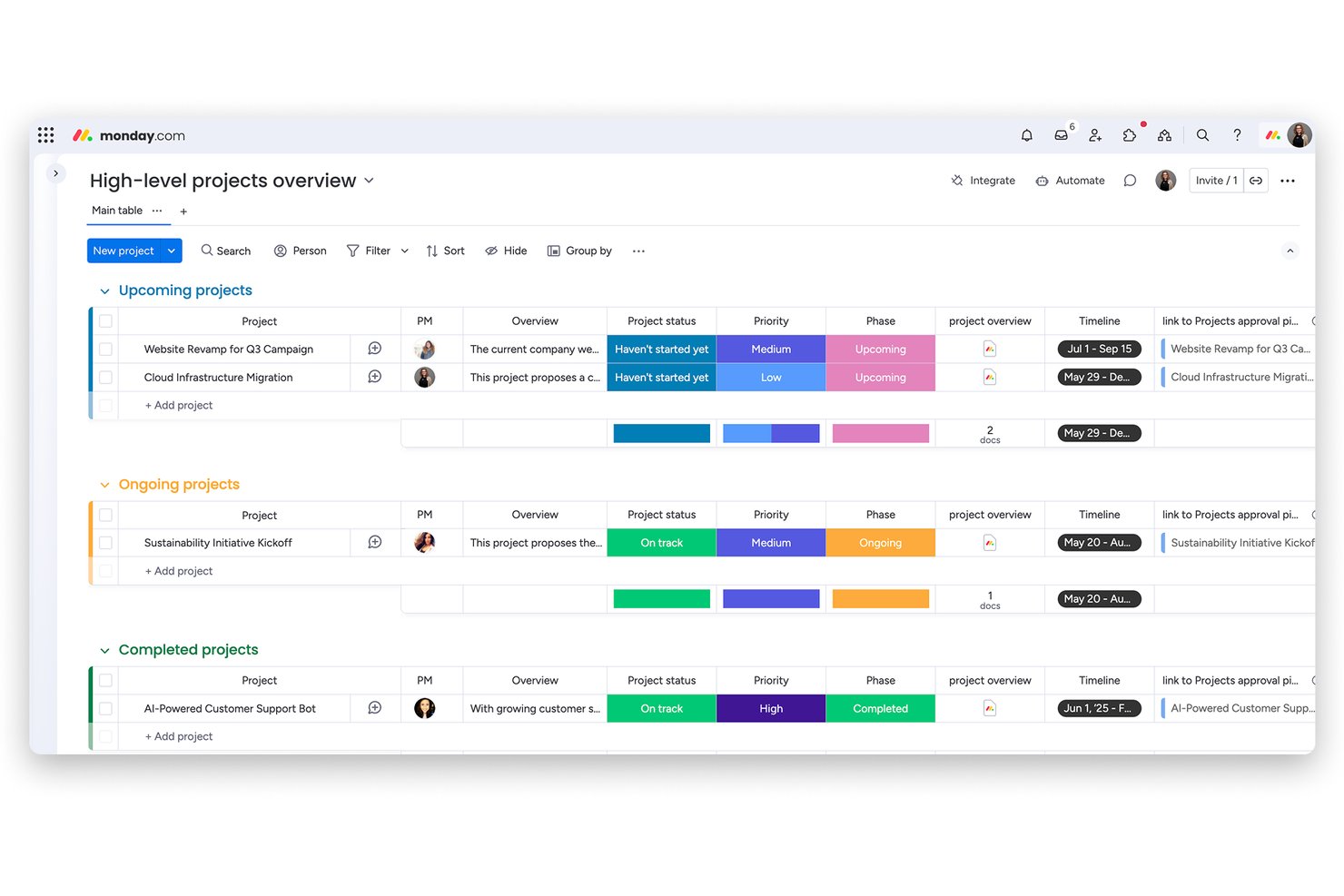
monday AI Workspace è una piattaforma visiva per la gestione del lavoro che combina bacheche di attività codificate a colori, cronologie Gantt, viste Kanban e dashboard potenziate dall'IA per aiutare i team a pianificare, monitorare e riportare i progetti tra diverse funzioni.
Per chi è ideale monday AI Workspace?
È particolarmente adatto ai team interfunzionali di aziende di medie dimensioni che hanno bisogno di uno strumento visivamente intuitivo per gestire più progetti senza pesanti configurazioni IT.
Perché ho scelto monday AI Workspace
monday AI Workspace merita un posto nella mia shortlist perché il piano gratuito offre un'esperienza realmente visiva, non un semplice elenco testuale ridotto. Si possono utilizzare fino a tre bacheche codificate a colori dove ogni colonna di stato corrisponde a un colore distinto, così stati delle attività come 'Bloccato', 'In corso' e 'Completato' sono subito riconoscibili per tutto il team. Apprezzo particolarmente che questi colori di stato siano completamente personalizzabili, così il mio team può creare un linguaggio visivo che rifletta le fasi reali del nostro flusso di lavoro.
Funzionalità principali di monday AI Workspace
- Dashboard alimentate dall'IA: Crea dashboard visive personalizzabili che sincronizzano i dati dei progetti in tempo reale da più bacheche.
- Viste Gantt e timeline drag-and-drop: Pianifica e modifica le attività visivamente, tra scadenze e traguardi, senza cambiare strumento.
- Automazione dei processi senza codice: Automatizza l'assegnazione dei compiti, le notifiche e i cambiamenti di stato con un builder visivo intuitivo.
- Monitoraggio portfolio nativo: Raccogli i progressi e gli aggiornamenti di stato da diverse bacheche in una singola vista portfolio di alto livello.
Integrazioni di monday AI Workspace
monday AI Workspace offre centinaia di integrazioni native e tramite marketplace, tra cui Slack, Google Workspace, Microsoft 365, Salesforce, HubSpot, Jira, GitHub e Zendesk. Supporta anche Zapier e fornisce un'API per integrazioni personalizzate.
Pros and Cons
Pros:
- Il piano gratuito include vere bacheche visive codificate a colori
- Più visualizzazioni di progetto si aggiornano in tempo reale
- L'IA genera automaticamente piani di progetto da richieste testuali
Cons:
- I diagrammi di Gantt sono disponibili solo nelle versioni a pagamento
- Le dashboard richiedono piani di livello superiore
New Product Updates from monday AI Workspace
monday AI Workspace Adds Human Approval Routing
monday AI Workspace adds a human-in-the-loop approval block to AI Workflows, sending approval requests and routing workflow paths based on responses. For more information, visit monday AI Workspace's official site.

Wrike
Migliore software collaborativo visivo per la gestione dei progetti
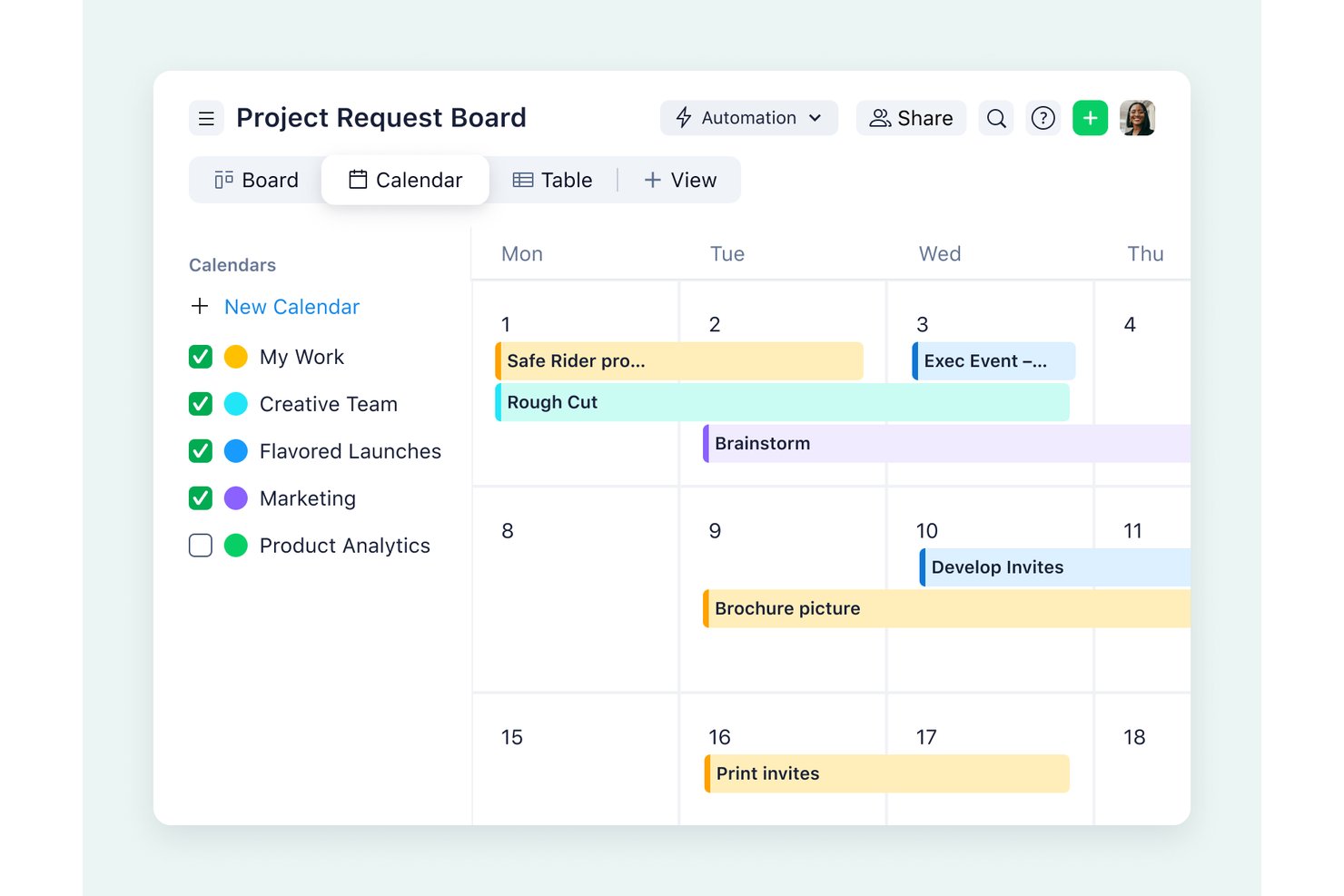
Wrike è una piattaforma visiva per la gestione dei progetti che riunisce diagrammi di Gantt, bacheche Kanban, viste del carico di lavoro e dashboard in tempo reale, oltre a funzionalità integrate per la revisione, flussi di approvazione e pianificazione automatizzata delle dipendenze.
Per chi è più adatto Wrike?
Wrike è particolarmente adatto ai responsabili di progetto e ai team leader di organizzazioni di medie e grandi dimensioni che necessitano di un monitoraggio delle dipendenze di livello aziendale, visibilità sul carico di lavoro e collaborazione interfunzionale in un unico ambiente.
Perché ho scelto Wrike
Wrike si è guadagnato un posto tra le migliori soluzioni della mia selezione perché la profondità dei suoi strumenti visivi collaborativi lo distingue davvero. Apprezzo il fatto che la revisione, le catene di approvazione e la modifica dei documenti in tempo reale siano disponibili accanto ai diagrammi di Gantt e alle mappe di calore del carico di lavoro in un unico spazio di lavoro. Quando il mio team esamina un elemento di una campagna, possiamo lasciare feedback visivi ancorati, sottoporlo a una catena di approvazione e vedere immediatamente come i ritardi nell'approvazione si ripercuotono sulle attività dipendenti nella sequenza temporale.
Funzionalità principali di Wrike
- Monitoraggio del percorso critico: Wrike evidenzia le attività che determinano direttamente la data di completamento del progetto, mostrando il margine totale e il margine libero per individuare i rischi relativi alla pianificazione prima che diventino un problema.
- Grafici del carico di lavoro: Visualizza a colpo d'occhio la capacità di ogni membro del team e riassegna le attività direttamente dal grafico per bilanciare i carichi di lavoro non uniformi.
- Moduli dinamici di richiesta: Raccogli le richieste di lavoro in arrivo tramite moduli di acquisizione personalizzabili che indirizzano automaticamente le attività al progetto o alla cartella corretti.
- Link pubblici ai diagrammi di Gantt: Condividi una sequenza temporale aggiornata e di sola visualizzazione con gli interlocutori esterni tramite un link protetto da password, senza che sia necessario un account Wrike.
Integrazioni di Wrike
Wrike supporta oltre 400 connettori preconfigurati, tra cui Jira, GitHub, Slack, Microsoft Teams, Google Workspace, Adobe Creative Cloud, Salesforce e Power BI. Offre inoltre un'API REST aperta per le integrazioni personalizzate; la sincronizzazione bidirezionale con Jira e GitHub richiede Wrike Sync.
Pros and Cons
Pros:
- Le dipendenze di Gantt riprogrammano automaticamente le attività collegate
- I grafici del carico di lavoro evidenziano gli squilibri di capacità tra i team
- La revisione collega il feedback visivo ai flussi di approvazione
Cons:
- Una configurazione complessa può rallentare l'inserimento dei team
- I pacchetti di licenze possono lasciare i piccoli team con più postazioni del necessario
New Product Updates from Wrike
Wrike Adds Klaxoon MCP Integration
Wrike’s Klaxoon MCP integration is now generally available, enabling AI agents to navigate between Wrike tasks and attached whiteboards, read task context, and manage whiteboard attachments via API. For more information, visit Wrike's official site.

Celoxis
Ideale per i report finanziari in tempo reale
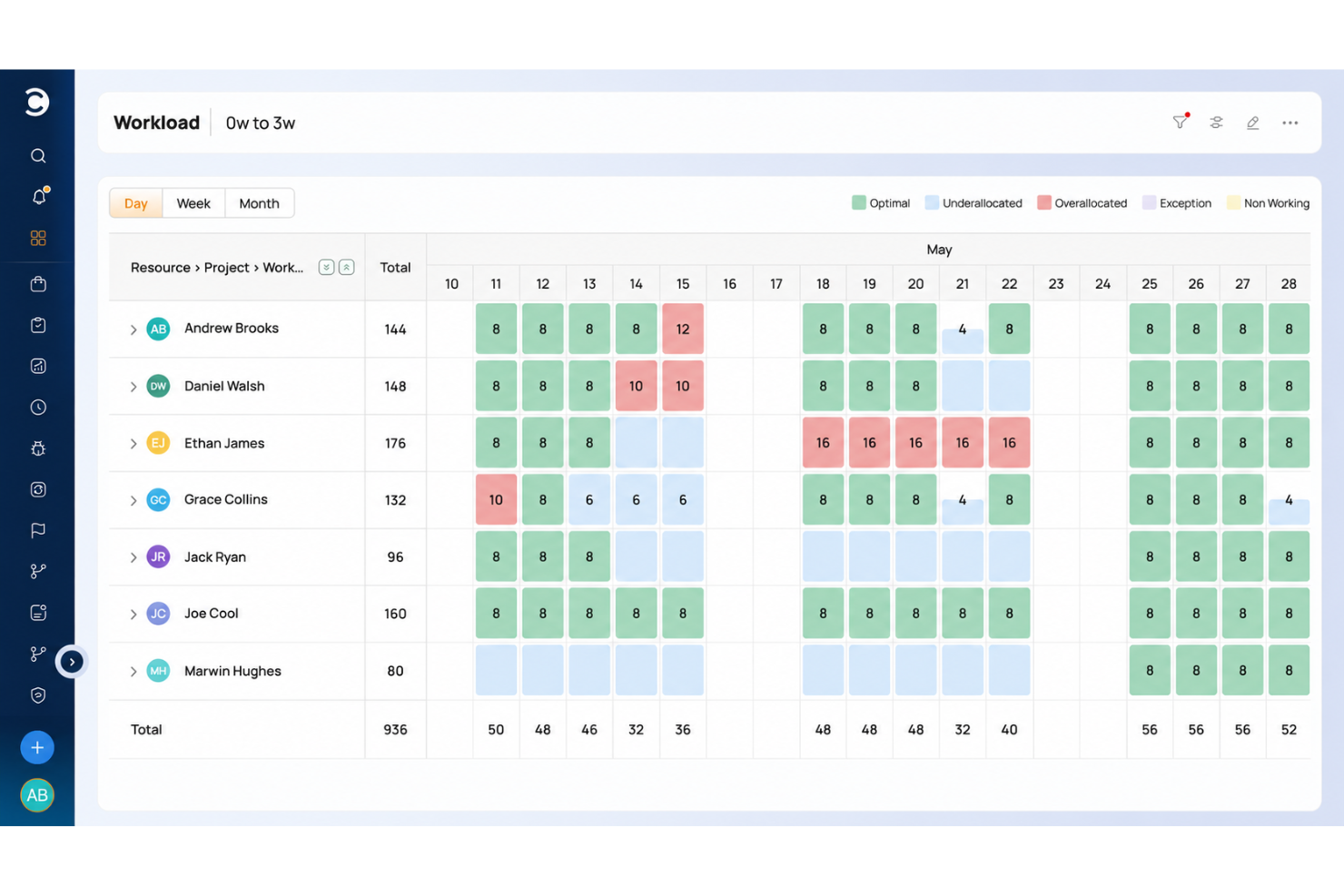
Celoxis è una piattaforma aziendale per la gestione di progetti e portafogli che offre pianificazione Gantt, mappatura delle dipendenze, mappe di calore del carico di lavoro delle risorse, monitoraggio finanziario e cruscotti personalizzabili con diverse viste dei progetti.
A chi è più adatto Celoxis?
Celoxis è adatto agli uffici di gestione dei progetti (PMO) e ai responsabili di portafoglio di organizzazioni medio-grandi che necessitano di un monitoraggio finanziario dettagliato e di una pianificazione approfondita, oltre a report visivi sui progetti.
Perché ho scelto Celoxis
Celoxis merita un posto nella mia selezione perché i suoi report finanziari in tempo reale sono più approfonditi di quelli offerti dalla maggior parte degli strumenti visivi per la gestione dei progetti. Apprezzo particolarmente il fatto che le metriche del valore acquisito, il monitoraggio dei costi pianificati rispetto a quelli effettivi e gli indicatori RAG dello stato del progetto confluiscano tutti in cruscotti personalizzabili che si aggiornano in tempo reale. Abbinando questa caratteristica a una pianificazione Gantt completa del percorso critico su più progetti contemporaneamente, i responsabili di portafoglio ottengono un quadro davvero chiaro degli aspetti finanziari e delle tempistiche in un unico spazio.
Funzionalità principali di Celoxis
- Vista Gantt multiprogetto: Visualizza attività, dipendenze e traguardi di più progetti contemporaneamente in un'unica cronologia Gantt interattiva.
- Mappe di calore del carico di lavoro: Visualizza la capacità del team nell'intero portafoglio e individua sovraccarichi o lacune nella disponibilità prima che influiscano sulla consegna.
- Portale clienti: Condividi direttamente con i clienti report di progetto personalizzabili e con il marchio aziendale, oltre agli aggiornamenti sulle attività, nascondendo automaticamente i campi finanziari.
- Riprogrammazione automatica delle attività: Quando una dipendenza cambia, Celoxis ricalcola le date delle attività successive in base ai calendari di lavoro, alle festività e ai turni.
Integrazioni di Celoxis
Celoxis offre 21 integrazioni native, tra cui Jira, GitHub, Azure DevOps, Slack, Google Drive, Google Sheets, Microsoft 365, Outlook, Trello e QuickBooks Online. Supporta inoltre un'API REST, webhook e Zapier.
Pros and Cons
Pros:
- I diagrammi Gantt mappano le dipendenze tra i portafogli di progetti
- I cruscotti finanziari monitorano il valore acquisito e i costi
- Le mappe di calore del carico di lavoro evidenziano le lacune nella capacità del team
Cons:
- Le schede Kanban dipendono dai campi dei report modificabili
- Le schermate complesse rallentano la configurazione iniziale dei progetti

Ideale per la visualizzazione della pianificazione della capacità
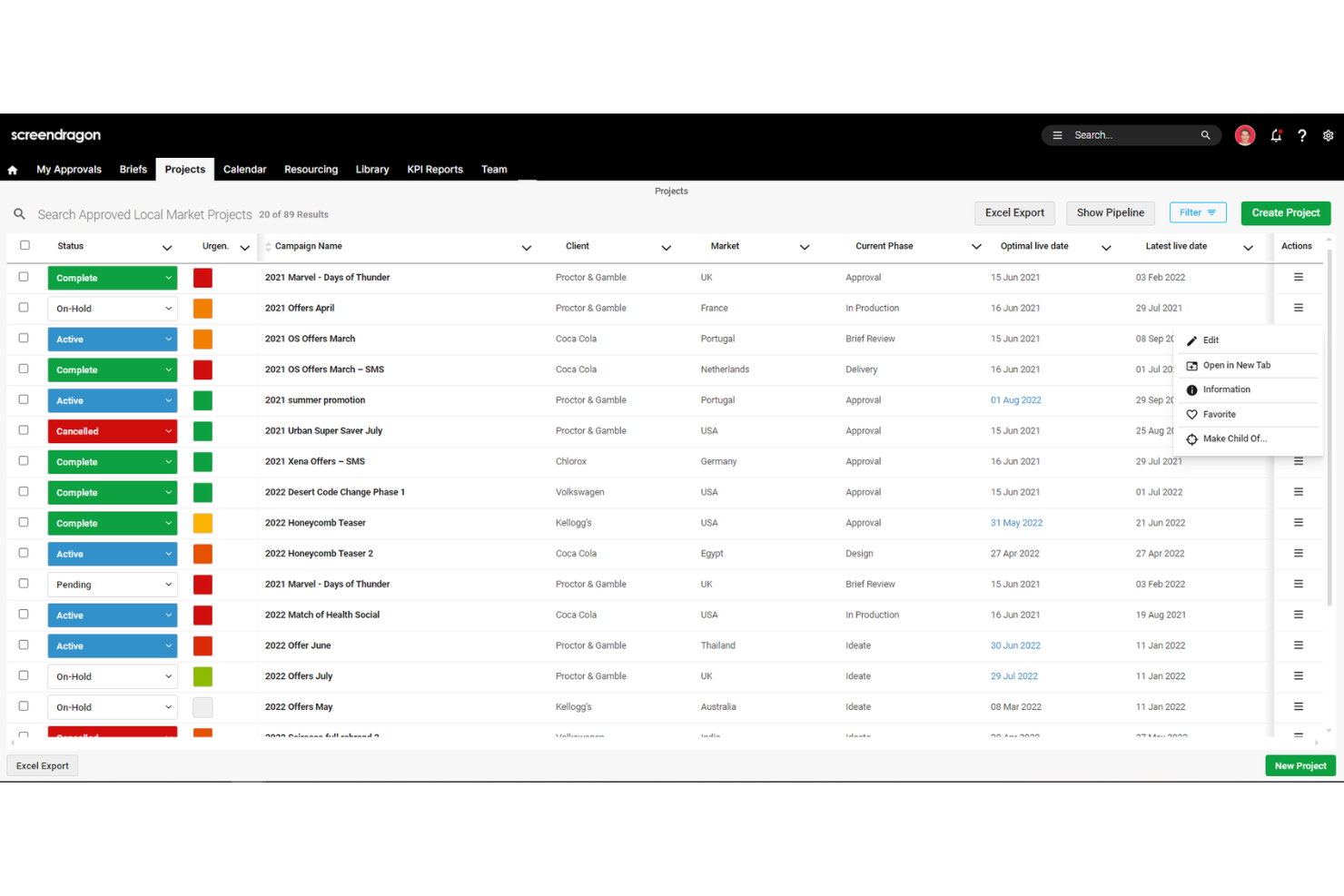
Screendragon è una piattaforma aziendale per la gestione dei flussi di lavoro e dei progetti, pensata per i team di marketing e creativi, che offre visualizzazioni Gantt, Kanban e calendario, oltre a mappe di calore della capacità, pianificazione delle risorse, dashboard finanziarie e strumenti integrati di revisione.
Per chi è più adatto Screendragon?
Screendragon è pensato per i team aziendali di marketing e creativi che devono visualizzare la capacità delle risorse nell'ambito di carichi di lavoro estesi e composti da numerosi progetti.
Perché ho scelto Screendragon
Screendragon si è guadagnato un posto nella mia rosa dei candidati perché le mappe di calore della capacità cambiano davvero il modo in cui si gestisce la visibilità del carico di lavoro in ambienti estesi e composti da numerosi progetti. Apprezzo particolarmente la possibilità di filtrare per reparto, competenza, area geografica o cliente, così da vedere esattamente dove la domanda supera la disponibilità prima che una scadenza slitti. La piattaforma sincronizza inoltre in tempo reale le visualizzazioni Gantt, Kanban e calendario, perciò le modifiche alle attività codificate a colori si propagano automaticamente in ogni visualizzazione.
Funzionalità principali di Screendragon
- Strumenti integrati di revisione: esamina e annota direttamente nella piattaforma risorse statiche, video e contenuti multimediali avanzati, con commenti con indicazione temporale, annotazioni e confronto affiancato delle versioni.
- Dashboard per i report finanziari: monitora il budget rispetto ai costi effettivi, il consumo delle risorse e le spese vive dei progetti, con visualizzazioni di dettaglio e supporto per più valute.
- Adattamento automatico della cronologia: quando cambiano le dipendenze, il pianificatore aggiorna automaticamente le cronologie correlate, gli assegnatari e i dati di budget senza dover riprogrammare manualmente.
- Dashboard in tempo reale personalizzabili: monitora in tempo reale lo stato dei progetti, le tappe fondamentali e i colli di bottiglia, con esportazione con un solo clic di report pronti per i clienti in formato Excel o PDF.
Integrazioni di Screendragon
Screendragon offre integrazioni con Microsoft Power BI, Slack, Microsoft Teams, Jira Software, Trello, Smartsheet, Google Drive e Microsoft 365. Fornisce inoltre un'API aperta, un portale per sviluppatori e la connettività con Zapier.
Pros and Cons
Pros:
- Le mappe di calore della capacità evidenziano tempestivamente le lacune nel carico di lavoro
- Visualizzazioni Gantt, Kanban e calendario sincronizzate
- I flussi di lavoro personalizzati e l'assistenza rapida ricevono elogi
Cons:
- I menu affollati rallentano la navigazione dei nuovi utenti
- Nessuna scheda delle attività tradizionale con trascinamento della selezione
New Product Updates from Screendragon
Screendragon Unveils New AI Hub
Screendragon introduced AI Hub, a new capability that lets teams build and manage AI agents directly within workflows. The update helps marketing teams automate tasks, maintain governance controls, and scale AI-driven operations more efficiently. For more information, visit Screendragon's official site.

Ideale per visualizzare progetti di complessità variabile
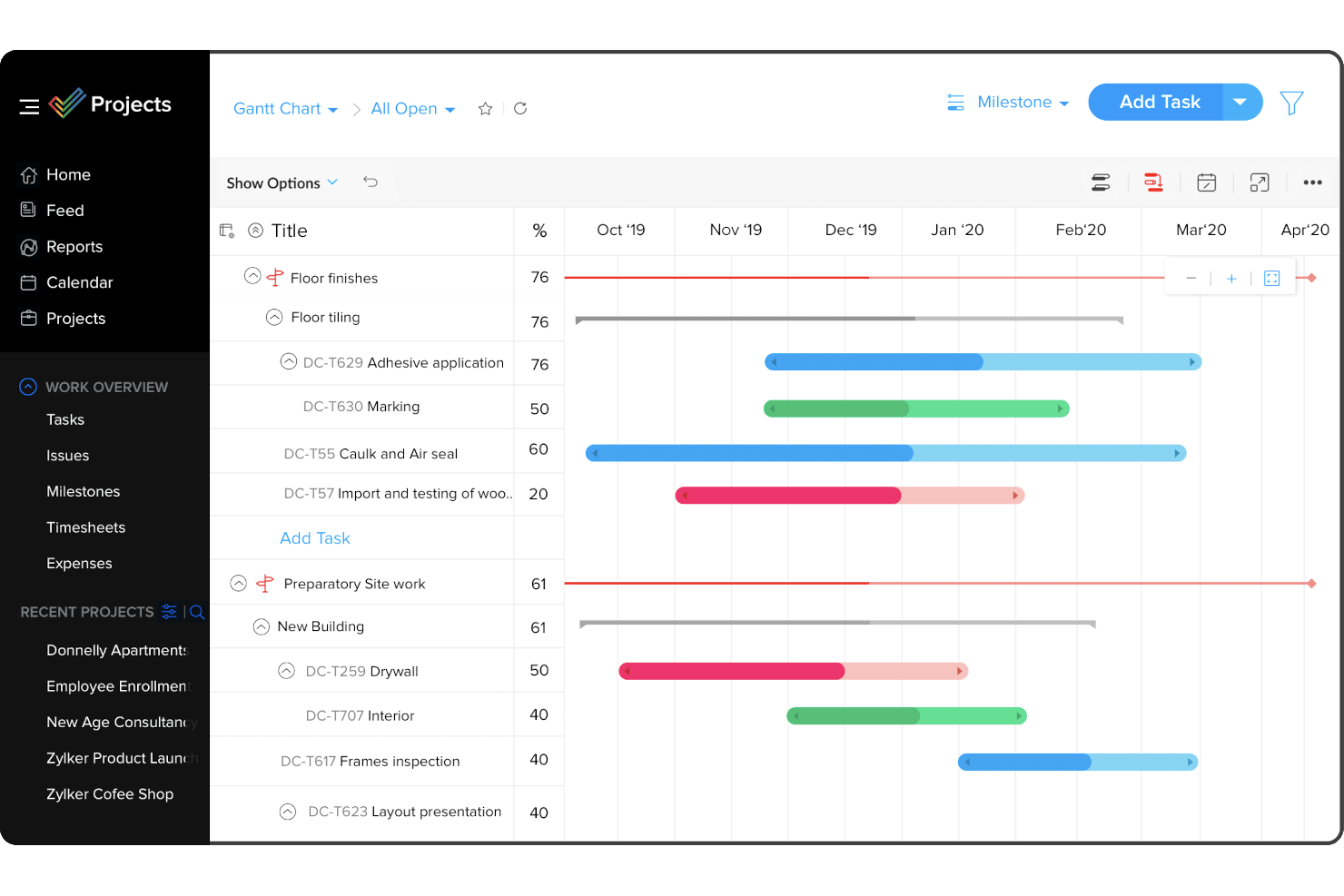
Zoho Projects è una piattaforma di gestione dei progetti che riunisce diagrammi di Gantt, bacheche Kanban, viste del calendario, mappe di calore del carico di lavoro e monitoraggio delle dipendenze tra attività e milestone.
Per chi è più adatto Zoho Projects?
Zoho Projects è particolarmente adatto ai responsabili di progetto e ai gruppi creativi che hanno bisogno di un'ampia gamma di viste visive, dai diagrammi di Gantt alle bacheche Kanban fino alle mappe di calore del carico di lavoro, senza pagare prezzi da livello aziendale.
Perché ho scelto Zoho Projects
Zoho Projects è entrato nella mia selezione perché gestisce progetti dalle strutture più diverse senza costringerti a usare un'unica vista. Posso gestire una semplice bacheca Kanban per una breve campagna, quindi passare a un diagramma di Gantt completo con analisi del percorso critico e confronti con le linee di riferimento per un'implementazione più lunga e ricca di dipendenze. La mappa di calore del carico di lavoro è la funzione a cui torno più spesso: identifica immediatamente con colori i membri del gruppo sovraccarichi e posso trascinare direttamente le attività su un'altra persona per riassegnarle senza uscire dal grafico.
Caratteristiche principali di Zoho Projects
- Tutti e quattro i tipi di dipendenza tra attività: Puoi impostare dipendenze fine-inizio, inizio-inizio, fine-fine e inizio-fine tra le attività, applicando un tempo di ritardo a ciascuna di esse.
- Confronto con la linea di riferimento: I piani Enterprise e Ultimate consentono di salvare fino a 15 linee di riferimento del progetto e confrontarle con l'avanzamento attuale per monitorare gli slittamenti del programma.
- Viste a barra e a mappa di calore del carico di lavoro: Due viste delle risorse mostrano fianco a fianco la capacità del gruppo, evidenziando con colori chiunque sia stato assegnato oltre le proprie ore disponibili.
- Automazione dei processi tramite modelli: Un editor con funzionalità di trascinamento consente di definire i flussi di lavoro delle attività con transizioni, condizioni e approvazioni stabilite prima dell'inizio del lavoro.
Integrazioni di Zoho Projects
Zoho Projects offre oltre 50 integrazioni, tra cui Zoho CRM, Slack, Microsoft Teams, Google Drive, Figma, GitHub, Google Calendar e Zapier. Si collega inoltre a Microsoft 365, SharePoint, Dropbox, Jira e Power BI.
Pros and Cons
Pros:
- Le viste Kanban, calendario e Gantt rimangono sincronizzate
- Le mappe di calore mostrano immediatamente i membri del gruppo sovraccarichi
- Trascina le attività tra i responsabili dai grafici del carico di lavoro
Cons:
- Le schermate dense possono nascondere le viste del progetto
- I diagrammi di Gantt di grandi dimensioni possono caricarsi lentamente
New Product Updates from Zoho Projects
Zoho Projects Adds CodeX Scripts for Custom Modules
Zoho Projects now supports CodeX Scripts for custom modules, enabling conditional logic and rules for creating, updating, and deleting records. For more information, visit Zoho Projects' official site.
 .
.
Ideale per la pianificazione visiva in stile foglio di calcolo
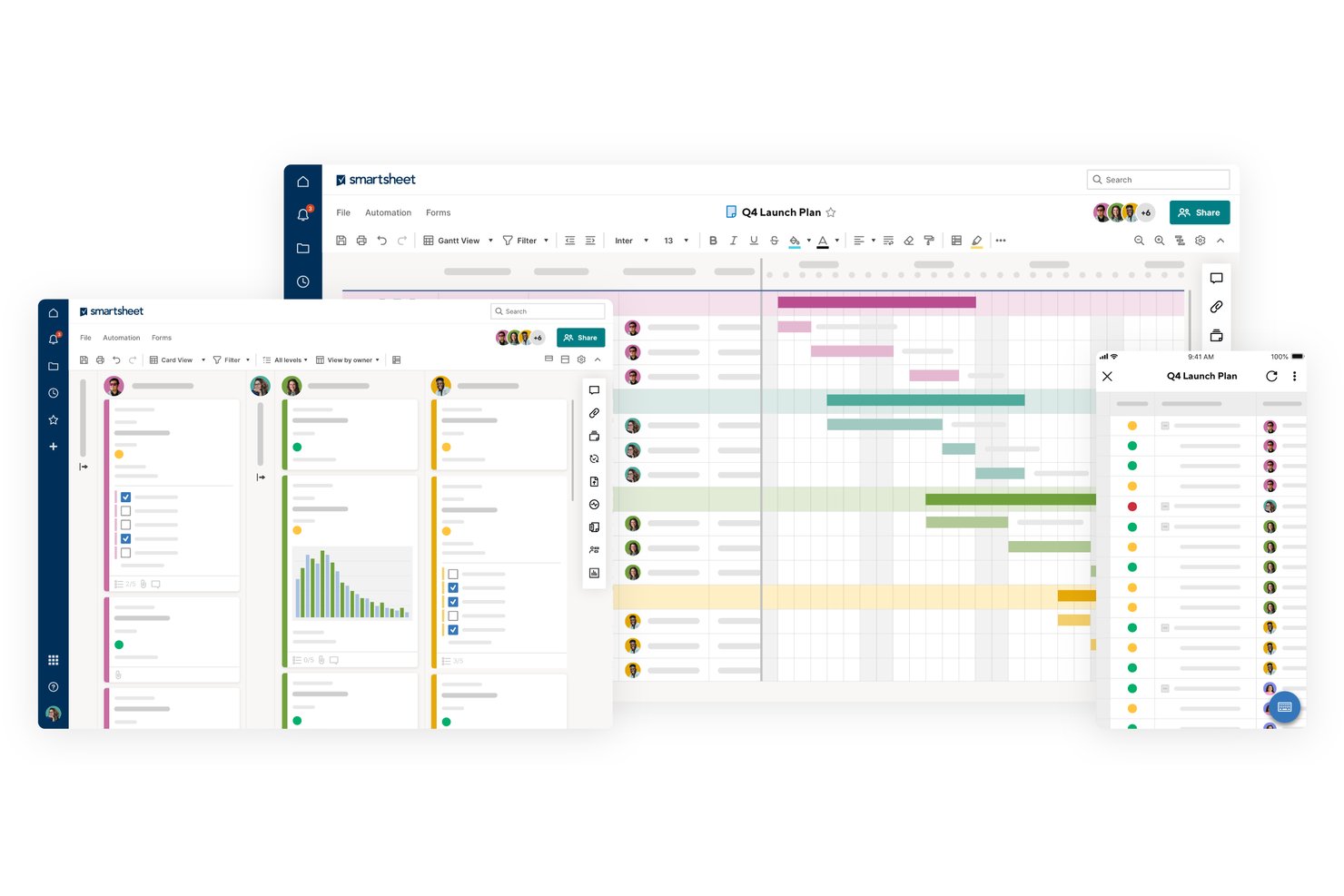
Smartsheet è una piattaforma di gestione dei progetti in stile foglio di calcolo che combina visualizzazioni a griglia, bacheca, Gantt, calendario e sequenza temporale con dipendenze tra attività, monitoraggio del carico di lavoro e pianificazione automatizzata.
Per chi è più adatto Smartsheet?
Smartsheet è particolarmente adatto ai project manager e ai team operativi che desiderano la struttura di un foglio di calcolo con la flessibilità visiva delle visualizzazioni Gantt, bacheca e calendario integrate.
Perché ho scelto Smartsheet
Ho scelto Smartsheet come uno dei migliori perché è l'unico strumento di questo elenco che parte da un foglio di calcolo e si trasforma in una suite completa per la pianificazione visiva. Apprezzo molto il modo in cui le dipendenze propagano automaticamente le modifiche alle date in tutto il progetto: quando un'attività subisce un ritardo, il diagramma di Gantt si adatta senza necessità di rielaborazioni manuali. Anche la mappa di calore del carico di lavoro è davvero utile, perché evidenzia direttamente nella griglia i membri del team con un carico eccessivo prima che una scadenza diventi un problema.
Funzionalità principali di Smartsheet
- Visualizzazione bacheca: organizza le attività in corsie in stile Kanban con schede che mostrano fino a 14 campi del foglio, inclusi assegnatari, scadenze e indicatori di stato.
- Automazione dei flussi di lavoro senza codice: crea avvisi, promemoria e richieste di approvazione automatici senza scrivere codice, con automazioni illimitate nei piani Business e superiori.
- Mappa di calore del carico di lavoro delle risorse: visualizza l'allocazione del team in tutti i fogli monitorati tramite una mappa di calore codificata a colori, che segnala i membri a cui sono state assegnate troppe attività prima che le scadenze vengano mancate.
- Pannelli di controllo e report pubblicabili: condividi pannelli di controllo aggiornati in tempo reale e report modificabili con gli stakeholder che non necessitano di una licenza a pagamento, utilizzando link pubblici o l'accesso gratuito come collaboratori.
Integrazioni di Smartsheet
Smartsheet offre integrazioni native con Slack, Google Workspace, Microsoft 365, Microsoft Teams, Jira, Adobe Creative Cloud, Power BI e Tableau. I piani Business e superiori includono l'accesso API per integrazioni personalizzate, con ulteriori connettori disponibili nel marketplace.
Pros and Cons
Pros:
- La griglia del foglio di calcolo facilita la migrazione da Excel
- Le dipendenze ricalcolano automaticamente le date successive
- Le mappe di calore del carico di lavoro segnalano l'eccessiva allocazione del team
Cons:
- Il flusso di lavoro incentrato sulla griglia mantiene il lavoro visivo centrato sul foglio
- I fogli grandi e complessi possono risultare lenti
New Product Updates from Smartsheet

Smartsheet Adds Non-Plan User Management in Admin Center
Smartsheet adds a Non plan users tab to the Seat types and true-up page in Admin Center. This lets system admins review non-plan users and add them to the plan or remove them from the organization in one place. For more information, visit Smartsheet’s official site.

ClickUp
Ideale per oltre 15 visualizzazioni su un unico set di dati
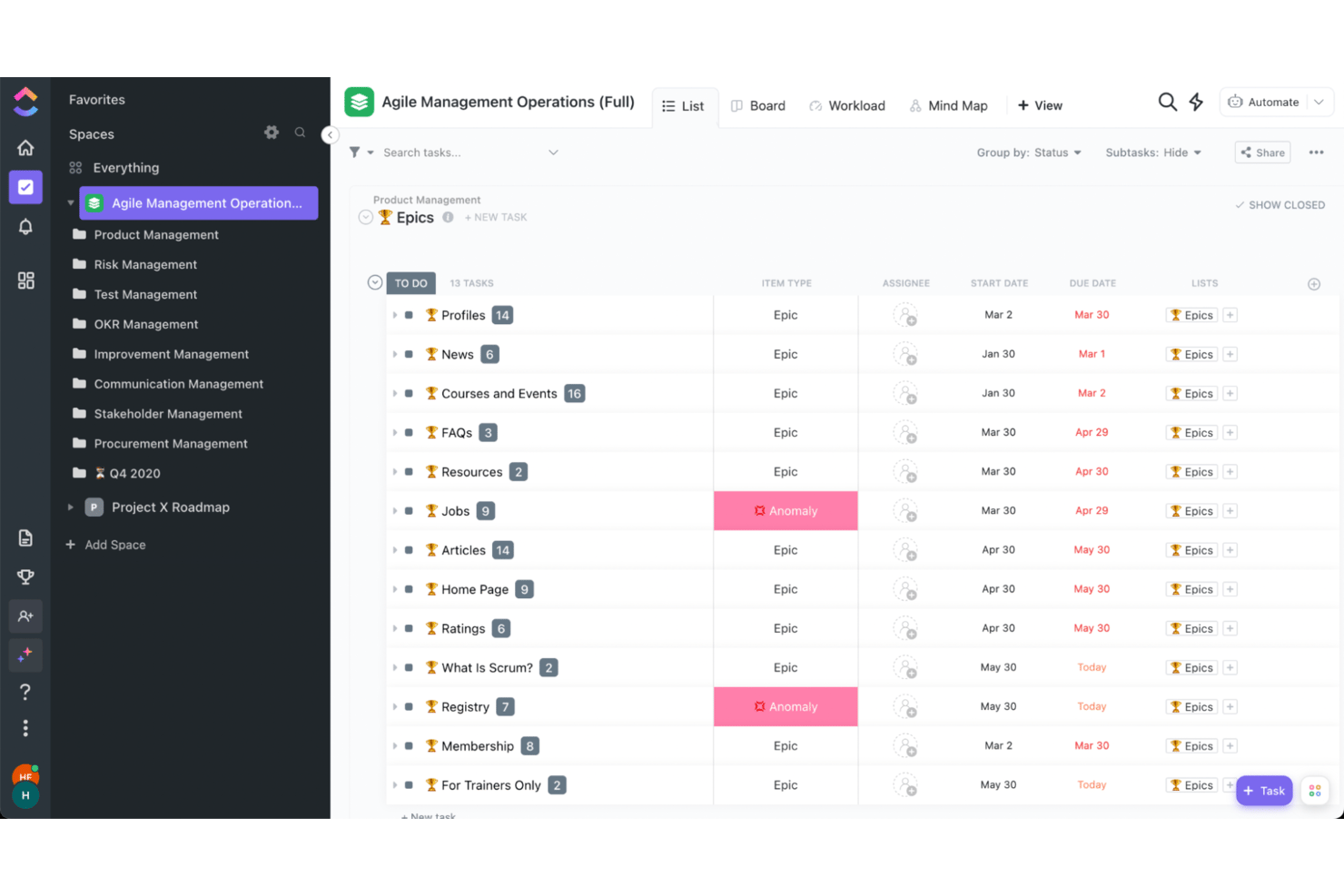
ClickUp è una piattaforma visiva per la gestione dei progetti che riunisce bacheche Kanban, diagrammi di Gantt, viste del carico di lavoro, lavagne bianche, mappe mentali e dashboard in oltre 15 tipi di visualizzazione all'interno di un unico spazio di lavoro altamente personalizzabile.
Per chi è più adatto ClickUp?
ClickUp è particolarmente adatto ai project manager e ai responsabili dei team che devono gestire progetti complessi, composti da più flussi di lavoro, all'interno di un unico spazio di lavoro visivo e altamente personalizzabile.
Perché ho scelto ClickUp
ClickUp merita un posto tra le migliori soluzioni della mia selezione perché la sua interfaccia visiva iperpersonalizzabile consente di mettere in evidenza esattamente ciò che conta tra oltre 15 tipi di visualizzazione, dai diagrammi di Gantt con mappatura completa delle dipendenze e del percorso critico alle mappe di calore del carico di lavoro che mostrano la capacità giornaliera in base alle stime temporali o ai punti sprint. Apprezzo particolarmente il fatto che le lavagne bianche e le mappe mentali siano collegate direttamente al livello delle attività, così una sessione di brainstorming può diventare un flusso di lavoro monitorato senza dover cambiare strumento.
Funzionalità principali di ClickUp
- Monitoraggio nativo del tempo: Registra il tempo direttamente dalle attività o dalla barra degli strumenti globale, contrassegna le voci come fatturabili e invia i dati ai widget della dashboard o ai report esportati.
- IA ClickUp Brain: Fai domande sulle attività a rischio, sulle dipendenze bloccate e sulle tendenze del carico di lavoro, e ricevi risposte generate dall'IA basate sui dati aggiornati del tuo spazio di lavoro.
- Pianificazione automatizzata: Trascina un'attività nel diagramma di Gantt e le attività dipendenti vengono riprogrammate automaticamente, mantenendo aggiornata la tua pianificazione senza interventi manuali.
- Condivisione di dashboard esterne: Condividi dashboard aggiornate in tempo reale con stakeholder che non hanno bisogno di un account ClickUp, grazie a controlli granulari sulle autorizzazioni per ciò che possono visualizzare.
Integrazioni di ClickUp
ClickUp offre integrazioni documentate con Slack, Microsoft Teams, GitHub, GitLab, Figma, Google Drive, Tableau e Zapier. La sua API pubblica e i webhook supportano integrazioni personalizzate e connessioni tra flussi di lavoro.
Pros and Cons
Pros:
- I diagrammi di Gantt mappano le dipendenze lungo le tempistiche del progetto
- Le mappe di calore del carico di lavoro mostrano la capacità per persona
- Le lavagne bianche trasformano il brainstorming in attività monitorate
Cons:
- La configurazione ricca di dettagli può sopraffare i nuovi team di progetto
- Gli spazi di lavoro di grandi dimensioni possono risultare poco reattivi
New Product Updates from ClickUp
ClickUp Adds Meetings Hub, Super Agent Templates, and ZoomInfo Integration
ClickUp adds a searchable Meetings Hub, new ways to clone and template Super Agents, and a ZoomInfo integration through the App Center. These updates improve meeting retrieval, agent reuse, and access to sales intelligence. For more information, visit ClickUp’s official site.

Forecast
Ideale per gestire progetti, risorse e finanze in un unico strumento
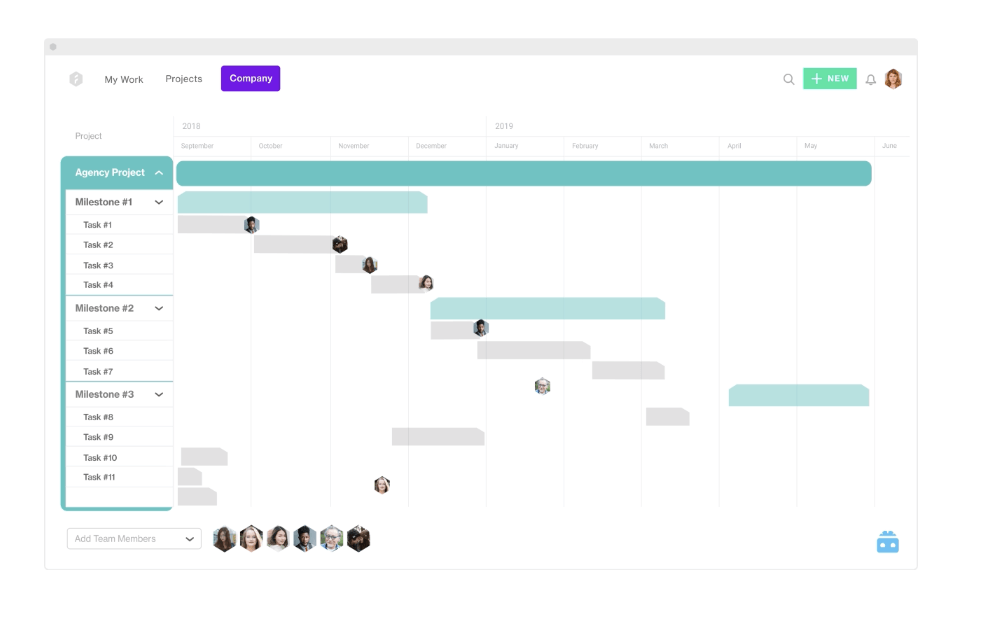
Forecast è una piattaforma di automazione dei servizi professionali che riunisce la gestione visiva dei progetti, la pianificazione delle risorse e il monitoraggio finanziario tramite sequenze temporali Gantt, bacheche Kanban, viste del portafoglio e mappe di calore del carico di lavoro.
Per chi è più adatto Forecast?
Forecast è pensato per i project manager e i responsabili delle operazioni di aziende di consulenza, agenzie e società di servizi IT che devono gestire in un'unica piattaforma le tempistiche dei progetti, la capacità del team e i budget.
Perché ho scelto Forecast
Ho scelto Forecast come uno dei migliori perché è l'unico strumento della mia lista che riunisce realmente in un'unica vista le tempistiche dei progetti, la pianificazione delle risorse e il monitoraggio del budget. Apprezzo molto il modo in cui la mappa di calore del programma delle persone mostra in tempo reale la capacità per ruolo o reparto, consentendomi di individuare i membri del team sovraccarichi prima che diventi un problema. Il diagramma Gantt del portafoglio di tutte le tempistiche sovrappone le fasi dei progetti, le percentuali di completamento e le assegnazioni del team per ogni progetto attivo contemporaneamente.
Funzionalità principali di Forecast
- Bacheca delle iterazioni: Una bacheca Scrum dedicata che consente ai team agili di gestire i cicli di iterazione separatamente dalla vista principale delle attività Kanban.
- Blocco della catena di dipendenze: Un'opzione che sposta insieme un'intera catena di attività collegate quando ne trascini una, mantenendo intatte le sequenze lungo la sequenza temporale.
- Pannelli di controllo per analisi avanzate: Quattro pannelli di controllo per la reportistica integrati, che coprono redditività, prestazioni del portafoglio, ricavi e gestione delle risorse, con componenti personalizzati e PDF esportabili.
- Accesso per utenti ospiti: I contatti dei clienti possono essere aggiunti come ospiti senza costi aggiuntivi per postazione, con controlli amministrativi per limitare ciò che ciascun ospite può visualizzare o modificare.
Integrazioni di Forecast
Forecast offre integrazioni con Jira, Azure DevOps, GitHub, GitLab, Slack, MS Teams, Trello, Asana, Google Drive e Zapier. Fornisce inoltre API REST e moduli per integrazioni personalizzate.
Pros and Cons
Pros:
- Le mappe di calore delle risorse evidenziano il sovraccarico tra i progetti
- Il diagramma Gantt del portafoglio collega fasi, avanzamento e assegnazioni
- La sfumatura della sequenza temporale confronta il lavoro registrato e quello rimanente
Cons:
- Le schermate affollate possono nascondere i dettagli delle attività
- I flussi di lavoro delle attività su dispositivi mobili ricevono lamentele in termini di usabilità

Ideale per il controllo aziendale con flessibilità operativa in prima linea
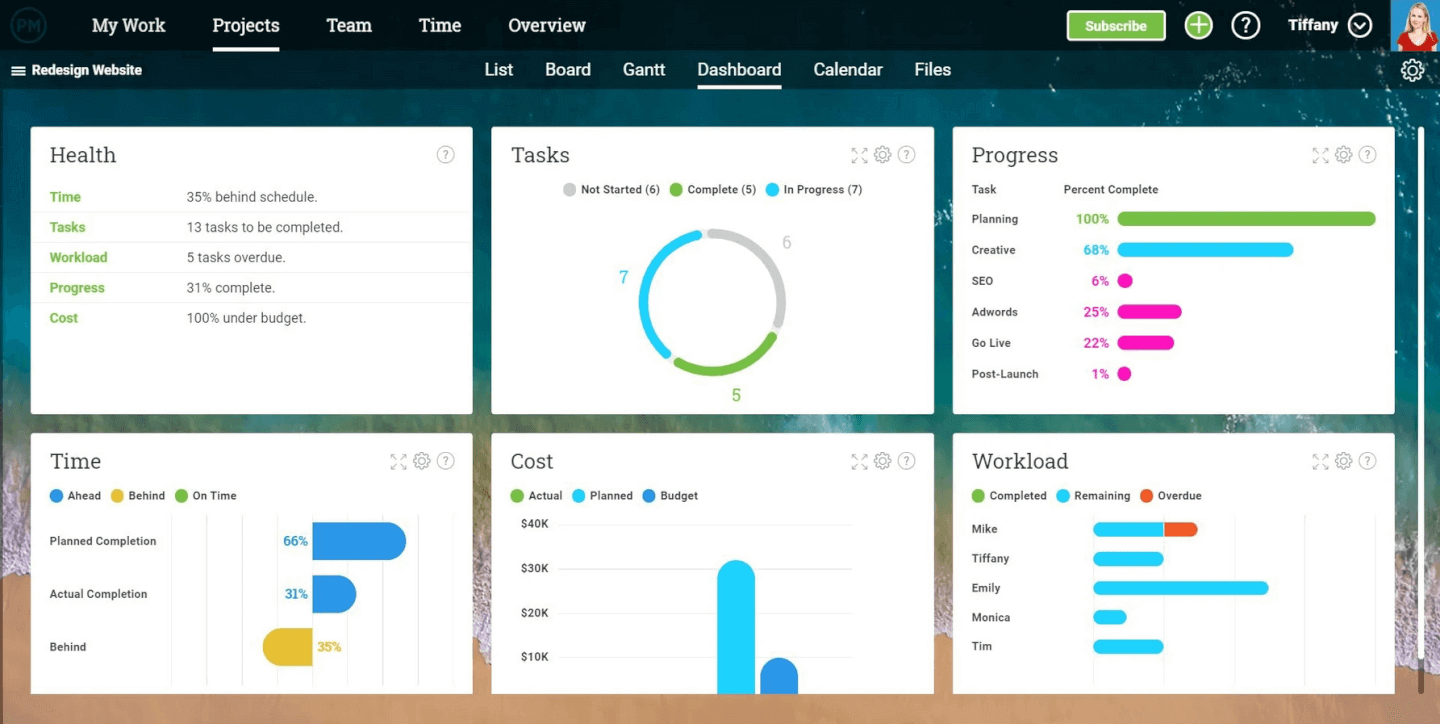
ProjectManager è una piattaforma visiva per la gestione dei progetti che offre diagrammi di Gantt, bacheche Kanban, dashboard in tempo reale e strumenti di pianificazione con visualizzazioni multiple, progettati per i team che gestiscono progetti complessi con numerose dipendenze.
Per chi è più adatto ProjectManager?
ProjectManager è una soluzione particolarmente adatta ai project manager e ai team operativi che gestiscono progetti complessi con numerose dipendenze e hanno bisogno di una visibilità in tempo reale su più flussi di lavoro.
Perché ho scelto ProjectManager
Ho incluso ProjectManager tra le mie scelte migliori perché le sue dashboard in tempo reale sono davvero le più curate che abbia visto in questa categoria. Ogni widget, dalla percentuale di completamento ai costi pianificati rispetto a quelli effettivi, si aggiorna automaticamente senza alcuna configurazione manuale. Mi piace anche il fatto che sia possibile personalizzare colori, filtri e riquadri delle metriche espandibili, quindi condividere o stampare una visualizzazione curata per gli aggiornamenti con i dirigenti senza dover riformattare nulla.
Funzionalità principali di ProjectManager
- Filtro del percorso critico: la visualizzazione Gantt evidenzia il percorso critico, così puoi vedere immediatamente quali attività influiscono direttamente sulla data di completamento del progetto.
- Quattro tipi di dipendenza: collega le attività utilizzando dipendenze fine-inizio, inizio-inizio, fine-fine o inizio-fine, con aggiornamenti automatici della pianificazione ogni volta che si verifica uno spostamento.
- Monitoraggio del piano di riferimento: imposta un piano di riferimento del progetto per confrontare date e costi pianificati con quelli effettivi, così puoi individuare gli slittamenti della pianificazione non appena si verificano.
- Licenze ospite gratuite illimitate: ogni piano include account ospite con accesso in sola lettura, consentendo agli stakeholder di seguire l'avanzamento del progetto senza occupare un posto utente a pagamento.
Integrazioni di ProjectManager
ProjectManager offre integrazioni native con Jira, Azure DevOps, Microsoft Teams, Slack, QuickBooks Online e Microsoft Excel. Supporta inoltre un'API aperta e Zapier.
Pros and Cons
Pros:
- Dashboard personalizzabili mostrano la pianificazione e i costi in tempo reale
- Cinque visualizzazioni sincronizzate mantengono allineati gli aggiornamenti delle attività
- Quattro tipi di dipendenza proteggono le tempistiche dei progetti collegati
Cons:
- Le pianificazioni complesse richiedono tempo per essere apprese
- Le pagine possono rallentare o richiedere un aggiornamento

Ideale per i report di analisi dell'intero portafoglio
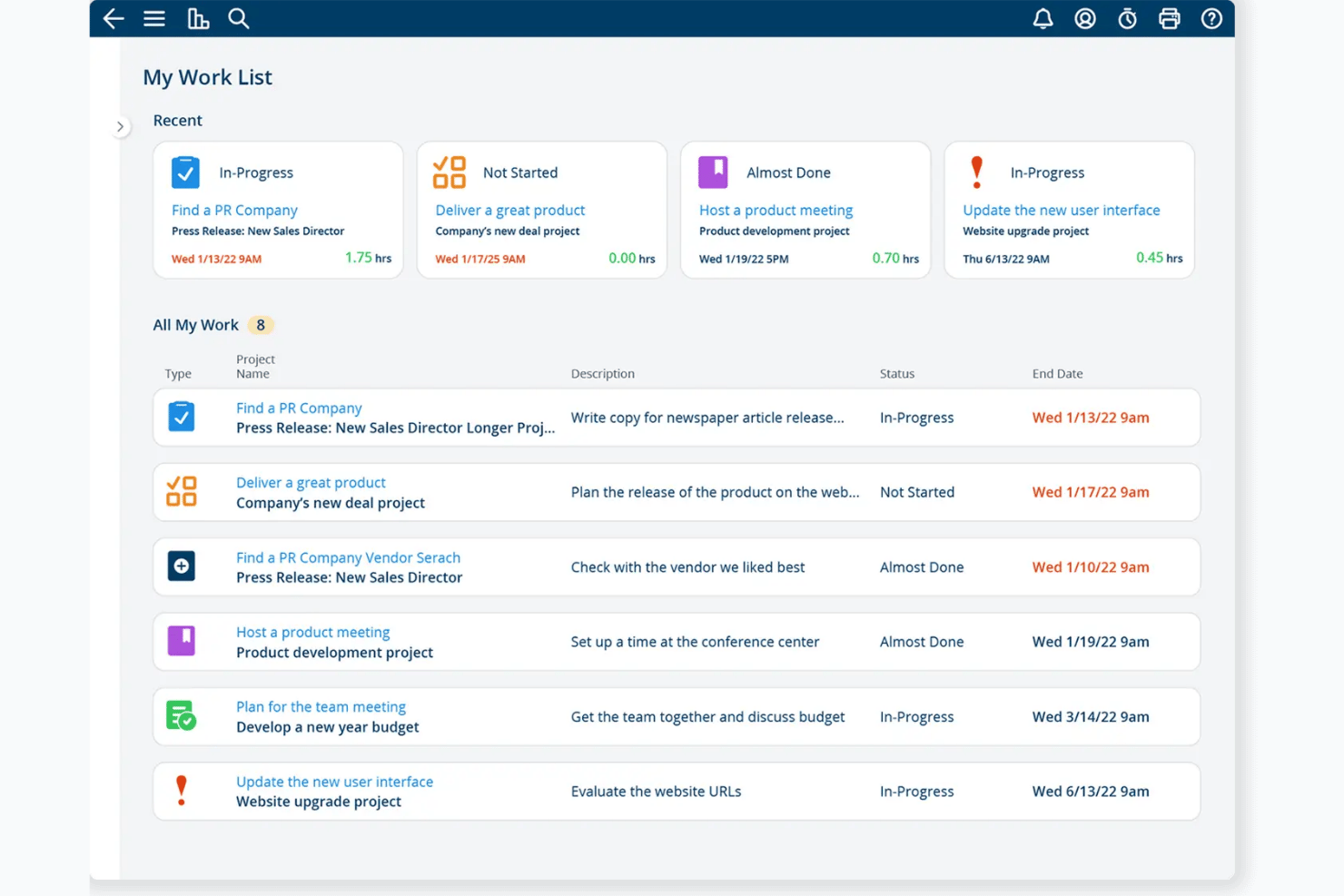
Project Insight è una piattaforma PPM strategica pensata per i PMO, che combina reportistica del portafoglio, viste Gantt e Kanban, pianificazione intelligente e gestione della capacità delle risorse tra i progetti.
Per chi è più adatto Project Insight?
Project Insight è particolarmente adatto ai team PMO e ai project manager che devono monitorare più progetti e presentare i progressi attraverso report dettagliati e visivi.
Perché ho scelto Project Insight
Ho scelto Project Insight come uno dei migliori perché le sue funzionalità di reportistica del portafoglio sono davvero notevoli. I dashboard trasversali ai progetti raccolgono stato, salute e KPI di ogni progetto attivo, e consentono di modificare le assegnazioni o adeguare le risorse direttamente all'interno di un report, senza uscire dalla vista. Apprezzo anche il fatto che i report salvati possano essere pianificati e inviati automaticamente alle parti interessate, rendendo molto meno manuale la condivisione dei progressi con la dirigenza.
Funzionalità principali di Project Insight
- Pianificazione intelligente: le attività vengono ripianificate automaticamente in base alle dipendenze, così le modifiche alle date si propagano nel piano senza aggiornamenti manuali.
- Vista Gantt trasversale ai progetti: un diagramma di Gantt a livello di portafoglio mostra le tempistiche di tutti i progetti attivi in un'unica vista modificabile.
- Pianificazione della capacità delle risorse: le viste della capacità e della domanda mostrano la disponibilità del team nei vari progetti, con riassegnazione tramite trascinamento per i membri sovraccarichi.
- Bacheche Kanban per le attività: le bacheche a livello di progetto e di attività permettono ai team di spostare le schede tra le colonne, aggiornando in tempo reale lo stato e le percentuali di completamento.
Integrazioni di Project Insight
Project Insight offre integrazioni native con Jira, Azure DevOps, Microsoft Teams, Slack, Power BI, Trello, Basecamp e Microsoft Project. Supporta inoltre l'accesso all'API REST per integrazioni personalizzate.
Pros and Cons
Pros:
- I report modificabili del portafoglio aggregano lo stato dei progetti
- Viste sincronizzate Gantt, Kanban e calendario
- Gli aggiornamenti della pianificazione basati sulle dipendenze aggiornano automaticamente le tempistiche collegate
Cons:
- L'interfaccia densa può risultare complessa per gli utenti alle prime armi
- I flussi di lavoro dei PMO vanno oltre le esigenze del semplice monitoraggio delle attività
Altre opzioni visive per la gestione dei progetti
Eccone alcune altre che non sono entrate nell’elenco principale. Se hai bisogno di ulteriori suggerimenti su pratiche app per la gestione visiva dei progetti, dai un’occhiata a queste.
- GanttPRO
Ideale per creare diagrammi di Gantt
- airfocus
Ideale per roadmap di prodotto scalabili e con più viste
- Teamwork.com
Il miglior piano gratuito per piccole imprese e liberi professionisti
- ProWorkflow
Ideale per visualizzare la gestione delle risorse
- Notion
Ideale per team remoti o ibridi
- GoodDay
Ideale per le tempistiche visive dei progetti e la pianificazione
- Asana
Ideale per la scalabilità, per team grandi o piccoli
- TaskRay
Ideale per il monitoraggio dei progetti collegati al CRM in Salesforce


Come Valuto i Software di Gestione Progetti Visiva
Cerco due elementi: le funzionalità di base che uno strumento deve avere per qualificarsi—come la programmazione Gantt drag-and-drop—e quei fattori che lo differenziano e lo rendono la scelta giusta rispetto agli altri.
Funzionalità Core (Requisiti Fondamentali per Questa Lista)
Quando seleziono gli strumenti per la mia lista, valuto ognuno su una scala da 0 (non offre la funzionalità) a 5 (eccelle in questo ambito) per ciascuna delle funzionalità principali elencate sotto. Poi, calcolo il punteggio totale dello strumento come percentuale. Ogni strumento deve raggiungere un punteggio minimo totale del 75% per essere preso in considerazione per l'inclusione.
- Viste Visive Multiple: Controllo quante visualizzazioni integrate offre uno strumento—Kanban, Gantt, timeline, calendario, carico di lavoro—e se restano sincronizzate quando si passa da una all'altra.
- Interazione Drag-and-Drop: Ripianificare una task di sprint trascinandola lungo una timeline o riassegnandola su una bacheca dovrebbe essere immediato, non macchinoso o vincolato alla visuale.
- Dipendenze dei Task e Traguardi: Verifico se uno strumento mostra visivamente le linee di dipendenza e i traguardi direttamente nelle visualizzazioni Gantt o timeline, segnalando anche conflitti di pianificazione.
- Personalizzazione del Workflow Visivo: I team che gestiscono pipeline creative o processi di rilascio hanno bisogno di creare visualmente fasi e stati personalizzati—qui cerco workflow builder senza codice.
- Dashboard Visive e Reportistica: Cerco widget configurabili come grafici burndown, ripartizioni di stato e barre di avanzamento che estraggono dati in tempo reale da progetti diversi.
- Collaborazione su Elementi Visivi: Commenti, @menzioni e allegati dovrebbero vivere direttamente sulle schede, sulle voci della timeline o sulle colonne della bacheca—non in un thread separato.
Una volta che dispongo di una lista di strumenti che soddisfano i criteri, considero ciò che distingue ciascuna piattaforma.
Fattori Differenzianti (Cosa Distingue i Fornitori)
Ecco come confronto e metto a confronto i diversi fornitori:
Funzionalità Distintive
La pianificazione dei portfolio è un grande elemento distintivo—cerco strumenti che raccolgano più progetti in una singola timeline visiva così che i PMO possano presentare lo stato dei lavori ai dirigenti senza dover preparare una presentazione. Anche le mappe termiche del carico di lavoro sono importanti, poiché individuare un ingegnere sovraccarico nel mezzo di uno sprint è molto più facile con una visualizzazione a capacità colorata che in un foglio di calcolo. Controllo inoltre se uno strumento include lavagne o mappe mentali integrate, permettendo ai team di delineare piani e convertire idee in task strutturate senza uscire dalla piattaforma.
Oltre le Funzionalità
La profondità di integrazione conta molto. Verifico se uno strumento si collega nativamente a Jira, GitHub, Figma e Slack—perché una bacheca visiva che non si integra nel flusso di lavoro reale del team richiede molta gestione manuale. Valuto anche la trasparenza dei prezzi, in particolare se le visualizzazioni core come Gantt e dashboard sono bloccate nei livelli superiori. Considero anche il supporto in fase di onboarding, inclusi i template predefiniti per flussi di lavoro comuni come la pianificazione degli sprint o il lancio di campagne, che aiutano i team a ottenere valore sin dal primo giorno.
Come scegliere un software visivo per la gestione dei progetti
È facile perdersi in lunghi elenchi di funzionalità e strutture tariffarie complesse. Per aiutarti a rimanere concentrato mentre affronti il tuo processo di selezione del software, unico per le tue esigenze, ecco una lista di fattori da tenere a mente:
| Fattore | Cosa considerare |
|---|---|
| Scalabilità | Assicurati che il software possa crescere insieme al tuo team. Verifica se è in grado di gestire un aumento degli utenti o dei progetti senza problemi di prestazioni. |
| Integrazioni | Controlla se lo strumento si collega alle app che già utilizzi, come Slack, Google Workspace o Trello, per semplificare i flussi di lavoro ed evitare silos di dati. |
| Personalizzazione | Cerca opzioni che consentano di adattare le funzionalità alle esigenze del tuo team. Ciò include la creazione di campi, flussi di lavoro o dashboard personalizzati in base ai tuoi processi. |
| Facilità d’uso | Scegli una piattaforma con un’interfaccia intuitiva che il tuo team possa imparare rapidamente senza una formazione approfondita. Considera la curva di apprendimento necessaria. |
| Budget | Valuta il costo rispetto al tuo budget. Cerca piani tariffari trasparenti che rientrino nei tuoi vincoli finanziari e offrano un buon rapporto qualità-prezzo per le funzionalità disponibili. |
| Misure di sicurezza | Valuta le misure di protezione dei dati della piattaforma. Assicurati che sia conforme agli standard di settore come il GDPR e che offra funzionalità quali crittografia e controlli degli accessi. |
| Strumenti di collaborazione | Prendi in considerazione strumenti che supportino il lavoro di squadra in tempo reale, come bacheche condivise o aggiornamenti in tempo reale, per migliorare la comunicazione del team e l’efficienza dei progetti. |
| Assistenza e risorse | Cerca un software con un solido servizio di assistenza clienti e numerose risorse, come tutorial, forum e domande frequenti, per aiutare il tuo team quando necessario. |
Tendenze nei software visivi per la gestione dei progetti
Durante la mia ricerca, ho raccolto innumerevoli aggiornamenti di prodotto, comunicati stampa e registri delle versioni di diversi fornitori di software visivi per la gestione dei progetti. Ecco alcune delle tendenze emergenti che sto tenendo d’occhio:
- Approfondimenti basati sull'AI: L'AI viene utilizzata per prevedere i risultati dei progetti e fornire informazioni utili, aiutando i team a prendere decisioni migliori. Strumenti come Wrike stanno integrando l'AI per analizzare i dati dei progetti e suggerire miglioramenti.
- Collaborazione con la realtà virtuale (VR): La VR viene studiata per creare esperienze di collaborazione più immersive, consentendo ai team di interagire in uno spazio virtuale. Miro sta sperimentando la VR per migliorare la collaborazione tra team remoti. Sebbene questa sia una tendenza che potrebbe essere più adatta a un software di gestione dei progetti per agenzie creative, sembra diffondersi anche nei software meno specializzati.
- Marketplace di modelli: Sempre più piattaforme offrono marketplace per modelli creati dagli utenti, rendendo più facile trovare e condividere flussi di lavoro. Notion sta ampliando la sua galleria di modelli con i contributi della community.
- Visualizzazione avanzata dei dati: I nuovi strumenti si concentrano sulla visualizzazione avanzata dei dati per aiutare i team a comprendere a colpo d'occhio le metriche dei progetti. Monday.com offre dashboard personalizzabili per visualizzare i dati in modo efficace.
- Focus sulla sostenibilità: Alcuni fornitori stanno integrando funzionalità per monitorare e ridurre l'impatto ambientale dei progetti. Questa tendenza sta prendendo piede poiché le aziende danno priorità alla sostenibilità nelle loro attività.
Che cos'è un software di gestione visiva dei progetti?
Il software di gestione visiva dei progetti è un tipo di software di gestione dei progetti specializzato nelle rappresentazioni visive per facilitare la pianificazione, il monitoraggio e la comunicazione dei progetti. Va oltre le tradizionali interfacce basate sul testo, offrendo elementi grafici come grafici, diagrammi e dashboard per presentare le informazioni sui progetti in un formato più comprensibile e utile per le decisioni.
Il software di gestione visiva dei progetti contribuisce a semplificare la supervisione dei progetti fornendo una piattaforma visivamente intuitiva che favorisce una migliore comunicazione con gli stakeholder, la comprensione di informazioni complesse e il processo decisionale durante l'intero ciclo di vita del progetto.