

I 10 migliori software per la gestione dei progetti di progettazione per il 2026

10 I migliori software per la gestione dei progetti di design


Gestire progetti di design può essere difficile. Scadenze, coordinamento del team e aspettative dei clienti spesso entrano in conflitto, lasciandoti sopraffatto. È qui che entra in gioco il software per la gestione dei progetti di design. Aiuta a organizzare le attività, favorisce la collaborazione e mantiene i progetti sulla buona strada.
Ho testato e analizzato diversi strumenti per trovare quelli che fanno davvero la differenza. Il mio obiettivo è offrirti una panoramica imparziale delle migliori opzioni disponibili.
In questo articolo scoprirai strumenti che possono aiutare il tuo team a lavorare in modo più efficiente e a raggiungere gli obiettivi dei progetti. Che tu faccia parte di un piccolo team o di una grande organizzazione, qui troverai la soluzione adatta a te.
Perché fidarsi dei nostri consigli sui software
Il nostro team testa e recensisce software dal 2012. In quanto project manager noi stessi, sappiamo quanto sia difficile — e importante — scegliere il software giusto.
Per questa guida, abbiamo valutato gli strumenti attraverso test pratici e ricerche indipendenti, assegnando un punteggio agli strumenti in base ai nostri criteri di selezione. Ci basiamo inoltre sulle competenze di leader di pensiero del settore e di professionisti attivi nella gestione dei progetti.
Le nostre recensioni riflettono il nostro giudizio editoriale umano, non un discorso di vendita.
Revisori esperti:
Tabella comparativa dei software per la gestione dei progetti di design
Questa tabella comparativa riassume i dettagli sui prezzi dei migliori software per la gestione dei progetti di design che ho selezionato:
| Tool | Best For | Trial Info | Price | ||
|---|---|---|---|---|---|
| 1 | Ideale per la pianificazione delle risorse | Prova gratuita di 14 giorni + demo gratuita disponibile | Da $19.90/utente/mese (fatturazione annuale) | Website | |
| 2 | Ideale per il monitoraggio della redditività | Prova gratuita di 14 giorni + demo gratuita disponibile | Da $10/mese (fatturati annualmente) | Website | |
| 3 | Ideale per annotazioni e controllo versione | Prova gratuita di 14 giorni | Da $8/utente/mese | Website | |
| 4 | Modelli di brief creativi per aiutarti a iniziare il tuo progetto con il piede giusto. | Prova gratuita di 14 giorni | A partire da $9,80/utente/mese | Website | |
| 5 | Collaborazione in tempo reale per la fase di revisione. | Demo gratuita disponibile | Prezzo su richiesta | Website | |
| 6 | Il miglior software per la gestione di progetti di design e la collaborazione | Prova gratuita di 15 giorni + piano gratuito + demo gratuita disponibile | Da $4/utente/mese (fatturazione annuale) | Website | |
| 7 | Ideale per l'erogazione completa di servizi lungo tutto il ciclo di vita | Non disponibile | Prezzo su richiesta | Website | |
| 8 | Ideale per suddividere compiti complessi | Prova gratuita di 30 giorni + piano gratuito disponibile | Da $7.65/membro/mese (fatturazione annuale) | Website | |
| 9 | Ideale per una soluzione altamente flessibile e personalizzabile | Piano gratuito disponibile | Da $8/membro/mese (fatturato annualmente) | Website | |
| 10 | Ideale per connettersi con la piattaforma di design di Figma | Piano gratuito disponibile | Da $16/mese (fatturato annualmente) | Website |


Recensioni dei migliori software per la gestione dei progetti di design
Di seguito trovi i miei riepiloghi dettagliati dei migliori software per la gestione dei progetti di design inclusi nella mia selezione. Le mie recensioni offrono una panoramica dettagliata delle funzionalità principali, dei pro e contro, delle integrazioni e dei casi d’uso ideali di ogni strumento, per aiutarti a trovare quello più adatto a te.

Scoro
Ideale per la pianificazione delle risorse
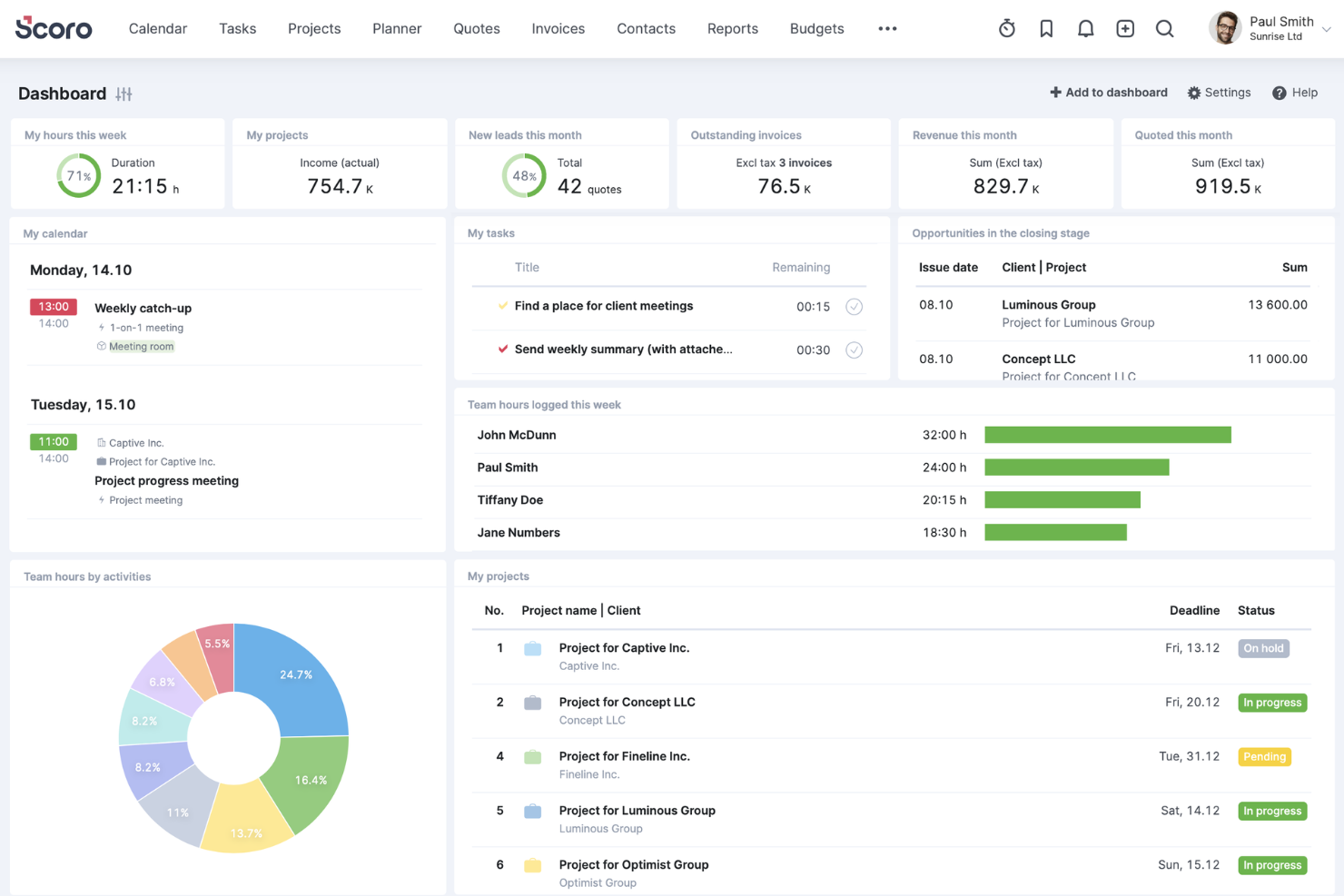
Scoro è un software di gestione aziendale tutto-in-uno progettato per aiutare i servizi professionali e creativi a semplificare le proprie operazioni. Combina gestione dei progetti, monitoraggio del tempo, vendite, fatturazione e reportistica in un'unica piattaforma, permettendo ai team di lavorare in modo più efficiente.
Uno dei motivi per cui ho scelto Scoro è la sua funzione di diagramma di Gantt in tempo reale. Questo strumento consente di monitorare i progressi, le attività, le dipendenze e gli eventi in una visualizzazione sempre aggiornata, aiutando ad adattarsi rapidamente ai cambiamenti e a capire come ritardi o ore registrate influenzino i tuoi piani. Riducendo al minimo gli aggiornamenti manuali e evitando doppie prenotazioni, il tuo team può concentrarsi maggiormente sugli aspetti creativi dei progetti di design.
Apprezzo anche le capacità di pianificazione delle risorse di Scoro. Grazie a un pianificatore drag-and-drop o a una bacheca di attività Kanban, puoi distribuire efficacemente le attività, assicurando carichi di lavoro equilibrati e prevenendo sovrapposizioni. I calendari condivisi, i timesheet e un timer integrato aiutano a gestire il tempo del team in modo efficiente, mentre il monitoraggio delle ore fatturabili e non fatturabili garantisce la responsabilità per il tempo dedicato ai lavori dei clienti.
Le integrazioni includono Google Calendar, Microsoft Exchange, QuickBooks, Xero, Stripe, PayPal, Jira, Asana, HubSpot, Salesforce, Dropbox e Zapier.
New Product Updates from Scoro

Scoro Adds Time Mobile App and ELI Improvements
Scoro adds the Scoro Time mobile app for iOS/Android to track time anywhere and expands ELI with attachments, smarter filtering, and trigger-based actions. For more information, visit Scoro's official site.

Ideale per il monitoraggio della redditività

Productive è uno strumento di gestione progetti tutto-in-uno che ti aiuta a gestire l’intero flusso di lavoro, dall’invio delle proposte e la pianificazione delle risorse fino alla consegna dei progetti e alla fatturazione dei clienti.
Productive dà particolare attenzione alla redditività. Ti permette di gestire ogni progetto come un singolo conto economico, offrendoti una chiara panoramica della performance finanziaria. Questa funzionalità ti aiuta a capire quali progetti sono più redditizi e dove potresti dover modificare le tue strategie.
Un altro aspetto utile sono le funzionalità di pianificazione delle risorse di Productive. Puoi assegnare efficacemente il tempo del tuo team, assicurandoti che tutti lavorino sui compiti giusti al momento giusto. Questo aiuta a evitare il sovraccarico o il sottoimpiego dei membri del team, portando a una conclusione più efficiente dei progetti.
Le integrazioni includono Google Calendar, Jira, Slack, QuickBooks, Xero, Zapier, Sage, BambooHR e HubSpot.
New Product Updates from Productive
Productive Adds Voice Dictation, Slack Connector, Proposals, and Overtime
Productive adds voice dictation, a Slack Connector, proposal controls, and overtime tracking. These updates support faster AI interactions, client proposals, and time management. For more information, visit Productive’s official site.

Ideale per annotazioni e controllo versione
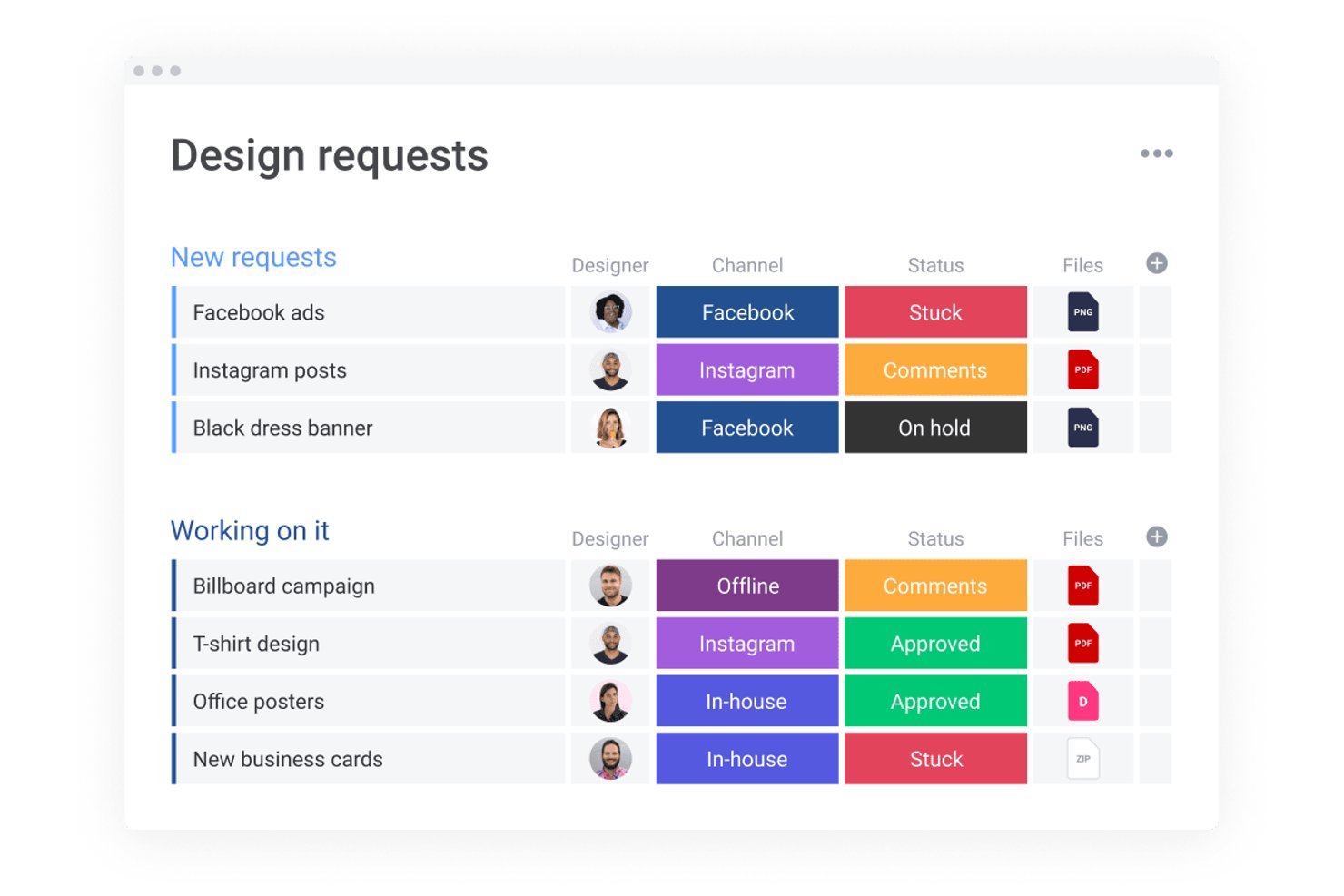
monday AI Workspace è una piattaforma configurabile di gestione del lavoro che combina il monitoraggio visivo dei progetti, automazioni supportate dall'IA, integrazioni con file di design e strumenti di collaborazione trasversale per team creativi e di design.
Per chi è ideale monday AI Workspace?
È l'opzione perfetta per team di design interni e agenzie creative che gestiscono più progetti tra diversi stakeholder trasversali e necessitano di uno spazio di lavoro centrale.
Perché ho scelto monday AI Workspace
Ho incluso monday AI Workspace tra le mie migliori scelte per il modo in cui collega il controllo delle versioni direttamente alle attività di progetto tramite l'integrazione con Figma. Ogni elemento della board è collegato a una specifica versione Figma, così il mio team sa sempre quale iterazione del design è in revisione. Gli embed live di Figma e Canva si sincronizzano automaticamente, mantenendo i feedback legati all'esatta risorsa invece che dispersi in una discussione di commenti di tre revisioni fa.
Funzionalità principali di monday AI Workspace
- Note automatiche con IA: Cattura, trascrive e riassume le discussioni delle riunioni direttamente nello spazio di lavoro per un facile follow-up.
- Lavagna WorkCanvas: Permette di fare brainstorming, pianificare e mappare idee creative in modo visivo all'interno dei tuoi project board.
- Automazione personalizzata dei flussi di lavoro: Automatizza compiti ripetitivi della gestione di progetto come cambi di stato, instradamento degli asset o monitoraggio delle scadenze.
- Accesso ospite e permessi: Permette a clienti o stakeholder di collaborare, commentare e revisionare all'interno di controlli di accesso definiti.
Integrazioni di monday AI Workspace
monday AI Workspace offre centinaia di integrazioni native tramite il proprio sistema integrato e marketplace, inclusi Slack, Google Workspace, Microsoft 365, Jira, Dropbox, Zoom, HubSpot, Salesforce, GitHub e Outlook. Supporta anche Zapier e fornisce un API per integrazioni personalizzate.
Pros and Cons
Pros:
- Gli embed Figma si sincronizzano in tempo reale nelle board di progetto
- Strumenti di annotazione collegati direttamente ai file di design
- Board altamente visive adatte al monitoraggio dei flussi creativi
Cons:
- Funzionalità avanzate disponibili solo nei piani più costosi
- Non è concepito esclusivamente per flussi di lavoro creativi
New Product Updates from monday AI Workspace
monday AI Workspace Adds Human Approval Routing
monday AI Workspace adds a human-in-the-loop approval block to AI Workflows, sending approval requests and routing workflow paths based on responses. For more information, visit monday AI Workspace's official site.

Wrike
Modelli di brief creativi per aiutarti a iniziare il tuo progetto con il piede giusto.
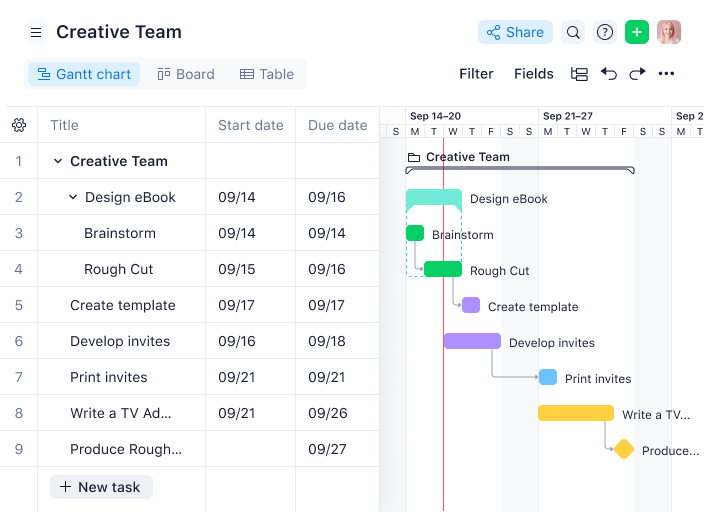
Wrike è un potente software di gestione progetti che consente ai team di design di creare flussi di lavoro personalizzati in base alle proprie esigenze specifiche. Semplifica la raccolta delle richieste di lavoro, ottimizza la revisione, configura flussi creativi e aumenta la produttività su un'unica piattaforma collaborativa. Dedica meno tempo alle attività amministrative ripetitive e più tempo alla realizzazione di progetti di design di alta qualità.
I modelli predefiniti ti aiuteranno a creare flussi di lavoro per il design e a lanciare rapidamente ed efficientemente nuovi progetti. Wrike offre brief e moduli di richiesta personalizzabili, gestione visiva e modulabile del carico di lavoro, uno spazio dove i membri del team possono fornire feedback, oltre a reportistica e analisi. Personalizza flussi di lavoro, dashboard, report e moduli di richiesta con un software altamente configurabile progettato per eliminare scoccianti compiti amministrativi, così il tuo team potrà dedicarsi maggiormente alla creazione di risorse di valore.
Wrike dispone di un'interfaccia semplice da usare con distinte aree (Spaces), cartelle e attività. Puoi passare da una visualizzazione Kanban a diagrammi di Gantt interattivi drag-and-drop o visualizzazioni tradizionali dei carichi di lavoro per avere sempre un quadro chiaro delle priorità. Oppure navigare tra la schermata principale, i timesheet, le dashboard, i calendari, i report e un flusso per notifiche e messaggi. Gli utenti hanno anche accesso a una varietà di template preimpostati per processi organizzativi comuni che consentono ai team di avviare i progetti più velocemente.
Wrike offre oltre 400 integrazioni, tra cui Adobe Creative Cloud, garantendoti la visibilità e l’efficienza necessarie senza ostacolare la creatività del tuo team. L’estensione Wrike per Adobe è gratuita per tutti gli abbonati Wrike ed è disponibile per Photoshop CC, Illustrator CC, InDesign CC e Premiere Pro CC.
New Product Updates from Wrike

Wrike Adds Quick Search to Table View
Wrike adds Quick Search to Table View with full-table search across titles, descriptions, and fields, plus highlighted matches. This helps users find tasks faster in large tables. For more information, visit Wrike’s official site.

Collaborazione in tempo reale per la fase di revisione.

Screendragon offre funzionalità nel proprio software che aiutano a ottimizzare i flussi di lavoro per la produzione creativa. Controllo delle versioni, condivisione dei file e approvazioni automatiche sono solo alcune di queste. Sono anche orgogliosi di offrire un software ben progettato fin dall'inizio e non sviluppato in modo approssimativo. Nessun lavoro superficiale qui!
Quello che apprezzo di questo strumento è la funzione di confronto delle versioni. È possibile visualizzare affiancate le diverse versioni dello stesso contenuto su cui si sta lavorando, evidenziare una sezione con uno strumento a mano libera o con dei moduli e tenere traccia della cronologia delle modifiche e dei commenti. Perfetto per audit interni!
Screendragon dispone di oltre mille integrazioni tramite Zapier.
I prezzi sono disponibili su richiesta.
New Product Updates from Screendragon
Screendragon Unveils New AI Hub
Screendragon introduced AI Hub, a new capability that lets teams build and manage AI agents directly within workflows. The update helps marketing teams automate tasks, maintain governance controls, and scale AI-driven operations more efficiently. For more information, visit Screendragon's official site.

Il miglior software per la gestione di progetti di design e la collaborazione
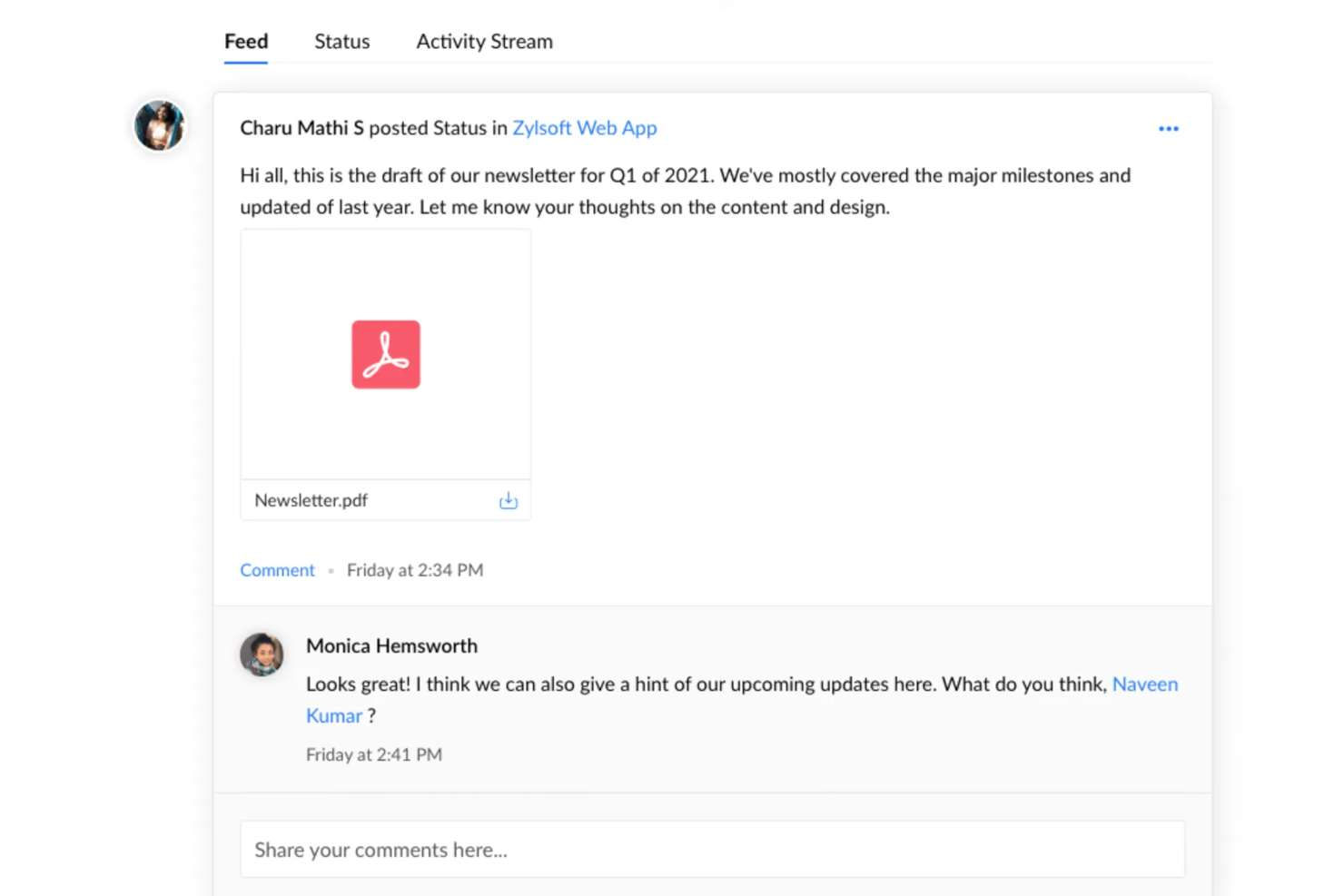
Zoho Projects è un software di gestione progetti che può essere utilizzato da qualsiasi tipo di team. La piattaforma offre molte funzionalità personalizzabili, come layout, visualizzazioni individuali, modelli di progetto e stati dei progetti. Gli utenti possono creare flussi di lavoro per i progetti, assegnare compiti e impostare dipendenze nel sistema. È possibile configurare i ruoli utente per assicurarsi che le persone giuste vengano assegnate ai progetti corretti, e una heatmap di disponibilità aiuta a garantire che nessuno sia sovraccarico.
Ciò che distingue questo software sono le sue funzionalità di collaborazione. Gli utenti possono commentare, taggare e condividere file direttamente sulla piattaforma, rendendo facile lavorare insieme su progetti creativi. Il software può archiviare e gestire grandi quantità di documenti, offrendo controllo di versione e degli accessi oltre a note per mantenere i file organizzati e aggiornati. Uno strumento di chat in tempo reale permette agli utenti di connettersi rapidamente per scambiarsi feedback e dettagli importanti sui progetti senza uscire dall'ambiente del software.
Gli utenti possono integrare il software con altri strumenti come Dropbox, Github, Google Workspace, Microsoft Teams, Slack e Zapier, sbloccando ancora più integrazioni con un account a pagamento.
È disponibile una versione gratuita e i piani a pagamento partono da $5/utente/mese. Le prove gratuite di 10 giorni consentono di testare un abbonamento a pagamento.
New Product Updates from Zoho Projects
Zoho Projects Adds CodeX Scripts for Custom Modules
Zoho Projects now supports CodeX Scripts for custom modules, enabling conditional logic and rules for creating, updating, and deleting records. For more information, visit Zoho Projects' official site.
 .
.
Kantata
Ideale per l'erogazione completa di servizi lungo tutto il ciclo di vita
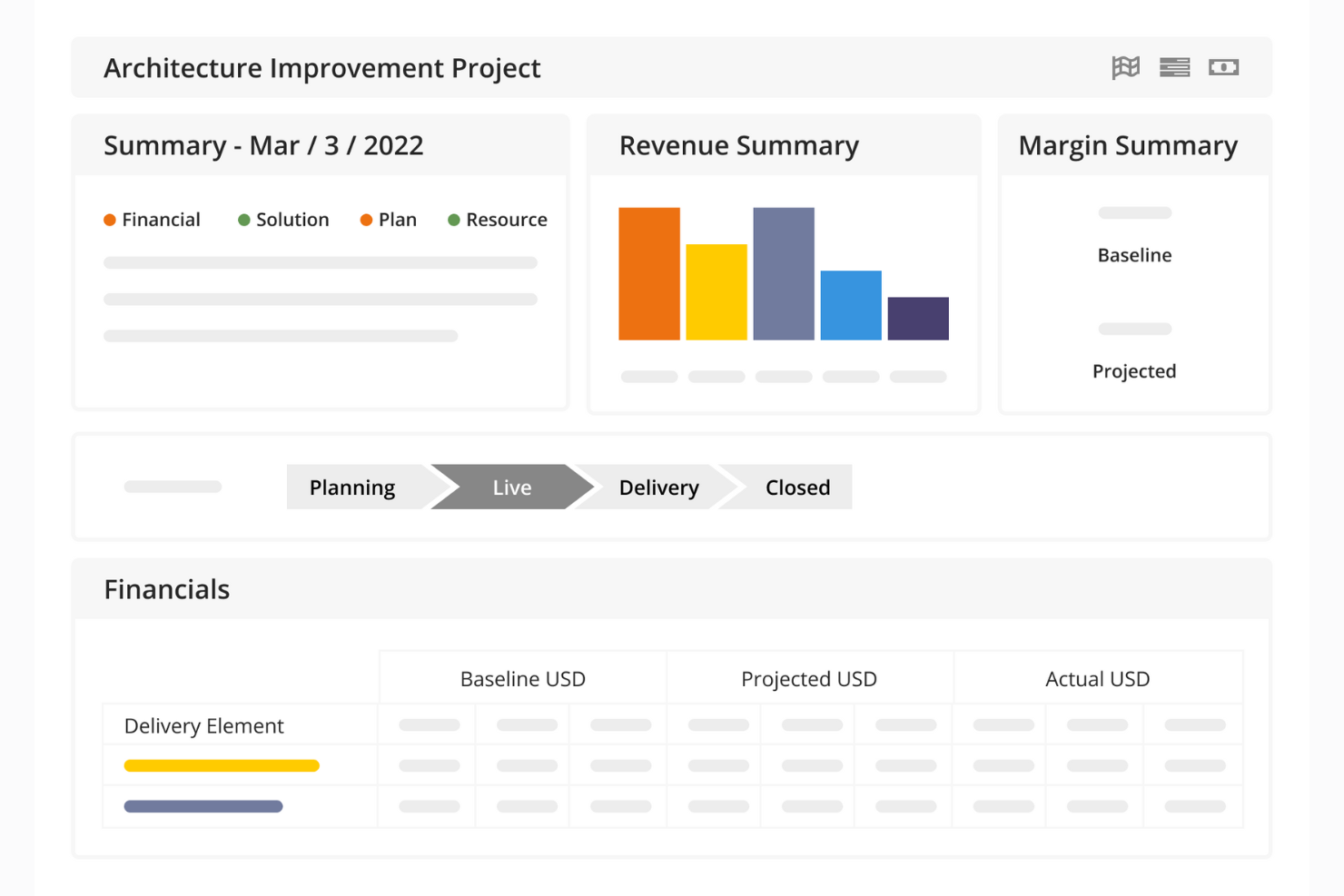
Kantata è una piattaforma di gestione progetti pensata per aiutare le agenzie di design e i team di servizi creativi a gestire il lavoro dall'inizio alla fine. Oltre alla gestione delle attività, riunisce in un unico sistema flussi di lavoro, pianificazione delle risorse, supervisione finanziaria e collaborazione.
Il software supporta il tuo team durante tutto il ciclo di vita del progetto. Dashboard in tempo reale e monitoraggio finanziario ti aiutano a prevenire i rischi, mentre gli strumenti di gestione di attività e risorse garantiscono che i designer giusti siano assegnati ai progetti giusti. Le funzioni di collaborazione integrate mantengono la comunicazione fluida tra i team interni e i clienti, così il tuo lavoro creativo resta sempre sulla buona strada e i feedback vengono gestiti rapidamente.
Per i team di design che gestiscono più account clienti o ampi portafogli di progetti creativi, Kantata offre una visione a livello di portafoglio insieme a dettagli specifici per ogni progetto. Puoi monitorare la redditività, la capacità e l'avanzamento delle campagne, approfondendo fino all'esecuzione delle singole attività. Questo rende più semplice bilanciare le risorse, rispettare le scadenze e offrire costantemente creatività di qualità.
Kantata si integra con diversi altri strumenti di lavoro, tra cui Slack, Sage, Quickbooks, Expensify, BambooHR, NetSuite, Jira, Salesforce, Xero e Google Workspace.
New Product Updates from Kantata

Kantata Adds Access Group Change History
Kantata adds Access Groups History, letting account administrators track changes to group details, membership, and permissions in Recent History. The update also makes these events available through the Subscribed Events API for broader monitoring. For more information, visit Kantata’s official site.
 .
.
Quire
Ideale per suddividere compiti complessi
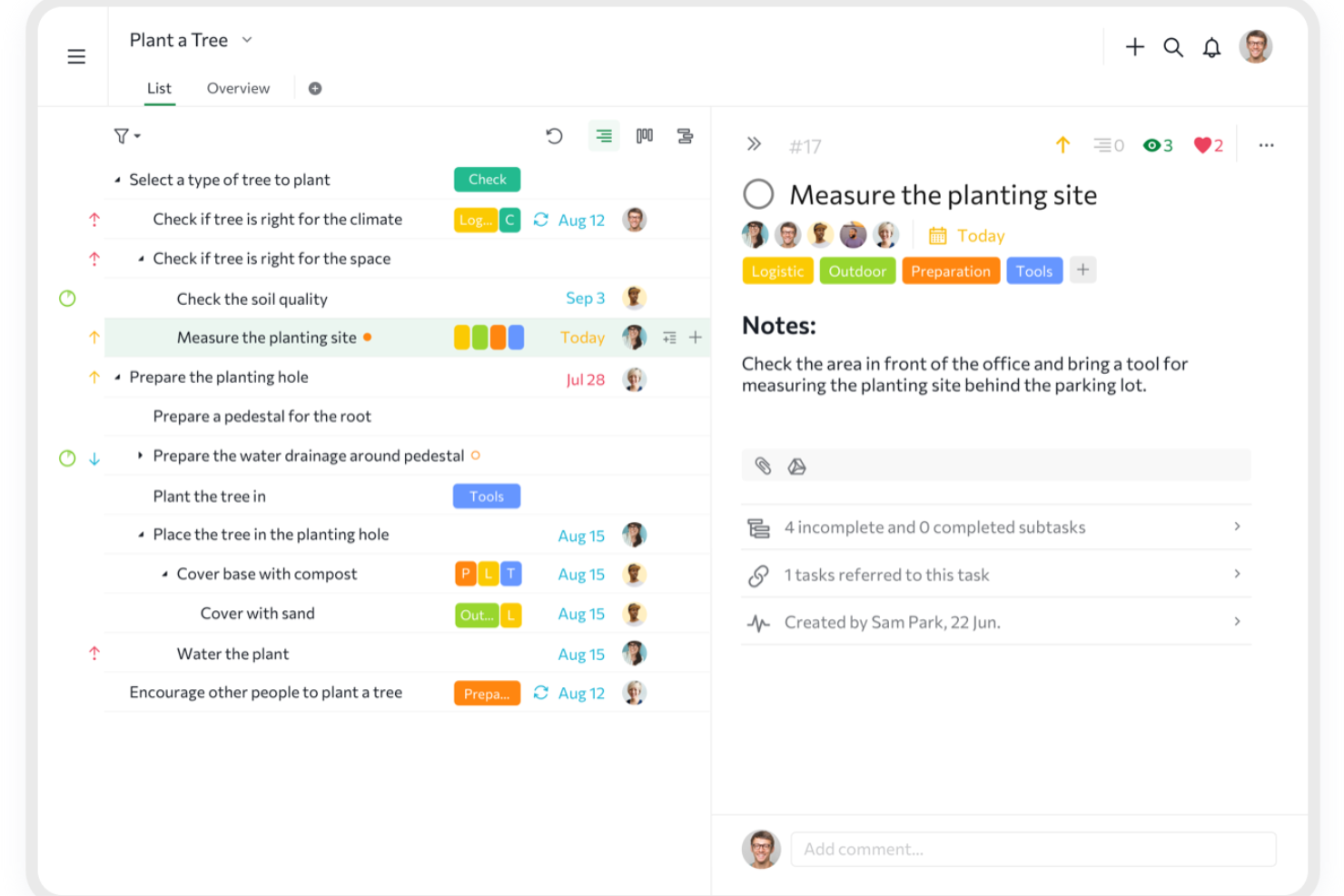
Quire è uno strumento collaborativo di gestione dei progetti progettato per aiutare i team a pianificare, monitorare ed eseguire il proprio lavoro. Offre uno spazio di lavoro flessibile in cui è possibile suddividere grandi idee in attività più piccole e gestibili.
Un modo in cui Quire permette di suddividere progetti di design complessi è tramite la sua funzionalità di elenco nidificato. Questa struttura gerarchica aiuta a organizzare il lavoro in modo logico, rendendo più semplice monitorare i progressi e mantenere chiarezza durante tutto il ciclo di vita del progetto. Inoltre, la timeline dinamica con diagrammi di Gantt consente di pianificare e tracciare le tappe fondamentali del progetto, garantendo il rispetto delle scadenze e il mantenimento della tabella di marcia. La sua interfaccia semplice drag-and-drop rende inoltre facile modificare le tempistiche quando il lavoro di design cambia a causa di imprevisti e priorità.
Inoltre, la piattaforma integra le bacheche Kanban con questi elenchi di attività nidificati. Questa combinazione consente di visualizzare il flusso di lavoro e tracciare l’avanzamento delle attività attraverso le varie fasi, aumentando la trasparenza e la responsabilità all'interno del team. La possibilità di passare da una vista all’altra offre ulteriore flessibilità nel modo in cui gestisci e interagisci con i tuoi progetti.
Alcune delle integrazioni di Quire includono Google Calendar, Gmail, Slack, Outlook, Zoho Flow, GitHub, Sincronizzazione con Apple Calendar, Box, Dropbox, Google Drive e Microsoft Teams.
New Product Updates from Quire

Quire Adds Task and Standalone Reminders
Quire adds task reminders and standalone reminders with shared notifications, recurring schedules, and automatic date tracking. These updates help teams stay ahead of deadlines and manage reminders that do not need a task. For more information, visit Quire’s official site.
 .
.
Miro
Ideale per una soluzione altamente flessibile e personalizzabile
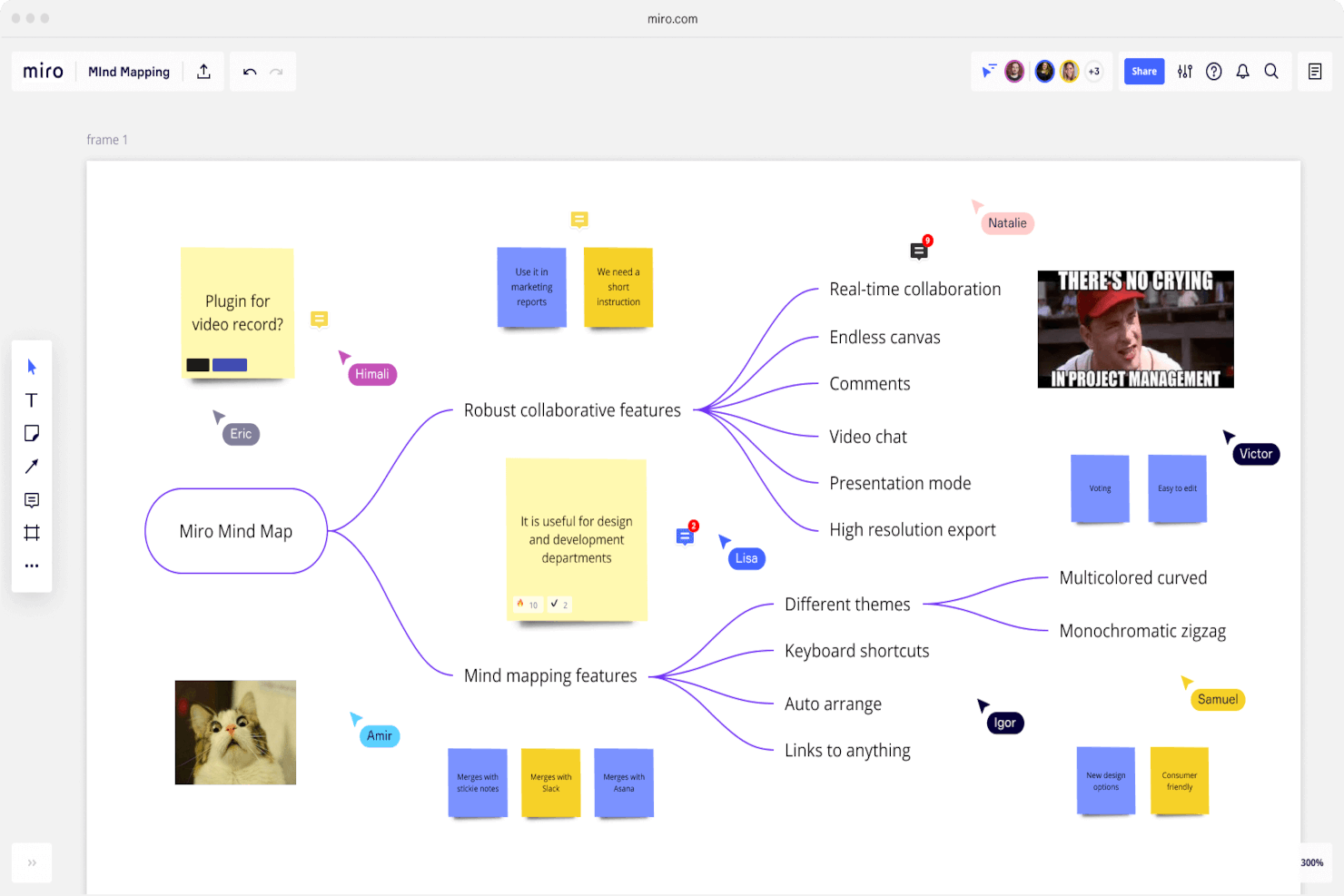
Miro è una piattaforma di collaborazione visiva pensata per la gestione di progetti di design, che offre un ampio spazio di lavagna virtuale. Supporta diverse forme di espressione delle idee, tra cui forme, diagrammi di flusso, note adesive ed elementi multimediali. Altre funzionalità chiave includono una tela infinita per un'ideazione senza limiti, TalkTrack per spiegazioni video asincrone delle mappe di processo e strumenti di collaborazione asincrona, come commenti e reazioni, per facilitare un feedback continuo.
Miro offre inoltre una vasta raccolta di modelli per workflow agili, roadmap e pianificazione strategica, sessioni di brainstorming e molte altre casistiche d’uso. Nel complesso, è una soluzione estremamente flessibile, adatta alle esigenze dei team di design che necessitano di uno spazio di lavoro personalizzabile in grado di adattarsi a stili e orari di lavoro diversi.
Il software si integra con altri strumenti di lavoro come Zoom, Microsoft Teams, Slack, Google Workspace, Asana, monday.com, Jira, Dropbox, OneDrive, Notion, Airtable, ClickUp e Unito, tra gli altri. È disponibile un piano gratuito e i piani a pagamento partono da $10 per utente al mese.
New Product Updates from Miro
Miro Adds Japan Data Residency for Enterprise Customers
Miro has introduced Japan data residency for enterprise customers, offering in-region storage for production data, backups, and metadata, plus in-region compute infrastructure. For more information, visit Miro's official site.

FigJam
Ideale per connettersi con la piattaforma di design di Figma
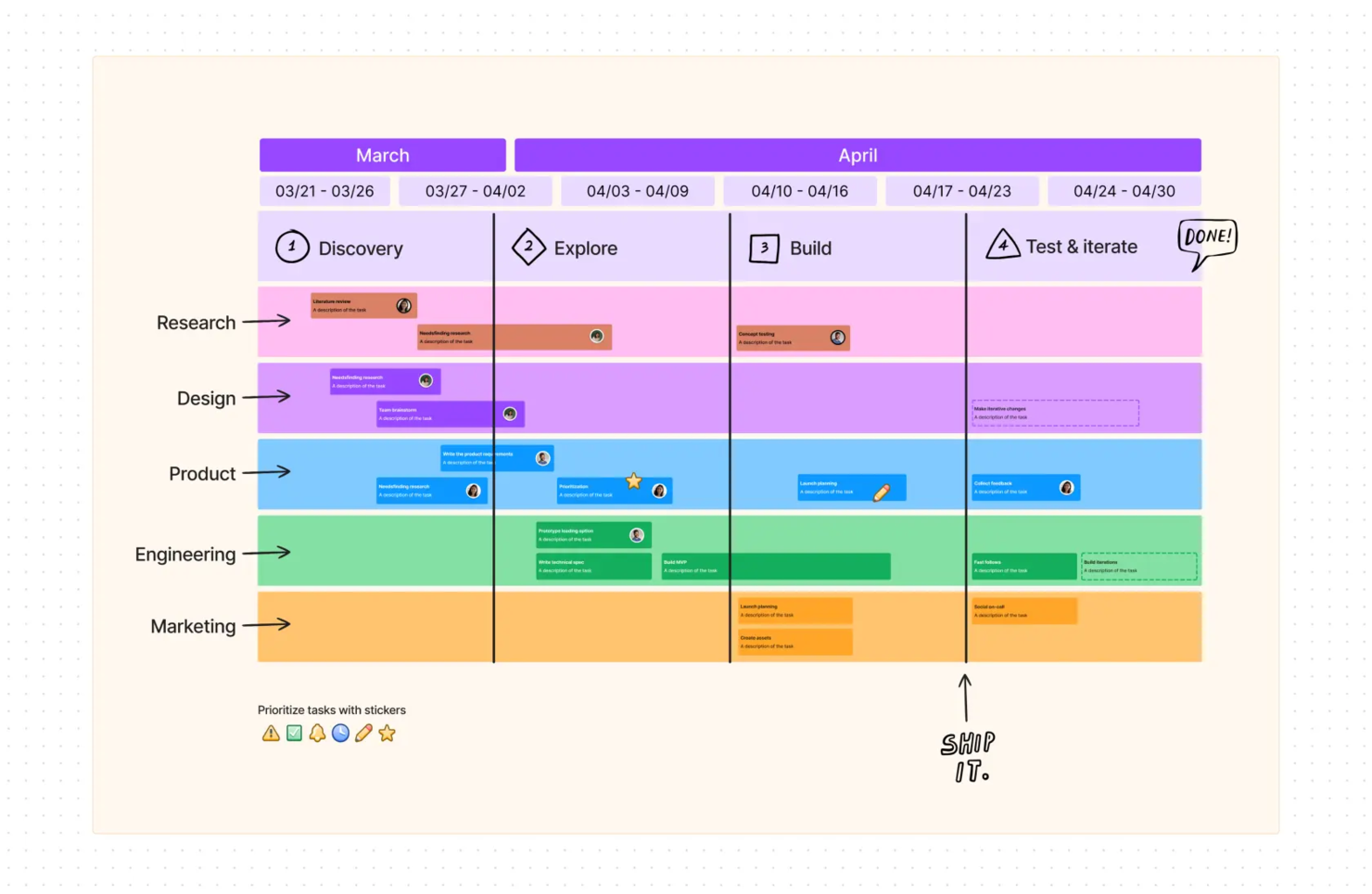
FigJam è una soluzione di whiteboard virtuale che offre strumenti di collaborazione in tempo reale. È creata da Figma e progettata per integrarsi con la piattaforma di design di Figma. La piattaforma, flessibile e versatile, può facilitare la pianificazione dei progetti, il monitoraggio delle attività e molto altro; inoltre puoi sincronizzare le risorse create direttamente con il tuo account Figma.
Poiché è una soluzione particolarmente libera, lo strumento di whiteboarding è utile per molto più che la semplice gestione dei progetti. Puoi utilizzarlo per l’ideazione, la prototipazione preliminare e altri casi d’uso. Le sue automazioni possono, ad esempio, ordinare automaticamente i post-it oppure consolidare le annotazioni in punti di azione chiari. È anche disponibile una vasta documentazione di supporto, sia da Figma che dalla community di Figma.
Ciò che rende FigJam particolarmente utile per i team di design è la sua integrazione con la piattaforma di design Figma. Per i team di prodotto e di design, questo è estremamente vantaggioso perché consente di pianificare, gestire ed eseguire il lavoro tutto nello stesso ambiente.
Sono disponibili integrazioni native per Figma, Microsoft Teams, Asana, Jira, Mixpanel e Github.
È disponibile un piano freemium fino a 3 lavagne; i piani a pagamento partono da $3 per utente, al mese.
Altri software per la gestione dei progetti di design
Ecco alcune opzioni aggiuntive di software per la gestione dei progetti di design che non sono state incluse nella mia selezione, ma che vale comunque la pena prendere in considerazione:
- MeisterTask
Visualizzazioni intuitive e navigazione facile da usare per i team di design.
- ClickUp
Condividi link con i clienti per far revisionare il tuo lavoro e nascondere le informazioni sensibili.
- Trello
Viste kanban che ti permettono di mappare facilmente i tuoi progetti di design e mantenere tutti aggiornati.
- IntelligenceBank
Piattaforma per operations di marketing con funzionalità di gestione delle risorse digitali.
- Workzone
Ideale per sistema integrato di revisione e approvazione
- Filestage
Ideale per la varietà di modalità di raccolta dei feedback
- Teamwork.com
Gestione progetti con accesso gratuito illimitato per i tuoi clienti.
- Bonsai Agency Software
Ideale per gestire progetti, clienti e finanze di agenzie di design
- Ravetree
Il miglior software di gestione progetti e lavoro per agenzie di design
- Gain
Revisioni e collaborazione del team in un unico posto per avere il pieno controllo del tuo progetto.


Come Valuto i Software di Gestione Progetti per il Design
Divido la mia valutazione in due livelli: le capacità di base che uno strumento deve possedere—come sistemi di revisione e approvazione—e i fattori differenzianti che distinguono una soluzione buona da quella giusta.
Funzionalità di Base (Requisiti Fondamentali per Questa Lista)
Queste funzionalità di base servono come criteri di accettazione per l'inclusione nella mia lista di software di gestione progetti per il design:
- Gestione delle Attività di Design: Valuto se è possibile strutturare le attività attorno alle fasi creative—brief, bozza, revisione, approvazione—invece di semplici flussi di lavoro generici.
- Revisione Visiva & Annotazione: Gli strumenti di markup per immagini, PDF e mockup sono fondamentali qui. Controllo se i revisori possono inserire commenti direttamente sul design.
- Gestione Centralizzata delle Risorse Creative: Cerco librerie di file centralizzate con cronologia delle versioni, così i team non devono cercare tra le email l'ultimo file del logo.
- Flussi di Approvazione: Inoltrare un mockup della homepage al direttore creativo, poi al cliente, poi al reparto legale richiede passaggi di approvazione strutturati. Valuto tale flusso.
- Pianificazione delle Risorse e della Capacità: Verifico se lo strumento mostra i carichi di lavoro e la disponibilità dei designer sui vari progetti, non solo chi è assegnato a quale attività.
- Integrazione con Strumenti Creativi: Collegamenti con piattaforme come Adobe Creative Cloud, Figma e Sketch sono requisiti di base. Cerco sincronizzazione nativa, non solo caricamento di file.
Attribuisco a ciascun fornitore un punteggio da 0 (non offre la funzionalità) a 5 (eccelle in quell'area) per ciascun criterio.
I fornitori devono raggiungere un punteggio medio minimo per essere presi in considerazione nell'elenco. Da lì, valuto ciò che distingue ciascuna piattaforma.
Fattori Differenzianti (Cosa Distingue i Fornitori)
Dopo aver selezionato la mia lista, ecco come confronto i diversi fornitori nel mercato dei software di gestione progetti per il design:
Funzionalità Distintive
I portali di collaborazione per i clienti sono particolarmente preziosi per agenzie o studi che devono mantenere il feedback dei clienti organizzato e separato dalle email. Cerco anche funzioni di monitoraggio del tempo e fatturazione, poiché collegare il tempo di design ai singoli progetti permette ai team creativi di gestire redditività e risorse nello stesso ambiente. La governance centralizzata degli asset del marchio fa davvero la differenza per team interni o agenzie che gestiscono più brand, garantendo che tutti lavorino sugli ultimi template e linee guida.
Oltre le Funzionalità
Strutture di prezzo e licenza variano molto in questo settore, quindi valuto se i posti per ospiti o clienti siano inclusi o fatturati separatamente—importante per le agenzie che conducono decine di revisioni esterne. Considero anche l'idoneità al team, perché una piattaforma pensata per uno studio di cinque persone può essere molto diversa da una progettata per reparti creativi aziendali. Vale la pena guardare anche alla sicurezza, specialmente quando si gestiscono asset di campagne non ancora pubblicate o materiali sensibili del marchio; la conformità SOC 2 e i permessi granulari basati sui ruoli sono ciò che cerco in questi casi.
Come scegliere il software per la gestione dei progetti di design
È facile perdersi in lunghi elenchi di funzionalità e strutture di prezzo complesse. Per aiutarti a rimanere concentrato mentre affronti il tuo particolare processo di selezione del software, ecco un elenco di fattori da tenere a mente:
| Fattore | Cosa considerare |
|---|---|
| Scalabilità | Lo strumento può crescere insieme al tuo team? Considera se supporta un numero maggiore di utenti, progetti e dati con l'espansione delle tue esigenze. |
| Integrazioni | Si connette agli strumenti che già utilizzi? Verifica la compatibilità con software di progettazione, app di comunicazione e altri strumenti di gestione dei progetti. |
| Personalizzazione | Puoi adattarlo ai tuoi flussi di lavoro? Cerca opzioni per modificare dashboard, modelli e autorizzazioni in base ai processi del tuo team. |
| Semplicità d'uso | È semplice da adottare per il tuo team? Valuta la sua interfaccia e la curva di apprendimento per garantire un adattamento rapido senza una formazione approfondita. |
| Implementazione e avvio | Quanto tempo richiederà la configurazione? Valuta il tempo e le risorse necessari per l'avvio, inclusi i materiali di formazione e la disponibilità del supporto. |
| Costo | Rientra nel tuo budget? Confronta i piani tariffari, i costi nascosti e le opzioni di prova per assicurarti che siano in linea con i tuoi vincoli finanziari. |
| Misure di sicurezza | I tuoi progetti sono al sicuro? Verifica le misure di protezione dei dati, come crittografia, controlli degli accessi e conformità agli standard pertinenti. |
| Disponibilità del supporto | Puoi ricevere assistenza quando ne hai bisogno? Considera i canali di supporto offerti e la loro reattività, soprattutto durante le fasi critiche dei progetti. |
Che cos'è il software di gestione dei progetti di design?
Il software di gestione dei progetti di design è uno strumento che aiuta i team a pianificare, eseguire e monitorare i progetti di design in modo efficiente. Viene comunemente utilizzato da designer, project manager e team creativi per migliorare la collaborazione e rispettare le scadenze. Le funzionalità di gestione delle attività, monitoraggio delle tempistiche e collaborazione del team aiutano a organizzare i progetti e a mantenere tutti allineati. Nel complesso, questi strumenti semplificano i flussi di lavoro dei progetti e migliorano la produttività del team.
Funzionalità
Quando scegli il software di gestione dei progetti di design, presta attenzione alle seguenti funzionalità chiave:
- Gestione delle attività: Organizza attività e scadenze, facilitando la definizione delle priorità e il completamento efficiente del lavoro da parte dei team.
- Monitoraggio delle tempistiche: Aiuta a monitorare le tempistiche dei progetti per garantire il rispetto delle scadenze e un'allocazione efficace delle risorse.
- Collaborazione del team: Facilita la comunicazione e la condivisione dei file tra i membri del team, migliorando il coordinamento e la produttività.
- Condivisione dei file: Consente ai team di condividere e accedere facilmente ai file di design, assicurando che tutti lavorino con le versioni più aggiornate.
- Flussi di lavoro personalizzabili: Permette agli utenti di adattare processi e dashboard alle esigenze specifiche del team e ai requisiti del progetto.
- Funzionalità di integrazione: Si connette ad altri strumenti e software, migliorando il flusso di lavoro complessivo mantenendo tutte le risorse in un unico luogo.
- Feedback in tempo reale: Consente di fornire input e apportare revisioni immediatamente, aiutando i team ad adattarsi rapidamente ai cambiamenti e alle richieste dei clienti.
- Controllo delle versioni: Tiene traccia delle modifiche ai file di design, assicurando che sia possibile accedere alle versioni precedenti quando necessario.
- Misure di sicurezza: Protegge i dati sensibili dei progetti con crittografia e controlli degli accessi, garantendo la conformità agli standard del settore.
- Risorse per la formazione: Fornisce supporto per l'avvio attraverso video, tutorial e guide per aiutare i team ad adattarsi rapidamente al software.
Vantaggi
L'implementazione di un software di gestione dei progetti di design offre diversi vantaggi al tuo team e alla tua azienda. Ecco alcuni dei benefici che puoi aspettarti:
- Organizzazione migliorata: Mantiene in ordine attività e scadenze, aiutando il tuo team a rimanere concentrato e produttivo.
- Collaborazione potenziata: Facilita la comunicazione e la condivisione dei file, rendendo più semplice per i membri del team lavorare insieme in modo efficace.
- Migliore gestione del tempo: Monitora tempistiche e scadenze, assicurando che i progetti rispettino il programma e che le risorse siano utilizzate con criterio.
- Maggiore flessibilità: I flussi di lavoro personalizzabili consentono di adattare i processi alle esigenze specifiche del progetto.
- Maggiore trasparenza: Offre visibilità sull'avanzamento del progetto e sullo stato delle attività, aiutandoti a prendere rapidamente decisioni informate.
- Sicurezza dei dati: Protegge le informazioni sensibili con crittografia e controlli degli accessi, garantendo la conformità agli standard del settore.
- Avvio più rapido: Offre risorse per la formazione, come video e tutorial, per aiutare il tuo team a diventare rapidamente operativo.
Costi e prezzi
La selezione del software per la gestione dei progetti di design richiede una comprensione dei vari modelli e piani tariffari disponibili. I costi variano in base alle funzionalità, alle dimensioni del team, ai componenti aggiuntivi e ad altro ancora. La tabella seguente riassume i piani più comuni, i relativi prezzi medi e le funzionalità tipicamente incluse nelle soluzioni software per la gestione dei progetti di design:
Tabella comparativa dei piani per il software di gestione dei progetti di design
| Tipo di piano | Prezzo medio | Funzionalità comuni |
|---|---|---|
| Piano gratuito | $0 | Gestione di base delle attività, condivisione limitata dei file e strumenti di base per la collaborazione. |
| Piano personale | $5-$25/utente/mese | Gestione delle attività, monitoraggio delle tempistiche, condivisione dei file e integrazioni di base. |
| Piano aziendale | $30-$60/utente/mese | Collaborazione avanzata, flussi di lavoro personalizzabili, integrazioni avanzate e supporto. |
| Piano per grandi aziende | $70-$120/utente/mese | Personalizzazione completa, funzionalità di sicurezza avanzate, supporto dedicato e strumenti per la conformità. |
Domande frequenti sul software di gestione dei progetti di design
Ecco alcune risposte alle domande comuni sul software per la gestione dei progetti di design:
Il software di gestione dei progetti di design può integrarsi con altri strumenti di design?
Sì, la maggior parte dei software per la gestione dei progetti di design si integra con strumenti di design popolari come Adobe Creative Suite e Sketch. Questa integrazione consente di condividere i file e collaborare senza problemi, aiutando il team a lavorare in modo efficiente senza dover passare continuamente da un’app all’altra. Verifica le integrazioni specifiche prima di scegliere uno strumento, per assicurarti che sia compatibile con il software attualmente in uso.
In che modo il software di gestione dei progetti di design può migliorare la collaborazione del team?
Il software di gestione dei progetti di design centralizza la comunicazione e le informazioni sul progetto, semplificando la collaborazione tra i membri del team. Funzionalità come tempistiche condivise, assegnazione delle attività e condivisione dei file consentono a tutti di rimanere informati e contribuire in modo efficace. Questi strumenti permettono inoltre di fornire feedback in tempo reale, accelerando le iterazioni del progetto e il processo decisionale.
La sicurezza dei dati è una preoccupazione per il software di gestione dei progetti di design?
Sì, la sicurezza dei dati è una preoccupazione, ma la maggior parte dei fornitori di software affidabili offre solide misure di sicurezza. Cerca strumenti che forniscano crittografia, controlli degli accessi e conformità agli standard del settore. Valuta sempre le funzionalità di sicurezza di un fornitore per assicurarti che i file di design sensibili e i dati dei progetti rimangano protetti dagli accessi non autorizzati.