

I 10 migliori software di gestione dei progetti per i servizi professionali selezionati per il 2026

Software di gestione dei progetti per i servizi professionali: selezione
- 2. Teamwork.com


Il software di gestione dei progetti per i servizi professionali aiuta il tuo team a pianificare, monitorare e completare i progetti dei clienti, gestendo risorse, budget e tempistiche in un unico posto. Se stai cercando la piattaforma giusta, probabilmente devi trovare un equilibrio tra esigenze mutevoli dei clienti, fatturazione complessa e la necessità di una visibilità in tempo reale su più progetti.
Il software giusto può aiutarti a coordinare il lavoro tra i team, mantenere allineate le parti interessate e assicurarti che nulla venga trascurato. In questo elenco troverai una selezione curata di strumenti progettati appositamente per le aziende di servizi professionali, così potrai confrontare le funzionalità e scegliere quello più adatto alla tua attività.
Perché fidarsi dei nostri consigli sui software
Il nostro team testa e recensisce software dal 2012. In quanto project manager noi stessi, sappiamo quanto sia difficile — e importante — scegliere il software giusto.
Per questa guida, abbiamo valutato gli strumenti attraverso test pratici e ricerche indipendenti, assegnando un punteggio agli strumenti in base ai nostri criteri di selezione. Ci basiamo inoltre sulle competenze di leader di pensiero del settore e di professionisti attivi nella gestione dei progetti.
Le nostre recensioni riflettono il nostro giudizio editoriale umano, non un discorso di vendita.
Revisori esperti:
Confronto tra software di gestione dei progetti per i servizi professionali
Questa tabella di confronto riassume i dettagli dei prezzi delle mie migliori selezioni di software di gestione dei progetti per i servizi professionali:
| Tool | Best For | Trial Info | Price | ||
|---|---|---|---|---|---|
| 1 | Non disponibile | A partire da $30/utente/mese (fatturati annualmente) | Website | ||
| 2 | Piano gratuito disponibile; prova gratuita di 14 giorni | A partire da $9.99/utente/mese (con fatturazione annuale) | Website | ||
| 3 | Ideale per le operazioni di gestione dei progetti e fatturazione delle agenzie creative | Demo gratuita disponibile | Da $53/utente/mese (fatturato annualmente) | Website | |
| 4 | Ideale per la pianificazione delle risorse delle agenzie | Prova gratuita di 14 giorni + demo gratuita disponibile | A partire da $10/utente/mese (fatturato annualmente) | Website | |
| 5 | Ideale per la gestione del tempo e della fatturazione nei servizi professionali | Demo gratuita disponibile | A partire da $20/utente/mese | Website | |
| 6 | Ideale per il monitoraggio visivo dei progetti e della capacità | Piano gratuito disponibile; prova gratuita di 14 giorni | A partire da 9 $/utente/mese (con fatturazione annuale) | Website | |
| 7 | Ideale per automatizzare i flussi di lavoro dalla raccolta delle richieste alla consegna | Piano gratuito + prova gratuita di 14 giorni disponibile | A partire da $10/utente/mese (con fatturazione annuale) | Website | |
| 8 | Ideale per riunire attività, documenti e chat di team | Piano gratuito disponibile | A partire da $7/utente/mese (con fatturazione annuale) | Website | |
| 9 | Ideale per le previsioni delle risorse a livello di portafoglio | Demo gratuita disponibile | Prezzi su richiesta | Website | |
| 10 | La soluzione migliore per collegare monitoraggio del tempo, fatturazione e lavoro con i clienti | Demo gratuita disponibile | Prezzi su richiesta | Website |


Recensioni dei software di gestione dei progetti per i servizi professionali
Di seguito trovi i miei riepiloghi dettagliati dei software di gestione dei progetti per i servizi professionali inclusi nella mia selezione. Le mie recensioni offrono un’analisi approfondita delle funzionalità, dei migliori casi d’uso e delle integrazioni di ogni piattaforma, per aiutarti a trovare quella più adatta al tuo team.

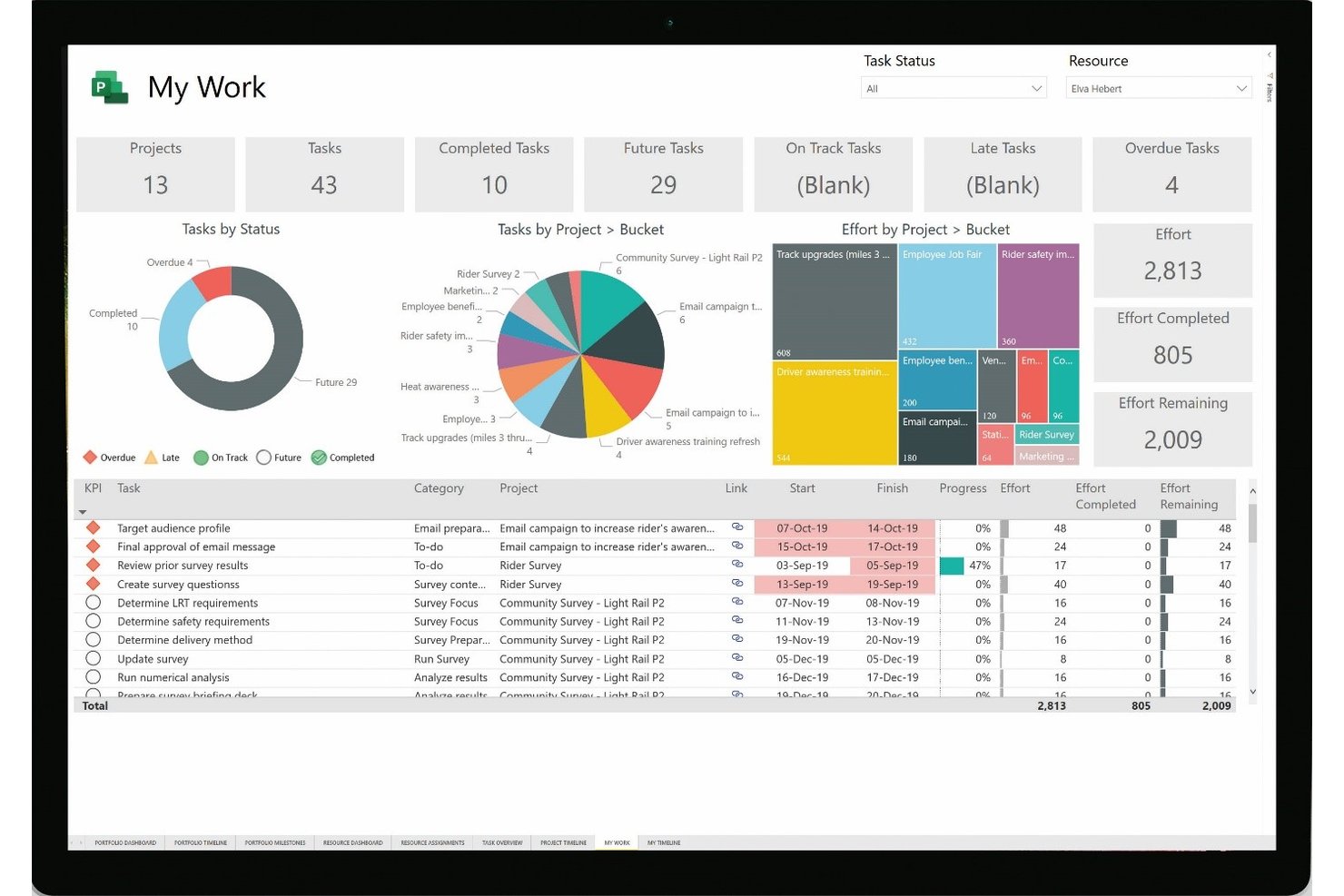
Microsoft Project è una piattaforma di gestione dei progetti di Microsoft che include pianificazione, allocazione delle risorse, gestione del portafoglio, monitoraggio del tempo e monitoraggio dei costi in ambienti con progetti singoli e multipli.
Per chi è più adatto Microsoft Project?
Microsoft Project è adatto alle grandi organizzazioni e ai team aziendali che necessitano di un controllo approfondito della pianificazione, della gestione delle risorse tra progetti e della visibilità a livello di portafoglio su flussi di lavoro complessi e simultanei.
Perché ho scelto Microsoft Project
Microsoft Project è nella mia lista ristretta grazie alla profondità di pianificazione che offre negli ambienti complessi con più progetti. Mi riferisco al monitoraggio completo del percorso critico tra attività dipendenti, alla pianificazione basata sull'impegno e alla ripianificazione automatica quando cambiano le date effettive di completamento: funzionalità importanti quando si gestiscono flussi di lavoro simultanei con dipendenze reali. Il pool di risorse e la pianificazione della capacità a livello di portafoglio (disponibile nel Piano 5) consentono di modellare scenari di organico sull'intero portafoglio di progetti prima di impegnarsi in un piano.
Funzionalità principali di Microsoft Project
- Monitoraggio del tempo basato sui fogli presenze: i membri del team registrano le ore effettive o la percentuale di completamento in un foglio presenze con inserimento singolo, con flussi di lavoro di approvazione configurabili e monitoraggio del tempo non fatturabile.
- Dashboard a livello di portafoglio: le dashboard personalizzabili mostrano report su progetti, attività e risorse, inclusi rischi, problemi e risultati finali, sull'intero portafoglio di progetti.
- Gestione del pool di risorse: un pool di risorse centralizzato riunisce disponibilità, tariffe dei costi e assegnazioni tra i file di progetto per contribuire a identificare i conflitti e visualizzare l'allocazione tra progetti.
- Condivisione esterna tramite Project Web App: gli utenti esterni possono essere invitati a collaborare su documenti, rischi e problemi tramite un sito Project Web App condiviso.
Integrazioni di Microsoft Project
Le integrazioni native non sono documentate in modo chiaro. Microsoft Project supporta interfacce REST e JavaScript per integrazioni personalizzate con Project Server, mentre Project Online archivia i dati in SharePoint.
Pros and Cons
Pros:
- La pianificazione dettagliata delle dipendenze supporta lo spostamento delle scadenze dei clienti
- I pool di risorse condivisi rendono visibili i conflitti di organico tra progetti
- Gli scenari di portafoglio aiutano a valutare i compromessi relativi all'organico
Cons:
- La fatturazione e l'emissione delle fatture ai clienti richiedono un altro sistema
- La collaborazione esterna non include approvazioni personalizzate per i clienti

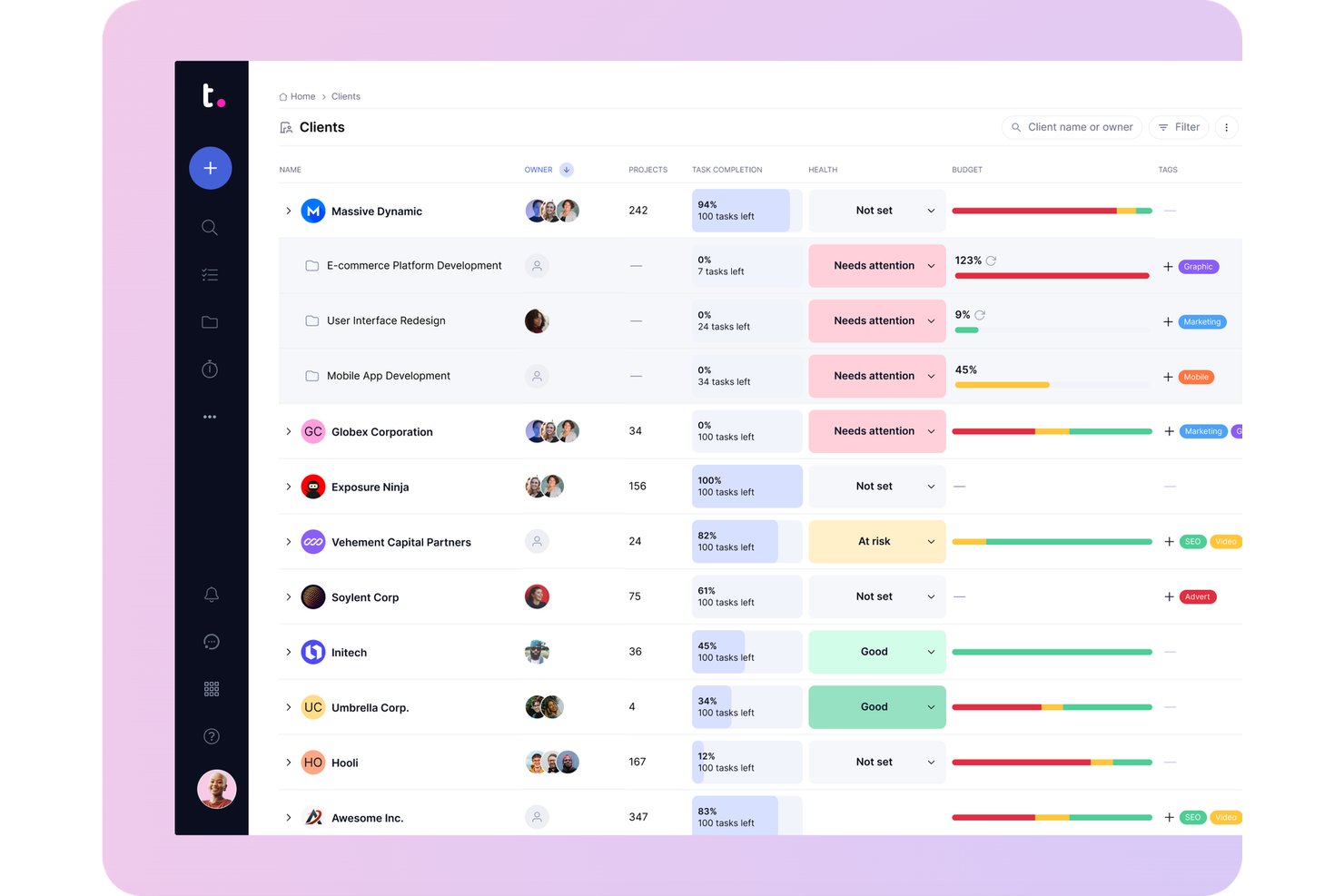
Teamwork.com è una piattaforma di gestione dei progetti progettata appositamente per il lavoro con i clienti, che combina pianificazione delle attività, programmazione con diagrammi di Gantt, rilevazione delle ore, gestione delle risorse, definizione del budget e fatturazione in un unico spazio di lavoro organizzato per cliente.
Per chi è più adatto Teamwork.com?
Teamwork.com è particolarmente adatto alle agenzie e ai team di consulenza che devono gestire ore fatturabili, budget dei clienti e consegna dei progetti in un unico luogo.
Perché ho scelto Teamwork.com
Teamwork.com si è guadagnato un posto nella mia selezione perché è stato progettato fin dall'inizio per il lavoro con i clienti, anziché essere adattato a questo scopo. Apprezzo particolarmente il modo in cui i registri delle ore si collegano direttamente alla fatturazione: le ore fatturabili confluiscono nelle fatture personalizzabili per i clienti, che si sincronizzano con QuickBooks, Xero o NetSuite senza necessità di riconciliazione manuale. I budget dei contratti a canone ricorrente si rinnovano automaticamente su cicli mensili o trimestrali, tengono traccia del tempo registrato rispetto al limite di budget e inviano avvisi prima che venga superato.
Funzionalità principali di Teamwork.com
- Pianificatore del carico di lavoro: Visualizza la capacità del team tra i vari progetti e segnala gli utenti con allocazione eccessiva o insufficiente, così puoi riequilibrare il lavoro prima che le scadenze slittino.
- Revisioni: Gestisce i cicli di revisione dei clienti, dalla prima bozza alle revisioni fino all'approvazione finale, con l'approvazione monitorata direttamente all'interno del progetto.
- Vista del portafoglio: Mostra lo stato di salute, lo stato di avanzamento e i progressi di tutti i progetti attivi dei clienti in un'unica vista per una supervisione trasversale dei progetti.
- Assegnazione del personale in base a competenze e ruoli: Classifica i membri del team in base alle competenze, così puoi abbinare alle nuove attività le persone giuste in base alle loro capacità e ai loro ruoli.
Integrazioni di Teamwork.com
Teamwork.com offre oltre 150 integrazioni, tra cui la connettività nativa con QuickBooks Online, Xero, NetSuite, HubSpot, Salesforce, Slack, Microsoft Teams e Google Calendar, oltre a SoftSync per Jira. Offre webhook, accesso API e Zapier.
Pros and Cons
Pros:
- I budget a livello di cliente collegano le ore registrate alla fatturazione
- Le viste del carico di lavoro aiutano a riequilibrare gli incarichi simultanei
- I clienti esaminano le revisioni accanto alle discussioni del progetto
Cons:
- Il cambio del timer può lasciare non registrate le attività brevi
- Gli utenti clienti non possono accedere al portafoglio o ai report

Ideale per le operazioni di gestione dei progetti e fatturazione delle agenzie creative
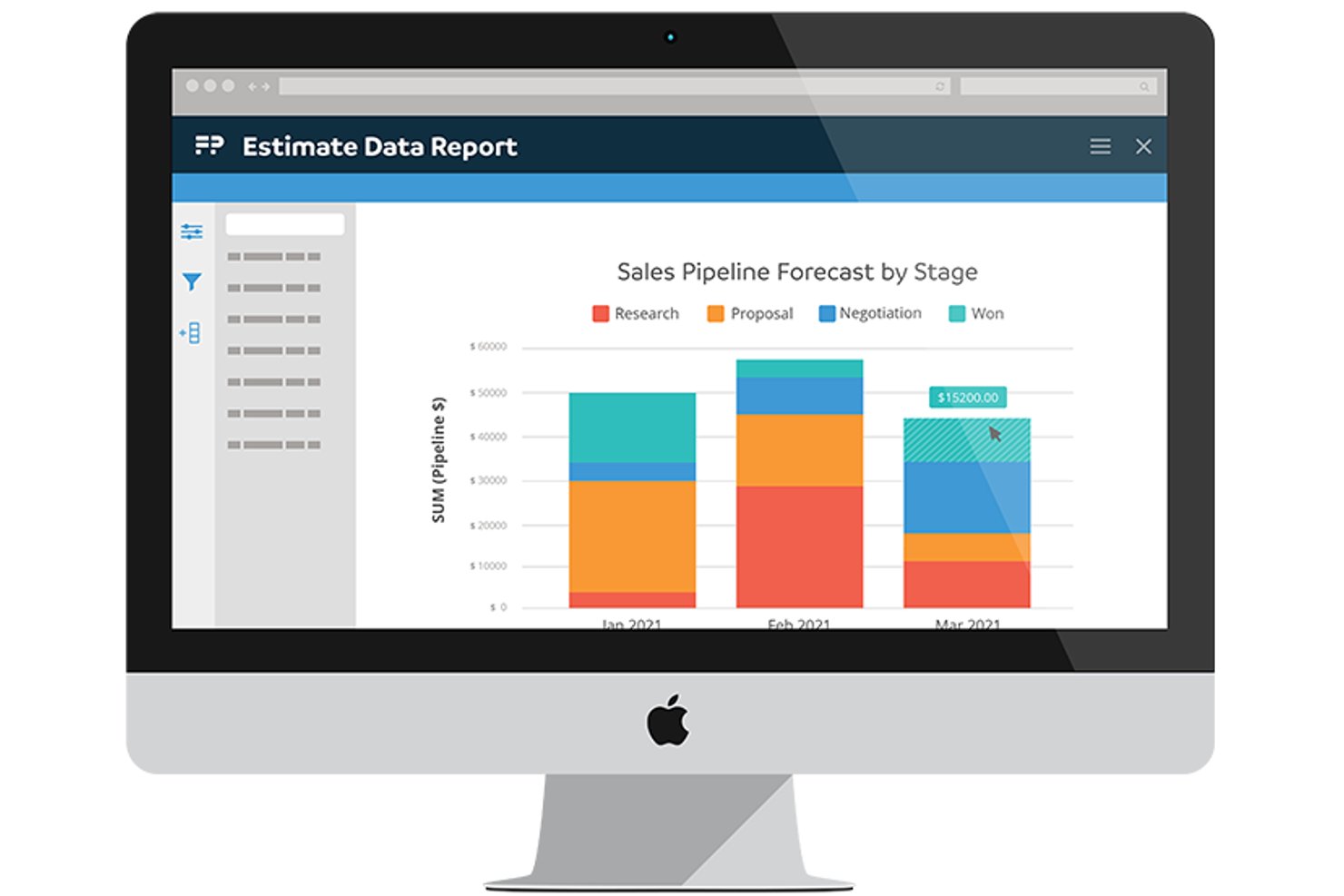
Function Point è una piattaforma per la gestione delle agenzie che combina pianificazione dei progetti, previsione delle risorse, monitoraggio del tempo, portali per i clienti e gestione finanziaria—inclusi budgeting, fatturazione e report sulla redditività—in un unico sistema sviluppato specificamente per i team di servizi creativi e professionali.
Per chi è più adatto Function Point?
Function Point è adatto alle agenzie creative e di marketing che hanno bisogno che la gestione dei progetti e la fatturazione dei clienti funzionino come un unico sistema anziché come due strumenti separati.
Perché ho scelto Function Point
Ho incluso Function Point tra le mie scelte principali perché è uno dei pochi strumenti in cui i budget dei progetti e la fatturazione dei clienti non sono funzionalità aggiunte in un secondo momento, ma sono integrate in ogni fase del lavoro. I preventivi si collegano direttamente alle pianificazioni dei progetti, il tempo registrato viene aggregato rispetto a tali preventivi e il report di analisi della redditività mostra affiancati i valori stimati, previsti, effettivi e fatturati. Apprezzo in particolare il modo in cui la fatturazione in serie si collega al tempo fatturabile già registrato, eliminando la necessità di una riconciliazione manuale prima di inviare una fattura al cliente.
Funzionalità principali di Function Point
- Vista di pianificazione del lavoro: Mostra le ore disponibili per membro del personale o ruolo e segnala i carichi di lavoro eccessivi con indicatori codificati a colori, così puoi modificare le assegnazioni direttamente dalla vista.
- Portale per i clienti: Consente ai clienti di inviare richieste di lavoro, esaminare e approvare o rifiutare i preventivi, accedere ai file e monitorare lo stato dei lavori con autorizzazioni gestite dall'agenzia.
- Modelli di pianificazione: I modelli predefiniti o personalizzati consentono di configurare le pianificazioni dei progetti con viste Gantt o Kanban, dipendenze tra attività, traguardi e assegnatari.
- Monitoraggio della pipeline di vendita: Tiene traccia dei potenziali clienti e delle opportunità tramite un CRM, così puoi prevedere il potenziale lavoro e i ricavi insieme alla gestione dei progetti attivi.
Integrazioni di Function Point
Function Point offre integrazioni native con Asana, Outlook, Gmail, Google Calendar, QuickBooks Online e QuickBooks Desktop. Fornisce inoltre un'API REST per integrazioni personalizzate.
Pros and Cons
Pros:
- Il tempo a livello di commessa si collega a preventivi e budget
- Le approvazioni dei clienti e lo stato condividono un unico portale
- I report sulla redditività confrontano il lavoro stimato e fatturato
Cons:
- Riassegnare il personale e le date richiede passaggi aggiuntivi
- La supervisione di più progetti può essere difficile da analizzare rapidamente

Ideale per la pianificazione delle risorse delle agenzie
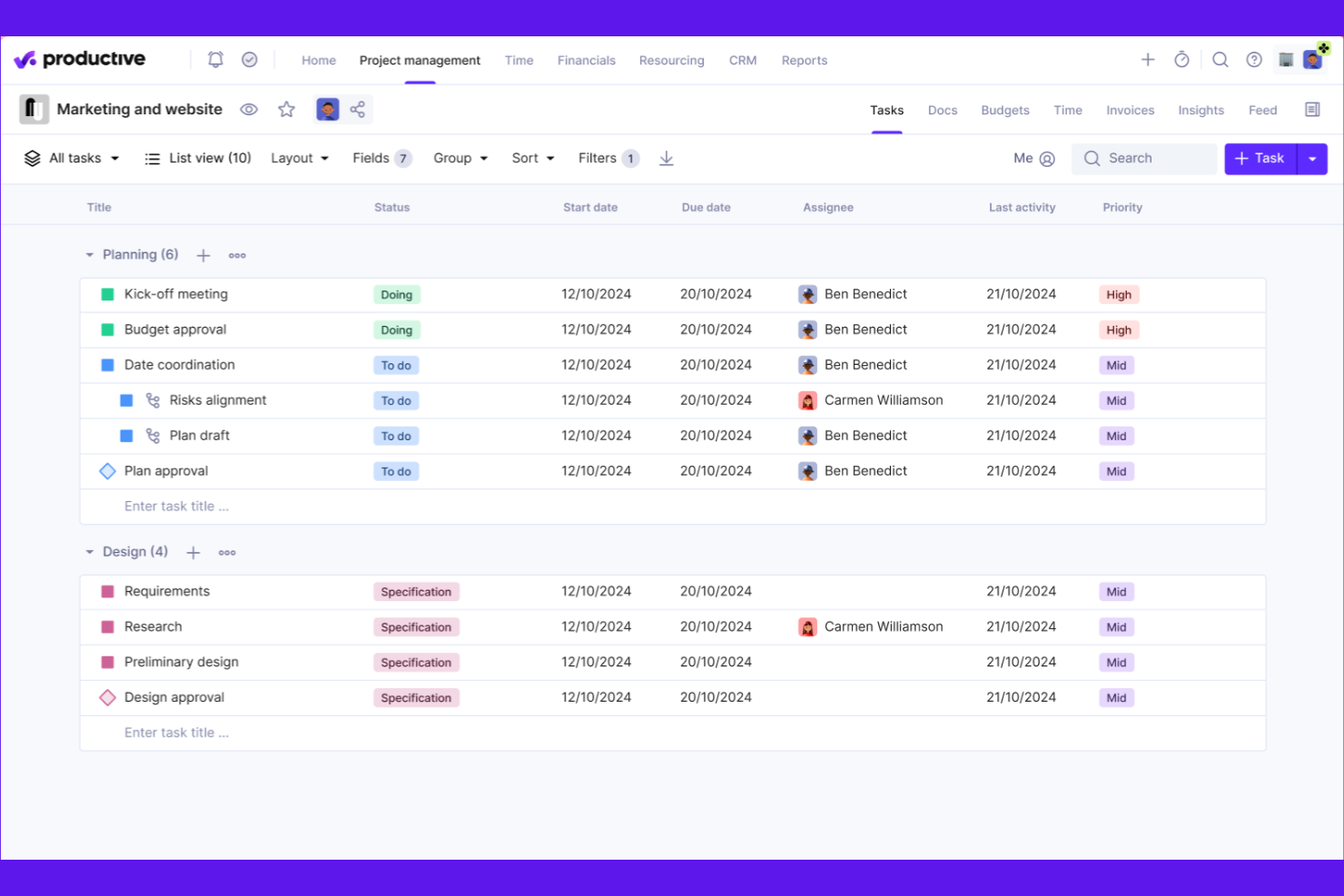
Productive è una piattaforma per la gestione dei servizi professionali che riunisce in un unico spazio la pianificazione dei progetti, la programmazione delle risorse, il monitoraggio del tempo, la gestione del budget, la fatturazione e la reportistica finanziaria.
Per chi è più adatto Productive?
Productive è particolarmente adatto alle squadre operative delle agenzie e ai responsabili di progetto che devono monitorare in un unico luogo i budget dei progetti, la redditività e la capacità delle risorse per più incarichi con diversi clienti.
Perché ho scelto Productive
Productive si è guadagnato un posto nella mia lista ristretta perché il monitoraggio del budget e della redditività sono al centro del suo funzionamento, anziché essere funzionalità aggiunte in un secondo momento. Apprezzo in particolare il modo in cui i pannelli di controllo del budget in tempo reale riuniscono contemporaneamente il tempo monitorato, i costi e i ricavi, con avvisi automatici che si attivano prima che un progetto superi il budget. Il sistema di avvisi sul budget, abbinato al riconoscimento dei ricavi per servizio, mi permette di vedere durante il progetto quali incarichi dei clienti stanno scivolando verso una situazione di non redditività, prima che sia troppo tardi per correggere la rotta.
Funzionalità principali di Productive
- Pianificatore delle risorse: Visualizza il carico di lavoro, la capacità e la disponibilità della squadra nei progetti attivi utilizzando le viste per persona, progetto, budget e assenze.
- Fatturazione dei contratti continuativi: Genera automaticamente fatture in bozza per i budget ricorrenti, supportando i cicli di fatturazione continuativi dei clienti.
- Generatore di scenari: Modella scenari di trattative o progetti modificando servizi, risorse e prenotazioni per confrontare costi, ricavi e profitti prima di prendere un impegno.
- Regole di riconoscimento dei ricavi: Configura i criteri di riconoscimento in base al tipo di servizio, in modo che solo le registrazioni del tempo approvate e le spese fatturabili contribuiscano ai ricavi.
Integrazioni di Productive
Productive offre integrazioni native con Xero, QuickBooks Online, NetSuite, Sage, Google Calendar, Microsoft Outlook, Slack, Jira, HubSpot e BambooHR. Fornisce inoltre un'API HTTP v2, webhook e Zapier per integrazioni personalizzate.
Pros and Cons
Pros:
- I budget collegati mostrano la redditività dei progetti
- Le viste della capacità coordinano il lavoro contemporaneo per diversi clienti
- Le registrazioni del tempo collegate ai progetti supportano la fatturazione
Cons:
- La modifica delle attività può richiedere diversi clic
- Può essere difficile configurare i report personalizzati
New Product Updates from Productive
Productive Adds Voice Dictation, Slack Connector, Proposals, and Overtime
Productive adds voice dictation, a Slack Connector, proposal controls, and overtime tracking. These updates support faster AI interactions, client proposals, and time management. For more information, visit Productive’s official site.

BigTime
Ideale per la gestione del tempo e della fatturazione nei servizi professionali
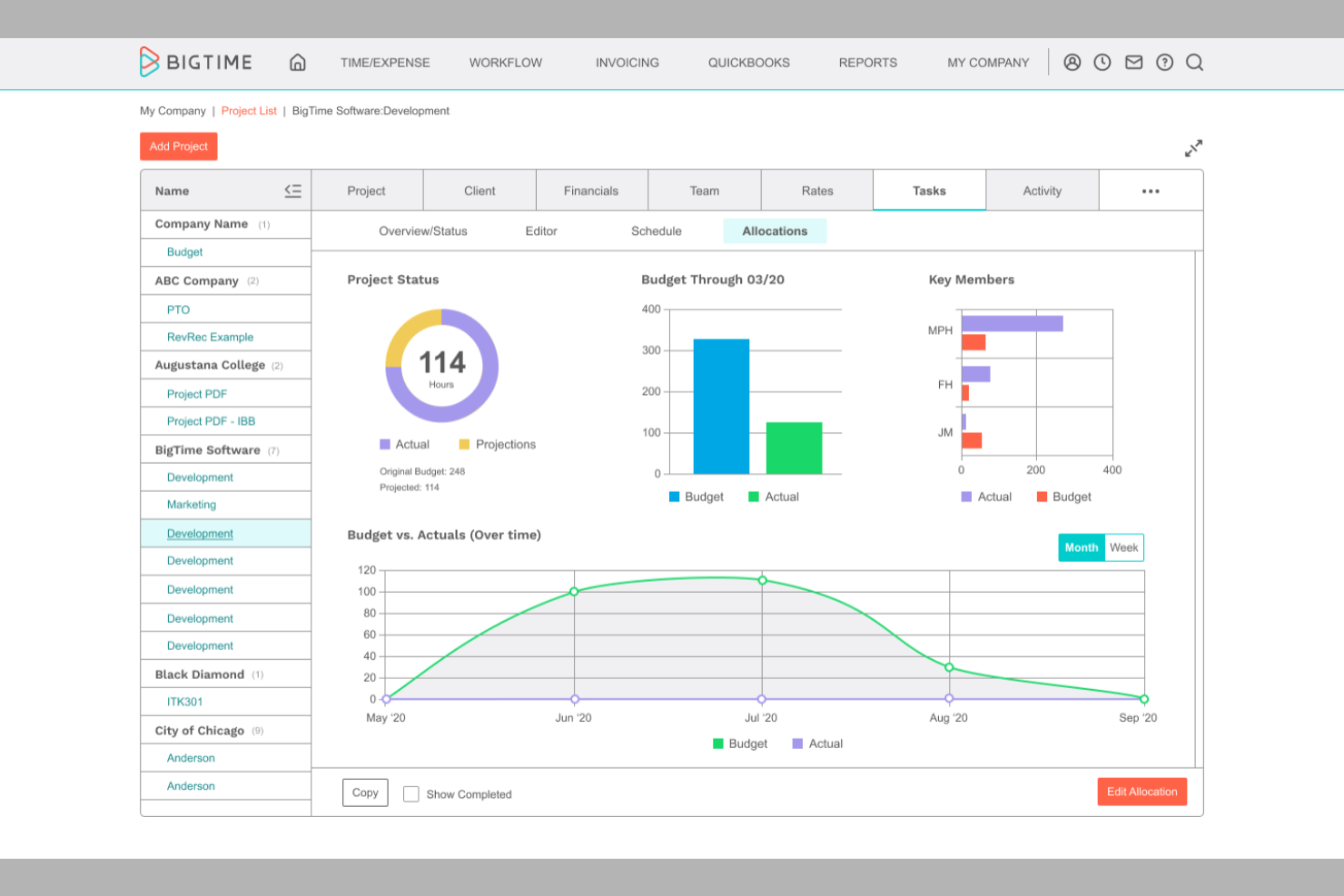
BigTime è una piattaforma di automazione dei servizi professionali che combina la gestione dei progetti, il monitoraggio del tempo e delle spese, la pianificazione delle risorse e i flussi di lavoro per la fatturazione e l'emissione delle fatture.
Per chi è più adatto BigTime?
BigTime è adatto alle aziende di servizi professionali di piccole e medie dimensioni—studi di consulenza, contabilità e ingegneria—dove la priorità è passare rapidamente dal tempo registrato a una fattura per il cliente.
Perché ho scelto BigTime
Ho incluso BigTime tra le mie scelte migliori perché il flusso di lavoro dalla registrazione del tempo alla fatturazione è davvero uno dei più efficienti che abbia visto in uno strumento PSA. Le registrazioni del tempo confluiscono direttamente nella fatturazione con compilazione automatica e salvataggio automatico durante l'acquisizione, e la piattaforma supporta modelli di fatturazione a tempo e materiali, a tariffa fissa e basati su articoli, così non si è costretti a gestire ogni incarico del cliente allo stesso modo. Apprezzo anche il fatto che il monitoraggio dei lavori in corso evidenzi il tempo non fatturato prima che venga trascurato al momento dell'emissione della fattura.
Funzionalità principali di BigTime
- Pianificazione della domanda e della capacità delle risorse: Pianifica e modifica la domanda di personale sia a livello di persona sia di progetto, con una mappa di calore e un calendario con funzionalità di trascinamento per la programmazione.
- Diagrammi di Gantt con percorso critico: Visualizza le tempistiche delle attività, imposta le dipendenze Fine-Inizio e Inizio-Inizio e utilizza la pianificazione automatica per spostare automaticamente le attività e le relative dipendenze.
- Abbinamento assistito dall'IA del personale: L'Agente per le risorse consiglia il personale per la domanda del progetto in base a disponibilità, competenze, anzianità e costi.
- Approvazioni dei fogli presenze su più livelli: Inoltra gli invii dei fogli presenze attraverso fino a tre livelli di approvazione—primario, secondario e finale—in base al team, al responsabile o al reparto.
Integrazioni di BigTime
BigTime offre integrazioni native con QuickBooks Online e Desktop, Sage Intacct, Xero, NetSuite, Microsoft Dynamics GP, Business Central, Salesforce, HubSpot, Jira e Google Calendar. Supporta inoltre l'API REST e le connessioni API personalizzate.
Pros and Cons
Pros:
- Le registrazioni del tempo confluiscono direttamente nella fatturazione
- I budget dei progetti collegano ore e costi
- I modelli di pianificazione della capacità consentono di simulare scenari di personale provvisori
Cons:
- La reportistica del portafoglio non dispone di riepiloghi tra progetti
- I recensori segnalano problemi di sincronizzazione tra fatture e tempo

Ideale per il monitoraggio visivo dei progetti e della capacità
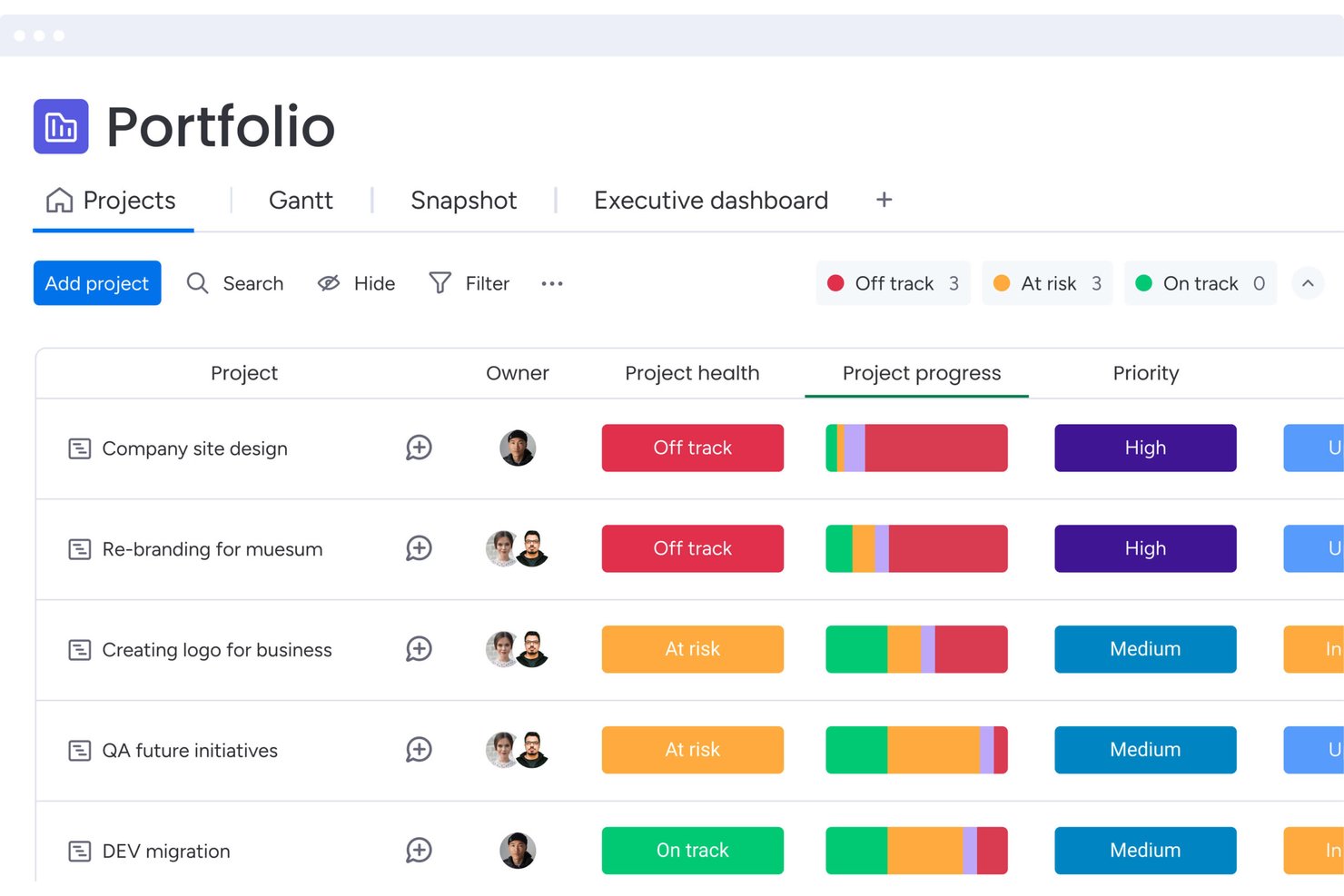
monday work management è una piattaforma di gestione dei progetti basata sull'intelligenza artificiale che combina il monitoraggio delle attività tramite bacheche, la pianificazione con diagrammi di Gantt e sequenze temporali, la gestione delle risorse e una visibilità a livello di portfolio su progetti e team.
A chi è più adatto monday AI Workspace?
monday AI Workspace è particolarmente adatto ai team di agenzie e consulenza che hanno bisogno di bacheche di progetto flessibili, pianificazione delle risorse assistita dall'IA e visibilità sul portfolio tra diversi incarichi per clienti gestiti contemporaneamente.
Perché ho scelto monday AI Workspace
Ho incluso monday AI Workspace tra le mie scelte principali perché i suoi strumenti di assegnazione del personale assistiti dall'IA cambiano concretamente il modo in cui i team pianificano le attività per diversi incarichi per clienti gestiti contemporaneamente. Apprezzo in particolare la Directory aziendale delle risorse, che memorizza ruoli lavorativi, competenze e località, permettendo all'assegnazione intelligente tramite IA di suggerire la persona giusta in base all'effettiva disponibilità, non soltanto all'intuito. In combinazione con il Gestore della capacità, posso vedere a colpo d'occhio la sovrautilizzazione e la sottoutilizzazione delle risorse in ogni progetto attivo.
Funzionalità principali di monday AI Workspace
- Panoramica dello stato del portfolio: Visualizza lo stato dei progetti, le attività completate e le tempistiche pianificate rispetto a quelle effettive di tutti i progetti collegati in un'unica dashboard interattiva.
- Bacheche per i flussi di approvazione: Indirizza il lavoro attraverso fasi di approvazione strutturate utilizzando bacheche dedicate e trigger di automazione.
- Accesso ospite per collaboratori esterni: Invita clienti o stakeholder esterni a bacheche specifiche senza concedere loro l'accesso all'intero account.
- Monitoraggio del budget con colonne basate su formule: Configura colonne per i costi pianificati ed effettivi con avvisi basati su formule per segnalare le voci fuori budget nei vari progetti.
Integrazioni di monday AI Workspace
monday AI Workspace offre oltre 850 integrazioni e app, tra cui QuickBooks, Salesforce, HubSpot, Slack, Google Calendar, Microsoft Teams, GitHub e Gmail. La sua API GraphQL e il relativo SDK supportano integrazioni personalizzate.
Pros and Cons
Pros:
- I recensori apprezzano le bacheche visive sullo stato dei progetti
- L'IA suggerisce il personale in base a competenze e disponibilità
- Le dashboard aiutano a monitorare contemporaneamente i progetti dei clienti
Cons:
- I budget manuali limitano i report sulla redditività in tempo reale
- Nessun portale clienti personalizzato né approvazioni integrate
New Product Updates from monday AI Workspace
monday AI Workspace Adds Human Approval Routing
monday AI Workspace adds a human-in-the-loop approval block to AI Workflows, sending approval requests and routing workflow paths based on responses. For more information, visit monday AI Workspace's official site.

Wrike
Ideale per automatizzare i flussi di lavoro dalla raccolta delle richieste alla consegna
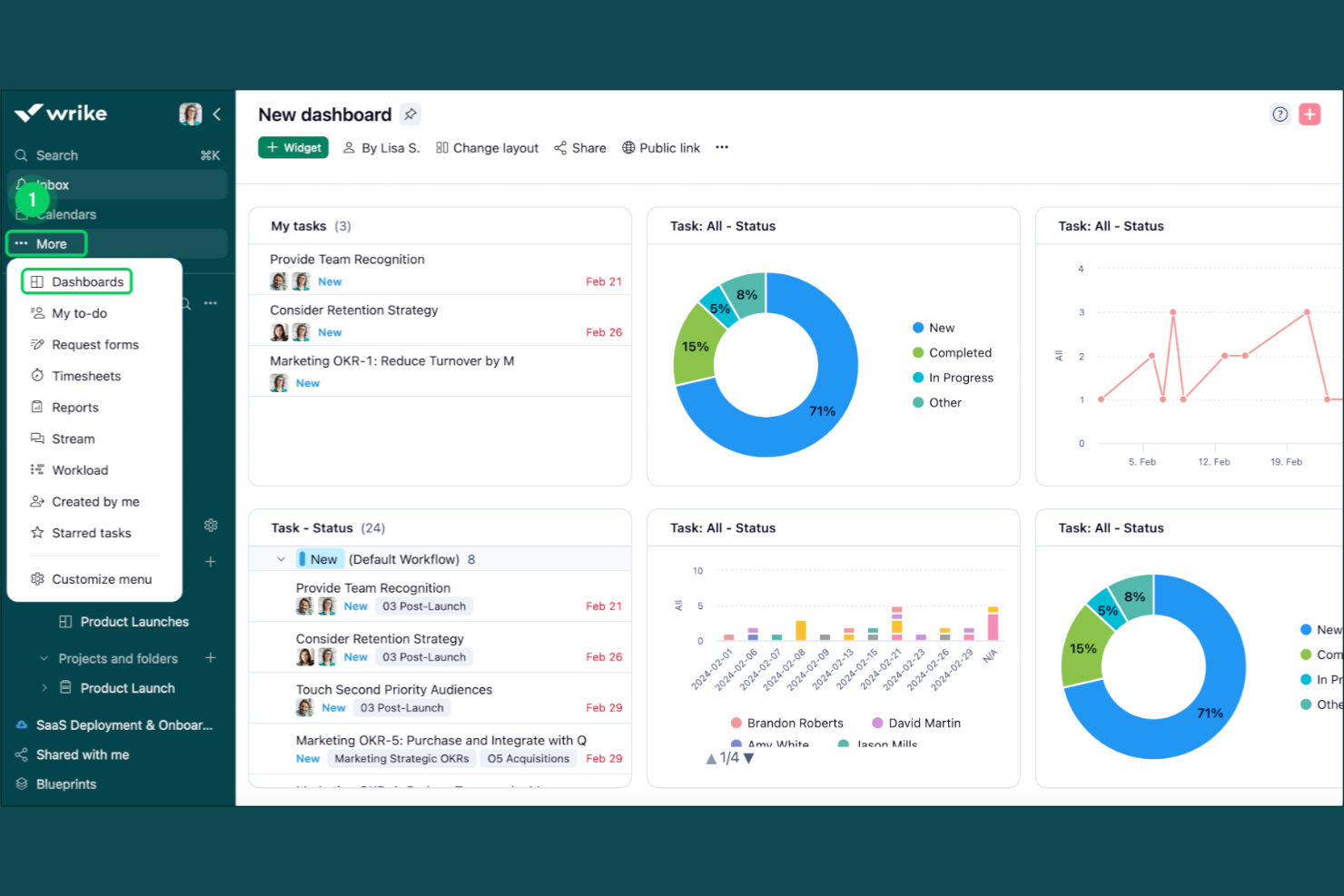
Wrike è una piattaforma per la gestione del lavoro e dei progetti, progettata per i team di servizi professionali, che offre diagrammi di Gantt, pianificazione delle risorse, monitoraggio del tempo, automazione dei flussi di lavoro, strumenti per la collaborazione con i clienti e pannelli di portafoglio in un unico spazio di lavoro.
Per chi è più adatto Wrike?
Wrike è particolarmente adatto alle agenzie e ai team di consulenza che devono standardizzare la raccolta delle richieste, automatizzare i flussi di lavoro ricorrenti e gestire più progetti dei clienti da un unico spazio di lavoro.
Perché ho scelto Wrike
Wrike si è guadagnato un posto nella mia selezione perché la sua automazione dei flussi di lavoro è più approfondita rispetto a quella della maggior parte degli strumenti di questa categoria. Apprezzo in particolare il modo in cui i modelli consentono di replicare intere strutture di progetto, comprese sequenze di attività, dipendenze e moduli di richiesta personalizzati, così l'acquisizione di un nuovo incarico da parte di un cliente non deve ripartire da zero ogni volta. A questo si aggiungono regole di automazione in grado di attivare flussi di lavoro per le fatture tramite QuickBooks, rendendo molto più semplice standardizzare le attività di consegna ricorrenti su larga scala.
Caratteristiche principali di Wrike
- Approvazioni degli ospiti: I clienti esterni possono esaminare e approvare i file tramite un collegamento inviato via email senza dover disporre di un account Wrike.
- Prenotazione delle risorse: Riserva la capacità di specifici membri del team o ruoli professionali e stima le ore di progetto rispetto alla disponibilità effettiva.
- Moduli di richiesta dinamici: Indirizza il lavoro in entrata da richiedenti interni o esterni direttamente verso un flusso di lavoro centralizzato per la raccolta delle richieste.
- Revisione e confronto delle versioni: Allega risorse alle attività, raccogli feedback visivi e confronta le versioni dei file durante il ciclo di revisione.
Integrazioni di Wrike
Wrike offre oltre 400 integrazioni, tra cui QuickBooks, NetSuite, Salesforce, Power BI, Jira, GitHub, Google Sheets e Microsoft Teams. La sua API REST, i webhook, OAuth 2.0, Wrike Integrate e Wrike Sync supportano connessioni personalizzate e la sincronizzazione dei dati.
Pros and Cons
Pros:
- Le tempistiche Gantt chiariscono le dipendenze tra progetti
- I modelli standardizzano gli incarichi ricorrenti dei clienti
- Le viste del carico di lavoro evidenziano i colli di bottiglia del personale
Cons:
- La configurazione iniziale può richiedere un impegno considerevole
- La ricerca e la navigazione risultano macchinose su larga scala
New Product Updates from Wrike
Wrike Adds Klaxoon MCP Integration
Wrike’s Klaxoon MCP integration is now generally available, enabling AI agents to navigate between Wrike tasks and attached whiteboards, read task context, and manage whiteboard attachments via API. For more information, visit Wrike's official site.

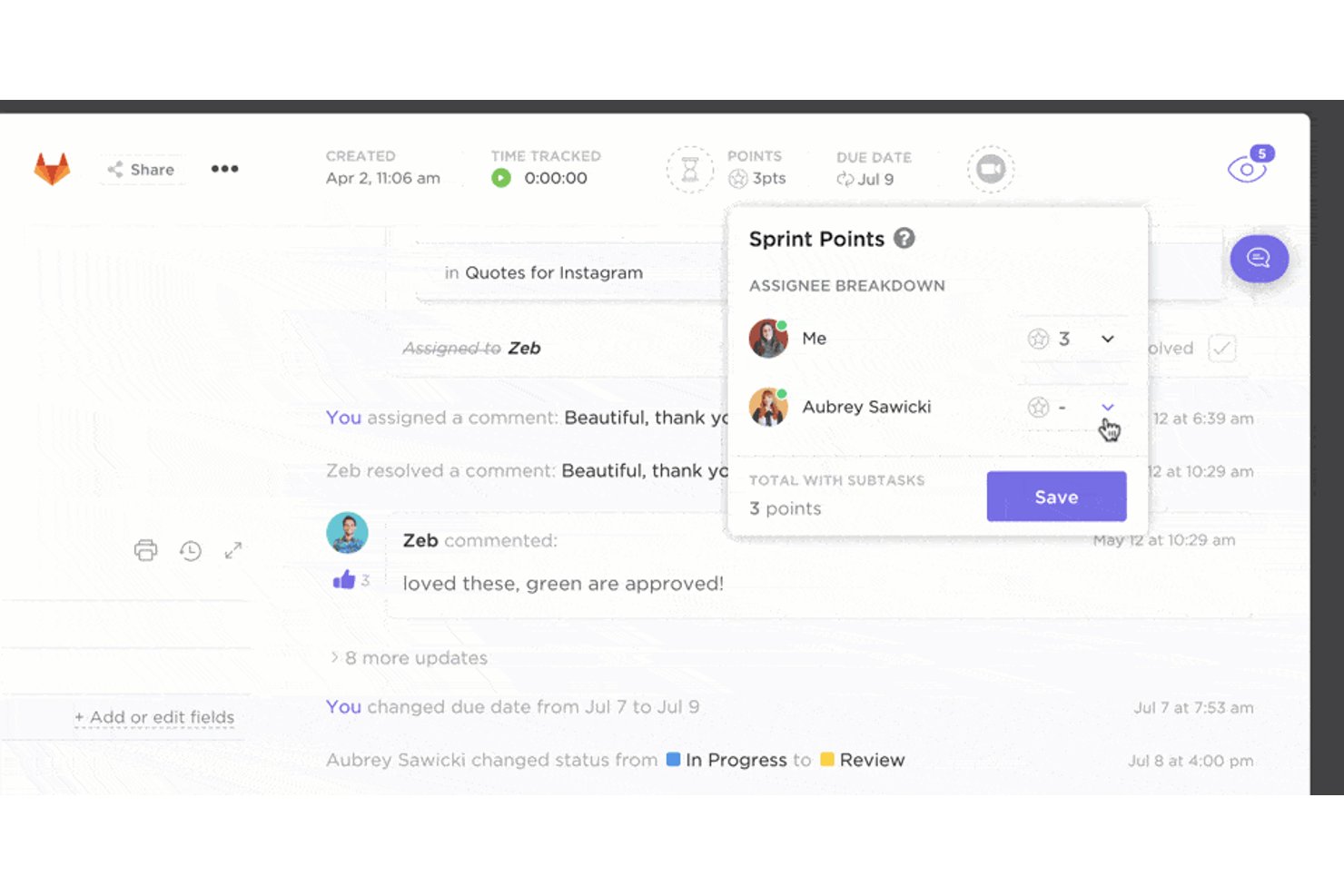
ClickUp è una piattaforma per la gestione del lavoro che combina il monitoraggio delle attività, la pianificazione dei progetti basata sui diagrammi di Gantt, la gestione del carico di lavoro, documenti collaborativi e una chat di team integrata in un unico spazio di lavoro.
Per chi è più adatto ClickUp?
ClickUp è ideale per agenzie e team di consulenza che desiderano gestire attività, documenti e comunicazioni con i clienti in un unico luogo, senza dover utilizzare più strumenti.
Perché ho scelto ClickUp
Ho incluso ClickUp tra le mie scelte principali perché è uno dei pochi strumenti che riunisce davvero attività, documenti e chat di team in un unico spazio di lavoro senza costringerti a rinunciare a una struttura di progetto efficace. Mi piace soprattutto la possibilità di creare uno Spazio dedicato per ogni cliente, applicare un modello di consegna con milestone e automazioni associate, quindi condividere una Dashboard filtrata visibile al cliente o un link pubblico al diagramma di Gantt senza mai lasciare la piattaforma. La vista Carico di lavoro integrata mi permette inoltre di individuare chi ha superato la propria capacità nei vari incarichi in corso e riassegnare immediatamente il lavoro.
Funzionalità principali di ClickUp
- Autorizzazioni degli ospiti: Invita i clienti come ospiti con accesso in sola visualizzazione o con possibilità di aggiungere commenti, limitando l'accesso a specifiche attività, elenchi o dashboard.
- Vista Carico di lavoro: Visualizza la capacità del team utilizzando stime temporali o il numero di attività e riassegna il lavoro quando qualcuno supera o non raggiunge la propria capacità.
- Modelli di consegna: Applica modelli di progetto predefiniti con milestone, stati e automazioni, con date associate in relazione alla data di inizio del progetto.
- Monitoraggio del tempo fatturabile: Contrassegna le registrazioni del tempo come fatturabili o non fatturabili e visualizzale nelle schede della dashboard suddivise per ruolo o team.
Integrazioni di ClickUp
ClickUp offre integrazioni native con Harvest, Everhour, Toggl, TimeCamp, Clockify, HubSpot, Slack, Google Drive e Microsoft Teams, oltre a Zapier. La sua API pubblica, i webhook, il server MCP e il supporto OAuth consentono integrazioni personalizzate e la sincronizzazione dei dati.
Pros and Cons
Pros:
- Attività, documenti e chat in un unico spazio di lavoro
- Le dashboard dei clienti chiariscono lo stato tra i vari progetti
- Le dipendenze del diagramma di Gantt evidenziano i rischi di consegna
Cons:
- La redditività basata sul confronto tra budget e valori effettivi necessita di miglioramenti
- La capacità e i report sul tempo risultano basilari

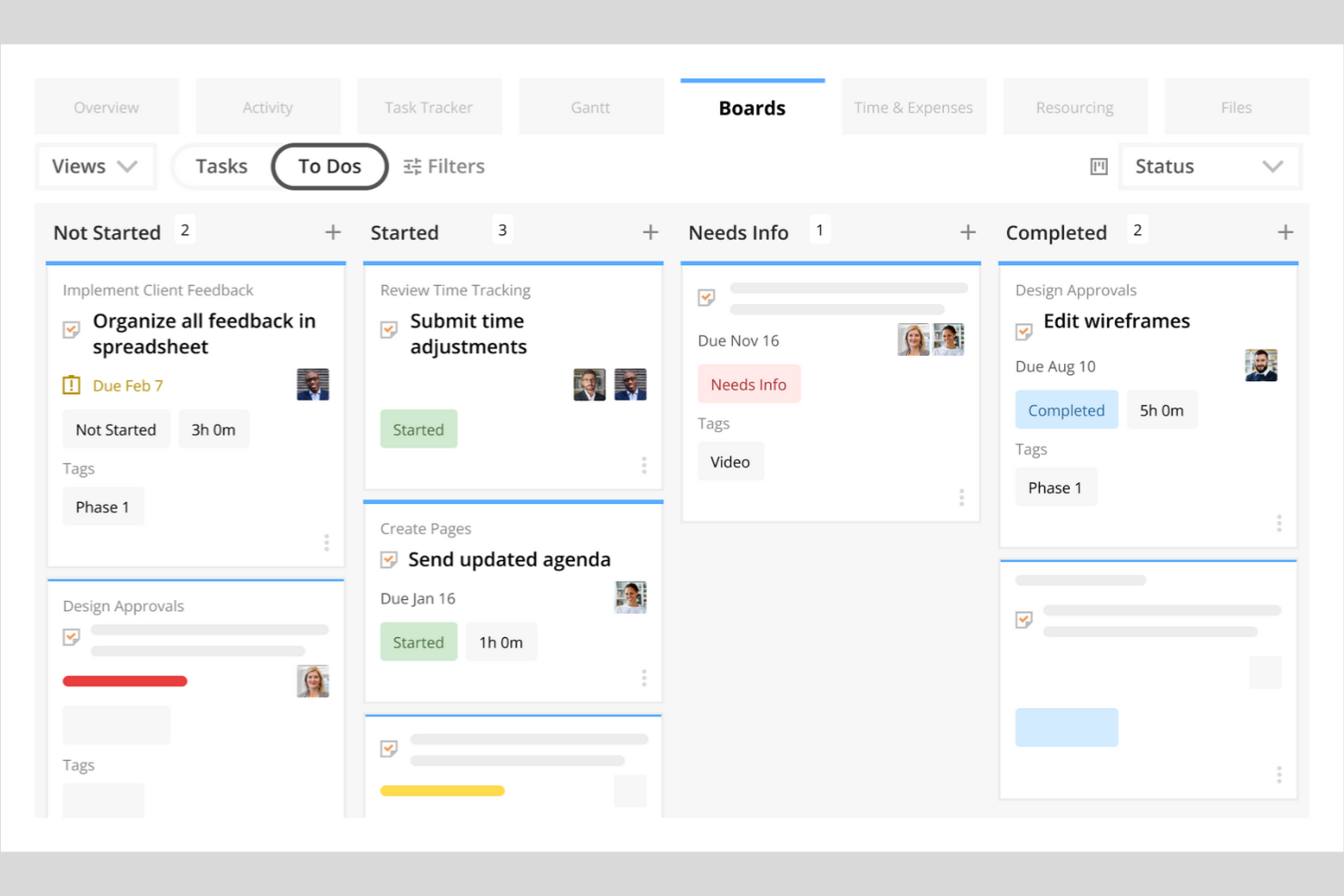
Kantata è una piattaforma di automazione dei servizi professionali che combina strumenti per la gestione dei progetti, la gestione delle risorse, la pianificazione della capacità, il monitoraggio finanziario e la collaborazione con i clienti, pensati per agenzie e società di consulenza.
Per chi è più indicata Kantata?
Kantata è particolarmente adatta ai responsabili delle risorse e ai responsabili operativi di società di servizi professionali di medie e grandi dimensioni che hanno bisogno di una visibilità precisa sulla capacità, sull'utilizzo e sull'assegnazione del personale per molteplici incarichi dei clienti.
Perché ho scelto Kantata
Kantata si è guadagnata un posto nella mia rosa ristretta perché il suo Resource Center offre un quadro davvero accurato di chi è disponibile, quali competenze possiede e dove si stanno creando lacune di capacità nell'intero portafoglio di progetti. Apprezzo in particolare il modo in cui presenta raccomandazioni classificate per l'assegnazione del personale, basate contemporaneamente su competenze, disponibilità ed esigenze del progetto, così non devi procedere per tentativi quando assegni le risorse a incarichi concorrenti di diversi clienti. Le previsioni basate su scenari consentono di simulare l'assegnazione del personale e i prezzi in relazione alla redditività prima di prendere impegni, esattamente ciò di cui hanno bisogno i responsabili della pianificazione delle risorse quando la domanda cambia nel corso del trimestre.
Funzionalità principali di Kantata
- Metodi di riconoscimento dei ricavi: Kantata supporta i metodi di riconoscimento dei ricavi basati su Tempo e materiali, Tempo e materiali (con limite massimo) e percentuale di completamento, collegati ai budget del progetto e alle ore previste.
- Spazio di lavoro brandizzato per la collaborazione con i clienti: I clienti dispongono di uno spazio di lavoro dedicato per esaminare l'avanzamento del progetto, approvare i risultati e accedere alle tappe fondamentali e alle fatture condivise.
- Linee di base dei diagrammi di Gantt: Le viste Gantt globali, locali e delle attività consentono di confrontare le date di progetto pianificate con quelle effettive su intervalli temporali settimanali, mensili o annuali.
- Registri di controllo: Kantata registra chi ha modificato cosa e quando nei progetti, nelle attività, nelle autorizzazioni, nelle registrazioni delle ore e nelle approvazioni, con filtri ed esportazione a livello di amministratore.
Integrazioni di Kantata
Kantata offre oltre 1.200 connettori preconfigurati, tra cui Salesforce, QuickBooks, NetSuite, Sage Intacct, HubSpot, SAP e BambooHR. Offre inoltre un'API REST con autenticazione OAuth 2.0 per le integrazioni personalizzate.
Pros and Cons
Pros:
- Prevede la domanda di personale in base alle competenze e alla disponibilità
- Collega i budget dei progetti, i margini e i tassi di consumo
- Tiene traccia delle ore fatturabili per gli incarichi dei clienti
Cons:
- La configurazione del progetto prevede numerosi elementi interdipendenti
- Le cifre relative all'assegnazione potrebbero richiedere una verifica manuale

Accelo
La soluzione migliore per collegare monitoraggio del tempo, fatturazione e lavoro con i clienti
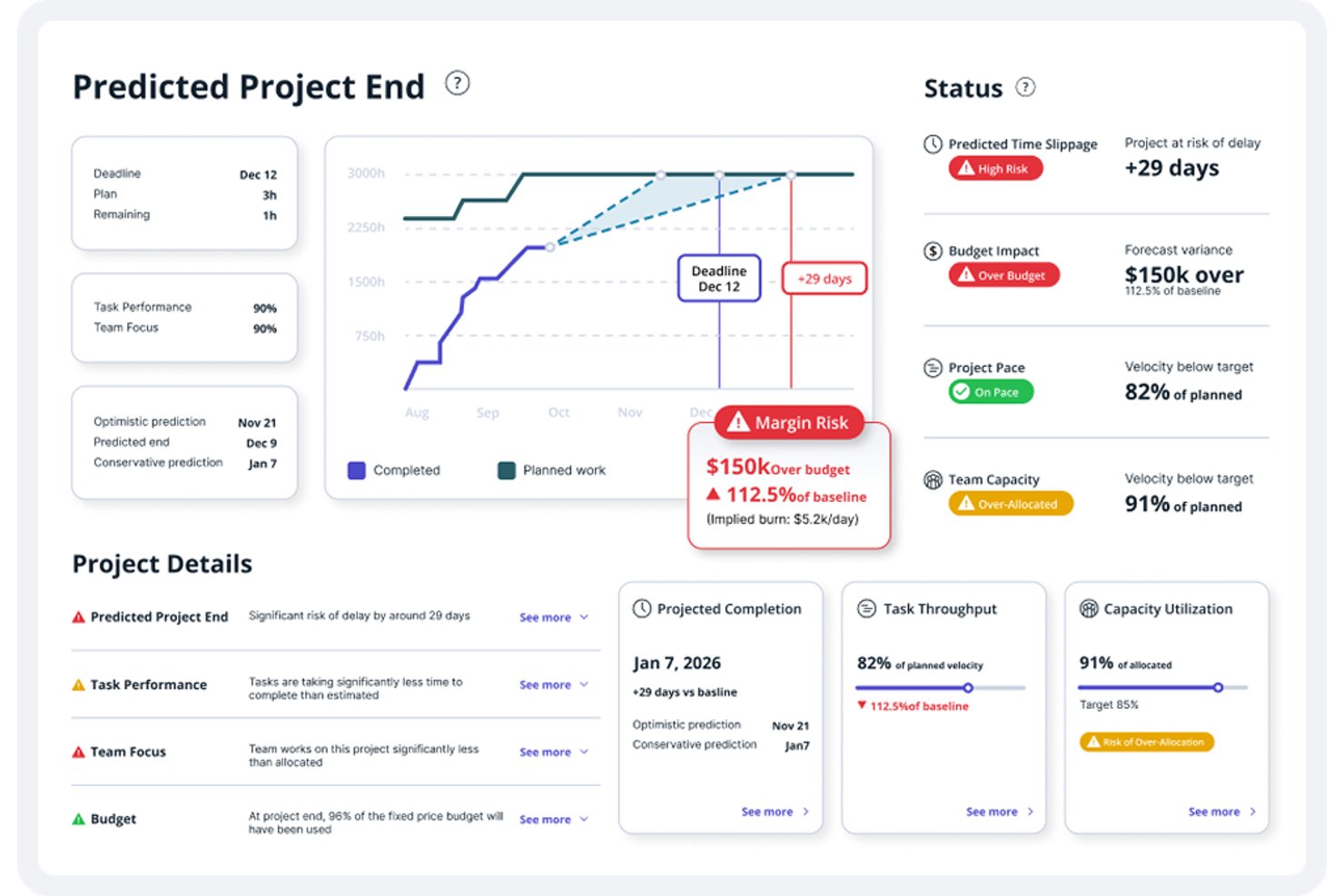
Accelo è una piattaforma di automazione dei servizi professionali che riunisce gestione dei progetti, pianificazione delle risorse, monitoraggio del tempo, fatturazione dei contratti a forfait e reportistica finanziaria in un unico sistema, progettato specificamente per le aziende che offrono servizi ai clienti.
Per chi è più adatto Accelo?
Accelo è particolarmente adatto alle aziende di servizi professionali—agenzie, società di consulenza e fornitori di servizi gestiti—che hanno bisogno di collegare in un unico luogo la gestione dei progetti, l'allocazione delle risorse e la fatturazione ai clienti.
Perché ho scelto Accelo
Accelo si guadagna un posto tra le migliori soluzioni della mia selezione perché è una delle poche piattaforme che collega davvero ogni fase del lavoro con i clienti, dal preventivo dettagliato alla fattura finale, senza richiedere uno strumento separato a ogni passaggio. Apprezzo in particolare il modo in cui il tempo registrato per qualsiasi progetto, ticket o contratto a forfait confluisce direttamente nella fatturazione e nei report sulla redditività, rendendo sempre visibile in tempo reale il consumo del budget. Anche l'area di lavoro personalizzata per i clienti è un elemento distintivo: i clienti possono esaminare i materiali consegnabili, approvare le milestone e monitorare l'utilizzo del contratto a forfait senza dover gestire una singola catena di email.
Funzionalità principali di Accelo
- Pianificazione dinamica: modifica automaticamente le date delle attività quando viene registrato del lavoro, cambiano le scadenze o variano le dipendenze nel piano del progetto.
- Gestione dei contratti a forfait: monitora i periodi dei contratti prepagati o postpagati in base a ore fisse, valore fisso o ore illimitate, con fatturazione automatica configurabile.
- Pianificazione delle risorse basata sulle competenze: filtra e assegna i membri del team in base a competenze, ruolo o gruppo, con suggerimenti assistiti dall'IA per individuare le risorse più adatte.
- Suggerimenti assistiti dall'IA per i fogli presenze: genera suggerimenti per l'inserimento del tempo in base al lavoro effettivamente completato, riducendo lo sforzo di registrazione manuale.
Integrazioni di Accelo
Accelo supporta integrazioni con QuickBooks, Xero, Sage Intacct, Salesforce, HubSpot, Jira, Microsoft 365, Google Workspace e Zapier. Offre inoltre API RESTful e API Forms per integrazioni personalizzate.
Pros and Cons
Pros:
- Progetto, monitoraggio del tempo e fatturazione rimangono collegati
- Le assegnazioni delle risorse mostrano la capacità futura del team
- I portali per i clienti chiariscono lo stato del progetto e le approvazioni
Cons:
- Le schermate dense complicano le attività di routine dei progetti
- Le date della pianificazione possono cambiare inaspettatamente quando il lavoro varia
New Product Updates from Accelo

Accelo Rebuilds Mobile App for Project and Time Management
Accelo rebuilds its mobile app with task management, new work creation, and mobile timesheets for Forecast customers. This helps teams keep project and time data current while working away from a desktop. For more information, visit Accelo’s official site.
Altri software di gestione dei progetti per i servizi professionali
Ecco alcune altre opzioni di software di gestione dei progetti per i servizi professionali che non sono entrate nella mia selezione, ma che vale comunque la pena prendere in considerazione:
- Runn
Ideale per la pianificazione delle risorse e della capacità
- Planview AdaptiveWork
Ideale per la pianificazione PSA e delle risorse a livello di portafoglio
- ProjectManager
Ideale per bilanciare il carico di lavoro tra progetti
- Workzone
Ideale per la visibilità dei progetti tra clienti
- Projectworks
Ideale per l'analisi finanziaria dei servizi professionali


Come valuto il software di Project Management per i servizi professionali
Valuto ogni strumento su due livelli: la base che deve superare—modelli di fatturazione, capacità delle risorse e dati finanziari di progetto—e i fattori differenzianti che lo rendono adatto.
Funzionalità core (Requisiti fondamentali per questa lista)
Quando seleziono gli strumenti per la mia lista, valuto ciascuno su una scala da 0 (non offre la funzionalità) a 5 (eccelle in quest'area) per ogni funzionalità principale elencata di seguito. Poi, calcolo il punteggio totale dello strumento trasformandolo in percentuale. Ogni strumento deve ottenere un punteggio totale minimo del 65% per essere considerato per l'inclusione.
- Contabilità & Fatturazione del progetto: Verifico se uno strumento supporta i modelli di fatturazione realmente utilizzati dalle aziende di servizi—“a tempo e materiali”, tariffa fissa, abbonamento—e come la fatturazione si collega alle attività registrate.
- Monitoraggio di tempo & spese: I consulenti e il personale operativo devono registrare le ore per clienti e task specifici, quindi cerco un tracciamento che si colleghi direttamente agli ingaggi fatturabili.
- Gestione delle risorse: Assegnare le persone giuste su progetti clienti sovrapposti è una sfida costante, e valuto come ciascuno strumento gestisce la visualizzazione e l'allocazione della capacità.
- Previsione finanziaria di progetto: Controllo quanto bene una piattaforma tiene traccia di budget, margini e ricavi previsti per ogni commessa—specialmente quando l'ambito cambia a progetto avviato.
- Consegna del progetto al cliente: Che si tratti di diagrammi di Gantt, kanban board o tracciamento delle milestone, valuto i tool disponibili per la gestione delle consegne dall'avvio alla chiusura.
- Reporting & analisi: Ai responsabili dei servizi interessano tassi di utilizzo e profittabilità dei progetti, quindi cerco report che evidenzino questi KPI senza bisogno di pesante configurazione manuale.
Quando ho una lista di strumenti che soddisfano i criteri, considero cosa distingue ciascuna piattaforma dalle altre.
Fattori differenzianti (Cosa distingue i fornitori)
Ecco come confronto e metto a confronto i diversi fornitori:
Caratteristiche distintive
Il matching di competenze e abilità è un grande elemento differenziante—quando devi assegnare una nuova commessa, filtrare per certificazioni, esperienza settoriale o conoscenze linguistiche fa risparmiare ore di scambi con i responsabili delle risorse. Guardo anche se una piattaforma offre portali clienti, dato che dare ai clienti una visibilità in tempo reale sullo stato dei progetti riduce le riunioni di aggiornamento ricorrenti. L'automazione del riconoscimento dei ricavi è altrettanto importante, soprattutto per le aziende che gestiscono modelli di fatturazione misti su decine di progetti attivi dove la gestione manuale può portare a errori.
Oltre le funzionalità
La profondità dell'integrazione qui conta molto—controllo se una piattaforma si collega nativamente a sistemi contabili come QuickBooks o NetSuite, perché una sincronizzazione finanziaria difettosa tra PSA e libro mastro porta a grattacapi di riconciliazione a fine mese. L'idoneità in termini di dimensione dell'azienda è un altro parametro che considero attentamente, perché uno strumento pensato per agenzie da 20 persone spesso non regge con 500 utenti, e le piattaforme enterprise possono risultare eccessive per team piccoli. Valuto anche la trasparenza dei prezzi, in particolare se i fornitori offrono licenze basate sul ruolo in modo che lo staff operativo non paghi quanto i responsabili di progetto.
Come scegliere un software di gestione dei progetti per i servizi professionali
È facile perdersi in lunghi elenchi di funzionalità e strutture tariffarie complesse. Per aiutarti a rimanere concentrato mentre affronti il tuo specifico processo di selezione del software, ecco un elenco di fattori da tenere a mente:
| Fattore | Elementi da considerare |
|---|---|
| Scalabilità | Il software supporterà le dimensioni del team e il volume dei progetti con la crescita dell'azienda? Verifica i limiti per gli utenti, il numero massimo di progetti e gli aumenti di prezzo con l'espansione delle tue esigenze. |
| Integrazioni | Si connette nativamente ai tuoi sistemi principali (CRM, contabilità, risorse umane, gestione documentale)? Le lacune in questo ambito possono creare lavoro manuale e silos di dati. |
| Personalizzazione | Puoi adattare flussi di lavoro, campi e autorizzazioni ai processi della tua azienda? Gli strumenti rigidi potrebbero costringerti a modificare il modo in cui lavora il tuo team. |
| Facilità d'uso | Il tuo team lo adotterà rapidamente? Cerca una navigazione intuitiva, requisiti minimi di formazione e un'interfaccia adatta al livello di familiarità tecnica del tuo team. |
| Implementazione e avviamento | Quanto tempo occorrerà per rendere il sistema operativo? Considera il supporto alla migrazione, gli strumenti per l'importazione dei dati e la disponibilità di risorse o servizi per l'avviamento. |
| Costo | I livelli di prezzo sono trasparenti e prevedibili con la crescita dell'azienda? Presta attenzione ai costi nascosti, ai componenti aggiuntivi obbligatori o ai termini minimi contrattuali che potrebbero influire sul ROI. |
| Misure di sicurezza | Lo strumento soddisfa i tuoi standard di privacy e sicurezza dei dati? Cerca crittografia, controlli degli accessi, registri di verifica e conformità alle normative pertinenti. |
| Disponibilità dell'assistenza | Quali canali di assistenza sono disponibili e in quali orari? Valuta se hai bisogno di supporto 24 ore su 24, 7 giorni su 7, di un account manager dedicato o di risorse autonome. |
Che cos'è il software di gestione dei progetti per i servizi professionali?
Il software di gestione dei progetti per i servizi professionali è una piattaforma digitale che aiuta le organizzazioni che offrono servizi a pianificare, monitorare e portare a termine i progetti dei clienti, gestendo al contempo risorse, budget e tempistiche. Queste soluzioni software riuniscono in un unico sistema la pianificazione dei progetti, la gestione finanziaria e la collaborazione tra i team, consentendo alle aziende di coordinare il lavoro in modo più efficace.
Invece di affidarsi a strumenti non integrati o a processi manuali, i team che offrono servizi professionali possono gestire i progetti dall'inizio alla fine, monitorando al contempo l'allocazione delle risorse, la redditività dei progetti e i prodotti finali per i clienti. Grazie a una maggiore visibilità sui carichi di lavoro e sui progressi, le organizzazioni possono prendere decisioni informate, favorire la collaborazione tra i team e adattare i flussi di lavoro alle esigenze specifiche di ogni progetto.
Funzionalità
Quando scegli un software di gestione dei progetti per i servizi professionali, presta attenzione alle seguenti funzionalità principali:
- Pianificazione e programmazione dei progetti: Crea tempistiche, definisci traguardi e mappa le dipendenze per creare un percorso chiaro della realizzazione dei progetti tra più team.
- Gestione delle risorse: Assegna i membri del team in base a competenze, disponibilità e carico di lavoro, così da mantenere equilibrati i progetti e consentire ai team che offrono servizi professionali di rispettare gli impegni con i clienti.
- Monitoraggio del tempo: Registra le ore fatturabili e non fatturabili direttamente nella piattaforma per supportare una fatturazione accurata e monitorare la redditività dei progetti.
- Gestione del budget e monitoraggio delle spese: Monitora budget, spese e prestazioni finanziarie dei progetti per collegare il lavoro di realizzazione alla gestione finanziaria e mantenere la redditività.
- Fatturazione ai clienti ed emissione delle fatture: Genera fatture intuitive basate sul tempo registrato, sui prodotti finali o sui traguardi, mantenendo i dati finanziari collegati alle attività del progetto.
- Bacheche Kanban: Organizza visivamente le attività utilizzando le bacheche Kanban, così i team possono gestire i processi di gestione del lavoro e monitorare più facilmente l'avanzamento dei progetti.
- Automazione dei flussi di lavoro basata sull'IA: Molti strumenti ora automatizzano i flussi di lavoro per l'approvazione delle attività, gli aggiornamenti dello stato e le notifiche, consentendo ai team di ridurre il lavoro manuale e mantenere i progetti in corso.
- Reportistica e analisi: Genera report sull'avanzamento dei progetti, sull'utilizzo del team e sulle metriche finanziarie per supportare decisioni migliori nei team che offrono servizi professionali.
- Strumenti di collaborazione: Favorisci la collaborazione tra i membri del team attraverso spazi di lavoro condivisi, commenti sulle attività e condivisione dei file, così che tutti i portatori di interesse rimangano allineati durante l'intero ciclo di vita del progetto.
- Integrazioni ERP: Collega la gestione dei progetti ai sistemi ERP per allineare i dati dei progetti alla gestione finanziaria e alle più ampie operazioni aziendali.
Vantaggi
L'implementazione di un software di gestione dei progetti per i servizi professionali offre diversi vantaggi al tuo team e alla tua azienda. Eccone alcuni:
- Visibilità centralizzata dei progetti: accedi a tutte le tempistiche, i budget e i risultati finali dei progetti in un unico luogo, facilitando il monitoraggio dei progressi e l'individuazione tempestiva dei problemi.
- Migliore allocazione delle risorse: assegna i membri del team in base alla disponibilità e alle competenze in tempo reale, riducendo i colli di bottiglia e l'assegnazione eccessiva di incarichi.
- Monitoraggio accurato di tempi e spese: registra le ore fatturabili e i costi dei progetti direttamente nella piattaforma, supportando una fatturazione precisa e l'analisi della redditività.
- Fatturazione semplificata dei clienti: automatizza la generazione delle fatture e i cicli di fatturazione utilizzando il tempo registrato, le tappe intermedie o i risultati finali, riducendo il lavoro manuale e gli errori.
- Collaborazione potenziata: condividi documenti, aggiornamenti e feedback all'interno della piattaforma, mantenendo tutti allineati e informati durante l'intero ciclo di vita del progetto.
- Flussi di lavoro personalizzabili: adatta i processi di approvazione e il passaggio delle attività in base ai metodi unici di gestione dei progetti della tua azienda, aumentando efficienza e responsabilità.
- Processo decisionale basato sui dati: utilizza i report e le analisi integrati per valutare le prestazioni dei progetti, l'utilizzo delle risorse e i risultati finanziari, supportando decisioni aziendali migliori.
Costi e prezzi
La scelta di un software di gestione dei progetti per i servizi professionali richiede la conoscenza dei diversi modelli di prezzo e dei piani disponibili. I costi variano in base alle funzionalità, alle dimensioni del team, ai componenti aggiuntivi e ad altri fattori. La tabella seguente riassume i piani più comuni, i relativi prezzi medi e le funzionalità tipicamente incluse nelle soluzioni software di gestione dei progetti per i servizi professionali:
Tabella comparativa dei piani per i software di gestione dei progetti per i servizi professionali
| Tipo di piano | Prezzo medio | Funzionalità comuni |
|---|---|---|
| Piano gratuito | $0 | Gestione di base delle attività, numero limitato di utenti, monitoraggio semplice dei progetti e report di base. |
| Piano personale | $5-$15/utente/mese | Assegnazione delle attività, integrazione del calendario, monitoraggio limitato del tempo e condivisione di base dei documenti. |
| Piano aziendale | $20-$40/utente/mese | Pianificazione avanzata dei progetti, gestione delle risorse, monitoraggio di tempi e spese, fatturazione dei clienti e flussi di lavoro personalizzati. |
| Piano per grandi aziende | $50-$100/utente/mese | Sicurezza avanzata, integrazioni personalizzate, supporto dedicato, analisi avanzate e gestione della conformità. |
Domande frequenti sul software di gestione dei progetti per i servizi professionali
Ecco alcune risposte alle domande più comuni sul software di gestione dei progetti per i servizi professionali:
In che modo il software di gestione dei progetti per i servizi professionali è diverso dagli strumenti generici di gestione dei progetti?
Il software di gestione dei progetti per i servizi professionali include funzionalità pensate per il lavoro con i clienti, come il monitoraggio del tempo, la fatturazione e la gestione delle risorse. Questi strumenti aiutano i team che offrono servizi a gestire i progetti dei clienti, monitorare le ore fatturabili e gestire la fatturazione, aspetti non sempre inclusi negli strumenti generici di gestione dei progetti.
Il software di gestione dei progetti per i servizi professionali può integrarsi con i sistemi di contabilità o CRM?
Sì, la maggior parte dei software di gestione dei progetti per i servizi professionali offre integrazioni con i più diffusi sistemi di contabilità e CRM. Ciò consente di sincronizzare i dati dei clienti, automatizzare la fatturazione e collegare l’attività dei progetti ai dati finanziari, riducendo l’inserimento manuale dei dati e migliorando la precisione.
Cosa devo considerare quando passo dai fogli di calcolo al software di gestione dei progetti per i servizi professionali?
Inizia mappando i flussi di lavoro e i campi dei dati attuali nel nuovo sistema. Cerca strumenti di importazione, supporto per l’avvio e risorse formative per aiutare il team a effettuare la transizione senza problemi. Pianifica un’implementazione graduale e dedica del tempo alla formazione degli utenti e agli adeguamenti dei processi.
È possibile gestire più clienti e progetti contemporaneamente con questi strumenti?
Sì, il software di gestione dei progetti per i servizi professionali è progettato per gestire contemporaneamente più clienti e progetti. Puoi configurare spazi di lavoro separati, assegnare i team e monitorare l’avanzamento, i budget e la fatturazione per ogni cliente o progetto all’interno della stessa piattaforma.
In che modo questi strumenti aiutano nell'allocazione delle risorse e nella pianificazione della capacità?
Questi strumenti forniscono dashboard e report che mostrano la disponibilità del team, il carico di lavoro e le assegnazioni dei progetti. Puoi prevedere il fabbisogno di risorse, evitare di assegnare un numero eccessivo di attività e modificare le assegnazioni in tempo reale per mantenere i progetti in linea con i piani e i team in equilibrio.