

I 10 migliori software per l’automazione dei processi recensiti nel 2026

Elenco dei migliori software per l'automazione dei processi


I migliori software per l'automazione dei processi consentono di automatizzare le attività, migliorare i flussi di lavoro e aumentare l'efficienza dei tuoi progetti. Senza uno strumento per automatizzare i flussi di lavoro, finirai per perdere tempo in attività ripetitive e manuali, correggere continuamente gli stessi errori e mantenere manualmente la coerenza.
Ho utilizzato la mia esperienza nella gestione dei progetti e oltre 3 anni di test di software per esaminare più di 25 strumenti software per l'automazione dei processi: leggi qui sotto la mia analisi di ciascuno strumento, delle funzionalità principali e dei casi d'uso. Ti aiuterò a trovare lo strumento giusto per velocizzare le approvazioni, ridurre i colli di bottiglia e migliorare la visibilità e la responsabilità, così potrai dedicare meno tempo al lavoro manuale e più alla gestione strategica dei progetti.
Perché fidarsi dei nostri consigli sui software
Il nostro team testa e recensisce software dal 2012. In quanto project manager noi stessi, sappiamo quanto sia difficile — e importante — scegliere il software giusto.
Per questa guida, abbiamo valutato gli strumenti attraverso test pratici e ricerche indipendenti, assegnando un punteggio agli strumenti in base ai nostri criteri di selezione. Ci basiamo inoltre sulle competenze di leader di pensiero del settore e di professionisti attivi nella gestione dei progetti.
Le nostre recensioni riflettono il nostro giudizio editoriale umano, non un discorso di vendita.
Revisori esperti:
Riepilogo dei migliori software per l'automazione dei processi
Confronta prezzi e specifiche di ogni strumento incluso nel mio elenco dei migliori software per l’automazione dei processi qui sotto.
| Tool | Best For | Trial Info | Price | ||
|---|---|---|---|---|---|
| 1 | Ideale per la gestione aziendale unificata | Prova gratuita di 14 giorni + demo gratuita disponibile | Da $19.90/utente/mese (fatturazione annuale) | Website | |
| 2 | Ideale per workflow sicuri di interazione con il cliente | Piano gratuito + prova gratuita + demo gratuita disponibili | A partire da $99/mese | Website | |
| 3 | Ideale per l'integrazione con tecnologie SAP | Demo gratuita disponibile | Prezzi su richiesta | Website | |
| 4 | Ideale per report personalizzabili | Demo gratuita disponibile | Non disponibile | Website | |
| 5 | Ideale per la guida AI nei workflow | Demo gratuita disponibile | Prezzo su richiesta | Website | |
| 6 | Ideale per flussi di lavoro basati su regole | Prova gratuita di 14 giorni + piano gratuito disponibile | Da $10/utente/mese (fatturazione annuale) | Website | |
| 7 | Ideale per la creazione di app senza codice | Demo gratuita disponibile | A partire da $2,500/mese (fatturati annualmente) | Website | |
| 8 | Ideale per l'automazione dei documenti su Salesforce | Demo gratuita disponibile | Da $399/mese (fatturazione annuale) | Website | |
| 9 | Ideale con connettori predefiniti per le principali app | Demo gratuita disponibile | Prezzo su richiesta | Website | |
| 10 | Ideale per l'automazione dei processi basata sull'IA | Prova gratuita disponibile + demo gratuita | Prezzo su richiesta | Website |


Recensioni dei migliori software per l'automazione dei processi
Scopri i dettagli di ciascuna delle mie scelte tra i migliori strumenti per l’automazione dei processi qui sotto. Analizzo funzionalità, casi d’uso, vantaggi e svantaggi per aiutarti a decidere quale strumento si adatta meglio alle tue esigenze.

Scoro
Ideale per la gestione aziendale unificata

Scoro è una piattaforma di automazione dei processi progettata per aiutare le aziende a gestire progetti, risorse e finanze in un unico luogo. È ideale per le aziende che desiderano centralizzare le operazioni e migliorare l'efficienza del flusso di lavoro tramite l'automazione.
Perché ho scelto Scoro
Ho scelto Scoro per la sua capacità di unificare la gestione di progetti, risorse e finanze in un'unica piattaforma. Semplifica la gestione di budget, fatturazione e reportistica, automatizzando anche attività ripetitive come approvazioni e notifiche. Credo che Scoro sia ideale per le aziende che vogliono avere maggiore visibilità sulle operazioni e aumentare la produttività del team senza dover passare da uno strumento all'altro.
Caratteristiche principali di Scoro
Scoro offre una varietà di altre funzionalità che possono aiutare a migliorare l'automazione dei processi e soddisfare le esigenze del tuo team.
- Diagrammi di Gantt: Puoi visualizzare le tempistiche dei progetti e le dipendenze tra i compiti, oltre a fare rapide modifiche alle risorse e ai programmi in caso di ritardi.
- Bacheche delle attività: Questo ti permette di monitorare lo stato delle singole attività tramite bacheche Kanban, identificare i colli di bottiglia e assicurarti che i membri del team ricevano il supporto necessario.
- Misurazione del tasso di utilizzo: Puoi misurare il tasso di utilizzo dei dipendenti, identificare i membri del team sovraccarichi o sottoutilizzati e apportare tempestive modifiche.
- Discussioni e commenti: Facilita la comunicazione sui progetti tramite thread di discussione e commenti, riducendo la dipendenza dalle email e mantenendo le informazioni chiave facilmente accessibili.
Integrazioni di Scoro
Le integrazioni includono Google Calendar, Microsoft Exchange, Xero, QuickBooks, Sage Intacct, Slack, Jira, HubSpot e Dropbox.
Pros and Cons
Pros:
- Insight basati su AI e dashboard personalizzabili
- CRM integrato
- Potenti strumenti di reportistica e analisi
Cons:
- Personalizzazione limitata rispetto ai concorrenti
- L'app mobile non è completa come la versione desktop
New Product Updates from Scoro

Scoro Adds Time Mobile App and ELI Improvements
Scoro adds the Scoro Time mobile app for iOS/Android to track time anywhere and expands ELI with attachments, smarter filtering, and trigger-based actions. For more information, visit Scoro's official site.

Moxo
Ideale per workflow sicuri di interazione con il cliente

Moxo è una piattaforma di automazione dei processi che consente di progettare ed eseguire workflow multi-step tra team interni, stakeholder esterni e agenti AI—coprendo azioni come approvazioni, richieste di documenti, firme elettroniche e instradamento automatico.
Per chi è più indicato Moxo?
Moxo è particolarmente adatto per aziende orientate ai servizi—come servizi finanziari, studi legali e società di consulenza—che gestiscono processi strutturati e ripetibili coinvolgendo clienti esterni.
Perché ho scelto Moxo
Ho scelto Moxo tra i migliori per l'importanza che attribuisce alla sicurezza a ogni livello del workflow di interazione con il cliente. Quando il mio team gestisce processi che coinvolgono clienti esterni—come la verifica KYC o le domande di prestito—I dati sensibili sono criptati sia in transito che a riposo, e i controlli granulari basati sui ruoli assicurano che ogni partecipante visualizzi solo ciò che è autorizzato a vedere. Inoltre, il sistema di audit trail di oltre 7 anni di Moxo e la certificazione SOC 2 Type II mi permettono di dimostrare la conformità ai regolatori senza dover cercare tra email sparse o unità condivise.
Caratteristiche principali di Moxo
- Diramazioni condizionali e percorsi paralleli: Crea logiche di workflow che instradano dinamicamente il lavoro in base agli input dei moduli, decisioni o risultati, con tracce parallele che non si bloccano tra loro.
- Timer SLA e trigger di escalation: Imposta timer basati sulle scadenze che fanno automaticamente salire di priorità i compiti in ritardo alla persona giusta senza follow-up manuale.
- Azioni degli agenti AI: Implementa agenti AI per precompilare dati, validare invii e allegare documenti rilevanti prima che venga effettuato un intervento umano.
- Opzioni di implementazione flessibili: Esegui Moxo on-premise, in cloud privato oppure in modalità ibrida per rispondere alle esigenze di infrastruttura e residenza dei dati della tua organizzazione.
Integrazioni Moxo
Moxo offre connettori di sincronizzazione dati diretti con Salesforce, HubSpot, Microsoft Dynamics, Zoho, Wealthbox, Redtail, Filevine, Global Relay, Smarsh e Xero, oltre a integrazioni con strumenti come DocuSign, Jira, Stripe, Slack, Google Drive, Dropbox, Box, OneDrive, QuickBooks e Zendesk. Si connette con Zapier e mette a disposizione una REST API e webhooks per integrazioni personalizzate.
Pros and Cons
Pros:
- Sicurezza conforme a SOC 2 Type II e GDPR
- La ramificazione dei workflow supporta percorsi di processo non lineari
- Messaggistica, condivisione file e firme elettroniche in un unico posto
Cons:
- Nessun sistema integrato di rilevamento del tempo sulle attività
- I workflow risultano rigidi per progetti non ripetibili

Ideale per l'integrazione con tecnologie SAP
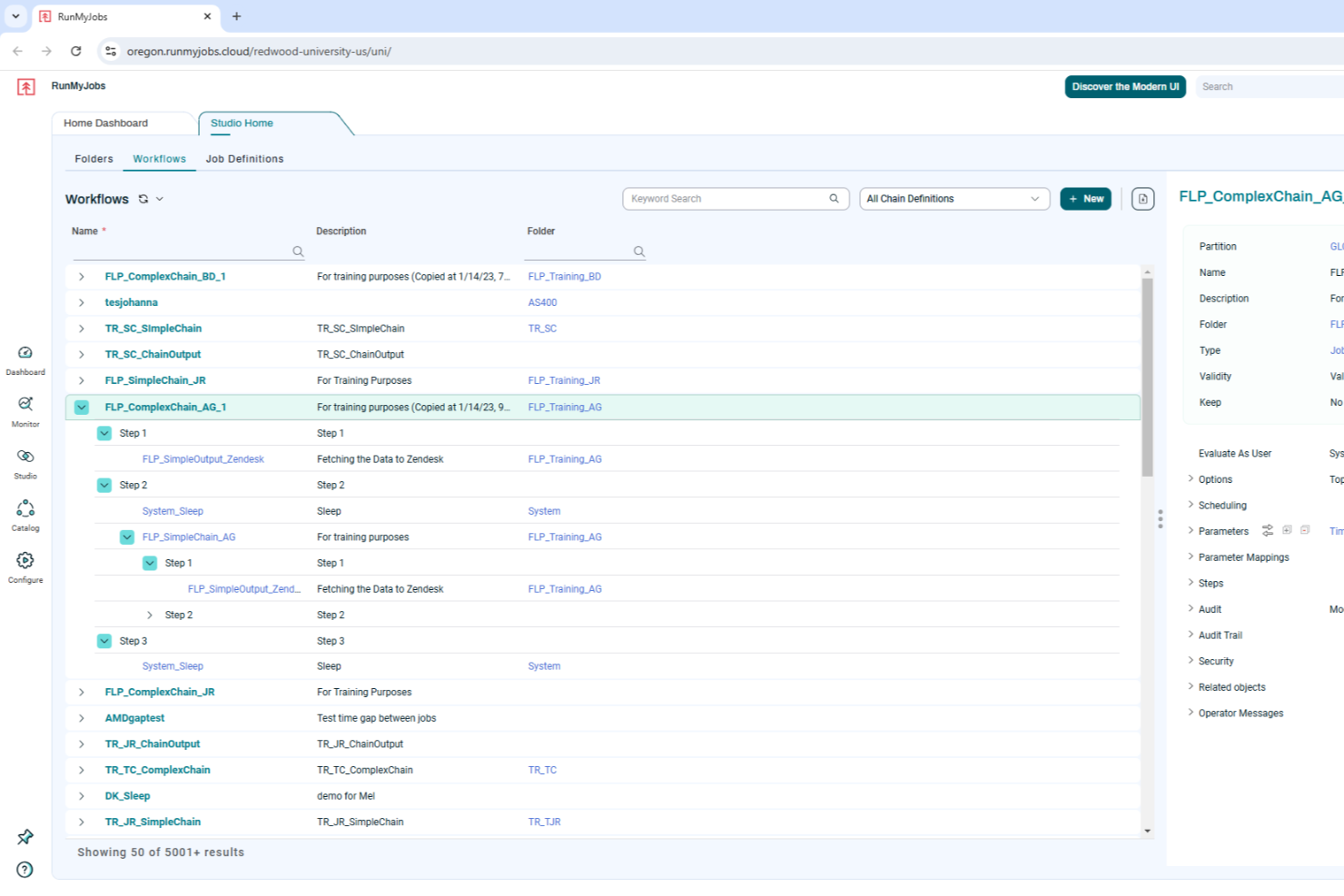
RunMyJobs di Redwood è un software intelligente per l'automazione dei carichi di lavoro che si rivolge alle aziende desiderose di migliorare l'efficienza operativa attraverso l'automazione. Offrendo un'integrazione senza soluzione di continuità con le tecnologie SAP e altre soluzioni aziendali critiche, risponde alle esigenze delle organizzazioni che desiderano ridurre le attività manuali e migliorare l'efficienza produttiva. RunMyJobs consente al tuo team di automatizzare i processi critici per il business, garantendo affidabilità e adattabilità in un panorama aziendale in continua evoluzione.
Perché ho scelto RunMyJobs di Redwood
Ho scelto RunMyJobs di Redwood per la sua eccezionale capacità di automatizzare con facilità processi aziendali complessi e mission-critical. L'integrazione profonda della piattaforma con le tecnologie SAP, incluso S/4HANA, la rende una scelta eccellente per le aziende fortemente dipendenti dai sistemi SAP. Inoltre, la funzione di analisi predittiva consente di monitorare in tempo reale gli accordi sul livello di servizio, assicurando che le operazioni siano gestite in modo fluido ed efficiente. Questo focus sul miglioramento dell'efficienza operativa tramite l'automazione distingue RunMyJobs nel panorama dei software per l'automazione dei processi.
Caratteristiche principali di RunMyJobs di Redwood
Oltre alla solida integrazione con SAP e all'analisi predittiva, RunMyJobs offre numerose altre funzionalità preziose per l'automazione dei processi:
- Architettura ibrida: Supporta l'automazione senza interruzioni tra vari ambienti, inclusi cloud e sistemi on-premises.
- Automazione self-service: Consente agli utenti di avviare e personalizzare i flussi di lavoro in modo indipendente, riducendo la dipendenza dai reparti IT.
- Connettività full stack: Orchestra i flussi di lavoro tra applicazioni e infrastrutture, assicurando una completa automazione dei processi.
- Integrazione AI e Analytics: Fornisce analisi predittive e ottimizzazione dei processi per migliorare le decisioni e l'efficienza operativa.
Integrazioni di RunMyJobs di Redwood
Le integrazioni includono SAP S/4HANA, Oracle Data Integrator, ServiceNow, Databricks, AWS DataSync, Kubernetes, Boomi Atom, Box.com, Informatica Cloud e Power BI.
Pros and Cons
Pros:
- Profonda integrazione nativa SAP
- Schedulazione affidabile di livello enterprise
- Supporta l'automazione di infrastrutture ibride
Cons:
- La configurazione può essere complessa
- Prezzi non pubblicati pubblicamente

Ideale per report personalizzabili

ActiveBatch è una piattaforma di automazione dei processi che ti aiuta a ottimizzare diversi flussi di lavoro operativi. Offre una suite di funzionalità che la rendono uno strumento essenziale se desideri migliorare le tue capacità di automazione.
Perché ho scelto ActiveBatch
ActiveBatch offre report e monitoraggio personalizzabili, il che significa che puoi adattare gli avvisi e i report alle tue esigenze specifiche e assicurarti di avere sempre le informazioni giuste a portata di mano.
Un altro motivo per scegliere ActiveBatch è la programmazione dei lavori basata su eventi, che consente alle automazioni di essere attivate da eventi specifici. Questa funzionalità mantiene i processi dinamici e reattivi ai cambiamenti, aumentando così l'efficienza delle tue operazioni. Le solide funzionalità di sicurezza e governance di ActiveBatch ti permettono di controllare gli accessi e proteggere i dati in vari ambienti.
Principali funzionalità di ActiveBatch
Oltre alla reportistica personalizzabile, ActiveBatch offre una serie di altre funzionalità pensate per soddisfare esigenze di automazione diversificate.
- Libreria di passaggi di lavoro: Puoi accedere a una libreria completa di modelli di lavoro predefiniti che eliminano la necessità di scripting, semplificando così le attività di automazione.
- Designer di workflow low-code: Questo strumento consente di creare facilmente flussi di lavoro senza richiedere una vasta conoscenza di programmazione, rendendolo accessibile a utenti di diversi livelli tecnici.
- Gestione SLA: Puoi monitorare e gestire automaticamente gli accordi sui livelli di servizio per mantenere la conformità e l'efficienza operativa.
- Provisioning cloud: Questa funzionalità ti consente di ottimizzare le risorse dell'infrastruttura cloud e gestire in modo efficiente i workflow basati sul cloud.
Integrazioni di ActiveBatch
Le integrazioni includono Microsoft PowerShell, SQL Server, ServiceNow, Azure Data Factory, Oracle EBS, VMware, SAP NetWeaver, Informatica PowerCenter e AWS.
Pros and Cons
Pros:
- Offre visibilità sui flussi di lavoro garantendo il completamento delle attività nell'ordine corretto
- Consente di automatizzare e gestire processi IT complessi
- Semplifica la pianificazione dei lavori e riduce tempo e risorse per il monitoraggio delle attività
Cons:
- Modificare i workflow e le integrazioni personalizzate può essere una sfida
- L'interfaccia utente potrebbe essere semplificata per una migliore usabilità

Ideale per la guida AI nei workflow
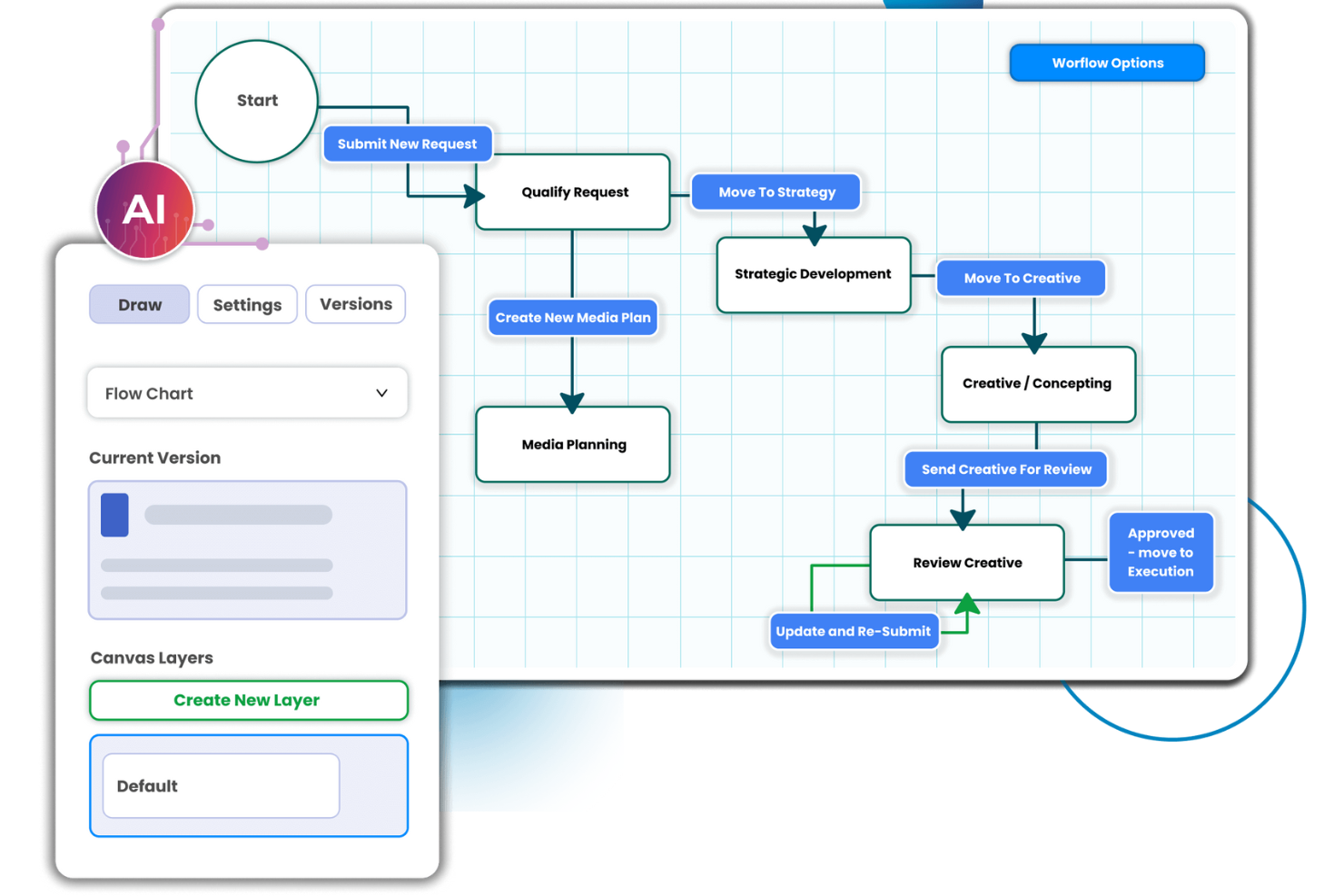
Screendragon è una piattaforma per la gestione dei flussi di lavoro e l'automazione dei processi, pensata in particolare per i team di marketing, agenzie e operazioni. Permette di progettare, indirizzare e monitorare i workflow per ridurre al minimo gli attriti nei processi.
Perché ho scelto Screendragon
Ho scelto Screendragon per la sua eccezionale guida AI nei flussi di lavoro. L'automazione basata sull'intelligenza artificiale e le regole di governance della piattaforma consentono di gestire con facilità workflow complessi e di ridurre il tempo dedicato ad attività ripetitive. Con funzioni come il builder visuale dei workflow e la gestione digitale delle approvazioni, otterrai insight in tempo reale che permettono decisioni più informate. La piattaforma no-code di Screendragon consente anche ai team non tecnici di personalizzare i flussi di lavoro, rendendola una scelta versatile per le aziende che vogliono migliorare produttività ed efficienza operativa.
Caratteristiche principali di Screendragon
Screendragon offre anche molte altre funzionalità per l'automazione dei processi e la gestione dei progetti.
- Gestione delle risorse: Offre una panoramica chiara della capacità del team e permette di distribuire in modo ottimale il personale affinché i progetti critici siano adeguatamente presidiati.
- Avvio automatico dei progetti: Puoi convertire accordi firmati in ambienti di progetto strutturati per mantenere coerenza e garantire un ottimo avvio per ogni nuovo progetto.
- Gestione delle pipeline: Offre workflow personalizzabili allineati alle tue operazioni e facilita il passaggio fluido dal primo pitch all’esecuzione del progetto.
- Stima dei costi di progetto: Puoi semplificare il processo di stima e prevedere accuratamente costi, tempistiche e necessità di risorse per una pianificazione finanziaria più efficace.
Integrazioni di Screendragon
Le integrazioni includono Microsoft Power BI, Slack, Microsoft Teams, HubSpot, Okta, Aprimo, Adobe, Ziflow, Brandfolder, Jira, Google Drive, Egnyte, Box, Salesforce, Microsoft Dynamics 365, SAP e Trello.
Pros and Cons
Pros:
- Workflow altamente personalizzabili con logica condizionale
- Solide funzionalità di revisione e approvazione incluse
- Gli agenti AI integrati offrono insight predittivi
Cons:
- La complessità può intimorire i team più piccoli
- La gestione delle risorse può risultare laboriosa
New Product Updates from Screendragon
Screendragon Unveils New AI Hub
Screendragon introduced AI Hub, a new capability that lets teams build and manage AI agents directly within workflows. The update helps marketing teams automate tasks, maintain governance controls, and scale AI-driven operations more efficiently. For more information, visit Screendragon's official site.

Wrike
Ideale per flussi di lavoro basati su regole
Wrike è un software di gestione progetti e collaborazione pensato per aziende di tutte le dimensioni, che offre strumenti per gestire sia progetti una tantum che attività ricorrenti.
Perché ho scelto Wrike
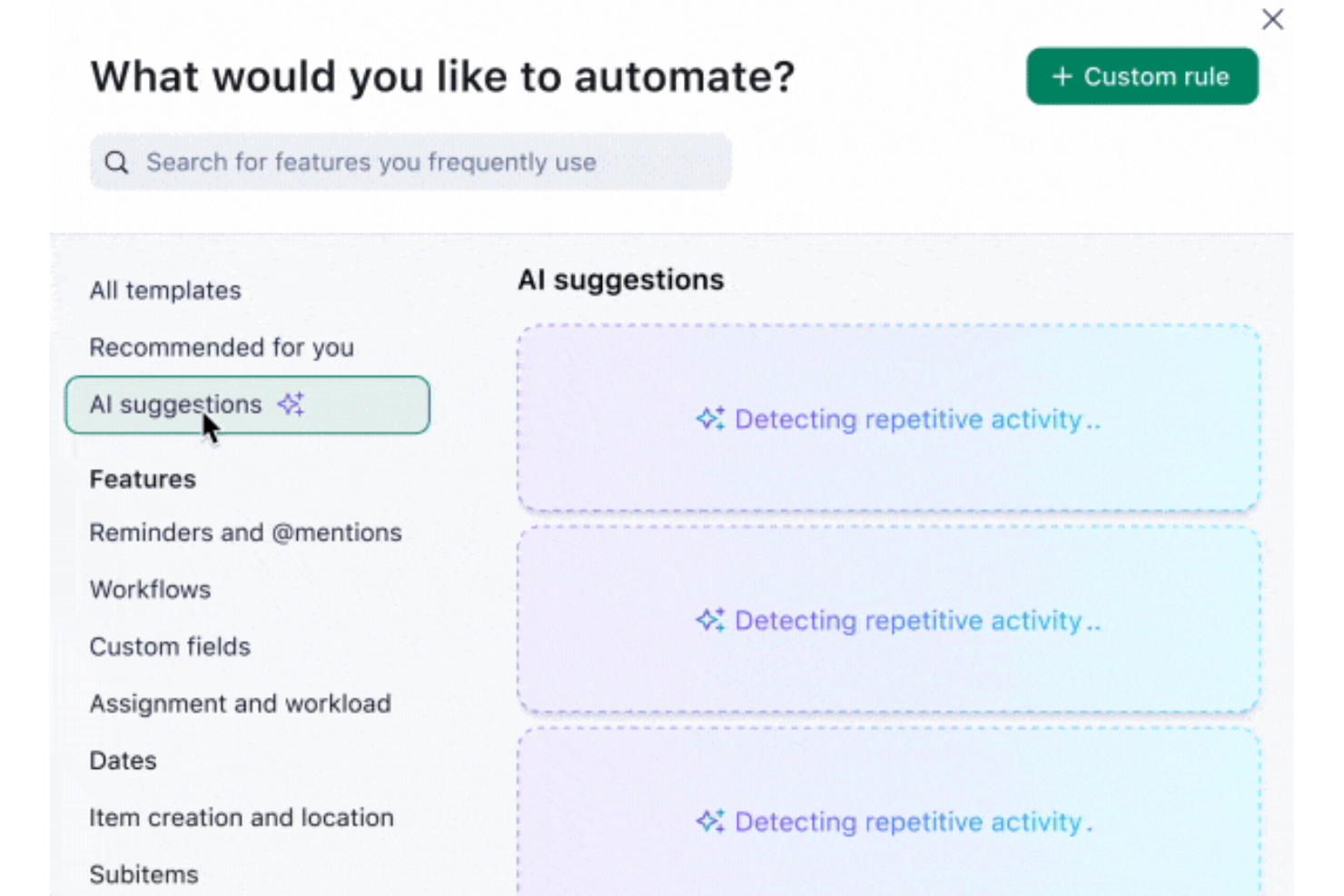
Uno dei suoi principali punti di forza sono le capacità di automazione personalizzabili, che permettono agli utenti di creare flussi di lavoro basati su regole per automatizzare attività ripetitive senza programmare. I modelli personalizzabili di Wrike, gli strumenti di reportistica e le viste interattive di Gantt consentono inoltre alle aziende di analizzare e ottimizzare i propri processi. Il software include anche funzionalità avanzate come la previsione del rischio tramite IA per avvisare i team quando i progetti rischiano di subire ritardi.
Funzionalità principali di Wrike
Wrike offre anche una serie di altre funzionalità per l'automazione dei processi.
- Moduli di richiesta dinamici: Questi moduli includono logica condizionale per permettere al tuo team di raccogliere e gestire dati in modo più efficace.
- Integrazione con l'IA: Gli strumenti di IA di Wrike forniscono suggerimenti avanzati di automazione che ti aiutano a migliorare la gestione delle attività e l'efficienza.
- Dashboard in tempo reale: Offrono una visualizzazione centralizzata dei dati per decisioni informate e monitoraggio dei processi.
- Strumenti di reportistica automatizzata: Puoi generare approfondimenti in tempo reale sulle prestazioni dei processi per favorire il miglioramento continuo e la pianificazione strategica.
Integrazioni Wrike
Le integrazioni includono Microsoft Teams, Slack, Salesforce, Google Drive, Dropbox, Box, Microsoft Office 365, Adobe Creative Cloud, Jira, QuickBooks e Tableau.
Pros and Cons
Pros:
- Diagrammi di Gantt dinamici con mappatura delle dipendenze
- Funzionalità di workflow di approvazione
- Ottime funzionalità di collaborazione
Cons:
- Configurare la piattaforma in base alle proprie esigenze può risultare complesso
- Sicurezza avanzata e automazione disponibili solo nei piani di livello superiore
New Product Updates from Wrike

Wrike Adds Quick Search to Table View
Wrike adds Quick Search to Table View with full-table search across titles, descriptions, and fields, plus highlighted matches. This helps users find tasks faster in large tables. For more information, visit Wrike’s official site.

Kissflow
Ideale per la creazione di app senza codice

Kissflow è una piattaforma che semplifica la creazione di applicazioni personalizzate con un minimo di programmazione richiesta. È ideale per le aziende che desiderano consentire ai propri team di sviluppare applicazioni senza dover possedere competenze tecniche approfondite.
Perché ho scelto Kissflow
Ho selezionato Kissflow per questa lista perché consente lo sviluppo rapido di applicazioni senza necessità di scrivere codice, distinguendosi dagli altri strumenti di automazione dei processi. Ritengo che Kissflow sia il migliore per la creazione di app senza codice grazie alla sua piattaforma intuitiva, che permette anche a chi non ha un background tecnico di progettare e distribuire applicazioni con facilità.
Funzionalità principali di Kissflow
Oltre alla creazione di app no-code, Kissflow offre una serie di altre funzionalità che possono aiutarti a migliorare l’automazione dei processi.
- Kissflow AI: Questa funzione integra l’intelligenza artificiale per automatizzare e ottimizzare in modo intelligente i flussi di lavoro.
- Orchestrazione dei flussi di lavoro: Permette di gestire e semplificare i flussi di lavoro complessi coordinando diverse attività e processi.
- Strumenti di gestione delle decisioni: Offre strumenti visuali per gestire le decisioni e visualizzare i flussi di lavoro, contribuendo anche alla chiarezza dei processi.
- Collaborazione sociale: Consente la condivisione delle informazioni in tempo reale e l’invio di avvisi per migliorare il lavoro di squadra e la comunicazione all’interno dell’organizzazione.
Integrazioni di Kissflow
Le integrazioni includono SAP Business ByDesign, Docusign, Dropbox, Oracle NetSuite, Salesforce, Google Drive, Slack, Asana e HubSpot.
Pros and Cons
Pros:
- Ampia gamma di integrazioni con altri sistemi
- Interfaccia facile da usare per la gestione di flussi di lavoro e applicazioni
- Piattaforma no-code adatta a utenti senza competenze di programmazione
Cons:
- Assenza di un ambiente dedicato allo sviluppo e al testing
- La migrazione a versioni software più recenti può essere complessa

altaFlow
Ideale per l'automazione dei documenti su Salesforce

altaFlow offre un software di automazione dei processi progettato per le organizzazioni che devono gestire flussi di lavoro documentali complessi e dati su più sistemi. È una scelta solida per i team di settori regolamentati o per chi utilizza Salesforce e necessita di un'automazione sicura e auditabile.
Per chi è migliore altaFlow?
I team nei settori finanziario, sanitario o legale che richiedono flussi di lavoro sicuri, automatizzati e una profonda integrazione con Salesforce troveranno altaFlow particolarmente utile.
Perché ho scelto altaFlow
Ho scelto altaFlow perché il mio team ha bisogno di un'automazione avanzata dei documenti direttamente all'interno di Salesforce. Con altaFlow possiamo generare, inoltrare e archiviare documenti senza uscire dall'ambiente CRM. Apprezzo la gestione delle catene di approvazione complesse e l'automazione dei passaggi di conformità per i settori regolamentati. Questo ci permette di mantenere tutti i flussi di lavoro documentali strettamente integrati con i nostri dati Salesforce.
Caratteristiche principali di altaFlow
- Costruttore di flussi di lavoro senza codice: Crea e modifica flussi di lavoro automatizzati tramite un'interfaccia drag-and-drop senza necessità di programmazione.
- Validazione dinamica dei campi: Garantisce l'accuratezza dei dati con campi personalizzabili e validazione integrata in ogni fase del flusso di lavoro.
- Controlli di accesso basati sui ruoli: Assegna permessi e gestisci la partecipazione ai flussi di lavoro in base ai ruoli utente per una maggiore sicurezza.
- Tracciabilità delle attività e monitoraggio della conformità: Mantieni un registro dettagliato di tutte le azioni sui flussi di lavoro per audit normativi e interni.
Integrazioni altaFlow
Le integrazioni includono Salesforce, NetSuite, SharePoint e altro.
Pros and Cons
Pros:
- Sincronizzazione in tempo reale tra diversi sistemi aziendali
- Controlli di autorizzazione granulare per flussi di lavoro sensibili
- Costruttore di flussi di lavoro senza codice per implementazioni rapide
Cons:
- Template predefiniti limitati per flussi di lavoro specifici di settore
- La configurazione di API personalizzate può richiedere competenze tecniche

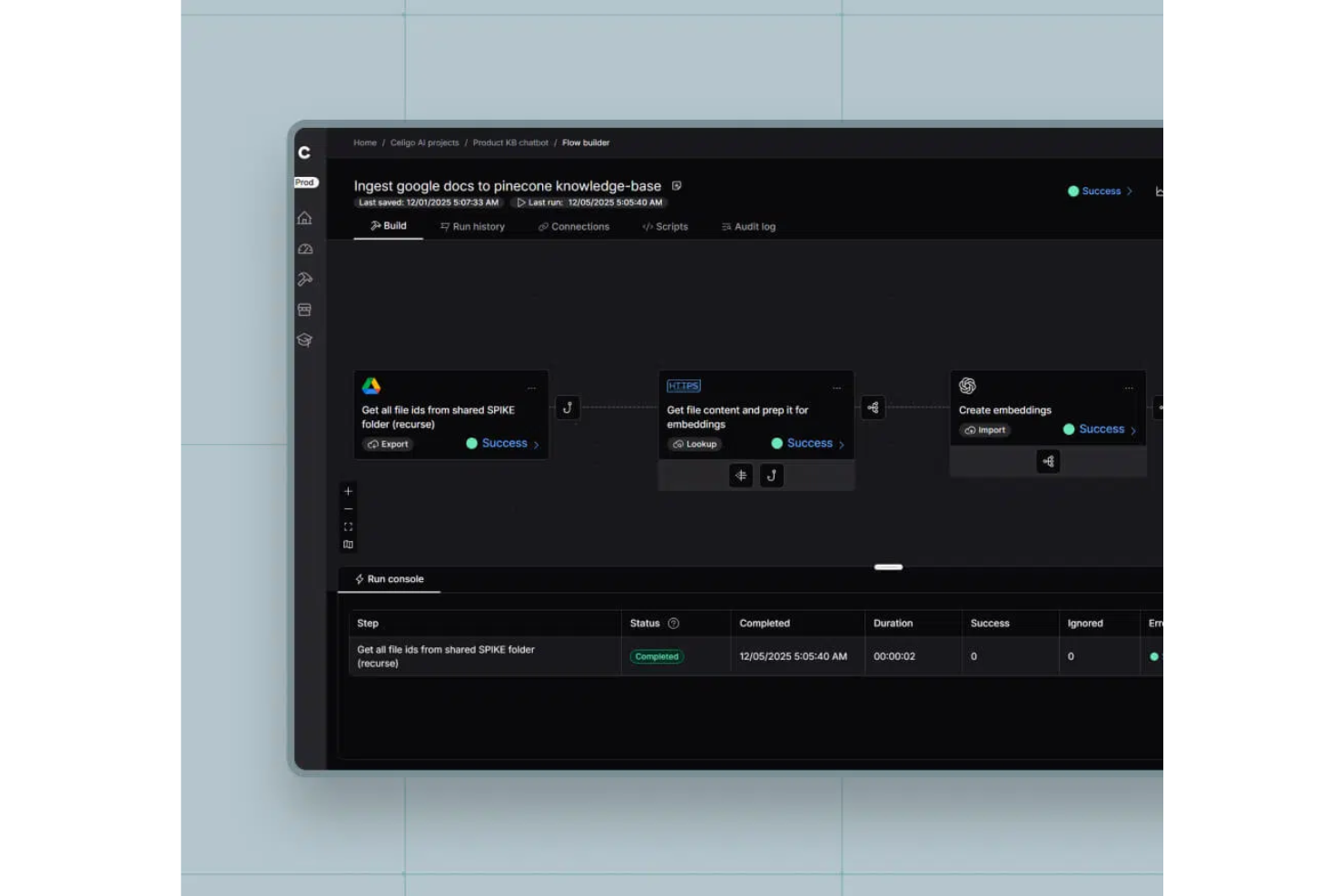
Celigo è una piattaforma di automazione dei processi che collega applicazioni cloud e on-premises, automatizza i flussi di lavoro e gestisce le integrazioni dei dati tra i sistemi aziendali.
Per chi è meglio Celigo?
Celigo è adatto a team IT e responsabili operativi di aziende di medie e grandi dimensioni che necessitano di automatizzare e collegare diverse applicazioni aziendali.
Perché ho scelto Celigo
Ho scelto Celigo tra i migliori perché posso automatizzare i processi nell'intero stack tecnologico utilizzando la sua vasta gamma di connettori predefiniti per app come Salesforce, NetSuite e Shopify. Il mio team è in grado di implementare le integrazioni rapidamente senza dover sviluppare codice personalizzato per ogni collegamento. Mi piace che possiamo orchestrare flussi di lavoro multi-step tra sistemi cloud e on-premises sfruttando questi connettori pronti all'uso.
Funzionalità principali di Celigo
- Flow builder: Progetta e gestisci flussi di lavoro automatizzati con un'interfaccia drag-and-drop.
- Dashboard per la gestione degli errori: Monitora, risolvi e analizza gli errori di integrazione da una dashboard centralizzata.
- Strumenti di trasformazione dei dati: Mappa, filtra e trasforma i dati tra diversi sistemi durante l'automazione.
- Pianificazione e trigger: Imposta trigger basati sul tempo o sugli eventi per automatizzare i processi tra le applicazioni collegate.
Integrazioni Celigo
Celigo offre oltre 200 integrazioni native, tra cui Salesforce, NetSuite, Shopify, Amazon, Zendesk, ServiceNow, Microsoft 365, Google Workspace, Jira e Slack. È disponibile un'API per integrazioni personalizzate.
Pros and Cons
Pros:
- Script personalizzati per logiche di automazione avanzate
- Monitoraggio in tempo reale con dashboard dettagliate
- Pianificazione flessibile e trigger basati su eventi
Cons:
- Alcuni connettori richiedono costi di licenza aggiuntivi
- L'interfaccia utente può risultare affollata su larga scala
New Product Updates from Celigo
Celigo Expands Microsoft Entra Authentication for SQL Connectors
Celigo’s Azure Synapse and MS SQL connectors now support Microsoft Entra service principal authentication via client secrets and certificates, so you can connect securely without relying on SQL credentials. For more information, visit Celigo’s official site.
 .
.
TrailHQ
Ideale per l'automazione dei processi basata sull'IA
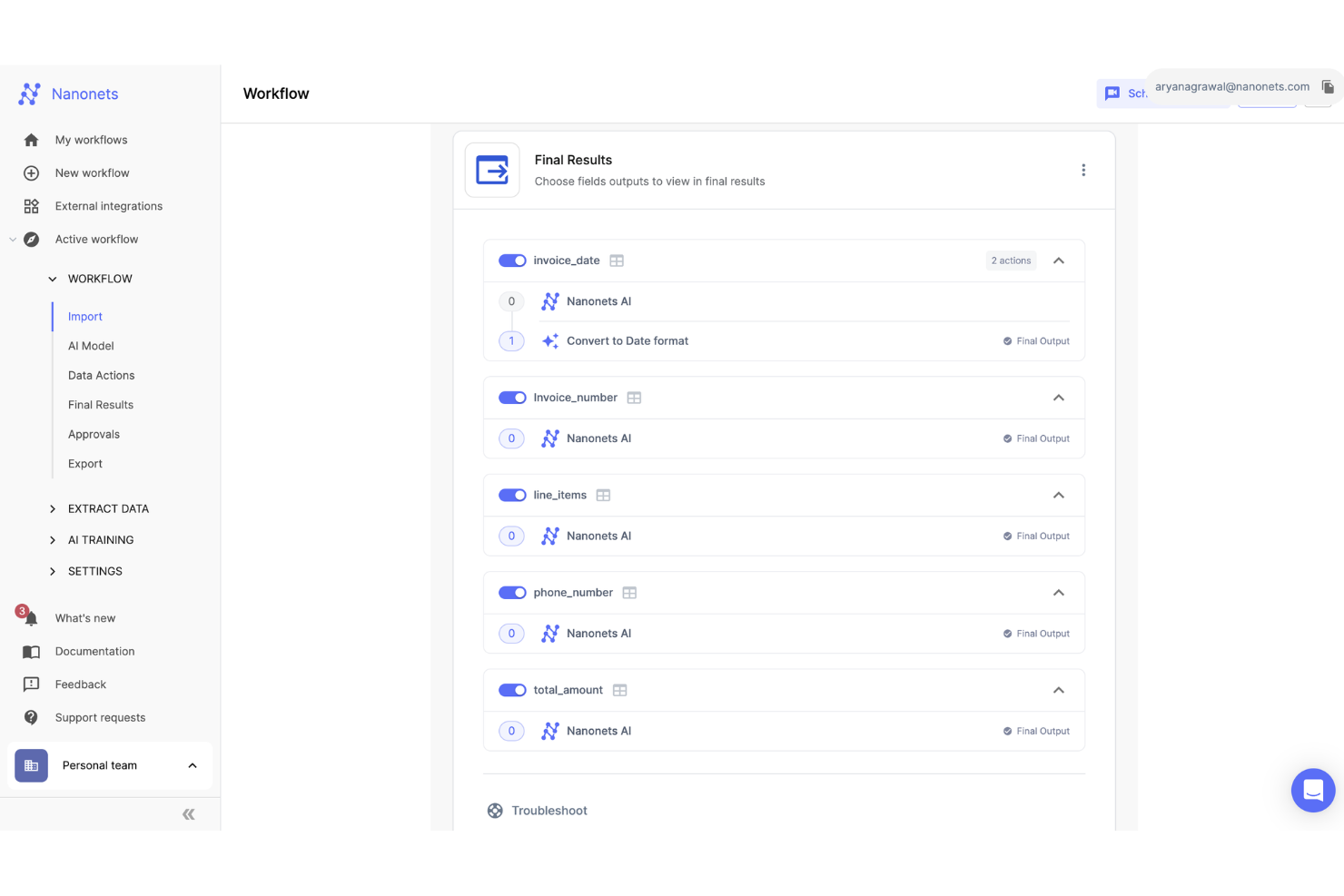
Nanonets è una piattaforma basata sull'intelligenza artificiale progettata per automatizzare l'elaborazione dei documenti e i flussi di lavoro in settori come finanza, sanità e logistica.
Perché ho scelto Nanonets
Nanonets mi ha colpito per le sue robuste capacità di intelligenza artificiale, in particolare nell'automatizzare flussi di lavoro complessi utilizzando l'elaborazione del linguaggio naturale. Si integra con varie app e fonti di dati, consentendo una gestione dinamica dei flussi di lavoro. Il supporto della piattaforma per modelli personalizzati di apprendimento del linguaggio (LLMs) permette risposte e azioni personalizzate, rendendo semplice adattare i flussi di lavoro alle esigenze specifiche dell'azienda.
Caratteristiche principali di Nanonets
Oltre alle capacità guidate dall'IA, Nanonets offre numerose altre funzionalità che lo rendono un forte concorrente tra i software per l'automazione dei processi.
- Sicurezza dei dati e conformità: La piattaforma aderisce agli standard del settore come GDPR e HIPAA, così puoi assicurarti che i tuoi dati siano gestiti in modo sicuro e conforme ai requisiti normativi.
- Flussi di lavoro Human-in-the-Loop: Questo prevede fasi di approvazione umana e validazione automatica per migliorare l'accuratezza e l'efficienza dei processi.
- Riconoscimento ottico dei caratteri: Puoi estrarre ed elaborare dati da documenti non strutturati come fatture e contratti.
- Automazioni dei flussi di lavoro: Permette di automatizzare passaggi manuali e ripetitivi nei tuoi processi per accelerare il lavoro e ridurre gli errori umani.
Integrazioni di Nanonets
Le integrazioni includono QuickBooks, Salesforce, Google Drive, SharePoint, Notion, Dropbox e Zapier.
Pros and Cons
Pros:
- Compatibile con vari linguaggi di programmazione
- Funzioni di estrazione dati
- Fornisce API che permettono la localizzazione personalizzata di oggetti
Cons:
- Meno opzioni di personalizzazione rispetto a strumenti più avanzati
- Potrebbe non essere adatto per progetti di machine learning estensivi con grandi set di dati
Altri software per l'automazione dei processi
Ecco un elenco di altri software per l’automazione dei processi che vale la pena considerare se non hai trovato uno strumento adatto nell’elenco precedente.
- UiPath
Ideale per flussi di lavoro agentici
- Pipefy
Ideale per la standardizzazione dei processi
- Process Street
Ideale per l'automazione dei flussi di lavoro senza codice
- Blue Prism
Ideale per soluzioni di automazione intelligente
- Nintex
Ideale per aumentare l'efficienza complessiva
- ProcessMaker
Ideale per l'automazione aziendale su larga scala
- Pneumatic Workflow
Ideale per la creazione illimitata di flussi di lavoro
- Fortra
Ideale per crescita aziendale e produttività
- Automation Anywhere
Ideale per l'orchestrazione di processi complessi
- Appian
Ideale per l'agilità aziendale
- SweetProcess
Ideale per la gestione della conoscenza
- Bizagi
Ideale per l'automazione end-to-end
- Creatio AI Studio
Ideale per l'automazione dei processi aziendali altamente personalizzabile
- Smartsheet
Ideale per flussi di lavoro intelligenti
- cloudsquid
Ideale per strutturare file di dati finanziari


Software correlati per la gestione dei progetti
Se non hai ancora trovato quello che cerchi, dai un'occhiata a questi altri strumenti correlati che abbiamo testato e valutato:
- Software per la gestione dei progetti
- Software per la gestione delle risorse
- Software per l'automazione dei flussi di lavoro
- Software per il monitoraggio del tempo
- Software per la gestione delle attività
- Strumenti per la collaborazione
- Strumento per la creazione di diagrammi di Gantt
- Strumenti per la produttività
- Software per il monitoraggio dei progetti
- Software per la pianificazione dei progetti
Come Valuto il Software per l'Automazione dei Processi
Valuto ogni strumento secondo due prospettive: le capacità di base—come i trigger condizionali e la gestione degli iter di approvazione—che uno strumento deve possedere, e i fattori distintivi che determinano l'idoneità per i team PMO.
Funzionalità Principali (Requisiti Fondamentali per Questa Lista)
Quando seleziono gli strumenti per la mia lista, valuto ciascuno su una scala da 0 (non offre la funzionalità) a 5 (eccelle in quest'area) per ogni funzionalità fondamentale elencata di seguito. Successivamente, calcolo il punteggio totale dello strumento come percentuale. Ogni strumento deve raggiungere un punteggio totale minimo del 65% per essere considerato.
- Creator Visivo di Flussi di Lavoro: Verifico se è possibile mappare un processo multi-step—come una sequenza di intake-avvio progetto—utilizzando un canvas drag-and-drop invece di scrivere codice.
- Logica Condizionale & Trigger: Ogni strumento deve supportare trigger basati su eventi e regole di ramificazione, come l'escalation automatica di un'attività quando una data di scadenza passa senza che sia completata.
- Automazione di Attività & Processi: Valuto quanto bene lo strumento gestisce la creazione automatica di attività, l'assegnazione e l'instradamento—fornendo ad esempio un set standard di attività ogni volta che un nuovo progetto entra in una fase specifica.
- Workflow di Approvazione & Revisione: Gli strumenti dovrebbero permettere di costruire catene di approvazione strutturate, ad esempio instradando una richiesta di modifica tramite il responsabile del progetto, poi un direttore PMO, con notifiche ad ogni passaggio.
- Integrazioni con Terze Parti: Esamino l'ampiezza dei connettori nativi con strumenti PM come Jira, Asana o monday.com, oltre al supporto per API e webhook per esigenze di orchestrazione personalizzate.
- Monitoraggio dei Processi & Analisi: Dashboard e log che tengono traccia delle prestazioni dell'automazione sono fondamentali qui—voglio verificare se è possibile individuare colli di bottiglia nei workflow e misurare l'aderenza agli SLA.
Una volta che ho una lista di strumenti che soddisfano questi criteri, considero cosa distingue ciascuna piattaforma.
Fattori Differenzianti (Cosa Distingue i Fornitori)
Ecco come confronto e distinguo i diversi fornitori:
Funzionalità Distintive
Una solida libreria di template di processo fa risparmiare ai team PMO la fatica di ricostruire da zero i workflow di intake, richiesta modifica e stage-gate per ogni nuovo tipo di progetto. Valuto anche se uno strumento offre suggerimenti potenziati dall'IA, come segnalare workflow bloccati o raccomandare i prossimi passi sulla base di dati storici di progetto. L'automazione della gestione risorse e capacità è un altro elemento distintivo, soprattutto quando una soluzione può riassegnare automaticamente compiti o attivare avvisi di staffing quando il carico di lavoro di un membro del team supera una soglia stabilita.
Oltre le Funzionalità
La profondità delle integrazioni è molto importante. Verifico se uno strumento si sincronizza bidirezionalmente con piattaforme PM come Jira o Asana, e non solo invia dati in un'unica direzione. Anche la scalabilità è un fattore che valuto, in particolare per i team PMO che gestiscono decine di progetti contemporaneamente tra diversi programmi. Una soluzione che funziona bene per un singolo team ma fatica su scala di portafoglio crea problemi rapidamente. Esamino inoltre la trasparenza dei prezzi, in particolare riguardo ai limiti di automazione e ai costi per utente, affinché i team possano stimare accuratamente quanto spenderanno man mano che l'adozione cresce.
Come scegliere un software per l'automazione dei processi
Ecco come scegliere uno strumento software per l'automazione dei processi adatto alle tue esigenze:
- Identificare esigenze e obiettivi: Definisci chiaramente ciò che vuoi che il software realizzi. Vuoi automatizzare attività ripetitive, migliorare l'efficienza dei flussi di lavoro o ridurre gli errori manuali? Ad esempio, se il tuo team dedica troppo tempo all'inserimento dei dati, una soluzione in grado di automatizzare questo processo affronterà direttamente questa difficoltà.
- Possibilità di integrazione: Considera quanto bene il software si integrerà con i sistemi esistenti. Ad esempio, dovresti poter integrare il software di automazione dei processi con il tuo sistema CRM, così da automatizzare le sequenze di ricontatto con i clienti.
- Scalabilità: Se prevedi un aumento della complessità o del volume dei processi, il software dovrebbe essere in grado di gestirlo senza richiedere una revisione completa. Ad esempio, una piccola attività di commercio elettronico trarrà vantaggio da un software di automazione in grado di aumentare la propria capacità durante i periodi di punta, come il Black Friday.
- Esperienza utente: Valuta la facilità d'uso del software e la curva di apprendimento. Dovrebbe essere accessibile a tutti gli utenti, indipendentemente dalle loro competenze tecniche. Ad esempio, un team di marketing con conoscenze informatiche limitate avrà bisogno di un'interfaccia intuitiva per configurare campagne e-mail automatizzate.
- Considerazioni sui costi: Analizza il costo totale di proprietà, compresi la configurazione iniziale, la formazione e la manutenzione continua. Assicurati che il costo sia in linea con il tuo budget e offra un buon ritorno sull'investimento. Ad esempio, una startup potrebbe cercare una soluzione che offra funzionalità di automazione di base senza caratteristiche superflue che facciano aumentare il prezzo.
Tendenze dei software di automazione dei processi
I software di automazione dei processi si stanno evolvendo rapidamente, con nuove tendenze che ridefiniscono il modo in cui operano le aziende. Queste tendenze sono destinate a lasciare il segno:
- Automazione strategica: L'automazione strategica è ormai una componente fondamentale delle trasformazioni aziendali, non solo una parola d'ordine tra i CIO. È essenziale per l'efficienza operativa, l'integrità dei dati e la crescita sostenuta, oltre a essere un fattore critico per le aziende che puntano a prosperare nel panorama digitale.
- La diffusione delle piattaforme senza codice e a basso codice: Le piattaforme senza codice e a basso codice consentono una rapida implementazione delle applicazioni, aiutano ad affrontare la carenza di competenze e a soddisfare la necessità di velocità nelle operazioni incentrate sul digitale. Democratizzano il processo di sviluppo e consentono la creazione rapida di applicazioni.
- Automazione completa dei processi: Sebbene la Robotic Process Automation (RPA) rimanga diffusa per l'automazione a livello di attività, la tendenza si sta spostando verso l'automazione sistematica. L'Intelligent Process Automation (IPA), che combina la RPA con l'intelligenza artificiale e l'apprendimento automatico per automazioni più intelligenti e una maggiore scalabilità, include spesso software per la generazione di documenti come componente fondamentale per creare e gestire automaticamente i documenti nell'ambito del processo completo.
- Adozione di strategie multi-cloud: Le aziende adottano sempre più strategie multi-cloud per soddisfare requisiti complessi dei processi. Questa tendenza prevede l'utilizzo di diversi servizi cloud di più fornitori, che possono aiutarti a facilitare la digitalizzazione e la gestione fluida dei documenti nei vari ambienti cloud.
- Iperautomazione: L'iperautomazione consiste nell'identificare i processi critici che trarrebbero vantaggio dall'automazione e nell'applicare una combinazione di tecnologie come l'intelligenza artificiale, l'apprendimento automatico e le piattaforme a basso codice per ottimizzare questi processi in modo completo.
Che cos'è un software di automazione dei processi?
Il software di automazione dei processi è un tipo di strumento in grado di eseguire attività ripetitive e flussi di lavoro di routine al posto tuo, senza bisogno di input manuali. Viene utilizzato principalmente da responsabili di progetto, team operativi, personale delle risorse umane, responsabili IT e professionisti della finanza per risparmiare tempo, ridurre gli errori e mantenere il lavoro in corso.
Funzionalità come gli attivatori delle attività, le azioni basate su regole e le integrazioni di sistema aiutano a ridurre il lavoro manuale, mantenere l'accuratezza e rendere i processi più facili da gestire, così il lavoro quotidiano è più rapido e prevedibile.
Funzionalità dei software di automazione dei processi
Quando scegli un software di automazione dei processi, presta attenzione alle seguenti funzionalità principali:
- Progettazione e personalizzazione dei flussi di lavoro: puoi creare, modificare e personalizzare flussi di lavoro automatizzati in base ai processi aziendali. Questo ti consente di definire ogni fase, collegarle logicamente e adattare il processo alle tue esigenze specifiche.
- Funzionalità di integrazione: dovresti poter collegare il software ad altri strumenti che utilizzi già, come piattaforme CRM, ERP o di posta elettronica. Questo facilita lo scambio di dati tra i sistemi.
- Gestione delle attività: puoi assegnare, monitorare e controllare le attività all'interno dei processi automatizzati per assicurarti che tutti sappiano cosa devono fare, prevenire il mancato rispetto delle scadenze ed evitare colli di bottiglia.
- Notifiche e avvisi: questa funzionalità consente di avvisare automaticamente le persone giuste quando le attività sono in scadenza, completate o richiedono attenzione; aiuta il tuo team a gestire le responsabilità e riduce gli errori umani e il mancato rispetto delle scadenze.
- Reportistica e analisi: puoi accedere a dashboard e generare report per analizzare le prestazioni dei processi. Questo ti consente di individuare le inefficienze, prendere decisioni più consapevoli e migliorare le tue operazioni.
- Autorizzazioni degli utenti e controllo degli accessi: questa funzionalità consente di stabilire chi può visualizzare, modificare o approvare i vari flussi di lavoro e i dati all'interno del software, nonché di mantenere al sicuro le informazioni sensibili e assicurarti che le persone vedano solo ciò che è pertinente al loro ruolo.
- Registri di controllo: puoi tenere traccia di ogni modifica e azione eseguita all'interno dei processi per ottenere una registrazione completa che ti aiuti a garantire la conformità, risolvere i problemi e capire esattamente chi ha fatto cosa e quando.
Funzionalità comuni dell'intelligenza artificiale nei software di automazione dei processi
Oltre alle funzionalità standard dei software di automazione dei processi elencate sopra, molti strumenti offrono funzionalità di intelligenza artificiale come:
- Elaborazione intelligente dei documenti: consente di estrarre, interpretare e organizzare automaticamente le informazioni dai documenti utilizzando l'intelligenza artificiale, così puoi elaborare moduli, fatture o contratti senza inserire manualmente i dati.
- Analisi predittiva: puoi utilizzare l'intelligenza artificiale per individuare modelli e prevedere le tendenze future all'interno dei flussi di lavoro, anticipare i problemi, allocare meglio le risorse e apportare miglioramenti proattivi.
- Elaborazione del linguaggio naturale: puoi interagire con lo strumento utilizzando comandi scritti o vocali, il che facilita l'automazione delle attività semplicemente digitando o dicendo ciò che vuoi venga fatto.
- Processo decisionale automatizzato: l'intelligenza artificiale può esaminare i criteri e scegliere l'azione più appropriata senza il tuo intervento. Questo accelera le approvazioni o l'instradamento delle attività in base alla logica e all'analisi dei dati impostate.
- Rilevamento delle anomalie: questa funzionalità può identificare e segnalare in tempo reale attività insolite, errori o deviazioni dai processi. Questo ti aiuta a individuare tempestivamente i problemi.
Vantaggi dei software di automazione dei processi
Ecco alcuni dei principali vantaggi che i software di automazione dei processi possono offrire:
- Maggiore efficienza: automatizzando le attività ripetitive e dispendiose in termini di tempo, il tuo team può concentrarsi su lavori più complessi e gratificanti, aumentando così la produttività complessiva.
- Riduzione degli errori: il software riduce al minimo l'errore umano assicurando che le attività vengano eseguite in modo coerente e corretto, con conseguenti risultati di qualità superiore e una riduzione delle rilavorazioni.
- Risparmio sui costi: semplificando i processi e riducendo la necessità di interventi manuali, puoi diminuire i costi della manodopera e ridurre al minimo le spese legate a errori e inefficienze.
- Maggiore conformità: i software di automazione dei processi possono essere programmati per seguire con precisione i requisiti normativi, rendendo più semplice rispettare gli standard di settore ed evitare costose sanzioni.
- Migliore gestione dei dati: il software può raccogliere e organizzare i dati in modo sistematico, fornendoti informazioni preziose utili a prendere decisioni consapevoli.
Costi e prezzi dei software di automazione dei processi
Ecco una tabella che illustra i prezzi e i piani tipici dei software di automazione dei processi:
Tabella comparativa dei piani dei software di automazione dei processi
| Tipo di piano | Prezzo medio | Funzionalità comuni |
|---|---|---|
| Gratuito | $0 | Accesso alle funzionalità di automazione di base, numero limitato di processi, supporto della community |
| Base | $10 - $20/utente/mese | Funzionalità di automazione di base, accesso a modelli predefiniti, supporto via email |
| Standard | $30 - $50/utente/mese | Funzionalità avanzate di automazione, accesso multiutente, supporto prioritario |
| Premium | $70 - $100/utente/mese | Gamma completa di funzionalità di automazione, opzioni di integrazione, supporto dedicato, strumenti di analisi e reportistica |
| Aziendale | Prezzi personalizzati | Soluzioni personalizzate, sicurezza di livello aziendale, gestione personale dell'account, supporto 24/7, formazione e configurazione iniziale |
Domande frequenti sul software di automazione dei processi
Ecco alcune domande frequenti sul software di automazione dei processi:
Il software di automazione dei processi può integrarsi con altri sistemi?
Sì, la maggior parte dei software di automazione dei processi è progettata per integrarsi con diversi sistemi e applicazioni aziendali. Tra questi rientrano i sistemi CRM, i sistemi ERP, i database e altri strumenti software. Le funzionalità di integrazione consentono di trasferire agevolmente i dati tra i sistemi e di automatizzare i flussi di lavoro interfunzionali.
Il software di automazione dei processi è adatto alle piccole imprese?
Sì, il software di automazione dei processi è sicuramente adatto alle piccole imprese. Può aiutarti a gestire le attività in modo più efficiente e a far crescere le operazioni senza aumentare significativamente il personale. Molte soluzioni sono scalabili e offrono prezzi flessibili per adattarsi alle esigenze e ai budget delle aziende più piccole.
Quali tipi di processi possono essere automatizzati?
Con il software di automazione dei processi puoi automatizzare le approvazioni dei progetti, l’assegnazione delle attività, la reportistica, la configurazione iniziale, l’instradamento dei documenti e gli aggiornamenti di stato. I responsabili di progetto utilizzano spesso l’automazione anche per i controlli periodici, il monitoraggio del budget e le catene di approvazione. Inizia dalle attività più ripetitive per massimizzare l’impatto immediato.
Quanto è sicuro il software di automazione dei processi?
La sicurezza varia in base al prodotto, ma il software di automazione dei processi affidabile include generalmente funzionalità di sicurezza come la crittografia dei dati, l’autenticazione degli utenti e i controlli degli accessi. Verifica la presenza di certificazioni di conformità come SOC 2 o GDPR e valuta le misure di sicurezza di qualsiasi software che stai prendendo in considerazione, per assicurarti che rispettino le normative del tuo settore.
Quali sono alcuni errori comuni da evitare quando si implementa l'automazione dei processi?
Non automatizzare processi inefficienti o poco chiari: correggili prima. Evita di trascurare il coinvolgimento degli stakeholder e non sottovalutare la necessità di formare gli utenti. Testa accuratamente i flussi di lavoro e prepara una documentazione chiara. Procedere troppo rapidamente o ignorare i feedback può causare problemi di adozione e potresti perdere i vantaggi dell’automazione dei processi.
Il software di automazione dei processi può gestire le approvazioni e i flussi di lavoro per la conformità?
Sì, molti strumenti supportano approvazioni in più fasi, registri di controllo e requisiti di conformità. Puoi configurare regole personalizzate per instradare i documenti, raccogliere firme digitali e monitorare la cronologia delle approvazioni. In questo modo i processi di progetto rimangono trasparenti e pronti per essere sottoposti a verifica, se o quando necessario.
Quanto tempo occorre per configurare il software di automazione dei processi?
Il tempo di configurazione del software di automazione dei processi dipende dalla complessità dello strumento e dalle esigenze dei tuoi processi. Per le automazioni semplici, potresti essere operativo in poche ore. I progetti più grandi, con integrazioni o flussi di lavoro personalizzati, possono richiedere alcune settimane. Prevedi tempo per i test e la configurazione del team: ti aiuterà a evitare ritardi.
Quale tipo di supporto o formazione viene generalmente fornito con gli strumenti di automazione dei processi?
La maggior parte dei fornitori offre guide per la configurazione iniziale, chat dal vivo, tutorial e community di utenti. Alcuni forniscono account manager dedicati, sessioni di formazione o programmi di certificazione. Verifica quali risorse di supporto sono disponibili prima di scegliere uno strumento, così avrai la certezza che il tuo team possa iniziare a utilizzarlo nel minor tempo possibile.
Qual è il prossimo passo?
Se desideri ulteriore aiuto e informazioni sulla gestione dei progetti, iscriviti alla newsletter di The Digital Project Manager. Inviamo un nuovo numero ogni settimana.