

10 migliori sistemi di gestione dei ticket per i progetti per il 2026

10 Elenco dei migliori sistemi di ticketing per la gestione dei progetti


Il giusto sistema di ticketing per la gestione dei progetti può semplificare notevolmente il monitoraggio del lavoro e dei problemi di progetto, velocizzare i flussi di lavoro e aumentare la produttività del team. Senza di esso, sarà difficile avere una visione chiara dell'avanzamento complessivo e di chi sta lavorando su cosa.
Ecco le mie scelte per i migliori sistemi di ticketing per la gestione dei progetti, che offrono funzionalità per il monitoraggio delle attività, la collaborazione del team e la risoluzione dei problemi. Ho utilizzato la mia esperienza e competenza come responsabile di progetto per valutare e analizzare diversi strumenti, così da aiutarti a trovare la soluzione più adatta, sia che tu gestisca piccoli team sia progetti grandi e complessi.
Perché fidarsi dei nostri consigli sui software
Il nostro team testa e recensisce software dal 2012. In quanto project manager noi stessi, sappiamo quanto sia difficile — e importante — scegliere il software giusto.
Per questa guida, abbiamo valutato gli strumenti attraverso test pratici e ricerche indipendenti, assegnando un punteggio agli strumenti in base ai nostri criteri di selezione. Ci basiamo inoltre sulle competenze di leader di pensiero del settore e di professionisti attivi nella gestione dei progetti.
Le nostre recensioni riflettono il nostro giudizio editoriale umano, non un discorso di vendita.
Revisori esperti:
Tabella comparativa dei sistemi di ticketing per la gestione dei progetti
Questa tabella comparativa riassume i dettagli dei prezzi delle mie principali selezioni di sistemi di ticketing per la gestione dei progetti:
| Tool | Best For | Trial Info | Price | ||
|---|---|---|---|---|---|
| 1 | Ideale per la connettività remota sicura | Prova gratuita di 30 giorni disponibile | Da $24,90/utente/mese (fatturazione annuale) | Website | |
| 2 | Ideale per la gestione di progetto e la collaborazione tutto-in-uno | Prova gratuita di 14 giorni + demo gratuita disponibile | A partire da $45/mese (fatturato annualmente) | Website | |
| 3 | Ideale per la collaborazione del team | Prova gratuita di 30 giorni + demo gratuita disponibile | Da $9.99/utente/mese (fatturato annualmente) | Website | |
| 4 | Ideale per la gestione di servizi ad alta velocità | Prova gratuita di 7 giorni + piano gratuito disponibile | Da $20/mese | Website | |
| 5 | Ideale per il tracciamento dei problemi | Piano gratuito disponibile + prova gratuita di 7 giorni | A partire da $3/utente/mese (fatturato annualmente) | Website | |
| 6 | Ideale per la consolidazione dei messaggi omnicanale | Demo gratuita disponibile | A partire da $25/postazione/mese | Website | |
| 7 | Ideale per il servizio clienti potenziato dall'IA | Prova gratuita + demo gratuita disponibile | Da $19/agente/mese (fatturato annualmente) | Website | |
| 8 | Ideale per il servizio clienti centralizzato | Prova gratuita di 15 giorni + demo gratuita disponibile | Da $7/utente/mese (fatturati annualmente) | Website | |
| 9 | Ideale per la gestione visiva dei progetti | Piano gratuito disponibile | A partire da $5/utente/mese (fatturato annualmente) | Website | |
| 10 | Ideale per ridurre i tempi dal concepimento all'implementazione | Prova gratuita di 30 giorni + Demo gratuita | Da $19/utente/mese | Website |
Recensioni dei migliori sistemi di ticketing per la gestione dei progetti
Ecco le mie valutazioni dettagliate di ciascuno dei migliori sistemi di ticketing per la gestione dei progetti. Per ogni software analizzo vantaggi e svantaggi, funzionalità principali e casi d’uso ideali.

Ideale per la connettività remota sicura

TeamViewer è un software di connettività remota che offre soluzioni di accesso remoto e supporto sicure. È ideale per la connettività remota sicura grazie alle sue approfondite funzionalità di sicurezza, tra cui la crittografia end-to-end e l'autenticazione multi-fattore, garantendo connessioni remote affidabili e protette.
Perché ho scelto TeamViewer: Ho inserito TeamViewer nella lista per la sua forte enfasi sulla sicurezza e per la sua suite completa di strumenti di connettività remota. TeamViewer si distingue da altre soluzioni di connettività remota grazie alle sue avanzate misure di sicurezza e all'ampia gamma di funzionalità che rispondono alle esigenze di vari settori. Credo che TeamViewer sia il migliore per la connettività remota sicura perché offre crittografia end-to-end, autenticazione multi-fattore e conformità agli standard di sicurezza internazionali, risultando così una scelta affidabile per aziende di tutte le dimensioni.
Caratteristiche e integrazioni principali
Le funzionalità includono accesso e supporto remoto, gestione remota e supporto di realtà aumentata. Fornisce anche monitoraggio e gestione centralizzati dei sistemi IT, gestione delle risorse e protezione degli endpoint.
Le integrazioni includono Microsoft Teams, Salesforce, Freshworks, Microsoft Intune, Jira, ServiceNow, SAP, Google Workspace, Slack e Zendesk.
Pros and Cons
Pros:
- Robuste funzionalità di sicurezza
- Ampia gamma di integrazioni
- Strumenti avanzati di supporto remoto
Cons:
- Costo più elevato per le funzionalità avanzate
- Richiede una connessione internet stabile

ProofHub
Ideale per la gestione di progetto e la collaborazione tutto-in-uno

ProofHub semplifica la gestione dei progetti e la collaborazione del team in un'unica piattaforma. Si distingue per l'integrazione di diversi strumenti di project management al fine di facilitare il lavoro di squadra e la consegna dei progetti.
Perché ho scelto ProofHub: Ho selezionato ProofHub per il suo approccio completo alla gestione dei progetti, offrendo una suite di strumenti in un unico pacchetto che lo differenzia dagli altri sistemi di project management. ProofHub è ideale per la gestione e la collaborazione di progetto tutto-in-uno perché fornisce una piattaforma unificata per la gestione delle attività, la pianificazione, le discussioni e la gestione dei documenti, favorendo la sinergia tra i membri del team e il controllo sui progetti.
Funzionalità principali e integrazioni
Le funzionalità includono liste di attività, bacheche kanban, diagrammi di Gantt e flussi di lavoro personalizzati per la pianificazione e l'esecuzione dei progetti. Offre anche il monitoraggio del tempo, la condivisione di file e strumenti di revisione per una collaborazione di team efficiente.
Le integrazioni comprendono Slack, Box, Dropbox, Google Calendar, Google Drive, One Drive, FreshBooks e QuickBooks.
Pros and Cons
Pros:
- Piattaforma unificata per diverse esigenze di project management
- Modello di tariffazione flat-rate che include utenti illimitati
- Ampia gamma di funzionalità per il monitoraggio dei progetti, la collaborazione e la reportistica
Cons:
- Nessun monitoraggio del tempo nativo
- Possibile curva di apprendimento dovuta all'estesa gamma di funzionalità

Ideale per la collaborazione del team

Teamwork.com è una piattaforma di project management progettata per aiutare i team a gestire in modo efficiente i loro progetti e il lavoro per i clienti. Include funzionalità di sistema di ticketing e strumenti per la collaborazione tra i membri del team.
Perché ho scelto Teamwork.com: Ho selezionato Teamwork.com per questa lista perché si distingue come soluzione collaborativa e specifica per la gestione del lavoro per i clienti in diversi settori, tra cui agenzie, servizi di consulenza, servizi IT e architettura & ingegneria. Ritengo che Teamwork.com sia ideale per la gestione dei progetti orientata alle consegne al cliente grazie al suo ampio set di funzionalità, come il tracciamento del tempo e la gestione delle risorse, elementi fondamentali per svolgere il lavoro per i clienti in modo efficace e massimizzare la produttività del team.
Funzionalità principali e integrazioni
Le funzionalità includono gli elementi essenziali per il project management, il monitoraggio del tempo, la gestione delle risorse e modelli di progetto personalizzabili. Offre anche funzioni avanzate come la gestione del carico di lavoro e della capacità, la pianificazione avanzata del budget e potenti strumenti di reportistica.
Le integrazioni includono Slack, Zapier, MS Teams, Google Drive, QuickBooks e HubSpot.
Pros and Cons
Pros:
- Funzionalità complete di gestione progetti
- Template personalizzabili e reportistica avanzata
- Ampia gamma di integrazioni native
Cons:
- La fatturazione annuale potrebbe non essere flessibile per tutti i team
- Può richiedere una formazione per sfruttare appieno tutte le funzionalità
Ideale per la gestione di servizi ad alta velocità

Jira Service Management è progettato per connettere i team di sviluppo, IT e business al fine di offrire un servizio eccezionale. È ideale per la gestione di servizi ad alta velocità perché accelera la collaborazione tra cambiamenti, incidenti e richieste, gestendo allo stesso tempo il rischio.
Perché ho scelto Jira: Ho scelto Jira per le sue capacità nella gestione dei servizi, che spiccano nel panorama dei tool di project management. La capacità di Jira di collegare i team di sviluppo e operativi su un'unica piattaforma lo rende unico. Credo sia il migliore per la gestione di servizi ad alta velocità grazie al suo focus sull'accelerazione della collaborazione e sulla gestione efficace dei rischi.
Funzionalità principali e integrazioni
Le funzionalità includono modelli personalizzabili e moduli dinamici, tipi di richiesta preconfigurati e workflow. Offre inoltre scalabilità sia per piccoli team che per grandi aziende.
Le integrazioni includono Confluence, Bitbucket, Trello, Slack, Microsoft Teams, GitHub, AWS, Google Cloud, Azure, Okta e altro ancora.
Pros and Cons
Pros:
- Modelli personalizzabili
- Scalabile per qualsiasi dimensione di team
- Ampia gamma di integrazioni
Cons:
- Configurazione leggermente complessa
- Curva di apprendimento elevata
nTask
Ideale per il tracciamento dei problemi

nTask è un software di gestione progetti progettato per migliorare la produttività e la collaborazione di team e aziende di varie dimensioni. Offre funzioni chiave come gestione dei progetti, gestione delle attività, collaborazione del team, tracciamento dei problemi, rilevamento del tempo, gestione dei rischi e gestione delle riunioni.
Perché ho scelto nTask: Quando gestisci progetti, la funzione di tracciamento dei problemi di nTask è di grande aiuto. Permette al tuo team di identificare, segnalare e gestire qualsiasi problema che si presenti durante il ciclo di vita di un progetto. Questa funzione è fondamentale in un sistema di ticketing di gestione progetti perché ti aiuta a tenere traccia dei problemi e risolverli prontamente, riducendo i tempi di inattività e garantendo che i progetti rimangano nei tempi previsti. Puoi assegnare i problemi ai membri del team, impostare priorità e monitorare lo stato di ciascun problema.
Funzionalità e integrazioni principali
Le funzionalità includono la gestione dei progetti, che fornisce strumenti per pianificare, eseguire e monitorare i progetti in modo efficace, assicurando che i team possano raggiungere gli obiettivi in modo efficiente. La gestione delle attività consente agli utenti di creare, assegnare e monitorare le attività, così tutti sanno cosa deve essere fatto e quando, migliorando la coordinazione del team. I diagrammi di Gantt aiutano a visualizzare le tempistiche e le dipendenze dei progetti.
Le integrazioni includono Google Calendar, Google Meet, Outlook Calendar, Apple Calendar, Microsoft Teams, GitHub, Trello, Google Tasks, Microsoft Office 365, Gmail, Evernote e Asana.
Pros and Cons
Pros:
- Include funzionalità di gestione delle riunioni
- Aiuta a visualizzare tempistiche e dipendenze
- Buone capacità di tracciamento dei problemi
Cons:
- Manca di funzionalità avanzate per team molto grandi
- Le funzionalità di reportistica potrebbero essere più dettagliate

Front
Ideale per la consolidazione dei messaggi omnicanale

Front è uno strumento di comunicazione con i clienti progettato per aiutare le aziende a costruire relazioni più forti con i clienti e migliorare l'efficienza operativa. Offre una gamma di funzionalità che includono la gestione dell'inbox omnicanale, chat dal vivo con chatbot AI, strumenti di collaborazione, automazione dei flussi di lavoro e analisi.
Perché ho scelto Front: Uno degli aspetti più notevoli di Front è il suo supporto omnicanale, che consolida i messaggi provenienti da vari canali come email, SMS, live chat e social media in un'unica casella di posta unificata. Questa funzionalità è particolarmente vantaggiosa per i team che gestiscono un elevato volume di interazioni con i clienti su più piattaforme, poiché previene la creazione di silos comunicativi e garantisce che nessun messaggio venga perso.
Caratteristiche principali e integrazioni
Le funzionalità includono chatbot AI e assistenza per gli agenti che forniscono soluzioni immediate alle richieste più comuni, migliorando la produttività degli agenti e la soddisfazione dei clienti. Inoltre, le capacità di automazione del flusso di lavoro della piattaforma, inclusa l'automazione senza codice, l'instradamento intelligente e il tagging, aiutano a categorizzare e assegnare automaticamente i ticket, riducendo i tempi di risposta e aumentando l'efficienza complessiva.
Le integrazioni includono Asana, ClickUp, Vooma, Krisp, Chatra, Dialpad, Drift, FullContact, Gainsight, HubSpot, Bugpilot e Salesforce.
Pros and Cons
Pros:
- Eccellente nel facilitare la collaborazione di squadra
- Comunicazione con i clienti centralizzata
- Ottime funzionalità di automazione
Cons:
- Potrebbero esserci più opzioni di personalizzazione
- Le funzionalità di reportistica non sono disponibili per il piano Starter


Zendesk è una soluzione di assistenza clienti versatile che offre un'ampia gamma di funzionalità alle aziende di diversi settori. Le sue funzionalità di intelligenza artificiale e automazione, insieme al focus sull'engagement della forza lavoro, la rendono una scelta di spicco per il software di gestione ticket per la gestione dei progetti. Inoltre, Zendesk si distingue per esperienze di supporto clienti personalizzate ed efficienti.
Perché ho scelto Zendesk: Ho scelto Zendesk per questa lista grazie alle sue avanzate capacità di intelligenza artificiale che migliorano il servizio clienti. Zendesk si distingue per la sua capacità di integrare l'IA nelle interazioni con i clienti, rendendo il supporto più efficiente e personalizzato. Questo la rende una buona opzione per le aziende che vogliono sfruttare l'IA nelle loro operazioni di assistenza clienti.
Funzionalità salienti e integrazioni
Funzionalità includono messaggistica e live chat, intelligenza artificiale e automazione, un centro assistenza e strumenti di engagement della forza lavoro.
Integrazioni includono strumenti come Salesforce, Slack, Google Analytics, Shopify, Mailchimp, HubSpot, Trello, Asana, Microsoft Teams e Zoom.
Pros and Cons
Pros:
- Utili capacità di intelligenza artificiale
- Ampia scelta di integrazioni
- Gamma completa di funzionalità per il supporto clienti
Cons:
- Costo più elevato per le funzionalità avanzate
- Opzioni di personalizzazione limitate

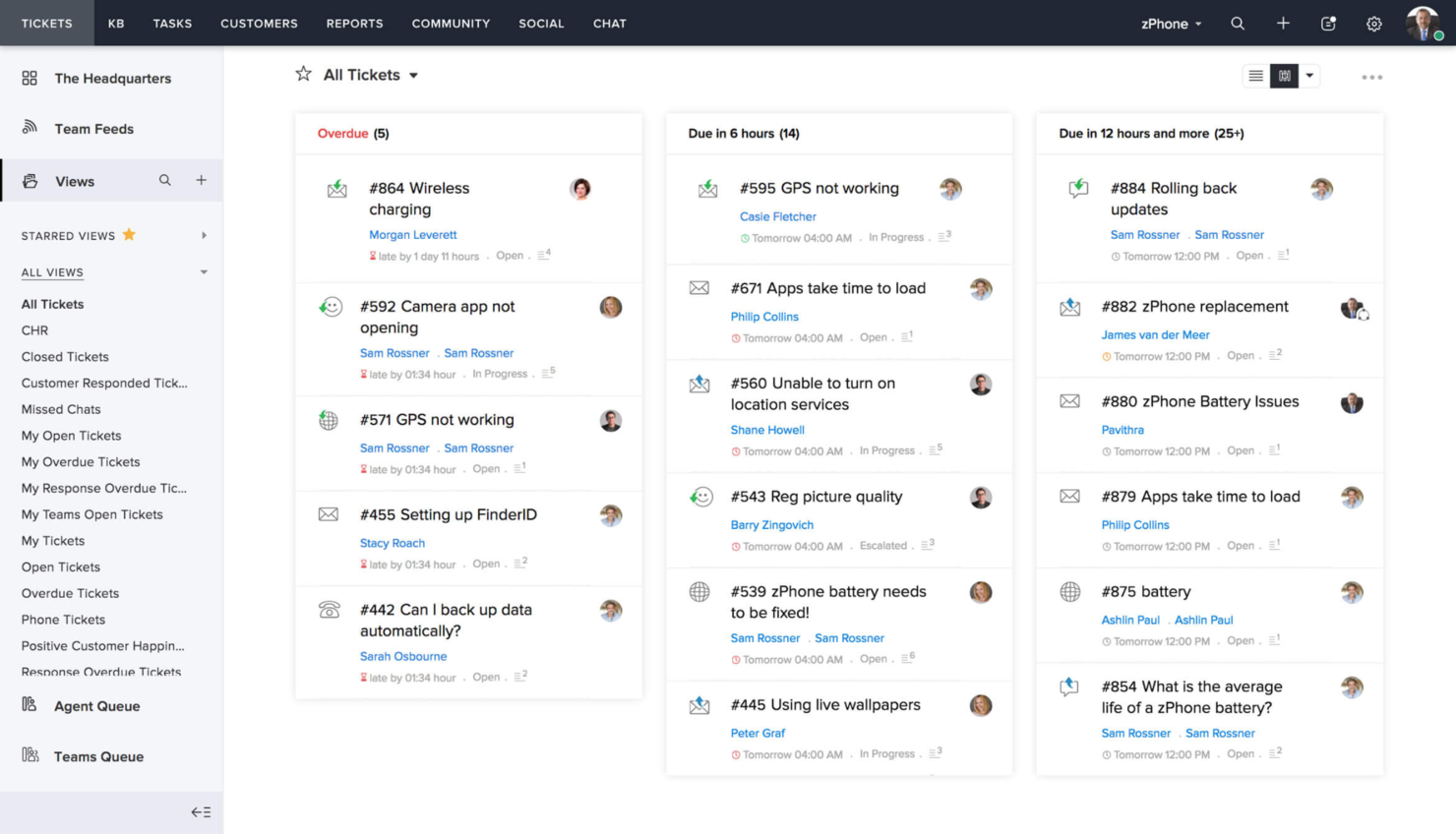
Zoho Desk è una piattaforma che centralizza le operazioni di assistenza clienti. È riconosciuta come la migliore per il servizio clienti centralizzato perché consolida le interazioni dei clienti da vari canali in un'unica posizione accessibile.
Perché ho scelto Zoho Desk: Ho selezionato Zoho Desk per la sua eccezionale capacità di centralizzare le operazioni di assistenza clienti, caratteristica utile per le aziende che vogliono mantenere coerenza nelle interazioni con i clienti. L'ho giudicata la migliore per il servizio clienti centralizzato perché riunisce efficacemente i canali di supporto, assicurando che l'esperienza del cliente sia positiva, coesa e reattiva nel complesso.
Funzionalità eccezionali e integrazioni:
Le funzionalità includono ticketing del servizio clienti alimentato da intelligenza artificiale, ticketing multicanale, portale self-service per clienti e strumenti di reportistica avanzata che rispondono a una vasta gamma di esigenze di assistenza.
Le integrazioni includono Mailchimp, Salesforce, Trello, Slack, Google Workspace, Dropbox, Google Drive, RingCentral, Twilio e Microsoft Office 365. Zoho si integra anche con piattaforme social come Facebook e Twitter.
Pros and Cons
Pros:
- Piattaforma unificata per il servizio clienti
- Assistenza alimentata dall'intelligenza artificiale
- Ampie opzioni di personalizzazione e integrazione
Cons:
- Prezzo di partenza più alto rispetto ad alcune alternative
- Curva di apprendimento iniziale per i nuovi utenti

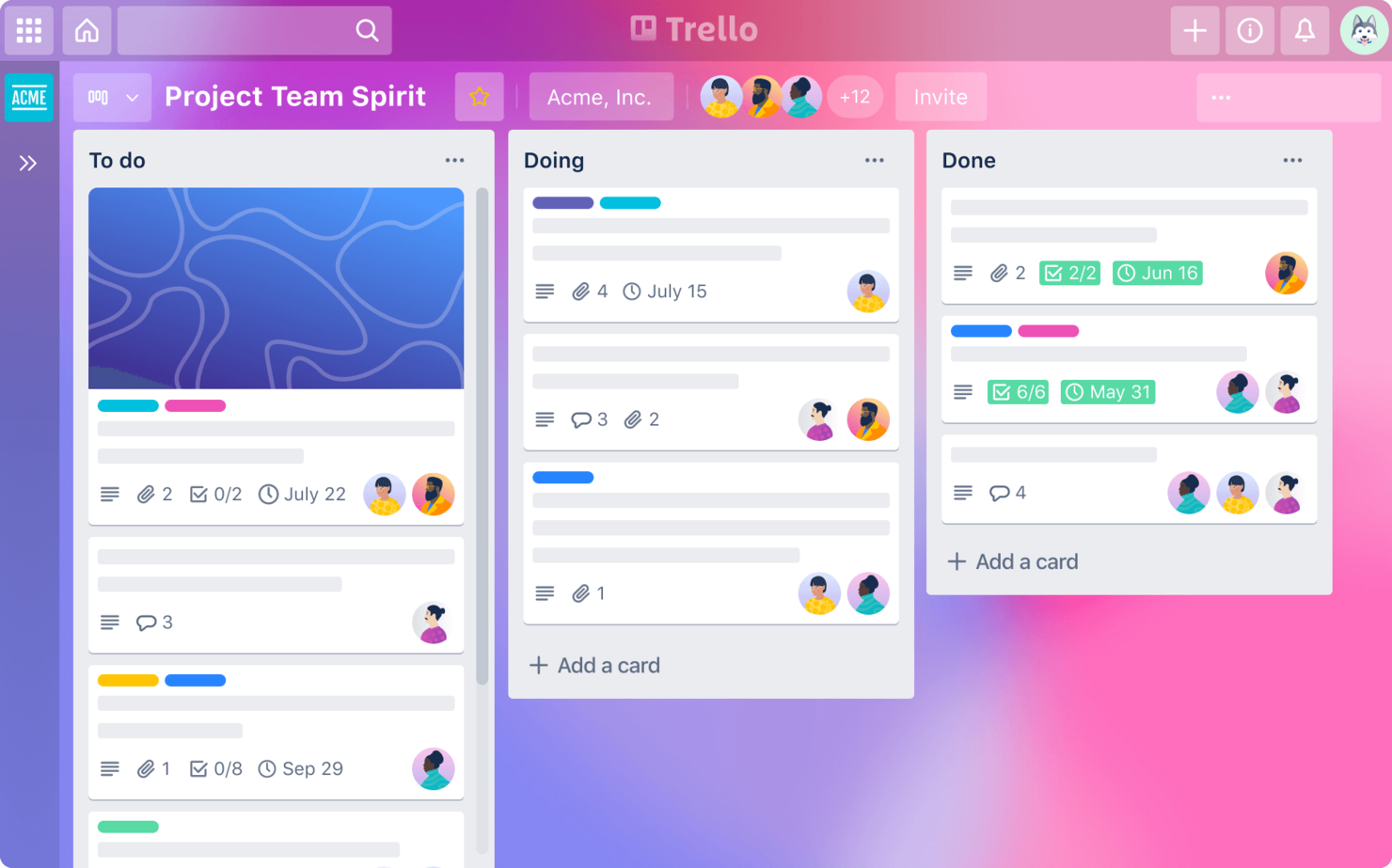
Trello è uno strumento di gestione dei progetti che utilizza bacheche, elenchi e schede per aiutare i team a organizzare e dare priorità ai progetti. È ideale per la gestione visiva dei progetti grazie alla sua interfaccia intuitiva drag-and-drop che permette agli utenti di visualizzare facilmente l’avanzamento e i flussi di lavoro dei progetti.
Perché ho scelto Trello: Ho scelto Trello per le sue eccezionali capacità di gestione visiva dei progetti. Trello si distingue dagli altri strumenti di gestione dei progetti grazie all’interfaccia a schede, facile da usare, che consente di vedere lo stato delle attività a colpo d’occhio. Ritengo che Trello sia il migliore per la gestione visiva dei progetti perché permette ai team di organizzare rapidamente e facilmente le attività, monitorare i progressi e collaborare in modo visivo e intuitivo.
Funzionalità e integrazioni principali
Funzionalità includono bacheche, elenchi e schede personalizzabili, automazione integrata con Butler e diverse visualizzazioni come Calendario e Timeline.
Integrazioni includono Slack, Google Drive, Dropbox, Microsoft Teams, Jira, Confluence, Evernote, Salesforce e GitHub.
Pros and Cons
Pros:
- Interfaccia intuitiva
- Flussi di lavoro personalizzabili
- Ampie integrazioni
Cons:
- Funzionalità avanzate limitate
- Strumenti di reportistica di base


GitLab è uno strumento DevOps basato sul web che semplifica il processo dall'idea alla produzione. È ideale per ridurre i tempi dal concepimento all'implementazione grazie al suo insieme integrato di funzionalità che coprono l'intero ciclo di vita dello sviluppo software.
Perché ho scelto GitLab: Ho scelto GitLab per questa lista perché offre un'unica applicazione per l'intero ciclo di vita DevOps, caratteristica unica rispetto ad altri strumenti che potrebbero necessitare di integrazioni o di più piattaforme. Ritengo che GitLab sia il migliore per ridurre i tempi dall'idea alla produzione perché offre un flusso di lavoro senza interruzioni con strumenti integrati per la pianificazione, la scrittura del codice, i test, il deployment e il monitoraggio, tutto all'interno dello stesso ambiente.
Funzionalità principali e integrazioni
Le funzionalità includono pipeline CI/CD integrate, gestione delle issue, gestione del codice sorgente e avanzate capacità di scansione della sicurezza. Queste caratteristiche permettono ai team di collaborare in modo efficace, automatizzare i flussi di lavoro e garantire qualità e sicurezza del codice.
Le integrazioni includono JIRA, Jenkins, Slack, Trello, Kubernetes, Docker, Sentry, Prometheus ed Elastic Stack.
Pros and Cons
Pros:
- Gestione integrata del ciclo di vita DevOps
- Pipeline CI/CD complete
- Forte attenzione a sicurezza e conformità
Cons:
- Può risultare complesso da configurare per i nuovi utenti
- Alcune funzionalità possono risultare complesse per i team più piccoli
Altri sistemi di ticketing per la gestione dei progetti
Di seguito è riportato un elenco di sistemi di ticketing aggiuntivi per la gestione dei progetti che non sono entrati nella mia classifica principale, ma che vale la pena prendere in considerazione.
- GoodDay
Ideale per metodologie di progetto diversificate
- monday.com
Ideale per il monitoraggio visivo dei progetti
- Manage Engine ServiceDesk Plus
Ideale per flussi di lavoro integrati IT e aziendali


Recensioni correlate di software per la gestione dei progetti
Se non hai ancora trovato quello che cerchi, dai un'occhiata a questi altri strumenti correlati che abbiamo testato e valutato:
- Software per la gestione dei progetti
- Software per la gestione delle risorse
- Software per l'automazione dei flussi di lavoro
- Software per il monitoraggio del tempo
- Software per la gestione delle attività
- Strumenti di collaborazione
- Strumento per creare diagrammi di Gantt
- Strumenti per la produttività
- Software per il monitoraggio dei progetti
- Software per la pianificazione dei progetti
Come valuto i sistemi di ticketing per la gestione dei progetti
I sistemi di ticketing per la gestione dei progetti consentono ai team di ingegneria e prodotto di trasformare bug, richieste di funzionalità e impedimenti in elementi di lavoro tracciati, assegnati e risolti. Quando valuto gli strumenti in questo ambito, divido la mia analisi tra i requisiti di base che ogni strumento deve soddisfare e i fattori distintivi che rendono unici i vari strumenti selezionati.
Funzionalità principali (Requisiti indispensabili per questa lista)
Per i sistemi di ticketing per la gestione dei progetti, le funzionalità principali che testo e valuto sono:
- Gestione dei ticket: Cerco campi personalizzati, tipi di ticket, livelli di priorità e ID univoci, in modo che i team possano registrare bug, richieste e attività con abbastanza contesto da poter agire.
- Flussi di lavoro personalizzabili: Ogni team gestisce il lavoro in modo diverso. Verifico se stati e transizioni possono essere adattati per progetto o per tipo di ticket.
- Viste multiple di lavoro: Kanban board, liste, timeline e viste backlog rispondono a diverse esigenze. Valuto quali viste offre ciascuno strumento e quanto sono pratiche da usare.
- Gerarchia dei progetti: Epic, task e sotto-attività devono incastrarsi facilmente. Osservo come ogni strumento permette di organizzare e collegare i ticket all'interno di strutture progettuali più ampie.
- Strumenti di collaborazione: Commenti nei ticket, @mention, allegati e log delle attività mantengono il contesto dove serve. Verifico quanto bene ogni strumento supporta la discussione a thread.
- Regole di automazione: La gestione ripetitiva dell'assegnazione e dei cambi di stato dei ticket fa perdere ore. Valuto il motore di trigger e azioni di ciascuno strumento per assegnazioni automatiche, transizioni e notifiche.
- Permessi e controllo degli accessi: Il controllo degli accessi basato sui ruoli è fondamentale quando più team condividono uno spazio di lavoro. Verifico quanto siano granulari i permessi a livello di progetto e di ticket in ogni strumento.
Uno strumento deve offrire la maggior parte di queste funzionalità per essere considerato in questa lista. Da qui, considero cosa distingue ogni soluzione.
Caratteristiche distintive (Cosa differenzia le scelte)
Integrazioni avanzate con repository di codice, strumenti CI/CD e piattaforme esterne permettono di sincronizzare i ticket con i cambiamenti di codice o i flussi di automazione, fattore molto importante per i team di sviluppo. Il triage automatico dei ticket basato su AI, riassunti automatici e suggerimenti di contenuto stanno iniziando a rivoluzionare il modo in cui i team gestiscono backlog complessi in tempi rapidi. Cerco anche soluzioni con supporto a metodologie specifiche—come template integrati per Scrum, Kanban o progetti ibridi—così i team non devono riprogettare i processi da zero.
Cosa considero oltre le funzionalità
I modelli di prezzo sono molto rilevanti in questo ambito—i costi per utente possono aumentare rapidamente quando un team di 20 persone cresce fino a 100, quindi valuto i piani gratuiti, gli sconti scalari e se i posti "solo visualizzatore" sono gratuiti. Considero inoltre per quale tipo di team è realmente pensato lo strumento, perché una piattaforma ottimizzata per sprint di sviluppo difficilmente soddisfa un team di marketing senza personalizzazione. Le basi di sicurezza e conformità come SOC 2, SSO e log di audit basati sui ruoli sono essenziali per le aziende enterprise: verifico sempre in quale piano del fornitore sono inclusi questi elementi.
Come scegliere un sistema di ticketing per la gestione dei progetti
È facile perdersi in lunghi elenchi di funzionalità e strutture tariffarie complesse. Per aiutarti a rimanere concentrato mentre affronti il tuo processo di selezione del software, ecco una lista di controllo dei fattori da tenere a mente:
| Fattore | Elementi da considerare |
|---|---|
| Scalabilità | Assicurati che il sistema possa crescere insieme al tuo team. Cerca soluzioni in grado di gestire un numero crescente di utenti o progetti senza problemi. |
| Integrazioni | Verifica se si connette agli strumenti che il tuo team utilizza già, come Slack o Jira, per migliorare i flussi di lavoro e ridurre l'inserimento manuale dei dati. |
| Personalizzazione | Assicurati di poter adattare il sistema ai tuoi processi. Cerca flussi di lavoro, campi e dashboard personalizzabili. |
| Semplicità d'uso | Il tuo team dovrebbe comprendere rapidamente il funzionamento del sistema. Cerca interfacce intuitive e procedure di onboarding semplici per ridurre al minimo il tempo dedicato alla formazione. |
| Budget | Chiarisci i limiti del tuo budget. Valuta i costi iniziali e le eventuali tariffe ricorrenti per assicurarti che lo strumento rimanga conveniente nel tempo. |
| Misure di sicurezza | Proteggi i tuoi dati con solide funzionalità di sicurezza. Cerca sistemi che offrano crittografia, backup regolari e conformità a standard come il GDPR. |
| Assistenza | Un'assistenza clienti affidabile è fondamentale. Scegli soluzioni che offrano assistenza 24 ore su 24, 7 giorni su 7, oppure un account manager dedicato per risolvere rapidamente i problemi. |
| Reportistica | Valuta le funzionalità di reportistica del sistema. Analisi complete e report personalizzabili possono aiutarti a monitorare i progressi e a prendere decisioni informate. |
Tendenze dei sistemi di gestione dei ticket per la gestione dei progetti
I sistemi di gestione dei ticket per la gestione dei progetti sono in continua evoluzione. Ecco le principali tendenze che ne stanno plasmando il futuro.
- Integrazione con l'intelligenza artificiale e l'apprendimento automatico: I fornitori stanno integrando l'intelligenza artificiale e l'apprendimento automatico nei propri sistemi di gestione dei ticket. Ciò può aiutare ad automatizzare attività di routine e a prevedere le tendenze relative ai ticket.
- Migliore accessibilità da dispositivi mobili: Gli strumenti stanno migliorando le proprie applicazioni mobili e molti consentono ora di gestire i ticket mentre si è in movimento. Questo è utile anche per i team che lavorano da remoto.
- Attenzione all'esperienza utente: Nei sistemi di gestione dei ticket si presta sempre più attenzione all'esperienza utente. I sistemi stanno diventando più intuitivi e semplici da usare. Ciò può portare a tassi di adozione e produttività più elevati.
- Più funzionalità di collaborazione: I fornitori stanno dando priorità alle funzionalità per la collaborazione in tempo reale, così i team possono lavorare insieme direttamente nell'interfaccia di gestione dei ticket. Questo favorisce una comunicazione migliore e tempi di risoluzione più rapidi.
- Analisi predittiva per la gestione dei ticket: Sempre più strumenti offrono funzionalità di analisi predittiva per attività come la previsione dei volumi di ticket e l'identificazione degli schemi ricorrenti. Ciò consente una pianificazione e una gestione migliori delle risorse.
Che cos'è un sistema di gestione dei ticket per la gestione dei progetti?
Un sistema di gestione dei ticket per la gestione dei progetti è una piattaforma digitale progettata per aiutare i team a monitorare e gestire le richieste di lavoro e i problemi all'interno di un progetto. Viene utilizzato dai project manager, dai membri del team e dagli stakeholder per organizzare le attività, segnalare i problemi, monitorare i progressi e garantire la responsabilità.
I componenti di un sistema di gestione dei ticket per la gestione dei progetti includono un'interfaccia per l'invio dei ticket, un sistema per classificare e stabilire la priorità dei problemi, strumenti per assegnare le attività e funzionalità per monitorare i progressi e la risoluzione. Questa infrastruttura favorisce una comunicazione e una collaborazione efficaci e aiuta i team ad affrontare e risolvere tempestivamente le difficoltà del progetto.
Funzionalità
Ecco dieci funzionalità essenziali da cercare in un sistema di gestione dei ticket per la gestione dei progetti.
- Interfaccia intuitiva: Un design semplice e intuitivo è essenziale per un'adozione rapida. Aiuta i membri del team a navigare facilmente nel sistema, aspetto fondamentale per mantenere la produttività.
- Opzioni di personalizzazione: La possibilità di personalizzare flussi di lavoro, campi e stati consente di adattare il sistema ai propri processi.
- Funzionalità di integrazione: Lo strumento dovrebbe poter interagire con gli altri strumenti e le piattaforme in uso, fungere da hub operativo centralizzato e ridurre la necessità di passare da un software all'altro.
- Collaborazione: Dovresti avere accesso a funzionalità per la comunicazione istantanea tra i membri del team. Ciò consente di discutere e risolvere immediatamente i problemi, accelerando così l'avanzamento del progetto.
- Definizione delle priorità delle attività: Dovresti poter assegnare un livello di urgenza e importanza alle richieste. Questo aiuta i team a concentrarsi prima sui problemi più critici, consentendo di rispettare le scadenze importanti.
- Reportistica e analisi: Lo strumento dovrebbe fornire informazioni sulle metriche relative alle prestazioni e ai progressi. Ciò aiuta a valutare il successo dei progetti e consente di prendere decisioni basate sui dati per migliorare i processi.
- Accessibilità da dispositivi mobili: Consente ai membri del team di rimanere aggiornati e rispondere alle richieste anche lontano dalla propria postazione, contribuendo a mantenere lo slancio.
- Notifiche automatiche: Comprendono avvisi relativi ad aggiornamenti e modifiche, così puoi informare tutti sull'avanzamento delle richieste e assicurarti che nulla venga trascurato.
- Monitoraggio del tempo: Dovresti poter monitorare il tempo dedicato alle attività e ottenere trasparenza sull'impegno investito nelle diverse attività. Questo aiuta nella distribuzione delle risorse e nella fatturazione.
- Funzionalità di sicurezza: Funzionalità di sicurezza affidabili contribuiscono a proteggere i dati dei progetti, un aspetto fondamentale per mantenere la fiducia dei clienti e la conformità normativa.
Vantaggi
Ecco cinque vantaggi principali dell'implementazione di un sistema di gestione delle richieste per la gestione dei progetti.
- Migliore monitoraggio dei problemi: Un sistema di gestione delle richieste consente di monitorare efficacemente i problemi e assicurarsi che nulla venga trascurato. Questo aiuta a rispettare le tempistiche del progetto e a mantenere progressi costanti.
- Maggiore responsabilità: Potrai assegnare chiaramente le responsabilità e rendere i membri del team responsabili delle proprie attività. Ciò aiuta a mantenere un alto livello di produttività e ad assicurarsi che tutti siano consapevoli dei propri compiti.
- Migliore definizione delle priorità: Potrai stabilire la priorità delle attività in base all'urgenza e all'importanza, concentrarti prima sui problemi critici e gestire efficacemente i carichi di lavoro.
- Comunicazione migliore: Centralizzare la comunicazione riduce la necessità di scambi continui di e-mail e riunioni. Questo fa risparmiare tempo e mantiene tutte le informazioni rilevanti in un unico luogo accessibile.
- Informazioni dalla reportistica: I sistemi di gestione delle richieste spesso includono funzionalità di reportistica che forniscono informazioni sulle prestazioni del progetto e sulla produttività del team. Questi report sono preziosi per prendere decisioni consapevoli e migliorare continuamente.
Costi e prezzi
Di seguito è riportata una panoramica delle opzioni di piano tipiche, dei relativi prezzi medi e delle funzionalità comunemente incluse in ciascun piano.
| Tipo di piano | Prezzo medio | Funzionalità comuni |
|---|---|---|
| Gratuito | $0 | Accesso per un numero limitato di utenti, gestione di base delle attività e monitoraggio delle richieste |
| Base | $10 - $25/utente/mese | Migliore gestione delle attività, strumenti di reportistica, integrazione e-mail e assistenza di base |
| Professionale | $25 - $75/utente/mese | Strumenti di pianificazione dei progetti, automazione, reportistica avanzata e assistenza prioritaria |
| Aziendale | $75+/utente/mese | Integrazioni personalizzate, assistenza dedicata, sicurezza avanzata e analisi |
Domande frequenti
Ecco alcune risposte alle domande frequenti che potresti avere sui sistemi di gestione dei ticket per la gestione dei progetti e sul loro funzionamento:
È possibile integrare un sistema di gestione dei ticket per la gestione dei progetti con altri strumenti?
Sì, molti sistemi di gestione dei ticket per la gestione dei progetti offrono funzionalità di integrazione con altri strumenti software, come piattaforme di posta elettronica, sistemi di gestione delle relazioni con i clienti (CRM) e strumenti di collaborazione. Questo consente di ottenere un flusso di lavoro più integrato e può aiutare ad automatizzare determinati processi.
Un sistema di gestione dei ticket per la gestione dei progetti è adatto ad aziende di qualsiasi dimensione?
I sistemi di gestione dei ticket possono essere utili per aziende di qualsiasi dimensione. I team più piccoli possono sfruttare sistemi più semplici per rimanere organizzati, mentre le organizzazioni più grandi potrebbero aver bisogno di soluzioni più robuste, con funzionalità avanzate per gestire un volume maggiore di ticket e progetti complessi.
In che modo un sistema di gestione dei ticket per la gestione dei progetti migliora il servizio clienti?
Per i team che gestiscono richieste esterne, un sistema di gestione dei ticket può aiutare a fornire risposte e soluzioni tempestive ai problemi dei clienti. Consente di monitorare le interazioni con i clienti e di assicurarsi che nessuna richiesta venga trascurata, contribuendo a una maggiore soddisfazione dei clienti.
Qual è la differenza tra un sistema di gestione dei ticket per la gestione dei progetti e il tradizionale software di gestione dei progetti?
Sebbene vi siano alcune sovrapposizioni, i sistemi di gestione dei ticket per la gestione dei progetti sono progettati specificamente per gestire richieste o problemi che sorgono durante un progetto. Il tradizionale software di gestione dei progetti si concentra in genere sulla pianificazione, sulla programmazione e sul monitoraggio dell’avanzamento delle attività e delle tappe fondamentali del progetto.
Come posso formare il mio team all'utilizzo di un nuovo sistema di gestione dei ticket per la gestione dei progetti?
La formazione per un nuovo sistema dovrebbe includere sessioni pratiche durante le quali i membri del team possano imparare direttamente sul campo. È inoltre utile fornire l’accesso a materiali formativi, come guide per gli utenti, tutorial video e domande frequenti. Valuta la possibilità di nominare un referente del sistema all’interno del team, che possa assistere gli altri e incoraggiarne l’adozione.