

10 migliori strumenti alternativi a ProWorkflow per i progetti nel 2026

Elenco delle migliori alternative a ProWorkflow


ProWorkflow è uno strumento di gestione dei progetti che aiuta i team a gestire le attività, monitorare il tempo e collaborare in modo efficace. Tuttavia, sebbene il software sia popolare, potrebbe non essere adatto al tuo team per diversi motivi.
In questa recensione analizzeremo le principali alternative a ProWorkflow, confrontandone funzionalità, prezzi e facilità d'uso per aiutarti a prendere una decisione informata. Che tu stia cercando una personalizzazione avanzata, strumenti di collaborazione migliori o una soluzione più conveniente, queste alternative offrono diverse opzioni per flussi di lavoro differenti.
Che cos'è ProWorkflow?
ProWorkflow è un software per la gestione dei progetti e la collaborazione sulle attività, progettato per aiutare le aziende a semplificare la pianificazione dei progetti, il monitoraggio del tempo e la collaborazione tra i team. Offre strumenti per gestire attività, tempistiche e risorse, risultando ideale per agenzie, freelance e aziende che devono mantenersi organizzati ed efficienti.
Perché fidarsi dei nostri consigli sui software
Il nostro team testa e recensisce software dal 2012. In quanto project manager noi stessi, sappiamo quanto sia difficile — e importante — scegliere il software giusto.
Per questa guida, abbiamo valutato gli strumenti attraverso test pratici e ricerche indipendenti, assegnando un punteggio agli strumenti in base ai nostri criteri di selezione. Ci basiamo inoltre sulle competenze di leader di pensiero del settore e di professionisti attivi nella gestione dei progetti.
Le nostre recensioni riflettono il nostro giudizio editoriale umano, non un discorso di vendita.
Revisori esperti:
Tabella di confronto delle alternative a ProWorkflow
| Tool | Best For | Trial Info | Price | ||
|---|---|---|---|---|---|
| 1 | Ideale per la gestione di progetti e risorse | Prova gratuita di 14 giorni + demo gratuita disponibile | Da $19,90/utente/mese (fatturazione annuale) | Website | |
| 2 | Ideale per la collaborazione sui progetti | Prova gratuita di 14 giorni + piano gratuito disponibile | Da $10/utente/mese (fatturato annualmente) | Website | |
| 3 | Ideale per l'automazione dei workflow senza codice | Piano gratuito + demo gratuita disponibile | Prezzi su richiesta | Website | |
| 4 | Ideale per la gestione gratuita di progetti e attività | Piano gratuito + demo gratuita disponibile | Da $3,99/postazione/mese (fatturazione annuale) | Website | |
| 5 | Ideale per la produttività tutto-in-uno | Piano gratuito + demo gratuita disponibile | Da $7/utente/mese (fatturazione annuale) | Website | |
| 6 | Ideale per la gestione di checklist e SOP | Prova gratuita di 14 giorni + demo gratuita disponibile | Prezzo su richiesta | Website | |
| 7 | Ideale per integrazione e automazione | Prova gratuita di 30 giorni disponibile | Da $99/mese + utilizzo | Website | |
| 8 | Ideale per flussi di lavoro tradizionali e agile | Prova gratuita + demo gratuita disponibile | A partire da $29/utente/mese | Website | |
| 9 | Ideale per ERP e CRM open-source | Prova gratuita + piano gratuito disponibili | Da $24,90/utente/mese (fatturato annualmente) | Website | |
| 10 | Ideale per collegare il lavoro agli obiettivi | Piano gratuito disponibile | A partire da $10.99/utente/mese (fatturato annualmente) | Website |


Recensioni delle migliori alternative a ProWorkflow
In questa analisi ti illustrerò i vantaggi e gli svantaggi di ciascuna alternativa a ProWorkflow. Esaminerò le loro funzionalità e i casi d’uso migliori per aiutarti a trovare lo strumento più adatto alle tue esigenze.

Scoro
Ideale per la gestione di progetti e risorse

Scoro è un software di gestione aziendale tutto-in-uno progettato per aiutare agenzie, società di consulenza e altri studi di servizi professionali a ottimizzare le proprie operazioni. Combina gestione dei progetti, vendite e CRM, fatturazione e reportistica in un'unica piattaforma, offrendo una soluzione completa per la gestione dei vari processi aziendali.
Perché è una buona alternativa a ProWorkflow: Con Scoro, puoi creare piani di progetto dettagliati, assegnare compiti, fissare scadenze e monitorare l'avanzamento in tempo reale. Questo garantisce che il tuo team rimanga allineato e che i progetti vengano completati nei tempi stabiliti. Inoltre, Scoro offre strumenti di pianificazione delle risorse che ti permettono di allocare il tempo del team in modo efficace, evitando sovrapposizioni e assicurando la massima produttività.
Funzionalità e integrazioni di rilievo:
Le funzionalità includono strumenti per la gestione finanziaria, modelli di progetto, automazione delle attività, gestione del calendario, gestione dei contatti, monitoraggio del ciclo di vendita, dashboard personalizzabili, monitoraggio delle spese, supporto multivaluta, fatturazione ricorrente, report sull'utilizzo, diagrammi di Gantt e accesso mobile.
Le integrazioni includono Gmail, Google Calendar, Microsoft Exchange, QuickBooks, Xero, Stripe, PayPal, Jira, Asana, HubSpot, Salesforce, Dropbox e Zapier.
Pros and Cons
Pros:
- Reportistica e analisi solide
- Ottima pianificazione e gestione delle risorse
- Funzionalità complete di gestione progetti
Cons:
- Alcune funzionalità di monitoraggio del tempo sono disponibili solo nei piani di livello superiore
- L'app mobile potrebbe essere migliorata
New Product Updates from Scoro

Scoro Adds Time Mobile App and ELI Improvements
Scoro adds the Scoro Time mobile app for iOS/Android to track time anywhere and expands ELI with attachments, smarter filtering, and trigger-based actions. For more information, visit Scoro's official site.

Wrike
Ideale per la collaborazione sui progetti
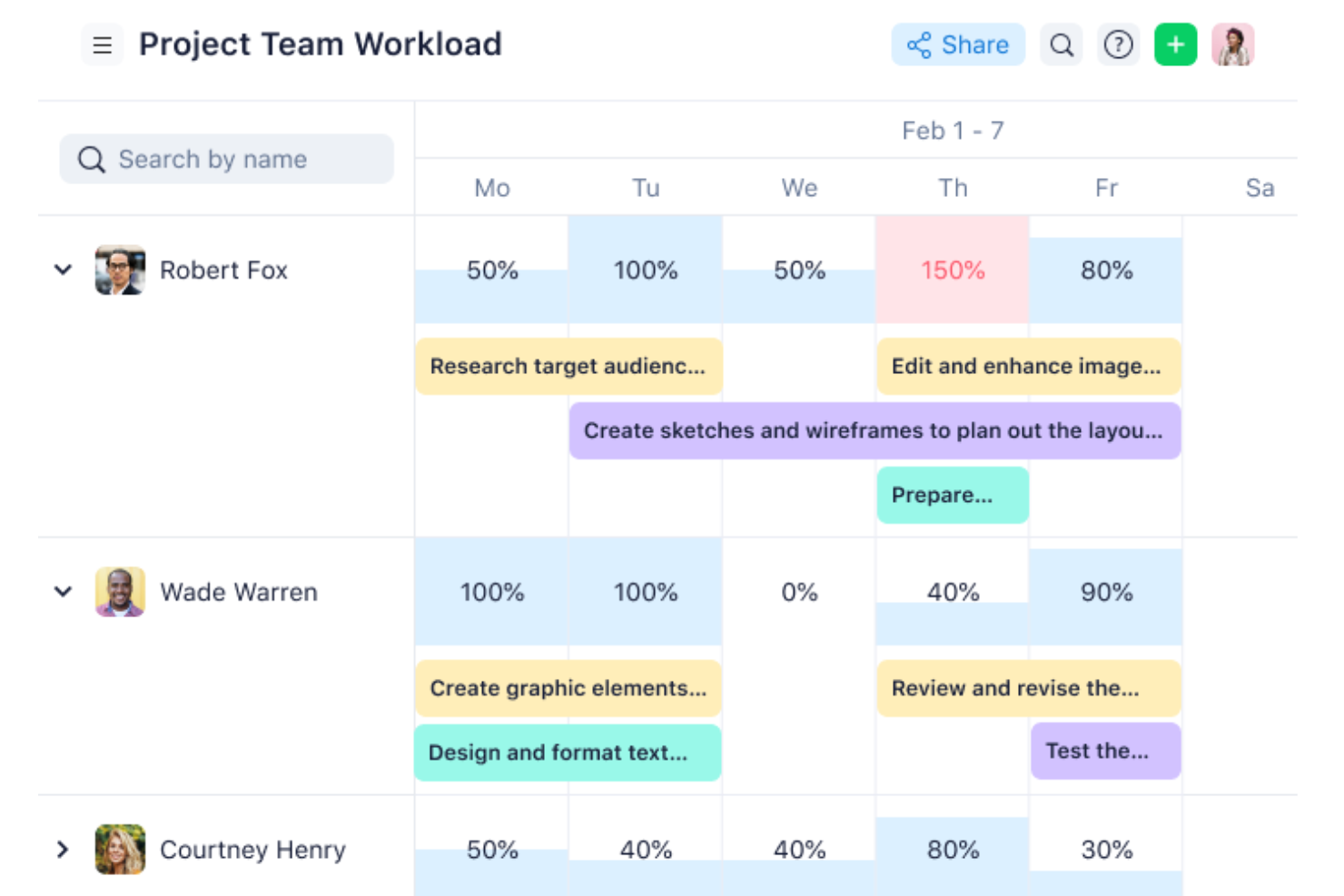
Wrike è uno strumento di gestione dei progetti progettato per migliorare la collaborazione tra i membri del team. Le sue funzionalità facilitano il lavoro di squadra, la comunicazione e il monitoraggio dei progetti, aiutando i team remoti a rimanere connessi e a portare a termine le attività nei tempi previsti.
Perché è una valida alternativa a ProWorkflow: Wrike offre funzionalità di comunicazione e collaborazione in tempo reale, come la modifica di documenti dal vivo, la condivisione di file e le discussioni sulle attività. Consente ai team di rimanere allineati fornendo uno spazio di lavoro centralizzato in cui tutti gli aggiornamenti di progetto, le tempistiche e i progressi possono essere facilmente monitorati e condivisi. Con flussi di lavoro personalizzabili e integrazioni senza interruzioni, Wrike assicura che i membri del team possano collaborare in modo efficiente su diversi compiti e reparti.
Funzionalità e integrazioni principali:
Funzionalità includono gestione delle attività, diagrammi di Gantt, monitoraggio del tempo e flussi di lavoro personalizzati. Offre anche strumenti di collaborazione in tempo reale, tra cui condivisione di documenti e funzionalità di comunicazione per il team.
Integrazioni includono Microsoft Teams, Google Drive, Slack, Salesforce, Dropbox, Box, OneDrive, Adobe Creative Cloud, GitHub e Jira.
Pros and Cons
Pros:
- Funzionalità solide di monitoraggio e collaborazione sui progetti
- Condivisione di documenti e strumenti di comunicazione in tempo reale
- Flussi di lavoro e dashboard personalizzabili
Cons:
- Può essere complesso da configurare inizialmente
- Accesso offline limitato per l'app mobile
New Product Updates from Wrike

Wrike Adds Quick Search to Table View
Wrike adds Quick Search to Table View with full-table search across titles, descriptions, and fields, plus highlighted matches. This helps users find tasks faster in large tables. For more information, visit Wrike’s official site.

Pipefy
Ideale per l'automazione dei workflow senza codice

Pipefy è un software di automazione dei processi aziendali che offre soluzioni potenziate dall’IA per la gestione dei servizi HR, il procure-to-pay e workflow personalizzati. Dispone di strumenti no-code per la creazione dei flussi di lavoro, integrazioni con altri strumenti tecnologici e funzionalità di automazione.
Perché è una valida alternativa a ProWorkflow: Pipefy consente agli utenti di creare e personalizzare flussi di lavoro senza alcuna competenza di programmazione. L'intuitiva interfaccia drag-and-drop permette ai team di automatizzare attività ripetitive e semplificare i processi, aumentando l’efficienza. Grazie a potenti funzionalità di automazione e integrazioni, Pipefy aiuta le aziende a ottimizzare le operazioni mantenendo il pieno controllo sui propri processi.
Funzionalità e integrazioni principali:
Le funzionalità includono automazione alimentata dall’IA, flussi di lavoro personalizzabili e un’interfaccia user-friendly che consente una rapida implementazione. La piattaforma offre anche analisi avanzate per monitorare le prestazioni e ottimizzare i processi.
Integrazioni disponibili: Slack, Google Sheets, Trello, Asana, Salesforce, Microsoft Teams, HubSpot, Mailchimp, Stripe e Docusign.
Pros and Cons
Pros:
- Interfaccia intuitiva senza codice
- Capacità di automazione avanzate
- Potenti funzionalità di analisi e reportistica
Cons:
- Non ideale per la gestione di progetti complessi
- Integrazioni limitate con applicazioni di terze parti

Plaky
Ideale per la gestione gratuita di progetti e attività

Plaky è un software di gestione progetti progettato per aiutare i team a organizzare progetti e processi. Offre un'interfaccia intuitiva e funzionalità essenziali che semplificano la gestione delle attività e la collaborazione del team.
Perché è una buona alternativa a ProWorkflow: Plaky offre funzionalità essenziali di monitoraggio dei progetti e collaborazione, il tutto senza alcun costo. Grazie a un'interfaccia facile da usare, Plaky consente ai team di gestire attività, scadenze e avanzamento dei progetti in modo efficiente, anche con il piano gratuito. Gli utenti e i progetti illimitati lo rendono una scelta eccellente per i team che cercano una soluzione conveniente per organizzare il proprio lavoro.
Funzionalità e integrazioni principali:
Le funzionalità includono gestione delle attività, collaborazione tra team e monitoraggio dell'avanzamento. Gli utenti possono creare le cose da fare, assegnare i membri del team e organizzare il lavoro in modo efficiente. Lo strumento offre anche diverse visualizzazioni, come diagrammi di Gantt e bacheche Kanban, per visualizzare le attività e seguirne lo stato di avanzamento.
Le integrazioni includono Google Drive, Slack, Trello, Asana, Microsoft Teams, Dropbox, GitHub, Jira, Zoom e Salesforce.
Pros and Cons
Pros:
- Piano gratuito con utenti e progetti illimitati
- Molteplici visualizzazioni per la gestione delle attività
- Funzionalità complete di collaborazione
Cons:
- Spazio di archiviazione limitato per file
- Nessun accesso offline

ClickUp
Ideale per la produttività tutto-in-uno

ClickUp è uno strumento avanzato di gestione dei progetti progettato per centralizzare tutte le tue attività, documenti, persone e conoscenze su un'unica piattaforma. Offre un'ampia gamma di funzionalità che rispondono a diversi aspetti della gestione del lavoro, rendendolo versatile per diversi team e progetti.
Perché è una buona alternativa a ProWorkflow: ClickUp combina la gestione dei progetti, il monitoraggio delle attività, la creazione di documenti e la definizione degli obiettivi all'interno di un'unica piattaforma. Le sue funzionalità altamente personalizzabili consentono agli utenti di gestire tutto, dai flussi di lavoro semplici a quelli complessi, senza necessità di strumenti aggiuntivi. Grazie a una vasta gamma di integrazioni e opzioni di automazione, ClickUp aumenta l'efficienza raggruppando tutte le esigenze di produttività sotto lo stesso tetto.
Funzionalità e integrazioni principali:
Funzionalità includono viste delle attività personalizzabili, monitoraggio del tempo, definizione degli obiettivi e reportistica avanzata. Offre anche potenti capacità di automazione per ottimizzare i flussi di lavoro e migliorare l'efficienza.
Integrazioni includono Slack, Google Drive, Trello, Zoom, Microsoft Teams, GitHub, Dropbox, Evernote, Outlook e Salesforce.
Pros and Cons
Pros:
- Alta personalizzazione e flessibilità
- Set di funzionalità completo
- Analisi avanzata dei report
Cons:
- Curva di apprendimento ripida per i nuovi utenti
- Occasionali problemi di prestazioni

Ideale per la gestione di checklist e SOP

Process Street è uno strumento per la gestione dei flussi di lavoro e dei processi che aiuta i team a creare, gestire e automatizzare attività e processi ricorrenti. Offre modelli personalizzabili, checklist e funzionalità di automazione per garantire coerenza e responsabilità nelle attività ripetute.
Perché è una valida alternativa a ProWorkflow: Process Street consente ai team di creare, condividere e automatizzare facilmente procedure operative standard e checklist. La sua interfaccia semplice e intuitiva assicura che le attività ricorrenti vengano completate in modo costante ed efficiente. Questo, insieme alla sua ampia gamma di funzionalità, aiuta i team a migliorare la responsabilità e a semplificare la gestione dei processi aziendali.
Funzionalità principali & integrazioni:
Funzionalità includono workflow, progetti, insiemi di dati, moduli, pagine e automazione dei processi alimentata dall’AI.
Integrazioni includono Salesforce, Slack, Microsoft Teams, Google Sheets, Jira, Docusign, HubSpot, Mailchimp e Stripe.
Pros and Cons
Pros:
- Interfaccia intuitiva
- Gestione solida di checklist e SOP
- Automazione alimentata dall’AI
Cons:
- Funzionalità avanzate di project management limitate
- Problemi di scalabilità per organizzazioni di grandi dimensioni

Boomi
Ideale per integrazione e automazione
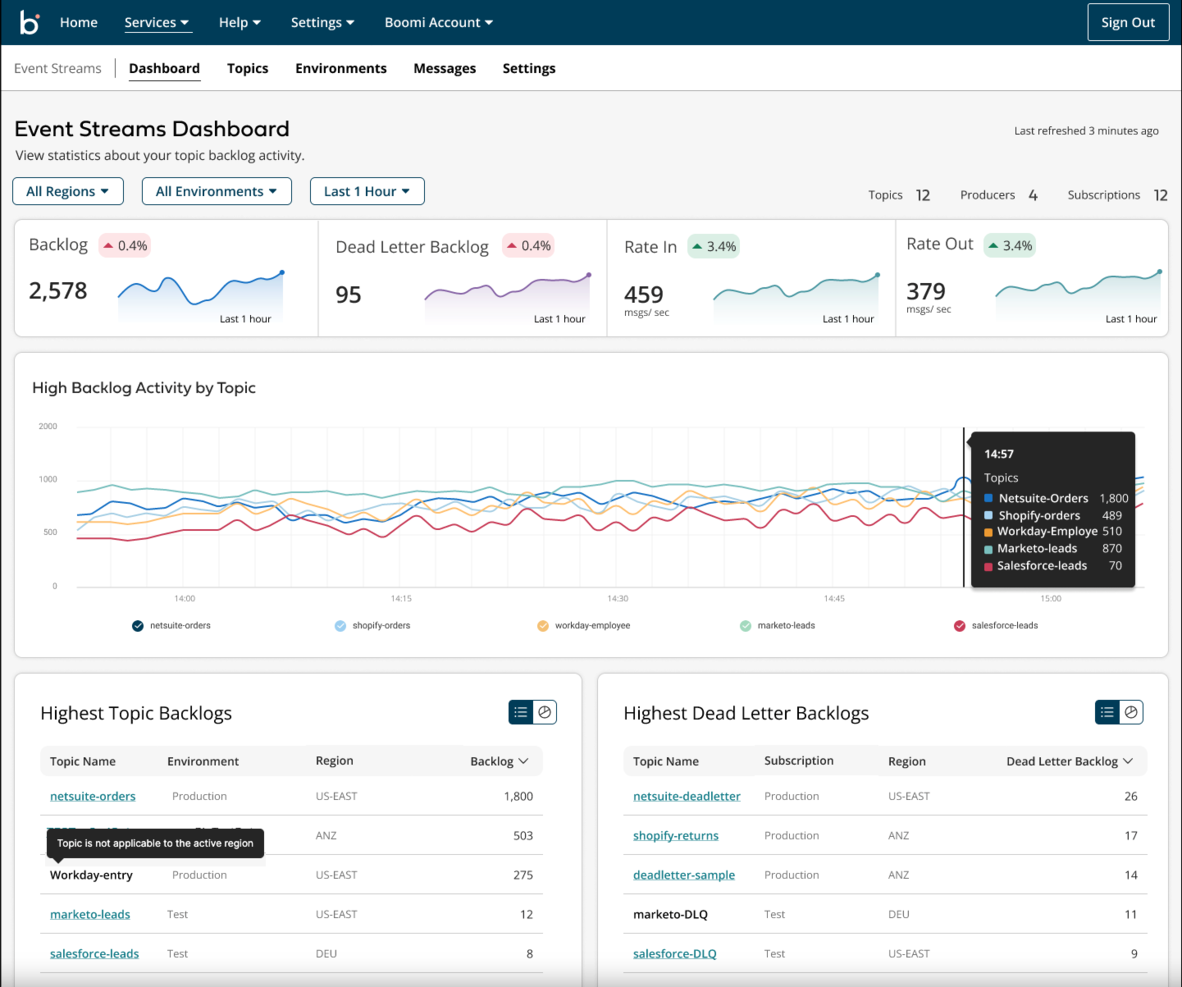
Boomi è una piattaforma di integrazione come servizio (iPaaS) che connette applicazioni, dati e persone. La sua suite avanzata di strumenti snellisce i flussi di lavoro complessi e i processi di gestione dei dati.
Perché è una buona alternativa a ProWorkflow: Boomi fornisce agli utenti capacità di integrazione avanzate, rendendola una valida alternativa a ProWorkflow per aziende che necessitano di connettività tra sistemi avanzati. Si distingue perché può connettere una vasta gamma di applicazioni e automatizzare i flussi di lavoro, risultando ideale per organizzazioni con esigenze di integrazione complesse.
Caratteristiche principali & integrazioni:
Caratteristiche includono la gestione delle API, la sincronizzazione dei dati e lo sviluppo di app low-code. La piattaforma supporta integrazioni in tempo reale basate su eventi e automazione delle attività, risultando estremamente versatile per le diverse esigenze aziendali.
Integrazioni includono Salesforce, NetSuite, SAP, Workday, Amazon, ServiceNow, Slack, Microsoft Dynamics, Google Cloud e Oracle.
Pros and Cons
Pros:
- Capacità di integrazione complete
- Interfaccia intuitiva con funzionalità drag-and-drop
- Ampia libreria di connettori preconfigurati
Cons:
- Le prestazioni possono variare con set di dati più grandi
- Può essere impegnativa in termini di risorse per i team più piccoli

Ravetree
Ideale per flussi di lavoro tradizionali e agile
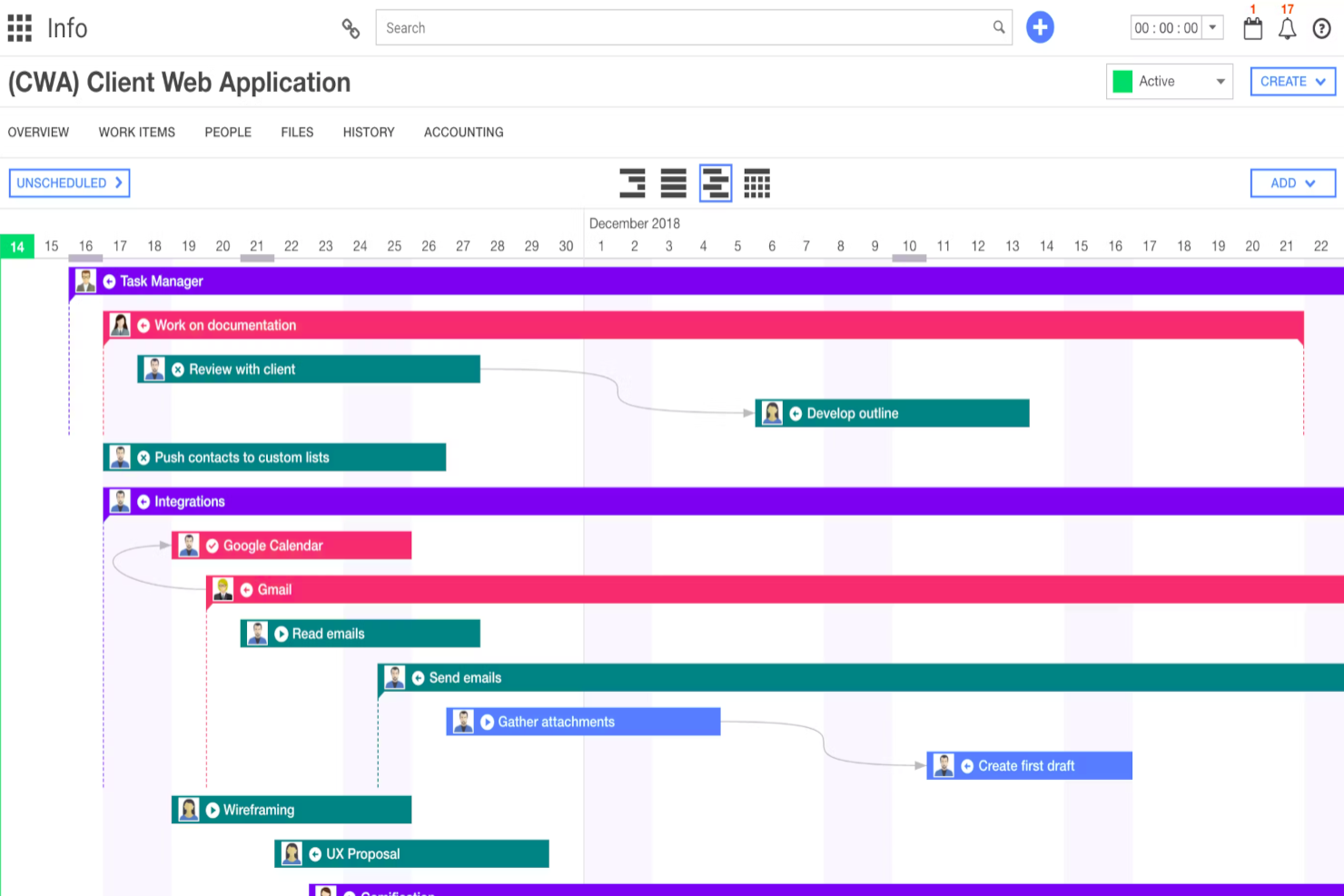
Ravetree è un software di project management tutto-in-uno progettato per consentire ai team di gestire progetti, risorse, clienti e fatturazione su un'unica piattaforma. Offre una soluzione che migliora la collaborazione e la produttività consolidando più funzionalità in un solo strumento.
Perché è una buona alternativa a ProWorkflow: Ho scelto Ravetree come valida alternativa a ProWorkflow perché combina strumenti di project management flessibili con il supporto per flussi di lavoro sia tradizionali che Agile. I suoi modelli personalizzabili, le funzionalità di pianificazione delle risorse e la gestione integrata di tempi e spese aiutano i team a rispettare le scadenze e il budget, mentre il CRM integrato centralizza i dati e le interazioni dei clienti, riducendo la necessità di più strumenti e migliorando la visibilità complessiva dei progetti.
Funzionalità principali & integrazioni:
Le funzionalità includono portali per i clienti che consentono ai tuoi clienti di rimanere aggiornati in tempo reale sullo stato dei progetti e di comunicare direttamente con il tuo team, aumentando trasparenza e collaborazione. La piattaforma offre anche la possibilità di inviare richieste, ottimizzando il processo di ricezione e approvazione delle richieste relative ai progetti, assicurando che nulla venga trascurato. Inoltre, il sistema di gestione dei file di Ravetree offre spazio di archiviazione illimitato con funzionalità di sicurezza, così puoi archiviare e gestire in sicurezza tutti i tuoi file di progetto in un unico posto.
Le integrazioni includono Dropbox, Google Drive, One Drive, Outlook, Gmail, Box, Hubspot, Google Calendar, Quickbooks, Xero, Stripe ed Exchange.
Pros and Cons
Pros:
- Fornisce una visione olistica di tutti i progetti e dei loro stati
- Supporta Scrum e Kanban, ideale per i team Agile
- Favorisce una comunicazione più fluida e trasparente con i clienti
Cons:
- L'interfaccia ricca di funzionalità può risultare caotica a causa delle numerose opzioni
- Offre meno flessibilità nella personalizzazione di interfaccia e flussi di lavoro rispetto ai concorrenti


Odoo è una piattaforma ERP e CRM open-source che offre applicazioni integrate per diverse esigenze aziendali. Fornisce un approccio modulare, permettendo agli utenti di selezionare e integrare solo le funzionalità necessarie e adattate alle operazioni specifiche dell’azienda.
Perché è una buona alternativa a ProWorkflow: La versatilità di Odoo offre una vasta gamma di applicazioni integrate, rendendolo un’alternativa avanzata a ProWorkflow. Si distingue non solo per la sua modularità, che consente alle aziende di adottare solo gli strumenti di cui hanno bisogno, ma anche per la sua capacità di scalare e adattarsi con l’evolversi dell’attività, garantendo valore a lungo termine per le organizzazioni in crescita.
Funzionalità principali & integrazioni:
Funzionalità comprendono il design modulare, che permette alle aziende di aggiungere applicazioni secondo necessità, e l’ampia gamma di strumenti integrati che spaziano dal CRM alla gestione dell’inventario. Questa flessibilità lo rende una soluzione versatile per aziende di qualsiasi dimensione.
Integrazioni includono Google Calendar, Google Drive, Microsoft Outlook, QuickBooks, PayPal, Stripe, Amazon, eBay, WooCommerce e Shopify.
Pros and Cons
Pros:
- Altamente personalizzabile
- Ampio supporto dalla community
- Analisi dei report
Cons:
- Può essere complesso da configurare
- L’interfaccia può risultare poco intuitiva per i principianti
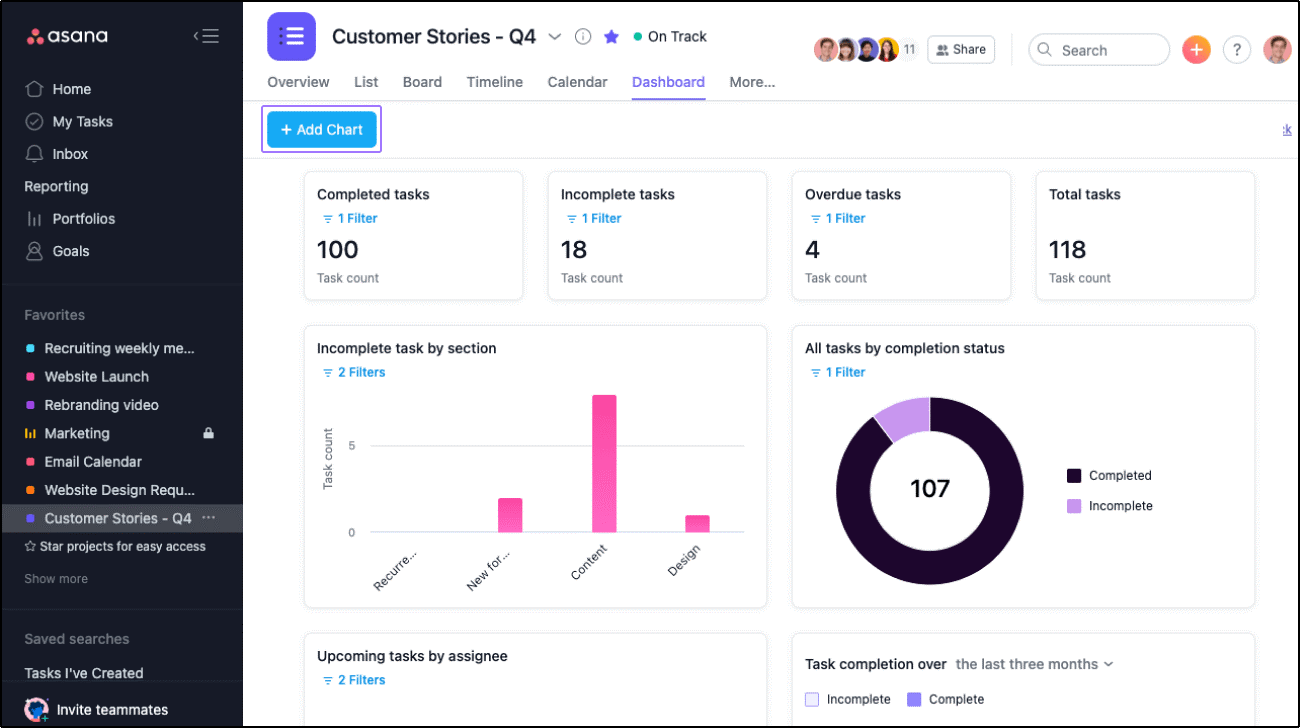
Asana è uno strumento di gestione dei progetti progettato per aiutare i team a organizzare, monitorare e gestire il proprio lavoro. Si distingue offrendo funzionalità che allineano compiti e progetti agli obiettivi organizzativi.
Perché è una buona alternativa a ProWorkflow: Asana consente ai team di suddividere grandi obiettivi in attività concrete e di monitorare i progressi in tempo reale. La funzione di definizione degli obiettivi collega progetti e attività direttamente agli obiettivi aziendali più ampi, garantendo l'allineamento tra i diversi team. Grazie a dashboard personalizzabili e al monitoraggio dei progressi, Asana aiuta a mantenere la concentrazione sia sulle attività quotidiane sia sugli obiettivi a lungo termine.
Funzionalità e integrazioni principali:
Le funzionalità includono gestione delle attività, visualizzazioni di progetto, campi personalizzati, aggiornamenti di stato, obiettivi e reportistica, flussi di lavoro e automazione, e gestione delle risorse.
Le integrazioni includono Slack, Microsoft Teams, Google Drive, Dropbox, Salesforce, Zoom, Jira, Trello, GitHub e Adobe Creative Cloud.
Pros and Cons
Pros:
- Funzionalità complete di monitoraggio degli obiettivi
- Ampie integrazioni
- Interfaccia facile da usare
Cons:
- Capacità offline limitate
- Può risultare disordinato con progetti ampi
Altre alternative a ProWorkflow
Di seguito è riportato un elenco di ulteriori alternative a ProWorkflow che ho selezionato. Sebbene non siano rientrate nella top 10, sono comunque valide e meritano ulteriori approfondimenti.


Come valuto le alternative a ProWorkflow
Esamino due livelli: i criteri di base—lo strumento gestisce progetti per clienti, monitoraggio del tempo e fatturazione?—e gli elementi distintivi che separano le buone opzioni da quella più adatta al tuo team.
Funzionalità principali (requisiti imprescindibili per questo elenco)
Quando seleziono gli strumenti per il mio elenco, assegno a ciascuno un punteggio su una scala da 0 (non offre la funzionalità) a 5 (eccelle in quest'area) per ogni funzionalità principale elencata di seguito. Quindi, calcolo il punteggio totale dello strumento sotto forma di percentuale. Ogni strumento deve raggiungere un punteggio totale minimo del 65% per essere preso in considerazione.
- Gestione di progetti e attività: valuto il modo in cui ogni strumento struttura progetti, attività, sottoattività e dipendenze—ad esempio, la pianificazione di una riprogettazione di un sito web in più fasi, con passaggi di consegne tra progettazione e sviluppo.
- Monitoraggio del tempo: è importante che ogni strumento consenta di registrare le ore fatturabili e non fatturabili a livello di attività, tramite cronometri integrati o inserimento manuale associato a specifiche attività per i clienti.
- Gestione di clienti e contatti: verifico se i record dei clienti sono collegati direttamente ai relativi progetti e contatti, così il tuo team può visualizzare l'intera cronologia di un account senza dover passare da uno strumento all'altro.
- Collaborazione del team: gli strumenti ottengono valutazioni più alte quando commenti, condivisione di file e @menzioni sono disponibili all'interno del contesto del progetto, invece di richiedere il passaggio alla posta elettronica o a un'app di chat separata.
- Resoconti e pannelli di controllo: verifico se è possibile creare resoconti sullo stato dei progetti, sul carico di lavoro del team e sulle ore registrate—il tipo di visualizzazione di cui un responsabile delle operazioni ha bisogno per l'aggiornamento settimanale della direzione.
- Fatturazione e preventivi: convertire le ore monitorate in una fattura per il cliente all'interno della stessa piattaforma è un flusso di lavoro fondamentale di ProWorkflow, quindi valuto se le alternative offrono preventivi e fatturazione nativi oppure solide integrazioni contabili.
Dopo aver creato un elenco di strumenti che soddisfano questi criteri, considero ciò che distingue ogni piattaforma.
Elementi distintivi (ciò che differenzia i fornitori)
Ecco come confronto i diversi fornitori:
Funzionalità di spicco
Un portale clienti può cambiare il modo in cui la tua agenzia condivide i progressi con le parti interessate—offrendo ai clienti visibilità diretta su tempistiche e risultati senza infinite e-mail di aggiornamento sullo stato. Anche il monitoraggio del budget è un altro elemento distintivo che esamino attentamente, soprattutto quando collega le ore stimate a quelle effettive, permettendoti di individuare l'erosione dei margini a progetto in corso. Valuto anche le funzionalità di automazione, come l'assegnazione automatica delle attività quando cambia una fase del progetto o l'attivazione di notifiche quando le registrazioni del tempo superano una soglia di budget.
Oltre le funzionalità
Le integrazioni sono molto importanti quando passi da ProWorkflow—il tuo team probabilmente si affida a QuickBooks o Xero per la fatturazione e a Slack o Microsoft Teams per la comunicazione. Verifico se ogni strumento si connette in modo nativo o richiede una soluzione alternativa tramite Zapier. La trasparenza dei prezzi è un altro fattore che valuto, in particolare se i costi per postazione rimangono prevedibili quando il team cresce da cinque a cinquanta persone. Considero anche il supporto durante l'implementazione, poiché migrare progetti cliente attivi, contatti e dati sul tempo nel corso di un incarico è una delle fasi più rischiose del passaggio a un'altra piattaforma.
Perché cercare un'alternativa a ProWorkflow?
Sebbene ProWorkflow sia uno strumento prezioso, ci sono molti motivi per cui potresti iniziare a cercare una soluzione alternativa, tra cui:
- Costo: se i prezzi di ProWorkflow non rientrano nel tuo budget, potresti aver bisogno di un'alternativa più conveniente senza rinunciare alle funzionalità essenziali. Scegliere una soluzione conveniente può aiutarti a gestire le spese continuando a soddisfare le tue esigenze di gestione dei progetti.
- Interfaccia utente: a volte l'interfaccia utente di un software può risultare complessa o poco intuitiva. Se questo è il caso di ProWorkflow, una piattaforma più facile da usare potrebbe aumentare la produttività e ridurre la curva di apprendimento del tuo team.
- Personalizzazione: ProWorkflow potrebbe non offrire il livello di personalizzazione richiesto dal tuo flusso di lavoro specifico. Di conseguenza, potresti aver bisogno di uno strumento che consenta una maggiore flessibilità per adattare le funzionalità ai tuoi processi.
- Integrazione: se dipendi da altri strumenti che non si integrano perfettamente con ProWorkflow, potresti aver bisogno di un'alternativa con funzionalità di integrazione migliori. Una compatibilità efficiente tra i software può far risparmiare tempo e migliorare l'efficienza complessiva del team.
- Assistenza clienti: se l'assistenza clienti di ProWorkflow non soddisfa le tue aspettative, potresti cercare un'alternativa con un supporto più rapido e competente. Un'assistenza clienti migliore può garantire che qualsiasi problema venga risolto in modo rapido ed efficace.
Le alternative a ProWorkflow possono offrire prezzi più convenienti, un'esperienza utente più intuitiva, maggiori possibilità di personalizzazione, migliori capacità di integrazione e un'assistenza clienti superiore. Queste alternative possono adattarsi meglio alle tue esigenze e preferenze specifiche, garantendo un'esperienza di gestione dei progetti più efficiente e soddisfacente.
Funzionalità principali delle alternative a ProWorkflow
Ecco alcune funzionalità chiave di ProWorkflow che il tuo software alternativo dovrebbe essere in grado di replicare o migliorare per risultare adatto alle tue esigenze.
- Gestione dei progetti: Mantieni il tuo team e l'intera azienda in linea con gli obiettivi e il budget, gestendo tutti i dettagli del progetto, le comunicazioni, i file e la fatturazione in un unico posto.
- Gestione delle attività: Semplifica la tua lista di cose da fare e migliora la gestione delle attività con autorizzazioni utente e una gestione visiva delle attività.
- Lavoro da remoto: Ottieni risultati eccellenti lavorando da casa, mantenendo il controllo delle attività e comunicando e collaborando in modo efficace.
- Monitoraggio del tempo: Monitora il tempo dedicato alle attività e ai progetti per garantire una fatturazione accurata e un'analisi della produttività.
- Gestore delle fatture: Gestisci in modo efficiente la fatturazione dei clienti con strumenti integrati per creare e inviare fatture.
- Gestore dei preventivi: Genera e gestisci i preventivi per i clienti direttamente all'interno della piattaforma.
- Reportistica: Accedi a informazioni avanzate sul carico di lavoro, sulle prestazioni e sulle metriche chiave relative a progetti, attività, tempo, team e clienti.
- Gestione delle risorse: Assegna e gestisci le risorse in modo efficace per garantire il successo del progetto.
- Sicurezza dei dati: Garantisce la sicurezza dei tuoi dati con solide misure di protezione.
- Integrazioni: Collegati agli strumenti che già utilizzi, dai software di contabilità (puoi anche utilizzare software di gestione dei progetti per commercialisti) alla gestione e all'archiviazione dei documenti, oppure collega qualsiasi flusso di lavoro con Zapier.