

Slack Entegrasyonlu En İyi 10 Proje Yönetimi Yazılımı 2026

Slack ile Entegrasyon Sağlayan En İyi Proje Yönetimi Yazılımları Kısa Listesi


Ekibinizin uyum içinde çalışmasını sağlamak, yalnızca projeleri takip edebilmek için sayısız uygulama arasında gidip gelmeniz anlamına gelmemeli. Slack zaten ekibinizin iletişim merkeziyse proje güncellemelerini, görev yönetimini ve iş birliğini neden doğrudan buraya taşımayasınız? Doğru proje yönetimi yazılımı, Slack'i yalnızca bir mesajlaşma aracından fazlasına dönüştürebilir; onu projeleriniz için gerçek zamanlı bir komuta merkezine çevirebilir. Ancak bu kadar çok seçenek varken hayatınızı kolaylaştıracak olanı nasıl bulabilirsiniz?
Slack ile sorunsuz şekilde entegre olan çeşitli proje yönetimi araçlarını test ettim. Böylece bildirimler altında boğulmadan veya odağınızı kaybetmeden görevler atayabilir, ilerlemeyi takip edebilir ve önemli güncellemeleri alabilirsiniz.
Why Trust Our Software Recommendations
Our team has been testing and reviewing software since 2012. As project managers ourselves, we know how difficult—and important—it is to choose the right software.
For this guide, we evaluated tools using hands-on testing and independent research, scoring tools using our selection criteria. We also draw on insights from industry thought leaders and practicing project management experts.
Our reviews reflect our human editorial judgment, not a sales pitch.
Expert reviewers:
Slack ile Entegrasyon Sağlayan Proje Yönetimi Yazılımları Karşılaştırma Tablosu
Score legend (out of 5)
- Excellent 4.5–5
- Good 4–4.4
- Average 3–3.9
- Below average 2–2.9
- Poor 1–1.9
| Tool | Starting Price | Website | |||||||
|---|---|---|---|---|---|---|---|---|---|
| Best for agency project management | 3.2 out of 5 | 3 | 4 | 5 | 2 | 2 | 3 | $10/user/month 14-day free trial | Book Demo |
| Best for customizable project views | 3.3 out of 5 | 2 | 4 | 5 | 3 | 4 | 2 | $10/user/month Free plan + 14-day trial available | Book Demo |
| Best for advanced workflow automation | 3.3 out of 5 | 2 | 4 | 5 | 3 | 3 | 3 | Pricing upon request Free plan + 15-day trial + demo available | Website |
| Best with API-driven enterprise integrations | — | — | 2 | 5 | 3 | 3 | — | Pricing upon request Not available | Book Demo |
| Best for visual project management | — | 1 | 3 | 4 | — | 2 | 1 | $8/user/month Free plan + 14-day trial available | Website |
| Best for client work collaboration | 3.5 out of 5 | 2 | 4 | 5 | 4 | 3 | 3 | $9.99/user/month Free plan + 14-day free trial + free demo available | Website |
| Best for agile teams tracking work in Slack | 4.2 out of 5 | 4 | 5 | 5 | 3 | 4 | 4 | $8.48/user/month Free plan + 7-day free trial available | Website |
| Best for goal alignment | 3.5 out of 5 | 3 | 4 | 5 | 3 | 3 | 3 | $10.99/user/month Free plan + trial + demo available | Website |
| Best for Kanban method integration | 3.5 out of 5 | 4 | 4 | 3 | 3 | 3 | 4 | $7.99/user/month Free plan + demo available | Website |
| Best for Slack task management | 3.8 out of 5 | 4 | 5 | 3 | 4 | 3 | 4 | $49/month 7-day and 15-day free trial | Website |


Slack ile Entegrasyon Sağlayan En İyi Proje Yönetimi Yazılımları İncelemeleri
Slack ile sorunsuz şekilde entegre olan proje yönetimi araçlarına ilişkin kapsamlı incelemem aşağıda yer alıyor. Bu inceleme sayesinde her yazılımın artılarını ve eksilerini, özelliklerini ve en uygun kullanım alanlarını ele alarak ekibinizin ihtiyaçlarına en uygun seçimi yapmanıza yardımcı olacağım.

Best for agency project management
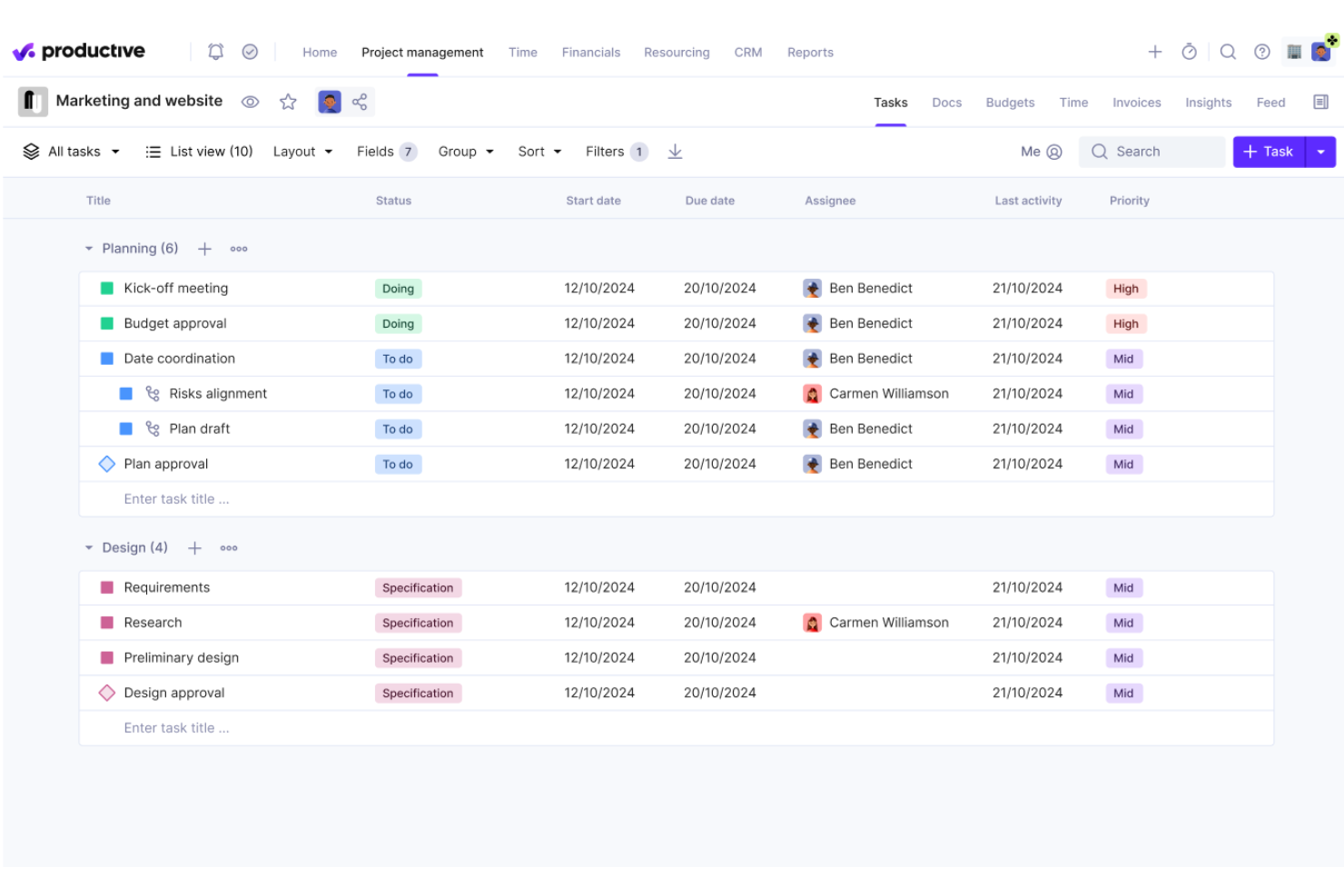
Productive is a project management platform built for agencies that combines project and task tracking, resource planning, time tracking, budgeting, and invoicing, with a native Slack integration for notifications and task management.
Who Is Productive Best For?
Productive is a strong fit for digital agencies and professional services firms that need to manage projects, people, and profitability in one place.
Why I Picked Productive
I've included Productive in my top picks because it's one of the few project management tools built specifically around how agencies operate. I love that budget tracking is tied directly to projects, so my team can see whether a client engagement is profitable in real time without toggling between tools. The resource planning view also lets me map team capacity against active projects, which is essential when managing multiple client workstreams at once.
Productive Key Features
- Slack integration: Create tasks directly from Slack messages and receive project notifications in designated Slack channels.
- Time tracking: Log billable and non-billable hours against specific tasks, projects, or clients from within the platform.
- Invoicing: Generate client invoices based on tracked time and project budgets without leaving the tool.
- Automations: Set up rules to auto-assign tasks, trigger status changes, or send updates based on project activity.
Pros and Cons
Pros:
- Comprehensive features for project management
- Deep native Slack integration
- Customizable features cater to specific agency needs
Cons:
- Initial setup can be time-consuming
- Lack of granular, customizable notifications.
New Product Updates from Productive
Productive Adds Email and Calendar Integrations for Agents
Productive adds Gmail, Outlook, Google Calendar, and Outlook Calendar connectors for its AI agents. These integrations let agents manage emails and create calendar events directly within Productive. For more information, visit Productive’s official site.

Wrike
Best for customizable project views

Wrike is a project management platform that combines task tracking, workflow automation, resource management, and real-time reporting across Agile, Waterfall, and hybrid delivery models.
Who Is Wrike Best For?
Wrike is a strong fit for mid-size to enterprise teams that need a scalable project management platform with flexible workflows across multiple departments.
Why I Picked Wrike
I've included Wrike in my top picks because no other tool gives you this level of control over how your team sees and interacts with project data. Wrike offers Table, Board, Gantt chart, Files, Chart view, Calendar, Resources, Timelog, and Stream views—and you can save configurations for each. Views can be customized, filtered, and saved; they can be shared with your team, set as private or public, or designated as the default for a project. Dynamic filters let you display tasks, projects, and resources based on status, due date, priority, and custom fields, allowing each team member to work from a view that reflects their priorities.
Wrike Key Features
- Slack integration: Create Wrike tasks directly from Slack messages and receive task notifications in any Slack channel.
- No-code workflow automation: Build automated rules that trigger actions like status changes, assignments, and notifications based on task activity.
- Custom request forms: Design intake forms that auto-generate tasks or projects with pre-filled fields when submitted.
- Real-time dashboards: Build custom dashboards with widgets that surface task status, workloads, and project progress.
Pros and Cons
Pros:
- Robust reporting and analytics capabilities
- Effective time tracking and workload management
- Comprehensive project management features with high customization
Cons:
- Mobile app lacks some desktop features
- Learning curve for new users
New Product Updates from Wrike

Wrike Adds Advanced Filters to Chart View
Wrike introduces new default filters in Chart view, including relative dates, exclusion conditions, multiple filters per field, and status group filtering. These updates help teams refine project data and reporting. For more information, visit Wrike’s official site.

Best for advanced workflow automation

Zoho Projects is a project management platform that combines task tracking, Gantt charts, time tracking, issue management, and workflow automation with a native Slack integration for real-time project notifications and task creation.
Who Is Zoho Projects Best For?
Zoho Projects is a strong fit for small to mid-sized teams already using the Zoho ecosystem who need structured project management with automation built in.
Why I Picked Zoho Projects
Zoho Projects earns its spot on my shortlist because its workflow automation extends beyond basic triggers. Blueprint, its visual workflow designer, lets you map out every stage of a task process, assign transition owners, enforce mandatory field updates before a status can move forward, and fire off automated email alerts at each handoff. Paired with business rules and custom functions, you can automate most of your team's project logic.
Zoho Projects Key Features
- Gantt charts: Visualize project timelines, set task dependencies, and adjust schedules with drag-and-drop rescheduling.
- Time tracking and timesheets: Log billable and non-billable hours directly against tasks, with timesheet approval workflows built in.
- Issue tracker: Create, assign, and prioritize bugs or issues with custom severity levels, status flows, and due dates.
- Slack notifications: Get real-time alerts in Slack for task assignments, comments, and milestone completions mapped to specific channels.
Pros and Cons
Pros:
- Comprehensive feature set including time tracking and billing
- Integration with other Zoho apps enhances functionality
- Customizable workflows and fields to fit various business needs
Cons:
- Mobile app functionality is not as robust as the desktop version
- Limited native third-party integrations outside the Zoho ecosystem
New Product Updates from Zoho Projects

Zoho Projects Adds QuickBooks Online and Xero Integrations
Zoho Projects now connects with QuickBooks Online and Xero, bringing project work and accounting workflows closer together. Manage project-related billing and financial tasks with fewer app switches. For more information, visit Zoho Projects’ official site.
 .

Best with API-driven enterprise integrations
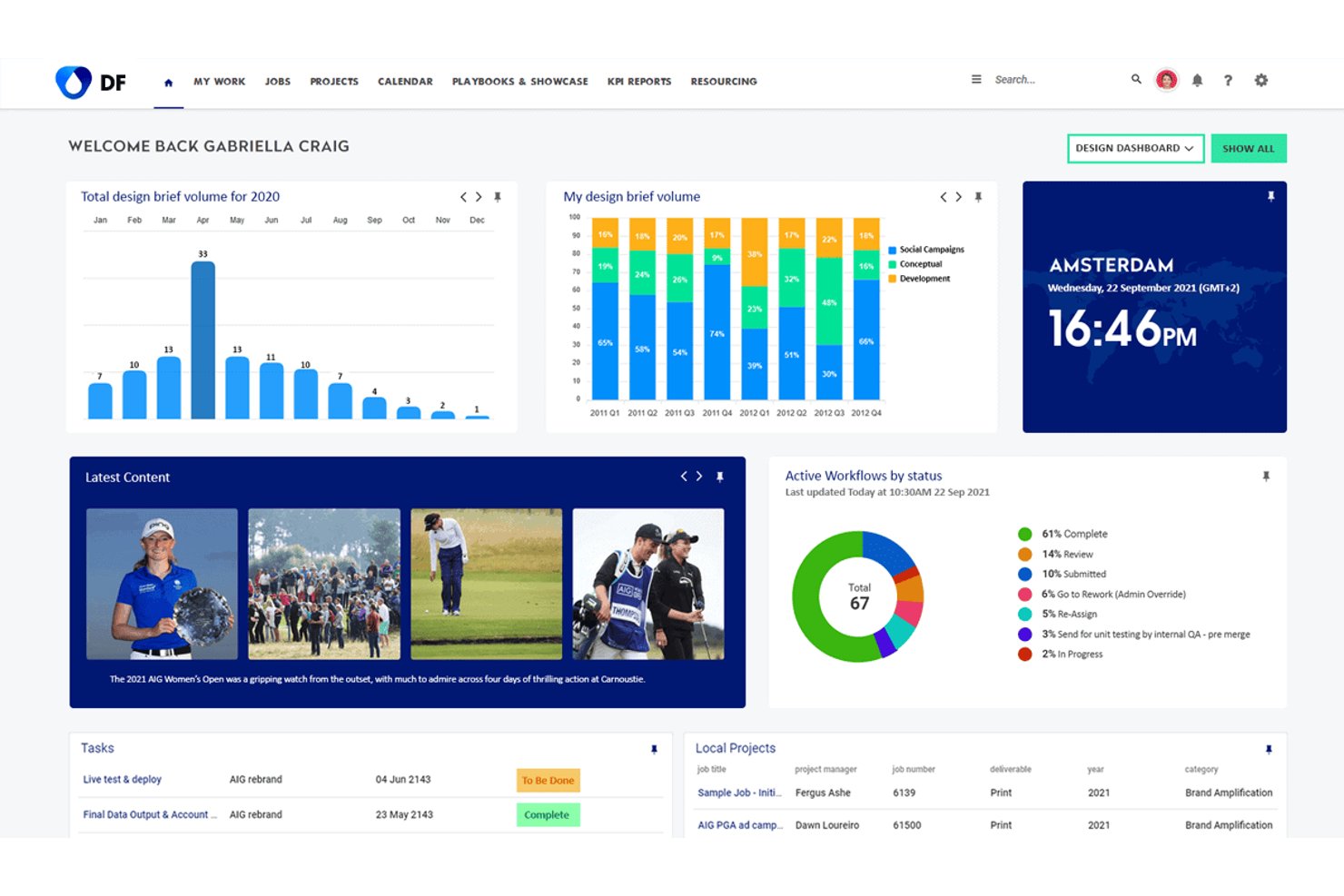
Screendragon is an enterprise workflow and project management platform built for marketing and creative teams, combining project planning, resource management, approval workflows, and visual proofing with a broad integration layer.
Who Is Screendragon Best For?
Screendragon is a strong fit for mid-market and enterprise marketing and creative operations teams managing high-volume, multi-stakeholder workflows across global organizations.
Why I Picked Screendragon
I picked Screendragon because its in-house Connection Manager genuinely sets it apart from typical project management tools. It handles dynamic routing, retry and failover logic, and data transformation across enterprise systems like SAP, Salesforce, and Microsoft Dynamics 365. Its Universal API Connector lets my team plug into any open API endpoint, and the native Slack webhook integration pushes configurable project and workflow events directly to chosen channels.
Screendragon Key Features
- No-code workflow builder: Design and launch custom project workflows using a visual editor and reusable templates.
- Dynamic forms engine: Capture project intake, briefs, and requests with configurable forms tied to workflow steps.
- Centralized proofing and approvals: Review, annotate, and approve files, including side-by-side version comparison, within a unified interface.
- Real-time reporting dashboards: Create personalized dashboards and custom automated reports for monitoring project milestones and resources.
Screendragon Integrations
Screendragon offers native integrations with Slack, SAP, Salesforce, Microsoft 365, and Adobe Creative Cloud. An API and Zapier integration are also available for custom workflows and additional connectivity.
Pros and Cons
Pros:
- Visual proofing and annotation built into platform
- Approval routing tied directly to workflow stages
- Configurable Slack webhook notifications by project
Cons:
- Limited Slack task creation compared to competitors
- Setup requires significant IT and admin involvement

Miro
Best for visual project management
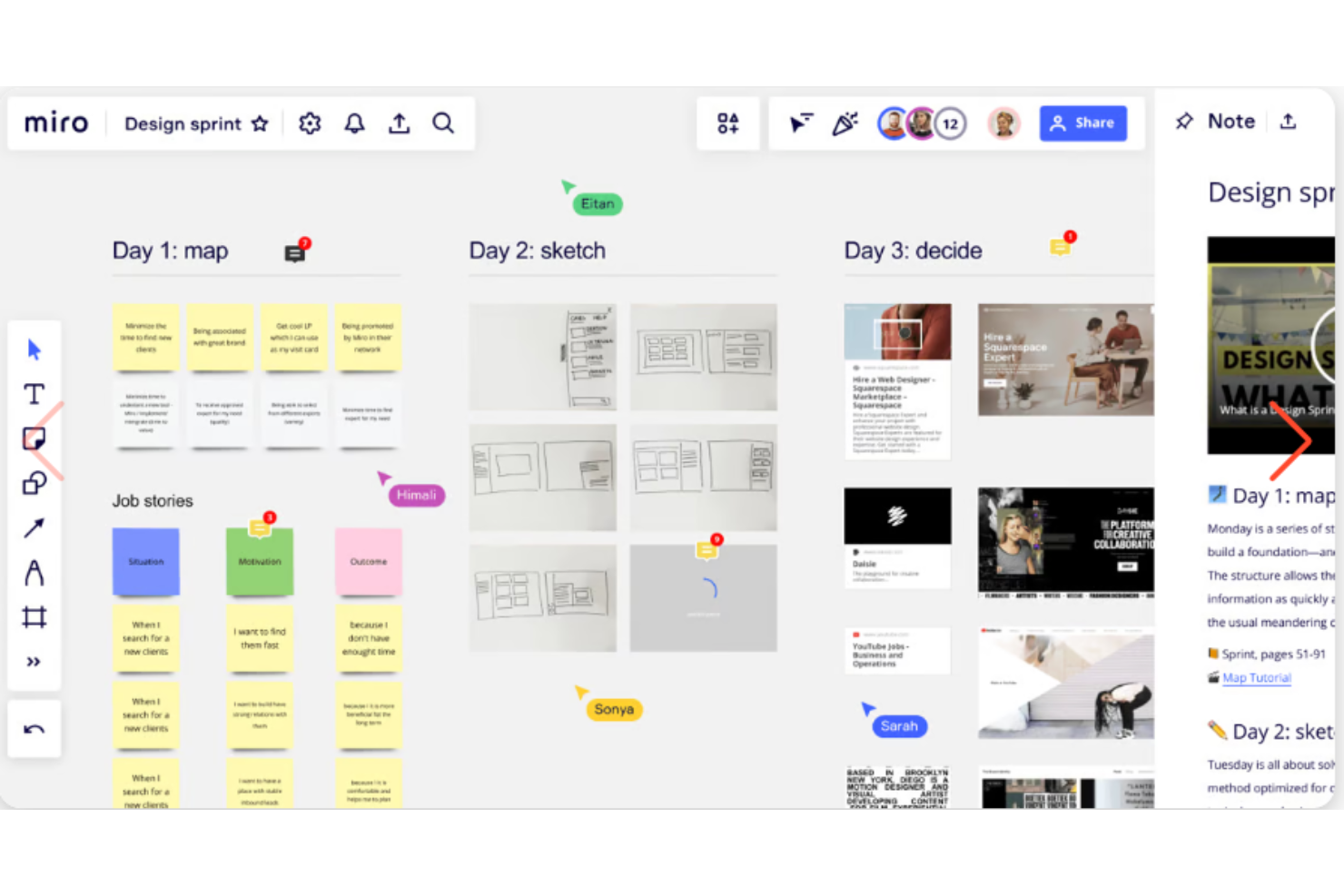
Miro is a visual collaboration and project management platform that combines an infinite canvas with Kanban boards, Gantt charts, timelines, and real-time team collaboration tools.
Who Is Miro Best For?
Miro is a strong fit for cross-functional product, design, and engineering teams that rely on visual thinking to plan and run projects.
Why I Picked Miro
Miro earns its spot on my shortlist because its infinite canvas approach to project management is genuinely unlike anything else I've used. I can map out a full product launch—sticky notes, flowcharts, Kanban board, and timeline—all in one shared space, which keeps my whole team oriented without switching tools. I also like how the Slack integration lets me share live board links and get notified when teammates comment or update tasks, so the canvas stays active between meetings.
Miro Key Features
- Miro AI: Generates diagrams, summarizes board content, and builds mind maps directly from a text prompt.
- Template library: 7,000+ pre-built templates covering Agile ceremonies, retrospectives, project planning, and brainstorming sessions.
- Voting and estimation tools: Built-in dot voting and planning poker features for running prioritization sessions and sprint planning.
- Dependency mapping: Draw visual dependency lines between tasks and milestones directly on the project board.
Pros and Cons
Pros:
- Provides customizable templates
- Excellent for brainstorming and ideation
- Offers real-time collaboration features for remote teams
Cons:
- Steep learning curve for some users
- Lacks advanced project management features
New Product Updates from Miro
Miro Adds Japan Data Residency for Enterprise Customers
Miro has introduced Japan data residency for enterprise customers, offering in-region storage for production data, backups, and metadata, plus in-region compute infrastructure. For more information, visit Miro's official site.
Best for client work collaboration
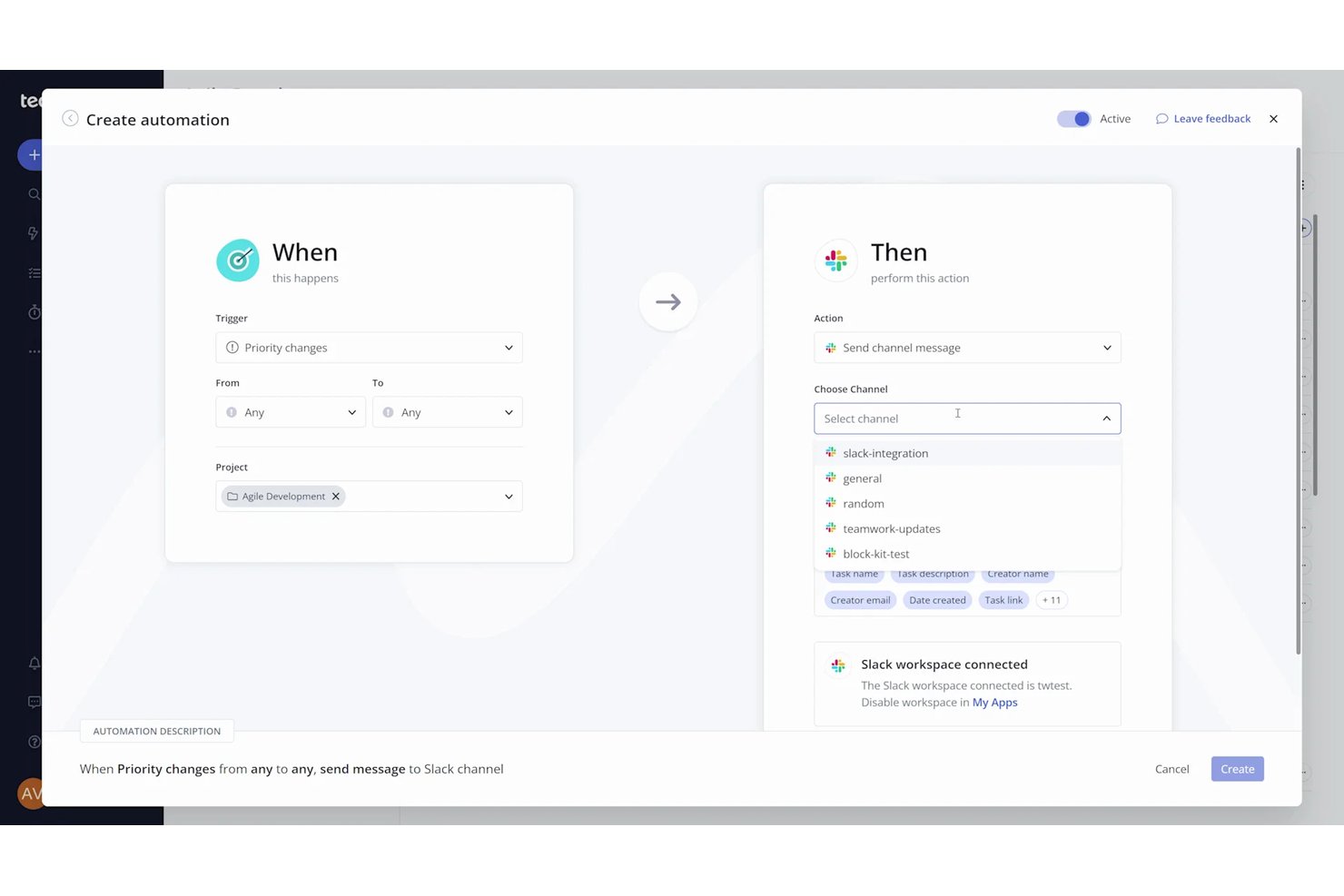
Teamwork.com is a project management platform built around client work, offering task management, Gantt charts, workload planning, time tracking, budget management, and a native Slack integration for project notifications and task creation.
Who Is Teamwork.com Best For?
Teamwork.com is a strong fit for project managers and team leads at agencies or client-service firms who need to track deliverables, budgets, and client communication in one place.
Why I Picked Teamwork.com
I picked Teamwork.com as one of the best because it's purpose-built for client work, and that focus shows up directly in how its Slack integration works. I can create tasks from Slack messages and have those messages auto-populate the task description, which keeps client context intact without any copy-pasting. Channel-to-project mapping means my team's Slack channels stay tied to active client projects, with task and comment notifications flowing in automatically.
Teamwork.com Key Features
- Workload and capacity planning: View your team's workload across active projects and identify over- or under-allocated members before resourcing issues escalate.
- Slack automations: Set task-triggered automations that post custom messages to a selected Slack channel using dynamic task fields.
- Client invoicing: Generate invoices directly from logged billable time and sync them with accounting tools like Xero and QuickBooks.
- Milestone tracking: Set project milestones to mark key checkpoints and give clients visibility into delivery progress.
Teamwork.com Integrations
Teamwork.com lists 150+ integrations, including native integrations with Slack, Microsoft Office, Harvest, and Xero File. It also supports API-based custom integrations and Zapier.
Pros and Cons
Pros:
- Time and budget tracking support client delivery
- Task ownership and deadlines remain visible
- Client updates stay tied to deliverables
Cons:
- Channel alerts can expose restricted project details
- Existing tasks need edits outside chat

Jira
Best for agile teams tracking work in Slack
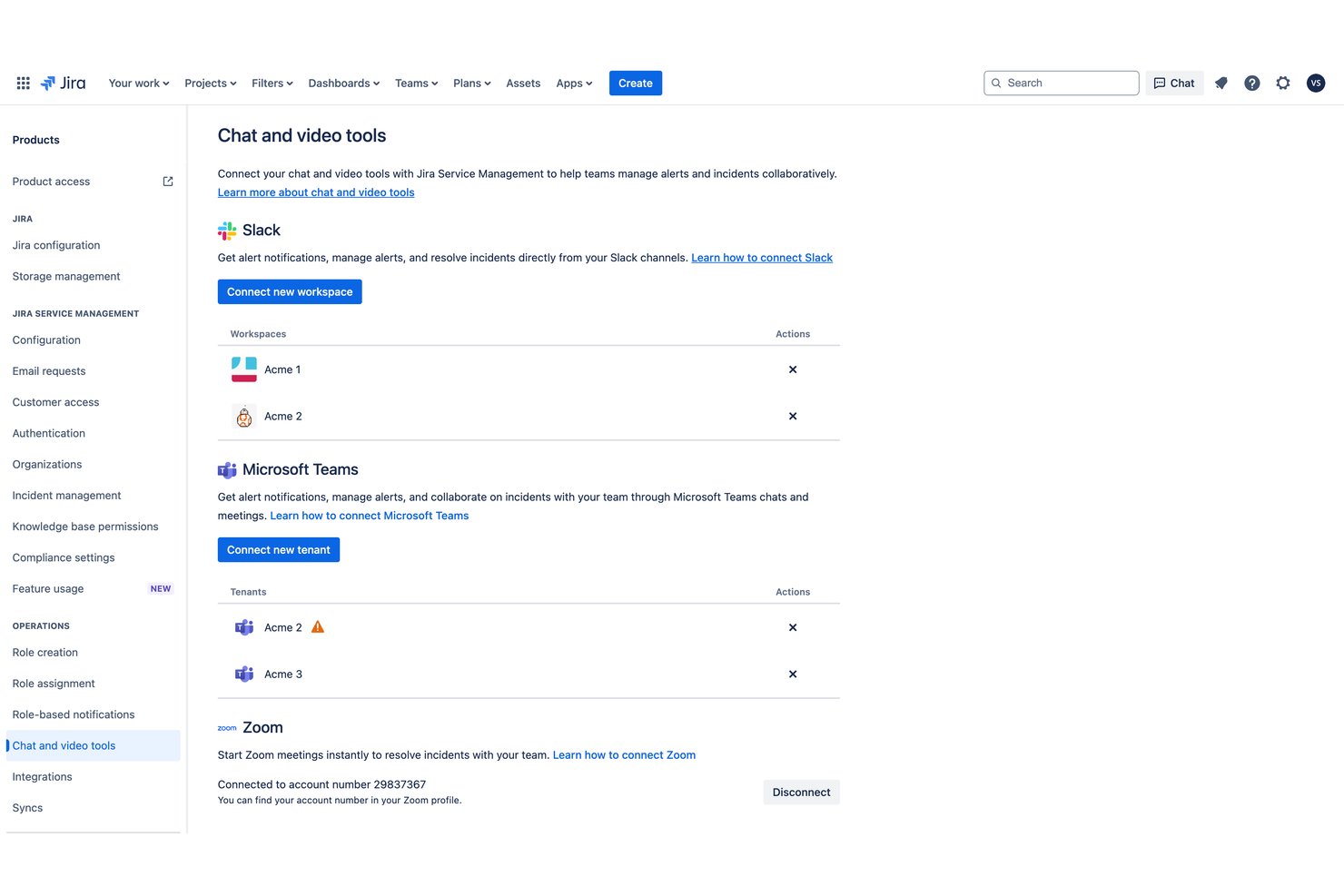
Jira is a project management platform by Atlassian built around agile workflows, offering sprint planning, backlog management, customizable boards, dependency tracking, and a deeply integrated Slack app for creating, updating, and tracking work without leaving Slack.
Who Is Jira Best For?
Jira is a strong fit for software development and technical project teams that run agile workflows and need sprint tracking, backlog management, and issue tracking in one place.
Why I Picked Jira
I picked Jira as one of the best because it's the go-to tool for agile sprint tracking, and its Slack integration goes well beyond simple notifications. I can create work items directly from a Slack message, sync thread replies as Jira comments, and transition issue statuses from notification cards without ever opening Jira. For teams running active sprints, that means a Slack conversation about a bug can become a tracked, assigned issue in seconds.
Jira Key Features
- Backlog management: Teams can organize, rank, and prioritize future work items in a dedicated backlog view before pulling them into sprints.
- Customizable workflows: Work items move through configurable stages that teams define to match their actual delivery process.
- Automation rules: No-code automation triggers actions across spaces and projects based on conditions teams set, reducing manual updates.
- Cross-team dependency tracking: Teams can link work items across projects to surface blockers and coordinate handoffs, available on Premium and above.
Jira Integrations
Jira offers over 3,000 Marketplace integrations, including Slack, Microsoft Teams, Zoom, Confluence, Trello, Bitbucket, GitHub, Azure DevOps, Jenkins, and GitLab. Its REST API supports custom integrations.
Pros and Cons
Pros:
- Thread replies stay attached to Jira work
- Boards clarify ownership, status, and blockers
- Slack conversations become assigned, trackable sprint work
Cons:
- Dense menus slow routine ticket updates
- Workflow configuration demands ongoing administrator attention
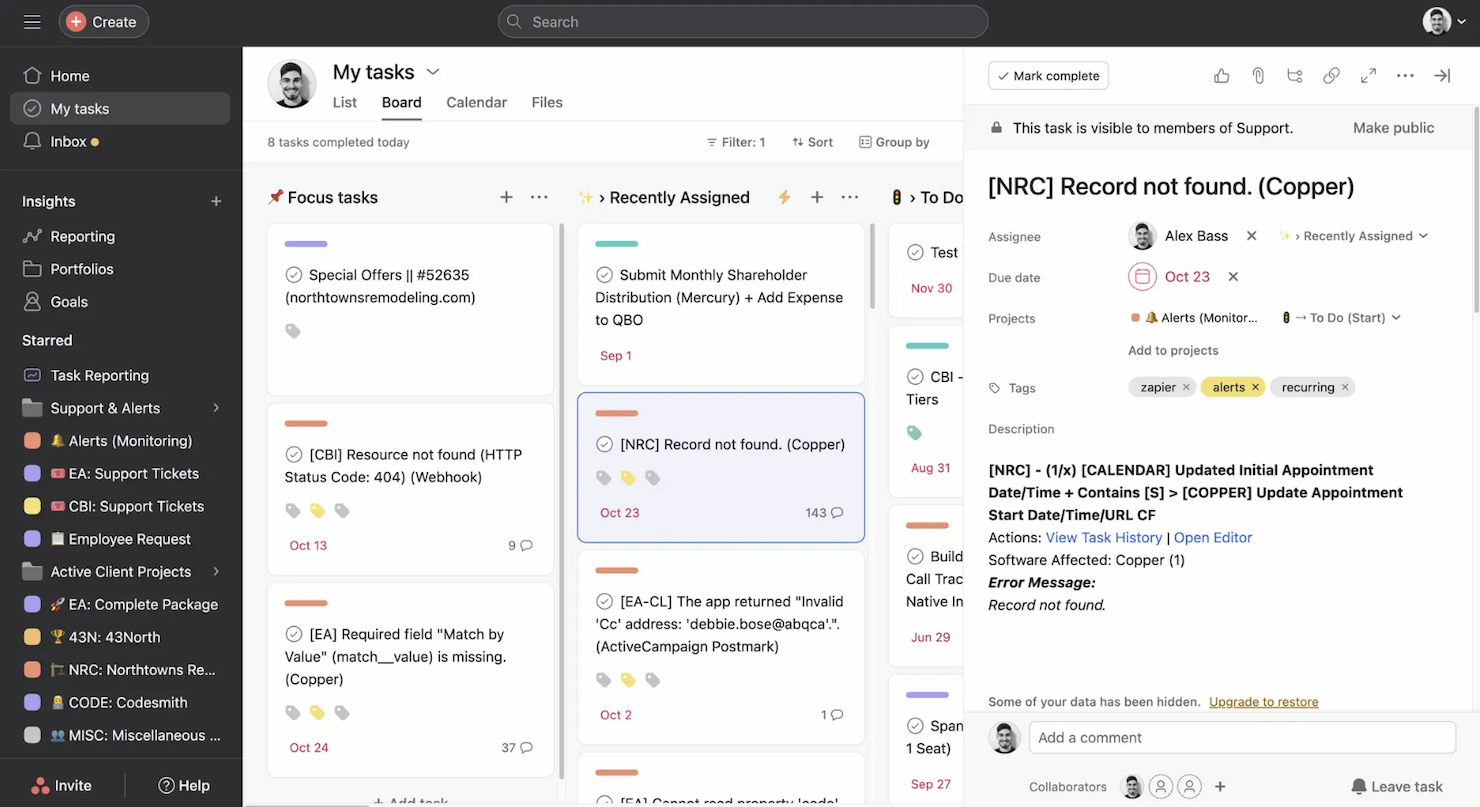
Asana is a versatile project management app that facilitates team collaboration and work management. It excels in goal alignment by linking tasks and projects to the organization's objectives, ensuring cohesive progress.
Why I picked Asana: Asana offers a comprehensive approach to project management and its unique emphasis on aligning tasks with strategic goals. This tool stands out due to its Work Graph® data model, which helps teams visualize their work in the context of the company's objectives. It provides tools like Goals and Portfolios that directly tie individual tasks to overarching business goals, fostering a sense of purpose and direction within teams.
Standout features & integrations:
Features include task management, project timelines, real-time chat, customizable dashboards, automated workflows, goal tracking, calendar integration, multiple project views (list, board, calendar, timeline), due date tracking, file attachments, team assignments, integration with multiple third-party applications, and robust reporting tools.
Integrations include Slack, Microsoft Teams, Google Calendar, Salesforce, Adobe Creative Cloud, Jira, GitHub, Zoom, Everhour, and TimeCamp.
Pros and Cons
Pros:
- Over 100 native integrations
- Direct linking of tasks to strategic goals
- Extensive project management tools
Cons:
- Limited custom reporting tools
- Free plan is limited to teams of 10

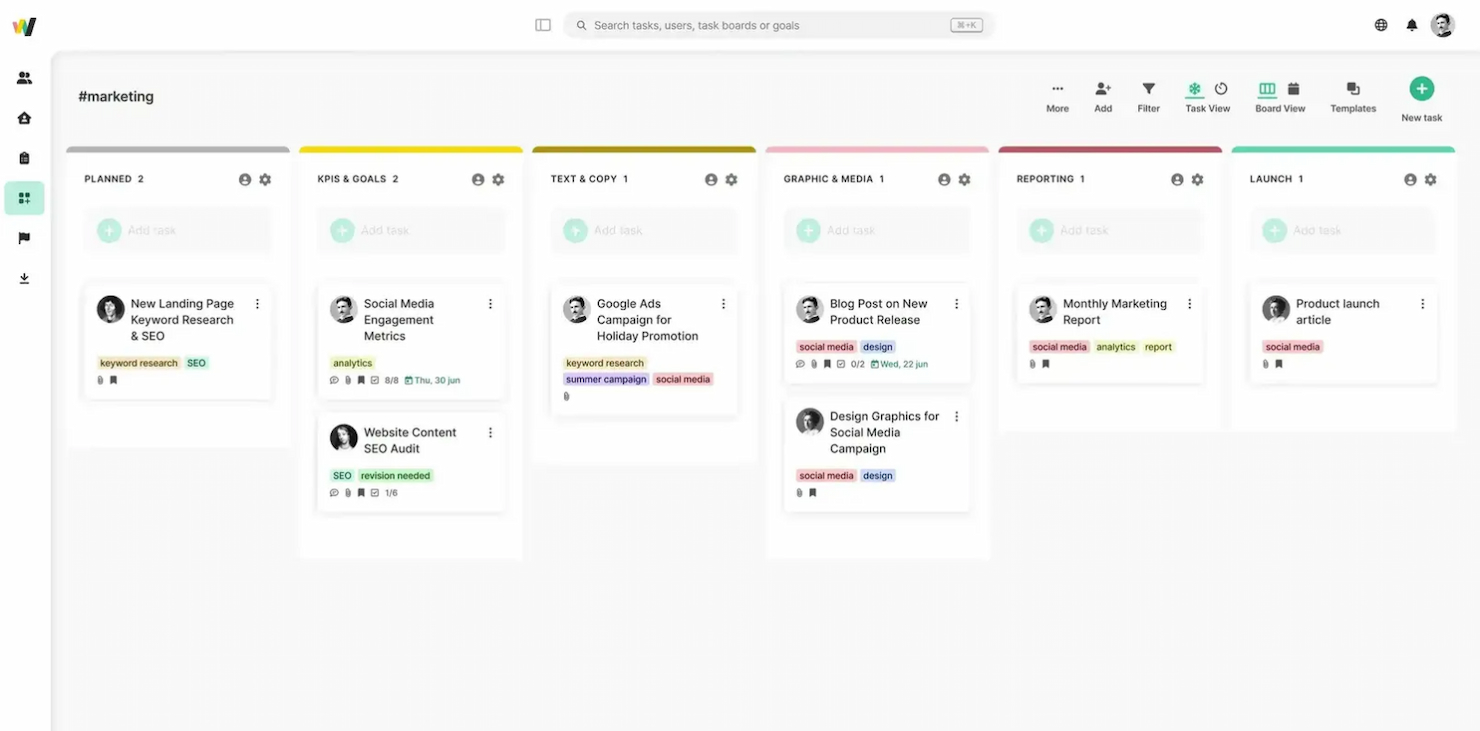
Workstreams is a task and workflow management tool built around Slack, offering Kanban boards, AI-assisted task creation, workflow automation, and time tracking directly within your Slack workspace.
Who Is Workstreams Best For?
Workstreams is a good fit for small to mid-sized teams that already run their day-to-day work inside Slack and want task management without switching tools.
Why I Picked Workstreams
Workstreams earns its spot on my shortlist because of how naturally its Kanban boards fit inside Slack. I can view a full board directly in a Slack channel, move cards between custom worksteps, and create tasks straight from messages—without ever opening a separate app. I also like the frozen task detection, which flags cards that haven't moved in a set period, keeping the board honest about where work is actually stalled.
Workstreams Key Features
- AI-assisted task creation: Automatically generates task descriptions and breaks tasks down into subtasks based on a brief prompt.
- Time allocation tracking: Assigns estimated time to individual tasks so you can monitor workload distribution across your team.
- Pre-built workflow library: Provides ready-made workflow templates you can deploy immediately or customize to match your team's process.
- Guest board access: Invites external collaborators to specific boards without requiring a full team seat.
Pros and Cons
Pros:
- Workflow automation
- Real-time collaboration
- Customizable Kanban boards
Cons:
- No mobile application for tasks on the go
- Minimum seat requirement


Teamline is a Slack-native task management tool that lets teams create, assign, and track tasks directly within Slack using slash commands, emoji reactions, and channel-linked projects.
Who Is Teamline Best For?
Teamline is a strong fit for small teams that live in Slack and want task management without adopting a separate project management platform.
Why I Picked Teamline
I picked Teamline as one of the best because it's built entirely around Slack rather than bolted onto it. Every Slack channel automatically becomes a task project, so my team can react to a message with ⚡️ to instantly create a task without leaving the conversation. The
/teamline
slash command goes deep too, covering assignment, due-date changes, comments, and task completion all from within Slack.
Teamline Key Features
- Team and individual task views: See all tasks organized by team, person, or project in one shared view.
- Shared Team Calendar: View your team's upcoming tasks and deadlines in a calendar that syncs with Outlook, Google Mail, and Apple Calendar.
- Daily morning report: Get a daily Slack reminder summarizing what you and your team are working on that day.
- Recurring checklists and subtasks: Build reusable checklists and break tasks into subtasks to standardize repeated workflows.
Teamline Integrations
Teamline offers a native Slack integration plus integrations with Outlook, Google Mail, and Apple Calendar. Business and Enterprise plans include an API and Zapier integration, with Evernote and Google Docs available through Zapier.
Pros and Cons
Pros:
- Team and individual views clarify ownership
- Users praised recurring checklists
- Reviewers valued quick task capture
Cons:
- No documented dependencies or milestones
- Reviewers reported friction managing assignments
Slack ile Entegrasyon Sağlayan Diğer Proje Yönetimi Yazılımları
Aşağıda kısa listeye alınan ancak yine de değerli olan ve daha fazla araştırılmaya değer ek proje yönetimi yazılımlarının bir listesi yer alıyor.
- monday AI Workspace
For visual project tracking
- ClickUp
For customizable workflows
- Airtable
For database-driven projects
- Jira Service Management
For agile software teams
- Workast
For Slack-first task capture and tracking
- Workzone
For structured project updates to Slack
- Linear
For developer-team Slack issue intake
- Shortcut
For software teams tracking work from Slack
- Trello
For visual task management
- monday work management
For coordinating projects across teams


Slack ile Entegrasyon Sağlayan İlgili Proje Yönetimi Yazılımları İncelemeleri
Burada aradığınızı hâlâ bulamadıysanız test edip değerlendirdiğimiz diğer ilgili araçlara göz atın:
- Proje Yönetimi Yazılımları
- Kaynak Yönetimi Yazılımları
- İş Akışı Otomasyonu Yazılımları
- Zaman Takibi Yazılımları
- Görev Yönetimi Yazılımları
- İş Birliği Araçları
- Gantt Şeması Oluşturucu
- Verimlilik Araçları
- Proje Takibi Yazılımları
- Proje Zamanlama Yazılımları
How I Evaluate Project Management Software That Integrates With Slack
I split my evaluation into three parts, giving the most weight to core work: create and assign tasks, track deadlines, and update them from Slack. Next, I look for standout features such as AI thread summaries that turn discussion into actionable tasks. Finally, I consider onboarding, permission controls, and pricing that can scale with your team.
Core Functionality (Table Stakes For This List)
When I'm selecting tools for my list, I score each one on a scale from 0 (does not offer the functionality) to 5 (excels in this area) for each core functionality listed below. I then convert the total into a percentage to help assess each tool's overall fit, with extra weight on any functionalities I’ve deemed essential.
- Native Slack Integration (Essential): I look for an official, purpose-built connection that supports project work in Slack, rather than relying solely on generic webhooks or third-party connectors.
- Task & Project Management (Essential): I check for assigned tasks, statuses, and deadlines, plus views or dependencies that help manage a changing project plan.
- Two-Way Task Sync: I evaluate whether teams can create, update, or comment on tasks from Slack and see those changes reflected in the project platform.
- Slack Notifications: I look for configurable alerts for events like assignments, due dates, comments, or status changes, with useful channel or direct-message controls.
- Commands & Bot Actions: I check whether Slack commands or a bot let team members find project information or take common actions without switching tools.
- Channel Project Mapping: I evaluate whether teams can connect Slack channels to relevant projects or boards, so updates reach the right work discussion.
Once I have a list of tools that meet the criteria, I consider what sets each platform apart.
Differentiating Factors (What Sets Vendors Apart)
Here's how I compare and contrast different vendors:
Standout Features
I look for AI task summarization that can distill a 50-message Slack thread into a clear task description with next steps already outlined. I also evaluate cross-channel project digests, where a single daily or weekly summary pulls activity from multiple Slack channels into one message—ideal for project leads tracking several workstreams at once. Emoji-based status updates matter too; I check whether a team member can react with an emoji to move a task forward without opening the platform at all.
Beyond Features
I check how quickly a distributed team can adopt the integration without looping in IT—guided setup wizards and pre-built channel mappings cut onboarding from days to minutes. Permission controls matter just as much: I evaluate whether admins can restrict who creates or edits tasks via Slack, especially on client-facing channels where sensitive project data flows. I also look at each platform's native ecosystem beyond Slack, because a tool that connects directly to GitHub, Google Drive, or your CRM reduces your dependency on middleware like Zapier.
Slack ile Entegrasyon Sağlayan Proje Yönetimi Yazılımı Nasıl Seçilir?
Kendinize özgü yazılım seçimi sürecinizi yürütürken aşağıdaki noktaları aklınızda bulundurun:
- Entegrasyon Uyumluluğu: Proje yönetimi yazılımı, iletişimlerin merkezileştirilmesine ve Slack mesajlarının üzerinde işlem yapılabilir öğelere dönüştürülmesine olanak tanıyacak şekilde Slack ile kapsamlı bir entegrasyon sunmalıdır.
- Bildirim Verimliliği: Bildirimleri Slack içinde hızlı eyleme geçmeyi teşvik edecek ve kritik güncellemelerin gözden kaçma riskini en aza indirecek şekilde ileten yazılımları arayın.
- Koordinasyonda Sadelik: Entegrasyon, ekibinizin operasyonlarını karmaşıklaştırmamalı, kolaylaştırmalıdır. Doğrudan Slack içinde görev koordinasyonunu, son teslim tarihlerinin belirlenmesini ve ekip iletişimini kolaylaştırmalıdır.
- Dosya Paylaşma Özellikleri: Proje yönetimi yazılımı, Slack'in dosya paylaşma özelliklerinden yararlanarak ekip üyelerinin dosyaları doğrudan sohbet platformu içinde paylaşmasına ve bunlara erişmesine olanak tanımalıdır. Bu, özellikle çeşitli dosya yönetim sistemlerini kullanan ve belgeleri paylaşmak için bütünleşik bir yönteme ihtiyaç duyan ekipler açısından önemlidir.
- Raporlama ve Gözetim: Slack entegrasyonu aracılığıyla raporlama süreçlerini geliştiren yazılımları seçin. Bu, ekip üyelerinin güncellemeleri bir Slack kanalında paylaşmasına olanak tanımak anlamına gelebilir; böylece gözetim iyileştirilebilir ve uzun e-posta yazışmalarına duyulan ihtiyaç azaltılabilir.
Yazılım alıcıları, bu temel alanlara odaklanarak yalnızca Slack ile entegre olan değil, aynı zamanda kendi özel ihtiyaçlarını karşılayan ve genel ekip verimliliğini artıran bir proje yönetimi çözümü bulabilir.
Slack ile Entegre Olan Proje Yönetimi Yazılımlarındaki Eğilimler
Proje yönetimi yazılımlarında fark ettiğim bazı eğilimleri ve bunların pazarlama sektörünün geleceği açısından ne anlama gelebileceğini burada bulabilirsiniz:
- Gerçek Zamanlı İş Birliği Araçlarına Artan Vurgu: Proje yönetimi yazılımları, gerçek zamanlı iş birliği özelliklerini giderek daha fazla bünyesine katıyor. Daha etkileşimli ve bütünleşik iletişim araçlarına doğru yaşanan gelişim, proje ekiplerinin uyum içinde kalmasına ve değişikliklere hızlı bir şekilde yanıt vermesine yardımcı olarak genel verimliliği artırıyor.
- Yapay Zekâ ve Otomasyonun Yükselişi: Proje yönetimi araçlarında yapay zekânın (AI) entegrasyonu hızla gelişiyor. Bu özellikler yalnızca zaman kazandırmakla kalmıyor, aynı zamanda doğruluğu artırıyor ve olası proje darboğazlarını ortaya çıkmadan önce öngörüyor.
- Gelişmiş Veri Analitiği ve Raporlama: Proje yöneticileri performansı izlemek, kaynakları verimli bir şekilde tahsis etmek ve bilinçli kararlar almak için güçlü veri görselleştirme ve raporlama araçlarına giderek daha fazla güveniyor. Yazılımların en yeni sürümleri; proje sağlığı, ekip performansı ve bütçeye uygunluk hakkında kapsamlı bilgiler sağlayan panolarla donatılmıştır. Bunlar, büyük ölçekli projeleri etkili bir şekilde yönetmek açısından kritik öneme sahiptir.
- Kullanıcı Deneyimine ve Özelleştirilebilirliğe Odaklanma: Proje yönetimi yazılımlarının kullanıcı kitlesi daha çeşitli hâle geldikçe, yüksek düzeyde özelleştirilebilir ve kullanıcı dostu arayüzlere olan talep de artıyor. Bu esneklik, ekiplerin proje yönetimi ortamlarını ihtiyaçlarına tam olarak uyacak şekilde kurmasına olanak tanıyarak benimseme oranlarını ve genel memnuniyeti artırıyor.
- Katı, Doğrusal Proje Yönetimi Yaklaşımlarının Gerilemesi: Geleneksel, doğrusal proje yönetimi metodolojileri daha az popüler hâle gelirken daha esnek, çevik metodolojilere doğru bir geçiş yaşanıyor. Bu değişim, Kanban panoları ve Scrum sprintleri gibi yinelemeli süreçleri destekleyen özelliklerin doğrudan proje yönetimi araçlarına entegre edilmesine de yansıyor.
Bu eğilimler, daha bütünleşik, akıllı ve kullanıcı odaklı proje yönetimi çözümlerine yönelik daha geniş kapsamlı bir hareketin altını çiziyor. Bu araçlar geliştikçe, özellikle dağıtık ekipleri ve aynı anda yürütülen birden fazla projeyi yöneten proje yöneticilerinin karşılaştığı karmaşık sorunları çözmeye devam ediyor.
Slack ile Entegre Olan Proje Yönetimi Yazılımı Nedir?
Slack ile entegre olan proje yönetimi yazılımı, proje yönetimi yazılımının düzenleme gücünü Slack'in çeşitli iletişim araçlarıyla birleştirir. Slack ile entegre olan bir proje yönetimi yazılımına yatırım yaparak ekibiniz görevler ve proje ilerlemesi hakkında gerçek zamanlı güncellemeler alabilir.
Slack ile Entegre Olan Proje Yönetimi Yazılımının Özellikleri
En iyi yazılımı seçmek, belirli özelliklerin projelerin başarıyla yürütülmesine nasıl katkıda bulunduğunu anlamayı gerektirir. Burada, özel ihtiyaçlarınızı karşılayan bir proje yönetimi yazılımı ararken dikkat etmeniz gereken en önemli özellikleri belirtiyorum:
- Gerçek Zamanlı Bildirimler: Bu özellik, ekip üyelerinin en son değişiklikler, görevler ve teslim tarihleri hakkında doğrudan Slack içinde bilgi sahibi olmalarını sağlayarak hızlı yanıt verme kültürünü teşvik eder.
- Görev Yönetimi: Görevleri Slack üzerinden yöneterek ekip üyeleri görevleri hızlıca atayabilir, takip edebilir ve durumlarını güncelleyebilir; böylece hiçbir işin gözden kaçmaması sağlanır.
- Dosya Paylaşımı ve İş Birliği: Bu özellik, proje dosyalarına Slack içinden kolayca erişilmesini sağlayarak ekip üyelerinin uygulamalar arasında geçiş yapmadan belgeler üzerinde iş birliği yapmasına olanak tanır.
- Zaman Takibi: Zaman takibinin Slack'e entegre edilmesi, şeffaflığın ve sorumluluk bilincinin korunmasına yardımcı olur ve proje zamanının daha iyi yönetilmesini sağlar.
- Takvim Senkronizasyonu: Takvimleri Slack ile senkronize edebilme özelliği, tüm ekip üyelerinin önemli tarihlerden ve teslim tarihlerinden haberdar olmasını sağlayarak etkili planlamaya yardımcı olur.
- Özelleştirilebilir İş Akışları: Slack içindeki özelleştirilebilir iş akışları, ekiplerin projelerinin özel gereksinimleri için en uygun sistemi oluşturmasına olanak tanır.
- Raporlama Araçları: Slack'e entegre edilen raporlama araçları sayesinde ekipler, ilerlemeyi değerlendirmek ve verilere dayalı kararlar almak için hızlıca rapor oluşturup paylaşabilir.
- Diğer Araçlarla Entegrasyon: Bu özellik, daha uyumlu bir teknoloji ekosistemi oluşturulmasını sağlar, birden fazla platforma duyulan ihtiyacı azaltır ve proje yönetimini kolaylaştırır.
- Otomatik Hatırlatıcılar: Slack üzerinden gönderilen otomatik hatırlatıcılar, ekip üyelerinin sorumluluklarını zamanında yerine getirmesine yardımcı olur.
- Kullanıcı İzinleri ve Güvenlik: Proje yöneticileri, kullanıcı izinlerini Slack içinde yöneterek hassas bilgilerin korunmasını ve yalnızca yetkili personelin bu bilgilere erişebilmesini sağlayabilir.
Bu özellikler, proje yönetimi ile iletişim platformları arasında güçlü bir sinerji oluşturarak projelerin daha verimli yürütülmesini sağlar.
Slack ile Entegre Olan Proje Yönetimi Yazılımının Faydaları
Proje yönetimi yazılımının Slack ile entegre edilmesi, herhangi bir ekibin üretkenliğini ve verimliliğini artırabilecek güçlü bir sinerji sunar. Böyle bir çözümü değerlendiren kuruluşlar için belirli faydaları anlamak, bilinçli bir karar vermeye yardımcı olabilir. Dikkate alınması gereken başlıca avantajlar şunlardır:
- Merkezi İletişim: Bu entegrasyon, iletişimi merkezileştirerek ekip üyelerinin bağlantıda kalmasını ve bilgi sahibi olmasını kolaylaştırır. Proje görüşmelerinin ve güncellemelerinin Slack'te yapılması, ekiplerin birden fazla iletişim platformu kullanırken sıklıkla karşılaştığı parçalı iletişim sorununu önlemesine yardımcı olur.
- Gerçek Zamanlı Bildirimler: Slack'in gerçek zamanlı bildirim sistemi, herkesin en son değişikliklerden haberdar olmasını ve yeni görevlere veya bilgilere hızlıca yanıt vermesini sağlar.
- Artan Üretkenlik: Proje yönetimi araçlarının Slack'in iletişim özellikleriyle bir araya gelmesi, üretkenlikte önemli bir artış sağlayabilir. Ekip üyelerinin farklı uygulamalar arasında geçiş yapmadan iletişim kurmasına ve görevleri yönetmesine olanak tanıyarak iş akışlarını kolaylaştırır.
- Görev Düzeni: Slack entegrasyonu, tüm görevlerin dikkate alınmasını ve ekip üyelerinin sorumlulukları ile teslim tarihlerini net biçimde anlamasını sağlar.
- Basitleştirilmiş Dosya Paylaşımı: Dosyalara ve proje bilgilerine Slack üzerinden kolayca erişilebilir. Entegrasyon, kullanıcıların çeşitli bulut hizmetlerinde depolanan dosyaları Slack ortamından ayrılmadan paylaşmasına, bunlara erişmesine ve bu dosyalar üzerinde iş birliği yapmasına olanak tanır.
Sonuç olarak Slack ile entegre olan proje yönetimi yazılımı, daha iyi iş birliğini teşvik eder ve projeleri yönetmek için yapılandırılmış bir yaklaşım sunar. Nihayetinde bu, operasyonel verimliliğini ve ekip dinamiklerini geliştirmeyi amaçlayan işletmeler için oyunun kurallarını değiştirebilir.
Slack ile Entegre Olan Proje Yönetimi Yazılımı İçin Maliyetler ve Fiyatlandırma
Proje yönetimi yazılımı için fiyatlandırma ve plan seçenekleri, ihtiyaç duyduğunuz özelliklere ve ölçeklenebilirliğe bağlı olarak büyük farklılıklar gösterir. Bu seçenekleri anlamak, ekibinizin ihtiyaçları ve bütçe kısıtlamalarıyla uyumlu bilinçli bir karar vermenize yardımcı olur.
Aşağıda yaygın fiyatlandırma yapılarının ve bunların genellikle neleri içerdiğinin bir dökümü yer almaktadır.
Slack ile Entegre Olan Proje Yönetimi Yazılımı İçin Plan Karşılaştırma Tablosu
| Plan Türü | Ortalama Fiyat | Yaygın Özellikler |
| Ücretsiz | $0 | Temel görev yönetimi, sınırlı entegrasyonlar ve minimum kullanıcı sınırları |
| Temel | $5 - $10/kullanıcı/ay | Gelişmiş görev yönetimi, ek entegrasyonlar ve bazı otomasyon özellikleri |
| Standart | $10 - $25/kullanıcı/ay | Tam proje planlama araçları, gelişmiş entegrasyonlar, daha kapsamlı otomasyon ve raporlama özellikleri |
| Premium | $25 - $50/kullanıcı/ay | Standart plandaki tüm özelliklere ek olarak kaynak yönetimi, gelişmiş analizler ve öncelikli destek |
| Kurumsal | Özel fiyatlandırma | Premium plandaki tüm özelliklere ek olarak özel entegrasyonlar, sınırsız kullanıcı ve kurumsal düzeyde güvenlik ve destek |
Bir plan seçerken, yazılımın işletmenizle birlikte ölçeklenebilmesini sağlamak için hem mevcut hem de öngörülen ihtiyaçlarınızı göz önünde bulundurun. Yatırımınızdan elde edeceğiniz değeri en üst düzeye çıkarmak için işlevsellik ile maliyet etkinliğini dengeleyen planları tercih ettiğinizden emin olun.
Slack ile Entegre Olan Proje Yönetimi Yazılımları SSS
Slack'ten Jira sorunları oluşturmak mümkün mü?
Jira’nın Slack ile entegrasyonu sayesinde kullanıcılar doğrudan Slack mesajlarından yeni Jira sorunları oluşturabilir. Ayrıca kullanıcılar sorunların durumunu değiştirebilir, yorum ekleyebilir ve Slack’te sorun güncellemeleri hakkında bildirim alabilir. Bu entegrasyon, sorun takibi ile ekip iletişimi arasında sorunsuz bir iş akışının sürdürülmesine yardımcı olur.
monday.com belirli Slack entegrasyonları sunuyor mu?
monday.com’un Slack entegrasyonu, kullanıcıların Slack içinde güncellemeler almasına, yeni öğeler oluşturmasına, durumları değiştirmesine ve panoları paylaşmasına olanak tanır. Bu entegrasyon, monday.com’dan gelen gerçek zamanlı güncellemeleri Slack çalışma alanına taşıyarak ekiplerin daha etkili bir şekilde iş birliği yapmasına ve herkesin aynı bilgiye sahip olmasına yardımcı olur.
ClickUp Slack içinde nasıl kullanılabilir?
ClickUp, kullanıcıların görev oluşturmasına, Slack mesajlarını görevlere eklemesine ve özelleştirilebilir bildirimler almasına olanak tanımak için Slack ile entegre olur. Entegrasyon ayrıca kullanıcıların Slack içinden görev durumlarını ve önceliklerini değiştirmesine olanak tanır; böylece sohbet arayüzünden ayrılmadan proje iş akışlarını yönetmek kolaylaşır.
Wrike'ın Slack ile entegrasyonu hangi işlevleri sağlar?
Wrike’ın Slack ile entegrasyonu, kullanıcıların Slack mesajlarından Wrike görevleri oluşturmasına, görev güncellemeleri hakkında bildirim almasına ve Slack konuşmalarını görevler hakkında yorum olarak Wrike’a aktarmasına olanak tanır. Bu entegrasyon, iletişim ve görev yönetimi platformlarını birbirine bağlayarak daha bütünleşik bir iş yönetimi deneyimi sunmak üzere tasarlanmıştır.
Smartsheet proje yönetimi için Slack'e bağlanabilir mi?
Evet, Smartsheet Slack’e bağlanabilir; böylece kullanıcılar sayfa değişiklikleri hakkında bildirim alabilir, güncelleme talep edebilir ve sayfaları Slack içinde paylaşabilir. Bu entegrasyon, ekiplerin proje ilerlemesinden haberdar olmasına ve uygulamalar arasında geçiş yapmak zorunda kalmadan Smartsheet belgeleri üzerinde iş birliği yapmasına yardımcı olur.
Slack ile Entegre Olan Proje Yönetimi Yazılımı Nasıl Seçilir
Kendinize özgü yazılım seçimi sürecinizi yürütürken aşağıdaki noktaları göz önünde bulundurun:
-
- Entegrasyon Uyumluluğu: Proje yönetimi yazılımı, iletişimlerin merkezileştirilmesine ve Slack mesajlarının gerçekleştirilebilir öğelere dönüştürülmesine olanak tanıyan kapsamlı bir Slack entegrasyonu sunmalıdır.
-
- Bildirim Verimliliği: Hızlı eyleme geçmeyi teşvik edecek ve kritik güncellemelerin gözden kaçma riskini en aza indirecek şekilde Slack içinde bildirimler sunan yazılımları tercih edin.
-
- Koordinasyonda Sadelik: Entegrasyon, ekibinizin operasyonlarını karmaşıklaştırmak yerine kolaylaştırmalıdır. Görev koordinasyonunu, son tarihlerin belirlenmesini ve ekip iletişimini doğrudan Slack içinde mümkün kılmalıdır.
-
- Dosya Paylaşma Özellikleri: Proje yönetimi yazılımı, Slack’in dosya paylaşma özelliklerinden yararlanarak ekip üyelerinin dosyaları doğrudan sohbet platformu içinde paylaşmasına ve bunlara erişmesine olanak tanımalıdır. Bu özellik, çeşitli dosya yönetimi sistemlerini kullanan ve belgeleri paylaşmak için bütünlüklü bir yönteme ihtiyaç duyan ekipler açısından özellikle önemlidir.
-
- Raporlama ve Gözetim: Slack entegrasyonu aracılığıyla raporlama süreçlerini geliştiren yazılımları seçin. Bu, ekip üyelerinin bir Slack kanalında güncellemeler paylaşabilmesini sağlayarak gözetimi iyileştirebilir ve uzun e-posta yazışmalarına duyulan ihtiyacı azaltabilir.
Bu temel alanlara odaklanan yazılım alıcıları, yalnızca Slack ile entegre olan değil, aynı zamanda kendi özel ihtiyaçlarını karşılayan ve genel ekip verimliliğini artıran bir proje yönetimi çözümü bulabilir.