

Bağımlılıkları Olan En İyi 10 Proje Yönetimi Yazılımı 2026

Bağımlılıkları Olan En İyi Proje Yönetimi Yazılımları Kısa Listesi


Bağımlılıkları olan proje yönetimi yazılımları, projelerinizdeki bağımlılıkları takip etmenin ve yönetmenin en kolay yoludur. Karmaşık proje takvimlerini yönetmenize ve görevleri etkili bir şekilde hizalamanıza yardımcı olacak, böylece kritik teslim tarihlerini karşılayabileceğiniz bir araca ihtiyacınız var.
Bağımlılıkları olan en iyi proje yönetimi yazılımları için seçimlerim burada. Görev bağımlılıklarını görselleştirmek, projeleri yolunda tutmak ve darboğazlardan kaçınmak için doğru seçeneği bulabilmeniz amacıyla, proje yöneticisi olarak edindiğim deneyimi her yazılım aracını incelemek ve test etmek için kullandım.
Why Trust Our Software Recommendations
Our team has been testing and reviewing software since 2012. As project managers ourselves, we know how difficult—and important—it is to choose the right software.
For this guide, we evaluated tools using hands-on testing and independent research, scoring tools using our selection criteria. We also draw on insights from industry thought leaders and practicing project management experts.
Our reviews reflect our human editorial judgment, not a sales pitch.
Expert reviewers:
Karşılaştırma Tablosu: Bağımlılıkları Olan Proje Yönetimi Yazılımları
Bu tabloyla fiyatlandırma ayrıntılarını ve ücretsiz denemelerin veya demoların kullanılabilirliğini yan yana karşılaştırın.
| Tool | Starting Price | Website | |
|---|---|---|---|
| Best for visualizing project timelines | 4.6 out of 5 | $10/user/month 14-day free trial | Book Demo |
| Best for growing teams | 4.3 out of 5 | $10/user/month Free plan + 14-day trial + demo available | Book Demo |
| Best for dependency-based project planning | 4.3 out of 5 | Pricing upon request Free plan + 15-day trial + demo available | Website |
| Best for nested task hierarchies and visual scheduling | 4.7 out of 5 | $7.65/user/month Free plan + 30-day free trial available | Website |
| Best for enterprise project management | 4.7 out of 5 | £679.99 one-time purchase Not available | Website |
| Best for visualizing task dependencies | 4.7 out of 5 | $8/user/month 14-day free trial + demo available | Website |
| Best for team collaboration | 4.5 out of 5 | $45/month 14-day free trial + free demo available | Website |
| Best for enterprise work management | 4.3 out of 5 | Pricing upon request Not available | Website |
| Best for streamlined business workflows | 4.2 out of 5 | $14/user/month Free plan + 30-day free trial + free demo available | Website |
| Best for robust project planning | 4.2 out of 5 | $15/user/month 30-day free trial + demo available | Website |
Bağımlılıkları Olan En İyi Proje Yönetimi Yazılımları İncelemeleri
Görev bağımlılıklarını yönetmek için tasarlanmış en iyi proje yönetimi yazılımları hakkındaki genel değerlendirmelerim burada. Her aracın en uygun kullanım alanını, özelliklerini, artılarını ve eksilerini ele alıyorum.

Best for visualizing project timelines

Productive is an all-in-one agency management system tailored for professional services like software development teams, marketing agencies, and design studios. You can use it for resource planning, project management, and financial management to improve project efficiency and profitability.
Why I Picked Productive: Productive's Gantt chart can help you identify and monitor dependencies and improve your team's workflow. It gives you a visual look at project timelines and how tasks link together. You can see how everything connects, which helps you plan and tweak schedules as needed. Productive's resource planning feature also helps you manage your team's workload by showing who's available and when, so you can make sure the right people are assigned to each task.
Standout features and integrations:
Features include unlimited dependencies and the ability to set dependencies at the subtask level. You can also assign types to each dependency to better manage and control their potential impact on your project.
Integrations include Jira, HubSpot, Xero, Google Calendar, Sage, Outlook, Slack, BugHerd, HiBob, Personio, BambooHR, and QuickBooks.
Pros and Cons
Pros:
- Workload and capacity planning features
- Good visual task management
- Combines resourcing, projects, and financials
Cons:
- Initial setup can be time-consuming
- May not be ideal for those strictly looking for project management functions
New Product Updates from Productive
Productive Adds Email and Calendar Integrations for Agents
Productive adds Gmail, Outlook, Google Calendar, and Outlook Calendar connectors for its AI agents. These integrations let agents manage emails and create calendar events directly within Productive. For more information, visit Productive’s official site.
 .

Wrike
Best for growing teams

Wrike is a cloud-based project management software designed to help teams plan, execute, and track their work in one place. It offers a range of tools to manage projects, track deadlines, and keep teams aligned. You can use Wrike to organize your tasks, monitor progress, and keep communication clear, all while keeping everything in one platform.
Why I Picked Wrike: Your team can establish task dependencies like finish-to-start relationships, ensuring tasks are completed in the right order. Wrike's dynamic timeline, or Gantt chart, lets you visually track how tasks depend on each other and adjust schedules if necessary. The platform is also scalable, so as your team grows, you can add more users, projects, and task dependencies without losing efficiency.
Standout features and integrations:
Features include AI assistance, automation, custom workflows, time tracking, project templates, request forms, document versioning, file sharing, resource allocation, team collaboration, task prioritization, and project dashboards.
Integrations include Salesforce, Power BI, Tableau, Google Drive, Microsoft SharePoint, OneDrive, Microsoft Teams, Zoom, and Slack.
Pros and Cons
Pros:
- Capacity and resource planning features
- Highly customizable dashboards
- Automated workflows
Cons:
- Can take time to learn the platform
- No built-in chat for internal collaboration
New Product Updates from Wrike

Wrike Redesigns Workspace Search With New Filters
Wrike introduces a redesigned Workspace Search interface with recent search shortcuts, item type and location filters, and parent-task context. These updates help users find relevant work items and navigate search results efficiently. For more information, visit Wrike’s official site.
 .

Best for dependency-based project planning

For teams seeking a project management solution that handles task dependencies, Zoho Projects stands out as a versatile option. Whether you're managing complex projects in construction, IT, or marketing, this tool offers the flexibility to organize tasks and timelines according to your specific needs. You can address common scheduling challenges by setting task dependencies, ensuring your projects stay on track and within scope. This makes Zoho Projects particularly appealing for industries that require meticulous planning and coordination.
Why I Picked Zoho Projects
I picked Zoho Projects because it offers robust support for managing task dependencies, which is crucial for keeping complex projects on schedule. You can easily set up task dependencies, ensuring that each phase of your project aligns perfectly with the next. Additionally, Zoho Projects features Gantt charts that visually map out your project timeline, providing a clear overview of task sequences and deadlines. This makes it easier for your team to coordinate efforts and avoid bottlenecks, which is often a challenge in project management.
Zoho Projects Key Features
In addition to its strong focus on task dependencies, Zoho Projects provides several other features that enhance project management:
- Task Automation: Automate repetitive tasks to save time and focus on more strategic activities.
- Time Tracking: Log both billable and non-billable hours to better manage resources and project budgets.
- Collaboration Tools: Facilitate seamless communication among team members with integrated chat and forums.
- Zia Intelligence: Use AI-driven insights to improve decision-making and project outcomes.
Zoho Projects Integrations
Integrations include Slack, Microsoft Teams, Google Drive, Dropbox, Evernote, GitHub, Bitbucket, Microsoft Outlook, Zapier, and Zoho CRM. An API is also available for custom integrations.
Pros and Cons
Pros:
- Affordable pricing for growing teams
- Built-in time tracking and billing
- Strong automation and workflow customization
Cons:
- Mobile experience less fully featured
- Interface has steeper learning curve
New Product Updates from Zoho Projects
Zoho Projects Adds CodeX Scripts for Custom Modules
Zoho Projects now supports CodeX Scripts for custom modules, enabling conditional logic and rules for creating, updating, and deleting records. For more information, visit Zoho Projects' official site.
 .

Quire
Best for nested task hierarchies and visual scheduling
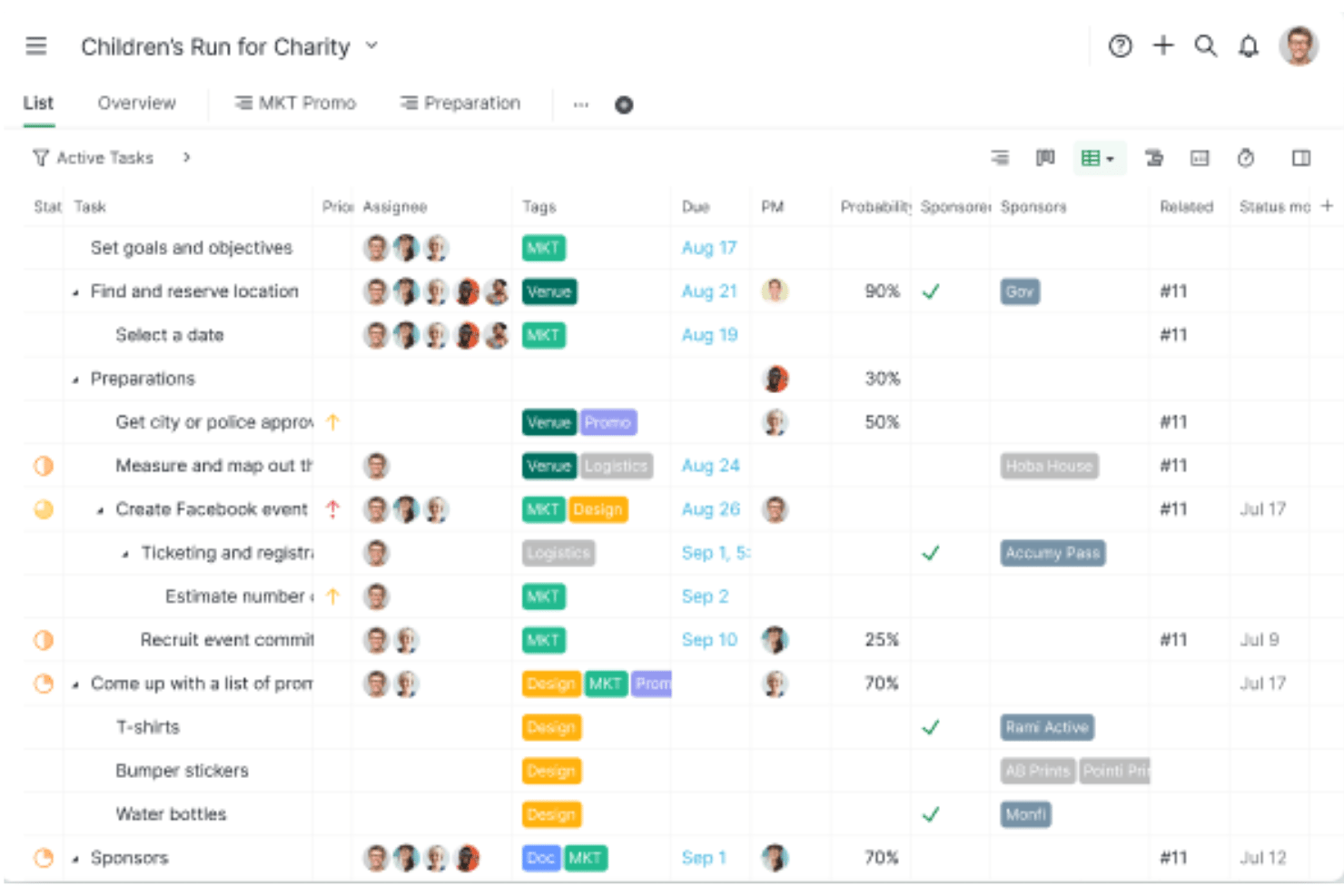
Quire is a project management tool built around an infinite nested task hierarchy, offering Kanban, Timeline (Gantt), and Table views alongside dependency linking, time tracking, and multi-project Smart Folder aggregation.
Who Is Quire Best For?
Quire is a strong fit for small-to-mid-sized teams that need flexible task hierarchies and visual scheduling without the overhead of enterprise-grade project management tools.
Why I Picked Quire
Quire earns its spot on my shortlist because of how naturally it handles nested task hierarchies alongside visual scheduling. I like that you can break a project into infinite sub-task layers and then flip to the Timeline view, where you can drag connector lines directly between tasks to set dependencies without leaving the Gantt. The blocked tasks widget on the Dashboard also gives my team a clear, running view of which tasks are stalled behind incomplete predecessors.
Quire Key Features
- Smart Folder aggregation: Groups tasks from multiple projects into a single filtered view, giving you a unified look across workstreams without switching between projects.
- Multiple assignees: Lets you assign a single task to more than one team member, which keeps cross-functional handoffs visible and accountable.
- Custom fields: Adds structured data fields to tasks so your team can track project-specific information alongside standard task details.
- Blocked tasks widget: Surfaces a running list of tasks stalled behind incomplete predecessors directly on the Dashboard, so bottlenecks don't go unnoticed.
Quire Integrations
Quire offers native integrations with GitHub, Slack, Microsoft Teams, Google Calendar, Google Drive, and Power BI. It also provides a REST API, webhooks, and Zapier for custom connectivity.
Pros and Cons
Pros:
- Blocked tasks widget highlights stalled work
- Infinite task hierarchy for complex breakdowns
- Drag-to-link dependencies in interactive Timeline
Cons:
- No critical path or lead/lag support
- Only supports Finish-to-Start dependencies
New Product Updates from Quire
Quire Adds Custom Field Locking and Comment Reaction API Support
Quire adds custom field locking and API support for reading and setting emoji reactions on comments. These updates give teams more control over field data and expand comment interaction options for developers. For more information, visit Quire’s official site.
 .
Best for enterprise project management

Microsoft Project is a comprehensive project management solution designed for enterprises. It excels in handling complex projects and aligning them with company-wide strategic goals, making it best for enterprise project management.
Why I Picked Microsoft Project: I chose Microsoft Project for this list because of its task dependency management capabilities. You can link dependent tasks within your Gantt chart, as well as within calendars, network diagrams, and other views. The tool also lets you insert additional dependencies between already linked tasks, which means it's adaptable to sudden changes to your project plan. Microsoft Project can autolink tasks for you, or you can add tasks and set up dependencies between them manually.
Standout features and integrations:
Features include the ability to set up a master project, which allows you to link tasks to the completion of a particular project (instead of an individual task). You can also set dependencies types, which lets you more easily keep track of them.
Integrations include Microsoft Teams, OneDrive, Power BI, SharePoint, Dynamics 365, Azure DevOps, Microsoft Excel, Microsoft Power Automate, Microsoft Power Apps, and Outlook.
Pros and Cons
Pros:
- Advanced reporting and business intelligence capabilities
- Integration with other Microsoft services and products
- Comprehensive resource and portfolio management features
Cons:
- Primarily designed for larger enterprises, which may not be suitable for smaller teams
- Can be complex to learn for new users

Workzone
Best for visualizing task dependencies
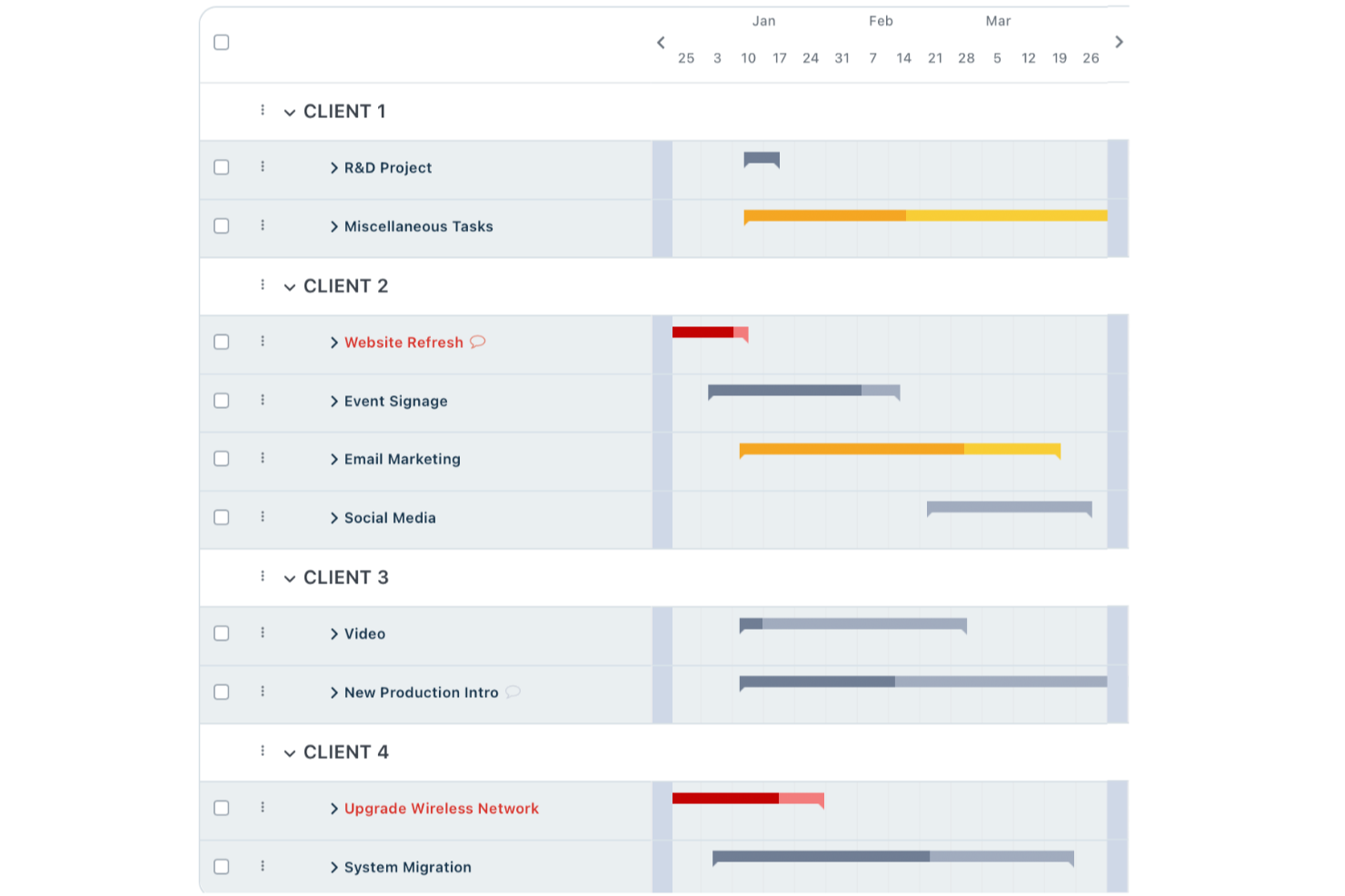
For teams that need a project management tool that handles dependencies well, Workzone is a practical, flexible option. It’s built to support collaboration and clear communication, which makes it a solid fit for industries like marketing, healthcare, and education. With Workzone, you can tackle common issues such as balancing workloads, managing deadlines, and keeping communication centralized, so your team stays aligned, and projects keep moving forward.
Why I Picked Workzone
I picked Workzone for its strong task management features, especially when it comes to managing dependencies. Its Gantt charts give you a clear visual of how tasks depend on one another and how they fit into the overall project timeline. Workzone also includes real-time reporting, which makes it easy to monitor progress and adjust plans as needed. This helps ensure deadlines are met without sacrificing quality.
Workzone Key Features
In addition to its task management and reporting capabilities, Workzone offers several other features:
- Portfolio Visibility: Allows you to view all projects and their statuses in one comprehensive dashboard, aiding in strategic planning and resource allocation.
- Creative Proofing Tools: Streamlines the review and approval process for creative projects, ensuring timely feedback and collaboration.
- Customizable Templates: Provides pre-built templates that can be tailored to fit your team's specific workflows, saving time and maintaining consistency.
- Centralized Request Process: Facilitates the management of incoming work requests, ensuring that all tasks are accounted for and prioritized accordingly.
Workzone Integrations
Integrations include Slack, Microsoft Teams, Google Drive, Dropbox, Box, Tableau, Salesforce, and QuickBooks. An API is available for custom integrations.
Pros and Cons
Pros:
- Unlimited training and live support
- Built-in document proofing approvals
- Strong real-time project visibility
Cons:
- Pricing less suitable small teams
- Limited advanced budgeting features
New Product Updates from Workzone

Workzone Enterprise Adds Multi-Stage Approval Workflows
Workzone Enterprise now includes Approval Workflows, enabling multi-stage document approvals to standardize complex processes and reduce manual effort. For more information, visit Workzone's official site.
 .

ProofHub
Best for team collaboration
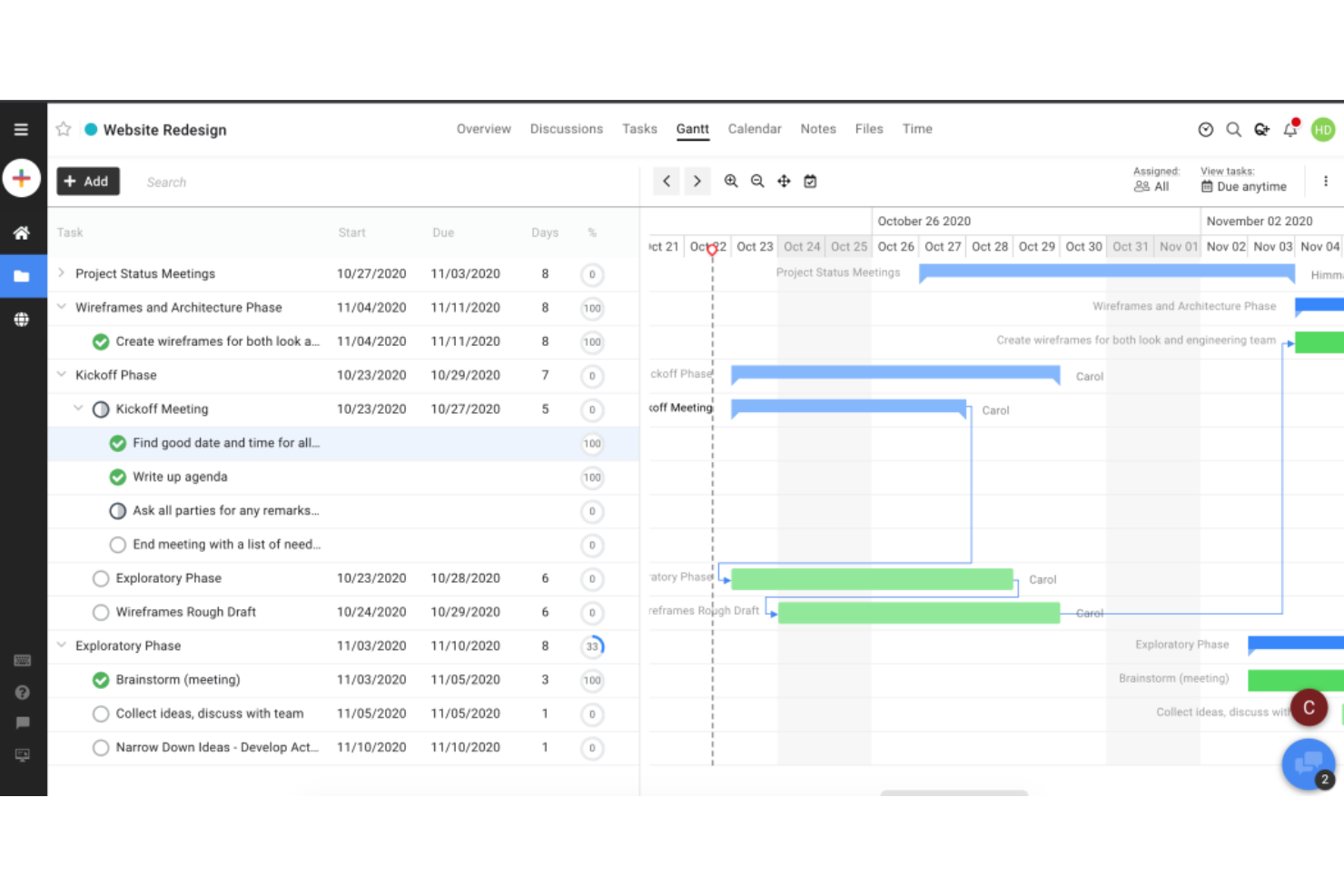
ProofHub is a project management software designed to help teams collaborate and manage tasks, dependencies, and projects efficiently. It centralizes all important information so you can plan, execute, track, and manage projects from start to finish in one place.
Why I Picked ProofHub: I chose ProofHub because it offers a comprehensive suite of features for managing task dependencies, the project schedule, and milestones. You can set and link dependencies directly from the Gantt chart view, as well as monitor dependencies and how they are impacted by changes to the schedule. Dependencies can be classified as predecessors or successors, and the tool can also automatically adjust downstream dependencies when you make changes to the project schedule.
Standout features and integrations:
Features include task completion notifications for team members that are assigned to dependent and successor tasks, as well as drag-and-drop creation of dependencies.
Integrations include Dropbox, Google Drive, Box, and OneDrive
Pros and Cons
Pros:
- Integrations with popular third-party tools
- Comprehensive set of project management and collaboration features
- Unlimited users with flat-rate pricing
Cons:
- Access to advanced features may be expensive for small businesses
- Limited storage space on the Essential plan

Best for enterprise work management

Adobe Workfront is a management software that lets you establish and monitor task dependencies within and across projects, using a variety of dependency types to make sure tasks are executed in a specific sequence and to improve project planning and execution.
Why I Picked Workfront: I selected Workfront for its capabilities in managing the complexities of dependencies in enterprise-level projects. You can set types for each dependency, including finish-start, finish-finish, and start-start, as well as lag—the specific amount of time that must pass between the dependent tasks. The tool also lets you set dependencies across different projects when you have a portfolio of interrelated projects, as well as manage your project timeline in conjunction with any dependencies contained within it.
Standout features and integrations:
Features include the automatic prevention of task dependency loops and the ability to enforce dependencies so that the team cannot start on dependent tasks until any and all predecessors are completed.
Integrations include Adobe Creative Cloud, Jira, Microsoft Teams, Slack, Salesforce, ServiceNow, Google Workspace, Box, Dropbox and Oracle.
Pros and Cons
Pros:
- Strategic alignment with organizational goals
- Real-time updates on project progress
- Centralized dashboard for project management
Cons:
- May be complex to implement for smaller organizations
- Lacks pricing transparency

Podio
Best for streamlined business workflows

Podio is a versatile project management platform designed to improve your business workflows. It is best for creating a highly customizable work environment that adapts to your team's specific needs and processes.
Why I Picked Podio: I chose Podio for this list because of its exceptional flexibility and customization options. You can use it to create your own apps via a simple drag-and-drop interface. The tool lets you tailor it to your specific workflows, so you can manage dependencies in a way that best fits your existing ways of working, instead of forcing you into a specific set of features.
Standout features and integrations:
Features include reporting options for tracking milestone progress and project budget usage, as well as automations that can help improve your workflows and reduce manual processes.
Integrations include Google Drive, Dropbox, ShareFile, Box, HighTail, OneDrive, Zendesk, Campaign Monitor, Evernote, and FreshBooks.
Pros and Cons
Pros:
- Offers automated workflows and advanced reporting options
- Integrates with major file sharing services and other platforms
- Highly customizable with drag-and-drop app creation
Cons:
- The free plan is limited to five employees and 100 items per organization
- May have a learning curve due to its high level of customization

Best for robust project planning

ProjectManager.com is a comprehensive project management tool designed to help teams plan, track, and collaborate online. It stands out for robust project planning and dependency management due to its wide array of features that cater to detailed project needs and its ability to scale with the complexity of projects.
Why I Picked ProjectManager.com: I chose ProjectManager.com for its extensive set of dependency management features that are essential for handling complex projects with numerous variables. The tool offers reporting capabilities that provide insights into milestone progress and where dependencies or bottlenecks are slowing the project down. You can use drag-and-drop to make changes to dependencies and your project schedule, and any dependencies further along in the project will automatically update accordingly.
Standout features and integrations:
Features include Gantt charts for setting milestones and tracking progress, as well as features for defining and monitoring the critical path and any dependencies along it. The tool can also automatically define the critical path for you.
Integrations include Google Workspace, Microsoft 365, Zapier, Salesforce, Slack, and Jira.
Pros and Cons
Pros:
- Provides different plans to cater to the needs of small, medium, and large teams.
- Integrates with over 1,000 apps, enhancing its functionality and flexibility
- Offers a wide range of project management features suitable for various industries
Cons:
- The transition from the free trial to a paid plan may require manual intervention to avoid being downgraded
- The pricing can be a bit steep for small teams or startups
Bağımlılıkları Olan Diğer Proje Yönetimi Yazılımları
Kısa listeme giremeyen, ancak göz atmaya değer bağımlılıkları olan ek proje yönetimi yazılımlarının listesi burada.
- Tempo Portfolio Manager
For dynamic project management
- Ravetree
For flexible project methodologies
- Teamwork Projects
For client work management
- Jira
For software development teams
- Clarizen
For large-scale project planning
- ReptonPOD
For intricate workflows
- Celoxis
For advanced portfolio tracking
- Accelo
For automating end-to-end workflows


İlgili Proje Yönetimi İncelemeleri
Burada aradığınızı hâlâ bulamadıysanız, sizin için derlediğimiz diğer proje yönetimi aracı incelemelerine göz atın:
- Gantt Şeması Oluşturucu
- Verimlilik Araçları
- Proje Takip Yazılımı
- Proje Planlama Yazılımı
- Proje Yönetimi Yazılımı
- Kaynak Yönetimi Yazılımı
How I Evaluate Project Management Software With Dependencies
I evaluate in two layers: baseline dependency logic every tool must offer, and differentiators that tell me whether it fits a TPM managing sprints or a construction PM working on the critical path.
Core Functionality (Table Stakes For This List)
When I'm selecting tools for my list, I rank each one on a scale from 0 (does not offer the functionality) to 5 (excels in this area) for each core functionality listed below. Then, I calculate the tool's total score into a percentage. Each tool needs to achieve a minimum total score of 65% to be considered for inclusion.
- Dependency Linking Types: I check whether a tool supports all four standard relationships (FS, SS, FF, SF), since real projects rarely run on Finish-to-Start alone.
- Gantt Chart Visualization: I look for interactive Gantt views where you can drag to create dependency links and see arrows between tasks update in real time.
- Automatic Rescheduling: When a predecessor slips by a week, every downstream task should cascade automatically rather than forcing manual date edits across the plan.
- Critical Path Identification: I evaluate whether the tool calculates the critical path and displays float values, so you know exactly which tasks carry schedule risk.
- Lead and Lag Configuration: Setting a two-day lag after a design review or a one-day lead on parallel QA work should be straightforward and calendar-aware.
- Cross-Project Dependencies: For program managers coordinating multiple workstreams, I look at whether the tool lets you link tasks across separate projects and track those links centrally.
Once I have a list of tools that meet the criteria, I consider what sets each platform apart.
Differentiating Factors (What Sets Vendors Apart)
Here's how I compare and contrast different vendors:
Standout Features
What-if scenario modelling is a major differentiator. I look for tools that let you clone a schedule, shift a dependency, and preview the ripple effect before touching the live plan. Baseline comparison matters just as much, since tracking how far your current timeline has drifted from the original commitment is how you report schedule health to leadership. I also evaluate resource levelling, which redistributes tasks when dependencies create over-allocation across team members.
Beyond Features
Integration depth matters a lot here. I check whether a tool syncs with Jira or Azure DevOps for engineering handoffs, and whether dependency changes push alerts into Slack or Teams. Scalability is another key factor. A Gantt with 50 tasks runs fine anywhere, but I evaluate how tools perform when plans grow to thousands of linked tasks across multiple projects. I also consider use case fit, since a TPM coordinating sprints needs a very different dependency experience than a construction PM running critical path method schedules.
Bağımlılıkları Olan Proje Yönetimi Yazılımı Nasıl Seçilir?
Uzun özellik listeleri ve karmaşık fiyatlandırma yapıları içinde kaybolmak kolaydır. Kendinize özgü yazılım seçme sürecinizde ilerlerken odaklanmanıza yardımcı olmak için aklınızda bulundurmanız gereken faktörleri içeren bir kontrol listesi hazırladım:
| Faktör | Dikkat Edilmesi Gerekenler |
|---|---|
| Ölçeklenebilirlik | Yazılımın ekibinizin büyümesini destekleyebildiğinden emin olun. İhtiyaçlarınız geliştikçe sınırsız projeleri, artan kullanıcı sayısını ve gelişmiş bağımlılık takibini destekleyen araçları tercih edin. |
| Entegrasyonlar | Yazılım, Slack, Jira, Trello veya Google Drive gibi hâlihazırda kullandığınız araçlara bağlanabilmelidir. Yerel entegrasyonlar ve API erişimi, iş akışlarının daha sorunsuz ilerlemesini sağlar. |
| Özelleştirilebilirlik | Her ekip farklı çalışır. İş akışlarını, görev bağımlılıklarını ve proje görünümlerini süreçlerinize uyacak şekilde ayarlamanıza olanak tanıyan bir araç seçin. |
| Kullanım Kolaylığı | Temiz ve sezgisel bir arayüz, işe alıştırma süresini ve kullanıcıların yaşayabileceği hayal kırıklığını azaltır. Sürükleyip bırakma yöntemiyle bağımlılık yönetimi ve görsel görev takibi gibi özellikleri arayın. |
| Bütçe | Kullanıcı başına ücretlendirme, alt düzey planlardaki özellik sınırlamaları ve olası eklentiler dâhil olmak üzere toplam maliyetleri değerlendirin. Ücretsiz deneme veya freemium sürüm, karar vermeden önce ürünü test etmenize yardımcı olur. |
| Güvenlik Önlemleri | Hassas proje verilerini şifreleme, rol tabanlı erişim ve GDPR veya SOC 2 gibi standartlara uyumlulukla koruyabildiğinizden emin olun. Kullanıcı izinlerinin bağımlılıkları kimlerin değiştirebileceğini nasıl kontrol ettiğini doğrulayın. |
| Otomasyon | Akıllı otomasyon, zaman çizelgeleri değiştiğinde bağımlı görevleri otomatik olarak ayarlayarak zamandan tasarruf etmenizi sağlayabilir. Kural tabanlı tetikleyiciler ve yapay zekâ destekli zamanlama gibi özellikleri arayın. |
| İş Birliği Özellikleri | Ekibinizin sorunsuz iletişime ihtiyacı vardır. Değişen bağımlılıklar konusunda herkesin aynı doğrultuda kalmasını sağlayan yerleşik sohbet, gerçek zamanlı güncellemeler ve bildirimleri arayın. |
Bağımlılıklara Sahip Proje Yönetimi Yazılımlarındaki Trendler
Proje yönetimi yazılımları gelişiyor. İşte geleceğini şekillendiren en yeni trendler.
- Yapay zekâ ve makine öğrenimiyle entegrasyon: Proje yönetimi araçları yapay zekâdan giderek daha fazla yararlanıyor. Bu durum öngörücü analizlere ve daha akıllı kaynak tahsisine olanak tanıyor; proje sonuçlarını ve verimliliği önemli ölçüde iyileştirebiliyor.
- Daha fazla iş birliği özelliği: Gerçek zamanlı iş birliği özellikleri, uzaktan ve dağınık ekipler için kritik olan anlık iletişim ve güncellemeleri kolaylaştırır. Bu trend, dinamik çalışma ortamlarını destekler ve daha iyi karar alma süreçlerine katkıda bulunabilir.
- Otomasyon kullanımında artış: Proje yönetimi yazılımlarındaki otomasyon kullanımı artıyor. Otomasyon, tekrarlayan görevleri kolaylaştırır, proje takvimlerinin korunmasına yardımcı olur ve daha stratejik faaliyetlere odaklanabilmeniz için zamanınızı serbest bırakır.
- Özelleştirme ve esnekliğe verilen önemin artması: Yazılımı özel ihtiyaçlarınıza göre uyarlamanıza olanak tanıyan özelleştirilebilir proje yönetimi çözümlerine yönelik artan bir eğilim var. Bu trend, benzersiz proje gereksinimlerini ve iş akışlarını karşılamaya yardımcı olur.
- Mobil proje yönetiminin yaygınlaşması: Daha fazla proje yönetimi aracı mobil erişim sunuyor. Bu sayede siz ve ekipleriniz projelerinize her yerden bağlı kalabilir, ayrıca iş gücünün artan hareketliliği desteklenir.
Bağımlılıklara Sahip Proje Yönetimi Yazılımı Nedir?
Bağımlılıklara sahip proje yönetimi yazılımı, bir proje içindeki birbiriyle ilişkili görevleri yönetmek ve takip etmek için tasarlanmış özel bir araçtır. Projelerin planlanması ve yürütülmesiyle ilgilenen proje yöneticileri, ekip liderleri ve diğer profesyoneller tarafından kullanılır. Bu yazılımı görevler arasındaki ilişkileri belirlemek ve izlemek, ayrıca birbirini izleyen görevlerin doğru sırayla tamamlanmasını sağlamak için kullanabilirsiniz.
Bu yazılımın bileşenleri arasında görevleri oluşturmanıza ve takip etmenize, ayrıca görevleri birbirine bağlayan bağımlılıkları yönetmenize olanak tanıyan görev yönetimi özellikleri bulunur. Ayrıca, bağımlı görevlerin sıralarına ve aralarındaki bağlantılara uygun şekilde planlanmasını sağlayan zamanlama özelliklerini de içerir.
Bağımlılıklara Sahip Proje Yönetimi Yazılımının Özellikleri
Bağımlılıklara sahip proje yönetimi yazılımında aramanız gereken başlıca özellikler şunlardır:
- Gantt çizelgeleri: Proje zaman çizelgelerini görselleştirin. Gantt çizelgeleri, görevlerin sırasını planlamak ve zaman çizelgesi içindeki birbirlerine olan bağımlılıklarını anlamak için vazgeçilmezdir.
- Bağımlılık takibi: Görev ilişkilerini izleyin. Bu özellik, görevlerin birbirini nasıl etkilediğini takip etmenizi sağlar; böylece bir alandaki değişikliklerin proje genelinde yansıtıldığından emin olabilirsiniz.
- Kritik yol analizi: Temel görevleri belirleyin. Projenin tamamlanma tarihini doğrudan etkileyen görevleri saptayarak kaynakları daha etkili biçimde tahsis edebilir ve olası gecikmeleri önleyebilirsiniz.
- Otomatik yeniden zamanlama: Zaman çizelgelerini dinamik olarak ayarlayın. Bir görev geciktiğinde yazılım, buna bağlı görevleri otomatik olarak günceller ve bu da projenin bütünlüğünü korumaya yardımcı olur.
- Kaynak yönetimi: Kaynakları tahsis edin ve takip edin. Etkili kaynak yönetimi, özellikle birbirine bağımlı görevler için gerekli personel ve malzemelerin görevlere atanmasını sağlar.
- Görev önceliklendirme: Görevleri önem derecesine göre sıralayın. Bu, bağımlı faaliyetlerin ilerlemesi açısından kritik olan görevleri tamamlamaya odaklanmanıza yardımcı olur.
- İş birliği araçları: Ekip iletişimini kolaylaştırın. Bu araçlar, birden fazla görev ve bağımlılık söz konusu olduğunda çalışmaları koordine etmek için gereklidir.
- Gerçek zamanlı güncellemeler: Değişikliklerden haberdar olun. Anlık güncellemeler, özellikle birbirine bağlı görevlerle çalışırken proje koşullarındaki değişikliklere hızlıca tepki vermenizi sağlar.
- Özelleştirilebilir görünümler: Bilgilerin görüntülenme şeklini ihtiyaçlarınıza göre uyarlayın. Özel görünümler, rolünüz veya projenin başarısı açısından en önemli bağımlılıklara odaklanmanızı sağlar.
- Raporlama ve analiz: İlerleme hakkında içgörüler elde edin. Güçlü raporlama sayesinde bağımlılıkların projeyi nasıl etkilediğini takip edebilir ve bilinçli kararlar alabilirsiniz.
Bağımlılıklara Sahip Proje Yönetimi Yazılımının Faydaları
Bağımlılıklara sahip proje yönetimi yazılımını uygulamanın beş temel faydası şunlardır:
- Daha iyi iş birliği: Bağımlılıklara sahip proje yönetimi yazılımı, daha iyi ekip çalışmasını kolaylaştırır. İletişim ve bilgi paylaşımı için merkezi bir platform sağlayarak ekip üyeleri, konumlarından bağımsız olarak daha etkili biçimde birlikte çalışabilir.
- Geliştirilmiş planlama: Bağımlılık takibiyle doğru proje zaman çizelgeleri oluşturun. Yazılım, görev bağımlılıklarını dikkate alan ayrıntılı proje planları oluşturmanıza olanak tanır; böylece proje sorunsuz ilerler ve teslim tarihlerine uyulur.
- Risk azaltma: Olası proje risklerini proaktif biçimde belirleyin ve yönetin. Bağımlılık takibi, darboğazları ve olası gecikmeleri önceden görmenize yardımcı olur; böylece riskleri projeyi etkilemeden önce azaltabilirsiniz.
- Kaynak optimizasyonu: Kaynakları verimli biçimde tahsis edin ve kullanın. Görev bağımlılıklarını görebildiğiniz için kaynakları daha etkili biçimde tahsis edebilir, aşırı veya yetersiz kullanımı önleyebilir ve kritik görevlerin gerekli desteğe sahip olmasını sağlayabilirsiniz.
- Gerçek zamanlı içgörüler: Güncel proje bilgilerine ve ölçümlere erişin. Proje ilerlemesini gerçek zamanlı olarak izleyebilir; bu da gerektiğinde bilinçli kararlar almayı ve ayarlamalar yapmayı kolaylaştırır.
Bağımlılıklara Sahip Proje Yönetimi Yazılımı için Maliyetler ve Fiyatlandırma
Aşağıda, bağımlılıklara sahip proje yönetimi yazılımı için plan seçeneklerini ve fiyatlandırmalarını özetleyen bir tablo yer almaktadır:
| Plan Türü | Ortalama Fiyat | Yaygın Özellikler |
|---|---|---|
| Ücretsiz | $0 | Sınırlı sayıda proje ve görev, temel bağımlılık takibi, iş birliği araçları ve sınırlı depolama |
| Ekip | $10 - $13/kullanıcı/ay | Sınırsız görev ve alt görev; Gantt, sayfa, pano, liste ve takvim görünümleri; ek dosya depolama alanı |
| İşletme | $20 - $24/kullanıcı/ay | Gelişmiş proje, portföy, & kaynak yönetimi; iş akışı & otomasyon; ek depolama alanı |
| Kurumsal | Özel Fiyatlandırma | Kurumsal düzeyde özellikler, sınırsız proje, API erişimi, SSO/SAML, sınırsız dosya depolama alanı |
Bağımlılıklara Sahip Proje Yönetimi Yazılımı Hakkında SSS
Bağımlılıklar proje zamanlamasını nasıl etkiler?
Bağımlılıklar, görevlerin sırasını belirledikleri için proje zamanlaması üzerinde önemli bir etkiye sahiptir. Diğer görevlerin bağlı olduğu bir görev gecikirse sonraki görevlerin başlama ve bitiş zamanlarını etkileyebilir. Bu durum, projenin tamamlanma tarihini daha ileriye atabilecek bir domino etkisine yol açabilir.
Proje yönetimi yazılımı, bağımlılıklara göre zamanlamaları otomatik olarak ayarlayabilir mi?
Evet, birçok proje yönetimi yazılımı çözümü, görev bağımlılıklarında değişiklikler olduğunda zamanlamaları otomatik olarak ayarlayabilir. Bir görev yeniden planlandığında yazılım, buna bağlı görevlerin zaman çizelgesini uygun şekilde yeniden hesaplar. Bu, her görevi manuel olarak ayarlamadan güncel bir zamanlamayı korumanıza yardımcı olur.
Proje yönetimi yazılımında bağımlılıkları görselleştirmenin en iyi yolu nedir?
Proje yönetimi yazılımında bağımlılıkları görselleştirmenin en iyi yolu Gantt çizelgesidir. Bu görsel araç, görevleri bir zaman çizelgesi üzerinde gösterir ve aralarındaki ilişkiyi ortaya koyar. Görevlerin nasıl örtüştüğünü, faaliyetlerin sırasını ve projenin kritik yolunu görmenizi sağlar.
Bağımlılıklar kaynak tahsisini nasıl etkiler?
Bağımlılıklar, görev atamalarının sırasını ve zamanlamasını belirleyerek kaynak tahsisini doğrudan etkiler. Belirli kaynaklar gerektiren bir görev başka bir görevin tamamlanmasına bağlıysa bu kaynaklar, önceki görev bitene kadar tahsis edilemez. Bu nedenle kaynakların ihtiyaç duyulduğunda hazır bulunması ve boşta kalmaması için dikkatli planlama yapılması gerekir.
Bir proje başladıktan sonra bağımlılıklar değiştirilebilir mi?
Bir proje başladıktan sonra bağımlılıklar değiştirilebilir, ancak bu işlem dikkatle yapılmalıdır. Bağımlılıkların değiştirilmesi proje zamanlamasını, kaynak tahsisini ve genel proje planını etkileyebilir. Bağımlılıkları değiştirmenin sonuçlarını değerlendirin ve yapılan tüm düzenlemeleri ilgili tüm paydaşlara bildirin.
Proje planında bir bağımlılık gözden kaçırılırsa ne olur?
Proje planında bir bağımlılık gözden kaçırılırsa zamanlama çakışmalarına, kaynakların aşırı tahsis edilmesine ve olası gecikmelere yol açabilir. Proje zaman çizelgesi ve bütçe üzerindeki etkiyi en aza indirmek için gözden kaçırılan bağımlılıkları mümkün olan en kısa sürede belirlemek ve düzeltmek önemlidir.
Proje yönetimi yazılımı projeler arası bağımlılıkların yönetilmesine nasıl yardımcı olabilir?
Proje yönetimi yazılımı, tüm projelerin ve bunlarla ilişkili görevlerin görülebildiği merkezi bir platform sağlayarak projeler arası bağımlılıkların yönetilmesinde son derece yararlı olabilir. Bu, projeler arasındaki koordinasyonu iyileştirir; çünkü projeler arasındaki bağımlılıklar etkili bir şekilde izlenebilir ve yönetilebilir. Yazılım, olası çakışmalar konusunda sizi uyarabilir ve kaynakların tüm projelerde verimli bir şekilde kullanılmasını sağlamaya yardımcı olabilir.