

2026’nın En İyi 10 Hukuki Proje Yönetimi Yazılımı

10 En İyi Hukuki Proje Yönetimi Yazılımları Kısa Listesi


Hukuki proje yönetimi yazılımı, hukuk uygulamanızdaki dava ve projeleri etkili bir şekilde yönetmek için kritik öneme sahiptir. Doğru araç; iletişimi geliştirmenize, iş birliğini artırmanıza ve projeleri zamanında ve kapsam dahilinde tamamlamanıza yardımcı olabilir.
İşte en iyi hukuki proje yönetimi yazılımı seçimlerim. İhtiyaçlarınız için en iyi seçeneği bulabilmeniz amacıyla çeşitli yazılım seçeneklerini incelemek ve değerlendirmek için hukuki projeleri yönetme deneyimimden yararlandım.
Why Trust Our Software Recommendations
Our team has been testing and reviewing software since 2012. As project managers ourselves, we know how difficult—and important—it is to choose the right software.
For this guide, we evaluated tools using hands-on testing and independent research, scoring tools using our selection criteria. We also draw on insights from industry thought leaders and practicing project management experts.
Our reviews reflect our human editorial judgment, not a sales pitch.
Expert reviewers:
Hukuki Proje Yönetimi Yazılımları Karşılaştırma Tablosu
Bu karşılaştırma tablosu, en iyi hukuki proje yönetimi yazılımı seçimlerimin fiyatlandırma ayrıntılarını özetlemektedir:
Score legend (out of 5)
- Excellent 4.5–5
- Good 4–4.4
- Average 3–3.9
- Below average 2–2.9
- Poor 1–1.9
| Tool | Starting Price | Website | |||||||
|---|---|---|---|---|---|---|---|---|---|
| Best for a user-friendly experience | 2.5 out of 5 | 2 | 3 | 3 | 3 | 2 | 2 | $59/user/month 7-day free trial + free demo available | Website |
| Best for scalable legal project workflows | 3.3 out of 5 | 2 | 3 | 3 | 4 | 4 | 4 | $10/user/month Free plan + 14-day trial + demo available | Book Demo |
| Best for tracking hours and billing on legal work | 3.5 out of 5 | 3 | 4 | 4 | 4 | 3 | 3 | $39.97/month 14-day free trial + free plan + free demo available | Website |
| Best for AI-driven legal workflow automation | 3.2 out of 5 | 2 | 4 | 3 | 4 | 3 | 3 | $10.99/user/month Free plan + trial + demo available | Website |
| Best for automating matter workflow triggers | 3.2 out of 5 | 3 | 4 | 3 | 4 | 3 | 2 | Pricing upon request Free demo available | Website |
| Best for court-deadline-driven matter tracking | 3.3 out of 5 | 3 | 4 | 4 | 4 | 3 | 2 | Pricing upon request Free demo available | Website |
| Best for built-in trust accounting compliance | 3.2 out of 5 | 3 | 3 | 4 | 4 | 3 | 2 | $49/user/month 10-day free trial + free demo available | Website |
| Best for matter-specific workflow templates | 3.7 out of 5 | 3 | 4 | 3 | 4 | 4 | 4 | Pricing upon request Free demo available | Website |
| Best for external counsel collaboration at scale | 3.0 out of 5 | 2 | 3 | 3 | 4 | 4 | 2 | Pricing upon request Free demo available | Website |
| Best for spreadsheet-style matter tracking | 3.5 out of 5 | 3 | 4 | 3 | 4 | 3 | 4 | $9/user/month 30-day free trial + demo available | Book Demo |
En İyi Hukuki Proje Yönetimi Yazılımı İncelemeleri
Bilinçli bir karar verebilmeniz için her aracın artıları ve eksileri, özellikleri ve en uygun kullanım alanları hakkındaki ayrıntılı incelemelerim burada yer alıyor.

Best for a user-friendly experience

PracticePanther is a customizable legal practice management software designed to simplify workflow and enhance efficiency for law firms.
Why I Picked PracticePanther: I chose PracticePanther for its customization capabilities. Its interface and flexible customization options make it ideal for law firms looking for tailored solutions for their practice management needs.
Standout features & integrations:
Features include case management, time tracking, billing, client portals, and document management.
Integrations include Dropbox, Google Drive, One Drive, Lawmatics, Jubilee, and Zapier.
Pros and Cons
Pros:
- Complete integration with popular legal and financial tools.
- User-friendly interface with intuitive navigation.
- Extensive customization options for tailored practice management solutions.
Cons:
- Limited advanced reporting capabilities.
- Steeper learning curve for new users.
New Product Updates from PracticePanther

PracticePanther Expands eCheck Payments and Invoice Fund Controls
PracticePanther expands payment controls with client eCheck collection and account-level choices for applying retainers and credits. These updates give firms more flexibility when collecting payments and deciding which funds cover an invoice. For more information, visit PracticePanther’s official site.
 .

Wrike
Best for scalable legal project workflows

Wrike is a project management software designed to help legal teams manage complex projects with efficiency. It offers tools for task coordination, document management, and in-platform collaboration, making it especially useful for firms handling multi-departmental or high-volume legal matters.
Why I Picked Wrike: I chose Wrike for its ability to support scalable workflows and complex legal project structures. Legal teams can create unlimited workflows, use project blueprints, and benefit from real-time dashboards that give visibility into progress across multiple matters. Additionally, Wrike’s built-in time-tracking capabilities help teams manage billing and invoicing accurately while keeping stakeholders aligned. Its in-platform communication tools also make collaboration with external parties straightforward and secure.
Standout Features & Integrations
Features include customizable request forms for standardizing approvals, project methodologies like Agile and Waterfall for structured case management, and real-time dashboards to monitor legal project performance.
Integrations include Salesforce, Jira, GitHub, MS Teams, Slack, Power BI, Google Sheets, Miro, Microsoft Dynamics 365, Google Workspace, Zoom, Dropbox, and more.
Pros and Cons
Pros:
- Robust task management capabilities
- Highly customizable dashboards
- Many integrations available
Cons:
- Can be tricky to learn how to customize the platform
- Advanced resource planning features limited to higher tier plans
New Product Updates from Wrike

Wrike Redesigns Workspace Search With New Filters
Wrike introduces a redesigned Workspace Search interface with recent search shortcuts, item type and location filters, and parent-task context. These updates help users find relevant work items and navigate search results efficiently. For more information, visit Wrike’s official site.
 .

Best for tracking hours and billing on legal work
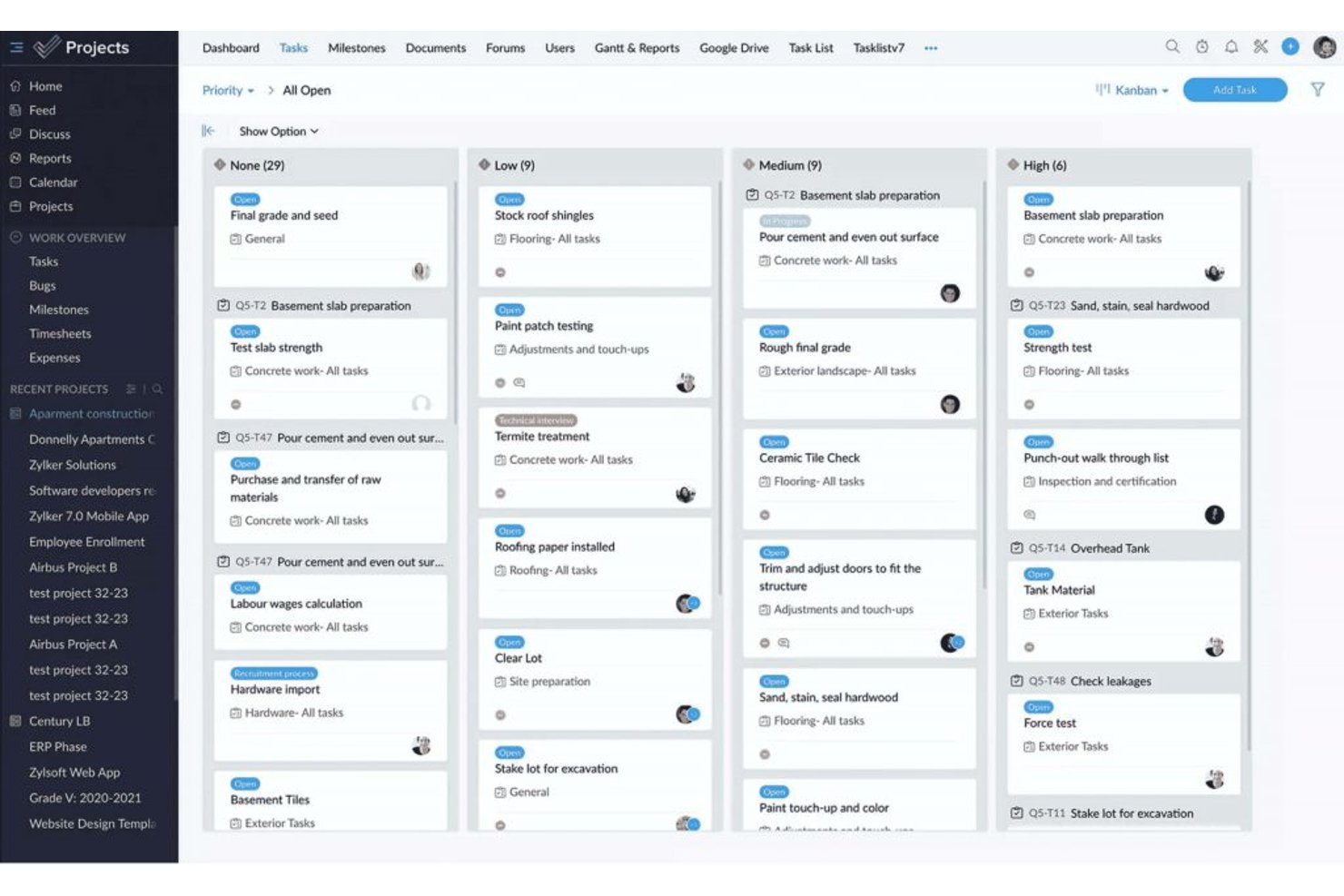
ProProfs Project is a project management tool that covers task planning, time tracking, team collaboration, and client billing across projects.
Who Is ProProfs Project Best For?
ProProfs Project suits small legal teams and solo practitioners who need straightforward time tracking and client billing without a steep learning curve.
Why I Picked ProProfs Project
I picked ProProfs Project as one of the best because it handles the two things legal teams lose the most time to: logging billable hours and turning those hours into client invoices. You can track time against specific tasks, compare actual hours to your estimates, and generate invoices directly from project data, so billing a client after a matter closes takes minutes rather than a manual reconciliation effort. Profitability reports then show margin, daily spend, and accumulated cost in one view.
ProProfs Project Key Features
- Task dependencies and baselines: Set task dependencies and capture baseline dates to compare original schedules against actual progress.
- Custom project templates: Build reusable templates from scratch or convert an existing project into a template for future matters.
- Guest client access: Add clients as guest users with configurable permissions to view updates, comment, and see estimated costs.
- Resource utilization reports: Review how team members are allocated across projects with dedicated resource and time-by-user reporting.
ProProfs Project Integrations
ProProfs Project has documented native integrations with Google Calendar, Google Drive, Dropbox, and Box. It also offers a REST API and webhooks for custom connections, but no native legal DMS, practice management, or e-billing integrations are documented.
Pros and Cons
Pros:
- Profitability reports connect hours and costs
- Reusable templates help repeat matter setup
- Billable-hour tracking supports client billing
Cons:
- No documented AFA tracking or alerts
- No legal-specific matter lifecycle controls

Asana
Best for AI-driven legal workflow automation
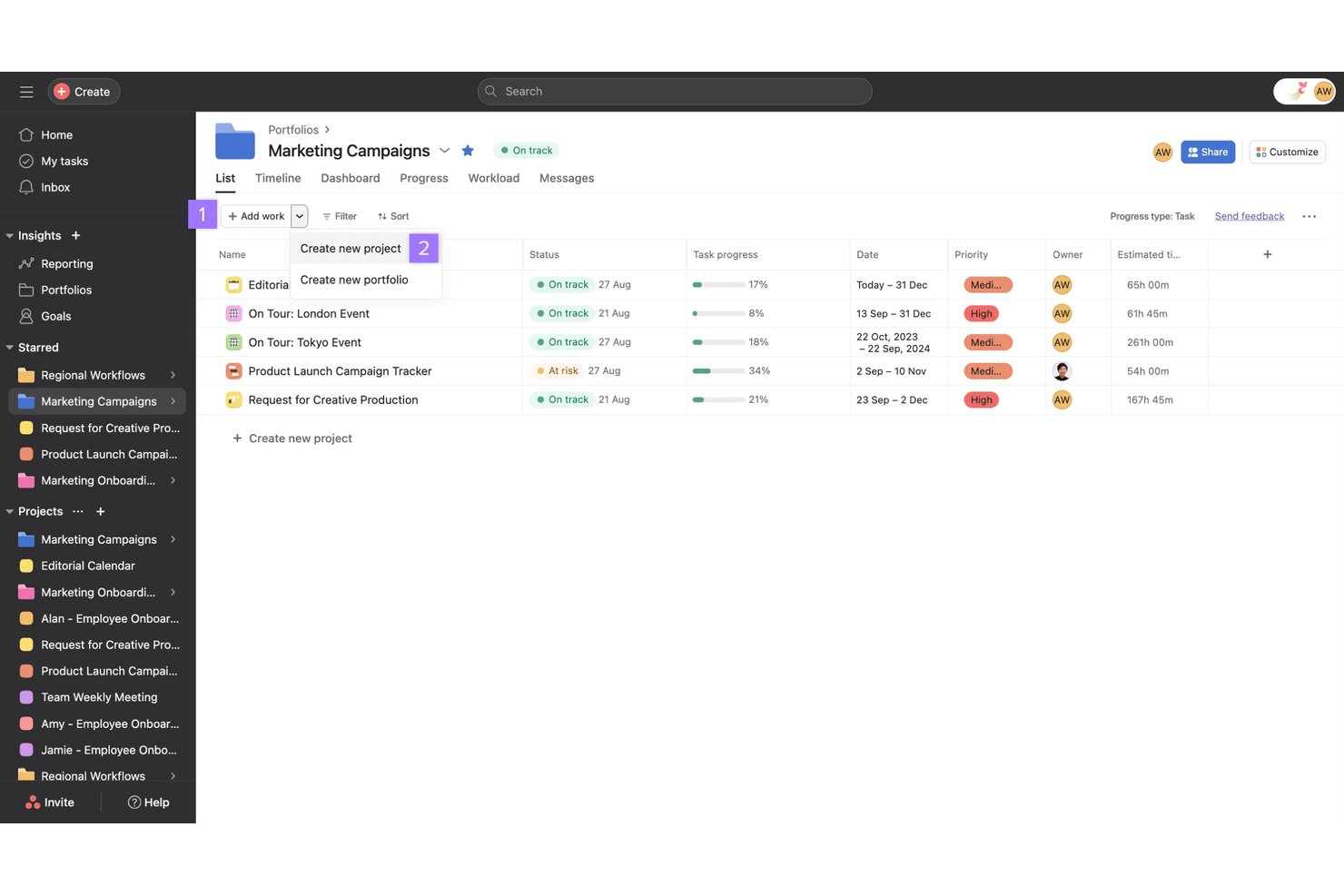
Asana is a work management platform that combines AI-powered workflow automation, task and project tracking, resource management, and reporting—adapted by legal teams for matter workflows, capacity planning, and cross-functional process standardization.
Who Is Asana Best For?
Asana works well for legal operations teams and small law firms that want to build structured matter workflows without investing in purpose-built legal software.
Why I Picked Asana
I've included Asana in my top picks because its AI Studio lets legal teams build no-code workflows that catch real operational problems, like tracking repeatedly moved due dates and surfacing patterns in workflow delays. I love that Keystone Law Group used it to build 50+ legal workflow templates with subtasks and estimated completion times, automating handoffs so the next person in a probate workflow gets notified automatically. That kind of AI-driven process standardization is difficult to replicate in generic project tools.
Asana Key Features
- Project views: Switch between list, board, calendar, timeline, and Gantt views to track matter progress across different stages.
- Intake forms with branching logic: Collect structured work requests and route them automatically based on submitter answers.
- Portfolio dashboards: View progress, health, and budget rollups across multiple matters or projects in one place.
- Workload visibility: See each team member's assigned work and capacity so you can redistribute tasks before someone gets overloaded.
Asana Integrations
Asana offers 100+ free marketplace integrations, including Everlaw, Google Drive, Microsoft 365, Slack, Jira Cloud, Salesforce, Tableau, and Power BI. It also supports Zapier, REST APIs, webhooks, client libraries, and an MCP Server for custom integrations.
Pros and Cons
Pros:
- Legal templates automate probate handoffs
- AI workflows flag recurring deadline slippage
- Reviewers value visible owners and deadlines
Cons:
- No court rules or conflict checks
- No AFA or fixed-fee tracking

Filevine
Best for automating matter workflow triggers
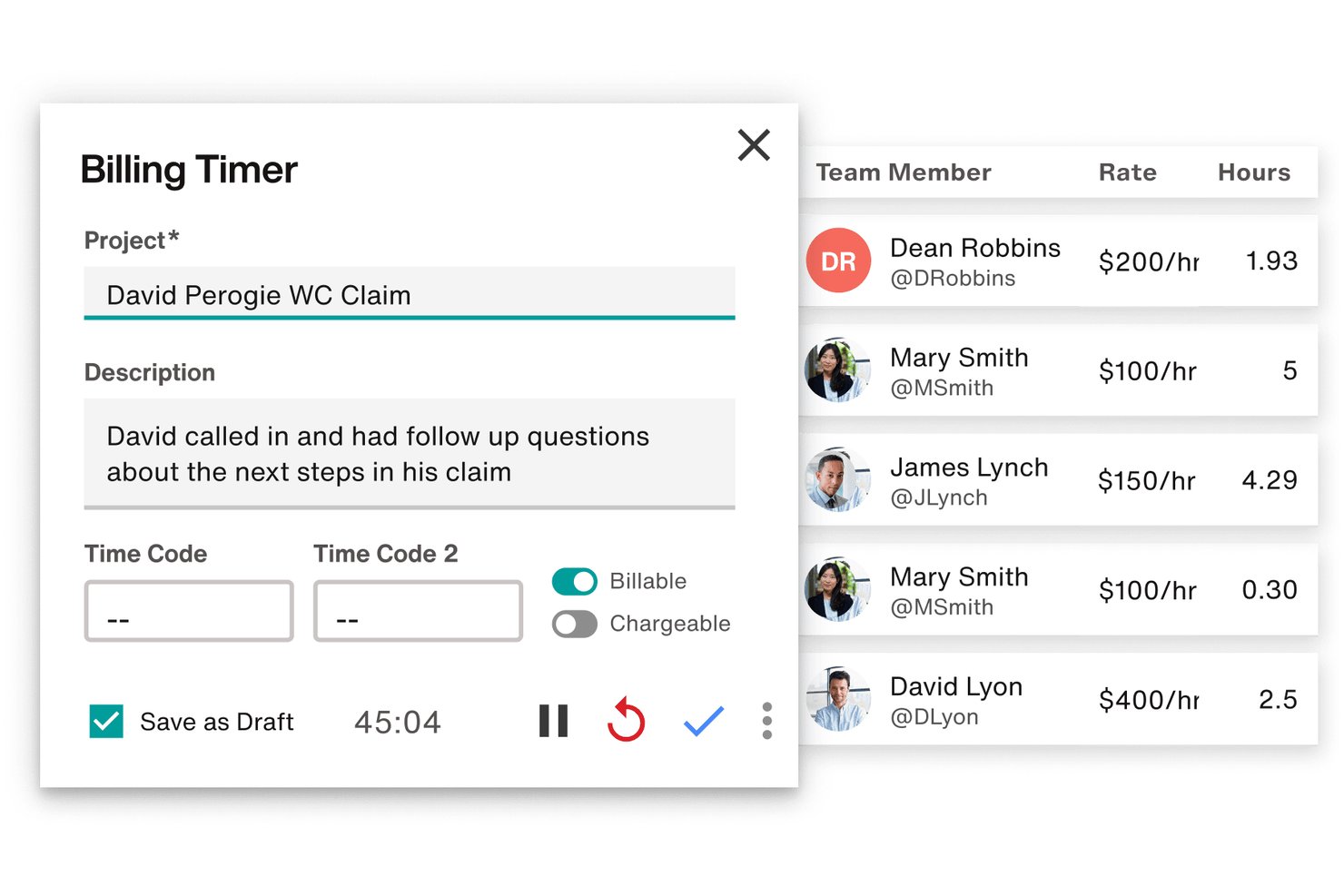
Filevine is a legal case and matter management platform that centralizes task tracking, deadline chains, document assembly, billing, and client communication across matters.
Who Is Filevine Best For?
Filevine works well for plaintiff-side and mid-size law firms that need to automate task triggers across high-volume caseloads.
Why I Picked Filevine
I picked Filevine as one of the best because its taskflow engine does something I genuinely find rare: it triggers entire task chains automatically when a matter changes phase or when a staff member clicks an action button. In a high-volume plaintiff firm, that means the moment a case moves from intake to active litigation, follow-up tasks get assigned to the right role without anyone building a to-do list manually. I also like that deadline chains calculate dependent dates from a single anchor date, including branching options for alternative scheduling scenarios.
Filevine Key Features
- Centralized case workspace: Anchors emails, calendar events, time entries, documents, and case notes directly to their matter files in one place.
- Client Portal: Gives clients secure, branded access to matter status, documents, communications, and invoices, with configurable billing and translation options.
- Conflict check section: Searches contacts across projects and your organization to surface potential conflicts, with results showing project roles, names, and phases.
- LEDES-compliant billing: Generates LEDES-formatted billing files and supports time entries, expense tracking, invoice management, and integrations with tools like QuickBooks and SurePoint.
Filevine Integrations
Filevine lists over 2,000 potential integrations, including QuickBooks, SurePoint, Soluno, Outlook, Microsoft Teams, Slack, and Google Calendar. It also supports API endpoints, webhooks, and Zapier for custom connectivity.
Pros and Cons
Pros:
- Reusable taskflows support repeatable matter processes
- Keeps case documents, notes, and communications together
- Automates role-assigned tasks when matter phases change
Cons:
- Search and activity feeds can obscure case details
- Workflow setup can demand substantial configuration effort

Best for court-deadline-driven matter tracking
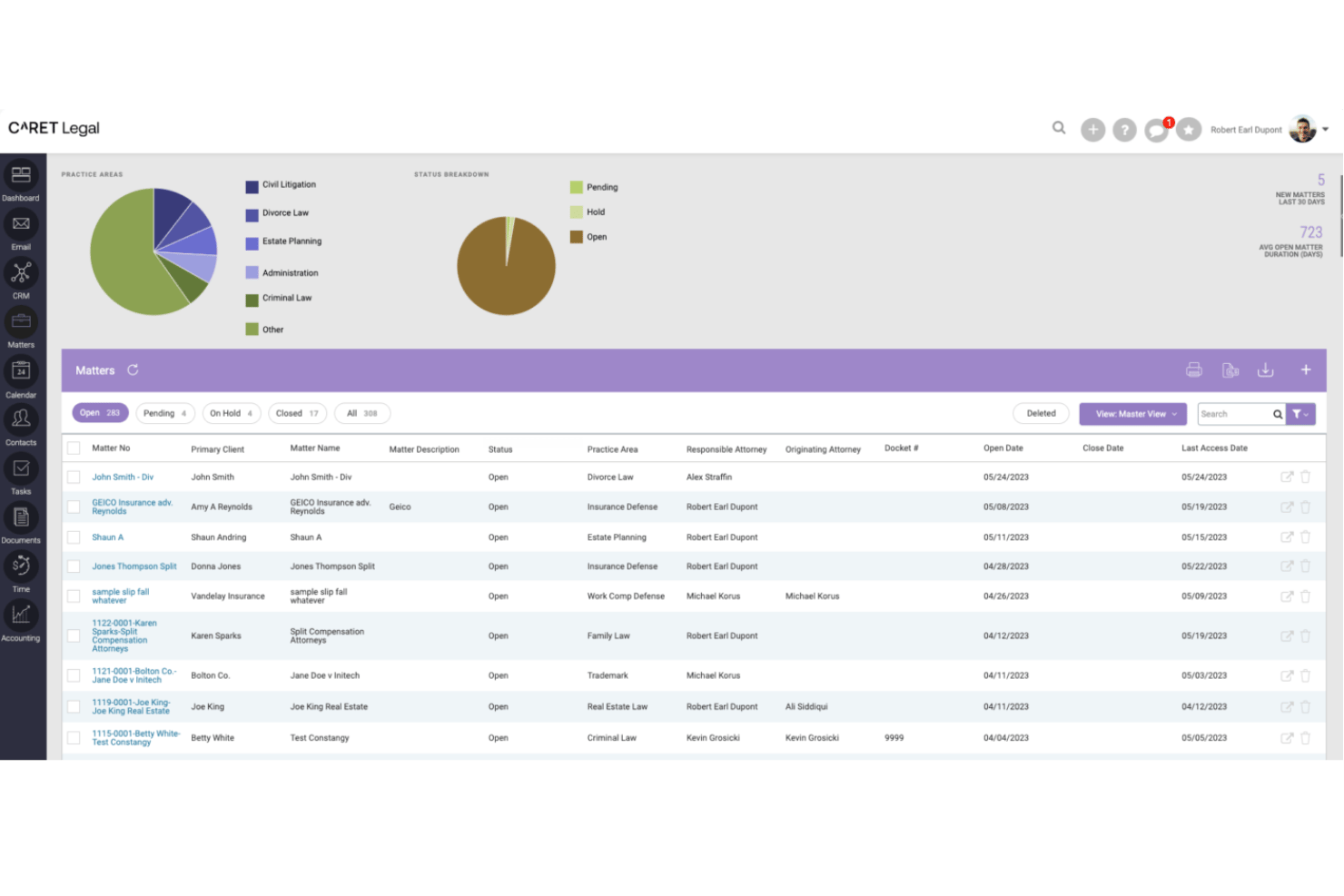
CARET Legal is a legal practice management platform that combines matter tracking, automated workflows, court-deadline calculation, billing, LEDES invoicing, conflict checking, and document management for law firms.
Who Is CARET Legal Best For?
CARET Legal suits law firms that need court-deadline-driven matter tracking built into their billing, workflows, and document management.
Why I Picked CARET Legal
I picked CARET Legal as one of the best because its Court Rules engine does something I haven't seen handled this cleanly elsewhere: it calculates matter deadlines directly from your selected venue and rule set, then reschedules dependent events automatically when a trigger date changes. Pair that with workflow templates that support dependencies, parallel steps, and matter-role assignment, and you get a system where court-driven timelines actually flow into day-to-day task coordination without manual reconciliation.
CARET Legal Key Features
- LEDES task code budgeting: Track matter spend by UTBMS activity codes to monitor billing against budget thresholds at the matter level.
- Enhanced conflict check: Search leads and matters using Boolean syntax with AND, OR, NOT, and wildcards, with results linked directly to records.
- Group-based matter permissions: Assign user groups to specific matters so only authorized staff can view or access sensitive matter content.
- Client portal with invoice delivery: Share documents and send invoices directly to clients through a branded portal, with credit card payment supported via CARET Pay.
CARET Legal Integrations
CARET Legal lists integrations with NetDocuments, Microsoft 365, Google Workspace, QuickBooks Online, Lawmatics, and CARET Pay. It also offers an API for custom integrations.
Pros and Cons
Pros:
- Matter records centralize documents, billing, communications
- Workflow automation clarifies task ownership
- Court-rule dates reschedule dependent events automatically
Cons:
- Email and calendar sync glitches disrupt work
- Reviewers report accounting and invoicing bugs

CosmoLex
Best for built-in trust accounting compliance
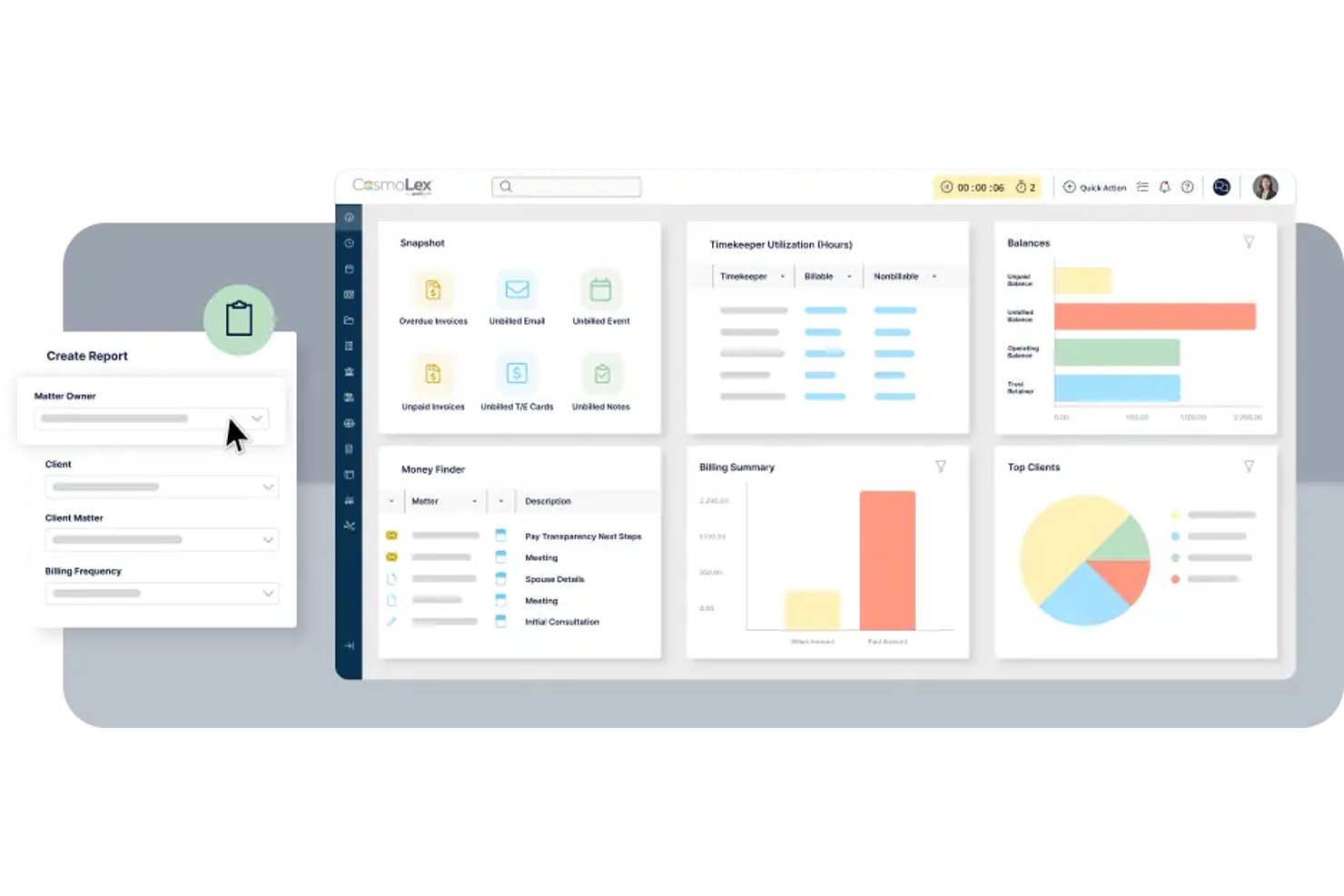
CosmoLex is a cloud-based legal practice management platform that combines matter management, task workflows, time tracking, billing, and firm accounting—including trust accounting—in a single system for law firms.
Who Is CosmoLex Best For?
CosmoLex suits small to mid-sized law firms that need billing, trust accounting, and matter management in one place without stitching together separate tools.
Why I Picked CosmoLex
I picked CosmoLex as one of the best because trust accounting compliance is baked directly into the platform rather than bolted on as an afterthought. Every client retainer flows into a separate trust ledger with automatic bookkeeping, and the three-way reconciliation reports are built to satisfy bar compliance requirements without manual prep work. I also like that matter budgets connect directly to billing data, so you can see fee performance by timekeeper or matter type without exporting to a separate tool.
CosmoLex Key Features
- Workflow automation: Create and save practice-area workflows with task dependencies, assignees, priorities, and calculated due dates, then apply them to any matter.
- Matter status boards: View and manage deadlines and matter progress across active matters from a visual status board.
- Financial productivity reporting: Track billed fees, collected amounts, hours worked, effective rates, and billing productivity by timekeeper, matter owner, or area of law.
- Conflict check tool: Search contacts to surface potential conflicts and their relationships to other matters before opening a new client file.
CosmoLex Integrations
CosmoLex offers integrations with Microsoft 365, Microsoft Outlook, Google Calendar, NetDocuments, Dropbox, OneDrive, Google Drive, Box, QuickBooks Online, and LawPay. It also provides a REST API and supports Zapier.
Pros and Cons
Pros:
- Matter reports connect fees, hours, and timekeepers
- Trust ledgers and three-way reconciliations stay connected
- Repeatable workflows generate assigned, dependency-aware tasks
Cons:
- Reviewers report limited analysis and forecasting reports
- No capacity views for balancing attorney workloads

Best for matter-specific workflow templates
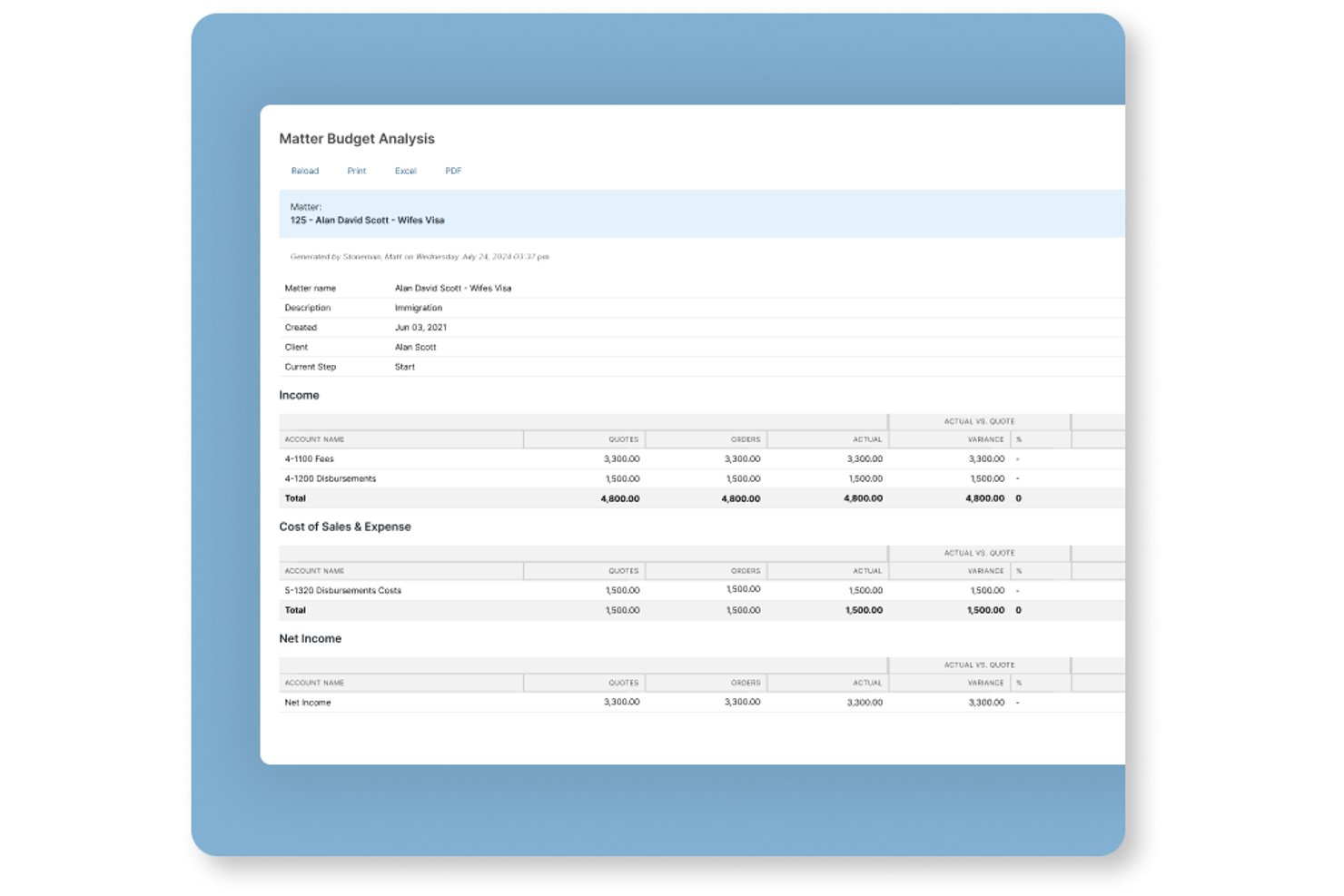
Actionstep is a law firm practice management platform that combines matter management, workflow automation, document handling, time tracking, billing, and client portal tools in one system.
Who Is Actionstep Best For?
Actionstep is a strong fit for mid-sized law firms that want to build and automate matter-specific workflows across multiple practice areas from a single platform.
Why I Picked Actionstep
I picked Actionstep as one of the best because its matter-type system lets you build fully customized workflow templates for each practice area, right down to task sequences, folder structures, document templates, and billing arrangements. One Capterra reviewer described running over 50 workflows with checklists and deadlines to standardize tax-litigation processes, which shows how deep the templating goes. I also like that certified implementation partners tailor those configurations to your firm's specific workflows before you go live.
Actionstep Key Features
- Client portal: Share matter updates, documents, and billing with clients through a dedicated portal built into the platform.
- Time tracking: Run multiple timers simultaneously and record notes against matters from different screens or the mobile app.
- Conflict check: Scan for potential conflicts of interest directly within the platform before opening a new matter.
- Resource and workload reporting: View utilization and productivity data across your team to monitor workload and identify bottlenecks.
Actionstep Integrations
Actionstep offers native integrations with Microsoft Outlook and Office 365, Gmail, iManage, InfoTrack Australia, and LawToolBox, plus marketplace integrations such as First AML and Lexidesk. It provides a REST API, REST Hooks, and Zapier for custom connectivity.
Pros and Cons
Pros:
- Client portal simplifies document exchange
- Centralized matter records improve team visibility
- Matter-specific workflows automate repeatable tasks
Cons:
- Workflow configuration takes time and effort
- Reporting dashboards can be hard to customize

HighQ
Best for external counsel collaboration at scale
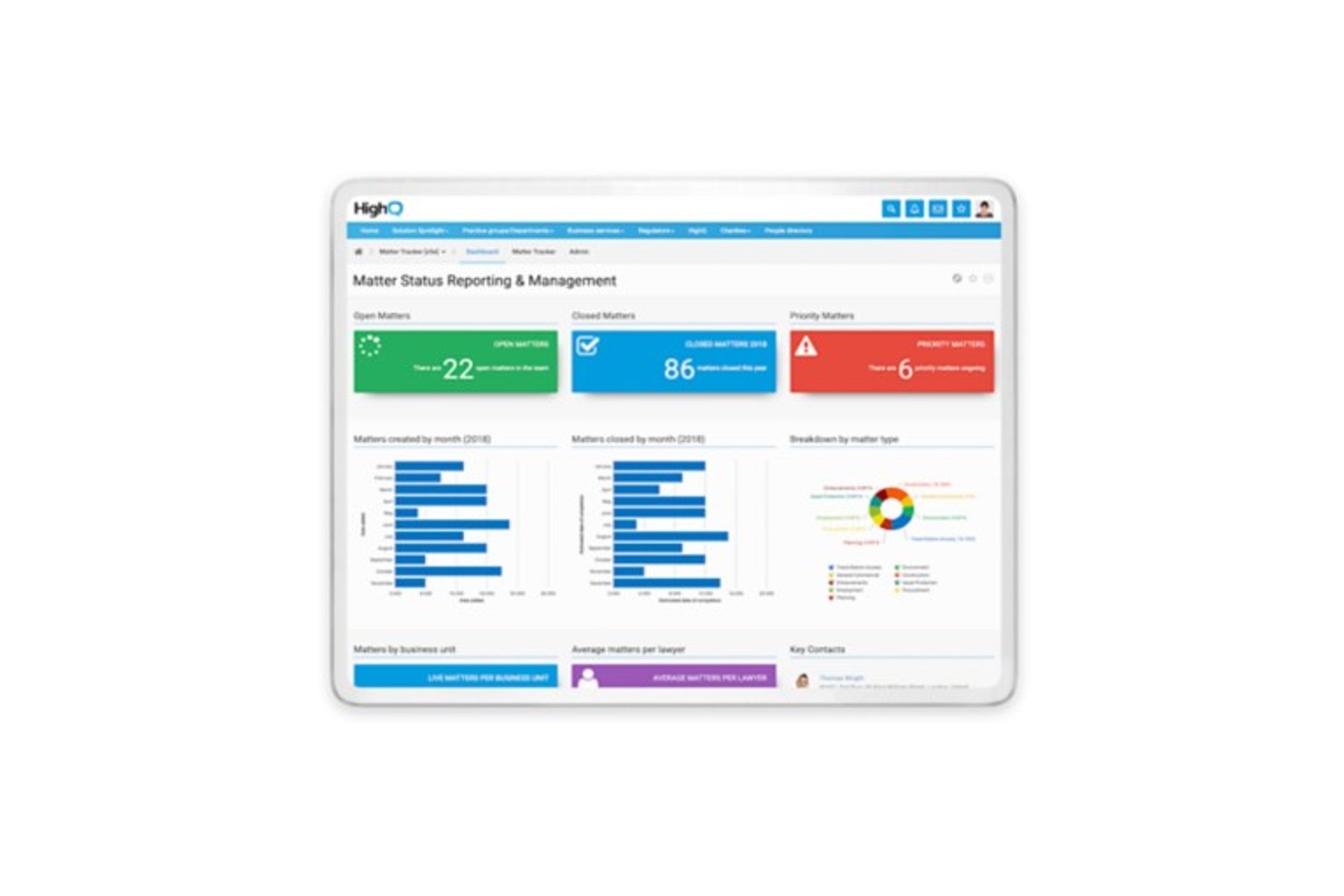
HighQ is a cloud-based legal collaboration platform from Thomson Reuters that combines secure document sharing, client portals, matter management, task tracking, and workflow automation for law firms and corporate legal departments.
Who Is HighQ Best For?
HighQ fits corporate legal departments and law firms that need to coordinate large volumes of matters and documents with outside counsel across a secure, centralized platform.
Why I Picked HighQ
I've included HighQ in my top picks because it's one of the few platforms built specifically around the reality of coordinating legal work across internal teams and outside counsel at scale. Client portals give external counsel secure, real-time access to matter status and shared documents, while the Extranet model bundles five external user seats per internal licence. I also like the site template library, which lets teams spin up structured matter sites with task lists, folder hierarchies, and workflow rules already in place.
HighQ Key Features
- Spend-vs-budget dashboards: Monitor legal spend against budgets in real time, with automated alerts when projects approach or exceed thresholds.
- Virtual data rooms: Store, categorize, and collaborate on deal and matter documents in a centralized, secure environment.
- Granular user permissions: Control access at the site, folder, and document level, with activity tracking and digital rights management across internal and external users.
- iSheets and smart forms: Capture and manage structured matter data using configurable spreadsheet-style data sheets and intake forms built directly into matter sites.
HighQ Integrations
HighQ documents integrations with SharePoint, iManage, NetDocuments, eDocs, Microsoft Office, Google Workspace, Active Directory, and SQL through connectors and partner solutions. It also provides an API for custom integrations.
Pros and Cons
Pros:
- Dashboards track matter status, spend, and risk
- Reusable templates standardize recurring legal workflows
- Secure portals coordinate outside counsel on matters
Cons:
- Complex setup and dated interface slow adoption
- AFA tracking and budget variance remain undocumented

Smartsheet
Best for spreadsheet-style matter tracking
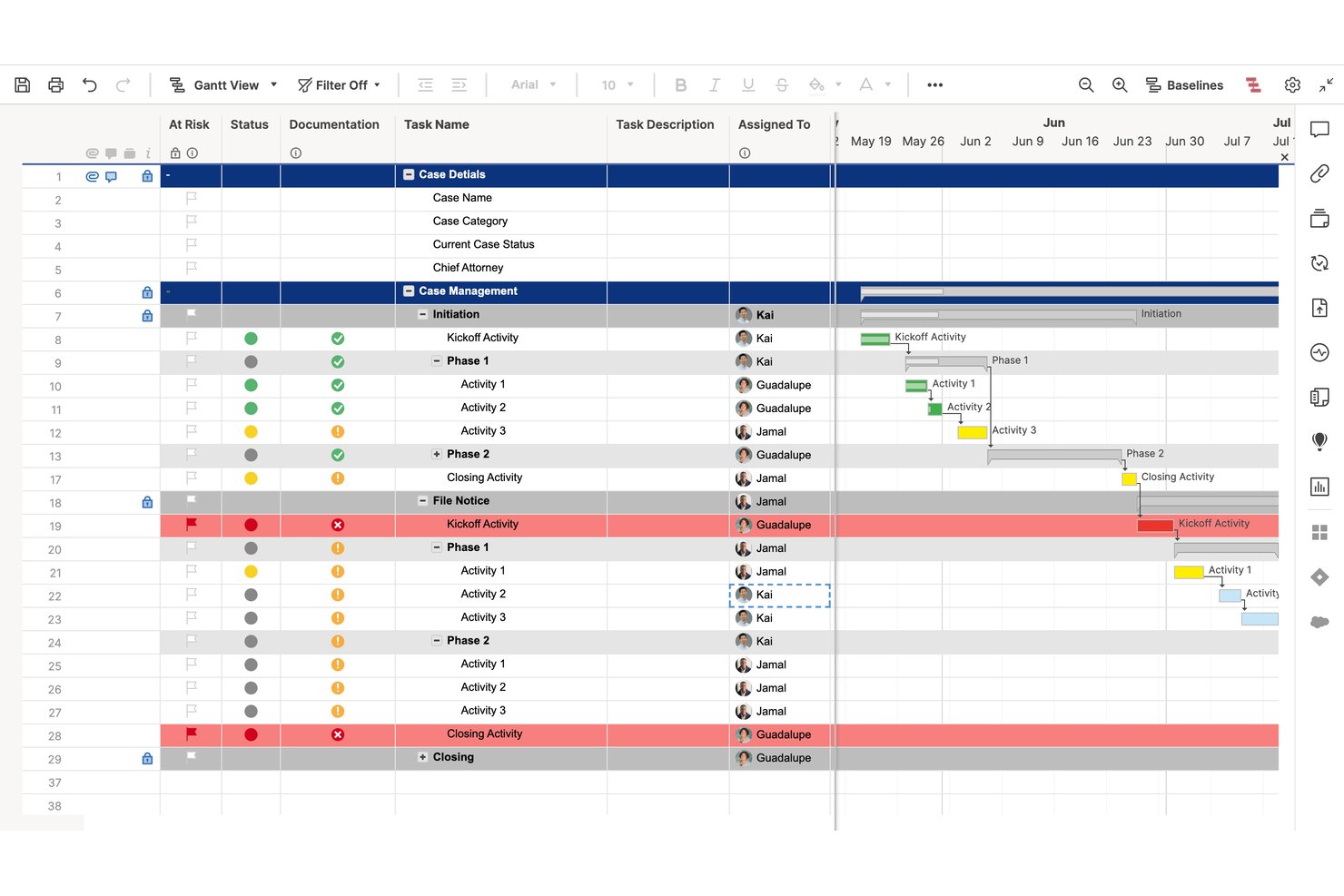
Smartsheet is a spreadsheet-style work management platform that combines project tracking, task management, automated workflows, resource allocation, and reporting across Gantt, grid, board, and timeline views—with legal case management templates built in.
Who Is Smartsheet Best For?
Smartsheet suits legal teams and law firms that already work in spreadsheets and want to manage matters, track workloads, and automate workflows without switching to an unfamiliar interface.
Why I Picked Smartsheet
I've included Smartsheet in my top picks because legal teams already living in spreadsheets don't have to relearn how to work—they just start tracking matters in a grid they already understand. The Legal Case Management Template structures case phases, associated tasks, start and due dates, and completion percentages out of the box, so you're not building from scratch. I also like that Resource Management layers workload heatmaps and capacity planning on top of that familiar grid, giving you attorney-level visibility across multiple active matters at once.
Smartsheet Key Features
- Legal Case Management Template: A pre-built template that tracks case phases, start and due dates, task completion percentages, and document storage in one shared grid.
- Automated workflow builder: A trigger-and-condition workflow tool that automates reminders, approval requests, row moves, and status alerts across active matters.
- Granular permission levels: Sheet-level access controls that let you set viewer, commenter, editor, or admin permissions for each team member or external collaborator.
- Multi-sheet reporting: A report builder that pulls data from multiple sheets into a single consolidated view for cross-matter status tracking.
Smartsheet Integrations
Smartsheet offers 175+ integrations, including Jira Software, Power BI, Salesforce, Slack, Microsoft Teams, Google Drive, and DocuSign. It also provides an API for custom integrations and Data Shuttle for scheduled CSV and XLSX imports.
Pros and Cons
Pros:
- Shared dashboards clarify attorney workloads
- Legal templates structure case phases and tasks
- Spreadsheet-style matter tracking feels familiar
Cons:
- No jurisdiction-specific court deadline engine
- No automated matter profitability analysis
New Product Updates from Smartsheet

Smartsheet Adds Non-Plan User Management in Admin Center
Smartsheet adds a Non plan users tab to the Seat types and true-up page in Admin Center. This lets system admins review non-plan users and add them to the plan or remove them from the organization in one place. For more information, visit Smartsheet’s official site.
 .
Diğer Hukuki Proje Yönetimi Yazılımları
İşte en iyi listeme giremeyen bazı ek hukuki proje yönetimi araçları. Yukarıda aradığınızı bulamadıysanız bunlara göz atın.
- Zoho Projects
For Zoho ecosystem budget tracking
- monday AI Workspace
For AI-driven project collaboration
- Onit SimpleLegal
For corporate legal spend and matter ops
- Clio Manage
For cloud-based matter and client portals
- Litify
For high-volume practice workflow automation
- Mitratech TeamConnect
For enterprise legal spend and matter control


İlgili Proje Yönetimi Yazılımı İncelemeleri
Hâlâ aradığınızı bulamadıysanız test edip incelediğimiz şu ilgili proje yönetimi araçlarına göz atın.
- Proje Yönetimi Yazılımı
- Kaynak Yönetimi Yazılımı
- İş Akışı Otomasyonu Yazılımı
- Görev Yönetimi Yazılımı
- İş Birliği Araçları
- Gantt Şeması Oluşturucu
How I Evaluate Legal Project Management Software
I split my evaluation into three parts, with the most weight on core functionality: tracking matter budgets against spend and assigning tasks with deadlines and status. Next, I look for standout features such as court-rule deadline calculation. Finally, I consider beyond-feature factors like onboarding, support, and pricing value.
Core Functionality (Table Stakes For This List)
When I'm selecting tools for my list, I score each one on a scale from 0 (does not offer the functionality) to 5 (excels in this area) for each core functionality listed below. I then convert the total into a percentage to help assess each tool's overall fit, with extra weight on any functionalities I’ve deemed essential.
- Matter Tracking (Essential): I look for matter timelines, phases, milestones, and task links that make progress visible across complex work.
- Budget & Fee Tracking (Essential): I assess whether teams can compare budgets with actual costs and track fixed fees or AFAs as work progresses.
- Task & Workflow Management: I check for assigned owners, deadlines, dependencies, and status updates across repeatable work such as contract reviews.
- Resource & Workload Planning: I look for views of assignments across active matters to help legal teams spot overloaded staff and rebalance work.
- Legal Workflow Templates: I consider whether editable templates cover recurring legal processes, so teams can standardize steps without losing flexibility.
- Reporting & Analytics: I evaluate whether reports show matter status, budget performance, and workload trends across teams.
Once I have a list of tools that meet the criteria, I consider what sets each platform apart.
Differentiating Factors (What Sets Vendors Apart)
Here's how I compare and contrast different vendors:
Standout Features
I check whether a tool includes a court rules engine that auto-calculates filing and response deadlines based on jurisdiction-specific procedural rules—missing a statutory deadline is a risk no workflow board can fix. I also evaluate conflict check support during matter intake, since flagging overlapping parties early prevents ethical issues downstream. Native DMS integration with systems like iManage or NetDocuments matters too; generic file storage won't cut it when teams need version-controlled documents tied directly to matter records.
Beyond Features
I check whether a vendor offers ethical walls and granular access controls, since firms handling litigation need to segregate sensitive matter data from unauthorized staff. Integration with existing practice management and e-billing systems matters too—duplicate data entry between timekeeping and project tracking kills adoption. I also evaluate onboarding and change management support, because legal teams often resist new workflows and vendor-led training directly affects how quickly a rollout sticks.
Hukuki Proje Yönetimi Yazılımı Nasıl Seçilir?
Uzun özellik listeleri ve karmaşık fiyatlandırma yapılarına takılıp kalmak kolaydır. Kendinize özgü yazılım seçimi sürecinizde ilerlerken odağınızı korumanıza yardımcı olmak için şu faktörleri göz önünde bulundurabileceğiniz bir kontrol listesi hazırladım:
| Faktör | Dikkat Edilmesi Gerekenler |
|---|---|
| Ölçeklenebilirlik | Yazılımınız hukuk büronuzla birlikte büyüyecek mi? Artan dava yüklerini ve ekip genişlemesini yönetebildiğinden emin olun. |
| Entegrasyonlar | Faturalandırma ve belge yönetimi sistemleri gibi hâlihazırda kullandığınız araçlarla bağlantı kurup kuramadığını kontrol edin. |
| Özelleştirilebilirlik | İş akışlarını ve panoları hukuk büronuzun süreçlerine ve tercihlerine uyacak şekilde özelleştirebilir misiniz? |
| Kullanım Kolaylığı | Yazılım ekibiniz için sezgisel mi? Eğitim ihtiyacını en aza indiren kullanıcı dostu bir arayüz arayın. |
| Bütçe | Mali planınıza uyuyor mu? Hem başlangıç maliyetlerini hem de devam eden abonelik ücretlerini değerlendirin. |
| Güvenlik Önlemleri | Müvekkil verileriniz ve dava dosyalarınız korunuyor mu? Şifreleme ve yasal standartlara uyumluluk özelliklerini arayın. |
| Destek | Güvenilir desteğe erişiminiz olacak mı? Müşteri hizmetlerinin ve eğitim seçeneklerinin kullanılabilirliğini değerlendirin. |
| Raporlama | Kapsamlı raporlama özellikleri sunuyor mu? Dava ilerlemesini ve sonuçlarını kolayca takip edebildiğinizden emin olun. |
Hukuki Proje Yönetimi Yazılımındaki Trendler
Hukuki proje yönetimi yazılımını şekillendiren dikkat çekici trendlerden bazıları şunlardır.
- Yapay zekâ destekli analiz: Hukuki proje yönetimi yazılımları, gelişmiş analizler ve öngörücü içgörüler gibi yapay zekâ özelliklerini giderek daha fazla sunuyor. Bu yapay zekâ algoritmaları, kalıpları belirlemek, sonuçları tahmin etmek ve kaynak tahsisini optimize etmek için geçmiş dava verilerini analiz eder.
- Daha iyi iş birliği araçları: Hukuki proje yönetimi yazılımlarındaki iş birliği özellikleri, hukuk profesyonelleri arasındaki iletişimi ve ekip çalışmasını teşvik ediyor. Sağlayıcılar daha gelişmiş gerçek zamanlı belge düzenleme, görev atama ve sohbet işlevleri sunuyor.
- Hukuki araştırma araçlarıyla entegrasyon: Hukuki proje yönetimi yazılımları, araştırma sürecini basitleştirmek ve karar verme sürecinizi iyileştirmek için hukuki araştırma platformlarıyla giderek daha fazla entegre oluyor. Yazılım içinde ilgili içtihatlara, yasalara ve yönetmeliklere erişerek daha bilinçli kararlar verebilirsiniz.
- Mobil erişilebilirlik: Hukuk sektöründe mobil cihazların kullanımının yaygınlaşmasıyla birlikte hukuki proje yönetimi yazılımları çoğu zaman mobil uygulamalar ve duyarlı web arayüzleri sunuyor. Bu sayede davaları yönetebilir, müvekkillerle iletişim kurabilir ve faturalandırılabilir saatleri hareket hâlindeyken takip edebilirsiniz.
- Siber güvenlik iyileştirmeleri: Veri güvenliği endişeleri artmaya devam ederken hukuki proje yönetimi yazılımı sağlayıcıları, hassas müvekkil bilgilerini korumak için güçlü siber güvenlik önlemleri uyguluyor. Şifreli iletişim, çok faktörlü kimlik doğrulama ve güvenli belge depolama gibi özellikler, gizli verilerin güvende kalmasını sağlamaya yardımcı olur.
Hukuki Proje Yönetimi Yazılımı Nedir?
Hukuki proje yönetimi yazılımı, davayla ilgili bilgileri düzenlemek, son tarihleri ve dönüm noktalarını takip etmek ve ekip üyeleriyle müvekkillerle iş birliği yapmak için kullanılan merkezi bir platformdur.
Hukuk profesyonelleri ve hukuk büroları bu yazılımı hukuki projeleri ve davaları yönetmek ve denetlemek, müvekkillerle iletişim kurmak, belgeleri düzenlemek ve görevler atamak için kullanır. Yazılım; iş akışlarını kolaylaştırmak, verimliliği artırmak ve hukuki projelerin etkili şekilde ve belirlenen zaman çizelgeleri içinde tamamlanmasını sağlamak için gereklidir.
Hukuki Proje Yönetimi Yazılımının Özellikleri
Hukuki proje yönetimi yazılımında aranması gereken temel özellikler şunlardır.
- Dava ve belge yönetimi: Bu özellik, davaları başlatılmasından sonuçlandırılmasına kadar yönetmenizi ve verimliliği ve düzeni artırmanızı sağlar.
- Müvekkil iletişim araçları: Merkezi iletişim ve belge paylaşımı özellikleri, müvekkil memnuniyetinin ve şeffaflığın korunmasına yardımcı olur.
- Zaman takibi: Bu özellik doğru faturalandırma, sunulan hizmetler için adil ücretlendirme ve artan kârlılık sağlar.
- Belge yönetimi ve depolama: Bu özellik belge erişimini kolaylaştırır, ekip üyeleri arasındaki iş birliğini teşvik eder ve veri güvenliği düzenlemelerine uyumlu kalmanıza yardımcı olur.
- Faturalandırma ve fatura düzenleme: Bu özellik nakit akışı yönetimini iyileştirmeye, faturalandırma hatalarını en aza indirmeye ve hukuk büronuzun mali durumunu güçlendirmeye yardımcı olur.
- Takvim ve son tarih yönetimi: Bu özellik görevleri zamanında tamamlamanıza ve davaların verimli şekilde ilerlemesini sağlamanıza yardımcı olur.
- Görev takibi ve atama: Bu özellik hesap verebilirliği ve görevlerin önceliklendirilmesini iyileştirir.
- Raporlama ve analiz: Bu özellik somut verilere dayanarak karar vermenizi, iyileştirme alanlarını belirlemenizi ve hukuk bürosu operasyonlarını optimize etmenizi sağlar.
- Mobil erişilebilirlik: Bu özellik görevleri her yerden yönetmenizi sağlayarak esnekliği ve verimliliği artırır.
- Şablonlar: Önceden tasarlanmış yapılar veya biçimler, yeni belgeler ya da projeler için başlangıç noktası olarak kullanılabilir.
- Zaman çizelgeleri: Bir proje içindeki olayların veya görevlerin kronolojik sırasını görsel olarak gösteren bu çizelgeler, düzenli kalmanıza yardımcı olur.
- Kullanıcı dostu arayüz: Kullanımı ve gezinmesi kolay bir arayüz, üretken bir çalışma ortamını teşvik eder.
- Bildirimler: Kullanıcıları önemli olaylar veya güncellemeler hakkında bilgilendiren uyarılar, planlama ve düzenleme konusunda yardımcı olabilir.
- Proje planlama: Bir projeyi tamamlamak için kapsamı, hedefleri ve gerekli adımları tanımlayabilmeniz gerekir. Bu, zaman çizelgelerinin ve projelerin planlandığı şekilde ilerlemesini sağlar.
- Durum güncellemeleri: Yazılım, görevlerin veya projelerin ilerleyişi hakkında düzenli güncellemeler sağlamanıza yardımcı olmalıdır; böylece tüm paydaşları bilgilendirebilirsiniz.
- Yapılacaklar listeleri: Bu özellik, sizin ve ekibinizin tamamlaması gereken görevlerin listelerini içerir.
- İş akışı otomasyonu: Yazılım, süreçleri hızlandırmak için iş akışlarınızdaki tekrarlayan görevleri otomatikleştirmenize olanak tanımalıdır.
Hukuki Proje Yönetimi Yazılımının Faydaları
Hukuki proje yönetimi yazılımını uygulamanın başlıca faydaları şunlardır.
- Daha iyi organizasyon: Hukuki proje yönetimi yazılımı; dava bilgilerini, son teslim tarihlerini, belgeleri ve iletişimleri tek bir yerde merkezileştirerek düzenli kalmanıza ve son teslim tarihlerine uymanıza yardımcı olur.
- Daha iyi iş birliği: Yazılım, ekip üyeleri arasındaki iş birliğini teşvik ederek hukuki konularda etkili bir şekilde birlikte çalışmanıza, belgeleri paylaşmanıza ve güncellemeleri gerçek zamanlı olarak iletmenize olanak tanır.
- Artan üretkenlik: Görev atama, otomatik iş akışları ve zaman takibi gibi özelliklerle hukuki proje yönetimi yazılımı iş yükünüzü daha verimli bir şekilde yönetmenize, görevleri daha hızlı tamamlamanıza ve müşteriler için daha iyi sonuçlar elde etmenize yardımcı olur.
- Daha iyi müşteri iletişimi: Hukuki proje yönetimi yazılımı, müşterilere dava güncellemelerine, belgelere ve ilerleme raporlarına erişim sağlayarak şeffaf iletişime olanak tanır. Bu, daha güçlü müşteri ilişkileri kurulmasını ve güven oluşturulmasını sağlar.
- Daha iyi uyumluluk: Hukuki proje yönetimi yazılımı, kuruluşların düzenleyici gerekliliklere uyum sağlamasına yardımcı olur. Ayrıca tüm hukuki süreçlerin ve belgelerin doğru şekilde yönetilmesini sağlayarak hata veya ihmallere ilişkin riski azaltır.
Hukuki Proje Yönetimi Yazılımı Maliyetleri ve Fiyatlandırması
Aşağıda plan seçeneklerini, fiyatları ve yaygın özellikleri özetledim.
| Plan Türü | Ortalama Fiyat | Yaygın Özellikler |
|---|---|---|
| Ücretsiz | $0 | Temel görev yönetimi, sınırlı belge depolama |
| Standart | $30/kullanıcı/ay | Görev yönetimi, belge depolama, iş birliği araçları |
| Profesyonel | $50/kullanıcı/ay | Gelişmiş görev yönetimi, belge otomasyonu, raporlama |
| Kurumsal | Özel fiyatlandırma | Özelleştirilebilir iş akışları, gelişmiş raporlama, API erişimi |
Hukuki Proje Yönetimi Yazılımı Hakkında Sıkça Sorulan Sorular
Hukuki proje yönetimi yazılımı tek başına çalışan hukukçular veya küçük hukuk büroları için uygun mudur?
Evet, birçok hukuki proje yönetimi yazılımı çözümü tek başına çalışan hukukçular ve küçük hukuk büroları için özel olarak hazırlanmış planlar sunar. Bu çözümler, daha küçük ekiplerin özel ihtiyaçlarını ve gereksinimlerini karşılamak için uygun fiyatlarla temel özellikler sağlar.
Hukuki proje yönetimi yazılımı genel proje yönetimi yazılımından nasıl farklıdır?
Genel proje yönetimi yazılımı çeşitli sektörlere uygun geniş işlevler sunabilirken hukuki proje yönetimi yazılımı, hukuk profesyonellerinin benzersiz ihtiyaçlarını ve iş akışlarını karşılamak üzere özel olarak tasarlanmıştır. Hukuki belge yönetimi ve müşteri iletişimi araçları gibi özel özellikler sunar.
Hukuki proje yönetimi yazılımı diğer hukuk yazılımlarıyla entegre olabilir mi?
Evet, birçok hukuki proje yönetimi yazılımı çözümü; hukuki faturalandırma, hukuk bürosu yönetimi ve elektronik keşif araçları gibi popüler hukuk yazılımı uygulamalarıyla entegrasyon sunar. Bu, veri alışverişini ve iş akışı otomasyonunu kolaylaştırır.
Hukuki proje yönetimi yazılımı bulut tabanlı mı yoksa şirket içinde mi çalışır?
Modern hukuki proje yönetimi yazılımı çözümlerinin çoğu bulut tabanlıdır; böylece verilerinize erişebilir ve internet bağlantısı olan her yerden çalışabilirsiniz. Bununla birlikte bazı çözümler, özel güvenlik veya uyumluluk gereksinimleri olan kuruluşlar için şirket içinde kullanım seçenekleri sunabilir.
Hukuk bürom için doğru hukuki proje yönetimi yazılımını nasıl seçerim?
Bir hukuki proje yönetimi yazılımı çözümü seçerken hukuk büronuzun büyüklüğü ve bütçesi, ihtiyaç duyduğunuz belirli özellikler ve işlevler, kullanım kolaylığı, müşteri desteği ve entegrasyon olanakları gibi faktörleri göz önünde bulundurun. Karar vermeden önce yazılımı test etmek için ücretsiz denemelerden veya tanıtımlardan yararlanmak da faydalıdır.