

2026’da Verimlilik İçin En İyi 10 Proje İş Akışı Aracı

10 En İyi Proje İş Akışı Yazılımları Kısa Listesi


Net bir iş akışı olmadan projeleri yönetmek, kedileri gütmeye çalışıyormuşsunuz gibi hissettirebilir—görevler gözden kaçar, ekip üyeleri kimin neden sorumlu olduğundan emin olamaz ve teslim tarihleri kaçırılmaya başlar. Çözümün bir araçta olduğunu biliyorsunuz; ancak piyasada bu kadar çok seçenek varken doğru aracı bulmak başlı başına bir proje gibi görünebilir.
Bu nedenle bu listeyi sizin için hazırladım. Proje yönetimi araçlarıyla ilgili deneyimimden yararlanarak en iyi proje iş akışı yazılımlarını derledim ve bilmeniz gereken önemli bilgileri özetledim—çünkü ihtiyacınız olan son şey, daha fazla iş akışı sorunu.
Why Trust Our Software Recommendations
Our team has been testing and reviewing software since 2012. As project managers ourselves, we know how difficult—and important—it is to choose the right software.
For this guide, we evaluated tools using hands-on testing and independent research, scoring tools using our selection criteria. We also draw on insights from industry thought leaders and practicing project management experts.
Our reviews reflect our human editorial judgment, not a sales pitch.
Expert reviewers:
Proje İş Akışı Yazılımları Karşılaştırma Tablosu
Bu karşılaştırma tablosu, en iyi proje iş akışı yazılımı seçimlerim için fiyatlandırma ayrıntılarını özetlemektedir.
| Tool | Starting Price | Website | |
|---|---|---|---|
| Best for scalability | 4.3 out of 5 | $10/user/month Free plan + 14-day trial + demo available | Book Demo |
| Best for 200+ workflow automation options | 4.6 out of 5 | $9/user/month Free plan + 14-day trial available | Book Demo |
| Best for AI workflows that drive ROI | 4.6 out of 5 | Pricing upon request Not available | Book Demo |
| Best with 1,000+ prebuilt app connectors | — | Pricing upon request 30-day free trial available | Website |
| Best for pre-made templates | 4.8 out of 5 | $8/user/month Free plan + 14-day trial available | Book Demo |
| Best for team task management | 4.7 out of 5 | €17.50/user/month Free plan + 14-day free trial available | Website |
| Best for external collaborator work | 4.4 out of 5 | $9.99/user/month Free plan + 14-day free trial + free demo available | Website |
| Best for tracking project progress | 4.4 out of 5 | Pricing upon request 30-day free trial | Website |
| Best for agencies | 4.4 out of 5 | $9/user/month 7-day free trial | Website |
| Best for building process templates | 4.6 out of 5 | $10/user/month 14-day free trial | Website |
En İyi Proje İş Akışı Yazılımları İncelemeleri
Burada, bir aracı proje iş akışları için harika bir seçenek yapan özelliklerin ayrıntılarını bulabilirsiniz.
Wrike
Best for scalability
Wrike is a comprehensive project and work management platform designed for scaling organizations.
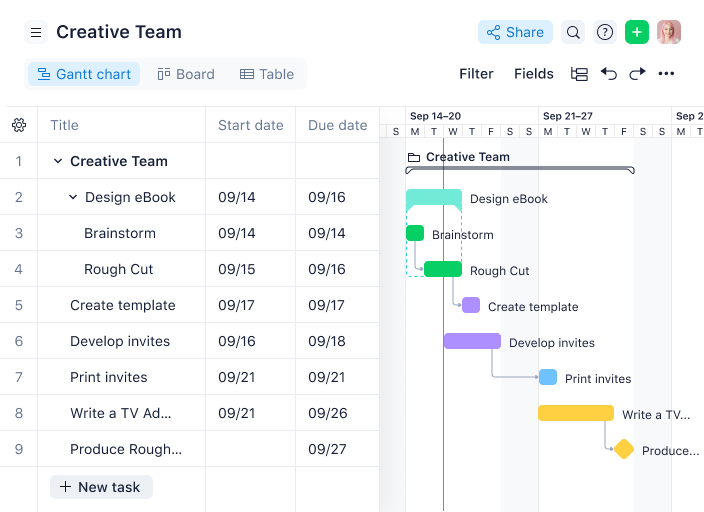
Why I picked Wrike: Let’s focus on the part of this platform that allows us to handle our project. From the home panel, we can navigate to our projects section and, by default, land on the list view. My recommendation is that if you are only starting to define your project you head to the table view. Basically an Excel spreadsheet that will allow you to input information.
Once you are done with recording the tasks, I recommend going to the Gantt chart view. There, you can play around with the arrows and visually connect tasks. This helped me a lot because I can’t make decisions based on cells. I need to see how the tasks are interconnected, duration and if it makes sense to deliver those tasks in that amount of time.
Recommendation: Hover over the left-hand side of the bar chart and look for the arrow that hides the cells on the left. This will help you have a much better, unobstructed view of what you have created.
Wrike Standout Features & Integrations
Features include pre-built templates, custom request forms, interactive Gantt charts, visual proofing, workflow automations, time tracking, project portfolio management, and dashboards.
Integrations include 400+ pre-built native integrations, including integrations with the most popular file management software from Microsoft, Google, and Dropbox, along with sales and marketing software from Salesforce and Marketo.
New Product Updates from Wrike

Wrike Redesigns Workspace Search With New Filters
Wrike introduces a redesigned Workspace Search interface with recent search shortcuts, item type and location filters, and parent-task context. These updates help users find relevant work items and navigate search results efficiently. For more information, visit Wrike’s official site.
 .
Best for 200+ workflow automation options
monday AI Workspace is a project workflow platform that combines customizable task boards, multi-stage workflow automation, AI-assisted planning, and cross-functional collaboration tools in one connected workspace.
Who Is monday AI Workspace Best For?
It's a strong fit for mid-sized to enterprise teams managing workflows across multiple departments, where process standardization and automation are ongoing priorities.
Why I Picked monday AI Workspace
I picked monday AI Workspace because the 200+ automation options go well beyond simple reminders. The AI workflow builder lets you orchestrate multi-step automations that span boards and departments, connecting AI agents, status triggers, and cross-team handoffs in one flow. My team uses this to automatically reroute tasks when a deadline shifts and trigger department-specific notifications when a project stage closes.
monday AI Workspace Key Features
- Custom dashboards and reporting: Build real-time dashboards with portfolio-level rollups and exportable reports.
- Resource and workload management: Visualize team member capacity and dynamically adjust assignments across projects.
- Client and guest access controls: Set granular permissions for external stakeholders without requiring full paid seats.
- Intake forms and request management: Convert submissions directly into tasks that flow into the correct workflow stage.
monday AI Workspace Integrations
monday AI Workspace offers hundreds of native integrations, including Slack, Google Workspace, Microsoft 365, Salesforce, HubSpot, Zoom, Jira, GitHub, Trello, and Outlook. It also supports Zapier and provides an API for custom integrations.
Pros and Cons
Pros:
- Gantt, Kanban, and timeline views built in
- AI-generated task breakdowns from natural language
- 200+ automation templates ready to deploy
Cons:
- Board complexity grows quickly at scale
- Automation features locked behind higher-tier plans
New Product Updates from monday AI Workspace
monday AI Workspace Adds Human Approval Routing
monday AI Workspace adds a human-in-the-loop approval block to AI Workflows, sending approval requests and routing workflow paths based on responses. For more information, visit monday AI Workspace's official site.
 .

Best for AI workflows that drive ROI
Screendragon is a work management software for marketing teams that helps you with project, resource, and workflow management.
Why I picked Screendragon: Probably the most relevant workflow feature of this software is their visual workflow editor. Using a drag-and-drop functionality, this no- or low-code builder can help you create your workflows in an instant.
Their product seems more niche, as their offering is focused on marketing agency operations. The tasks module of their platform allows you to define the tasks needed for your project. A field called dependencies lets you establish the relationship between tasks. Overall, it has all the basic functionality you need to get started on those complex workflows.
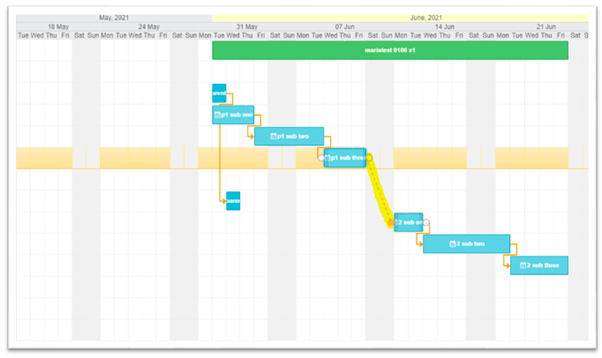
If you are more of a drag-and-drop person, you can also set dependencies from their Gantt view, which looks exactly like the one on the screenshot above.
Screendragon Standout Features & Integrations
Features include custom terminology, no-code workflow builder, SOW-to-plan automation, templates, forms, workflow rules, rates, notifications, and reporting.
Integrations are only available through a paid subscription with Zapier. You can use this to connect to thousands of apps using connectors.
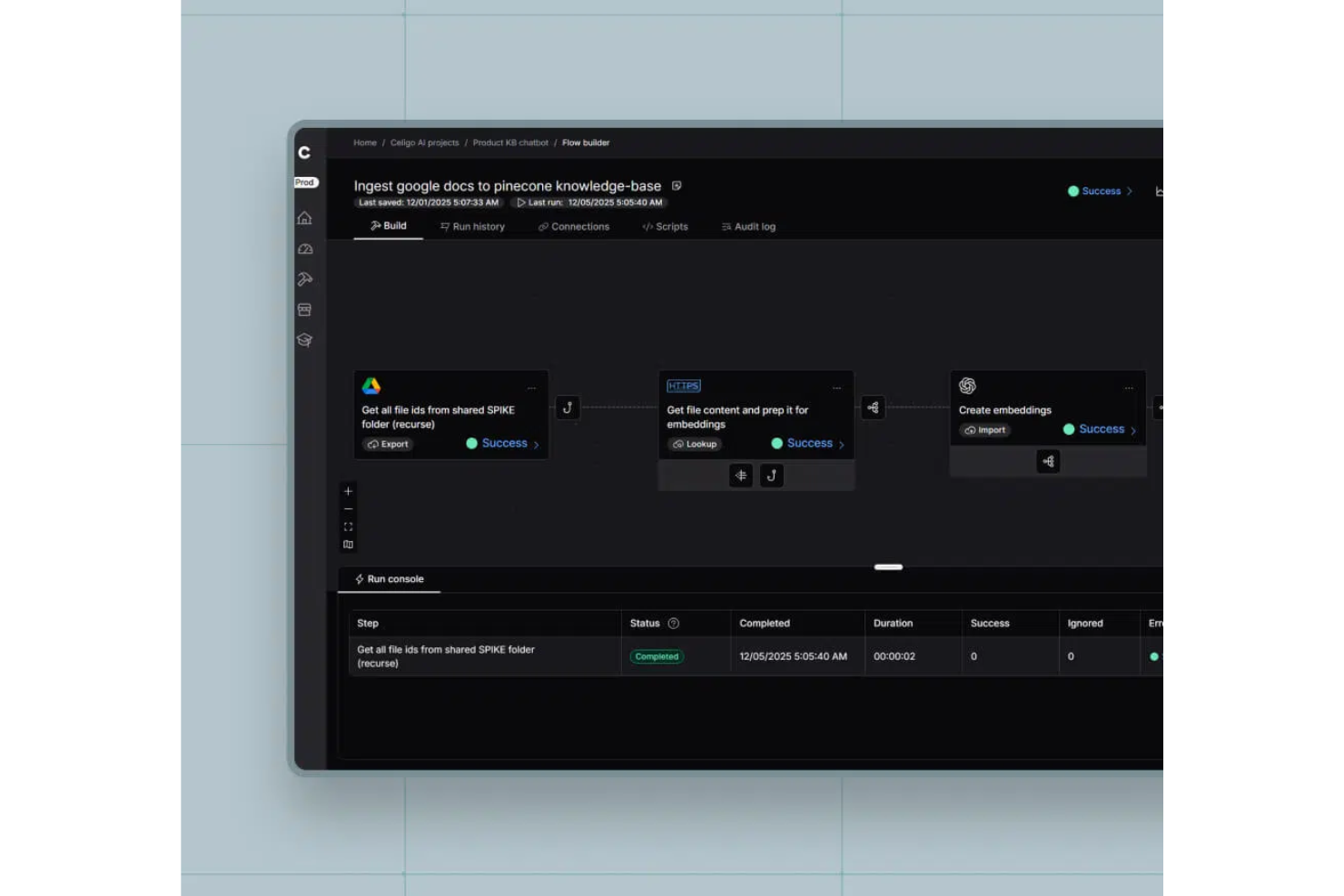
Celigo is an integration and workflow automation platform that lets you connect business apps, automate processes, and manage complex project workflows through a visual interface.
Who Is Celigo Best For?
Celigo suits IT teams and operations leaders at mid-sized to large businesses who need to automate and connect workflows across multiple cloud apps.
Why I Picked Celigo
I picked Celigo as one of the best because I can connect nearly any business app my team uses, thanks to its 1,000+ prebuilt connectors. When we need to automate workflows between tools like Salesforce, NetSuite, and Jira, I just select the connectors and map the data. This lets us orchestrate complex, multi-app project workflows without custom development.
Celigo Key Features
- Visual flow builder: Design and manage workflow automations using a drag-and-drop interface.
- Error management dashboard: Monitor, troubleshoot, and resolve integration errors in real time.
- Role-based access controls: Set permissions and manage user access for different workflow components.
- Automated data mapping: Map and transform data fields between connected applications automatically.
Celigo Integrations
Celigo offers 1,000+ native integrations, including Salesforce, NetSuite, Jira, ServiceNow, Shopify, Zendesk, HubSpot, Microsoft 365, Google Workspace, and Slack. An API is available for custom integrations.
Pros and Cons
Pros:
- Real-time monitoring and error resolution features
- Visual workflow builder with drag-and-drop tools
- Granular user permissions for secure collaboration
Cons:
- Documentation can be inconsistent for complex workflows
- Limited offline functionality for workflow management
New Product Updates from Celigo
Celigo Expands Storage, Data Imports, and Connection Management
Celigo adds a standalone storage connector, optimized Azure Synapse imports, NetSuite OAuth 2.0, flexible file templates, and expanded MCP access controls. These updates help teams manage files, process data, and secure integrations. For more information, visit Celigo’s official site.
 .

Miro
Best for pre-made templates

Miro is an online collaborative whiteboard platform designed to facilitate project workflow management. You can brainstorm, plan, visualize, and manage your projects and access them from anywhere.
Why I picked Miro: Miro distinguishes itself with its expansive selection of pre-made templates, catering to various project types and industries. This key feature, alongside the ability to upload and enhance existing diagrams from other tools, offers flexibility in project visualization.
Moreover, Miro's dependencies app provides insightful visualizations of task relationships, aiding in meticulous project workflow planning. Collaboration is further facilitated through interactive tools that enable team members to communicate, share feedback, and align project goals efficiently, all within a single, intuitive interface.
Miro Standout Features & Integrations
Standout features include its infinite canvas which provides unlimited space for brainstorming and project mapping, accommodating complex workflows without constraints. Additionally, Miro's extensive template library offers ready-to-use templates for various activities, expediting your workflow processes. But, if you are into AI, you'll be excited to know that Miro AI features work great. It basically turns your entire canvas into a prompt and it can help you create summaries of things, documents, cluster sticky notes, and brainstorm.
Integrations include Confluence, Zoom, Microsoft Teams, Slack, Google Workspace, Asana, monday.com, Jira, Dropbox, OneDrive, Notion, Airtable, ClickUp, and Unito, among others.
New Product Updates from Miro
Miro Adds Japan Data Residency for Enterprise Customers
Miro has introduced Japan data residency for enterprise customers, offering in-region storage for production data, backups, and metadata, plus in-region compute infrastructure. For more information, visit Miro's official site.
 .
Best for team task management

MeisterTask is a task management tool that is designed to cater to a variety of use cases, including individual task management, agile project management, and facilitating collaboration among remote teams. The tool particularly utilizes Kanban boards to help users organize and prioritize their tasks visually.
Why I picked MeisterTask: MeisterTask aids in project workflow management by offering features such as Kanban-style boards and Gantt-style timelines, which provide visual representations of tasks and their progress. The software includes automations that can streamline repetitive processes, and integrations that allow for a more connected workflow with other tools. MeisterTask also emphasizes the importance of real-time updates and cloud-based accessibility, which are crucial for maintaining up-to-date project statuses and enabling team collaboration.
Additionally, the tool generates reports that assist in data-driven decision-making, helping teams to manage their workload more effectively and boost productivity. MeisterTask also focuses on user support and privacy, employing necessary technologies to enhance the user experience and provide personalized online experiences. These features collectively contribute to the management of project workflows, offering clarity and ease of use for teams.
MeisterTask Standout Features & Integrations
Standout features like Kanban-style boards offer a visual representation of tasks, enabling you to manage and track progress efficiently. Additionally, the platform provides automation capabilities that streamline repetitive processes, allowing teams to focus on more critical tasks. A special mention to their security features like SSL encryption and GDPR compliance.
Integrations include Google Calendar, Outlook Calendar, Microsoft Teams, Slack, GitHub, Zendesk, Spark, and PomoDone.
Best for external collaborator work

Teamwork is a project management software that has been designed to scale with your operation, as it has multiple integrations and features that can be plugged into your software as you grow.
Why I picked Teamwork: Finally a project workflow tool for all of us who have attention problems! Sometimes I find myself working on project #3, when BAM! 💥a trigger makes me remember that I forgot to add that task I discussed about 15 minutes ago to project #1. However, I’m in the middle of this update and I don’t want to change views and change my focus. Enter: quick add!
Quick add allows you to add a task to any project from any place you are within the tool. Unfortunately, this button will not allow you to add subtasks but I’m sure the people at Teamwork reading this are taking notes. Even though their Gantt view is not the most visually friendly, workflows are easy to follow with their other views. Table view is good if you are transitioning from Excel or other cell-based software. Table view shows the tasks, dates, priority, and assignee in the same place.
Warning: the default view filter is set to show incomplete tasks only. This will remove any tasks that you complete and that may scare you! Make sure you set the dropdown to view all tasks on the top-right corner. You’re welcome!
Teamwork Standout Features & Integrations
Standout features include its capacity planning module which can help you identify if you have the right people for incoming work and ensure healthy utilization across projects. Another feature worth noting is the profitability reports that give you information on every retainer and allow you to make data-driven decisions.
Integrations include Google Drive, Box, OneDrive, Dropbox, Slack, Microsoft Teams, MS Office, Harvest, Quickbooks, Xero, Hubspot, SharePoint, Microsoft Project, SoftSync, and hundreds of others using a paid plan through Zapier.
Best for tracking project progress

Camunda is an open-source project workflow software that enables organizations to model, automate, and monitor business processes.
Why I picked Camunda: It offers a comprehensive set of features for managing and tracking the progress of projects from beginning to end. From process modeling and automation to analytics and monitoring, Camunda makes it easy for organizations to keep their projects on track.
It provides users with tools for creating process models that define the steps in a project from start to finish. These models can be used as the basis for automating tasks such as data entry or document processing using BPMN. This eliminates manual work associated with repetitive tasks and ensures that projects are completed efficiently.
Camunda Standout Features & Integrations
Standout features include powerful analytics capabilities. Users can track the progress of their projects in real-time using dashboard views of KPIs. This allows users to quickly identify areas where processes are not meeting expectations or require further optimization. Another highlight is its monitoring tools that enable you to monitor the performance of processes in real time. These tools provide notifications when certain conditions are met, such as when a task is overdue, allowing users to stay on top of any potential issues before they become serious problems.
Integrations include Microsoft 365, Salesforce, Asana, Slack, and Microsoft Teams. There are also partner and community-developed connectors. Finally, its API enables developers to quickly integrate it with existing tools without having to do extensive development or maintenance work.
Best for agencies

Bonsai is a business and project management software designed for agencies, consultancies, and professional service firms. It offers tools for client management, project management, and financial management.
Why I picked Bonsai: The platform's Kanban boards allow users to visualize their project workflows, easily move tasks between different stages, and set priorities. Each task can be assigned deadlines, subtasks, and team members, ensuring that everyone is aware of their responsibilities and that project timelines are met.
Additionally, Bonsai's automation features, such as recurring tasks and automated reminders, reduce manual work and help maintain a consistent workflow, increasing overall productivity.
The software also enables team members to share files, leave comments, and track progress in real time, fostering better workflow communication and coordination. Bonsai also integrates with various calendar applications to keep project schedules synchronized and accessible to all stakeholders.
Bonsai Standout Features & Integrations
Features include capacity and resource management, client management, invoicing, task and project management, a client portal, reports and analytics, contracts and proposals, time tracking, collaboration, and templates for contracts, proposals, invoices, quotes, scopes of work, briefs, and forms.
Integrations include Xero, Slack, Gmail, ClickUp, HubSpot, Google Drive, Google Sheets, QuickBooks Online, Trello, Notion, Mailchimp, and Asana.

beSlick
Best for building process templates

“Less expensive than chaos”. That’s how beSlick describes themselves and it’s too good not to share with you. We all know what they are talking about. Just like other tools on this list, it deals with that component of our work that builds predictability. The more “template-based” we make our work, the better it is for the company and ourselves.
Why I picked beSlick: There are two main components to beSlick that I want to focus on here. Tasks and templates. Tasks is a section with a checklist of things to do within the project, only those tasks are processes themselves and are based on the templates you create. I can see this working well for those of you working with freelancers that need to deliver content, and I’ll explain why.
When you are creating the template for your project, you can attach documents to the task, such as a creative brief. Then, you can also add file sharing as a requirement for completion. This means the person will have to upload a file with the results, say the design for your Youtube thumbnails. If you need some inspiration, there is a library of 25 common process templates to pick from.
beSlick Standout Features & Integrations
Standout features include process management tools that allow you to document and optimize workflows, ensuring tasks are completed efficiently. Additionally, beSlick offers task automation capabilities, reducing manual effort and accelerating task completion.
Integrations are available through Zapier, and it gives you access to thousands of other apps.
Diğer Proje İş Akışı Yazılımları
Bunlar ilk 10’a giremeyen ancak araç araştırmanızı genişletmeye karar verirseniz değerlendirmenizde fayda olan bazı araçlardır.
- Ravetree
For request and approval workflows
- Pneumatic Workflow
For building internal workflows
- ReptonPOD
For structured phase progression
- ClickUp
For nested checklists
- Productive
For planning client projects
- Smartsheet
For its customizable spreadsheet
- Celoxis
For project portfolio management
- Hive
For hybrid work teams
- GoodDay
For visual project timelines
- Kantata
For critical path visibility


İlgili Proje Yönetimi Yazılımı İncelemeleri
Aradığınızı hâlâ burada bulamadıysanız, test edip değerlendirdiğimiz diğer ilgili araçlara göz atın:
- Proje Yönetimi Yazılımı
- İş Akışı Otomasyonu Yazılımı
- Zaman Takibi Yazılımı
- Görev Yönetimi Yazılımı
- Gantt Şeması Oluşturucu
- Proje Zamanlama Yazılımı
How I Evaluate Project Workflow Software
My evaluation splits into two layers: baseline must-haves for managing real project handoffs—multi-stage workflows, automations—and the differentiators that make a tool the right fit.
Core Functionality (Table Stakes For This List)
When I'm selecting tools for my list, I rank each one on a scale from 0 (does not offer the functionality) to 5 (excels in this area) for each core functionality listed below. Then, I calculate the tool's total score into a percentage. Each tool needs to achieve a minimum total score of 65% to be considered for inclusion.
- Workflow Automation Rules: I look for rule-based automations that go beyond simple reminders—things like auto-assigning a reviewer when a task moves to "Ready for QA" or triggering a Slack notification when a blocker is flagged.
- Customizable Task Workflows: Each team runs differently, so I evaluate whether you can build custom stages, fields, and transitions per project rather than being locked into a fixed pipeline.
- Multiple Project Views: Teams need to toggle between Kanban boards for sprint work, Gantt charts for stakeholder updates, and calendars for deadline planning—I check which views each tool actually supports.
- Task Dependencies & Assignments: I evaluate how each platform handles sequencing, such as finish-to-start links between design and development tasks, and whether dependencies auto-adjust downstream dates.
- Collaboration & Notifications: Clear handoffs matter, so I look at whether a tool supports contextual comments on tasks, @mentions that ping the right person, and notification rules you can tune to avoid inbox overload.
- Integrations & API Access: Most project teams rely on tools like Jira, Slack, Google Workspace, or Salesforce daily, so I check for native connectors, webhook support, and iPaaS compatibility with platforms like Zapier or Make.
Once I have a list of tools that meet the criteria, I consider what sets each platform apart.
Differentiating Factors (What Sets Vendors Apart)
Here's how I compare and contrast different vendors:
Standout Features
Resource and workload management is one of the first things I evaluate. When a PM juggles three concurrent projects, seeing who's overloaded at a glance changes how you staff sprints and reassign tasks. I also look at reporting—specifically, whether dashboards can roll up status across a portfolio so leadership gets real answers without scheduling another sync. Intake forms round out the picture. A good request form routes incoming work straight into the right workflow stage, saving ops teams from manually triaging every ask that lands in their inbox.
Beyond Features
Pricing structure matters a lot here. Some platforms gate workflow automation behind higher-tier plans, which means a growing team can outgrow a plan fast. I also evaluate fit for team type—an agency managing client deliverables needs different workflow patterns than an engineering PMO tracking release cycles, so I check whether a tool supports both agile and waterfall within the same workspace. Implementation speed is another factor I weigh. Pre-built templates for common use cases like marketing campaigns or IT requests cut weeks off the setup timeline.
Proje İş Akışı Yazılımı Nasıl Seçilir?
Bu kadar çok farklı proje iş akışı yazılımı çözümü mevcutken, ihtiyaçlarınıza en uygun proje iş akışı yazılımının hangisi olduğuna karar vermek zor olabilir.
Proje iş akışı yazılımlarını kısa listeye alırken, denerken ve seçerken aşağıdakileri göz önünde bulundurun:
- Hangi sorunu çözmeye çalışıyorsunuz - İhtiyaç duyulan özellikleri ve işlevleri netleştirmek için, doldurmaya çalıştığınız proje iş akışı yazılımı özellik boşluğunu belirleyerek başlayın.
- Kimlerin kullanması gerekecek - Maliyeti ve gereksinimleri değerlendirmek için yazılımı kimlerin kullanacağını ve kaç lisansa ihtiyaç duyacağınızı göz önünde bulundurun. Erişimin yalnızca proje yönetimi profesyonelleriyle mi sınırlı olacağını yoksa tüm kuruluşun mu erişime ihtiyaç duyacağını değerlendirmeniz gerekir. Bu netleştiğinde, herkes için kullanım kolaylığına mı yoksa proje iş akışı yazılımınızı yoğun kullananlar için hıza mı öncelik verdiğinizi düşünmeye değer.
- Hangi diğer araçlarla birlikte çalışması gerekiyor - Hangi araçların yerine geçeceğini, hangi araçların kullanılmaya devam edeceğini ve muhasebe, CRM veya İK yazılımı gibi hangi araçlarla entegrasyon gerekeceğini netleştirin. Araçların birbiriyle entegre olması gerekip gerekmediğine veya birden fazla aracı tek bir birleşik proje iş akışı aracıyla değiştirip değiştiremeyeceğinize karar vermeniz gerekir.
- Hangi sonuçlar önemli - Başarılı sayılabilmesi için yazılımın sunması gereken sonucu göz önünde bulundurun. Hangi yetkinliği kazanmak veya neyi geliştirmek istediğinizi ve başarıyı nasıl ölçeceğinizi düşünün. Örneğin, sonuçlardan biri performans hakkında daha fazla görünürlük elde etme olanağı olabilir. Proje iş akışı yazılımı özelliklerini, istediğiniz kadar karşılaştırabilirsiniz; ancak elde etmek istediğiniz sonuçları düşünmüyorsanız, çok değerli zamanınızı boşa harcıyor olabilirsiniz.
- Kuruluşunuz içinde nasıl çalışacağı - Yazılım seçimini iş akışlarınız ve teslimat metodolojinizle birlikte değerlendirin. Nelerin iyi çalıştığını ve ele alınması gereken sorunlara yol açan alanları değerlendirin. Her işletmenin farklı olduğunu unutmayın — bir aracın popüler olması, kuruluşunuzda işe yarayacağı anlamına gelmez.
2025'te Proje İş Akışı Yazılımındaki Eğilimler
2025'te proje iş akışı yazılımı, daha verimli, esnek ve entegre proje yönetimi çözümlerine yönelik talebin etkisiyle önemli ölçüde gelişti. Kuruluşlar uzaktan ve hibrit çalışma modelleri de dahil olmak üzere değişen çalışma ortamına uyum sağlamaya devam ederken, proje iş akışı yazılımının temelindeki teknoloji de bu yeni zorlukları karşılayacak şekilde ilerledi. Aşağıda, proje yönetimi profesyonellerinin değişen ihtiyaçlarını nasıl karşıladıklarını vurgulayarak, günümüzdeki bazı önemli eğilimleri belirledim.
Otomasyon ve Yapay Zekâ Entegrasyonu
- Rutin Görevler İçin Artan Otomasyon: Araçlar; planlama, zaman takibi ve durum güncellemeleri gibi idari görevler için giderek daha fazla otomasyon özelliği sunuyor. Bu sayede proje yöneticileri ve ekip üyeleri daha stratejik faaliyetlere odaklanabiliyor.
- Yapay Zekâ Destekli Analizler ve Tahminler: Proje riskleri, kaynak tahsisi verimliliği ve son tarih tahminleri hakkında içgörüler sağlamak üzere gelişmiş analizler ve tahmine dayalı modeller entegre ediliyor; bu da proaktif proje yönetimine yardımcı oluyor.
İş Birliğinde Geliştirmeler
- Gelişmiş Gerçek Zamanlı İş Birliği Özellikleri: Uzaktan ve dağınık ekipleri desteklemek amacıyla iletişim araçlarıyla sorunsuz entegrasyon, paylaşılan çalışma alanları ve canlı belge düzenleme dahil olmak üzere gerçek zamanlı iş birliği olanaklarının geliştirilmesine büyük önem veriliyor.
- Merkezi İletişim Platformları: Proje iş akışı yazılımı içinde yerleşik mesajlaşma ve video konferans araçlarının entegrasyonu veya geliştirilmesi daha yaygın hale geldi ve farklı proje paydaşları arasındaki iletişimi kolaylaştırdı.
Açık Ekosistemler
- Açık Ekosistemlerin Geliştirilmesi: Bazı proje iş akışı araçları daha açık ekosistemlere yöneliyor. Bu sayede üçüncü taraf geliştiriciler eklentiler ve entegrasyonlar oluşturabiliyor ve temel platformun işlevselliği daha da genişletilebiliyor.
Yeni ve Alışılmadık İşlevler
- Proje Planlamada Sanal ve Artırılmış Gerçeklik: Proje görselleştirme ve planlama için VR ve AR teknolojilerinin kullanılması, proje planlarını ve ilerlemeyi değerlendirmek için sürükleyici yöntemler sunan en yenilikçi eğilimlerden biridir.
Bu eğilimler, işletmelerin gelişen ihtiyaçlarını karşılayan daha uyarlanabilir, kullanıcı dostu ve entegre proje yönetimi araçları oluşturma yönünde net bir eğilim olduğunu gösteriyor. Proje iş akışı yazılımı geliştiricileri bu ihtiyaçların oldukça farkında; proje verimliliğini, ekip iş birliğini ve veriye dayalı karar almayı geliştirmek üzere tasarlanan özelliklerin hızlı gelişimi de bunun kanıtı.
Proje İş Akışı Yazılımı Nedir?
Proje iş akışı yazılımı, proje süreçlerini optimize edip otomatikleştirerek görev yönetimi ve ekip iş birliğinde verimliliği ve netliği artıran bir araçtır. Bu yazılım, faaliyetlerin, bağımlılıkların ve kilometre taşlarının sırasını ana hatlarıyla belirleyerek proje iş akışının sistematik ve görsel bir temsilini sunar.
Bu araç, projelerinizin benzersiz gereksinimlerine uygun proje iş akışları oluşturmanıza ve bunları özelleştirmenize olanak tanır. Tüm proje iş akışını görselleştirerek olası darboğazları belirleyebilir, kaynakları stratejik bir şekilde tahsis edebilir ve gerçekçi zaman çizelgeleri oluşturabilirsiniz.
Proje İş Akışı Yazılımının Özellikleri
Proje iş akışı yazılımı, bir proje içindeki çeşitli görev ve faaliyetlerin yönetimini kolaylaştıran temel bir araçtır. Planlama, koordinasyon ve yürütmeye yardımcı olur ve genellikle her ekip üyesinin uyumlu ve üretken olmasını sağlar. Sizin için işe yarayacak bir proje iş akışı aracı seçerken aramanız gereken en önemli özelliklerden bazıları şunlardır.
- Görev Yönetimi: Bu özellik, görevlerin oluşturulmasına, atanmasına ve izlenmesine olanak tanır. Tüm proje görevlerinin açıkça tanımlanmasını ve doğru ekip üyelerine atanmasını sağlayarak sorunsuz ilerlemeyi kolaylaştırdığı için kritik öneme sahiptir.
- İş Birliği Araçları: Bu araçlar, ekip üyelerinin gerçek zamanlı olarak iletişim kurmasını ve birlikte çalışmasını sağlar. Sorun çözme ve görev tamamlama süreçlerinde birleşik bir yaklaşımı teşvik ederek ekip uyumunu artırdıkları için önemlidir.
- Son Tarih Takibi: Bu özellik, görev son tarihlerinin görsel veya sayısal bir gösterimini sunar. Projeyi takvimine uygun sürdürmek için gereklidir; ekip üyelerinin çalışmalarına öncelik vermesine ve zamanlarını etkili bir şekilde yönetmesine olanak tanır.
- Belge Paylaşımı ve Yönetimi: Bu özellik, proje belgelerinin merkezi olarak depolanmasını ve bunlara erişilmesini sağlar. Tüm ekip üyelerinin ihtiyaç duydukları en güncel bilgilere ve kaynaklara sahip olmasını sağlayarak hataları ve yanlış anlaşılmaları azalttığı için kritik öneme sahiptir.
- Kaynak Tahsisi: Bu işlev, kaynakların görevlere eşlenmesini sağlar. Her göreve gerekli kaynakların tahsis edilmesini garanti etmek, mevcut kaynakların kullanımını optimize etmek ve darboğazları önlemek için hayati öneme sahiptir.
- Zaman Takibi: Bu özellik, görevlerde harcanan süreyi kaydeder. Üretkenliği izlemek ve proje zamanının nasıl kullanıldığına ilişkin içgörüler sunmak açısından önemlidir; bu da gelecekteki projelerde daha doğru planlama ve tahmin yapılmasını sağlayabilir.
- Raporlama ve Analiz: Bu özellik, raporlar oluşturur ve proje verilerini analiz eder. Paydaşlara proje ilerlemesi hakkında içgörüler sunmak, eğilimleri belirlemek ve verilere dayalı kararlar almak için kritik öneme sahiptir.
- Entegrasyon Yetenekleri: Diğer araç ve platformlarla entegre olabilme özelliği önemlidir; çünkü sorunsuz bir iş akışı sağlar, farklı uygulamalar arasında geçiş yapma gereksinimini azaltır ve verimliliği artırır.
- Özelleştirme: Bu özellik, yazılımın projenin veya ekibin özel ihtiyaçlarına göre uyarlanmasına olanak tanır. Yazılımın çeşitli proje gereksinimlerine ve iş akışlarına uyum sağlayabilmesini garanti etmek ve kullanılabilirliği artırmak için gereklidir.
- Erişim Denetimleri ve Güvenlik: Bu işlev, yazılım içinde kimlerin neyi görebileceğini ve yapabileceğini yönetir. Hassas proje bilgilerini korumak ve yalnızca yetkili personelin belirli verilere erişebilmesini veya belirli işlemleri gerçekleştirebilmesini sağlamak için kritik öneme sahiptir.
Bu özelliklere sahip doğru proje iş akışı yazılımını seçmek, planlama, koordinasyon ve yürütme süreçlerinin kolaylaştırılmasını ve bunun sonucunda projelerin daha verimli şekilde tamamlanmasını sağlar. Ekiplerin daha etkili çalışmasına olanak tanır, projelerin plan doğrultusunda ilerlemesini sağlar ve daha iyi sonuçlar elde edilmesine yardımcı olur. Sonuç olarak, projenizin ihtiyaçları ve ekibinizin iş akışıyla uyumlu bir yazılım seçmek, proje yönetimi çalışmalarınızın başarısını önemli ölçüde etkileyebilir.
Proje İş Akışı Yazılımının Faydaları
Proje iş akışı yazılımı, proje yönetiminde verimliliklerini ve üretkenliklerini artırmak isteyen ekipler için paha biçilmez bir varlık olabilir. Süreçleri kolaylaştırıp koordinasyonu iyileştiren bu tür yazılımlar, kuruluşların projeleri yürütme biçimini dönüştürebilecek çeşitli faydalar sunar. Kullanıcıların ve kuruluşların proje iş akışı yazılımıyla elde edebileceği beş temel fayda şunlardır:
- Geliştirilmiş İş Birliği: Bu yazılım, ekip üyelerinin bilgileri kolayca paylaşabileceği ve iletişim kurabileceği iş birliğine dayalı bir ortam oluşturur. Bilgi silolarını ortadan kaldırarak, gerçek zamanlı güncellemeleri ve tartışmaları mümkün kılar; bu da daha uyumlu ve bilgili bir ekip çalışması sağlar ve kullanıcılara ve işletmelere fayda sunar.
- Artan Verimlilik: Proje iş akışı yazılımı, rutin görevleri otomatikleştirerek ve net görev atamaları sağlayarak bireysel ve ekip verimliliğini önemli ölçüde artırır. Kullanıcılar, çalışmalarına yapılandırılmış bir yaklaşım kazandıran bu yazılımdan faydalanır; bu yaklaşım idari görevlere harcanan zamanı azaltmaya ve önemli proje faaliyetlerine daha fazla odaklanmaya yardımcı olur.
- Geliştirilmiş Proje Görünürlüğü: Gösterge panoları ve raporlama araçları sunan yazılım, proje ilerlemesine ve performansına ilişkin genel bir görünüm sağlar. Bu avantaj işletmeler için kritik öneme sahiptir; yöneticilerin ve paydaşların gerçek zamanlı verilere dayanarak bilinçli kararlar almasını sağlar ve projelerin plana uygun ve bütçe dâhilinde ilerlemesine yardımcı olur.
- Daha İyi Kaynak Yönetimi: Yazılım, zaman, bütçe ve insan gücü dâhil olmak üzere kaynakların etkili bir şekilde tahsis edilmesine ve izlenmesine olanak tanır. Bu avantaj, kuruluşların kaynak kullanımını optimize etmesine yardımcı olur; hiçbir kaynağın aşırı yüklenmemesini veya gereğinden az kullanılmamasını sağlayarak daha verimli proje yürütülmesine katkıda bulunur.
- Kolaylaştırılmış İş Akışı: Proje iş akışı yazılımı, projeler genelindeki süreçleri standartlaştırarak birden fazla projenin aynı anda yönetilmesini kolaylaştırır. Bu tek tip yaklaşım, karmaşıklığı ve kafa karışıklığını azaltarak kullanıcılara fayda sağlar; ayrıca işletmelerin proje yürütme süreçlerinde tutarlılığı korumasına yardımcı olarak genel kaliteyi ve verimliliği artırır.
Proje iş akışı yazılımını benimsemek, hem kullanıcılara hem de kuruluşlara önemli avantajlar sunar; proje yönetimi görevlerini basitleştirirken genel proje yürütme stratejisini de geliştirir ve daha yüksek başarı oranlarına ulaşılmasını sağlar. Potansiyel alıcılar için bu avantajları anlamak, proje yönetimi uygulamalarında uzun vadeli iyileştirmeler sağlayacak bilinçli bir karar vermenin anahtarıdır.
Proje İş Akışı Yazılımı İçin Maliyetler ve Fiyatlandırma
Proje iş akışı yazılımı seçerken mevcut plan ve fiyatlandırma seçeneklerinin kapsamını anlamak önemlidir. Bu planlar, her birinin kendine özgü ihtiyaçları ve bütçe kısıtlamaları bulunan küçük girişimlerden büyük işletmelere kadar çeşitli işletme büyüklüklerine uygun olacak şekilde tasarlanmıştır.
Fiyatlandırma; sunulan özelliklere, kullanıcı sayısına ve destek ile eğitim gibi ek hizmetlere bağlı olarak büyük ölçüde değişebilir. Aşağıda yaygın plan türleri, ortalama fiyatları ve her birinde genellikle sunulan özelliklerin ayrıntılı bir dökümü yer almaktadır.
Proje İş Akışı Yazılımı İçin Plan Karşılaştırma Tablosu
| Plan Türü | Ortalama Fiyat | Yaygın Özellikler |
|---|---|---|
| Ücretsiz | $0 | Temel görev yönetimi, Sınırlı kullanıcı sayısı, Temel iş birliği araçları, Topluluk desteğine erişim |
| Temel | $10-15/kullanıcı/ay | Görev ve proje takibi, Zaman takibi, Ek entegrasyonlar, E-posta desteği |
| Profesyonel | $20-35/kullanıcı/ay | Gelişmiş raporlama, Kaynak yönetimi, Sınırsız proje, Öncelikli destek |
| Kurumsal | Özel fiyatlandırma | Özel entegrasyonlar, Gelişmiş güvenlik özellikleri, Kişisel hesap yöneticisi, 7/24 destek |
| Premium | $50-80/kullanıcı/ay | Portföy yönetimi, Kapasite planlaması, Özel markalama, Özel destek |
Her plan, işletmenin büyümesinin başlangıç aşamasından operasyonların küresel ölçekte genişletilmesine kadar farklı aşamalara uyacak şekilde hazırlanmıştır. Bu nedenle bir plan seçerken ihtiyaçlarınıza en uygun planı belirlemek için projelerinizin ölçeğini, ekibinizin büyüklüğünü, iş akışınıza en fazla fayda sağlayacak belirli özellikleri ve bütçenizi göz önünde bulundurmanız önemlidir.
