

2026’da Uzaktan Çalışan Ekipler İçin En İyi 10 Proje Yönetimi Aracı

10 Uzaktan Çalışan Ekipler için En İyi Proje Yönetimi Araçları Kısa Listesi


Uzaktan çalışan ekiplere yardımcı olduğunu iddia eden görünüşte sayısız proje yönetimi çözümü var; bu nedenle hangisinin sizin için en iyi olduğunu belirlemek zor. Ekiplerinizi, aynı odadaymışçasına iş birliği yapabilecekleri tek bir platformda bir araya getirmek istiyorsunuz, ancak hangi aracın ihtiyaçlarınıza en uygun olduğunu bulmanız gerekiyor. Size yardımcı olabilirim! Bu yazıda, yüzlerce farklı PM aracını inceleme deneyimim ve uzaktan çalışmayı önceliklendiren şirketlerdeki tecrübemden yararlanarak işleri basitleştiriyor ve uzaktan çalışan ekipler için en iyi proje yönetimi araçlarının bu kısa listesini sunuyorum.
Why Trust Our Software Recommendations
Our team has been testing and reviewing software since 2012. As project managers ourselves, we know how difficult—and important—it is to choose the right software.
For this guide, we evaluated tools using hands-on testing and independent research, scoring tools using our selection criteria. We also draw on insights from industry thought leaders and practicing project management experts.
Our reviews reflect our human editorial judgment, not a sales pitch.
Expert reviewers:
Uzaktan Çalışan Ekipler için Proje Yönetimi Araçları Karşılaştırma Tablosu
Uzaktan çalışan ekipler için öne çıkan proje yönetimi araçlarımın fiyatlandırma ayrıntılarını karşılaştırmak için aşağıdaki tabloyu kullanın.
| Tool | Starting Price | Website | |
|---|---|---|---|
| Best remote PM tool for 3rd-party integrations | 4.6 out of 5 | $9/user/month Free plan + 14-day trial available | Book Demo |
| Best for agile teams | 4.3 out of 5 | $10/user/month Free plan + 14-day trial + demo available | Book Demo |
| Best for remote project portfolio management | 4.5 out of 5 | $10/user/month 14-day free trial | Website |
| Best for enterprise agency workflows | 4.6 out of 5 | Pricing upon request Not available | Book Demo |
| Best for task automation and customization | 4.3 out of 5 | Pricing upon request Free plan + 15-day trial + demo available | Website |
| Best collaborative whiteboard for remote teams | 4.8 out of 5 | $8/user/month Free plan + 14-day trial available | Book Demo |
| Best for visual task management with remote teams | 5.0 out of 5 | $3.99/user/month Free plan available | Website |
| Best tool for mixed OS teams | 4.7 out of 5 | €17.50/user/month Free plan + 14-day free trial available | Website |
| Best for building custom project workflows | 4.6 out of 5 | $24/user/month 30-day free trial + free demo available | Website |
| Best for collaboration and task management | 4.7 out of 5 | $8/user/month 14-day free trial + demo available | Website |
Uzaktan Çalışan Ekipler için En İyi Proje Yönetimi Aracı İncelemeleri
Kısa listeme giren, uzaktan çalışan ekipler için en iyi proje yönetimi araçlarının ayrıntılı özetlerini aşağıda bulabilirsiniz. İncelemelerim, size en uygun aracı bulmanıza yardımcı olmak için her bir aracın temel özelliklerine, artılarına & eksilerine, entegrasyonlarına ve ideal kullanım alanlarına ayrıntılı bir bakış sunuyor.

Best remote PM tool for 3rd-party integrations
Used by over 100,000 teams, monday AI Workspace offers a host of tools for planning, tracking, and delivering remote work for different projects. Out-of-office teams will most likely have a collection of apps they need on a daily basis and monday AI Workspace delivers with hundreds on third-party integrations to choose from. They connect with the apps you would expect, like Slack and Microsoft, as well as more niche software like Eventbrite.
monday AI Workspace costs from $9/user/month and comes with a free 14-day trial. They offer a free plan for up to 2 users.
Pros and Cons
Pros:
- Excellent collaborative features
- Simple organization by dragging and dropping tasks
- Very easy to invite others, share timelines, and assign tasks
Cons:
- Best features locked to Standard or Pro versions
- Automations are not fully customizable
- No bottleneck identification or assistance
New Product Updates from monday AI Workspace
monday AI Workspace Adds Human Approval Routing
monday AI Workspace adds a human-in-the-loop approval block to AI Workflows, sending approval requests and routing workflow paths based on responses. For more information, visit monday AI Workspace's official site.
 .

Wrike
Best for agile teams

Wrike is a project management tool best for teams of five to an unlimited number of users in distributed locations. Wrike’s project management tools give teams across time zones a digital information hub with real-time collaboration and remote communication.
Wrike’s project management tools are easy to learn and include task lists, subtasks, schedules, and shared workflows that help with daily workloads. Wrike offers simple navigation with distinct spaces, folders, and tasks, as well as between dashboards, calendars, reports, and the notification and messages stream.
Wrike has a dedicated help center with interactive training, videos, a ‘Getting Started’ guide, and a thriving community. The tool also offers templates to assist with standard organizational processes.
Wrike offers 400+ pre-built native integrations that make remote project management possible. Wrike’s integrations include the most popular file management software from Microsoft, Google, and Dropbox, along with sales and marketing software from Salesforce and Marketo.
Pros and Cons
Pros:
- Variety of project views meet different user needs
- Holistic, comprehensive task modeling
- Ease of use and setup
Cons:
- The commenting system needs to be more prominent
- Best features limited to Business plan
New Product Updates from Wrike

Wrike Redesigns Workspace Search With New Filters
Wrike introduces a redesigned Workspace Search interface with recent search shortcuts, item type and location filters, and parent-task context. These updates help users find relevant work items and navigate search results efficiently. For more information, visit Wrike’s official site.
 .

Celoxis
Best for remote project portfolio management
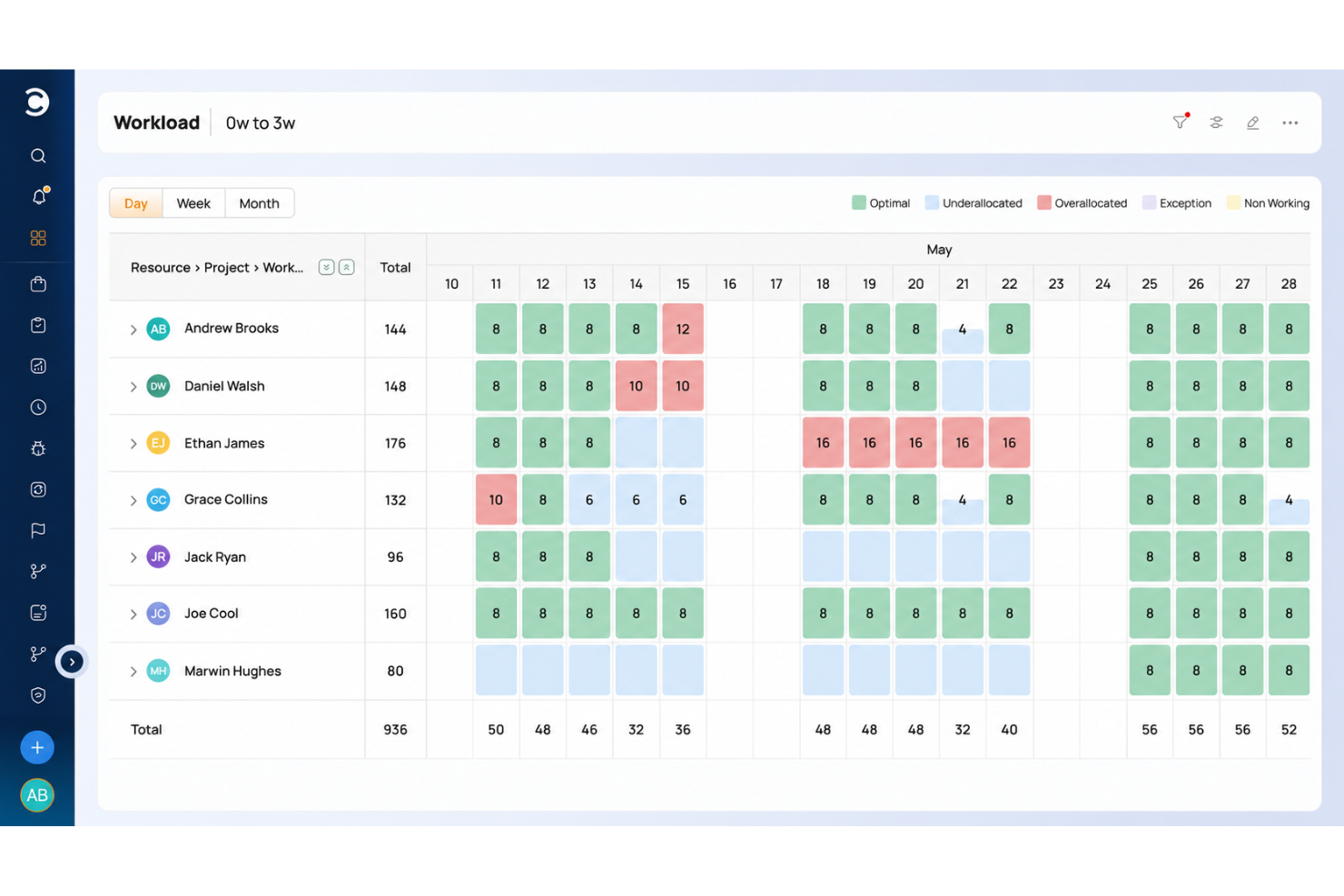
Celoxis is a complete Project Portfolio Management (PPM) software that's well-suited to the needs of remote teams. Project, resource, time, financial, and workflow management features are included in the platform. It can be used for complex projects, products, and team structures.
The software offers a comprehensive set of project management tools. Gantt charts let you plan your projects in a clear timeline, giving all team members a high-level overview of what's coming up. You can even add task dependencies across multiple projects, helping keep everything connected and accurate.
In addition to project management, the software offers resource management. Employees can be assigned tasks based on not just their capacity but also their location and schedule. This is handy for remote teams working in different areas with different holidays, managing time off, and accommodating various schedules and time zones.
The software integrates with other tools including Google Drive, Microsoft Excel, Microsoft Project, Jira, Slack, Salesforce, Google Calendar, Outlook, Evernote, and QuickBooks Online. You can also access additional integrations with a paid Zapier account.
Paid plans for Celoxis start from $25 per user, per month. A 30-day free trial is also available.
Pros and Cons
Pros:
- Intake and request management included
- Customizable workflow apps available
- Resource management and project accounting included
Cons:
- 5 User minimum
- Somewhat complex, takes time to learn

Best for enterprise agency workflows
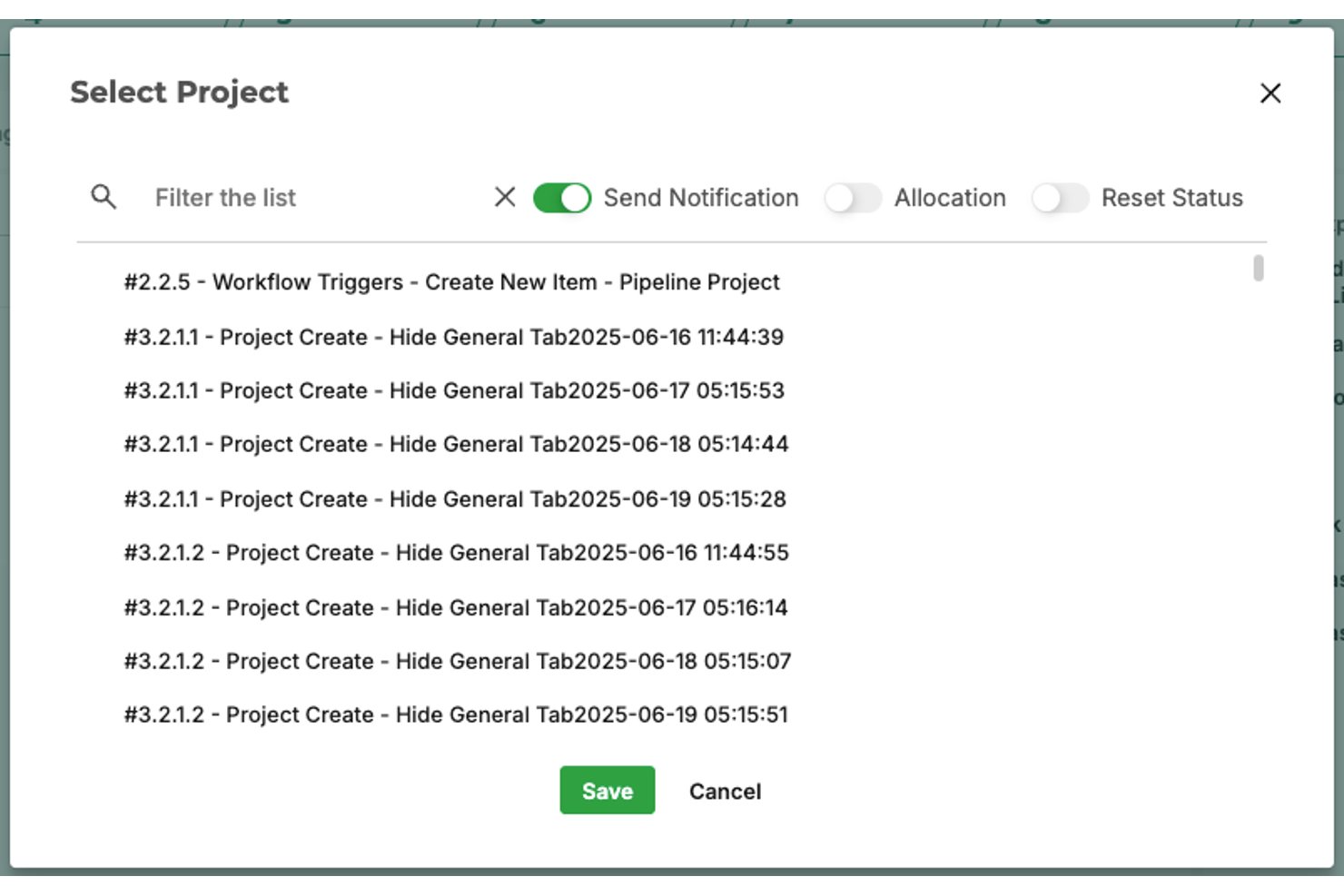
Screendragon is a no-code workflow and project management platform built for enterprise marketing and agency teams, combining dynamic forms, automated approvals, resource management, and real-time reporting in a single cloud-based workspace.
Who Is Screendragon Best For?
Screendragon is a strong fit for enterprise marketing teams and large creative agencies managing high volumes of projects across distributed, global teams.
Why I Picked Screendragon
Screendragon earns its spot on my shortlist because I love how it handles the approval chaos that enterprise agency teams deal with across time zones. My team can mark up documents, graphics, and video files directly in the platform, compare versions side by side, and track every change through an automated audit trail. The no-code workflow builder also lets me design region-specific routing, so a campaign asset moving through legal, brand, and client review never gets buried in an email thread.
Screendragon Key Features
- No-code workflow editor: Create and adapt complex agency workflows without developer resources using a visual builder.
- Dynamic forms: Collect and route project information through customizable forms that trigger automated workflows.
- Role-based permissions: Assign detailed access levels and approval rights to team members, clients, or external partners.
- Real-time project dashboards: Visualize project status and milestones across global teams with customizable, up-to-date dashboards.
Screendragon Integrations
Screendragon offers native integrations with Google Drive, Box, OneDrive, Adobe Creative Cloud, Jira, Trello, Salesforce, HubSpot, Microsoft 365, and Smartsheet. It also connects with Zapier and has an API for custom integrations.
Pros and Cons
Pros:
- Highly configurable for complex enterprise workflows
- Automated approval routing across time zones
- Built-in asset proofing across distributed teams
Cons:
- Setup requires significant configuration time
- No dedicated async video messaging feature

Best for task automation and customization
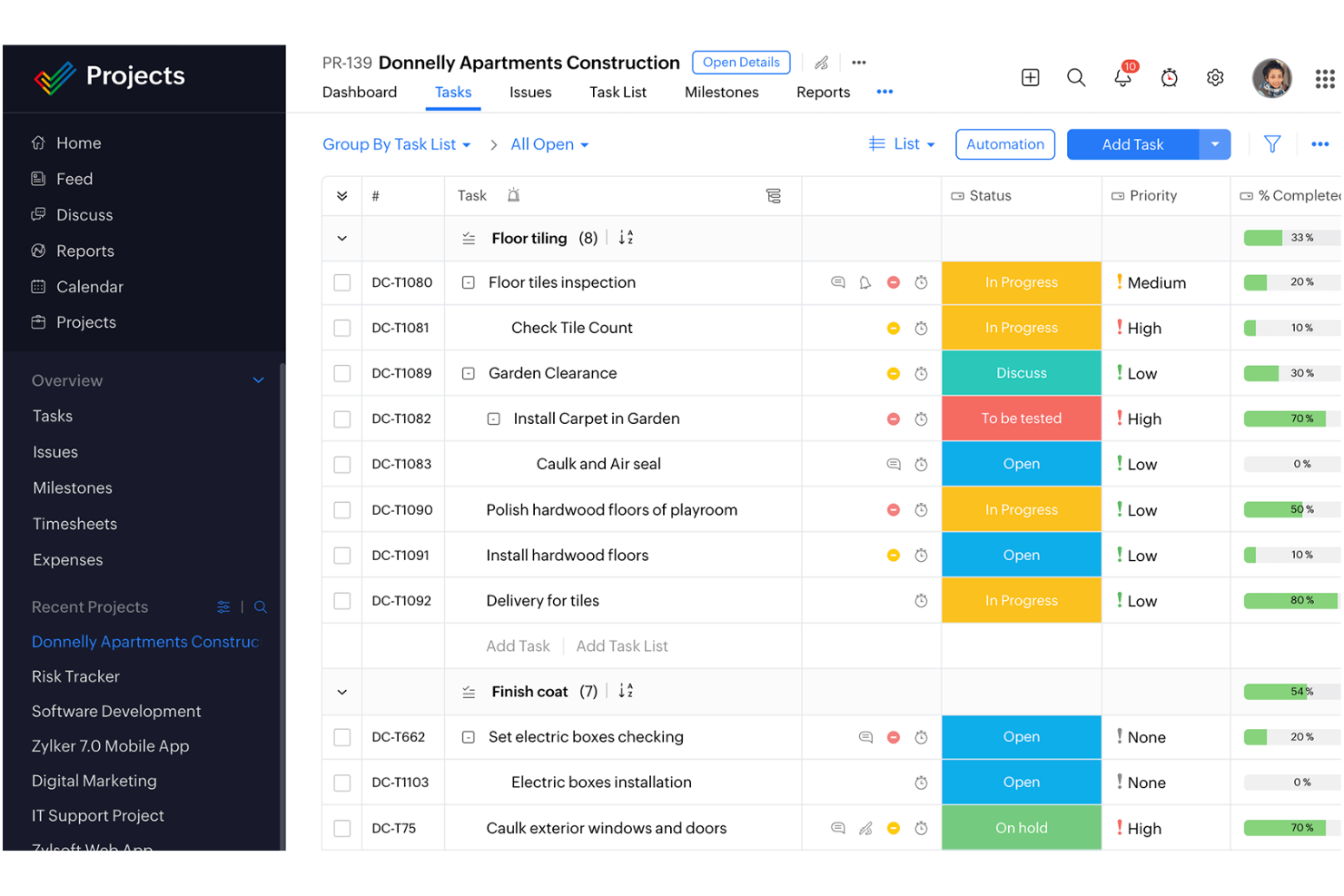
For remote teams seeking a project management tool that enhances productivity and fosters collaboration, Zoho Projects offers a compelling solution. Tailored for industries like construction, software development, and marketing, it addresses the unique challenges of distributed workforces by providing tools that streamline task management and improve communication. With features designed to tackle the intricacies of remote work, Zoho Projects helps your team stay organized and focused, ensuring projects are completed on time and within scope.
Why I Picked Zoho Projects
I picked Zoho Projects for its seamless integration of task management with team collaboration, which is crucial for remote teams. The platform's task automation feature lets you automate repetitive tasks, freeing up time for more strategic work. Additionally, its project customization options enable you to tailor workflows and fields to fit your team's specific needs, ensuring that your processes align perfectly with your project goals. These features, combined with its emphasis on privacy and security, make Zoho Projects an ideal choice for remote teams looking to enhance their project management capabilities.
Zoho Projects Key Features
In addition to task automation and customization, Zoho Projects offers:
- Gantt Charts: Visualize project timelines and dependencies to better plan and manage your team's workload.
- Time Tracking: Monitor billable hours and manage workloads with ease, ensuring accountability across your remote team.
- Issue Tracking: Identify and resolve project issues quickly to maintain project momentum and quality.
- Mobile Access: Stay connected with your team and manage projects on the go with mobile apps for iOS and Android.
Zoho Projects Integrations
Integrations include Zoho CRM, Slack, GitHub, Microsoft Teams, Google Drive, Dropbox, Microsoft OneDrive, Box, Zapier, and Trello. An API is available for custom integrations.
Pros and Cons
Pros:
- Facilitates collaboration with a robust client portal
- Offers detailed reporting and analytics for project insights
- Centralized platform that improves visibility across projects
Cons:
- Customization options are less flexible than competitors
- Performance slowdowns when handling large or complex projects
New Product Updates from Zoho Projects
Zoho Projects Adds CodeX Scripts for Custom Modules
Zoho Projects now supports CodeX Scripts for custom modules, enabling conditional logic and rules for creating, updating, and deleting records. For more information, visit Zoho Projects' official site.
 .
Miro
Best collaborative whiteboard for remote teams
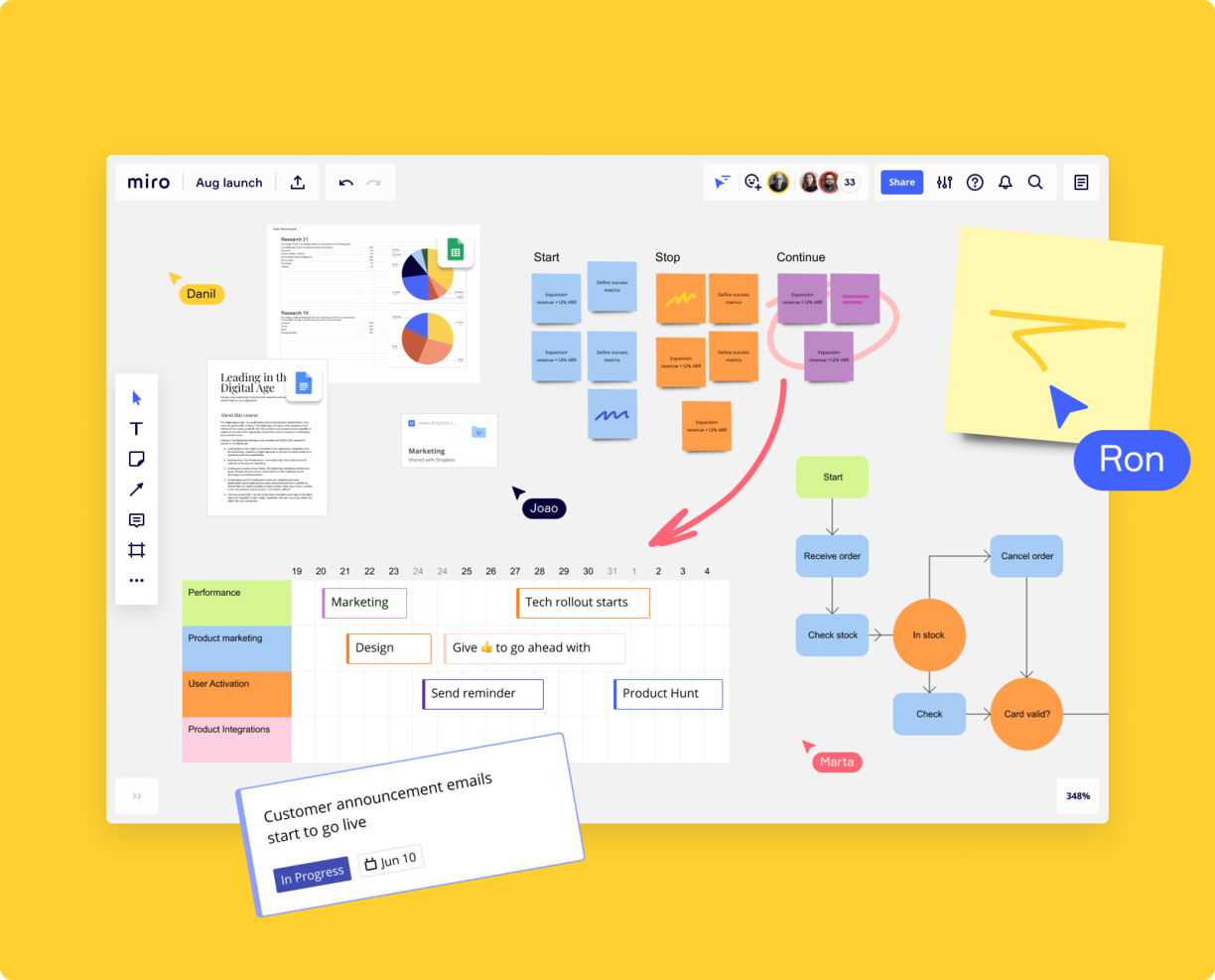
Miro is a comprehensive online whiteboard designed with remote teams in mind, providing an extensive array of over 1,000 templates for various project management tasks. Its infinite canvas allows teams unlimited space for brainstorming and project mapping, supporting a wide range of idea expression, including numerical data, images, videos, and brand elements.
With the Miro Assist feature, the platform can generate ideas and pathways from initial prompts, facilitating collaborative brainstorming. Additionally, Miro enables asynchronous collaboration, accommodating diverse schedules and work habits, through features like comments and reactions.The platform also integrates well into hybrid work environments, offering interactive displays and mobile access, making it a suitable choice for teams looking to collaborate remotely.
Miro has integrations with a whole suite of tools, including Zoom, Figma, Asana, Microsoft Teams, Jira, Slack, Monday.com, Confluence, Google Drive, Box, Airtable, Notion, Azure, and Webex. Some integrations are limited to paid plans only.
Miro is free to use for unlimited members with up to 3 editable boards. Paid plans start at $8/user/month (billed annually).
Pros and Cons
Pros:
- Built-in communication features for streamlined collaboration
- Intuitive and easy setup
- Free forever plan available
Cons:
- Free version does not allow high-quality export to pdf
- Zooming can be jumpy on larger projects
- Visitor/guest accounts locked to paid plans only
New Product Updates from Miro
Miro Adds Japan Data Residency for Enterprise Customers
Miro has introduced Japan data residency for enterprise customers, offering in-region storage for production data, backups, and metadata, plus in-region compute infrastructure. For more information, visit Miro's official site.
 .

Plaky
Best for visual task management with remote teams

Plaky is a project management software that excels in visual task management. As a cloud-based platform, it's ideal for remote teams working from a wide range of devices, including Apple devices, Androids, and PCs. Overall, it helps teams remain aligned with full visibility of project workflows, task assignments, and due dates.
One standout feature is the ability to customize project boards from ready-made templates or from scratch. This allows users to create custom fields, subtasks, and other important notes to keep all team members in the loop about a specific task or project process. You can access different project views, like a simple list, Kanban board, or Gantt chart to stay up to date about a task's status and overall project progress. Plaky also facilitates communication among remote team members with the ability to comment and leave mentions directly on a task.
Plaky integrates with Clockify to help track time spent on tasks and Pumble to facilitate real-time communication among teams.
The software is free with unlimited users and projects. Paid plans with more advanced features start from $3.99/user/month (billed annually).
Pros and Cons
Pros:
- Free plan offers unlimited users and projects
- Supports agile workflows
- Customizable project management templates for various use cases
Cons:
- Limits on storage per file
- Limited integrations
Best tool for mixed OS teams
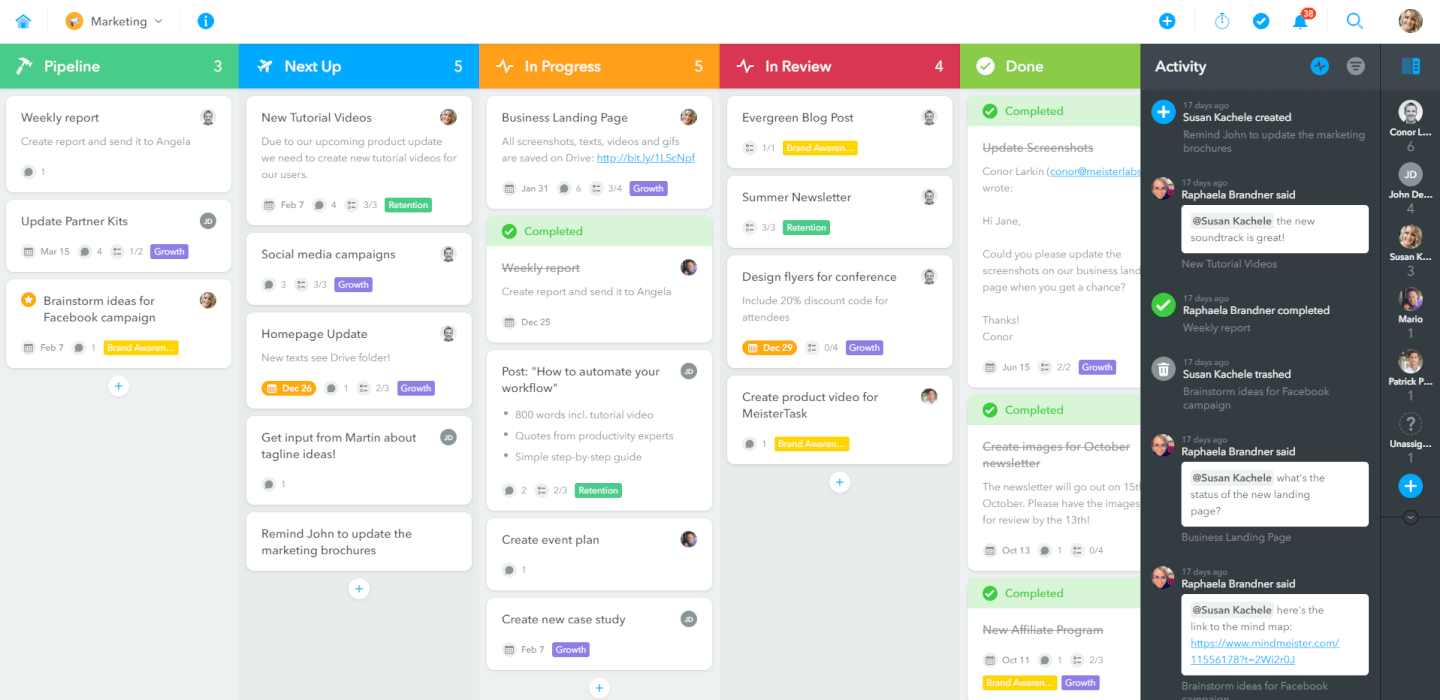
MeisterTask tackles everything from individual task management to holistic project planning with a simple-to-use interface. Remote teams may be scattered across a variety of device types but that's not a problem for MeisterTask, which works with iOS, Android, Mac, and Windows. Their smart device apps are no joke, either, with a 4.7-star rating on the Google Play Store at the time of writing this. They were also named Editor's Choice on the iOS App Store.
MeisterTask costs from $8.25/user/month and offers a free version for up to 3 projects.
Pros and Cons
Pros:
- Access to unlimited project boards
- Very easy to manage several projects at the same time
- Intuitive and user-friendly UI
Cons:
- After loading a file into a task it cannot be downloaded immediately
- File attachments limited to 200 MB per file
- Timeline and custom fields are restricted to Business accounts
Kintone
Best for building custom project workflows

Kintone is a customizable project planning platform used by teams at Volvo Trucks North America, Japan Airlines, Shiseido, and over 23,000 organizations worldwide. Their unique approach to project and task management lets you build a wide variety of customizable “apps” either from scratch, using templates or from your existing spreadsheets, for data management, business processes, and workflows. Kintone apps can be customized for project management, sales CRM, customer databases, expense reports, shared to-do lists, equipment management, product feedback, and much more.
Apps can be built either from scratch, using templates, or from existing spreadsheets for data management, business processes, and workflow purposes. Kintone apps can be customized for project management, sales CRM, customer databases, expense reports, shared to-do lists, equipment management, product feedback, and much more.
Kintone lets you build agile project management apps by dragging and dropping elements that you want to see onto the page: rich text fields, date fields, drop-down menus, number fields with built-in calculations, spaces for attachments, user or group selection menus, related data from other apps, tables, and more. Your agile project management solution can look and work however you want it to.
What makes Kintone particularly great for agile project management is that it empowers project managers to track all facets of their project, from individual tasks and project data to workflows and communication—and then use their findings to rapidly improve their processes as they go. Because the end-users are also the app designers, feedback loops are instant, continuous, and actionable.
Kintone lets you expand its capabilities with both free native plugins built by the Kintone team as well as integrations with other tools like Slack, Gmail, Google Calendar, Outlook, Tableau, Dropbox, Salesforce, HubSpot, Eventbrite, WordPress, QuickBooks, MailChimp, and many more through a paid plan with Zapier or via API integrations.
Kintone costs $24/user/month with a minimum requirement of 5 users. They offer a 30-day free trial (no credit card required) and discounted prices for nonprofits and educators. Kintone’s team also offers a free custom app build as part of the free trial process.

Workzone
Best for collaboration and task management

Workzone is a project management software designed to help remote teams collaborate and manage tasks efficiently. Built for industries such as marketing, operations, and IT, it provides real-time visibility into project status and supports communication across distributed teams. By centralizing tasks and project updates, Workzone helps teams stay aligned and manage work effectively across different locations and time zones.
Why I Picked Workzone
I picked Workzone for its emphasis on collaboration and task management. The platform's project intake management feature allows you to streamline requests with pre-built forms, ensuring your team captures all necessary details from the start. Additionally, Workzone's advanced proofing capabilities support document and media reviews, facilitating seamless feedback loops. These features, combined with customizable templates, help your team maintain consistency and clarity, reducing the friction often encountered in remote work settings.
Workzone Key Features
In addition to its collaboration and task management strengths, Workzone offers many other features that enhance its utility for remote teams:
- Customizable Templates: You have access to over 1,000 templates that allow for consistent project launches, tailored to your specific industry needs.
- Secure File Sharing: This feature ensures that all your documents and assets are stored securely and are easily accessible to your team members.
- Pre-Built Reports: These reports provide insights into capacity planning and workload, helping you allocate resources effectively and keep projects on track.
- Flexible Permissions: You can set user-specific access levels, ensuring that sensitive information is only accessible to authorized team members.
Workzone Integrations
Integrations include Slack, Microsoft Teams, Google Drive, Salesforce, Box, Dropbox, Everhour, Freshbooks, GitHub, and Jira, and more.
Pros and Cons
Pros:
- User-friendly interface
- Project intake management simplifies task organization
- Integration with Slack and Google Drive improves workflow
Cons:
- Limited customization compared to other project management tools
- Limited mobile functionality
New Product Updates from Workzone

Workzone Enterprise Adds Multi-Stage Approval Workflows
Workzone Enterprise now includes Approval Workflows, enabling multi-stage document approvals to standardize complex processes and reduce manual effort. For more information, visit Workzone's official site.
 .
Diğer Proje Yönetimi Araçları
Kısa listeme giremeyen, ancak yine de göz atmaya değer bazı ek uzaktan çalışan ekipler için proje yönetimi aracı seçenekleri şunlardır:
- Teamwork.com
Platform for client work
- Bonsai Agency Software
For agencies, consultancies, and professional service firms
- ProjectManager
Software for remote teams using hybrid project methodologies
- Ravetree
Remote project management for professional services businesses
- Height
For extensive reporting and analytics tools
- ClickUp
Remote project management tool for screen recording
- Productive
For agency performance tracking
- Smartsheet
Remote project management tool for sales reps
- Hubstaff
Free PM tool for remote teams
- Hive
Remote tool for agencies
- GoodDay
For diverse project views
- Kantata
For business intelligence (BI)
- Kissflow
Simple project management software for remote teams
- Hub Planner by Milient
For midsized to large companies
- PathPro
For transparent team collaboration


How I Evaluate Project Management Tools for Remote Teams
When a tool can't handle async handoffs, time-zone-aware deadlines, or distributed visibility, it doesn't make the list—then I look at what separates the best from the rest.
Core Functionality (Table Stakes For This List)
When I'm selecting tools for my list, I rank each one on a scale from 0 (does not offer the functionality) to 5 (excels in this area) for each core functionality listed below. Then, I calculate the tool's total score into a percentage. Each tool needs to achieve a minimum total score of 65% to be considered for inclusion.
- Task & Project Management: I look at how each tool handles task creation, assignment, dependencies, and status tracking—like whether a PM can map subtask chains across a sprint without losing context.
- Multiple Project Views: Teams work differently, so I check for view variety—Kanban, Gantt, timeline, calendar—and whether switching between them preserves filters and groupings.
- Real-Time Collaboration: I evaluate in-context collaboration features like threaded comments, @mentions, and file attachments on tasks, since scattered Slack threads shouldn't replace project-level discussion.
- Cross-Time-Zone Scheduling: How a tool handles time-zone-aware due dates and notifications matters when your designer in Berlin and your developer in Manila share a deliverable deadline.
- Third-Party Integrations: I check for native connections to core remote-work tools like Slack, Microsoft Teams, Google Workspace, GitHub, and Zoom, plus API access for custom workflows.
- Cloud-Based Access & Permissions: Every tool should offer web and mobile apps with role-based permissions and guest access so external contractors can join a project without seeing your entire workspace.
Once I have a list of tools that meet this criteria, I consider what sets each platform apart.
Differentiating Factors (What Sets Vendors Apart)
Here's how I compare and contrast different vendors:
Standout Features
Workflow automation is a major differentiator—I look for no-code rules that auto-assign tasks or shift statuses on handoffs, reducing the back-and-forth that slows async teams. Workload and capacity views also matter because a PM needs to see who's overloaded before distributing work across time zones. AI features like thread summaries and auto-generated updates help teammates who wake up to dozens of notifications catch up in minutes rather than hours.
Beyond Features
Security and compliance weigh heavily when your team spans multiple regions—I check for SOC 2 Type II certification, SSO, and data residency options that help you meet local requirements. Onboarding support matters too, especially async-friendly resources like templates and academies that distributed teams can access on their own schedule. I also evaluate pricing models for guest and contractor access, since remote teams regularly invite external collaborators who shouldn't cost a full seat.
Uzaktan Çalışan Ekipler için Proje Yönetimi Araçları Nasıl Seçilir?
Uzun özellik listeleri ve karmaşık fiyatlandırma yapıları arasında kaybolmak kolaydır. Kendinize özgü yazılım seçim sürecinizi yürütürken odağınızı korumanıza yardımcı olmak için göz önünde bulundurmanız gereken faktörleri içeren bir kontrol listesi hazırladım:
| Faktör | Dikkate Alınması Gerekenler |
|---|---|
| Ölçeklenebilirlik | Araç ekibinizle birlikte büyüyebilir mi? Artan kullanıcı veya proje sayısını nasıl yönettiğini değerlendirin. Gelecekteki ihtiyaçları karşılayabilecek esnek fiyatlandırma ve kapasite arayın. |
| Entegrasyonlar | Mevcut araçlarınıza bağlanabiliyor mu? Manuel veri girişinden kaçınmak ve iş akışı verimliliğini artırmak için ekibinizin hâlihazırda kullandığı yazılımlarla yerel entegrasyonları kontrol edin. |
| Özelleştirilebilirlik | Araç iş akışlarınız için ne kadar esnek? Gösterge panellerini, alanları ve süreçleri çok fazla uğraşmadan ekibinizin kendine özgü ihtiyaçlarına uyarlayabildiğinizden emin olun. |
| Kullanım kolaylığı | Arayüz ekibiniz için sezgisel mi? Eğitim süresini en aza indirmek ve benimsenmeyi artırmak için kullanıcı dostu bir tasarım sunan bir araç arayın. |
| Uygulama ve işe alıştırma | Ne kadar hızlı kullanmaya başlayabilirsiniz? İşe alıştırma sürecini hızlandırmak için eğitim kaynaklarının bulunabilirliğini, geçiş desteğini ve kurulum kolaylığını değerlendirin. |
| Maliyet | Fiyatlandırma bütçenize uygun mu? Maliyeti sunulan özelliklerle karşılaştırın ve gizli ücretlere veya pahalı eklentilere karşı dikkatli olun. |
| Güvenlik önlemleri | Verileriniz korunuyor mu? Bilgilerinizin güvende olduğundan emin olmak için sektör standartlarına uygunluğu, veri şifrelemeyi ve kullanıcı erişim kontrollerini kontrol edin. |
| Destek bulunabilirliği | Hangi destek seçenekleri mevcut? 7/24 desteğin sunulup sunulmadığını ve zorluklar sırasında hızlı yardım alma ihtiyaçlarınızla örtüşüp örtüşmediğini değerlendirin. |
Proje Yönetimi Araçları Nedir?
Proje yönetimi araçları, herkes farklı yerlerde olsa bile çalışmayı düzenlemenize, ilerlemeyi izlemenize ve ekibinizle iletişim kurmanıza yardımcı olan dijital platformlardır. Proje yöneticileri, uzaktan çalışan ekipler ve serbest çalışanlar; görevleri takip etmek, dosya paylaşmak ve gerçek zamanlı olarak birlikte çalışmak için bu araçları kullanır. Nerede olursanız olun, projelerin ilerlemesini ve herkesin gelişmelerden haberdar olmasını kolaylaştırırlar.
Özellikler
Uzaktan çalışan ekipler için proje yönetimi araçlarını seçerken aşağıdaki temel özelliklere dikkat edin:
- Görev yönetimi: Görevleri düzenler ve ekip üyelerine atar; ilerlemeyi ve son teslim tarihlerini takip etmeyi kolaylaştırır.
- Dosya paylaşımı: Ekiplerin belgeleri yükleyip paylaşmasına olanak tanır ve herkesin en güncel bilgilere erişmesini sağlar.
- Gerçek zamanlı iletişim: Anlık mesajlaşmayı ve görüntülü görüşmeleri kolaylaştırarak ekip üyelerinin bağlantıda kalmasına ve verimli bir şekilde iş birliği yapmasına yardımcı olur.
- Zaman takibi: Görevlere harcanan saatleri izleyerek proje bütçelemeye ve kaynak tahsisine yardımcı olur.
- Özelleştirilebilir panolar: Kullanıcıların çalışma alanlarını ilgili bilgi ve ölçümleri gösterecek şekilde kişiselleştirmesine olanak tanır.
- Otomasyonlar: İş akışlarını otomatikleştirerek tekrarlayan görevleri azaltır, verimliliği ve üretkenliği artırır.
- Gantt şemaları: Proje zaman çizelgelerini ve bağımlılıklarını görselleştirerek karmaşık projeleri planlamayı ve yönetmeyi kolaylaştırır.
- Kaynak yönetimi: Ekip uygunluğunu ve iş yükünü takip ederek kaynakların etkili bir şekilde kullanılmasını sağlar.
- Bütçeleme araçları: Bütçe dahilinde kalmak için proje maliyetlerini yönetmeye ve harcamaları takip etmeye yardımcı olur.
- Güvenlik önlemleri: Verileri şifreleme ve erişim denetimleriyle koruyarak hassas bilgilerin güvende kalmasını sağlar.
Faydalar
Uzaktan çalışan ekipler için proje yönetimi araçlarını uygulamak, ekibiniz ve işletmeniz açısından çeşitli faydalar sağlar. Yararlanabileceğiniz birkaç fayda şunlardır:
- Gelişmiş iş birliği: Gerçek zamanlı iletişim ve dosya paylaşımı özellikleri ekip üyelerinin bağlantıda ve bilgili kalmasını sağlayarak ekip çalışmasını geliştirir.
- Artan üretkenlik: Görev yönetimi ve otomasyonlar, çalışmaları önceliklendirmeye ve manuel görevleri azaltmaya yardımcı olarak daha önemli faaliyetler için zaman kazandırır.
- Daha iyi kaynak tahsisi: Kaynak yönetimi araçları, ekip iş yüklerinin dengelenmesini sağlayarak tükenmişliği önler ve verimliliği en üst düzeye çıkarır.
- Geliştirilmiş proje görünürlüğü: Gantt şemaları ve özelleştirilebilir panolar, proje ilerlemesi ve zaman çizelgeleri hakkında net görünümler sunarak daha iyi karar vermeye yardımcı olur.
- Maliyet kontrolü: Bütçeleme araçları ve zaman takibi, harcamaları izlemeye ve bütçe dahilinde kalmaya yardımcı olarak finansal yükü azaltır.
- Veri güvenliği: Güvenlik önlemleri hassas bilgileri koruyarak işletme verilerinizin güvende kalmasını sağlar.
- Esneklik ve ölçeklenebilirlik: Özelleştirilebilir özellikler ekibinizin aracı belirli ihtiyaçlara uyarlamasına olanak tanır; ölçeklenebilirlik ise aracın işletmenizle birlikte büyümesini sağlar.
Maliyetler & Fiyatlandırma
Uzaktan çalışan ekipler için proje yönetimi araçlarını seçmek, mevcut çeşitli fiyatlandırma modellerinin ve planların anlaşılmasını gerektirir. Maliyetler özelliklere, ekip büyüklüğüne, eklentilere ve daha fazlasına göre değişir. Aşağıdaki tablo, uzaktan çalışan ekipler için proje yönetimi araçları çözümlerinde yaygın planları, ortalama fiyatlarını ve genellikle sunulan özellikleri özetlemektedir:
Uzaktan Çalışan Ekipler İçin Proje Yönetimi Araçları Plan Karşılaştırma Tablosu
| Plan Türü | Ortalama Fiyat | Yaygın Özellikler |
|---|---|---|
| Ücretsiz Plan | $0 | Temel görev yönetimi, dosya paylaşımı ve sınırlı entegrasyonlar. |
| Kişisel Plan | $5-$15/kullanıcı/ay | Gelişmiş görev yönetimi, daha fazla entegrasyon ve temel raporlama. |
| İşletme Planı | $20-$50/kullanıcı/ay | Gelişmiş iş birliği araçları, özel iş akışları ve ayrıntılı analizler. |
| Kurumsal Plan | $60-$100/kullanıcı/ay | Gelişmiş güvenlik özellikleri, özel destek ve tam özelleştirme seçenekleri. |
Uzaktan Çalışan Ekipler için Proje Yönetimi Araçları SSS
Uzaktan çalışan ekipler için proje yönetimi araçları hakkında sık sorulan soruların bazı yanıtları:
Uzaktan çalışırken ekip sorumluluğunu nasıl koruyabilirim?
Ekibiniz dağıtık olduğunda, herkesin ne üzerinde çalıştığını ve işin ne zaman tamamlanması gerektiğini açıkça kaydettiği ortak bir sisteme ihtiyacınız olur. Yalnızca durum e-postalarına güvenmemek için aracınızla bağlantılı düzenli durum güncellemelerini teşvik edin. Herkesin ilerlemeyi birlikte gözden geçirdiği bir düzen oluşturun; böylece kimse gözden kaçmaz.
Uzaktan çalışan ekip araçları toplantı yoğunluğunu azaltmaya yardımcı olabilir mi?
Evet — görevlerin, dönüm noktalarının ve engellerin görünür olduğu merkezi bir çalışma alanı kullanarak anlık toplantı ihtiyacını azaltabilirsiniz. Plansız “Durum nedir?” görüşmeleri yapmak yerine ekip, araca danışabilir ve toplantılara yalnızca gerçekten önemli sorunları taşıyabilir. Zamanla, araçta bir güncellemeyle çözülebilecek konular için yapılan toplantıların azaldığını göreceksiniz.
Uzaktan çalışan bir ekip ortamında saat dilimi farklılıklarını nasıl yönetebilirim?
Üyeler birden fazla saat dilimine yayıldığında, herkesin aynı anda çevrimiçi olmasına gerek kalmadan eşzamansız güncellemeleri ve görünürlüğü destekleyen araçlara ihtiyacınız olur. Kimin sırada olduğunu, neyin beklediğini ve neyin engellendiğini gösteren ortak panoların (veya çalışma panolarının) kullanılmasını teşvik edin; böylece hiç kimse başka birinin sisteme giriş yapmasını beklemek zorunda kalmaz.
Uzaktan çalışan bir ekip proje yönetimi araçlarını kullanırken karşılaşılan yaygın sorunlar nelerdir?
Sık karşılaşılan bir sorun “araçtan uzaklaşma”dır — insanlar araç yerine başka kanalları (sohbet, e-posta) kullanmaya başlar ve tek doğruluk kaynağınız ortadan kalkar. Bir diğer risk de düşük benimsemedir: Araç çok ağır veya kafa karıştırıcı gelirse insanlar eski alışkanlıklarına döner. Ayrıca araç çok fazla veya çok az görünürlük sağlayarak kimin ne yaptığının anlaşılmasında karmaşaya yol açabilir.
Uzaktan çalışan bir ekibin yeni bir proje yönetimi aracını sorunsuz şekilde benimsemesine nasıl yardımcı olabilirim?
Bir pilot aşamayla başlayın: Bir proje seçin, aracı nasıl kullanacağınıza ilişkin beklentileri net bir şekilde belirleyin ve geri bildirim toplayın. Ekibi aracı nasıl kullanacağınız konusunda eğitin (neleri kaydedecekleri, güncellemeleri nasıl görüntüleyecekleri). Sisteme giriş yapmayan veya güncelleme yapmayan kişileri izleyin ve erkenden takip edin — kullanmayanları erken fark ettiğinizde benimseme daha kolay olur.
İlk kullanıma sunma aşamasından sonra araçla ivmeyi nasıl sürdürebilirim?
İşler yolunda gidiyor gibi görünmeye başladıktan sonra bile aracın kullanımını düzenli aralıklarla gözden geçirmeniz gerekir. Görevlerin hâlâ güncellenip güncellenmediğini, durumların doğru olup olmadığını ve insanların aracın değer kattığını düşünüp düşünmediğini kontrol edin. Araç bir teslim tarihinin kaçırılmasını önlemeye yardımcı olduğunda veya netlik sağladığında olduğu gibi, görünür başarıları kutlayarak ekibin katılımını sürdürün.