

2026’da İncelenen En İyi 10 Yapay Zekâ İş Akışı Otomasyon Yazılımı

En İyi Yapay Zekâ İş Akışı Otomasyonu Yazılımları Kısa Listesi


En iyi yapay zekâ iş akışı otomasyonu yazılımları, manuel ve tekrarlayan görevleri (durum güncellemeleri, veri girişi, onaylar ve görev atamaları gibi) ortadan kaldırarak yüksek etkili çalışmalara odaklanmanızı sağlar. Değişen teslim tarihleri, uyumsuz ekipler, dağınık araçlar ve manuel devirler gibi zorluklar, bağımlılıkların gözden kaçmasına ve ilerlemenin durmasına yol açabilir; ancak yapay zekâ iş akışı araçları bunları ele almanıza yardımcı olabilir.
En verimli ve güvenilir platformları belirlemek için düzinelerce aracı bizzat test edip inceledim. İş akışı optimizasyonundaki deneyimimi kullanarak, pratik, ölçeklenebilir ve gerçek proje yürütme süreçlerini desteklemek üzere tasarlanmış otomasyon yazılımını seçmenize yardımcı olacak bu listeyi hazırladım.
Why Trust Our Software Recommendations
Our team has been testing and reviewing software since 2012. As project managers ourselves, we know how difficult—and important—it is to choose the right software.
For this guide, we evaluated tools using hands-on testing and independent research, scoring tools using our selection criteria. We also draw on insights from industry thought leaders and practicing project management experts.
Our reviews reflect our human editorial judgment, not a sales pitch.
Expert reviewers:
Yapay Zekâ İş Akışı Otomasyonu Yazılımları Karşılaştırma Tablosu
Bu karşılaştırma tablosu, en iyi yapay zekâ iş akışı otomasyonu yazılımı seçimlerimin fiyatlandırma ayrıntılarını özetlemektedir:
| Tool | Starting Price | Website | |
|---|---|---|---|
| Best for generative AI project planning | 4.3 out of 5 | $10/user/month Free plan + 14-day trial + demo available | Book Demo |
| Best for real-time profitability insights | 4.6 out of 5 | $10/user/month 14-day free trial | Book Demo |
| Best for client interaction management | 4.4 out of 5 | $5,000/year Free trial + free demo available | Book Demo |
| Best for AI-driven workflow management | 4.6 out of 5 | Pricing upon request Not available | Book Demo |
| Best for AI-drafted project workflows | 4.5 out of 5 | $5/user/month Free plan + 14-day trial + demo available | Website |
| Best for workflow optimization | 4.3 out of 5 | Pricing upon request Free demo | Website |
| Best with 1,000+ prebuilt connectors | — | Pricing upon request 30-day free trial available | Website |
| Best for easy process documentation | 4.7 out of 5 | Pricing upon request 14-day free trial; free demo available | Website |
| Best for enterprise integrations | 4.7 out of 5 | $75/month Free plan + free demo available | Website |
| Best for custom workflow creation | 4.7 out of 5 | €20/month Free trial available | Website |
En İyi Yapay Zekâ İş Akışı Otomasyonu Yazılımları İncelemeleri
En iyi yapay zekâ iş akışı otomasyonu yazılımı seçimlerimin her biri hakkındaki ayrıntılı özetimi okuyun. Doğru seçeneği bulabilmeniz için temel özellikleri, artıları ve eksileri, entegrasyonları ve kullanım alanlarını ele alıyorum.

Wrike
Best for generative AI project planning
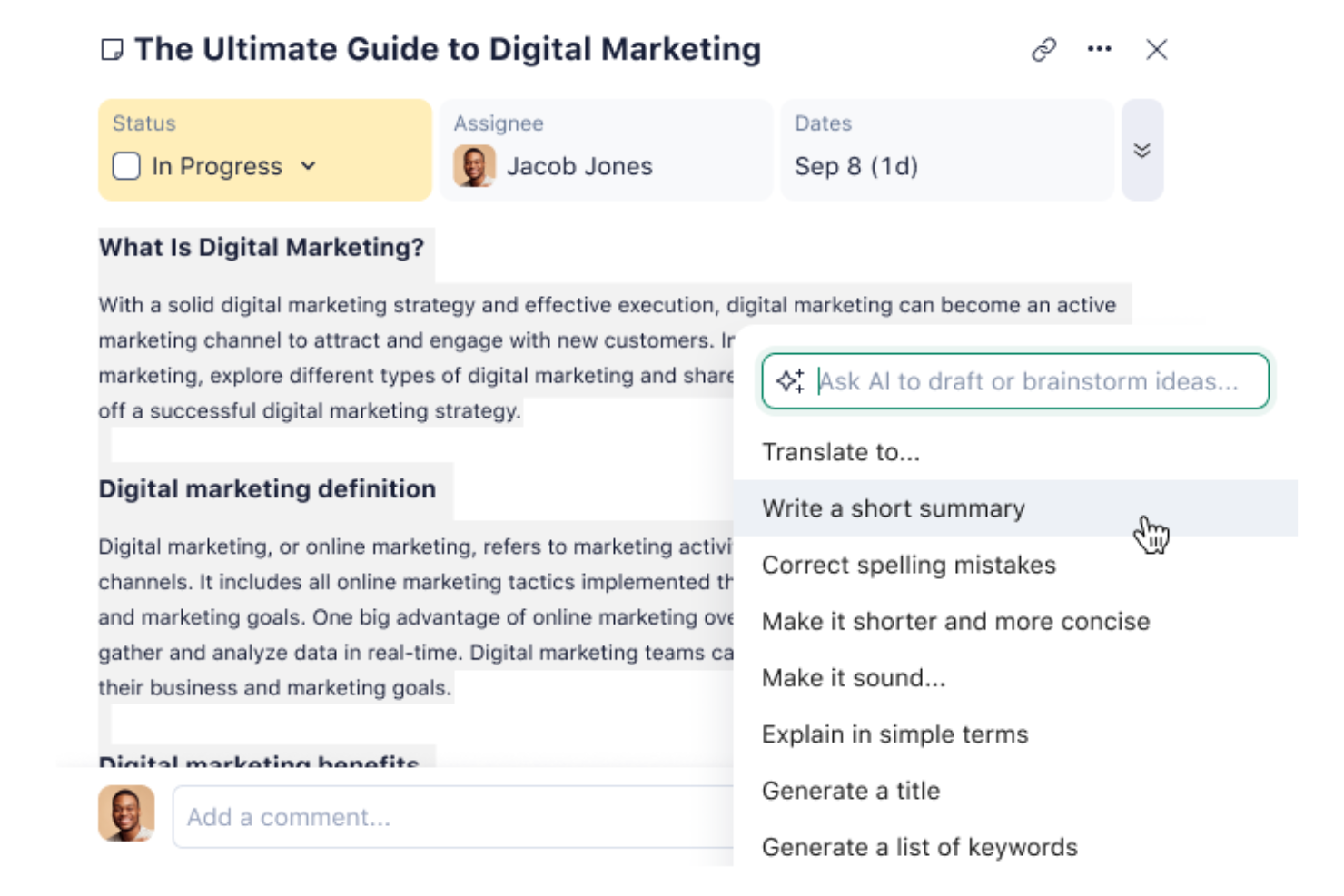
Wrike is a work management and AI workflow automation platform that combines no-code automation rules, a conversational AI agent builder, and generative project planning tools with project tracking, resource management, and 400+ integrations.
Who Is Wrike Best For?
Wrike is a strong fit for cross-functional teams that need to combine structured project delivery with AI-driven workflow automation across departments.
Why I Picked Wrike
I picked Wrike as one of the best because its AI agent builder is the most project-planning-native I've seen: you describe a workflow in plain language, and Wrike builds the automation rule or agent for you. In practice, that means I can deploy a no-code agent that scores incoming requests by impact and effort, populates task fields from intake forms, and routes work to the right team automatically. Wrike Copilot layers on top by surfacing project risks and answering natural-language questions about status directly in the workspace.
Wrike Key Features
- Automation rules: Trigger status changes, assignments, notifications, and approvals from defined conditions, with a monthly action allowance that scales by plan.
- Natural-language rule creation: Describe an automation in plain language and Wrike builds the rule for you, available from the Team plan.
- AI agents: Build no-code agents that triage intake, populate fields, and route work, deployed under administrator controls, available from the Business plan.
- Wrike Integrate: Connect Wrike to external apps using Workato-powered recipes with scheduled triggers, conditional forks, and loops.
Wrike Integrations
Wrike offers 400+ integrations, including Google Sheets, Jira, GitHub, Salesforce, Slack, Microsoft Teams, Power BI, and QuickBooks. Its REST API, webhooks, OAuth 2.0, Wrike Integrate, and Wrike Sync support custom workflows and two-way connections.
Pros and Cons
Pros:
- Dashboards clarify ownership, workload, and overdue work
- Workflow rules automate approvals and status handoffs
- AI agents score intake and route requests
Cons:
- AI agents can miscalculate and vary their responses
- Initial rule configuration takes substantial planning
New Product Updates from Wrike

Wrike Redesigns Workspace Search With New Filters
Wrike introduces a redesigned Workspace Search interface with recent search shortcuts, item type and location filters, and parent-task context. These updates help users find relevant work items and navigate search results efficiently. For more information, visit Wrike’s official site.
 .

Best for real-time profitability insights
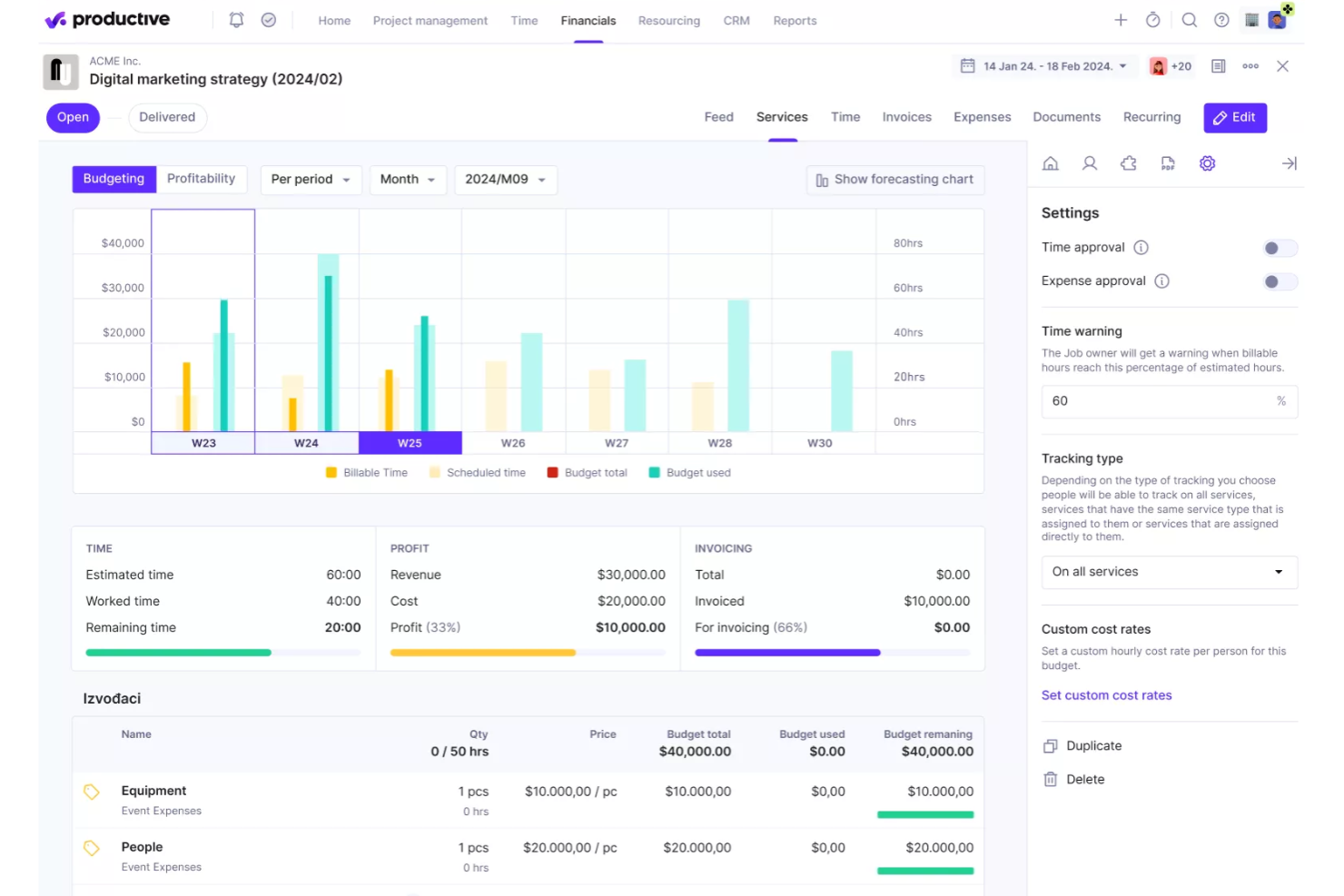
Productive is designed to help agencies streamline operations by combining project management, resource planning, and financial tracking in one platform. With features that support real-time profitability insights, it allows teams to monitor project budgets, utilization, and revenue performance while managing workflows more efficiently. This makes it a practical choice for organizations that want better visibility into both their operational processes and financial outcomes.
Why I Picked Productive
I picked Productive for its real-time profitability insights, which allow teams to monitor project margins, budgets, and financial performance as work progresses. This helps agencies understand whether projects are profitable and make adjustments before issues impact revenue. The platform also supports resource planning to ensure projects are staffed with the right team members based on availability and workload. In addition, Productive includes automated reporting and forecasting tools that help teams analyze performance data and plan future work more effectively.
Productive Key Features
In addition to real-time profitability insights, some other features of Productive include:
- Gantt Charts: Visualize project timelines and dependencies to improve planning and execution.
- Time Tracking: Monitor billable and non-billable hours directly linked to project budgets.
- Invoicing: Automate invoice creation based on tracked time and project budgets.
- Sales CRM: Manage client interactions and sales pipelines within the platform.
Productive Integrations
Integrations include QuickBooks, HubSpot, Slack, Xero, Jira, and Google Calendar. An API and Zapier connection are also available for additional integrations.
Pros and Cons
Pros:
- Flexible configuration supports different agency workflows and operational needs
- Clear dashboards improve team collaboration and project performance monitoring
- Project visibility tools help teams track budgets, progress, and resource usage
Cons:
- Reporting tools require manual configuration to generate detailed project insights
- Interface layout can feel overwhelming when managing large numbers of projects
New Product Updates from Productive
Productive Adds Email and Calendar Integrations for Agents
Productive adds Gmail, Outlook, Google Calendar, and Outlook Calendar connectors for its AI agents. These integrations let agents manage emails and create calendar events directly within Productive. For more information, visit Productive’s official site.
 .

Moxo
Best for client interaction management

Moxo is a client interaction management platform that helps improve client communication and engagement, operational efficiency, and project collaboration. It serves industries like finance, real estate, and legal services.
Why I picked Moxo: It excels in managing client interactions and is ideal if you need efficient communication channels. The platform provides secure messaging and document sharing features to keep client data safe. You can set up client portals as centralized hubs for communication and collaboration. Moxo's task management tools keep your team organized and help them stay responsive to client needs.
Standout features & integrations:
Features include digital forms that capture client input, task automation that reduces manual tasks, and the ability to track progress with built-in dashboards.
Integrations include Salesforce, Slack, Box, Docusign, QuickBooks, and HubSpot.
Pros and Cons
Pros:
- Strong client engagement tools
- Centralized communication hub
- Secure client portals
Cons:
- Learning curve for new users
- Limited customization options

Best for AI-driven workflow management

Screendragon is a no-code workflow management platform that uses AI and automation to simplify complex business processes. It’s ideal for marketing, operations, and enterprise teams that need to manage multiple projects, approvals, and resources without getting bogged down by manual tasks. By combining visual workflow design with intelligent automation, it helps teams stay efficient and focused on strategic work.
Why I picked Screendragon: I picked Screendragon for its strong AI-driven workflow management capabilities. The platform uses embedded AI agents to automate repetitive tasks and manage complex workflows end-to-end. I also liked how it combines no-code flexibility with enterprise-grade security, so you can build and scale workflows that match your organization’s exact needs. If your team handles high-volume approvals or global campaigns, Screendragon can help reduce manual effort while maintaining visibility and control.
Standout features & integrations:
Features include a visual workflow builder for creating custom automations, digital approval management that speeds up decision-making, and workflow analytics that provide real-time insights into team performance.
Integrations include Jira, Google Drive, Box, Adobe, OneDrive, Salesforce, Microsoft Dynamics 365, SAP, and NetSuite.
Pros and Cons
Pros:
- Enterprise-ready with strong security
- AI agents automate complex tasks
- Customizable no-code workflow builder
Cons:
- Steep learning curve for new users
- Setup can take time
Hive
Best for AI-drafted project workflows
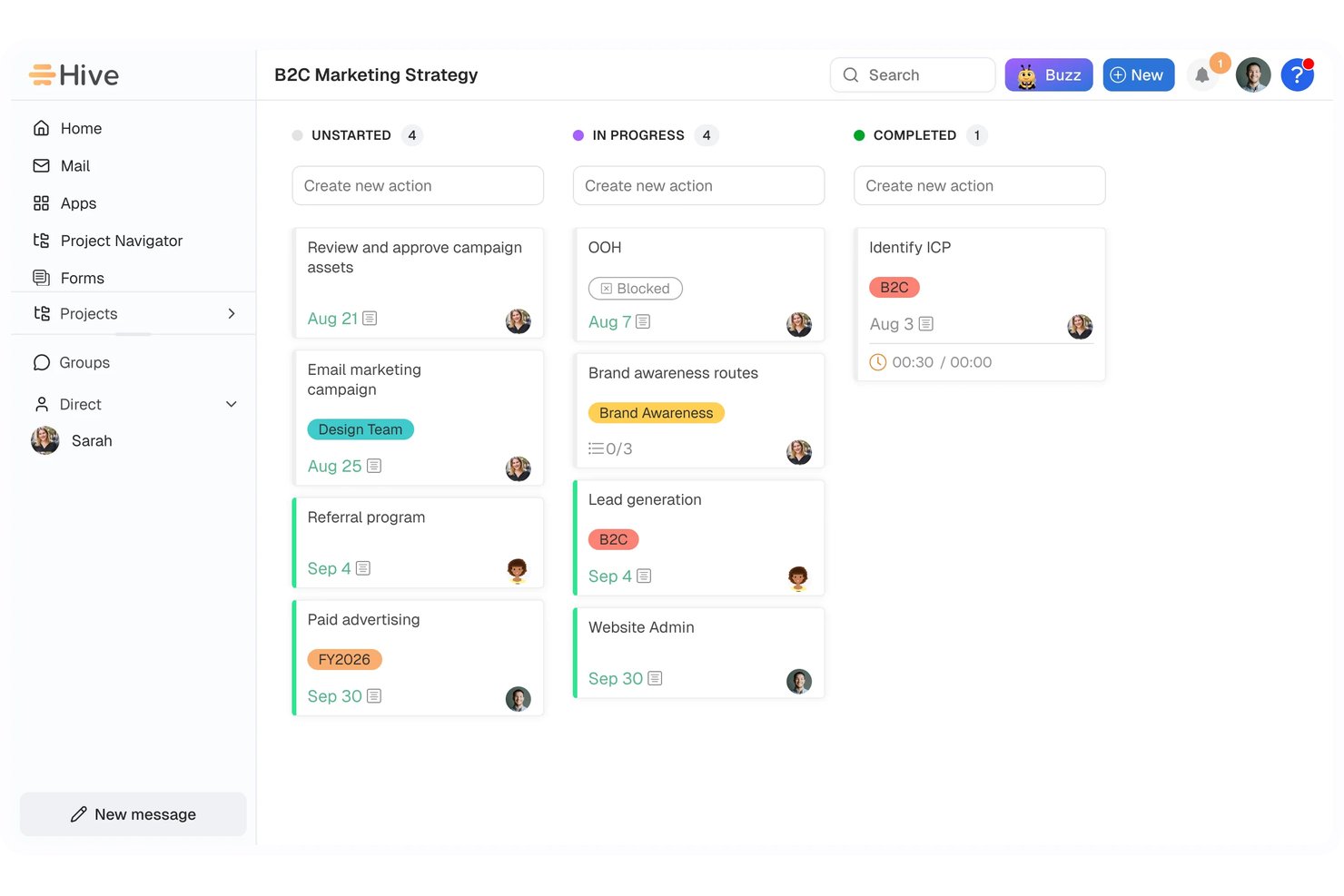
Hive is an AI-powered project and workflow automation platform that combines trigger-based automations, an embedded AI assistant (Buzz), cross-app integrations, and project management views to help teams plan, assign, and automate work.
Who Is Hive Best For?
Hive is a strong fit for department team leads and cross-functional teams that want AI to handle the heavy lifting of building and managing project workflows.
Why I Picked Hive
I picked Hive as one of the best because its AI assistant, Buzz, can draft an entire project workflow from a plain-English description, assign owners, set due dates, and populate fields automatically. In practice, that means my team can describe a process like "route client requests by type and notify the right assignee," and Buzz produces a working workflow to review and activate. I also like that Buzz-built workflows aren't black boxes: the "Show thinking" feature lets me inspect how Buzz interpreted the instructions before anything goes live.
Hive Key Features
- Trigger-based workflow automation: Build multi-step workflows that fire on status changes, form submissions, schedules, API requests, or Salesforce events.
- Workflow runs dashboard: Monitor completed, failed, and in-progress workflow runs with daily success and failure charts and per-operation error details.
- Form-to-action field mapping: Automatically map form submission answers to action card fields and route work conditionally based on those answers.
- 1,000+ app integrations: Connect Hive to external tools via native connectors, Zapier, custom HTTP endpoints, or MCP tool servers.
Hive Integrations
Hive offers more than 1,000 integrations, including native connections with Jira, Slack, GitHub, Google Drive, Microsoft Teams, and Salesforce. It also provides an API, custom HTTP and MCP connections, and Zapier integrations.
Pros and Cons
Pros:
- Run logs pinpoint failed workflow steps
- Routes form requests to assigned owners
- Drafts workflows from plain-language requests
Cons:
- Run dashboards cover only 30 days
- Workflow setup can take time
Kissflow
Best for workflow optimization

Kissflow serves as a versatile solution for teams seeking to enhance their operational efficiency through AI-powered workflow automation. Its low-code/no-code platform empowers users across industries, from healthcare to finance, to develop internal applications and automate complex processes without extensive coding knowledge.
Why I Picked Kissflow
I picked Kissflow for its AI capabilities, which are pivotal for any team aiming to automate and optimize workflows intelligently. The platform leverages machine learning models and predictive analytics to optimize process execution, ensuring tasks are dynamically assigned and resources are efficiently utilized. Additionally, its cognitive automation features reduce manual intervention, allowing you to focus on strategic initiatives rather than routine tasks.
Kissflow Key Features
In addition to its AI capabilities, I also found these features beneficial for your team:
- App and Process Builders: These tools allow you to create customized workflows tailored to your unique business needs.
- Workflow Orchestration: This feature ensures seamless task allocation and process management across your organization.
- Boards and Project Views: Flexible boards and multiple project views (like Kanban or list) that help teams track work and priorities.
- Templates: With industry-specific templates, you can quickly deploy solutions that align with best practices in your field.
Kissflow Integrations
Integrations include Slack, Google Workspace, Microsoft Teams, QuickBooks, Salesforce, Zapier, Dropbox, DocuSign, Jira, and Trello.
Pros and Cons
Pros:
- Cloud-based access lets teams work remotely and approve tasks from anywhere.
- Low-code/no-code capabilities let teams build workflows and apps without developer dependency.
- Easy drag-and-drop workflow design lets non-technical users automate processes with minimal help.
Cons:
- Workflow edits after approval can be restrictive or require restart.
- Limited deep customization makes highly specialized workflows harder to build.
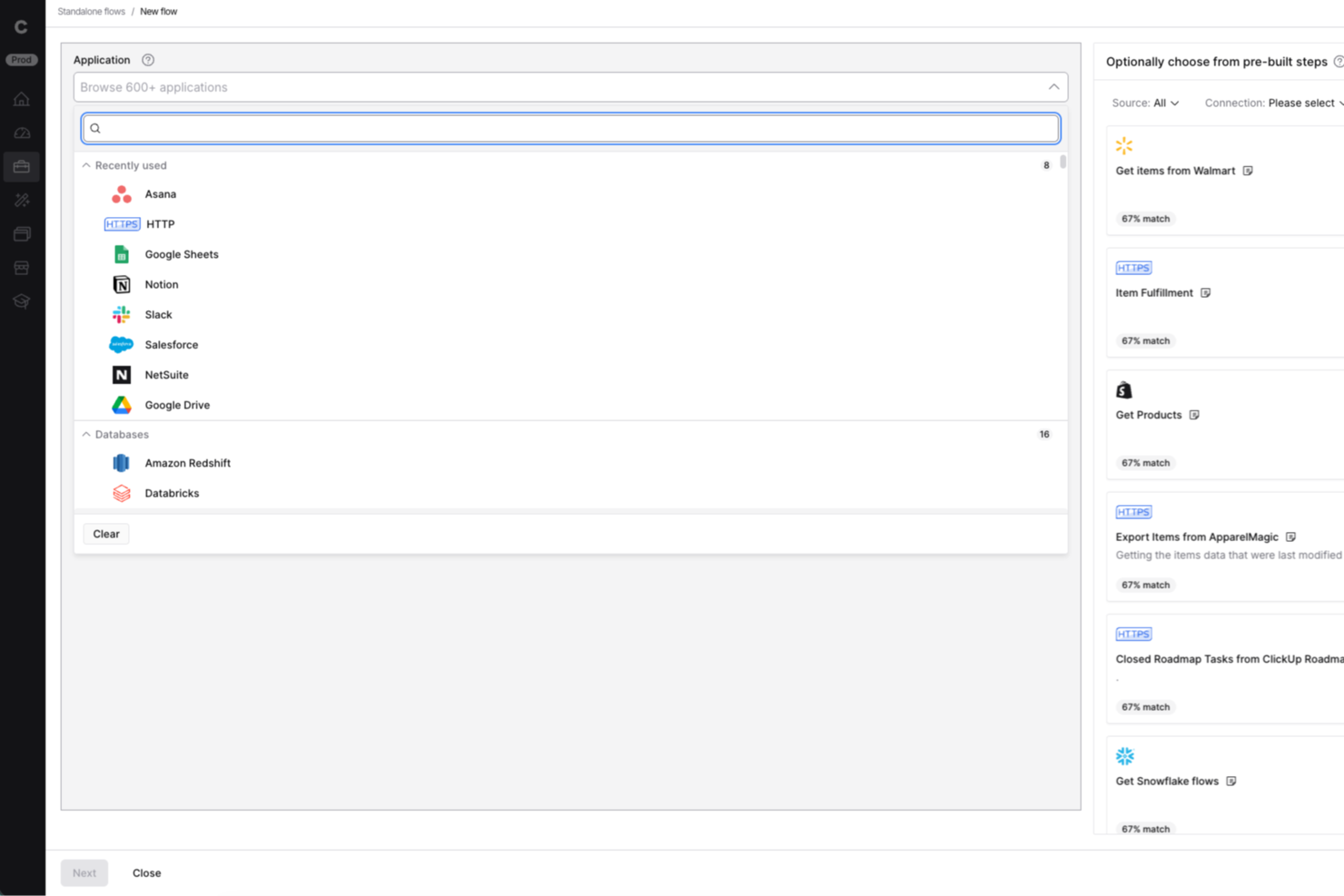
Celigo is an ai workflow automation platform built for IT teams and operations leaders who need to connect apps, automate complex business processes, and manage integrations at scale across their organization.
Who Is Celigo Best For?
IT teams and operations leaders at mid-sized to large enterprises who need to automate and orchestrate workflows across multiple business systems.
Why I Picked Celigo
I picked Celigo as one of the best because its library of 1,000+ prebuilt connectors lets my team automate workflows across dozens of SaaS apps without custom development. I can quickly connect Salesforce, NetSuite, Shopify, and more, then orchestrate data flows between them. This saves us weeks on integration projects and lets us focus on optimizing business processes instead of building connectors from scratch.
Celigo Key Features
- AI-powered error management: Automatically detects, flags, and helps resolve integration errors in real time.
- Visual flow builder: Lets you design, map, and automate workflows using a drag-and-drop interface.
- Role-based access controls: Assigns permissions and restricts access to sensitive workflows and data.
- Workflow monitoring dashboard: Provides real-time visibility into process status, throughput, and performance metrics.
Celigo Integrations
Integrations include Salesforce, Microsoft Dynamics 365 Business Central, Oracle NetSuite, Walmart, SAP, Snowflake, Acumatica, ADP, Adobe, and 3M.
Pros and Cons
Pros:
- Real-time monitoring and error alerting included
- SOC 2 Type II and GDPR compliance features
- Built-in data transformation and mapping tools
Cons:
- Limited AI-specific automation templates
- Advanced features require higher-tier pricing
New Product Updates from Celigo
Celigo Expands Storage, Data Imports, and Connection Management
Celigo adds a standalone storage connector, optimized Azure Synapse imports, NetSuite OAuth 2.0, flexible file templates, and expanded MCP access controls. These updates help teams manage files, process data, and secure integrations. For more information, visit Celigo’s official site.
 .

Best for easy process documentation

Process Street is a compliance operations platform that helps you automate and track business processes. It's ideal for operations, compliance, and HR teams in industries like healthcare and technology. The platform centralizes compliance documentation and transforms policies with AI-powered workflows.
Why I picked Process Street: It excels in simplifying process documentation and makes it easy for teams to manage standard operating procedures. Its standout features include centralized policy management and real-time task visibility. The platform's AI-driven workflows also help you improve operational efficiency.
Standout features & integrations:
Features include workflow automation that simplifies repetitive tasks, project management capabilities to keep your team organized, and AI tools that transform manual processes.
Integrations are not listed publicly on Process Street’s website.
Pros and Cons
Pros:
- Compliance monitoring
- Centralized policy management
- Easy process documentation
Cons:
- Some integrations need improvement
- Limited customization options

Workato
Best for enterprise integrations

Workato is an integration platform as a service (iPaaS) for enterprise users across IT, finance, HR, and marketing. You can use it to automate business processes, integrate your apps, and improve operational efficiency.
Why I picked Workato: It offers enterprise-grade integrations, which makes it suitable for large organizations. The platform offers a no-code interface with over 1200 pre-built connectors. You can automate complex workflows and manage APIs, and the ability to create custom AI assistants and agents adds flexibility to your operations.
Standout features & integrations:
Features include version control so you can manage changes safely, role-based access to support cross-functional teams, and granular error monitoring to help you resolve failures.
Integrations include Salesforce, Slack, HubSpot, Marketo, ServiceNow, NetSuite, QuickBooks, Microsoft Dynamics 365, Zendesk, and Jira.
Pros and Cons
Pros:
- Custom agent creation
- No-code automation platform
- Extensive pre-built connectors
Cons:
- Can be complex for small teams
- Limited customer support hours

n8n
Best for custom workflow creation

n8n is an AI workflow automation platform for technical teams like IT, security, development, and sales. It helps you build multi-step AI agents and integrate various applications to perform business functions like employee onboarding and security incident management.
Why I picked n8n: The platform's flexibility in custom workflow creation sets it apart. Users can build workflows using either the visual interface or code, which makes it adaptable to different skill levels. It supports over 500 integrations, so you can connect various tools, and the option for self-hosting or a cloud solution adds more versatility.
Standout features & integrations:
Features include a visual workflow builder that simplifies complex tasks, support for both no-code and code-savvy users, and the ability to run and debug workflows efficiently.
Integrations include Google Sheets, Slack, MySQL, HubSpot, Salesforce, GitHub, Jira, Airtable, Trello, and Microsoft Teams.
Pros and Cons
Pros:
- Extensive integration capabilities
- Low-code and self-hosting options
- Flexible workflow creation
Cons:
- Can be complex for beginners
- Requires technical knowledge
Diğer Yapay Zekâ İş Akışı Otomasyonu Yazılımları
Kısa listeme giremeyen ancak yine de göz atmaya değer bazı ek yapay zekâ iş akışı otomasyonu yazılımı seçenekleri şunlardır:
- TimeHero
For task automation
- Adobe Workfront
For marketing teams
- Tonkean
For operations teams
- Camunda
For BPMN and DMN modeling
- Jitterbit
For data integration tasks
- Forms On Fire
For mobile data collection
- elvex
For AI-powered knowledge workflows
- Miro
For visual collaboration
- Jotform Workflows
For no-code workflow customization
- GoodDay
For task dependency management
- Parabola.io
For data-heavy workflows
- Asana
For managing cross-functional projects
- Zapier
For simple app-to-app automations
- ClickUp
For customizing workflow views
- monday.com
For visual task management


How I Evaluate AI Workflow Automation Software
Every tool on this list needs to do more than bolt on an AI label—I look for platforms where AI drives real outcomes, like auto-generating status reports or flagging at-risk sprints before they derail. I split my evaluation into core functionality every tool must have to qualify and differentiating factors that separate the best fits from the rest.
Core Functionality (Table Stakes For This List)
When I'm selecting tools for my list, I rank each one on a scale from 0 (does not offer the functionality) to 5 (excels in this area) for each core functionality listed below. Then, I calculate the tool's total score into a percentage. Each tool needs to achieve a minimum total score of 65% to be considered for inclusion.
- AI-Assisted Workflow Builder: I evaluate whether the platform lets you describe a workflow in plain language and get a usable automation back, like typing "assign QA tasks when dev marks a ticket done."
- Project Task Automation: Each tool should automate core PM actions like creating subtasks, reassigning work when priorities shift, or updating status fields across dependent tasks.
- Trigger-Based Conditional Logic: I look for event-driven triggers paired with branching logic, such as kicking off a risk review workflow when a milestone slips past its planned date.
- Native PM Integrations: The tool needs to connect with platforms teams already use. I check for depth of integration with tools like Jira, Asana, ClickUp, Slack, and Google Workspace.
- Generative AI Outputs: I evaluate whether AI can produce useful project artifacts within workflows, like drafting a sprint summary from completed tickets or generating stakeholder update emails.
- Predictive Intelligence: The platform should surface forward-looking insights, such as flagging resource bottlenecks or forecasting delivery risk based on velocity trends and historical data.
Once I have a list of tools that meet the criteria, I consider what sets each platform apart.
Differentiating Factors (What Sets Vendors Apart)
Here's how I compare and contrast different vendors:
Standout Features
Autonomous AI agents set tools apart. I look for platforms where an agent can triage requests, route tasks, and update stakeholders on its own. That kind of hands-off coordination saves PMs hours each week. A conversational interface matters too—PMs should be able to type "show me blocked tasks this sprint" and get answers without building a report. Prebuilt PM templates for sprint kickoffs or risk reviews help teams get running in minutes rather than configuring workflows from scratch.
Beyond Features
AI transparency is a big deal when workflows make decisions on your behalf. I check whether a platform shows why it flagged a deadline as at-risk or reassigned a task, and whether it offers approval gates before AI actions execute. Security and data governance matter just as much—I evaluate controls over what project data AI models can access and whether the vendor supports SOC 2 Type II and regional data residency. Pricing structures also get close attention, since AI-heavy usage can drive costs up fast if token consumption or workflow runs aren't priced predictably.
Yapay Zekâ İş Akışı Otomasyonu Yazılımı Nasıl Seçilir?
Uzun özellik listeleri ve karmaşık fiyatlandırma yapılarına takılıp kalmak kolaydır. Doğru yapay zekâ iş akışı otomasyonu yazılımını seçmenize yardımcı olmak için göz önünde bulundurmanız gereken faktörleri içeren bir kontrol listesi hazırladım:
| Faktör | Dikkat Edilmesi Gerekenler |
|---|---|
| Ölçeklenebilirlik | Yazılım işletmenizle birlikte büyüyebilir mi? Ek kullanıcıları ve iş akışlarını sorunsuz şekilde destekleyip desteklemediğini değerlendirin. Artan veri hacmini verimli bir şekilde işleyip işleyemediğini kontrol edin. |
| Entegrasyonlar | Mevcut araçlarınıza (ör. muhasebe yazılımı veya CRM aracı) bağlanabiliyor mu? Temel yazılım sistemlerinizle yerel entegrasyonlar sunduğundan emin olun. Entegrasyon için maliyetli üçüncü taraf çözümler gerektiren araçlardan kaçının. |
| Özelleştirilebilirlik | İş akışlarınıza uyacak şekilde uyarlayabilir misiniz? Geliştiriciye ihtiyaç duymadan değişiklik yapmanıza olanak tanıyan yazılımları tercih edin. Özel alanları ve arayüzleri destekleyip desteklemediğini kontrol edin. |
| Kullanım kolaylığı | Arayüz ekibiniz için sezgisel mi? Öğrenme eğrisi dik olan araçlardan kaçının. Karar vermeden önce gezinme deneyimini ve kullanıcı deneyimini test edin. |
| Uygulama ve işe alıştırma | Ekibiniz ne kadar hızlı şekilde yetkinlik kazanabilir? İşe alıştırma sırasında sunulan eğitim materyallerini ve desteği değerlendirin. Etkileşimli kılavuzları ve öğreticileri kontrol edin. |
| Maliyet | Bütçenize uyuyor mu? Fiyatlandırma planlarını karşılaştırın ve gizli ücretleri kontrol edin. Temel planlarda sunulan değeri premium seçeneklerle karşılaştırarak değerlendirin. |
| Güvenlik önlemleri | Verileriniz korunuyor mu? Yazılımın GDPR gibi sektör standartlarına uyduğundan emin olun. Şifreleme ve role dayalı erişim denetimleri olup olmadığını kontrol edin. |
| Destek kullanılabilirliği | İhtiyacınız olduğunda yardım alabiliyor musunuz? 7/24 destek seçenekleri ve hızlı yanıt süreleri sunan araçları tercih edin. Sohbet ve telefon gibi birden fazla destek kanalı sunup sunmadıklarını kontrol edin. |
Yapay Zekâ İş Akışı Otomasyonu Yazılımı Nedir?
Yapay zekâ iş akışı otomasyon yazılımı, yapay zekâ kullanarak tekrarlayan görevleri ve süreçleri otomatikleştiren bir araçtır. Verimliliği artırmak ve manuel ve rutin görevleri azaltmak için proje yöneticileri, BT profesyonelleri ve operasyon ekipleri tarafından yaygın olarak kullanılır.
Görev otomasyonu, gerçek zamanlı analizler ve mevcut araçlarla entegrasyonlar gibi özellikler iş akışlarını yönetmenize, üretkenliği artırmanıza ve ekiplerin uyum içinde çalışmasını sağlamanıza yardımcı olur. Genel olarak bu araçlar zamandan tasarruf etmenizi sağlar; böylece daha stratejik görevlere odaklanabilirsiniz.
Yapay Zekâ İş Akışı Otomasyon Yazılımının Özellikleri
Yapay zekâ iş akışı otomasyon yazılımı seçerken aşağıdaki temel özelliklere dikkat edin:
- Görev otomasyonu: Tekrarlayan görevleri otomatikleştirir ve daha stratejik çalışmalar için zaman kazandırır.
- Gerçek zamanlı analizler: İş akışı performansı hakkında içgörüler sunar ve veriye dayalı kararlar almanıza yardımcı olur.
- Özelleştirilebilir iş akışları: Geliştirici gerektirmeden süreçlerinizi özel işletme ihtiyaçlarınıza uyacak şekilde uyarlamanızı sağlar.
- Entegrasyonlar: Platformlar arasında kesintisiz bilgi akışını sürdürmek için mevcut araçlara bağlanır.
- Ölçeklenebilirlik: Artan veri hacmini ve ek kullanıcıları sorunsuz bir şekilde işleyerek büyümeyi destekler.
- Güvenlik önlemleri: Hassas verileri şifreleme ve rol tabanlı erişim denetimleriyle korur.
- İş birliği araçları: Paylaşılan çalışma alanları ve sohbet gibi özelliklerle ekip iletişimini ve koordinasyonunu geliştirir.
- Mobil erişim: Ekip üyelerinin iş akışlarını ve görevleri mobil cihazlardan yönetmesini sağlar.
- Kullanıcı dostu arayüz: Sezgisel bir tasarımla kullanım kolaylığı sunar ve yeni kullanıcıların öğrenme sürecini kısaltır.
- Performans raporlaması: Üretkenliği takip etmek ve iyileştirme alanlarını belirlemek için ayrıntılı raporlar sunar.
Yapay Zekâ İş Akışı Otomasyon Yazılımının Faydaları
Yapay zekâ iş akışı otomasyon yazılımını uygulamak ekibiniz ve işletmeniz için çeşitli faydalar sağlar. İşte yararlanabileceğiniz bazı avantajlar:
- Artan verimlilik: Tekrarlayan görevleri otomatikleştirerek ekibinizin daha değerli çalışmalara odaklanmasını sağlar.
- Geliştirilmiş karar alma: Verilere dayalı bilinçli seçimler yapmanıza yardımcı olmak için gerçek zamanlı analizler sunar.
- Daha iyi iş birliği: Ekibinizde iletişimi ve koordinasyonu geliştiren araçlar sunar.
- Ölçeklenebilirlik: Daha fazla veriyi ve kullanıcıyı kolayca işleyerek işletmenin büyümesini destekler.
- Zaman tasarrufu: Manuel çalışmayı azaltır ve stratejik girişimler için zaman kazandırır.
- Daha iyi veri güvenliği: Güçlü güvenlik önlemleriyle hassas bilgilerin korunmasını sağlar.
- Esneklik: Özelleştirilebilir iş akışları, süreçleri değişen işletme ihtiyaçlarına uyarlamanızı sağlar.
Yapay Zekâ İş Akışı Otomasyon Yazılımının Maliyetleri ve Fiyatlandırması
Yapay zekâ iş akışı otomasyon yazılımının maliyetleri özelliklere, ekip büyüklüğüne, eklentilere ve daha fazlasına göre değişir. Yapay zekâ iş akışı otomasyon çözümlerinde sunulan yaygın planlar, ortalama fiyatlar ve tipik özellikler şunlardır:
Yapay Zekâ İş Akışı Otomasyon Yazılımı İçin Plan Karşılaştırma Tablosu
| Plan Türü | Ortalama Fiyat | Yaygın Özellikler |
|---|---|---|
| Ücretsiz Plan | $0/user/month | Temel görev otomasyonu, sınırlı uygulama entegrasyonları ve topluluk desteği. |
| Kişisel Plan | $5-$25/user/month | Görev otomasyonu, temel raporlama, daha fazla entegrasyon ve e-posta desteği. |
| İşletme Planı | $30-$75/user/month | Gelişmiş iş akışı otomasyonu, gerçek zamanlı analizler, daha iyi güvenlik ve sohbet desteği. |
| Kurumsal Plan | $100+/user/month | Özelleştirilebilir iş akışları, özel destek, eksiksiz entegrasyonlar ve gelişmiş analizler. |
AI İş Akışı Otomasyon Yazılımı SSS'leri
AI iş akışı otomasyon yazılımı hakkında sık sorulan soruların yanıtları aşağıdadır:
AI iş akışı otomasyon araçlarını uygularken karşılaşılan yaygın zorluklar nelerdir?
Yaygın zorluklar arasında mevcut sistemlerle entegrasyon ve ekip üyelerinin değişime direnç göstermesi yer alır. Bir öğrenme süreciyle karşılaşabilirsiniz; bu nedenle eğitim ve destek kaynakları kritik önem taşır. Yazılımı iş süreçlerinizle uyumlu hâle getirebilmek için hedeflerinizin net olduğundan emin olun.
AI iş akışı otomasyon yazılımı üretkenliği nasıl artırır?
AI iş akışı otomasyon yazılımı, tekrarlayan görevleri otomatikleştirerek ekibinizin stratejik çalışmalara odaklanmasını sağlar ve üretkenliği artırır. Bilinçli kararlar alabilmeniz için gerçek zamanlı analizler sunar; iş birliği araçları ise farklı departmanların bağlantı kurmasına ve iletişimin kolaylaştırılmasına yardımcı olur.
AI iş akışı otomasyon yazılımından en çok hangi sektörler yararlanır?
Finans, sağlık ve üretim gibi sektörler AI iş akışı otomasyon araçlarından yararlanır. Bu sektörlerde büyük hacimli tekrarlayan görevler ve veri işleme süreçleri bulunur; bu nedenle otomasyon, verimlilik açısından gereklidir. Yazılım süreçleri kolaylaştırır, hataları azaltır ve uyumluluğu iyileştirir.
AI iş akışı otomasyon yazılımı veri güvenliğini nasıl iyileştirebilir?
AI iş akışı otomasyon araçları, şifreleme ve role dayalı erişim denetimleri aracılığıyla veri güvenliğini artırmaya yardımcı olabilir. Yalnızca yetkili kullanıcıların hassas bilgilere erişebilmesini sağlar. Düzenli güncellemeler ve GDPR gibi sektör standartlarına uyumluluk, verileri ihlallere ve yetkisiz erişime karşı daha da korur.
Kullanıcı katılım sürecinde nelere dikkat etmelisiniz?
Kullanıcı katılımı sırasında eğitimlerin ve web seminerlerinin yanı sıra eğitim kaynaklarının bulunabilirliğini değerlendirin. Geçiş sürecini kolaylaştırmak için etkileşimli ürün turları ve sağlayıcı desteği olup olmadığını kontrol edin. Potansiyelini en üst düzeye çıkarmak ve günlük operasyonlara etkili bir şekilde entegre etmek için ekibinizin yazılımın özelliklerini ve avantajlarını anladığından emin olun.