

2026’da İncelenen En İyi 10 Süreç Otomasyonu Yazılımı

En İyi Süreç Otomasyonu Yazılımları Kısa Listesi


En iyi süreç otomasyonu yazılımı, görevleri otomatikleştirmenize, iş akışlarınızı iyileştirmenize ve projelerinizde verimliliği artırmanıza olanak tanır. İş akışlarınızı otomatikleştirecek bir araç olmadan kendinizi tekrarlayan, manuel işlere zaman harcarken, aynı hataları tekrar tekrar düzeltirken ve tutarlılığı manuel olarak korurken bulursunuz.
Proje yönetimindeki deneyimimi ve 3+ yıllık yazılım test geçmişimi kullanarak 25'ten fazla süreç otomasyonu yazılımı aracını inceledim; her araçla ilgili analizimi, temel özellikleri ve kullanım alanlarını aşağıda okuyabilirsiniz. Onayları hızlandırmak, darboğazları azaltmak, görünürlüğü ve hesap verebilirliği artırmak için doğru aracı bulmanıza yardımcı olacağım; böylece manuel işlere daha az, stratejik proje teslimine daha fazla zaman ayırabilirsiniz.
Why Trust Our Software Recommendations
Our team has been testing and reviewing software since 2012. As project managers ourselves, we know how difficult—and important—it is to choose the right software.
For this guide, we evaluated tools using hands-on testing and independent research, scoring tools using our selection criteria. We also draw on insights from industry thought leaders and practicing project management experts.
Our reviews reflect our human editorial judgment, not a sales pitch.
Expert reviewers:
Süreç Otomasyonu Yazılımları Karşılaştırma Tablosu
Aşağıdaki tabloda en iyi süreç otomasyonu yazılımı seçimlerimin fiyatlarını ve temel özelliklerini karşılaştırabilirsiniz.
| Tool | Best For | Trial Info | Price | ||
|---|---|---|---|---|---|
| 1 | Best for secure client interaction workflows | Free trial + free demo available | From $5,000/year (billed annually) | Website | |
| 2 | Best for SAP technology integration | Free demo available | Pricing upon request | Website | |
| 3 | Best for customizable reporting | Free trial available | From $10,000 (one-time license) | Website | |
| 4 | Best for AI workflow guidance | Not available | Pricing upon request | Website | |
| 5 | Best for rule-based workflows | Free plan + 14-day trial + demo available | From $10/user/month (billed annually) | Website | |
| 6 | Best for no-code app creation | Free demo | Pricing upon request | Website | |
| 7 | Best for Salesforce document automation | Free demo available | From $399/month (billed annually) | Website | |
| 8 | Best with prebuilt connectors for major apps | 30-day free trial available | Pricing upon request | Website | |
| 9 | Best for AI-driven process automation | Free trial available + free demo | Pricing upon request | Website | |
| 10 | Best for agentic workflows | Free plan available | From $25/month | Website |


En İyi Süreç Otomasyonu Yazılımları İncelemeleri
Aşağıda en iyi süreç otomasyonu araçları için yaptığım seçimlerin tüm ayrıntılarını bulabilirsiniz. İhtiyaçlarınıza en uygun araca karar vermenize yardımcı olmak için özellikleri, kullanım alanlarını, avantajları ve dezavantajları ele alıyorum.

Moxo
Best for secure client interaction workflows

Moxo is a process automation platform that lets you design and run multi-step workflows across internal teams, external stakeholders, and AI agents—covering actions like approvals, document requests, eSignatures, and automated routing.
Who Is Moxo Best For?
Moxo is a strong fit for service-based businesses—like financial services, legal, and consulting firms—that run structured, repeatable processes involving external clients.
Why I Picked Moxo
I picked Moxo as one of the best because of how seriously it handles security across every layer of a client interaction workflow. When my team runs processes that involve external clients—think KYC verification or loan applications—sensitive data is encrypted in transit and at rest, and granular role-based access controls keep each participant seeing only what they should. On top of that, Moxo's 7+ year audit trail and SOC 2 Type II certification mean I can demonstrate compliance to regulators without digging through scattered email threads or shared drives.
Moxo Key Features
- Conditional branching and parallel paths: Build workflow logic that routes work dynamically based on form inputs, decisions, or outcomes, with parallel tracks that don't block each other.
- SLA timers and escalation triggers: Set deadline-based timers that automatically escalate overdue tasks to the right person without manual follow-up.
- AI agent actions: Deploy AI agents to pre-fill data, validate submissions, and attach relevant documents before a human action step is reached.
- Flexible deployment options: Run Moxo on-premises, in a private cloud, or in a hybrid model to meet your organization's infrastructure and data residency requirements.
Moxo Integrations
Moxo offers direct data sync connectors with Salesforce, HubSpot, Microsoft Dynamics, Zoho, Wealthbox, Redtail, Filevine, Global Relay, Smarsh, and Xero, along with integrations for tools like DocuSign, Jira, Stripe, Slack, Google Drive, Dropbox, Box, OneDrive, QuickBooks, and Zendesk. It connects with Zapier and provides a REST API and webhooks for custom integrations.
Pros and Cons
Pros:
- Messaging, file sharing, and eSignatures in one place
- Workflow branching supports non-linear process paths
- SOC 2 Type II and GDPR compliant security
Cons:
- Workflows feel rigid for non-repeatable projects
- No built-in time tracking for tasks

Best for SAP technology integration
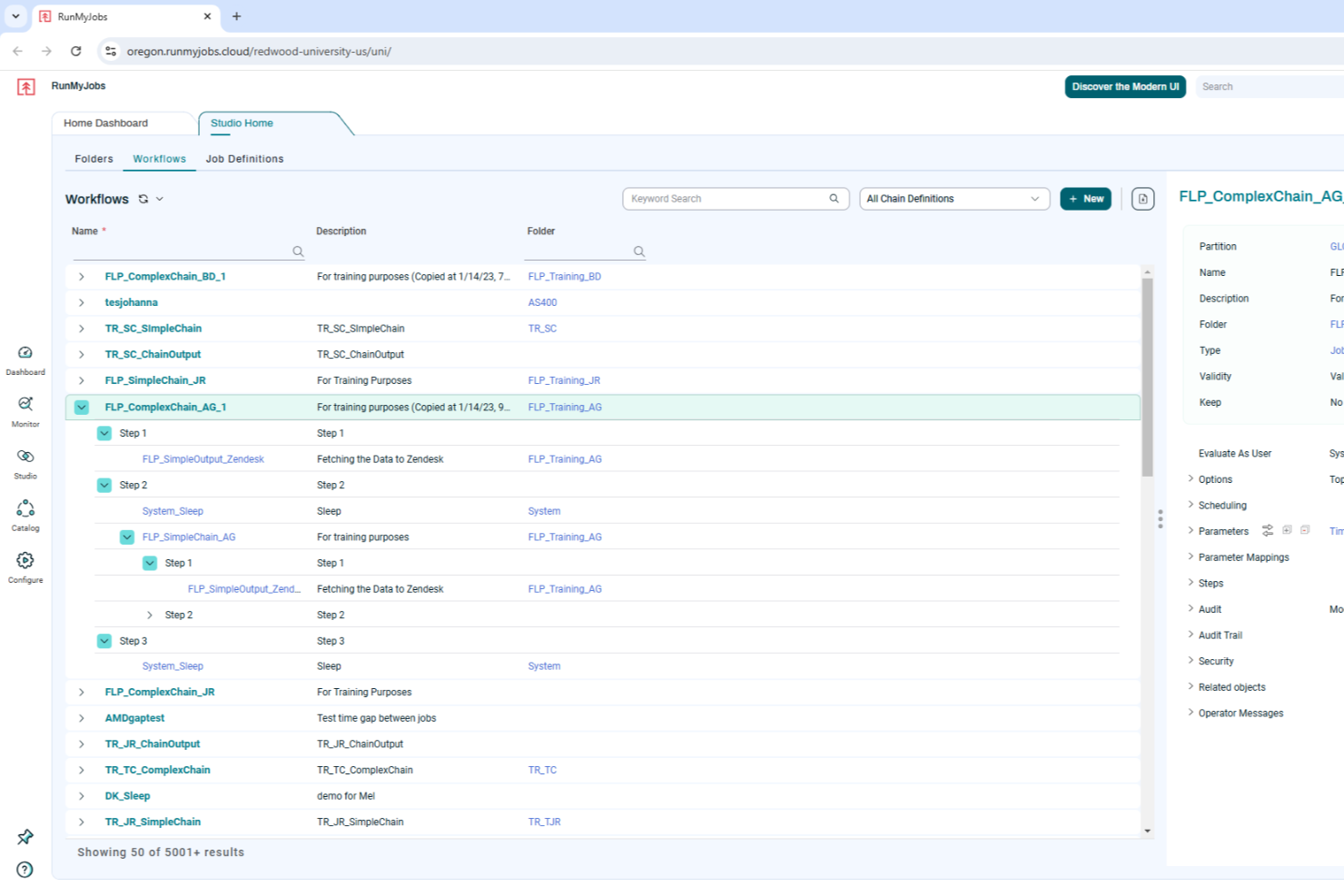
RunMyJobs by Redwood is an intelligent workload automation software that caters to businesses seeking to enhance their operational efficiency through automation. By offering seamless integration with SAP technologies and other critical business solutions, it addresses the needs of organizations looking to reduce manual tasks and improve production efficiency. RunMyJobs empowers your team to automate mission-critical processes, ensuring reliability and adaptability in an ever-evolving business landscape.
Why I Picked RunMyJobs by Redwood
I picked RunMyJobs by Redwood because of its exceptional capability to automate complex, mission-critical business processes with ease. The platform's deep integration with SAP technologies, including S/4HANA, makes it an excellent choice for businesses heavily reliant on SAP systems. Additionally, its predictive analytics feature allows for real-time monitoring of service-level agreements, ensuring your operations run smoothly and efficiently. This focus on enhancing operational efficiency through automation sets RunMyJobs apart in the process automation software space.
RunMyJobs by Redwood Key Features
In addition to its robust SAP integration and predictive analytics, RunMyJobs offers several other valuable features for process automation:
- Hybrid Architecture: Supports seamless automation across various environments, including cloud and on-premises systems.
- Self-Service Automation: Empowers users to initiate and customize workflows independently, reducing dependency on IT departments.
- Full Stack Connectivity: Orchestrates workflows across applications and infrastructure, ensuring comprehensive process automation.
- AI and Analytics Integration: Provides predictive analysis and process optimization to enhance decision-making and operational efficiency.
RunMyJobs by Redwood Integrations
Integrations include SAP S/4HANA, Oracle Data Integrator, ServiceNow, Databricks, AWS DataSync, Kubernetes, Boomi Atom, Box.com, Informatica Cloud, and Power BI.
Pros and Cons
Pros:
- Supports hybrid infrastructure automation
- Reliable enterprise grade scheduling
- Deep native SAP integration
Cons:
- Pricing not publicly listed
- Setup can be complex

Best for customizable reporting
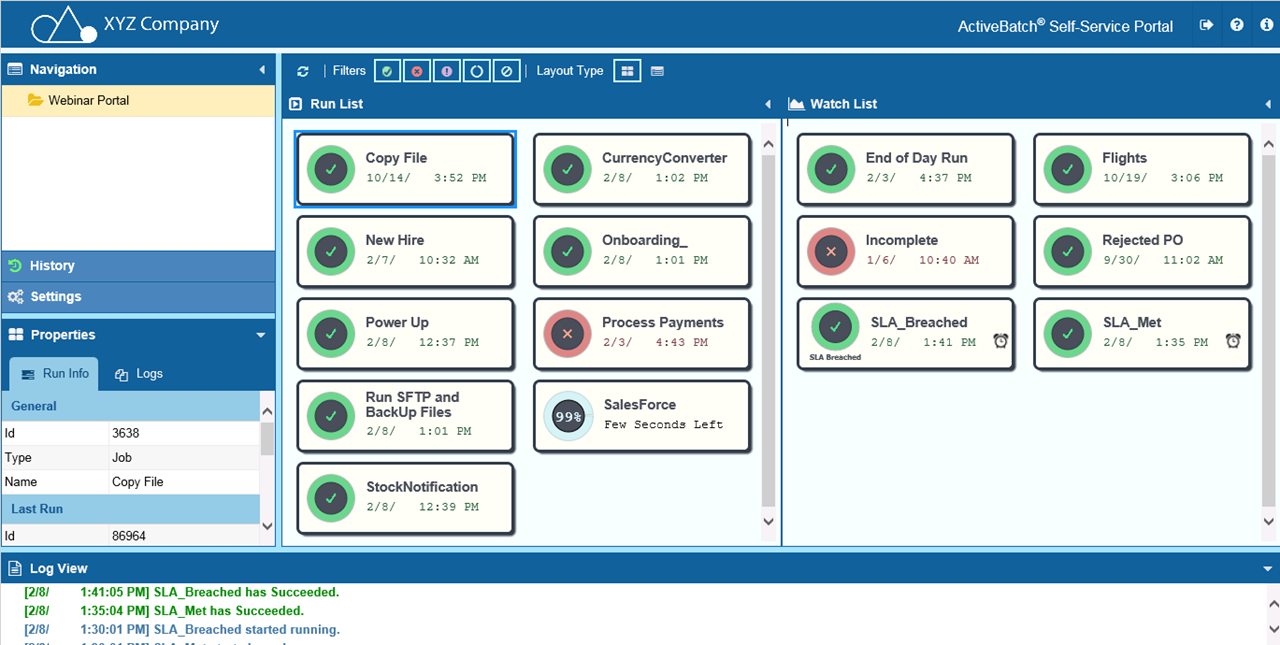
ActiveBatch is a process automation platform that helps you optimize various operational workflows. It offers a suite of features that make it an essential tool if you want to improve your automation capabilities.
Why I Picked ActiveBatch
ActiveBatch offers customizable reporting and monitoring, which means you can tailor alerts and reports to suit your specific needs and make sure you always have the right information at your fingertips.
Another reason for choosing ActiveBatch is its event-driven job scheduling, which allows automations to be triggered by specific events. This feature keeps processes dynamic and responsive to changes and leads to greater efficiency across your operations. ActiveBatch's strong security and governance features mean you can control access and protect your data across various environments.
ActiveBatch Key Features
In addition to customizable reporting, ActiveBatch offers a range of other features that cater to diverse automation needs.
- Job Step Library: You can access a comprehensive library of pre-built job templates that eliminate the need for scripting, which helps simplify automation tasks.
- Low-Code Workflow Designer: This lets you easily create workflows without the need for extensive coding knowledge and makes it accessible for users of various technical backgrounds.
- SLA Management: You can automatically monitor and manage service level agreements to maintain compliance and operational efficiency.
- Cloud Provisioning: This lets you optimize cloud infrastructure resources and efficiently manage cloud-based workflows.
ActiveBatch Integrations
Integrations include Microsoft PowerShell, SQL Server, ServiceNow, Azure Data Factory, Oracle EBS, VMware, SAP NetWeaver, Informatica PowerCenter, and AWS.
Pros and Cons
Pros:
- Simplifies job scheduling & reduces time and resources for monitoring tasks
- Lets you automate and manage complex IT processes
- Offers visibility into workflows so tasks are completed in the correct order
Cons:
- User interface could be simplified for better usability
- Modifying workflows and custom integrations can be challenging

Best for AI workflow guidance

Screendragon is a workflow management and process automation platform aimed especially at marketing, agency, and operations teams. It allows you to design, route, and monitor workflows to reduce friction in processes.
Why I Picked Screendragon
I chose Screendragon for its exceptional AI workflow guidance. The platform's AI-driven automation and governance rules let you manage complex workflows with ease and reduce time spent on repetitive tasks. With features like a visual workflow builder and digital approval management, you get real-time insights that empower informed decision-making. Screendragon's no-code platform means even non-technical teams can customize workflows, which makes it a versatile choice for businesses that want to improve productivity and operational efficiency.
Screendragon Key Features
Screendragon also offers several other features for process automation and project management.
- Resource Management: This provides a clear overview of team capacity and lets you optimally deploy your team to make sure critical projects are staffed adequately.
- Automated Project Kickoffs: You can convert signed deals into structured project environments to maintain consistency and have a strong start for every new project.
- Pipeline Management: This offers customizable workflows that align seamlessly with your operations and facilitate a smooth transition from initial pitch to project execution.
- Project Cost Estimation: You can streamline the estimation process and accurately predict costs, timelines, and resource needs for better financial planning.
Screendragon Integrations
Integrations include Microsoft Power BI, Slack, Microsoft Teams, HubSpot, Okta, Aprimo, Adobe, Ziflow, Brandfolder, Jira, Google Drive, Egnyte, Box, Salesforce, Microsoft Dynamics 365, SAP, and Trello.
Pros and Cons
Pros:
- Built-in AI agents offer predictive insights
- Robust proofing and approval loops built in
- Highly customizable workflows with conditional logic
Cons:
- Resource management can feel tedious
- Complexity may overwhelm small teams

Wrike
Best for rule-based workflows

Wrike is a project management and collaboration software designed for businesses of all sizes, offering tools to manage both one-time projects and ongoing tasks.
Why I Picked Wrike
One of its core strengths is its customizable automation capabilities, allowing users to create rule-based workflows that automate repetitive tasks without any coding. Wrike's customizable templates, reporting tools, and interactive Gantt views also enable businesses to analyze and optimize their processes. The software even includes advanced features like AI risk prediction to alert teams when projects are at risk of falling behind.
Wrike Key Features
Wrike also offers a range of other features for process automation.
- Dynamic Request Forms: These forms come with conditional logic so your team can collect and manage data more effectively.
- AI Integration: Wrike's AI tools provide advanced automation suggestions that can help you improve task management and efficiency.
- Real-Time Dashboards: This offers centralized data visualization for informed decision-making and process monitoring.
- Automated Reporting Tools: You can generate real-time insights on process performance to foster continuous improvement and strategic planning.
Wrike Integrations
Integrations include Microsoft Teams, Slack, Salesforce, Google Drive, Dropbox, Box, Microsoft Office 365, Adobe Creative Cloud, Jira, QuickBooks, and Tableau.
Pros and Cons
Pros:
- Good collaboration features
- Approval workflow features
- Dynamic Gantt charts with dependency mapping
Cons:
- Advanced security and automation only available in higher-tier plans
- Configuring the platform to your needs can be complex
New Product Updates from Wrike

Wrike Redesigns Workspace Search With New Filters
Wrike introduces a redesigned Workspace Search interface with recent search shortcuts, item type and location filters, and parent-task context. These updates help users find relevant work items and navigate search results efficiently. For more information, visit Wrike’s official site.
Kissflow
Best for no-code app creation
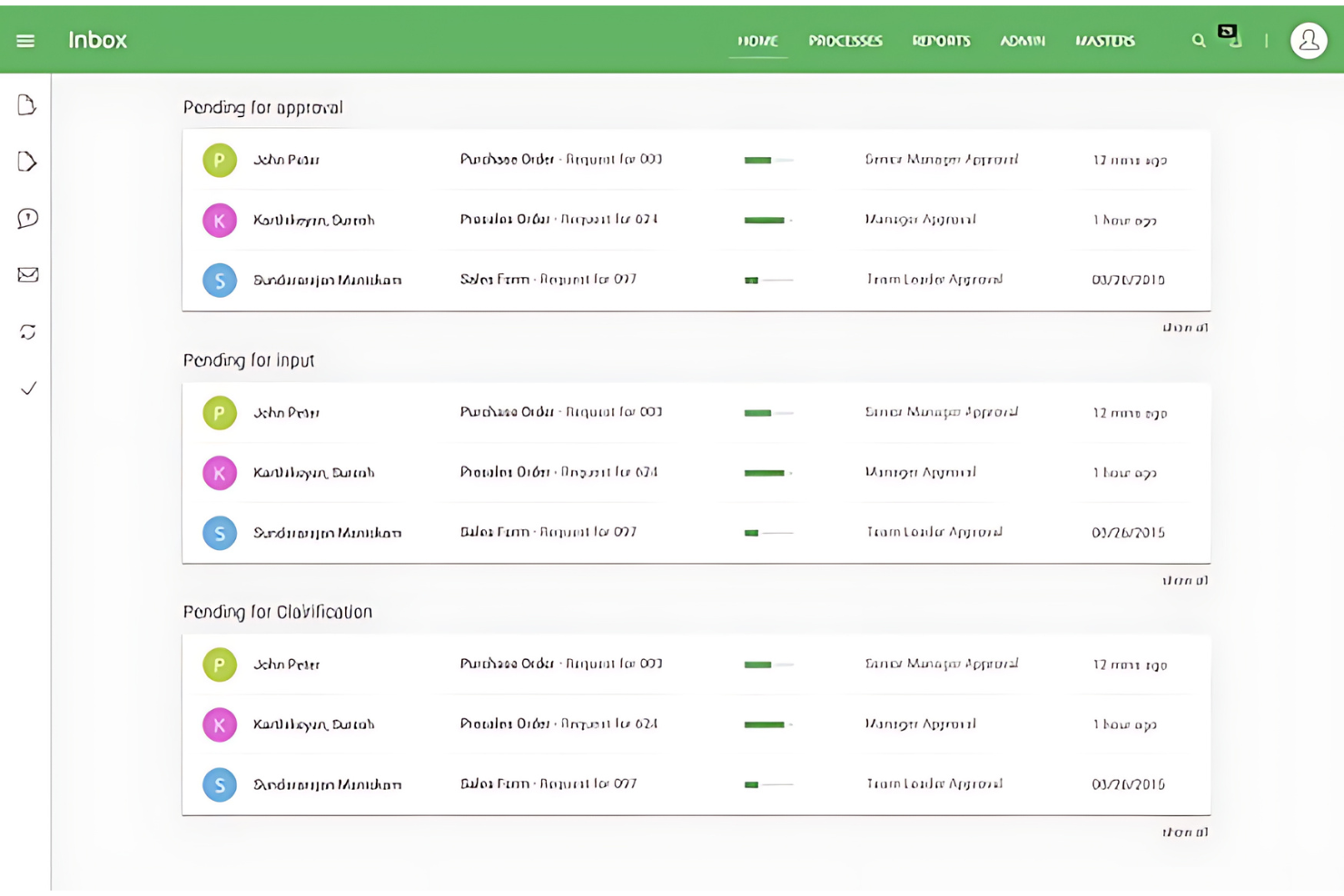
Kissflow is a platform that simplifies the creation of custom applications with minimal coding required. It is best for businesses that aim to enable their teams to build applications without needing extensive technical skills.
Why I Picked Kissflow
I chose Kissflow for this list because it uniquely enables rapid app development without the need for coding, which sets it apart from other process automation tools. I believe Kissflow is best for no-code app creation due to its user-friendly platform that allows individuals without a technical background to easily create and deploy applications.
Kissflow Key Features
In addition to no-code app creation, Kissflow offers a range of other features that can help you improve process automation.
- Kissflow AI: This feature integrates artificial intelligence to automate and optimize workflows intelligently.
- Workflow Orchestration: You can manage and simplify complex workflows by coordinating different tasks and processes.
- Decision Management Tools: This provides visual tools for managing decisions and visualizing workflows, which also helps with process clarity.
- Social Collaboration: This allows for real-time information sharing and alerts to boost teamwork and communication within your organization.
Kissflow Integrations
Integrations include SAP Business ByDesign, Docusign, Dropbox, Oracle NetSuite, Salesforce, Google Drive, Slack, Asana, and HubSpot.
Pros and Cons
Pros:
- No-code platform suitable for users without programming skills
- User-friendly interface for workflow and application management
- A broad range of integrations with other systems
Cons:
- Migration to newer software versions can be challenging
- Absence of dedicated development and testing environment

altaFlow
Best for Salesforce document automation
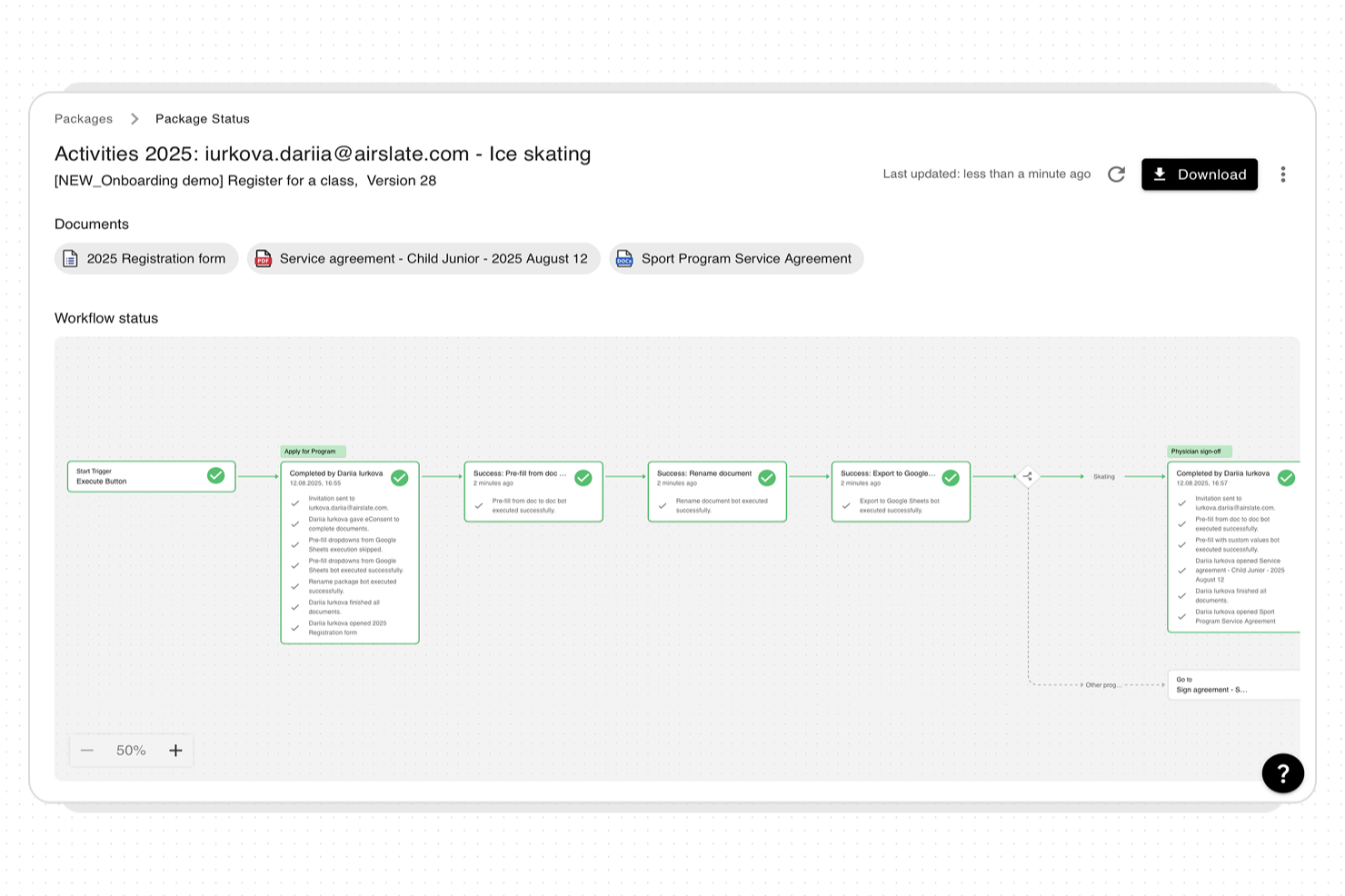
altaFlow offers process automation software designed for organizations that need to manage complex document workflows and data across multiple systems. It’s a strong choice for teams in regulated industries or those using Salesforce who require secure, auditable automation.
Who Is altaFlow Best For?
Teams in finance, healthcare, or legal industries that need secure, automated workflows and deep Salesforce integration will find altaFlow especially useful.
Why I Picked altaFlow
I picked altaFlow because my team needs advanced document automation directly within Salesforce. With altaFlow, we can generate, route, and archive documents without leaving our CRM environment. I appreciate how it handles complex approval chains and automates compliance steps for regulated industries. This lets us keep all document workflows tightly integrated with our Salesforce data.
altaFlow Key Features
- No-code workflow builder: Create and modify automated workflows using a drag-and-drop interface without any coding.
- Dynamic field validation: Ensure data accuracy with customizable fields and built-in validation at every workflow step.
- Role-based access controls: Assign permissions and manage workflow participation based on user roles for added security.
- Audit trails and compliance tracking: Maintain a detailed record of all workflow actions for regulatory and internal audits.
altaFlow Integrations
Integrations include Salesforce, NetSuite, SharePoint, and more.
Pros and Cons
Pros:
- No-code workflow builder for rapid deployment
- Granular permission controls for sensitive workflows
- Real-time synchronization across multiple business systems
Cons:
- Custom API setup can require technical expertise
- Limited prebuilt templates for industry-specific workflows
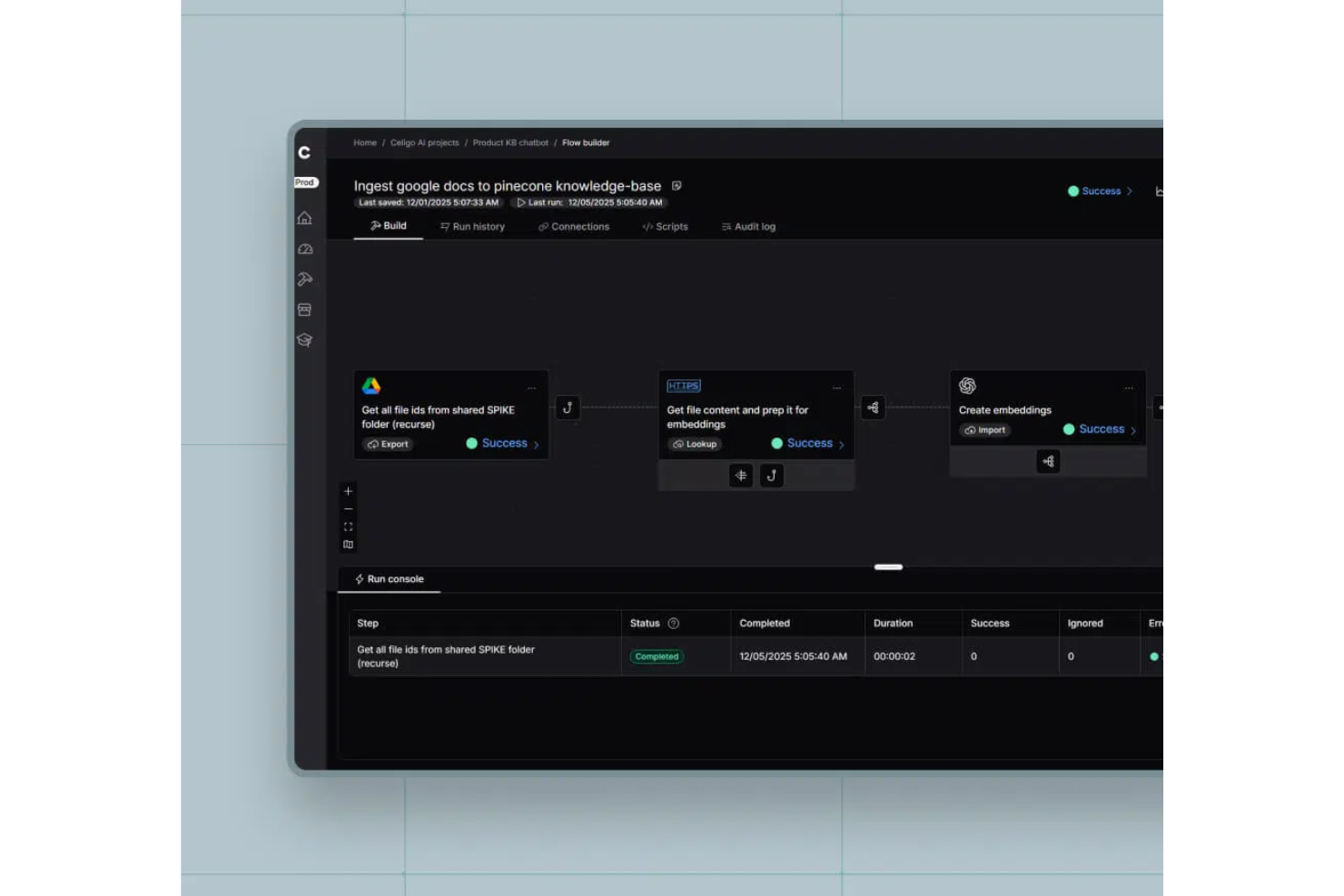
Celigo is a process automation platform that connects cloud and on-premises applications, automates workflows, and manages data integrations across business systems.
Who Is Celigo Best For?
Celigo is a good fit for IT teams and operations leaders at mid-sized to large businesses that need to automate and connect multiple business applications.
Why I Picked Celigo
I picked Celigo as one of the best because I can automate processes across my tech stack using its wide range of prebuilt connectors for apps like Salesforce, NetSuite, and Shopify. My team is able to deploy integrations quickly without building custom code for every connection. I like that we can orchestrate multi-step workflows between cloud and on-premises systems using these ready-made connectors.
Celigo Key Features
- Flow builder: Design and manage automated workflows with a drag-and-drop interface.
- Error management dashboard: Monitor, troubleshoot, and resolve integration errors from a centralized dashboard.
- Data transformation tools: Map, filter, and transform data between different systems during automation.
- Scheduling and triggers: Set up time-based or event-driven triggers to automate processes across connected applications.
Celigo Integrations
Celigo offers 200+ native integrations, including Salesforce, NetSuite, Shopify, Amazon, Zendesk, ServiceNow, Microsoft 365, Google Workspace, Jira, and Slack. An API is available for custom integrations.
Pros and Cons
Pros:
- Flexible scheduling and event-based triggers
- Real-time monitoring with detailed dashboards
- Custom scripting for advanced automation logic
Cons:
- User interface can feel cluttered at scale
- Some connectors require additional licensing fees
New Product Updates from Celigo
Celigo Expands Storage, Data Imports, and Connection Management
Celigo adds a standalone storage connector, optimized Azure Synapse imports, NetSuite OAuth 2.0, flexible file templates, and expanded MCP access controls. These updates help teams manage files, process data, and secure integrations. For more information, visit Celigo’s official site.
 .

TrailHQ
Best for AI-driven process automation

Nanonets is an AI-powered platform designed to automate document processing and workflows in industries like finance, healthcare, and logistics.
Why I Picked Nanonets
Nanonets stood out to me for its robust AI capabilities, particularly in automating intricate workflows using natural language processing. It integrates with various apps and data sources, enabling dynamic workflow management. The platform's support for custom language learning models (LLMs) allows for personalized responses and actions, making it easy to adapt workflows to specific business requirements.
Nanonets Key Features
In addition to AI-driven capabilities, Nanonets offers several other features that make it a strong contender for process automation software.
- Data Security and Compliance: The platform adheres to industry standards like GDPR and HIPAA, so you can make sure your data is handled securely and in compliance with regulatory requirements.
- Human-in-the-Loop Workflows: This incorporates human approval and automated validation stages to improve workflow accuracy and efficiency.
- Optical Character Recognition: You can extract and process data from unstructured documents like invoices and contracts.
- Workflow Automations: This lets you automate manual, repetitive steps in your processes to speed up work and reduce manual errors.
Nanonets Integrations
Integrations include QuickBooks, Salesforce, Google Drive, SharePoint, Notion, Dropbox, and Zapier.
Pros and Cons
Pros:
- Provides APIs that allow for custom object localization
- Data extraction features
- Compatible with various programming languages
Cons:
- May not be suitable for extensive machine learning projects with large datasets
- Fewer customization options than more advanced tools

UiPath
Best for agentic workflows
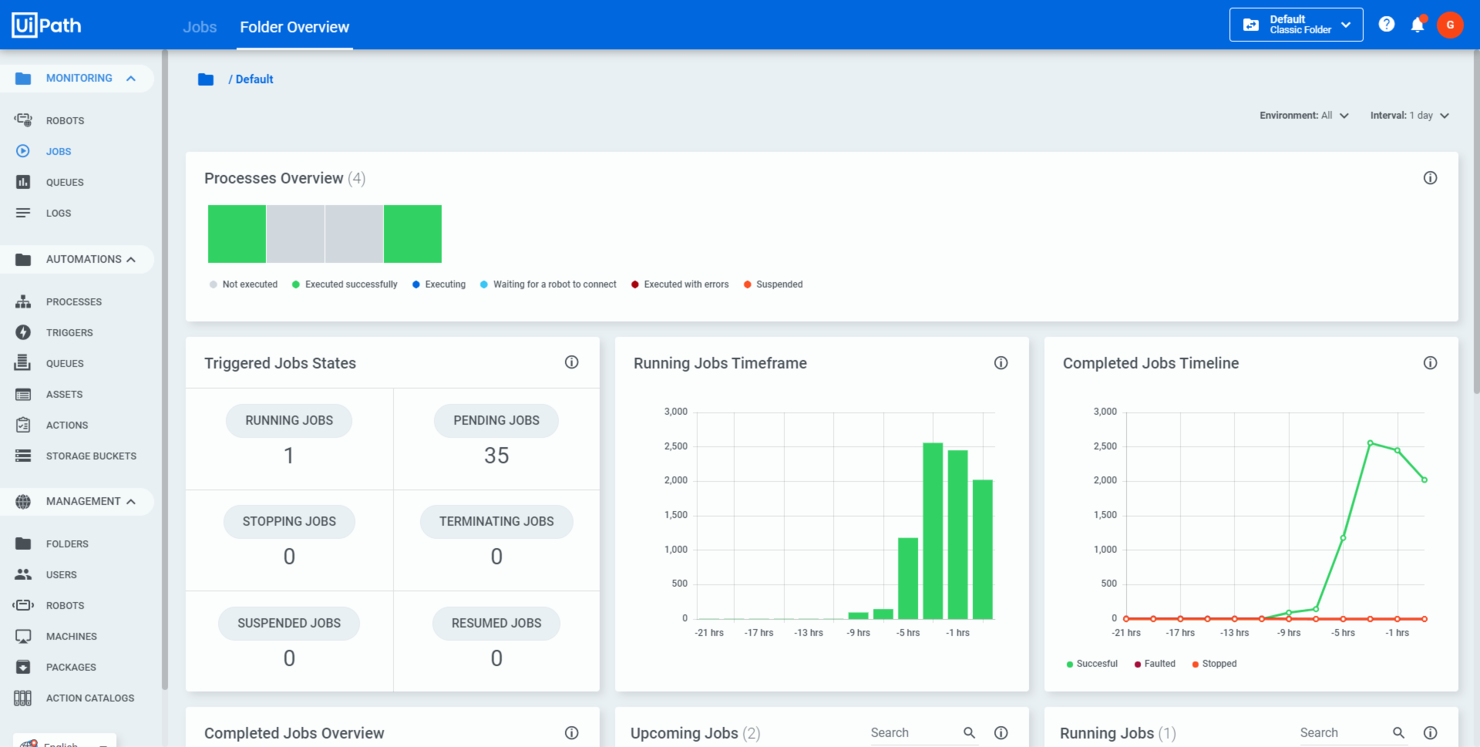
UiPath is an automation platform that integrates AI agents, robots, and human teams to boost operational efficiency. It's tailored for various industries and can help you improve business processes and manage workflows effectively.
Why I Picked UiPath
I picked UiPath because it provides agentic workflows that combine AI agents, robots, and human efforts to automate complex processes. This feature lets you manage workflows in a way that suits your business needs and improves overall efficiency. UiPath's business process management tools also help you model, orchestrate, and manage processes end-to-end, which makes achieving automation goals easier.
Another reason for choosing UiPath is its focus on intelligent document processing. This feature uses AI and machine learning to extract and process information from documents and reduce manual effort and errors. By automating these tasks, your team can focus on more strategic activities, which helps productivity and decision-making.
UiPath Key Features
In addition to agentic workflows, UiPath offers a range of other features for process automation.
- Drag and Drop Workflow: You can easily design automation processes using a visual interface that simplifies task arrangement without requiring extensive programming skills.
- Record and Playback: This feature lets you capture user actions through various recording options and automate processes by mimicking user interactions.
- Advanced Scraping Options: This includes tools for extracting data from a variety of applications and web pages, as well as integrating data into your automated workflows.
- Inbuilt Activities: UiPath supports diverse automation tasks such as data entry, manipulation, and extraction for maximum workflow flexibility.
UiPath Integrations
Integrations include Google Cloud, Microsoft, Salesforce, AWS, Adobe, and Docusign.
Pros and Cons
Pros:
- User-friendly interface makes automation accessible
- AI agents and low-code development options
- Supports various data types and offers a wide range of reusable activities
Cons:
- Reliance on virtual machines can limit effectiveness for big data uses
- Occasional challenges with bulk updates and editing after updates
Diğer Süreç Otomasyonu Yazılımları
Yukarıdaki listede ihtiyaçlarınıza uygun bir seçenek bulamadıysanız göz atmaya değer ek süreç otomasyonu yazılımlarının listesi burada yer alıyor.
- Pipefy
For process standardization
- Process Street
For no-code workflow automation
- Blue Prism
For intelligent automation solutions
- Nintex
For increasing overall efficiency
- ProcessMaker
For enterprise-wide automation
- Pneumatic Workflow
For unlimited workflow creation
- Fortra
For business growth and productivity
- Automation Anywhere
For complex process orchestration
- Appian
For enterprise agility
- SweetProcess
For knowledge management
- Bizagi
For end-to-end automation
- Creatio AI Studio
For highly customizable business process automation
- Smartsheet
For intelligent workflows
- Scoro
For unified business management
- cloudsquid
For structuring financial data files
- Zapier
For simple cross-app automation
- TrackVia
For mobile workflow management
- ClickUp
For team collaboration
- Workato
For connecting apps
- Decisions
For complex rule-based automation
- Asana
For project collaboration
- monday.com
For workflow customization and management
- Conga
For document generation automation
- Pega
For customer engagement and CRM
- IBM Robotic Process Automation
For integrating AI capabilities
- InRule
For business rules management
- AgilePoint
For building enterprise apps quickly


İlgili Proje Yönetimi Yazılımları
Aradığınızı hâlâ bulamadıysanız test edip değerlendirdiğimiz diğer ilgili araçlara göz atın:
- Proje Yönetimi Yazılımı
- Kaynak Yönetimi Yazılımı
- İş Akışı Otomasyonu Yazılımı
- Zaman Takibi Yazılımı
- Görev Yönetimi Yazılımı
- İş Birliği Araçları
- Gantt Şeması Oluşturucu
- Verimlilik Araçları
- Proje Takibi Yazılımı
- Proje Zamanlama Yazılımı
How I Evaluate Process Automation Software
I look at every tool through two lenses: the core capabilities—like conditional triggers and approval routing—a tool must have, and the differentiators that determine fit for PMO teams.
Core Functionality (Table Stakes For This List)
When I'm selecting tools for my list, I rank each one on a scale from 0 (does not offer the functionality) to 5 (excels in this area) for each core functionality listed below. Then, I calculate the tool's total score into a percentage. Each tool needs to achieve a minimum total score of 65% to be considered for inclusion.
- Visual Workflow Builder: I check whether you can map out a multi-step process—like a project intake-to-kickoff sequence—using a drag-and-drop canvas rather than writing code.
- Conditional Logic & Triggers: Each tool needs to support event-based triggers and branching rules, such as auto-escalating a task when a due date passes without completion.
- Task & Process Automation: I evaluate how well the tool handles automated task creation, assignment, and routing—for example, spinning up a standard task set when a new project enters a specific stage.
- Approval & Review Workflows: Tools should let you build structured approval chains, like routing a change request through a project lead, then a PMO director, with notifications at each step.
- Third-Party Integrations: I look at the breadth of native connectors to PM tools like Jira, Asana, or monday.com, plus API and webhook support for custom orchestration needs.
- Process Monitoring & Analytics: Dashboards and logs that track automation performance matter here—I want to see whether you can spot workflow bottlenecks and measure SLA adherence.
Once I have a list of tools that meet this criteria, I consider what sets each platform apart.
Differentiating Factors (What Sets Vendors Apart)
Here's how I compare and contrast different vendors:
Standout Features
A strong process templates library saves PMO teams from rebuilding intake, change request, and stage-gate workflows from scratch for every new project type. I also evaluate whether a tool offers AI-powered suggestions, like flagging stalled workflows or recommending next steps based on historical project data. Resource and capacity automation is another differentiator, especially when a tool can auto-reassign tasks or trigger staffing alerts when a team member's workload crosses a set threshold.
Beyond Features
Integration depth matters a lot here. I check whether a tool syncs bi-directionally with PM platforms like Jira or Asana, not just pushes data one way. Scalability is another factor I weigh, particularly for PMO teams running dozens of concurrent projects across programs. A tool that performs well for a single team but struggles at portfolio scale creates problems fast. I also look at pricing transparency, especially around automation-run limits and per-user costs, so teams can forecast what they'll actually pay as adoption grows.
Süreç Otomasyonu Yazılımı Nasıl Seçilir?
İhtiyaçlarınıza uygun bir süreç otomasyonu yazılımı aracını şu şekilde seçebilirsiniz:
- İhtiyaçları ve hedefleri belirleyin: Yazılımın neyi başarması gerektiğini açıkça tanımlayın. Tekrarlayan görevleri otomatikleştirmek, iş akışı verimliliğini artırmak veya manuel hataları azaltmak mı istiyorsunuz? Örneğin, ekibiniz veri girişi için aşırı zaman harcıyorsa, bu süreci otomatikleştirebilen bir çözüm doğrudan bu zorluğu ele alacaktır.
- Entegrasyon olanakları: Yazılımın mevcut sistemlerinizle ne kadar iyi entegre olacağını değerlendirin. Örneğin, müşteri takip dizilerini otomatikleştirebilmek için süreç otomasyonu yazılımını CRM sisteminizle entegre edebilmelisiniz.
- Ölçeklenebilirlik: Süreç karmaşıklığında veya hacminde artış bekliyorsanız yazılım, tamamen yenilenmesine gerek kalmadan bunu yönetebilmelidir. Örneğin, küçük bir e-ticaret işletmesi, Kara Cuma gibi yoğun sezonlarda ölçeklenebilen otomasyon yazılımından fayda sağlayacaktır.
- Kullanıcı deneyimi: Yazılımın kullanım kolaylığını ve öğrenme eğrisini değerlendirin. Teknik uzmanlık düzeyleri ne olursa olsun tüm kullanıcılar yazılıma erişebilmelidir. Örneğin, BT bilgisi sınırlı olan bir pazarlama ekibi, otomatik e-posta kampanyaları oluşturmak için kullanımı kolay bir arayüze ihtiyaç duyacaktır.
- Maliyet değerlendirmeleri: İlk kurulum, eğitim ve devam eden bakım da dâhil olmak üzere toplam sahip olma maliyetini analiz edin. Maliyetin bütçenizle uyumlu olduğundan ve iyi bir yatırım getirisi sağladığından emin olun. Örneğin, yeni kurulmuş bir şirket, fiyatı gereksiz özelliklerle artırmadan temel otomasyon olanakları sunan bir çözüm arayabilir.
2025'te Süreç Otomasyonu Yazılımı Trendleri
Süreç otomasyonu yazılımı hızla gelişiyor ve işletmelerin çalışma biçimini yeniden tanımlayan yeni trendler ortaya çıkıyor. Bu trendlerin büyük etki yaratması bekleniyor:
- Stratejik otomasyon: Stratejik otomasyon artık CIO'lar arasındaki bir moda sözcük değil, işletme dönüşümlerinin temel bir parçasıdır. Operasyonel verimlilik, veri bütünlüğü ve sürdürülebilir büyüme için gereklidir ve dijital ortamda başarılı olmayı amaçlayan işletmeler açısından kritik bir faktördür.
- Kodsuz ve az kodlu platformların yükselişi: Kodsuz ve az kodlu platformlar, uygulamaların hızlı bir şekilde kullanıma alınmasını sağlar, beceri eksikliklerinin giderilmesine yardımcı olur ve dijital öncelikli operasyonlarda hız ihtiyacını karşılar. Geliştirme sürecini demokratikleştirir ve uygulamaların hızlı bir şekilde oluşturulmasına olanak tanır.
- Kapsamlı süreç otomasyonu: Robotik süreç otomasyonu (RPA), görev düzeyinde otomasyon için popülerliğini korurken trend sistematik otomasyona doğru kayıyor. Daha akıllı otomasyonlar ve daha yüksek ölçeklenebilirlik için RPA'yı yapay zekâ ve makine öğrenimiyle birleştiren akıllı süreç otomasyonu (IPA), uçtan uca sürecin bir parçası olarak belgeleri otomatik şekilde oluşturup yönetmek için genellikle temel bir bileşen olarak belge oluşturma yazılımını içerir.
- Çoklu bulut stratejilerini benimseme: İşletmeler, karmaşık süreç gereksinimlerini karşılamak için çoklu bulut stratejilerini giderek daha fazla benimsiyor. Bu trend, çeşitli sağlayıcılardan alınan farklı bulut hizmetlerinin kullanılmasını içerir ve çeşitli bulut ortamlarında kesintisiz belge dijitalleştirme ve yönetimini kolaylaştırmanıza yardımcı olabilir.
- Hiper otomasyon: Hiper otomasyon, otomasyondan fayda sağlayacak kritik süreçlerin belirlenmesini ve bu süreçleri kapsamlı biçimde optimize etmek için yapay zekâ, makine öğrenimi ve az kodlu platformlar gibi çeşitli teknolojilerin birlikte uygulanmasını içerir.
Süreç Otomasyonu Yazılımı Nedir?
Süreç otomasyonu yazılımı, tekrarlayan görevleri ve rutin iş akışlarını manuel girdiye ihtiyaç duymadan sizin için gerçekleştirebilen bir araç türüdür. Zaman kazanmak, hataları azaltmak ve işlerin ilerlemesini sağlamak için çoğunlukla proje yöneticileri, operasyon ekipleri, İK personeli, BT yöneticileri ve finans uzmanları tarafından kullanılır.
Görev tetikleyicileri, kural tabanlı eylemler ve sistem entegrasyonları gibi özellikler manuel işi azaltmaya, doğruluğu korumaya ve süreçlerin yönetimini kolaylaştırmaya yardımcı olur; böylece günlük işler daha hızlı ve öngörülebilir hâle gelir.
Süreç Otomasyonu Yazılımının Özellikleri
Süreç otomasyonu yazılımı seçerken aşağıdaki temel özelliklere dikkat edin:
- İş akışı tasarımı ve özelleştirme: İş süreçlerinize uygun otomatik iş akışları oluşturabilir, düzenleyebilir ve kişiselleştirebilirsiniz. Bu, her adımı planlamanıza, bunları mantıksal olarak birbirine bağlamanıza ve süreci benzersiz gereksinimlerinize uyacak şekilde özelleştirmenize olanak tanır.
- Entegrasyon olanakları: Yazılımı CRM, ERP veya e-posta platformları gibi hâlihazırda kullandığınız diğer araçlara bağlayabilmeniz gerekir. Bu, sistemler arasında veri alışverişini kolaylaştırır.
- Görev yönetimi: Herkesin ne yapması gerektiğini bildiğinden emin olmak, kaçırılan son teslim tarihlerini önlemek ve darboğazlardan kaçınmak için otomatikleştirilmiş süreçler içindeki görevleri atayabilir, takip edebilir ve izleyebilirsiniz.
- Bildirimler ve uyarılar: Bu özellik, görevlerin son tarihi geldiğinde, tamamlandığında veya ilgilenilmesi gerektiğinde doğru kişileri otomatik olarak bilgilendirmenizi sağlar; ekibinizin sorumluluklarını takip etmesine yardımcı olur ve insan hatalarını ve kaçırılan son teslim tarihlerini azaltır.
- Raporlama ve analiz: Süreçlerin nasıl performans gösterdiğini analiz etmek için gösterge tablolarına erişebilir ve raporlar oluşturabilirsiniz. Bu, verimsizlikleri fark etmenizi, daha bilinçli kararlar almanızı ve operasyonlarınızı iyileştirmenizi sağlar.
- Kullanıcı izinleri ve erişim denetimi: Bu özellik, yazılım içindeki çeşitli iş akışlarını ve verileri kimlerin görüntüleyebileceğini, düzenleyebileceğini veya onaylayabileceğini belirlemenizi; ayrıca hassas bilgileri güvende tutmanızı ve kişilerin yalnızca rolleriyle ilgili olanları görmesini sağlar.
- Denetim izleri: Uyumluluğunuzu sürdürmenize, sorunları gidermenize ve kimin neyi, ne zaman yaptığını tam olarak anlamanıza yardımcı olan eksiksiz bir kayıt elde etmek için süreçlerinizde gerçekleştirilen her değişikliği ve eylemi takip edebilirsiniz.
Yaygın Süreç Otomasyonu Yazılımı Yapay Zekâ Özellikleri
Yukarıda listelenen standart süreç otomasyonu yazılımı özelliklerinin yanı sıra birçok araç şu tür yapay zekâ özellikleri sunar:
- Akıllı belge işleme: Bu özellik, formları, faturaları veya sözleşmeleri manuel veri girişi olmadan işleyebilmeniz için yapay zekâ kullanarak belgelerdeki bilgileri otomatik olarak çıkarmanıza, yorumlamanıza ve düzenlemenize olanak tanır.
- Öngörücü analiz: İş akışlarınızdaki kalıpları belirlemek ve gelecekteki eğilimleri tahmin etmek, sorunları önceden öngörmek, kaynakları daha iyi tahsis etmek ve proaktif iyileştirmeler yapmak için yapay zekâdan yararlanabilirsiniz.
- Doğal dil işleme: Araçla yazılı veya sözlü komutlar kullanarak etkileşim kurabilirsiniz; bu da yalnızca yapılmasını istediğiniz şeyi yazarak veya söyleyerek görevleri otomatikleştirmenizi kolaylaştırır.
- Otomatik karar verme: Yapay zekâ, ölçütleri inceleyebilir ve sizin müdahaleniz olmadan en uygun eylemi seçebilir. Bu, belirlenen mantığa ve veri analizine göre onayları hızlandırır veya görevleri yönlendirir.
- Anormallik tespiti: Bu özellik, olağandışı etkinlikleri, hataları veya süreç sapmalarını gerçek zamanlı olarak belirleyip sizi uyarabilir. Bu, sorunları erken yakalamanıza yardımcı olur.
Süreç Otomasyonu Yazılımının Faydaları
Süreç otomasyonu yazılımının sunabileceği başlıca faydalardan bazıları şunlardır:
- Artan verimlilik: Tekrarlayan ve zaman alan görevleri otomatikleştirerek ekibiniz daha karmaşık ve tatmin edici işlere odaklanabilir; bu da genel üretkenliği artırır.
- Azalan hatalar: Yazılım, görevlerin tutarlı ve doğru bir şekilde gerçekleştirilmesini sağlayarak insan hatalarını en aza indirir; bu da daha yüksek kaliteli sonuçlara ve daha az yeniden çalışmaya yol açar.
- Maliyet tasarrufu: Süreçleri kolaylaştırıp manuel müdahale gereksinimini azaltarak iş gücü maliyetlerinizi düşürebilir ve hatalarla verimsizliklerle ilişkili giderleri en aza indirebilirsiniz.
- Geliştirilmiş uyumluluk: Süreç otomasyonu yazılımı, düzenleyici gereklilikleri tam olarak izleyecek şekilde programlanabilir; böylece sektör standartlarına uymanız ve maliyetli cezalardan kaçınmanız kolaylaşır.
- Daha iyi veri yönetimi: Yazılım verileri sistematik bir şekilde toplayıp düzenleyebilir; böylece bilinçli karar almaya yardımcı olan değerli içgörüler elde edersiniz.
Süreç Otomasyonu Yazılımının Maliyetleri ve Fiyatlandırması
Aşağıda süreç otomasyonu yazılımı için tipik fiyatlandırma ve planları içeren bir tablo yer almaktadır:
Süreç Otomasyonu Yazılımı İçin Plan Karşılaştırma Tablosu
| Plan Türü | Ortalama Fiyat | Yaygın Özellikler |
|---|---|---|
| Ücretsiz | $0 | Temel otomasyon özelliklerine erişim, sınırlı sayıda süreç, topluluk desteği |
| Temel | $10 - $20/kullanıcı/ay | Temel otomasyon yetenekleri, önceden oluşturulmuş şablonlara erişim, e-posta desteği |
| Standart | $30 - $50/kullanıcı/ay | Gelişmiş otomasyon özellikleri, çok kullanıcılı erişim, öncelikli destek |
| Premium | $70 - $100/kullanıcı/ay | Tüm otomasyon özellikleri, entegrasyon seçenekleri, özel destek, analiz ve raporlama araçları |
| Kurumsal | Özel fiyatlandırma | Özelleştirilmiş çözümler, kurumsal düzeyde güvenlik, kişisel hesap yönetimi, 7/24 destek, eğitim ve işe alıştırma |
Süreç Otomasyonu Yazılımı SSS
Süreç otomasyonu yazılımı hakkında sıkça sorulan bazı sorular şunlardır:
Süreç otomasyonu yazılımı diğer sistemlerle entegre olabilir mi?
Evet, çoğu süreç otomasyonu yazılımı çeşitli diğer iş sistemleri ve uygulamalarıyla entegre olacak şekilde tasarlanmıştır. Buna CRM sistemleri, ERP sistemleri, veritabanları ve diğer yazılım araçları dahildir. Entegrasyon özellikleri, sistemler arasında verileri sorunsuz şekilde aktarmanıza ve birden fazla işlevi kapsayan iş akışlarını otomatikleştirmenize olanak tanır.
Süreç otomasyonu yazılımı küçük işletmeler için uygun mudur?
Evet, süreç otomasyonu yazılımı küçük işletmeler için kesinlikle uygundur. Personel sayısını önemli ölçüde artırmadan görevleri daha verimli yönetmenize ve operasyonları ölçeklendirmenize yardımcı olabilir. Birçok çözüm ölçeklenebilir ve daha küçük şirketlerin ihtiyaçlarına ve bütçelerine uyum sağlamak için esnek fiyatlandırma seçenekleri sunar.
Ne tür süreçler otomatikleştirilebilir?
Süreç otomasyonu yazılımıyla proje onaylarını, görev atamalarını, raporlamayı, işe alıştırmayı, belge yönlendirmeyi ve durum güncellemelerini otomatikleştirebilirsiniz. Proje yöneticileri, yinelenen durum kontrolleri, bütçe takibi ve onay zincirleri için de sıkça otomasyondan yararlanır. Anında etkiyi en üst düzeye çıkarmak için en sık tekrarlanan görevlerinizle başlayın.
Süreç otomasyonu yazılımı ne kadar güvenlidir?
Güvenlik ürüne göre değişir, ancak saygın süreç otomasyonu yazılımları genellikle veri şifreleme, kullanıcı kimlik doğrulama ve erişim denetimleri gibi güvenlik özelliklerini içerir. SOC 2 veya GDPR gibi uyumluluk sertifikalarını kontrol edin ve değerlendirdiğiniz tüm yazılımların güvenlik önlemlerini inceleyerek sektörünüzün düzenlemelerine uyduklarından emin olun.
Süreç otomasyonunu uygularken kaçınılması gereken yaygın hatalar nelerdir?
Bozuk veya belirsiz süreçleri otomatikleştirmeyin; önce bunları düzeltin. Paydaşların katılımını atlamaktan kaçının ve kullanıcı eğitimine duyulan ihtiyacı küçümsemeyin. İş akışlarını kapsamlı şekilde test edin ve anlaşılır belgeler hazırlayın. Acele etmek veya geri bildirimleri görmezden gelmek benimseme sorunlarına yol açabilir ve süreç otomasyonunun avantajlarından yararlanmanızı engelleyebilir.
Süreç otomasyonu yazılımı onayları ve uyumluluk iş akışlarını yönetebilir mi?
Evet, birçok araç çok adımlı onayları, denetim izlerini ve uyumluluk gerekliliklerini destekler. Belgeleri yönlendirmek, dijital imzaları toplamak ve onay geçmişlerini izlemek için özel kurallar oluşturabilirsiniz. Bu, gerektiğinde (veya gerektiğinde) proje süreçlerini şeffaf ve denetime hazır tutar.
Süreç otomasyonu yazılımını kurmak ne kadar sürer?
Süreç otomasyonu yazılımının kurulum süresi, aracın karmaşıklığına ve süreç ihtiyaçlarınıza bağlıdır. Basit otomasyonlar için birkaç saat içinde kullanıma başlayabilirsiniz. Entegrasyonlar veya özel iş akışları içeren daha büyük projeler birkaç hafta sürebilir. Test ve ekibin işe alıştırılması için zaman ayırmayı planlayın; bu, gecikmeleri önlemenize yardımcı olur.
Süreç otomasyonu araçlarıyla genellikle ne tür destek veya eğitim sağlanır?
Çoğu sağlayıcı işe alıştırma kılavuzları, canlı sohbet, öğreticiler ve kullanıcı toplulukları sunar. Bazıları özel hesap yöneticileri, eğitim oturumları veya sertifika programları sağlar. Bir araç seçmeden önce hangi destek kaynaklarının mevcut olduğunu kontrol edin; böylece ekibinizin mümkün olan en kısa sürede çalışmaya başlayacağından emin olabilirsiniz.