

2026’da İncelenen En İyi 10 Productive Alternatifi

En İyi Productive Alternatifleri Kısa Listesi


Productive'in ekibiniz için doğru ajans ve proje yönetimi aracı olmadığını düşünüyorsanız, benzersiz işletme ihtiyaçlarınızı ve ekip gereksinimlerinizi karşılayabilecek çok sayıda Productive alternatifi mevcuttur.
Productive'de raporlama özellikleri veya daha kullanıcı dostu bir arayüz eksik olabilir. Bu nedenle, bir yedek çözüm bulmanıza yardımcı olmak için düzinelerce Productive alternatifini test edip inceledim. İşte en iyi Productive alternatifleri için önerilerim.
Productive nedir?
Productive, operasyonlarınızı kolaylaştırmanıza ve kârlılığınızı artırmanıza yardımcı olmak üzere tasarlanmış bir ajans yönetim yazılımıdır. Çeşitli araçları tek bir platformda birleştirir ve proje yönetimi, zaman takibi, kaynak planlama, bütçeleme, faturalandırma ve raporlama gibi özellikler sunar.
Yazılım Önerilerimize Neden Güvenebilirsiniz?
Ekibimiz 2012’den beri yazılımları test ediyor ve inceliyor. Biz de proje yöneticisi olduğumuz için doğru yazılımı seçmenin ne kadar zor ve önemli olduğunu biliyoruz.
Bu rehber için araçları uygulamalı testler ve bağımsız araştırmalarla değerlendirdik ve seçim kriterlerimize göre puanladık. Ayrıca sektörün fikir önderlerinin ve alanında çalışan proje yönetimi uzmanlarının görüşlerinden de yararlanıyoruz.
İncelemelerimiz bir satış konuşması değil, editör ekibimizin kendi değerlendirmesidir.
Uzman inceleyenler:
Productive Alternatifleri Karşılaştırma Tablosu
Aşağıda yer alan en iyi Productive alternatifleri listemdeki araçların fiyatlarını ve teknik özelliklerini karşılaştırın.
Score legend (out of 5)
- Excellent 4.5–5
- Good 4–4.4
- Average 3–3.9
- Below average 2–2.9
- Poor 1–1.9
| Tool | Starting Price | Website | |||||||
|---|---|---|---|---|---|---|---|---|---|
| Best for project management | 4.5 out of 5 | 5 | 4 | 4 | 4 | 5 | 5 | $17/user/month 14-day free trial + free demo available | Book Demo |
| Best for client onboarding workflows | 3.8 out of 5 | 4 | 4 | 2 | 5 | 4 | 4 | $49/user/month 14-day free trial + free demo available | Website |
| Best for client service automation | 4.5 out of 5 | 5 | 4 | 3 | 5 | 5 | 5 | Pricing upon request Free demo available | Book Demo |
| Best for flexible project views | 3.3 out of 5 | 3 | 1 | 4 | 5 | 4 | 3 | $10/user/month Free plan + 14-day free trial + free demo available | Book Demo |
| Best for AI-driven task management | 3.7 out of 5 | 4 | 1 | 3 | 4 | 5 | 5 | Pricing upon request Free demo available | Book Demo |
| Best for keeping project data self-hosted | 3.7 out of 5 | 4 | 4 | 3 | 4 | 3 | 4 | $10/user/month 14-day free trial + Free demo available | Website |
| Best for agency capacity and profit tracking | 4.3 out of 5 | 4 | 4 | 4 | 4 | 5 | 5 | Pricing upon request Free demo available | Website |
| Best for agency delivery and billing in one place | 4.0 out of 5 | 4 | 3 | 4 | 5 | 4 | 4 | $9.99/user/month Free plan + 14-day free trial + free demo available | Website |
| Best for project flexibility | 4.5 out of 5 | 5 | 5 | 3 | 5 | 4 | 5 | $39/user/month Free trial + free demo available | Website |
| Best for agency accounting and project billing | 4.3 out of 5 | 4 | 5 | 4 | 4 | 4 | 5 | $49/user/month Free demo available | Website |


En İyi Productive Alternatifleri İncelemeleri
İşte her bir Productive alternatifine ilişkin genel değerlendirmelerim. Avantajlarını ve dezavantajlarını, temel özelliklerini ve ideal kullanım alanlarını ele alıyorum.

Scoro
Best for project management
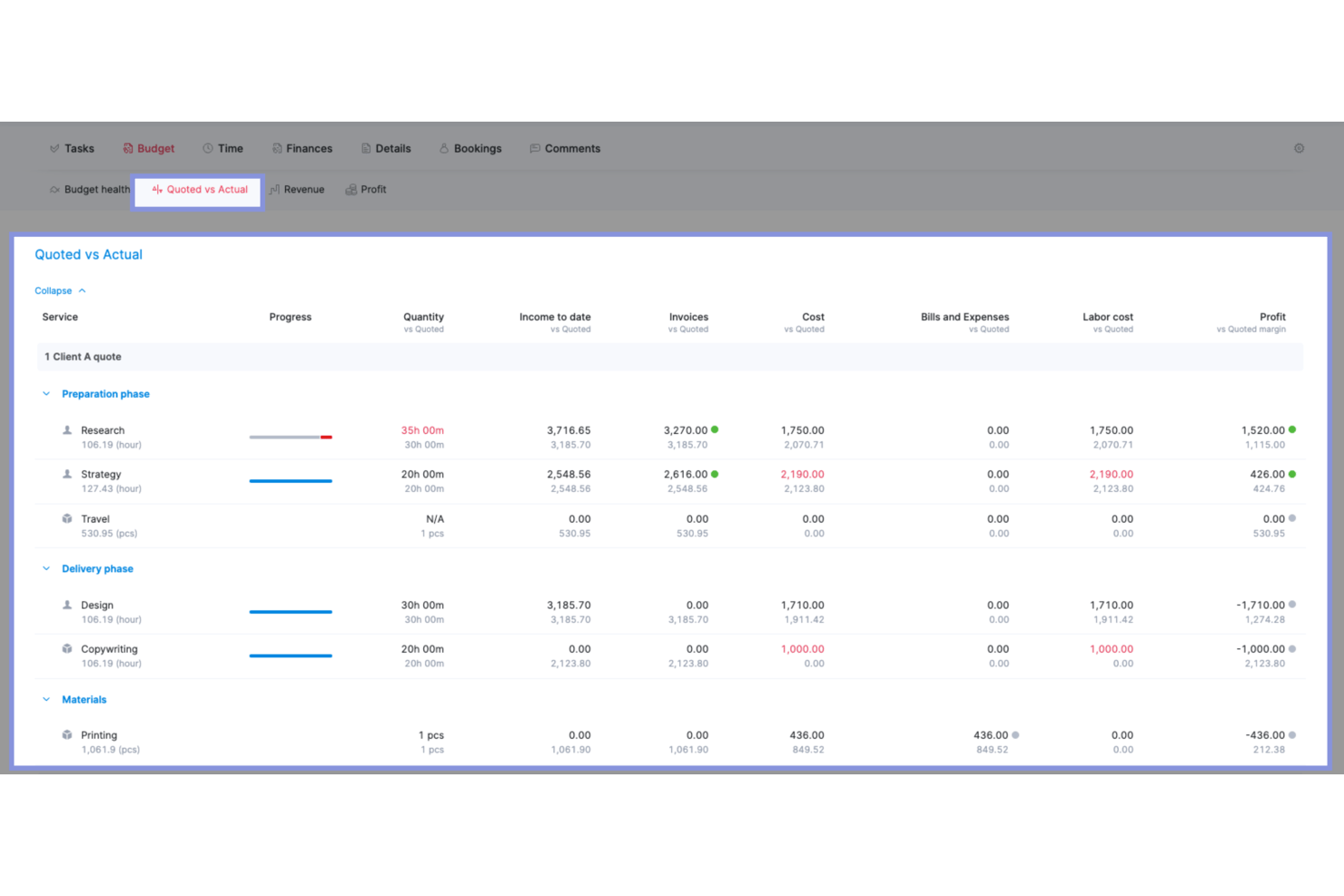
For professional services teams juggling delivery and profitability, Scoro brings project planning, task and time tracking, and financial oversight into one work management platform.
Who Is Scoro Best For?
Scoro suits project managers at consultancies and creative agencies who need to coordinate client work, team capacity, and project finances in one place.
Why I Picked Scoro
Scoro earns my pick for Best for project management by linking delivery plans to project finances. I like its project templates and Gantt charts for mapping milestones, assigning owners, and replanning shifted deliverables. Its budget view compares estimates with logged time, costs, and invoices, helping me spot overservicing before scope or margins slip.
Scoro Key Features
- Resource heatmaps: View team workload, availability, and utilization by person or role.
- Tentative bookings: Test staffing and timeline scenarios before confirming resource allocations.
- Sales pipeline: Track prospective deals and connect won opportunities to project delivery.
- ELI AI assistant: Ask questions in natural language and take action using Scoro business data.
Scoro Integrations
Scoro’s app directory lists integrations with Xero, QuickBooks, Sage Intacct, Exact Online, Salesforce, HubSpot, Google Calendar, Jira, and Dropbox. It also supports Zapier and offers an open API for custom integrations.
Pros and Cons
Pros:
- Carries won sales into project delivery
- Shows team capacity through workload heatmaps
- Connects project plans with budgets and margins
Cons:
- Task creation takes too many steps
- Dense screens can bury project details
New Product Updates from Scoro

Scoro Adds Time Mobile App and ELI Improvements
Scoro adds the Scoro Time mobile app for iOS/Android to track time anywhere and expands ELI with attachments, smarter filtering, and trigger-based actions. For more information, visit Scoro's official site.

Best for client onboarding workflows
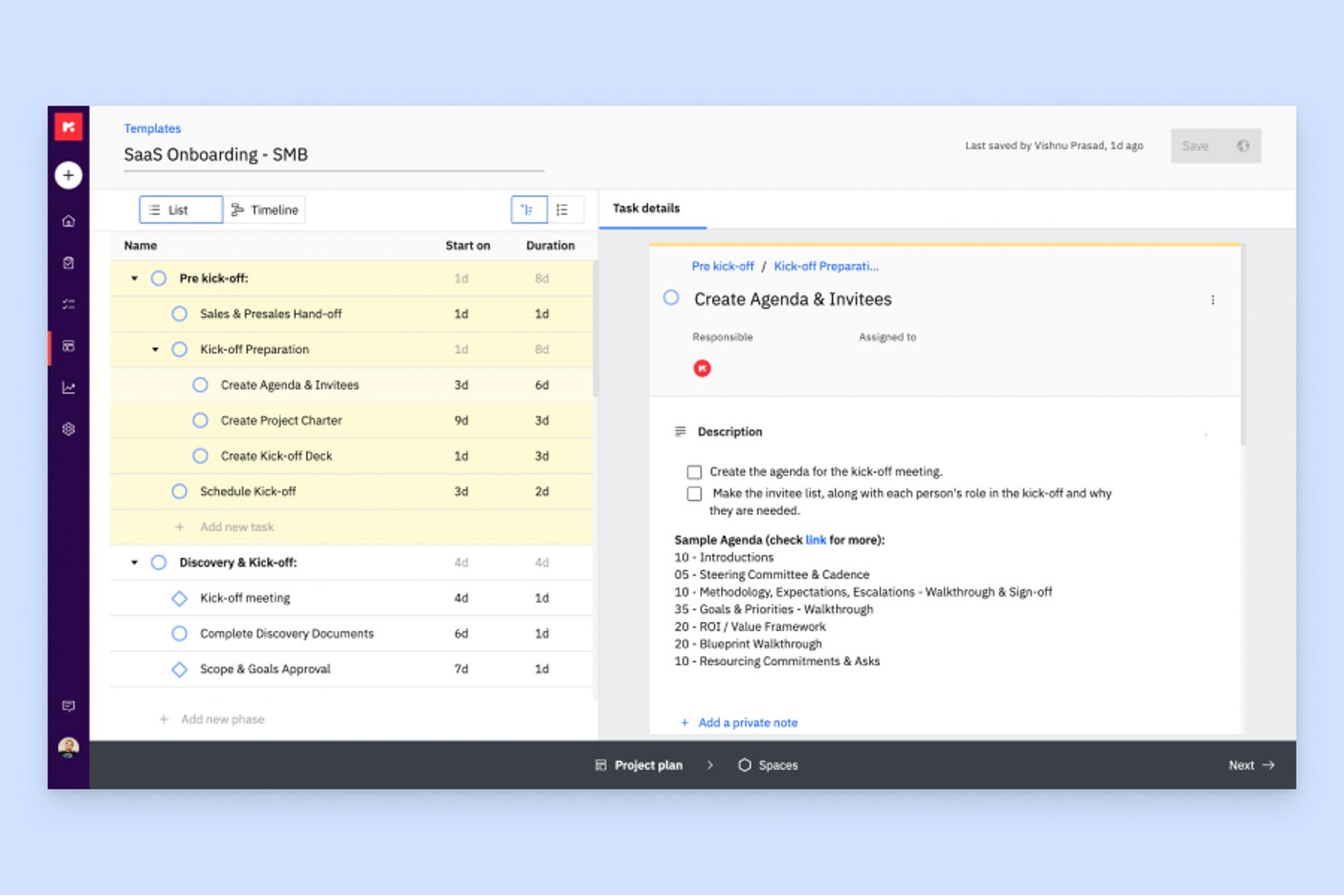
Rocketlane is a client-facing project management platform for implementation and services teams that helps coordinate delivery work, clarify ownership, and keep internal teams and customers aligned.
Who Is Rocketlane Best For?
Rocketlane suits implementation managers and customer success teams at B2B software companies coordinating onboarding across internal and client teams.
Why I Picked Rocketlane
I pick Rocketlane as a productive alternative because its client onboarding workflows put customer and internal tasks, owners, and milestones on a shared project plan. I like how onboarding templates and a client portal help teams track deliverables, so an implementation manager can spot a delayed data import before it pushes back training.
Rocketlane Key Features
- Time tracking: Log billable and non-billable hours against projects.
- Resource planning: Schedule team capacity and forecast resource needs.
- Expense tracking: Record project expenses alongside time entries.
- Financial management: Plan budgets and track revenue as projects progress.
Rocketlane Integrations
Rocketlane documents integrations with Slack, Salesforce, Jira, HubSpot, Google Calendar, and Outlook Calendar, plus Zapier and Workato connections. It also offers a REST API for custom integrations.
Pros and Cons
Pros:
- Time tracking reveals delivery capacity
- Reusable templates keep onboarding consistent
- Shared portals clarify customer ownership
Cons:
- Complex automations can trigger noisy updates
- Advanced reports need more configuration

Accelo
Best for client service automation
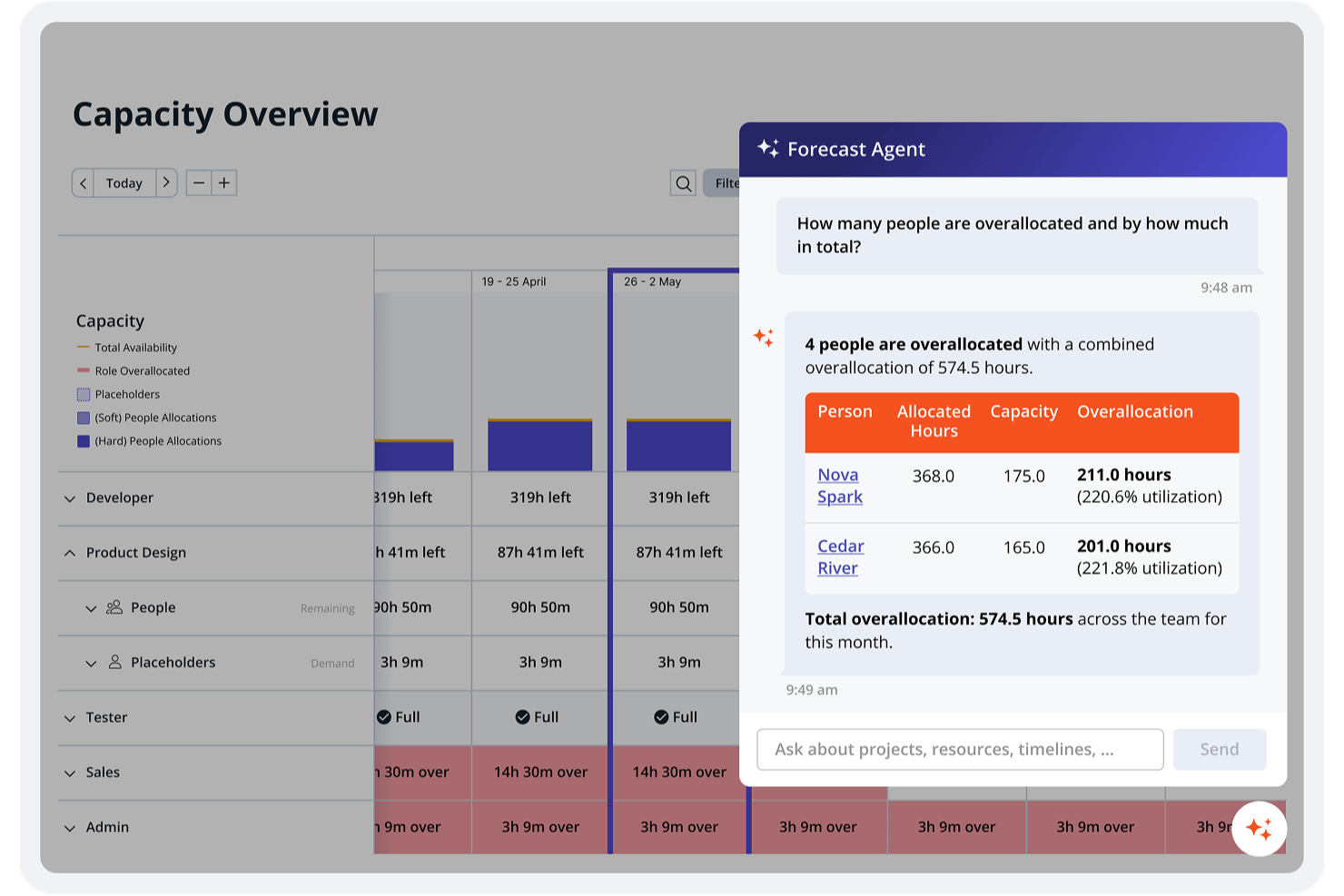
Accelo is a work management platform for professional services teams that connects client relationships with project delivery, time tracking, and billing to help agencies and consultancies coordinate work from proposal to completion.
Who Is Accelo Best For?
Accelo suits agencies and consultancies that need connected workflows for managing client relationships and service delivery.
Why I Picked Accelo
I picked Accelo as a Best Productive Alternative because its client service automation connects client relationships with project delivery. I like that teams can track time and manage billing alongside delivery, so when a client approves a proposal, the work and its billable hours stay connected.
Accelo Key Features
- Project plans: Set milestones, tasks, timelines, and dependencies in a project plan.
- Task dependencies: Link tasks and milestones so work follows its required sequence.
- Automatic progression: Configure milestones and tasks to start when dependencies are met.
- Project types: Create different project types to match your team’s processes.
Accelo Integrations
Accelo lists 25 integrations, including Salesforce, HubSpot, Xero, QuickBooks, Sage Intacct, Google Workspace, Microsoft 365, Jira, Slack, and Zapier. It also offers a RESTful API for custom applications and a Forms API for sending data into Accelo.
Pros and Cons
Pros:
- Centralizes client communication and delivery records
- Automates work from proposal through billing
- Links billable time with project budgets
Cons:
- Trigger testing can risk unintended workflow changes
- Reporting feels clunky for custom views
New Product Updates from Accelo

Accelo Rebuilds Mobile App for Project and Time Management
Accelo rebuilds its mobile app with task management, new work creation, and mobile timesheets for Forecast customers. This helps teams keep project and time data current while working away from a desktop. For more information, visit Accelo’s official site.

Wrike
Best for flexible project views
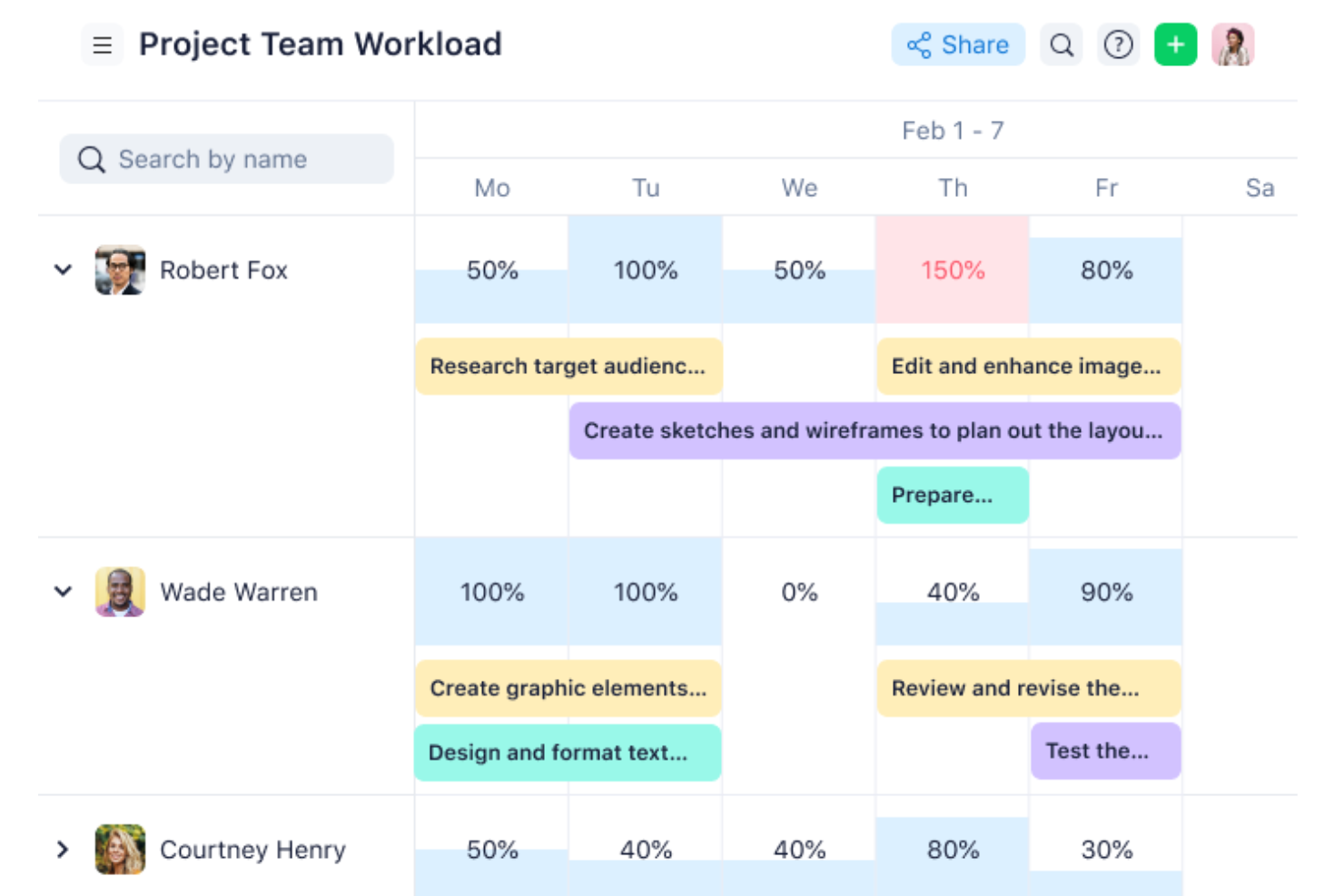
Wrike is a project management platform for cross-functional teams that need to coordinate tasks, timelines, and approvals across complex projects and tailor workflows to their delivery needs.
Who Is Wrike Best For?
Wrike suits project managers in growing or enterprise teams who need flexible views to track work across varied workflows.
Why I Picked Wrike
I picked Wrike as a productive alternative because its flexible project views let me match work tracking to the project at hand. I can use board views to follow task status and Gantt charts to map launch timelines and dependencies, then switch views as priorities shift.
Wrike Key Features
- Request forms: Collect project details through customizable forms for internal or external requests.
- Workflow automation: Set rules to assign work, update statuses, and send reminders.
- Proofing and approvals: Review files, compare versions, and collect feedback from internal or external approvers.
- Dashboards: Build dashboards with widgets to track project progress and workload.
Wrike Integrations
Wrike lists 400+ prebuilt connectors, including Slack, Salesforce, Jira, GitHub, Google Sheets, Microsoft Teams, Zoom, and Dropbox. It also supports Zapier and offers an API for custom integrations.
Pros and Cons
Pros:
- Proofing ties feedback to specific deliverables
- Custom request forms route cross-team work
- Flexible Gantt and board views support shifting plans
Cons:
- Calendar views can be hard to navigate
- Dense interface can slow new user onboarding
New Product Updates from Wrike

Wrike Adds Advanced Filters to Chart View
Wrike introduces new default filters in Chart view, including relative dates, exclusion conditions, multiple filters per field, and status group filtering. These updates help teams refine project data and reporting. For more information, visit Wrike’s official site.

Best for AI-driven task management
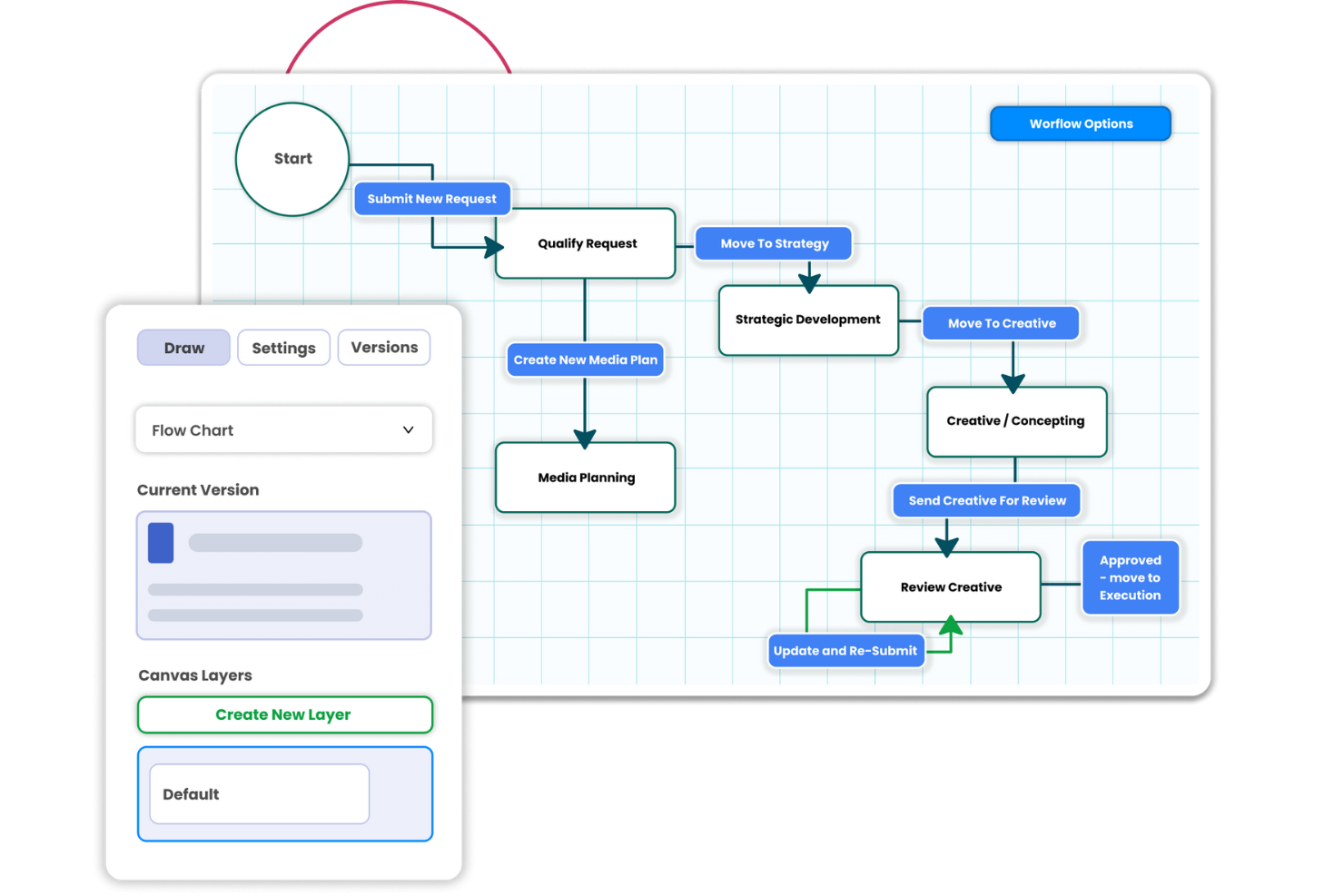
Screendragon is a workflow management platform for marketing and creative teams, bringing project planning, resource coordination, and approvals together to help teams manage complex work and shifting priorities.
Who Is Screendragon Best For?
Screendragon suits marketing operations and creative services teams coordinating campaign work, creative requests, and approvals across departments.
Why I Picked Screendragon
I picked Screendragon as Best for AI-driven task management because its AI resourcing matches tasks to people based on availability, expertise, experience, and department fit. Managers can adjust how those factors are weighted before assigning work from a project task list. I like this approach for turning a campaign brief into assignments without overlooking specialized skills.
Screendragon Key Features
- No-code workflow builder: Configure workflow steps, conditional routing, and approval sequences.
- Online proofing: Mark up documents, artwork, and video, then compare versions side by side.
- Project dashboards: Track project status, timelines, and milestones in real time.
- Budget tracking: Monitor campaign budgets and spend alongside project plans.
Screendragon Integrations
Screendragon offers out-of-the-box integrations with Aprimo, HubSpot, Microsoft Power BI, Amazon S3, Sitecore, Ziflow, Brandfolder, Smartsheet, and Zapier. It also provides a REST API and Connection Manager for custom connections.
Pros and Cons
Pros:
- Cross-project resource views reveal team availability
- Custom workflows automate creative approvals
- AI matches tasks to skills and availability
Cons:
- Complex workflows take time to configure
- Report creation can intimidate new users

Best for keeping project data self-hosted
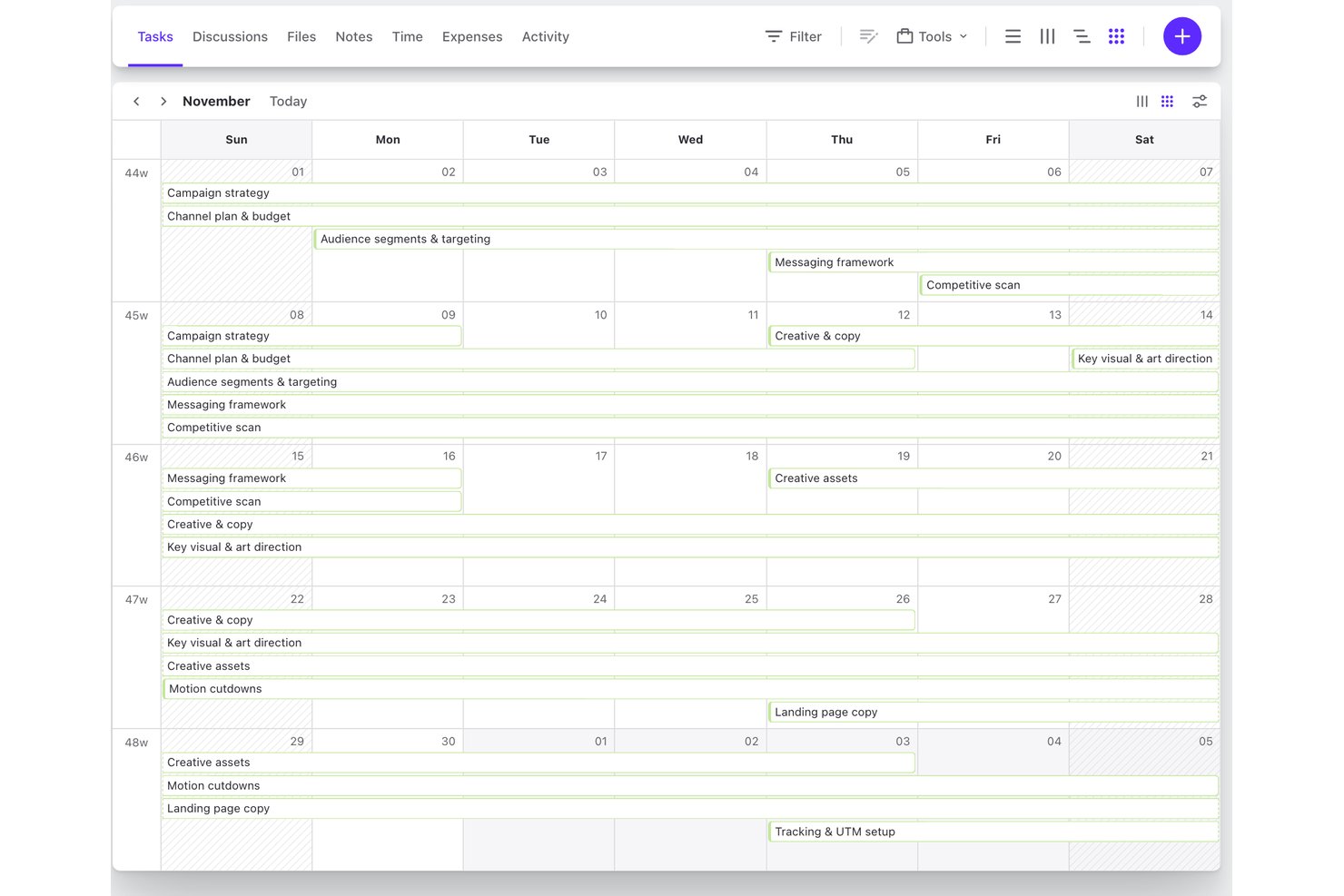
ActiveCollab is an agency-focused project management platform that brings client work, time tracking, budgeting, invoicing, and resource planning together in one workspace—making it a strong fit for professional services teams tired of juggling separate tools.
Who Is ActiveCollab Best For?
ActiveCollab is a strong fit for agencies and consultancies that want to manage client projects, time, and invoicing in one place without relying on a stack of separate tools.
Why I Picked ActiveCollab
I picked ActiveCollab because it's one of the few Productive alternatives that offers a genuine self-hosted option, meaning your project data stays on your own server rather than a third-party cloud. I appreciate that the self-hosted license covers unlimited users, projects, and storage with no ongoing per-seat fees. On the cloud side, the Pro+ plan ties workload planning, budget tracking, and invoicing together in a single workspace, so I can move from task estimates to client invoices without switching tools.
ActiveCollab Key Features
- Task dependencies with automated updating: Link tasks together so that when one date changes, dependent task dates update automatically.
- Client role access: Invite clients to specific projects for free, with privacy controls to show or hide individual tasks.
- Recurring invoices: Schedule invoices to generate and send automatically on a cadence ranging from daily to biennially.
- GitHub and GitLab integration: Connect pull requests and branches directly to tasks, with tasks completing automatically when a pull request is merged.
ActiveCollab Integrations
Native integrations include QuickBooks, Slack, GitHub, GitLab, Google Drive, and Dropbox. ActiveCollab also supports PayPal, Stripe, Braintree, an API, webhooks, MCP Server, and Zapier.
Pros and Cons
Pros:
- Reviewers praise organized client collaboration
- Client work, time, and billing stay connected
- Self-hosted option keeps data on your server
Cons:
- Some clients find the interface difficult to use
- Reviewers want more detailed operational reports

Forecast
Best for agency capacity and profit tracking
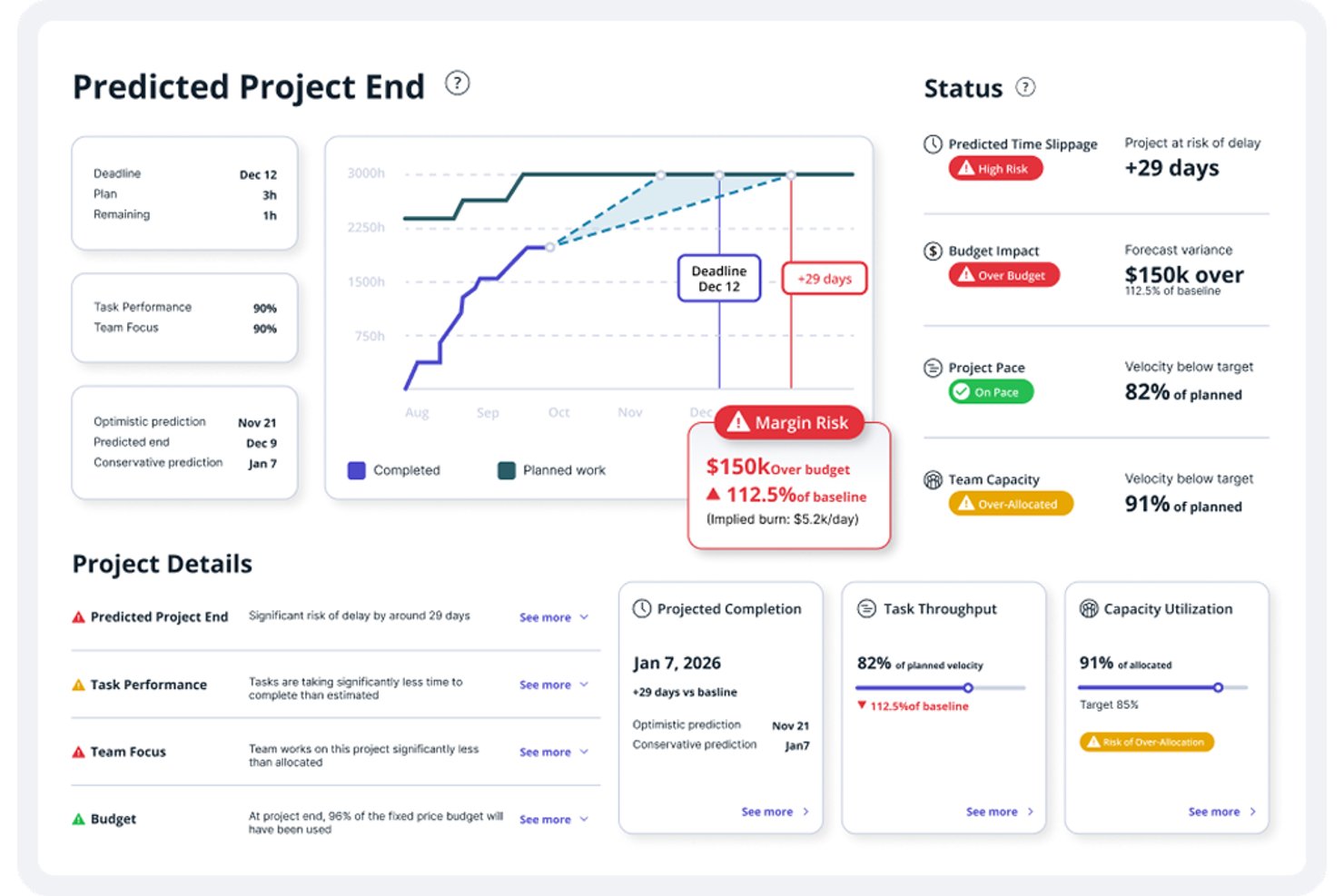
Forecast is a project management platform for agencies and professional services teams that brings project planning, collaboration, and financial visibility together to help coordinate delivery and keep work on track.
Who Is Forecast Best For?
Forecast suits agency project managers who need to match team capacity to client work and track project profitability.
Why I Picked Forecast
I picked Forecast for agency capacity and profit tracking because its resource planning shows team availability alongside project assignments, helping me spot overbooked designers before deadlines collide. I also value its project financial tracking, which lets managers compare budgets with actual costs and monitor margins as work progresses.
Forecast Key Features
- Gantt timeline: View project phases and tasks by day, week, or month.
- Task dependencies: Link tasks to show their required sequence.
- Sprint planning: Set sprint durations for projects with agile workflows.
- Subtasks: Break tasks into smaller, nested pieces of work.
Forecast Integrations
Forecast’s integration catalog includes Jira, Azure DevOps, Slack, Google Calendar, Outlook, iCloud, HubSpot, Salesforce, QuickBooks Online, and Xero. A REST API is available for custom integrations.
Pros and Cons
Pros:
- Task and time tracking improve deadline visibility
- Project financials track budgets against actual costs
- Capacity plans show availability across client work
Cons:
- Mobile app limits on-the-go project updates
- Filters and navigation confuse some new users
Best for agency delivery and billing in one place
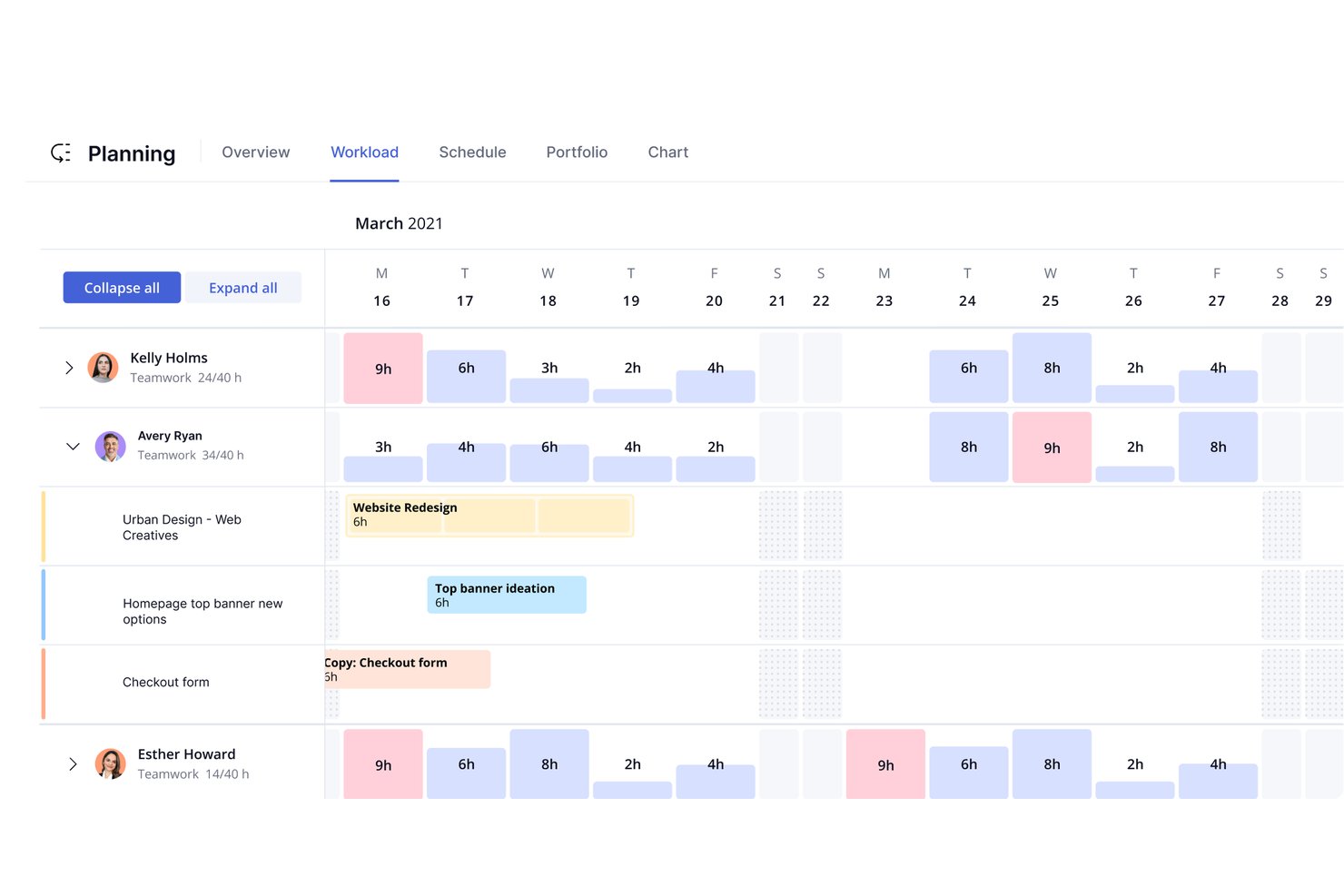
Teamwork.com is a project management platform for client-facing teams that need to coordinate project work, track deadlines, and keep delivery details visible as requirements change.
Who Is Teamwork.com Best For?
Teamwork.com suits agencies and client services teams that need to coordinate project delivery and billing across client work.
Why I Picked Teamwork.com
I picked Teamwork.com for “Best for agency delivery and billing in one place.” Its time tracking and project budgets connect delivery work with billable hours, while invoicing helps turn tracked client work into charges. I can check project costs and billing before wrapping up a client engagement.
Teamwork.com Key Features
- Gantt charts: Map tasks and milestones across a project timeline.
- Kanban boards: Move tasks through visual workflow stages.
- Project templates: Create projects from reusable setups.
- Proofs: Collect client feedback and approvals on project files.
Teamwork.com Integrations
Teamwork.com documents built-in integrations with Slack, HubSpot, QuickBooks, Xero, Google Drive, Microsoft OneDrive, and Microsoft Teams. It also connects with Zapier and provides an API for custom integrations.
Pros and Cons
Pros:
- Workload views expose resource constraints across projects
- Client portals tie approvals to project work
- Billable time connects delivery with client budgets
Cons:
- Busy project screens can feel cluttered
- Dashboards offer limited customization
- Large projects can load slowly

Ravetree
Best for project flexibility
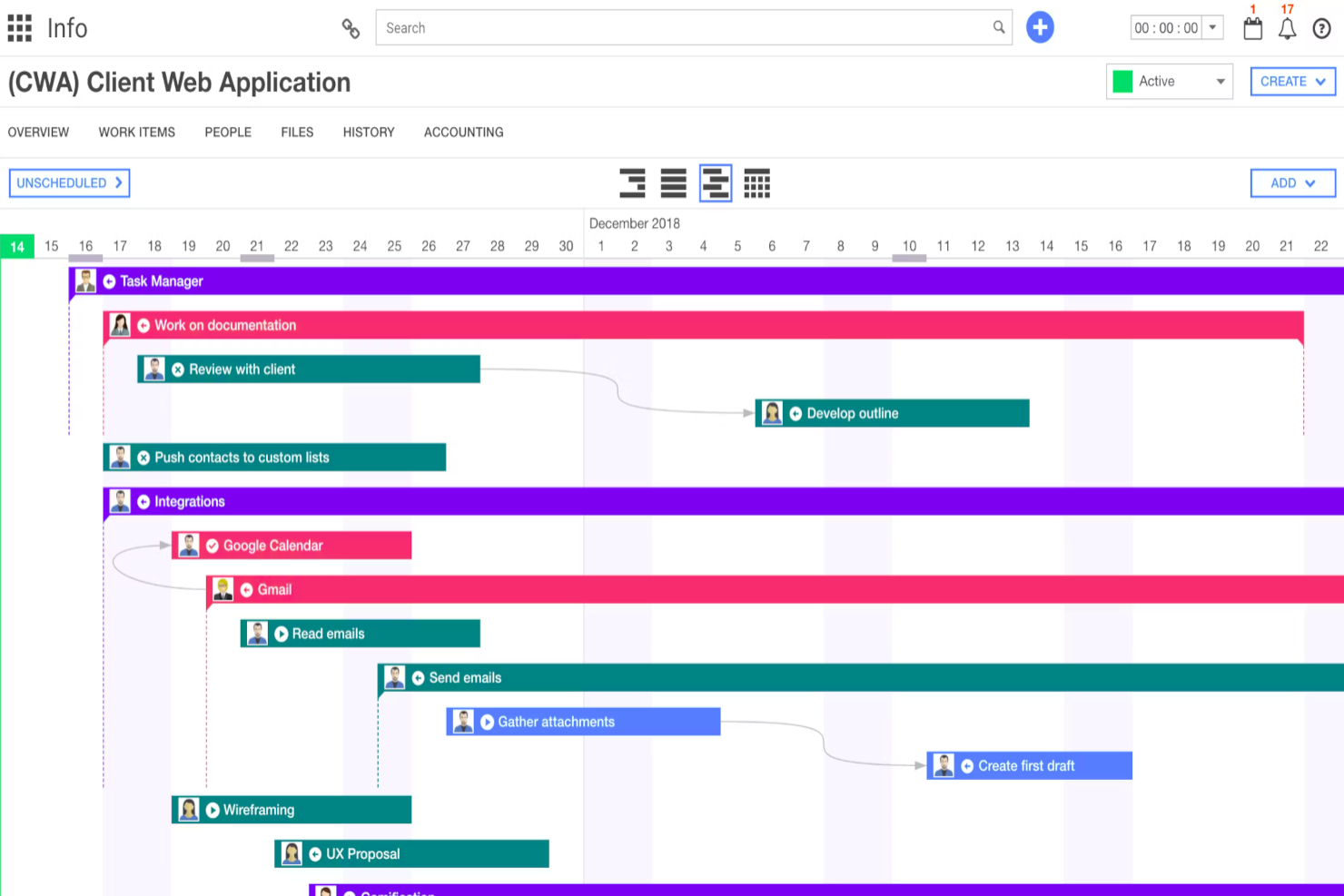
Ravetree is a work management platform for professional services teams that brings project planning, resource allocation, time tracking, and client work into one system.
Who Is Ravetree Best For?
Ravetree suits project managers at agencies and consultancies who need flexible workflows for varied client projects.
Why I Picked Ravetree
I picked Ravetree as a Best Productive Alternative for its project flexibility. Configurable workflows and custom fields let me adapt client projects to different delivery steps, while Gantt, Kanban, and list views help me match the project view to the work at hand.
Ravetree Key Features
- Time and expense tracking: Log project hours and expenses, then submit them for approval.
- Client portal: Give clients access to project updates and shared files.
- Resource planning: Review team capacity and assign people to project work.
- Project billing: Manage budgets, retainers, project financials, and invoices.
Ravetree Integrations
Ravetree’s integrations include QuickBooks, Xero, HubSpot, Google Drive, Dropbox, Box, Stripe, Google Calendar, Outlook Calendar, and GitHub. It also connects with Zapier and offers an Open API for custom integrations.
Pros and Cons
Pros:
- Project budgets connect with time and capacity planning
- Gantt, Kanban, and Agile work structures
- Custom workflows adapt to varied client projects
Cons:
- Work-item navigation takes adjustment
- Interface can feel dated

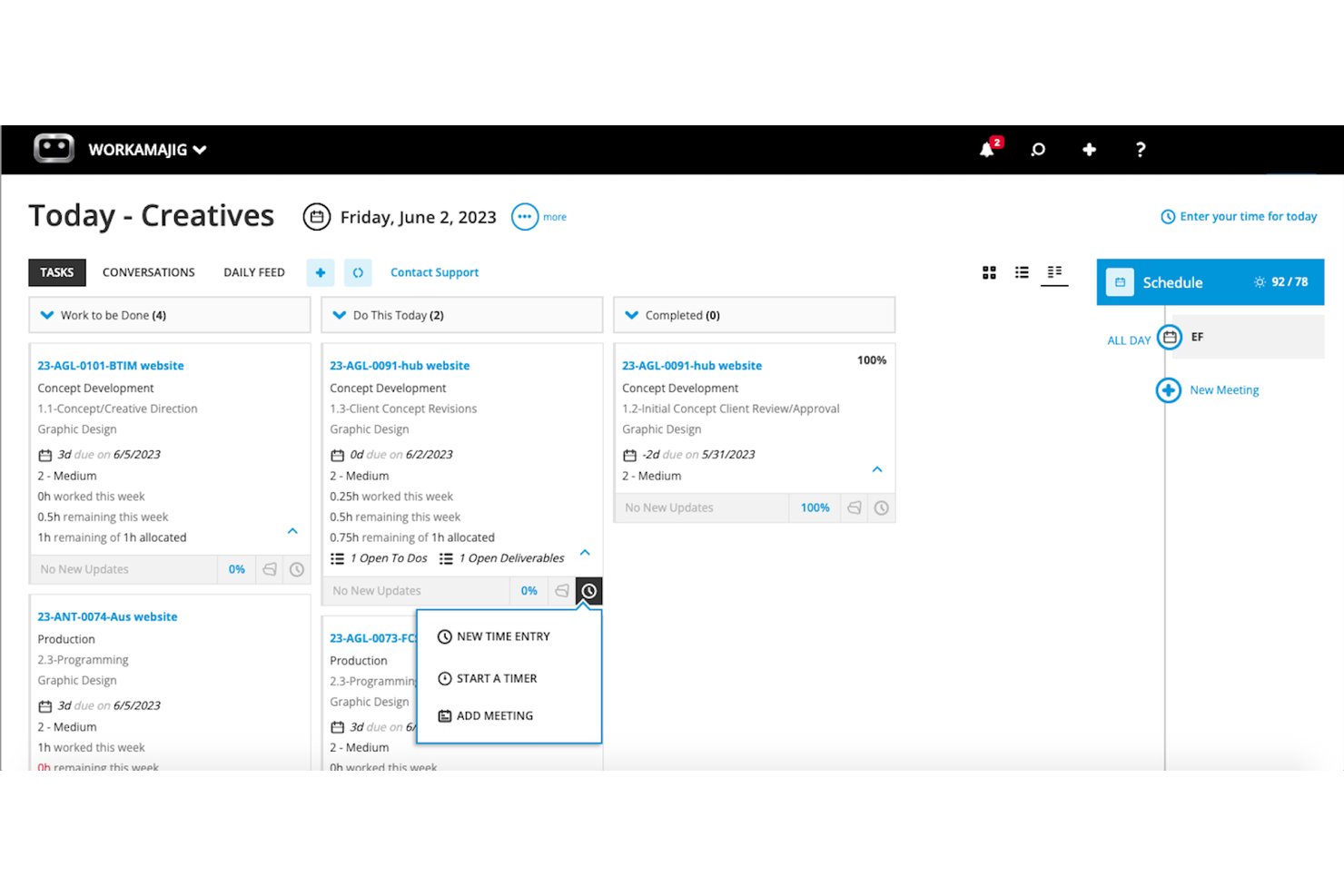
For creative agencies coordinating client work across teams, Workamajig brings project planning, resource coordination, and collaboration into one agency management platform.
Who Is Workamajig Best For?
Workamajig suits project managers at creative and marketing agencies who coordinate client work across multiple departments.
Why I Picked Workamajig
I picked Workamajig as a Best Productive Alternative because it’s Best for agency accounting and project billing. I like that project budgets and job costs connect with tracked time and expenses, helping me compare actuals with estimates. Those entries can also support client billing, reducing manual reconciliation between project delivery and invoices.
Workamajig Key Features
- Lead tracking : Manage prospects and follow-ups in the agency CRM.
- Resource scheduling : Assign staff to tasks and review availability.
- Digital proofing : Annotate creative files and route work for approval.
- Project schedules : Build task lists and organize work across project timelines.
Workamajig Integrations
Workamajig lists integrations with Avalara, AvidXchange, Edenred Pay, Strata, GaleForce, Mediaocean, Bionic, and Slack, and it connects with Zapier. It also offers REST and JSON APIs for custom integrations.
Pros and Cons
Pros:
- Shows project profitability against estimates
- Turns tracked work into client billing
- Connects budgets, time, and project costs
Cons:
- Project updates involve too many clicks
- Reporting comparisons can require extra work
Diğer Productive Alternatifleri
Aşağıda kısa listeme aldığım ek Productive alternatiflerinin bir listesi yer alıyor. Yukarıda aradığınızı bulamadıysanız bunlara göz atın.
- Celoxis
For complex project portfolios
- BigTime
For finance-led professional services firms
- Kantata
For mid-market resource and margin tracking
- Asana
For cross-project workflow customization
- Avaza
For quote-to-cash agency billing
- Function Point
For agency financials tied to projects
- Nifty
For milestone-driven team delivery
- Projectworks
For resourcing, billing, and margin in one view
- Harvest
For time tracking tied to client billing
- Bonsai
For freelance-to-agency billing workflows


İlgili Proje Yönetimi Yazılımı İncelemeleri
Burada aradığınızı hâlâ bulamadıysanız, test edip değerlendirdiğimiz şu diğer ilgili araçlara göz atın:
- Proje Yönetimi Yazılımı
- Kaynak Yönetimi Yazılımı
- İş Akışı Otomasyonu Yazılımı
- Zaman Takibi Yazılımı
- Görev Yönetimi Yazılımı
- İş Birliği Araçları
- Gantt Şeması Oluşturucu
- Verimlilik Araçları
- Proje Takibi Yazılımı
- Proje Planlama Yazılımı
How I Evaluate Productive Alternatives
I split my evaluation into three parts. Core functionality—managing projects and logging billable time—carries the most weight. Then I look for standout features like utilization heatmaps or pipeline-to-project conversion, and I consider onboarding support and pricing flexibility.
Core Functionality (Table Stakes For This List)
When I'm selecting tools for my list, I score each one on a scale from 0 (does not offer the functionality) to 5 (excels in this area) for each core functionality listed below. I then convert the total into a percentage to help assess each tool's overall fit, with extra weight on any functionalities I’ve deemed essential.
- Project & Task Management (Essential): I look for clear task ownership, status, and due dates across projects, plus views that help teams track dependencies and shifting client requests.
- Time Tracking (Essential): I check whether teams can log billable and non-billable hours against project work, then review or approve entries before billing.
- Resource Planning: I assess whether managers can compare team availability with project allocations and spot capacity conflicts before taking on new work.
- Budget & Profitability: I look for budgets tied to actual time or costs, so teams can monitor project spend and assess margins as delivery progresses.
- Invoicing & Billing: I evaluate whether tracked time or project costs can feed client invoices, including support for the team’s billing approach.
- Reporting & Dashboards: I check whether reports bring project status, utilization, time, and financial measures together for useful portfolio-level reviews.
Once I have a list of tools that meet the criteria, I consider what sets each platform apart.
Differentiating Factors (What Sets Vendors Apart)
Here's how I compare and contrast different vendors:
Standout Features
I look for pipeline-to-project conversion, where won deals automatically become scoped projects with budgets and resource assignments already in place. That handoff between sales and delivery is where agencies lose time and context. I also evaluate utilization heatmaps—color-coded views that show overbooking and bench time across weeks, helping managers rebalance before capacity issues hit deadlines. Client portals matter too, since letting clients review progress or approve hours without a full license keeps collaboration tight and licensing costs down.
Beyond Features
I evaluate onboarding support because agencies migrating years of client and timesheet history need guided data imports and billing-model configuration—not just a knowledge base. Pricing flexibility matters too, especially for shops with rotating freelancer pools where per-seat costs add up fast. I also check integration depth with accounting tools like QuickBooks or Xero, since two-way syncing between invoicing and your general ledger prevents the reconciliation headaches that come from managing finances across disconnected systems.
Neden Productive Alternatifi Aramalısınız?
Productive iyi bir proje yönetimi yazılımı seçeneği olsa da alternatif çözümler aramanızın çeşitli nedenleri olabilir. Şu nedenlerle bir Productive alternatifi arıyor olabilirsiniz:
- Daha gelişmiş raporlama özelliklerine sahip bir yazılım arıyorsunuz
- Ekibinizin diğer araçlarla daha iyi entegrasyona ihtiyacı var
- Daha uygun fiyat seçenekleri arıyorsunuz
- Ekibiniz için daha basit bir kullanıcı arayüzüne ihtiyacınız var
- Ekibiniz hızla büyüyor ve ölçeklenebilir bir yazılıma ihtiyaç duyuyor
- Bölgenizde daha iyi müşteri desteği sunan bir çözüme ihtiyacınız var
Productive'in Temel Özellikleri
Alternatif yazılımınızın, ihtiyaçlarınıza uygun bir seçenek olabilmesi için Productive'in aşağıdaki temel özelliklerini sunabilmesi veya bunları geliştirebilmesi gerekir:
- Özelleştirilebilir görünümler: Özelleştirilebilir görünümler, projeleri iş akışınıza en uygun şekilde düzenleyerek görevlere ve kaynaklara öncelik vermenizi sağlar. Bu, odağı korumanıza, proje yönetimini kolaylaştırmanıza ve üretkenliği artırmanıza yardımcı olur.
- Projelerin genel görünümü: İlerlemeyi genel görünümler aracılığıyla takip etmek, hem bireysel katkıları hem de genel ekip performansını proje zaman çizelgesine göre izlemenizi sağlar.
- Dahili sohbet aracı: Dahili bir sohbet aracı, kuruluş içindeki iletişimi destekler ve özel, grup veya şirket genelinde mesajlaşma seçenekleri sunmalıdır. Bu, iş birliğini geliştirir ve herkesin bilgi sahibi olmasını ve bağlantıda kalmasını sağlar.
- Yinelenen görevler: Yinelenen görevleri otomatikleştirmek, görevleri manuel olarak yeniden oluşturma ihtiyacını ortadan kaldırarak zaman kazandırır ve görevlerin gözden kaçırılması riskini azaltır. Bu, temel görevlerin programa uygun şekilde düzenli olarak tamamlanmasını sağlar.
- E-posta yoluyla görev ekleme: E-postaları hızlı bir şekilde gerçekleştirilebilir öğelere dönüştürme özelliği, görev yönetimini kolaylaştırır.
- Anımsatıcı ayarlama: Özelleştirilebilir anımsatıcılar, bireysel veya proje ihtiyaçlarına göre düzenlenmiş bildirimler göndererek zaman çizelgelerinin plana uygun ilerlemesine yardımcı olur. Bu, son teslim tarihlerini karşılamanızı ve görevleri zamanında tamamlamanızı sağlar.
- Bildirimleri sessize alma: Bildirimleri sessize alma seçeneği, dikkat dağıtıcı unsurları susturmanıza ve yüksek öncelikli görevlere odaklanmanıza olanak tanır. Bu, kesintisiz çalışma dönemlerini destekler ve üretkenliği artırır.
- Özel projeler ve görevler: Yalnızca davetle erişim yoluyla görünürlüğü kontrol etmek, hassas projelerin ve görevlerin güvenliğini sağlar. Bu, gizliliği korur ve belirli ekipler içinde odaklanmış iş birliğine olanak tanır.
- Tek oturum açma: Tek oturum açma, Google veya Microsoft hesaplarını kullanarak sorunsuz bir giriş deneyimi sunar ve birden fazla parolayla uğraşma gereğini azaltır. Bu, güvenliği artırır ve kullanıcı erişimi yönetimini kolaylaştırır.
- Güvenli dosya paylaşımı entegrasyonu: Güvenli dosya paylaşımı entegrasyonu, uygulama içinde güvenli ve verimli bulut tabanlı dosya paylaşımına olanak tanır. Bu, dosyaların yetkili kullanıcılar tarafından kolayca erişilebilir olmasını sağlar ve veri güvenliğini korur.