

2026’da İncelenen En İyi 10 Kurumsal Yapay Zekâ Proje Yönetimi Aracı

10 En İyi Kurumsal Yapay Zekâ Proje Yönetimi Araçları Kısa Listesi


Kurumsal yapay zekâ proje yönetimi araçları, büyük kuruluşların karmaşık projeleri planlamasına, yürütmesine ve optimize etmesine yardımcı olmak için yapay zekâdan yararlanır. Bu araçlar; devasa veri kümelerini, dağınık ekipleri ve dinamik iş akışlarını yönetme zorluğunu ele alarak karar verme süreçlerini, risk tahminini ve genel proje görünürlüğünü iyileştirir.
Yazılım test etme ve inceleme deneyimime dayanarak, bu araçların yaygın proje yönetimi sorunlarını önemli ölçüde hafifletebildiğini gördüm. Yapay zekâ özelliklerinin proje planlamanızı ve yürütmenizi nasıl geliştirebileceğini keşfedeceksiniz.
Bu makalede, en iyi kurumsal yapay zekâ proje yönetimi araçları için en iyi seçimlerimi paylaşarak ekibiniz için bilinçli bir karar vermeniz adına ihtiyaç duyduğunuz bilgileri sunacağım.
Why Trust Our Software Recommendations
Our team has been testing and reviewing software since 2012. As project managers ourselves, we know how difficult—and important—it is to choose the right software.
For this guide, we evaluated tools using hands-on testing and independent research, scoring tools using our selection criteria. We also draw on insights from industry thought leaders and practicing project management experts.
Our reviews reflect our human editorial judgment, not a sales pitch.
Expert reviewers:
Kurumsal Yapay Zekâ Proje Yönetimi Araçları Karşılaştırma Tablosu
Bu karşılaştırma tablosu, en iyi kurumsal yapay zekâ proje yönetimi araçları seçimlerim için fiyatlandırma ayrıntılarını özetlemektedir.
Score legend (out of 5)
- Excellent 4.5–5
- Good 4–4.4
- Average 3–3.9
- Below average 2–2.9
- Poor 1–1.9
| Tool | Starting Price | Website | |||||||
|---|---|---|---|---|---|---|---|---|---|
| Best for resource management | 3.0 out of 5 | 2 | 4 | 4 | 3 | 3 | 2 | $10/user/month 14-day free trial | Website |
| Best for AI-powered portfolio visibility | 3.2 out of 5 | 3 | 4 | 2 | 3 | 3 | 4 | $9/user/month Free plan + 14-day trial available | Book Demo |
| Best for no-code enterprise workflow automation | — | 3 | — | 2 | 3 | 2 | 3 | Pricing upon request Not available | Book Demo |
| Best for AI features included in all plans | 2.7 out of 5 | 3 | 3 | 3 | 2 | 2 | 3 | $10/user/month Free plan + 14-day trial + demo available | Book Demo |
| Best AI for meeting notes | 3.2 out of 5 | 3 | 4 | 2 | 3 | 3 | 4 | $10.99/user/month Free plan + trial + demo available | Website |
| Best for AI-driven scheduling | 3.2 out of 5 | 4 | 4 | 3 | 3 | 2 | 3 | $19/seat/month Free trial available | Website |
| Best customizable task views | 3.2 out of 5 | 4 | 4 | 3 | 2 | 2 | 4 | $7/user/month Free plan + 14-day free trial + free demo available | Website |
| Best for cross-portfolio AI dependency mapping | 3.3 out of 5 | 2 | 4 | 3 | 3 | 4 | 4 | Pricing upon request Free demo available | Website |
| Best for PSA-rooted AI project insights | 3.3 out of 5 | 3 | 4 | 3 | 3 | 3 | 4 | $17/user/month 14-day free trial | Book Demo |
| Best for AI-driven project planning | 3.2 out of 5 | 3 | 3 | 4 | 4 | 3 | 2 | Pricing upon request Free demo available | Book Demo |
En İyi Kurumsal Yapay Zekâ Proje Yönetimi Araçları İncelemeleri
Aşağıda, kısa listeme giren en iyi kurumsal yapay zekâ proje yönetimi araçlarının ayrıntılı özetlerini bulabilirsiniz. İncelemelerim, size en uygun aracı bulmanıza yardımcı olmak için her aracın temel özelliklerine, avantajlarına ve dezavantajlarına, entegrasyonlarına ve ideal kullanım alanlarına ayrıntılı bir bakış sunar.

Celoxis
Best for resource management

Celoxis is a comprehensive project management tool designed for businesses that require detailed resource management and planning capabilities. It caters to mid-sized and large enterprises, providing tools for project tracking, resource allocation, and financial management. Celoxis's AI features enhance decision-making by offering predictive analytics and automated scheduling.
Why I picked Celoxis: Celoxis excels in resource management, allowing your team to allocate resources efficiently across projects. Its AI-driven algorithms predict resource needs and help you optimize workload distribution. Celoxis also offers automated scheduling, reducing manual effort and improving project timelines. This focus on resource management makes it ideal for businesses with complex resource allocation needs.
Standout Features & Integrations
Features include interactive Gantt charts, customizable dashboards, and time tracking. These features help your team monitor project progress and manage tasks effectively. Celoxis also offers advanced reporting tools to provide insights into project performance.
Integrations include Salesforce, QuickBooks, Google Drive, Slack, Jira, Microsoft Project, Outlook, Excel, Zendesk, and Trello.
Pros and Cons
Pros:
- Advanced reporting tools
- Automated scheduling features
- Strong resource management capabilities
Cons:
- Low-tier lacks customization options
- Outdated interface layout may cause lags

Best for AI-powered portfolio visibility
monday AI Workspace is an enterprise AI work platform that combines portfolio management, AI-powered task automation, resource planning, and cross-functional workflow orchestration across project and program teams.
Who Is monday AI Workspace Best For?
It's a strong fit for enterprise PMO teams and portfolio managers at large organizations running multiple cross-functional projects simultaneously.
Why I Picked monday AI Workspace
monday AI Workspace earns its spot on my shortlist because of how it handles portfolio visibility at scale. I love the Portfolio Dashboards, which surface real-time health snapshots across every active project without any manual status chasing. On top of that, monday sidekick lets me query project data in natural language and get instant executive-ready summaries, which cuts reporting prep significantly. The AI Smart Assignment in Capacity Manager also means my team can match the right people to the right work across a full portfolio, not just a single project.
monday AI Workspace Key Features
- AI workflow builder: Orchestrates custom automations across project and portfolio workflows using AI-powered logic and triggers.
- Advanced resource management: Assigns and monitors resources based on skills, workload, and availability across multiple projects.
- Portfolio dashboards: Displays live visual snapshots and data rollups from every project in an enterprise-wide workspace.
- Jira and Salesforce two-way sync: Maintains up-to-date project and portfolio data by synchronizing with key enterprise systems in real time.
monday AI Workspace Integrations
monday AI Workspace offers hundreds of native integrations, including Salesforce, Jira, HubSpot, Google Workspace, Slack, Microsoft Teams, GitHub, DocuSign, Stripe, Zoom, and connects with Zapier. An API is also available for custom integrations.
Pros and Cons
Pros:
- Supports Agile, Waterfall, and hybrid delivery methods
- Autonomous agents handle multi-step project tasks independently
- AI portfolio dashboards surface real-time project health
Cons:
- Complex enterprise setups require significant admin configuration
- AI features gated behind higher-tier plans
New Product Updates from monday AI Workspace
monday AI Workspace Adds Human Approval Routing
monday AI Workspace adds a human-in-the-loop approval block to AI Workflows, sending approval requests and routing workflow paths based on responses. For more information, visit monday AI Workspace's official site.
 .

Best for no-code enterprise workflow automation
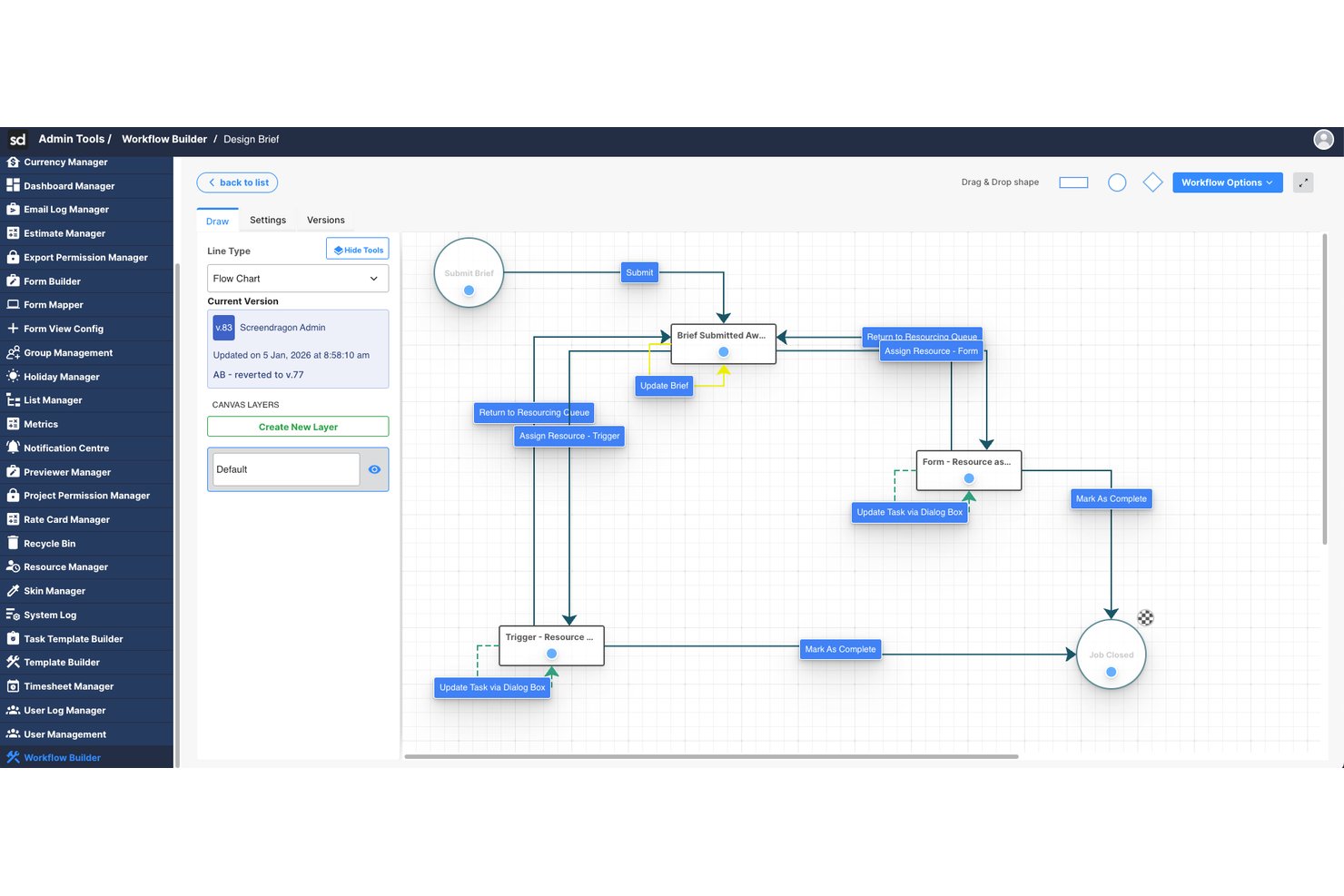
Screendragon is an enterprise work management platform that combines AI-powered workflow orchestration, resource planning, and project management with no-code automation tools built for large-scale marketing and creative operations.
Who Is Screendragon Best For?
Screendragon is well-suited for enterprise marketing teams, in-house agencies, and creative operations groups managing high volumes of work across multiple stakeholders.
Why I Picked Screendragon
Screendragon earns its spot on my shortlist because of its no-code workflow engine, which lets enterprise teams build and automate complex approval chains without any developer involvement. I also like the AI agent orchestration layer, which routes work across multiple AI models based on cost and performance needs. The smart resourcing feature rounds it out by auto-assigning team members based on skills, not just availability.
Screendragon Key Features
- AI governance controls: Offers oversight and management of AI usage, model routing, and workflow execution within the platform.
- Advanced operational reporting: Provides real-time dashboards and analytics across projects, people, budgets, and approvals.
- Enterprise integrations: Connects natively with platforms like SAP, Salesforce, PeopleSoft, Jira, and Microsoft 365.
- Role-based access controls: Supports enterprise-grade security with permissions for users, teams, and external partners.
Screendragon Integrations
Screendragon offers native integrations with SAP, PeopleSoft, Salesforce, Microsoft 365, Google Drive, Adobe Creative Cloud, Jira, Trello, Box, and Egnyte, and provides an API for custom integrations.
Pros and Cons
Pros:
- Skill-based resource assignment via AI
- AI agents handle multi-step tasks autonomously
- No-code workflow automation without developer support
Cons:
- AI predictive risk features are less mature
- Skewed toward marketing over broader PMO use

Wrike
Best for AI features included in all plans

Wrike is a work management platform designed for teams looking to enhance their project workflows. It primarily serves enterprises and teams that need deep automation and task management features. Wrike's AI capabilities, like Wrike Copilot, assist in real-time data analysis and task automation, providing substantial value to its users.
Why I picked Wrike: Wrike's AI features are included in all plans, making it accessible for various team sizes. The Wrike Copilot offers AI-driven insights to help you manage projects efficiently. It includes AI capabilities for data analysis, allowing your team to automate repetitive tasks. This makes Wrike a versatile choice for enhancing productivity across different industries.
Standout Features & Integrations
Features include task management, Gantt charts, and a visual collaboration platform. The platform provides templates for Agile and event management, helping your team get started quickly. Wrike also emphasizes user education through online courses and webinars.
Integrations include Google, Microsoft, Adobe Creative Cloud, Box, GitHub, JIRA, Salesforce, Zoom, Tableau, and MS Teams.
Pros and Cons
Pros:
- Strong user education resources
- Extensive project templates
- AI features in all plans
Cons:
- Automations are capped unless upgrading
- Complex folder-based structure
New Product Updates from Wrike

Wrike Redesigns Workspace Search With New Filters
Wrike introduces a redesigned Workspace Search interface with recent search shortcuts, item type and location filters, and parent-task context. These updates help users find relevant work items and navigate search results efficiently. For more information, visit Wrike’s official site.
 .
Asana
Best AI for meeting notes

Asana is a project management tool designed for teams that need to organize their work and manage tasks efficiently. It is popular among businesses of all sizes, offering tools for task tracking and project planning. Asana's AI capabilities focus on improving productivity by automating routine tasks and providing insights from project data.
Why I picked Asana: Asana excels in using AI to optimize meeting notes, helping your team capture and organize information effectively. Its AI features include automated task suggestions and timeline predictions, which can enhance your team's workflow. Asana also uses AI to provide insights into project progress and potential roadblocks. This focus on AI-driven meeting management makes it a valuable tool for teams looking to improve collaboration.
Standout Features & Integrations
Features include task dependencies, a timeline view, and project milestones. These features help you manage complex projects with multiple moving parts. Asana also offers a workload feature to help you balance team capacity.
Integrations include Slack, Microsoft Teams, Google Drive, Dropbox, Zoom, Salesforce, Jira, Trello, Zapier, and Adobe Creative Cloud.
Pros and Cons
Pros:
- Visual timeline and workload features
- Intuitive task dependencies
- Effective AI for meeting notes
Cons:
- Notifications overload without tuning
- Limited advanced field customization

Motion
Best for AI-driven scheduling
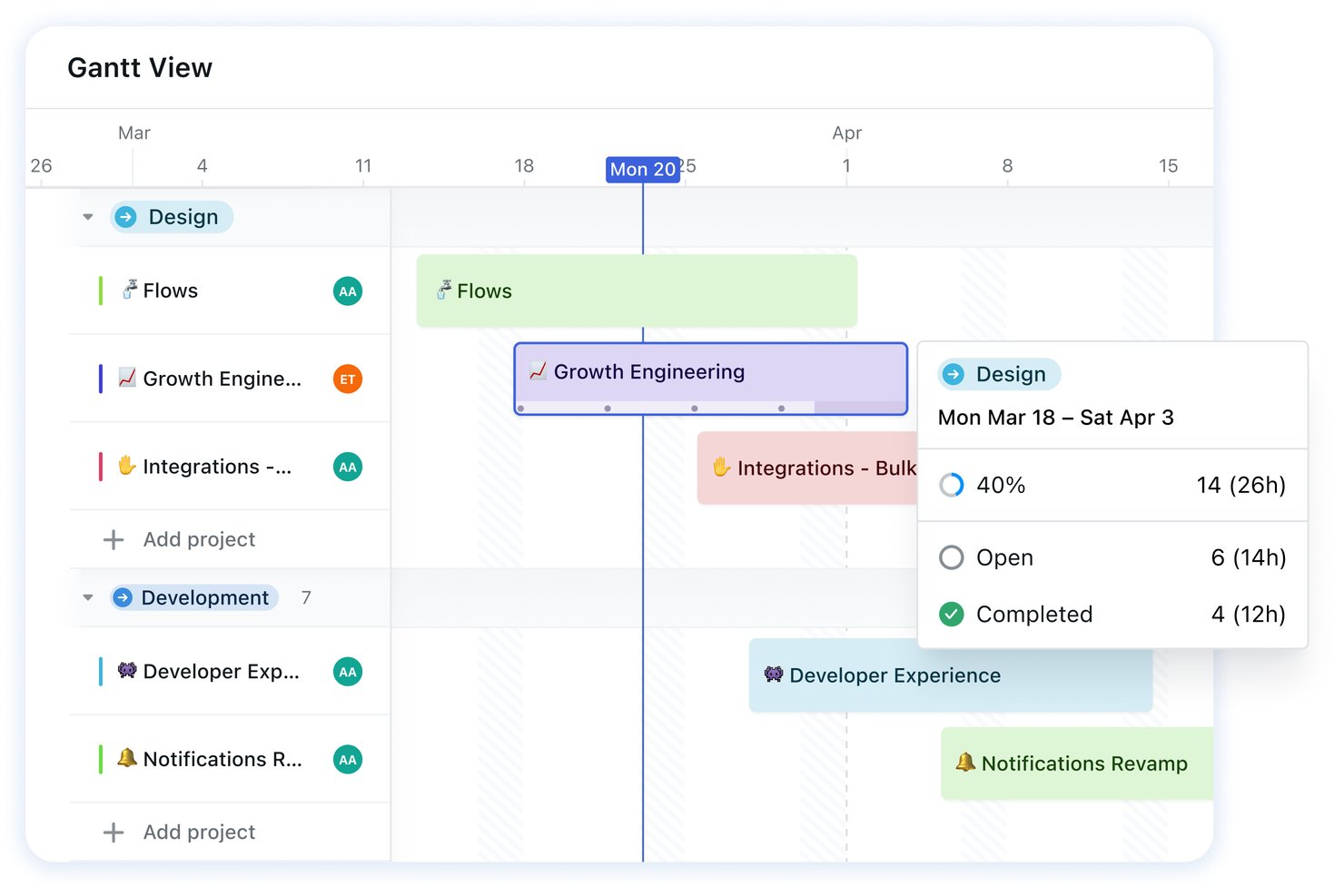
Motion is an AI-powered project and task management platform that combines auto-scheduling, calendar planning, workload management, meeting notes, and AI-driven project creation in a single workspace.
Who Is Motion Best For?
Motion works well for individual contributors and small teams who want AI to handle the daily grind of scheduling and task prioritization without manual planning.
Why I Picked Motion
Motion earns its spot on my shortlist because its AI scheduler does something I find genuinely useful: it watches your calendar and task list simultaneously, then fills open time slots automatically and reshuffles everything the moment a meeting runs long or a deadline shifts. I picked it specifically for its AI-driven scheduling because the auto-prioritization engine factors in deadlines, dependencies, and capacity before placing a single task, so your day adjusts without you touching it. The AI project creation feature also lets you generate a full task breakdown from a plain-language prompt, turning a project brief into sequenced work in seconds.
Motion Key Features
- AI meeting notetaker: Automatically generates meeting notes, summaries, action items, and follow-up emails from recorded meetings.
- Workload view: Displays each team member's capacity by day or week, showing which tasks and events are contributing to their load so you can spot overallocation at a glance.
- AI Chat: A conversational interface that reads across your entire Motion workspace to create, update, or search work using natural language in over 100 languages.
- SOP-to-workflow conversion: Turns existing standard operating procedure documents into reusable workflows with structured projects and assigned tasks.
Motion Integrations
Motion offers native integrations with Google Calendar, Microsoft Outlook 365, iCloud Calendar, Zoom, Microsoft Teams, Google Meet, and Gmail. It also supports Zapier and provides an API for custom integrations.
Pros and Cons
Pros:
- Workload views reveal team capacity bottlenecks
- AI drafts project plans from plain-language prompts
- Tasks reschedule when calendars and deadlines shift
Cons:
- Portfolio-level resource rebalancing remains manual
- Scheduling can misread preferred priority order


ClickUp is a versatile project management tool designed for teams seeking flexibility in managing tasks and projects. It serves a diverse user base, from small teams to large enterprises, offering tools for task management, goal setting, and workflow automation. ClickUp's AI capabilities enhance productivity by automating task assignments and providing insights into project performance.
Why I picked ClickUp: ClickUp offers highly customizable task views, allowing your team to tailor their workspace to fit specific needs. Its AI features include automation of repetitive tasks and smart suggestions for task prioritization. ClickUp's AI-driven tools help you optimize team productivity by analyzing workload and efficiency. This flexibility in customization sets it apart, making it suitable for various industries and project types.
Standout Features & Integrations
Features include time tracking, goal setting, and a built-in document editor. These features enable your team to manage projects comprehensively within a single platform. ClickUp also provides a whiteboard feature for visual collaboration and brainstorming.
Integrations include Slack, Google Drive, Microsoft Teams, Zoom, Dropbox, Trello, HubSpot, Salesforce, GitHub, and Outlook.
Pros and Cons
Pros:
- Built-in document editor
- Comprehensive project management features
- Highly customizable task views
Cons:
- Feature sprawl can be overwhelming
- Performance lag in large spaces

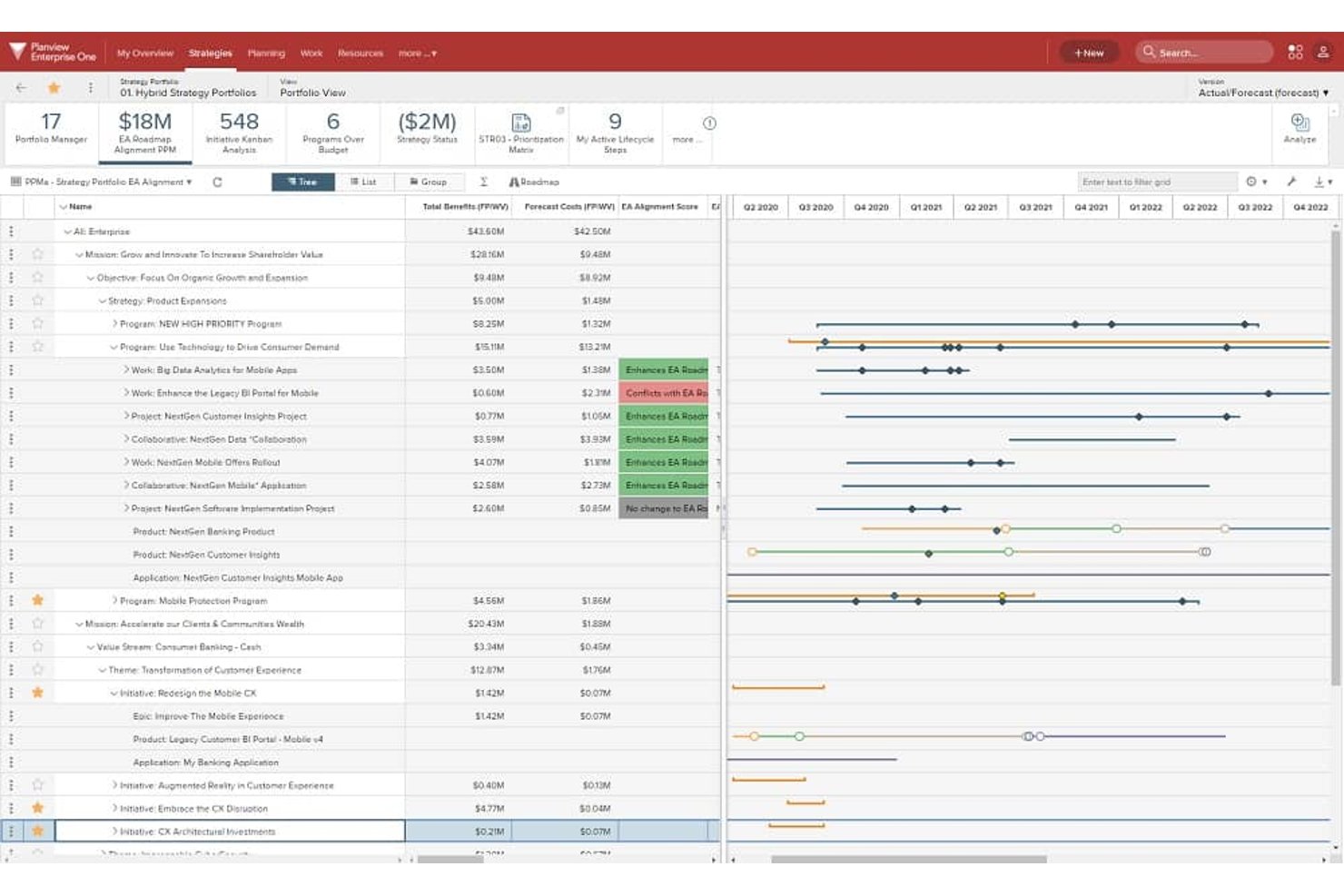
Planview Portfolios is an enterprise portfolio management platform that combines strategic alignment, investment prioritization, resource planning, and AI-powered dependency intelligence across large, multi-project portfolios.
Who Is Planview Portfolios Best For?
Planview Portfolios is a strong fit for enterprise PMO and EPMO leaders managing large, complex portfolios across multiple business units.
Why I Picked Planview Portfolios
I picked Planview Portfolios as one of the best because its Connected Work Graph is genuinely unlike what most enterprise tools offer: it maps dependencies across teams, projects, and tools in real time, then surfaces bottlenecks and critical-path risks before they become blockers. Backed by 60+ connectors, Anvi, Planview's conversational AI layer, can answer natural-language questions about cross-portfolio work and generate on-demand executive summaries without manual report compilation. I especially like that AI-driven scenario planning lets you test something like a 15% budget cut or a delayed product launch in minutes, then push the chosen scenario directly into the live portfolio.
Planview Portfolios Key Features
- Sentiment analysis: Anvi scans free-text status updates across your portfolio to surface sentiment trends and flag potential risks before they escalate.
- OKR alignment: Connects organizational objectives and key results directly to portfolio investments so you can track progress from strategy down to project-level execution.
- Financial planning and forecasting: Sets portfolio financial targets and tracks budgets, forecasts, and cost and benefit actuals across programs and projects in one view.
- Demand management: Collects and evaluates enterprise demand, from early-stage ideas through to formal program and project requests, in a single intake workflow.
Planview Portfolios Integrations
Planview Portfolios offers integrations with Jira, Microsoft Azure DevOps, and Planview AgilePlace, including bidirectional updates for portfolio items, progress, priorities, and resource allocation. It also lists connections with SAP, Salesforce, ServiceNow, Workday, and other enterprise systems.
Pros and Cons
Pros:
- Maps dependencies and bottlenecks across portfolios
- Supports capacity planning across project workloads
- Connects portfolio investments to strategic priorities
Cons:
- Complex navigation can slow project manager adoption
- AI doesn’t generate or assign tasks

Scoro
Best for PSA-rooted AI project insights
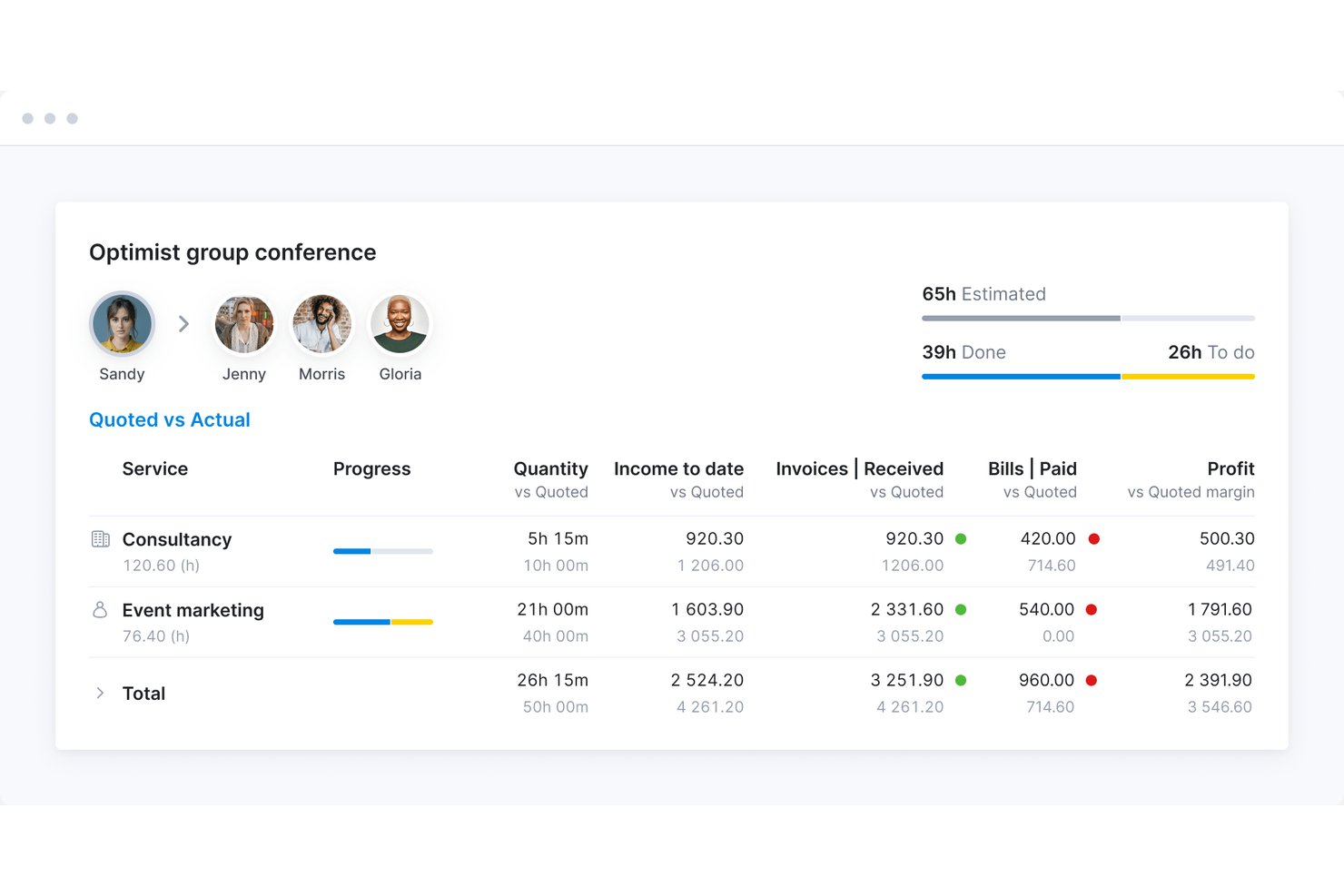
Scoro is a professional services automation platform that combines project management, resource planning, time tracking, and financial workflows—from quoting and budgeting through invoicing—with ELI, its built-in AI assistant for querying project data and taking action across the platform.
Who Is Scoro Best For?
Scoro fits professional services firms—agencies, consultancies, and similar teams—that need AI-assisted insights tied directly to project financials and delivery.
Why I Picked Scoro
I've included Scoro in my top picks because it's the only tool on this list that ties AI project insights directly to financial workflows rather than treating them as separate concerns. ELI, Scoro's built-in AI assistant, can analyze a project's budget consumption, bookings, and task completion in one prompt, then flag which projects are at highest risk before you're scrambling to fix them. I also like that ELI's booking action lets you evaluate and redistribute team workloads across the current or upcoming month using plain language.
Scoro Key Features
- ELI natural-language reporting: Ask ELI questions in plain language to pull reports and filtered insights directly from your Scoro data.
- Project budget health forecast: View a forward-looking budget health indicator based on delivered and planned work, alongside projected hours by role or service.
- Bookings heatmap: Visualize team utilization across projects and roles in a six-month heatmap that groups availability by user or role.
- Gantt chart with milestone tracking: Plan and share project timelines using Gantt charts that include phases and milestones for stakeholder visibility.
Scoro Integrations
Scoro connects with 40+ tools, including native integrations with Xero, Sage Intacct, QuickBooks, Salesforce, Slack, Google Calendar, and Jira, plus marketplace integrations with HubSpot and Asana. It also offers an API, webhooks, an MCP server, and Zapier.
Pros and Cons
Pros:
- Portfolio heatmaps reveal team capacity by role
- Project health links budgets, bookings, and tasks
- ELI surfaces project risks from business data
Cons:
- Task creation can take extra steps
- ELI waits for prompts and confirmation
New Product Updates from Scoro

Scoro Adds Time Mobile App and ELI Improvements
Scoro adds the Scoro Time mobile app for iOS/Android to track time anywhere and expands ELI with attachments, smarter filtering, and trigger-based actions. For more information, visit Scoro's official site.
 .

Accelo
Best for AI-driven project planning

Accelo is a professional services automation platform that connects AI-driven project management, resource and capacity planning, time tracking, and financial reporting in a single system.
Who Is Accelo Best For?
Accelo is a strong fit for professional services teams that need AI-driven project planning, resource forecasting, and financial visibility in one connected platform.
Why I Picked Accelo
I picked Accelo as one of the best because its AI-driven project planning goes beyond surface-level forecasting: the platform's task overrun alerts flag at-risk tasks before they slip, using a model trained on your team's actual delivery history, logged time, and assignee skills. I also like that its AI-assisted resource scheduling factors in skills, availability, and past performance to recommend the right people across multiple projects simultaneously, which is exactly where most teams lose time.
Accelo Key Features
- AI-powered project risk scoring: Ranks projects by risk using signals like overdue status, budget health, predicted end-date health, and proximity to due date.
- Statement-of-work project setup: Reads a uploaded SOW file to extract phases, deliverables, budgets, and role-based hours, then builds a project baseline after you review and confirm.
- Pipeline-weighted capacity forecasting: Factors in likely deals from your sales pipeline to model future resource demand and inform hiring decisions before work is confirmed.
- MCP natural-language querying: Connects to AI assistants like Claude, ChatGPT, and Copilot Studio so you can query project status, team utilization, and budget risk in plain language.
Accelo Integrations
Accelo lists integrations with Jira, Azure DevOps, GitHub, GitLab, HubSpot, Salesforce, Microsoft 365, Google Workspace, Slack, and Zapier. It also offers RESTful and Forms APIs for custom integrations.
Pros and Cons
Pros:
- Reviewers praise clear workload and schedule views
- Forecasts team capacity across multiple projects
- Predicts task overruns from delivery history
Cons:
- Reviewers report occasional task-sync issues
- Forecast accuracy depends on consistent time logging
New Product Updates from Accelo

Accelo Rebuilds Mobile App for Project and Time Management
Accelo rebuilds its mobile app with task management, new work creation, and mobile timesheets for Forecast customers. This helps teams keep project and time data current while working away from a desktop. For more information, visit Accelo’s official site.
 .
Diğer Kurumsal Yapay Zekâ Proje Yönetimi Araçları
Kısa listeme giremeyen ancak yine de göz atmaya değer bazı ek kurumsal yapay zekâ proje yönetimi aracı seçenekleri şunlardır:
- Epicflow
For AI scenario planning across portfolios
- Kantata
For professional services resource AI
- Adobe Workfront
For Adobe-native creative operations
- Teamwork.com
For client project AI reporting
- Airtable
For AI-generated project briefs and summaries
- Productive
For agency project management
- OnePlan
For Microsoft-stack portfolio planning
- Notion
For team document collaboration
- ServiceNow Strategic Portfolio Management
For AI-generated portfolio status reports


How I Evaluate Enterprise AI Project Management Tools
To make this list, a tool’s AI needs to handle real project work, like forecasting delivery risks and recommending resource shifts. From there, I evaluate three things. Core functionality carries the most weight, like mapping dependencies and planning capacity. Then I look at standout features, like AI scenario simulation, and what a tool offers beyond its feature set, like transparent data governance.
Core Functionality (Table Stakes For This List)
When I'm selecting tools for my list, I score each one on a scale from 0 (does not offer the functionality) to 5 (excels in this area) for each core functionality listed below. I then convert the total into a percentage to help assess each tool's overall fit, with extra weight on any functionalities I’ve deemed essential.
- AI Task Automation (Essential): I look for AI that creates, sequences, prioritizes, or assigns tasks as requirements change, with clear opportunities for teams to review its suggestions.
- Predictive Analytics (Essential): I assess whether forecasts connect project data to likely delays, budget overruns, or resource constraints, such as a slipping dependency affecting a launch.
- Natural Language Interaction: I check whether people can ask questions about project status or request a plan in plain language and get relevant, usable responses.
- Resource Optimization: I look for actionable recommendations across projects, such as shifting work when a specialist is overbooked or a team has spare capacity.
- AI Reporting: I evaluate whether AI can turn project data into accurate status summaries, forecasts, or next steps that need little manual correction.
- Portfolio Intelligence: I check whether AI identifies patterns and dependencies across initiatives, helping leaders spot a shared resource bottleneck or schedule risk.
Once I have a list of tools that meet the criteria, I consider what sets each platform apart.
Differentiating Factors (What Sets Vendors Apart)
Here's how I compare and contrast different vendors:
Standout Features
I look for AI scenario simulation that lets PMO leaders model staffing or timeline changes before touching a live plan. Automated dependency mapping matters just as much—I check whether a tool can surface hidden cross-project bottlenecks, like two initiatives competing for the same architect. I also evaluate anomaly detection alerts, since early flags on scope creep or unusual spend patterns give teams time to course-correct before a risk escalates to leadership.
Beyond Features
I evaluate how transparent each vendor is about AI model training and data access, since PMO directors need to trust forecasts before acting on budget or staffing decisions. Enterprise change management support matters just as much—I check for structured onboarding programs and sandbox environments that help large teams adopt AI features beyond an initial pilot group. I also look at licensing flexibility, because hidden costs around premium AI add-ons can erode ROI as portfolios scale.
Kurumsal Yapay Zekâ Proje Yönetimi Aracı Nasıl Seçilir?
Uzun özellik listeleri ve karmaşık fiyatlandırma yapılarına kendinizi kaptırmanız kolaydır. Kendinize özgü yazılım seçimi süreciniz üzerinde çalışırken odaklanmanızı korumanıza yardımcı olmak için göz önünde bulundurmanız gereken faktörlerin bir kontrol listesini aşağıda bulabilirsiniz:
| Faktör | Dikkate Alınması Gerekenler |
| Ölçeklenebilirlik | Araç ekibinizle birlikte büyüyecek mi? Kullanıcı sınırlarını ve projeleriniz ölçeklendikçe aracın artan veri ve karmaşıklığı işleyip işleyemeyeceğini değerlendirin. |
| Entegrasyonlar | Mevcut araçlarınıza bağlanıyor mu? Sorunsuz veri akışı ve iş akışı sürekliliği sağlamak için hâlihazırda kullandığınız yazılımlarla uyumluluğunu kontrol edin. |
| Özelleştirilebilirlik | Aracı iş akışınıza uyarlayabilir misiniz? Gösterge tablolarını, raporları ve iş akışlarını ekibinizin süreçlerine ve tercihlerine uyacak şekilde özelleştirme seçenekleri arayın. |
| Kullanım kolaylığı | Kullanıcı dostu mu? Öğrenme eğrisini ve ekip üyelerinin kapsamlı bir eğitim almadan aracı hızlı bir şekilde benimseyip benimseyemeyeceğini değerlendirin. |
| Uygulama ve kullanıma alıştırma | Başlamanız ne kadar sürecek? Kurulum, veri aktarımı ve ekibiniz için başlangıç eğitimi amacıyla gereken zamanı ve kaynakları göz önünde bulundurun. |
| Maliyet | Toplam maliyet nedir? Bütçenize uygun olması için abonelik ücretlerini, gizli maliyetleri ve farklı fiyatlandırma kademelerinin sunduğu değeri karşılaştırın. |
| Güvenlik önlemleri | Verileriniz korunuyor mu? Bilgilerinizin güvende olduğundan emin olmak için şifreleme, kullanıcı erişim denetimleri ve ilgili veri koruma düzenlemelerine uyumluluk özelliklerini kontrol edin. |
| Destek bulunabilirliği | Hangi destek seçenekleri mevcut? Sohbet, telefon veya e-posta yoluyla zamanında yardıma erişiminiz olup olmadığını ve sık sorulan sorular veya forumlar gibi kendi kendine hizmet kaynaklarının bulunup bulunmadığını belirleyin. |
Kurumsal Yapay Zekâ Proje Yönetimi Araçları Nelerdir?
Kurumsal yapay zekâ proje yönetimi araçları, yapay zekâdan yararlanarak proje planlamasını ve yürütülmesini geliştirmek üzere tasarlanmış yazılım çözümleridir. Bu araçlar; verimliliği ve karar alma süreçlerini iyileştirmek için proje yöneticileri, ekip liderleri ve BT profesyonelleri tarafından yaygın olarak kullanılır. Otomasyon, öngörücü analizler ve kaynak optimizasyonu özellikleri; görevlerin yönetilmesine, proje zorluklarının öngörülmesine ve kaynakların etkili bir şekilde tahsis edilmesine yardımcı olur. Genel olarak bu araçlar, üretkenliği artırarak ve verilere dayalı kararlar alınmasını sağlayarak önemli değer sunar.
Kurumsal Yapay Zekâ Proje Yönetimi Araçlarının Özellikleri
Kurumsal yapay zekâ proje yönetimi araçlarını seçerken aşağıdaki temel özelliklere dikkat edin:
- Otomasyon: Tekrarlanan görevleri otomatikleştirerek zamandan tasarruf sağlar ve hataları azaltır; ekibinizin daha stratejik çalışmalara odaklanmasına olanak tanır.
- Öngörücü analizler: Proje zaman çizelgeleri ve olası riskler hakkında içgörüler sunarak bilinçli kararlar almanıza ve zorlukları öngörmenize yardımcı olur.
- Kaynak optimizasyonu: Ekip üyelerinin ve varlıkların en iyi şekilde kullanılmasını sağlamak için kaynak tahsisini analiz eder ve proje verimliliğini artırır.
- Özelleştirilebilir panolar: Görünümleri ve raporları ekibinizin özel ihtiyaçlarına uyacak şekilde düzenlemenize olanak tanıyarak görünürlüğü ve kontrolü artırır.
- Yapay zekâ destekli içgörüler: Proje yönetimi için verilere dayalı öneriler sunarak karar alma ve strateji planlama süreçlerini iyileştirir.
- İş akışı otomasyonu: Rutin iş akışlarını otomatikleştirerek süreçleri birleştirir, üretkenliği ve tutarlılığı artırır.
- Entegrasyon yetenekleri: Sistemler arasında hızlı veri akışı ve iş birliği sağlamak için mevcut araçlara ve platformlara bağlanır.
- Zaman takibi: Görevler ve projeler için harcanan zamanı izleyerek üretkenlik ve kaynak tahsisi hakkında içgörüler sunar.
- Bütçe yönetimi: Proje bütçelerini ve harcamalarını izleyerek mali sınırlar içinde kalmanıza ve uygun maliyetli kararlar almanıza yardımcı olur.
- Güvenlik önlemleri: Şifreleme ve kullanıcı erişim denetimleriyle veri koruması sağlayarak bilgilerin gizliliğini ve bütünlüğünü korur.
Kurumsal Yapay Zekâ Proje Yönetimi Araçlarının Faydaları
Kurumsal yapay zekâ proje yönetimi araçlarını uygulamak, ekibiniz ve işletmeniz için çeşitli faydalar sağlar. Yararlanabileceğiniz bazı faydalar şunlardır:
- Artan verimlilik: Rutin görevleri otomatikleştirerek ekibinizin yüksek öncelikli faaliyetlere odaklanması için zaman kazandırır.
- Geliştirilmiş karar alma: Öngörücü analizler ve yapay zekâ destekli içgörüler sunarak hızlı ve bilinçli seçimler yapmanıza yardımcı olur.
- Geliştirilmiş kaynak tahsisi: Verimli iş yükü dağılımını sağlamak için ekip kapasitesini ve proje gereksinimlerini analiz ederek kaynak kullanımını optimize eder.
- Daha iyi risk yönetimi: Yapay zekâ yetenekleriyle olası proje risklerini erkenden belirleyerek proaktif risk azaltma stratejilerinin uygulanmasına olanak tanır.
- Maliyet tasarrufu: Bütçeleri ve harcamaları doğru şekilde izleyerek maliyet tasarrufu fırsatlarını belirlemenize ve mali sınırlar içinde kalmanıza yardımcı olur.
- Daha güçlü iş birliği: Mevcut araçlarla entegre olarak ekibiniz genelinde veri paylaşımını ve iletişimi kolaylaştırır.
- Ölçeklenebilirlik: Büyüyen işletme ihtiyaçlarınıza uyum sağlayarak zaman içinde daha büyük veya daha karmaşık projeleri yönetmek için gereken esnekliği sunar.
Kurumsal Yapay Zekâ Proje Yönetimi Araçlarının Maliyetleri ve Fiyatlandırması
Kurumsal yapay zekâ proje yönetimi araçlarını seçmek, mevcut çeşitli fiyatlandırma modellerinin ve planların anlaşılmasını gerektirir. Maliyetler özelliklere, ekip büyüklüğüne, eklentilere ve diğer unsurlara göre değişir. Aşağıdaki tabloda, kurumsal yapay zekâ proje yönetimi aracı çözümlerinde yaygın olarak sunulan planlar, ortalama fiyatları ve tipik özellikleri özetlenmiştir:
Kurumsal Yapay Zekâ Proje Yönetimi Araçları için Plan Karşılaştırma Tablosu
| Plan Türü | Ortalama Fiyat | Yaygın Özellikler |
| Ücretsiz Plan | $0 | Temel görev yönetimi, sınırlı entegrasyonlar ve topluluk desteği. |
| Kişisel Plan | $5-$15/kullanıcı/ay | Görev yönetimi, temel otomasyon, raporlama özellikleri ve sınırlı destek. |
| İşletme Planı | $20-$40/kullanıcı/ ay | Gelişmiş otomasyon, proje şablonları, zaman takibi ve öncelikli destek. |
| Kurumsal Plan | $50-$100/kullanıcı/ ay | Özel entegrasyonlar, gelişmiş analizler, özel hesap yöneticisi ve güçlendirilmiş güvenlik. |
Kurumsal Yapay Zekâ Proje Yönetimi Araçları SSS
Kurumsal yapay zekâ proje yönetimi araçları hakkında sık sorulan bazı soruların yanıtları:
Yapay zekâ özellikleri proje zaman çizelgelerini nasıl etkiler?
Yapay zekâ özellikleri, zamanlamayı otomatikleştirerek ve olası gecikmeleri tahmin ederek proje zaman çizelgelerini önemli ölçüde iyileştirebilir. Yapay zekâ sayesinde ekibiniz, proje sürelerini daha doğru tahmin etmek için geçmiş verileri analiz edebilir. Bu, kaynakların verimli bir şekilde tahsis edilmesine ve olası darboğazların ortaya çıkmadan önce belirlenmesine yardımcı olur.
Örneğin, yapay zekâ destekli zamanlama araçları, gerçek zamanlı ilerleme güncellemelerine göre zaman çizelgelerini otomatik olarak ayarlayarak ekibinizin programa bağlı kalmasını sağlayabilir. Yapay zekâ özellikleri, manuel müdahaleyi azaltarak proje yöneticilerinin günlük zamanlama yerine stratejik planlamaya odaklanmasına da olanak tanır.
Yapay zekâ araçları mevcut iş akışlarıyla entegre olabilir mi?
Evet, yapay zekâ araçları API’ler ve yerleşik bağlayıcılar aracılığıyla mevcut iş akışlarıyla entegre olabilir. Bir yapay zekâ proje yönetimi aracı seçerken CRM veya ERP sistemleri gibi mevcut yazılım yığınınızla uyumluluğunu kontrol edin. Entegrasyon, platformlar arasında verilerin sorunsuz bir şekilde akmasını sağlayarak manuel veri girişini ve hataları azaltır.
Örneğin, bir yapay zekâ aracını CRM’nizle entegre etmek, müşteri iletişimini ve güncellemelerini otomatikleştirebilir. Çoğu yapay zekâ aracı özelleştirilebilir entegrasyon seçenekleri sunarak ekibinizin yapay zekâ geliştirmelerinden yararlanırken mevcut iş akışlarını sürdürmesini kolaylaştırır.
Yapay zekâ proje yönetimi araçlarında veri güvenliği bir endişe kaynağı mıdır?
Evet, yapay zekâ proje yönetimi araçlarını kullanırken veri güvenliği temel bir husustur. Bu araçlar genellikle hassas proje verilerini işler ve şifreleme ile erişim denetimleri gibi güçlü güvenlik önlemleri gerektirir. Geçerliyse aracın GDPR veya HIPAA gibi sektör standartlarına uygun olduğundan emin olun.
Çok faktörlü kimlik doğrulama ve düzenli güvenlik denetimleri gibi özellikleri arayın. Verilerinizin nasıl saklandığını ve korunduğunu anlamak için sağlayıcının veri saklama politikalarını incelemek de akıllıca olacaktır. Güvenliğe öncelik vererek yapay zekâ yeteneklerinden yararlanırken ekibinizin bilgilerini koruyabilirsiniz.
Sırada Ne Var:
Kurumsal yapay zekâ proje yönetimi araçlarını araştırma sürecindeyseniz, ücretsiz öneriler için SoftwareSelect danışmanıyla iletişime geçin.
Bir form doldurur ve ihtiyaçlarınızın ayrıntılarını ele aldıkları kısa bir görüşme yaparsınız. Ardından incelemeniz için kısa bir yazılım listesi alırsınız. Hatta fiyat görüşmeleri de dâhil olmak üzere satın alma sürecinin tamamında size destek olurlar.