

2026’da İncelenen En İyi 10 Hive Rakibi ve Alternatifi

En İyi Hive Alternatifleri Kısa Listesi


En iyi Hive alternatiflerinde gezinmek daha kolaydır, Hive'ın içermediği ihtiyaç duyduğunuz ek özellikleri sunar ve büyüyen işletmenizin ve bütçenizin gereksinimleriyle daha uyumludur. Hive için doğru alternatifi seçtiğinizde proje ekibi içindeki iş birliğini geliştirebilir, işleri zamanında ve bütçe dahilinde tamamlayabilir ve etkili projeler teslim edebilirsiniz.
Ajanslarda ve daha büyük kuruluşlarda proje yönetimi alanındaki 15 yılı aşkın deneyimimi kullanarak çeşitli Hive alternatiflerini test ettim ve projelerinizi ve görevlerinizi takip etmenize, müşterilerinizin ve paydaşlarınızın beklentilerini aşan işler teslim etmenize yardımcı olacak en iyi seçenekleri belirledim. Aşağıdaki incelemelerimde güçlü yönleri ve temel farklılıkları, artıları ve eksileri ve ideal kullanım alanlarını vurguluyorum.
Why Trust Our Software Recommendations
Our team has been testing and reviewing software since 2012. As project managers ourselves, we know how difficult—and important—it is to choose the right software.
For this guide, we evaluated tools using hands-on testing and independent research, scoring tools using our selection criteria. We also draw on insights from industry thought leaders and practicing project management experts.
Our reviews reflect our human editorial judgment, not a sales pitch.
Expert reviewers:
Hive Alternatifleri Nedir?
Hive alternatifleri, Hive'ın yaptığı işleri kendi özellik, format ve fiyatlandırma kombinasyonlarıyla gerçekleştiren proje yönetimi ve ekip iş birliği araçlarıdır. Proje yöneticileri, ekip liderleri ve çok sayıda görevi bir arada yürüten herkes bu araçları işleri düzenlemek, ilerlemeyi takip etmek ve herkesin aynı hedef doğrultusunda ilerlemesini sağlamak için kullanabilir. İş akışınıza ve ekip büyüklüğünüze gerçekten uyan seçeneği belirleyebilmeniz için farklı özelleştirme, entegrasyon ve bütçe seçenekleri bulabilirsiniz.
Hive Hakkında
Hive, piyasadaki daha yeni proje yönetimi araçlarından biridir. 2015 yılında kurucu ortaklar John Furneaux ve Eric Typaldos tarafından kurulmuştur.
Araç, kısmen proje yönetimi, kısmen de yapay zekâ çözümüdür. Görev yönetimi otomasyonu, özel iş akışları, şablonlar, mesajlaşma ve iş birliği gibi özellikleri tek bir çatı altında bir araya getirir.
Bu proje yönetimi platformunda görevler, raporlama ve iletişimler arasında gezinmenize yardımcı olacak panolar bulunur.
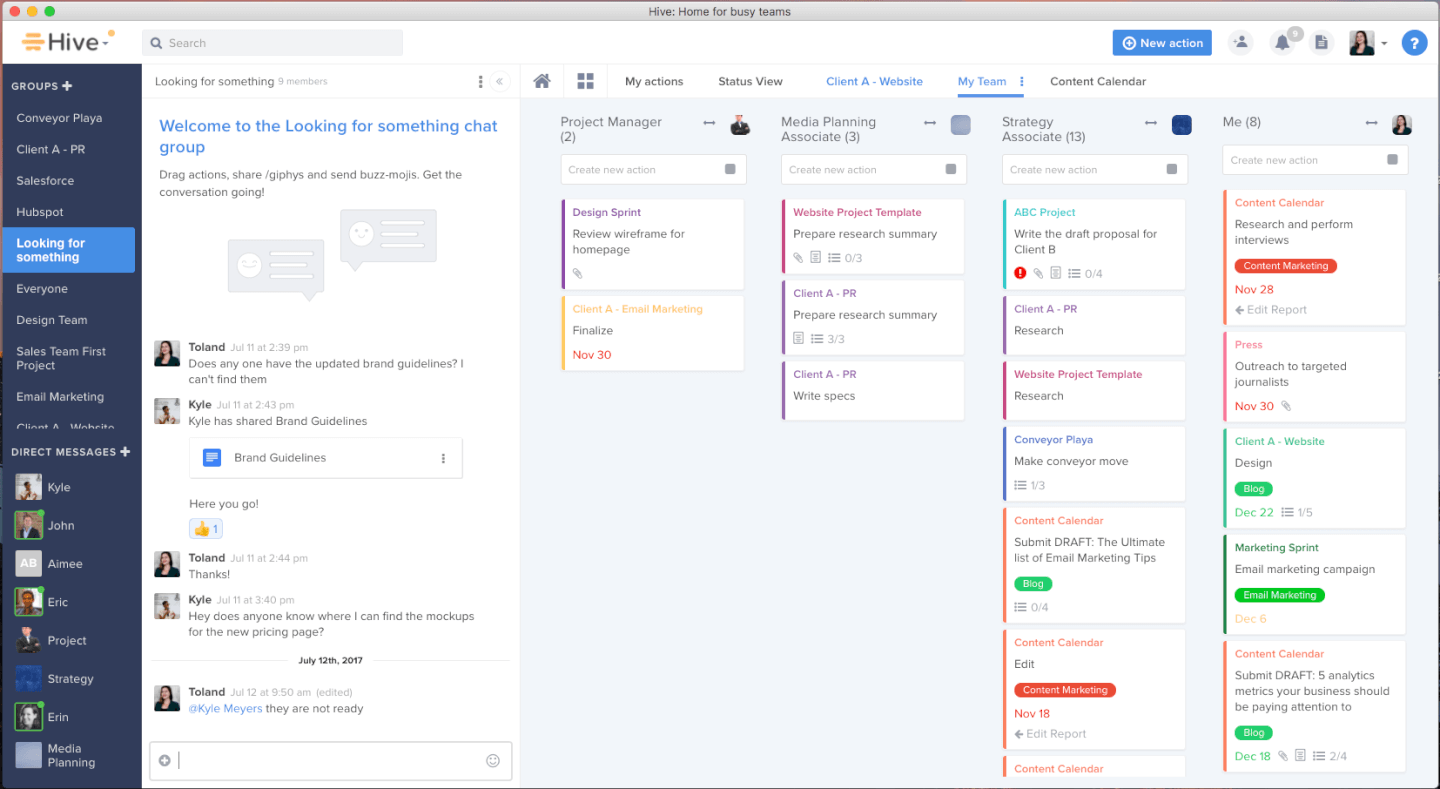
İlk olarak bu panolar modern, renkli ve görev kartları ile raporlama araçları gibi öğeleri sürükleyip bırakarak kolayca gezinilebilecek şekilde tasarlanmıştır. Ardından portföy panoları, ekibinizin ne yaptığını ve büyük ölçekli projelerin genel olarak nasıl ilerlediğini gösteren ölçümler sunabilir. Son olarak kişisel panolar, bireysel üretkenlik düzeylerini ve iş akışı modellerini takip edebilir.
Hive'ın otomatikleştirilmiş iş akışı süreçleri, temel etiketleme ve iletişim görevlerinin idari yükünü azaltmanıza yardımcı olur. Yeni başlayanlar bile özel iş akışları oluşturma ve rutin süreçleri otomatikleştirme konusunda konuşma düzenini kolayca takip edebilir. Bu, hataya açık manuel girdilere daha az dayandığı için pano ölçümlerinin doğruluğunu destekleyebilir.
Ayrıca Kanban panoları, Gantt şemaları, portföyler, tablolar, takvim görünümleri ve özet görünümleri gibi esnek proje görünümlerine erişebilirsiniz. Esnek araç seti; özelleştirilebilir formlar, proje şablonları, içerik inceleme ve onay sistemleri ve otomasyonlar dahil olmak üzere çalışma alanınızı dijitalleştirmek için ihtiyaç duyduğunuz her şeyi kapsar.
Hive; Microsoft Teams, Google Workspace, JIRA ve Salesforce gibi araçlarla bir düzineden fazla yerel üçüncü taraf entegrasyonu sunar. Ayrıca Zapier üzerinden ücretli bir planla daha fazla bağlantının kilidini açabilirsiniz (ek ücret uygulanır).
Hive, aylık planda kullanıcı başına aylık $18'dan başlar ve 14 günlük ücretsiz deneme sunar.
Hive Alternatifleri Karşılaştırma Tablosu
Yukarıda ele alınan Hive alternatiflerini hızlıca karşılaştırmak için bu karşılaştırma tablosunu kullanın.
Score legend (out of 5)
- Excellent 4.5–5
- Good 4–4.4
- Average 3–3.9
- Below average 2–2.9
- Poor 1–1.9
| Tool | Starting Price | Website | |||||||
|---|---|---|---|---|---|---|---|---|---|
| Best for agile design and marketing teams | 4.5 out of 5 | 5 | 4 | 5 | 4 | 5 | 4 | $10/user/month Free plan + 14-day trial + demo available | Book Demo |
| Best for connecting work to 850+ app integrations | 4.5 out of 5 | 5 | 4 | 5 | 4 | 5 | 4 | $9/user/month Free plan + 14-day trial available | Book Demo |
| Best for capacity planning across teams | 2.8 out of 5 | 3 | 2 | 2 | 1 | 4 | 5 | $5/user/month Free trial available | Website |
| Best for similar features at a lower price | 4.2 out of 5 | 5 | 4 | 5 | 4 | 4 | 3 | $12/user/month Free plan + free demo available | Book Demo |
| Best for breaking projects into unlimited subtasks | 2.7 out of 5 | 3 | 1 | 4 | 3 | 3 | 2 | $7.65/user/month Free plan + 30-day free trial available | Website |
| Best for project-to-invoice KPI visibility | 4.2 out of 5 | 4 | 4 | 5 | 3 | 4 | 5 | $17/user/month 14-day free trial | Book Demo |
| Best for enterprise financial and portfolio tracking | 3.7 out of 5 | 2 | 3 | 5 | 3 | 4 | 5 | $10/user/month 14-day free trial | Website |
| Best for client work billed by time and margin | 3.8 out of 5 | 3 | 4 | 4 | 3 | 4 | 5 | Pricing upon request Free demo available | Book Demo |
| Best for growing marketing and agency teams | 4.3 out of 5 | 3 | 5 | 5 | 4 | 4 | 5 | Pricing upon request Not available | Book Demo |
| Best for professional services resource planning | 4.5 out of 5 | 4 | 4 | 5 | 4 | 5 | 5 | Pricing upon request Not available | Website |
Karşılaştırılan En İyi 10 Hive Alternatifi
Proje ekibinize en uygun Hive alternatifini bulmanıza yardımcı olmak için değerlendirebileceğiniz 10 seçeneğin artılarını ve eksilerini, deneme bilgilerini, fiyatlandırmasını ve uzman görüşlerini ele aldım.

Wrike
Best for agile design and marketing teams
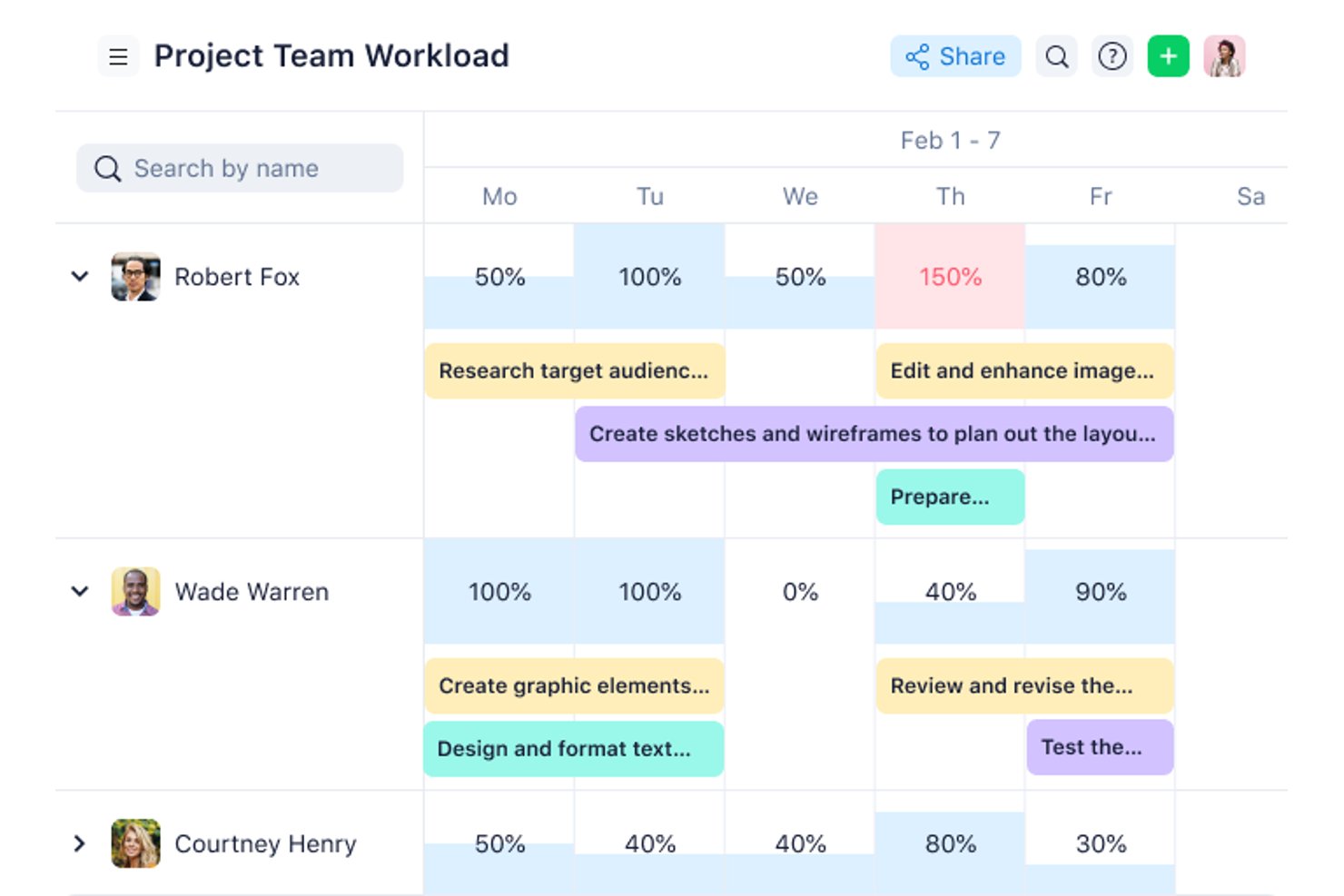
Wrike is a project management platform for cross-functional digital teams that need to coordinate tasks, deadlines, and approvals while keeping changing work visible across projects.
Who Is Wrike Best For?
Wrike suits design and marketing teams that need flexible workflows to coordinate creative projects, review cycles, and shifting campaign deadlines.
Why I Picked Wrike
I picked Wrike as a Hive alternative for “Best for agile design and marketing teams.” I like its proofing tools for gathering comments on creative assets and its approval workflows for tracking campaign sign-offs. Custom workflows let my team adjust project stages when briefs or launch dates change.
Wrike Key Features
- Gantt charts: View tasks, milestones, and dependencies on a project timeline.
- Workload charts: Review assignments and team capacity across projects.
- Custom dashboards: Track project data with configurable widgets.
- Time tracking: Record time directly on tasks.
Wrike Integrations
Wrike’s apps and integrations directory lists 60 options, including Slack, Google Workspace, Microsoft 365, Salesforce, Jira, Google Sheets, Miro, and Microsoft Teams. Wrike also supports Zapier and provides an API for custom integrations.
Pros and Cons
Pros:
- Workload charts reveal capacity across projects
- Gantt dependencies expose schedule impact
- Creative proofing keeps asset feedback contextual
Cons:
- Crowded interface obscures work across projects
- Workspace structures take care to configure
New Product Updates from Wrike

Wrike Redesigns Workspace Search With New Filters
Wrike introduces a redesigned Workspace Search interface with recent search shortcuts, item type and location filters, and parent-task context. These updates help users find relevant work items and navigate search results efficiently. For more information, visit Wrike’s official site.
 .

Best for connecting work to 850+ app integrations
For product and operations teams managing shifting priorities, monday AI Workspace combines project planning, task tracking, and team coordination in a configurable work management platform.
Who Is monday AI Workspace Best For?
It suits cross-functional product and operations teams that need to connect project work across 850+ app integrations.
Why I Picked monday AI Workspace
I picked monday AI Workspace for this Best Hive Competitors And Alternatives: Reviewed list because it’s “Best for connecting work to 850+ app integrations.” I like how teams can connect tools such as Slack and GitHub to work boards, then use automation recipes to trigger status changes as work moves. That keeps product and engineering handoffs visible without manually copying every update.
monday AI Workspace Key Features
- Gantt view: Map tasks across a timeline and track project dates.
- Task dependencies: Link tasks to show which work must happen first.
- Dashboards: Combine project data into customizable visual summaries.
- Kanban view: Move tasks across columns as their workflow status changes.
monday AI Workspace Integrations
monday AI Workspace offers access to 850+ integrations and apps, including Slack, GitHub, GitLab, Salesforce, HubSpot, Gmail, Google Calendar, Outlook, Microsoft Teams, and Zapier. monday.com also provides a GraphQL API for custom integrations.
Pros and Cons
Pros:
- Task updates keep ownership visible
- Cross-board dashboards clarify portfolio progress
- Configurable boards fit changing team workflows
Cons:
- Complex dependencies lack critical-path scheduling
- Large boards can lag or freeze
New Product Updates from monday AI Workspace
monday AI Workspace Adds Human Approval Routing
monday AI Workspace adds a human-in-the-loop approval block to AI Workflows, sending approval requests and routing workflow paths based on responses. For more information, visit monday AI Workspace's official site.
 .

Best for capacity planning across teams
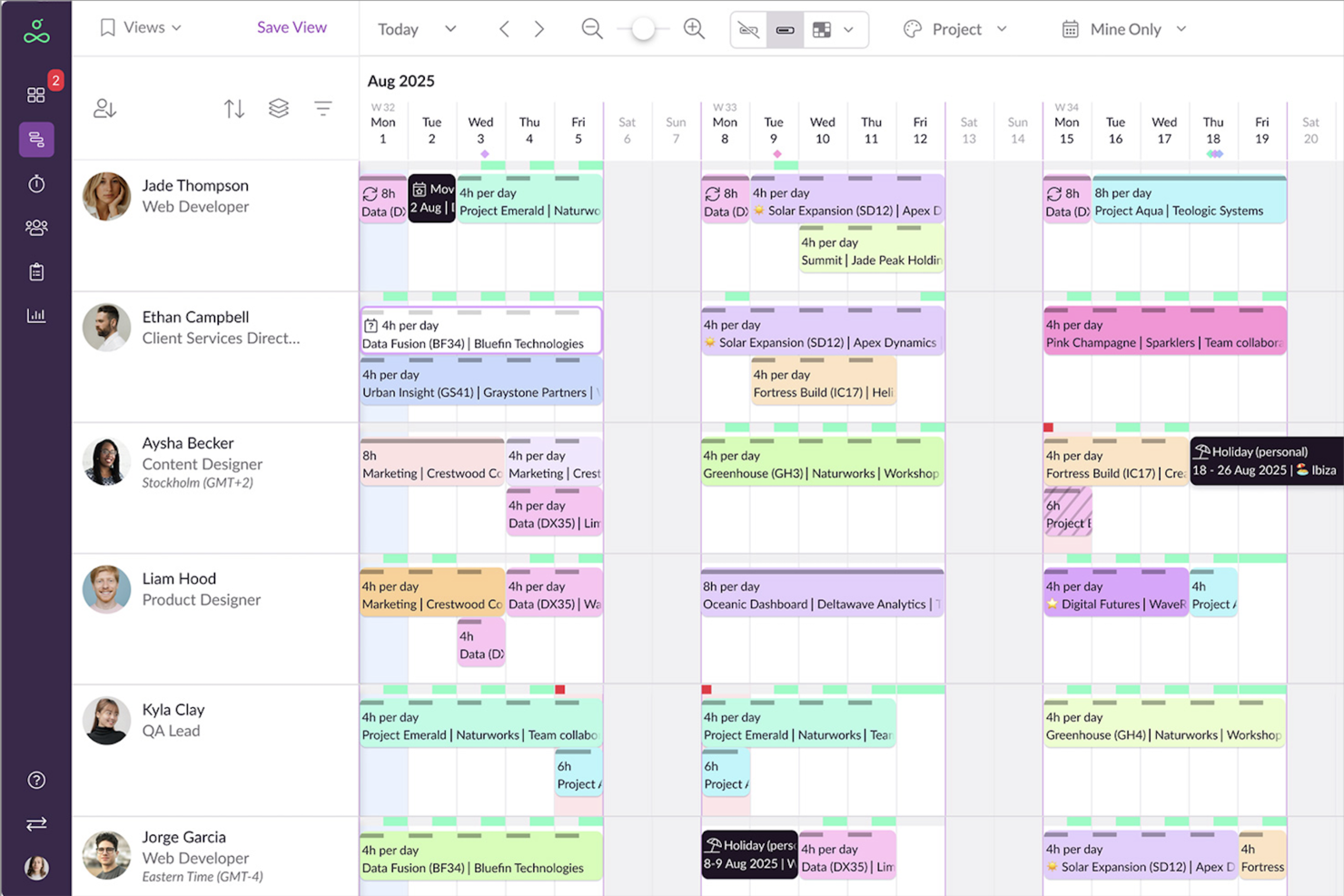
Resource Guru is a resource scheduling platform for project teams that need to coordinate availability, bookings, and workloads across active projects, helping reduce scheduling conflicts and spot staffing gaps.
Who Is Resource Guru Best For?
Resource Guru suits project managers and resource planners who need to balance team capacity across competing projects.
Why I Picked Resource Guru
I picked Resource Guru as Best for capacity planning across teams because its resource scheduling brings availability, bookings, and workloads together. I like that project managers can spot scheduling conflicts and staffing gaps before assigning people across competing projects.
Resource Guru Key Features
- Timesheets: Auto-fill from scheduled work and support one-click submission and approvals.
- Project Gantt charts: Map project phases, tasks, and milestones against timelines.
- Leave tracking: Record vacations, sick days, and other staff absences.
- Customizable reports: Review project and team data, including time, utilization, and overtime.
Resource Guru Integrations
Resource Guru lists 17 native integrations, including Google Calendar, Outlook Calendar, Jira, Asana, monday.com, ClickUp, Trello, Slack, and Microsoft Teams; it also connects with Zapier. A REST-style API is available for custom integrations.
Pros and Cons
Pros:
- Drag-and-drop rescheduling adjusts allocations quickly
- Leave approvals sit alongside resource bookings
- Visual capacity views reveal conflicts early
Cons:
- Multi-day booking edits can require splitting entries
- Reporting lacks deeper forecasting and analytics
New Product Updates from Resource Guru

Resource Guru Adds More Control Over Calendar Sync
Resource Guru adds more control over Google and Outlook Calendar sync, including source calendar selection and destination calendar options. These updates help users manage external events and Resource Guru bookings with less clutter. For more information, visit Resource Guru’s official site.
 .

ClickUp
Best for similar features at a lower price

ClickUp brings tasks, docs, goals, and team collaboration into customizable workflows, helping tech teams coordinate dependencies and adapt as project priorities change.
Who Is ClickUp Best For?
ClickUp suits tech project managers who want broad work-management capabilities for cross-functional delivery without a high per-seat cost.
Why I Picked ClickUp
I picked ClickUp as a Hive alternative because it brings task dependencies and customizable statuses into project workflows. I also like that teams can connect project tasks with Docs and Goals, keeping delivery details and targets in one workspace. It’s a fit for “Best for similar features at a lower price.”
ClickUp Key Features
- Multiple project views: Switch between List, Board, Calendar, Gantt, and Timeline views.
- Workflow automations: Set triggers and actions for recurring task updates.
- Time tracking: Log time against tasks and review timesheets.
- Dashboards: Create reports from project data with customizable cards.
ClickUp Integrations
ClickUp documents native integrations with Slack, GitHub, GitLab, Bitbucket, Azure DevOps, Google Drive, Google Calendar, Microsoft Teams, Zoom, and Zapier. It also offers a public API and webhooks for custom integrations.
Pros and Cons
Pros:
- Gantt and timeline views expose cross-team dependencies
- Docs and goals connect tasks to targets
- Custom statuses and dependencies clarify handoffs
Cons:
- Large projects can trigger slow loading
- Extensive setup can overwhelm new team members
New Product Updates from ClickUp
ClickUp Adds List Automations, Time Off Scheduling, and Org Charts
ClickUp adds template-based List automations, personal time off scheduling, a unified picker, automatic task date syncing, and Org Charts. These updates help teams automate project setup, manage availability, and organize work. For more information, visit ClickUp’s official site.
 .

Quire
Best for breaking projects into unlimited subtasks
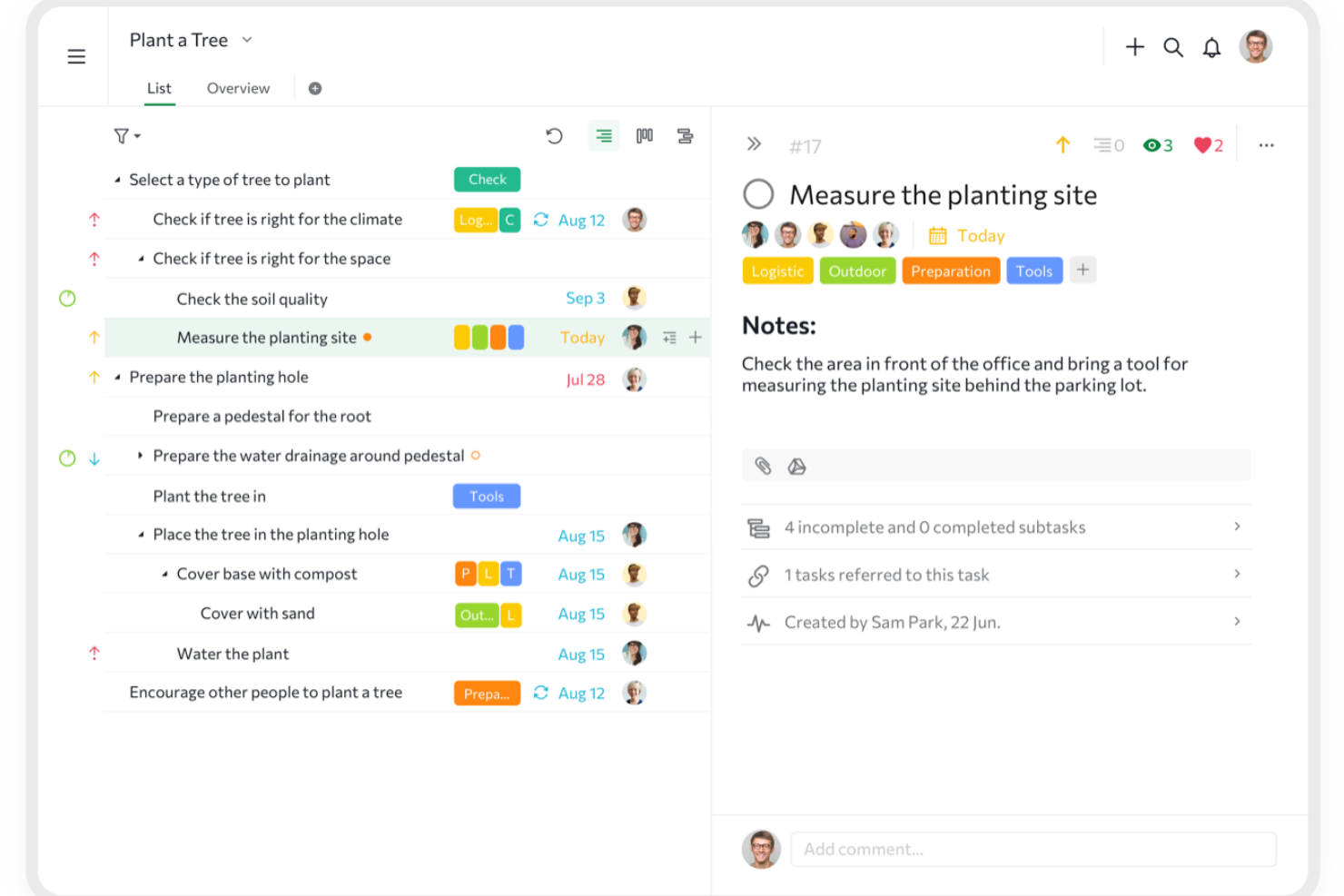
Quire is a project management platform for product and engineering teams that need to coordinate plans, track work, and keep shifting priorities visible across projects.
Who Is Quire Best For?
Product and engineering teams that need to coordinate complex work across projects and keep changing priorities visible.
Why I Picked Quire
I picked Quire because its nested task tree fits the USP, Best for breaking projects into unlimited subtasks. I can split a product launch into workstreams and smaller deliverables, assign task owners, and switch to a Kanban board to track execution, making Quire a useful Hive alternative when plans need deep decomposition.
Quire Key Features
- Timeline view: Schedule tasks and view project dates along a timeline.
- Calendar view: See dated tasks and deadlines on a calendar.
- Task reminders: Set notifications for tasks ahead of their deadlines.
- Recurring tasks: Schedule tasks to repeat on a set cadence.
Quire Integrations
Quire offers integrations with Google Drive, Dropbox, Box, OneDrive, Microsoft Teams, Slack, GitHub, and Google Calendar, including two-way Google Calendar sync on the Premium plan. Its app directory also lists Zapier, and Quire provides an API for custom integrations.
Pros and Cons
Pros:
- Task-linked comments keep decisions beside deliverables
- Tree, Kanban, and timeline views support execution
- Deep task trees keep complex work legible
Cons:
- Offline work pauses until connectivity returns
- Reporting offers limited time and performance insight
New Product Updates from Quire
Quire Adds Custom Field Locking and Comment Reaction API Support
Quire adds custom field locking and API support for reading and setting emoji reactions on comments. These updates give teams more control over field data and expand comment interaction options for developers. For more information, visit Quire’s official site.
 .

Scoro
Best for project-to-invoice KPI visibility
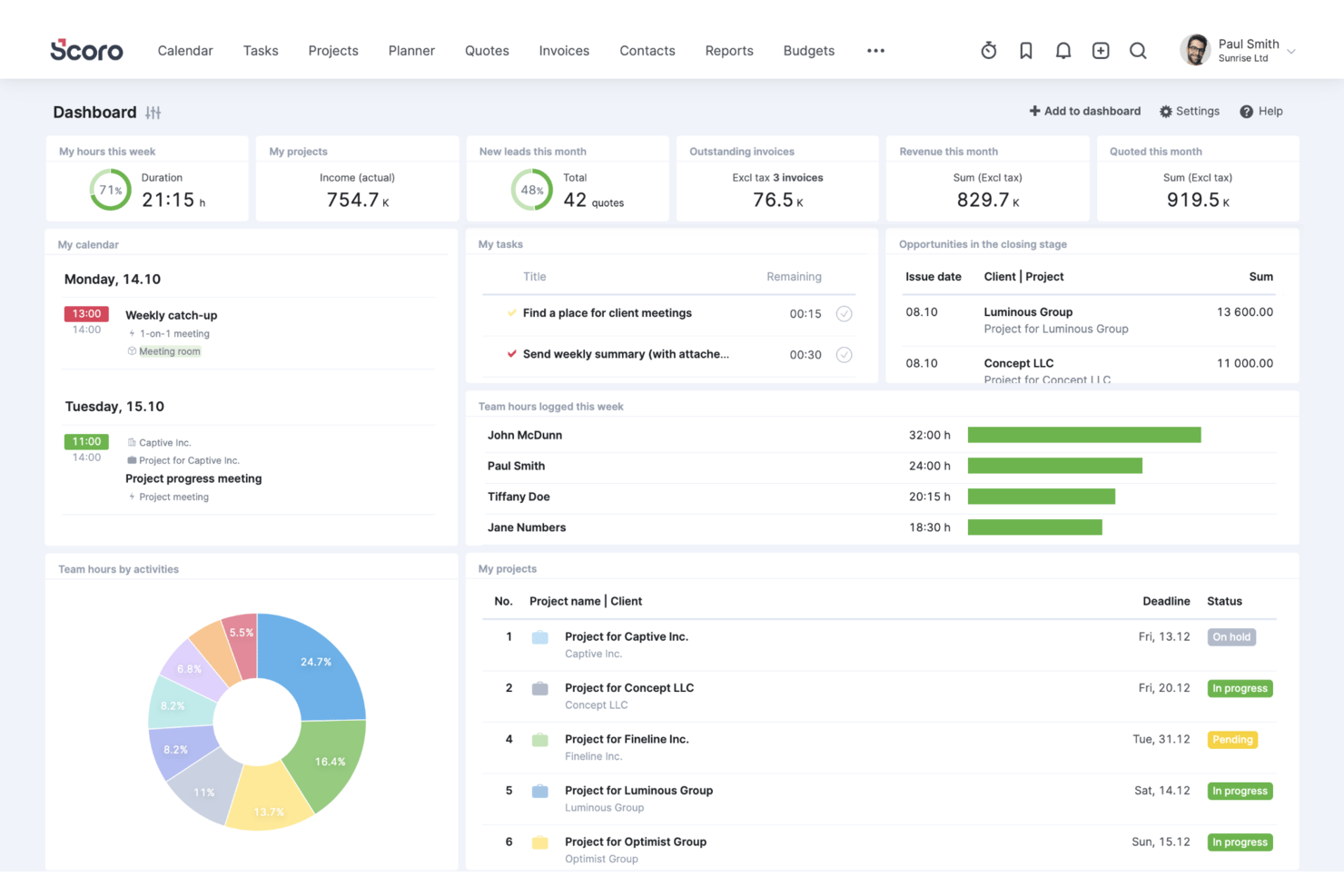
Scoro is work management software for professional services firms, helping agencies and consultancies plan projects, coordinate teams, track work, and manage client delivery in one system.
Who Is Scoro Best For?
Scoro suits agency and consulting project managers who need to connect delivery performance with budgets, utilization, and invoicing.
Why I Picked Scoro
I picked Scoro because it links project delivery with budgets, utilization, and invoicing rather than stopping at task status. Tracking project budgets and team utilization alongside invoices gives me project-to-invoice KPI visibility, such as spotting budget pressure while work is underway. That makes it a relevant Hive alternative when I need to review delivery health alongside financial outcomes.
Scoro Key Features
- Project templates: Create projects with predefined tasks and milestones.
- Gantt charts: View project timelines and progress, then share charts with stakeholders.
- CRM and pipeline: Track sales opportunities before they become projects.
- Integrations: Connect Scoro with tools including Google, Microsoft, Dropbox, and Salesforce.
Scoro Integrations
Scoro offers 40+ native integrations, including Salesforce, BambooHR, and Google Calendar. It also supports Zapier and provides an API for custom integrations.
Pros and Cons
Pros:
- Links estimates, tasks, time, and billing
- Shows utilization and profitability alongside project status
- Connects project delivery with budgets and invoices
Cons:
- Mobile app lacks full project dashboards
- Project setup and task creation feel cumbersome
New Product Updates from Scoro

Scoro Adds Time Mobile App and ELI Improvements
Scoro adds the Scoro Time mobile app for iOS/Android to track time anywhere and expands ELI with attachments, smarter filtering, and trigger-based actions. For more information, visit Scoro's official site.
 .

Celoxis
Best for enterprise financial and portfolio tracking
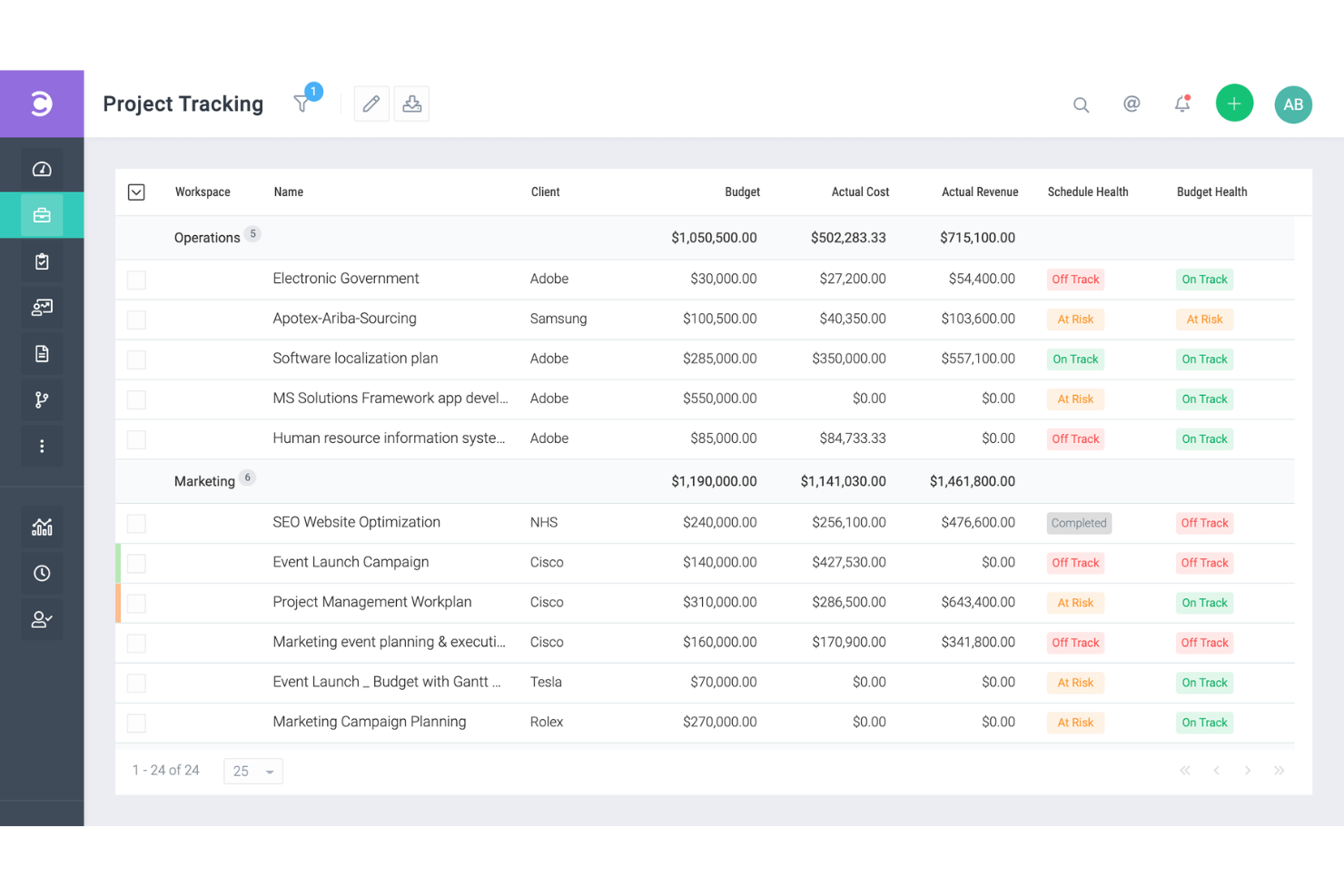
Celoxis is a project management platform for growing and enterprise teams that need to coordinate schedules, resources, and dependencies across complex work while keeping stakeholders aligned.
Who Is Celoxis Best For?
PMO leaders at midsize and large organizations who need portfolio-level financial oversight alongside project planning will find Celoxis a good fit.
Why I Picked Celoxis
I picked Celoxis for enterprise financial and portfolio tracking because it connects project plans with budget and cost data. I like that its financial tracking covers planned versus actual costs, while portfolio dashboards help me monitor project health and milestones across workstreams. That makes it easier to spot budget variances before they affect delivery.
Celoxis Key Features
- Interactive Gantt charts: View project schedules, dependencies, and baselines on a timeline.
- Timesheets: Record time against project tasks.
- Capacity planning: Review resource availability and allocation across projects.
- Workflow automation: Set rules to automate task updates and actions.
Celoxis Integrations
Celoxis offers 21 native integrations, including Jira, Azure DevOps, GitHub, Microsoft 365, Google Drive, Slack, Salesforce, QuickBooks Online, and Trello. It also connects with Zapier and provides a REST API for custom integrations.
Pros and Cons
Pros:
- Portfolio views reveal workload and project risks
- Gantt charts map dependencies and critical paths
- Tracks budgets against actual project costs
Cons:
- Advanced reports require setup and configuration
- Dense interface slows routine navigation

Accelo
Best for client work billed by time and margin
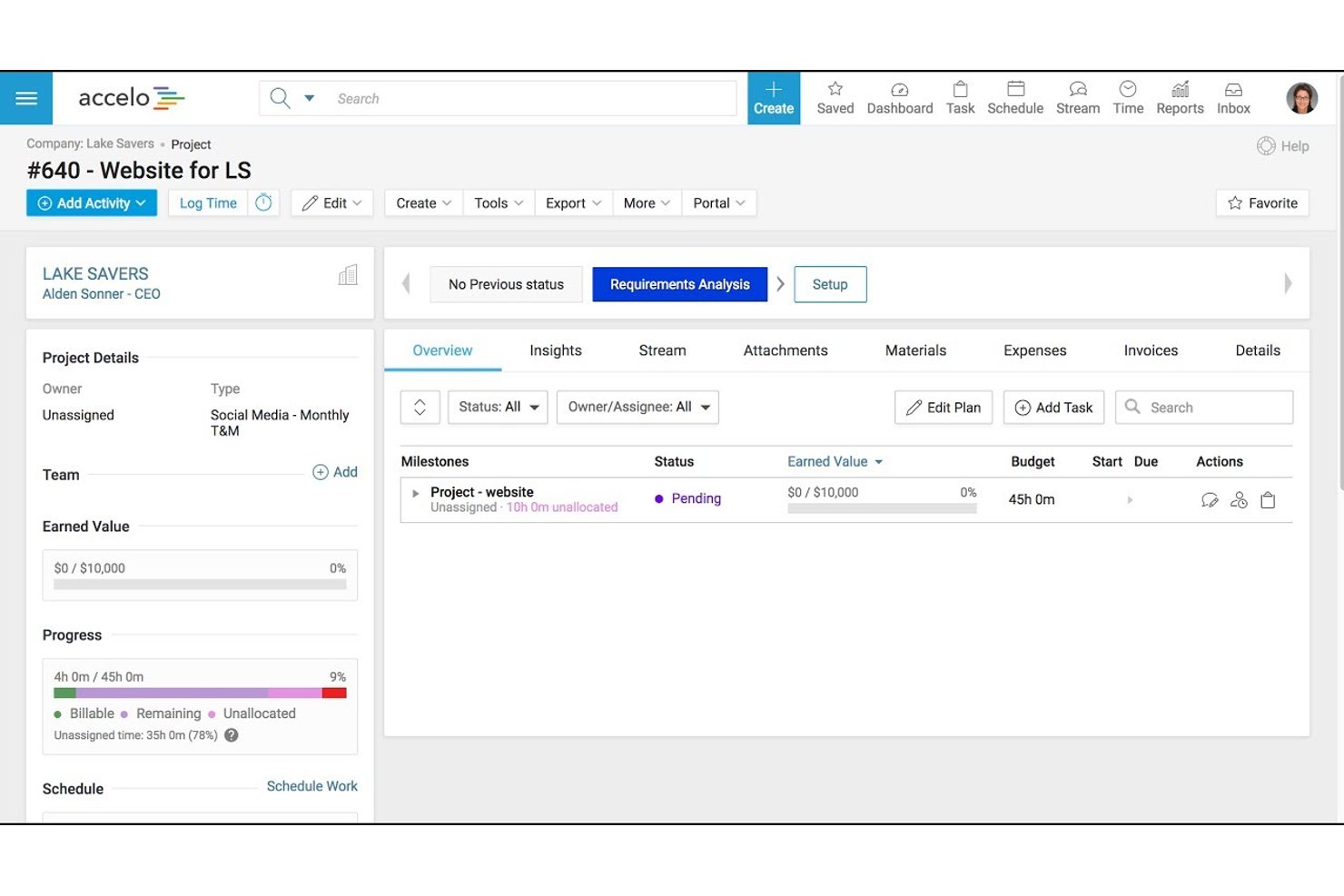
Accelo is a professional services automation platform for client-facing teams, connecting project delivery and client work to help agencies and consultancies coordinate engagements and track progress.
Who Is Accelo Best For?
Accelo suits agencies and consultancies that need to manage client engagements, billable time, and project margins in one workflow.
Why I Picked Accelo
I picked Accelo for “Best for client work billed by time and margin” work. Its project tracking connects logged time and billable hours to project budgets, helping me spot when an engagement is running over its planned effort. Accelo also ties client work to billing, so I can track delivery and margin in the same workflow.
Accelo Key Features
- Gantt charts: Build project plans with drag-and-drop scheduling.
- Client portal: Share project updates and collaborate with clients.
- Email capture: Automatically capture emails for project collaboration.
- Project templates: Create projects from reusable templates.
Accelo Integrations
Accelo lists 25 integrations, including HubSpot, Salesforce, Jira, Google Workspace, Microsoft 365, QuickBooks, Xero, Slack, and Zapier. It also offers a RESTful API and Forms API for custom integrations.
Pros and Cons
Pros:
- Supports reusable estimates and project templates
- Keeps client emails and project activity together
- Links billable hours to budgets and margins
Cons:
- Setup and dense workflows slow adoption
- Reports can be difficult to simplify
New Product Updates from Accelo

Accelo Rebuilds Mobile App for Project and Time Management
Accelo rebuilds its mobile app with task management, new work creation, and mobile timesheets for Forecast customers. This helps teams keep project and time data current while working away from a desktop. For more information, visit Accelo’s official site.
 .

Best for growing marketing and agency teams
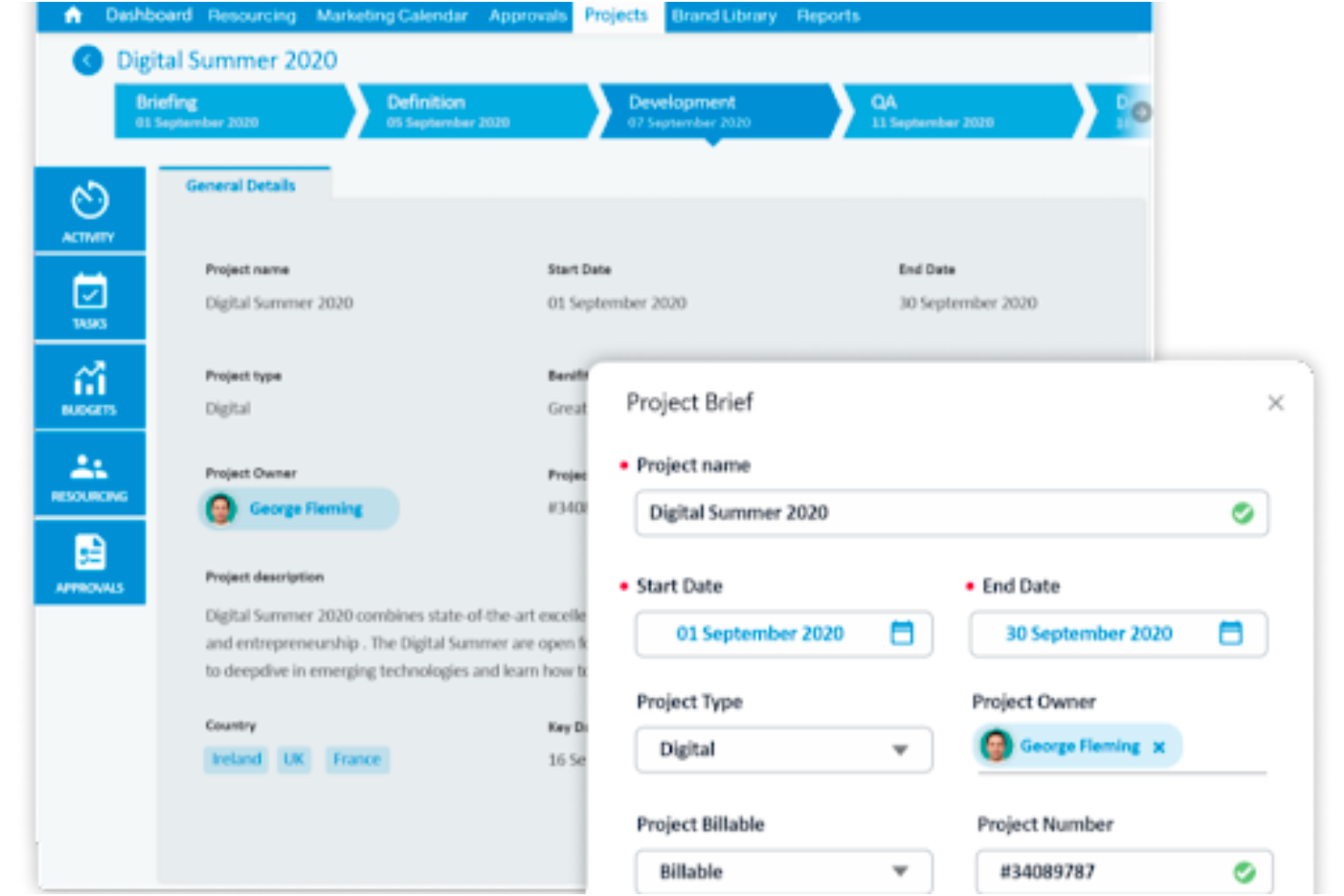
Screendragon is a work management platform for marketing teams and agencies that need to coordinate campaign tasks, creative approvals, and deadlines across growing workloads.
Who Is Screendragon Best For?
Screendragon suits marketing operations and agency delivery leads who need a shared system to manage work across expanding teams.
Why I Picked Screendragon
I picked Screendragon as a Hive alternative because it’s built for Best for growing marketing and agency teams. I like how it brings campaign tasks, creative approvals, and deadlines into one shared work management platform. That gives marketing teams a place to coordinate reviews and keep campaign work moving as workloads grow.
Screendragon Key Features
- Resource and capacity planning: Forecast demand and assign work by skills, availability, and team capacity.
- Budget tracking: Track planned and actual spend against budgets.
- Custom dashboards: View real-time milestones, budgets, and KPI data.
- Integrations: Connect with tools such as Jira, Google Drive, and SAP.
Screendragon Integrations
Screendragon lists pre-built integrations with Aprimo, HubSpot, Microsoft Teams, Microsoft Power BI, Sitecore, Ziflow, Vidmob, Brandfolder, Smartsheet, and Workato. It also offers a REST API and a connection manager for custom integrations.
Pros and Cons
Pros:
- Resource forecasts connect with budget tracking
- Approval trails keep creative reviews traceable
- Configurable workflows fit agency processes
Cons:
- Multiple approvals can slow complex projects
- Complex setup takes time to configure

Kantata
Best for professional services resource planning
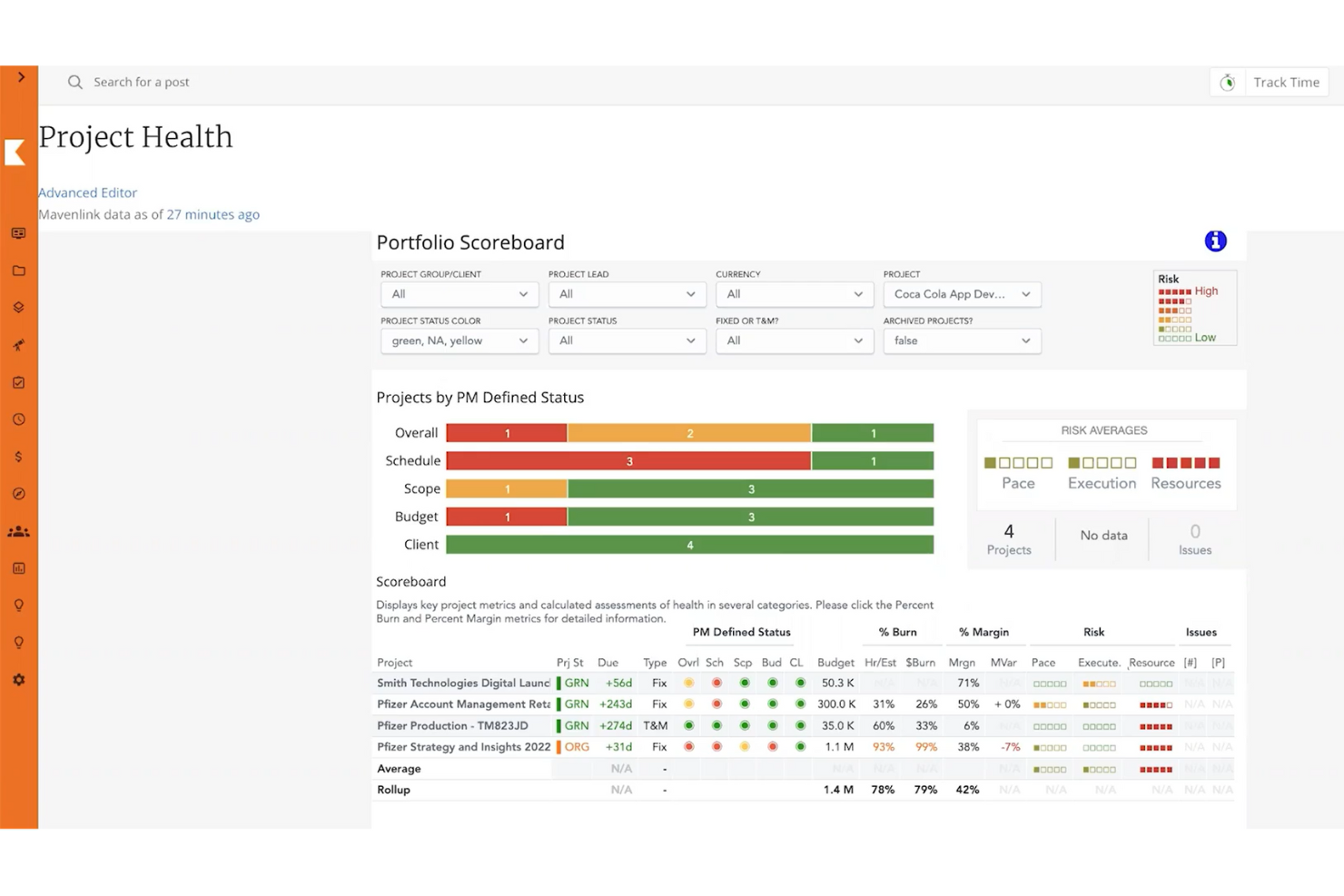
Kantata is a professional services automation platform for consulting and client-service teams, helping coordinate project delivery, people, and financials across client engagements.
Who Is Kantata Best For?
Kantata suits professional services firms that need to match consultants’ skills and availability to client project demand.
Why I Picked Kantata
I picked Kantata as a Hive alternative because it’s best for professional services resource planning. I like how its resource management helps match consultants’ skills and availability to project demand. Capacity and utilization views help me spot staffing gaps before they affect client engagement plans.
Kantata Key Features
- Project and portfolio management: View project details alongside consolidated portfolio data.
- Time and expense tracking: Record billable time and expenses across clients and projects.
- Project financials: Monitor project costs, financial targets, and burn.
- Kantata Pulse: Collect client and employee feedback during project delivery.
Kantata Integrations
Kantata advertises 1,200+ prebuilt connectors and documents integrations with Salesforce, Jira, Slack, Google Workspace, QuickBooks, HubSpot, BambooHR, Concur, and Sage Intacct; availability can vary by product and setup. It supports APIs for custom integrations and connects with Zapier.
Pros and Cons
Pros:
- Utilization and margin reports support delivery decisions
- Project and financial data share one view
- Skill-based staffing forecasts expose capacity gaps
Cons:
- Slow page loads interrupt project workflows
- Routine updates can require too many clicks
New Product Updates from Kantata

Kantata Adds Access Group Change History
Kantata adds Access Groups History, letting account administrators track changes to group details, membership, and permissions in Recent History. The update also makes these events available through the Subscribed Events API for broader monitoring. For more information, visit Kantata’s official site.
 .
Diğer Hive Alternatifleri
Kısa listeme giremeyen, ancak yine de göz atmaya değer bazı ek Hive alternatiflerini burada bulabilirsiniz.
- Asana
For tracking tasks across cross-functional teams
- GoodDay
For building a workspace around your workflow
- Smartsheet
For spreadsheet-style project tracking
- Zoho Projects
For Zoho ecosystem project tracking
- Teamwork.com
For client work with built-in time billing
- MeisterTask
For turning mind maps into tracked tasks
- Ravetree
For billable team resource planning
- Rocketlane
For client-facing delivery teams
- Workzone
For portfolio-wide deadline visibility
- Bonsai Agency Software
For live budget and margin tracking


How I Evaluate Hive Alternatives
I split my evaluation into three parts, starting with core functionality—tools must track tasks across projects and support multiple views—since that carries the most weight. Then I look for standout features like native time tracking or proofing tools. Finally, I consider pricing value and onboarding support.
Core Functionality (Table Stakes For This List)
When I'm selecting tools for my list, I score each one on a scale from 0 (does not offer the functionality) to 5 (excels in this area) for each core functionality listed below. I then convert the total into a percentage to help assess each tool's overall fit, with extra weight on any functionalities I’ve deemed essential.
- Task & Project Tracking (Essential): I look for assignments, due dates, dependencies, and status rollups that show whether a delayed design task threatens a launch milestone.
- Multiple Views (Essential): I check whether teams can switch between board, list, calendar, and timeline views while keeping dates and status consistent.
- Team Collaboration: I look for comments, file sharing, and mentions tied to project work, such as feedback on a deliverable or a client-approved revision.
- Workflow Automation: I assess whether teams can automate recurring handoffs, such as assigning a task when a status changes or notifying an approver.
- Resource & Workload Management: I check whether managers can see capacity across projects and rebalance assignments when competing deadlines strain a team.
- Third-Party Integrations: I consider how well the tool connects with communication, file storage, and calendar apps already used in the team’s workflow.
Once I have a list of tools that meet the criteria, I consider what sets each platform apart.
Differentiating Factors (What Sets Vendors Apart)
Here's how I compare and contrast different vendors:
Standout Features
I check whether each tool offers native time tracking tied directly to tasks, since a separate timesheet app adds friction and gaps in project cost data. Proofing and approval workflows matter too—when a design team needs markup and sign-off chains inside the same tool where tasks live, tools like monday.com and Wrike handle this differently than a generic comment thread. I also evaluate guest access options, because inviting a client into a specific project without paying for a full seat changes how you manage feedback loops on delivery work.
Beyond Features
Pricing models vary widely—per-user costs can quietly double your budget as a team grows, so I check whether flat-rate or tiered plans better fit the team size. I also evaluate onboarding support, especially import options for migrating existing tasks and project history from Hive without rebuilding everything manually. For agencies handling client data across regions, SOC 2 compliance and granular role-based permissions are non-negotiable, since a single misconfigured guest account can expose sensitive deliverables.
Wie ich Hive-Alternativen bewerte
Ich teile meine Bewertung in drei Bereiche auf, angefangen bei der Kernfunktionalität – Tools müssen Aufgaben projektübergreifend verfolgen und mehrere Ansichten unterstützen –, da diese am stärksten gewichtet wird. Danach achte ich auf herausragende Funktionen wie native Zeiterfassung oder Korrektur- und Freigabewerkzeuge. Schließlich berücksichtige ich das Preis-Leistungs-Verhältnis und die Unterstützung bei der Einführung.
Kernfunktionalität (Grundlegende Anforderungen für diese Liste)
Bei der Auswahl der Tools für meine Liste bewerte ich jedes Tool für jede unten aufgeführte Kernfunktionalität auf einer Skala von 0 (bietet die Funktionalität nicht) bis 5 (ist in diesem Bereich hervorragend). Anschließend wandle ich die Gesamtpunktzahl in einen Prozentsatz um, um die allgemeine Eignung jedes Tools besser beurteilen zu können, wobei Funktionalitäten, die ich als unverzichtbar eingestuft habe, zusätzlich gewichtet werden.
- Aufgaben- und Projektverfolgung (unverzichtbar): Ich achte auf Zuweisungen, Fälligkeitsdaten, Abhängigkeiten und Statusübersichten, die zeigen, ob eine verspätete Designaufgabe einen Meilenstein der Produkteinführung gefährdet.
- Mehrere Ansichten (unverzichtbar): Ich prüfe, ob Teams zwischen Board-, Listen-, Kalender- und Zeitleistenansichten wechseln können, während Daten und Status konsistent bleiben.
- Teamzusammenarbeit: Ich achte auf Kommentare, Dateifreigaben und Erwähnungen, die mit der Projektarbeit verknüpft sind, etwa Feedback zu einem Ergebnis oder eine vom Kunden genehmigte Überarbeitung.
- Workflow-Automatisierung: Ich bewerte, ob Teams wiederkehrende Übergaben automatisieren können, beispielsweise durch die Zuweisung einer Aufgabe bei einer Statusänderung oder die Benachrichtigung einer genehmigenden Person.
- Ressourcen- und Arbeitslastmanagement: Ich prüfe, ob Manager die Kapazitäten projektübergreifend einsehen und Zuweisungen neu ausbalancieren können, wenn konkurrierende Fristen ein Team belasten.
- Integrationen von Drittanbietern: Ich berücksichtige, wie gut sich das Tool mit Kommunikations-, Dateispeicher- und Kalender-Apps verbinden lässt, die bereits im Workflow des Teams verwendet werden.
Sobald ich eine Liste von Tools zusammengestellt habe, die die Kriterien erfüllen, prüfe ich, was die einzelnen Plattformen voneinander unterscheidet.
Unterscheidungsmerkmale (Was Anbieter voneinander abhebt)
So vergleiche ich die verschiedenen Anbieter:
Herausragende Funktionen
Ich prüfe, ob jedes Tool eine native Zeiterfassung bietet, die direkt mit Aufgaben verknüpft ist, da eine separate Zeiterfassungs-App zusätzlichen Aufwand und Lücken in den Projektdaten zu den Kosten verursacht. Auch Korrektur- und Freigabeworkflows sind wichtig – wenn ein Designteam Markierungen und Freigabeketten innerhalb desselben Tools benötigt, in dem auch die Aufgaben verwaltet werden, gehen Tools wie monday.com und Wrike anders damit um als ein allgemeiner Kommentar-Thread. Außerdem bewerte ich die Optionen für den Gastzugriff, denn die Möglichkeit, einen Kunden in ein bestimmtes Projekt einzuladen, ohne für einen vollständigen Benutzerzugang zu bezahlen, verändert die Verwaltung von Feedbackschleifen bei Lieferleistungen.
Über die Funktionen hinaus
Preismodelle unterscheiden sich erheblich – Kosten pro Benutzer können das Budget bei wachsendem Team unbemerkt verdoppeln, daher prüfe ich, ob Pauschal- oder Staffelpreise besser zur Teamgröße passen. Außerdem bewerte ich die Unterstützung bei der Einführung, insbesondere Importoptionen für die Migration bestehender Aufgaben und der Projekthistorie aus Hive, ohne alles manuell neu aufbauen zu müssen. Für Agenturen, die Kundendaten über mehrere Regionen hinweg verarbeiten, sind die SOC-2-Konformität und detaillierte rollenbasierte Berechtigungen unverzichtbar, da ein einziges falsch konfiguriertes Gastkonto vertrauliche Ergebnisse offenlegen kann.
Neden Bir Hive Alternatifine İhtiyaç Duyabilirsiniz?
Hive'ı zaten kullandığınız diğer araçlara bağlamanız gerekiyor
Hive tüm temel entegrasyonları sunar. Tüm araçları tek bir çatı altında gerçekten bir araya getirmek için sektöre özel entegrasyonlara ihtiyacınız varsa, önce Hive rakiplerinin sunduğu entegrasyonlar listesine göz atmayı düşünün.
Karmaşık projeleri kolaylaştırmak için farklı özellikler istiyorsunuz
Hive henüz bir faturalandırma modülüyle birlikte gelmiyor. Bu nedenle ister müşterilerinize fatura kesmek ister muhasebe verilerini takip etmek isteyin, diğer alternatifler projelerinizin ödemesini yalnızca birkaç tıklamayla almanıza yardımcı olur.
Maliyetleri azaltmak istiyorsunuz
Hive piyasadaki en pahalı çözüm değil, ancak farklı bir kullanıcı arayüzü altında tamamen aynı özellikleri sunan daha ucuz alternatifler var.
Uygun Bir Hive Alternatifi İçin Temel Özellikler
Gelişmiş zaman takibi
Zaman takibi modülü proje yönetimi araçları için zorunlu değildir, ancak projeleriniz için değerli bir özelliktir. Bir alternatife geçerken Hive'ın sunduğu farklı zaman takibi seçeneklerini, zaman çizelgelerini ve ekip üyeleriniz için gerçek zamanlı raporlamayı göz ardı etmek istemezsiniz.
Sezgisel bir arayüz
Hive, Slack'in kullanıcı arayüzünü taklit eder ve yeni kullanıcıların Hive'da çalışmaya alışmasını son derece kolaylaştırır. İyi haber şu ki, piyasada öğrenme eğrisi düşük başka proje yönetimi uygulamaları da var. Her birinin, daha önce benzer bir arayüz düzeninde çalışmış belirli kullanıcılar için onu daha uygun kılan kendine özgü özellikleri bulunur.
Ekip iş birliği
Daha iyi iş birliği özelliklerine sahip en iyi alternatifi bulmak zordur. Bu nedenle değerlendirdiğiniz ekip çalışması çözümlerinde, en azından günlük olarak kullandığınız iletişim seçenekleri bulunmalıdır.
Analizler için özelleştirme seçenekleri
Ekibinizin etkinlikleri hakkında gerçekçi içgörüler sunmak için makine öğreniminden yararlanan 50'den fazla etkileşimli gösterge tablosuna erişebilir ve bunları özelleştirebilirsiniz. Ekibinizi ve projelerinizi büyütmeyi düşünüyorsanız portföy yönetimi düzeyinde raporlama özelliklerine ihtiyacınız olacaktır.
Sırada Ne Var?
Hive alternatiflerini araştırma sürecindeyseniz, ücretsiz öneriler almak için bir SoftwareSelect danışmanıyla iletişime geçin.
Bir form doldurur ve ihtiyaçlarınızın ayrıntılarını ele alacağınız kısa bir görüşme yaparsınız. Ardından incelemeniz için kısa bir yazılım listesi alırsınız. Hatta fiyat görüşmeleri de dahil olmak üzere satın alma sürecinin tamamında size destek olurlar.