

2026 İçin Seçilen En İyi 10 SEO Proje Yönetimi Yazılımı

En İyi Proje Yönetimi Yazılımı Kısa Listesi


SEO projelerini yönetmek çoğu zaman değişen öncelikler, sıkışık teslim tarihleri ve dağınık araçlarla uğraşmak anlamına gelir; tüm bunları arama motoru sıralamalarınızı iyileştirmeye çalışırken yaparsınız. Doğru sistem olmadan görevleri, içerikleri ve sonuçları takip etmek zordur.
SEO proje yönetimi yazılımı tam da bu noktada yardımcı olabilir. Doğru araç size yapı, görünürlük ve ekibinizle ve müşterilerinizle iş birliği yapmanın daha iyi yollarını sunabilir.
Bu listede, günümüzde kullanıma sunulan en iyi SEO proje yönetimi yazılımlarını inceleyeceğim. Araçları bağımsız olarak test edip değerlendiriyor ve ihtiyaçlarınıza en uygun yazılımı seçebilmeniz için sizin gibi proje ekipleri açısından gerçekten işe yarayan özelliklere odaklanıyorum.
Why Trust Our Software Recommendations
Our team has been testing and reviewing software since 2012. As project managers ourselves, we know how difficult—and important—it is to choose the right software.
For this guide, we evaluated tools using hands-on testing and independent research, scoring tools using our selection criteria. We also draw on insights from industry thought leaders and practicing project management experts.
Our reviews reflect our human editorial judgment, not a sales pitch.
Expert reviewers:
SEO Proje Yönetimi Yazılımları Karşılaştırma Tablosu
Bu karşılaştırma tablosu, en iyi SEO proje yönetimi yazılımı seçimlerimin fiyatlandırma ayrıntılarını özetlemektedir:
Score legend (out of 5)
- Excellent 4.5–5
- Good 4–4.4
- Average 3–3.9
- Below average 2–2.9
- Poor 1–1.9
| Tool | Starting Price | Website | |||||||
|---|---|---|---|---|---|---|---|---|---|
| Best for real estate project management | 3.2 out of 5 | 2 | 3 | 4 | 4 | 2 | 4 | Pricing upon request Free plan + 15-day trial + demo available | Website |
| Best for customizable workflows | 3.5 out of 5 | 3 | 3 | 4 | 4 | 3 | 4 | $10/user/month Free plan + 14-day trial available | Book Demo |
| Best for database-driven projects | 3.7 out of 5 | 2 | 4 | 4 | 4 | 4 | 4 | $20/user/month Free plan + 14-day trial + demo available | Website |
| Best for multi-client milestone tracking | 3.0 out of 5 | 1 | 3 | 3 | 4 | 3 | 4 | $10/user/month Free plan + 14-day trial + demo available | Website |
| Best for adapting one workspace to SEO content ops | 3.0 out of 5 | 1 | 2 | 3 | 4 | 4 | 4 | $10/user/month Free plan + 30-day trial available | Website |
| Best for white-label multi-client work tracking | 3.0 out of 5 | 2 | 2 | 3 | 4 | 3 | 4 | $8/user/month Free demo available | Website |
| Best for no-code custom SEO workflow building | 3.0 out of 5 | 2 | 3 | 3 | 4 | 3 | 3 | $14/user/month Free plan + 30-day trial available | Website |
| Best for building custom SEO workflows | 3.0 out of 5 | 1 | 3 | 3 | 4 | 3 | 4 | $10.99/user/month Free plan + free trial + free demo available | Website |
| Best for content-led SEO team workflows | 3.2 out of 5 | 4 | 3 | 2 | 3 | 4 | 3 | $49/month Free trial + free demo available | Website |
| Best for agile-style SEO task tracking | 3.0 out of 5 | 1 | 3 | 3 | 3 | 4 | 4 | $7.91/user/month Free plan + 14-day free trial + free demo available | Website |

En İyi SEO Proje Yönetimi Yazılımı İncelemeleri
Aşağıda her bir SEO proje yönetimi yazılımına ilişkin kapsamlı incelemelerim ve genel bakışlarım yer alıyor. Bu analizlerde her aracın artıları ve eksileri, özellikleri ve en uygun kullanım alanları ayrıntılı olarak ele alınarak SEO ihtiyaçlarınıza en uygun seçeneği bulmanıza yardımcı olunuyor.

Best for real estate project management
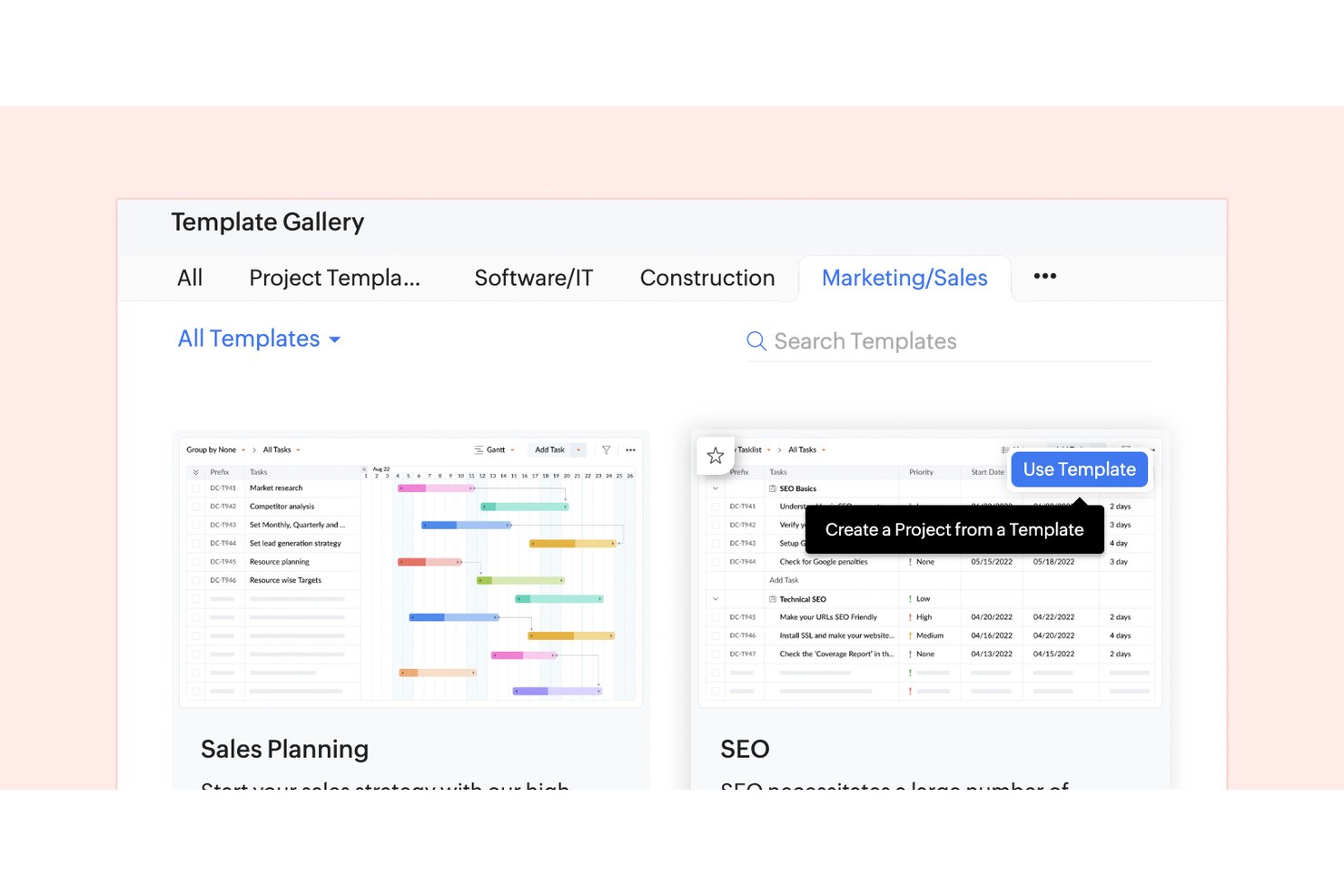
Zoho Projects is a project management platform that combines task management, Gantt charts, time tracking, and team collaboration tools with built-in integrations across the broader Zoho ecosystem.
Who Is Zoho Projects Best For?
Zoho Projects is a strong fit for real estate teams that need to coordinate listings, client timelines, and property development workflows in one place.
Why I Picked Zoho Projects
I picked Zoho Projects as one of the best because its Gantt chart-based timeline view maps perfectly onto the sequential, deadline-heavy nature of real estate workflows, like tracking listing prep, inspection windows, and closing milestones in a single view. I also like how task dependencies let you chain actions together, so a delayed appraisal automatically flags downstream tasks. Blueprint automation handles repeatable deal stages without manual follow-up.
Zoho Projects Key Features
- Issue tracker: Log, assign, and monitor bugs or content errors directly within a project to keep SEO deliverables on track.
- Timesheet logging: Record hours spent on individual tasks so you can measure effort across keyword research, content production, and link-building campaigns.
- Custom project dashboard: Build visual reports that surface task progress, workload, and milestone completion across active SEO projects.
- Document management: Attach and organize briefs, audit reports, and reference files directly to tasks for centralized access.
Zoho Projects Integrations
Zoho Projects offers integrations with Zoho CRM, Zoho Desk, Zoho Analytics, Google Drive, Microsoft Teams, Slack, GitHub, Dropbox, and Zendesk. It also supports Zapier.
Pros and Cons
Pros:
- Briefs and audit files stay attached
- Timesheets show effort by SEO task
- Gantt timelines map SEO campaign milestones
Cons:
- SEO workflows require custom task configuration
- No built-in keyword research or rank tracking
New Product Updates from Zoho Projects

Zoho Projects Adds QuickBooks Online and Xero Integrations
Zoho Projects now connects with QuickBooks Online and Xero, bringing project work and accounting workflows closer together. Manage project-related billing and financial tasks with fewer app switches. For more information, visit Zoho Projects’ official site.
 .

Wrike
Best for customizable workflows
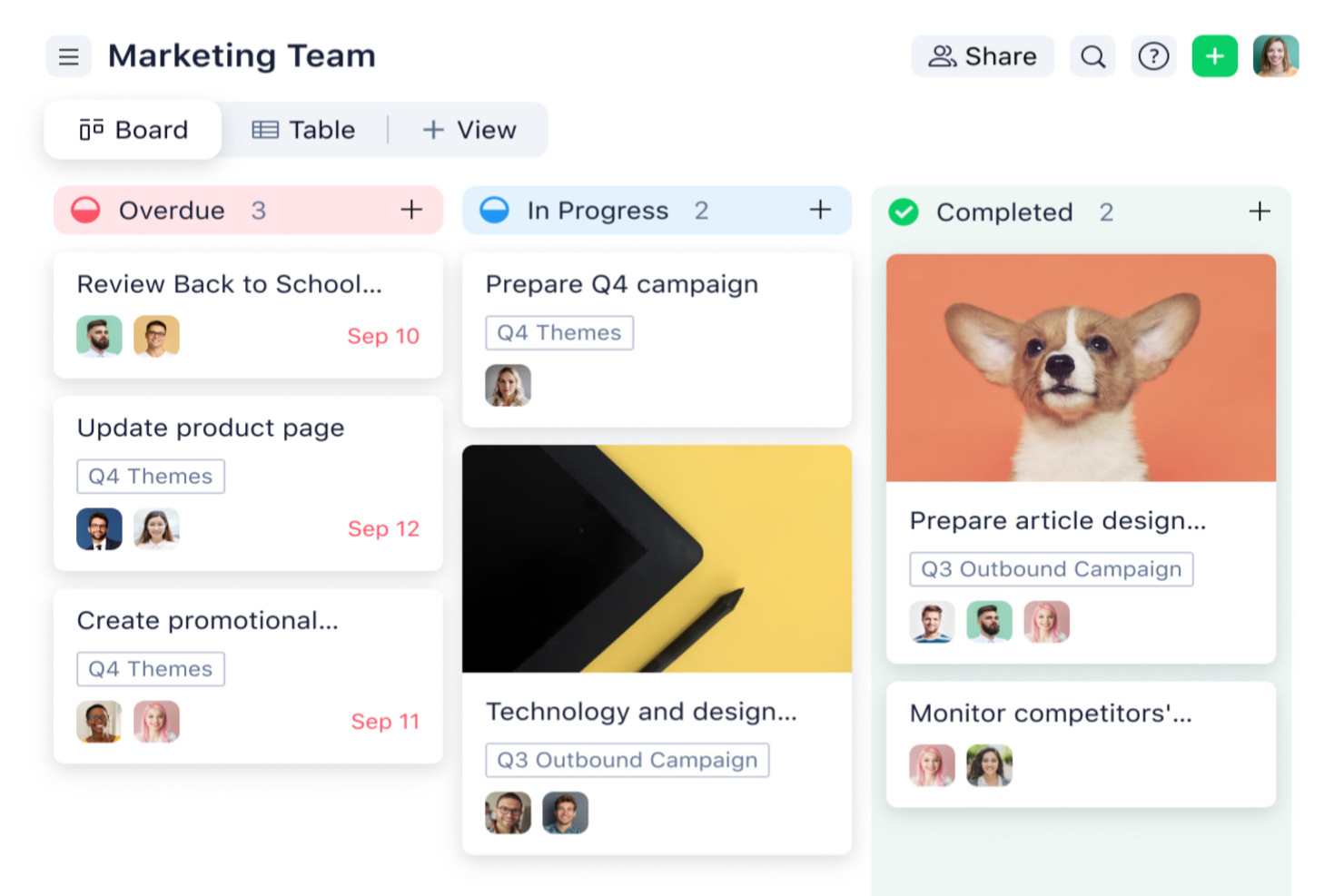
Wrike is a work management platform that covers SEO project planning, task assignment, workflow automation, reusable project blueprints, and cross-team collaboration in a single configurable workspace.
Who Is Wrike Best For?
Wrike is a strong fit for in-house marketing teams and SEO managers who need to coordinate recurring campaign work, manage cross-functional task dependencies, and standardize workflows across multiple workstreams.
Why I Picked Wrike
I've included Wrike in my top picks because its customizable workflows make it genuinely adaptable to how SEO teams actually operate. I love how reusable blueprints let you save an entire technical audit or content plan as a template, then spin up a preconfigured project the moment a new request comes in via a request form. Pairing that with custom automation rules for task handoffs and deadline reminders means recurring SEO work runs consistently without manual oversight each cycle.
Wrike Key Features
- Gantt chart view: Visualize task timelines, manage dependencies between deliverables, and adjust due dates directly on an interactive chart.
- Visual proofing and version comparison: Review and mark up files with inline comments, then compare original and revised versions side by side within a task.
- Public dashboard sharing: Share view-only dashboard links with non-Wrike users, including optional password protection and expiration dates.
- Cross-tagging: Tag tasks and folders across multiple projects so different teams can track the same work without duplicating it.
Wrike Integrations
Wrike lists 400+ application integrations, including native integrations with Jira, GitHub, Google Drive, Dropbox, Box, and Adobe Creative Cloud. Its REST API, webhooks, Wrike Integrate, and Wrike Sync support custom and two-way connections.
Pros and Cons
Pros:
- Proofing keeps feedback tied to deliverables
- Task dependencies clarify deadlines across campaigns
- Reusable blueprints standardize recurring SEO work
Cons:
- SEO metrics lack native rank tracking
- Workspace setup requires planning and oversight
New Product Updates from Wrike

Wrike Adds Advanced Filters to Chart View
Wrike introduces new default filters in Chart view, including relative dates, exclusion conditions, multiple filters per field, and status group filtering. These updates help teams refine project data and reporting. For more information, visit Wrike’s official site.
Airtable
Best for database-driven projects
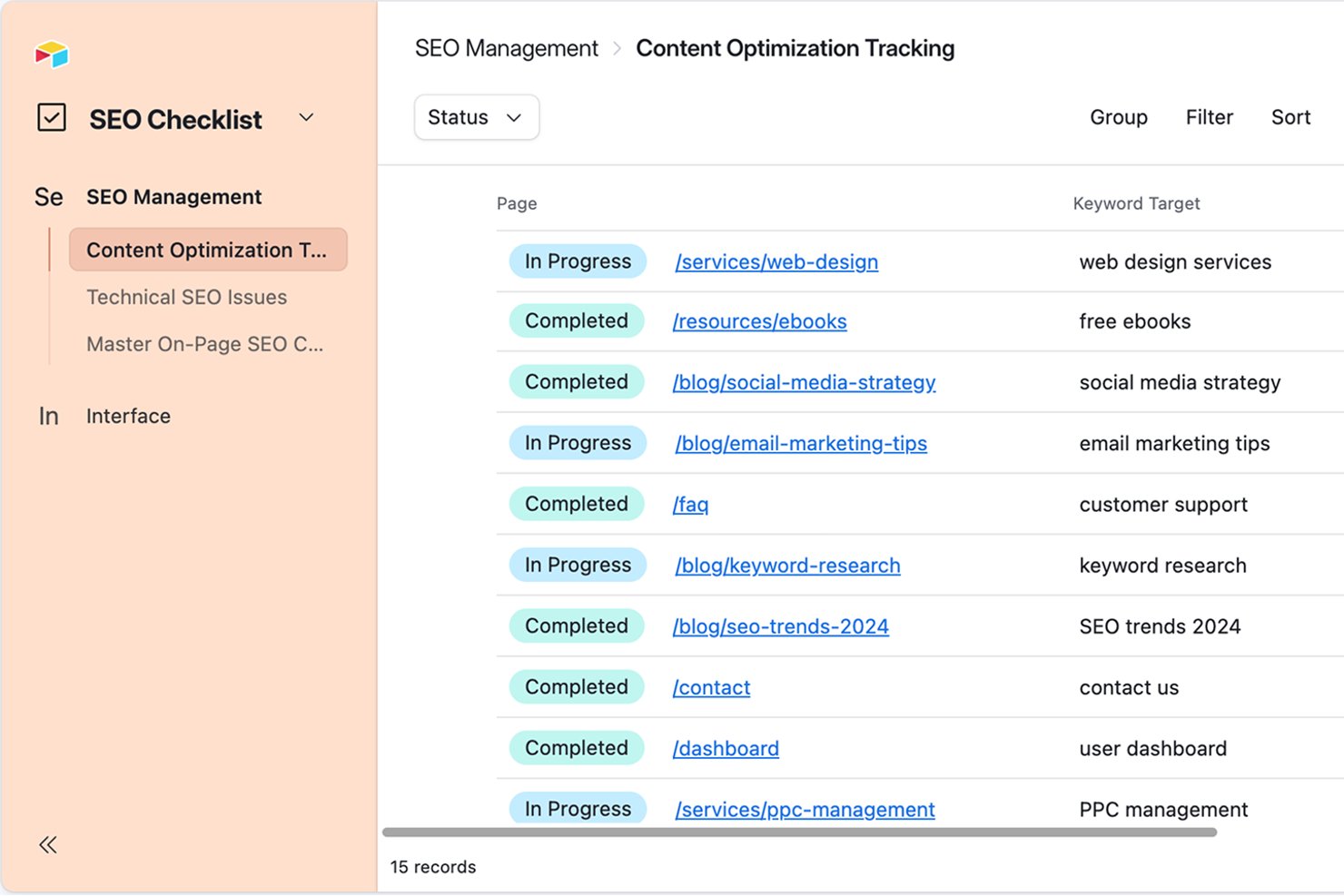
Airtable is a no-code database platform that lets you build connected SEO workflows across keyword research, content pipelines, on-page metadata, and task management—all within a customizable, relational workspace.
Who Is Airtable Best For?
Airtable is a strong fit for in-house marketing teams and SEO managers who want to build a custom, database-driven SEO workflow without writing code.
Why I Picked Airtable
I picked Airtable as one of the best because it treats your SEO workflow as a relational database problem, which is exactly what it is. Keyword research, content briefs, metadata, and page statuses all live in linked tables, so a change in one record ripples across the whole system. I especially like the SEO checklist template's content quality score Field Agent, which evaluates pages for relevance, readability, and SEO best practices on demand, giving you a clear signal on what to prioritize next.
Airtable Key Features
- Gantt view with dependencies: Visualize SEO task timelines, set linked-record dependencies, and highlight the critical path across your project.
- Airtable Portals: Share selected interface data with external collaborators through a branded, access-controlled portal without exposing your underlying base.
- Trigger-and-action automations: Build multi-step workflow automations that connect Airtable to external tools like Slack, Gmail, and WordPress.
- Interface Designer: Create role-specific views that show each stakeholder only the fields and records relevant to their part of the SEO workflow.
Airtable Integrations
Airtable lists integrations with DataForSEO, WordPress, Slack, Gmail, Google Drive, Jira, Salesforce, and Tableau Cloud. Its REST API supports custom SEO data connections and workflow integrations.
Pros and Cons
Pros:
- Reusable workflows support multiple campaigns
- Dashboards help reduce SEO status requests
- Connected tables link keywords, content, and metadata
Cons:
- Custom SEO workflows take setup time
- Complex schedules can make dependencies awkward
Nifty
Best for multi-client milestone tracking
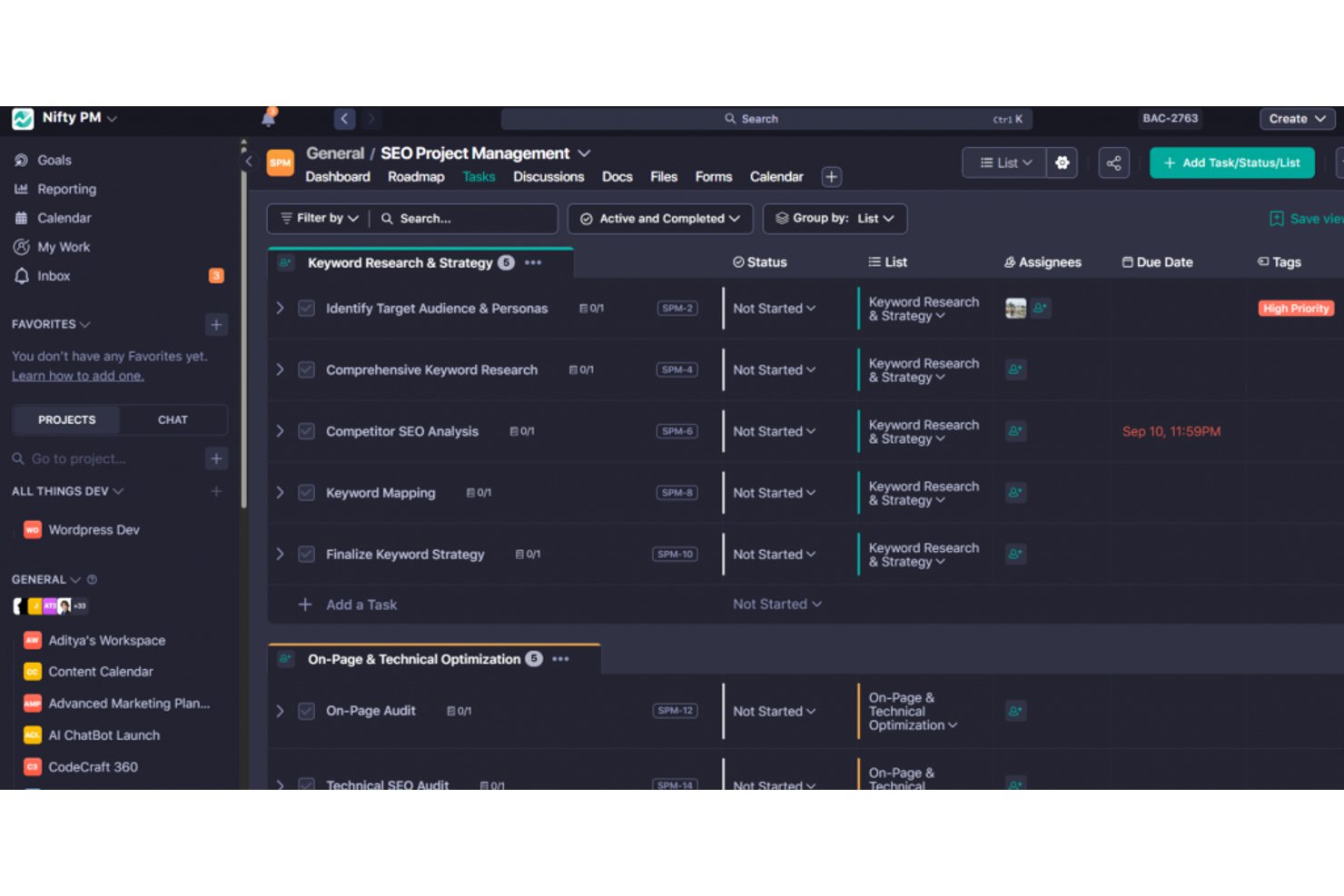
Nifty is a project management platform that brings tasks, milestones, roadmaps, docs, and client collaboration tools into one workspace for managing SEO and digital marketing projects across multiple clients or campaigns.
Who Is Nifty Best For?
Nifty is a strong fit for digital marketing agencies that need to manage deliverables, milestones, and client communication across multiple active projects from one workspace.
Why I Picked Nifty
I picked Nifty as one of the best because it handles multi-client milestone tracking better than most general project management tools. Each client lives in its own project, milestones auto-update as tasks complete, and you can group everything into portfolios for a cross-client progress view. I especially like the task-to-milestone conversion: you build out a deliverable list, set due dates, and Nifty rolls that work directly into a milestone whose progress reflects real task completion.
Nifty Key Features
- Workflow automations: Set if/then rules that trigger task assignments, status updates, due dates, and subtask creation based on conditions like task completion or custom-field values.
- File proofing: Collect feedback directly on uploaded files, with comments that can generate subtasks to keep revision work tracked and actionable.
- Public read-only sharing: Share project Roadmap and Task views via a public link so clients and stakeholders can follow progress without needing a Nifty account.
- Goals tracking: Create KPI-based goals that update automatically using tasks, tags, or custom fields, with target dates and values you set at the project or team level.
Nifty Integrations
Nifty offers native integrations with Google Drive and Calendar, Slack, GitHub, Figma, Microsoft Suite, Zoom, Webex, Harvest, Miro, and Typeform. It also supports REST API, webhooks, OAuth 2.1, and over 2,000 integrations through Zapier.
Pros and Cons
Pros:
- Tasks, discussions, and files stay connected
- Client projects group into portfolio views
- Milestones reflect completed task progress
Cons:
- Customized reporting exports offer limited flexibility
- SEO performance metrics stay outside project reporting

Notion
Best for adapting one workspace to SEO content ops
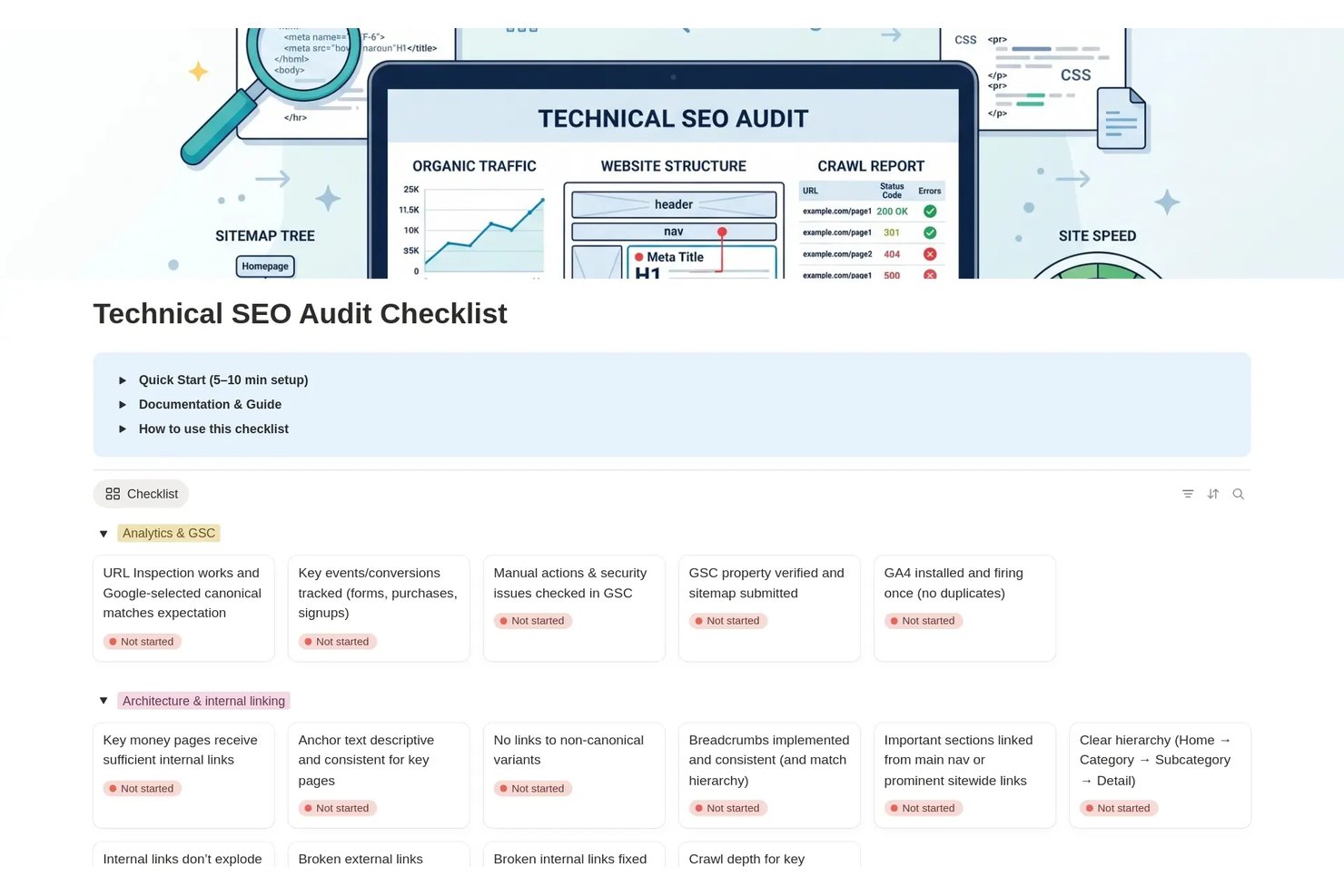
Notion is a flexible all-in-one workspace that combines block-based documents, connected databases, project tracking, and real-time collaboration to help teams organize content, manage tasks, and centralize knowledge.
Who Is Notion Best For?
Notion works well for in-house marketing teams that want to manage content planning, SEO tasks, and team collaboration in a single flexible workspace.
Why I Picked Notion
I've included Notion in my top picks because it's the tool I reach for when a team wants to run SEO content ops without juggling five separate apps. Its block-based databases let you build a content calendar with status, assignee, deadline, and an SEO checklist (think structured URLs and keyword-optimized meta descriptions) all in one view. Pair that with 92 community-built SEO templates covering everything from keyword research to technical audits, and your team can adapt a single workspace to fit almost any content workflow.
Notion Key Features
- Block-based content databases: Build content entries that store briefs, drafts, feedback, and strategy documents alongside task properties like status, assignee, and due date.
- Multiple project views: Switch between board, timeline, calendar, and list views to track SEO tasks and deadlines across campaigns.
- Database automations: Set triggers based on property changes, page additions, or recurring schedules to move tasks forward without manual updates.
- Granular page permissions: Assign view, comment, edit, or full-access levels to guests on specific pages without exposing the rest of your workspace.
Notion Integrations
Notion’s marketplace integrations include Jira, Asana, Slack, Google Drive, GitHub, Figma, and Salesforce. It also offers a public API, webhooks, Workers, and MCP for custom connections.
Pros and Cons
Pros:
- Comments support shared content reviews
- Custom calendars surface writers and deadlines
- Keeps SEO briefs beside task tracking
Cons:
- Client-specific access needs careful workarounds
- SEO performance reporting remains manual

Infinity
Best for white-label multi-client work tracking
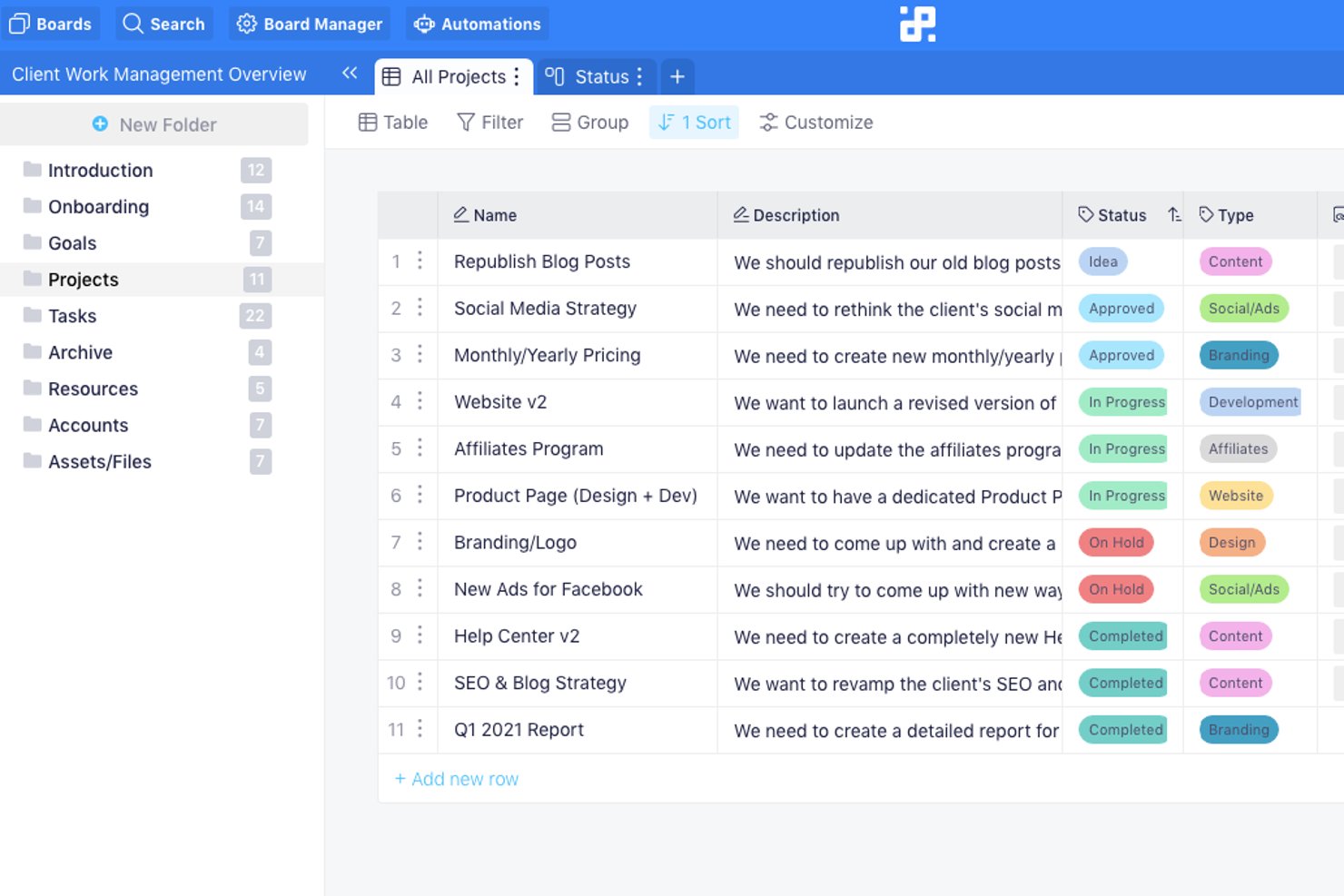
Infinity is a flexible work management platform that lets agencies and consultants organize client projects across customizable boards, folders, and views, with white-label branding, multi-workspace support, and built-in automation.
Who Is Infinity Best For?
Infinity is a strong fit for digital marketing agencies and SEO consultants managing multiple clients who need white-label branding and flexible multi-workspace organization.
Why I Picked Infinity
I picked Infinity as one of the best because its Agency Plan is purpose-built for managing multiple client accounts under one roof, with white-label branding and custom domains that let you present the workspace as your own product. I particularly like that you can structure separate boards and folders for each client, with SEO, Content, and Social Media as distinct subfolders, while controlling exactly what clients see through granular board and folder-level permissions. The reseller license and dedicated account manager make it a serious option for consultants running client work at scale.
Infinity Key Features
- Automation rules: Set up if-then triggers to automatically create, move, or update items when task conditions are met.
- Gantt view: Visualize project timelines and track start and end dates across client deliverables in one place.
- Granular permission controls: Assign admin, full member, or restricted member roles at the workspace, board, or folder level.
- Public board sharing: Share boards with external collaborators who don't have an Infinity account, with owner-controlled guest editing rights.
Infinity Integrations
Infinity offers native integrations with Google Calendar, Google Drive, Clockify, iCalendar, and Trello imports. It also supports CSV, API, webhooks, and Zapier for custom connectivity.
Pros and Cons
Pros:
- Shared boards clarify team and client responsibilities
- Reusable workflows support client onboarding
- White-label workspaces keep client work branded
Cons:
- Folder-bound dashboards limit cross-client reporting
- No native SEO performance tracking or scoring
Podio
Best for no-code custom SEO workflow building
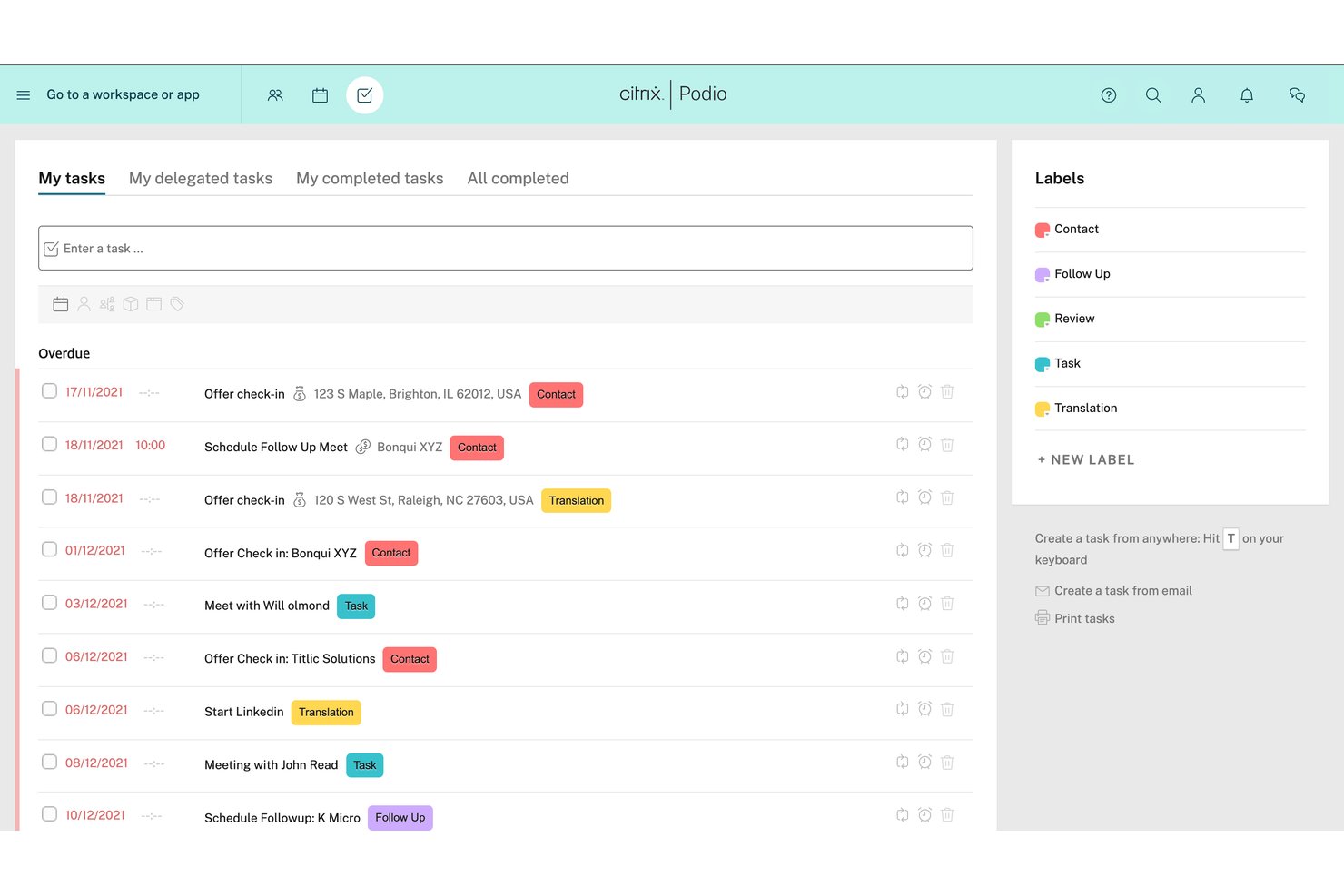
Podio is a no-code work platform that lets you build custom apps, automate workflows, manage tasks, and organize project workspaces without writing code.
Who Is Podio Best For?
Podio is a strong fit for teams that want to build their SEO workflows from scratch rather than work around a tool's rigid, predefined structure.
Why I Picked Podio
I picked Podio as one of the best because its no-code app builder lets you design SEO workflows from scratch, rather than forcing your team into a rigid structure. I've built custom apps for content briefs, audit tracking, and link-building pipelines using drag-and-drop fields, then connected them with Workflow Automation to move items through each stage automatically. That flexibility is genuinely hard to replicate in tools built around fixed project templates.
Podio Key Features
- No-code app builder: Create custom apps using drag-and-drop fields without writing any code, then modify them as your SEO processes evolve.
- Workspace organization: Group related apps, tasks, and files into separate workspaces, with controls for private access and external member invitations.
- Task automation: Set up "when/then" workflow rules on Plus, or advanced multi-step automations on Premium, to move items through defined stages automatically.
- Kanban, table, and calendar views: Switch between multiple layout options within any app to visualize SEO tasks and deliverables in the format your team prefers.
Podio Integrations
Podio offers native integrations with ShareFile, Dropbox, GoToMeeting, Excel, and Google Drive. It also supports custom integrations through its open API and marketplace integrations, including Zapier.
Pros and Cons
Pros:
- Shared workspaces support client collaboration
- Tasks connect briefs, deadlines, and deliverables
- Custom apps fit bespoke SEO workflows
Cons:
- Building workflows takes time and setup
- Reports can be confusing to run
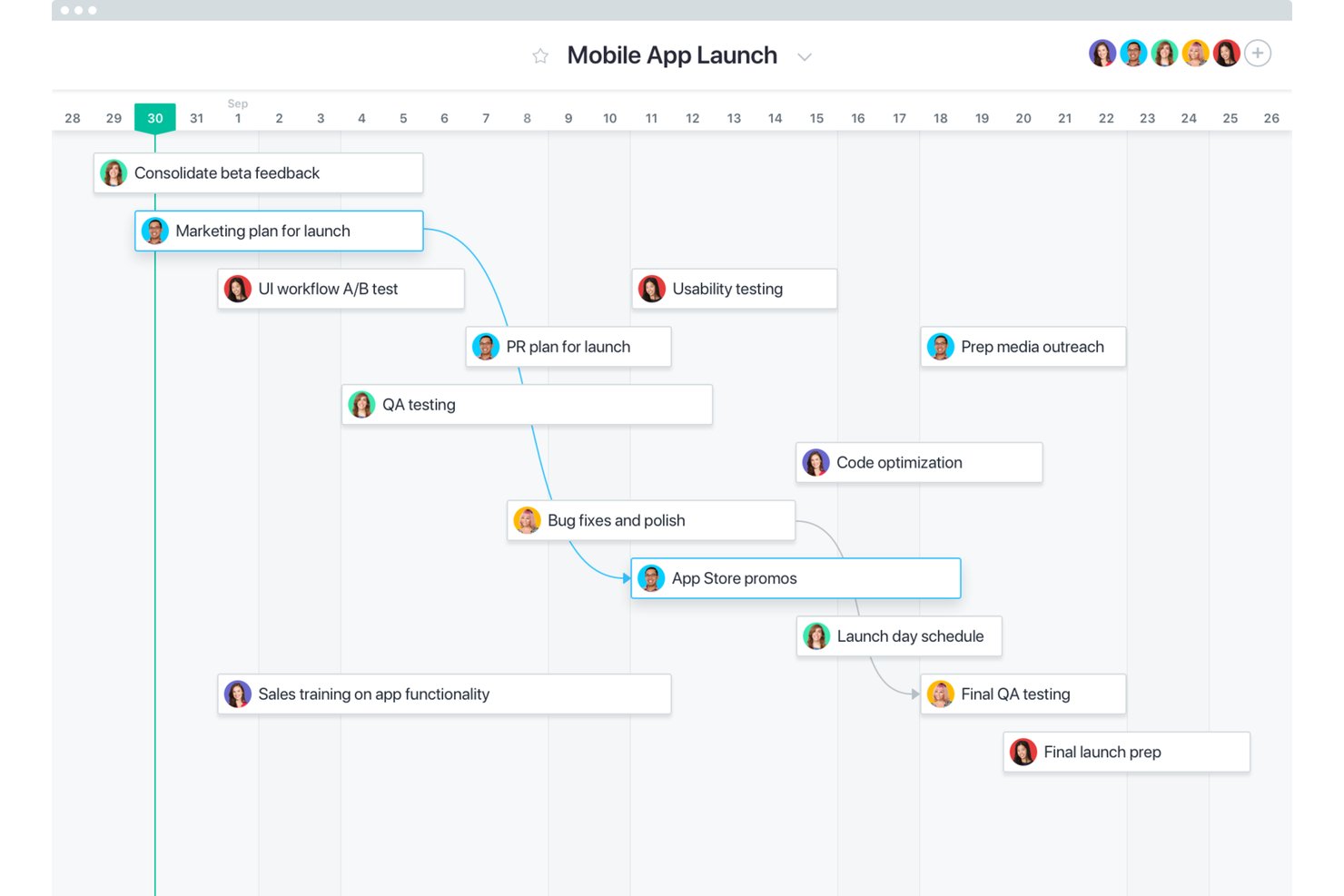
Asana is a work management platform that lets teams build custom project workflows, automate task routing and assignments, and track progress across campaigns using templates, rules, and AI-powered workflow tools.
Who Is Asana Best For?
Asana is a strong fit for cross-functional marketing teams that need to build and automate custom SEO workflows from scratch rather than rely on out-of-the-box SEO tooling.
Why I Picked Asana
I've included Asana in my top picks because it gives SEO teams the flexibility to build exactly the workflows they need rather than forcing them into rigid, predefined structures. Using AI Studio, you can automate the entire content intake process: a form captures a brief, a rule assigns the task, and status updates fire automatically as work moves through review. I also like how project templates with custom fields let teams codify repeatable processes, like a keyword research pipeline or a site audit cycle, so nothing gets rebuilt from scratch each sprint.
Asana Key Features
- Multi-homing: Tasks can appear in multiple projects simultaneously, with updates syncing across every project they belong to.
- Portfolio dashboards: Portfolios group up to 1,500 projects into a single view, showing progress and health across all active campaigns.
- Read-only project links: Shareable links give external stakeholders a live view of project boards, lists, or timelines without requiring a paid seat.
- Branching forms: Forms display different follow-up questions based on a respondent's previous answers, enabling smarter content or campaign intake.
Asana Integrations
Asana offers 200+ app integrations, including native Salesforce, Tableau, and Power BI connections, plus marketplace integrations with Google Sheets, Slack, Jira Cloud, and Google Drive. Its REST API and webhooks support custom integrations, and Zapier is available.
Pros and Cons
Pros:
- Dashboards clarify campaign ownership and progress
- Task discussions keep cross-functional handoffs visible
- Reusable workflows organize recurring SEO campaigns
Cons:
- Subtask automation gaps complicate SEO reporting
- No native rank or search analytics tracking

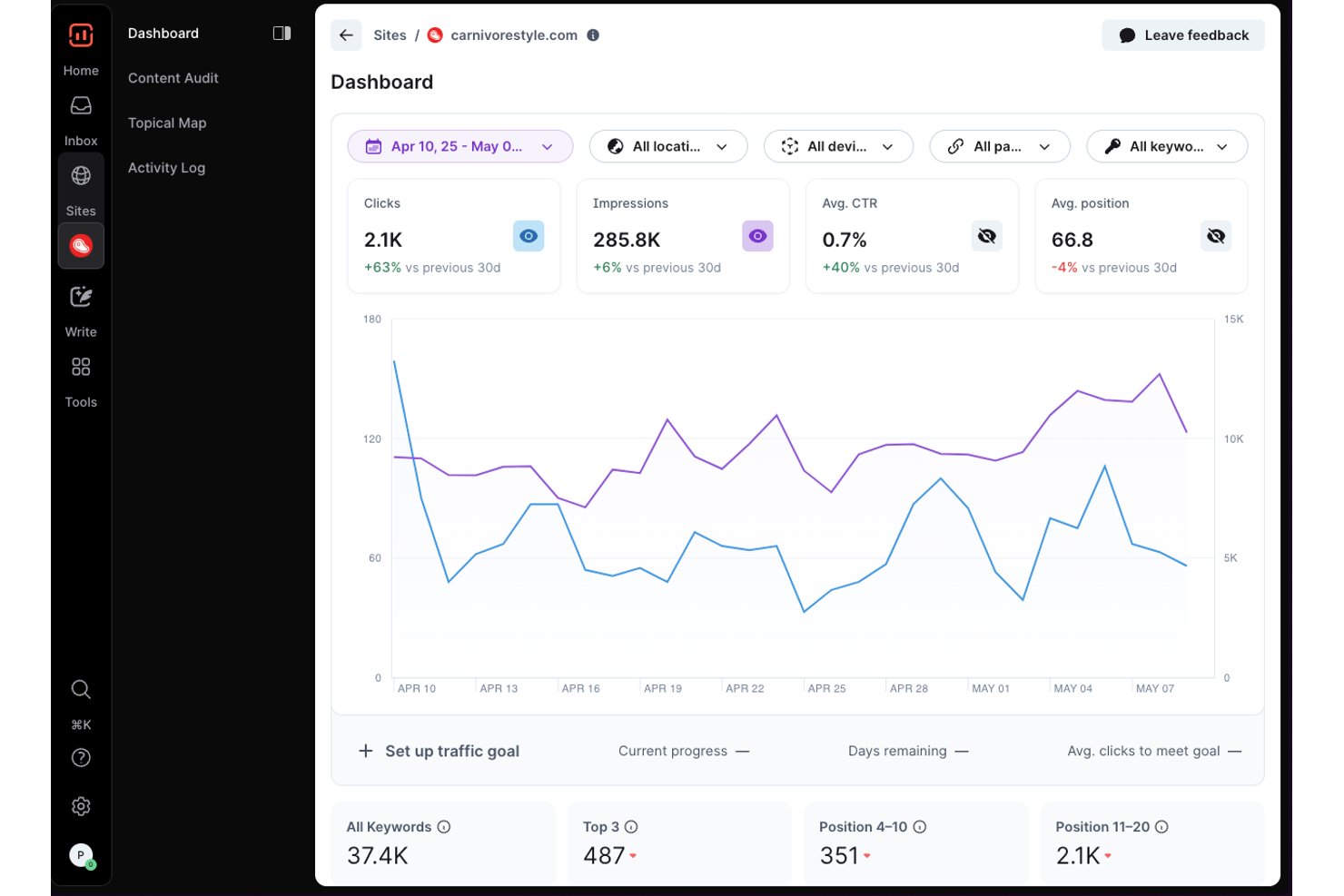
Surfer SEO is an AI-powered content platform that combines content creation, on-page optimization, topical mapping, content auditing, and GSC-integrated performance tracking in a single workspace.
Who Is Surfer SEO Best For?
Surfer SEO is a strong fit for content-focused SEO teams and agencies that need to plan, create, optimize, and audit content within a single platform.
Why I Picked Surfer SEO
I've included Surfer SEO in my top picks because it's the strongest option on this list for teams whose SEO work is primarily content-driven. The Content Editor ties live content scoring, competitor-derived keyword guidance, and real-time optimization recommendations into a single writing environment, so content teams aren't bouncing between tools to brief, write, and optimize. I also like that GSC connects automatically to feed the Content Audit dashboard, making it easy to spot ranking drops and identify pages that need a refresh without building a separate reporting workflow.
Surfer SEO Key Features
- Topical map: Maps content clusters across a topic to identify coverage gaps and plan articles that build topical authority.
- Rank drop detection: Flags pages experiencing ranking drops so your team can prioritize which content to refresh first.
- Simultaneous content editing: Lets multiple team members write and edit the same Content Editor document at the same time with live comments.
- Brand workspaces: Separates content, data, and settings into distinct workspaces, one per brand or client, within a single subscription.
Surfer SEO Integrations
Surfer SEO offers native integrations with Google Docs, WordPress, and Contentful. It also supports Zapier and provides a REST API with webhooks for custom integrations.
Pros and Cons
Pros:
- Reviewers praise writer collaboration tools
- Audit signals help prioritize content refreshes
- Live content scores guide article optimization
Cons:
- Backlink and technical SEO work remain outside
- No assignable SEO task workflow

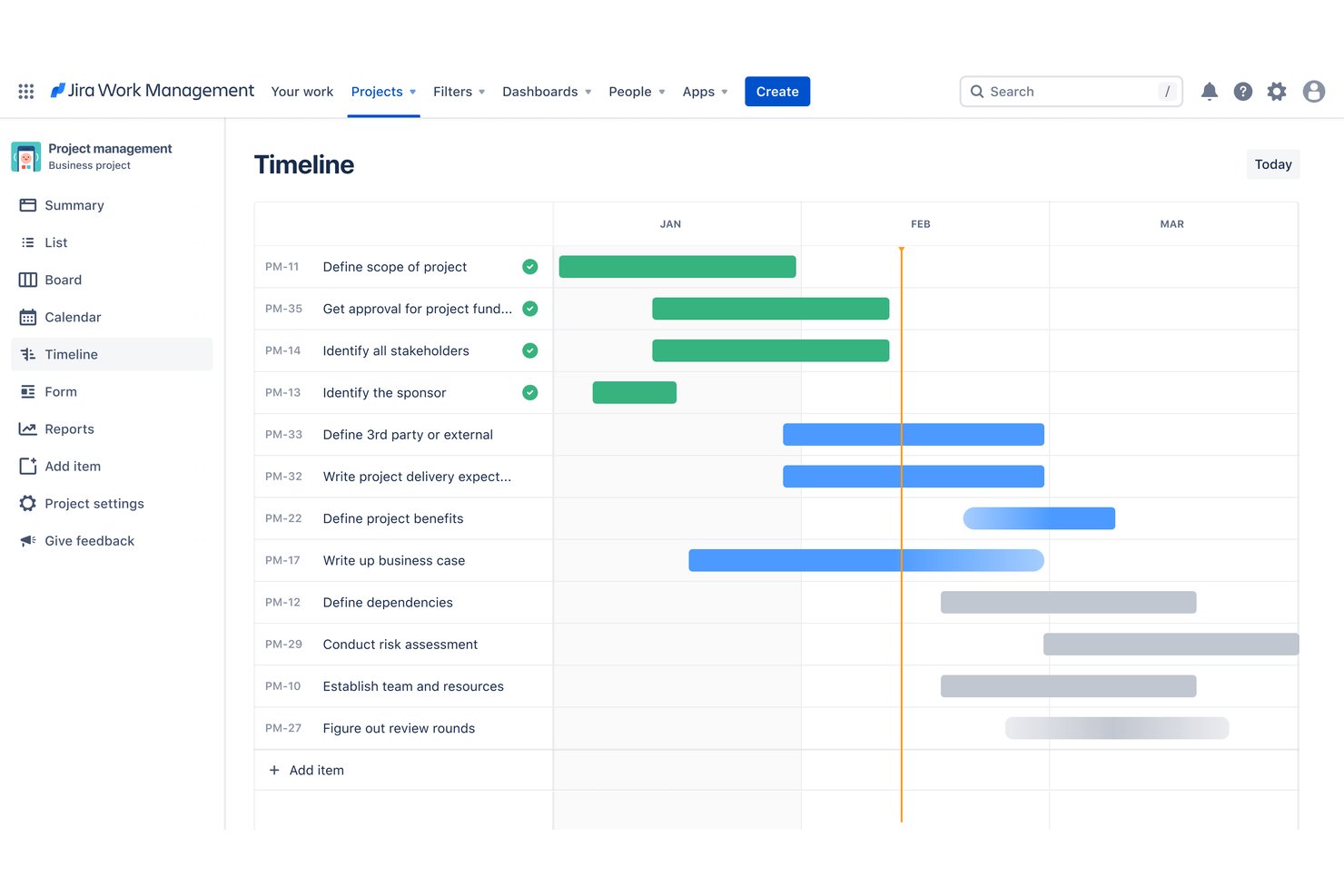
Jira is Atlassian's project management platform that lets teams plan, assign, and track work across customizable boards, timelines, and workflows, with built-in reporting and external collaboration tools.
Who Is Jira Best For?
Jira is a strong fit for cross-functional tech teams that already live in the Atlassian ecosystem and want to manage SEO tasks within the same agile workflows they use for product and engineering work.
Why I Picked Jira
I've included Jira in my top picks because it brings agile-style structure to SEO task tracking in a way that purpose-built marketing tools rarely match. I love how you can configure custom workflows with distinct statuses, like moving a technical audit from backlog through in-progress to done, and track every task across board, timeline, and calendar views simultaneously. The content management template also gives SEO teams a ready-made draft-to-published pipeline with built-in review and approval stages.
Jira Key Features
- Guest collaboration: Invite external clients, contractors, or consultants into a single Jira space with configurable view, edit, comment, and attachment permissions.
- No-code automation: Build rule-based automations to trigger actions on work items without writing any code, reducing manual handoffs between tasks.
- Request forms: Create structured intake forms to collect briefs, feedback, or campaign requests directly within a Jira space.
- Dependency mapping: Link work items across projects to visualize and manage dependencies between tasks, epics, and initiatives.
Jira Integrations
Jira offers more than 3,000 Marketplace integrations, with documented native integrations for Confluence, Bitbucket, and Trello. It also connects with Slack, Figma, and Google, and provides a REST API for custom integrations.
Pros and Cons
Pros:
- Content stages support draft-to-published reviews
- Boards expose campaign progress and blockers
- Configurable workflows clarify SEO task ownership
Cons:
- Dashboards omit SEO performance metrics
- Setup demands ongoing workflow administration
Diğer SEO Proje Yönetimi Yazılımları
Aşağıda kısa listemize aldığımız ancak en iyi listeye giremeyen ek SEO proje yönetimi yazılımlarının bir listesi yer alıyor. Bunları mutlaka incelemeye değer.
- monday AI Workspace
For cross-team SEO campaign tracking
- ClickUp
For goal tracking across SEO campaigns
- Smartsheet
For spreadsheet-style SEO campaign tracking
- ProofHub
For flat-rate client feedback and approvals
- ProjectManager
For real-time campaign dashboard visibility
- Teamwork.com
For agency-side client work tracking
- Trello
For kanban-style client task collaboration


How I Evaluate SEO Project Management Software
I split my evaluation into three parts, giving the most weight to core functionality: assigning SEO tasks, tracking deadlines, and organizing campaigns across clients. Next, I look for differentiators such as white-label client portals. Finally, I consider factors beyond features, including onboarding support and pricing that fits team and client volume.
Core Functionality (Table Stakes For This List)
When I'm selecting tools for my list, I score each one on a scale from 0 (does not offer the functionality) to 5 (excels in this area) for each core functionality listed below. I then convert the total into a percentage to help assess each tool's overall fit, with extra weight on any functionalities I’ve deemed essential.
- Task & Workflow Management (Essential): I look for assignable SEO tasks and adaptable stages for work like audits, content briefs, and link-building campaigns.
- Project & Campaign Organization (Essential): I assess how clearly teams can separate campaigns or client work, track timelines, and see progress across projects.
- SEO Data Integration: I check whether SEO metrics from tools such as rank trackers, Google Search Console, or analytics can inform campaign priorities.
- Collaboration & Client Communication: I look for comments, approvals, and permissioned sharing that help teams and clients review deliverables.
- Reporting & Progress Tracking: I assess whether dashboards show task completion and project progress over time, ideally alongside SEO results.
- Content & Deliverable Management: I check how briefs, drafts, and optimization checklists connect to tasks from planning through review and publication.
Once I have a list of tools that meet the criteria, I consider what sets each platform apart.
Differentiating Factors (What Sets Vendors Apart)
Here's how I compare and contrast different vendors:
Standout Features
White-label client portals matter when your agency needs branded dashboards that hide internal workflow details from clients. I check whether portals support custom domains and filtered reporting. Backlink workflow automation is another differentiator—I look for structured pipelines that move prospects through outreach stages with tracked status, not just a shared spreadsheet. I also evaluate multi-site management, since agencies juggling dozens of domains need isolated project spaces per property without duplicating templates.
Beyond Features
Pricing models matter here. Per-seat costs add up fast when agencies loop in freelance writers, developers, and clients—so I check whether guest or reviewer seats are free or capped. I also evaluate onboarding complexity, since SEO workflows need custom fields, integrations, and templates before anyone sees value. A tool like monday.com offers pre-built templates that cut setup time, while more flexible platforms may need days of configuration. Finally, I look at how well a platform handles cross-functional handoffs between writers, developers, and external stakeholders through role-based permissions.
SEO Proje Yönetimi Yazılımı Nasıl Seçilir?
Uzun özellik listeleri ve karmaşık fiyatlandırma yapıları içinde kaybolmak kolaydır. Kendinize özgü yazılım seçme sürecinizi yürütürken odağınızı korumanıza yardımcı olmak için göz önünde bulundurmanız gereken faktörlerin bir kontrol listesini burada bulabilirsiniz:
| Faktör | Dikkat Edilmesi Gerekenler |
| Ölçeklenebilirlik | Özellikle birden fazla müşteri hesabını yönetiyor veya SEO hizmetlerinizi genişletiyorsanız, yazılımın ekibiniz büyüdükçe ekibinizi destekleyebildiğinden emin olun. |
| Entegrasyonlar | Platformlar arasında geçiş yapmaktan kaçınmak için Google Analytics, SEMrush, Ahrefs veya Slack gibi araçlarla entegrasyonlar sunan çözümleri arayın. |
| Özelleştirilebilirlik | İş akışlarını, alanları ve panoları ekibinizin SEO görevlerini ve raporlamayı ele alma biçimine uyacak şekilde özelleştirip özelleştiremeyeceğinizi kontrol edin. |
| Kullanım Kolaylığı | Teknoloji konusunda bilgili olmayan veya proje yönetiminde yeni olan ekip üyeleri için bile gezinmesi kolay bir araç seçin. |
| Bütçe | Fiyatlandırmayı kullanıcı lisanslarına veya özelliklere göre değerlendirin. Her kademede ne elde ettiğinizi ve bunun mevcut ihtiyaçlarınıza uyup uymadığını öğrenin. |
| Güvenlik Önlemleri | Aracın şifreleme kullandığından, kullanıcı izinleri için denetimler sunduğundan ve standart veri koruma uygulamalarına uyduğundan emin olun. |
| İş Birliği Araçları | Ekibinizin iletişimi merkezi ve görevlere odaklı tutmak için paylaşılan panolara, yorumlara ve dosya eklerine ihtiyacı vardır. |
| Raporlama Özellikleri | Ek araçlara ihtiyaç duymadan SEO çıktılarınızı, teslim tarihlerinizi ve performans ölçümlerinizi takip etmenize yardımcı olan bir araç seçin. |
SEO Proje Yönetimi Yazılımlarındaki Eğilimler
Araştırmamda, farklı SEO proje yönetimi yazılımı sağlayıcılarından sayısız ürün güncellemesi, basın bülteni ve sürüm günlüğü derledim. Göz önünde bulundurduğum yeni trendlerden bazıları şunlar:
- İçerik Özeti Otomasyonu: Bazı araçlar artık belirlenen anahtar kelimelere göre içerik özetleri oluşturuyor; rakip verilerini, en üst sıralarda yer alan sayfaları ve yapı önerilerini bir araya getiriyor. Bu trend, yazım sürecini hızlandırıyor ve içeriği SEO hedefleriyle uyumlu hâle getiriyor.
- Yapay Zekâ Destekli İçerik Önerileri: Bazı araçlar artık görev akışlarının içinde doğrudan anahtar kelimeler, blog konuları ve meta verisi düzenlemeleri önermek için yapay zekâ kullanıyor. Bu, ekiplerin SEO araçları ile proje panoları arasında geçiş yapmadan daha hızlı ilerlemesine yardımcı oluyor.
- Dahili SERP İzleme Panoları: Daha fazla sağlayıcı, canlı arama performansı görünümlerini doğrudan proje çalışma alanına ekliyor. Sıralamaları ve görünürlüğü görev güncellemelerinin bir parçası olarak izleyebilirsiniz; ek panolara gerek kalmaz.
- Müşteri İş Birliği Özellikleri: Birçok platform, e-posta üzerinden yapılan karşılıklı yazışmaları azaltmak için artık müşterilere yönelik görünümler, geri bildirim dizileri ve onay iş akışları ekliyor. Bu, ajansların SEO teslimatlarını ve müşteri girdilerini tek bir yerde yönetmesine yardımcı oluyor.
- Önceden Oluşturulmuş SEO İş Akışı Şablonları: Sağlayıcılar, anahtar kelime araştırması, sayfa içi optimizasyon ve içerik denetimleri için kullanıma hazır şablonlar sunuyor. Bu, ekiplerin süreçleri standartlaştırmasına ve yeni çalışanları daha hızlı işe alıştırmasına yardımcı oluyor.
SEO Proje Yönetimi Yazılımı Nedir?
SEO proje yönetimi yazılımı, arama motoru optimizasyonu kampanyalarının yönetimini kolaylaştırmak ve geliştirmek için tasarlanmış özel bir araçtır. Genellikle SEO ajansları, pazarlama departmanları ve bağımsız SEO danışmanları tarafından kullanılan bu yazılım; arama motoru sıralamalarını iyileştirmek ve trafik çekmek amacıyla SEO stratejilerinin planlanmasını, uygulanmasını ve izlenmesini kolaylaştırır.
SEO proje yönetimi yazılımının temel bileşenleri arasında görev planlama, anahtar kelime izleme, içerik yönetimi, bağlantı oluşturma araçları ve analiz panoları yer alır. Bu özellikler, kullanıcıların SEO görevlerini etkili bir şekilde koordine etmesini, performans verilerini analiz etmesini ve gerçek zamanlı içgörülere göre stratejileri ayarlamasını sağlar.
SEO Proje Yönetimi Yazılımının Özellikleri
SEO proje yönetimi yazılımı seçerken aşağıdaki temel özelliklere dikkat edin:
- Gerçek zamanlı bildirimler: Görevler atandığında, son teslim tarihleri değiştiğinde veya geri bildirim eklendiğinde ekibinizin güncel kalmasını sağlar.
- Görev izleme: Denetimler, anahtar kelime araştırması ve içerik güncellemeleri gibi SEO görevlerini atamanıza, önceliklendirmenize ve ilerlemeyi izlemenize olanak tanır.
- Anahtar kelime planlama araçları: Hedef anahtar kelimeleri yönetmenize, bunları içerikle eşleştirmenize ve kampanya hedefleriyle uyumlu hâle getirmenize yardımcı olur.
- İçerik takvimi görünümleri: Yaklaşan SEO içerikleri, son teslim tarihleri ve yayın tarihleri için görsel bir program sunar.
- Performans raporlaması: SEO çalışmalarınızın nasıl sonuç verdiğini göstermek için sıralamalar, trafik ve geri bağlantılar gibi temel ölçümleri izler.
- Müşteri iş birliği portalları: Harici müşterilerin proje güncellemelerini görüntülemesine, teslimatları onaylamasına ve yorum bırakmasına olanak tanır.
- Özel iş akışları: Sayfa içi optimizasyon veya bağlantı oluşturma gibi işlemler için tekrarlanabilir görev dizileri oluşturmanıza olanak tanır.
- Dahili özet şablonları: SEO stratejinizle uyumlu içerik parçaları için yapılandırılmış taslaklar sunar.
- Role dayalı izinler: Doğru ekip üyelerinin ve müşterilerin görevleri görüntülemek veya düzenlemek için uygun erişime sahip olmasını sağlar.
- Belge depolama: SEO dosyalarını, özetleri ve araştırmaları merkezileştirerek ekibinizin her şeye tek bir yerden erişmesini sağlar.
Proje Yönetimi Yazılımının Faydaları
SEO proje yönetimi yazılımını uygulamak, ekibiniz ve işletmeniz için çeşitli faydalar sağlar. Yararlanabileceğiniz bazı avantajlar şunlardır:
- Daha az araç değiştirme: Entegrasyonlar ve dahili SEO özellikleri, ayrı platformlar arasında geçiş yapma ihtiyacını azaltır.
- Daha az kaçırılan son teslim tarihi: Dahili takvimler ve hatırlatıcılar, ekibinizin SEO yayınlama programlarını takip etmesine yardımcı olur.
- Daha iyi ekip koordinasyonu: Paylaşılan görev panoları ve gerçek zamanlı güncellemeler, herkesin aynı bilgiye sahip olmasını sağlar.
- Daha net içerik planlaması: İçerik takvimleri ve özet şablonları, anahtar kelimeleri içerik fikirleri ve son teslim tarihleriyle eşleştirmeye yardımcı olur.
- Daha hızlı müşteri geri bildirimi: Müşteri portalları ve yorum dizileri, dağınık iletişimin neden olduğu gecikmeleri azaltır.
- Daha kolay raporlama: Dahili SEO panoları, anahtar kelime sıralamalarını, geri bağlantıları ve trafiği tek bir yerde izlemenizi sağlar.
- Geliştirilmiş süreç tutarlılığı: Özel iş akışları, ekibinizin SEO görevleri için her seferinde aynı adımları izlemesini sağlar.
Proje Yönetimi Yazılımı Maliyetleri ve Fiyatlandırması
SEO proje yönetimi yazılımını seçmek, mevcut çeşitli fiyatlandırma modellerinin ve planların anlaşılmasını gerektirir. Maliyetler özelliklere, ekip büyüklüğüne, eklentilere ve daha fazlasına bağlı olarak değişir. Aşağıdaki tablo, SEO proje yönetimi yazılımı çözümlerindeki yaygın planları, ortalama fiyatlarını ve genellikle sunulan özellikleri özetlemektedir:
| Plan Türü | Ortalama Fiyat | Yaygın Olarak Sunulan Özellikler |
|---|---|---|
| Ücretsiz | $0 | Temel görev yönetimi, sınırlı sayıda anahtar kelime ve proje |
| Temel | $25/kullanıcı/ay | Görev planlama, temel analizler, bazı entegrasyonlar |
| Profesyonel | $50/kullanıcı/ay | Gelişmiş analizler, artırılmış entegrasyonlar, özelleştirme seçenekleri |
| Kurumsal | Özel Fiyatlandırma | Tüm özelliklere erişim, özel destek, sınırsız proje |
SEO Proje Yönetimi Yazılımı Hakkında Sıkça Sorulan Sorular
SEO Proje Yönetimi Yazılımı hakkında sıkça sorulan bazı sorular şunlardır:
SEO proje yönetimi yazılımı ne için kullanılır?
SEO proje yönetimi yazılımı, SEO kampanyalarıyla ilişkili çeşitli görevlerin yönetilmesine ve optimize edilmesine yardımcı olmak için tasarlanmıştır. Kullanıcıların arama motoru sıralamalarını iyileştirmek ve web sitesi trafiğini artırmak amacıyla SEO faaliyetlerini planlamasına, yürütmesine ve izlemesine olanak tanır.
SEO proje yönetimi yazılımını genellikle kimler kullanır?
Bu yazılım genellikle birden fazla SEO projesini yönetmesi ve ekipleri verimli bir şekilde koordine etmesi gereken SEO ajansları, pazarlama ajansları, dijital pazarlama profesyonelleri, SEO uzmanları ve işletme sahipleri tarafından kullanılır.
SEO proje yönetimi yazılımı web sitesi sıralamalarını iyileştirmeye yardımcı olabilir mi?
Evet, anahtar kelime takibi, geri bağlantı analizi, içerik oluşturma ve planlama gibi araçlar sunarak bu yazılım, arama motoru sıralamalarını iyileştiren stratejilerin optimize edilmesine yardımcı olabilir.
SEO proje yönetimi yazılımı diğer araçlarla entegre olur mu?
Çoğu SEO proje yönetimi yazılımı, iş akışını ve veri yönetimini kolaylaştırmak için analiz platformları, CRM yazılımları ve içerik yönetim sistemleri gibi çeşitli diğer araçlarla entegre olabilir.
SEO proje yönetimi yazılımı küçük işletmeler için uygun mudur?
Evet, birçok sağlayıcı küçük işletmeler için uygun olan ve şirketinizle birlikte büyüyebilen, temel özelliklerden daha gelişmiş seçeneklere kadar ölçeklenebilir çözümler sunar.
SEO proje yönetimi yazılımı seçerken nelere dikkat etmeliyim?
Görev yönetimi, analizler, iş birliği araçları ve ölçeklenebilirlik gibi kapsamlı özellikler sunan yazılımları tercih edin. Ayrıca yazılımın kullanım kolaylığını, müşteri desteğini ve entegrasyon özelliklerini de göz önünde bulundurun.
Ücretsiz SEO proje yönetimi yazılımı seçenekleri mevcut mu?
Evet, bazı sağlayıcılar genellikle yeni başlayan bireyler veya küçük ekipler için yeterli olan yazılımlarının ücretsiz sürümlerini sunar. Ancak bu ücretsiz planlarda genellikle özellikler ve ölçeklenebilirlik açısından sınırlamalar bulunur.SEO projelerini yönetmek çoğu zaman değişen öncelikler, sıkı teslim tarihleri ve dağınık araçlarla uğraşmak anlamına gelir. Doğru sistem olmadan görevleri, içerikleri ve sonuçları takip etmek zordur.