2026 İçin İncelenen En İyi 10 Çevik Proje Yönetimi Yazılımı

10 En İyi Çevik Proje Yönetimi Yazılımları Kısa Listesi


En iyi çevik proje yönetimi yazılımı, çevik projelerinizi planlamanıza, yönetmenize ve geliştirmenize yardımcı olur. Doğru araç olmadan projelerinizin hızla kontrolden çıktığını fark eder; sprint hedeflerini, proje ilerlemesini ve birikimde kalan işleri takip edemez hâle gelirsiniz. Bu da işleri zamanında teslim etmeyi, etkili bir şekilde yinelemeyi ve müşterileri memnun tutmayı zorlaştırır.
Seçim sürecini basit ve stresiz bir şekilde yürütebilmeniz için çevik proje yöneticisi olarak 20 yılı aşkın deneyimimi kullanarak en iyi çevik proje yönetimi araçlarını değerlendirdim ve özenle seçtim.
Bu rehberde, hangi çevik metodolojiyi benimsediğinizden bağımsız olarak projeniz boyunca planlamayı, takibi ve iletişimi destekleyen yazılımları bulacaksınız. İş akışlarınız ve yönetim tarzınızla en iyi uyum sağlayan yazılımı seçebilmeniz için temel özellikleri, avantajları ve dezavantajları ele alıyorum.
Why Trust Our Software Recommendations
Our team has been testing and reviewing software since 2012. As project managers ourselves, we know how difficult—and important—it is to choose the right software.
For this guide, we evaluated tools using hands-on testing and independent research, scoring tools using our selection criteria. We also draw on insights from industry thought leaders and practicing project management experts.
Our reviews reflect our human editorial judgment, not a sales pitch.
Expert reviewers:
Çevik Proje Yönetimi Yazılımları Karşılaştırma Tablosu
Bu karşılaştırma tablosu, en iyi çevik proje yönetimi yazılımı seçimlerimdeki fiyatlandırma ayrıntılarını özetlemektedir:
| Tool | Best For | Trial Info | Price | ||
|---|---|---|---|---|---|
| 1 | Best for cross-departmental collaboration | Free plan + 14-day trial + demo available | From $10/user/month (billed annually) | Website | |
| 2 | Best for agile project collaboration | Free plan available | From $1/user/month (billed annually) | Website | |
| 3 | Best for no-code enterprise apps | 30-day free trial | From $35/user/month (billed annually) | Website | |
| 4 | Best for breaking down complex projects | Free plan + 30-day free trial available | From $7.65/user/month (billed annually) | Website | |
| 5 | Best for integrated client portals | 14-day free trial | From $10/user/month (billed annually) | Website | |
| 6 | Best for collaborative whiteboards | Free plan + 14-day trial available | From $8/user/month (billed annually) | Website | |
| 7 | Best for strategy-to-sprint delivery alignment | 30-day free trial | From $9/user/month | Website | |
| 8 | Best for scrum boards | Free plan + 7-day free trial available | From $8.48/user/month | Website | |
| 9 | Best for GitHub-native agile sprint tracking | Free plan + 14-day free trial + free demo available | From $4.99/user/month (billed annually) | Website | |
| 10 | Best for scaling agile across SAFe enterprise teams | Free trial available | Pricing upon request | Website |


En İyi Çevik Proje Yönetimi Yazılımları İncelemeleri
Listemdeki yazılımların her birinin kısa bir açıklamasını, en iyi yaptığı işi ve öne çıkan özelliklerini burada bulabilirsiniz.

Wrike
Best for cross-departmental collaboration
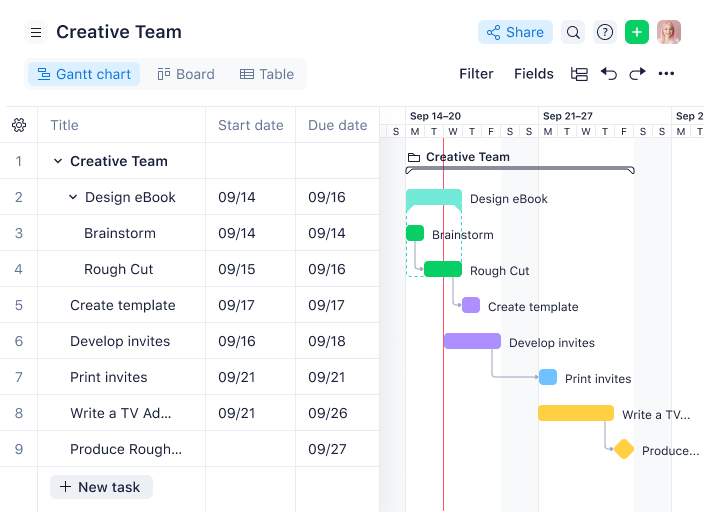
Wrike is a project management software with a collection of agile tools for managing projects, and the tool is suitable for teams of five or more. This highly configurable agile project management software allows users to customize workflows, dashboards, and reports.
Why I picked Wrike: Wrike’s simple interface enables users to switch between Kanban boards, interactive drag-and-drop Gantt charts, and workload views to visualize priorities. Wrike features a number of easy-to-use agile templates, backlog management functionalities, spaces for collaboration and feedback, and agile reporting and analytics. Other features include agile folder organization and automated task management.
Wrike’s features can be configured for each individual team’s needs, and the tool also offers a variety of specific solutions depending on the type of team or organization, including solutions for marketing teams and professional service teams.
Wrike Standout Features & Integrations
Features include resource bookings, workload charts, effort management, a board view, time tracking, budgeting, proofing, cross-tagging, and approval workflows.
Integrations include more than 400 pre-built native integrations, including popular file management software from Microsoft, Google, and Dropbox, along with sales and marketing software from Salesforce and Marketo.
Pros and Cons
Pros:
- Detailed analytics and dashboards
- Good workload management features
- Range of task automation features
Cons:
- Learning curve for new users
- No built-in chat feature
New Product Updates from Wrike

Wrike Redesigns Workspace Search With New Filters
Wrike introduces a redesigned Workspace Search interface with recent search shortcuts, item type and location filters, and parent-task context. These updates help users find relevant work items and navigate search results efficiently. For more information, visit Wrike’s official site.

Best for agile project collaboration
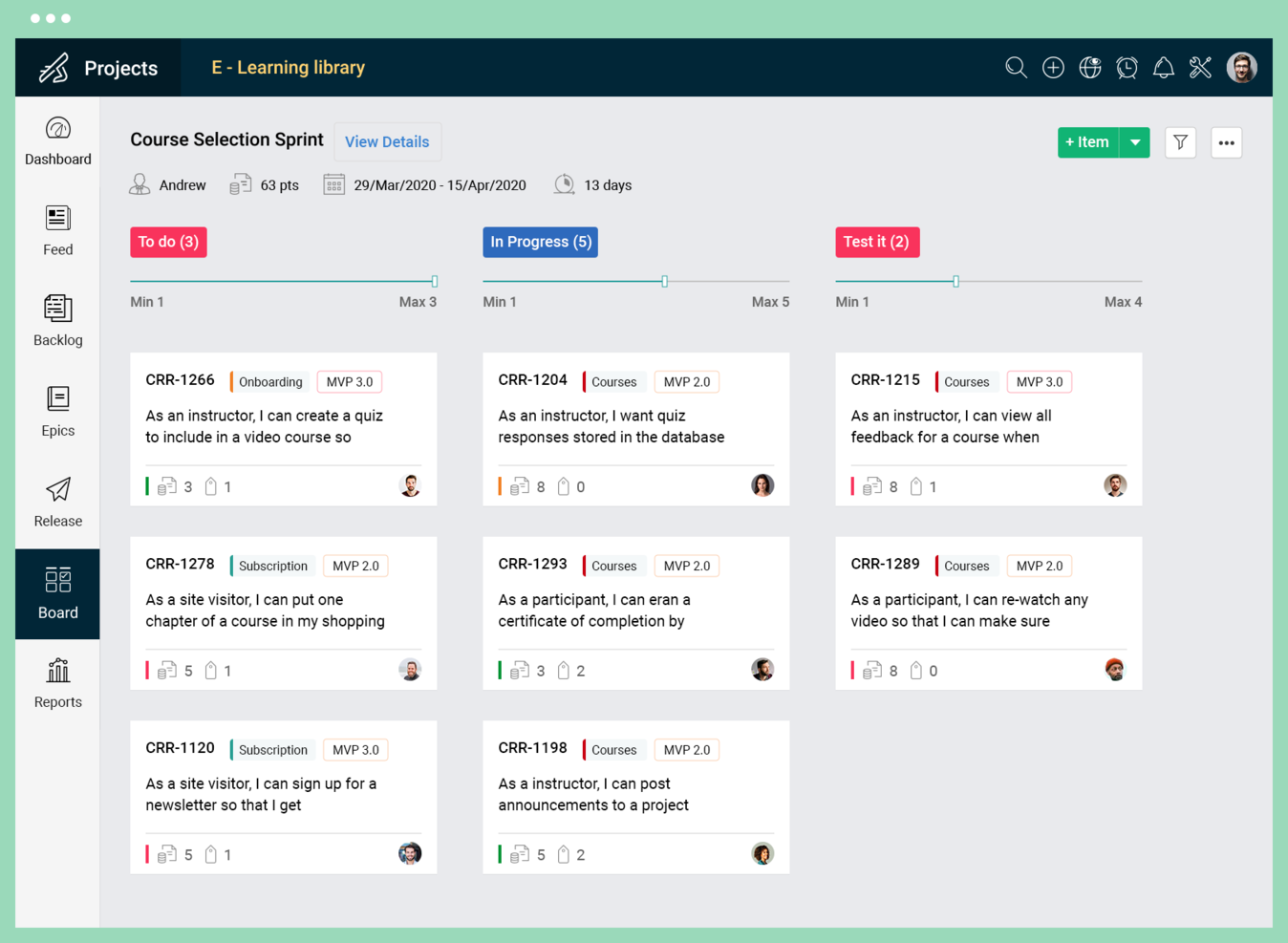
Zoho Sprints is a digital project management tool designed to support agile teams in planning and tracking their work.
Why I picked Zoho Sprints: I chose Zoho Sprints because it provides a robust set of features that cater to dynamic planning and collaboration, which are essential for agile teams. What makes it different is its focus on visualizing workflows and tracking progress, coupled with user-friendly time tracking capabilities. I believe Zoho Sprints is best suited for agile project collaboration due to its comprehensive approach to managing project ideas, tracking progress, launching increments, and automating the CI/CD pipeline, which supports a smoother agile process.
Zoho Sprints Standout Features & Integrations
Features include backlogging capabilities that let you break work down into stories, tasks, and sub-tasks, prioritize them, and add items to the sprint. The tool also includes a fully-customizable Scrum board with the ability to set up workflows and swimlanes, and get the team aligned on the sprint goal.
Integrations include Microsoft Office 365, Microsoft Teams, Google Drive, Zapier, Zendesk, and ServiceNow. Integrations via Zapier and Zoho Flow are also supported. Being part of the Zoho ecosystem allows you to connect to several of Zoho’s own services for bug tracking, CRM, accounting, customer service, and more.
Pros and Cons
Pros:
- Intuitive user interface
- Comprehensive reporting with burndown charts
- Tailored for Scrum methodologies
Cons:
- Many customization features are limited to higher-tier plans
- Limited project views
New Product Updates from Zoho Sprints

Zoho Sprints Adds ServiceDesk Plus Integration
Zoho Sprints now offers Zoho Sprints for ServiceDesk Plus in Zoho Marketplace, enabling IT teams to send requests, changes, and releases to developers and track progress in SDP. For more information, visit Zoho Sprints' official site.
 .

Best for no-code enterprise apps

QuickBase is a cloud-based platform that provides a no-code operational agility solution, enabling users to build custom applications for various business needs. The platform is suitable for businesses of all sizes and industries, particularly those looking for a flexible and scalable solution to manage work processes and adapt to business changes, such as those at the enterprise level.
Why I picked QuickBase: With QuickBase, teams can rapidly build, modify, and customize applications without the need for extensive coding knowledge or dependencies on IT departments, empowering users to take control of their projects. The platform's intuitive drag-and-drop interface allows for quick configuration of data fields, workflows, and automations, enabling agile teams to adapt and iterate on their applications in real-time.
Additionally, QuickBase provides robust collaboration features that facilitate agile project management. Teams can leverage its Kanban boards, task tracking, and status updates to visualize project progress, identify bottlenecks, and ensure efficient task allocation. The platform also supports seamless communication and collaboration with features like commenting, notifications, and document sharing, enabling effective teamwork and rapid decision-making.
QuickBase Standout Features & Integrations
Features include an app-builder that lets you tailor the software to your specific needs without needing to be able to code (this is particularly useful if you don't have extensive IT resources). You can select from starter apps that are ready to go, or pull together components to build your own. This is helpful for getting your projects up and running quickly.
Integrations include Salesforce, Slack, Dropbox, Microsoft Teams, Trello, OneDrive, Quickbooks, Google Drive, SurveyMonkey, Tableau, and Lucidchart.
Pros and Cons
Pros:
- Low-code customizable workflows
- Integrates with a range of external tools
- Highly scalable for both small and large teams
Cons:
- Not ideal for those who want a quick-start solution
- Limited ready-made templates

Quire
Best for breaking down complex projects

Quire is a cloud-based project management tool designed to help teams organize and track their work through a task-based system.
Why I picked Quire: Quire's nested task list allows for a more intuitive organization of tasks, breaking down complex tasks into smaller, more manageable sub-tasks. This hierarchical structure is distinct and helps in visualizing project workflows in a more detailed manner.
The platform’s clean, minimalistic interface provides multiple viewing options, including a list view for straightforward task tracking and a Kanban-style board to visualize task progress through various stages. Such flexibility caters well to teams using Agile or Scrum methodologies, enhancing adaptability to different project management methods.
Quire Standout Features & Integrations
Features include a timeline view that provides a visual representation of the project schedule, helping users track progress and deadlines. Additionally, Quire supports tagging for easy organization and filtering of tasks. Its real-time synchronization feature further ensures that team members are always updated.
Integrations include Google Calendar, Gmail, Slack, Outlook, Zoho Flow, GitHub, Apple Calendar Sync, Box, Dropbox, Google Drive, and Microsoft Teams.
Pros and Cons
Pros:
- Ability to create nested tasks and subtasks, allowing for detailed project breakdowns
- Multiple project views, including lists, boards, and timelines
- Easy to collaborate with team members
Cons:
- Potential for notification overload, especially when working with large teams
- The mobile version lacks some features available on the desktop
New Product Updates from Quire
Quire Adds Custom Field Locking and Comment Reaction API Support
Quire adds custom field locking and API support for reading and setting emoji reactions on comments. These updates give teams more control over field data and expand comment interaction options for developers. For more information, visit Quire’s official site.
 .

Celoxis
Best for integrated client portals

Celoxis is an enterprise project portfolio management (PPM) platform that covers project planning, resource management, portfolio tracking, time and expense tracking, and BI-level dashboards—all built in, without add-ons or plugins.
Who Is Celoxis Best For?
Celoxis is a strong fit for mid-to-large enterprises managing multiple simultaneous projects across departments, especially in industries like IT, professional services, and engineering.
Why I Picked Celoxis
I've included Celoxis in my top picks because its integrated client portals genuinely set it apart from most agile PPM tools. Clients get their own login, where you can configure exactly what they see: task updates, sprint progress, shared dashboards, and file attachments—without exposing financials or internal data. I also like that client hierarchies let you mirror real org structures, so a parent account like a regional office can roll up visibility across sub-clients automatically.
Celoxis Key Features
- Kanban boards: Visualize work in progress across sprints with configurable columns, WIP limits, and drag-and-drop card management.
- Burndown and burnup charts: Track sprint progress against planned scope in real time to spot delays before they compound.
- Resource workload management: View team capacity across projects simultaneously and reassign tasks directly from the workload grid.
- Custom workflow automation: Build rule-based automations to trigger status changes, notifications, or task assignments based on defined conditions.
Celoxis Integrations
Celoxis offers native integrations with Google Drive, Microsoft Excel, Microsoft Project, Salesforce, Jira, Zendesk, Slack, QuickBooks Online, and more. It also connects with Zapier, and an API is available for custom integrations.
Pros and Cons
Pros:
- Role-based dashboards with custom BI widgets
- Supports hybrid agile and waterfall workflows
- Cross-portfolio resource and budget visibility
Cons:
- Mobile app lacks full desktop functionality
- Only two task views available

Miro
Best for collaborative whiteboards
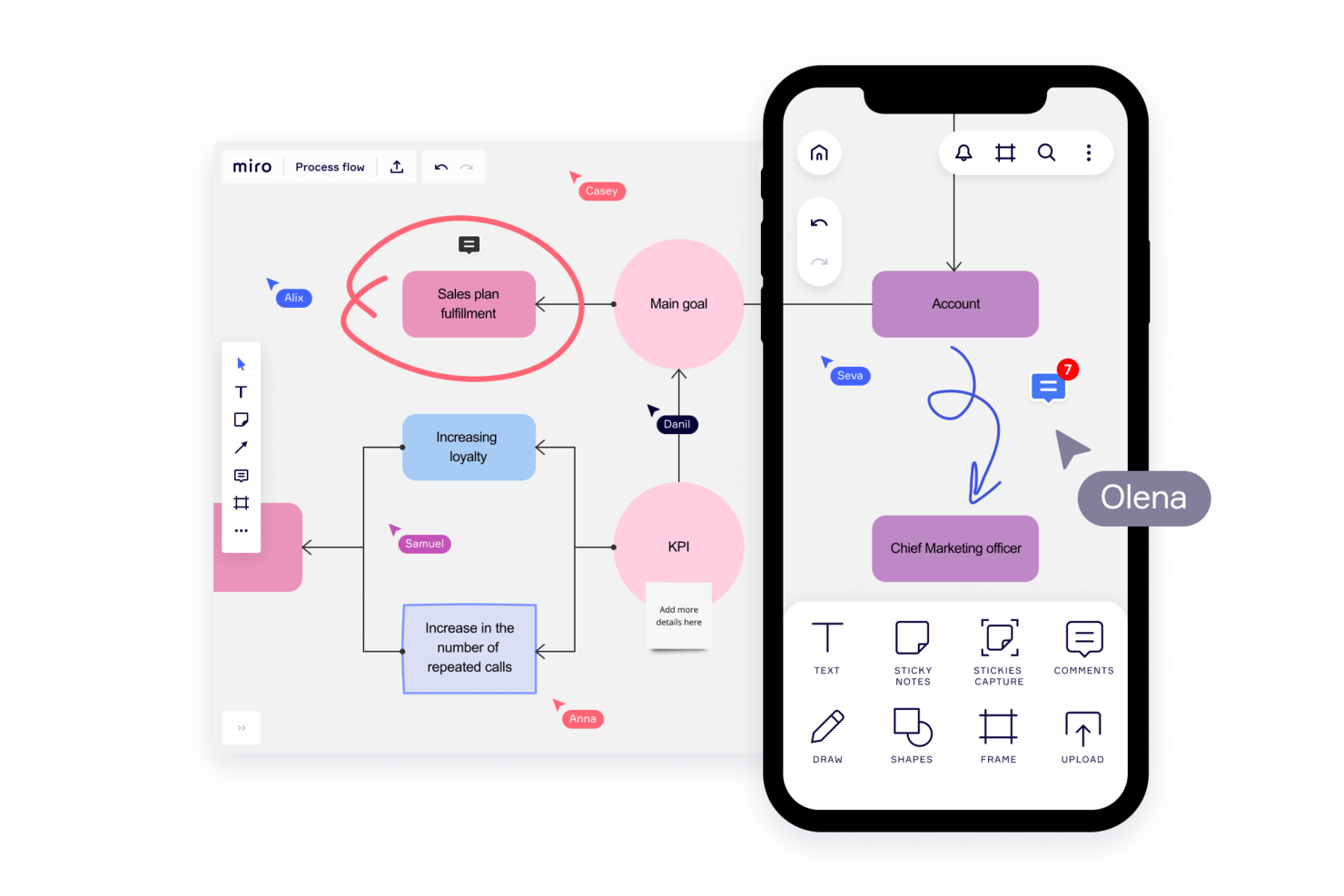
Miro is a collaborative online whiteboard and project management software with over 1,000 templates including mind maps, Kanban boards, Gantt charts, product wireframes, research boards, and flowcharts.
Why I Picked Miro: Miro’s visual platform is built for Agile project management with a wide range of features supporting iterative processes. Its two-way integration with Jira and Azure helps maintain a clear overview of project progress and task dependencies. The planner widget and dependencies app also simplify task organization and visibility, allowing teams to visualize tasks by sprint, status, or team, and how each task is interlinked. Additionally, the platform fosters collaboration and real-time feedback through features like built-in video conferencing, voting, stickies, and comments.
Miro Standout Features & Integrations
Features include AI capabilities for tasks like clustering sticky notes and fleshing out brainstorm ideas. The tool also offers an extensive library of common diagram types and other templates for specific use cases like project planning, kickoffs, and timelines.
Integrations include Confluence, monday.com, Zoom, Figma, Asana, Microsoft Teams, Jira, Slack, Google Drive, Box, Airtable, Notion, Azure, and Webex. Some integrations are limited to paid plans only.
Pros and Cons
Pros:
- Free forever plan available
- Intuitive and easy setup
- Built-in communication features for streamlined collaboration
Cons:
- Visitor/guest accounts locked to paid plans only
- Zooming can be jumpy on larger projects
New Product Updates from Miro
Miro Adds Japan Data Residency for Enterprise Customers
Miro has introduced Japan data residency for enterprise customers, offering in-region storage for production data, backups, and metadata, plus in-region compute infrastructure. For more information, visit Miro's official site.

Aha!
Best for strategy-to-sprint delivery alignment
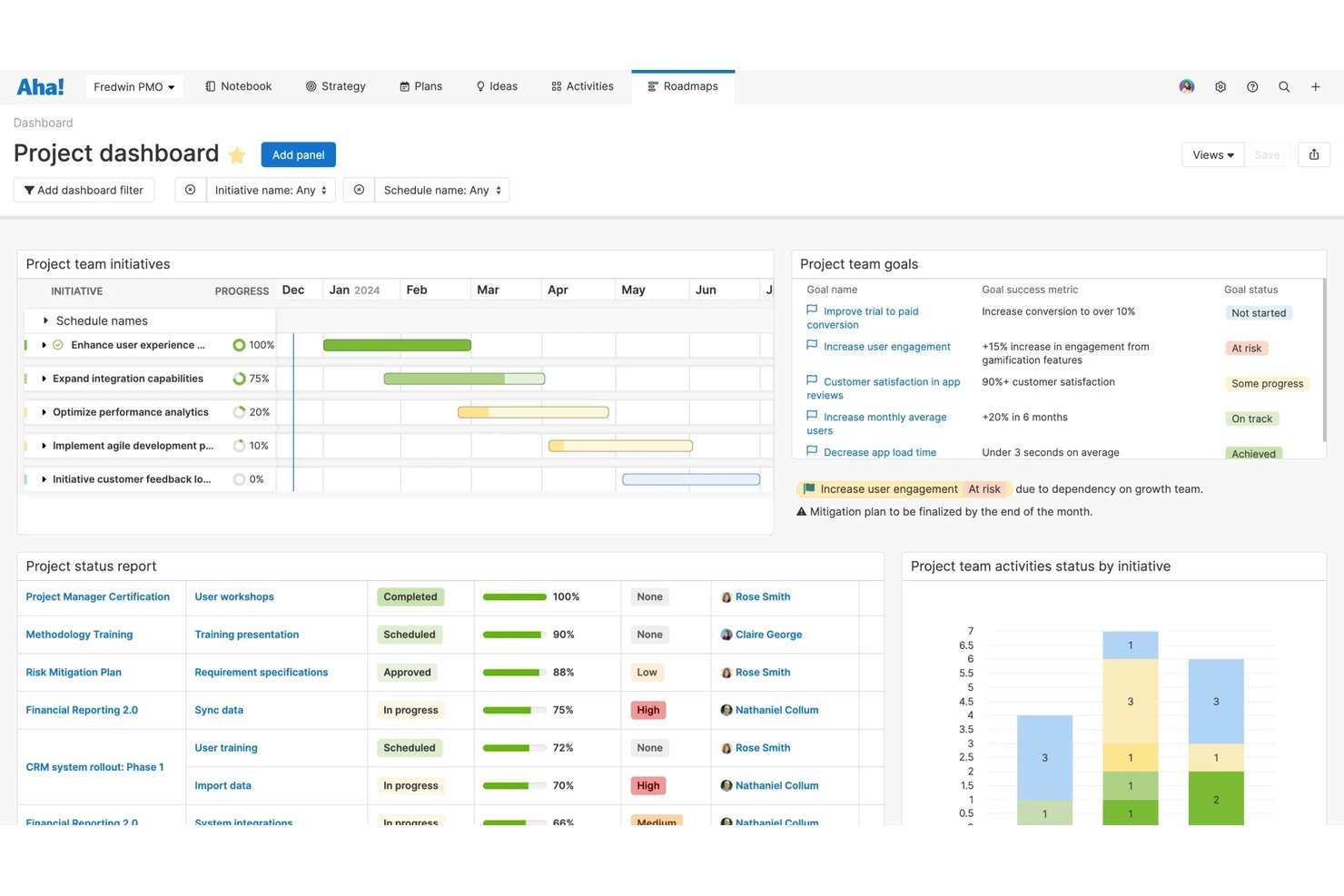
Aha! Develop is an agile project management tool that covers sprint planning, backlog management, Kanban and Scrum boards, dependency tracking, and cross-team coordination across Scrum, Kanban, SAFe, and hybrid frameworks.
Who Is Aha! Best For?
Aha! Develop is a strong fit for product and engineering teams that need sprint execution to stay visibly connected to strategy, roadmaps, and business goals.
Why I Picked Aha!
I picked Aha! as one of the best because it's the only tool on my list where sprint work is visibly tied to the goals and roadmap features that drove it in the first place. Status changes in Aha! Develop sync automatically up to Aha! Roadmaps, so leadership always sees live delivery progress without anyone writing a status report. I also like how program increments generate aligned sprints across every team in a release train, which is a genuine edge for teams running SAFe at scale.
Aha! Key Features
- Customizable Kanban board: Add custom status columns, set WIP limits per column, apply swimlanes by class of service or team member, and save filtered views.
- Developer tool integrations: Link stories to branches and pull requests in GitHub, GitLab, Bitbucket, and Azure DevOps, with automatic status updates when a PR merges.
- Sprint retrospective report: Track retrospective outcomes with follow-up actions assigned by owner and due date directly within the tool.
- AI-assisted estimation: Generate first-pass story estimates based on historical data using the built-in AI assistant, Elle.
Aha! Integrations
Aha! Develop offers 35+ integrations, including GitHub, GitLab, Bitbucket, Azure DevOps, Jira, CircleCI, and GitHub Actions. It also provides a REST API for custom integrations and supports AI coding agents such as GitHub Copilot.
Pros and Cons
Pros:
- Reviewers praise responsive, knowledgeable customer support
- Aligns SAFe teams through shared program increments
- Links sprint work to strategy and roadmaps
Cons:
- Initial setup takes planning across complex workflows
- Advanced agile reports require an upgraded plan

Jira
Best for scrum boards
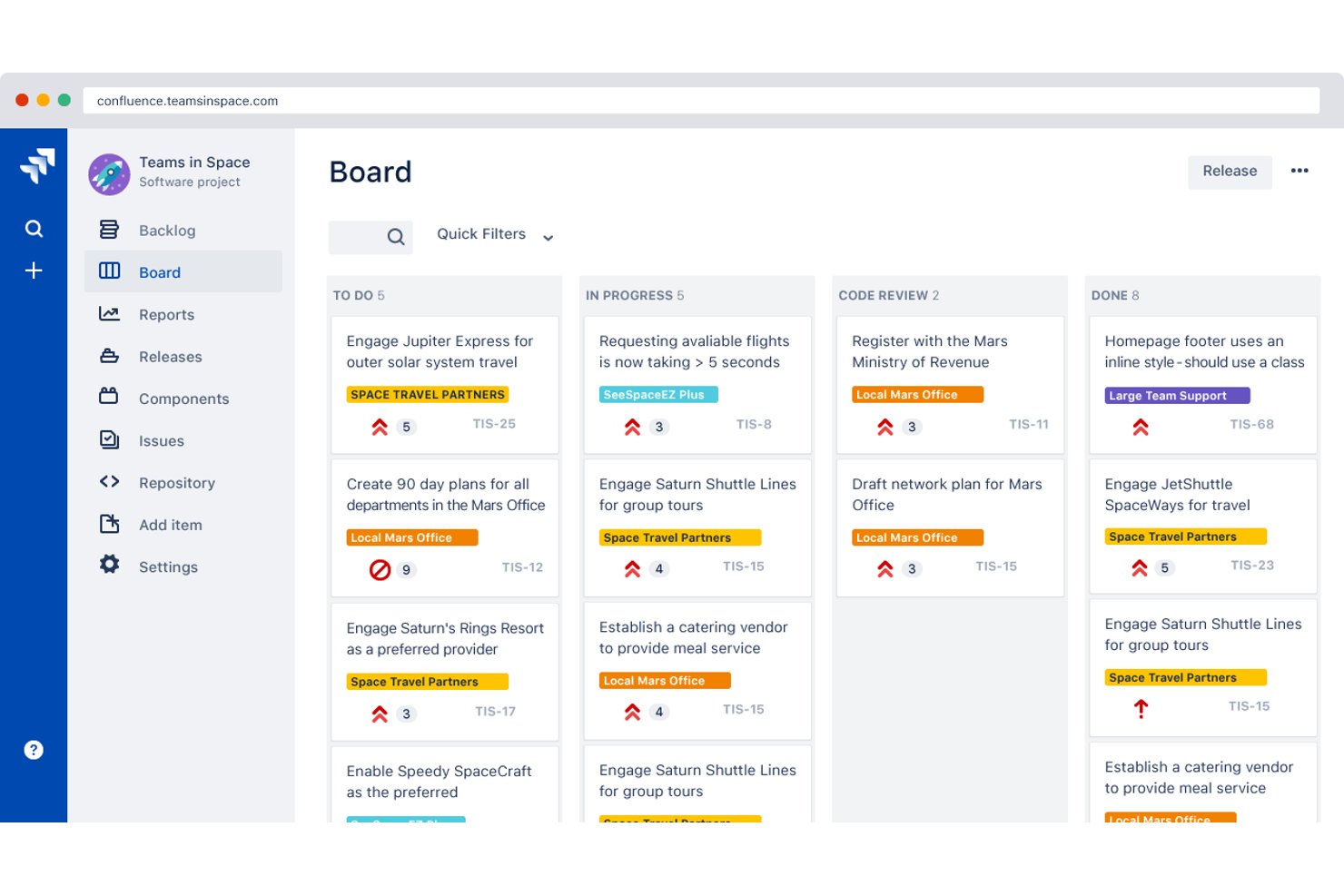
Jira is an agile project management platform that combines scrum boards, kanban boards, sprint planning, backlog management, and agile reporting into a deeply configurable toolset built for software development teams.
Who Is Jira Best For?
Jira is a strong fit for scrum masters and software development teams who need deep sprint planning, backlog management, and agile reporting built into one platform.
Why I Picked Jira
Jira earns its spot on my shortlist because its scrum boards are genuinely the most mature I've used, built around the full sprint lifecycle rather than bolted on as an afterthought. I love how the backlog feeds directly into sprint planning, with velocity data and burndown charts available out of the box, so scrum masters can run planning sessions without exporting anything. The Release Hub is particularly useful in practice: it flags broken builds and open pull requests tied to a release, giving teams a real-time picture of what's actually ready to ship.
Jira Key Features
- Customizable agile boards: Scrum and Kanban boards support configurable columns, swimlanes, and WIP limits to match your team's workflow.
- JQL filtering: Jira Query Language lets you build custom searches that feed boards, dashboards, and cross-project views.
- Automation rules engine: A no-code rule builder with hundreds of templates lets admins trigger actions across single or multiple projects.
- Developer tool integration: Work items surface linked branches, commits, pull requests, and build status directly from connected dev tools like Bitbucket.
Jira Integrations
Jira integrates with Confluence, Bitbucket, Slack, Microsoft Teams, Google Workspace, Zoom, Figma, and GitHub. Its Marketplace offers 3,000+ apps, and rich APIs support custom integrations.
Pros and Cons
Pros:
- Release views surface build and pull-request blockers
- Backlog grooming feeds directly into sprint planning
- Sprint reports connect velocity, burndown, and planning
Cons:
- Retrospective and async standup tools require add-ons
- Dense menus complicate onboarding for new teams

Zenhub
Best for GitHub-native agile sprint tracking
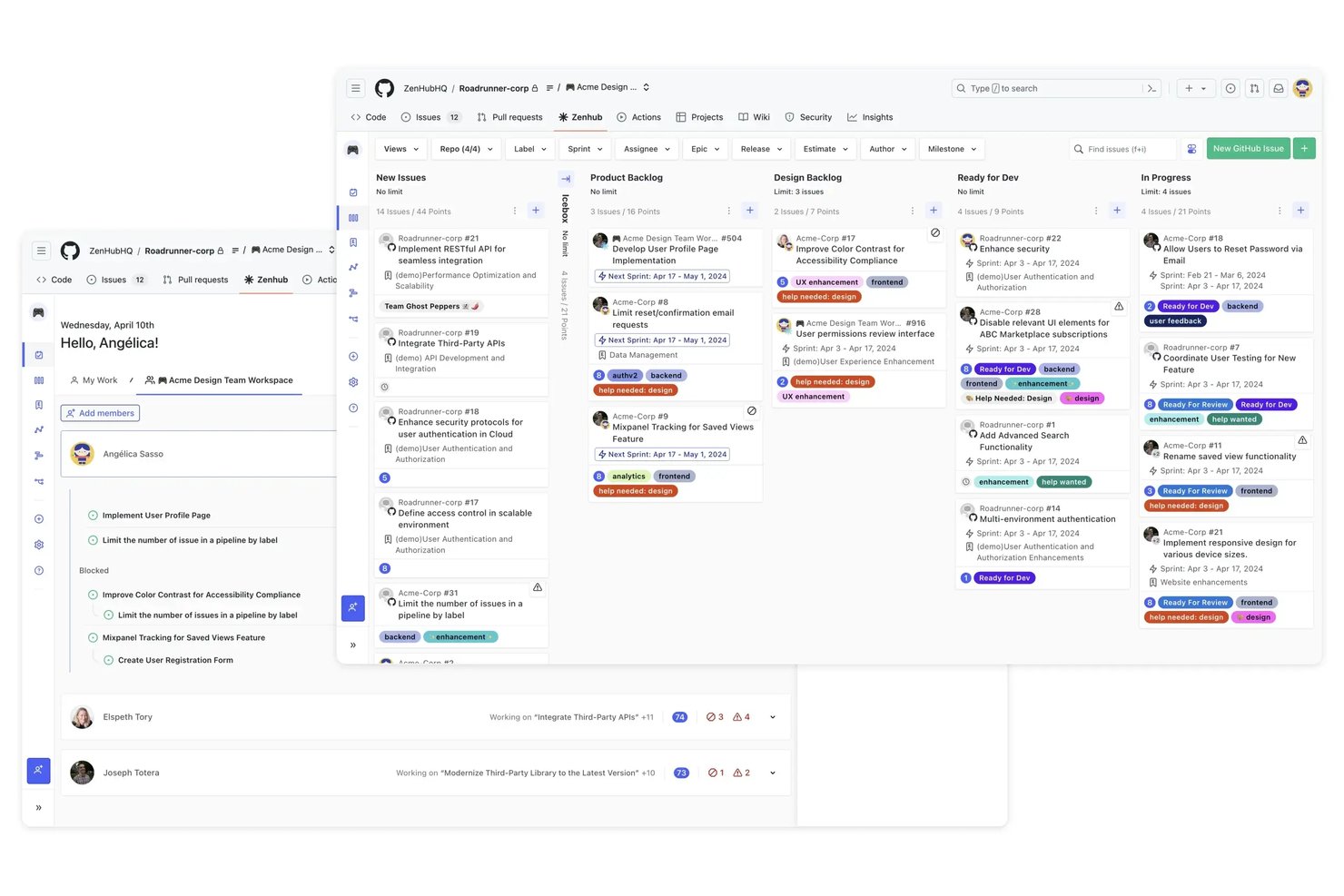
Zenhub is a GitHub-native agile project management tool that combines sprint planning, Kanban boards, backlog management, and agile reporting within a GitHub-integrated environment.
Who Is Zenhub Best For?
Zenhub is a strong fit for software development teams that live in GitHub and want agile sprint tracking without switching tools.
Why I Picked Zenhub
Zenhub earns its spot on my shortlist because it's the only agile tool that lives entirely inside GitHub rather than alongside it. I love how recurring sprints fill themselves from the prioritized backlog using your team's average velocity, so sprint planning becomes a quick review rather than a manual rebuild every two weeks. The multi-repo Kanban board lets engineering leads track issues across several repositories on a single board, with PRs linked directly to the relevant issues, keeping code and project context together without any copy-pasting.
Zenhub Key Features
- Planning Poker: Run anonymous, asynchronous estimation sessions where story point votes are applied automatically once the team reaches consensus.
- Five-level work hierarchy: Organize work across Initiatives, Projects, Epics, Issues, and Sub-tasks, built on native GitHub sub-issues with a rules engine to enforce structure.
- AI sprint review summary: Zenhub auto-generates a written summary of closed sprint issues, ready to use as a demo agenda or sprint record.
- Portfolio roadmap: View and switch between portfolio-level and project-level timelines by month, quarter, or year, with velocity-based deadline risk indicators.
Zenhub Integrations
Zenhub offers native integrations with GitHub and Slack, while Enterprise adds Figma, Loom, and Miro. A public GraphQL API and MCP server support custom integrations with Claude, Cursor, Gemini CLI, and Windsurf.
Pros and Cons
Pros:
- Agile reports cover velocity and cycle time
- Planning poker supports async estimation
- Automated sprints use team velocity
Cons:
- Reports can be unclear for decision-making
- Large boards can lag or glitch
Best for scaling agile across SAFe enterprise teams
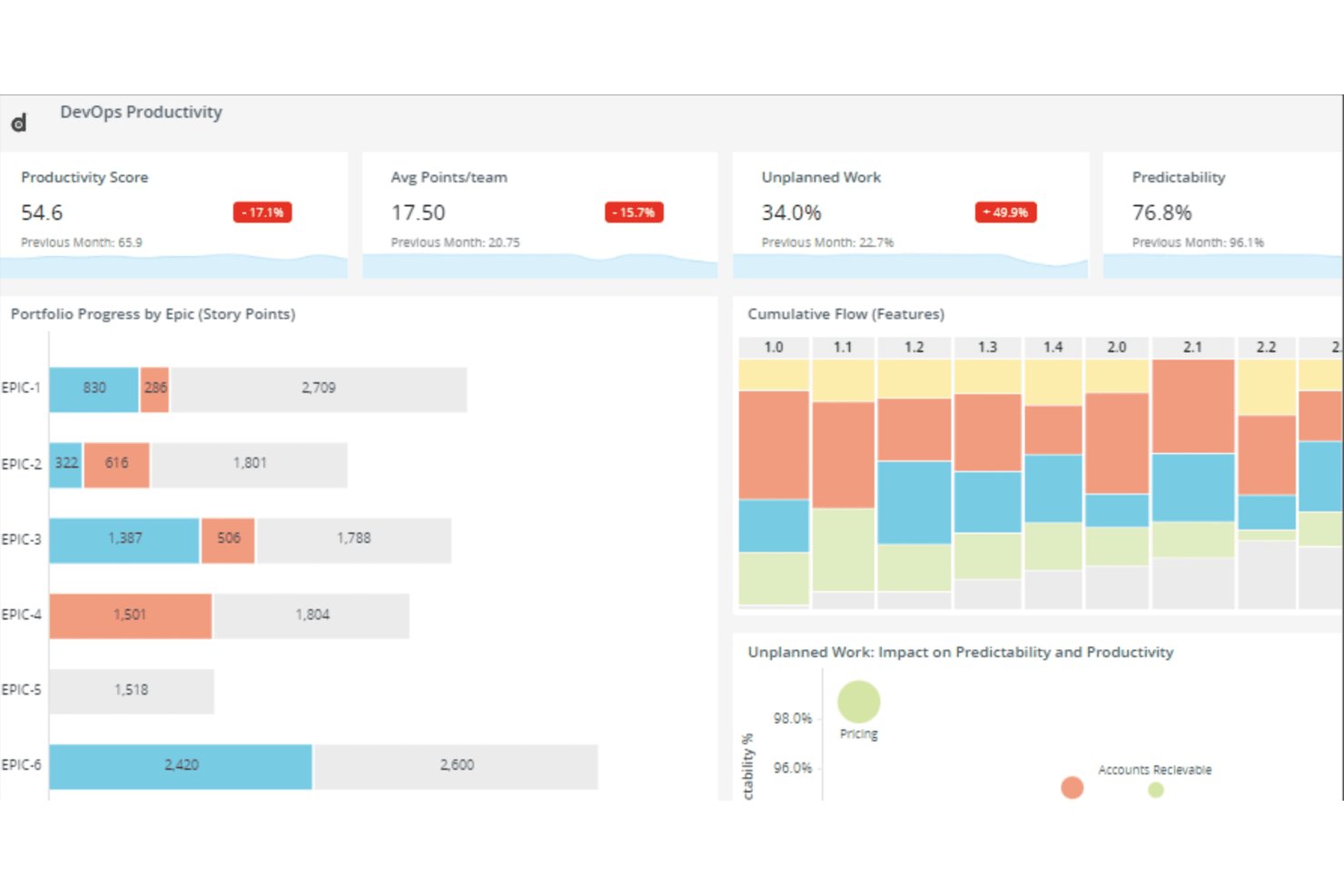
Digital.ai Agility is an enterprise agile planning platform that supports sprint planning, backlog management, dependency tracking, cross-team coordination, and reporting across Scrum, Kanban, SAFe, and other agile frameworks.
Who Is Digital.ai Agility Best For?
Digital.ai Agility is a strong fit for enterprise teams running SAFe at scale, particularly organizations with multiple Agile Release Trains that need portfolio-to-team traceability in one platform.
Why I Picked Digital.ai Agility
I picked Digital.ai Agility as one of the best because it's built from the ground up for SAFe at scale, with native support across all four SAFe levels: Portfolio, Development Value Stream, Program, and Team. I love how the Dependency Board color-codes cross-ART dependencies in real time, so I can spot a broken dependency the moment it turns red during PI planning rather than discovering it mid-sprint. The PlanningRooms make distributed PI planning genuinely workable, supporting live and async participation across multiple Agile Release Trains simultaneously.
Digital.ai Agility Key Features
- Rooms 2 sprint workspace: Combines sprint planning, execution, testing, and retrospectives in a single unified team view.
- Estimably planning poker: A built-in planning poker tool for collaborative story estimation, included in all hosted editions.
- Storyboard WIP limits: Column-level work-in-progress limits with aging indicators that flag violations at configurable thresholds.
- Sage AI story breakdown: AI-assisted tools that automatically break portfolio items and epics down into stories and work items.
Digital.ai Agility Integrations
Digital.ai Agility supports 70+ marketplace integrations, including Jira Software, Azure DevOps, GitHub, GitLab, Zendesk, ServiceNow, Salesforce, and OpenText ALM/QC. Its Sync API and open integration framework support custom connections.
Pros and Cons
Pros:
- Sprint planning and retrospectives share one workspace
- Color-coded dependencies clarify cross-team risks
- Native SAFe support across four levels
Cons:
- Report building and exports feel cumbersome
- Large backlogs can slow performance
Diğer Çevik Proje Yönetimi Yazılımları
Bunlar, en iyi çevik proje yönetimi araçları listeme giremeyen ancak yine de değerlendirmenize değer birkaç seçenektir.
- Jira Align
For linking strategy to team-level delivery
- IBM Targetprocess
For enterprise portfolio-to-team agile visibility
- Smartsheet
For customizability
- MeisterTask
For ideation and task management
- ClickUp
For tracking sprint projects
- GitLab
For dev-to-deploy agile traceability
- FigJam
For project brainstorming
- Linear
For dev-team sprint tracking with Git sync
- Shortcut
For sprint and iteration management
- Azure Boards
For dev-team agile in the Microsoft stack


İlgili Proje Yönetimi Yazılımı İncelemeleri
Aradığınızı hâlâ bulamadıysanız, test edip değerlendirdiğimiz diğer ilgili araçlara göz atın:
- Proje Yönetimi Yazılımı
- Çevik Takip Araçları
- Kaynak Yönetimi Yazılımı
- İş Akışı Otomasyonu Yazılımı
- Zaman Takibi Yazılımı
- Görev Yönetimi Yazılımı
- İş Birliği Araçları
- Yaratıcı Proje Yönetimi Yazılımı
- Çevrim İçi Proje Yönetimi Araçları
- Girişimler İçin Proje Yönetimi Yazılımı
How I Evaluate AI Agile Project Management Tools
I only include tools where the AI goes beyond a chatbot bolted onto a task board—it needs to save real time in how teams plan, run, and improve their sprints. I split my evaluation into core functionality every tool must offer to make the list and differentiating factors that set one vendor apart from another.
Core Functionality (Table Stakes For This List)
When I'm selecting tools for my list, I rank each one on a scale from 0 (does not offer the functionality) to 5 (excels in this area) for each core functionality listed below. Then, I calculate the tool's total score into a percentage. Each tool needs to achieve a minimum total score of 65% to be considered for inclusion.
- AI-Powered Backlog Management: I look for tools that use AI to generate, prioritize, and refine user stories and epics from plain-language inputs rather than forcing manual entry.
- Agile Framework Support: The tool should natively support Scrum and Kanban at minimum, with sprint boards, backlogs, burndown charts, and velocity tracking built in.
- AI Sprint Planning & Estimation: I evaluate how well the AI recommends sprint scope and estimates story points based on team capacity and past velocity data.
- Predictive Analytics & Forecasting: I check whether the tool surfaces AI-driven delivery forecasts, risk flags, and bottleneck alerts across sprints and releases.
- AI Workflow Automation: Routine agile tasks like status updates, standup summaries, and task routing should be automated by AI rather than relying on manual rules.
- Integrations & Collaboration: Tools need to connect with the dev stack teams already use—GitHub, Slack, Jira, CI/CD pipelines—and support real-time collaboration.
Once I have a list of tools that meet this criteria, I consider what sets each platform apart.
Differentiating Factors (What Sets Vendors Apart)
Here's how I compare and contrast different vendors:
Standout Features
Dependency intelligence is a big differentiator—I look for tools that use AI to map cross-team dependencies and flag risks before they derail a sprint. Natural language querying also stands out. Being able to ask "what's blocking the checkout feature?" and get a real answer saves time over digging through boards manually. I also evaluate whether a tool can join standups or planning calls, extract action items, and push updates directly to the backlog.
Beyond Features
AI model transparency matters—I check whether a vendor explains how its AI generates recommendations and whether teams can opt out of model training on their data. Scalability is another key factor, especially for orgs running SAFe or LeSS across multiple squads. I look for portfolio-level roll-ups and cross-team reporting that hold up at scale. Time-to-value also counts: migration tools and prebuilt agile templates help teams moving off legacy platforms get productive fast without a lengthy onboarding cycle.
Çevik Proje Yönetimi Yazılımı Nasıl Seçilir?
Çevik proje yönetimi yazılımını kısa listeye alırken, denerken ve seçerken aşağıdakileri göz önünde bulundurun:
- Hangi sorunu çözmeye çalışıyorsunuz? Yazılımın sağlaması gereken özellikleri ve işlevleri netleştirmek için, doldurmaya çalıştığınız çevik proje yönetimi yazılımı özellik boşluğunu belirleyerek başlayın.
- Kimlerin kullanması gerekecek? Maliyetleri ve gereksinimleri değerlendirmek için yazılımı kimlerin kullanacağını ve kaç lisansa ihtiyaç duyacağınızı göz önünde bulundurun. Yazılımı yalnızca proje yöneticilerinizin mi yoksa tüm kuruluşun mu kullanacağını değerlendirin. Herkes için kullanım kolaylığına mı yoksa ileri düzey kullanıcılarınız için hıza mı öncelik vereceğinizi düşünün.
- Hangi diğer araçlarla birlikte çalışması gerekiyor? Hangi araçları değiştirdiğinizi, hangi araçları kullanmaya devam edeceğinizi ve muhasebe, CRM veya İK yazılımı gibi hangi araçlarla entegre olmanız gerekeceğini netleştirin. Araçların birbiriyle entegre olması gerekip gerekmediğine veya birden fazla aracı tek bir bütünleşik çevik proje yönetimi aracıyla değiştirip değiştiremeyeceğinize karar vermeniz gerekecek.
- Hangi sonuçlar önemli? Başarılı kabul edilmesi için yazılımın sağlaması gereken sonucu, hangi yetkinliği kazanmak istediğinizi, neyi iyileştirmek istediğinizi ve başarıyı nasıl ölçeceğinizi göz önünde bulundurun. Örneğin sonuç, performans hakkında daha fazla görünürlük elde etme becerisi olabilir.
- Kuruluşunuz içinde nasıl çalışır? Yazılım seçimini iş akışlarınız ve teslimat metodolojinizle birlikte değerlendirin. Neyin iyi çalıştığını ve hangi alanların ele alınması gerektiğini değerlendirin. Her işletme farklıdır—popüler aracın kuruluşunuzda işe yarayacağını varsaymayın.
Çevik Proje Yönetimi Yazılımındaki Eğilimler
Belirlediğim ve gelecekte çevik planlama araçlarının gelişimini şekillendirmeye devam edeceğine inandığım birkaç yeni eğilim aşağıda yer alıyor.
- Mobil optimizasyon ve erişilebilirlik: Mobil optimizasyon ve geliştirilmiş erişilebilirlik özelliklerine yönelik eğilim, çevik proje yönetimi araçlarının hareket hâlindeyken tamamen işlevsel olmasına yönelik artan ihtiyacı gösteriyor. Bu eğilim, proje bilgilerine, görevlere ve iş birliği araçlarına her zaman ve her yerden erişimi destekleyen yazılımlara duyulan ihtiyacı artıran uzaktan ve hibrit çalışma düzenlerinin yaygınlaşmasından kaynaklanıyor.
- Otomasyon ve yapay zekâ destekli özellikler: Araçlar, otomatik görev atamaları ve yapay zekâ tabanlı risk değerlendirmesi gibi daha fazla otomasyon ve yapay zekâ destekli işlev sunuyor. Bu özellikler, manuel çabayı azaltmayı, proje tahminlerindeki doğruluğu artırmayı ve kaynak yönetimini optimize etmeyi amaçlıyor. Bu durum, proje süreçlerini kolaylaştırmak için teknolojiden yararlanma eğiliminin altını çiziyor.
- Kodsuz/düşük kodlu özelleştirme: Çevik planlama yazılımı geliştirme sürecinde kodsuz ve düşük kodlu platformların yükselişi önemli bir eğilimdir. Bu platformlar, kullanıcıların kapsamlı programlama bilgisi olmadan iş akışlarını özelleştirmesine, uygulamalar oluşturmasına veya süreçleri otomatikleştirmesine olanak tanır. Bu durum, çevik proje yönetimi araçlarını daha geniş bir kullanıcı kitlesi için daha uyarlanabilir ve erişilebilir hâle getirme yönündeki değişimi yansıtır.
- Gelişmiş güvenlik ve uyumluluk özellikleri: Siber güvenlik tehditleri daha karmaşık hâle geldikçe, çevik proje yönetimi yazılımlarında gelişmiş güvenlik özelliklerine yönelik belirgin bir eğilim görülüyor. Buna gelişmiş veri şifreleme, erişim denetimleri ve uluslararası standartlar ile düzenlemelere uyumluluk dâhildir.
Çevik Proje Yönetimi Yazılımı Nedir?
Çevik proje yönetimi yazılımı, çevik yöntemleri kullanan projeleri (esnekliğe ve değişime hızlıca uyum sağlamaya odaklanan çalışma biçimlerini) planlamanıza, izlemenize ve yönetmenize yardımcı olan bir araçtır. Yazılım geliştiricileri, ürün yöneticileri ve tasarımcılar gibi ekipler; çalışmaları sprint adı verilen kısa döngülere bölmek, görevleri izlemek ve düzenli kalmak için bu tür yazılımları kullanır.
Öncelikler değiştiğinde daha iyi ekip çalışması, daha hızlı güncellemeler ve herkesin gelişmelerden haberdar olması için bu yazılımı yararlı bulacaksınız. Ayrıca, güçlü bir geri bildirim döngüsünü (çevikliğin temel ilkelerinden biri) sürdürmek açısından kritik önem taşıyan paydaşlar ve müşterilerle iletişim hâlinde kalmanıza da yardımcı olabilir.
Çevik Proje Yönetimi Yazılımının Özellikleri
İhtiyaçlarınıza en uygun çevik araçları seçerken aramanız gereken en kritik özellikler aşağıda yer alıyor.
- Gerçek zamanlı iş birliği: Ekip üyelerinin görevler üzerinde gerçek zamanlı olarak iletişim kurmasına ve iş birliği yapmasına olanak tanır. Bu özellik, tüm ekip üyelerinin aynı doğrultuda ilerlemesini sağlayarak ekip çalışmasını geliştirir ve karar alma sürecini hızlandırır.
- Esnek görev yönetimi: Görevleri hızlı bir şekilde oluşturmak, önceliklendirmek ve güncellemek için araçlar sunar. Görevleri ve öncelikleri anında ayarlayabilme olanağı, çevik ekiplerin değişen proje gereksinimlerine ve müşteri geri bildirimlerine etkili bir şekilde yanıt vermesini sağlar.
- Kullanıcı hikâyeleri ve iş listeleri: Ekiplerin ürün işlevlerini kullanıcı hikâyeleri biçiminde kaydetmesine ve bunları bir iş listesinde yönetmesine olanak tanır. Bu özellik, projenin önceliklendirilebilen ve yinelemeli olarak ele alınabilen yönetilebilir birimlere ayrılması açısından önemlidir; böylece en değerli özellikler önce geliştirilir.
- Sprint planlama araçları: Çalışmaların sprintler hâlinde düzenlenmesini kolaylaştırarak ekiplerin yinelemeleri etkili bir şekilde planlamasını sağlar. Sprint planlama araçları, belirli bir zaman diliminde hangi çalışmaların tamamlanacağını tanımlamak için önemlidir; bu da beklentilerin yönetilmesini ve ilerlemenin izlenmesini kolaylaştırır.
- İş bitirme grafikleri: Kalan iş miktarını zamana göre görsel olarak temsil eder. İş bitirme grafikleri, sprintlerin ve sürümlerin ilerlemesini izlemek açısından hayati önem taşır; böylece ekipler son teslim tarihlerine yetişmek için çalışma hızlarını ve önceliklerini ayarlayabilir.
- Kanban panoları: Görevlerin farklı aşamalardaki ilerlemesini izlemek için görsel bir iş akışı yönetim sistemi sunar. Kanban panoları, çalışmaları görselleştirmede, devam eden iş miktarını sınırlamada ve görevlerin sorunsuz bir şekilde ilerlemesini sağlamada önemli bir rol oynar; bu da sürekli teslimi destekler.
- Sürekli entegrasyon/sürekli teslim (CI/CD) araçları: Test ve dağıtım süreçlerini otomatikleştirmek için CI/CD işlem hatlarıyla entegre olur.
- Geri bildirim döngüleri: Paydaşlardan hızlı bir şekilde geri bildirim toplanmasına ve bu geri bildirimlerin projeye dâhil edilmesine olanak tanır. Hızlı ve verimli geri bildirim döngüleri, çevik ekiplerin değişikliklere uyum sağlaması ve kullanıcı girdilerine dayanarak ürünü sürekli geliştirmesi için gereklidir.
- Raporlama ve analiz: Proje sağlığını ve ekip performansını izlemek için kapsamlı raporlama araçları ve analiz özellikleri sunar. Bu özellik, proje ilerlemesine ilişkin içgörüler sağlayarak ekiplerin veriye dayalı kararlar almasına olanak tanır.
- Erişim denetimleri ve izinler: Farklı kullanıcılar için erişim haklarının ve izinlerin yönetilmesine olanak tanır. Uygun erişim denetimleri, hassas bilgilerin korunmasını ve ekip üyelerinin etkili bir şekilde çalışmak için ihtiyaç duydukları verilere erişebilmesini sağlar.
Çevik Proje Yönetimi Yazılımının Faydaları
Çevik planlama uygulamalarının kullanıcılara ve kuruluşlara sunduğu beş temel avantaj şunlardır:
- Artan esneklik: Çevik proje yönetimi için en iyi araçlar, ekiplerin değişikliklere hızlı ve verimli bir şekilde uyum sağlamasına olanak tanır. Bu esneklik, işletmelerin projeyi rayından çıkarmadan pazar değişikliklerine, müşteri geri bildirimlerine ve öngörülemeyen zorluklara yanıt verebilmesini sağlar.
- Gelişmiş iş birliği: Bu araçlar, konumlarından bağımsız olarak ekip üyeleri arasında gerçek zamanlı iletişim ve iş birliği için platformlar sunar. Gelişmiş iş birliği; daha iyi problem çözme, daha yenilikçi fikirler ve ekip üyeleri arasında daha güçlü bir birlik duygusu sağlayarak projelerin başarısına katkıda bulunur.
- Geliştirilmiş proje görünürlüğü: Panolar, iş bitirme grafikleri ve Kanban panoları gibi özellikler sayesinde paydaşlar, proje ilerlemesine ilişkin net bir genel bakış elde eder. Geliştirilmiş proje görünürlüğü; bilinçli kararlar almanıza, kaynakların verimli bir şekilde tahsis edilmesini sağlamanıza ve herkesin proje hedefleriyle uyum içinde kalmasına yardımcı olur.
- Daha kısa pazara sunma süresi: Sürekli entegrasyon ve teslimi kolaylaştıran en iyi çevik yazılımlar, işletmelerin ürünlerinin daha küçük artımlarını daha hızlı yayımlamasını sağlar. Bu, değeri daha sık sunarak müşteri memnuniyetini artırır ve pazara sunma süresini hızlandırarak işletmelerin rekabette öne geçmesine olanak tanır.
- Daha yüksek ürün kalitesi: Sürekli geri bildirim döngüleri ve düzenli yinelemeler, sorunların proje yaşam döngüsünün erken aşamalarında belirlenip ele alınması anlamına gelir. Bu durum ürün kalitesini artırır, nihai ürünün müşteri ihtiyaçlarıyla yakından örtüşmesini ve piyasaya sürülmeden önce kapsamlı bir şekilde test edilmesini sağlar.
Çevik Proje Yönetimi Yazılımı Maliyetleri ve Fiyatlandırması
İhtiyaçlarınıza uygun aracı ararken karşılaşabileceğiniz tipik fiyatlandırma planlarının dökümü aşağıda yer almaktadır:
| Plan Türü | Ortalama Fiyat | Yaygın Özellikler |
|---|---|---|
| Ücretsiz | $0 | Temel proje yönetimi, sınırlı kullanıcı sayısı, temel iş birliği araçları |
| Başlangıç/Temel | $10-20 kullanıcı başına/ay | Geliştirilmiş proje takibi, ek kullanıcılar, temel entegrasyonlar |
| Standart/Orta Seviye | $20-50 kullanıcı başına/ay | Gelişmiş raporlama, sınırsız proje, öncelikli destek, daha fazla entegrasyon |
| Premium/Gelişmiş | $50-100 kullanıcı başına/ay | Portföy yönetimi, özel alanlar ve iş akışları, gelişmiş analiz, tam entegrasyon seçenekleri |
| Kurumsal | Özel fiyatlandırma | Kapsamlı özellik seti, özel destek, işe alıştırma ve eğitim, kurumsal düzeyde güvenlik |