

2026 İçin İncelenen En İyi 10 Ajans Yönetim Sistemi

10 En İyi Ajans Yönetim Sistemleri Listesi


En iyi ajans yönetim sistemleri, ekip verimliliğini artırmak ve sonuçların zamanında alınmasını sağlamak için proje, kaynak ve finans yönetimini merkezileştirir. Bu işlevler için birden fazla araç kullanmak; müşteri projelerinin, kaynakların ve bütçelerin yönetimini dağınık hâle getirebilir ve bu durum teslim tarihlerinin kaçırılmasına, kapsamın kontrolsüz biçimde genişlemesine ve finansal tutarsızlıklara yol açabilir.
Ajans operasyonlarında 20 yıllık deneyime ve yazılım incelemecisi olarak on yılı aşkın tecrübeye sahibim. Bu süre boyunca çeşitli ajans yönetim sistemlerini değerlendirdim ve uyguladım. Bu deneyim, doğru yazılımın verimliliği nasıl artırabileceğini, hataları nasıl azaltabileceğini ve müşteri ilişkilerini nasıl geliştirebileceğini gösterdi.
20'den fazla farklı aracı test ettikten sonra, mevcut en güvenilir seçeneklerin bir listesini hazırladım. Ekibiniz için en uygun seçeneği belirlemenize yardımcı olmak amacıyla temel özellikleri, fiyatlandırmayı ve daha fazlasını öne çıkardım.
Why Trust Our Software Recommendations
Our team has been testing and reviewing software since 2012. As project managers ourselves, we know how difficult—and important—it is to choose the right software.
For this guide, we evaluated tools using hands-on testing and independent research, scoring tools using our selection criteria. We also draw on insights from industry thought leaders and practicing project management experts.
Our reviews reflect our human editorial judgment, not a sales pitch.
Expert reviewers:
Ajans Yönetim Sistemleri Karşılaştırma Tablosu
Bu karşılaştırma tablosu, en iyi ajans yönetim sistemi aracı seçimlerimdeki fiyatlandırma ayrıntılarını özetlemektedir:
| Tool | Starting Price | Website | |
|---|---|---|---|
| Best for client delivery and creative review | 4.3 out of 5 | $10/user/month Free plan + 14-day trial + demo available | Book Demo |
| Best all-in-one agency management system with sales and invoicing tools | 4.6 out of 5 | $10/user/month 14-day free trial | Book Demo |
| Best depth of functionality and reporting | 4.7 out of 5 | $17/month Free demo available | Website |
| Best for end-to-end work management | 4.5 out of 5 | $17/user/month 14-day free trial | Book Demo |
| Best for AI-powered workflows and resourcing | 4.6 out of 5 | Pricing upon request Not available | Book Demo |
| Best customizable advertising agency software | 4.6 out of 5 | $9/user/month Free plan + 14-day trial available | Book Demo |
| Best for full lifecycle service delivery | 4.2 out of 5 | Pricing upon request Not available | Website |
| Best for agencies managing HR and projects | — | $12/user/month Free plan + 14-day free trial | Website |
| Best agency management system for multiple project views | 4.5 out of 5 | $5/user/month Free plan + 14-day trial + demo available | Website |
| best for enabling client collaboration | 4.4 out of 5 | $9.99/user/month Free plan + 14-day free trial + free demo available | Website |
En İyi Ajans Yönetim Sistemleri İncelemeleri
İşte bu en iyi 10 listesinde yer alan ajans yönetim sistemlerinin her birinin kısa açıklaması.

Wrike
Best for client delivery and creative review
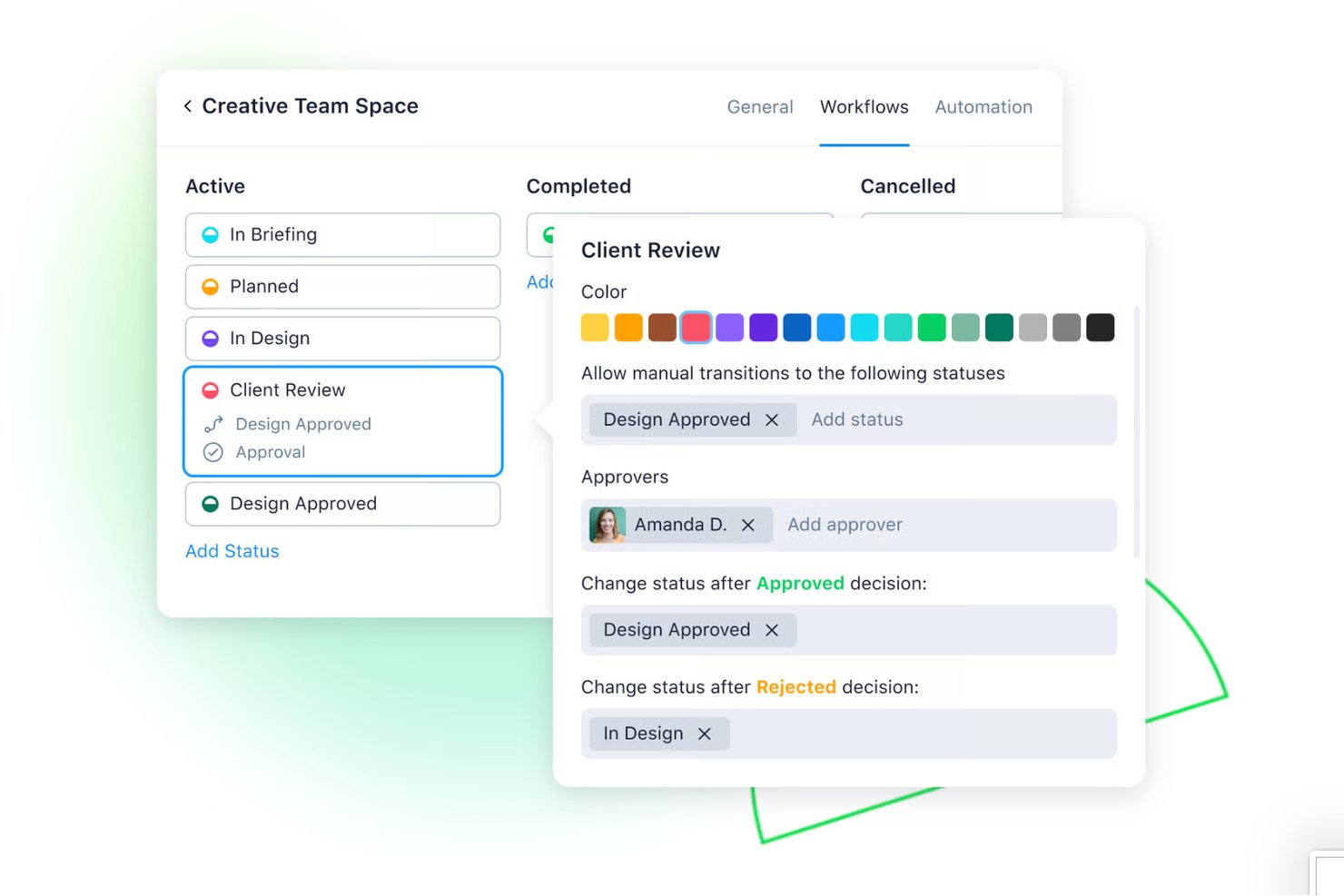
Wrike is a work management platform for agencies that combines project planning, creative review and approval, client collaboration, resource management, and workflow automation across concurrent client engagements.
Who Is Wrike Best For?
Wrike is a strong fit for creative and marketing agencies that need to manage concurrent client engagements, from brief intake and resource planning through to creative review and stakeholder approval.
Why I Picked Wrike
I picked Wrike as one of the best because it handles the full arc of client delivery, from brief intake through creative review and final approval, in a single workspace. I particularly like the proofing feature, which lets my team mark up and approve 30+ file types, including video, directly inside tasks, with a structured approval chain and a recorded decision trail. Guest approvals mean clients and freelancers can participate in review rounds without needing a paid seat.
Wrike Key Features
- Dynamic request forms: Capture client briefs through customizable intake forms that automatically generate a task, project, or blueprint and route it to the right team.
- Workload charts: View and rebalance team capacity across concurrent client engagements using drag-and-drop workload management and effort allocation.
- Guest approvals: Invite clients and freelancers into specific projects with controlled permissions so they can participate in review rounds without a paid seat.
- WHEN–IF–THEN automation rules: Trigger task updates, status changes, and handoffs automatically across projects using configurable multi-step automation rules.
Wrike Integrations
Wrike lists 400+ integrations, including QuickBooks, Power BI, Tableau, Salesforce, Google Sheets, Microsoft Teams, Slack, Jira, GitHub, and HubSpot. It also provides REST, OAuth 2.0, webhook, Datahub, and BI Export APIs for custom connections.
Pros and Cons
Pros:
- Intake forms route briefs into delivery workflows
- Reviewers value task-linked files and approvals
- Clients approve creative without paid seats
Cons:
- No insurance policy records or rating capability
- No native invoicing or billing system
New Product Updates from Wrike

Wrike Redesigns Workspace Search With New Filters
Wrike introduces a redesigned Workspace Search interface with recent search shortcuts, item type and location filters, and parent-task context. These updates help users find relevant work items and navigate search results efficiently. For more information, visit Wrike’s official site.
 .

Best all-in-one agency management system with sales and invoicing tools

Productive is a well-rounded agency management software with a stack of powerful functionality that gives you the tools and data you need to keep an agency running smoothly. The tool was built by a team with a decade of experience in founding, managing, and scaling a software development shop, so it's especially well-suited to digital agencies. Fran Vižintin, Senior Account Executive at Productive, explains why the platform works so well for agencies: “Productive is designed for agencies and supports high-level resource planning. It allows agencies to assign services, billable rates, and track budget within each project phase.”
The tool's features fully satisfy my criteria for agency management tools. You'll find client and prospect management in the Sales Pipeline (manage deal flow, get sales organized). The Resource Planning feature, time tracker, and task collaboration tools fit the criteria for resource and project management that I look for in an agency tool or platform.
Billing and invoicing can also be managed straight from the tool, along with useful reports on profitability and costs to help with finance management. The reporting feature actually goes quite a bit beyond that, with real-time reports on margins, utilization, and a whole lot more—including reports on individual employees' or contractors' history with the company, salary report, etc.
Productive's integrations include Zapier as well as Jira, Open API, QuickBooks Online, Xero, and Exact.
Productive costs $9/user/month (billed annually). They also offer a fully-featured, free 14-day trial.
New Product Updates from Productive
Productive Adds Email and Calendar Integrations for Agents
Productive adds Gmail, Outlook, Google Calendar, and Outlook Calendar connectors for its AI agents. These integrations let agents manage emails and create calendar events directly within Productive. For more information, visit Productive’s official site.
 .
Best depth of functionality and reporting

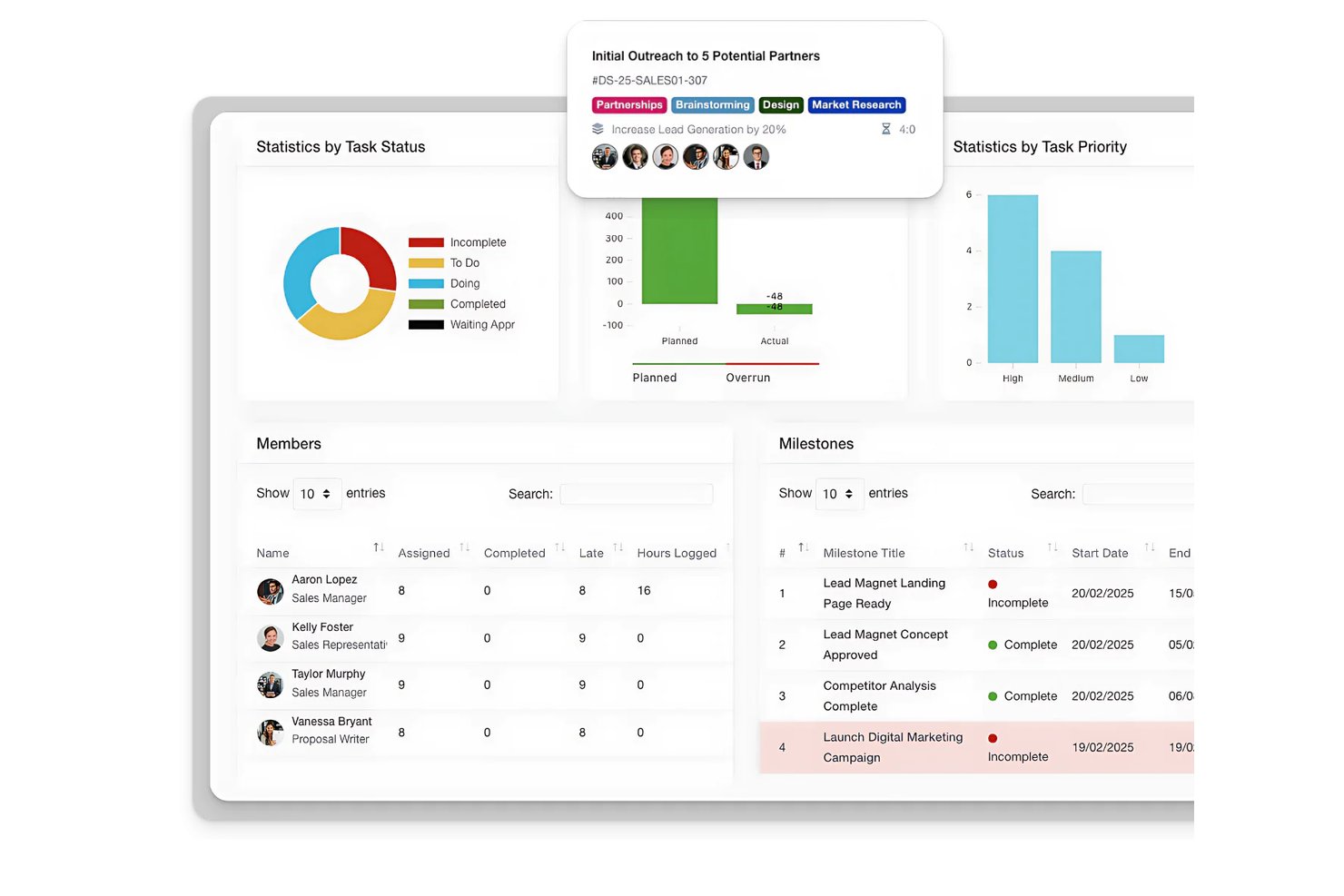
Synergist is a comprehensive agency management software designed to support growing agencies by providing tools for tracking project profitability, managing projects, and overseeing team utilization. For agencies aiming to improve their financial performance, Synergist can be used to monitor profitability metrics and forecast pipelines, profits, and payments.
I specifically picked this software because it offers an all-in-one solution with a depth of functions, such as reporting, a scheduling tool, project-tracking capabilities, and a centralized system for managing client interactions and finances. It also ensures that resources and teams are optimally allocated to enhance efficiency across the board.
Overall, Synergist stands out as an indispensable tool for agencies focused on maximizing profitability due to its access to real-time insights and financial control over projects.
Synergist integrates with various software systems, including Microsoft 365, Google, Xero, Sage, HubSpot, Salesforce CRM, Outlook Calendar, and iCal, alongside file management through Microsoft OneDrive, Google Drive, and Dropbox.

Scoro
Best for end-to-end work management

Scoro is an agency management system designed to help businesses manage operations more effectively. It combines tools for project management, sales and customer relationship management (CRM), quoting, resource planning, time tracking, billing, and reporting, bringing every aspect of agency work into one centralized platform.
The system facilitates end-to-end project management across the entire lifecycle, from initial quotes to final invoicing. Real-time dashboards and detailed reports provide visibility into progress, results, and overall performance, helping teams make informed decisions and minimize miscommunication.
Scoro also includes resource planning capabilities that help allocate workloads efficiently and prevent team burnout. Its retainer management functionality ensures that recurring client work is tracked and delivered consistently across projects.
The platform integrates with Google Calendar, Microsoft Exchange, HubSpot, Jira, Xero, QuickBooks, Sage Intacct, Exact Online, Expensify, Stripe, BambooHR, Slack, Asana, Dropbox, PayPal, and more. You can also connect additional tools through Zapier for extended automation.
Pricing starts from $19.9/user/month, with a free trial available.
New Product Updates from Scoro

Scoro Adds Time Mobile App and ELI Improvements
Scoro adds the Scoro Time mobile app for iOS/Android to track time anywhere and expands ELI with attachments, smarter filtering, and trigger-based actions. For more information, visit Scoro's official site.
 .

Best for AI-powered workflows and resourcing

Screendragon is an agency management software designed to manage projects, people, processes, and profitability in one place. It is easy to use and offers powerful customization. The world’s top agency groups like Omnicom, WPP, and IPG rely on Screendragon to power their agency operations.
Screendragon is seamlessly integrated offering project management, workflow management, resource management, and forecasting, time-tracking, budget management, and asset management. The tool is highly configurable, giving users the ability to customize forms, dashboards, templates, workflow rules, permissions, notifications, reports, and even the terminology used on the platform.
Screendragon’s integrated budget module enables users to build SOW’s and estimates, as well as forecast future revenues and resourcing needs. Reviews and approvals are made simple with features for visual proofing, real-time collaboration, version control, and granular permissions. Screendragon’s advanced automation capabilities facilitate the secure and efficient approval of assets and can adapt easily to support scaling agencies. Intuitive task management allows users to switch between Kanban boards, interactive Gantt charts, and list views.
Screendragon offers native integrations with ERP systems such as SAP and PeopleSoft and can integrate with thousands of apps through Zapier like Slack, Trello, Google Drive, Office 365, and Microsoft Dynamics. It also has an open API, allowing custom integrations with any solution.
Screendragon starts from $20/user/month with a one-off implementation fee, and a free demo is available.

Best customizable advertising agency software
monday AI Workspace is a great advertising agency software because of the way the tool has done away with a lot of the trimmings of typical management tools and focused on simple, visually intuitive layouts that help clarify the sequence of work.
monday AI Workspace features for managing advertising projects include resource and project management modules, as well as some great collaboration tools. For example, users can upload and attach files to cards, make comments, mention teammates, and more. It also offers a great project reporting dashboard that can collect data from multiple boards, allowing better tracking abilities of progress. And while monday AI Workspace doesn't offer a complete set of tools for project accounting and invoicing solutions, you can use monday AI Workspace to track hours, timelines, and invoices. monday AI Workspace also adds AI-powered capabilities that can help agencies automate routine work and move projects forward faster. Teams can use AI to summarize information, generate and refine content, extract insights from work data, and automate parts of their workflows.
Overall, it's a highly customizable tool that lets you work in whatever methodology—kanban or otherwise—that fits your project and team. You'll also find some useful workflow tools for automating parts of your process.
monday AI Workspace's integrations include project management apps like Slack, Google Drive, Gmail, Google Calendar, Jira, GitHub, Trello, Dropbox, Typeform, and many more, accessible via Zapier.
monday AI Workspace costs from $9/user/month and comes with a free 14-day trial. They offer a free plan for up to 2 users.
New Product Updates from monday AI Workspace
monday AI Workspace Adds Human Approval Routing
monday AI Workspace adds a human-in-the-loop approval block to AI Workflows, sending approval requests and routing workflow paths based on responses. For more information, visit monday AI Workspace's official site.
 .

Kantata
Best for full lifecycle service delivery

Kantata is an agency management platform built to unify every stage of the client delivery lifecycle. From project planning and resource scheduling to financial tracking and client reporting, it gives agencies a centralized system to manage operations, improve profitability, and scale efficiently.
The platform includes features designed specifically for agencies, such as client onboarding tools, project planning, time and resource tracking, invoicing, contracts, and collaboration hubs. These capabilities make it easy to track your team’s progress against deadlines and budgets, monitor client satisfaction, and forecast utilization or revenue—all from the same platform. By consolidating workstreams, Kantata eliminates silos and provides a complete view of agency health.
Beyond daily project management, Kantata supports data-driven decision-making across the entire service lifecycle. Dynamic dashboards, business intelligence reporting, and scenario planning let agency leaders identify risks, adjust plans, and demonstrate value to clients. This combination of visibility and flexibility helps agencies deliver on promises while strengthening client trust.
Some other notable features include customizable skills databases for tracking your team’s expertise, scenario-specific reports (like profitability trackers and executive scorecards), Kanban views for agile campaign work, and automated alerts that flag potential timeline or task misalignments.
Kantata integrates with a range of tools, like Salesforce, SAP, Jira, Xero, BambooHR, Slack, Worday, QuickBooks, HubSpot, and NetSuite.
New Product Updates from Kantata

Kantata Adds Access Group Change History
Kantata adds Access Groups History, letting account administrators track changes to group details, membership, and permissions in Recent History. The update also makes these events available through the Subscribed Events API for broader monitoring. For more information, visit Kantata’s official site.
 .

Olqan is a business operating system for agencies and consultancies that brings together sales pipeline management, project delivery, HR, and financial operations—including invoicing, estimates, and budget tracking—in a single platform.
Who Is Olqan Best For?
Olqan is a strong fit for agency owners and operations managers who want HR, project delivery, and client billing in one place instead of juggling separate tools.
Why I Picked Olqan
I picked Olqan as one of the best because it's one of the few tools that genuinely connects HR and project delivery without treating them as separate concerns. When a team member goes on leave, their project workload view updates accordingly, so resource allocation stays accurate. I also like that time logs convert directly into client invoices, with hours, rates, and currency handled in the same workflow rather than exported to a separate billing tool.
Olqan Key Features
- Sales pipeline management: Track deals through customizable stages with deal value, probability, expected close date, and activity logging.
- Client portal access: Give clients controlled visibility into their project information, files, and communications through a dedicated portal.
- Multi-currency invoicing: Create standard, recurring, or time-log-based invoices in multiple currencies with automatic daily rate conversion.
- Employee leave and attendance tracking: Manage leave requests, approvals, balances, and attendance records alongside project workloads.
Olqan Integrations
Olqan offers native integrations with Google Calendar, Slack, and QuickBooks, plus webhooks for custom integrations. Other listed services, including Stripe, PayPal, Microsoft Teams, and Xero, aren’t clearly documented as native integrations.
Pros and Cons
Pros:
- Project workload views support resource allocation
- Time logs can feed client invoices
- Reviewers praise consolidated agency workflows
Cons:
- Agency-wide utilization and margin detail remain unclear
- Billable-hour rules and approvals aren't documented
Hive
Best agency management system for multiple project views

Hive is a robust tool for agency management, project organization, and flexible task coordination. It lets agencies organize projects in a Gantt chart, Kanban board, table, or calendar, and also easily switch between each layout. Additionally, each user can choose to look at a project through different views, so each member of your team can use the view that works for them. Updates are reflected across all project views so the agency is informed no matter what option they use.
Hive enables users to easily collaborate by sending messages directly to agency individuals or groups. Need to share a document? Upload it directly to a task, project, or message. Hive’s Forms feature eliminates constant emails and collects all necessary information through simple fill-in-the-blanks.
It’s worth noting that if you’re switching to Hive from another tool, you can import tasks from tools including Asana, Trello, Basecamp, Smartsheet, and a few others.
Hive integrates with Google Drive, Salesforce, Jira, Dropbox, Slack, Zoom, One Drive, Box, and more than one thousand other tools through Zapier.
Hive costs from $12/user/month.

Teamwork.com
best for enabling client collaboration

Teamwork is a flexible agency management system that helps agencies become more productive and profitable. It enables agencies to manage high volumes of client projects from start to finish. Teamwork allows you to build flexible, custom workflows and gives you one central place to visualize your team and client projects.
Teamwork offers a number of tools and features to help agencies manage their work. With the Workload feature, you can get a complete picture of your team’s capacity and manage resources and keep your team on track. Another popular tool is the Gantt view. As Melody MacKeand, project manager and former Principal Consultant at Teamwork, shares: “In Teamwork, the Gantt view is very intuitive; you can move tasks around, and the timeline auto-updates.” There's also built-in time-tracking on Teamwork to log hours spent working on tasks and track billable hours. Profitability reports allow you to track financial performance by project or team member and compare it against the budget for that client.
Something especially useful about this agency software is that you can add clients as collaborators for free so they can communicate with your team, leave comments in context, review assets and get visibility on project progress.
Teamwork integrates easily with other tools including Gmail, Harvest, Hubspot, QuickBooks, Slack, Dropbox and more.
Teamwork costs from $10/user/month. They also offer a 30-day free trial
Diğer Ajans Yönetim Sistemleri
Dijital reklam ajansları doğru ve eksiksiz yazılım çözümünü bulmakta zorlanabilir. Bu nedenle, en iyi listeye giremeyen birkaç seçeneği daha burada sunuyoruz. Kullanışlı ajans sistemleri için ek önerilere ihtiyacınız varsa bunlara göz atın.
- Bonsai Agency Software
For managing the entire agency process
- Nutcache
Agency management system for invoicing and managing expenses
- FunctionFox
Software for creative teams and agencies
- Parallax
Agency management software for resource tracking & forecasting
- Yanado
Agency management tool for Gmail users
- Ravetree
Agency management system with retainers and billing
- Workamajig Platinum
For marketing & creative teams
- Service Provider Pro
Software for client portals & billing
- Height
For collaborating with clients on projects
- Punchlist
The best free tool for client feedback management
- Gain
Social media agency management system
- Insightful
For agency workforce intelligence
- ClickUp
Free plan with unlimited tasks and users
- Monitask
For tracking agency productivity
- Project.co
For collaborating with clients
- ClickTime
For real-time staffing insights
- Accelo
For mid-sized agencies and consultancies
- Float.com
For resourcing with financial visibility
- VOGSY
For international agencies managing global resources
- GoodDay
For integrated time tracking
- Hub Planner by Milient
For scheduling agency resources
- Adobe Workfront
Enterprise agency management system
- Forecast
Advertising agency software for intelligent automation
- Function Point
Tool for managing agency finances, billing, and forecasting
- Streamtime
Creative agency management system
- TeamGantt
Visual agency management software for simple timelines and charts
- flow
Simple agency management software


Ajans ortamlarında sıkça kullanılan şu araçlara da göz atabilirsiniz:
How I Evaluate Agency Management Systems
I split my evaluation into three parts, in order: core functionality carries the most weight, so I look for tools that organize client projects and deliverables and track billable time against budgets. Next, I consider standout features such as creative review workflows. Finally, I weigh onboarding, responsive support, and pricing fit for the agency’s size.
Core Functionality (Table Stakes For This List)
When I'm selecting tools for my list, I score each one on a scale from 0 (does not offer the functionality) to 5 (excels in this area) for each core functionality listed below. I then convert the total into a percentage to help assess each tool's overall fit, with extra weight on any functionalities I’ve deemed essential.
- Client & Project Tracking (Essential): I look for clear client workspaces with multiple projects, deliverables, status, and timelines visible across teams.
- Time & Billing (Essential): I evaluate billable and non-billable time entry, plus how easily approved hours feed into invoices or budget reports.
- Resource & Capacity Planning: I check whether workload and availability views help managers spot conflicts when staffing overlapping client projects.
- Budget & Profitability: I look for budget-versus-actual reporting and visibility into project or client margins as delivery work progresses.
- CRM & Pipeline: I assess how tools track leads and proposal stages, and whether teams can connect won work to active client projects.
- Financial Documents: I check whether teams can generate estimates, invoices, or purchase orders from client and project records.
Once I have a list of tools that meet the criteria, I consider what sets each platform apart.
Differentiating Factors (What Sets Vendors Apart)
Here's how I compare and contrast different vendors:
Standout Features
I look for carrier rating integration that lets producers quote multiple carriers from one screen without re-keying client details. E&O risk flagging is another separator—I check whether the system automatically surfaces coverage gaps or missing signatures before they become liability issues. I also evaluate automated outreach triggers, like renewal reminders or cross-sell campaigns that fire based on policy dates, since manual follow-up at scale is where balls get dropped.
Beyond Features
I evaluate how each system handles data migration, especially historical policy and commission records, since a botched cutover can stall renewals mid-cycle. Integration depth matters too: I check whether the platform connects to carrier download clearinghouses and comparative raters without costly add-ons. Finally, I look at pricing structure—per-user fees hit growing agencies differently than per-policy models, so I weigh how costs scale as headcount and book size increase.
Ajans Yönetim Sistemi Nasıl Seçilir?
Uzun özellik listeleri ve karmaşık fiyatlandırmalar karşısında bunalmak kolaydır. Yazılım seçim süreciniz boyunca odağınızı korumanıza yardımcı olmak için göz önünde bulundurmanız gereken temel faktörleri içeren bir kontrol listesi hazırladık:
| Faktör | Dikkate Alınması Gerekenler |
| Ölçeklenebilirlik | Sistemin ajansınızın ihtiyaçlarıyla birlikte büyüyebildiğinden emin olun. İşletmeniz büyüdükçe kullanıcı sayısını artırma, daha fazla müşteriyi destekleme ve uyarlanabilir iş akışları gibi özellikleri arayın. |
| Entegrasyonlar | Operasyonları kolaylaştırmak ve bilgi silolarını önlemek için sistemin ekibinizin kullandığı muhasebe yazılımları, CRM'ler veya e-posta platformları gibi araçlarla entegre olabildiğini doğrulayın. |
| Özelleştirilebilirlik | Yazılımın gösterge tablolarını, iş akışlarını ve raporlamasını ekibinizin süreçlerine uyacak şekilde özelleştirme seçeneklerini arayın. |
| Kullanım Kolaylığı | Ekibinizin hızlı bir şekilde benimseyebileceği bir sisteme ihtiyacı vardır. Sezgisel arayüzlere, basit gezinmeye ve işe alışma kaynaklarına sahip platformları seçin. |
| Bütçe | Peşin ücretler, yinelenen abonelikler, eklentiler ve uygulama dahil olmak üzere toplam maliyetleri anlayın. Uygun fiyatı gerekli özelliklerle dengeleyen bir çözüm seçin. |
| Güvenlik Önlemleri | Müşteri ve ajans verilerinin korunduğundan emin olun. Veri şifreleme, role dayalı erişim kontrolleri ve GDPR gibi güvenlik standartlarına uyumluluk gibi özellikleri arayın. |
| Raporlama Araçları | Gelişmiş raporlama özelliklerine sahip bir sistem seçin. Gerçek zamanlı gösterge tabloları ve özel analizler gibi özellikler performansı izlemeye ve karar alma süreçlerini iyileştirmeye yardımcı olabilir. |
| Destek Seçenekleri | Güvenilir müşteri desteği önemlidir. Sorunları hızlıca çözmek için 7/24 yardım, özel müşteri yöneticileri veya self servis kaynakları gibi seçenekleri arayın. |
Ajans Yönetim Sistemlerindeki Trendler
Araştırmam sırasında çeşitli ajans yönetim sistemi sağlayıcılarının çok sayıda ürün güncellemesini, basın bültenini ve sürüm günlüğünü inceledim. İzlediğim yeni trendlerden bazıları şunlar:
- Yapay Zekâ Destekli Analizler: Sağlayıcılar, müşteri verilerini ve ajans performansını analiz etmek için yapay zekâyı entegre ediyor; bu da ekiplerin trendleri öngörmesine ve operasyonları optimize etmesine yardımcı olabilir. Yapay zekâ destekli tahmin ve duygu analizi gibi araçlar da daha akıllı planlama olanağı sağlar.
- Müşteri Self Servis Portalları: Artık daha fazla sistem, müşterilerin güncellemelere erişmesine, geri bildirim paylaşmasına ve proje ilerlemesini görüntülemesine olanak tanıyan gelişmiş portallar içeriyor. Bu, karşılıklı iletişim trafiğini azaltır ve şeffaflığı artırır.
- Özelleştirilebilir Gösterge Tabloları: Ajanslar, ekiplerin bileşenleri sürükleyip bırakabildiği, metrikleri filtreleyebildiği ve temel içgörülere odaklanabildiği uyarlanabilir gösterge tabloları istiyor. Örneğin bir pazarlama ajansı, tek bakışta genel bir görünüm sağlamak için kampanya yatırım getirisini, müşteri bütçelerini ve zaman çizelgelerini yan yana görüntüleyebilir.
- Yerleşik Kaynak Optimizasyonu: Araçlar artık iş yüklerini izleyerek ve ayarlamalar önererek yeteneklerin ve zamanın tahsis edilmesine yardımcı oluyor. İş yükü dengeleme gibi özellikler ekiplerin aşırı yük altına girmesini önler.
- Gelişmiş Veri Gizliliği Kontrolleri: Veri güvenliği önem kazandıkça sistemler, hassas bilgileri korumak ve GDPR gibi katı uyumluluk standartlarıyla uyum sağlamak için role dayalı erişim ve denetim izleri gibi araçlar ekliyor.
Ajans Yönetim Sistemi Nedir?
Bir ajans yönetim sistemi (AMS), ajansların müşteri projeleri, finans, iletişim ve kaynaklar gibi operasyonları yönetmesine yardımcı olan bir profesyonel hizmet yazılımı türüdür.
AMS, pazarlama, reklam ve personel ajanslarının operasyonlarını etkili bir şekilde yönetmesini sağlar. İş akışlarını merkezileştirerek, görevleri otomatikleştirerek ve iş birliğini geliştirerek süreçleri kolaylaştırır; müşteri verileri, bütçeler, proje ilerlemesi ve ekip performansı gibi temel değişkenleri tek bir platformda bir araya getirir. Bu entegrasyon daha iyi bir düzen, şeffaflık ve bilinçli karar alma süreçlerini destekler.
Özellikler
Ajans yönetim sistemlerini seçerken aşağıdaki temel özelliklere dikkat edin:
- Müşteri yönetimi: İletişim bilgilerinden işlem geçmişine kadar tüm müşteri bilgilerinizi tek bir yerde yönetin. Hizmeti kişiselleştirebilir, iletişimleri takip edebilir ve bir daha karmaşık elektronik tabloların içinde arama yapmak zorunda kalmazsınız.
- Poliçe yönetimi: Tekliflendirme, zeyilnameler, yenilemeler ve iptaller dâhil olmak üzere sigorta poliçelerini yaşam döngüleri boyunca yönetin. Bu özellik, karmaşık poliçe değişiklikleriyle ilgilenirken zamandan tasarruf etmenize ve maliyetli hatalardan kaçınmanıza yardımcı olur.
- Belge yönetimi: Belgeleri kolayca depolayın, düzenleyin ve bulun. Telaşlı aramalara veda edin—bu özellik, önemli dosyaları tam ihtiyaç duyduğunuz anda yüklemenize ve bunlara erişmenize olanak tanır.
- Komisyon takibi: Komisyonları otomatik olarak hesaplayın, izleyin ve raporlayın. Böylece manuel hesaplama yapmak zorunda kalmadan ödemeleri kontrol altında tutarsınız (elektronik tabloları gerçekten seviyorsanız o başka).
- İş akışı otomasyonu: Yenilemeler, belge talepleri ve takipler gibi günlük görevleri kolaylaştırın. Bu, angarya işleri halletmeleri için küçük robotlar görevlendirmek gibidir; böylece müşterilerinize odaklanabilirsiniz.
- Raporlama ve analiz: Satışlar, gelir, verimlilik ve müşteri elde tutma hakkında ayrıntılı raporlar oluşturun. Bu özellikle yalnızca tahmin yürütmek yerine gerçek verilere dayanarak bilinçli kararlar verebilirsiniz.
- Entegrasyon olanakları: E-posta platformları, muhasebe araçları veya sektörel veritabanları gibi diğer popüler yazılımlara bağlanın. Sorunsuz entegrasyonlar zamandan tasarruf etmenizi ve manuel veri girişini azaltmanızı sağlar.
- Görev ve takvim yönetimi: Görevler atayın, hatırlatıcılar ayarlayın ve ortak bir takvimle ajansınızı düzenli tutun. Bu, en yoğun günlerde bile herkesin işlerini planlandığı şekilde sürdürmesine yardımcı olur.
- Güvenli veri erişimi: Hassas müşteri bilgilerini güçlü kullanıcı izinleri ve veri şifrelemeyle koruyun. Ajansınızın ve müşterilerinizin verilerinin güvende olduğunu bilmenin huzurunu yaşarsınız.
- Mobil erişim: Mobil uyumlu erişim veya özel uygulamalarla ajansınızı hareket hâlindeyken yönetin. İster masanızda ister müşterilerle görüşüyor olun, müşteri taleplerini ve ajans görevlerini takip edebilirsiniz.
Yapay Zekâ Özellikleri
Ajans yönetim sistemleri yapay zekâyı giderek daha fazla kullanıma dâhil ediyor; yapay zekâ destekli ajans yönetim sistemleri verimlilik ve içgörü açısından yeni seviyelerin önünü açıyor.
- Otomatik veri girişi: Yapay zekâ, müşteri kayıtlarını otomatik olarak güncellemek için e-postaları ve belgeleri tarayabilir; böylece sizi yorucu manuel işlerden kurtarır.
- Öngörücü analiz: Müşteri elde tutma, satış eğilimleri ve poliçe yenilemeleri hakkında tahminler alarak olası sorunları proaktif biçimde ele alabilir ve yeni fırsatları değerlendirebilirsiniz.
- Akıllı öneriler: Yapay zekâ, müşteri profillerine ve davranışlarına göre çapraz satış veya üst satış fırsatları önererek işinizi daha az tahminle büyütmenize yardımcı olur.
- Sohbet robotları ve sanal asistanlar: Müşteri sorularına anında yanıt verin, randevular planlayın ve rutin talepleri 7/24 yönetin.
- Dolandırıcılık tespiti: Gelişmiş yapay zekâ algoritmaları, hasar taleplerindeki ve başvurulardaki şüpheli faaliyetleri veya tutarsızlıkları işaretleyerek ajansınızı ve müşterilerinizi korumanıza yardımcı olur.
- Duygu analizi: Yapay zekâ, memnuniyet düzeylerini değerlendirmek için müşteri iletişimlerini analiz edebilir; böylece birinin memnuniyetsiz göründüğü durumlarda erken müdahale edebilirsiniz.
Avantajlar
Bir ajans yönetim sistemini uygulamak, ekibiniz ve işletmeniz için çeşitli avantajlar sağlayabilir. Öne çıkan bazı faydalar şunlardır:
- Daha iyi organizasyon: Müşteri, proje ve kaynak verilerini merkezileştirerek her şeyi tek bir yerde bulmayı ve yönetmeyi kolaylaştırır.
- Daha iyi zaman yönetimi: Görevler ve projeler için harcanan saatleri takip ederek ekiplerin üretken ve odaklanmış kalmasına yardımcı olur.
- Artan kârlılık: Projelerin mali açıdan planlandığı şekilde ilerlemesini sağlamak ve aşırı harcamaları azaltmak için bütçeleri, giderleri ve faturalandırmayı izler.
- Gelişmiş iş birliği: Paylaşılan görev listeleri, proje güncellemeleri ve gerçek zamanlı iletişim araçlarıyla ekiplerin uyum içinde çalışmasını sağlar.
- Doğru raporlama: Daha iyi karar verme için proje performansı, kaynak kullanımı ve kârlılık hakkında net içgörüler sunar.
- Basitleştirilmiş iş akışları: Zaman kazanmak ve manuel çabayı azaltmak için faturalandırma, raporlama ve görev atama gibi tekrarlayan işleri otomatikleştirir.
- Daha güçlü veri güvenliği: Hassas bilgileri rol tabanlı izinler ve uyumluluğa odaklanan güvenlik özellikleriyle korur.
Maliyetler ve Fiyatlandırma
Bir ajans yönetim sistemi seçmek, mevcut çeşitli fiyatlandırma modellerinin ve planların anlaşılmasını gerektirir. Maliyetler özelliklere, ekip büyüklüğüne ve eklentilere göre değişir. Aşağıdaki tabloda ajans yönetim sistemi çözümlerinde bulunan yaygın planlar, ortalama fiyatlar ve tipik özellikler gösterilmektedir:
Ajans Yönetim Sistemi için Plan Karşılaştırma Tablosu
| Plan Türü | Ortalama Fiyat | Yaygın Özellikler |
| Ücretsiz Plan | $0-$10/kullanıcı/ay | Temel müşteri yönetimi, görev takibi, sınırlı depolama ve temel raporlama. |
| Kişisel Plan | $10-$30/kullanıcı/ay | Müşteri yönetimi, proje takibi, zaman takibi, temel raporlama ve sınırlı entegrasyonlar. |
| İşletme Planı | $30-$80/kullanıcı/ay | Gelişmiş raporlama, kaynak tahsisi, finansal yönetim, belge depolama ve iş birliği araçları. |
| Kurumsal Plan | $80+/kullanıcı/ay | Özel iş akışları, gelişmiş analizler, güçlendirilmiş güvenlik, role dayalı izinler ve özel destek. |
SSS
Bu konu hakkında diğer insanların sorduğu yaygın soruların yanıtlarını bulun.
Ekibimin iş akışı için en iyi ajans yönetim sistemini nasıl seçerim?
\u003cp class=\u0022p1\u0022\u003eEkibinizin iş akışını haritalandırarak ve olmazsa olmaz özellikleri listeleyerek başlayın. Ajansınızın büyüklüğüne, proje türüne ve iş birliği tarzına uygun sistemleri arayın. Arayüzün anlaşılır olup olmadığını ve ekibinizin çalışma biçimiyle örtüşüp örtüşmediğini görmek için demolar talep edin. Kullanıcı yorumlarını inceleyin ve güçlü işe alıştırma süreçleri ile desteğe sahip sağlayıcıları değerlendirin. Güçlü entegrasyonlara ve raporlama özelliklerine sahip araçlara öncelik verin.\u003c/p\u003e
Ajans yönetim yazılımı, ekibimin hâlihazırda kullandığı araçlarla entegre olabilir mi?
Evet, çoğu ajans yönetim sistemi Slack, Google Workspace veya muhasebe platformları gibi yaygın araçlarla doğrudan entegrasyonlar sunar. Bir karar vermeden önce sağlayıcılardan desteklenen entegrasyonların tam listesini isteyin ve özel bağlantılar için API seçeneklerini inceleyin. Entegrasyonları günlük araçlarınızla test etmek, iş akışında aksaklıkların önlenmesine yardımcı olabilir.
Bir ajans yönetim sistemi sağlayıcısından ne tür bir işe alıştırma ve destek beklemeliyim?
Saygın sağlayıcıların çoğu, kendi kendine kullanılabilen kaynaklardan ekibe özel eğitimlere kadar çeşitli işe alıştırma seçenekleri sunar. Genellikle ekibinizin başlamasına yardımcı olacak bir bilgi bankası, e-posta/sohbet desteği ve canlı oturumlar sağlanır. Sürekli desteğin pakete dâhil olup olmadığını veya ek ücret bulunup bulunmadığını kontrol edin. Hızlı sorun giderme için duyarlı destek çok önemlidir.
Bir ajans yönetim sistemi proje görünürlüğünü ve raporlamayı geliştirmeye nasıl yardımcı olabilir?
Ajans yönetim yazılımı, panolar, görev zaman çizelgeleri ve ilerleme takibiyle proje durumunun net bir görünümünü sunar. Kaynak kullanımı, bütçeler ve son tarihler hakkında gerçek zamanlı raporlama elde edersiniz. Bu, sorunları erkenden fark etmenize ve veriye dayalı kararlar almanıza olanak tanır. Özelleştirilebilir raporlar, müşterilere veya yönetime sağladığınız değeri göstermenize yardımcı olabilir.
Ajans yönetim sistemleri veri güvenliğini ve müşteri gizliliğini nasıl ele alır?
Önde gelen sistemler verilerinizi korumak için şifreleme, güvenli oturum açma protokolleri ve katı kullanıcı izinleri kullanır. Birçoğu GDPR veya SOC 2 gibi sektör standartlarına uygundur. Sağlayıcılara veri depolama, yedekleme prosedürleri ve müşteri dosyalarının gizli tutulmasına ilişkin politikalarını sorun. Şeffaf ve güncel güvenlik uygulamalarına sahip bir platform seçin.
