

2026 İçin İncelenen En İyi 10 Profesyonel Hizmet Yazılımı

10 En İyi Profesyonel Hizmetler Yazılımı Kısa Listesi


Projeleri yönetmek zor olabilir. Her gün teslim tarihleri, kaynaklar ve müşteri beklentileri arasında denge kurmanız gerekir. Profesyonel hizmetler yazılımı; görevleri düzenleyerek, zamanı takip ederek ve ekip iş birliğini geliştirerek bu yükü hafifletmeye yardımcı olabilir.
Bu araçları test etmek ve incelemek için sayısız saat harcadım. Neyin işe yaradığını, neyin yaramadığını biliyorum. Amacım, mevcut en iyi seçeneklere tarafsız bir bakış sunmak.
Bu makalede, öne çıkan yazılım seçimleri, özellikleri ve ekibinize nasıl fayda sağlayabilecekleri hakkında net bilgiler bulacaksınız. İster küçük bir ekip ister büyük bir kuruluş olun, burada sizin için bir seçenek var. İhtiyaçlarınıza en uygun çözümü bulmak için gelin, birlikte inceleyelim.
Why Trust Our Software Recommendations
Our team has been testing and reviewing software since 2012. As project managers ourselves, we know how difficult—and important—it is to choose the right software.
For this guide, we evaluated tools using hands-on testing and independent research, scoring tools using our selection criteria. We also draw on insights from industry thought leaders and practicing project management experts.
Our reviews reflect our human editorial judgment, not a sales pitch.
Expert reviewers:
Profesyonel Hizmetler Yazılımı Karşılaştırma Tablosu
Bu karşılaştırma tablosu, en iyi profesyonel hizmetler yazılımı seçimlerimin fiyatlandırma ayrıntılarını özetlemektedir:
| Tool | Starting Price | Website | |
|---|---|---|---|
| Best for real-time reporting across multiple business operations | 4.5 out of 5 | $17/user/month 14-day free trial | Book Demo |
| Best for end-to-end PSA management | 4.6 out of 5 | $10/user/month 14-day free trial | Book Demo |
| Best for professional services automation | 4.4 out of 5 | Pricing upon request Free demo available | Book Demo |
| Best for generating accurate reports plus actionable insights | 4.3 out of 5 | $10/user/month Free plan + 14-day trial + demo available | Book Demo |
| Best for global services organizations | 4.6 out of 5 | $16/user/month Free trial available | Website |
| Best for AI-powered workforce scheduling | 4.6 out of 5 | Pricing upon request Free demo available | Website |
| Best for full lifecycle service delivery | 4.2 out of 5 | Pricing upon request Not available | Website |
| Best client portals for project insight sharing | 4.8 out of 5 | $49/user/month 14-day free trial | Website |
| Best PSA software for MSPs | 4.8 out of 5 | Pricing upon request 30-day free trial | Website |
| Best for mid-sized agencies and consultancies | 4.6 out of 5 | Pricing upon request Free demo available | Website |
En İyi Profesyonel Hizmetler Yazılımı İncelemeleri
Aşağıda, kısa listeme giren en iyi profesyonel hizmetler yazılımlarının ayrıntılı özetlerini bulabilirsiniz. İncelemelerim, size en uygun aracı bulmanıza yardımcı olmak için her aracın temel özelliklerine, artılarına ve eksilerine, entegrasyonlarına ve ideal kullanım alanlarına ayrıntılı bir bakış sunar.&

Scoro
Best for real-time reporting across multiple business operations
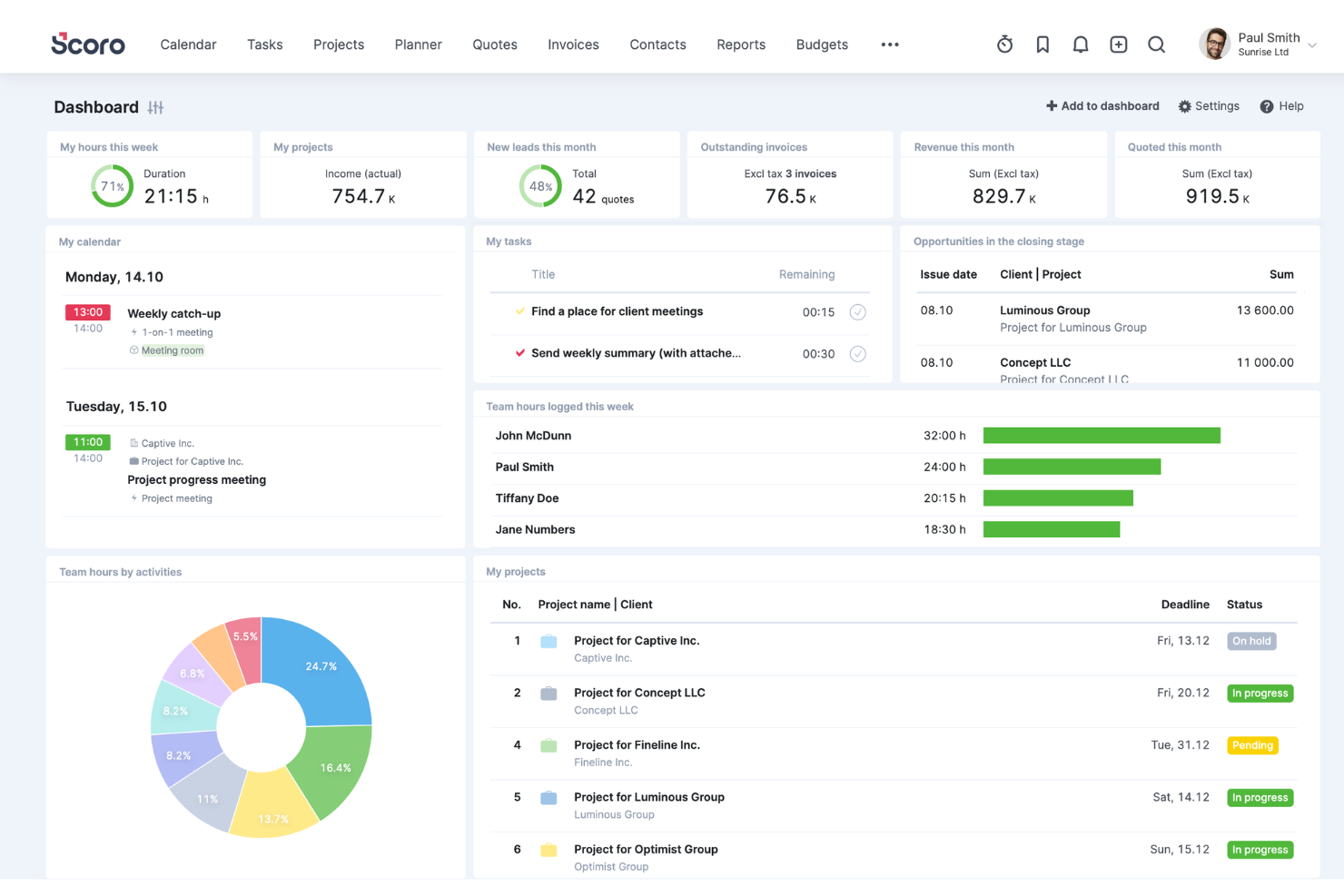
Scoro is a comprehensive work management software designed for professional services, offering a wide range of features to help boost service profitability. It caters to various industries and roles within the business, providing tools for project management, quoting and budgeting, invoicing, sales and CRM, resource planning, time tracking, and reporting.
One of Scoro's standout features is its project management tool, which can handle multiple projects simultaneously, with capabilities to assign tasks, set deadlines, track progress in real time, and manage resources effectively. Additionally, the platform's dynamic scheduling tools allow for adjustments on the fly, accommodating last-minute changes without disrupting the entire project workflow.
Furthermore, Scoro's advanced reporting and analytics features provide invaluable insights into every aspect of business operations. These reports are fully customizable and cover everything from detailed financial reports that analyze profits and losses to performance analytics that gauge project success and team productivity.
Integrations include Google Calendar, Microsoft Exchange, Xero, QuickBooks, Sage Intacct, Expensify, Stripe, Jira, Slack, Asana, Dropbox, PayPal, and more.
New Product Updates from Scoro

Scoro Adds Time Mobile App and ELI Improvements
Scoro adds the Scoro Time mobile app for iOS/Android to track time anywhere and expands ELI with attachments, smarter filtering, and trigger-based actions. For more information, visit Scoro's official site.
 .

Best for end-to-end PSA management
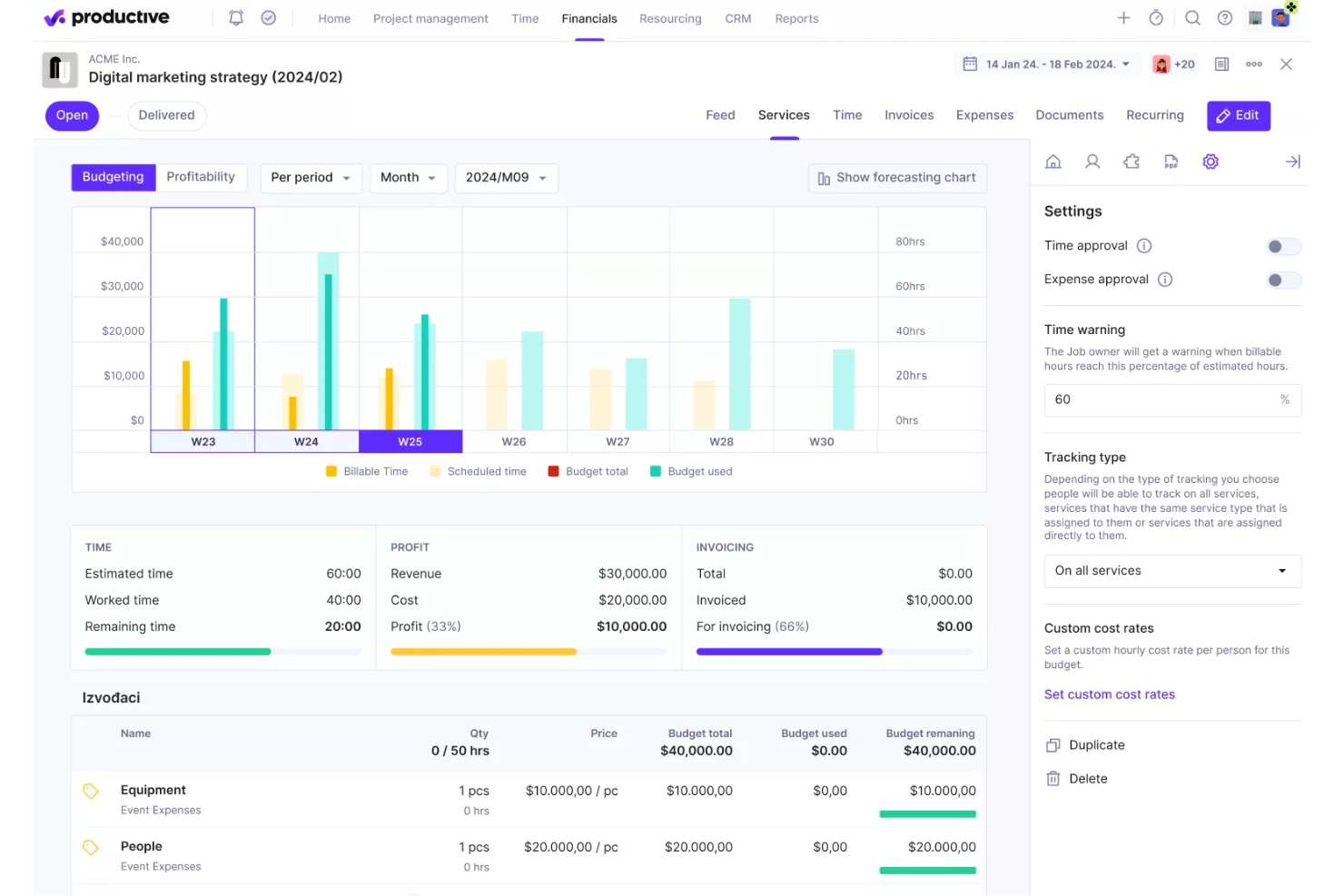
Productive is a comprehensive software solution designed to handle end-to-end processes for professional services and agencies. It integrates a wide range of tools necessary for managing projects, tracking time, allocating resources, and handling financial aspects, all within a single platform.
The platform offers advanced project management capabilities, such as Gantt charts for visualizing project timelines, task management to keep teams organized, and workload management to ensure resources are used effectively. Additionally, Productive includes tools for time tracking and billing, allowing agencies to accurately log hours, generate invoices, and manage payments.
Furthermore, the platform's CRM and sales tools help manage client relationships and streamline the sales process. Agencies can easily plan schedules, create pipelines, and track the status of projects and deals. Productive’s document management and automation features also reduce administrative overhead by automating repetitive tasks and ensuring that all team members have access to the latest project information and documentation.
Key integrations include Jira, Slack, QuickBooks, Xero, Zapier, Google Drive, Sage, BambooHR, and HubSpot.
New Product Updates from Productive
Productive Adds Email and Calendar Integrations for Agents
Productive adds Gmail, Outlook, Google Calendar, and Outlook Calendar connectors for its AI agents. These integrations let agents manage emails and create calendar events directly within Productive. For more information, visit Productive’s official site.
 .

Accelo
Best for professional services automation
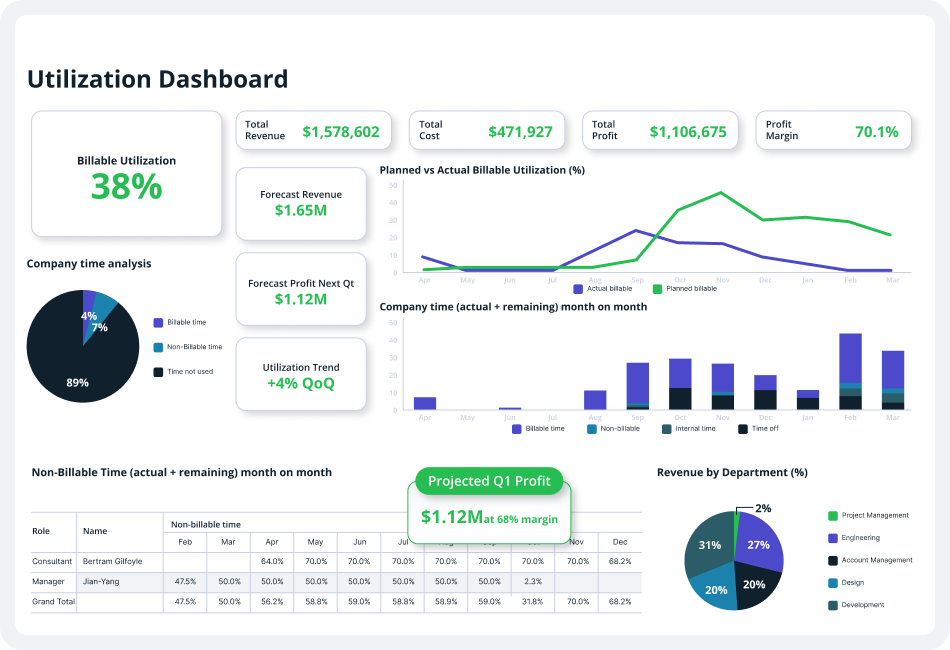
Accelo is a comprehensive professional services automation (PSA) platform designed to enhance the operations of service-based businesses. It offers a suite of tools for client relationship management (CRM), project management, time tracking, billing, invoicing, and client communication.
The platform's automation capabilities offer numerous opportunities to reduce repetitive, manual tasks, freeing up more time for billable client work. For instance, the quote-to-project conversion feature allows users to create new projects based on approved quotes in just a few clicks. Additionally, bulk client billing automates the generation of accurate client invoices into pre-made templates.
Furthermore, Accelo's project management features allow teams to collaborate, plan, manage, and deliver client projects efficiently through project templates, automated time tracking, custom workflows, and project triggers. Other features include branded invoice templates, custom payment terms, and accounting software integrations that save time and improve processes.
Integrations include Google Workspace, Microsoft 365, Microsoft Exchange & Microsoft Outlook, Xero, QuickBooks Online, HubSpot, Mailchimp, Salesforce, Zapier, Stripe, PayPal, Jira, Continuum, Zendesk, Microsoft Power BI, Expensify, Gusto, HubSpot Partner Portal, Practice Ignition, Google Analytics, and others.
New Product Updates from Accelo

Accelo Rebuilds Mobile App for Project and Time Management
Accelo rebuilds its mobile app with task management, new work creation, and mobile timesheets for Forecast customers. This helps teams keep project and time data current while working away from a desktop. For more information, visit Accelo’s official site.
 .

Wrike
Best for generating accurate reports plus actionable insights

Wrike is a project management software that is designed for marketing agencies, project teams, and professional service providers. Wrike offers an all-in-one collaboration solution, which simplifies the project management process as well as resource allocation and people management.
The platform enables users to collaborate on projects without having to constantly call, text, or email to communicate. Users get access to collaborative features like automated notifications, dynamic reports, live editing, and real-time comments to make sure that every team member, stakeholder, and project contributor is on the same page throughout the project development process. Apart from the ability to share information and digital assets within the team, the platform is also tailored to make it easier for project managers and professional service providers to share updates with clients as needed.
Project managers can significantly improve client collaboration by simply inviting their clients into Wrike and making them a part of the work process. This allows clients to provide direct feedback and approvals on critical project decisions. And project managers can reduce the tedious back-and-forth process of getting requirements from clients on project requests or scope changes by using customizable request forms. This will enable agencies and teams to quickly collect all the necessary information from clients in one location and trigger fully planned projects with predefined actions, task assignees, and timelines.
New Product Updates from Wrike

Wrike Redesigns Workspace Search With New Filters
Wrike introduces a redesigned Workspace Search interface with recent search shortcuts, item type and location filters, and parent-task context. These updates help users find relevant work items and navigate search results efficiently. For more information, visit Wrike’s official site.
 .

VOGSY
Best for global services organizations

VOGSY is a unified project and resource platform that helps organizations set up new countries, track international projects, and connect local finance packages. The professional services automation (PSA) software offers end-to-end solutions built for services businesses so they can focus on what they do best—providing services—without worrying about the complexities of international expansion.
The cloud-based PSA platform also provides tools for project management, task management, resource management, performance monitoring, as well as automated billing and invoicing. It allows professional services firms to keep track of every client and deal, engage in a more efficient and sustainable quote-to-cash approach, and generate a more concise and reliable statement of work (SOW) on soft-booked services and projects.
With VOGSY’s professional service software, startups and SMEs can effectively plan their projects with great detail. They can leverage the platform’s robust work breakdown structure to design and implement a cohesive project roadmap based on key objectives and desired outcomes. The software allows them to budget the required work, resources, potential revenue, and margins accordingly, oftentimes even before the deal is finalized.
With the task management feature, users can allocate tasks and assign them to the appropriate personnel with the right skill set to finish them on time and on budget. Users can set tasks for themselves or their entire team, addressing everything from their quote-to-cash cycle, which includes the clients, the nature of the deal, the proposed projects, and the billing and invoicing.
This means that services businesses can focus on what they do best—providing services—without worrying about the complexities of international expansion.
Features include resource and project management, international project views and resource allocation, collaboration, reporting dashboards, budgeting, professional services automation, Gantt charts, notifications & alerts.
Integrations include Google Workspace, Jira, Microsoft Excel, Xero, Intuit Quickbooks Online, Copper, Hubspot, Salesforce, and Zoho.
VOGSY has a free version that is accessible through a personal Gmail account. It comes with all the features and is limited to a single user. Paid plans cost from $13/user/month. All paid plans require a minimum of 10 users and include a free trial.
New Product Updates from VOGSY
VOGSY Adds Velocity Agent Verdicts for Quote Approvals
VOGSY adds Velocity agent verdicts for quote approval requests with risk levels, margin checks, discount analysis, and reasoning. This helps approvers assess quote risk before making a final decision. For more information, visit VOGSY’s official site.
 .

Dayshape
Best for AI-powered workforce scheduling

Dayshape is a resource management and scheduling platform designed for professional services organizations, with AI-driven tools for capacity planning, project financials, and governance.
Who Is Dayshape Best For?
Dayshape is a strong fit for mid-to-large professional services firms—particularly in accounting, consulting, and legal—that need firm-wide resource visibility and scheduling at scale.
Why I Picked Dayshape
Dayshape is one of my top picks because I love how its AI scheduling engine doesn't just surface available people, it processes thousands of scheduling options per second and ranks them by suitability. In practice, that means my team can factor in skills, preferences, certifications, and existing commitments simultaneously. I also rely on the roll-forward feature for recurring engagements, which carries forward project structures so we're not rebuilding schedules from scratch each cycle.
Dayshape Key Features
- Real-time project financials: Track budgets, margins, and fee forecasts at the project level as schedules change.
- Capacity and demand planning: View firm-wide supply and demand across teams, grades, and time horizons in a single dashboard.
- People preferences: Let staff set scheduling preferences and availability, which the system factors in during resource allocation.
- Configurable approval workflows: Set up multi-step approval chains for schedule changes based on your firm's governance structure.
Dayshape Integrations
Dayshape integrates with leading ERP, PSA, and practice management systems, with named integrations including Workday, SAP, OpenHR, and Dynamics 365. Dayshape also has a co-developed packaged solution with Workday called Dayshape Intelligent Staffing, featuring pre-built integrations for firms already running Workday. Zapier support is not clearly documented, and API availability for custom integrations is not confirmed on the vendor's site.
Pros and Cons
Pros:
- Trusted by Big Four accounting firms
- Real-time project financials built into scheduling
- AI suggests ranked resource matches firm-wide
Cons:
- Dashboard and report customization is limited
- Struggles with high volumes of small projects

Kantata
Best for full lifecycle service delivery

Kantata is a professional services platform purpose-built to help firms manage complex client engagements with ease. Instead of relying on disconnected tools for projects, resources, and reporting, it brings everything together so your team can plan, deliver, and analyze work in one streamlined system.
What makes Kantata stand out is how it supports the full lifecycle of service delivery—estimating, planning, executing, analyzing, and optimizing. You can forecast demand, align resources with project needs, and track budgets and profitability in real time. By connecting projects, financials, and staffing in a single view, Kantata gives you the clarity to make confident decisions and keep engagements running smoothly from start to finish.
Kantata also emphasizes collaboration and business intelligence. Activity feeds, task boards, and built-in surveys keep both teams and clients engaged throughout delivery, while customizable dashboards and 70+ prebuilt reports surface insights into utilization, portfolio health, and profitability. This combination of people-focused planning and data-driven visibility makes it easier to deliver consistently successful client outcomes.
New Product Updates from Kantata

Kantata Adds Access Group Change History
Kantata adds Access Groups History, letting account administrators track changes to group details, membership, and permissions in Recent History. The update also makes these events available through the Subscribed Events API for broader monitoring. For more information, visit Kantata’s official site.
 .

Best client portals for project insight sharing
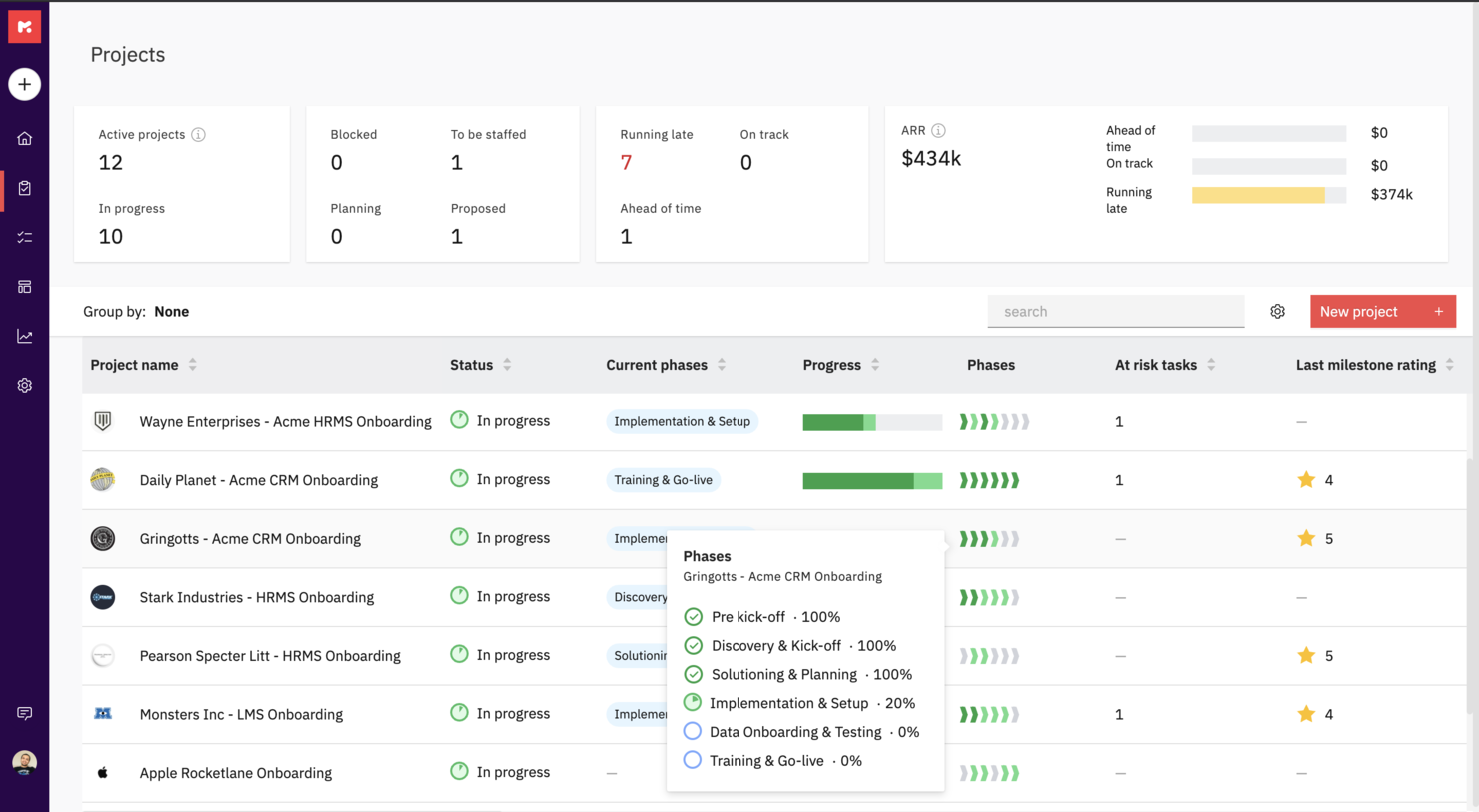
Rocketlane is a professional service software purpose-built to run customer-facing projects. It uniquely combines project management, document collaboration, and communication to help teams hit their project goals, accelerate time-to-value, and deliver a 5-star customer experience.
Rocketlane offers private and shared views for project plans and documents as well as a customer portal for stakeholder and client views. You can also codify your best practices with project and document templates to create them once and reuse them forever across projects.
With Rocketlane, you'll be able to keep your customers involved and make them accountable with reminders, notifications, and actionable emails. You can work together and create new or embed existing documents, collaborate on them synchronously and experience Slack-like chat inside Rocketlane.
Rocketlane costs from $19/user/month and offers a free 14-day trial.

HaloPSA
Best PSA software for MSPs

HaloPSA is a solution, designed for MSPs and service providers. HaloPSA gives users powerful out-of-the-box functionality. With an integrated PSA platform, you get features such as time-tracking and billing, advanced reporting, asset management, remote access, seamless integrations, automation tools and more.
HaloPSA is a fully configurable system for managed IT services and is the PSA solution of choice for enterprises such as ATOS, NEC and Gijima.
HaloPSA integrates with many popular tools such as Microsoft CSP, Splunk, N-Able N-Central/RMM, Xero, Teams, Slack, Zapier, and TeamViewer to name a few. View their entire list of integrations on their website.
HaloPSA costs from $29/user/month.

Forecast
Best for mid-sized agencies and consultancies

Forecast is an AI-powered project and resource management software designed for professional services. It offers tools that help you manage project planning, resource allocation, and performance tracking, enhancing your team's operational efficiency.
Forecast stands out with its real-time workload visibility and capacity tracking, which helps you understand your team's demand and allocate resources based on skills and availability. This functionality ensures that your projects are on track and your team isn't overburdened, allowing for smoother project execution.
Another compelling feature is its ability to provide detailed utilization reports and project baselines. These tools give you insights into your team's performance and project progress, helping you make informed decisions and optimize resources to increase billable hours. Features include automated time tracking, which reduces the administrative burden and allows your team to focus on more critical tasks. Risk prediction alerts offer proactive insights into potential project challenges, enabling you to address issues before they escalate. Real-time dashboards provide a comprehensive view of project timelines and financials, enhancing your ability to manage budgets and profits effectively.
Integrations include Azure DevOps, GitLab, GitHub, BambooHR, HiBob, Google Calendar, Google Drive, MS Teams, Office 365 Calendar, Slack, Trello, and Zapier.
Diğer Profesyonel Hizmetler Yazılımları
Kısa listeme giremeyen ancak yine de göz atmaya değer bazı ek profesyonel hizmetler yazılımı seçeneklerini burada bulabilirsiniz:
- Workzone
For document proofing tool
- Adobe Workfront
Cross-platform PSA software
- Bonsai Agency Software
For integrated project, client, and financial management
- Birdview
For BI reporting
- Projector
PSA software for accessibility
- Polaris PSA By Replicon
PSA with resource allocation, time tracking, billing, and reporting
- Kimble
For salesforce users and management consulting
- Parallax
For efficient project management and streamlined business operations
- OnePlan
For managing project finances
- Ravetree
For retainer contracts
- Workamajig Platinum
For creative teams
- Netsuite OpenAir
For small businesses
- Upland
For managing large teams
- Deltek Workbook
For client transparency and communication
- Unit4PSA
For end-to-end administration
- Height
For cross-functional project and resource planning
- Changepoint
CRM-integrated PSA
- Celoxis
PSS for enterprises
- ClickTime
For medium-sized businesses seeking to centralize their resource management processes
- Hubstaff
PSS time management reports & analysis


How I Evaluate Professional Services Software
I split my evaluation into two layers: the baseline every tool must hit—billable time tracking, resource capacity, and client invoicing—and the differentiators that set the best PSAs apart.
Core Functionality (Table Stakes For This List)
When I'm selecting tools for my list, I rank each one on a scale from 0 (does not offer the functionality) to 5 (excels in this area) for each core functionality listed below. Then, I calculate the tool's total score into a percentage. Each tool needs to achieve a minimum total score of 65% to be considered for inclusion.
- Project Planning & Delivery: I look for scheduling tools that handle dependencies, milestones, and baselines—things like mapping a multi-phase ERP rollout across workstreams with clear critical paths.
- Resource Management: Matching the right consultant to a project based on skills, availability, and utilization targets is central, so I evaluate how each tool handles capacity planning.
- Time & Expense Tracking: Each tool should support billable vs. non-billable splits and rate cards, since accurate capture drives everything from invoicing to margin analysis downstream.
- Project Financials & Billing: I check whether a platform supports multiple billing models—fixed-fee, time-and-materials, milestone-based—and tracks budgets against actuals at the engagement level.
- Utilization & Profitability Analytics: Dashboards that surface real-time KPIs like billable utilization rates, realization percentages, and per-project margins help leaders make staffing and pricing decisions.
- PSA-CRM/ERP Integrations: Connecting delivery data to your CRM and accounting stack matters, so I evaluate native connectors and API depth for tools like Salesforce, QuickBooks, and NetSuite.
Once I have a list of tools that meet this criteria, I consider what sets each platform apart.
Differentiating Factors (What Sets Vendors Apart)
Here's how I compare and contrast different vendors:
Standout Features
Quote-to-cash automation is a major differentiator—I look for platforms that connect opportunity creation through SOW, staffing, delivery, and invoicing without manual handoffs. Scenario-based forecasting also matters when you're juggling a growing pipeline and need to model how new wins affect headcount and margins. Client-facing portals where stakeholders can approve deliverables and review project status cut down on update meetings and keep engagements transparent.
Beyond Features
Firm size and vertical fit shape my evaluation significantly. A five-person design studio and a 500-consultant IT services firm have very different needs around multi-entity support, currency handling, and project templates. I also evaluate pricing structures—whether a vendor charges per billable seat, per user, or offers modular bundles—since total cost of ownership shifts dramatically at scale. Implementation timelines matter too, especially for firms that need domain-specific onboarding rather than generic SaaS setup.
Profesyonel Hizmetler Yazılımı Nasıl Seçilir?
Uzun özellik listeleri ve karmaşık fiyatlandırma yapıları arasında kaybolmak kolaydır. Kendinize özgü yazılım seçim sürecinizi yürütürken odaklanmanızı korumanıza yardımcı olmak için göz önünde bulundurmanız gereken faktörleri aşağıda bir kontrol listesi olarak bulabilirsiniz:
| Faktör | Dikkate Alınması Gerekenler |
|---|---|
| Ölçeklenebilirlik | Yazılım işletmenizle birlikte büyüyebilir mi? Genişledikçe daha fazla kullanıcıyı veya projeyi destekleyip desteklemediğini kontrol edin. Büyümeye uyum sağlayacak esnek fiyatlandırma planları arayın. |
| Entegrasyonlar | Zaten kullandığınız araçlarla entegre oluyor mu? İş akışının kesintiye uğramasını önlemek için CRM'nize, muhasebe yazılımınıza veya diğer temel uygulamalarınıza bağlandığından emin olun. |
| Özelleştirilebilirlik | Yazılımı ihtiyaçlarınıza uyacak şekilde uyarlayabilir misiniz? İş akışlarını, alanları ve panoları süreçlerinize ve tercihlerinize göre ayarlayabildiğinizden emin olun. |
| Kullanım kolaylığı | Arayüz ekibiniz için sezgisel mi? Kullanıcı dostu olup olmadığını ve hızlı benimseme için öğrenme eğrisini azaltıp azaltmadığını görmek üzere deneme sürümünü test edin. |
| Uygulama ve işe alıştırma | Başlamak ne kadar sürecek? Kesintisiz ve sorunsuz bir geçiş sağlamak için işe alıştırma sürecini, eğitim kaynaklarını ve desteği sorun. |
| Maliyet | Bütçeniz dahilinde mi? Maliyeti ihtiyaçlarınızla karşılaştırın ve ek özellikler veya kullanıcılar için gizli ücretleri ya da ek masrafları göz önünde bulundurun. |
| Güvenlik önlemleri | Verilerinizi koruyor mu? Bilgilerinizin güvende kalması için yazılımın veri şifrelemesini, erişim denetimlerini ve güvenlik standartlarına uygunluğunu doğrulayın. |
| Destek erişilebilirliği | İhtiyacınız olduğunda yardım alabiliyor musunuz? Acil sorunlar için canlı sohbet, telefon desteği ve yanıt süreleri dahil olmak üzere müşteri desteğinin erişilebilirliğini kontrol edin. |
Profesyonel Hizmet Yazılımı Nedir?
Profesyonel hizmet yazılımı, işletmelerin müşteri projelerini yönetmesine, zamanı takip etmesine ve faturalandırma ile fatura kesme işlemlerini yürütmesine yardımcı olmak için tasarlanmış bir araçtır. Danışmanlar, muhasebeciler ve hukuk ekipleri gibi profesyoneller, çalışmalarını düzenlemek ve verimliliği artırmak için genellikle bu araçları kullanır. Proje yönetimi, zaman takibi ve faturalandırma özellikleri; görevlerin düzenlenmesine, son teslim tarihlerine uyulmasına ve müşterilere doğru faturalar kesilmesine yardımcı olur. Genel olarak bu araçlar, karmaşık süreçleri basitleştirerek ekiplerin kaliteli hizmetler sunmasını kolaylaştırır.
Özellikler
Profesyonel hizmet yazılımı seçerken aşağıdaki temel özelliklere dikkat edin:
- Proje yönetimi: Son teslim tarihlerine uyulmasını sağlayarak projeleri etkili bir şekilde planlamanıza, yürütmenize ve izlemenize yardımcı olur.
- Zaman takibi: Faturalandırılabilir saatleri doğru şekilde kaydederek müşterilere fatura kesmeyi ve ekip verimliliğini yönetmeyi kolaylaştırır.
- Faturalandırma ve fatura kesme: Faturaların oluşturulmasını otomatikleştirir ve ödemeleri takip ederek idari iş yükünü azaltır.
- Kaynak planlaması: Kaynakları verimli bir şekilde tahsis eder ve yönetir, ekip ile araçların en iyi şekilde kullanılmasını sağlar.
- İş birliği araçları: Ekip üyeleri arasındaki iletişimi ve iş birliğini kolaylaştırarak proje sonuçlarını iyileştirir.
- Entegrasyon özellikleri: CRM ve muhasebe araçları gibi mevcut yazılımlara bağlanarak iş akışlarının sorunsuz ilerlemesini sağlar.
- Özelleştirilebilir panolar: Hızlı içgörüler elde etmek için arayüzü ilgili verileri ve ölçümleri gösterecek şekilde uyarlamanıza olanak tanır.
- Güvenlik önlemleri: Şifreleme ve erişim kontrolleriyle hassas verileri koruyarak standartlara uyumu sağlar.
- Mobil uygulama kullanılabilirliği: Temel özelliklere hareket hâlindeyken erişim sağlayarak projeler ve görevlerle bağlantıda kalmanıza yardımcı olur.
- Yapay zekâ destekli analizler: Veri analizi yoluyla içgörüler sunarak bilinçli iş kararları almanıza yardımcı olur.
Faydalar
Profesyonel hizmet yazılımını uygulamak, ekibiniz ve işletmeniz için çeşitli faydalar sağlar. Yararlanabileceğiniz faydalardan bazıları şunlardır:
- Artan verimlilik: Faturalandırma ve kaynak planlaması gibi zaman alan görevleri otomatikleştirerek daha önemli işler için zaman kazandırır.
- Daha iyi iş birliği: İletişim ve dosya paylaşımı için araçlar sunarak ekip üyelerinin bağlantıda ve bilgili kalmasını sağlar.
- Doğru faturalandırma: Faturalandırılabilir saatleri ve giderleri takip ederek faturaların doğru olmasını ve müşterilerle yaşanan anlaşmazlıkların azalmasını sağlar.
- Geliştirilmiş karar alma: Proje performansına ilişkin içgörüler sunan yapay zekâ destekli analizler ve özelleştirilebilir panolar sağlar.
- Ölçeklenebilirlik: İşletmenizle birlikte büyüyerek tamamen yeni bir sistem kurmaya gerek kalmadan daha fazla kullanıcıyı ve projeyi destekler.
- Artırılmış güvenlik: Şifreleme ve erişim kontrolleriyle müşteri ve şirket verilerini koruyarak güveni ve uyumluluğu sürdürür.
- Mobil erişilebilirlik: Ekip üyelerinin kritik bilgilere her yerden erişmesine ve görevleri yönetmesine olanak tanıyarak esnekliği artırır.
Maliyetler & Fiyatlandırma
Profesyonel hizmet yazılımı seçmek, mevcut çeşitli fiyatlandırma modellerinin ve planların anlaşılmasını gerektirir. Maliyetler özelliklere, ekip büyüklüğüne, eklentilere ve daha fazlasına göre değişir. Aşağıdaki tablo, profesyonel hizmet yazılımı çözümlerinde yaygın olarak sunulan planları, ortalama fiyatlarını ve tipik özelliklerini özetlemektedir:
Profesyonel Hizmet Yazılımı İçin Plan Karşılaştırma Tablosu
| Plan Türü | Ortalama Fiyat | Yaygın Özellikler |
|---|---|---|
| Ücretsiz Plan | $0 | Temel proje yönetimi, sınırlı zaman takibi ve temel iş birliği araçları. |
| Kişisel Plan | $5-$25/user/month | Proje yönetimi, zaman takibi, faturalandırma ve fatura kesme ile temel raporlama. |
| İşletme Planı | $30-$75/user/month | Gelişmiş proje yönetimi, kaynak planlaması, entegrasyonlar ve geliştirilmiş güvenlik. |
| Kurumsal Plan | $80-$150/user/month | Özelleştirilebilir panolar, yapay zekâ destekli analizler, öncelikli destek ve tam uyumluluk özellikleri. |
Profesyonel Hizmetler Yazılımı SSS
Profesyonel hizmetler yazılımı hakkında sık sorulan soruların bazı yanıtları şunlardır:
Profesyonel hizmetler yazılımı diğer araçlarla entegre olabilir mi?
Evet, çoğu profesyonel hizmetler yazılımı CRM sistemleri, muhasebe yazılımları ve iletişim platformları gibi araçlarla entegre olabilir. Bu entegrasyon, birleşik bir iş akışı oluşturmaya yardımcı olarak ekibinizin ihtiyaç duyduğu tüm bilgilere tek bir yerden erişmesini sağlar. Zaten kullandığınız araçlarla bağlantı kurduğundan emin olmak için yazılımın entegrasyon seçeneklerini kontrol edin.
Profesyonel hizmetler yazılımında veri güvenliği bir endişe kaynağı mıdır?
Evet, veri güvenliği önemli bir endişe kaynağıdır. Şifreleme, erişim denetimleri ve sektör standartlarına uygunluk sunan yazılımları tercih edin. Müşteri verilerinizin ve hassas bilgilerinizin yetkisiz erişime karşı korunduğundan emin olmanız önemlidir. Değerlendirme süreciniz sırasında yazılımın güvenlik önlemleri hakkında mutlaka bilgi alın.
Profesyonel hizmetler yazılımının uygulanması ne kadar sürer?
Uygulama süresi, yazılımın karmaşıklığına ve ekibinizin hazırlık düzeyine bağlı olarak değişir. Bazı araçlar şablonlar ve kılavuzlarla hızlı kurulum sunarken diğerleri ayrıntılı özelleştirme gerektirebilir. Ekibinizin sistemi öğrenebileceği ve iş akışlarını uyarlayabileceği bir geçiş dönemi planlayın. Süreci kolaylaştırmak için eğitim ve destek gibi kaynakları değerlendirin.