

2026 İçin Faturalandırma Özellikli En İyi 10 Proje Yönetimi Yazılımı

10 Faturalandırma Özellikli En İyi Proje Yönetimi Yazılımları Kısa Listesi


Bu kadar çok farklı proje yönetimi çözümü mevcutken, proje finanslarınızı destekleyecek özelliklere hangilerinin sahip olduğunu belirlemek zordur. Proje ilerlemesini ve giderlerini takip etmeyi basitleştirirken faturaları oluşturmak ve yönetmek için sorunsuz bir süreç sunmak istediğinizi biliyorsunuz; ancak bunun için hangi aracın en iyisi olduğunu belirlemeniz gerekiyor. Size yardımcı olacağım! Bu yazıda, en iyi faturalandırma araçlarına sahip proje yönetimi yazılımlarını seçerken, büyük ekipler ve projelerle düzinelerce farklı PM aracı kullanma konusundaki kişisel deneyimlerimi paylaşarak seçiminizi kolaylaştıracağım.
Why Trust Our Software Recommendations
Our team has been testing and reviewing software since 2012. As project managers ourselves, we know how difficult—and important—it is to choose the right software.
For this guide, we evaluated tools using hands-on testing and independent research, scoring tools using our selection criteria. We also draw on insights from industry thought leaders and practicing project management experts.
Our reviews reflect our human editorial judgment, not a sales pitch.
Expert reviewers:
Faturalandırma Özellikli Proje Yönetimi Yazılımları Karşılaştırma Tablosu
Aşağıdaki tablo, faturalandırma özellikli en iyi proje yönetimi yazılımları seçimimdeki fiyatlandırma ayrıntılarını karşılaştırmaktadır.
Score legend (out of 5)
- Excellent 4.5–5
- Good 4–4.4
- Average 3–3.9
- Below average 2–2.9
- Poor 1–1.9
| Tool | Starting Price | Website | |||||||
|---|---|---|---|---|---|---|---|---|---|
| Best for centralized global invoicing | 4.2 out of 5 | 4 | 4 | 4 | 4 | 5 | 4 | $17/user/month 14-day free trial | Book Demo |
| Best for agencies operating globally | 3.7 out of 5 | 5 | 4 | 4 | 3 | 4 | 2 | $10/user/month 14-day free trial | Book Demo |
| Best time tracking & timesheets for easy invoicing | — | 3 | 1 | 3 | 3 | 3 | — | $10/user/month Free plan + 14-day trial + demo available | Book Demo |
| Best for timesheet modules | 3.2 out of 5 | 5 | 2 | 4 | 3 | 3 | 2 | Pricing upon request Free plan + 15-day trial + demo available | Website |
| Best for branded invoice generation | 2.7 out of 5 | 4 | 3 | 3 | 2 | 3 | 1 | $6/user/month Free plan + Free trial + Free demo available | Book Demo |
| Best if you also need staffing tools | 4.0 out of 5 | 4 | 5 | 4 | 3 | 4 | 4 | $15/user/month 14-day free trial | Website |
| Best for financial forecasting | 4.3 out of 5 | 5 | 4 | 4 | 4 | 5 | 4 | Pricing upon request Free demo available | Website |
| Best for agencies | 4.0 out of 5 | 4 | 4 | 4 | 3 | 5 | 4 | $9/user/month 7-day free trial | Website |
| Best for client invoicing and management | 4.0 out of 5 | 4 | 4 | 4 | 4 | 5 | 3 | $39/user/month Free plan + free trial + free demo available | Website |
| Best for billing controls and margin tracking | 4.3 out of 5 | 5 | 5 | 4 | 4 | 5 | 3 | Pricing upon request Free demo available | Book Demo |
Faturalandırma Özellikli En İyi Proje Yönetimi Yazılımları İncelemesi
Aşağıda, kısa listeme giren faturalandırma özellikli en iyi proje yönetimi yazılımlarına ilişkin ayrıntılı özetlerimi bulabilirsiniz. İncelemelerim, her aracın temel özelliklerini, avantajlarını & dezavantajlarını, entegrasyonlarını ve ideal kullanım alanlarını ayrıntılı bir şekilde ele alarak sizin için en iyi seçeneği bulmanıza yardımcı olur.

Scoro
Best for centralized global invoicing
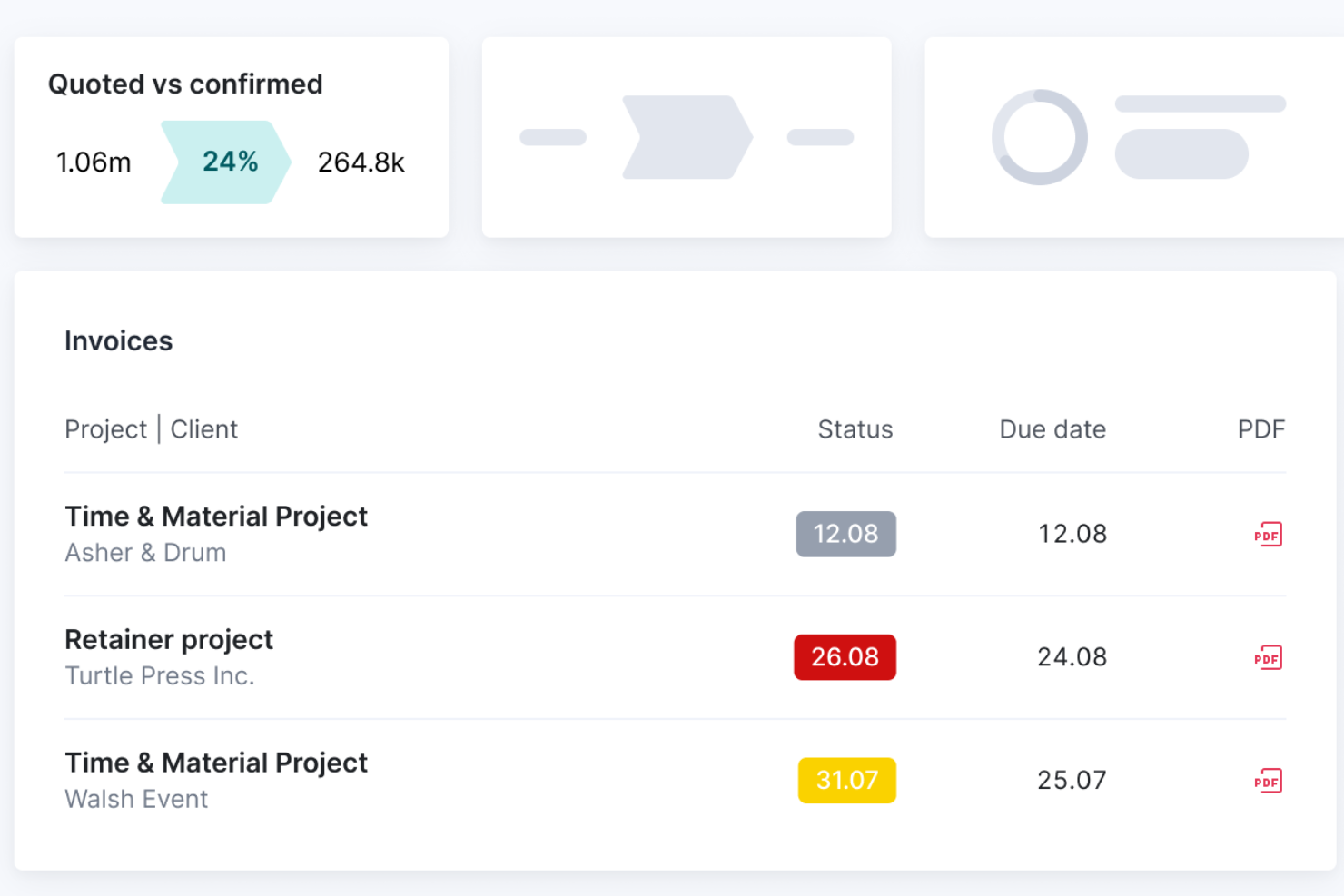
Scoro is a professional services automation platform that brings together project management, time tracking, expense management, billing rate configuration, and client invoicing in one connected system.
Who Is Scoro Best For?
Scoro is a strong fit for agencies and consultancies managing multiple clients across different currencies, billing rates, and entities.
Why I Picked Scoro
I've included Scoro in my top picks because it handles multi-currency, multi-entity billing in a way that most project management tools simply don't. I love that it supports client-specific price lists, each with its own currency, so negotiated rates pull automatically onto quotes and invoices without manual overrides. When one client pays in euros and another in Australian dollars, Scoro keeps each entity's tax rates and accounting files separate while consolidating everything into group reports.
Scoro Key Features
- Milestone and partial invoicing: Generate invoices tied to specific project milestones or bill incrementally as work progresses, rather than waiting until a project is complete.
- Retainer management: Manage recurring client engagements by billing period, with per-period budgets, rollover of unused hours, and a choice of fixed fee or time-and-materials models.
- Quote-to-invoice workflow: Convert approved quotes directly into projects, budgets, and time logs, so billable data flows through to invoices at the rates already saved.
- Accounting sync: Two-way sync with Xero, QuickBooks, Sage Intacct, and Exact Online keeps invoices, bills, and payment status aligned across platforms.
Scoro Integrations
Scoro offers 40+ native integrations, including Xero, QuickBooks, Sage Intacct, Exact Online, Stripe, Salesforce, and HubSpot. It also provides a REST API v2 and Zapier.
Pros and Cons
Pros:
- Profitability reports expose unbilled work
- Milestones and time logs feed billing
- Client-specific rates carry into invoices
Cons:
- Dense screens complicate initial configuration
- Invoice formatting can require extra work
New Product Updates from Scoro

Scoro Adds Time Mobile App and ELI Improvements
Scoro adds the Scoro Time mobile app for iOS/Android to track time anywhere and expands ELI with attachments, smarter filtering, and trigger-based actions. For more information, visit Scoro's official site.
 .

Best for agencies operating globally
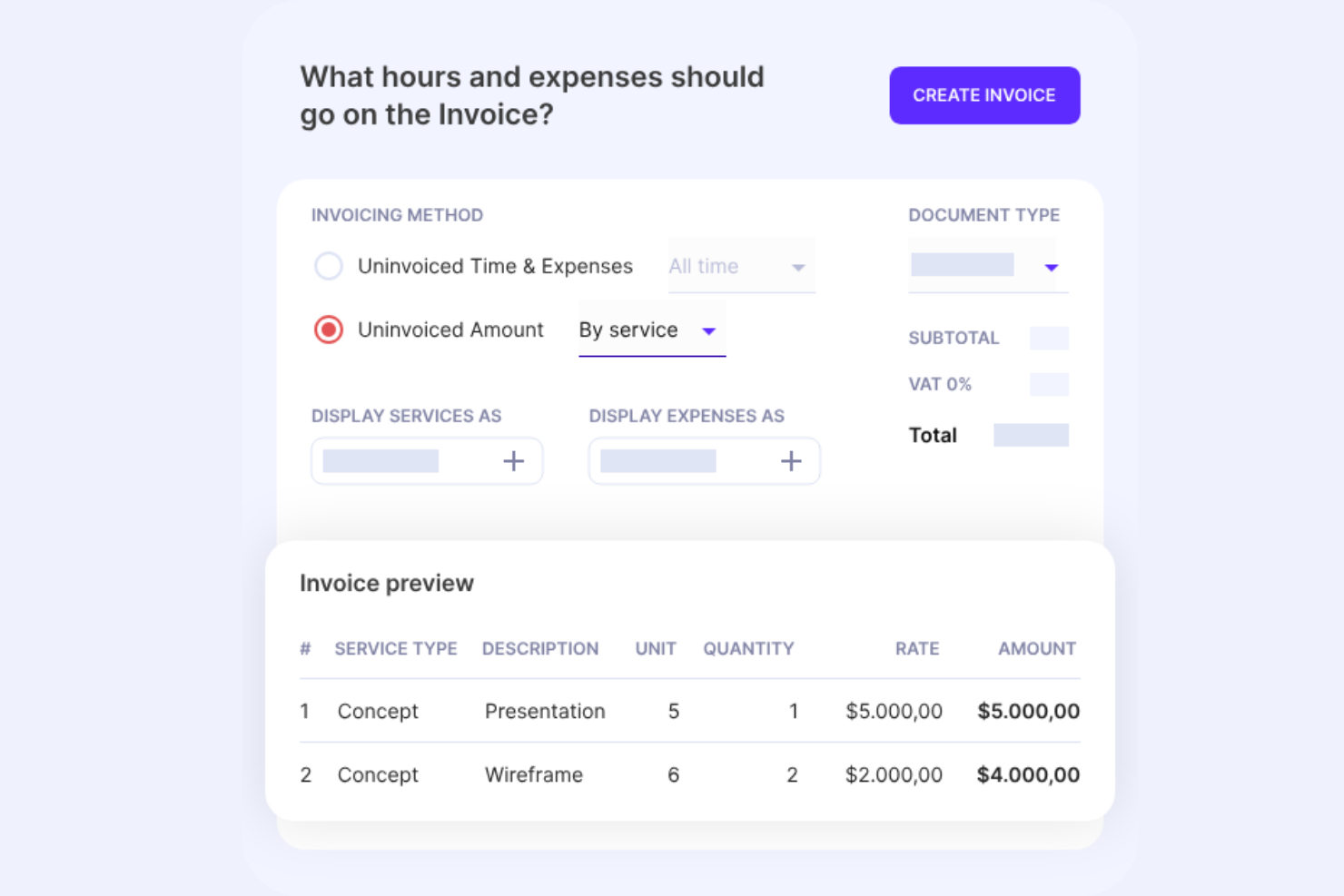
Productive is a project management and invoicing platform built for agencies, combining time tracking, project budgeting, billing rate management, and client invoicing with multi-currency support and global accounting integrations.
Who Is Productive Best For?
Productive is a strong fit for agencies managing projects and billing across multiple countries, currencies, and accounting systems.
Why I Picked Productive
I've included Productive in my top picks because it handles the full billing cycle across multiple currencies and tax jurisdictions without forcing you to stitch together separate tools. I particularly like that each subsidiary can carry its own tax rates and that invoices automatically display both the client currency and the exchange rate, which matters when you're billing a client in euros while your books run in pounds. Recurring budgets also auto-generate invoice drafts for retainer clients, so your monthly billing cycle starts review-ready rather than from scratch.
Productive Key Features
- AI timesheet autofill: Productive uses AI to suggest time entries based on your activity, reducing manual logging across your team.
- Budget overrun limits: You can cap time logging at the service level so team members can't log hours once a budget threshold is hit.
- Approval workflows: Billable time and expense approvals let designated reviewers check entries before they flow into invoices or revenue reports.
- E-invoicing support: Productive supports PEPPOL, XRechnung, FACe, SDI, and Moj e-Račun for agencies with structured invoicing requirements.
Productive Integrations
Productive offers native integrations with Xero, QuickBooks Online, Sage, Exact, Visma e-conomic, Fortnox, Twinfield, NetSuite, Jira, and Slack. It also supports an Open API and Zapier.
Pros and Cons
Pros:
- Reviewers praise joined-up project and billing workflows
- Recurring retainer budgets create invoice drafts
- Live budget-to-profit and invoice visibility
Cons:
- Reporting customization can feel clunky
- No native online invoice payment collection
New Product Updates from Productive
Productive Adds Email and Calendar Integrations for Agents
Productive adds Gmail, Outlook, Google Calendar, and Outlook Calendar connectors for its AI agents. These integrations let agents manage emails and create calendar events directly within Productive. For more information, visit Productive’s official site.
 .

Wrike
Best time tracking & timesheets for easy invoicing
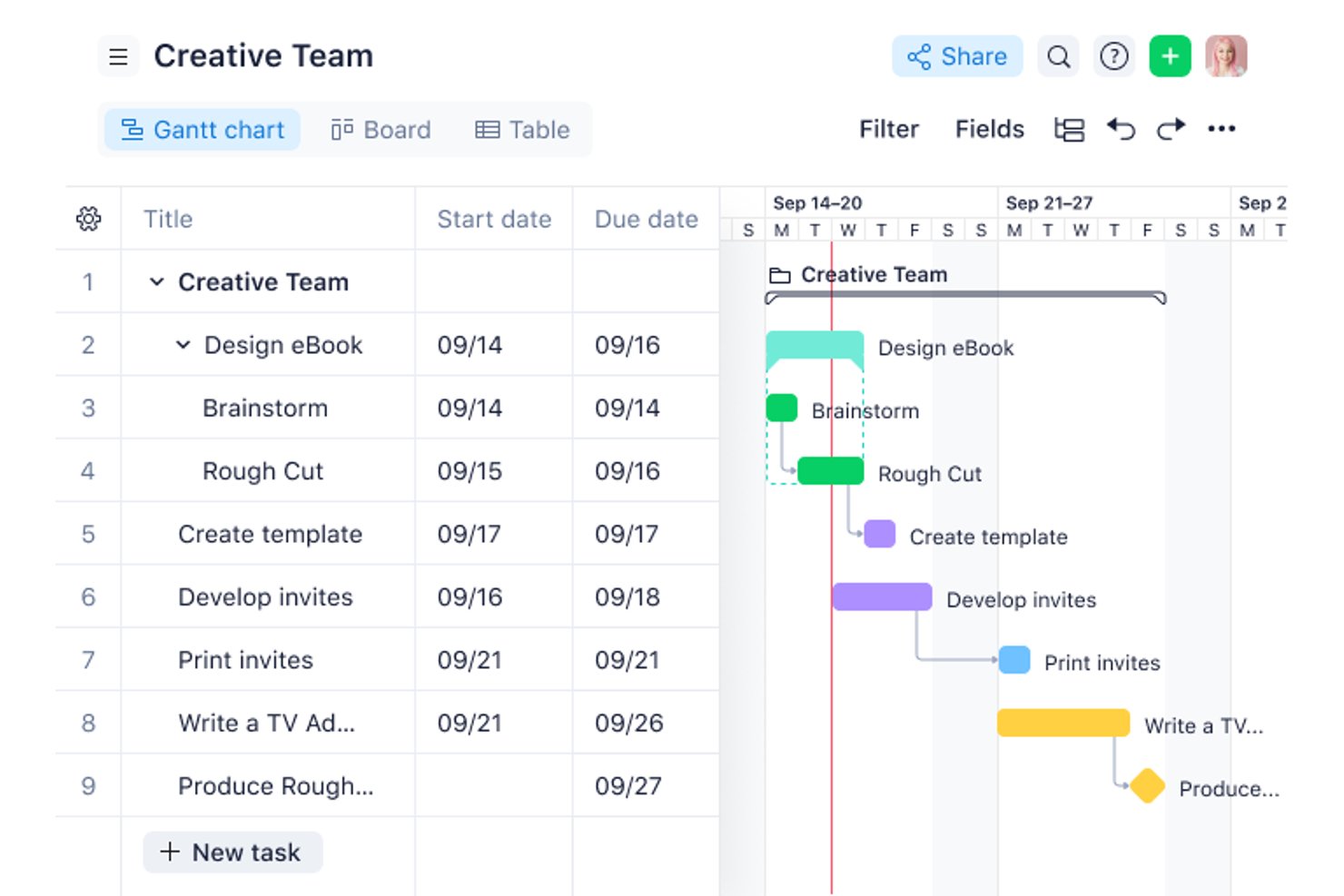
Wrike is a work management platform with time tracking, timesheet approvals, billable hour controls, project budgeting, and a QuickBooks Online integration for exporting logged time to invoicing workflows.
Who Is Wrike Best For?
Wrike suits mid-to-large teams that already use QuickBooks Online and need billable time approvals and budget tracking built into their project workflows.
Why I Picked Wrike
I've included Wrike in my top picks because its billable time controls are genuinely well-thought-out: tasks inherit billable flags from their parent project, time entries inherit them from tasks, and approved timesheets get locked so nothing slips through before export. I like how the QuickBooks Online integration automates that export, so when a task hits "Completed," logged hours move to QuickBooks ready for invoicing without manual re-entry. The per-user and per-role bill rates, with project-level overrides, give you clean cost and fee tracking across multiple client engagements.
Wrike Key Features
- Timesheet approval locking: Managers can approve or decline weekly and monthly timesheets, and approved periods are locked to prevent edits before export.
- Automation-triggered QuickBooks export: Automation rules can push time entries to QuickBooks Online when a task reaches a set status, such as "Completed."
- Per-role and per-user billing rates: Default bill and cost rates can be assigned by user or job role, with the option to override them at the project level.
- Planned vs. actual financial fields: Projects automatically calculate planned and actual fees and costs from effort and logged time, giving you a live budget vs. actual view.
Wrike Integrations
Wrike offers 400+ prebuilt connectors, including native QuickBooks Online, Salesforce, HubSpot, Jira, GitHub, Microsoft Teams, Slack, and Power BI integrations. It also supports custom integrations through its API and connects with Xero via Zapier.
Pros and Cons
Pros:
- Planned-versus-actual fees expose budget overruns
- Approved billable hours lock before export
- Clear project visibility across workstreams
Cons:
- No payment collection or recurring billing
- No client-ready invoices inside Wrike
New Product Updates from Wrike

Wrike Redesigns Workspace Search With New Filters
Wrike introduces a redesigned Workspace Search interface with recent search shortcuts, item type and location filters, and parent-task context. These updates help users find relevant work items and navigate search results efficiently. For more information, visit Wrike’s official site.
 .

Best for timesheet modules
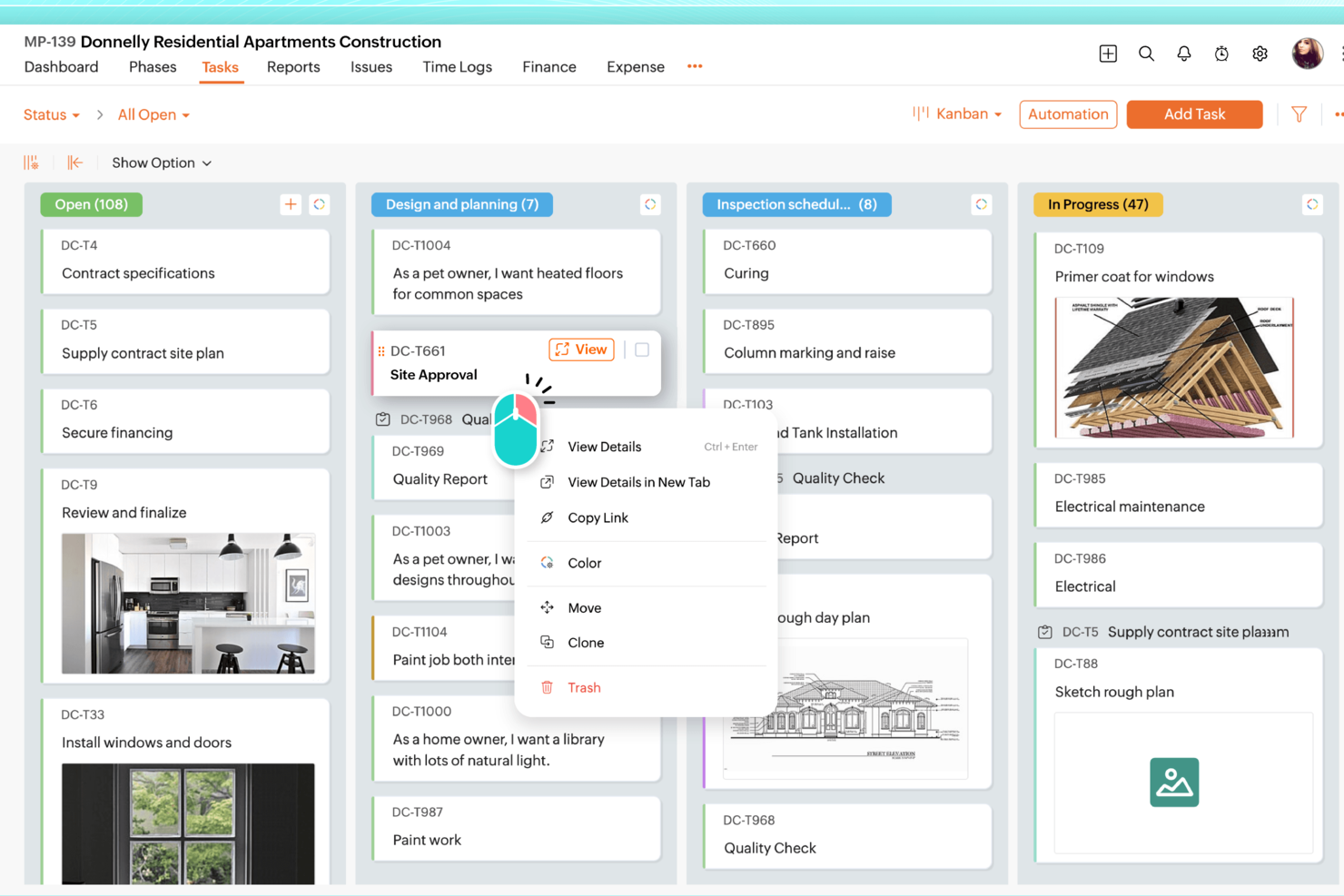
Zoho Projects is a project management platform with deep timesheet capabilities, multi-level budget tracking, and billing rate management that connects to Zoho's finance tools for invoicing and payment collection.
Who Is Zoho Projects Best For?
Zoho Projects is a strong fit for project managers and agency teams already using Zoho's ecosystem who need detailed timesheet controls and multi-level budget tracking across client projects.
Why I Picked Zoho Projects
Zoho Projects earns its spot on my shortlist because of how far it takes timesheet management compared to most project management tools. I'm particularly impressed by its multi-level approval workflows, which ensure only billable, approved hours flow through to invoicing in Zoho Books. You also get billing rate flexibility I rarely see at this price: rates can be set by staff member, project, task, or fixed cost, with per-project overrides so one team member can bill at different rates across clients.
Zoho Projects Key Features
- Project budget tracking: Set budgets by hours or amount at the project, milestone, or task level, with threshold alerts and a health widget that flags overruns.
- Earned value management (EVM): Compare work completed against your planned cost and schedule to catch variances before they become serious problems.
- Zoho Finance Suite integration: Push timesheet data directly to Zoho Invoice or Zoho Books to create client invoices, quotes, and purchase orders from within Projects.
- Client portal: Add clients as users so they can view project progress, tasks, and hours logged without needing full team access.
Zoho Projects Integrations
Zoho Projects offers native integrations with Zoho Invoice, Zoho Books, Zoho Billing, Zoho Expense, Google Sheets, Microsoft Teams, Slack, and GitHub. It also supports Zoho Flow, webhooks, an API, and Zapier.
Pros and Cons
Pros:
- Reviewers praise task organization and reporting
- Budget alerts flag project and task overruns
- Detailed time logs support billable-hour approvals
Cons:
- Reviewers report a cluttered interface
- Projects doesn’t generate invoices natively
New Product Updates from Zoho Projects
Zoho Projects Adds CodeX Scripts for Custom Modules
Zoho Projects now supports CodeX Scripts for custom modules, enabling conditional logic and rules for creating, updating, and deleting records. For more information, visit Zoho Projects' official site.
 .

actiTIME
Best for branded invoice generation
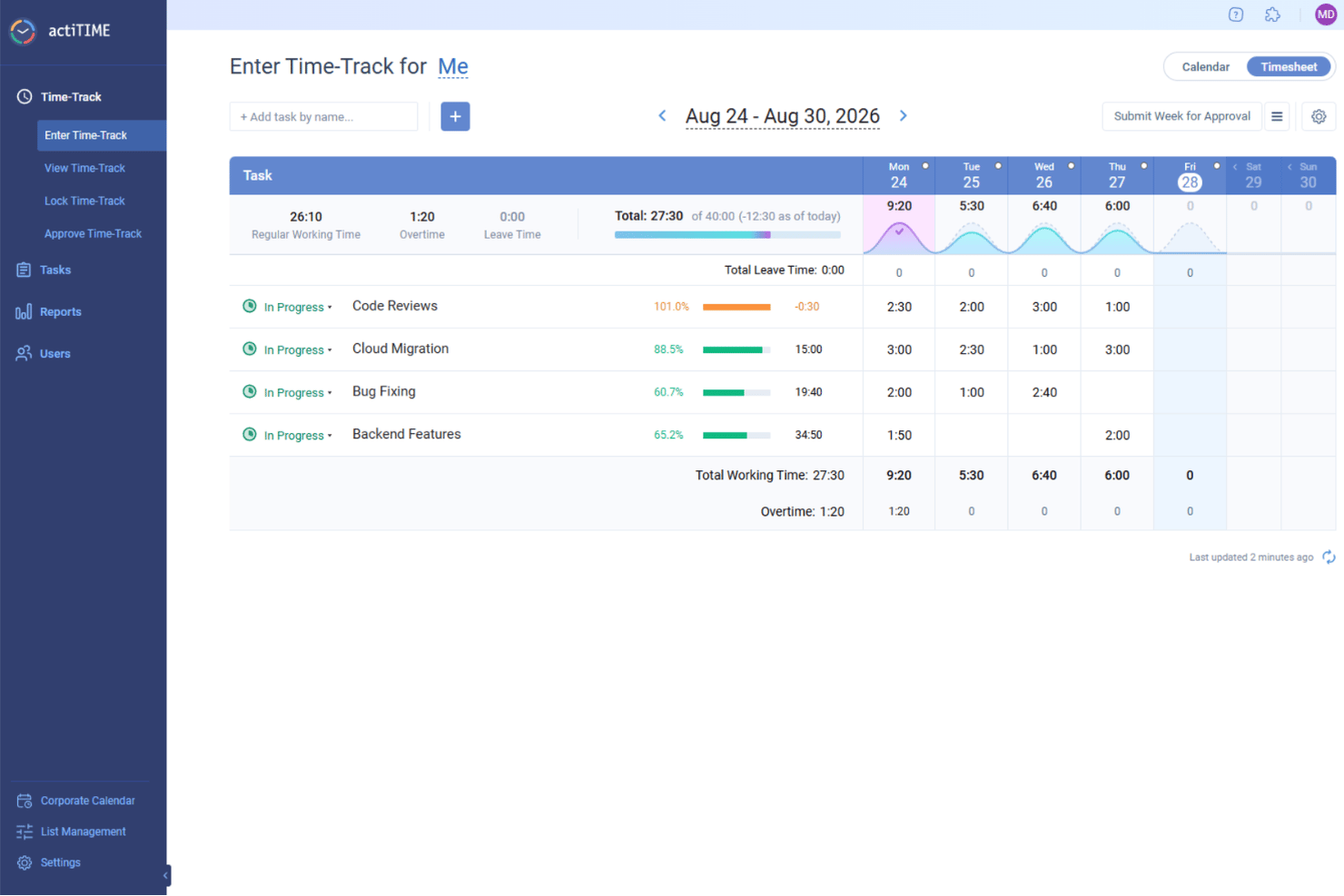
actiTIME is a time tracking and project management tool that combines timesheet management, task tracking, budget monitoring, and branded PDF invoice generation from billable hours.
Who Is actiTIME Best For?
actiTIME is a good fit for agency owners and project managers who need to turn tracked billable hours into branded, client-ready PDF invoices without a lot of manual effort.
Why I Picked actiTIME
I picked actiTIME as one of the best because of how cleanly it turns tracked billable hours into polished, client-ready PDF invoices. I love that you can add your logo, adjust line-item descriptions, apply discounts, and include payment terms before sending, all from the Invoice Export Report. The Billing Summary Report rounds it out by giving clients a clear breakdown of what they're paying for and why.
actiTIME Key Features
- Timesheet approvals: Managers can review, edit, and lock submitted timesheets before any billable hours flow into reports or invoices.
- Project budget tracking: Set time, cost, and billing budgets at the customer, project, or task level, with progress bars showing spend in real time.
- Profit/Loss reporting: The Profit/Loss report breaks down revenue, labor costs, and gross profit across projects so you can see where you're making and losing money.
- QuickBooks Online integration: Sync time data directly to QuickBooks for accounting reports and invoice management across both platforms.
actiTIME Integrations
actiTIME offers native integrations with QuickBooks Online and actiPLANS. It also supports custom connections through a REST API and Zapier.
Pros and Cons
Pros:
- Profitability reports connect billable hours to margins
- Project budgets expose cost and revenue drift
- Branded PDFs built from approved timesheets
Cons:
- Advanced budget setup takes configuration
- Invoice PDFs require separate payment follow-up
New Product Updates from actiTIME

actiTIME Visual Hour Indicator and Time-Track Report Redesign
actiTIME adds a wave-style hour indicator to the Timesheet and Calendar views and refreshes the Time-Track report for smoother navigation and clearer visuals. For more information, visit actiTIME's official site.
 .

Zistemo
Best if you also need staffing tools
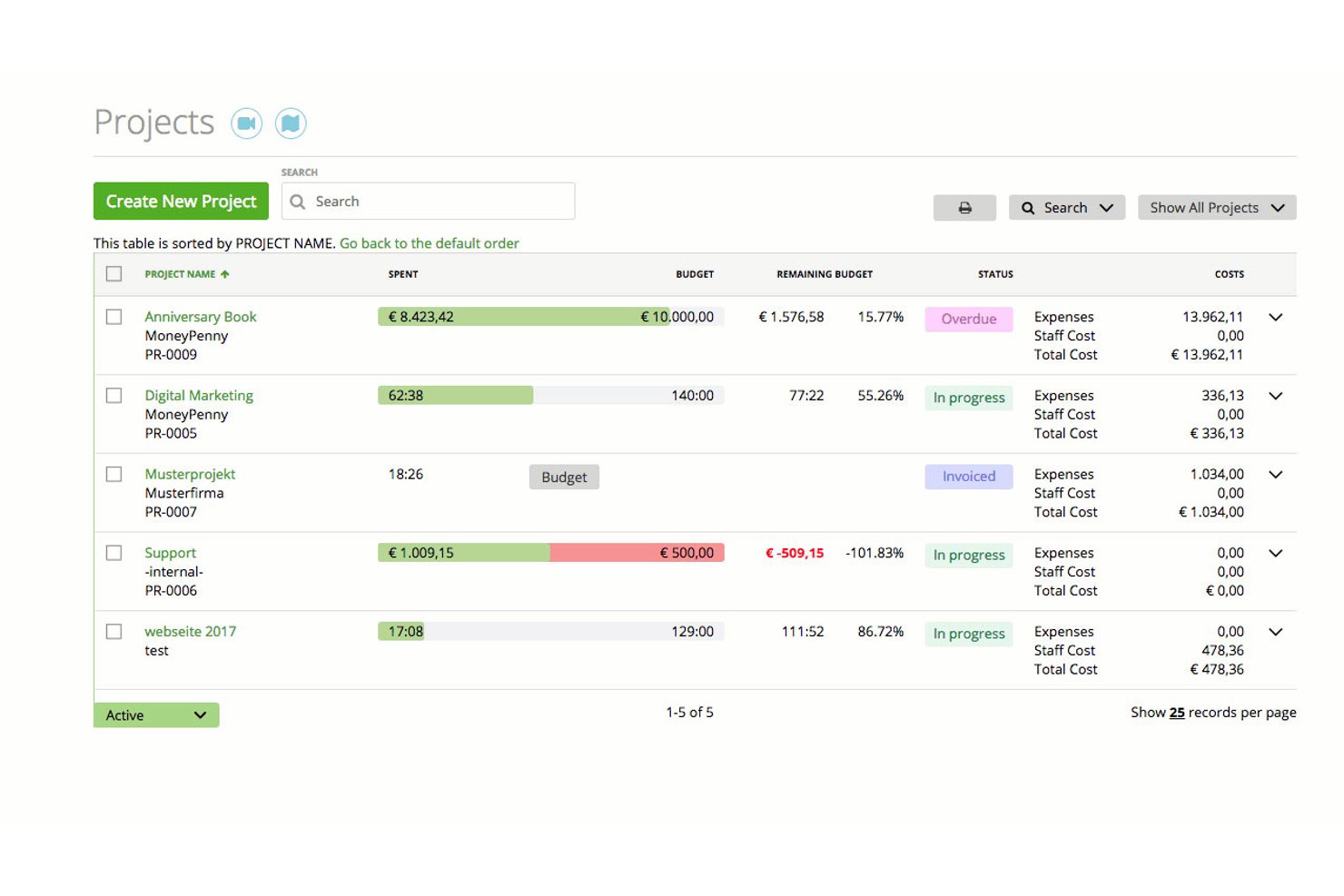
Zistemo is a cloud-based project management and invoicing platform that combines time tracking, expense management, staff scheduling, and client billing in one tool.
Who Is Zistemo Best For?
Zistemo is a strong fit for agencies and consulting firms that need to manage staff schedules and project billing in the same place.
Why I Picked Zistemo
I've included Zistemo in my top picks because its staffing and scheduling tools go well beyond what most project management and invoicing platforms offer. I can assign work by skill, view team availability up to six weeks out, and account for leave and holidays, all without leaving the platform. The drag-and-drop scheduler feeds directly into time tracking and budgeting, so billable hours stay tied to real capacity rather than guesswork.
Zistemo Key Features
- Invoice wizard: Pulls tracked hours, tasks, expenses, and mileage into a client invoice in one click, with support for retainers, progress invoicing, and credit notes.
- Seven billing methods: Choose from hourly task, hourly project, flat project, flat task, hourly staff, and day rate options to match how each client engagement is structured.
- Budget escalation alerts: Set a percentage threshold and get notified by email, Slack, or in-app bell when a project approaches its budget limit.
- Client portal: Clients can log in to view shared projects, tracked time, invoices, unpaid balances, and estimates without counting as paid users.
Zistemo Integrations
Zistemo offers documented integrations with QuickBooks, Xero (beta), Lexoffice, Asana, Jira, Trello, HubSpot, Pipedrive, Slack, and Microsoft Teams. It also provides a REST API and Zapier (beta).
Pros and Cons
Pros:
- Staff scheduling connects capacity with project budgets
- Tracked hours and expenses feed invoices directly
- Support responds quickly to billing questions
Cons:
- Project dashboards feel limited at scale
- Project and task setup can feel complex

NetSuite
Best for financial forecasting
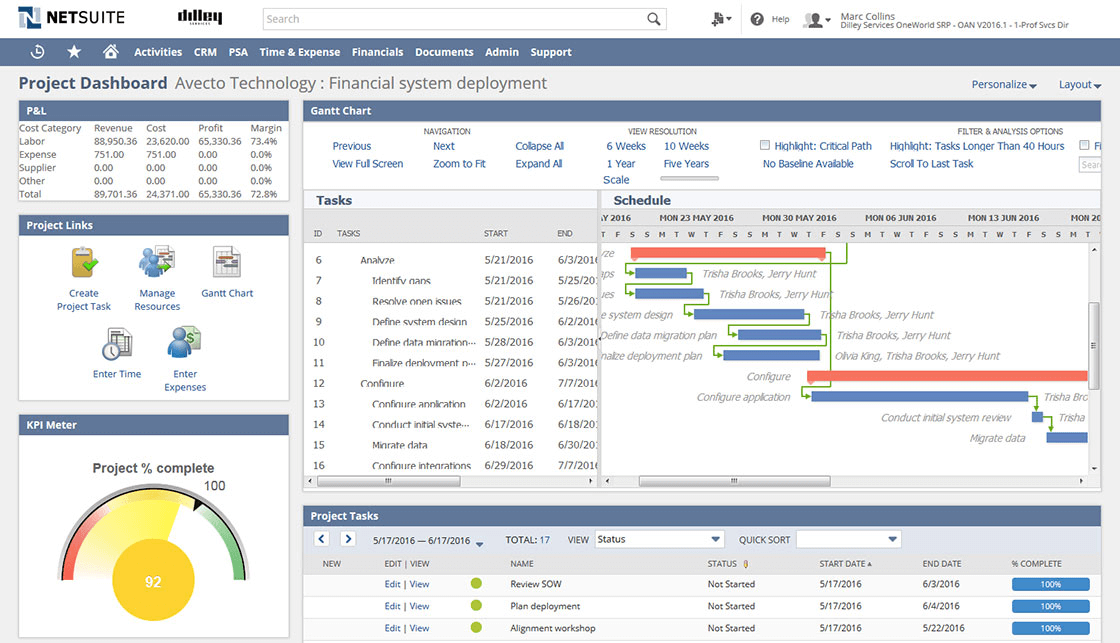
NetSuite is a cloud-based ERP platform with a built-in professional services automation module that covers project management, time and expense tracking, invoicing, billing automation, and financial planning.
Who Is NetSuite Best For?
NetSuite is a strong fit for finance and operations managers at mid-to-large organizations that need project billing, revenue recognition, and financial forecasting in one system.
Why I Picked NetSuite
I picked NetSuite as one of the best because its budget-versus-actual tracking is genuinely built for finance-first teams, not bolted on. Submitted timesheets and expense reports hit the project budget automatically, so variances surface in real time without any manual reconciliation. I also like that the Planning and Budgeting module layers in AI-driven scenario modeling, letting you run forecasts across products, customers, and locations directly from your general ledger data.
NetSuite Key Features
- Rate cards: Set billing rates by client, billing class, or role, with effective dates that automatically apply the right rate when prices change.
- SuiteBilling: Manage recurring billing with evergreen or fixed-term subscriptions, consolidated invoices, prorated change orders, and automatic renewals.
- Milestone-based invoicing: Trigger invoices automatically when a project milestone is reached using the Fixed Bid, Milestone billing type.
- Resource and capacity planning: Match staff to projects by skills, availability, and planned time off, with utilization monitoring built into the PSA module.
NetSuite Integrations
NetSuite offers 600+ marketplace integrations and add-ons, including Salesforce, Microsoft Office, Google Sheets, and Oracle Analytics Cloud. SuiteCloud and SuiteScript support custom integrations, while native connections include NetSuite CRM and SuitePeople.
Pros and Cons
Pros:
- Rate cards support client-specific billing changes
- Timesheets and expenses update project budgets
- Reviewers praise centralized finance and operations
Cons:
- SuiteProjects Pro interface feels dated
- Reviewers report difficult, time-consuming setup
Best for agencies
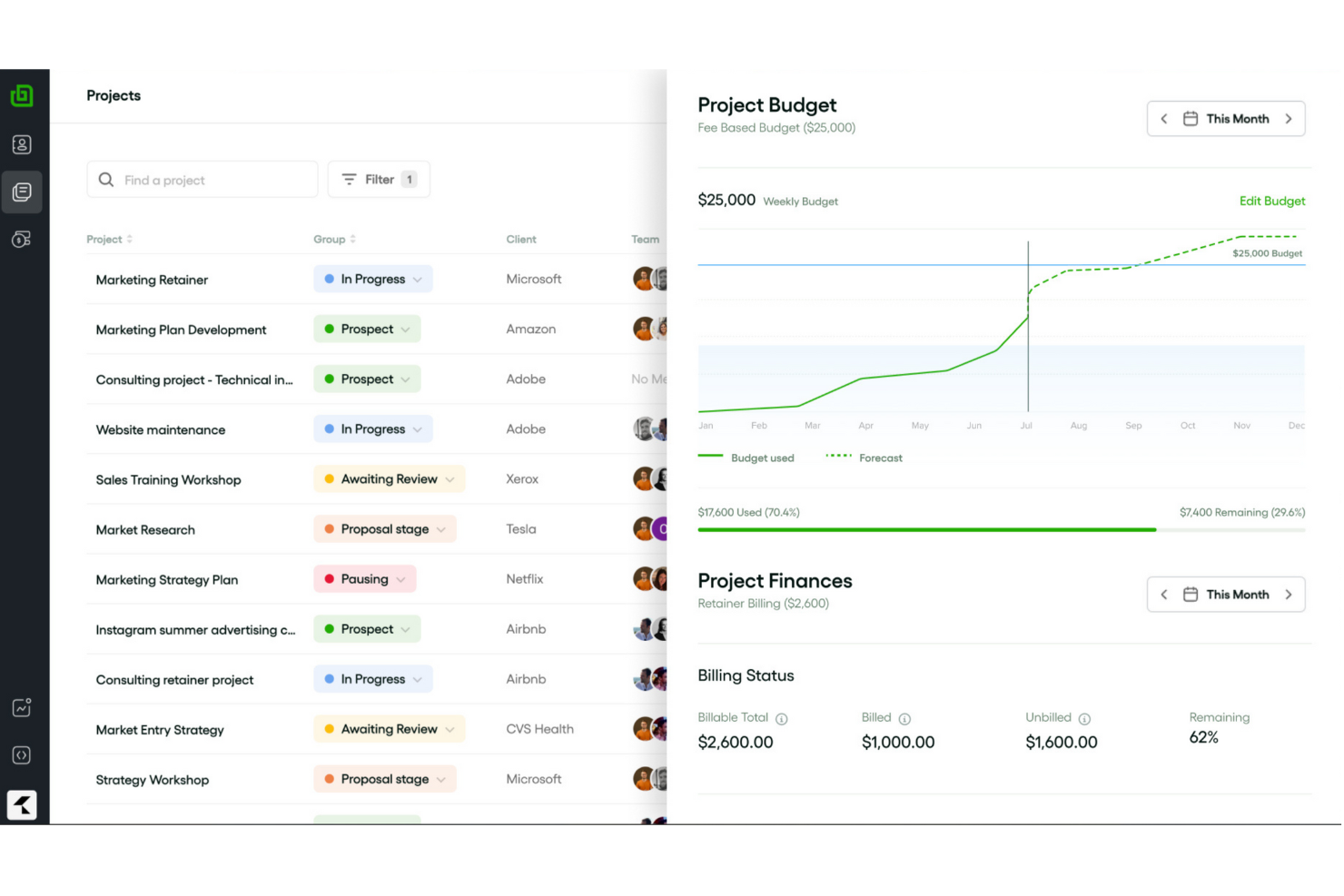
Bonsai Agency Software is a project management and invoicing platform that combines client billing, time tracking, expense management, resource planning, and built-in proposals and contracts.
Who Is Bonsai Agency Software Best For?
Bonsai Agency Software is a strong fit for client-service teams that need to manage projects, track billable hours, and invoice clients from a single platform.
Why I Picked Bonsai Agency Software
I picked Bonsai Agency Software as one of the best because it's built around the way agencies actually bill, with rate cards you can assign by role, client, or project so logged hours automatically calculate at the right rate without manual adjustments. I also love how tracked time and expenses convert into a branded invoice in just a few clicks, with recurring billing available for retainer clients. The client portal ties it together by letting clients view project progress, review deliverables, and pay invoices from a single link.
Bonsai Agency Software Key Features
- Resource and capacity planning: A drag-and-drop timeline lets you schedule team bookings, flag tentative work, and track live capacity against part-time schedules, time off, and public holidays.
- Kanban and Gantt views: Projects can be visualized as a Kanban board or Gantt chart, with task dependencies, custom statuses, and recurring tasks built in.
- SOC 2 Type II certification: Bonsai completed its SOC 2 Type II audit in July 2025, with GDPR and CCPA compliance, enforced multi-factor login, and role-based access controls.
- Accounting integrations: QuickBooks Online and Xero connect with two-way invoice sync, keeping your project billing and bookkeeping aligned without manual data entry.
Bonsai Agency Software Integrations
Bonsai Agency Software offers documented integrations with QuickBooks Online, Xero, Stripe, Slack, Gmail, Google, and Calendly. It also supports Zapier, but no public API is documented for custom integrations.
Pros and Cons
Pros:
- Clients track milestones and pay through portal
- Role-based rate cards reduce billing adjustments
- Billable hours flow directly into client invoices
Cons:
- Slow support responses complicate billing issues
- Payment holds can delay agency cash flow

Ravetree
Best for client invoicing and management

Ravetree is a professional services automation (PSA) platform that brings together project management, time and expense tracking, client invoicing, retainer billing, CRM, and resource planning in one system.
Who Is Ravetree Best For?
Ravetree is a strong fit for agencies and consultancies that bill clients for services and need project management, time tracking, and invoicing to work as one system.
Why I Picked Ravetree
Ravetree earns its spot on my shortlist because of how tightly it connects project delivery to client billing. I love that its "Ready to Invoice" page automatically pulls approved time, expenses, and retainer charges into a single invoice, so nothing gets missed at billing time. Client-specific rate cards with start and expiration dates mean the right rate applies automatically, even across complex, multi-phase projects.
Ravetree Key Features
- Retainer billing automation: Ravetree generates and sends renewal invoices on a set schedule and can auto-charge clients through Stripe at the end of each billing period.
- Resource capacity planning: Utilization heat maps, skill-based filtering, and drag-and-drop scheduling let you manage team availability across all active client projects.
- Project budgeting and profitability tracking: Real-time budget burndown, estimated-vs-actual comparisons, and gross-profit reports are tied directly to each project.
- Proposal-to-project conversion: Approved proposals can automatically create a project from a template and trigger invoice generation without any manual setup.
Ravetree Integrations
Ravetree offers native integrations with QuickBooks, Xero, Stripe, HubSpot, Google Calendar, Outlook Calendar, Google Drive, Dropbox, OneDrive, and GitHub. It also supports an open API for custom integrations; Slack is listed as coming soon.
Pros and Cons
Pros:
- Profitability reports connect budgets and actuals
- Approved time and expenses feed invoices
- Responsive support helps teams get started
Cons:
- Occasional bugs can slow billing work
- Staff can feel overwhelmed during adoption

Accelo
Best for billing controls and margin tracking
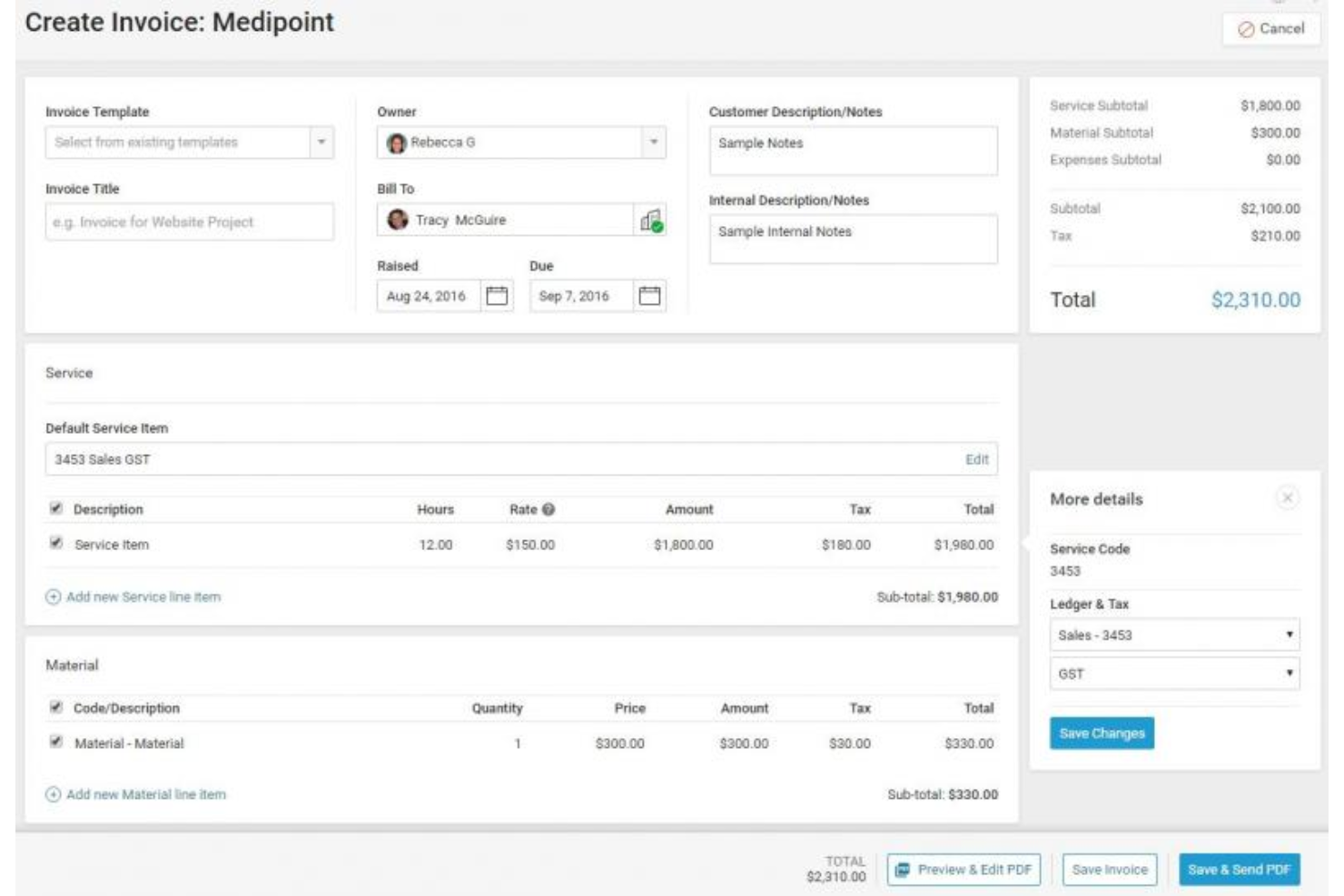
Accelo is an AI-powered professional services automation (PSA) platform that combines project management, time tracking, client billing, retainer management, and profitability forecasting in a single system.
Who Is Accelo Best For?
Accelo is built for mid-sized agencies and professional services firms that need tight control over billing across multiple clients, retainers, and projects simultaneously.
Why I Picked Accelo
I picked Accelo as one of the best because it gives you genuinely granular control over what gets billed and at what rate. The project rate card system lets you set per-staff rates, apply client division defaults, and override them at the project level, so margins stay predictable across every engagement. I especially like the Margin Guard AI agent, which flags profitability drops before they become losses, and the bulk Company Billing wizard, which invoices across multiple clients, retainers, and tickets in one pass.
Accelo Key Features
- Timesheet approval workflow: Time entries move through a structured pending-to-approved process, and only approved time becomes available to invoice.
- Retainers module: Automatically renews billing periods and schedules invoices, including fixed charges for non-time items like licenses and subscriptions.
- Client Workspace portal: A branded, passwordless client portal where clients can view project dashboards, Gantt timelines, and milestone sign-offs with a timestamped audit trail.
- Resource and capacity planning: AI matches staff to projects based on skills, availability, and workload, with utilization tracking and pipeline-weighted demand forecasts.
Accelo Integrations
Accelo offers integrations with Xero, QuickBooks Online, Sage Intacct, Stripe, Authorize.net, PayPal, Jira, Azure DevOps, GitHub, and Expensify. It also provides RESTful and Forms APIs for custom integrations, plus Zapier.
Pros and Cons
Pros:
- Retainers renew and invoice automatically
- Approved time feeds invoice creation
- Client and project data stay together
Cons:
- Complex workflows can slow initial adoption
- Reporting takes hunting to find worked hours
New Product Updates from Accelo

Accelo Rebuilds Mobile App for Project and Time Management
Accelo rebuilds its mobile app with task management, new work creation, and mobile timesheets for Forecast customers. This helps teams keep project and time data current while working away from a desktop. For more information, visit Accelo’s official site.
 .
Faturalandırma Özellikli Diğer Proje Yönetimi Yazılımları
İşte kısa listeme giremeyen ancak yine de göz atmaya değer bazı ek faturalandırma seçeneklerine sahip proje yönetimi yazılımları:
- VOGSY
For mixed billing models across projects
- Kantata
For margin tracking tied to client billing
- Avaza
For client approval and billing in one place
- BigTime
For billing rate rules across client projects
- Rocketlane
For milestone-based billing workflows
- Bonsai
For billing clients through a project portal
- Certinia
For Salesforce-native billing and projects
- Harvest
Free time-to-invoice workflow
- WorkflowMax
For job costing tied to billing rates
- Workamajig
For creative agency billing and accounting


How I Evaluate Project Management Software With Invoicing
I split my evaluation into three parts, giving the most weight to core needs: track billable hours and expenses, then turn those logs into client invoices. Next, I consider standout features such as client payment portals. Finally, I weigh onboarding support and pricing that fits freelancers and growing agencies.
Core Functionality (Table Stakes For This List)
When I'm selecting tools for my list, I score each one on a scale from 0 (does not offer the functionality) to 5 (excels in this area) for each core functionality listed below. I then convert the total into a percentage to help assess each tool's overall fit, with extra weight on any functionalities I’ve deemed essential.
- Time & Expense Tracking (Essential): I look for time entries tied to tasks and categorized expenses that can flow into billing without rekeying.
- Invoice Generation (Essential): Can logged hours, expenses, or completed milestones become itemized client invoices, with recurring retainer billing where needed?
- Project Budgeting: I check whether teams can set project or phase budgets, compare actuals, and spot overruns before they erode margin.
- Tasks & Milestones: I consider whether teams can organize deliverables into phases and connect milestones to progress tracking or billing events.
- Billing Rates: I look for rates that can vary by client, project, task, or team member, so invoices reflect the agreed pricing.
- Payment Processing: I check whether clients can pay through a supported payment option and teams can track invoice status and follow-ups.
Once I have a list of tools that meet the criteria, I consider what sets each platform apart.
Differentiating Factors (What Sets Vendors Apart)
Here's how I compare and contrast different vendors:
Standout Features
I look for approval workflows that route time and expense entries through manager sign-off before they reach an invoice. Without that gate, billing disputes eat into client relationships. Multi-currency and tax automation matters just as much—I check whether a tool applies the right conversion rates and regional tax rules automatically, since manual lookups don't scale across a global client base. I also evaluate client self-service portals, where clients can review invoices and submit payment without a chain of emails slowing collections.
Beyond Features
I check how each platform's pricing scales with client volume, since per-seat models can punish agencies that only need a few internal users but manage dozens of accounts. Tech stack connectivity matters just as much—I look for a reliable two-way sync with accounting tools like QuickBooks or Xero so finance teams aren't rekeying invoice data. I also evaluate onboarding support for migrating billing history and configuring rate cards, because a tool that takes months to set up delays every invoice it's supposed to speed up.
Faturalandırma Özellikli Proje Yönetimi Yazılımı Nasıl Seçilir?
Uzun özellik listeleri ve karmaşık fiyatlandırma yapıları içinde kaybolmak kolaydır. Kendinize özgü yazılım seçim süreciniz üzerinde çalışırken odaklanmanızı korumanıza yardımcı olmak için aklınızda bulundurmanız gereken faktörlerin bir kontrol listesi aşağıda yer alıyor:
| Faktör | Dikkat Edilmesi Gerekenler |
|---|---|
| Ölçeklenebilirlik | Yazılım işletmenizle birlikte büyüyebilir mi? Gelecekte sahip olmayı planladığınız proje ve kullanıcı sayısını göz önünde bulundurun ve aracın bunları karşılayabildiğinden emin olun. |
| Entegrasyonlar | Yazılım mevcut sistemlerinize bağlanabiliyor mu? CRM'niz, e-postanız veya muhasebe yazılımınız gibi araçlarla entegre olup olmadığını kontrol edin. |
| Özelleştirilebilirlik | Aracı iş akışlarınıza uyacak şekilde düzenleyebilir misiniz? Alanları, gösterge panellerini ve raporları süreçlerinize uyacak şekilde özelleştirme seçeneklerini arayın. |
| Kullanım kolaylığı | Arayüz kullanıcı dostu mu? Basit bir tasarım, ekibinizin kapsamlı bir eğitim almadan hızlıca uyum sağlamasına yardımcı olur. |
| Uygulama ve işe alıştırma | Başlamak ne kadar sürecek? Yazılımı kurmanın kolaylığını ve işe alıştırma sürecinde sunulan desteği değerlendirin. |
| Maliyet | Fiyatlandırma bütçeniz dahilinde mi? Ek kullanıcılar veya özellikler için alınabilecek gizli ücretleri ya da maliyetleri de içeren toplam maliyeti göz önünde bulundurun. |
| Güvenlik önlemleri | Yazılım verilerinizi nasıl koruyor? Şifreleme, düzenli yedeklemeler ve veri koruma standartlarına uygunluk gibi özellikleri arayın. |
Proje Yönetiminde Faturalandırma Nedir?
Faturalandırma özellikli proje yönetimi yazılımı; zaman çizelgeleri ve faturalandırılabilir saat takibi, nakit akışı analizleri ve faturalandırma araçları gibi finansal yönetim araçlarını proje yönetimi işlevleriyle bir araya getirir.
Bu tür yazılımlar genellikle proje planlama, görev yönetimi, iş birliği ve zaman takibi özelliklerini içerir ve kullanıcıların bir projenin çeşitli yönlerini verimli bir şekilde yönetip izlemesine olanak tanır.
Küçük ekipler, serbest çalışanlar ve girişimler bundan büyük ölçüde yararlanır. Bu grupların genellikle bütçe kısıtlamaları vardır ve paralarını üç veya dört farklı profesyonel hizmet aracı için ödemek yerine yatırım yapmaları gereken başka alanlar bulunur.
Özellikler
Faturalandırma özelliğine sahip proje yönetimi yazılımı seçerken aşağıdaki temel özelliklere dikkat edin:
- Güvenlik önlemleri: Hassas proje ve finansal verileri şifreleme ve düzenli yedeklemelerle korur.
- Görev yönetimi: Görevleri düzenler ve ekip üyelerine atar, böylece projelerin plan doğrultusunda ilerlemesine yardımcı olur.
- Zaman takibi: Görevlerde harcanan süreyi izleyerek doğru faturalandırma ve verimlilik hakkında içgörüler sağlar.
- Fatura oluşturma: Faturaları doğrudan yazılım üzerinden oluşturup göndererek faturalandırma sürecini kolaylaştırır.
- Özelleştirilebilir gösterge panelleri: Kullanıcıların önemli proje verilerine hızlı erişim için görünümlerini uyarlamasına olanak tanır.
- Bütçe takibi: Proje giderlerini izler ve bunların ayrılan bütçe dahilinde kalmasını sağlar.
- Entegrasyon özellikleri: Veri akışını kesintisiz hale getirmek için CRM'ler ve muhasebe yazılımları gibi diğer araçlara bağlanır.
- Çoklu para birimi desteği: Çeşitli para birimlerini destekleyerek farklı ülkelerdeki müşterilere faturalandırma yapılmasını kolaylaştırır.
- Raporlama araçları: Proje performansı ve finansal durum hakkında içgörüler ve analizler sunar.
- İş birliği özellikleri: Platform içinde ekip iletişimini ve dosya paylaşımını geliştirir.
- Müşteri portalları: Müşterilerin faturaları, giderleri ve kaydedilen süreyi görüntülemesine olanak tanır ve çevrim içi ödemelere izin verebilir.
Faydalar
Faturalandırma özelliğine sahip proje yönetimi yazılımını uygulamak, ekibiniz ve işletmeniz için çeşitli faydalar sağlar. Yararlanabileceğiniz bazı faydalar şunlardır:
- Daha iyi organizasyon: Görev yönetimi ve özelleştirilebilir gösterge panelleri, projelerin düzenli ve zamanında ilerlemesine yardımcı olur.
- Doğru faturalandırma: Zaman takibi ve fatura oluşturma, müşterilerin yapılan iş için doğru şekilde ücretlendirilmesini sağlar.
- Geliştirilmiş iş birliği: Yerleşik iletişim araçları, ekip üyelerinin fikirleri ve güncellemeleri paylaşmasını kolaylaştırır.
- Daha iyi finansal denetim: Bütçe takibi ve raporlama araçları, proje maliyetleri ve finansal durum hakkında içgörüler sunar.
- Sadeleştirilmiş iş akışları: Entegrasyon özellikleri, manuel veri girişini ve hataları azaltmak için diğer araçlara bağlanır.
- Küresel erişim: Çoklu para birimi desteği, uluslararası müşterilerle kolayca çalışmanıza olanak tanır.
- Veri güvenliği: Güvenlik önlemleri, proje ve finansal verilerinizi yetkisiz erişime karşı korur.
Maliyetler ve Fiyatlandırma
Faturalandırma özelliğine sahip proje yönetimi yazılımını seçmek, mevcut çeşitli fiyatlandırma modellerini ve planları anlamayı gerektirir. Maliyetler özelliklere, ekip büyüklüğüne, eklentilere ve daha fazlasına göre değişir. Aşağıdaki tabloda, faturalandırma çözümlerine sahip proje yönetimi yazılımlarındaki yaygın planlar, ortalama fiyatları ve genellikle sunulan özellikler özetlenmiştir:
Faturalandırma Özelliğine Sahip Proje Yönetimi Yazılımları için Plan Karşılaştırma Tablosu
| Plan Türü | Ortalama Fiyat | Yaygın Özellikler |
|---|---|---|
| Ücretsiz Plan | $0 | Temel görev yönetimi, sınırlı sayıda proje ve temel destek. |
| Bireysel Plan | $5-$25/kullanıcı/ay | Görev yönetimi, zaman takibi, fatura oluşturma ve sınırlı entegrasyonlar. |
| İşletme Planı | $30-$50/kullanıcı/ay | Gelişmiş raporlama, bütçe takibi, geliştirilmiş entegrasyonlar ve iş birliği özellikleri. |
| Kurumsal Plan | $60-$100/kullanıcı/ay | Özelleştirilebilir gösterge panelleri, çoklu para birimi desteği, gelişmiş güvenlik önlemleri ve özel destek. |
Faturalandırmalı Proje Yönetimi Yazılımı SSS
Faturalandırmalı proje yönetimi yazılımı hakkında sık sorulan soruların bazı yanıtları:
Hangi entegrasyonları aramalıyım?
Faturalandırma özellikli bir proje yönetimi aracı seçerken, Hubspot, Harvest, Pipedrive ve Salesforce gibi zaman takibi ve CRM yazılımıyla entegrasyonların yanı sıra Slack ve Teams gibi iletişim platformlarıyla entegrasyonları da değerlendirin.
Özelleştirilebilir gösterge panoları, faturalandırmalı proje yönetimi yazılımını nasıl geliştirebilir?
Özelleştirilebilir gösterge panoları, görünümünüzü en alakalı verilere odaklanacak şekilde uyarlamanıza olanak tanır. Bu kişiselleştirme; proje durumlarına, faturalandırma bilgilerine ve ekip performansına hızlıca erişmenizi sağlayarak daha bilinçli kararlar almanıza ve projeleri daha verimli şekilde denetlemenize yardımcı olur.
Faturalandırmalı proje yönetimi yazılımında çoklu para birimi desteği neden önemlidir?
Uluslararası müşterilerle çalışıyorsanız çoklu para birimi desteği çok önemlidir. Manuel dönüşümler yapmadan farklı para birimlerinde faturalandırma yapmanıza olanak tanır ve faturalandırma sürecinizde doğruluk ile profesyonellik sağlar. Bu özellik, dünya genelindeki müşterilere hizmet vermenize yardımcı olarak pazar erişiminizi genişletir.