

2026 İçin En İyi 10 Tasarım Proje Yönetimi Yazılımı

10 En İyi Tasarım Proje Yönetimi Yazılımları Kısa Listesi


Tasarım projelerini yönetmek zor olabilir. Son teslim tarihleri, ekip koordinasyonu ve müşteri beklentileri çoğu zaman çakışarak sizi bunalmış hissettirebilir. Tasarım proje yönetimi yazılımları bu noktada devreye girer. Görevleri düzenlemeye, iş birliğini desteklemeye ve projelerinizi planlandığı gibi ilerletmeye yardımcı olur.
Gerçekten fark yaratanları bulmak için farklı araçları test edip inceledim. Amacım, mevcut en iyi seçeneklere tarafsız bir bakış sunmak.
Bu makalede, ekibinizin daha verimli çalışmasına ve proje hedeflerinize ulaşmasına yardımcı olabilecek araçları keşfedeceksiniz. İster küçük bir ekip ister büyük bir kuruluş olun, burada size uygun bir seçenek bulabilirsiniz.
Why Trust Our Software Recommendations
Our team has been testing and reviewing software since 2012. As project managers ourselves, we know how difficult—and important—it is to choose the right software.
For this guide, we evaluated tools using hands-on testing and independent research, scoring tools using our selection criteria. We also draw on insights from industry thought leaders and practicing project management experts.
Our reviews reflect our human editorial judgment, not a sales pitch.
Expert reviewers:
Tasarım Proje Yönetimi Yazılımları Karşılaştırma Tablosu
Bu karşılaştırma tablosu, en iyi tasarım proje yönetimi yazılımı seçimlerim için fiyatlandırma ayrıntılarını özetlemektedir:
| Tool | Starting Price | Website | |
|---|---|---|---|
| Best for resource planning | 4.5 out of 5 | $17/user/month 14-day free trial | Book Demo |
| Best for profitability tracking | 4.6 out of 5 | $10/user/month 14-day free trial | Book Demo |
| Best for annotations and version control | 4.6 out of 5 | $9/user/month Free plan + 14-day trial available | Book Demo |
| Creative brief templates to help you start your project on the right foot. | 4.3 out of 5 | $10/user/month Free plan + 14-day trial + demo available | Book Demo |
| Real-time collaboration for your proofing stage. | 4.6 out of 5 | Pricing upon request Not available | Book Demo |
| Best design project management and collaboration software | 4.3 out of 5 | Pricing upon request Free plan + 15-day trial + demo available | Website |
| Best for full lifecycle service delivery | 4.2 out of 5 | Pricing upon request Not available | Website |
| Best for breaking down complex tasks | 4.7 out of 5 | $7.65/user/month Free plan + 30-day free trial available | Website |
| Best for a highly flexible and customizable solution | 4.8 out of 5 | $8/user/month Free plan + 14-day trial available | Book Demo |
| Best for connecting with Figma's design platform | 4.7 out of 5 | $3/user/month Free plan available | Website |
En İyi Tasarım Proje Yönetimi Yazılımları İncelemeleri
Aşağıda, kısa listeme giren en iyi tasarım proje yönetimi yazılımlarının ayrıntılı özetlerini bulabilirsiniz. İncelemelerim, size en uygun seçeneği bulmanıza yardımcı olmak için her aracın temel özelliklerine, avantajlarına & dezavantajlarına, entegrasyonlarına ve ideal kullanım alanlarına ayrıntılı bir bakış sunuyor.
Scoro
Best for resource planning

Scoro is an all-in-one business management software designed to help professional and creative services streamline their operations. It combines project management, time tracking, sales, billing, and reporting into a single platform, enabling teams to work more efficiently.
One reason I chose Scoro is its real-time Gantt chart feature. This tool lets you track progress, tasks, dependencies, and events in an always up-to-date view, helping you adapt quickly to changes and understand how delays or logged hours impact your plans. By minimizing manual updates and avoiding double bookings, your team can focus more on the creative aspects of design projects.
I also like Scoro's resource planning capabilities. With a drag-and-drop planner or Kanban task board, you can distribute tasks effectively, ensuring balanced workloads and preventing overlaps. Shared calendars, timesheets, and a built-in time tracker help manage your team's time efficiently while monitoring billable and non-billable hours ensures accountability for time spent on client work.
Integrations include Google Calendar, Microsoft Exchange, QuickBooks, Xero, Stripe, PayPal, Jira, Asana, HubSpot, Salesforce, Dropbox, and Zapier.
New Product Updates from Scoro

Scoro Adds Time Mobile App and ELI Improvements
Scoro adds the Scoro Time mobile app for iOS/Android to track time anywhere and expands ELI with attachments, smarter filtering, and trigger-based actions. For more information, visit Scoro's official site.
 .

Best for profitability tracking

Productive is an all-in-one project management tool that helps you manage your entire workflow, from sending proposals and planning resources to delivering projects and billing clients.
Productive provides a focus on profitability. It allows you to run each project like a separate profit and loss statement, giving you clear insights into your financial performance. This feature helps you understand which projects are most profitable and where you might need to adjust your strategies.
Another useful aspect is Productive's resource planning capabilities. You can allocate your team's time effectively, ensuring that everyone is working on the right tasks at the right time. This helps prevent overbooking or underutilizing your team members, leading to more efficient project completion.
Integrations include Google Calendar, Jira, Slack, QuickBooks, Xero, Zapier, Sage, BambooHR, and HubSpot.
New Product Updates from Productive
Productive Adds Email and Calendar Integrations for Agents
Productive adds Gmail, Outlook, Google Calendar, and Outlook Calendar connectors for its AI agents. These integrations let agents manage emails and create calendar events directly within Productive. For more information, visit Productive’s official site.
 .

Best for annotations and version control
monday AI Workspace is a configurable work management platform that combines visual project tracking, AI-powered automation, design file integrations, and cross-functional collaboration tools for creative and design teams.
Who Is monday AI Workspace Best For?
It's a strong fit for in-house design teams and creative agencies that manage multiple projects across cross-functional stakeholders and need one central workspace.
Why I Picked monday AI Workspace
I've included monday AI Workspace in my top picks because of how it connects version control directly to project tasks via its Figma integration. Each board item links to a specific Figma version, so my team always knows which design iteration is under review. The live Figma and Canva embeds sync automatically, keeping feedback tied to the exact asset rather than buried in a comment thread from three revisions ago.
monday AI Workspace Key Features
- AI Notetaker: Captures, transcribes, and summarizes meeting discussions straight into the workspace for easy follow-up.
- WorkCanvas whiteboard: Lets you brainstorm, plan, and map creative ideas visually within your project boards.
- Custom workflow automation: Automates repetitive project management tasks like status changes, asset routing, or deadline tracking.
- Guest access and permissions: Allows clients or stakeholders to collaborate, comment, and review within defined access controls.
monday AI Workspace Integrations
monday AI Workspace offers hundreds of native integrations through its built-in integrations and marketplace, including Slack, Google Workspace, Microsoft 365, Jira, Dropbox, Zoom, HubSpot, Salesforce, GitHub, and Outlook. It also supports Zapier and provides an API for custom integrations.
Pros and Cons
Pros:
- Highly visual boards suit creative workflow tracking
- Annotation tools tied directly to design files
- Figma embeds sync live within project boards
Cons:
- Not purpose-built for creative-only workflows
- Advanced features locked behind pricier plans
New Product Updates from monday AI Workspace
monday AI Workspace Adds Human Approval Routing
monday AI Workspace adds a human-in-the-loop approval block to AI Workflows, sending approval requests and routing workflow paths based on responses. For more information, visit monday AI Workspace's official site.
 .

Wrike
Creative brief templates to help you start your project on the right foot.

Wrike is a powerful project management software that enables design teams to create their own customized workflows based on their unique needs. Streamline work intake, simplify proofing, configure creative workflows, and increase delivery in a single collaborative platform. Spend less time on repetitive administrative tasks and more time producing high-quality design projects.
Pre-built templates will help you create design workflows and launch design projects quickly and efficiently. Wrike features customizable briefs and request forms, visual and customizable workload management, space for team members to provide feedback, and reporting and analytics. Customize workflows, dashboards, reports, and request forms with highly configurable software that’s designed to eliminate time-consuming admin, so your team can spend more time creating high-value assets.
Wrike has an easy-to-use interface with distinct Spaces, folders, and tasks. You can switch between Kanban boards, interactive drag-and-drop Gantt charts, and traditional workload views to visualize priorities. Or navigate between the home screen and timesheets, dashboards, calendars, reports, and a stream for notifications and messages. Users also have access to a variety of pre-built templates for common organizational processes that allow teams to launch projects faster.
Wrike has over 400 integrations, including with Adobe Creative Cloud, giving you the visibility and efficiency you need without disrupting your team’s creativity. The Wrike extension for Adobe is free for all Wrike subscribers and is available for Photoshop CC, Illustrator CC, InDesign CC, and Premiere Pro CC.
New Product Updates from Wrike

Wrike Redesigns Workspace Search With New Filters
Wrike introduces a redesigned Workspace Search interface with recent search shortcuts, item type and location filters, and parent-task context. These updates help users find relevant work items and navigate search results efficiently. For more information, visit Wrike’s official site.
 .
Real-time collaboration for your proofing stage.
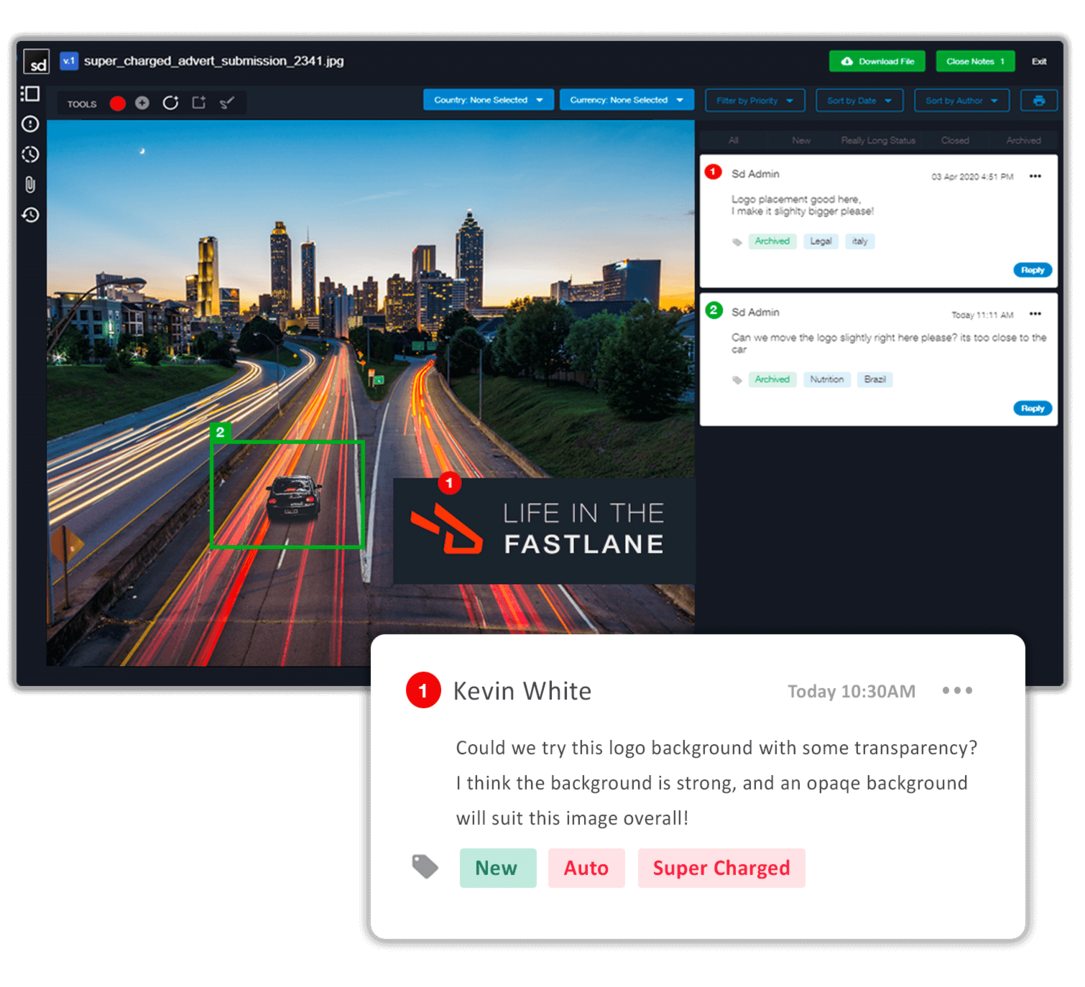
Screendragon has capabilities in their software that help streamline creative production workflows. Version control, file sharing and automated approvals are only a few. They also pride themselves in having a software that was well-thought out and designed before it was developed. No patchy work here!
What I like about this tool is their version comparison feature. You can see side by side different versions of the same content being worked on, you can highlight a section with a free hand tool or forms, and track the history of changes and comments. Perfect for internal audits!
Screendragon has over a thousand integrations through Zapier.
Pricing is available upon request.

Best design project management and collaboration software
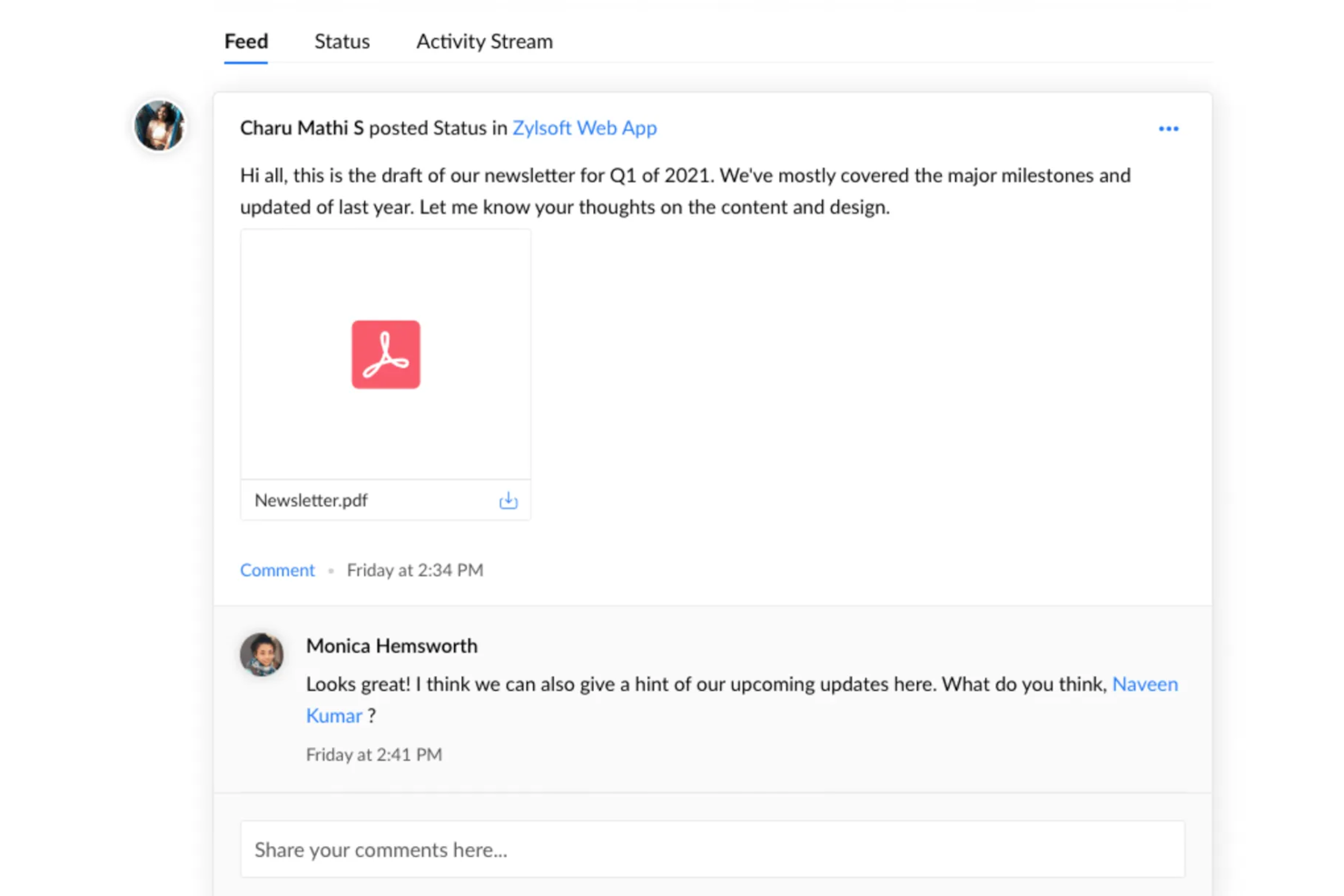
Zoho Projects is a project management software that can be used by all types of teams. The platform has plenty of customizable features, like the layout, individual views, project templates, and project statuses. Users can build project workflows, assign tasks, and set dependencies in the system. User roles can be set to make sure the right people are assigned to the right projects, and an availability heatmap helps ensure no one's overloaded.
What makes this software stand out is its collaboration features. Users can comment, tag, and share files directly in the platform, making it easy to work together on creative projects. The software can store and manage large quantities of documents, and has version and access control as well as notes to keep files organized and up-to-date. A live chat tool means users can connect quickly to exchange feedback and important project details without leaving the software's environment.
Users can integrate the software with other tools like Dropbox, Github, Google Workspace, Microsoft Teams, Slack, and Zapier, which unlocks even more integrations with a paid account.
A free version is available, and paid plans start from $5/user/month. 10-day free trials let you test out a paid subscription.
New Product Updates from Zoho Projects
Zoho Projects Adds CodeX Scripts for Custom Modules
Zoho Projects now supports CodeX Scripts for custom modules, enabling conditional logic and rules for creating, updating, and deleting records. For more information, visit Zoho Projects' official site.
 .

Kantata
Best for full lifecycle service delivery
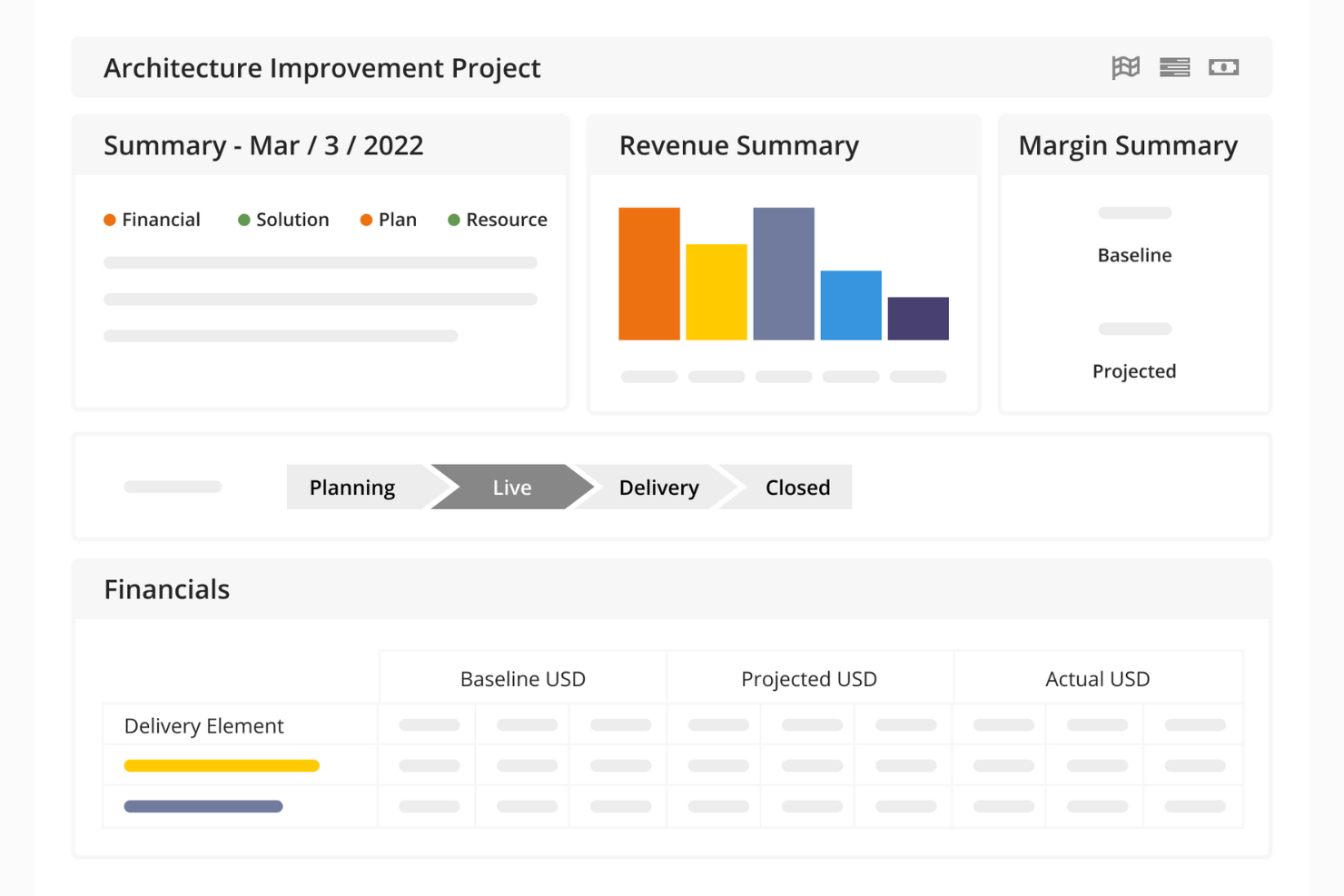
Kantata is a project management platform designed to help design agencies and creative services teams manage their work from start to finish. Beyond task management, it brings together workflow, resource planning, financial oversight, and collaboration in one system.
The software supports your team throughout the entire project lifecycle. Real-time dashboards and financial tracking help you stay ahead of risks, while task and resource management tools ensure the right designers are assigned to the right projects. Built-in collaboration features also keep communication flowing between internal teams and clients, so your creative work stays on track and feedback is addressed quickly.
For design teams managing multiple client accounts or large portfolios of creative work, Kantata provides portfolio-level visibility alongside project-specific details. You can track profitability, capacity, and progress across campaigns while drilling into task-level execution. This makes it easier to balance resources, hit deadlines, and deliver quality creative consistently.
Kantata integrates with several other workplace tools, including Slack, Sage, Quickbooks, Expensify, BambooHR, NetSuite, Jira, Salesforce, Xero, and Google Workspace.
New Product Updates from Kantata

Kantata Adds Access Group Change History
Kantata adds Access Groups History, letting account administrators track changes to group details, membership, and permissions in Recent History. The update also makes these events available through the Subscribed Events API for broader monitoring. For more information, visit Kantata’s official site.
 .

Quire
Best for breaking down complex tasks

Quire is a collaborative project management tool designed to help teams plan, track, and execute their work. It offers a flexible workspace where you can break down big ideas into smaller, manageable tasks.
One way Quire allows you to break down complex design projects is through its nested list feature. This hierarchical structure helps in organizing work logically, making it easier to track progress and maintain clarity throughout the project lifecycle. Additionally, the dynamic timeline, featuring Gantt charts, allows you to plan and track project milestones, ensuring you meet deadlines and stay on schedule. Its simple drag-and-drop interface also makes it easy to adjust timelines as your design work shifts with roadblocks and priorities.
Additionally, the platform integrates Kanban boards with these nested task lists. This combination allows you to visualize your workflow and track task progress through various stages, enhancing transparency and accountability within the team. The ability to switch between different views offers further flexibility in how you manage and interact with your projects.
Some of Quire's integrations include Google Calendar, Gmail, Slack, Outlook, Zoho Flow, GitHub, Apple Calendar Sync, Box, Dropbox, Google Drive, and Microsoft Teams.
New Product Updates from Quire
Quire Adds Custom Field Locking and Comment Reaction API Support
Quire adds custom field locking and API support for reading and setting emoji reactions on comments. These updates give teams more control over field data and expand comment interaction options for developers. For more information, visit Quire’s official site.
 .
Miro
Best for a highly flexible and customizable solution

Miro is a visual collaboration platform tailored for design project management, offering an extensive virtual whiteboard space. It supports various forms of idea expression, including shapes, flowcharts, sticky notes, and multimedia elements. Additional key features include an infinite canvas for unrestricted ideation, TalkTrack for asynchronous video explanations of process maps, and asynchronous collaboration tools, like comments and reactions, to facilitate continuous feedback.
Miro also comes with a large bank of templates for agile workflows, roadmaps and strategy planning, brainstorm sessions, and various other use cases. Overall, it's a highly flexible solution that's well suited to the needs of design teams who may need a customizable workspace that accommodates diverse working styles and schedules.
The software integrates with other workplace tools like Zoom, Microsoft Teams, Slack, Google Workspace, Asana, monday.com, Jira, Dropbox, OneDrive, Notion, Airtable, ClickUp, and Unito, among others. A free plan is available and paid plans start from $10 per user per month.
New Product Updates from Miro
Miro Adds Japan Data Residency for Enterprise Customers
Miro has introduced Japan data residency for enterprise customers, offering in-region storage for production data, backups, and metadata, plus in-region compute infrastructure. For more information, visit Miro's official site.
 .
FigJam
Best for connecting with Figma's design platform

FigJam is a virtual whiteboard solution that offers real-time collaboration tools. It's created by Figma, and designed to integrate with Figma's design platform. The flexible and versatile platform can facilitate project planning, task tracking, and more, and you can then sync up the assets you create with your Figma account.
Because of how freeform of a solution it is, the whiteboarding tool is helpful for more than just project management. You can use it for ideation, rough prototyping, and other use cases. Its automations can do things like auto-sort your sticky notes or consolidate notes into clear action items. There's also lots of support documentation available, both from Figma and from the Figma community.
What makes FigJam especially useful for design teams is its integration with Figma's design platform. For product and design teams, this is super useful because you can plan, manage, and execute your work all within the same environment.
Native integrations are available for Figma, Microsoft Teams, Asana, Jira, Mixpanel, and Github.
A freemium plan is available for up to 3 boards, and paid plans start from $3 per user, per month.
Diğer Tasarım Proje Yönetimi Yazılımları
Kısa listeme giremeyen ancak yine de incelemeye değer bazı ek tasarım PM yazılımı seçenekleri şunlardır:
- MeisterTask
User-friendly visuals and intuitive navigation for design teams.
- Trello
Kanban views that can easily map your design projects and keep everyone on track.
- IntelligenceBank
Marketing operations platform with digital asset management capabilities.
- Workzone
For integrated proofing and approvals system
- Filestage
For its variety of ways to gather feedback
- Teamwork.com
Project management with unlimited free access for your clients.
- Bonsai Agency Software
For managing design agency projects, clients, and finances
- Ravetree
Project and work management software for design agencies
- Gain
Reviews and team collaboration in one place so you have full control of your project.
- ClickUp
Share links with clients to review your work and hide sensitive information.


How I Evaluate Design Project Management Software
I evaluate these tools in two layers: the baseline must-haves—like proofing, approval routing, and versioning—and the differentiators that set one tool apart for your team's specific workflow.
Core Functionality (Table Stakes For This List)
When I'm selecting tools for my list, I rank each one on a scale from 0 (does not offer the functionality) to 5 (excels in this area) for each core functionality listed below. Then, I calculate the tool's total score into a percentage. Each tool needs to achieve a minimum total score of 65% to be considered for inclusion.
- Visual Task Management: I check whether a tool offers multiple project views—boards for sprinting through a campaign, timelines for mapping a product launch—that creative teams can switch between.
- Design File Handling: The tool should support native previews of common design formats like PSD, AI, and Figma files so teams can review assets without downloading or switching apps.
- Proofing & Annotation: I look for the ability to drop comments directly on a design asset—pinning feedback to a specific spot on a mockup rather than describing it in a separate thread.
- Approval Workflows: Routing a homepage redesign through a copywriter, creative director, and then the client should be structured, not ad hoc. I evaluate how each tool handles multi-stage review cycles.
- Version Control: When a designer uploads a revised logo file, I want to see automatic versioning with the ability to compare the current draft against earlier iterations side by side.
- Creative Team Collaboration: I evaluate how the tool handles communication between internal designers, project managers, and external clients—especially guest access and shared creative briefs.
Once I have a list of tools that meet the criteria, I consider what sets each platform apart.
Differentiating Factors (What Sets Vendors Apart)
Here's how I compare and contrast different vendors:
Standout Features
Resource and capacity planning is a big differentiator—I look for workload views that show which designers are overloaded and who has bandwidth for a new project. Client portals also matter, especially for agencies managing external feedback. A branded portal where a client can review mockups and approve deliverables keeps stakeholders engaged without cluttering the team's workspace. For agency PMs tracking profitability, built-in time tracking tied to specific design tasks makes billing far simpler than toggling between separate tools.
Beyond Features
Creative tool integrations are one of the first things I check. A design PM tool that connects natively with Adobe Creative Cloud, Figma, or Sketch saves designers from constant file exporting and re-uploading. I also evaluate how pricing handles guest access—agencies that loop in dozens of clients shouldn't pay full per-user rates for reviewers who only log in to approve a deliverable. Pre-built creative workflow templates matter too. Starting a brand campaign from a blank board wastes time that a good template eliminates on day one.
Tasarım Proje Yönetimi Yazılımı Nasıl Seçilir?
Uzun özellik listeleri ve karmaşık fiyatlandırma yapıları içinde kaybolmak kolaydır. Kendinize özgü yazılım seçim sürecinizi yürütürken odağınızı korumanıza yardımcı olmak için aklınızda bulundurmanız gereken faktörleri içeren bir kontrol listesi hazırladım:
| Etken | Dikkate Alınması Gerekenler |
|---|---|
| Ölçeklenebilirlik | Araç ekibinizle birlikte büyüyebilir mi? İhtiyaçlarınız genişledikçe daha fazla kullanıcıyı, projeyi ve veriyi destekleyip desteklemediğini değerlendirin. |
| Entegrasyonlar | Mevcut araçlarınıza bağlanabiliyor mu? Tasarım yazılımları, iletişim uygulamaları ve diğer proje yönetimi araçlarıyla uyumluluğunu kontrol edin. |
| Özelleştirilebilirlik | İş akışlarınıza göre uyarlayabilir misiniz? Panoları, şablonları ve izinleri ekibinizin süreçlerine uygun şekilde düzenleme seçeneklerini arayın. |
| Kullanım kolaylığı | Ekibinizin benimsemesi kolay mı? Kapsamlı bir eğitim gerektirmeden hızlı uyum sağlanabilmesi için arayüzünü ve öğrenme eğrisini değerlendirin. |
| Uygulama ve işe alıştırma | Kurulum ne kadar sürecek? Eğitim materyalleri ve destek erişilebilirliği de dâhil olmak üzere işe alıştırma için gereken zamanı ve kaynakları değerlendirin. |
| Maliyet | Bütçenize uygun mu? Mali kısıtlarınıza uyduğundan emin olmak için fiyatlandırma planlarını, gizli ücretleri ve deneme seçeneklerini karşılaştırın. |
| Güvenlik önlemleri | Projeleriniz güvende mi? Şifreleme, erişim denetimleri ve ilgili standartlara uyumluluk gibi veri koruma önlemlerini doğrulayın. |
| Destek erişilebilirliği | İhtiyaç duyduğunuzda yardım alabilir misiniz? Özellikle projenin kritik aşamalarında sunulan destek kanallarını ve yanıt verme hızlarını değerlendirin. |
Tasarım Projesi Yönetim Yazılımı Nedir?
Tasarım projesi yönetim yazılımı, ekiplerin tasarım projelerini verimli bir şekilde planlamasına, yürütmesine ve takip etmesine yardımcı olan bir araçtır. İş birliğini geliştirmek ve teslim tarihlerine uymak için tasarımcılar, proje yöneticileri ve yaratıcı ekipler tarafından yaygın olarak kullanılır. Görev yönetimi, zaman çizelgesi takibi ve ekip iş birliği özellikleri, projelerin düzenlenmesine ve herkesin aynı hedef doğrultusunda ilerlemesine yardımcı olur. Genel olarak bu araçlar proje iş akışlarını basitleştirir ve ekip verimliliğini artırır.
Özellikler
Tasarım projesi yönetim yazılımı seçerken aşağıdaki temel özelliklere dikkat edin:
- Görev yönetimi: Görevleri ve teslim tarihlerini düzenleyerek ekiplerin çalışmaya öncelik vermesini ve işleri verimli bir şekilde tamamlamasını kolaylaştırır.
- Zaman çizelgesi takibi: Teslim tarihlerine uyulmasını ve kaynakların etkili bir şekilde tahsis edilmesini sağlamak için proje zaman çizelgelerinin izlenmesine yardımcı olur.
- Ekip iş birliği: Ekip üyeleri arasındaki iletişimi ve dosya paylaşımını kolaylaştırarak koordinasyonu ve verimliliği artırır.
- Dosya paylaşımı: Ekiplerin tasarım dosyalarını kolayca paylaşmasına ve bunlara erişmesine olanak tanıyarak herkesin en güncel sürümlerle çalışmasını sağlar.
- Özelleştirilebilir iş akışları: Kullanıcıların süreçleri ve panoları belirli ekip ihtiyaçlarına ve proje gereksinimlerine göre uyarlamasını sağlar.
- Entegrasyon olanakları: Diğer araçlara ve yazılımlara bağlanarak tüm kaynakları tek bir yerde tutar ve genel iş akışını geliştirir.
- Gerçek zamanlı geri bildirim: Anında görüş ve revizyon olanağı sunarak ekiplerin değişikliklere ve müşteri taleplerine hızla uyum sağlamasına yardımcı olur.
- Sürüm denetimi: Tasarım dosyalarındaki değişiklikleri takip ederek gerektiğinde önceki sürümlere erişilebilmesini sağlar.
- Güvenlik önlemleri: Hassas proje verilerini şifreleme ve erişim denetimleriyle koruyarak sektör standartlarına uyumluluğu sağlar.
- Eğitim kaynakları: Ekiplerin yazılıma hızla uyum sağlamasına yardımcı olmak için videolar, eğitimler ve kılavuzlar aracılığıyla işe alıştırma desteği sunar.
Avantajlar
Tasarım projesi yönetim yazılımını uygulamak ekibiniz ve işletmeniz için çeşitli avantajlar sağlar. Yararlanabileceğiniz avantajlardan bazıları şunlardır:
- Geliştirilmiş organizasyon: Görevleri ve teslim tarihlerini düzenli tutarak ekibinizin odaklanmasına ve verimli çalışmasına yardımcı olur.
- Geliştirilmiş iş birliği: İletişimi ve dosya paylaşımını kolaylaştırarak ekip üyelerinin etkili bir şekilde birlikte çalışmasını kolaylaştırır.
- Daha iyi zaman yönetimi: Zaman çizelgelerini ve teslim tarihlerini takip ederek projelerin programa uygun ilerlemesini ve kaynakların verimli kullanılmasını sağlar.
- Artırılmış esneklik: Özelleştirilebilir iş akışları, süreçleri belirli proje ihtiyaçlarınıza uyarlamanıza olanak tanır.
- Daha fazla şeffaflık: Proje ilerlemesi ve görev durumu hakkında görünürlük sağlayarak hızlı ve bilinçli kararlar almanıza yardımcı olur.
- Veri güvenliği: Hassas bilgilerinizi şifreleme ve erişim denetimleriyle koruyarak sektör standartlarına uyumluluğu sağlar.
- Daha hızlı işe alıştırma: Ekibinizin hızla bilgi edinmesine yardımcı olmak için videolar ve eğitimler gibi eğitim kaynakları sunar.
Maliyetler & Fiyatlandırma
Tasarım projesi yönetim yazılımı seçmek, mevcut çeşitli fiyatlandırma modellerinin ve planların anlaşılmasını gerektirir. Maliyetler özelliklere, ekip büyüklüğüne, eklentilere ve daha fazlasına göre değişir. Aşağıdaki tablo, tasarım projesi yönetimi yazılımı çözümlerinde yaygın planları, ortalama fiyatlarını ve genellikle sunulan özellikleri özetlemektedir:
Tasarım Projesi Yönetim Yazılımı İçin Plan Karşılaştırma Tablosu
| Plan Türü | Ortalama Fiyat | Yaygın Özellikler |
|---|---|---|
| Ücretsiz Plan | $0 | Temel görev yönetimi, sınırlı dosya paylaşımı ve temel iş birliği araçları. |
| Kişisel Plan | $5-$25/kullanıcı/ay | Görev yönetimi, zaman çizelgesi takibi, dosya paylaşımı ve temel entegrasyonlar. |
| İşletme Planı | $30-$60/kullanıcı/ay | Gelişmiş iş birliği, özelleştirilebilir iş akışları, geliştirilmiş entegrasyonlar ve destek. |
| Kurumsal Plan | $70-$120/kullanıcı/ay | Tam özelleştirme, gelişmiş güvenlik özellikleri, özel destek ve uyumluluk araçları. |
Tasarım Projesi Yönetim Yazılımı Hakkında SSS
Tasarım PM yazılımı hakkında sık sorulan bazı soruların yanıtları şunlardır:
Tasarım projesi yönetim yazılımı diğer tasarım araçlarıyla entegre olabilir mi?
Evet, tasarım projesi yönetim yazılımlarının çoğu Adobe Creative Suite ve Sketch gibi popüler tasarım araçlarıyla entegre olur. Bu entegrasyon, sorunsuz dosya paylaşımına ve iş birliğine olanak tanıyarak ekibinizin uygulamalar arasında sürekli geçiş yapmak zorunda kalmadan verimli çalışmasına yardımcı olur. Mevcut yazılımınızla uyumluluğu sağlamak için bir araç seçmeden önce sunulan belirli entegrasyonları kontrol edin.
Tasarım projesi yönetim yazılımı ekip iş birliğini nasıl geliştirebilir?
Tasarım projesi yönetim yazılımı iletişimi ve proje bilgilerini merkezileştirerek ekip üyelerinin iş birliği yapmasını kolaylaştırır. Paylaşılan zaman çizelgeleri, görev atamaları ve dosya paylaşımı gibi özellikler herkesin bilgi sahibi olmasını ve etkili bir şekilde katkıda bulunmasını sağlar. Bu araçlar aynı zamanda gerçek zamanlı geri bildirime olanak tanır; bu da proje yinelemelerini ve karar alma süreçlerini hızlandırır.
Tasarım projesi yönetim yazılımında veri güvenliği bir endişe midir?
Evet, veri güvenliği önemli bir konudur; ancak saygın yazılım sağlayıcılarının çoğu güçlü güvenlik önlemleri sunar. Şifreleme, erişim denetimleri ve sektör standartlarına uyumluluk sağlayan araçları tercih edin. Hassas tasarım dosyalarınızın ve proje verilerinizin yetkisiz erişime karşı korunmasını sağlamak için bir sağlayıcının güvenlik özelliklerini her zaman değerlendirin.