

2026 İçin En İyi 10 Kaynak Planlama Yazılımı Aracı

10 En İyi Kaynak Planlama Yazılımları Kısa Listesi


En iyi kaynak planlama yazılımı, doğru kişileri doğru işe atamanıza, ekip uygunluğunu yönetmenize ve proje teslimini etkilemeden önce çakışmaları çözmenize yardımcı olur. Bu yazılım olmadan projeleri yolunda tutmak için takvimleri, elektronik tabloları ve e-postaları manuel olarak dengelemeniz gerekir; bu da özellikle kimin aşırı görevlendirildiğini veya yeterince kullanılmadığını görmeyi zorlaştırır.
Küresel markalar için karmaşık projeleri yönetme konusunda 20 yılı aşkın, yazılım incelemecisi olarak da 10 yıllık deneyimimle proje yönetimi yazılımları pazarını kapsamlı bir şekilde inceledim. 30'dan fazla kaynak planlama aracını test ettikten sonra planlama süreçlerindeki zorlukları etkili biçimde en aza indiren, gerçek zamanlı uygunluğu gösteren ve değişen proje gereksinimlerine uyum sağlayan araçları belirledim.
Bu rehberde görünürlüğü artıran, iş yüklerini dengeleyen ve kaynak planlama konusunda güvenle karar vermenize yardımcı olan yazılımları bulacaksınız. İhtiyaçlarınıza ve bütçenize en uygun seçeneği bulmanızı sağlamak için her öneride aracın özelliklerine, fiyatlandırmasına ve benzersiz avantajlarına ilişkin kapsamlı bir genel bakış yer alır.
Why Trust Our Software Recommendations
Our team has been testing and reviewing software since 2012. As project managers ourselves, we know how difficult—and important—it is to choose the right software.
For this guide, we evaluated tools using hands-on testing and independent research, scoring tools using our selection criteria. We also draw on insights from industry thought leaders and practicing project management experts.
Our reviews reflect our human editorial judgment, not a sales pitch.
Expert reviewers:
Kaynak Planlama Yazılımları Karşılaştırma Tablosu
Bu tablo, karar vermenize yardımcı olacak bazı temel özellikleri özetlemektedir.
| Tool | Best For | Trial Info | Price | ||
|---|---|---|---|---|---|
| 1 | Best for real-time workload visibility | 14-day free trial | From $17/user/month | Website | |
| 2 | Best for multi-departmental complex organizations | Free demo available | Pricing upon request | Website | |
| 3 | Best for agencies and professional services | 14-day free trial | From $10/user/month (billed annually) | Website | |
| 4 | Best for profitable resource scheduling | Free trial available | From $7/scheduled user/month | Website | |
| 5 | Best for conflict-aware staffing | Free demo available | Pricing upon request | Website | |
| 6 | Best for automated and interactive resourcing | Not available | Pricing upon request | Website | |
| 7 | Best for complex projects | Free plan + 14-day trial + demo available | From $10/user/month (billed annually) | Website | |
| 8 | Best for manufacturer resource planning | 15 + 15-day free trial available | From $49/user/month | Website | |
| 9 | Best for people-centric resource scheduling | Not available | Pricing upon request | Website | |
| 10 | Best for real-time planning | 30-day free trial available | From $7/resource/month | Website |


En İyi Kaynak Planlama Yazılımları İncelemeleri
Her aracı, öne çıkan özellikleriyle birlikte kaynak planlama açısından onu harika kılan unsurlara ilişkin bilgilerle burada bulabilirsiniz.

Scoro
Best for real-time workload visibility

Scoro gives project managers and operations leads a real-time view of team workloads and project timelines. Agencies and consultancies use Scoro to spot bottlenecks, balance assignments, and adjust plans as priorities shift. Its live dashboards and visual planners help you make fast, informed decisions about resource allocation.
Who Is Scoro Best For?
Services businesses that need real-time insight into workloads, utilization, and business performance across projects and teams.
Why I Picked Scoro
Scoro stands out for its ability to give you instant visibility into team workloads and project progress. The real-time dashboards and interactive Gantt charts let you see who’s overloaded, who’s available, and where deadlines might slip. I appreciate how Scoro’s workload planner updates automatically as tasks shift, so you always have an up-to-date picture of resource allocation. This level of transparency is especially useful for agencies and consultancies managing multiple projects at once.
Scoro Key Features
In addition to its real-time workload visibility, Scoro offers several other features that support resource scheduling:
- Calendar Sync: Connects with Google Calendar and Outlook for unified scheduling across platforms.
- Task Dependencies: Lets you set and manage dependencies between tasks to control project flow.
- Billable and Non-Billable Time Tracking: Tracks both billable and internal hours for accurate reporting.
- Customizable Dashboards: Allows you to tailor dashboard widgets to display the metrics and data most relevant to your team.
Scoro Integrations
Integrations include Google Calendar, Xero, QuickBooks, Sage Intacct, Exact Online, Expensify, Stripe, Jira, HubSpot, Salesforce, Google Drive, Dropbox, Okta, Azure AD, and Zapier.
Pros and Cons
Pros:
- Real-time project tracking
- Robust utilization reports
- Good invoicing and financial management features
Cons:
- Mobile app is less robust than web version
- Its many customization options can feel overwhelming
New Product Updates from Scoro

Scoro Adds Time Mobile App and ELI Improvements
Scoro adds the Scoro Time mobile app for iOS/Android to track time anywhere and expands ELI with attachments, smarter filtering, and trigger-based actions. For more information, visit Scoro's official site.
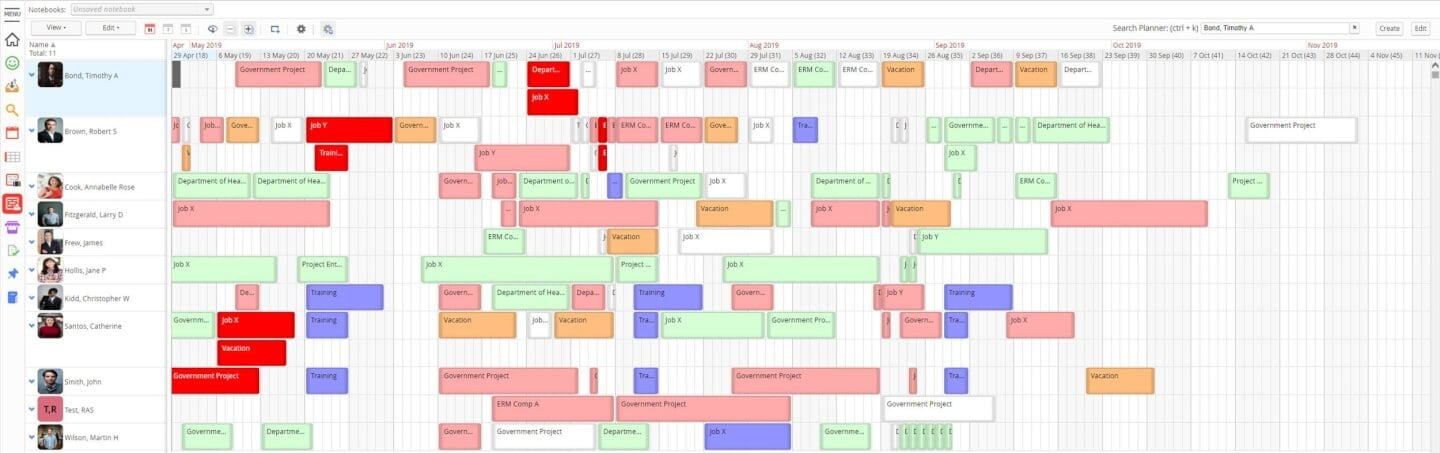
If your team needs resource scheduling with a focus on analytics, Retain is worth a look. It’s designed for organizations that want to dig into utilization, demand, and allocation trends across projects. Retain is especially useful for professional services and enterprise teams that rely on detailed reporting to guide resource planning decisions.
Who Is Retain Best For?
Enterprises that require detailed reporting and analytics to manage resource utilization and business performance.
Why I Picked Retain
What sets Retain apart for resource scheduling is its focus on comprehensive reporting and analytics. I picked Retain because it gives you detailed visibility into resource utilization, capacity, and future demand, which is essential for teams managing complex projects. The platform’s customizable dashboards and exportable reports help you analyze trends and make informed allocation decisions. For organizations that need more than just scheduling, Retain’s reporting depth is a clear advantage.
Retain Key Features
In addition to its reporting strengths, Retain offers several features that support resource scheduling:
- Drag-and-Drop Assignment: Quickly move resources between projects or tasks using a visual interface.
- Multi-Project Calendar: View and manage resource bookings across multiple projects in one place
- Absence and Leave Tracking: Monitor team availability by logging vacations, sick days, and other absences.
- Role-Based Permissions: Control access to sensitive scheduling data by assigning user roles and permissions.
Retain Integrations
Integrations include Microsoft Excel, Microsoft Power BI, Salesforce, SAP, Oracle, Workday, and Microsoft Dynamics.
Pros and Cons
Pros:
- Easy to duplicate bookings
- Data-rich dashboards
- Supports multiple currencies
- Drag-and-drop organization
Cons:
- Search functionality could use improvement
- Displays can get pretty busy

Best for agencies and professional services

Productive is purpose-built for agencies and professional services teams that need to manage people, projects, and profitability in one place. It’s especially useful for operations leads and resource managers who want to balance workloads, track billable hours, and forecast capacity across multiple clients. The platform’s focus on agency workflows and integrated financial tracking sets it apart from more generic resource scheduling tools.
Who Is Productive Best For?
Agencies and professional services firms that want integrated resource planning, budgeting, time tracking, and financial visibility.
Why I Picked Productive
Agencies and professional services teams have unique needs when it comes to resource scheduling, and Productive is built with those workflows in mind. The platform’s resource planning module lets you assign people to projects based on skills, availability, and billable rates, which is essential for managing client work. I appreciate how Productive connects scheduling with time tracking and project budgets, so you can see the impact of resource allocation on profitability in real time. This focus on agency-specific resource management makes it a strong fit for teams juggling multiple clients and shifting priorities.
Productive Key Features
Some other features that make Productive useful for agencies and professional services include:
- Customizable Project Templates: Let you create and reuse templates for common project types and workflows.
- Utilization Reporting: Tracks team member workload and utilization rates across projects.
- Integrated Document Management: Stores project files and documents directly within the platform.
- Client Portal: Provides clients with access to project updates, deliverables, and communication threads.
Productive Integrations
Integrations include Jira, Xero, Exact, Slack, QuickBooks, Microsoft Outlook, Fortnox, Personio, and Zapier. It also has an open API available for custom integrations.
Pros and Cons
Pros:
- Built-in time management can bill multiple business entities
- Plenty of custom tags to choose from
- Quite easy to set up collaborative tasks
Cons:
- Invoicing and quotation features are limited
- Roles/user rights are not as granular
New Product Updates from Productive
Productive Adds Email and Calendar Integrations for Agents
Productive adds Gmail, Outlook, Google Calendar, and Outlook Calendar connectors for its AI agents. These integrations let agents manage emails and create calendar events directly within Productive. For more information, visit Productive’s official site.

Best for profitable resource scheduling

Float.com offers a tailored approach to resource scheduling. By bringing together resource scheduling, capacity planning, time tracking, and delivery reporting, it helps teams make informed decisions and improve project delivery. With features like real-time tracking of roles and skills, along with finance and estimation capabilities, Float provides a comprehensive solution for organizations looking to forecast revenue and enhance operational efficiency.
Who Is Float.com Best For?
For creative and professional services teams, agencies, and consultancies that need a live view of team capacity, billable utilization, and profitability across projects.
Why I Picked Float.com
Float earns its spot on my shortlist because it excels in profitable resource scheduling, making it a strong choice for organizations looking to optimize project margins and resource allocation. The software's visual scheduling interface provides a clear overview of team workloads, allowing you to efficiently allocate and adjust resources in real time. Its capacity planning tools help you forecast revenue and manage project costs, ensuring that your team is working on the most profitable projects. Time tracking feeds directly from scheduled allocations, helping keep actuals accurate while reducing manual timesheet administration.
Float.com Key Features
In addition to its capacity planning and financial insights, Float offers several other features that enhance its appeal as a resource scheduling software.
- Visual Resource Schedule: Provides a live drag-and-drop view of team workloads with real-time capacity indicators and conflict flagging.
- Built-in Time Tracking: Log hours directly in the platform, with timesheets pre-populated from scheduled allocations to improve accuracy and reduce manual entry.
- Skill-Based Assignment: Match tasks to team members based on skills, helping optimize resource utilization and improve project outcomes.
Float.com Integrations
Integrations include Asana, Basecamp, ClickUp, Jira, Google Calendar, Aprimo, Hubspot, Karbon, monday.com, and Salesforce.
Pros and Cons
Pros:
- Built-in time tracking enhances project accuracy and timelines.
- Strong forecasting tools improve resource allocation decisions.
- Flexible dashboards help organize complex project management.
Cons:
- Interface complexity may overwhelm users with simple projects.
- Time tracking features require a higher plan.
New Product Updates from Float.com

Float Adds Rate Cards and Multi-Currency Billing
Float introduced centralized rate cards to standardize bill rates across projects and added multi-currency support to bill clients consistently across regions. For more information, visit Float's official site.

Dayshape
Best for conflict-aware staffing

If you’re looking for AI-driven resource scheduling, Dayshape is built for professional services firms managing complex project portfolios. The platform uses intelligent automation to match people, skills, and availability with shifting project needs. Dayshape is a fit for teams that need to optimize assignments and reduce manual scheduling effort.
Who Is Dayshape Best For?
Professional services firms that want AI-driven scheduling to optimize resource allocation and improve utilization.
Why I Picked Dayshape
What sets Dayshape apart for resource scheduling is its AI-powered approach to matching people, skills, and project needs. I picked Dayshape because its automation engine actively adapts schedules as priorities shift, which is especially valuable for firms managing multiple projects and changing requirements. The platform’s compliance automation and bulk scheduling features help reduce manual effort and ensure assignments align with both business rules and team capacity. For organizations that need to optimize resource allocation at scale, Dayshape’s intelligent scheduling stands out.
Dayshape Key Features
Some other features of Dayshape that support resource scheduling include:
- Visual dashboards: View real-time resource utilization and project allocation data in customizable dashboards.
- Scenario planning: Model different scheduling scenarios to forecast project outcomes and resource needs.
- Automated notifications: Send alerts to team members about schedule changes, assignment updates, or compliance issues.
- Skill tracking: Maintain a searchable database of team skills and certifications for more accurate scheduling.
Dayshape Integrations
Integrations include SAP, IRIS, Workday, Salesforce, Oracle, OpenHR, CatalystOne, Deltek, Flowcase, and CCH.
Pros and Cons
Pros:
- Proven in large firms, especially accounting
- AI-assisted scheduling does the heavy lifting
- Engagement financials and quality controls make this more than just scheduling software
Cons:
- Implementation is custom so takes longer than off the shelf products
- No feature-pricing information available.

Best for automated and interactive resourcing
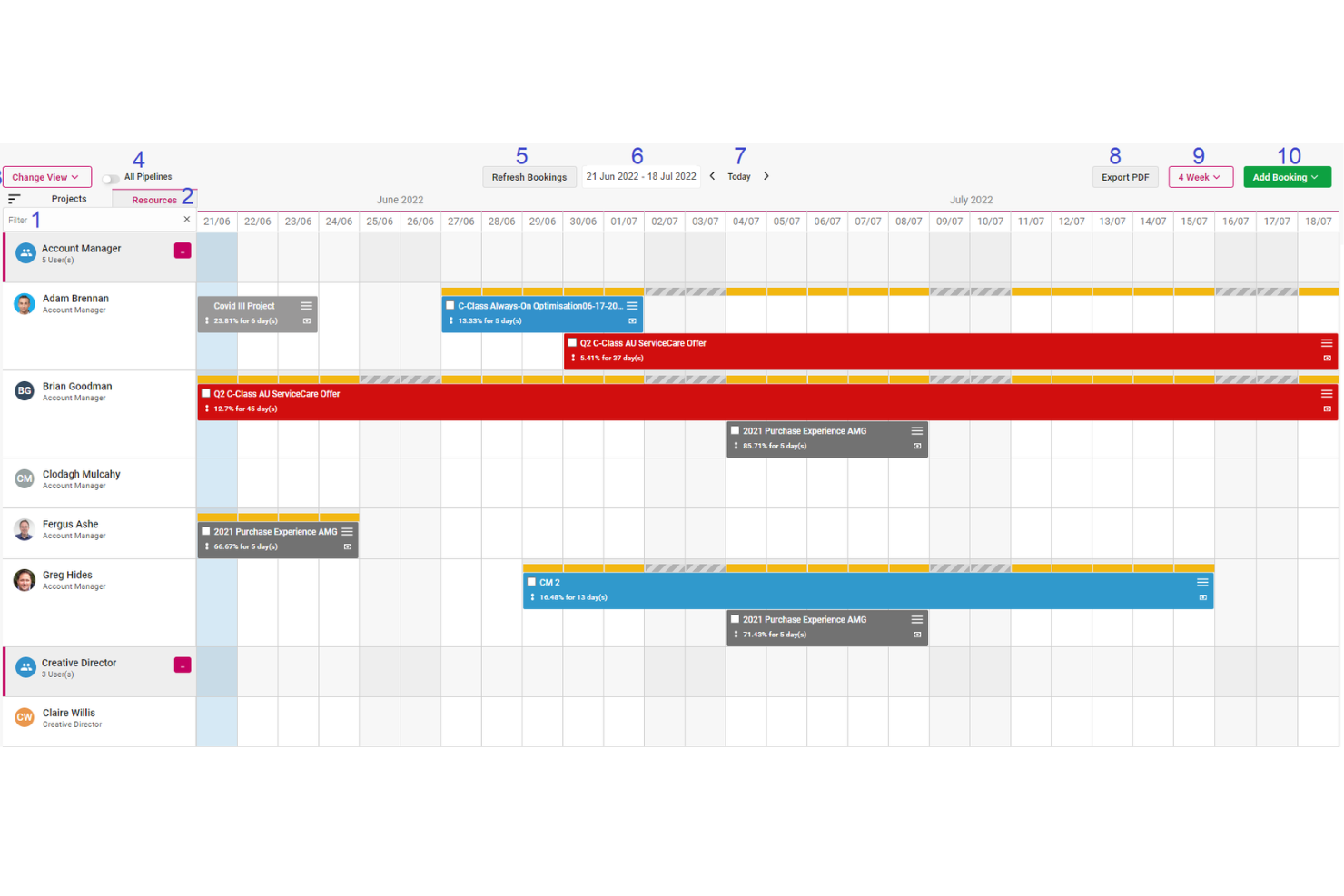
Screendragon is a work management platform designed for marketing, agency, and professional services teams. It combines project management, workflow automation, resource scheduling, financial tracking, and proofing tools to help teams improve operational efficiency and maintain visibility across complex campaigns and client work.
Who Screendragon Is Best For?
Marketing operations teams, in-house creative departments, agencies, and professional services organizations that need structured resource planning, budget oversight, and workflow control across multiple concurrent projects.
Why I Picked Screendragon
One of the main reasons Screendragon stands out is its automated and interactive resource scheduling. The platform can auto-populate schedules directly from scoped staff plans, reducing manual setup and aligning resources with approved budgets from the start. Teams can then adjust allocations using a drag-and-drop interface, with changes reflected in real time. This keeps budgets current and gives leadership immediate insight into resource allocation and financial performance.
Screendragon also offers capacity planning heatmaps that display utilization at both role and individual levels. These visual tools help management spot overbooking or underutilization early, preventing bottlenecks before they disrupt delivery timelines. By clearly showing who is assigned to what and when, teams can forecast more accurately and plan upcoming projects with greater confidence.
Screendragon Features
Features include AI-driven agentic workflows that automate repetitive tasks and support better operational decision-making. Smart forms with conditional logic guide users through required inputs and automatically route information to the appropriate stakeholders. The platform also provides online proofing tools that support markup across multiple media types, version control, and real-time collaboration between internal teams and clients.
Integrations
Integrations include MS Power BI, Slack, MS Teams, Zapier, Google Drive, Trello, Microsoft 365, Box, Jira, Microsoft OneDrive, and PeopleSoft.
Pros and Cons
Pros:
- Integrates various tools like project management and budget tracking
- Good resource planning features
- Can tailor the platform to your specific needs
Cons:
- The platform's depth can lead to complexity
- Time-consuming setup

Wrike
Best for complex projects

Wrike brings advanced resource management to teams handling complex, multi-phase projects with shifting priorities. Project managers in IT, marketing, and professional services use Wrike to coordinate cross-functional work, manage dependencies, and balance workloads across large teams. Its customizable workflows and real-time visibility help you keep projects on track, even as requirements change.
Who Is Wrike Best For?
Organizations managing complex, cross-functional projects that require structured workflows, detailed tracking, and enterprise-grade collaboration.
Why I Picked Wrike
When projects involve multiple teams, shifting deadlines, and complex dependencies, Wrike stands out for its ability to handle that level of complexity. Its workload charts and resource allocation tools let you visualize team capacity and adjust assignments as priorities change. I appreciate how Wrike’s dynamic Gantt charts and task dependencies help you manage overlapping schedules and avoid bottlenecks. These features make Wrike a strong fit for organizations that need to coordinate large, multifaceted projects with many moving parts.
Wrike Key Features
Some other features in Wrike help teams manage resources and projects more efficiently:
- Custom Request Forms: Collect project and resource requests with tailored forms that route work to the right teams.
- Time Tracking: Log hours directly on tasks to monitor effort and compare planned versus actual time spent.
- Document Sharing and Proofing: Upload, share, and review files within tasks, with markup and approval tools built in.
- Automated Workflows: Set up rules to automate task assignments, status updates, and notifications based on project triggers.
Wrike Integrations
Integrations include Salesforce, Microsoft Teams, Google Drive, QuickBooks, Tableau, Power BI, Miro, Adobe Creative Cloud, Google Sheets, and Microsoft SharePoint.
Pros and Cons
Pros:
- Building custom dashboards is great for highly specific resource tracking
- Good variety of dashboard views to accommodate different user needs
- Resource request and approvals are easy and well organized
Cons:
- May require additional training for an understanding of the full functionality
- Best resource tools are limited to the higher level paid plans
New Product Updates from Wrike

Wrike Redesigns Workspace Search With New Filters
Wrike introduces a redesigned Workspace Search interface with recent search shortcuts, item type and location filters, and parent-task context. These updates help users find relevant work items and navigate search results efficiently. For more information, visit Wrike’s official site.

MRPeasy
Best for manufacturer resource planning
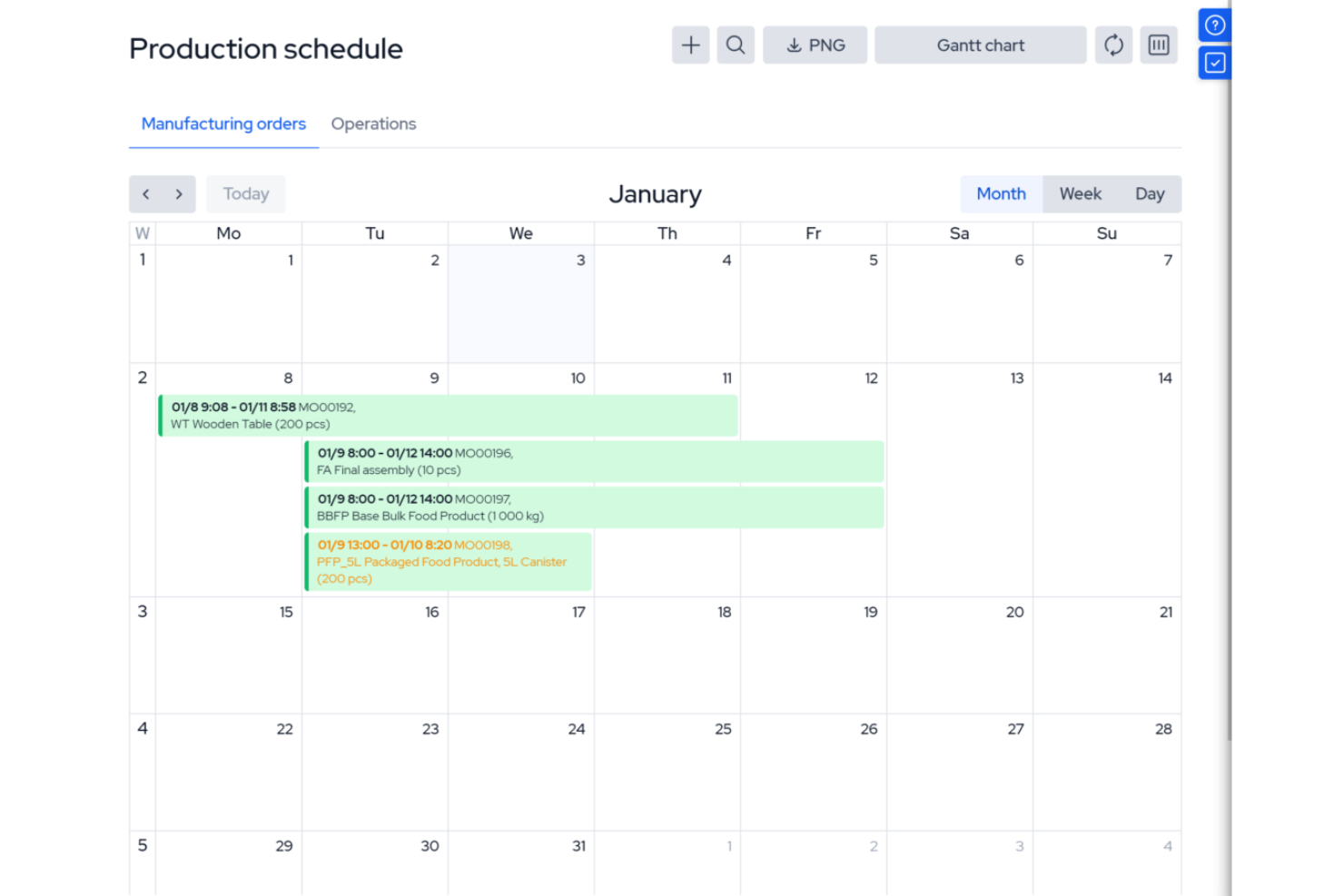
MRPeasy is a manufacturing resource planning (MRP) software, specifically tailored for the manufacturing sector. It integrates with industry processes, offering real-time visibility into production scheduling, inventory management, and operational efficiency. It’s especially useful for operations managers and production planners who want to automate job routing, track materials, and manage shop floor workloads. The platform’s focus on manufacturing resource planning sets it apart from general project scheduling tools.
Who Is MRPeasy For?
Small to mid-sized manufacturers that need integrated production scheduling and resource planning tied to inventory and operations.
Why I Picked MRPeasy
For manufacturers who need more than basic scheduling, MRPeasy offers resource planning tools built specifically for production environments. The platform’s visual production calendar and drag-and-drop job scheduling help you allocate machines, workstations, and labor with precision. I like that MRPeasy automatically factors in material availability and lead times when generating production schedules. This level of manufacturing-specific detail makes it a strong fit for teams managing complex shop floor operations.
MRPeasy Key Features
Some other features that stand out for manufacturers using MRPeasy include:
- BOM (Bill of Materials) Management: Lets you create, edit, and track multi-level BOMs for accurate production planning.
- Shop Floor Reporting: Provides real-time updates from the shop floor on job status and worker activity.
- Inventory Tracking: Monitors raw materials and finished goods across multiple locations.
- Purchase Order Management: Automates the creation and tracking of purchase orders for materials and components.
MRPeasy Integrations
Integrations include Amazon, Xero, WooCommerce, BigCommerce, Crossfire, Dropbox, Google Drive, OneDrive, HubSpot, QuickBooks, ShipStation, Salesforce, Shopify, Zapier, and more.
Pros and Cons
Pros:
- Comprehensive view of resource scheduling
- Automated production planning
- Simple, easy-to-use interface
Cons:
- Limited customizations
- Lack of advanced features due to a simple platform
New Product Updates from MRPeasy
MRPeasy Adds Stocktake for Physical Inventory Counts
MRPeasy adds Stocktake for planning, conducting, and documenting physical inventory counts. This supports both full warehouse counts and cycle counts for selected items. For more information, visit MRPeasy’s official site.
 .

Kantata
Best for people-centric resource scheduling

Kantata is designed for organizations that need to match the right people to the right projects based on skills, availability, and preferences. Professional services teams and consultancies use Kantata to manage resource allocation with a focus on individual strengths and workload balance. Its people-centric approach helps you optimize project outcomes while supporting employee satisfaction and retention.
Who Is Kantata Best For?
People-focused professional services organizations that need to balance resource planning with skills, availability, and project demand.
Why I Picked Kantata
What sets Kantata apart is its focus on aligning people’s skills and interests with project needs. The resource management dashboard lets you see individual availability, skill sets, and utilization rates, making it easier to assign the right person to each task. I like how Kantata’s talent profiles and forecasting tools help you plan for future project demands while considering employee preferences. This people-centric approach supports both project delivery and team satisfaction, which is especially valuable for professional services organizations.
Kantata Key Features
Some other features in Kantata help teams manage resources and projects more effectively:
- Project Portfolio Management: Track multiple projects and their resource needs in one centralized view.
- Role-Based Permissions: Control access to sensitive resource and project data based on user roles.
- Time and Expense Tracking: Capture billable hours and expenses directly within the platform.
- Scenario Planning: Model different resource allocation scenarios to see potential impacts before making changes.
Kantata Integrations
Integrations include Salesforce, SAP, Jira, Xero, BambooHR, Slack, Worday, QuickBooks, HubSpot, and NetSuite.
Pros and Cons
Pros:
- Distinguishes between soft and firm allocation
- Resourcing fully integrated with master planning
- Good reporting functionality for resource data
- Easy capacity management
Cons:
- Custom reports can be difficult to create without training
- Proofing solution is an add-on
New Product Updates from Kantata

Kantata Adds Access Group Change History
Kantata adds Access Groups History, letting account administrators track changes to group details, membership, and permissions in Recent History. The update also makes these events available through the Subscribed Events API for broader monitoring. For more information, visit Kantata’s official site.
 .

Runn
Best for real-time planning
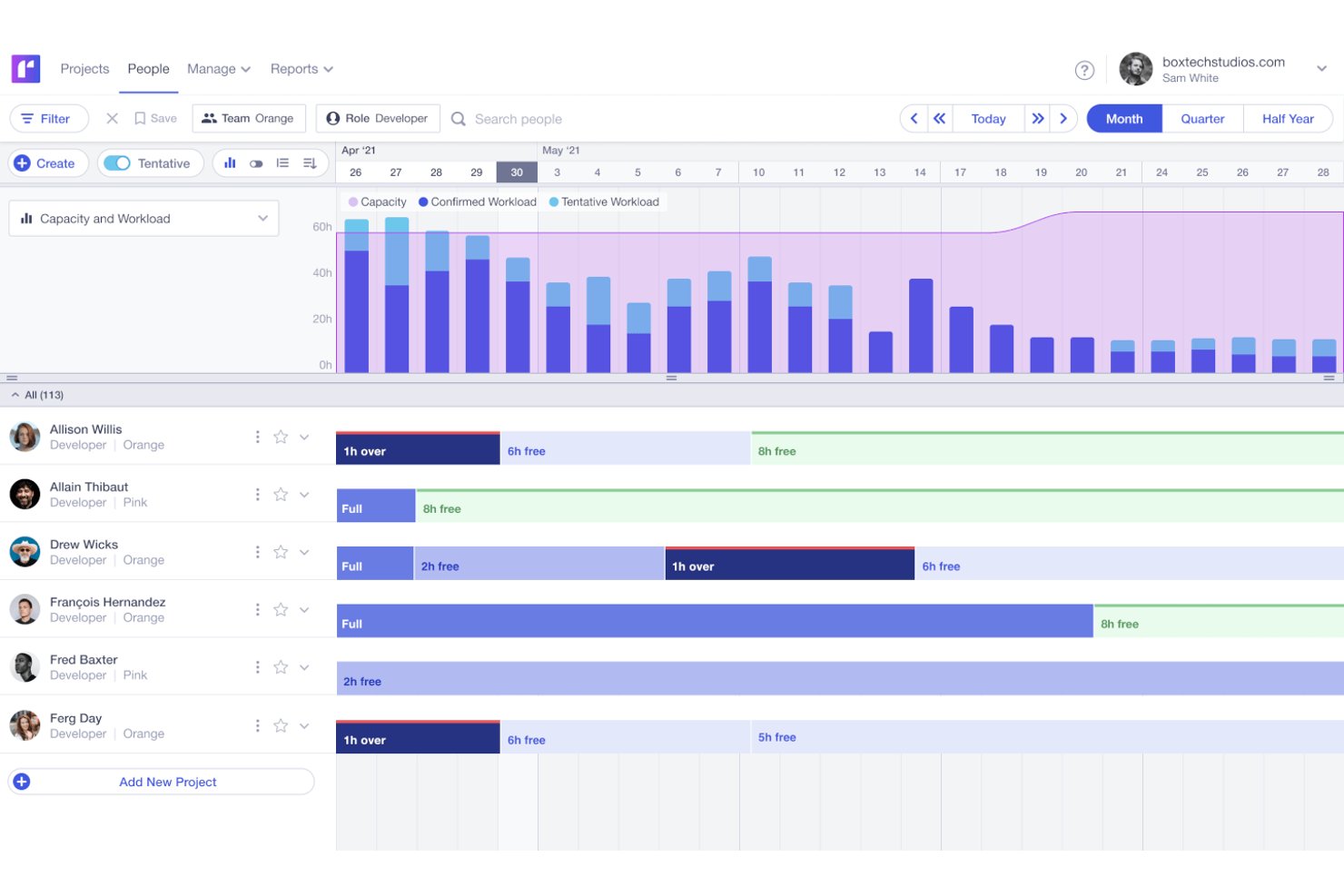
If your team needs to adjust project plans on the fly, Runn gives you real-time visibility into resource availability and workload. This tool is built for agencies, consultancies, and digital teams that juggle shifting priorities and need instant updates when schedules change. Its live planner and forecasting tools help you spot conflicts and make quick decisions as new work comes in.
Who Is Runn Best For?
Project-based teams that need real-time forecasting, scenario planning, and visibility into team capacity.
Why I Picked Runn
What sets Runn apart is its focus on real-time planning, which is essential for teams that need to respond quickly to changing project demands. I picked Runn because its live planner updates instantly as you move bookings or adjust allocations, so you always see the latest resource picture. The tool’s dynamic forecasting lets you model different scenarios and immediately see the impact on capacity and workload. This makes Runn a strong fit for agencies and consultancies that need to keep pace with shifting priorities and client requests.
Runn Key Features
Some other features in Runn that support resource scheduling include:
- Timesheet entry: Team members can log actual hours worked directly in the platform for accurate tracking.
- Public holidays management: Automatically accounts for regional holidays in resource availability calculations.
- Skills tracking: Lets you assign and filter resources based on specific skills or roles.
- API access: Enables you to connect Runn with other tools and automate data flows.
Runn Integrations
Integrations include Harvest, WorkflowMax, and Clockify for importing project, client, and people data and syncing time entries. With Runn’s API, you can build your own integration to send data across your favorite tools.
Pros and Cons
Pros:
- Native integrations & API available
- Free version available for 5 users
- Clean UI that’s easy to use & navigate
Cons:
- Time tracking requires a Google Chrome extension
- Colors are not customisable
Diğer Kaynak Planlama Yazılımları
Aşağıda, en iyi araçlar listesine giremeyen ek kaynak planlama araçlarının bir listesi yer almaktadır:
- Resource Guru
For scheduling people and shared assets
- Connecteam
For multi-location shift scheduling
- Mosaic
For proposal-stage staffing forecasts
- Saviom
For multi-dimensional resource scheduling
- monday AI Workspace
For role-based project staffing
- Rocketlane
For skills-based staffing approvals
- Projectworks
For staffing from won proposals
- eResource Scheduler
For teams needing self-hosted deployment
- Silverbucket
For staffing before projects are won
- Primetric
For staffing around synced employee leave


İlgili Kaynak Planlama Yazılımı İncelemeleri
Burada hâlâ aradığınızı bulamadıysanız test edip değerlendirdiğimiz şu diğer ilgili araçlara göz atın:
- Proje Yönetimi Yazılımı
- Web Tabanlı Kaynak Planlama Yazılımı
- Kaynak Yönetimi Yazılımı
- İş Akışı Otomasyonu Yazılımı
- Zaman Takibi Yazılımı
- Verimlilik Araçları
- Proje Planlama Yazılımı
- Açık Kaynaklı Kaynak Yönetimi Yazılımı
How I Evaluate Resource Scheduling Software
I split my evaluation into three parts, weighting core functionality most: assign people and equipment, view cross-project capacity, and flag overloads. Next, I consider PTO sync or portfolio heatmaps. Finally, I weigh onboarding, support, and pricing value beyond features.
Core Functionality (Table Stakes For This List)
When I'm selecting tools for my list, I score each one on a scale from 0 (does not offer the functionality) to 5 (excels in this area) for each core functionality listed below. I then convert the total into a percentage to help assess each tool's overall fit, with extra weight on any functionalities I’ve deemed essential.
- Resource Assignment (Essential): I look for flexible assignments of people or equipment, with adjustable effort or hours as project needs change.
- Capacity Visualization (Essential): I check whether timeline, calendar, or heatmap views make team availability and workload easy to compare across projects.
- Utilization Tracking: I assess whether usage can be reviewed by person, team, project, and period to spot spare or stretched capacity.
- Conflict Detection: I look for clear warnings when a shared resource is double-booked, ideally before a schedule change is confirmed.
- Multi-Project Scheduling: I evaluate whether managers can view and reallocate shared resources across concurrent projects in one place.
- Skill-Based Matching: I check whether teams can filter available people by skills or roles when staffing upcoming work.
Once I have a list of tools that meet the criteria, I consider what sets each platform apart.
Differentiating Factors (What Sets Vendors Apart)
Here's how I compare and contrast different vendors:
Standout Features
I look for what-if scenario modeling that lets you simulate adding a project or shifting staff before locking in changes—essential when your PMO is weighing competing proposals. Cross-portfolio heatmaps matter just as much; I check whether utilization trends surface across the full book of work, not just one project. I also evaluate how well each tool syncs PTO and leave data into capacity views, since a forecast that ignores approved holidays is wrong on day one.
Beyond Features
I check whether each tool connects to existing project management and finance platforms. A resource plan that doesn't sync with Jira, Asana, or your ERP means someone is manually reconciling allocations and billing data. I also evaluate role-based access controls, since capacity views often expose pay rates, PTO balances, and utilization figures that not every stakeholder should see. Reporting flexibility matters too—I look for dashboards that serve both day-to-day scheduling and long-range capacity conversations with leadership.
Kaynak Planlama Yazılımı Nasıl Seçilir
Uzun özellik listeleri ve karmaşık fiyatlandırma yapıları arasında kaybolmak kolaydır. Benzersiz yazılım seçim sürecinizde ilerlerken odağınızı korumanıza yardımcı olmak için göz önünde bulundurmanız gereken faktörlerin bir kontrol listesini aşağıda bulabilirsiniz:
| Etken | Dikkate Alınması Gerekenler |
| Ölçeklenebilirlik | Bu araç, altı ay sonra ekip büyüklüğünüz için hâlâ işe yarayacak mı? Ek kurulum gerektirmeden daha fazla kullanıcıyı, projeyi ve kaynağı yönetebilen çözümleri tercih edin. |
| Entegrasyonlar | Araç, proje yönetimi veya zaman takip araçlarınızla senkronize oluyor mu? Çifte çalışmayı önlemek için mevcut iş akışınıza bağlandığından emin olun. |
| Özelleştirilebilirlik | Görünümleri, izinleri ve etiketleri ekibinizin süreçlerine uyacak şekilde değiştirebilir misiniz? Hâlihazırda çalışma şeklinizi değiştirmenizi zorunlu kılan katı sistemlerden kaçının. |
| Kullanım kolaylığı | Ekip üyeleri yazılımı yoğun bir eğitim almadan öğrenebilir mi? Temiz bir arayüz ve sürükle-bırak planlama, destek taleplerini azaltmaya yardımcı olur. |
| Uygulama ve işe alıştırma | Ekip, aracı gerçekten ne kadar hızlı kullanmaya başlayabilir? Uzun kullanıma sunma gecikmelerini önlemek için şablonları, kılavuzları veya canlı işe alıştırma desteğini sorun. |
| Maliyet | Fiyat, kullanım amacınıza uygun mu? Sizi çok kısa sürede daha üst bir pakete geçmeye zorlayabilecek kullanıcı, proje veya planlama görünümü sınırlamalarına dikkat edin. |
| Güvenlik önlemleri | Ekip verileriniz için hangi korumalar mevcut? Rol tabanlı erişim, veri şifreleme ve verilerin nerede barındırıldığı hakkında bilgi alın. |
| Dahili kaynak gereksinimleri | Kurulum ve bakımdan ekibinizde kim sorumlu olacak? Kaynaklarınız kısıtlıysa, güvenilir sağlayıcı desteğine sahip, az bakım gerektiren bir araç seçin. |
2025'te Kaynak Planlama Yazılımındaki Eğilimler
Araştırmam sırasında farklı kaynak planlama yazılımı sağlayıcılarının sayısız ürün güncellemesini, basın bültenini ve sürüm kaydını inceledim. Takip ettiğim yeni ortaya çıkan eğilimler şunlar:
- Yapay Zekâ Destekli İş Yükü Tahmini: Araçlar, iş yükü dengesizliklerini öngörmek ve kaynak tahsisi önermek için yapay zekâ kullanmaya başlıyor. Bu, yöneticilerin darboğazlar oluşmadan önce harekete geçmesine yardımcı oluyor.
- Gerçek Zamanlı Uygunluk Senkronizasyonu: Daha fazla araç, güncel uygunluğu göstermek için ekip takvimlerini ve PTO planlarını gerçek zamanlı olarak senkronize ediyor. Bu, aşırı rezervasyon olasılığını azaltıyor ve özellikle otomatik olarak en uygun değişiklikleri önerebilen bir yapay zekâ planlama asistanı ile birlikte kullanıldığında hızlı yeniden planlamayı kolaylaştırıyor.
- Kaynak Tahsisi İçin Senaryo Planlama: Bazı araçlar ekiplerin, değişikliklerin teslimat zaman çizelgelerini nasıl etkilediğini test etmek için “ya şöyle olsaydı?” kaynak senaryoları oluşturmasına olanak tanıyor. Bu, beklenmedik durum planlamasına ve işe alım kararlarına yardımcı oluyor.
- Ayrıntılı Beceri Etiketleme ve Eşleştirme: Yeni araçlar, kişileri yalnızca rollerine göre görevlerle eşleştirmek yerine hassas atamalar için beceri düzeyinde etiketlemeye olanak tanıyor. Bu, projeye daha uygun eşleştirmeler yapılmasını sağlıyor ve genç çalışanların gelişimine yardımcı oluyor.
- Manuel Zaman Tahsisinin Önceliğini Kaybetmesi: Her ekip üyesine günlük çalışma saatlerini manuel olarak atamak giderek daha az önem taşıyor. Araçlar artık tükenmişliği önlemek için yerleşik korumalarla birlikte çaba veya sonuç odaklı planlamayı tercih ediyor.
Kaynak Planlama Yazılımı Nedir?
Kaynak planlama yazılımı, kuruluşların çeşitli projelerde personel, ekipman veya zaman gibi kaynakları planlamasına, atamasına ve yönetmesine yardımcı olan bir araçtır.
Doğru kaynakların doğru görevler için doğru zamanda hazır olmasını sağlayarak çakışmaları azaltır ve ekip verimliliğini artırır. Temel özellikler arasında genellikle etkili kaynak planlamasını ve proje yürütmeyi destekleyen takvim görünümleri, iş yükü yönetimi ve gerçek zamanlı uygunluk takibi yer alır.
Kaynak Planlama Yazılımının Özellikleri
Kaynak planlama yazılımı seçerken aşağıdaki temel özelliklere dikkat edin:
- Sürükle-bırak planlama: Kullanıcıların hızlı güncellemeler ve düzenlemeler için görevleri görsel bir zaman çizelgesine kolayca atamasını ve taşımasını sağlar.
- Gerçek zamanlı uygunluk takibi: çalışan takvimlerini ve izin planlarını senkronize ederek kaynakların güncel uygunluğunu gösterir.
- İş yükü dengeleme: Aşırı rezervasyonu veya kaynakların yetersiz kullanılmasını önlemek için görevlerin ekip üyeleri arasında eşit şekilde dağıtılmasına yardımcı olur.
- Beceriye dayalı atama: Proje sonuçlarını iyileştirmek için görevleri belirli becerilere göre ekip üyeleriyle eşleştirir.
- Tahmin ve kapasite planlama: Mevcut ve yaklaşan projelere göre gelecekteki kaynak ihtiyaçlarını öngörür.
- Senaryo planlama: Kullanıcıların canlı planları etkilemeden farklı planlama sonuçlarını test etmesine olanak tanır.
- Entegre zaman takibi: Tahminlerle gerçekleşenleri karşılaştırmak için çalışılan saatleri doğrudan araç içinde kaydeder.
- Rol tabanlı erişim denetimi: Yöneticilerin, rollerine göre farklı kullanıcıların neleri görebileceğini ve yapabileceğini sınırlandırmasına olanak tanır.
- Raporlama ve analiz: Kaynak kullanımı, proje zaman çizelgeleri ve ekip performansı hakkında veriler sunar.
- Mobil erişim: Kullanıcıların bir mobil uygulama veya tarayıcı aracılığıyla hareket hâlindeyken planları görüntülemesini ve düzenlemesini sağlar.
Kaynak Planlama Yazılımının Faydaları
Kaynak planlama yazılımını uygulamak, ekibiniz ve işletmeniz için çeşitli faydalar sağlayabilir. İşte yararlanmayı bekleyebileceğiniz bazı faydalar:
- Daha az planlama çakışması: Gerçek zamanlı uygunluk ve takvim senkronizasyonu, kişileri aynı anda birden fazla işe atamaktan veya son teslim tarihlerini kaçırmaktan kaçınmanıza yardımcı olur.
- Ekip kapasitesinin daha iyi kullanılması: İş yükü dengeleme ve tahminleme, kişilerin hangi noktalarda aşırı görevlendirildiğini veya daha fazla görev için kapasitesi bulunduğunu gösterir.
- Daha hızlı proje planlama: Sürükle ve bırak zaman çizelgeleri ile beceri eşleştirme, görev atamayı ve kimin ne yapacağını planlamayı hızlandırır.
- Daha doğru tahminleme: Kapasite planlama ve raporlama araçları, kaynak ihtiyaçlarını ve teslimat zaman çizelgelerini öngörmeyi kolaylaştırır.
- Daha kolay değişiklik yönetimi: Senaryo planlama, canlı planları ayarlamadan önce farklı seçenekleri test etmenizi sağlar.
- Yöneticiler için daha iyi görünürlük: Gösterge panelleri ve raporlar, kaynakların nasıl kullanıldığını ve işlerin hangi noktalarda planlandığı gibi gitmeyebileceğini gösterir.
- Daha az manuel iş: Otomatik güncellemeler ve yerleşik zaman takibi, sürekli kontrol etme veya elektronik tabloları güncelleme ihtiyacını azaltır.
Kaynak Planlama Yazılımı Maliyetleri ve Fiyatlandırması
Kaynak planlama yazılımını seçmek, mevcut çeşitli fiyatlandırma modellerini ve planları anlamayı gerektirir. Maliyetler özelliklere, ekip büyüklüğüne, eklentilere ve diğer unsurlara göre değişir. Aşağıdaki tablo, kaynak planlama yazılımı çözümlerinde yaygın planları, bunların ortalama fiyatlarını ve genellikle içerdiği özellikleri özetlemektedir:
Kaynak Planlama Yazılımı için Plan Karşılaştırma Tablosu
| Plan Türü | Ortalama Fiyat | Yaygın Özellikler |
|---|---|---|
| Ücretsiz | $0 | Temel planlama, sınırlı kaynaklar, standart raporlar, topluluk desteği |
| Temel | $10-20/kullanıcı/ay | Geliştirilmiş planlama özellikleri, ek kaynaklar, temel entegrasyonlar, e-posta desteği |
| Profesyonel | $20-40/kullanıcı/ay | Gelişmiş planlama seçenekleri, sınırsız kaynaklar, eksiksiz rapor paketi, öncelikli e-posta desteği |
| Kurumsal | $40+/kullanıcı/ay | Özel entegrasyonlar, gelişmiş güvenlik seçenekleri, özel destek, işe alıştırma ve eğitim hizmetleri |
Bir plan seçerken mevcut ihtiyaçlarınızı değerlendirin ve gelecekteki büyümeyi göz önünde bulundurun. İyi bir plan bütçenize uymalı ve verimli kaynak yönetimi için gereken esnekliği ve araçları sunarak kuruluşunuzla birlikte büyümelidir.
Bir şirketin fiyatlandırma planını yükseltebileceği yaygın durumlar şunlardır:
- Ekip büyümesi: Daha fazla çalışan veya departman, daha büyük bir iş gücünü yönetmek için daha iyi planlama araçlarına ihtiyaç duyabilir.
- Proje genişlemesi: Daha fazla veya daha büyük projeler, daha gelişmiş planlama özellikleri gerektirir.
- Daha fazla müşteri: Daha geniş bir müşteri tabanı, daha iyi planlama, daha fazla özelleştirme ve daha güçlü müşteri yönetimi araçlarına ihtiyaç duyar.
- Gelişmiş özelliklere duyulan ihtiyaç: Zaman içinde şirketler gerçek zamanlı iş birliği, analiz, otomasyon ve sistem entegrasyonları gibi özellikleri isteyebilir.
- Coğrafi genişleme: Kaynakları bölgeler veya saat dilimleri arasında yönetmek, genellikle birden fazla konum için planlamayı destekleyen araçlar gerektirir.
Kaynak Planlama Yazılımı Hakkında Sıkça Sorulan Sorular
Bu konu hakkında en sık sorulan soruların yanıtlarını bulun.
Ekibim için doğru kaynak planlama yazılımını nasıl seçerim?
Ekibinizin entegrasyon seçenekleri, raporlama veya kullanım kolaylığı gibi olmazsa olmaz özelliklerini listeleyerek başlayın. Araçları bu ihtiyaçlara göre karşılaştırın, gerçek kullanıcı yorumlarını okuyun ve ücretsiz denemelerden yararlanın. Karar vermeden önce yazılımın proje boyutunuza ve iş akışınıza uygun olduğundan emin olun.
Kaynak planlama araçları mevcut proje yönetimi yazılımımla entegre olabilir mi?
Evet, çoğu kaynak planlama aracı Asana, Jira veya Trello gibi popüler proje yönetimi yazılımlarıyla çalışır. Teknoloji altyapınıza uygun olduğunu doğrulamak için yazılımın web sitesindeki veya yardım belgelerindeki entegrasyon ayrıntılarını kontrol edin. Entegrasyonlar, verileri ve zaman çizelgelerini otomatik olarak senkronize ederek zamandan tasarruf sağlar.
Bu araçlar kaynakların aşırı tahsis edilmesini veya tükenmişlik yaşanmasını nasıl önlemeye yardımcı olur?
Kaynak planlama yazılımı, birinin kapasitesinden fazla görevlendirildiğini size bildirir. Sorunları kolayca fark etmenizi sağlayan panolar veya iş yükü grafikleri görürsünüz. Bazı araçlar, görevleri yeniden dağıtabilmeniz ve iş yüklerini gerçekçi tutabilmeniz için hatırlatıcılar veya uyarılar da gönderir.
Elektronik tablolardan özel planlama yazılımına geçiş yapmanın en iyi yolu nedir?
Elektronik tablo verilerinizi dışa aktarın, ardından yeni yazılımınızın sunduğu içe aktarma veya kurulum araçlarını kullanın. Ekibiniz için kısa bir eğitim oturumu düzenleyin ve yeni sisteme alışmalarını sağlamak için örnek bir projeyle başlayın. Herkes yeni sisteme uyum sağladıkça eski elektronik tabloları kullanımdan kaldırın.
Kaynak planlama yazılımını etkili bir şekilde kullanmak için özel bir kaynak yöneticisine ihtiyacım var mı?
Hayır, özel bir kaynak yöneticisine ihtiyacınız yok. Özellikle kullanımı kolay araçlarla proje yöneticileri kaynak planlamasını kendileri yapabilir. Bazı büyük ekipler zamanla özel bir yönetici görevlendirebilir, ancak çoğu yazılım herkesin kolayca kullanabileceği şekilde tasarlanmıştır.