

Operating Pricing Tiers & Costs (Updated for 2026)

Operating is a resource management software designed to help you efficiently allocate and track resources. It provides tools for scheduling, tracking, and reporting, and Operating’s subscription-based pricing structure includes multiple tiers that suit different team sizes and needs. Find out which tier will best match your team's specific requirements without breaking the bank below.
How Much Does Operating Cost?
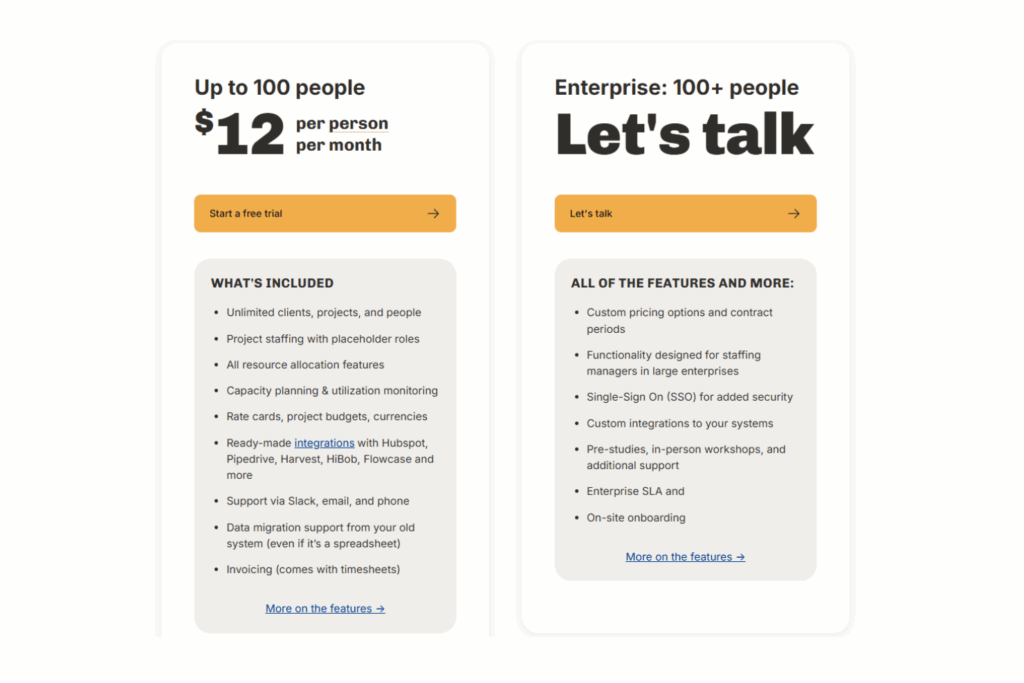
Operating's pricing starts at $12 per employee per month for the base tier. If you need more advanced features or have more than 100 team members, you’ll need to speak to a sales representative to get a custom quote.
Operating offers a free trial so you can explore its capabilities before committing. Positioned as a mid-range option, Operating is a good fit for teams that need a customizable resource management solution.
Operating Plans & Pricing Tiers
Operating offers two pricing tiers that offer different features and levels of support and cater to different team sizes. Pricing details are available for the base tier only, and add-ons for timesheets and invoicing are available for an additional $3/user/month each. You’ll need to request a custom quote for more information on the enterprise tier. Here's how the plans break down:
| Plan Name | Pricing (Monthly/Annual) | Key Features Included | Best For |
|---|---|---|---|
| Base | $12/user/month ($144/user/year) | Unlimited clients and projects, resource allocation, capacity planning, native integrations, project budgeting, timesheets and invoicing (add-on) | Small teams (up to 100 team members) |
| Enterprise | Custom quote | All features plus single-sign on, custom integrations, and enterprise service level agreement, and on-site onboarding | Large organizations (100+ team members) |
How to Choose The Right Operating Plan
To determine which Operating plan is right for you, think about the number of team members that will need to use the system, integrations, compliance, and other factors that get overlooked when choosing a resource management software.
- What integrations do we need? Your team might rely on tools like a CRM or analytics software. Make sure Operating integrates with these systems to save time and reduce manual data entry.
- Are there locked features we need? Some features might only be available in the enterprise plan or via add-ons. Check whether the essential tools for your projects are included in your chosen plan to avoid unexpected costs.
- Can we scale with this plan? If your team is growing, make sure the plan can accommodate more users or features without a huge price hike. This helps in budgeting and planning for future expansions.
- What project management features are essential? Make a list of must-have features like task management or time tracking. Make sure your chosen plan includes these.
- Does the pricing model suit our usage? If your team uses the software heavily, a plan with a usage-based pricing model might become costly. Look for plans that fit your usage patterns.
- Do we need advanced analytics? If analyzing data is key, make sure your plan includes robust analytics tools. This helps you make informed decisions and track progress effectively.

Operating Pricing Compared to Alternatives
Operating is generally considered in the mid-range of resource management software pricing. It offers a balance of features and cost, which makes it suitable for businesses that need robust tools without breaking the bank. While some advanced features and integrations are gated behind higher-tier plans, it remains a feature-rich option.
Small to mid-sized businesses or teams looking for a solid return on investment find Operating valuable. It’s ideal if you need comprehensive features but can manage without the premium options that are locked behind higher tiers.
What Affects Operating Pricing?
Pricing for Operating varies based on the number of team members that need to use the software and how you plan to use the software:
- Number of users: More users generally mean higher costs, so consider your team size when choosing a plan.
- Feature tier: Different plans offer varying features. Picking a higher tier for advanced tools will impact your budget.
- Usage volume: If your team uses Operating heavily, you might face additional charges, so track your usage.
- Support requirements: Needing dedicated support can increase costs. Decide if your team needs this level of assistance.
- Customizations: Tailoring Operating to fit your specific needs may come with extra fees, so plan accordingly.
- Integration needs: If you require specific integrations with other tools, this could affect your pricing.
Operating Pricing Compared to Alternatives
Operating is generally considered in the mid-range of resource management software pricing. It offers a balance of features and cost, which makes it suitable for businesses that need robust tools without breaking the bank. While some advanced features and integrations are gated behind higher-tier plans, it remains a feature-rich option.
Small to mid-sized businesses or teams looking for a solid return on investment find Operating valuable. It’s ideal if you need comprehensive features but can manage without the premium options that are locked behind higher tiers.
What Affects Operating Pricing?
Pricing for Operating varies based on the number of team members that need to use the software and how you plan to use the software:
- Number of users: More users generally mean higher costs, so consider your team size when choosing a plan.
- Feature tier: Different plans offer varying features. Picking a higher tier for advanced tools will impact your budget.
- Usage volume: If your team uses Operating heavily, you might face additional charges, so track your usage.
- Support requirements: Needing dedicated support can increase costs. Decide if your team needs this level of assistance.
- Customizations: Tailoring Operating to fit your specific needs may come with extra fees, so plan accordingly.
- Integration needs: If you require specific integrations with other tools, this could affect your pricing.
Additional Costs to Watch Out For
Many resource management software vendors don't always publish their full cost structure, which can lead to surprise fees after signing. Understanding what might not be included in Operating's base price can help your team avoid budget overruns or limited access. Consider drafting a resource management software RFP to get a clear picture of potential costs.
Setup Fees or Onboarding Costs
Setup fees cover assistance in getting your team up and running with Operating. These costs apply when you need help with initial configuration or training. Ask if these fees are bundled in the plan or billed separately, and request a full cost breakdown to avoid surprise expenses.
Premium Support Tiers
Premium support might include faster response times or dedicated account managers. This cost typically applies to teams that need extra help or assurance of quick issue resolution. Check if this is included in higher-tier plans or if it's an extra charge, and make sure you understand the support level you're paying for.
Custom Integrations or API Usage
If you need Operating to work with your other tools, it might be necessary to set up custom integrations. This cost applies when your team requires specific API usage or bespoke connections. Confirm whether these integrations are part of your plan or an additional expense, and seek clarity on any API limits.
Usage Overages
Usage overages occur when your team exceeds the limits of your plan, like storage or user count. This can quickly increase costs if not monitored. Ask about these limits upfront and how overages are billed to prevent unexpected charges.
Regulatory or Compliance Costs
If your industry requires specific compliance features, these might come at an extra cost. This applies to teams in regulated sectors that need advanced security or reporting tools. Understand whether these are part of your tier or additional, and get full disclosure on any related fees.
Is Operating Worth the Cost?
In my opinion, Operating offers solid value for teams that need reliable resource management. Mid-sized teams in industries like tech or consulting often see good ROI. It's especially beneficial for those who value strong onboarding and support.
Operating stands out with its flexible integrations and clear pricing transparency. Sales reps generally tailor quotes to fit your needs, making it fair for different budgets.
- Strong onboarding: Helps your team get started smoothly.
- Robust integrations: Connects easily with other tools you use.
- Transparent pricing: Clear details and fair quotes.
Operating Pricing FAQs
Here are answers to a few common questions about Operating pricing:
Does Operating offer a free trial or pilot?
Yes, Operating offers a free trial to help you explore its features before committing. This trial lets your team assess the platform’s fit for your needs without upfront costs.
Are discounts available for nonprofits or multi-year contracts?
Ask Operating’s sales representatives directly about potential discounts for nonprofits and multi-year contracts.
What’s the average onboarding time?
The average onboarding time for Operating varies, but most teams can expect to be up and running within a few weeks. This timeframe includes setup, training, and initial configuration that’s tailored to your team’s needs.
Is the pricing likely to increase after the first year?
Pricing may increase after the first year, especially if your usage or team size grows. Discuss potential future costs with Operating’s sales team to plan your budget effectively.
What happens if our team exceeds the user limit?
If your team exceeds the user limit on your current plan, you’ll need to upgrade to a higher tier or pay for additional user licenses. Monitor your usage and adjust your plan accordingly.
Are there fees for additional support or integrations?
Yes, there might be additional fees for premium support or custom integrations. These costs depend on your specific requirements, so discuss them with the Operating team to understand potential charges.
What’s Next?
If you're in the process of researching resource management software, connect with a SoftwareSelect advisor for free recommendations.
You fill out a form and have a quick chat where they get into the specifics of your needs. Then you'll get a shortlist of software to review. They'll even support you through the entire buying process, including price negotiations.


