

10 Best Mind Mapping Software for Mac in 2026

Best Mind Mapping Software for Mac Shortlist


Mind mapping software for Mac gives you digital tools to visually organize new ideas, tackle complex projects, and brainstorm with more clarity on your Apple device. If you need to structure your thoughts, collaborate with your team, or turn scattered notes into action, finding the right app matters.
In this guide, you’ll find a curated list of the best mind mapping tools designed for Mac, with details on how each one fits different workflows, so you can pick the solution that keeps your creative process moving and your team on the same page.
Why Trust Our Software Recommendations
Our team has been testing and reviewing software since 2012. As project managers ourselves, we know how difficult—and important—it is to choose the right software.
For this guide, we evaluated tools using hands-on testing and independent research, scoring tools using our selection criteria. We also draw on insights from industry thought leaders and practicing project management experts.
Our reviews reflect our human editorial judgment, not a sales pitch.
Expert reviewers:
Mind Mapping Software for Mac Comparison Table
This comparison table summarizes pricing details for my top mind mapping software for Mac selections:
| Tool | Best For | Trial Info | Price | ||
|---|---|---|---|---|---|
| 1 | Best for live team brainstorming | Free plan + free demo available | From $6.50/user/month | Website | |
| 2 | Best for fast visual co-editing | Free plan available | From $10/user/month (billed annually) | Website | |
| 3 | Best for an infinite creative canvas | Free plan available | From $5/month (billed annually) | Website | |
| 4 | Best for integrated note-taking layouts | Free plan available | From $69/month (billed annually) | Website | |
| 5 | Best for multipurpose diagramming | Free demo available | From $9.95/user/month (billed annually) | Website | |
| 6 | Best for AI-powered mind map generation | Free plan available | From $4.92/month | Website | |
| 7 | Best for Apple ecosystem integration | Free plan available | From $2.99/month | Website | |
| 8 | Best for detailed project planning | Free trial available | From $99/year | Website | |
| 9 | Best for local data privacy | Free plan + free trial available | From $29.99/user (one-time purchase) | Website | |
| 10 | Best for tracking project tasks | Free plan available | From $199/license | Website |
Best Mind Mapping Software for Mac Reviews
Below are my detailed summaries of the best mind mapping software for Mac that made it onto my shortlist. My reviews offer a detailed look at the features, best use cases, and integrations of each tool to help you find the best one for you.

Best for live team brainstorming
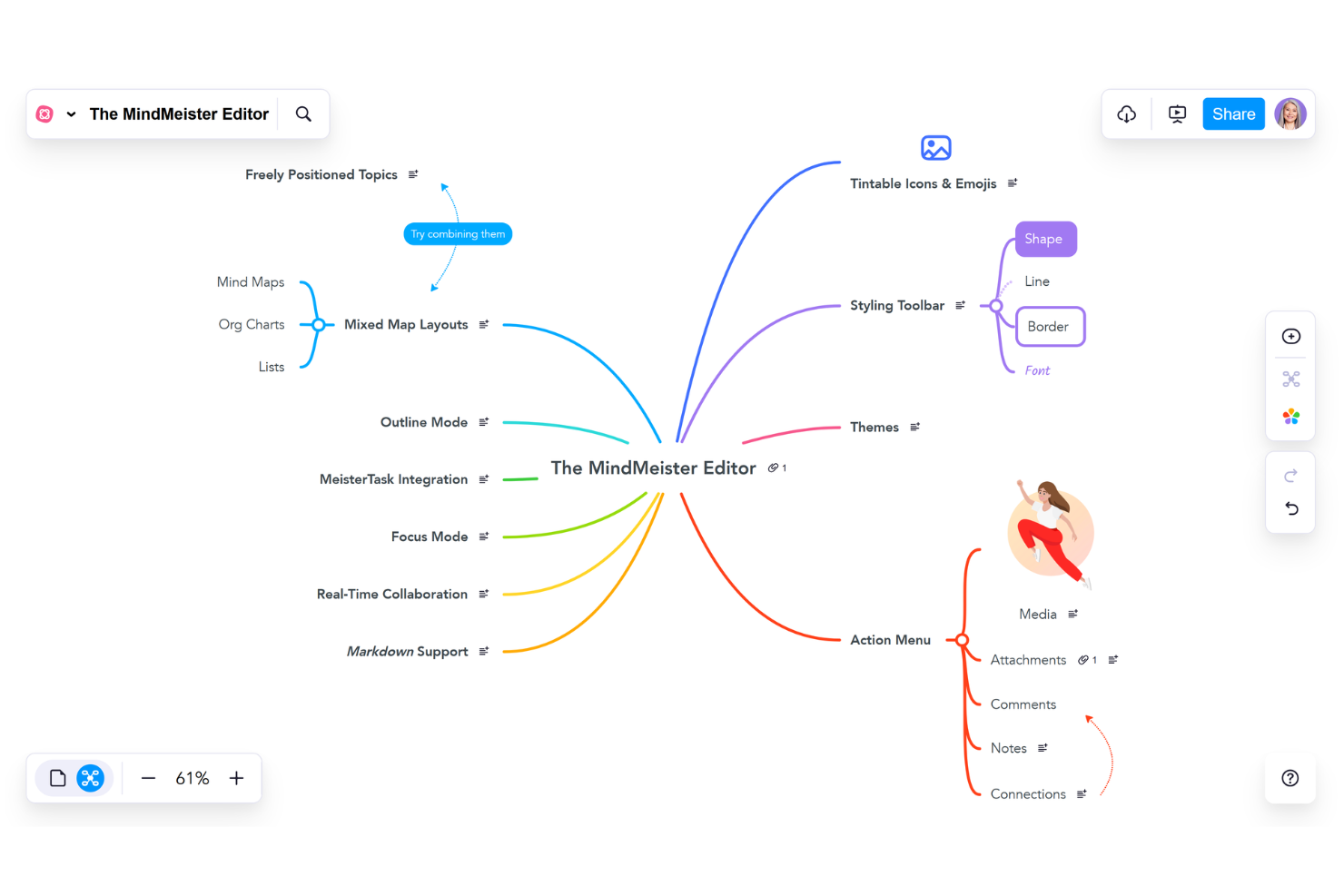
MindMeister is a browser-based mind mapping software that offers real-time collaboration, built-in chat, customizable templates, and easy export options for visual idea organization on Mac.
Who Is MindMeister Best For?
MindMeister is a good fit for distributed teams, agencies, and organizations that need to brainstorm, plan, and collaborate visually in real time.
Why I Picked MindMeister
I picked MindMeister as one of the best because I run live mapping sessions with distributed teams that need real-time collaboration, easy sharing, and group editing, all within a browser on Mac.
MindMeister Key Features
- Customizable templates: Quickly start new mind maps using a variety of built-in templates.
- Attachment support: Add images, links, and notes to any node.
- Task widget integration: Assign and track tasks associated with map topics.
MindMeister Integrations
MindMeister offers native integrations with MeisterTask, Google Drive, and Microsoft Teams. An API is available for custom integrations.
Pros and Cons
Pros:
- Easy linking of maps to MeisterTask tasks
- Presentation mode for sharing mind mapsks
- Real-time collaboration for group brainstorming
Cons:
- Lacks offline editing in browser version
- Free version allows only three maps

Best for fast visual co-editing
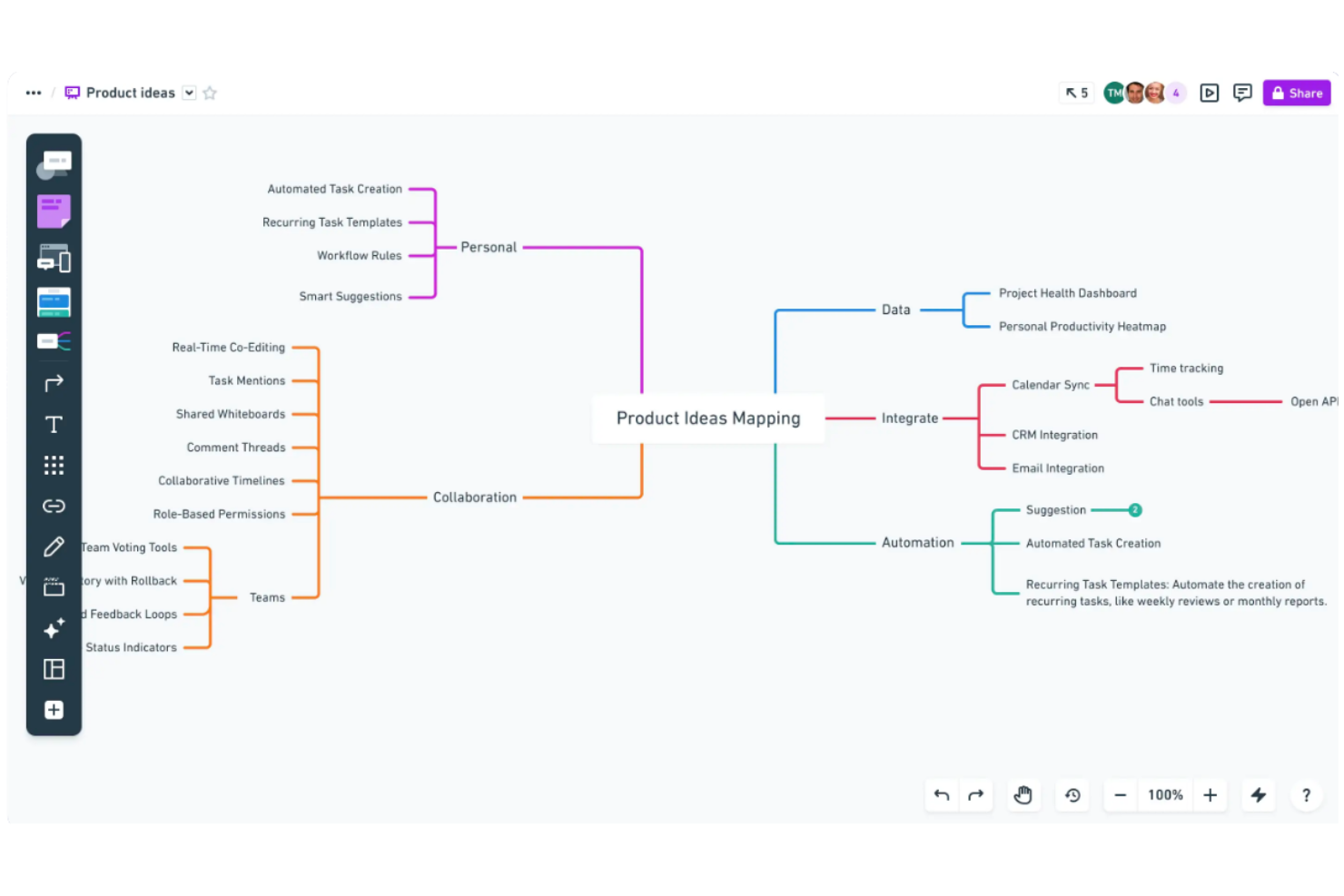
Whimsical is a web-based visual collaboration tool for Mac users that combines mind mapping, flowcharts, wireframes, and sticky notes in an intuitive online workspace.
Who Is Whimsical Best For?
Whimsical suits fast-moving product, design, and remote teams that need real-time, cross-functional collaboration on visual brainstorming projects.
Why I Picked Whimsical
I picked Whimsical because it gives my team instant multi-cursor mind map editing, sticky notes, and color-coded branches right in the browser. We can brainstorm and co-edit visual structures without waiting or switching tools.
Whimsical Key Features
- Unlimited boards per workspace: Create as many mind maps, flowcharts, and wireframes as your projects demand.
- Comments and mentions: Annotate diagrams and directly tag collaborators for feedback or clarifications.
- Version history: Track changes to any board and restore previous iterations as needed.
Whimsical Integrations
Whimsical offers native integrations with Slack, Jira, Notion, Linear, Cursor, GitHub, Figma, and Google Drive. An API is available for custom integrations.
Pros and Cons
Pros:
- Real-time commenting on shared boards
- Drag-and-drop wireframes and sticky notes
- Super fast multi-user mind map editing
Cons:
- Massive canvases experience severe performance lag
- Free tier caps total workspace items

Creately
Best for an infinite creative canvas

Creately is a visual collaboration and mind mapping software for Mac that combines diagramming, concept mapping, intelligent shapes, and workspace management in one online tool.
Who Is Creately Best For?
Creately fits teams in design, product, or education roles who need a visual platform to map ideas, workflows, and processes collaboratively.
Why I Picked Creately
I picked Creately because my team uses its infinite canvas to build giant mind maps that connect to visual docs, tasks, and data shapes. I like being able to link objects, drop in templates, and zoom out to see everything at once.
Creately Key Features
- Drag-and-drop diagramming: Move items and branches instantly anywhere on your canvas.
- Multi-user collaboration: Invite others to edit diagrams with you in real time.
- Data-enabled shapes: Add structured fields and visual tags directly to map items.
Creately Integrations
Creately offers native integrations with Google Workspace, Slack, GitHub, Slack, Confluence, and Microsoft Teams. It also provides an API for custom integrations.
Pros and Cons
Pros:
- Real-time multi-user editing and comments
- Visual database for linking mind map data
- Infinite canvas for organizing complex structures
Cons:
- Free version severely limits workspace items
- Large diagrams cause significant canvas lag

Best for integrated note-taking layouts
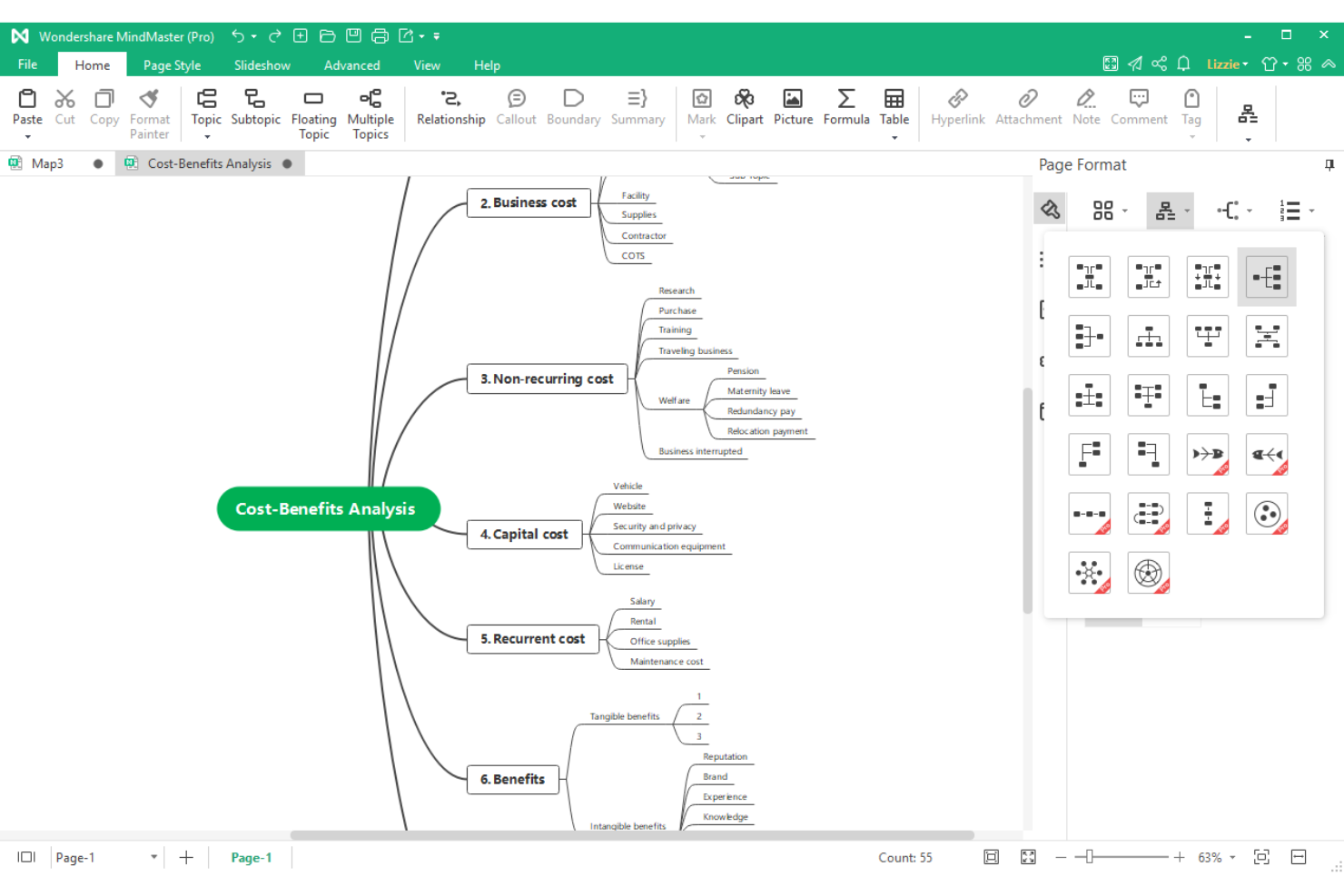
EdrawMind is a desktop and browser-based mind mapping software for Mac that combines idea mapping, outline and presentation modes, and built-in note structuring tools for visual thinkers and project teams.
Who Is EdrawMind Best For?
EdrawMind is a strong choice for educators, students, and professionals who need rich visual note-taking and structured brainstorming in academic or content-driven environments.
Why I Picked EdrawMind
I picked EdrawMind because I rely on its built-in outline and notes modes to structure meeting minutes and research side-by-side with my mind maps. I like having one workspace where I can switch between brainstorming, linear notes, and diagram layouts without losing context.
EdrawMind Key Features
- Brainstorming mode: Lets you visually organize ideas into dynamic, free-form mind maps.
- Multiple map structures: Switch between radial, tree, fishbone, timeline, and org chart layouts.
- Cloud sync: Access and edit your mind maps across Mac and other devices.
EdrawMind Integrations
EdrawMind integrations are not publicly listed.
Pros and Cons
Pros:
- Supports mixed diagram and note layouts
- Presentation mode for sharing visual plans
- Built-in outline and mind map view modes
Cons:
- Free version enforces restrictive paywalls
- Cloud autosave fails during weak connectivity

Best for multipurpose diagramming

SmartDraw is a multipurpose diagramming and mind mapping platform for Mac that covers concept mapping, organizational charts, process flows, technical diagrams, and floor plans.
Who Is SmartDraw Best For?
SmartDraw suits Mac-based operations, IT, and engineering teams who need fast diagramming across flowcharts, mind maps, or technical layouts.
Why I Picked SmartDraw
I picked SmartDraw because I draw everything from mind maps to network diagrams for cross-team projects on Mac. I use the extensive template library and automatic formatting to switch diagram types with just a few clicks.
SmartDraw Key Features
- Collaboration tools: Share diagrams and invite others to comment or edit in real time.
- Intelligent formatting engine: Automatically adjusts spacing and alignment as you build diagrams.
- Cloud storage integration: Save and access diagrams from Google Drive, OneDrive, and Dropbox.
SmartDraw Integrations
SmartDraw offers native integrations with Microsoft 365, Google Workspace, Atlassian Confluence, Jira, Trello, Dropbox, Box, and OneDrive. An API is available for custom integrations.
Pros and Cons
Pros:
- Automatic diagram formatting saves setup time
- Mac app mirrors web functionality closely
- Exports mind maps to multiple diagram types
Cons:
- Complex diagrams cause interface lag
- Fewer built-in mind map templates than peers


Xmind is a Mac-compatible mind mapping software that provides visual diagramming, customizable map styles, and advanced structure options with integrated AI-powered new features.
Who Is Xmind Best For?
Xmind suits Mac users in education, research, or creative roles who need advanced visual mapping and AI-driven brainstorming tools.
Why I Picked Xmind
I picked Xmind as one of the best because its AI features quickly turn bullet points into full mind maps and diagram structures. I also like its built-in logic charts and tree diagrams that make structuring complex ideas straightforward.
Xmind Key Features
- Zen mode: Focuses your workspace with a distraction-free, full-screen environment.
- Templates library: Offers a range of professionally designed templates you can customize for different mapping needs.
- Topic link support: Lets you add links between topics to show relationships across the map.
Xmind Integrations
Xmind offers native integrations with Slack, Zoom, Notion, Dropbox, Google Drive, OneDrive, and more. Xmind offers an API for custom integrations.
Pros and Cons
Pros:
- Syncs projects across Mac, Windows, and mobile
- Offers a wide variety of map templates
- AI instantly transforms notes into mind maps
Cons:
- Large mind maps cause significant lag
- Free version exports include large watermarks


MindNode is a macOS and iOS mind mapping software that features visual idea organization, outline and focus modes, Quick Entry capture, and deep integration with native Apple frameworks.
Who Is MindNode Best For?
MindNode is ideal for Apple users, including students, designers, and creative professionals, who want a mind mapping solution tightly integrated with macOS and iOS.
Why I Picked MindNode
I picked MindNode as one of the best because sync works flawlessly across Mac, iPhone, iPad, and Apple Watch. I use iCloud Drive for real-time updates, and I appreciate deep integration with Apple Shortcuts and Siri for quick capture.
MindNode Key Features
- Focus mode: Hides everything but a single branch to reduce distraction while brainstorming.
- Outline view: Displays your mind map as a collapsible, editable outline.
- Quick Entry: Captures ideas instantly from any screen without opening the full app.
MindNode Integrations
MindNode offers native integration with the Apple ecosystem, Ulysses, Bear, Things, and OmniFocus. It does not offer an open API.
Pros and Cons
Pros:
- Offers visual tags, markdown, and outline view
- Supports system-wide capture with Quick Entry
- Syncs instantly between Mac, iPhone, and iPad
Cons:
- Advanced features are locked behind pro version
- Hidden file storage restricts folder organization


MindManager is a versatile mind mapping and project management platform for Mac that features advanced diagramming, Gantt charting, data linking, and task assignment tools for structured visual planning.
Who Is MindManager Best For?
Project managers and operations leads in mid-sized or larger organizations who need detailed, multi-layered project mapping and visual workflows.
Why I Picked MindManager
I picked MindManager because I can build intricate, multi-level mind maps with task ownership, dependencies, and integrated Gantt charts, features I rely on when managing cross-team project plans on Mac. I often use drag-and-drop resource assignments for precise oversight.
MindManager Key Features
- SmartRules automation: Lets you set rules to trigger visual changes or actions based on map data.
- Topic calculation tools: Calculate values and totals automatically within map branches.
- Map export options: Export maps to PDF, Word, image, or Microsoft Project formats.
MindManager Integrations
MindManager offers native integrations with Microsoft 365, Microsoft Teams, SharePoint, Outlook, OneDrive, Google Drive, Box, Slack, and Zapier. An API is available for custom integrations.
Pros and Cons
Pros:
- Mix diagrams, tasks, and notes in one workspace
- Presentation mode for real-time plan sharing
- Outline and mind map views are linked
Cons:
- Advanced project tools are desktop-only
- Dense interface creates steep learning curve


SimpleMind is a cross-platform mind mapping software for Mac that offers flexible map layouts, custom themes, multimedia attachments, and offline editing with files stored locally.
Who Is SimpleMind Best For?
SimpleMind is ideal for solo professionals and privacy-conscious teams in regulated industries who need offline Mac mind mapping with no cloud storage requirements.
Why I Picked SimpleMind
I picked SimpleMind because I need my Mac mind maps to stay local and secure, there’s no forced cloud sync or external storage. I use password protection and offline access to fully control my brainstorming data.
SimpleMind Key Features
- Multiple map layouts: Create maps in free-form, horizontal, vertical, and top-down structures.
- Multimedia attachments: Add images, videos, notes, and links directly to mind maps.
- Topic relation lines: Visually connect topics with customizable lines to show dependencies.
SimpleMind Integrations
Native integrations are not publicly listed. An API is available for building custom integrations.
Pros and Cons
Pros:
- Free-form and auto-layout map options
- Advanced multimedia support in map nodes
- Keeps all mind map files local
Cons:
- Limited third-party integrations
- No built-in real-time collaboration

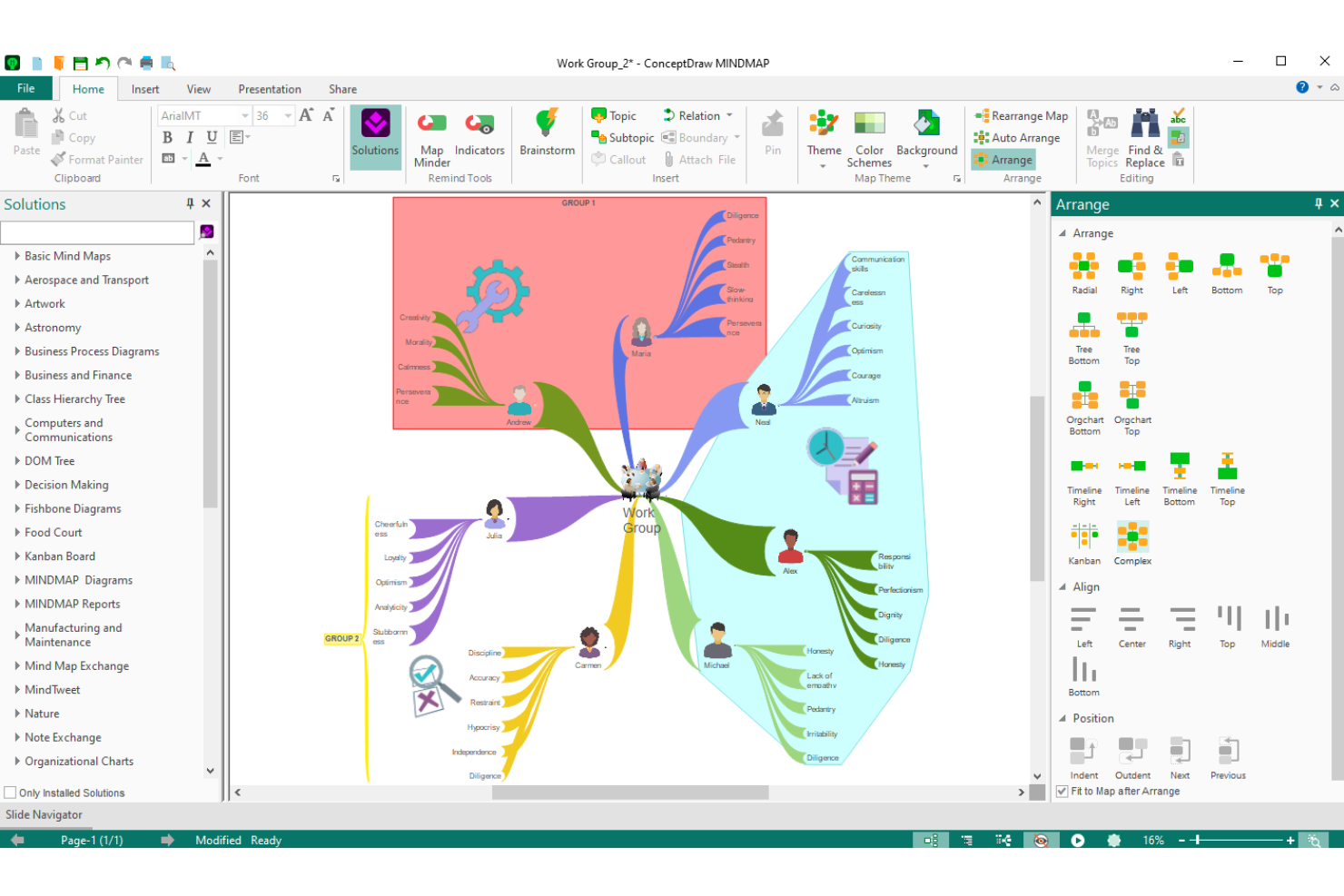
ConceptDraw MINDMAP is desktop mind mapping software for Mac focused on visual brainstorming, map-based outlining, project dashboards, and integration with ConceptDraw’s suite of business productivity tools.
Who Is ConceptDraw MINDMAP Best For?
ConceptDraw MINDMAP fits project managers and professionals who need mind mapping alongside project tracking and business visualization tools on Mac.
Why I Picked ConceptDraw MINDMAP
I picked ConceptDraw MINDMAP because I use its task-oriented mind maps to break down project deliverables, set priorities, and assign responsibilities with status icons and deadline tracking directly in the map workspace.
ConceptDraw MINDMAP Key Features
- Mind map presentation mode: Turn any mind map into an interactive slideshow within the app.
- MS Office file export: Export mind maps directly to Word, PowerPoint, and Project file formats.
- Custom topic formatting: Apply styles, images, and icons to differentiate map branches and topics.
ConceptDraw MINDMAP Integrations
ConceptDraw MINDMAP offers native integrations with Microsoft Office applications, ConceptDraw PROJECT, and Mindjet MindManager. An API is available for custom integrations.
Pros and Cons
Pros:
- Works offline with Mac desktop installation
- Built-in brainstorming and presentation modes
- Exports mind maps to Word and PowerPoint
Cons:
- Limited real-time cloud collaboration options
- Interface feels dated compared to competitors
Other Mind Mapping Software for Mac
Here are some additional mind mapping software for Mac options that didn’t make it onto my shortlist, but are still worth checking out:
- Lucidchart
For multi-platform diagram imports
- Ayoa
For neuro-inclusive design
- ClickUp
For converting nodes into tasks
- Miro
For remote team collaboration
- MindView
For interactive Gantt chart views
- MarginNote
For academic document research


How I Evaluate Mind Mapping Software for Mac
I split my evaluation into baseline criteria—like native Mac compatibility and mind map canvas quality—and differentiators like AI ideation, Gantt conversion, and PM integrations.
Core Functionality (Table Stakes For This List)
When I'm selecting tools for my list, I rank each one on a scale from 0 (does not offer the functionality) to 5 (excels in this area) for each core functionality listed below. Then, I calculate the tool's total score into a percentage. Each tool needs to achieve a minimum total score of 65% to be considered for inclusion.
- Native Mac Compatibility: I check for a dedicated macOS app with Apple Silicon support, trackpad gestures, and Retina rendering rather than a wrapped web view.
- Mind Map Creation: The core mapping canvas matters most—I look at node linking, branch styling, and how naturally you can build radial or hierarchical maps.
- PM Tool Integration: Project managers need maps that connect to where work gets done, so I evaluate integrations with platforms like Jira, Asana, and Trello.
- Real-Time Collaboration: For distributed teams running remote brainstorms or sprint planning, I look for live co-editing with visible cursors and inline comments.
- Export & File Compatibility: I check whether you can export to formats like PDF, PNG, OPML, and DOCX and import maps from competing tools when switching platforms.
- Templates & Structural Views: Good PM templates for WBS or sprint planning save setup time, and alternate views like outlines, timelines, or Gantt charts add flexibility.
Once I have a list of tools that meet the criteria, I consider what sets each platform apart.
Differentiating Factors (What Sets Vendors Apart)
Here's how I compare and contrast different vendors:
Standout Features
Gantt chart conversion is a big differentiator—I look for tools that transform a mind map directly into a Gantt view with dependencies, saving hours of re-entry during sprint planning. Presentation mode also matters when you need to walk stakeholders through project scope without exporting to a separate slide deck. AI-powered ideation is worth evaluating too, especially for brainstorming sessions where auto-generated branches can surface angles your team might otherwise miss.
Beyond Features
Cross-device sync is a key consideration for Mac users—I evaluate whether a tool offers companion iOS and iPadOS apps with Apple Pencil support, since many PMs sketch initial ideas on an iPad before refining on a MacBook. Pricing models vary widely in this space, from one-time license purchases to per-seat subscriptions, so I check whether the structure fits a growing team without unexpected cost jumps. For enterprise PMOs handling sensitive project data, I also look at SSO support, encryption standards, and compliance certifications like SOC 2 and GDPR.
How to Choose Mind Mapping Software for Mac
It’s easy to get bogged down in long feature lists and complex pricing structures. To help you stay focused as you work through your unique software selection process, here’s a checklist of factors to keep in mind:
| Factor | What to Consider |
|---|---|
| Scalability | Will the software handle larger, more complex maps as your projects grow? Consider limits on map size, number of nodes, or user seats. |
| Integrations | Does the tool connect natively with your task managers, file sharing platforms, or project systems? Gaps could create manual workarounds. |
| Customizability | Can you tailor map templates, colors, and layouts to support your preferred workflows and branding requirements? |
| Ease of use | How quickly can you and your team pick up the tool? Look for friction in adding nodes, navigation, or switching between devices. |
| Implementation and onboarding | What onboarding resources are available? Consider the presence of import options, training materials, or product tours for new users. |
| Cost | Are the pricing tiers clear and predictable? Factor in added costs like per-seat licenses, annual support, or required add-ons. |
| Security safeguards | Does the software protect your organization’s data with encryption, user permissions, and secure storage tailored for macOS environments? |
| Support availability | Is live support easily accessible? Check response times, regional coverage, and whether help is offered via chat, phone, or email. |
What Is Mind Mapping Software for Mac?
Mind mapping software for Mac is a digital tool designed for brainstorming, organizing ideas, and visualizing projects, specifically optimized for macOS devices. These platforms let you create, edit, and share mind maps using drag-and-drop nodes, customizable layouts, and export options, helping you clarify concepts, structure information, and enhance project planning on your Mac.
Features
When selecting mind mapping software for mac, keep an eye out for the following key features:
- Drag-and-drop editing: Rearrange nodes, branches, and ideas easily by dragging elements across your mind map for fast organization and restructuring.
- Customizable templates: Choose from pre-built mind map layouts to speed up map creation and match your preferred brainstorming style or project format.
- Multi-format export: Save and share your maps as formats like PDF, PNG, or text outlines, allowing collaboration and presentation beyond the original app.
- Cloud synchronization: Access your mind maps from multiple Mac devices through integrated cloud storage, ensuring your latest work is available anywhere.
- Offline access: Work on your maps without an internet connection, especially useful when traveling or working in environments with limited connectivity.
- Keyboard shortcuts: Perform frequent actions and navigation using shortcuts for faster map creation, editing, and management on your Mac.
- Task management integration: Link map nodes to action items, deadlines, or project statuses to turn your brainstorming into executable plans.
- Image and file attachments: Embed images, documents, or links directly into mind map nodes to centralize all relevant information in one visual workspace.
- Presentation mode: Turn your mind map into a slideshow within the app, guiding teams or audiences through your ideas step-by-step without leaving the platform.
Benefits
Implementing mind mapping software for mac provides several benefits for your team and your business. Here are a few you can look forward to:
- Enhanced idea organization: Visually structure and connect thoughts using flexible mind maps, making it easier to clarify priorities and relationships between concepts.
- Faster project planning: Use drag-and-drop editing and templates to quickly turn brainstorming sessions into actionable diagrams and workflows.
- Native macOS experience: Enjoy smooth performance, optimized interfaces, and smooth integration with other Mac tools and system features.
- Easy team collaboration: Share maps and updates across Mac devices and the cloud, keeping all stakeholders aligned on evolving ideas and project changes.
- Improved focus and creativity: Present and refine ideas with a distraction-free workspace, supporting deeper engagement and more original input.
- Simplified knowledge sharing: Export maps in multiple formats and present them directly, making it easy to distribute complex ideas to team members or stakeholders.
- Centralized resource management: Attach files, notes, links, and images to nodes, ensuring that all relevant information for a project lives in one organized visual space.
Costs and Pricing
Selecting mind mapping software for Mac requires an understanding of the various pricing models and plans available. Costs vary based on features, team size, add-ons, and more. The table below summarizes common plans, their average prices, and typical features included in mind mapping software for Mac solutions:
Plan Comparison Table for Mind Mapping Software for Mac
| Plan Type | Average Price | Common Features |
|---|---|---|
| Free Plan | $0 | Basic map creation, limited templates, basic export formats, and individual offline access. |
| Personal Plan | $5–$10/user/month | Unlimited maps, advanced templates, image attachments, standard export options, and cloud sync across devices. |
| Business Plan | $10–$20/user/month | Team collaboration, real-time editing, advanced task linking, presentation modes, and centralized administration. |
| Enterprise Plan | $20–$40/user/month | SSO/security controls, priority support, custom onboarding, API access, compliance tools, and dedicated training. |
Mind Mapping Software for Mac FAQs
Here are some answers to common questions about mind mapping software for Mac:
Can I export mind maps to other file formats on Mac?
Yes, most mind mapping software for Mac lets you export maps as PDF, image files, text outlines, or even Microsoft Office documents. This makes it easier to share your ideas with colleagues who use different platforms or include maps in project documentation.
Does mind mapping software for Mac support real-time collaboration?
Yes, many options support real-time editing and team collaboration. You and your teammates can work on the same map at once, add comments, and track changes, which is especially useful for remote or distributed teams.
Are there mind mapping tools designed specifically for Mac users?
Yes, several mind mapping tools are optimized specifically for macOS. These typically offer native Mac interfaces, support for system shortcuts and gestures, and integration with other Mac apps or services for a smoother user experience.
Is offline access available in mind mapping software for Mac?
Yes, most Mac-based mind mapping apps provide offline access. You can work on your maps without Wi-Fi and then sync changes when you’re online again, which is handy for commuting or travel.
What security features should I look for in mind mapping software for Mac?
Look for software that encrypts your data, offers user access controls, and provides secure cloud storage. Enterprise-focused solutions may also include options like SSO (single sign-on) and compliance certifications to meet company policies.