

10 Best Frame.io Alternatives for 2026

Best Frame.io Alternatives Shortlist


A strong Frame.io alternative gives your team secure video review, real-time feedback, and workflow management without locking you into a single platform. If you’re searching for Frame.io alternatives, you’re likely facing challenges with pricing, feature gaps, or integration limits as your video projects grow more complex. This list will help you compare the top video collaboration tools for 2026, so you can find the right fit for your team’s review cycles, creative workflows, and client needs—whether you’re in post-production, marketing, or creative services.
What Is Frame.io?
Frame.io is a cloud-based video collaboration platform designed for teams to review, share, and approve video content. It offers features like time-stamped comments, version control, and secure file sharing, making it easier for creative teams to manage feedback and revisions. Video editors, producers, and clients use Frame.io to simplify post-production workflows and keep projects organized in one place.
Frame.io Alternatives Comparison Table
This comparison table summarizes pricing details for my top Frame.io alternative selections:
| Tool | Best For | Trial Info | Price | ||
|---|---|---|---|---|---|
| 1 | Best for its video capabilites | 30-day free trial available | From $250/month (billed annually) | Website | |
| 2 | Best for visual version comparison and revision tracking | Free plan available | From $10/user/month | Website | |
| 3 | Best for creative agency collaboration | Free trial + free demo available | From $9.95/month | Website | |
| 4 | Best for multi-stage approval workflows | 30-day free trial + free plan + free demo available | From $199/month | Website | |
| 5 | Best for fast client review cycles | Free plan + free demo available | From $66/month (billed annually) | Website | |
| 6 | Best for integrating with Adobe Creative Cloud | Free demo available | Pricing upon request | Website | |
| 7 | Best for real-time visual feedback | 14-day free trial available | From $9/user/month (billed annually) | Website | |
| 8 | Best for animation and VFX pipeline tracking | 30-day free trial | From $50/month | Website | |
| 9 | Best for enterprise-grade security needs | 14-day free trial available | From $15/user/month | Website | |
| 10 | Best for managing complex media projects | Free demo available | From $10/month (billed annually) | Website |
Why Trust Our Software Recommendations
Our team has been testing and reviewing software since 2012. As project managers ourselves, we know how difficult—and important—it is to choose the right software.
For this guide, we evaluated tools using hands-on testing and independent research, scoring tools using our selection criteria. We also draw on insights from industry thought leaders and practicing project management experts.
Our reviews reflect our human editorial judgment, not a sales pitch.
Expert reviewers:
Frame.io Alternatives Reviews
Below are my detailed summaries of the Frame.io alternatives that made it onto my shortlist. My reviews offer a detailed look at the features, best use cases, and integrations of each platform to help you find the best one for you.
Best for its video capabilites

Tagbox.io is a digital asset management platform designed for teams who need faster ways to organize, find, and share their media libraries. If you’re looking for a frame.io alternative centered on AI-driven organization and media discovery, Tagbox.io is worth considering.
Who Is Tagbox.io Best For?
Creative teams and marketing departments who need AI-driven media organization for large volumes of digital assets.
Why Tagbox.io Is a Good frame.io Alternative
I picked Tagbox.io because its tagging saves my team hours of manual organization work especially when it comes to people and object tagging. When we upload a batch of campaign assets, Tagbox.io's AI scans visual content and applies relevant tags instantly, making assets searchable right away. I also appreciate the smart multilingual search, which lets my team find specific images or video files using natural language queries rather than digging through folders. For teams managing large, fast-growing media libraries, that combination makes a real difference.
Tagbox.io Key Features
- Custom taxonomies: Build your own folder structures, labels, and metadata fields to match how your team works.
- Bulk asset management: Select, tag, move, or organize large groups of files simultaneously.
- Role-based access controls: Set permissions by user or team to control who can view, edit, or download assets.
- Shareable collections: Group assets into curated collections and share them via a link with internal or external stakeholders.
Tagbox.io Integrations
Connect Tagbox.io through Tagbox Desktop (drag-and-drop into any app), Zapier, Make, and a REST API. Custom workflows are available for Enterprise.
Pros and Cons
Pros:
- Allows fully custom organization structures
- Quick asset search using natural language
Cons:
- No frame-accurate markup for editors
- Lacks video annotation and timeline feedback
KROCK
Best for visual version comparison and revision tracking
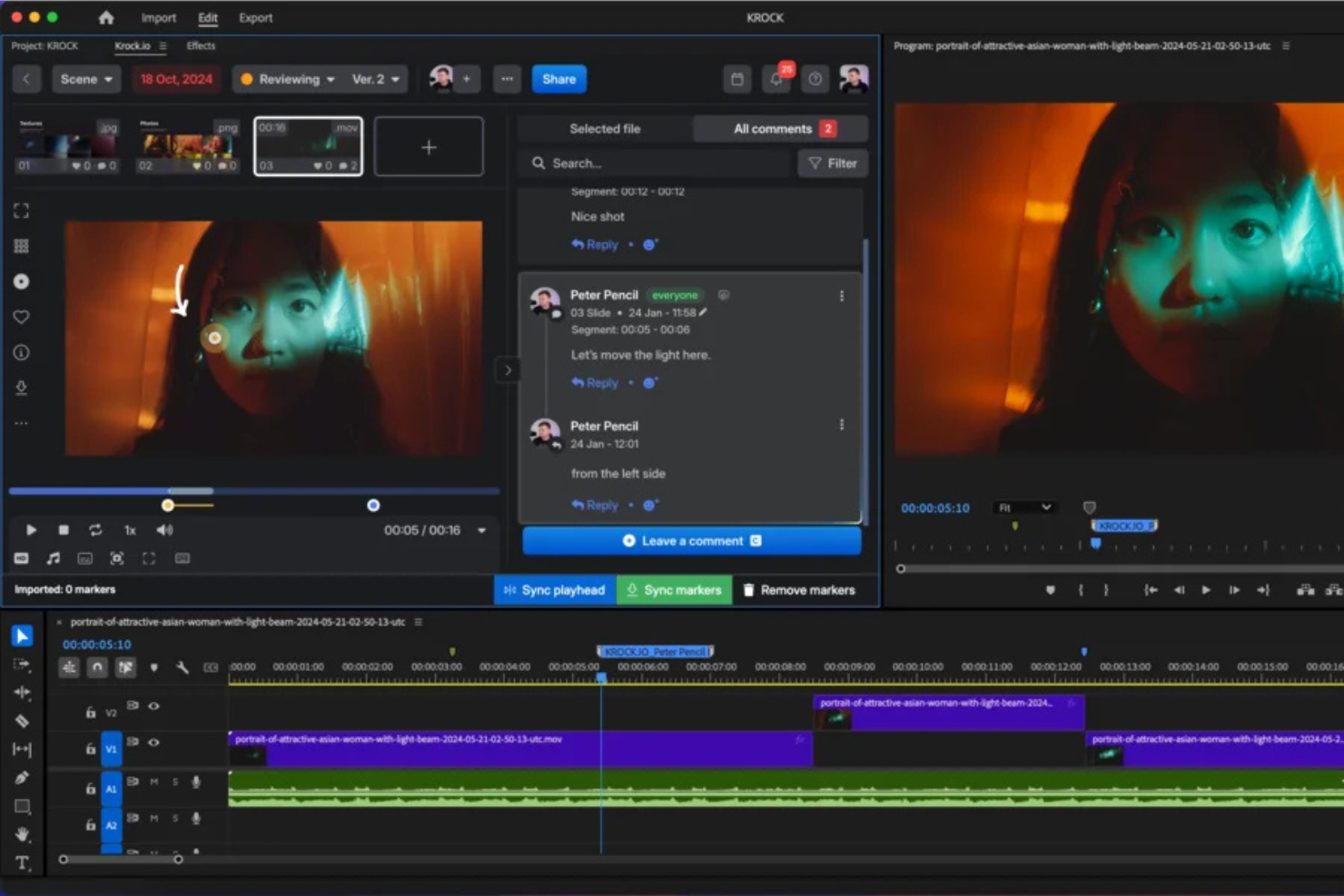
KROCK is a creative collaboration platform built for video production teams, agencies, and studios that need structured review workflows and clear version tracking. It’s a strong alternative to Frame.io for teams managing frequent revisions and multi-stage approvals.
Who Is KROCK Best For?
KROCK works well for creative agencies, video production teams, and marketing departments that manage visual content with multiple rounds of feedback and version changes.
Why I Picked KROCK
I picked KROCK because its version comparison tools make revision tracking much easier. The overlay and side-by-side comparison modes highlight visual differences between asset versions, so it’s clear what changed and what didn’t. That saves time during approval cycles and reduces confusion between teams and clients. For projects with frequent edits, having that visibility prevents accidental overwrites and missed updates.
KROCK Key Features
- Visual version comparison: Compare asset revisions side by side to quickly identify changes.
- Time-coded commenting: Leave frame-specific feedback directly on video timelines.
- Custom approval workflows: Create multi-stage review pipelines with designated approvers.
- Role-based access control: Assign viewer, reviewer, or approver permissions to manage project visibility.
KROCK Integrations
KROCK provides API access for custom integrations. Native third-party integrations are limited compared to some competitors.
Pros and Cons
Pros:
- Clear visual version tracking tools
- Frame-accurate commenting for video feedback
- Structured multi-stage approval workflows
Cons:
- Fewer native integrations than some competitors
- Limited advanced permission customization

Wipster
Best for creative agency collaboration
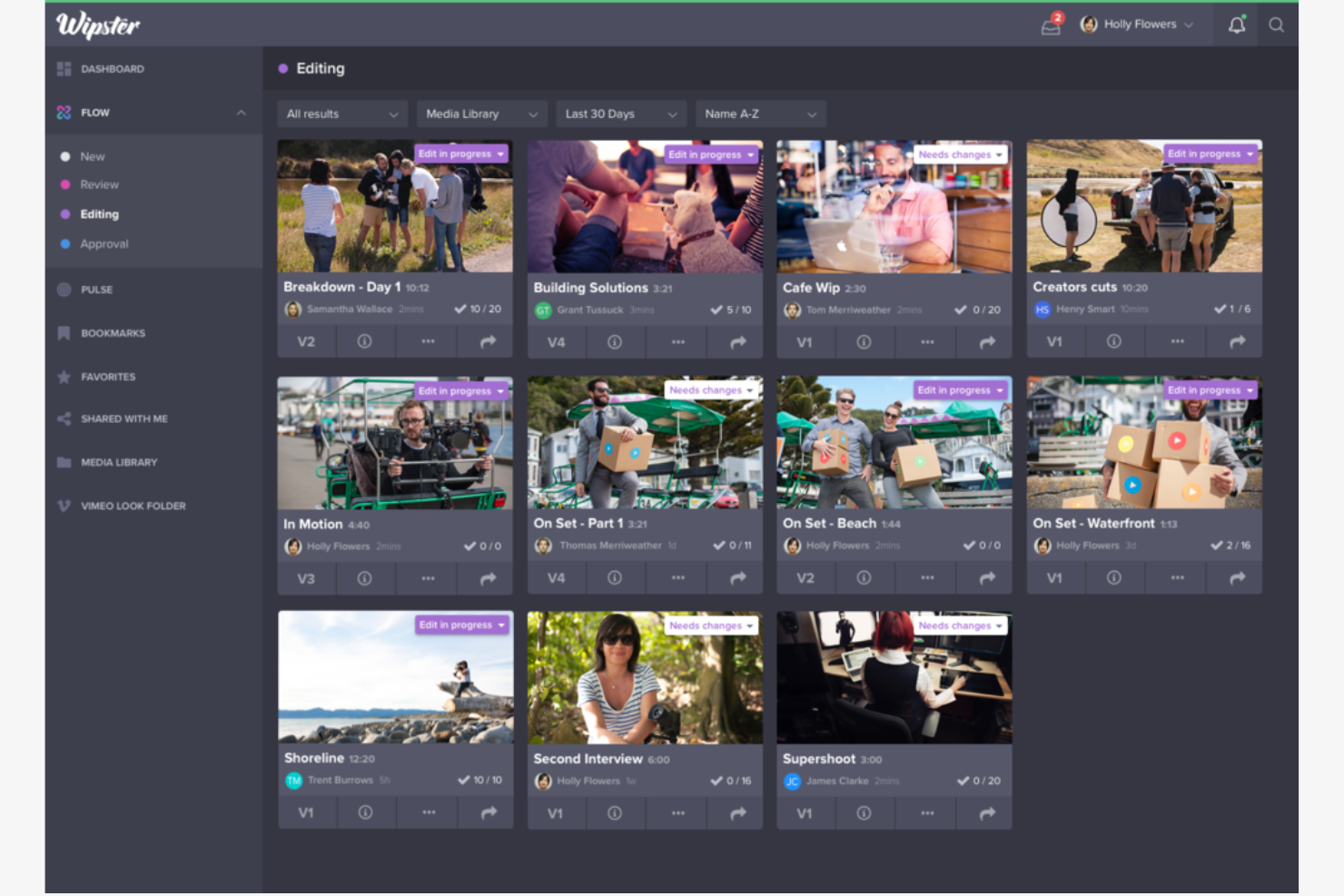
Creative agencies looking for a dedicated space to collaborate on video projects often turn to Wipster. This platform is designed for teams that need to gather feedback, manage approvals, and keep creative workflows moving without confusion. Wipster stands out by making it easy for both internal teams and clients to review, comment, and approve video content in one organized hub.
Why Wipster Is a Good Frame.io Alternative
Wipster is built with creative agency collaboration at its core, making it a strong choice for teams that need to manage feedback from both clients and internal stakeholders. I like that Wipster lets you invite unlimited reviewers, so agencies can easily loop in clients, freelancers, and partners without extra hassle. The platform’s threaded comments and visual annotations help keep conversations organized and actionable throughout the review process. This focus on collaborative feedback makes Wipster a practical alternative to Frame.io for agencies juggling multiple creative projects and client relationships.
Wipster Key Features
Some other features that make Wipster useful for creative teams include:
- Version Management: Upload and track multiple versions of a video to keep revisions organized.
- Frame-Accurate Commenting: Leave feedback on the exact frame where changes are needed.
- Approval Status Tracking: Monitor which reviewers have approved or still need to review each asset.
- Asset Library: Store and manage all your video files and related assets in a centralized location.
Wipster Integrations
Integrations include Adobe Premiere Pro, Adobe After Effects, Final Cut Pro, Frame.io, Slack, Dropbox, Google Drive, Vimeo, YouTube, and Box.
Pros and Cons
Pros:
- Centralized version and feedback history
- Precise, frame-accurate video commenting
- Invite unlimited reviewers for free
Cons:
- No built-in task management tools
- Lacks advanced workflow automation

Best for multi-stage approval workflows
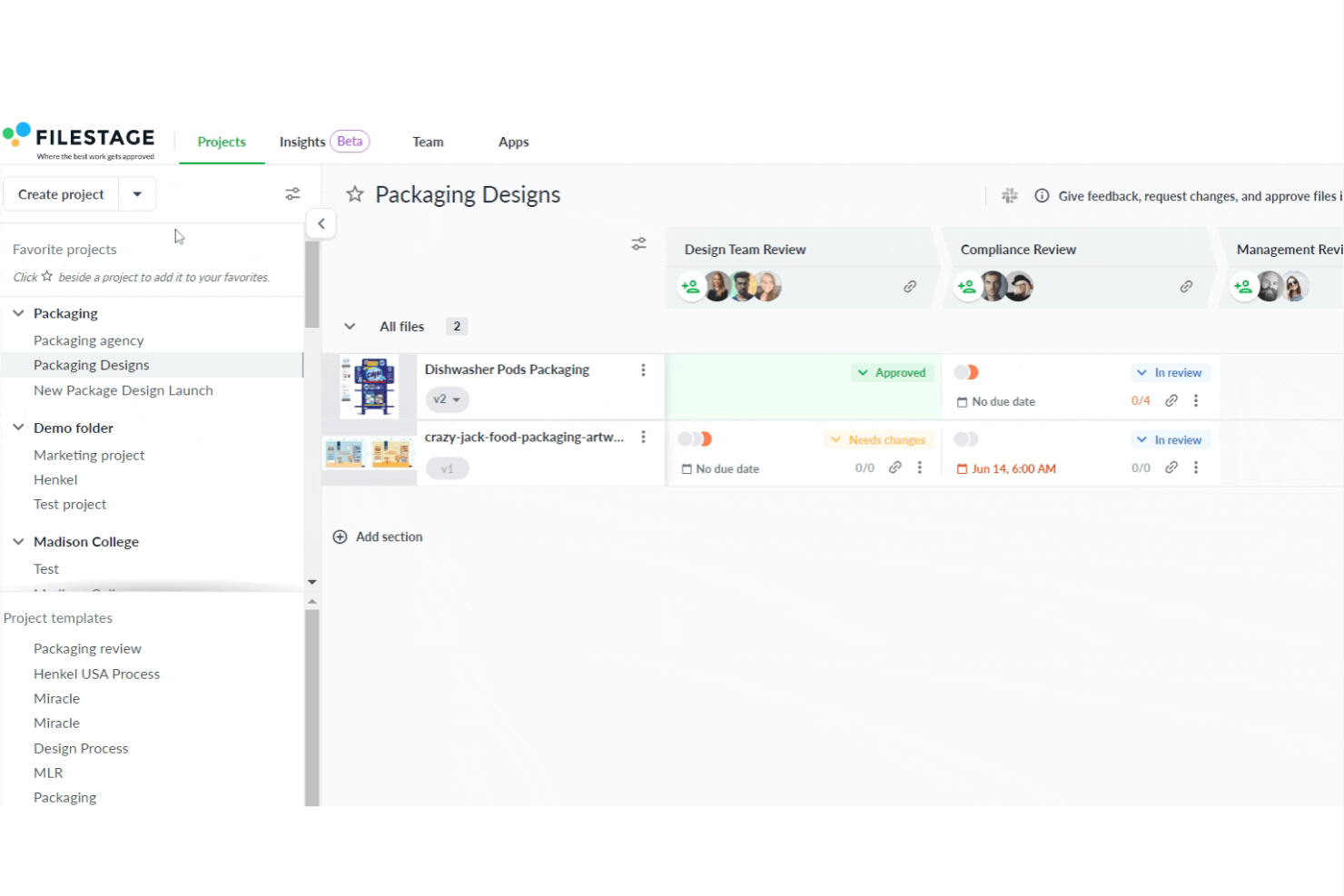
Filestage is built for teams that need to manage complex, multi-stage approval workflows for video and creative projects. It’s especially useful for marketing agencies, in-house creative teams, and anyone juggling feedback from multiple stakeholders. If you’re looking for a way to organize, track, and automate approvals across several review steps, Filestage offers a structured approach that goes beyond basic video collaboration.
Why Filestage Is a Good Frame.io Alternative
What sets Filestage apart is its focus on multi-stage approval workflows, which is something many creative teams need but don’t always get from other video collaboration tools. I picked Filestage because it lets you build custom review steps, so you can route videos through marketing, legal, and client approvals in a set order. You can assign reviewers to specific stages and track who has approved or left feedback at each step. This structure helps teams avoid bottlenecks and ensures every stakeholder signs off before a project moves forward.
Filestage Key Features
In addition to its structured approval workflows, Filestage offers several other features that support video collaboration:
- Timestamped Comments: Add feedback directly on specific frames or moments in a video for clear communication.
- Side-by-Side Version Comparison: View two versions of a file at once to easily spot changes and updates.
- Automated Reminders: Set up notifications to prompt reviewers who haven’t yet given feedback.
- File Type Support: Review and approve not just videos, but also images, PDFs, and audio files within the same platform.
Filestage Integrations
Integrations include Slack, Microsoft Teams, Google Drive, Dropbox, Adobe Creative Cloud, Asana, Trello, Jira, and Monday.com.
Pros and Cons
Pros:
- Supports video, audio, and PDFs
- Precise, timestamped video comments
- Custom multi-stage approval workflows
Cons:
- Performance lags with massive files
- Notification settings lack deep customization

Best for fast client review cycles
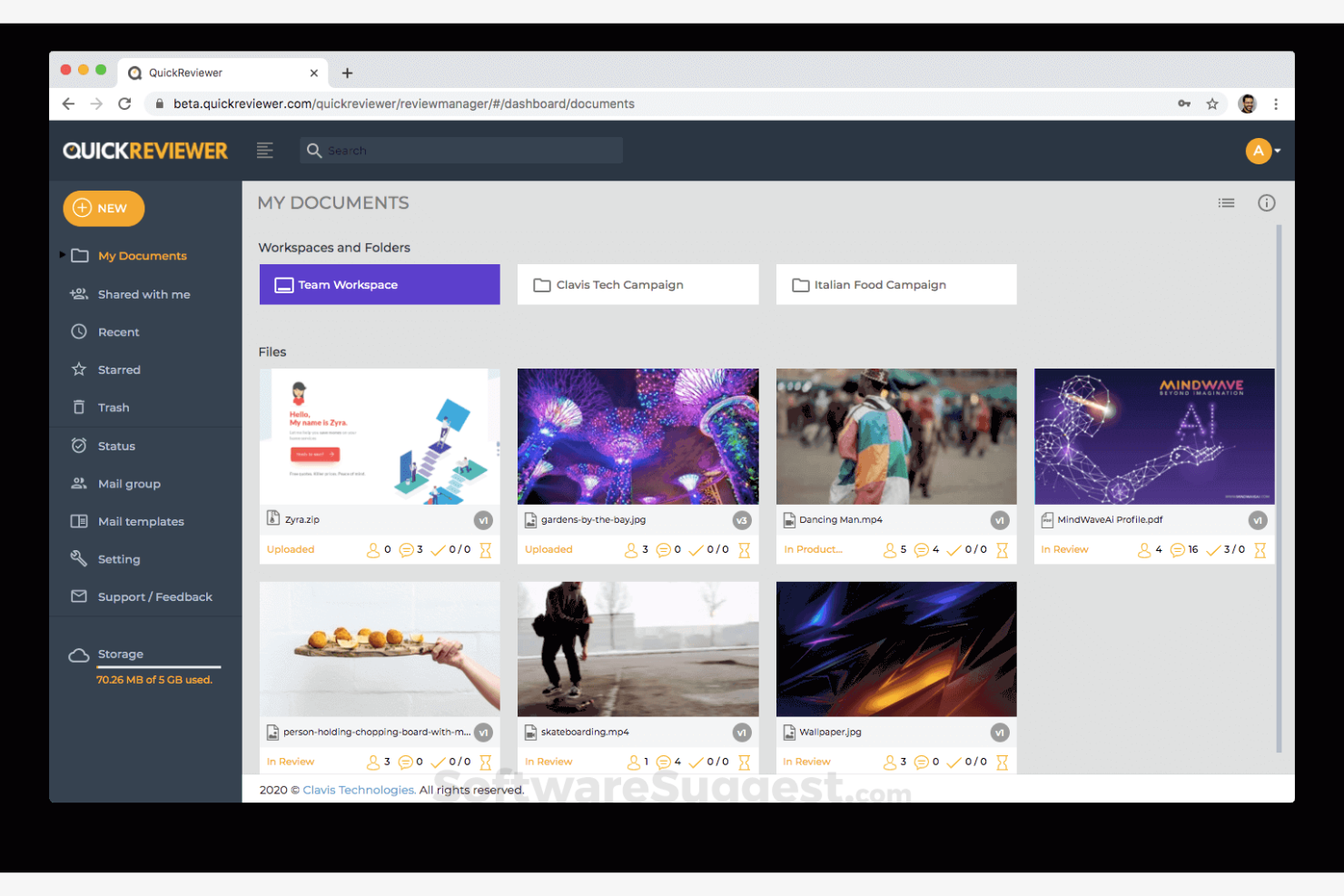
If you need to speed up client feedback on creative projects, QuickReviewer is built for fast review cycles. It’s especially useful for agencies and creative teams that juggle multiple client deliverables and need to keep approvals moving. Unlike Frame.io, QuickReviewer lets clients review and comment on videos, PDFs, images, and HTML files without requiring them to create an account.
Why QuickReviewer Is a Good Frame.io Alternative
When you need to keep client review cycles moving quickly, QuickReviewer stands out for its frictionless feedback process. I picked QuickReviewer because clients can review and comment on files without needing to register or log in, which removes a common bottleneck in creative approvals. The platform also supports real-time commenting and visual markup on videos, images, and even HTML files, so feedback is clear and actionable. For teams that want to avoid delays caused by client onboarding or account setup, QuickReviewer offers a faster path to sign-off than Frame.io.
QuickReviewer Key Features
Some other features that make QuickReviewer useful for creative teams include:
- Side-by-Side Version Comparison: Compare different versions of a file to see changes at a glance.
- Bulk File Upload: Upload multiple files at once to speed up project setup.
- Custom Branding: Add your company logo and colors to the review interface for a branded client experience.
- Deadline Reminders: Set automated reminders to keep reviewers on schedule.
QuickReviewer Integrations
Integrations include Dropbox, Google Drive, OneDrive, Box, Slack, Microsoft Teams, Adobe Creative Cloud, Trello, Asana, and Jira.
Pros and Cons
Pros:
- Automated deadline reminders for feedback
- Custom branding for logos/colors
- Video, image, PDF, HTML reviews
Cons:
- No built-in long-term cloud storage
- Limited annotation tools for video

Best for integrating with Adobe Creative Cloud
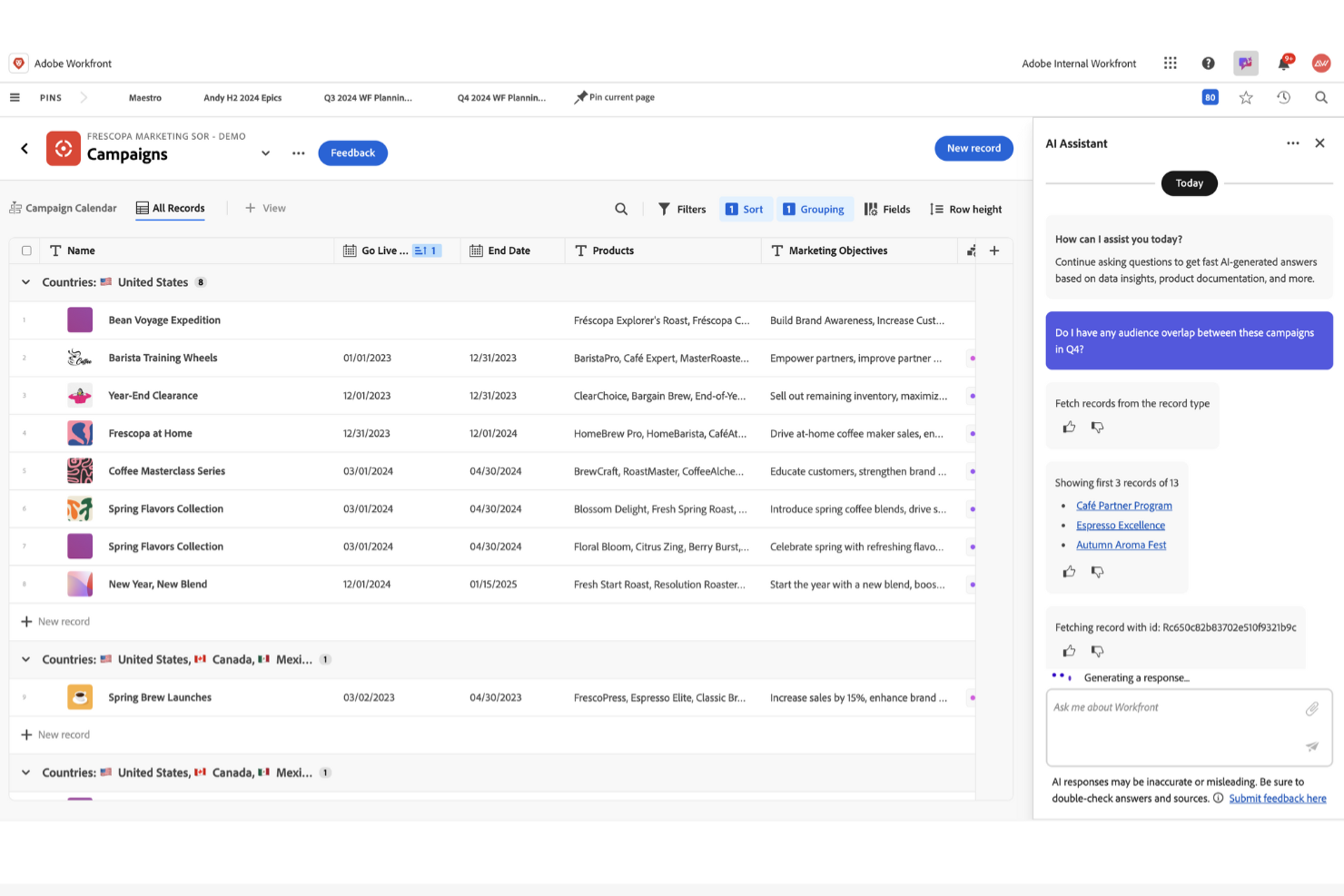
Creative teams that rely on Adobe Creative Cloud for content production will find Adobe Workfront especially well-suited for managing video projects. The platform connects project management directly with creative workflows, making it easier for marketing departments, agencies, and in-house media teams to coordinate feedback and approvals without leaving their Adobe apps. Adobe Workfront stands out by letting you centralize requests, assets, and reviews right alongside your creative tools, reducing the friction between project planning and content creation.
Why Adobe Workfront Is a Good Frame.io Alternative
If your team already works within Adobe Creative Cloud, Adobe Workfront offers a level of integration that Frame.io can’t match. I picked Adobe Workfront because it lets you manage project timelines, asset approvals, and creative requests directly inside tools like Adobe Premiere Pro and After Effects. This means you can assign tasks, track feedback, and keep all project communication in sync with your creative assets. For creative operations teams, this tight connection between project management and content production helps reduce context switching and keeps video projects moving forward.
Adobe Workfront Key Features
Some other features that make Adobe Workfront valuable for video collaboration include:
- Custom Workflow Automation: Build and automate multi-step approval and review processes tailored to your team’s needs.
- Resource Management Tools: Allocate team members, track workloads, and forecast capacity across multiple projects.
- Document Proofing and Markup: Review, comment, and annotate documents and creative assets directly within the platform.
- Advanced Reporting Dashboards: Generate real-time reports on project status, bottlenecks, and team performance.
Adobe Workfront Integrations
Integrations include Adobe Creative Cloud, Microsoft Teams, Slack, Figma, Marketeo, and more.
Pros and Cons
Pros:
- Direct video and creative proofing
- Enterprise-level resource management tools
- Automated complex approval workflows
Cons:
- Overwhelming interface for small teams
- No built-in frame-accurate video player

Best for real-time visual feedback
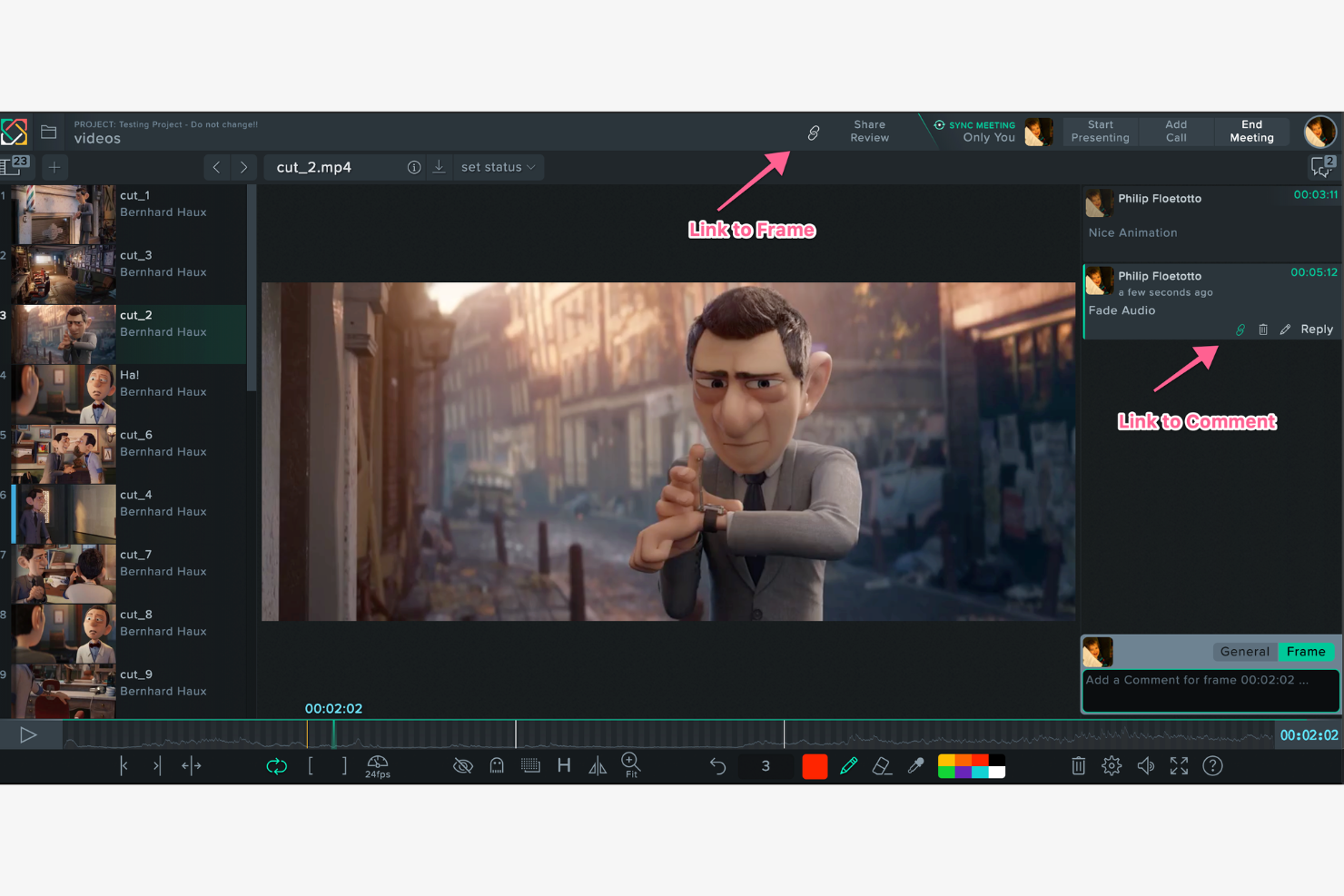
Creative teams looking for instant, interactive feedback on visual projects will find SyncSketch especially useful. The platform is designed for animators, VFX artists, and studios that need to review and annotate video, images, or 3D content together in real time. SyncSketch stands out by letting multiple users draw, comment, and collaborate live on the same frame, making it easier to align on creative direction without delays.
Why SyncSketch Is a Good Frame.io Alternative
For teams that need to collaborate visually in real time, SyncSketch offers a unique approach compared to Frame.io. I picked SyncSketch because it lets multiple users draw directly on video frames or images while everyone watches the feedback unfold live. The platform also supports synchronized playback and time-stamped comments, so creative teams can discuss and resolve visual details together without lag. These features make SyncSketch especially valuable for animation, VFX, and design teams who rely on immediate, interactive feedback to keep projects moving.
SyncSketch Key Features
Some other features that make SyncSketch useful for video collaboration include:
- Version Management: Track and compare different versions of assets within the same project.
- 3D Model Viewer: Review and annotate 3D models directly in the browser without extra plugins.
- Project-Based Organization: Organize assets, reviews, and feedback by project for easier management.
- Role-Based Access Controls: Assign specific permissions to users based on their role in the project.
SyncSketch Integrations
Integrations include Jira, ShotGrid, Maya, and more.
Pros and Cons
Pros:
- Browser-based with no install needed
- Side-by-side version comparison tools
- Real-time drawing for instant feedback
Cons:
- Limited offline access restricts reviews without internet
- Audio and video sync lags during live sessions

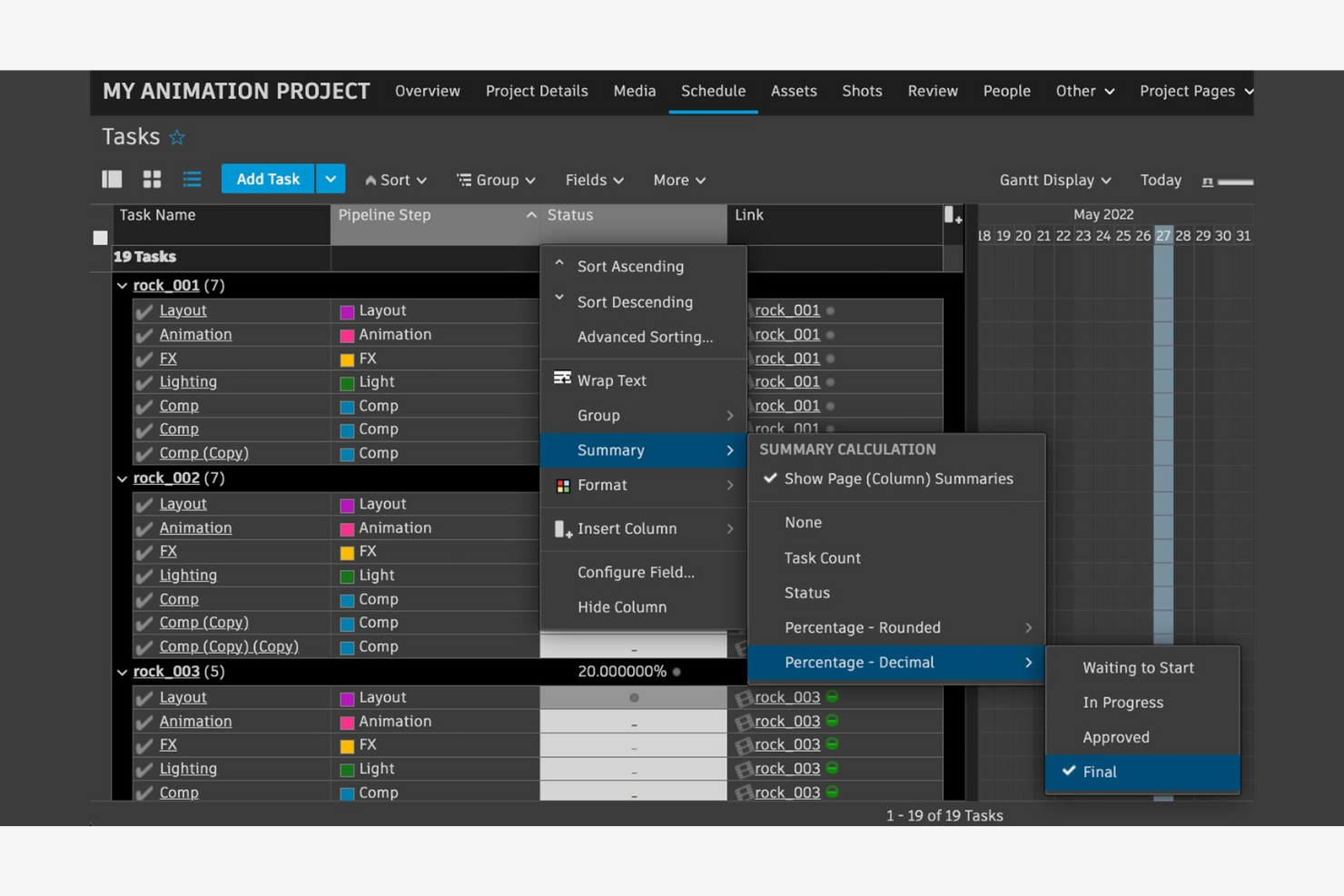
Studios managing complex animation or VFX pipelines will find Autodesk Flow Production Tracking designed for their unique needs. The platform gives production managers, supervisors, and artists a way to track assets, tasks, and reviews across every stage of a high-volume project. Unlike Frame.io, Autodesk Flow Production Tracking is built to handle the intricate dependencies and versioning challenges that come with animation and VFX work.
Why Autodesk Flow Production Tracking Is a Good Frame.io Alternative
For teams working in animation and VFX, Autodesk Flow Production Tracking offers specialized tools that go far beyond what Frame.io provides. I picked this platform because it’s built to manage asset tracking, task dependencies, and version control across large, multi-department projects. You can set up custom workflows for each stage of production, track every asset’s status, and manage complex review cycles with granular control. This level of pipeline management is essential for studios handling high volumes of shots, assets, and iterations.
Autodesk Flow Production Tracking Key Features
Some other features that make Autodesk Flow Production Tracking valuable for animation and VFX teams include:
- Shotgun Review Integration: Connects with Shotgun Review for real-time feedback and media review.
- API Access: Allows studios to build custom integrations and automate repetitive production tasks.
- Permission Controls: Lets you set detailed user roles and access levels for sensitive projects.
- Production Reporting: Generates detailed reports on project progress, asset status, and team productivity.
Autodesk Flow Production Tracking Integrations
Integrations are not publicly listed.
Pros and Cons
Pros:
- Customizable pipeline stages for unique processes
- Supports complex asset versioning and dependencies
- Designed specifically for animation and VFX
Cons:
- Less visual feedback than dedicated review apps
- No built-in frame-accurate review player

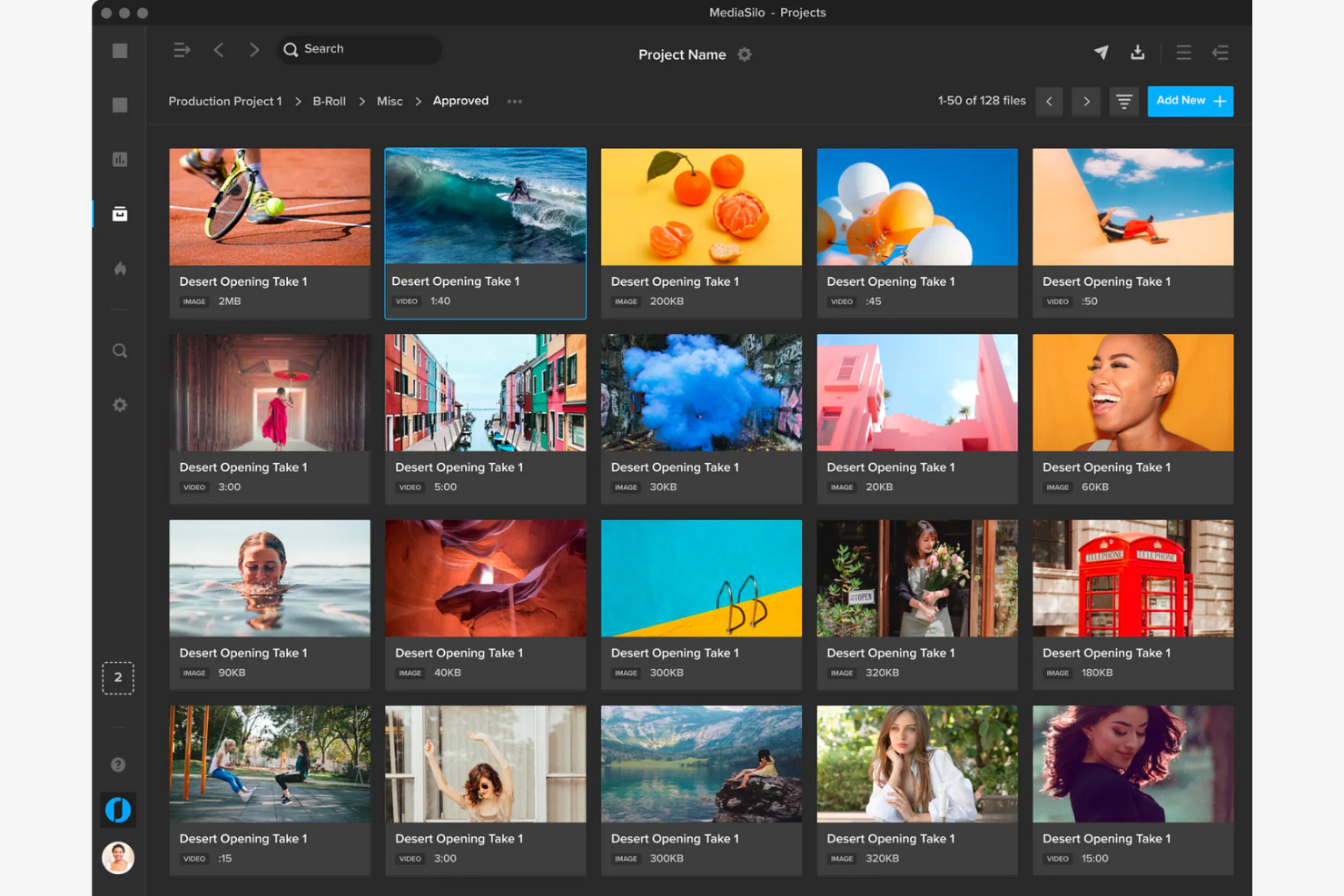
For teams that need to prioritize security in their video collaboration workflows, MediaSilo offers a platform built with enterprise-grade protection in mind. It’s especially suited for media companies, agencies, and studios handling sensitive or confidential content. MediaSilo stands out by providing advanced watermarking, granular access controls, and detailed audit trails to help you safeguard your assets throughout the review and approval process.
Why MediaSilo Is a Good Frame.io Alternative
If your team needs to meet strict security requirements for video collaboration, MediaSilo is worth considering as an alternative to Frame.io. I picked MediaSilo because it offers advanced security features like forensic watermarking and customizable access permissions, which help protect sensitive content from leaks or unauthorized sharing. The platform also provides detailed audit logs, so you can track every action taken on your files. These security-focused capabilities make MediaSilo a strong fit for organizations that can’t compromise on content protection during the review and approval process.
MediaSilo Key Features
Some other features that make MediaSilo useful for video collaboration include:
- Branded Portals: Create custom-branded review portals for sharing content with clients or partners.
- Time-Stamped Comments: Leave feedback on specific moments within a video for clear communication.
- Multi-Format Support: Upload and review a wide range of video and media file types.
- Batch Uploads: Add multiple files at once to speed up project setup and asset management.
MediaSilo Integrations
Integrations include Adobe Creative Cloud, Blackmagic Design DaVinci Resolve, and more.
Pros and Cons
Pros:
- Full audit logs record every user interaction
- Granular permissions provide strict asset access control
- Forensic watermarking tracks leaks to the source
Cons:
- Interface updates disrupt workflows
- Advanced mobile review is missing

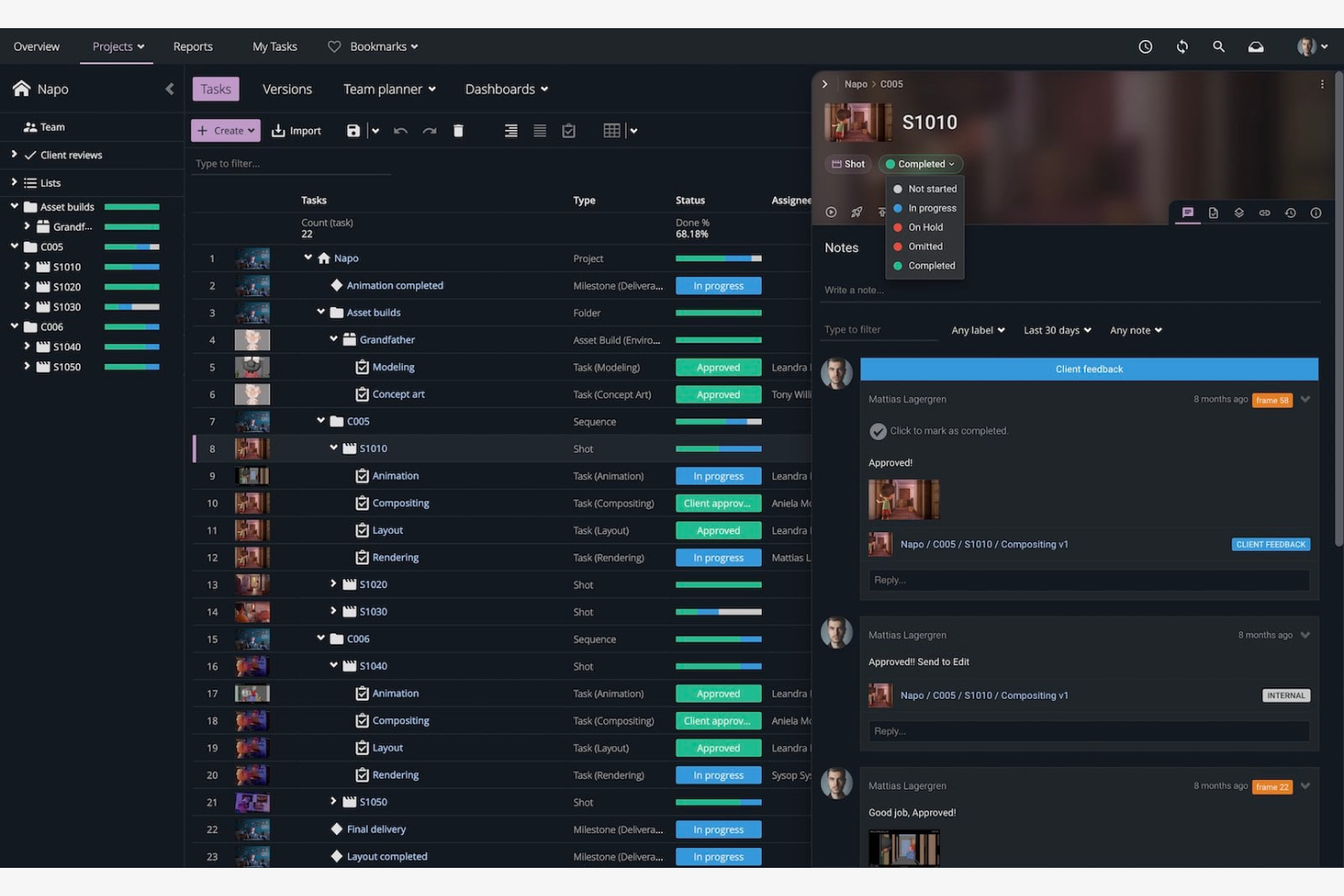
If your team handles large-scale media projects with many moving parts, Ftrack is built to keep everything organized. The platform is tailored for producers, post-production supervisors, and creative teams who need to coordinate tasks, assets, and feedback across complex workflows. Unlike Frame.io, Ftrack offers advanced project tracking and resource management features that help you manage multiple deliverables and deadlines in parallel.
Why Ftrack Is a Good Frame.io Alternative
When you’re managing complex media projects with multiple teams and deliverables, Ftrack brings a level of project oversight that Frame.io doesn’t match. I picked Ftrack because it lets you break down projects into detailed tasks, assign responsibilities, and track progress across every stage of production. The platform’s asset management tools help you organize media files, versions, and feedback in one place, making it easier to keep large projects on track. For teams juggling overlapping deadlines and resources, these features make Ftrack a strong alternative for video collaboration.
Ftrack Key Features
Some other features that make Ftrack useful for media teams include:
- Real-Time Collaboration Tools: Team members can review, annotate, and discuss media directly within the platform.
- Customizable Workflows: You can tailor project stages and approval processes to fit your team’s needs.
- Shot Management: Organize, track, and update the status of individual shots in complex productions.
- Time Tracking: Built-in tools let you log hours and monitor resource allocation across projects.
Ftrack Integrations
Integrations include Adobe Premiere Pro, Adobe After Effects, Nuke, Maya, Houdini, Cinema 4D, Unreal Engine, DaVinci Resolve, and Shotgun.
Pros and Cons
Pros:
- Shot management tools for complex projects
- In-app review and annotation for assets
- Detailed project tracking for large media
Cons:
- Feedback tools less visual than competitors
- No built-in frame-accurate video player
Other Frame.io Alternatives
Here are some additional frame.io alternatives that didn’t make it onto my shortlist, but are still worth checking out:
- Picflow
For sharing visual storyboards
- Dropbox Replay
For teams using Dropbox storage
- Kollaborate
For in-house post-production teams
- MarkUp.io
For annotating web and video content
- Papirfly
For global brand consistency management
- Wistia
For branded video hosting and review
- Vimeo
For video privacy and sharing controls
- ReviewStudio
For collaborative markup tools
- Ziflow
For automated review and approval workflows
- PageProof
For compliance-driven review processes


How I Evaluate Frame.io Alternatives
I split my evaluation into baseline requirements—like time-coded review and approval routing—and the differentiators that determine which tool fits a creative team's production workflow.
Core Functionality (Table Stakes For This List)
When I'm selecting tools for my list, I rank each one on a scale from 0 (does not offer the functionality) to 5 (excels in this area) for each core functionality listed below. Then, I calculate the tool's total score into a percentage. Each tool needs to achieve a minimum total score of 65% to be considered for inclusion.
- Video Review & Annotation: I check whether reviewers can drop time-coded comments and draw directly on frames, the way editors expect when sharing rough cuts for feedback.
- Version Control: Each tool should let teams stack revisions and compare versions side by side, so no one accidentally approves an outdated cut.
- Approval Workflows: I look for configurable review stages with role-based routing, like sending a color grade to the DP before it reaches the client for final sign-off.
- Project & Task Management: The platform should tie tasks and deadlines to specific deliverables, so a campaign manager can track a 30-second spot from script to delivery.
- Media Asset Organization: I evaluate how well the tool handles tagging, search, and folder structures when a team manages hundreds of assets across multiple projects.
- Collaboration & Sharing: Secure external sharing matters here—I look at guest permissions, link expiration, and whether freelancers or clients can access only what they need.
Once I have a list of tools that meet this criteria, I consider what sets each platform apart.
Differentiating Factors (What Sets Vendors Apart)
Here's how I compare and contrast different vendors:
Standout Features
Native NLE integrations matter a lot—editors who can push a cut from Premiere Pro or DaVinci Resolve and pull comments back into their timeline save real production hours. I also evaluate whether the platform offers branded client portals, since agencies frequently need a polished review experience under their own domain. AI-powered transcription is another differentiator worth checking, especially for teams managing large volumes of footage that need searchable dialogue across projects.
Beyond Features
Security is a major consideration when teams handle pre-release content. I look for TPN certification, forensic watermarking, and expiring links—especially for studios sharing unreleased footage with external reviewers. Creative tech stack fit also shapes my evaluation. A tool that syncs with Asana or monday.com for task tracking and connects to cloud storage like Google Drive or AWS S3 fits into existing workflows more naturally. Finally, I consider how storage and pricing scale, since video-heavy teams can outgrow entry-tier plans fast.
Why Look For a Frame.io Alternative?
While Frame.io is a good choice of video collaboration software, there are a number of reasons why some users seek out alternative solutions. You might be looking for a Frame.io alternative because…
- You need more advanced storyboarding or image review features
- Your team requires integrations with tools that Frame.io doesn’t support
- You want a solution with more flexible pricing for small teams
- You work with file types or formats not supported by Frame.io
- Your organization needs on-premise or private cloud deployment options
- You need a tool available in regions where Frame.io is restricted
If any of these sound like you, you’ve come to the right place. My list contains several video collaboration software options that are better suited for teams facing these challenges with Frame.io and looking for alternative solutions.
Frame.io Key Features
Here are some of the key features of Frame.io, to help you contrast and compare what alternative solutions offer:
- Time-stamped video commenting and annotation
- Version control for video assets and project files
- Secure sharing with customizable permissions
- Integration with Adobe Premiere Pro and Final Cut Pro
- Real-time team notifications and activity tracking
- Side-by-side version comparison for review
- File upload support for large video projects
- Approval workflow management for stakeholders
- Mobile app access for reviewing and commenting on the go
- Watermarking and advanced security controls