

10 Best Email Filing Software in 2026

Best Email Filing Software Shortlist


Email filing software helps you organize, categorize, and store emails so you can quickly find what you need and keep your inbox under control. If you’re searching for the best email filing software, you’re probably tired of digging through cluttered inboxes, missing important messages, or struggling to keep project communications organized.
In this guide, you’ll find trusted tools that make email management easier for busy teams and professionals. I’ll break down what each solution does best, so you can pick the right fit for your workflow and finally take charge of your inbox.
Why Trust Our Software Recommendations
Our team has been testing and reviewing software since 2012. As project managers ourselves, we know how difficult—and important—it is to choose the right software.
For this guide, we evaluated tools using hands-on testing and independent research, scoring tools using our selection criteria. We also draw on insights from industry thought leaders and practicing project management experts.
Our reviews reflect our human editorial judgment, not a sales pitch.
Expert reviewers:
Email Filing Software Comparison Table
This comparison table summarizes pricing details for my top email filing software:
| Tool | Best For | Trial Info | Price | ||
|---|---|---|---|---|---|
| 1 | Best for secure email and document collaboration | Free demo available | Pricing upon request | Website | |
| 2 | Best for bulk inbox cleanup | Free plan available | From $9.99/month | Website | |
| 3 | Best for document-centric email management | Free demo available | From $210/month (billed annually) | Website | |
| 4 | Best for legal email and document management | Free demo available | Pricing upon request | Website | |
| 5 | Best for collaborative inbox management | 14-day free trial + free demo available | From $25/seat/month (billed annually) | Website | |
| 6 | Best for one-click Outlook email filing | 30-day free trial available | From $4.99/user/month (billed annually) | Website | |
| 7 | Best for compliant email organization | Free demo + free trial available | Pricing upon request | Website | |
| 8 | Best for automated Outlook email filing | 14-day free trial available | Pricing upon request | Website | |
| 9 | Best for project-based email organization | Free demo available | Pricing upon request | Website | |
| 10 | Best for project email management in AEC | Free demo available | Pricing upon request | Website |
Email Filing Software Reviews
Below are my detailed summaries of the best email filing software that made it onto my shortlist. My reviews offer a detailed look at the features, integrations, and best use cases of each software to help you find the best one for you.

iManage
Best for secure email and document collaboration
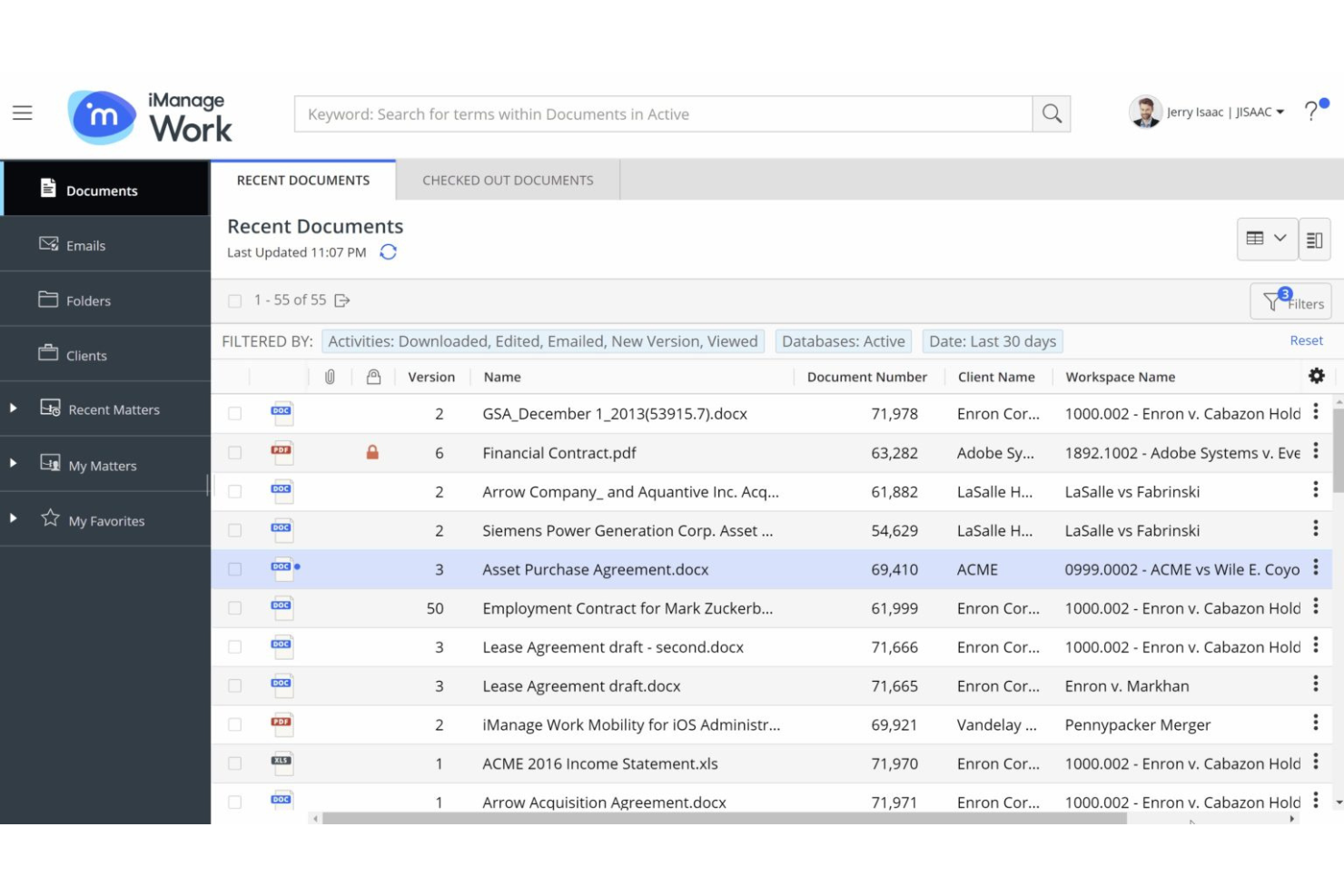
iManage is a document and email management platform for legal professionals that combines secure email filing, advanced search, version control, and collaboration tools in a single workspace.
Who Is iManage Best For?
Law firms and corporate legal departments needing secure document and email management.
Why I Picked iManage
I picked iManage as one of the best because I rely on its secure document and email management features built specifically for legal professionals. I like that my team can file emails directly from Outlook into Matter Workspaces, keeping everything organized and compliant. The platform’s version control and advanced search make it easy for us to retrieve and manage sensitive correspondence alongside documents.
iManage Key Features
- AI-powered email filing: Uses machine learning to suggest the right workspace for each email.
- Threaded email view: Displays related email conversations in a single, organized thread.
- Granular access controls: Lets you set detailed permissions for email visibility and actions.
- Audit logging: Tracks all email filing and access activity for compliance.
iManage Integrations
iManage offers native integrations across the Microsoft ecosystem, including Microsoft 365, Outlook, and Teams, and has an API for custom integrations.
Pros and Cons
Pros:
- Supports both cloud and on-premises deployments
- Enables granular access controls for sensitive emails
- Offers AI-powered email filing suggestions
Cons:
- Interface can feel overwhelming for new users
- Requires frequent updates for optimal security

Best for bulk inbox cleanup
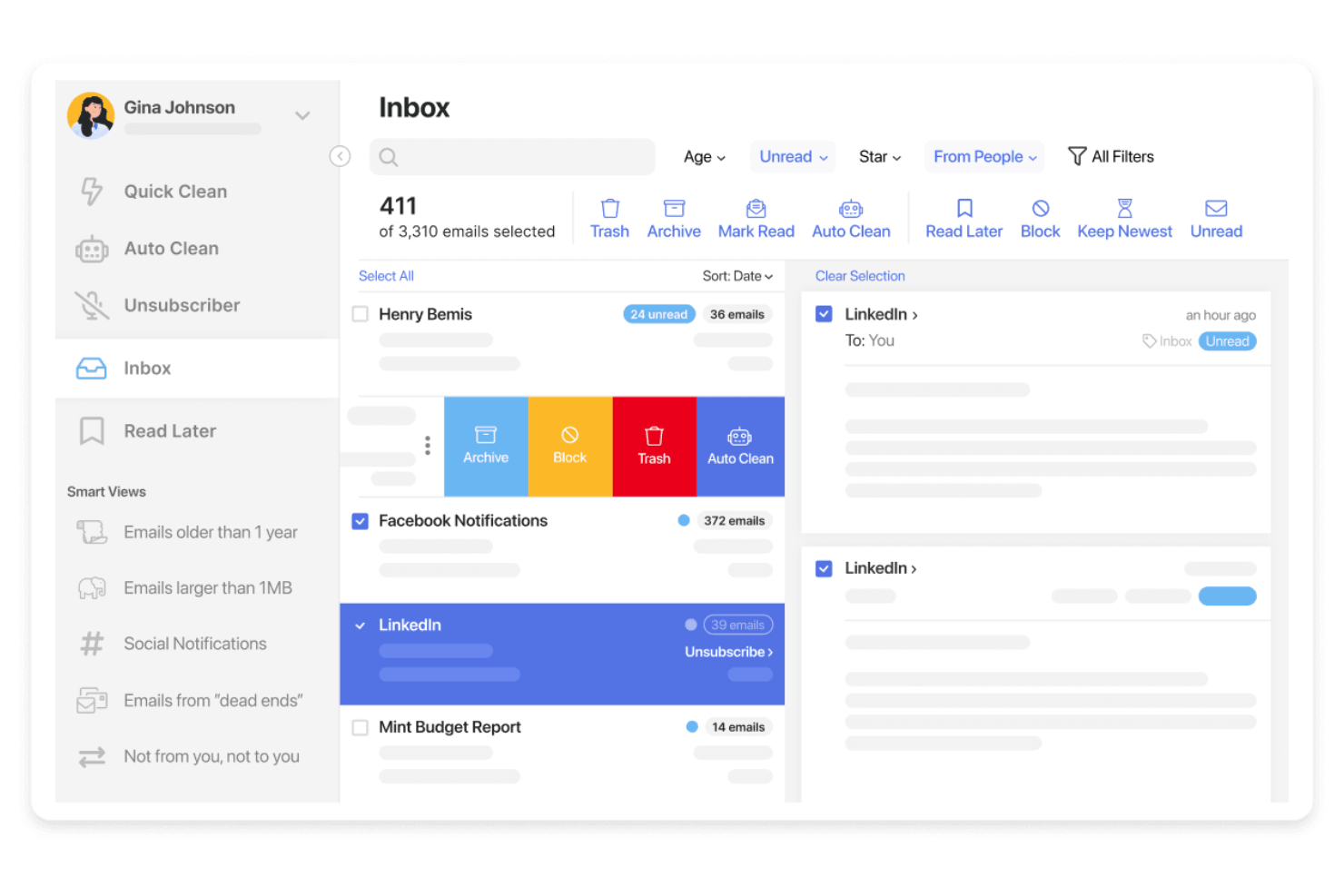
Clean Email is an email filing software platform that offers bulk email cleaning, smart automation rules, and advanced filtering tools for organizing and managing inboxes across multiple email providers.
Who Is Clean Email Best For?
Individuals and small teams who need bulk email organization and automation across multiple accounts.
Why I Picked Clean Email
I picked Clean Email as one of the best because I rely on its bulk email cleaning tools to quickly organize thousands of messages at once. I like using its smart automation rules to set up recurring filters for newsletters and notifications. My team uses the Auto Clean feature to keep our shared inboxes tidy without manual sorting.
Clean Email Key Features
- Unsubscriber tool: Lets you remove yourself from unwanted mailing lists in one click.
- Smart Views: Groups emails by category, sender, or age for easier review.
- Privacy Guard: Scans your inbox for data breaches and compromised accounts.
- Multiple account support: Manage and organize emails across several inboxes from one dashboard.
Clean Email Integrations
Native integrations are not currently listed.
Pros and Cons
Pros:
- Smart Views group emails by sender or category
- Privacy Guard checks for compromised accounts
- Supports multiple email providers and accounts
Cons:
- No built-in email scheduling or snooze
- Lacks shared inbox or team features

Best for document-centric email management
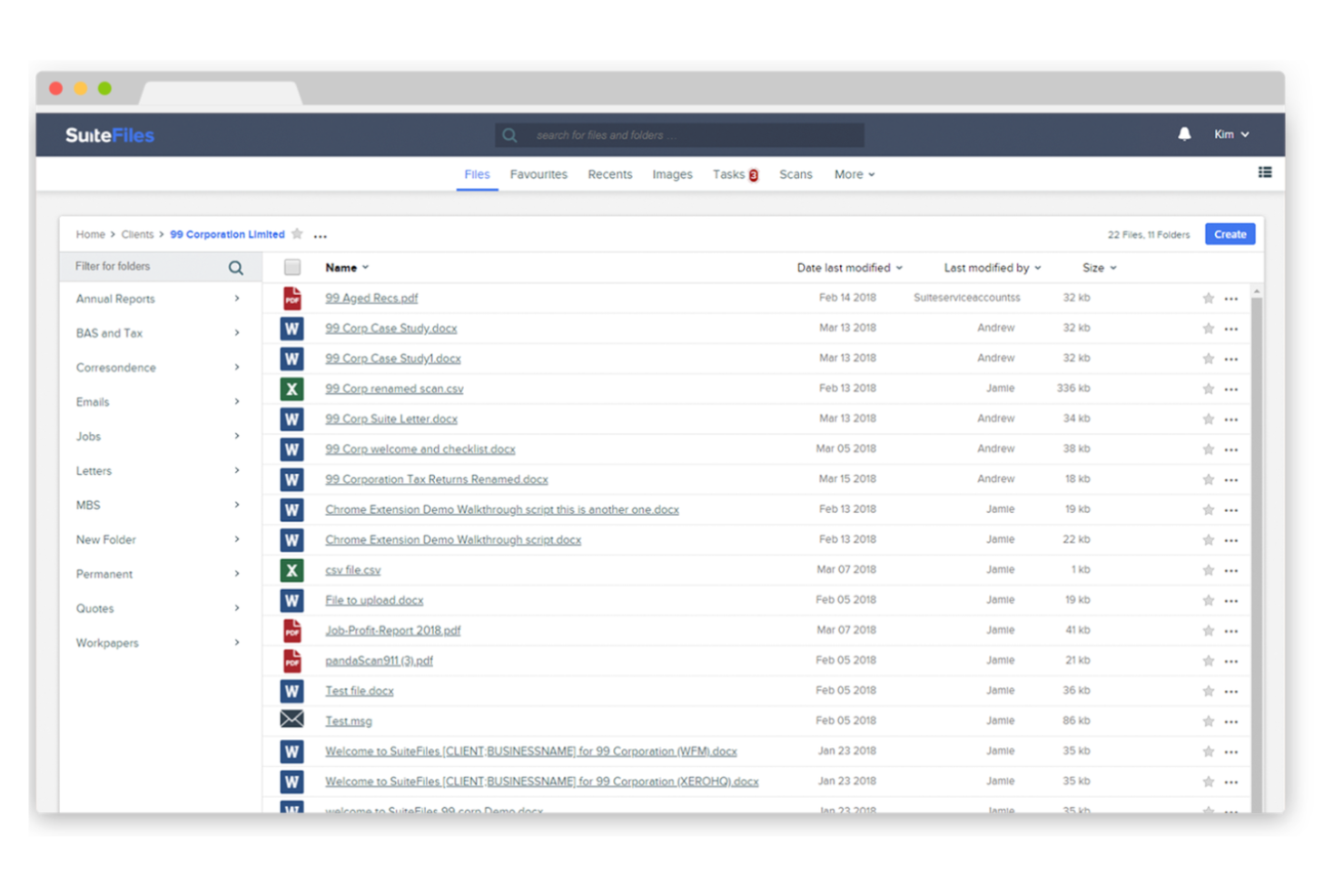
SuiteFiles is a document management and email filing software for Microsoft 365 users that lets you capture, organize, and search emails directly within your cloud file system.
Who Is SuiteFiles Best For?
Small and midsize professional services firms using Microsoft 365 who need integrated email and document management.
Why I Picked SuiteFiles
I picked SuiteFiles as one of the best because I like how it’s built specifically for Microsoft 365 users—my team can file emails straight from Outlook into shared folders without leaving our workflow. I use its email-to-folder automation to keep client communications organized alongside documents. I also rely on its search and tagging features to quickly find any email or attachment stored in our cloud file system.
SuiteFiles Key Features
- Email thread capture: Save entire email conversations as a single thread in your file system.
- Attachment extraction: Automatically extract and store email attachments in relevant folders.
- Permission controls: Set granular access permissions for filed emails and folders.
- Audit logging: Track all email filing actions for compliance and review.
SuiteFiles Integrations
SuiteFiles has native integrations across the Microsoft ecosystem, including Microsoft 365, Outlook, and Azure, and also integrates natively with Xero, DocuSign, and Zapier. An API is available for custom integrations.
Pros and Cons
Pros:
- Searchable email archive within Microsoft 365
- Captures full email threads automatically
- Allows folder-level permission management
Cons:
- No built-in analytics for email activity
- Limited automation for email categorization
Best for legal email and document management
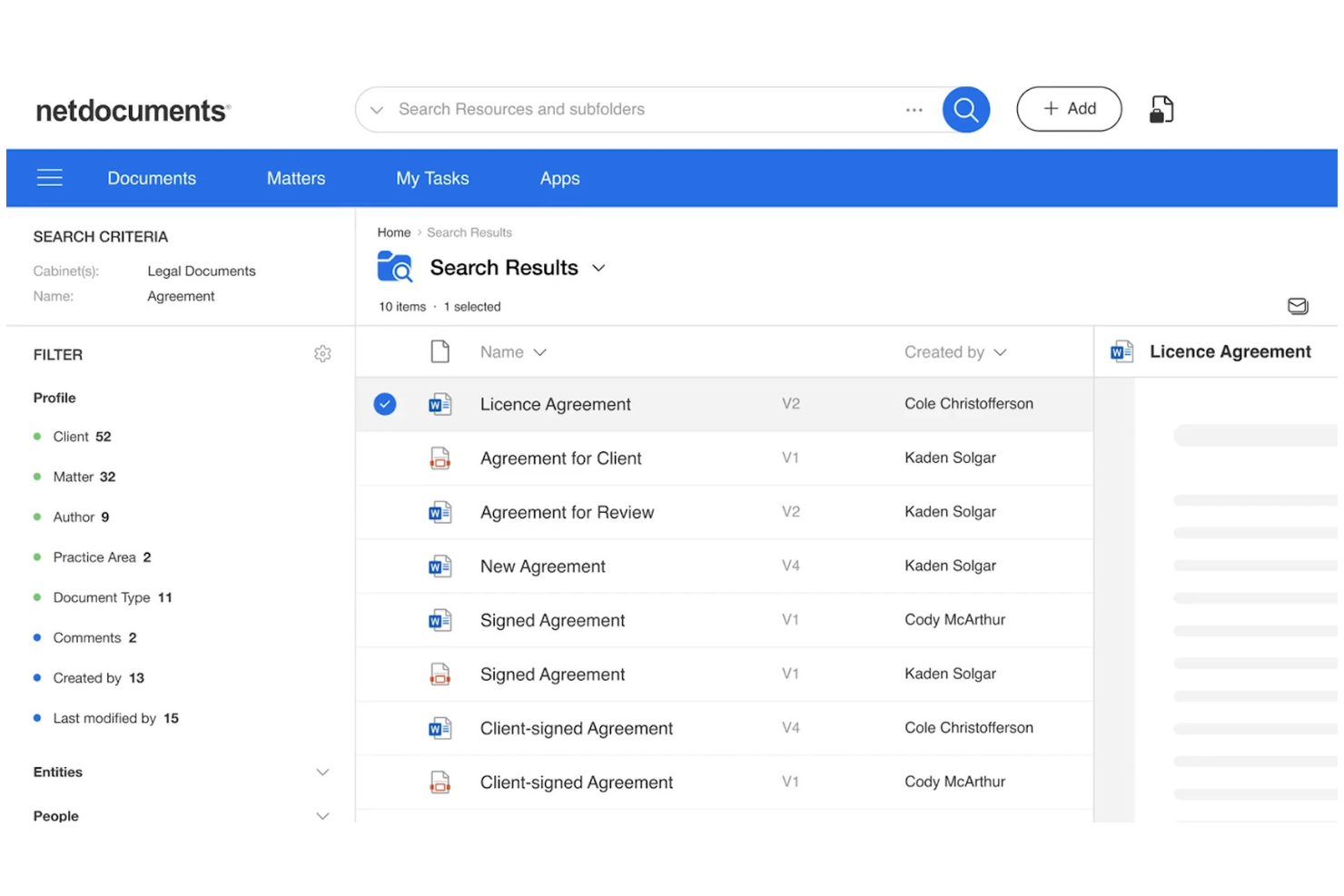
NetDocuments is a cloud-based email management platform designed for legal professionals, offering secure email capture, filing, search, and compliance features within a unified workspace.
Who Is NetDocuments Best For?
Law firms and legal departments needing secure, cloud-based email management and compliance.
Why I Picked NetDocuments
I picked NetDocuments as one of the best because I rely on its secure cloud-based email management to keep sensitive legal correspondence protected and organized. I like that it offers advanced compliance controls and audit trails, which help my team meet strict regulatory requirements. The platform’s unified workspace lets us capture, file, and search emails alongside documents, making it easy to manage everything in one place.
NetDocuments Key Features
- Predictive email filing: Suggests the best workspace or folder for each email.
- Outlook integration: Lets you file and manage emails directly from Microsoft Outlook.
- Threaded conversation view: Groups related emails together for easier tracking.
- Granular access controls: Allows you to set permissions for email visibility and actions.
NetDocuments Integrations
NetDocuments offers native integrations across the Microsoft ecosystem, including Microsoft 365, Outlook, and Teams. An API is available for custom integrations.
Pros and Cons
Pros:
- Threaded conversation view for email chains
- Audit trails for all filed emails
- Predictive filing suggests relevant folders automatically
Cons:
- Limited bulk email filing options
- Occasional sync delays with large mailboxes


Front is a collaborative email management platform that combines shared inboxes, team workflows, internal comments, and integrations with popular business apps for organizing and managing email conversations.
Who Is Front Best For?
Teams in customer support, sales, or operations who need to manage high-volume shared inboxes collaboratively.
Why I Picked Front
I picked Front as one of the best because I rely on its shared inboxes and collaborative email management to keep my team aligned on high-volume conversations. I like using internal comments and assignments to clarify ownership and context on each thread. My team uses message templates and workflow rules to organize, file, and route emails without losing track of important requests.
Front Key Features
- Analytics dashboard: Track team email metrics and response times in real time.
- Rules engine: Automate filing, tagging, and routing of incoming emails.
- Multi-channel inbox: Manage email, SMS, and social messages in one place.
- Custom tags: Organize and categorize emails for quick retrieval.
Front Integrations
Front offers 100+ native integrations, including Salesforce, HubSpot, Asana, Jira, Slack, Trello, Google Workspace, Microsoft 365, Dropbox, Aircall, and connects with Zapier. An API is available for custom integrations.
Pros and Cons
Pros:
- Rules automate email categorization and archiving
- Internal comments keep filing context visible
- Shared inboxes support team-based email filing
Cons:
- Limited bulk email filing actions
- No offline access for email filing

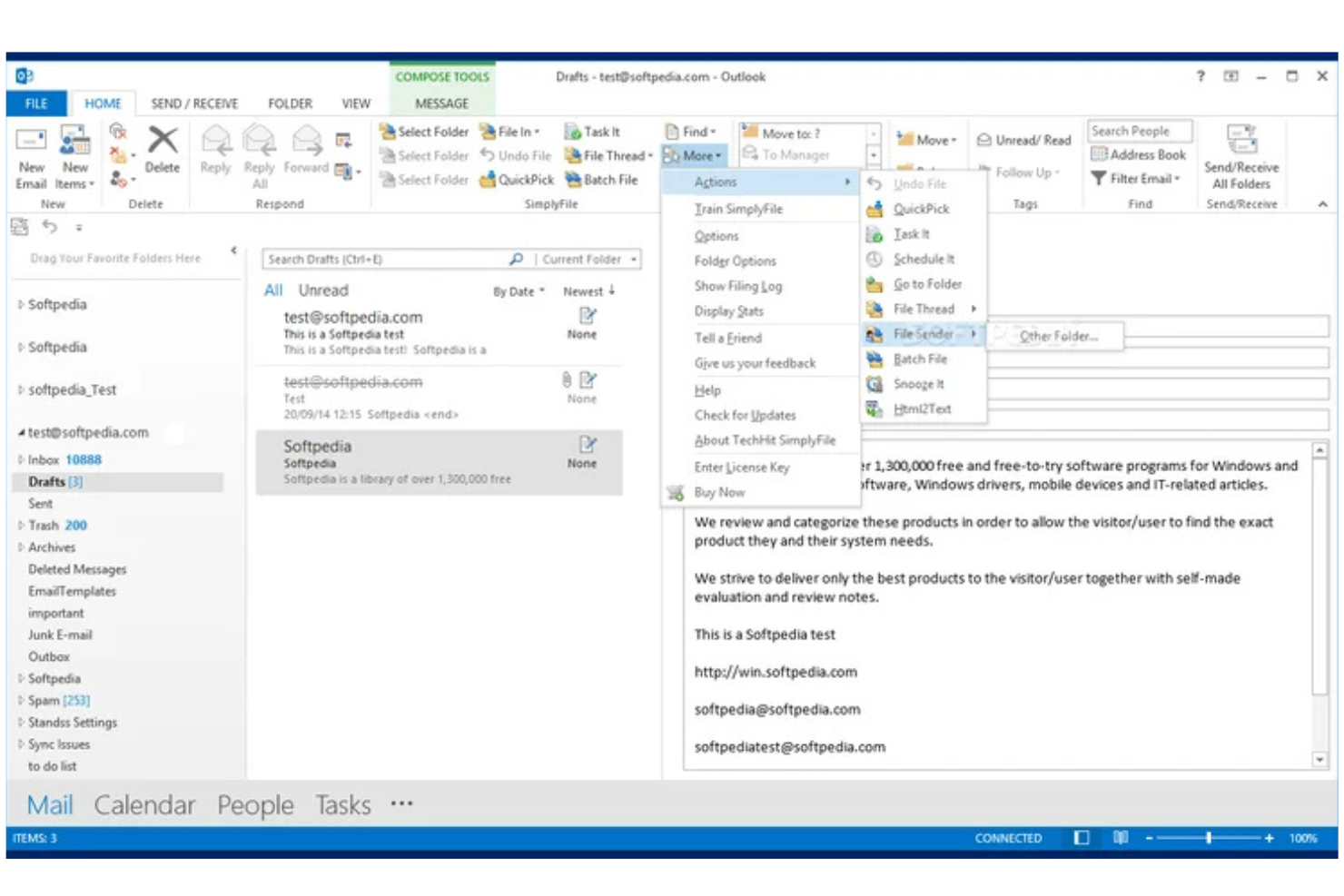
SimplyFile is an Outlook add-in for email filing that uses machine learning to suggest folders, supports one-click filing, and offers customizable rules for organizing messages.
Who Is SimplyFile Best For?
Outlook users in small to midsize businesses who need fast, folder-based email organization.
Why I Picked SimplyFile
I picked SimplyFile as one of the best because its one-click email filing for Outlook is genuinely fast and accurate. I like how it predicts the right folder for each message using machine learning so that I can file emails with a single click. The customizable filing rules let my team automate repetitive sorting tasks and keep our inboxes organized.
SimplyFile Key Features
- Batch filing: File multiple emails to their respective folders in one action.
- Quick pick folders: Access a list of recently used folders for faster manual filing.
- Folder search: Instantly search and select any folder within Outlook for filing.
- Sent item filing: Automatically file sent emails to project or client folders.
SimplyFile Integrations
SimplyFile offers native integrations across the Microsoft ecosystem, including Microsoft Outlook and Microsoft 365. An API is not available for custom integrations.
Pros and Cons
Pros:
- Supports batch filing of multiple emails
- Accurate folder suggestions using machine learning
- One-click filing directly from Outlook inbox
Cons:
- No support for cloud-based email platforms
- Only works with Microsoft Outlook

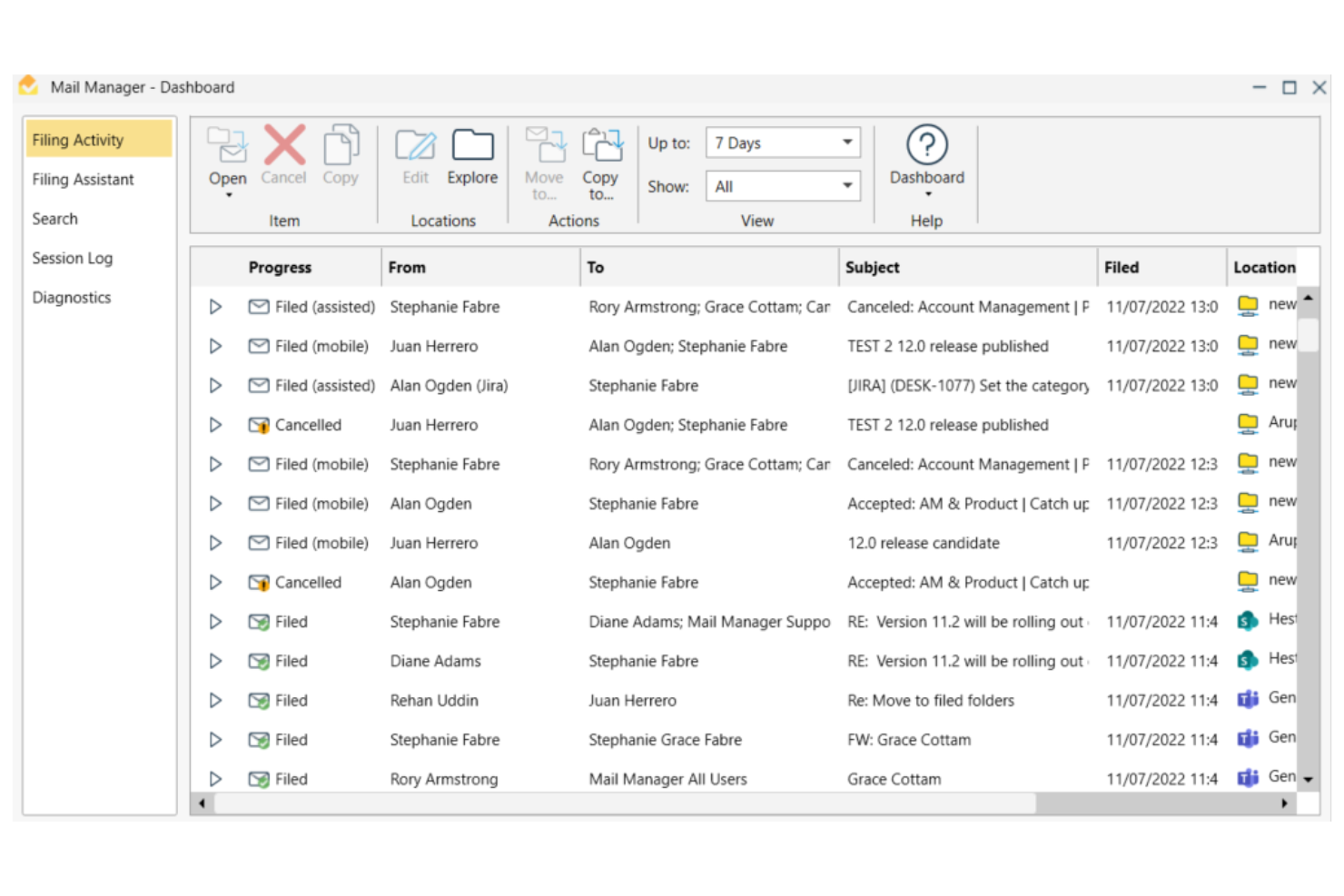
Ideagen Mail Manager is an email management platform for filing, searching, and organizing emails, with features for compliance, advanced search, and shared mailboxes.
Who Is Ideagen Mail Manager Best For?
Project-based teams in architecture, engineering, and construction firms needing advanced email search and compliance tools.
Why I Picked Ideagen Mail Manager
I picked Ideagen Mail Manager as one of the best because I rely on its advanced search to quickly retrieve project emails, even from shared mailboxes. I like that it enforces email filing compliance, which is essential for regulated industries. The tool’s ability to capture and organize correspondence across teams helps my projects stay audit-ready.
Ideagen Mail Manager Key Features
- Automated email filing: Automatically prompts users to file emails to the correct location.
- Outlook integration: Works directly within Microsoft Outlook for seamless workflow.
- Duplicate email detection: Identifies and prevents duplicate emails from being filed.
- Access control settings: Lets administrators manage user permissions for email access and filing.
Ideagen Mail Manager Integrations
Ideagen Mail Manager offers native integrations across the Microsoft ecosystem, including Microsoft Outlook, Microsoft 365, and SharePoint. An API is available for custom integrations.
Pros and Cons
Pros:
- Supports filing to network drives and cloud storage
- Sent email filing to project folders
- Customizable rules for automated sorting
Cons:
- Requires Outlook add-in installation for all users
- Lacks built-in AI-powered categorization features

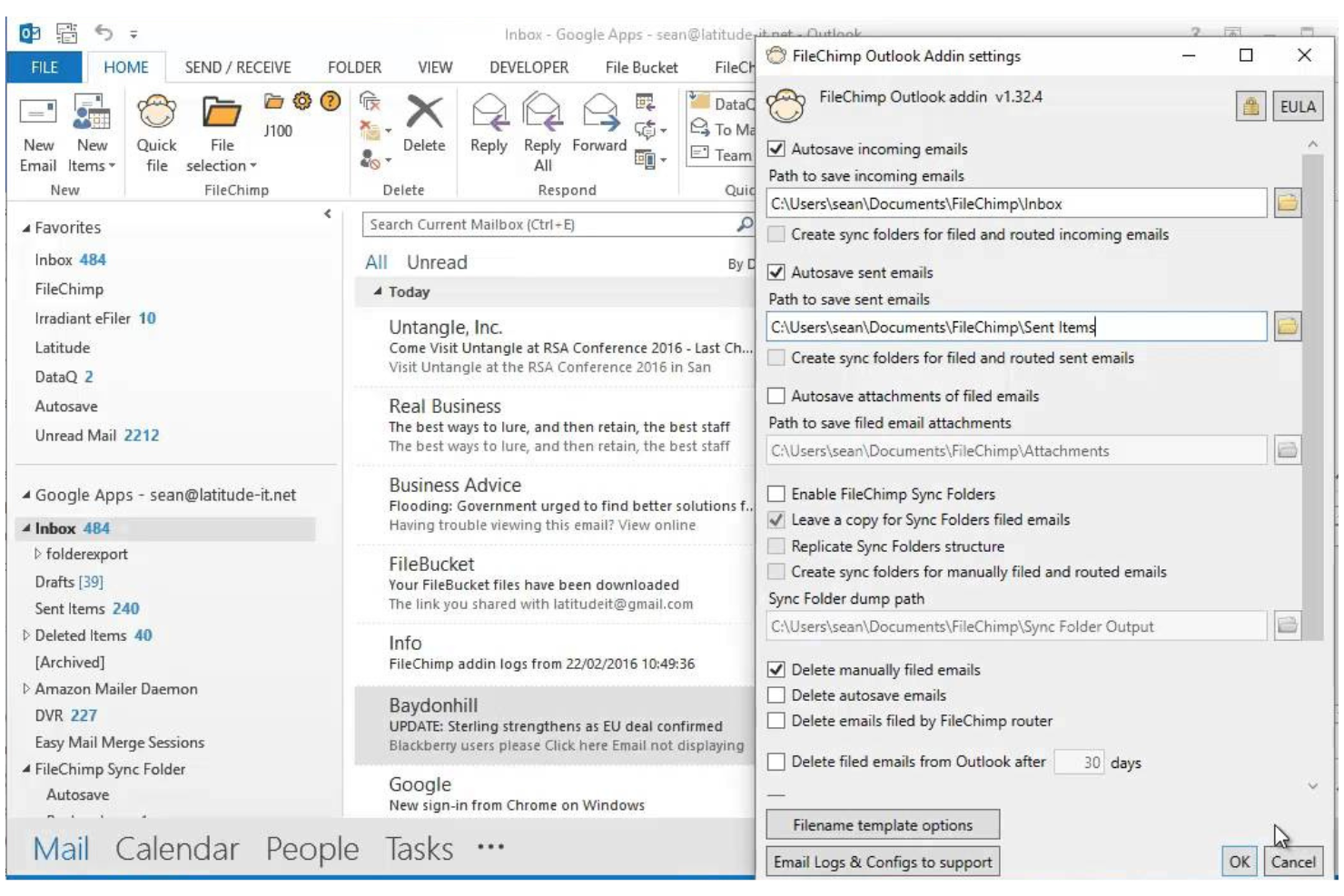
FileChimp is an Outlook add-in for email filing that lets you automatically organize emails and attachments into custom folder structures on your local drive or network.
Who Is FileChimp Best For?
Outlook users in small to midsize businesses who need automated email and attachment filing to local or network folders.
Why I Picked FileChimp
I picked FileChimp as one of the best because I like how it automates email and attachment filing directly from Outlook to local or network folders. My team uses its rule-based engine to sort emails by project or client, and I appreciate that we can customize folder structures to match our workflows. The drag-and-drop mapping tool makes setup quick, so we’re able to get organized fast without IT support.
FileChimp Key Features
- Attachment extraction: Automatically saves email attachments to designated folders.
- Duplicate detection: Flags and manages duplicate emails and files during filing.
- Folder monitoring: Watches specified folders and processes new emails as they arrive.
- Custom naming rules: Lets you define how filed emails and attachments are named.
FileChimp Integrations
FileChimp offers native integration with Microsoft Outlook and connects with Zapier. An API is available for custom integrations.
Pros and Cons
Pros:
- Offers duplicate detection for filed items
- Supports custom folder structures and rules
- Automates filing of emails and attachments
Cons:
- No support for cloud storage platforms
- Interface design feels outdated


CMap Mail is an email filing software add-in designed for project-centric teams, offering automated email capture, project-based organization, and seamless integration with the CMap project management platform.
Who Is CMap Mail Best For?
Project-focused professional services teams that need automated email capture and filing linked to project records.
Why I Picked CMap Mail
I picked CMap Mail as one of the best because I like how it captures and files emails automatically to the right project records without manual sorting. My team uses its deep integration with the CMap platform to keep all project communications organized and accessible. I appreciate that it links emails directly to project timelines and client records, which helps us keep everything connected as we work.
CMap Mail Key Features
- Outlook add-in: Lets you file emails directly from Microsoft Outlook.
- Bulk email filing: Allows you to file multiple emails at once to project folders.
- Attachment management: Saves and organizes email attachments alongside project records.
- Audit trail: Tracks all filed emails and attachments for compliance and reference.
CMap Mail Integrations
CMap Mail offers native integration with Microsoft Outlook and the CMap project management platform, and it connects with Zapier. An API is available for custom integrations.
Pros and Cons
Pros:
- Detects and prevents duplicate email filing
- Maintains a searchable audit trail of filed emails
- Links emails directly to CMap project records
Cons:
- No AI-driven filing or categorization features
- No direct integration with cloud storage platforms
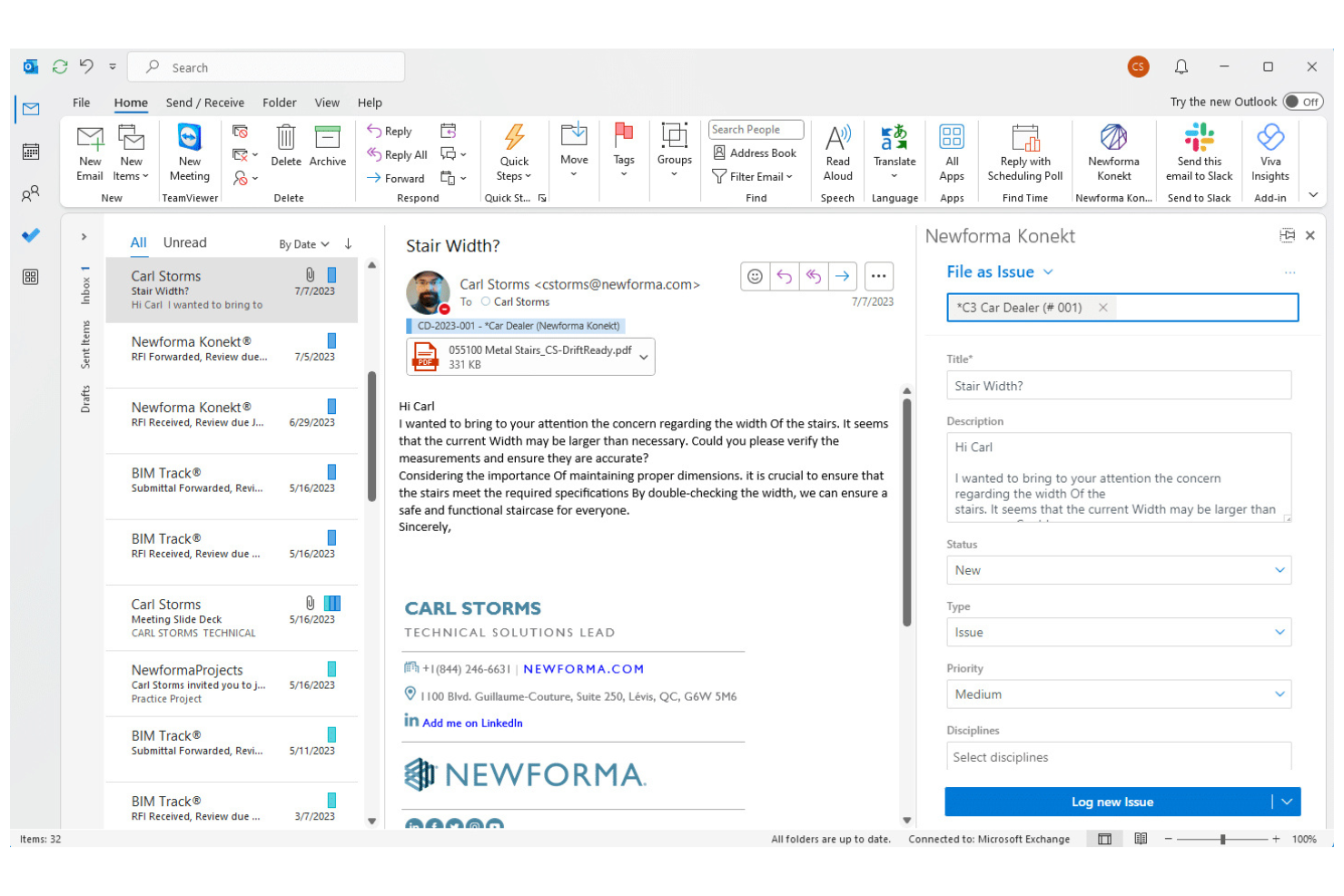
Newforma is a project email management platform designed for architecture, engineering, and construction teams to organize, search, and archive project-related emails and attachments.
Who Is Newforma Best For?
Architecture, engineering, and construction firms are managing complex project communications and documentation.
Why I Picked Newforma
I picked Newforma as one of the best because I rely on its project email management to capture, organize, and search all project-related emails in one place. I use its automated email filing to keep correspondence linked to specific projects, and I like how it preserves attachments and conversation history for compliance. My team can quickly retrieve any project email, even years later, without digging through individual inboxes.
Newforma Key Features
- Threaded email view: Displays related emails as conversation threads for easy tracking.
- Role-based access controls: Lets you set permissions for who can view or manage project emails.
- Email tagging: Allows users to tag emails with project-specific metadata.
- Audit trail: Records all actions taken on project emails for compliance and transparency.
Newforma Integrations
Newforma offers native integrations with Dynamo, E-Project, Agave, BIMoffice, and more, and provides an API for custom integrations.
Pros and Cons
Pros:
- Enables team-wide access to project correspondence
- Supports automated email capture from Outlook
- Designed specifically for project-based email filing
Cons:
- Integration options outside AEC tools are minimal
- Limited support for non-project email filing
Other Email Filing Software
Here are some additional email filing software options that didn’t make it onto my shortlist, but are still worth checking out:
- Inbox Zero
For inbox productivity workflows
- SaneBox
For AI email prioritization
- MacroView
For SharePoint-based email compliance filing
- Help Scout
For shared inbox collaboration
- Mailgun
For developer email automation
- eM Client
For desktop email with archiving
- BIGContacts
For CRM with email tracking
- Mailbird
For customizable email management
- InboxAlly
For improving email deliverability
- Zoho Desk
For email-based support ticketing
- Thunderbird
For open-source email filtering
- Mailspring
For cross-platform email management
- ArcTitan
For cloud email archiving and compliance


How I Evaluate Email Filing Software
I evaluate these tools in two layers: the core filing and retrieval basics every project team needs, and the differentiators—like audit trails and PM integrations—that set tools apart.
Core Functionality (Table Stakes for This List)
When I'm selecting tools for my list, I rank each one on a scale from 0 (does not offer the functionality) to 5 (excels in this area) for each core functionality listed below. Then, I calculate the tool's total score into a percentage. Each tool needs to achieve a minimum total score of 65% to be considered for inclusion.
- Email Capture & Filing: I check whether a tool can pull emails and attachments from Outlook, Gmail, or both into organized project folders without stripping metadata.
- Shared Project Repository: Teams need a single place to access filed correspondence, so I look for multi-user repositories with role-based access controls.
- Automated Filing Rules: I evaluate how each tool routes emails to the right project—whether by sender domain, subject keywords, or project-specific metadata tags.
- Duplicate Prevention: When three people on a project thread all file the same email, the system should catch it. I look for message-ID-level deduplication.
- Search & Retrieval: Finding a subcontractor's email from six months ago shouldn't take 20 minutes. I look for full-text search across bodies, attachments, and metadata.
- PM/Document System Integration: I check for native connectors to platforms like SharePoint, Procore, or Autodesk Construction Cloud that keep email records aligned with project data.
Once I have a list of tools that meet this criteria, I consider what sets each platform apart.
Differentiating Factors (What Sets Vendors Apart)
Here's how I compare and contrast different vendors:
Standout Features
AI-powered classification is a major differentiator—tools that learn from filing history and auto-suggest the correct project folder save real effort on high-volume programs. Compliance audit trails also matter. When a contractual dispute surfaces, you need an immutable log showing who filed what and when. For bulk historical migration, I check whether a tool can import legacy PST archives without forcing your team to re-file old emails manually.
Beyond Features
Licensing flexibility is something I evaluate closely. Large project teams often include external contractors and consultants who need filing access but shouldn't require a full seat license. Security certifications like SOC 2 and ISO 27001 signal that a vendor takes data protection seriously—especially when filed emails contain sensitive contract details. I also consider implementation support, because rolling out a filing system across a 200-person project team without structured onboarding and taxonomy templates usually leads to inconsistent adoption.
How to Choose Email Filing Software
It’s easy to get bogged down in long feature lists and complex pricing structures. To help you stay focused as you work through your unique software selection process, here’s a checklist of factors to keep in mind:
| Factor | What to Consider |
|---|---|
| Scalability | Will the software handle your current and future email volume as your team or business grows? |
| Integrations | Does it connect natively with your existing email providers, productivity tools, and collaboration platforms? |
| Customizability | Can you tailor filing rules, folder structures, and workflows to match your team’s unique needs? |
| Ease of use | Will your team adopt it quickly, or does it require extensive training and ongoing support? |
| Implementation and onboarding | How long will setup take, and what resources or support does the vendor provide for migration and training? |
| Cost | Are pricing tiers clear, and do they align with your usage patterns and budget constraints? |
| Security safeguards | Does the tool offer encryption, access controls, and compliance with relevant data protection standards? |
| Support availability | Can you access timely help via chat, phone, or email, especially during critical business hours? |
What Is Email Filing Software?
Email filing software is a type of email management software that automatically organizes, sorts, and archives email messages using rules or intelligent algorithms. It helps teams save emails, share emails with team members, and keep communication structured in a central system.
Many tools offer an all-in-one solution with integrations like OneDrive or a plugin, making it easier to manage and access stored data. By improving the overall user experience, these platforms reduce manual effort and keep inboxes organized. Some solutions also highlight customer stories to show how businesses handle high-volume email workflows more efficiently.
Features
When selecting email filing software, keep an eye out for the following key features:
- Automatic folder filing: Automatically moves emails into designated folders based on sender, subject, or custom rules, reducing manual sorting.
- Bulk actions: Lets you select and file, archive, or delete multiple emails at once, saving time when managing high-volume inboxes.
- Attachment management: Organizes, stores, and indexes email attachments separately for easy retrieval and reference.
- Multi-account support: Allows you to manage and file emails from several accounts within a single interface.
- Custom rule creation: Enables you to set up personalized filing rules to match your team’s workflow and preferences.
- Advanced search: Provides robust search tools to quickly locate filed or archived emails using filters like date, sender, or keywords.
- Scheduled filing: Lets you set specific times for the software to automatically file or archive emails, keeping your inbox tidy.
- Audit trails: Tracks and logs filing actions for compliance and accountability, making it easier to review email management history.
- User access controls: Allows administrators to set permissions for who can view, file, or delete emails, supporting secure team collaboration.
Common Email Filing Software AI Features
Beyond the standard email filing software features listed above, many of these solutions are incorporating AI with features like:
- Smart email categorization: Uses AI to analyze email content and context, automatically assigning emails to the most relevant folders without manual rule setup.
- Predictive filing suggestions: Learns from your filing habits and recommends where new emails should be filed, speeding up organization for repetitive tasks.
- Spam and phishing detection: Employs AI algorithms to identify and filter out suspicious or unwanted emails, reducing inbox clutter and security risks.
- Automated email prioritization: Analyzes message urgency and sender importance to highlight or flag emails that require immediate attention.
- Intent recognition: Detects the purpose or action required from an email, such as follow-up or scheduling, and prompts users with suggested next steps.
Benefits
Implementing email filing software provides several benefits for your team and your business. Here are a few you can look forward to:
- Faster inbox organization: Automated filing and bulk actions keep inboxes tidy and reduce time spent on manual sorting.
- Improved email retrieval: Advanced search and structured archiving make it easy to find important messages and attachments when you need them.
- Consistent compliance: Audit trails and user access controls help your team meet data retention and privacy requirements.
- Enhanced team collaboration: Multi-account support and shared filing rules ensure everyone stays on the same page with email management.
- Reduced security risks: Built-in security safeguards and permission settings protect sensitive information from unauthorized access.
- Personalized workflows: Custom rule creation and scheduled filing let you tailor the system to your team’s unique processes.
- Better prioritization: AI-powered features highlight urgent emails and suggest next steps, helping teams focus on what matters most.
Costs and Pricing
Selecting email filing software requires an understanding of the various pricing models and plans available. Costs vary based on features, team size, add-ons, and more. The table below summarizes common plans, their average prices, and typical features included in email filing software solutions:
Plan Comparison Table for Email Filing Software
| Plan Type | Average Price | Common Features |
|---|---|---|
| Free Plan | $0 | Basic email filing, limited storage, single account support, and basic search functionality. |
| Personal Plan | $5-$15/user/month | Multi-account support, custom rules, attachment management, and priority email support. |
| Business Plan | $15-$30/user/month | Team collaboration tools, advanced search, audit trails, user access controls, and integration options. |
| Enterprise Plan | $30-$60/user/month | Enhanced security, compliance features, dedicated support, advanced analytics, and custom onboarding. |
Email Filing Software FAQs
Here are some answers to common questions about email filing software:
Can email filing software work with multiple email providers?
Yes, most email filing software supports integration with popular providers like Gmail, Outlook, and Exchange. This flexibility lets you manage and organize emails from different accounts in one place, which is especially useful for teams using a mix of platforms.
How does email filing software help with compliance?
Email filing software helps with compliance by providing audit trails, retention policies, and secure storage. These features make it easier to meet industry regulations and internal policies for data retention, privacy, and access control.
Is it difficult to migrate existing emails into a new filing system?
No, most solutions offer migration tools or guided onboarding to import existing emails and folder structures. Look for platforms with step-by-step wizards, templates, or support staff to help you transition smoothly without losing important data.
What security measures should I expect from email filing software?
You should expect encryption for data in transit and at rest, user access controls, and regular security updates. Some solutions also offer compliance certifications and advanced threat detection to protect sensitive information.
Can I automate filing rules for specific projects or clients?
Yes, most email filing software lets you set up custom rules to automatically file emails by project, client, sender, or keywords. This automation saves time and ensures consistent organization across your team.
What happens if I need support during setup or daily use?
Most vendors provide support through live chat, email, or phone, and many offer searchable help centers and community forums. Check support hours and response times to make sure you’ll get help when you need it.