

10 Top Digital Asset Management Software For Photographers

10 Best Digital Asset Management Software For Photographers Shortlist


Choosing the ideal digital asset management software for photographers can be challenging due to the many available options. After all, this software serves as a central hub for your photos, simplifying organizing, locating, and sharing them. It also effectively addresses issues such as duplicate files and chaotic naming conventions by offering rapid search functions, tagging, and sorting capabilities.
I understand your struggle, and I can help you navigate the various choices to help you find the solution that best aligns with your workflow. Here are my top picks for digital asset management software for photographers.
Why Trust Our Software Recommendations
Our team has been testing and reviewing software since 2012. As project managers ourselves, we know how difficult—and important—it is to choose the right software.
For this guide, we evaluated tools using hands-on testing and independent research, scoring tools using our selection criteria. We also draw on insights from industry thought leaders and practicing project management experts.
Our reviews reflect our human editorial judgment, not a sales pitch.
Expert reviewers:
Digital Asset Management Software For Photographers Comparison Table
I’ve investigated the pricing and availability of free trials and demo versions so you can make a much simpler side-by-side comparison.
| Tool | Best For | Trial Info | Price | ||
|---|---|---|---|---|---|
| 1 | Best for brand asset management | 30-day free trial | From $29/month | Website | |
| 2 | Best for version control | Free demo available | Pricing upon request | Website | |
| 3 | Best for facial recognition sorting | Free plan available | From $99/month | Website | |
| 4 | Best for global scalability and security | Free demo available | Pricing upon request | Website | |
| 5 | Best for enhancing team collaboration | Free demo available | Pricing upon request | Website | |
| 6 | Best for centralized creative assets | 14-day free trial | Pricing upon request | Website | |
| 7 | Best for AI-enhanced photo edits | Not available | From $3.33/user/month (billed annually) | Website | |
| 8 | Best for multimedia file management | Not available | One-time cost of $29.99 | Website | |
| 9 | Best for creative operations management | Free demo available | From $150/user/year (billed annually) | Website | |
| 10 | Best for advanced features | 15-day free trial | From $214/month | Website |
Best Digital Asset Management Software For Photographers Reviews
Discover the strengths and weaknesses of top digital asset management tools for photographers. Each review provides a detailed look at features and ideal use scenarios.

Filecamp
Best for brand asset management

Filecamp is a unified platform for organizing, sharing, and collaborating on photo collections, simplifying the workflow.
Why I Picked Filecamp: I chose Filecamp because it offers a specialized solution for managing brand assets. Its emphasis on custom branding and granular access control makes it a good choice for businesses focused on brand management. Filecamp is best for brand asset management because it can centralize brand assets while providing the tools necessary to manage and distribute them.
Standout features & integrations:
Features include granular user permissions, custom branding capabilities, and a user-friendly interface. These features help businesses maintain control over their digital assets and ensure a consistent brand image.
Integrations include Adobe Creative Cloud, Dropbox, Google Drive, Slack, Microsoft Office 365, Zapier, Box, OneDrive, and Salesforce.
Pros and Cons
Pros:
- User-friendly interface for ease of use
- Granular user permissions for enhanced control
- Custom branding across the platform
Cons:
- Clunky user notifications
- Can’t drag-and-drop to move files
New Product Updates from Filecamp
Filecamp Adds Analytics, AI Thumbnails, and CDN Embed Links
Filecamp adds Analytics, AI-powered thumbnails, and CDN-backed Embed links. These updates give teams more visibility into asset usage, improve thumbnail presentation, and make embedded images easier to manage. For more information, visit Filecamp’s official site.
 .
.
Pics.io
Best for version control

Pics.io is a digital asset management tool that helps you organize, manage, and share your media files like photos, videos, and design mockups.
Why I Picked Pics.io: Pics.io offers a range of features tailored for photographers. Its version control system lets you track changes to your photos, compare different versions side by side, and revert to previous edits if needed. This is particularly useful when working on complex projects or collaborating with others, as it ensures everyone is on the same page and reduces the risk of errors. Additionally, Pics.io's AI-powered keyword tagging helps you organize your photos by automatically generating relevant keywords, making it easier to find specific images later.
Standout features & integrations:
Features include customizable public websites, collections, metadata management, asset sharing, inboxes for receiving files, PDF viewer, online Sketch viewer, file comparison, branding customization, and watermarking.
Integrations include Google Drive, Slack, Trello, Adobe Creative Cloud, Amazon S3, Dropbox, Shopify, Zapier, Google Workspace, ClickUp, and Figma.
Pros and Cons
Pros:
- Supports a wide range of file types
- Easy asset search functions
- Allows for collaboration on assets
Cons:
- No previews for zip files
- Limited platform customization
New Product Updates from Pics.io
Pics.io Adds AVIF File Support
Pics.io now supports AVIF files, expanding the image formats you can upload and manage in the platform. This gives teams more flexibility when working with modern image assets. For more information, visit Pics.io’s official site.
 .
.
Best for facial recognition sorting

Stockpress is a digital asset management platform that caters to a range of industries and professions, including photographers who want to organize, find, and share their files with ease.
Why I Picked Stockpress: I picked Stockpress because of its advanced features like facial recognition and version control, which are crucial for photographers handling large volumes of images. Facial recognition helps you quickly locate images with specific individuals, saving time in the sorting process. The version control feature ensures that you always have access to the most current version of your files, which is vital for maintaining consistency across your projects.
Standout features & integrations:
Features include customizable sharing options that allow you to control who sees what, ensuring your work is shared securely. The platform also offers unlimited user access across all plans, making it easier for teams of any size to collaborate without restrictions.
Integrations include Figma, Photoshop, Mailchimp, Slack, Dropbox, Google Drive, Okta, WordPress, Azure, Webflow, Klaviyo, and Design Pickle.
Pros and Cons
Pros:
- Version control helps in maintaining file consistency
- Facial recognition feature saves time in sorting images
- Easy to navigate interface, making file organization straightforward
Cons:
- Occasional lags reported during high-volume file uploads
- Limited advanced editing features compared to specialized software

Best for global scalability and security
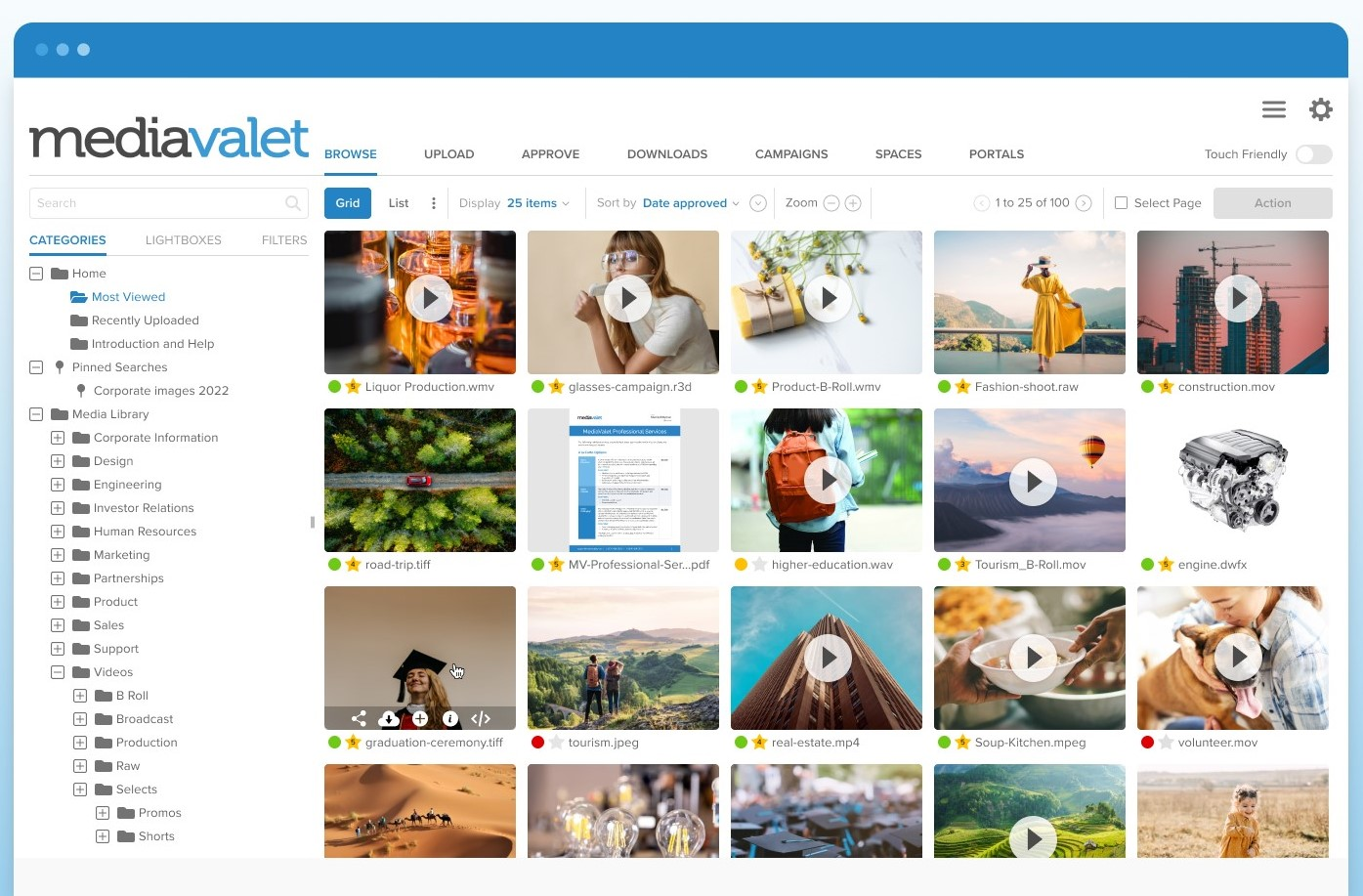
MediaValet organizes photo collections through features such as tagging and easy search.
Why I Picked MediaValet: I chose MediaValet for this list because it stands out with its promise of delivering a cost-effective, scalable, and user-friendly digital asset management system. Its global reach, powered by Microsoft Azure, differentiates it from other digital asset management tools that may not offer the same features.
I believe MediaValet is best for global scalability and security because it provides an enterprise-level DAM system at a low cost, which is important for organizations operating across multiple countries.
Standout features & integrations:
Features include a user-friendly interface, enterprise-level security, in-app edits of Office documents, and an open API for custom integrations.
Integrations include Microsoft SharePoint, Drupal, Microsoft PowerPoint, Microsoft Azure, CI HUB Connector, WordPress, Slack, AutoCAD, Shutterstock Editor, Microsoft 365, Adobe Illustrator, EasyBuild, monday.com, Adobe Workfront, WordPress Portal, Wrike, Asana, Hootsuite, Oracle Eloqua Marketing Automation, Microsoft Word, Adobe Creative Cloud, and Microsoft Excel.
Pros and Cons
Pros:
- User-friendly interface and ease of use
- Unlimited support, training, and users included
- Global scalability with Microsoft Azure
Cons:
- Some users find that the search function could be improved
- Issues with uploading large files
Canto
Best for enhancing team collaboration
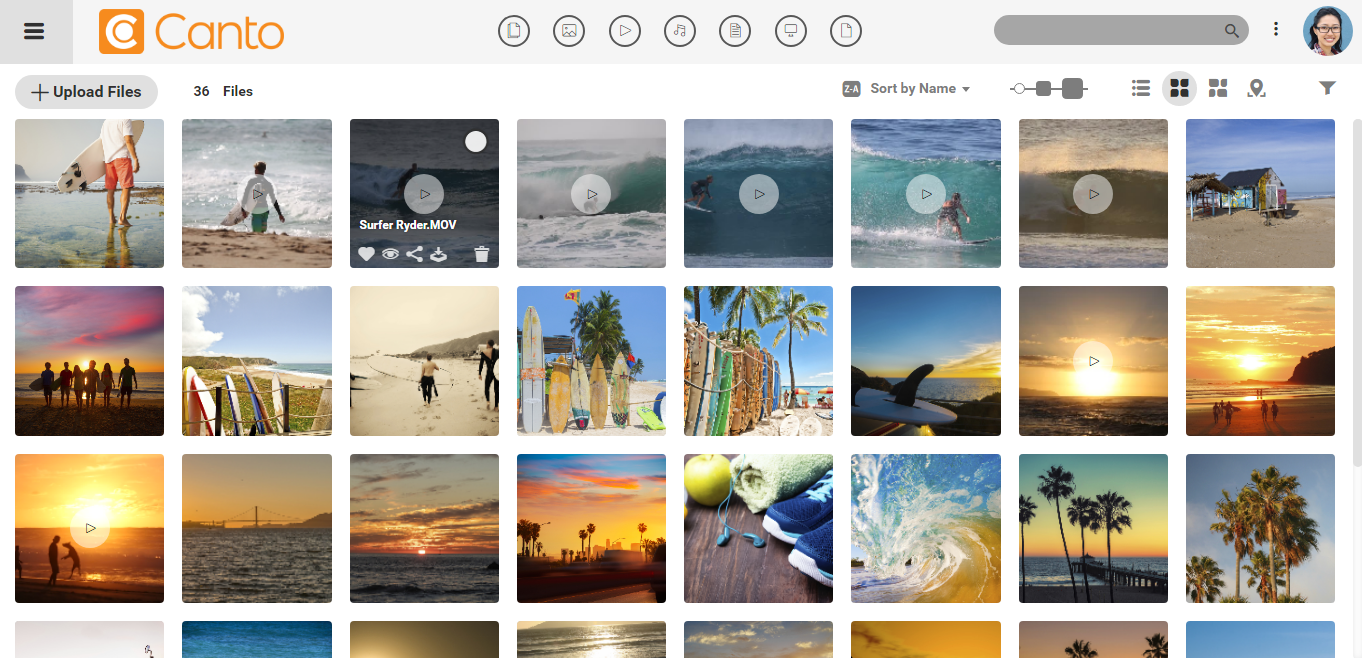
Canto supports content workflows and allows teams to collaborate successfully.
Why I Picked Canto: I selected Canto for this list because it effectively addresses the challenges teams face when managing digital assets. Its capabilities in creating a centralized content hub and advanced search functions set it apart from other digital asset management tools. Canto is the best for enhancing team collaboration as it provides essential tools for planning, creating, and sharing content, which is important for collaborative team efforts.
Standout features & integrations:
Features include AI-powered search, which expedites asset retrieval, and Media Delivery Cloud, which simplifies content distribution. The platform also enhances video workflows and ensures the security of digital assets.
Integrations include Box, Canva, Drupal, Dropbox, Figma, Hootsuite, Egnyte, Google Drive, Mailchimp, monday.com, Slack, Wrike, WordPress, and Zapier.
Pros and Cons
Pros:
- Secure environment for asset protection
- Media Delivery Cloud simplifies content distribution
- AI-powered search for quick asset retrieval
Cons:
- Can be overwhelming for some users
- Uploading files can take time

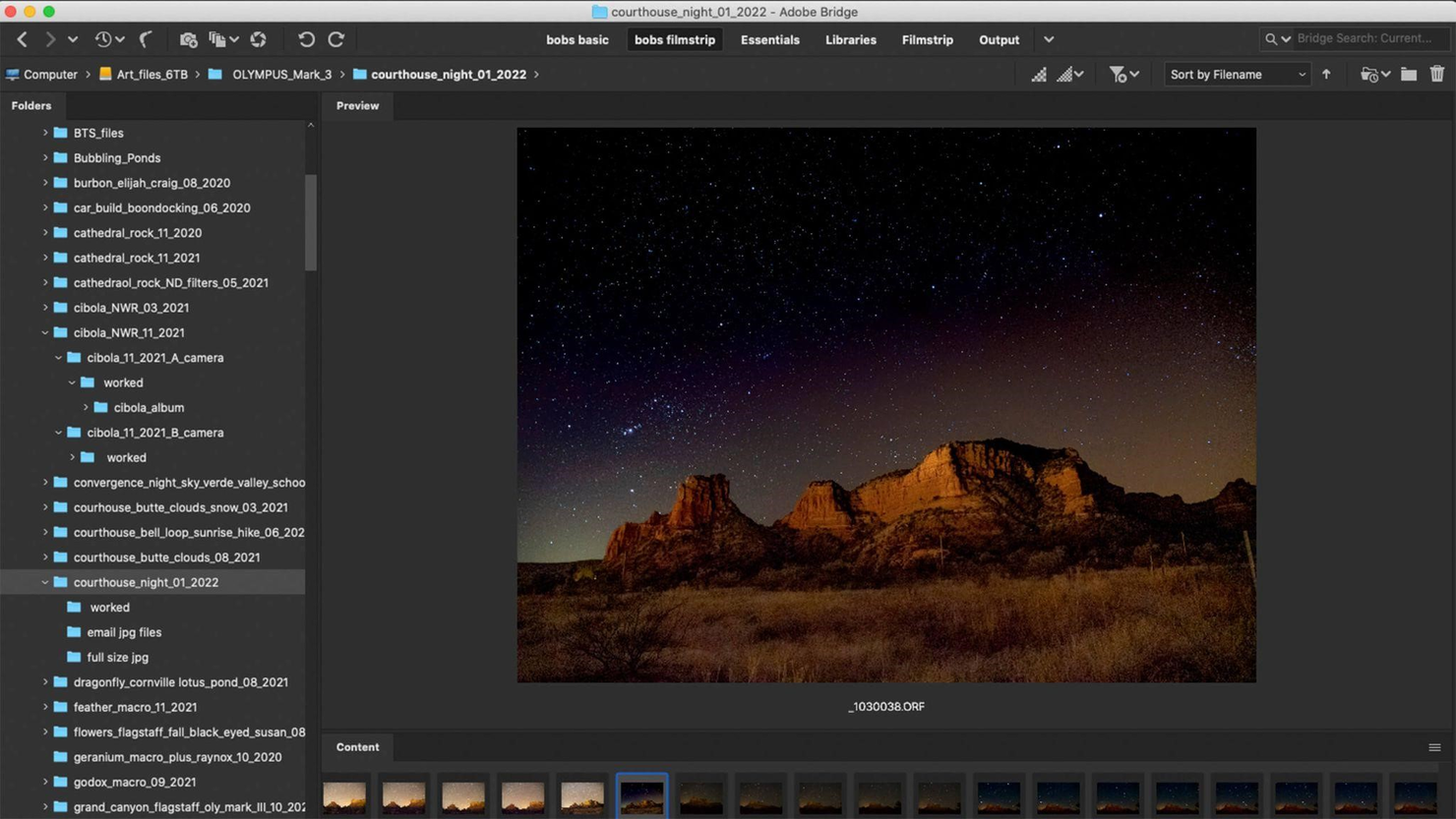
Adobe Bridge is a digital asset management software that helps photographers organize, access, and share photos. It provides features like tagging, categorization, and quick search.
Why I Picked Adobe Bridge: I chose Adobe Bridge for this list because it provides a solid platform for managing a wide range of creative assets, which is essential for photographers who deal with large volumes of digital content.
Its ability to centralize assets makes it a standout choice compared to other digital asset management software. I believe Adobe Bridge is best for centralized creative assets because it offers advanced metadata search features, collections for organization, and collaboration with Creative Cloud Libraries.
Standout features & integrations:
Features include multitasking with multiple windows, customizing keyboard shortcuts, and bulk workflows. Additionally, it supports creating 3D designs with a cross-application workflow, particularly with Substance 3D Stager.
Integrations include Adobe Photoshop, Adobe Illustrator, Adobe InDesign, Adobe Premiere Pro, Adobe After Effects, Adobe XD, Adobe Lightroom, Adobe Camera Raw, Adobe Stock, and Adobe Acrobat.
Pros and Cons
Pros:
- Integration with Adobe Creative Cloud and direct publishing to Adobe Stock
- Advanced metadata search and organization features
- Centralized management of creative assets
Cons:
- Potential cost implications for the full Adobe Creative Cloud suite
- Reliant on other Adobe products for full functionality


CyberLink PhotoDirector improves photo organizing and editing with tagging, categorization, and quick search features. It allows photographers to manage their image collections more efficiently.
Why I Picked CyberLink PhotoDirector: I selected CyberLink PhotoDirector for its AI features that simplify photo editing processes. Its combination of AI technology and editing tools distinguishes it from other software. CyberLink PhotoDirector is best for integrated photo editing as it merges workflow management and advanced editing in one platform, providing photographers with a full suite of tools.
Standout features & integrations:
Features include AI-powered sky replacement, artful glitch effects, and the ability to create complex multiple exposures. The software also offers content-aware editing, portrait beautification tools, and AI-style transfers.
Integrations include Adobe Photoshop, Adobe Lightroom, Flickr, Facebook, OneDrive, Google Drive, Dropbox, Windows Live Gallery, and Vimeo.
Pros and Cons
Pros:
- Available for Windows, macOS, and online
- Complete set of features for photo editing
- Advanced AI-driven editing tools
Cons:
- Some users say the interface needs updating
- May have a learning curve for new users
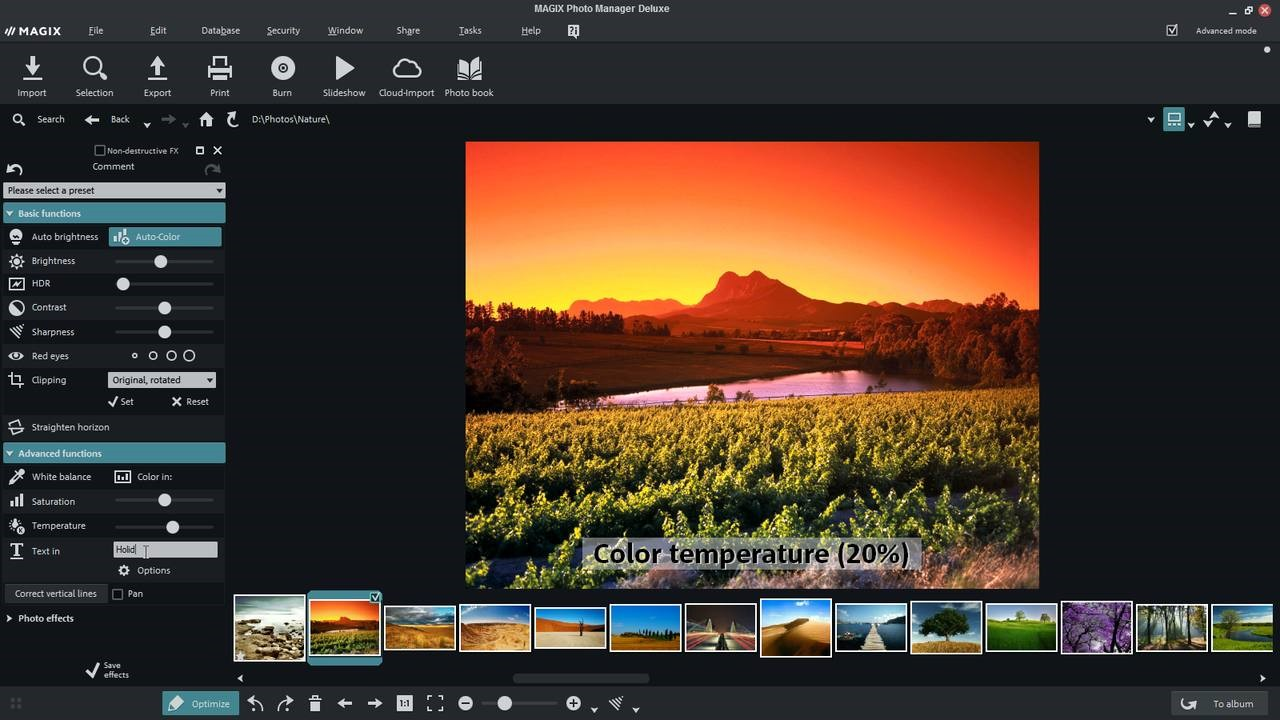
Magix simplifies photo organization and administration with tagging, categorization, and quick search features.
Why I Picked Magix: I chose Magix because it handles diverse media types, making it distinct from many other digital asset management software. Magix is the best for multimedia file management because it organizes photos and videos and provides editing tools.
Standout features & integrations:
Features include cloud import functions, RAW format support selection, virtual albums, image optimization tools, photo filters and effects, perspective correction tools, a horizon straightening feature, panorama creation, and travel route animation.
Integrations include Adobe Photoshop, Adobe Lightroom, Google Drive, Dropbox, Facebook, YouTube, OneDrive, and Twitter.
Pros and Cons
Pros:
- Creative tools for photo editing and presentation
- Intelligent media sorting capabilities
- Broad format support for photos and videos
Cons:
- Some users new to this type of software report a learning curve
- Limited in advanced editing features
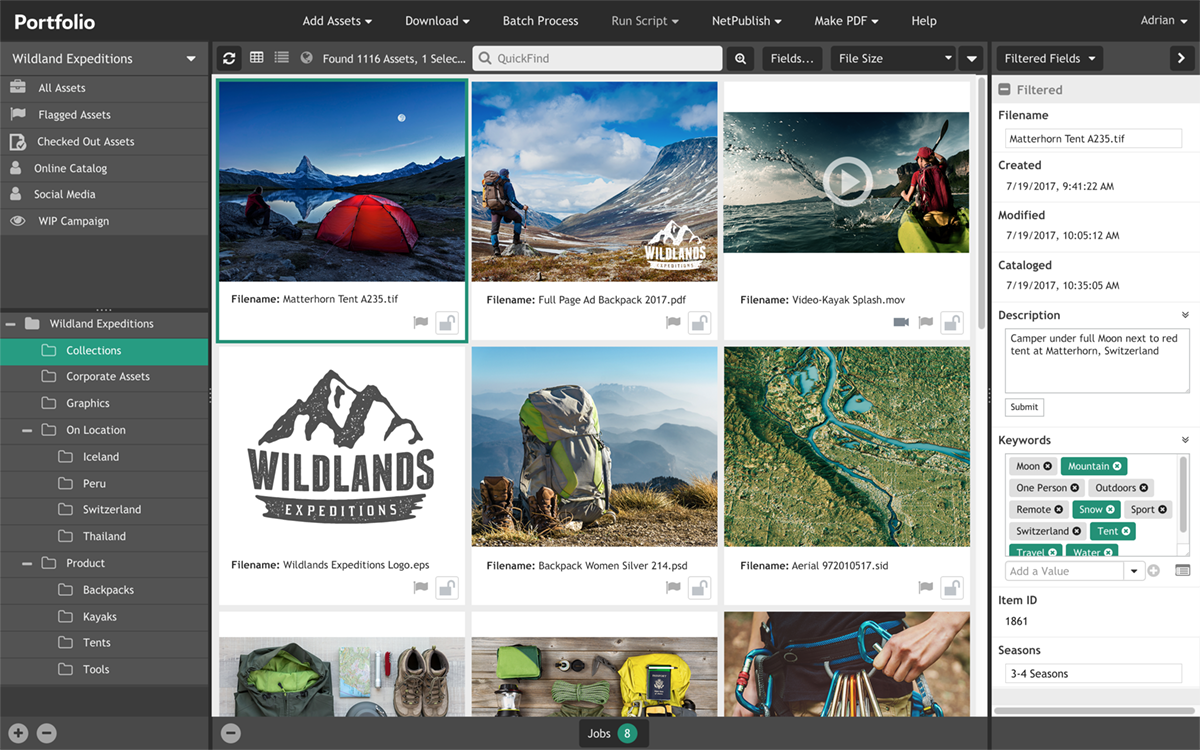
Extensis Portfolio makes organizing, accessing, and sharing photo collections easier. Its features include labeling, categorization, and quick search, which improve workflow productivity.
Why I Picked Extensis Portfolio: I selected Extensis Portfolio as its approach to managing creative assets distinguishes it from other digital asset management software. It's best for creative operations management because it enhances the ability to manage, locate, and distribute digital assets, which is essential for maintaining an effective workflow.
Standout features & integrations:
Features include AI-powered smart keyword tagging, categorization, versatile search options, and a drag-and-drop functionality.
Integrations include Adobe Creative, Cloud Photoshop, Illustrator, Microsoft OfficeWord, and PowerPoint.
Pros and Cons
Pros:
- Convenient drag-and-drop functionality
- Versatile search options with advanced capabilities
- AI-powered smart keyword tagging
Cons:
- Higher starting price point compared to some alternatives
- Absence of specific system requirements or support details
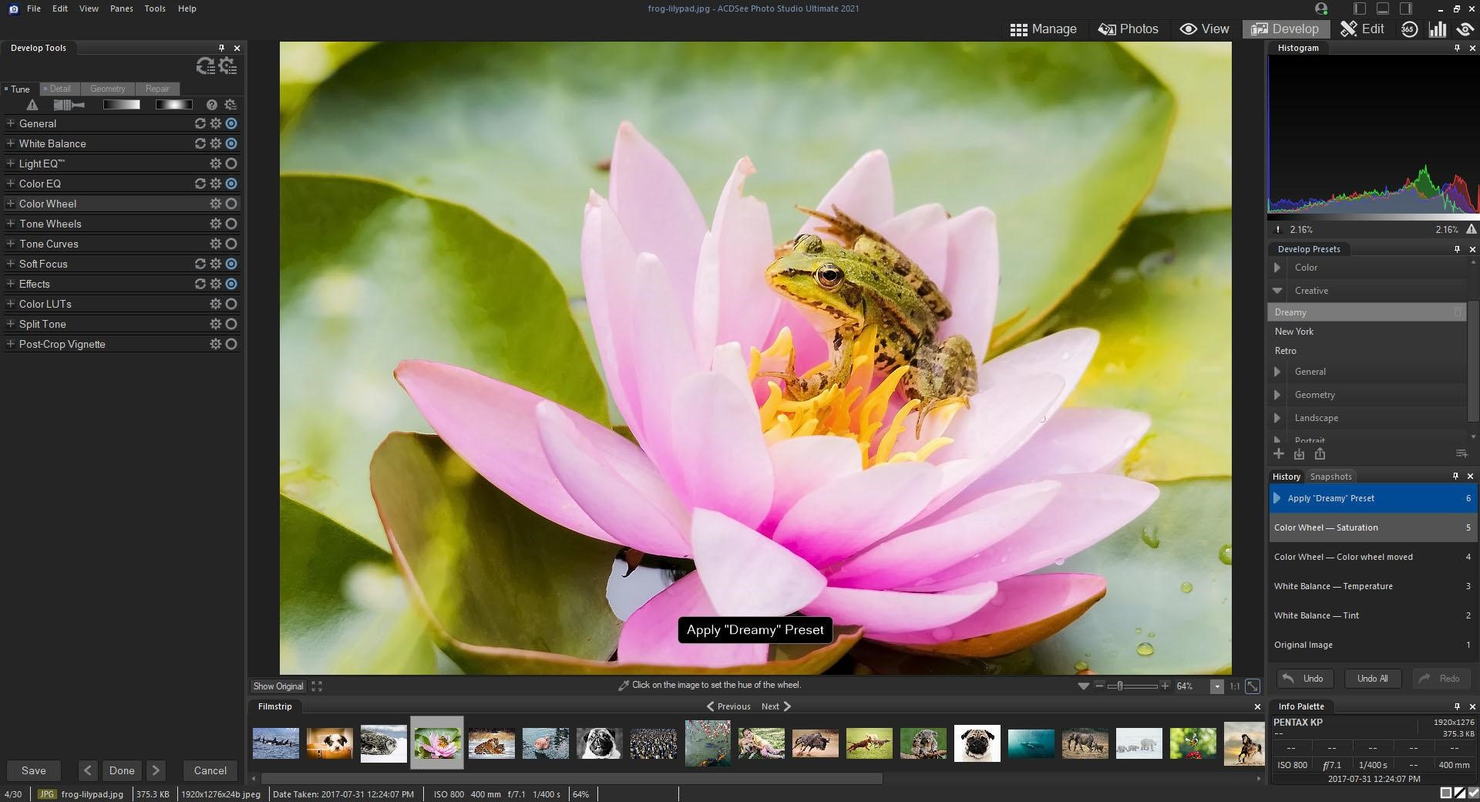
ACDSee Photo Studio uses tools like labeling, categorization, and quick search to help photographers organize, display, and edit their photographs more efficiently.
Why I Picked Acdsee Photo Studio: I chose Acdsee Photo Studio for this list because of its facial recognition-based search features, allowing for quickly sorting images. Its advanced AI-driven features also simplify managing and editing large photo collections.
I believe it's best for an AI-driven organization because it leverages artificial intelligence to automate the tedious task of manual keywording and enables efficient photo searching and categorization.
Standout features & integrations:
Features include AI Keywords that automatically tag photos, facial recognition, advanced search criteria, and quick search capabilities. Other features include AI selection tools, photo merge, repair tools, color correction, and creative tools.
Integrations include Adobe Lightroom, Dropbox, Google Drive, Flickr, Pixabay, Picasa, OneDrive, and Facebook.
Pros and Cons
Pros:
- Support for a wide range of file formats and camera RAW files
- Complete editing tools, including non-destructive AI masking
- AI-driven features for automated photo organization
Cons:
- The terminology used by some users is confusing
- May have a learning curve for new users due to the breadth of features
Other Digital Asset Management Software For Photographers
Below is a list of additional digital asset management software for photographers that we shortlisted but did not reach the top list. It’s worth checking them out, though.
- Zoner Photo Studio X
For cloud storage integration
- Photo Mechanic
For fast photo ingestion
- iMatch
For supporting various file formats
- Daminion
For duplicate detection
- Brandfolder
For strong analytics
- Pimcore
For PIM and DAM integration
- Cloudinary
For web asset optimization
- Bynder
For securing digital assets
- Adobe Experience Manager
For Adobe Creative Cloud integration
- Nuxeo
For customization


Related Project Management Software
If you still haven't found what you're looking for, check out these related project management tools we've tested and reviewed.
- Project Management Software
- Resource Management Software
- Workflow Automation Software
- Task Management Software
- Collaboration Tools
- Gantt Chart Maker
- DAM Software for eCommerce
How I Evaluate Digital Asset Management Software for Photographers
I split my evaluation into two layers: whether a tool handles RAW libraries, proofing, and rights management at baseline, then what sets the best options apart for studio workflows.
Core Functionality (Table Stakes For This List)
When I'm selecting tools for my list, I rank each one on a scale from 0 (does not offer the functionality) to 5 (excels in this area) for each core functionality listed below. Then, I calculate the tool's total score into a percentage. Each tool needs to achieve a minimum total score of 55% to be considered for inclusion.
- Image-Centric Asset Library: I check whether the platform handles RAW formats like CR3 and ARW alongside standard files, with fast previews and logical catalog structures for large shoot volumes.
- Metadata & Keyword Tagging: Strong EXIF, IPTC, and XMP support matters here, along with bulk tagging and faceted search so you can surface a specific portrait from a 5,000-image event library.
- Version Control & Proofing: I look for clear version histories and built-in proofing tools that let clients or art directors annotate, compare, and approve selects within a structured workflow.
- Rights & Licensing Management: Each tool should track model releases, usage licenses, and expiration dates at the asset level so a studio can verify permissions before reusing a commercial image.
- Project-Based Collaboration: I evaluate how each platform groups assets by shoot or campaign and whether it supports role-based access so retouchers, producers, and clients see only what they need.
- Secure Sharing & Delivery: The platform should offer permissioned download links, watermarking, and branded galleries for final delivery rather than forcing you to rely on external file transfer tools.
Once I have a list of tools that meet this criteria, I consider what sets each platform apart.
Differentiating Factors (What Sets Vendors Apart)
Here's how I compare and contrast different vendors:
Standout Features
AI auto-tagging is a major differentiator. Platforms that detect faces, scenes, and colors can save hours of cataloging after a 3,000-image wedding or product shoot. I also evaluate how well each tool connects to Lightroom and Photoshop, since most photographers live in those apps and need seamless edit syncing without manual exports. White-label client portals matter for studio owners who want branded proofing galleries that reflect their business identity rather than the DAM vendor's branding.
Beyond Features
Performance with large files is one of the first things I check. A DAM that chokes on 50MB RAW uploads or takes minutes to render previews will kill productivity during a fast-turnaround editorial shoot. Storage pricing also matters—I look at how each vendor scales when you're managing tens of terabytes across years of archived work. Finally, onboarding and migration support can make or break adoption. Studios with decades of archived shoots in folder-based systems need bulk ingestion tools and metadata mapping, not just a generic getting-started guide.
How To Choose Digital Asset Management Software For Photographers
Choosing the correct digital asset management (DAM) software is important for photographers aiming to efficiently organize, store, and retrieve work. During your software selection process, keep the following considerations in mind.
- Intuitive Search: Locating specific photos is essential for photographers with large image libraries. A DAM system should offer search capabilities that allow users to filter by subject, location, date, and other metadata.
- Distribution and Sharing: The software should simplify distributing and sharing assets with teams and clients, reducing the need for constant communication and ensuring efficient asset delivery.
- Automation: Dynamic asset updating across various channels directly from the DAM system is key for maintaining brand consistency and saving time on manual updates, which is particularly beneficial for photographers who distribute content across multiple platforms.
- Permissions and Security: A DAM system must provide strong permission settings and security measures to protect digital assets and ensure that only authorized personnel have access, which is important for safeguarding a photographer's work and brand integrity.
- Return on Investment (ROI): Evaluating the financial impact of a DAM system is important. Consider the cost savings from avoiding asset re-creation, reducing time spent searching for assets, and streamlining distribution, all of which can contribute to increased productivity and potential new revenue opportunities.
Trends in Digital Asset Management Software for Photographers
Here are some key trends in digital asset management software for photographers. To stay updated, I've researched industry trends, product updates, press releases, release logs, news articles, and emerging sources of information.
- Integration with Editing Tools: Software now often integrates directly with photo editing tools. This allows photographers to manage and edit assets in one place, improving workflow efficiency. The trend is important as it saves time and simplifies the editing process.
- AI-Based Tagging and Categorization: Artificial intelligence is used to auto-tag and categorize images. This technology can recognize content and context, making searching for specific photos faster. It's interesting because it reduces the manual effort of organizing large photo libraries.
- Cloud-Based Collaboration Features: Collaboration features are increasingly cloud-based, enabling real-time sharing and editing. This is progressive as it allows teams to work together from different locations. It's important for photographers who work with remote clients or teams.
- Enhanced Security Protocols: Security for digital assets is getting stronger with advanced encryption and access controls. This trend is important to protect intellectual property and client confidentiality. It's a key trend as it provides peace of mind for photographers in the digital age.
- Mobile Access and Management: Mobile access to digital asset management software is becoming more prevalent. Photographers can now manage their assets on the go with mobile apps. This is important for those who need to work remotely or travel frequently.
What is Digital Asset Management Software for Photographers?
Digital asset management software for photographers is a specialized tool designed to store, organize, and manage digital media files efficiently. It serves professional photographers, photo editors, and media organizations. It acts as a central repository for digital assets, allowing users to categorize, search, and distribute photographs effectively.
Key components include a user-friendly interface for navigating the image library, metadata tagging for simplified search and retrieval, and editing tools for enhancing images. Additionally, it offers access controls for security, sharing capabilities for collaboration, and integration options with other software to support photographers' workflows.
Features of Digital Asset Management Software for Photographers
Selecting digital asset management software for photographers is important for effectively managing many digital assets. The right software can influence how photographers access, organize, and secure their work.
Here are the most important aspects when choosing DAM software for photographers.
- Centralized Storage: This feature allows all digital assets to be stored in one location. It is vital to access and manage all photographs and related files quickly.
- Metadata Management: Metadata management tools enable adding and editing information to files. This is important for organizing and locating assets efficiently, especially when dealing with large volumes of images.
- Advanced Search Capabilities: With advanced search functions, I can find images quickly using various criteria. This saves time when I need to locate specific shots among thousands.
- Access Controls: Setting permissions and access controls ensures only authorized users can view or edit certain assets. This is important for maintaining the security and integrity of my work.
- Version Control: Version control tracks file changes, allowing me to revert to previous versions if necessary. This feature is essential for maintaining the quality and consistency of my images.
- Integration with Editing Software: The ability to integrate with photo editing software simplifies the editing process. This integration is key to maintaining a smooth workflow from capture to final output.
- Backup and Recovery: Reliable backup and recovery options protect assets from data loss. This feature provides peace of mind and ensures that images are safe in case of technical issues.
- Collaboration Tools: Collaboration tools facilitate working with teams or clients by allowing shared access and feedback on assets. This is important for projects that require input from multiple stakeholders.
- Mobile Access: Mobile access allows me to view and manage my assets on the go. This flexibility is increasingly important in today's mobile-centric world.
- Scalability: Scalability ensures that the DAM software can grow with my needs, accommodating an increasing number of assets over time. This is important for long-term asset management.
Benefits of Digital Asset Management Software for Photographers
Digital asset management software (DAM software) for photographers provides powerful features for optimizing workflows and increasing business efficiency. It boosts photographers' efficiency and creativity by providing a centralized platform for storing, organizing, and sharing photographs. Here are five significant benefits of DAM software for photographers.
- Centralized Storage: Having all digital assets in one place allows photographers to access, manage, and back up their work. This reduces the risk of data loss and saves time that would otherwise be spent searching for files across different devices and locations.
- Improved Organization: Digital asset management software often includes tagging and metadata features, enabling users to categorize and locate images. This level of organization is important for managing large volumes of photos, saving time, and improving workflow efficiency.
- Access Control and Security: By setting permissions and controlling access, photographers can ensure their digital assets are secure and only accessible to authorized users. This is particularly important for protecting copyright and sensitive content.
- Simplified Sharing and Distribution: DAM software makes sharing files with clients and collaborators easy, often through secure links or integrated platforms. This simplifies the process of delivering final products and enables collaboration on projects.
- Scalability: As a photographer's portfolio grows, so does the need for storage and management. Digital asset management software is designed to scale with the user, accommodating increasing numbers of assets without a drop in performance.
Digital asset management software for photographers is transformative, providing tools that save time and enhance creativity. With DAM software, photographers and organizations can prioritize their art over administrative burdens associated with managing vast digital libraries.
Costs & Pricing Of Digital Asset Management Software for Photographers
Digital asset management software for photographers is available at various complexity levels and offers pricing options to meet the needs of amateur photographers and large-scale professional enterprises.
The table below summarizes plan options and pricing for digital asset management software.
Digital Asset Management Software for Photographers Pricing Comparison Table
| Plan Type | Average Price | Common Features |
|---|---|---|
| Free Option | $0 | Limited asset storage, basic search and filter capabilities, file sharing with some restrictions |
| Basic | $0 - $20 per user/month | Basic asset storage and organization, basic search functionality, limited file-sharing capabilities |
| Professional | $25 - $100 per user/month | Advanced search capabilities, greater storage capacity, version control, basic integration options |
| Enterprise | Custom pricing | Customizable workflows, unlimited storage, complete integration options, advanced security features |
Each plan caters to different needs based on the amount of digital assets and required collaboration level. Free plans suit minimal storage needs, while professional and enterprise plans offer more features tailored for larger teams and organizations.
Digital Asset Management Software for Photographers FAQs
Here are some of the frequently asked questions I’ve been asked about digital asset management software for photographers.
How does digital asset management software for photographers differ from other photo storage solutions?
DAM software is specifically tailored to manage large volumes of digital assets and is more feature-rich than basic photo storage solutions. It offers advanced search capabilities through metadata, supports a wide range of file formats, and often includes rights management and publishing features. Unlike simple photo storage, DAM systems are designed to facilitate workflow for professional photographers who need to access, edit, and distribute their work regularly.
Can digital asset management software for photographers handle raw files and different file formats?
Yes, most DAM software for photographers is built to handle a variety of file formats, including raw files. These systems support files from camera manufacturers and can manage other media types, such as videos, PDFs, and audio files. This compatibility ensures that photographers can keep all digital assets in one place, regardless of format.
Is it possible to share files directly from digital asset management software for photographers?
Many DAM systems include sharing capabilities that allow photographers to send files directly from the platform. This can be done through generated links, integrated social media sharing, or by creating client portals where clients can view and download selected images. This feature simplifies the collaboration and distribution of digital assets.
What are the security features of digital asset management software for photographers?
Security is a critical aspect of DAM software. These systems often include user permission settings, which allow photographers to control who can view, edit, or download certain files. Encryption and secure backup options are common features to protect digital assets from unauthorized access and data loss.
How does digital asset management software for photographers support keyword and metadata management?
DAM software typically provides extensive metadata and keyword tagging support, which is essential for organizing and locating images. Photographers can add descriptive tags, copyright information, and other relevant metadata to their files. The software often includes batch editing tools to simultaneously apply metadata to multiple images, enhancing searchability and organization.
Is digital asset management software for photographers suitable for both individual and larger businesses?
Yes, DAM software is versatile and can be tailored to the needs of individual photographers, small studios, and large photography businesses with multiple users and complex workflows.
Can I access my photos from anywhere using digital asset management software for photographers?
Yes, most DAM software offers cloud-based storage and remote access capabilities, allowing photographers to access their photos anywhere with an internet connection.