Os 10 melhores softwares para agências de publicidade para gestão em 2026

10 A Lista do Melhor Software para Agências de Publicidade


Gerir os desafios de uma agência de publicidade pode ser difícil. Tem de gerir vários projetos, prazos apertados e as expectativas dos clientes. É fácil sentir-se sobrecarregado quando as coisas não correm como planeado.
O software para agências de publicidade pode ajudar. Foi concebido para facilitar a gestão de projetos, ajudando a sua equipa a manter-se organizada e concentrada. Na minha experiência, o software certo pode fazer uma enorme diferença na eficiência com que a sua equipa trabalha.
Testei e analisei de forma independente várias opções de software. O meu objetivo é apresentar-lhe uma análise imparcial das melhores ferramentas disponíveis. Neste artigo, encontrará as minhas principais escolhas, cada uma selecionada pela sua capacidade de resolver problemas comuns no setor. Vamos encontrar a solução certa para a sua equipa.
Why Trust Our Software Recommendations
Our team has been testing and reviewing software since 2012. As project managers ourselves, we know how difficult—and important—it is to choose the right software.
For this guide, we evaluated tools using hands-on testing and independent research, scoring tools using our selection criteria. We also draw on insights from industry thought leaders and practicing project management experts.
Our reviews reflect our human editorial judgment, not a sales pitch.
Expert reviewers:
Tabela Comparativa de Software para Agências de Publicidade
Esta tabela comparativa resume os detalhes de preços das minhas principais escolhas de software para agências de publicidade:
| Tool | Best For | Trial Info | Price | ||
|---|---|---|---|---|---|
| 1 | Best for agency business process management | 14-day free trial | From $10/user/month (billed annually) | Website | |
| 2 | Best for all-in-one project management | 14-day free trial | From $17/user/month | Website | |
| 3 | Best advertising agency software for team collaboration | Free plan + 14-day trial + demo available | From $10/user/month (billed annually) | Website | |
| 4 | Best for ease-of-use and intuitive UI | Free plan + 14-day free trial + free demo available | From $9/user/month (billed annually) | Website | |
| 5 | Best for AI-powered advertising agency management | Free demo available | Pricing upon request | Website | |
| 6 | Best for full lifecycle service delivery | Not available | Pricing upon request | Website | |
| 7 | Best for issues & changes management | Free plan + 14-day free trial available | From $10/user/month (billed annually) | Website | |
| 8 | Best for creatives & design teams | 30-day free trial | From $40/month, fixed price available | Website | |
| 9 | best for enabling client collaboration | Free plan + 14-day free trial + free demo available | From $9.99/user/month (billed annually) | Website | |
| 10 | Best for managing the entire advertising agency process | 7-day free trial | From $9/user/month (billed annually) | Website |


Visão Geral dos 15 Melhores Softwares para Agências de Publicidade
Segue-se uma descrição detalhada das ferramentas, com capturas de ecrã e funcionalidades de destaque. Consulte, sempre que quiser, os critérios que utilizei para selecionar o software desta lista.

Best for agency business process management

Productive is an agency management software that can handle all your business processes, including sales, invoicing and billing, resource planning, and project management.
Why I Picked Productive: The Sales Pipeline functionality lets you keep track of sales and your deal flow with sales reports and tracking for lost contracts. This is also great for keeping your sales process organized.
Productive has a built-in time tracker as well, which makes it easy for your team to track their time, and communication and task management functionalities make collaboration on tasks simple. Also included are resource planning features, as well as profitability tracking features for keeping track of project costs, key metrics, budgets, and invoicing.
Productive Standout Features & Integrations
Features include project management, resource planning, budgeting, reporting, time tracking, billing, sales enablement, and third-party integrations.
Integrations include Jira, QuickBooks, Xero, Google Calendar, Exact, Slack, Outlook, Visma e-conomic, Harvest Import, Fortnox, Personio, and more using their open API.
New Product Updates from Productive
Productive Adds Voice Dictation, Slack Connector, Proposals, and Overtime
Productive adds voice dictation, a Slack Connector, proposal controls, and overtime tracking. These updates support faster AI interactions, client proposals, and time management. For more information, visit Productive’s official site.

Scoro
Best for all-in-one project management

Scoro is an all-in-one professional services automation software designed to standardize operations and streamline workflows for agencies. It combines CRM, quoting, project management, billing, and reporting tools into a single platform, enabling teams to manage their work more efficiently.
Why I Picked Scoro: With Scoro, you can manage projects from start to finish, including quoting, budgeting, task scheduling, and time tracking. This end-to-end approach ensures that all aspects of a project are interconnected, reducing the chances of miscommunication and errors. Additionally, Scoro’s resource planning feature allows you to allocate work effectively across your team, ensuring optimal utilization and preventing burnout. The platform also makes it easier to manage client accounts, sales pipelines, and financials while providing tools for planning and forecasting work for better visibility across your operations.
Scoro standout features and integrations:
Features include invoicing capabilities that let you automate billing processes, reducing manual work and the potential for mistakes. Additionally, detailed reporting and dashboards provide real-time insights into your business performance, allowing you to monitor key metrics and make data-driven decisions. The platform also includes retainer management functionality for tracking and managing recurring client work, plus Gantt charts, a drag-and-drop planner or Kanban board, and a comprehensive CRM to keep all client communications and invoices connected.
Integrations include HubSpot, Google Calendar, Microsoft Exchange, Jira, Xero, QuickBooks, Sage Intacct, Exact Online, Expensify, Stripe, Google Drive, BambooHR, Slack, Asana, Dropbox, PayPal, and more. You can also connect to other apps through Zapier.
New Product Updates from Scoro

Scoro Adds Time Mobile App and ELI Improvements
Scoro adds the Scoro Time mobile app for iOS/Android to track time anywhere and expands ELI with attachments, smarter filtering, and trigger-based actions. For more information, visit Scoro's official site.

Wrike
Best advertising agency software for team collaboration

Wrike is an advertising agency software that is best for teams of five up to an unlimited number of team members. Wrike enables managers and teams to visualize projects on Kanban boards and drag-and-drop Gantt charts, as well as customize workflows, dashboards, reports, and request forms.
Why I Picked Wrike: Wrike allows teams and individuals to arrange their dashboard and task list in a view that suits their working style, as well as offers automations for admin tasks. Wrike also features employee capacity monitoring, resource management, and onboarding templates.
Wrike also offers a dedicated help center with interactive training, videos, a ‘Getting Started’ guide, and a thriving community. The tool includes a variety of specific solutions for every type of team or organization, including marketing teams and professional service teams. Users also have access to a variety of templates for common organizational processes.
Wrike Standout Features & Integrations
Features include project management, task scheduling/tracking, resource management, expense tracking, API, budgeting, Gantt charts, marketing automations, collaboration support, and reporting.
Integrations include over 400 pre-built integrations with the most popular file management software from Microsoft, Slack, Google, and Dropbox, along with sales and marketing software like Salesforce and Marketo.
New Product Updates from Wrike
Wrike Expands Gantt Planning, Approvals, and AI Work Intake
Wrike adds cross-project Gantt dependencies, flexible approval routing, and AI work intake through Wrike MCP. These updates give teams more control over planning, decision-making, and incoming work. For more information, visit Wrike’s official site.

Best for ease-of-use and intuitive UI
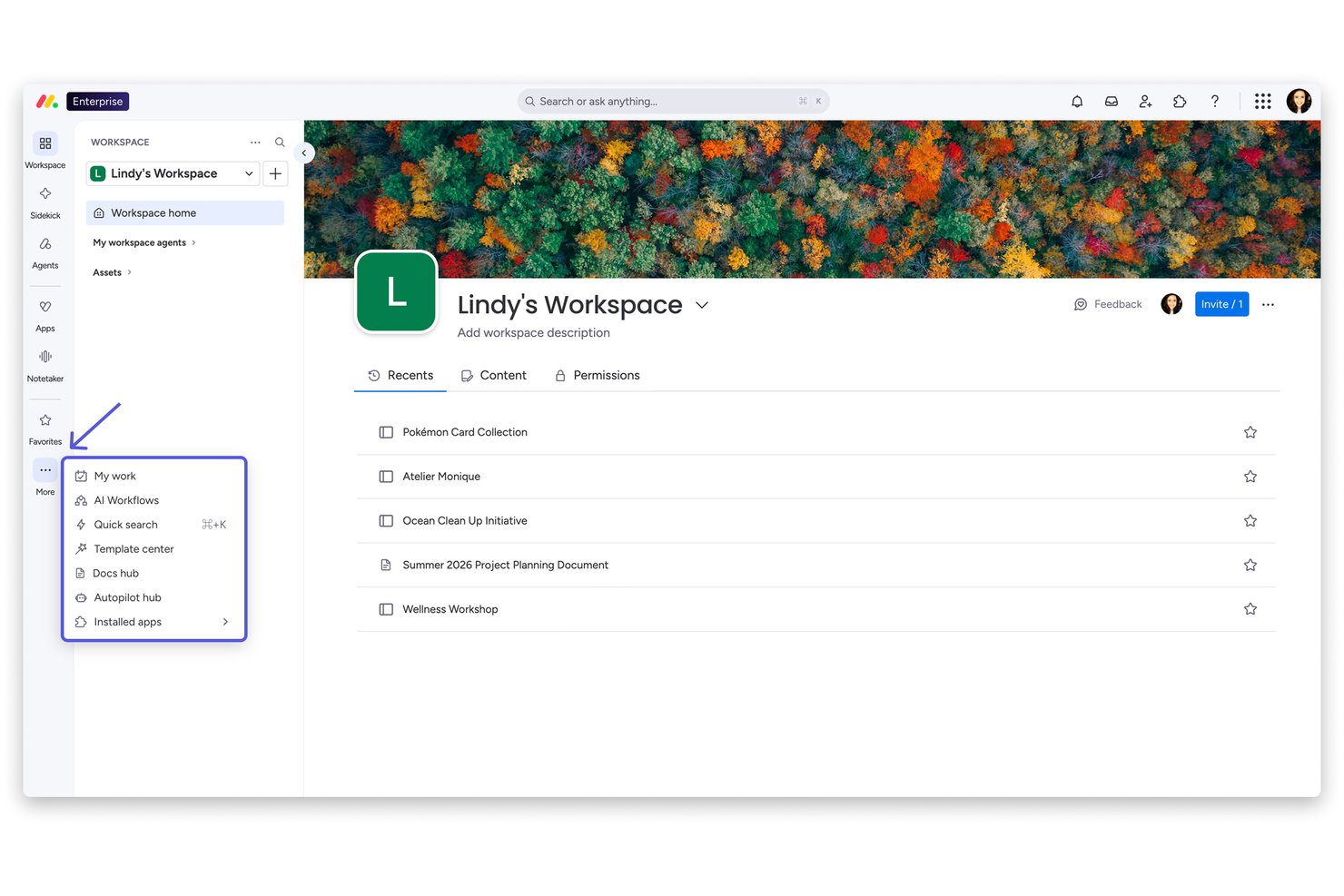
monday AI Workspace is a general-purpose work management platform that combines campaign planning, task and timeline management, workflow automation, and AI-assisted project coordination across teams and client accounts.
Who Is monday AI Workspace Best For?
It's a strong fit for marketing and agency teams at mid-size to large organizations that need a flexible, visually intuitive workspace to manage multiple concurrent projects.
Why I Picked monday AI Workspace
I've included monday AI Workspace in my top picks because the drag-and-drop board setup genuinely removes the onboarding friction that slows down busy agency teams. I like that you can flip between Kanban, Gantt, and timeline views without rebuilding anything, which is practical when you're juggling multiple client campaigns at once. The 200+ pre-built templates mean a new campaign board takes minutes to spin up, not hours.
monday AI Workspace Key Features
- Resource management dashboards: Visualize and balance team workloads across projects with real-time capacity views.
- AI-powered automations: Set up triggers and workflows to automate repetitive tasks and status updates for campaigns.
- Client account hierarchies: Organize boards and folders by client, enabling clear separation between engagements and deliverables.
- Time tracking columns: Log billable and non-billable hours at the task level to support agency project accounting.
monday AI Workspace Integrations
monday AI Workspace offers hundreds of integrations through its built-in integrations and marketplace, including Slack, Salesforce, HubSpot, Google Workspace, Microsoft 365, Adobe Creative Cloud, Jira, QuickBooks, Dropbox, and Zapier. It also provides an API for custom integrations.
Pros and Cons
Pros:
- Custom intake forms simplify creative brief collection
- Drag-and-drop setup needs no technical training
- Highly visual campaign boards across multiple clients
Cons:
- Reporting lacks agency profitability and margin depth
- No native creative proofing or annotation tools
New Product Updates from monday AI Workspace
monday AI Workspace Adds Human Approval Routing
monday AI Workspace adds a human-in-the-loop approval block to AI Workflows, sending approval requests and routing workflow paths based on responses. For more information, visit monday AI Workspace's official site.
Best for AI-powered advertising agency management

Screendragon is an advertising agency management software designed to manage projects, processes, people, and profitability in one place. The world’s top agency groups like Omnicom, WPP, and IPG rely on Screendragon to power their agency operations.
Why I Picked Screendragon: Anyone can leverage Screendragon’s integrated budget module to build SOW’s and estimates, as well as forecast future revenues and resourcing needs. Screendragon is also highly configurable, giving users the ability to customize forms, dashboards, templates, workflow rules, permissions, notifications, reports, and even the terminology used on the platform.
Screendragon also includes intuitive task management features that enable users to switch between different interfaces like visual Kanban boards, interactive Gantt charts, and list views. Reviews and approvals are made simple with features for visual proofing, real-time collaboration, version control, and granular permissions. Automated approvals facilitate the secure and efficient approval of assets. Screendragon’s robust offering in the area of advertising agency software tends to make it more suited to mid to large-sized agencies.
Screendragon’s user interface is easy-to-use and allows users to custom brand the interface. The tool provides functionality for project management, workflow management, resource management and forecasting, time-tracking, budget management, and asset management.
Screendragon Standout Features & Integrations
Features include project management, collaboration, resource management, time tracking, budget management, reporting, mobile app, and third-party integrations.
Integrations include SAP and PeopleSoft and can integrate with thousands of apps through Zapier like Slack, Trello, Google Drive, Office 365, and Microsoft Dynamics. It also has an open API, allowing custom integrations with any solution.
New Product Updates from Screendragon
Screendragon Unveils New AI Hub
Screendragon introduced AI Hub, a new capability that lets teams build and manage AI agents directly within workflows. The update helps marketing teams automate tasks, maintain governance controls, and scale AI-driven operations more efficiently. For more information, visit Screendragon's official site.

Kantata
Best for full lifecycle service delivery

Kantata is a professional services work management platform designed to support the entire lifecycle of client campaigns. From scoping and planning to staffing, delivery, and reporting, it provides agencies with one centralized hub to manage projects, align resources, and keep budgets under control while ensuring work is delivered on time.
Why I Picked Kantata: Kantata goes beyond basic task and project tracking by connecting every part of the campaign lifecycle. Agencies can plan projects, forecast demand, and staff the right mix of talent, while also managing financials and tracking performance in real time. Its collaboration and communication tools help creative, account, and strategy teams stay aligned with clients throughout the campaign. With built-in business intelligence and profitability tracking, Kantata helps agencies manage not just the work, but the health of the business behind it.
Kantata Standout Features & Integrations
Features include dynamic dashboards for campaign performance, portfolio-level views to track multiple client accounts, resource capacity planning to balance workloads, and time and expense tracking for accurate billing.
Integrations include NetSuite, QuickBooks, Salesforce, Google Workspace, Jira, Expensify, Xero, Concur, Sage Intacct, Slack, HubSpot, Microsoft platforms, and more.
New Product Updates from Kantata

Kantata Adds Access Group Change History
Kantata adds Access Groups History, letting account administrators track changes to group details, membership, and permissions in Recent History. The update also makes these events available through the Subscribed Events API for broader monitoring. For more information, visit Kantata’s official site.
 .
Nifty
Best for issues & changes management

Nifty puts your agency’s best on display by creating timeline clarity while managing files, copy, communications, and feedback. Combine your daily team collaboration with your client delivery by selecting which Tasks and Milestones are visible to your Guest. Cross-project overviews give portfolio clarity as your project milestone timelines are updated when corresponding tasks are completed.
Why I Picked Nifty: Nifty boast automated project status reporting based on task completion, built-in Google Docs, Sheets, and Presentations to integrate into your workflow as well as a time tracker to track time across members, tasks, and projects. Nifty also has a task list and Kanban view for added task management flexibility.
Nifty keeps your team and project stakeholders aligned as daily workflows update Milestone progress. Guests enjoy an immersive Nifty experience as they’re permitted to create and complete tasks to empower your client collaboration. This reduces the time spent hunting for transmissions or feedback across many communication channels.
Nifty Standout Features & Integrations
Features task management, resource management, collaboration, dashboards, reports, a mobile app, customizations, and third-party integrations.
Integrations include Github, Google Drive and Calendar, Microsoft Suite, Slack, and Zoom with native integrations and more than 1000 integrations are available through Zapier.

Best for creatives & design teams

Streamtime is a powerful agency management tool that allows you to create, plan, and manage projects while keeping your team in the loop. Streamtime’s interactive to-do screen can replace timesheets, making chasing timesheet completion a thing of the past. On the market since 2002, Streamtime has been recognized with a 2020 Webby award along with D&AD, AGDA Pinnacle, and Best Design Awards.
Why I Picked Streamtime: With flexible project planning, autmoated estimating and invoicing, innovative time tracking, slick scheduling, and intelligent reporting, Streamtime serves up all the functionality you need within a beautiful, intuitive interface. Design and advertising agencies across the globe have used Streamtime to improve visibility of business and client performance, as well as capitalize on robust scheduling views to improve capacity planning and resourcing.
Streamtime Standout Features & Integrations
Features include project management, budget tracking, collaboration, reporting, flexible workflows, mobile access, job costing, invoicing, asset management, and third-party integrations.
Integrations include Xero, Quickbooks, PayPal, Stripe, Google apps, Microsoft Office, Trello, HubSpot, Salesforce, Gmail, Microsoft Outlook, Dropbox, Google Drive, and other tools.

best for enabling client collaboration

Teamwork is a flexible advertising agency management software that helps agencies become more productive and profitable. It enables agencies to manage high volumes of client projects from start to finish. Teamwork allows you to build flexible, custom workflows and gives you one central place to visualize your team and client projects.
Teamwork offers a number of tools and features to help agencies manage their work. With the Workload feature, you can get a complete picture of your team’s capacity and manage resources and keep your team on track. There's built-in time-tracking on Teamwork to log hours spent working on tasks and track billable hours. Profitability reports allow you to track financial performance by project or team member and compare it against the budget for that client.
Something especially useful about this agency software is that you can add clients as collaborators for free so they can communicate with your team, leave comments in context, review assets and get visibility on project progress.
Teamwork integrates easily with other tools including Gmail, Harvest, Hubspot, QuickBooks, Slack, Dropbox and more.
Teamwork costs from $10/user/month. They also offer a 30-day free trial.
Best for managing the entire advertising agency process

Bonsai is a comprehensive business management tool designed to consolidate workflow and increase productivity for agencies. It offers a suite of features including client and project management, financial management, and customizable templates,
Why I Picked Bonsai: As an advertising agency software, Bonsai uses an all-in-one approach to manage the entire agency process. It caters to the needs of advertising agencies by providing a suite of tools like time tracking, task assignment, budget management, and integrated billing and invoicing systems. It also includes a client portal for collaboration, sharing files, and managing client interactions.
I also like that Bonsai provides a range of templates for your unique needs. These templates include sales agreements, contracts, proposals, and demand letters.
Bonsai Standout Features & Integrations
Features include automated workflows, proposals, contracts, CRM, scheduling, time tracking, collaboration tools, invoicing, and bookkeeping.
Integrations include Gmail, Google Calendar, Zapier, Slack, QuickBooks Online, Calendly, ClickUp, Trello, Google Drive, Google Sheets, Xero, HubSpot, and more.
Outro Software para Agências de Publicidade
Eis uma lista de softwares que não entraram na lista principal, mas que vale a pena considerar.
- FunctionFox
For creative teams & agencies
- Parallax
For proactive resource planning
- Intervals
Reporting features for time & expenses
- Function Point
For identifying task dependencies in agency projects
- Ravetree
Agency software for real-time client portals
- Workamajig Platinum
Advertising agency software for integrations
- SegMetrics
For campaign tracking
- Admation
For proofing & approvals processes
- Mosaic
Advertising agency software for visualizing workload and staffing projects
- Olavana
For posting & reviewing HTML banner ads
- ClickUp
For a range of templates forvarious workflows
- Copper
Advertising agency software CRM capabilities
- Hubstaff
For hybrid/remote teams
- Hive
For communication & collaboration tools
- Accelo
For tracking one-time projects and recurring work
- VOGSY
Advertising agency software for Google Workspace users


How I Evaluate Advertising Agency Software
I split my evaluation into two layers: a baseline every agency PM tool must clear—campaign tracking, billable time, client proofing—and the differentiators that separate the best.
Core Functionality (Table Stakes For This List)
When I'm selecting tools for my list, I rank each one on a scale from 0 (does not offer the functionality) to 5 (excels in this area) for each core functionality listed below. Then, I calculate the tool's total score into a percentage. Each tool needs to achieve a minimum total score of 65% to be considered for inclusion.
- Campaign Project Management: I look for tools that let you spin up multi-phase campaign projects with task dependencies, milestones, and timeline views so a rebrand launch or seasonal ad push stays on track.
- Resource & Capacity Planning: Agencies juggle overlapping client deadlines constantly, so I check whether a tool shows real-time workload views and lets you reassign staff when a pitch deck suddenly takes priority.
- Time Tracking & Budget Controls: Every billable hour matters at an agency. I evaluate whether time tracking ties directly to client projects with budget thresholds that flag overruns before they eat into margins.
- Creative Proofing & Approvals: I look for native markup and annotation tools that support multiple file types, version comparison, and structured approval routing—so a client review cycle on video or display ads doesn't live in email threads.
- Client & Account Management: Keeping client work organized is table stakes. I check for account-level hierarchies that group projects, briefs, and contacts under each client for easy navigation and reporting.
- Agency Profitability Reporting: I evaluate whether a tool offers project-level profitability, utilization rates, and budget burn dashboards that help operations leads answer "are we making money on this account?" without exporting to a spreadsheet.
Once I have a list of tools that meet this criteria, I consider what sets each platform apart.
Differentiating Factors (What Sets Vendors Apart)
Here's how I compare and contrast different vendors:
Standout Features
A built-in DAM makes a real difference when your team reuses logos, templates, and approved assets across dozens of client accounts—no more digging through shared drives. I also look for creative brief intake tools that route structured requests straight into project workflows, cutting out the back-and-forth that slows down kickoffs. White-label client portals are another feature I value, since they let you share status updates and collect approvals under your agency's branding instead of exposing a generic tool interface.
Beyond Features
Integration coverage matters a lot—I check whether a platform connects to Adobe Creative Cloud, Slack, and accounting tools like QuickBooks or Xero, since agencies rely on that data flow daily. Pricing structure is equally important. Agencies scale up with freelancers and scale down between pitches, so I evaluate whether licensing accommodates fluctuating headcount without penalizing you for guest reviewers or client seats. I also consider onboarding support, especially whether the vendor offers agency-specific templates and migration help to shorten time to value.
Como Escolher Software para Agências de Publicidade
É fácil perder-se em listas longas de funcionalidades e estruturas de preços complexas. Para o ajudar a manter-se concentrado enquanto percorre o seu processo único de seleção de software, eis uma lista de fatores a ter em conta:
| Fator | O que considerar |
|---|---|
| Escalabilidade | O software consegue acompanhar o crescimento da sua agência? Considere o número futuro de clientes e a expansão da equipa. Procure ferramentas que suportem o aumento dos dados e das exigências dos utilizadores. |
| Integrações | Funciona com as suas ferramentas atuais? Verifique a compatibilidade com as plataformas de CRM, e-mail e análise que a sua equipa já utiliza. |
| Personalização | Pode adaptá-lo aos seus fluxos de trabalho? Avalie as opções para ajustar painéis, relatórios e definições de utilizador de acordo com as necessidades da sua agência. |
| Facilidade de utilização | A sua equipa irá adotá-lo rapidamente? Procure interfaces simples e uma navegação fácil. Evite ferramentas que exijam formação extensa para serem utilizadas eficazmente. |
| Implementação e integração inicial | Quanto tempo demorará a começar? Considere o tempo necessário para configurar a ferramenta e formar a sua equipa. Verifique se estão disponíveis recursos como tutoriais e suporte. |
| Custo | Enquadra-se no seu orçamento? Compare os planos de preços e as taxas ocultas. Procure uma boa relação entre as funcionalidades e o suporte disponibilizado. |
| Medidas de segurança | Os dados dos seus clientes estão protegidos? Verifique as normas de encriptação e a conformidade com os regulamentos de proteção de dados. |
| Disponibilidade do suporte | É fácil obter ajuda? Verifique se existe suporte 24 horas por dia, 7 dias por semana, e várias opções de contacto. Considere a reputação do fornecedor quanto à rapidez na resolução de problemas. |
O que é o software para agências de publicidade?
O software para agências de publicidade é uma ferramenta concebida para ajudar as agências a gerir campanhas, comunicações com clientes e fluxos de trabalho de projetos. Profissionais como gestores de projetos, gestores de conta e equipas criativas utilizam estas ferramentas para melhorar a eficiência e a colaboração. As funcionalidades de gestão de tarefas, acompanhamento do orçamento e análise ajudam a organizar projetos e a tomar decisões baseadas em dados. De um modo geral, estas ferramentas simplificam a gestão de projetos publicitários complexos e aumentam a produtividade da equipa.
Funcionalidades
Ao selecionar software para agências de publicidade, esteja atento às seguintes funcionalidades principais:
- Gestão de campanhas: Ajuda a planear, executar e monitorizar campanhas publicitárias do início ao fim, garantindo a entrega atempada e o alinhamento com os objetivos do cliente.
- Colaboração com clientes: Facilita a comunicação e a partilha de documentos com os clientes, melhorando a transparência e a criação de relações.
- Relatórios e análise: Fornece informações sobre o desempenho das campanhas, permitindo tomar decisões baseadas em dados e realizar otimizações.
- Acompanhamento do orçamento: Monitoriza as despesas e prevê as necessidades financeiras, ajudando as agências a manterem-se dentro do orçamento e a gerirem os recursos de forma eficaz.
- Agendamento de tarefas: Organiza tarefas e prazos, garantindo que os membros da equipa conhecem as suas responsabilidades e cumprem os calendários dos projetos.
- Integrações: Liga-se a ferramentas existentes, como plataformas de CRM e de e-mail, criando um fluxo de trabalho unificado e reduzindo a introdução manual de dados.
- Painéis personalizáveis: Permite aos utilizadores personalizar o seu espaço de trabalho para acederem rapidamente às informações e métricas mais relevantes.
- Medidas de segurança: Protege dados sensíveis dos clientes através de encriptação e da conformidade com os regulamentos de proteção de dados.
- Interface intuitiva: Garante facilidade de utilização através de uma navegação intuitiva, incentivando a adoção e reduzindo o tempo de formação.
- Disponibilidade do suporte: Oferece suporte fiável ao cliente para resolver problemas rapidamente e manter os projetos no rumo certo.
Vantagens
A implementação de software para agências de publicidade proporciona várias vantagens à sua equipa e à sua empresa. Eis algumas das que pode esperar:
- Melhor organização: Com o agendamento de tarefas e a gestão de campanhas, a sua equipa consegue acompanhar os prazos e os detalhes dos projetos, reduzindo o caos.
- Colaboração reforçada: As funcionalidades de colaboração com clientes facilitam a partilha de atualizações e comentários, promovendo melhores relações e comunicação.
- Decisões baseadas em dados: Os relatórios e a análise fornecem informações sobre o desempenho, ajudando-o a tomar decisões fundamentadas e a otimizar as campanhas.
- Controlo do orçamento: O acompanhamento do orçamento permite controlar as despesas, garantindo que os projetos se mantêm dentro dos limites financeiros e que os recursos são utilizados de forma inteligente.
- Aumento da produtividade: Uma interface intuitiva e painéis personalizáveis significam menos tempo a navegar e mais tempo dedicado a trabalho relevante.
- Fluxos de trabalho integrados: As integrações com ferramentas existentes garantem um fluxo de dados uniforme, reduzindo a introdução manual e os possíveis erros.
- Segurança dos dados: As medidas de segurança protegem as informações dos clientes, proporcionando tranquilidade e mantendo a confiança.
Custos e preços
Selecionar software para agências de publicidade exige compreender os vários modelos de preços e planos disponíveis. Os custos variam consoante as funcionalidades, o tamanho da equipa, os complementos e muito mais. A tabela abaixo resume os planos comuns, os seus preços médios e as funcionalidades normalmente incluídas nas soluções de software para agências de publicidade:
Tabela de comparação de planos para software de agências de publicidade
| Tipo de plano | Preço médio | Funcionalidades comuns |
|---|---|---|
| Plano gratuito | $0 | Gestão básica de tarefas, acesso limitado dos utilizadores e armazenamento mínimo. |
| Plano pessoal | $10-$30/utilizador/mês | Gestão de tarefas, colaboração com clientes, relatórios básicos e integração de e-mail. |
| Plano empresarial | $50-$100/utilizador/mês | Análise avançada, acompanhamento do orçamento, ferramentas de colaboração da equipa e painéis personalizados. |
| Plano empresarial de grande escala | $150+/utilizador/mês | Conjunto completo de funcionalidades, suporte prioritário, utilizadores ilimitados e opções avançadas de segurança. |
Perguntas frequentes sobre software para agências de publicidade
Encontre respostas para perguntas comuns que outras pessoas fazem sobre este tema.
O software para agências de publicidade pode ajudar no trabalho remoto?
Sim, o software para agências de publicidade inclui frequentemente ferramentas de colaboração que facilitam o trabalho remoto. Funcionalidades como armazenamento na nuvem, atualizações em tempo real e canais de comunicação tornam mais fácil para as equipas trabalharem em conjunto a partir de locais diferentes. Isto pode melhorar a produtividade e manter todos alinhados com os objetivos do projeto.
Como posso garantir que os meus dados estão seguros com software para agências de publicidade?
Escolha software que ofereça medidas de segurança robustas, como encriptação e conformidade com os regulamentos de proteção de dados. Reveja sempre a política de privacidade e as certificações de segurança do fornecedor. Poderá também querer verificar se este disponibiliza atualizações de segurança regulares e se dispõe de um sistema de suporte sólido para resolver quaisquer problemas.
É difícil mudar para um novo software para agências de publicidade?
A mudança pode ser desafiante, mas muitos fornecedores disponibilizam recursos para ajudar. Procure ferramentas que ofereçam suporte à integração inicial, como tutoriais e atendimento ao cliente. Deverá também planear a migração dos dados e a formação da sua equipa para garantir uma transição tranquila. Considere começar com um período de avaliação para testar a compatibilidade.