

Os 10 melhores softwares para serviços profissionais analisados para 2026

10 Melhor seleção de software para serviços profissionais


Gerir projetos pode ser difícil. Todos os dias, tem de conciliar prazos, recursos e expectativas dos clientes. O software para serviços profissionais pode ajudar a aliviar essa carga, organizando tarefas, controlando o tempo e melhorando a colaboração da equipa.
Dediquei inúmeras horas a testar e analisar estas ferramentas. Sei o que funciona e o que não funciona. O meu objetivo é proporcionar-lhe uma análise imparcial das melhores opções disponíveis.
Neste artigo, encontrará informações claras sobre as principais opções de software, as respetivas funcionalidades e a forma como podem beneficiar a sua equipa. Quer faça parte de uma equipa pequena ou de uma grande empresa, encontrará aqui uma opção adequada para si. Vamos começar e encontrar a solução certa para as suas necessidades.
Why Trust Our Software Recommendations
Our team has been testing and reviewing software since 2012. As project managers ourselves, we know how difficult—and important—it is to choose the right software.
For this guide, we evaluated tools using hands-on testing and independent research, scoring tools using our selection criteria. We also draw on insights from industry thought leaders and practicing project management experts.
Our reviews reflect our human editorial judgment, not a sales pitch.
Expert reviewers:
Tabela comparativa de software para serviços profissionais
Esta tabela comparativa resume os detalhes de preços das minhas principais escolhas de software para serviços profissionais:
| Tool | Best For | Trial Info | Price | ||
|---|---|---|---|---|---|
| 1 | Best for real-time reporting across multiple business operations | 14-day free trial | From $17/user/month | Website | |
| 2 | Best for end-to-end PSA management | 14-day free trial | From $10/user/month (billed annually) | Website | |
| 3 | Best for professional services automation | Free demo available | Pricing upon request | Website | |
| 4 | Best for generating accurate reports plus actionable insights | Free plan + 14-day trial + demo available | From $10/user/month (billed annually) | Website | |
| 5 | Best for global services organizations | Free trial available | From $16/user/month (billed annually) | Website | |
| 6 | Best for AI-powered workforce scheduling | Free demo available | Pricing upon request | Website | |
| 7 | Best for full lifecycle service delivery | Not available | Pricing upon request | Website | |
| 8 | Best client portals for project insight sharing | 14-day free trial | From $49/user/month (billed annually) | Website | |
| 9 | Best PSA software for MSPs | 30-day free trial | Pricing upon request | Website | |
| 10 | Best for mid-sized agencies and consultancies | Free demo available | Pricing upon request | Website |


Análises do melhor software para serviços profissionais
Abaixo encontrará os meus resumos detalhados do melhor software para serviços profissionais que entrou na minha seleção. As minhas análises apresentam uma visão detalhada das principais funcionalidades, vantagens \u0026 desvantagens, integrações e casos de utilização ideais de cada ferramenta, para o ajudar a encontrar a melhor opção para si.

Scoro
Best for real-time reporting across multiple business operations
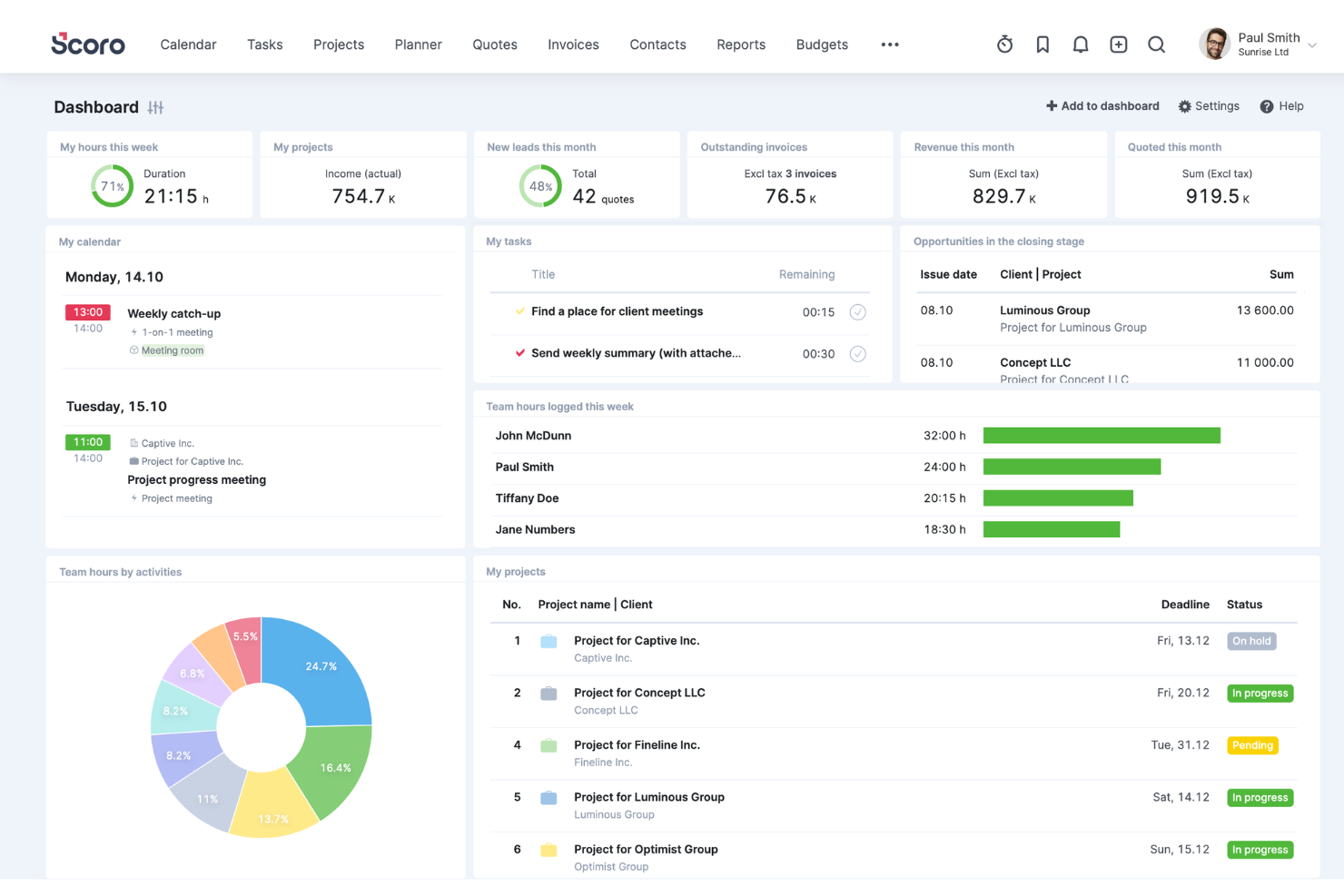
Scoro is a comprehensive work management software designed for professional services, offering a wide range of features to help boost service profitability. It caters to various industries and roles within the business, providing tools for project management, quoting and budgeting, invoicing, sales and CRM, resource planning, time tracking, and reporting.
One of Scoro's standout features is its project management tool, which can handle multiple projects simultaneously, with capabilities to assign tasks, set deadlines, track progress in real time, and manage resources effectively. Additionally, the platform's dynamic scheduling tools allow for adjustments on the fly, accommodating last-minute changes without disrupting the entire project workflow.
Furthermore, Scoro's advanced reporting and analytics features provide invaluable insights into every aspect of business operations. These reports are fully customizable and cover everything from detailed financial reports that analyze profits and losses to performance analytics that gauge project success and team productivity.
Integrations include Google Calendar, Microsoft Exchange, Xero, QuickBooks, Sage Intacct, Expensify, Stripe, Jira, Slack, Asana, Dropbox, PayPal, and more.
New Product Updates from Scoro

Scoro Adds Time Mobile App and ELI Improvements
Scoro adds the Scoro Time mobile app for iOS/Android to track time anywhere and expands ELI with attachments, smarter filtering, and trigger-based actions. For more information, visit Scoro's official site.

Best for end-to-end PSA management
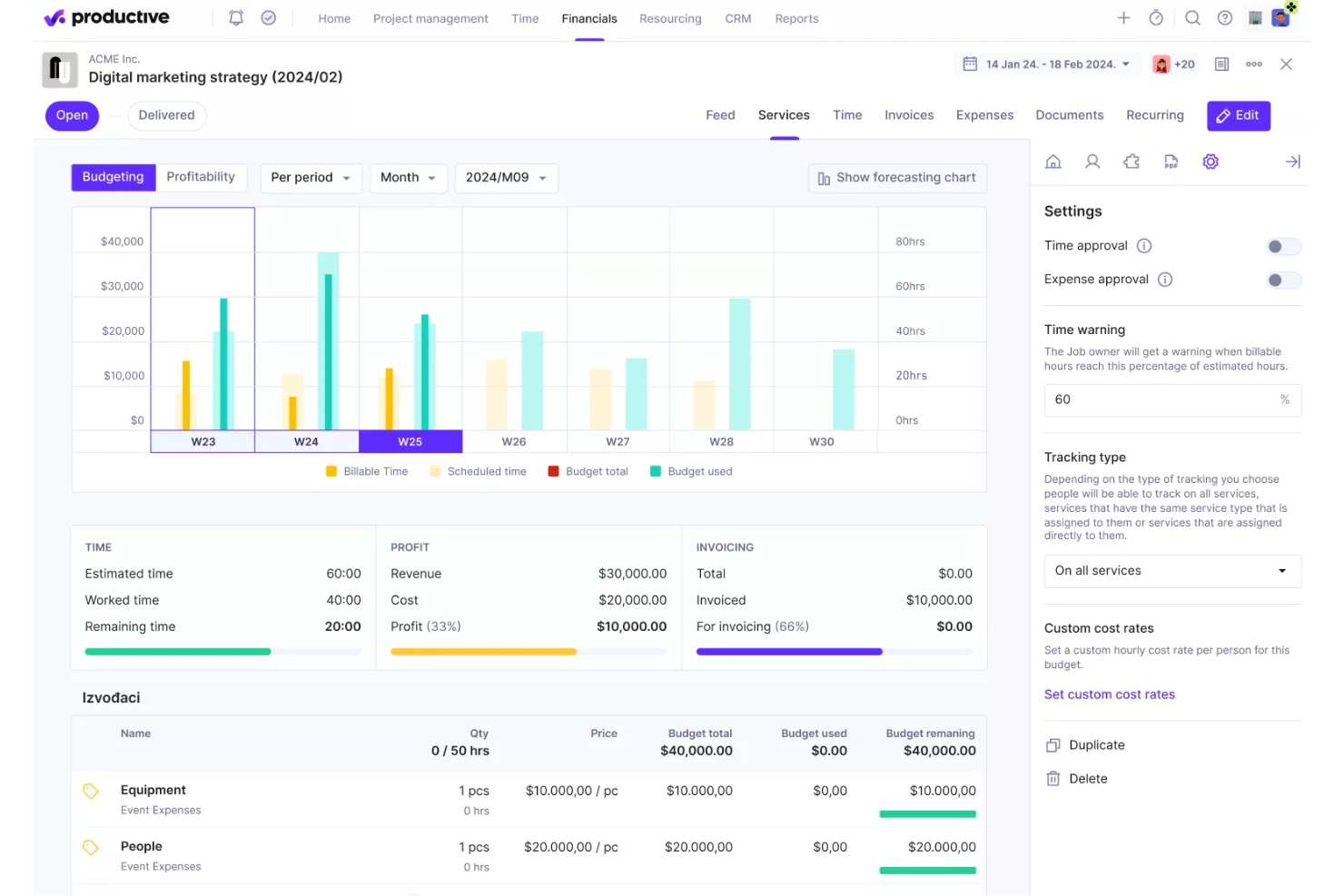
Productive is a comprehensive software solution designed to handle end-to-end processes for professional services and agencies. It integrates a wide range of tools necessary for managing projects, tracking time, allocating resources, and handling financial aspects, all within a single platform.
The platform offers advanced project management capabilities, such as Gantt charts for visualizing project timelines, task management to keep teams organized, and workload management to ensure resources are used effectively. Additionally, Productive includes tools for time tracking and billing, allowing agencies to accurately log hours, generate invoices, and manage payments.
Furthermore, the platform's CRM and sales tools help manage client relationships and streamline the sales process. Agencies can easily plan schedules, create pipelines, and track the status of projects and deals. Productive’s document management and automation features also reduce administrative overhead by automating repetitive tasks and ensuring that all team members have access to the latest project information and documentation.
Key integrations include Jira, Slack, QuickBooks, Xero, Zapier, Google Drive, Sage, BambooHR, and HubSpot.
New Product Updates from Productive
Productive Adds Voice Dictation, Slack Connector, Proposals, and Overtime
Productive adds voice dictation, a Slack Connector, proposal controls, and overtime tracking. These updates support faster AI interactions, client proposals, and time management. For more information, visit Productive’s official site.

Accelo
Best for professional services automation
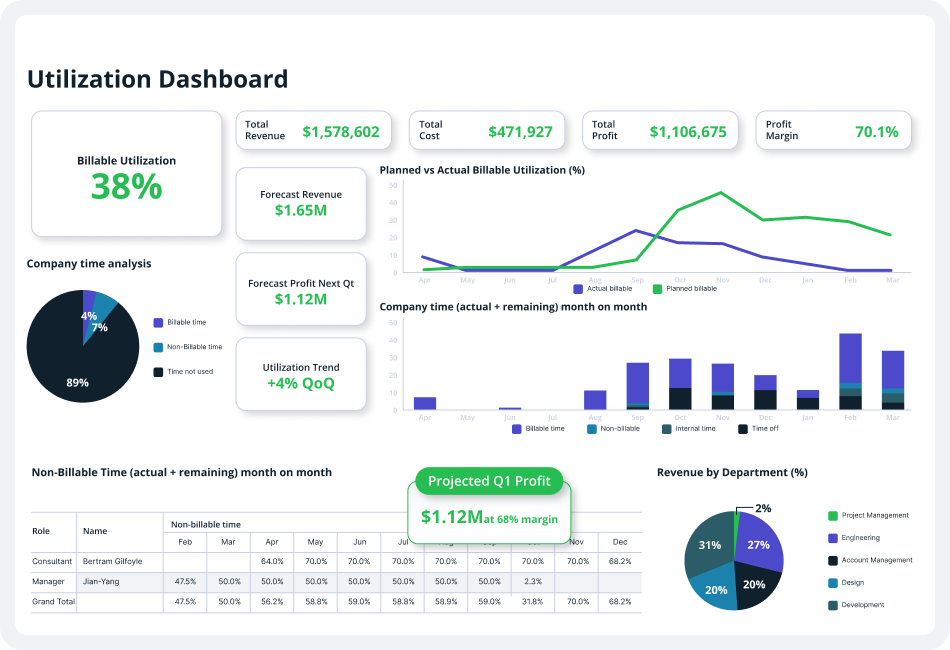
Accelo is a comprehensive professional services automation (PSA) platform designed to enhance the operations of service-based businesses. It offers a suite of tools for client relationship management (CRM), project management, time tracking, billing, invoicing, and client communication.
The platform's automation capabilities offer numerous opportunities to reduce repetitive, manual tasks, freeing up more time for billable client work. For instance, the quote-to-project conversion feature allows users to create new projects based on approved quotes in just a few clicks. Additionally, bulk client billing automates the generation of accurate client invoices into pre-made templates.
Furthermore, Accelo's project management features allow teams to collaborate, plan, manage, and deliver client projects efficiently through project templates, automated time tracking, custom workflows, and project triggers. Other features include branded invoice templates, custom payment terms, and accounting software integrations that save time and improve processes.
Integrations include Google Workspace, Microsoft 365, Microsoft Exchange & Microsoft Outlook, Xero, QuickBooks Online, HubSpot, Mailchimp, Salesforce, Zapier, Stripe, PayPal, Jira, Continuum, Zendesk, Microsoft Power BI, Expensify, Gusto, HubSpot Partner Portal, Practice Ignition, Google Analytics, and others.
New Product Updates from Accelo

Accelo Rebuilds Mobile App for Project and Time Management
Accelo rebuilds its mobile app with task management, new work creation, and mobile timesheets for Forecast customers. This helps teams keep project and time data current while working away from a desktop. For more information, visit Accelo’s official site.

Wrike
Best for generating accurate reports plus actionable insights

Wrike is a project management software that is designed for marketing agencies, project teams, and professional service providers. Wrike offers an all-in-one collaboration solution, which simplifies the project management process as well as resource allocation and people management.
The platform enables users to collaborate on projects without having to constantly call, text, or email to communicate. Users get access to collaborative features like automated notifications, dynamic reports, live editing, and real-time comments to make sure that every team member, stakeholder, and project contributor is on the same page throughout the project development process. Apart from the ability to share information and digital assets within the team, the platform is also tailored to make it easier for project managers and professional service providers to share updates with clients as needed.
Project managers can significantly improve client collaboration by simply inviting their clients into Wrike and making them a part of the work process. This allows clients to provide direct feedback and approvals on critical project decisions. And project managers can reduce the tedious back-and-forth process of getting requirements from clients on project requests or scope changes by using customizable request forms. This will enable agencies and teams to quickly collect all the necessary information from clients in one location and trigger fully planned projects with predefined actions, task assignees, and timelines.
New Product Updates from Wrike
Wrike Expands Gantt Planning, Approvals, and AI Work Intake
Wrike adds cross-project Gantt dependencies, flexible approval routing, and AI work intake through Wrike MCP. These updates give teams more control over planning, decision-making, and incoming work. For more information, visit Wrike’s official site.

VOGSY
Best for global services organizations

VOGSY is a unified project and resource platform that helps organizations set up new countries, track international projects, and connect local finance packages. The professional services automation (PSA) software offers end-to-end solutions built for services businesses so they can focus on what they do best—providing services—without worrying about the complexities of international expansion.
The cloud-based PSA platform also provides tools for project management, task management, resource management, performance monitoring, as well as automated billing and invoicing. It allows professional services firms to keep track of every client and deal, engage in a more efficient and sustainable quote-to-cash approach, and generate a more concise and reliable statement of work (SOW) on soft-booked services and projects.
With VOGSY’s professional service software, startups and SMEs can effectively plan their projects with great detail. They can leverage the platform’s robust work breakdown structure to design and implement a cohesive project roadmap based on key objectives and desired outcomes. The software allows them to budget the required work, resources, potential revenue, and margins accordingly, oftentimes even before the deal is finalized.
With the task management feature, users can allocate tasks and assign them to the appropriate personnel with the right skill set to finish them on time and on budget. Users can set tasks for themselves or their entire team, addressing everything from their quote-to-cash cycle, which includes the clients, the nature of the deal, the proposed projects, and the billing and invoicing.
This means that services businesses can focus on what they do best—providing services—without worrying about the complexities of international expansion.
Features include resource and project management, international project views and resource allocation, collaboration, reporting dashboards, budgeting, professional services automation, Gantt charts, notifications & alerts.
Integrations include Google Workspace, Jira, Microsoft Excel, Xero, Intuit Quickbooks Online, Copper, Hubspot, Salesforce, and Zoho.
VOGSY has a free version that is accessible through a personal Gmail account. It comes with all the features and is limited to a single user. Paid plans cost from $13/user/month. All paid plans require a minimum of 10 users and include a free trial.
New Product Updates from VOGSY
VOGSY Adds Velocity Agent Verdicts for Quote Approvals
VOGSY adds Velocity agent verdicts for quote approval requests with risk levels, margin checks, discount analysis, and reasoning. This helps approvers assess quote risk before making a final decision. For more information, visit VOGSY’s official site.
 .

Dayshape
Best for AI-powered workforce scheduling

Dayshape is a resource management and scheduling platform designed for professional services organizations, with AI-driven tools for capacity planning, project financials, and governance.
Who Is Dayshape Best For?
Dayshape is a strong fit for mid-to-large professional services firms—particularly in accounting, consulting, and legal—that need firm-wide resource visibility and scheduling at scale.
Why I Picked Dayshape
Dayshape is one of my top picks because I love how its AI scheduling engine doesn't just surface available people, it processes thousands of scheduling options per second and ranks them by suitability. In practice, that means my team can factor in skills, preferences, certifications, and existing commitments simultaneously. I also rely on the roll-forward feature for recurring engagements, which carries forward project structures so we're not rebuilding schedules from scratch each cycle.
Dayshape Key Features
- Real-time project financials: Track budgets, margins, and fee forecasts at the project level as schedules change.
- Capacity and demand planning: View firm-wide supply and demand across teams, grades, and time horizons in a single dashboard.
- People preferences: Let staff set scheduling preferences and availability, which the system factors in during resource allocation.
- Configurable approval workflows: Set up multi-step approval chains for schedule changes based on your firm's governance structure.
Dayshape Integrations
Dayshape integrates with leading ERP, PSA, and practice management systems, with named integrations including Workday, SAP, OpenHR, and Dynamics 365. Dayshape also has a co-developed packaged solution with Workday called Dayshape Intelligent Staffing, featuring pre-built integrations for firms already running Workday. Zapier support is not clearly documented, and API availability for custom integrations is not confirmed on the vendor's site.
Pros and Cons
Pros:
- Trusted by Big Four accounting firms
- Real-time project financials built into scheduling
- AI suggests ranked resource matches firm-wide
Cons:
- Dashboard and report customization is limited
- Struggles with high volumes of small projects

Kantata
Best for full lifecycle service delivery

Kantata is a professional services platform purpose-built to help firms manage complex client engagements with ease. Instead of relying on disconnected tools for projects, resources, and reporting, it brings everything together so your team can plan, deliver, and analyze work in one streamlined system.
What makes Kantata stand out is how it supports the full lifecycle of service delivery—estimating, planning, executing, analyzing, and optimizing. You can forecast demand, align resources with project needs, and track budgets and profitability in real time. By connecting projects, financials, and staffing in a single view, Kantata gives you the clarity to make confident decisions and keep engagements running smoothly from start to finish.
Kantata also emphasizes collaboration and business intelligence. Activity feeds, task boards, and built-in surveys keep both teams and clients engaged throughout delivery, while customizable dashboards and 70+ prebuilt reports surface insights into utilization, portfolio health, and profitability. This combination of people-focused planning and data-driven visibility makes it easier to deliver consistently successful client outcomes.
New Product Updates from Kantata

Kantata Adds Access Group Change History
Kantata adds Access Groups History, letting account administrators track changes to group details, membership, and permissions in Recent History. The update also makes these events available through the Subscribed Events API for broader monitoring. For more information, visit Kantata’s official site.
 .

Best client portals for project insight sharing
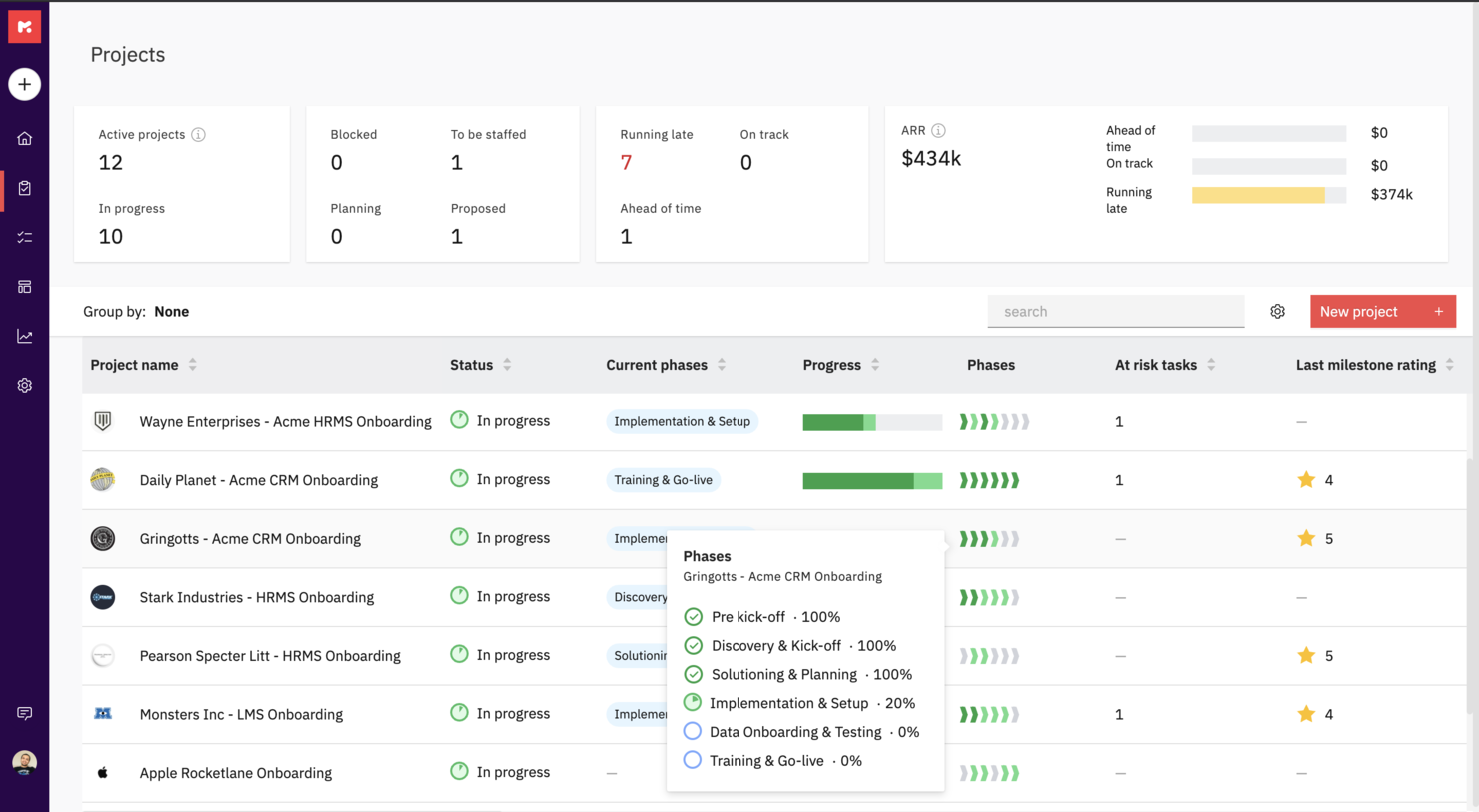
Rocketlane is a professional service software purpose-built to run customer-facing projects. It uniquely combines project management, document collaboration, and communication to help teams hit their project goals, accelerate time-to-value, and deliver a 5-star customer experience.
Rocketlane offers private and shared views for project plans and documents as well as a customer portal for stakeholder and client views. You can also codify your best practices with project and document templates to create them once and reuse them forever across projects.
With Rocketlane, you'll be able to keep your customers involved and make them accountable with reminders, notifications, and actionable emails. You can work together and create new or embed existing documents, collaborate on them synchronously and experience Slack-like chat inside Rocketlane.
Rocketlane costs from $19/user/month and offers a free 14-day trial.

HaloPSA
Best PSA software for MSPs

HaloPSA is a solution, designed for MSPs and service providers. HaloPSA gives users powerful out-of-the-box functionality. With an integrated PSA platform, you get features such as time-tracking and billing, advanced reporting, asset management, remote access, seamless integrations, automation tools and more.
HaloPSA is a fully configurable system for managed IT services and is the PSA solution of choice for enterprises such as ATOS, NEC and Gijima.
HaloPSA integrates with many popular tools such as Microsoft CSP, Splunk, N-Able N-Central/RMM, Xero, Teams, Slack, Zapier, and TeamViewer to name a few. View their entire list of integrations on their website.
HaloPSA costs from $29/user/month.

Forecast
Best for mid-sized agencies and consultancies

Forecast is an AI-powered project and resource management software designed for professional services. It offers tools that help you manage project planning, resource allocation, and performance tracking, enhancing your team's operational efficiency.
Forecast stands out with its real-time workload visibility and capacity tracking, which helps you understand your team's demand and allocate resources based on skills and availability. This functionality ensures that your projects are on track and your team isn't overburdened, allowing for smoother project execution.
Another compelling feature is its ability to provide detailed utilization reports and project baselines. These tools give you insights into your team's performance and project progress, helping you make informed decisions and optimize resources to increase billable hours. Features include automated time tracking, which reduces the administrative burden and allows your team to focus on more critical tasks. Risk prediction alerts offer proactive insights into potential project challenges, enabling you to address issues before they escalate. Real-time dashboards provide a comprehensive view of project timelines and financials, enhancing your ability to manage budgets and profits effectively.
Integrations include Azure DevOps, GitLab, GitHub, BambooHR, HiBob, Google Calendar, Google Drive, MS Teams, Office 365 Calendar, Slack, Trello, and Zapier.
Outro software para serviços profissionais
Eis algumas opções adicionais de software para serviços profissionais que não entraram na minha seleção, mas que vale a pena conhecer:
- Workzone
For document proofing tool
- Adobe Workfront
Cross-platform PSA software
- Bonsai Agency Software
For integrated project, client, and financial management
- Birdview
For BI reporting
- Projector
PSA software for accessibility
- Polaris PSA By Replicon
PSA with resource allocation, time tracking, billing, and reporting
- Kimble
For salesforce users and management consulting
- Parallax
For efficient project management and streamlined business operations
- OnePlan
For managing project finances
- Ravetree
For retainer contracts
- Workamajig Platinum
For creative teams
- Netsuite OpenAir
For small businesses
- Upland
For managing large teams
- Deltek Workbook
For client transparency and communication
- Unit4PSA
For end-to-end administration
- Height
For cross-functional project and resource planning
- Changepoint
CRM-integrated PSA
- Celoxis
PSS for enterprises
- ClickTime
For medium-sized businesses seeking to centralize their resource management processes
- Hubstaff
PSS time management reports & analysis


How I Evaluate Professional Services Software
I split my evaluation into two layers: the baseline every tool must hit—billable time tracking, resource capacity, and client invoicing—and the differentiators that set the best PSAs apart.
Core Functionality (Table Stakes For This List)
When I'm selecting tools for my list, I rank each one on a scale from 0 (does not offer the functionality) to 5 (excels in this area) for each core functionality listed below. Then, I calculate the tool's total score into a percentage. Each tool needs to achieve a minimum total score of 65% to be considered for inclusion.
- Project Planning & Delivery: I look for scheduling tools that handle dependencies, milestones, and baselines—things like mapping a multi-phase ERP rollout across workstreams with clear critical paths.
- Resource Management: Matching the right consultant to a project based on skills, availability, and utilization targets is central, so I evaluate how each tool handles capacity planning.
- Time & Expense Tracking: Each tool should support billable vs. non-billable splits and rate cards, since accurate capture drives everything from invoicing to margin analysis downstream.
- Project Financials & Billing: I check whether a platform supports multiple billing models—fixed-fee, time-and-materials, milestone-based—and tracks budgets against actuals at the engagement level.
- Utilization & Profitability Analytics: Dashboards that surface real-time KPIs like billable utilization rates, realization percentages, and per-project margins help leaders make staffing and pricing decisions.
- PSA-CRM/ERP Integrations: Connecting delivery data to your CRM and accounting stack matters, so I evaluate native connectors and API depth for tools like Salesforce, QuickBooks, and NetSuite.
Once I have a list of tools that meet this criteria, I consider what sets each platform apart.
Differentiating Factors (What Sets Vendors Apart)
Here's how I compare and contrast different vendors:
Standout Features
Quote-to-cash automation is a major differentiator—I look for platforms that connect opportunity creation through SOW, staffing, delivery, and invoicing without manual handoffs. Scenario-based forecasting also matters when you're juggling a growing pipeline and need to model how new wins affect headcount and margins. Client-facing portals where stakeholders can approve deliverables and review project status cut down on update meetings and keep engagements transparent.
Beyond Features
Firm size and vertical fit shape my evaluation significantly. A five-person design studio and a 500-consultant IT services firm have very different needs around multi-entity support, currency handling, and project templates. I also evaluate pricing structures—whether a vendor charges per billable seat, per user, or offers modular bundles—since total cost of ownership shifts dramatically at scale. Implementation timelines matter too, especially for firms that need domain-specific onboarding rather than generic SaaS setup.
Como escolher software para serviços profissionais
É fácil perder-se em listas extensas de funcionalidades e estruturas de preços complexas. Para o ajudar a manter o foco enquanto percorre o seu processo único de seleção de software, eis uma lista de fatores a ter em conta:
| Fator | O que deve considerar |
|---|---|
| Escalabilidade | O software consegue acompanhar o crescimento da sua empresa? Verifique se suporta mais utilizadores ou projetos à medida que expande a atividade. Procure planos de preços flexíveis que acomodem o crescimento. |
| Integrações | Integra-se com as ferramentas que já utiliza? Certifique-se de que se liga ao seu CRM, software de contabilidade ou outras aplicações essenciais para evitar interrupções no fluxo de trabalho. |
| Personalização | Pode adaptar o software às suas necessidades? Certifique-se de que consegue ajustar fluxos de trabalho, campos e painéis de controlo de acordo com os seus processos e preferências. |
| Facilidade de utilização | A interface é intuitiva para a sua equipa? Teste a versão experimental para verificar se é fácil de utilizar e reduz a curva de aprendizagem, permitindo uma adoção rápida. |
| Implementação e integração inicial | Quanto tempo demorará a começar? Informe-se sobre o processo de integração inicial, os recursos de formação e o suporte, para garantir uma transição tranquila e sem períodos de inatividade. |
| Custo | Está dentro do seu orçamento? Compare o custo com as suas necessidades e tenha em conta taxas ocultas ou custos adicionais relativos a funcionalidades ou utilizadores extra. |
| Medidas de segurança | Protege os seus dados? Verifique a encriptação de dados, os controlos de acesso e a conformidade do software com as normas de segurança, para manter as suas informações protegidas. |
| Disponibilidade do suporte | Existe ajuda quando precisa dela? Verifique a disponibilidade do apoio ao cliente, incluindo chat em direto, suporte telefónico e tempos de resposta para problemas urgentes. |
O que é o software para serviços profissionais?
O software para serviços profissionais é uma ferramenta concebida para ajudar as empresas a gerir projetos de clientes, registar o tempo e tratar da faturação e da emissão de faturas. Profissionais como consultores, contabilistas e equipas jurídicas utilizam normalmente estas ferramentas para organizar o seu trabalho e melhorar a eficiência. As funcionalidades de gestão de projetos, registo de tempo e faturação ajudam a organizar tarefas, cumprir prazos e garantir uma faturação precisa aos clientes. No geral, estas ferramentas simplificam processos complexos, facilitando a prestação de serviços de qualidade pelas equipas.
Funcionalidades
Ao selecionar software para serviços profissionais, esteja atento às seguintes funcionalidades principais:
- Gestão de projetos: Ajuda a planear, executar e acompanhar projetos de forma eficaz, garantindo o cumprimento dos prazos.
- Registo de tempo: Regista com precisão as horas faturáveis, facilitando a faturação aos clientes e a gestão da produtividade da equipa.
- Faturação e emissão de faturas: Automatiza a criação de faturas e acompanha os pagamentos, reduzindo a carga de trabalho administrativa.
- Planeamento de recursos: Atribui e gere recursos de forma eficiente, garantindo a utilização ideal da equipa e das ferramentas.
- Ferramentas de colaboração: Facilitam a comunicação e a colaboração entre os membros da equipa, melhorando os resultados dos projetos.
- Capacidades de integração: Ligam-se ao software existente, como ferramentas de CRM e contabilidade, garantindo fluxos de trabalho fluidos.
- Painéis personalizáveis: Permitem adaptar a interface para apresentar dados e métricas relevantes e obter informações rapidamente.
- Medidas de segurança: Protegem dados sensíveis através de encriptação e controlos de acesso, garantindo a conformidade com as normas.
- Disponibilidade de aplicação móvel: Disponibiliza acesso a funcionalidades essenciais em qualquer lugar, mantendo-o ligado a projetos e tarefas.
- Análises baseadas em IA: Oferecem informações através da análise de dados, ajudando-o a tomar decisões empresariais fundamentadas.
Benefícios
A implementação de software para serviços profissionais proporciona vários benefícios à sua equipa e à sua empresa. Eis alguns dos que pode esperar:
- Maior eficiência: Automatiza tarefas demoradas, como a emissão de faturas e o planeamento de recursos, libertando tempo para trabalhos mais importantes.
- Melhor colaboração: Disponibiliza ferramentas de comunicação e partilha de ficheiros, mantendo os membros da equipa ligados e informados.
- Faturação precisa: Regista horas faturáveis e despesas, garantindo que as faturas são exatas e reduzindo os conflitos com os clientes.
- Melhor tomada de decisões: Disponibiliza análises baseadas em IA e painéis personalizáveis que oferecem informações sobre o desempenho dos projetos.
- Escalabilidade: Acompanha o crescimento da sua empresa, suportando mais utilizadores e projetos sem necessidade de uma reformulação completa do sistema.
- Maior segurança: Protege os dados dos clientes e da empresa através de encriptação e controlos de acesso, mantendo a confiança e a conformidade.
- Acessibilidade móvel: Permite aos membros da equipa aceder a informações críticas e gerir tarefas a partir de qualquer lugar, aumentando a flexibilidade.
Custos & preços
A seleção de software para serviços profissionais exige uma compreensão dos vários modelos de preços e planos disponíveis. Os custos variam consoante as funcionalidades, a dimensão da equipa, os complementos, entre outros fatores. A tabela abaixo resume os planos comuns, os seus preços médios e as funcionalidades normalmente incluídas nas soluções de software para serviços profissionais:
Tabela de comparação de planos de software para serviços profissionais
| Tipo de plano | Preço médio | Funcionalidades comuns |
|---|---|---|
| Plano gratuito | $0 | Gestão básica de projetos, registo de tempo limitado e ferramentas básicas de colaboração. |
| Plano pessoal | $5-$25/utilizador/mês | Gestão de projetos, registo de tempo, faturação e emissão de faturas e relatórios básicos. |
| Plano empresarial | $30-$75/utilizador/mês | Gestão avançada de projetos, planeamento de recursos, integrações e segurança reforçada. |
| Plano empresarial avançado | $80-$150/utilizador/mês | Painéis personalizáveis, análises baseadas em IA, suporte premium e funcionalidades completas de conformidade. |
Perguntas frequentes sobre software para serviços profissionais
Eis algumas respostas a perguntas comuns sobre software para serviços profissionais:
O software para serviços profissionais pode integrar-se com outras ferramentas?
Sim, a maioria dos softwares para serviços profissionais pode integrar-se com ferramentas como sistemas CRM, software de contabilidade e plataformas de comunicação. Esta integração ajuda a criar um fluxo de trabalho unificado, permitindo à sua equipa aceder a todas as informações necessárias num só lugar. Consulte as opções de integração do software para garantir que este se liga às ferramentas que já utiliza.
A segurança dos dados é uma preocupação no caso do software para serviços profissionais?
Sim, a segurança dos dados é uma preocupação fundamental. Procure software que ofereça encriptação, controlos de acesso e conformidade com as normas do setor. É importante garantir que os dados dos seus clientes e as informações sensíveis estão protegidos contra o acesso não autorizado. Informe-se sempre sobre as medidas de segurança do software durante o processo de avaliação.
Quanto tempo demora a implementar software para serviços profissionais?
O tempo de implementação varia consoante a complexidade do software e o grau de preparação da sua equipa. Algumas ferramentas permitem uma configuração rápida com modelos e guias, enquanto outras podem exigir uma personalização detalhada. Planeie um período de transição durante o qual a sua equipa possa aprender a utilizar o sistema e ajustar os fluxos de trabalho. Considere recursos como formação e suporte para facilitar o processo.