10 Melhores Softwares de Automação de Serviços Profissionais 2026

10 Melhor software de automatização de serviços profissionais


O melhor software de automatização de serviços profissionais ajuda-o a gerir a entrega de projetos, acompanhar a utilização e as tarifas faturáveis e melhorar as operações e os processos empresariais, proporcionando uma melhor experiência aos clientes. Pode utilizá-lo para manter relações sólidas com os seus clientes, construir uma boa reputação e expandir o seu negócio, prestando mais serviços a mais clientes.
Utilizei os meus 15 anos de experiência em serviços profissionais e gestão de projetos para avaliar mais de 20 ferramentas de automatização de serviços profissionais. Leia abaixo a minha análise de cada ferramenta, das principais funcionalidades e dos casos de utilização. Vou ajudá-lo a encontrar a ferramenta certa para melhorar a visibilidade, a alocação de recursos e a faturação, bem como a obter melhores informações sobre as suas finanças, operações e satisfação geral dos clientes.
Tabela comparativa de soluções de software de automatização de serviços profissionais
Esta tabela comparativa resume os detalhes de preços das minhas principais seleções de soluções de software de automatização de serviços profissionais:
| Tool | Best For | Trial Info | Price | ||
|---|---|---|---|---|---|
| 1 | Best for all-in-one work management automation | 14-day free trial | From $17/user/month | Website | |
| 2 | Best for tracking time and expenses together | Free demo available | From $20/user/month | Website | |
| 3 | Best for end-to-end PSA management | 14-day free trial | From $10/user/month (billed annually) | Website | |
| 4 | Best for maximizing project profitability from quote-to-cash | Free demo available | Pricing upon request | Website | |
| 5 | Best for IT automation | Free trial available | From $149/user/month (billed annually) | Website | |
| 6 | Best for built-in client collaboration automations | Free plan + 14-day trial + demo available | From $10/user/month (billed annually) | Website | |
| 7 | Best for full lifecycle service delivery | Not available | Pricing upon request | Website | |
| 8 | Best for service organizations with global resources and projects | Free trial available | From $16/user/month (billed annually) | Website | |
| 9 | Best for MSP operational growth | 14-day free trial | Pricing upon request | Website | |
| 10 | Best with real-time reporting dashboards | Free demo available | Pricing upon request | Website |


Why Trust Our Software Recommendations
Our team has been testing and reviewing software since 2012. As project managers ourselves, we know how difficult—and important—it is to choose the right software.
For this guide, we evaluated tools using hands-on testing and independent research, scoring tools using our selection criteria. We also draw on insights from industry thought leaders and practicing project management experts.
Our reviews reflect our human editorial judgment, not a sales pitch.
Expert reviewers:

Visão geral das melhores soluções de software de automatização de serviços profissionais
Eis uma breve descrição de cada solução de automatização de serviços profissionais da minha lista, do seu melhor caso de utilização, de algumas funcionalidades dignas de nota e de capturas de ecrã que lhe dão uma visão geral da interface do utilizador.

Scoro
Best for all-in-one work management automation
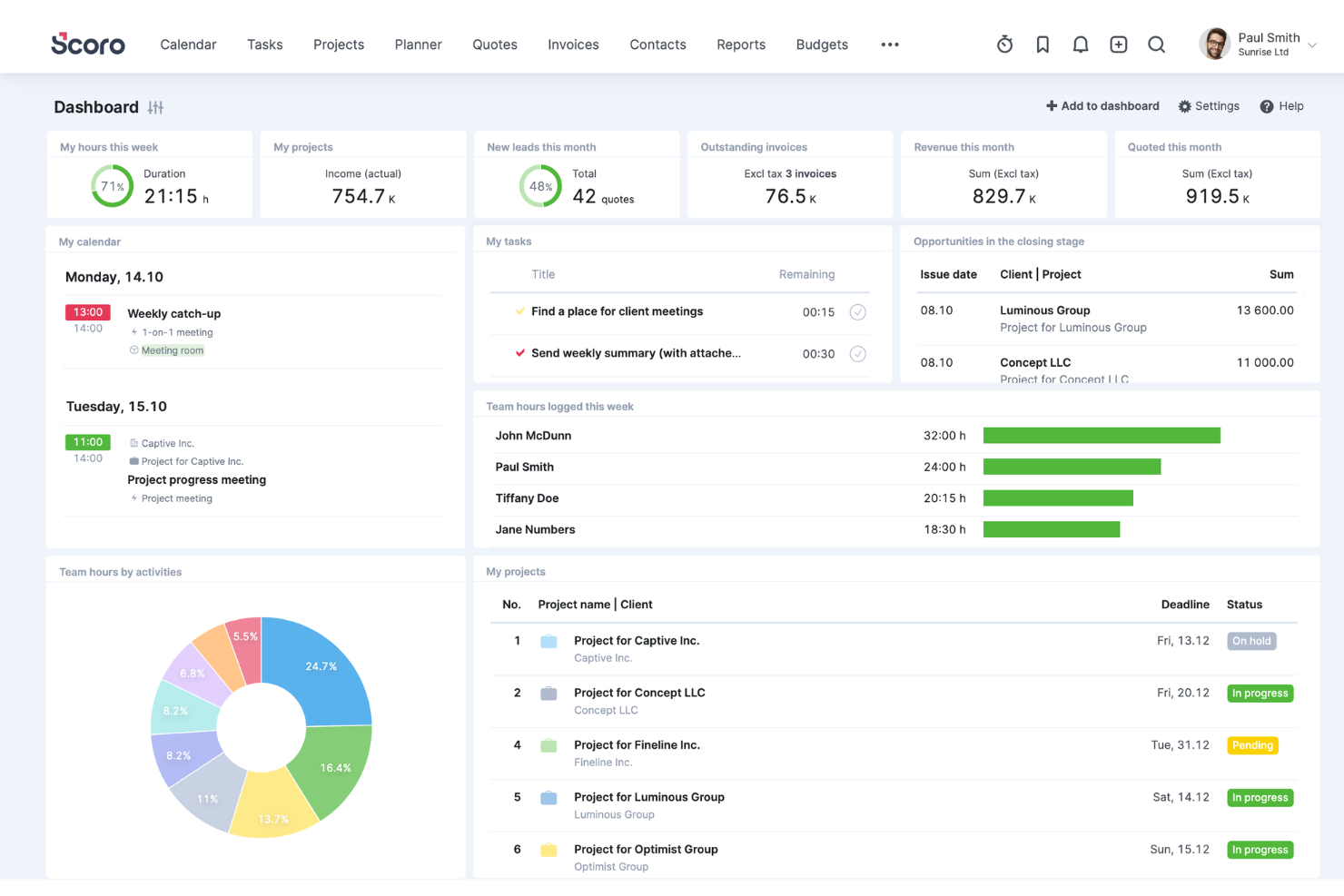
Scoro is a professional services automation software that can help you manage your operations more effectively. It provides a suite of tools for various roles within an organization and addresses every aspect of service delivery from project planning and execution to customer relationship management and billing. This level of integration is essential for services firms that need to maintain alignment across various departments and projects.
Why I Picked Scoro
Scoro excels in automating the critical yet time-consuming aspects of professional services, such as time tracking, invoicing, and reporting. The automated billing features let you quickly create detailed invoices based on the tracked time and expenses, which reduces errors and saves valuable administrative time. The software's ability to generate in-depth, customizable reports also gives you and your stakeholders insights into business performance, client profitability, and operational efficiency.
Another key aspect that sets Scoro apart is its CRM functionality, which allows for a seamless flow of information from initial client contact to project delivery and follow-up. You can manage client interactions, store critical data, and track communication history. Furthermore, the ability to link CRM data with project management and billing processes helps you keep clients informed and contributes to better client satisfaction and retention.
Scoro Key Features
Scoro also offers a range of other features that are designed to help you improve your professional services operations.
- Task Management: This helps you simplify task assignment and tracking, so your team stays organized and on schedule.
- Time Tracking: Scoro provides multiple options for logging hours, including a built-in timer for real-time tracking.
- Collaboration Tools: This centralizes project-related communication to foster better collaboration and let team members comment and tag each other.
- Customizable Dashboards: You can tailor your workspace to your needs and get a personalized view of KPIs and project statuses.
Scoro Integrations
Integrations include Google Calendar, Microsoft Exchange, Xero, QuickBooks, Sage Intacct, Expensify, Stripe, Jira, Slack, Asana, Dropbox, and PayPal.
Pros and Cons
Pros:
- AI assistant surfaces actionable insights
- Interlinked internal and external cost tracking
- Quote estimation matrix with margin insight
Cons:
- Gaps in mobile functionality compared to desktop features
- Custom reporting may need technical setup
New Product Updates from Scoro

Scoro Adds Time Mobile App and ELI Improvements
Scoro adds the Scoro Time mobile app for iOS/Android to track time anywhere and expands ELI with attachments, smarter filtering, and trigger-based actions. For more information, visit Scoro's official site.

BigTime
Best for tracking time and expenses together
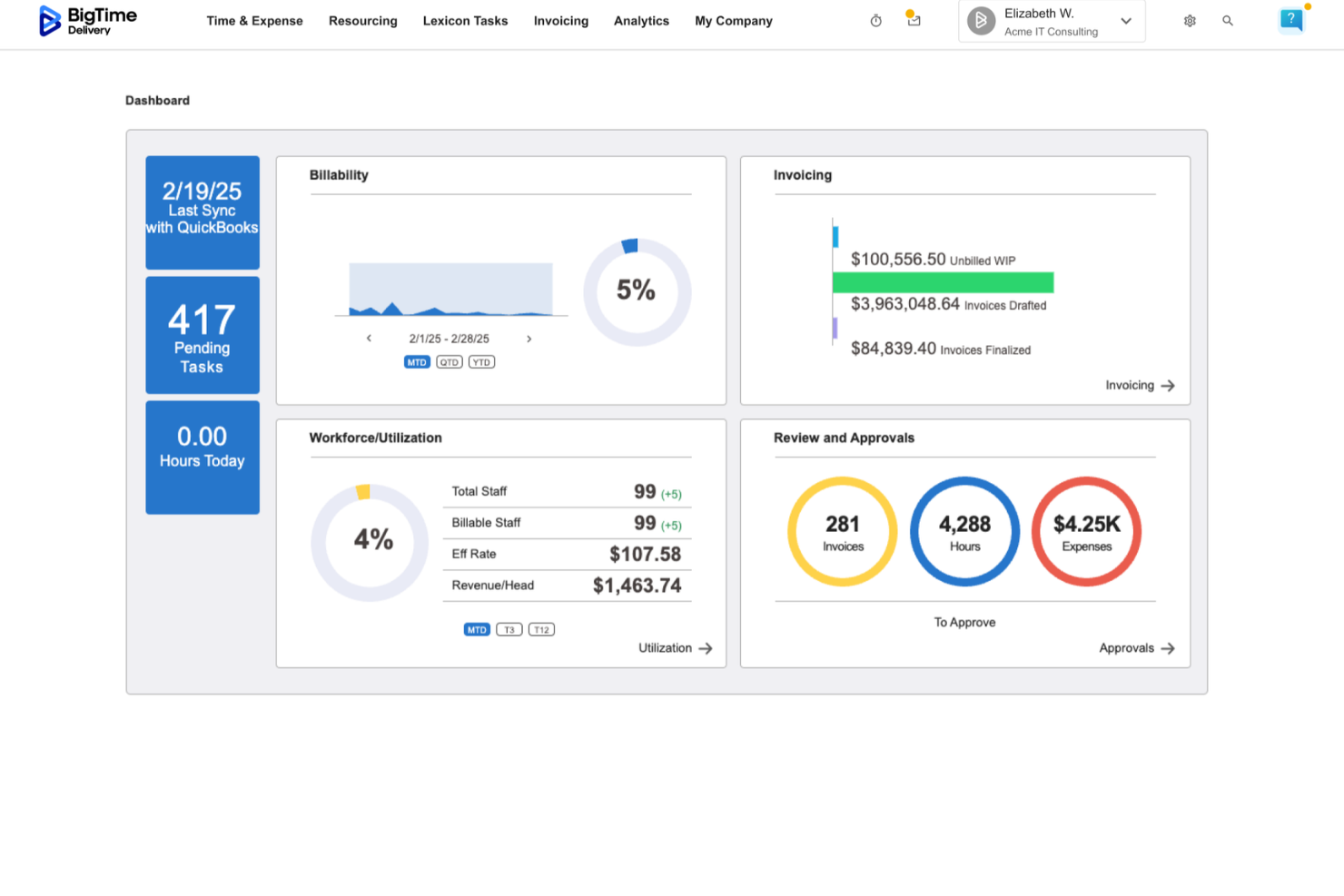
BigTime is a professional services automation (PSA) platform designed for IT, engineering, and consulting firms. It connects time tracking, billing, and financial reporting in a single system, helping teams manage projects from initial time entry through invoicing and revenue tracking. The software supports firms that rely on tools like QuickBooks and Sage by syncing financial data across systems. Billing rules, rate cards, and revenue recognition settings can be configured within BigTime to align with existing accounting structures. This allows finance teams to monitor work-in-progress (WIP), margins, and invoicing activity without relying solely on end-of-period reporting.
I recently spoke with Moti Gamburd, CEO of CARE Homecare, about how his team uses BigTime to manage time tracking and billing. He noted that time entries flow directly into billable hours with minimal manual adjustment. According to Gamburd, this helped reduce administrative errors and improved visibility into project-level profitability as work progressed.
Why I Picked BigTime
I picked BigTime because it combines time tracking, billing, and financial reporting within a system that integrates closely with general ledger platforms like QuickBooks and Sage. Teams can begin with core functionality such as time and expense tracking, billing, and profitability reporting. Additional modules, including resource management, quoting, and payment processing, can be added as operational needs expand. Each module uses the same underlying financial configuration, so billing structures and reporting logic remain consistent as usage grows. For finance leaders who need visibility into billing accuracy, WIP balances, and project margins, BigTime provides reporting and controls without requiring a full enterprise system implementation.
BigTime Key Features
BigTime offers a suite of other features that can help improve the way you manage your professional services offerings.
- Project portfolio management: Centralized visibility into active projects, including budget tracking and performance monitoring.
- Expense tracking: Capture and allocate project-related expenses to maintain budget control.
- Invoicing and payments: Generate invoices based on tracked time and expenses, with tools for monitoring payment status.
- Reporting and analytics: Access dashboards and reports focused on utilization, profitability, WIP, and financial performance.
BigTime Integrations
Integrations include QuickBooks, Salesforce, HubSpot, Jira, Xero, and Sage.
Pros and Cons
Pros:
- Unified time, billing, and financial tracking
- Modular structure allows expanded functionality over time
- Auto reminders help team compliance
Cons:
- Financial configuration may require upfront setup
- Less focused on client collaboration features compared to delivery-first tools

Best for end-to-end PSA management

Productive is a professional services automation software that's designed to help businesses streamline their operations. It's an end-to-end tool that covers everything from project management and time tracking to sales pipeline and profitability analysis.
I recently spoke with Miguel Angel Gongora Meza, the founder and director of Evolution Treks Peru, about his org's use of Productive. "I liked the fact that it presented the number of the hours worked as compared to the planned expenditures," he says. This saved them money as well. "In one of our projects we were able to save nearly 500 dollars as we were in a position to detect the inefficiencies early. It provided me with a clearer idea of how money and time were being spent and this is quite important when the resources are limited," he explains.
Why I Picked Productive
The project management feature is particularly impressive. It lets you plan projects, assign tasks, track progress, and forecast future work. The sales pipeline feature gives you a clear overview of your sales process, and the profitability analysis feature helps you understand your financial performance.
Productive's resource management and utilization insights provide a deep understanding of their team's workload and availability, which allows for better resource allocation and preventing burnout. The platform provides detailed reports and visualizations that display workloads, capacity, and efficiency levels so you can make informed decisions on task assignments and redistribute workloads as needed to optimize team performance and project efficiency.
Productive Key Features
Here are several other features offered by Productive that can help you with professional services automation.
- Time Tracking: This feature lets your team log hours with ease so you can get real-time insights into project timelines and resource allocation.
- Revenue Forecasting: You can predict future revenue streams based on current projects and resource availability, which helps with strategic planning.
- Profitability Analysis: This feature offers detailed reports on the profitability of projects and clients to help you make informed financial decisions.
- Integration with Accounting Tools: You can connect Productive to popular accounting software to facilitate efficient financial management and reporting.
Productive Integrations
Integrations include Quickbooks, Jira, Xero, Exact, Slack, Fortnox, and Personio.
Pros and Cons
Pros:
- Profitability insights available in real time
- Automations reduce repetitive task load
- End-to-end linking of projects to finances
Cons:
- You may need support to use advanced features effectively
- Customization limits in niche workflows
New Product Updates from Productive
Productive Adds Voice Dictation, Slack Connector, Proposals, and Overtime
Productive adds voice dictation, a Slack Connector, proposal controls, and overtime tracking. These updates support faster AI interactions, client proposals, and time management. For more information, visit Productive’s official site.

Accelo
Best for maximizing project profitability from quote-to-cash

Accelo is a professional services automation platform that helps businesses manage their operations more effectively. It offers features that automate various aspects of client management, project management, resource management, and financial management.
I recently spoke with Mircea Dima, the founder, CEO, and CTO of AlgoCademy. He's used Accelo in the past, and he says that "it simplified the process of project management...it was easy to coordinate with other members of my team and keep everything under control." He found the automation feature particularly useful. "Workflow automation made sure that tasks were being done on schedule and everybody remained on the same eye level," he says.
Why I Picked Accelo
Accelo links your sales process right to project delivery and invoicing, so there’s less friction handing off work. It also offers quote templates that let easily you turn estimates into project plans with time budgets, smart resource allocation to keep utilization high, and real-time cost vs. time tracking so you can see when a job is unprofitable. Built-in dashboards let you monitor margins across all open projects so small losses don’t become big ones.
Accelo Key Features
In addition to helping you optimize profitability, Accelo offers more features that can improve your team's productivity and service delivery.
- Task Management Dashboard: This feature provides a centralized view of all tasks to help your team prioritize and manage workloads effectively.
- Client Portal: This lets clients access project updates and billing information in real-time to foster transparency and better client relationships.
- Custom Reporting: You can create detailed reports tailored to your business needs, get insights into project performance, and make data-driven decisions.
- Automated Time Tracking: This feature can automatically log time spent on various tasks to maintain accurate billing and resource allocation without manual entry.
Accelo Integrations
Integrations include Google Workspace, Microsoft 365, Xero, QuickBooks Online, HubSpot, Mailchimp, Salesforce, Zapier, Stripe, PayPal, Jira, Continuum, Microsoft Power BI, Expensify, and Gusto.
Pros and Cons
Pros:
- Alerts help catch cost overruns early
- Adaptive schedules adjust with changes
- Better visibility into project profit margins
Cons:
- Mobile app more limited than web
- Some reports lack deep customization
New Product Updates from Accelo

Accelo Rebuilds Mobile App for Project and Time Management
Accelo rebuilds its mobile app with task management, new work creation, and mobile timesheets for Forecast customers. This helps teams keep project and time data current while working away from a desktop. For more information, visit Accelo’s official site.

Atera
Best for IT automation
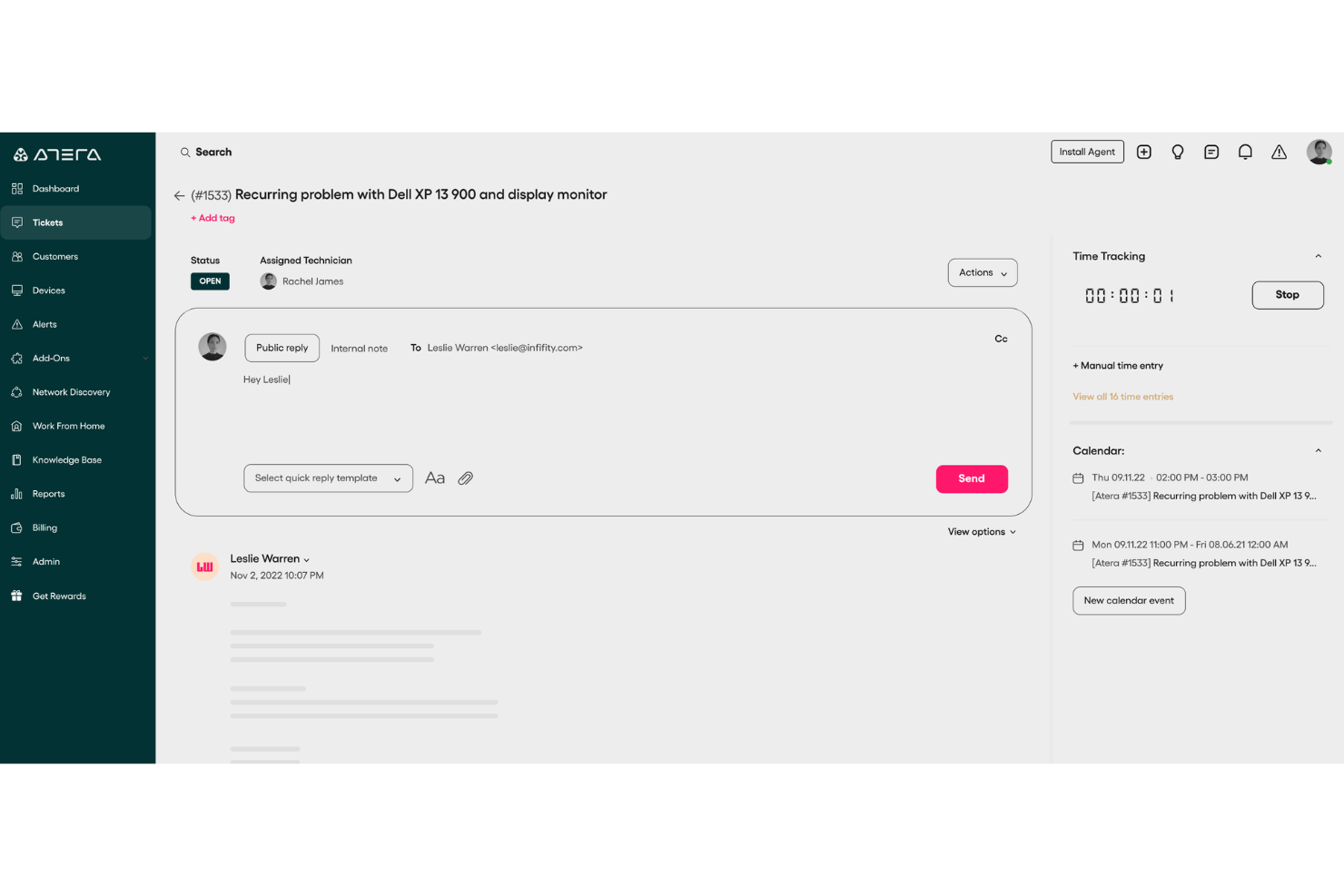
Atera offers an integrated platform that simplifies IT management for managed service providers (MSPs) and IT professionals by combining remote monitoring, management, and professional services automation. Its all-in-one nature makes it particularly appealing to businesses looking to streamline their IT operations and enhance service delivery.
Why I Picked Atera
I picked Atera because of its unique integration of remote monitoring and PSA functionalities, which is vital for IT service management. Its comprehensive ticketing system, combined with AI-powered insights, ensures that your team can manage client requests and issues effectively. Additionally, Atera's automated reporting feature allows you to track performance metrics and make informed decisions, which is crucial for maintaining service quality and client satisfaction.
Atera Key Features
In addition to its ticketing and reporting capabilities, I also found several other noteworthy features:
- Customer Portal: Provides clients with a dedicated platform to submit requests and track their status, enhancing transparency and communication.
- Flexible Contracts and Billing: Allows customization of contracts and billing processes to suit different client needs and agreements.
- Time Tracking: Facilitates accurate tracking of time spent on various tasks and projects, essential for billing and performance assessment.
- AI Ticket Tagging: Automates the classification of tickets using AI, improving response times and ticket management efficiency.
Atera Integrations
Integrations include QuickBooks, Xero, FreshBooks, Dropbox, Google Workspace, Microsoft 365, TeamViewer, Splashtop, AnyDesk, and Zapier. An API is also available for custom integrations.
Pros and Cons
Pros:
- AI-driven automation improves service quality and reduces workload.
- Integrated RMM and PSA features reduce tool redundancies.
- Centralized dashboard enhances IT management efficiency.
Cons:
- Additional costs for advanced reporting features.
- Less granular control for highly complex custom workflows or integrations.
New Product Updates from Atera

Atera Adds Approval Queue for New Agents
Atera adds an approval queue for new agents and gives technicians more control over threshold profiles without full admin access. These updates help you manage device onboarding and delegate monitoring setup. For more information, visit Atera’s official site.

Wrike
Best for built-in client collaboration automations
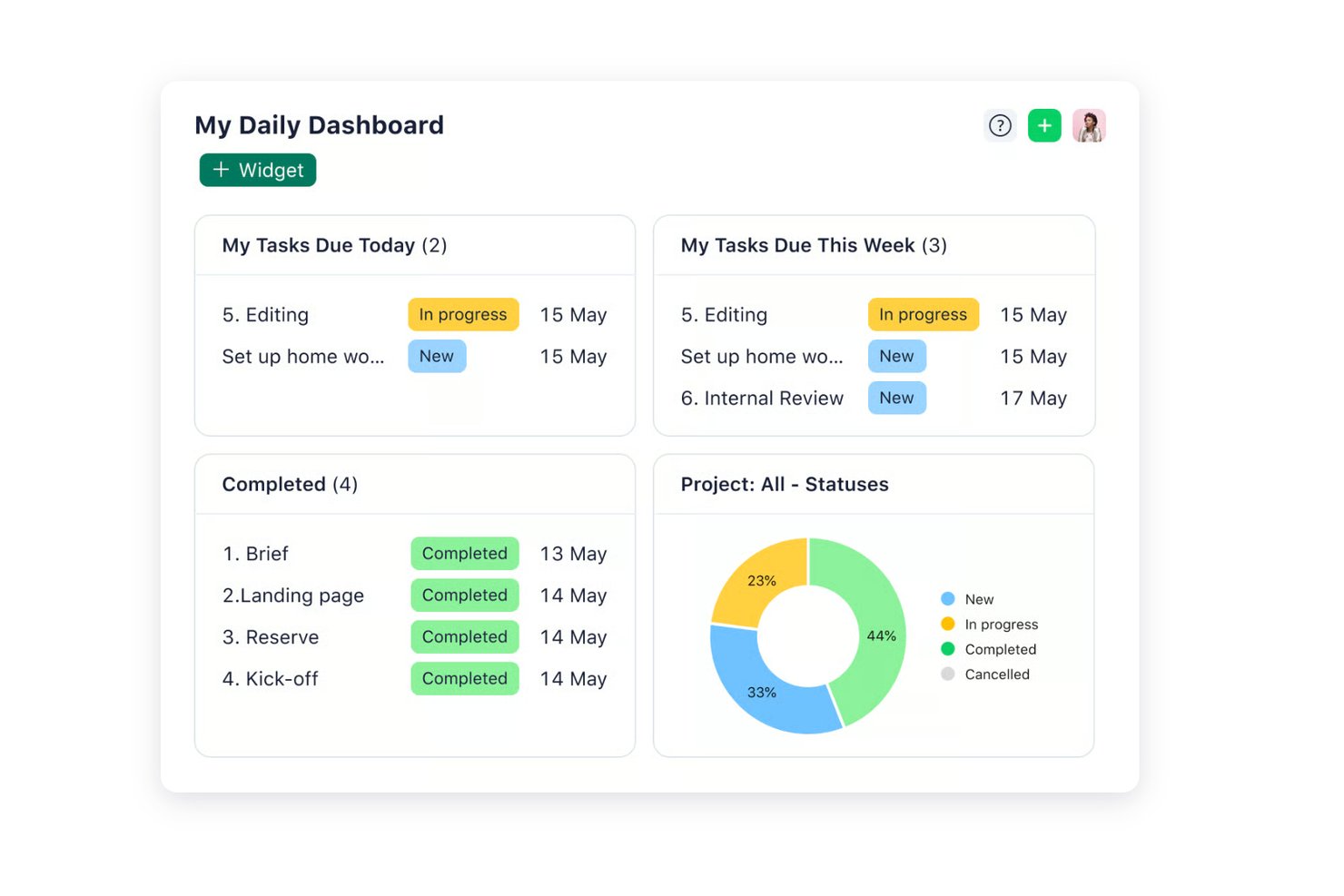
Wrike is a work management platform that combines project planning, time tracking, resource and capacity planning, workflow automation, and client collaboration tools, with budgeting available on higher tiers.
Who Is Wrike Best For?
Wrike is a strong fit for project managers and operations teams at professional services firms that need structured resource planning and client collaboration, and already have a dedicated billing or finance system in place.
Why I Picked Wrike
I've included Wrike in my top picks because its built-in client collaboration automations set it apart for teams managing high-volume, feedback-heavy client work. Wrike connects customizable intake forms directly to project blueprints, so a client request can automatically trigger a scoped project with the right workflow attached. It's worth noting that Wrike tracks time and effort against client work and offers resource and capacity planning, with budgeting on higher tiers, but it works alongside a billing system rather than replacing one.
Wrike Key Features
- Workload charts: Visual dashboards that display each team member's scheduled tasks and effort over time, letting you reassign or reschedule work directly from the view.
- Gantt chart with automatic dependency rescheduling: Interactive timelines that support four dependency types and automatically shift dependent tasks when you adjust a predecessor's dates.
- Customizable request forms connected to blueprints: Dynamic intake forms that route incoming client or internal requests directly into pre-scoped project templates.
- QuickBooks Online time export: Automated or manual export of time entries—including duration, entry date, and task details—from Wrike into QuickBooks Online for downstream invoicing.
Wrike Integrations
Wrike offers 400+ pre-built native integrations, including Salesforce, QuickBooks Online, Slack, and HubSpot. It also provides an open REST API and Wrike Integrate for systems without a native connector.
Pros and Cons
Pros:
- Gantt dependencies expose schedule impacts
- Workload views help spot overbooked staff
- Client feedback stays with project tasks
Cons:
- Financial reporting stops short of project margins
- No native client invoicing or expense tracking
New Product Updates from Wrike
Wrike Expands Gantt Planning, Approvals, and AI Work Intake
Wrike adds cross-project Gantt dependencies, flexible approval routing, and AI work intake through Wrike MCP. These updates give teams more control over planning, decision-making, and incoming work. For more information, visit Wrike’s official site.

Kantata
Best for full lifecycle service delivery

Kantata is a professional services automation (PSA) platform for firms that need to manage projects, resources, and financials in one place. Instead of juggling multiple systems, Kantata brings the entire service delivery lifecycle into a single cloud-based solution. This makes it easier to plan, staff, track, and report on client work with full visibility from start to finish.
Why I Picked Kantata
The software features powerful resource management and scheduling tools, project and portfolio management capabilities, and built-in financial oversight. Business intelligence dashboards and real-time analytics provide actionable insights, so leaders can make informed decisions on timelines, budgets, and client outcomes. The result is better visibility, stronger profitability, and smoother service delivery.
Kantata also supports ongoing collaboration and client engagement. Features like activity feeds, task boards, time tracking, and pulse surveys keep professional services teams aligned and give leaders feedback on both team morale and client sentiment throughout the project lifecycle. This people-first layer adds another dimension to traditional PSA software and makes delivery more predictable and client-focused.
Kantata Key Features
Kantata also offers several other features that make it useful as a professional services automation software.
- AI-Powered Tools: This feature uses artificial intelligence to help you optimize resource allocation and project delivery so you can make sure your team is always working at its best capacity.
- Collaboration Tools: You can facilitate seamless communication and collaboration among team members and clients to keep everyone aligned and informed.
- Advanced Business Intelligence: This provides real-time insights and analytics that empower your team with data-driven decision-making capabilities to improve project outcomes.
- Customizable Workflows: You can tailor processes to fit your specific operational needs to improve efficiency and make sure the software adapts to your business rather than the other way around.
Kantata Integrations
Integrations include Salesforce, SAP, Jira, Xero, BambooHR, Slack, Workday, QuickBooks, HubSpot, and NetSuite.
Pros and Cons
Pros:
- Built-in feedback mechanisms
- AI forecasting built in
- Multi-currency and multi-rate support
Cons:
- Configuration overhead for customization
- Implementation can be complex
New Product Updates from Kantata

Kantata Adds Access Group Change History
Kantata adds Access Groups History, letting account administrators track changes to group details, membership, and permissions in Recent History. The update also makes these events available through the Subscribed Events API for broader monitoring. For more information, visit Kantata’s official site.
 .

VOGSY
Best for service organizations with global resources and projects

VOGSY is a cloud solution that brings together project delivery, resource planning, and finance across multiple geographies. It’s for firms operating in several countries that need to manage international projects, staffing, and financials, and it supports opportunity management, allocation, time tracking, invoicing, and financial consolidation.
Why I Picked VOGSY
This tool lets you and your team run work across borders without losing track of local financial rules or currency conversions. VOGSY lets you set up multiple legal entities, local accounting tools, and tax regimes while maintaining a shared resource pool and unified dashboards. It provides intercompany invoicing and revenue distribution so internal costs are handled automatically. You also get opportunity pipelines that are linked to resource forecasts, project budgets tied into local and consolidated financials, and reports that roll up across all your entities. It's built to connect your global operations rather than forcing you to adopt a one-size-fits-all system.
VOGSY Key Features
In addition to global resource management capabilities, VOGSY offers several other features that improve your operational efficiency.
- Time and Expense Tracking: This feature lets you automate time tracking with auto-populated timesheets and simplifies expense management through easy receipt uploads.
- Task Management: This provides visual task tracking for team members across projects and improves collaboration and accountability.
- Billing and Invoicing: You can automate billing processes, as well as schedule invoices for various project types. This helps maintain accuracy and timeliness.
- Real-Time Reporting: You can create custom reports for stakeholders and your team, and use them for informed decision-making and strategic planning.
VOGSY Integrations
Integrations include Google Workspace, Jira, Microsoft 365, Xero, QuickBooks, Copper, HubSpot, Salesforce, and Zoho.
Pros and Cons
Pros:
- Intercompany revenue and cost automation
- Shared resource pool across entities
- Handles multi-country operations in one system
Cons:
- Requires careful configuration for tax regimes
- Setup complexity in multinational contexts
New Product Updates from VOGSY
VOGSY Adds Velocity Agent Verdicts for Quote Approvals
VOGSY adds Velocity agent verdicts for quote approval requests with risk levels, margin checks, discount analysis, and reasoning. This helps approvers assess quote risk before making a final decision. For more information, visit VOGSY’s official site.
 .

SuperOps
Best for MSP operational growth

For IT teams and managed service providers that want to improve their operational efficiency, SuperOps provides an AI-driven professional services automation solution that offers essential functionalities like service desk management and contract oversight. It simplifies ticketing and resource tracking, can help you improve your workflows, and offers features like mobile device management and integrations with other remote monitoring tools.
Why I Picked SuperOps
I chose SuperOps because it's a unified PSA and remote monitoring and management platform that includes service desk management, contract management, and service automation, and it can drive MSP operational growth. The AI-driven profitability tools and advanced policy management for endpoint discovery are standout features that can help improve your efficiency and automate routine tasks.
The platform's ability to streamline processes and improve service delivery makes it an ideal choice for MSPs that want to grow their operations. These functionalities save time and increase profitability, which makes SuperOps a strategic asset for any MSP that wants to increase service quality and client satisfaction.
SuperOps Key Features
SuperOps offers a range of other features that professional services teams will find useful.
- Task and Reply Templates: These let your team save time and maintain consistency by using pre-defined templates for common tasks and responses.
- Kanban View: This provides a visual representation of your workflows to help you and your team track progress and manage tasks more effectively.
- Customer Satisfaction Surveys: You can gather valuable feedback from your clients with built-in surveys to continuously improve service quality and client satisfaction.
- Runbooks: You can automate routine tasks and streamline approvals using runbooks, which help maintain consistency and reduce manual errors in operations.
SuperOps Integrations
Integrations include ESET, Splashtop, Acronis, QuickBooks, Xero, Microsoft Azure, Stripe, and TeamViewer.
Pros and Cons
Pros:
- AI-driven features for improved IT management
- Solid service desk and project management tools
- Strong automation capabilities improve operational efficiency
Cons:
- Relatively few integrations
- Limited customization options compared to competitors
New Product Updates from SuperOps

SuperOps Improves Ticket Visibility, Dynamic Forms, and Dashboard Views
SuperOps introduces improvements to ticket visibility, dynamic forms, and dashboard visualizations. These updates help technicians manage customer conversations, simplify ticket creation, and keep dashboard views consistent across teams. For more information, visit SuperOps' official site.
 .

Dayshape
Best with real-time reporting dashboards
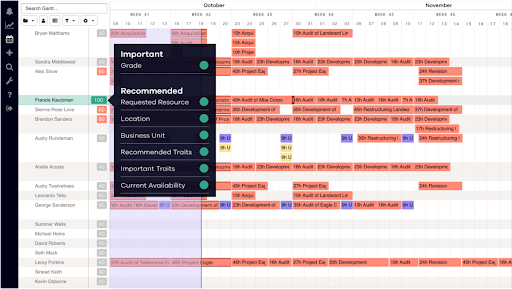
Dayshape is a professional services automation platform designed for firms that need advanced resource management and project delivery controls. It’s especially well-suited for consultancies, accounting practices, and other people-focused organizations managing complex schedules and shifting priorities. With a focus on intelligent automation and real-time visibility, Dayshape helps teams coordinate resources, projects, and reporting in one place.
Who Is Dayshape Best For?
Dayshape is a strong choice for mid-sized to large professional services firms—such as consultancies and accounting practices—that need to manage complex resource allocation and project delivery across distributed teams.
Why I Picked Dayshape
When it comes to tracking project performance and resource utilization, Dayshape stands out for its real-time reporting dashboards. The platform provides live visualizations of key metrics like project progress, financials, and team utilization, so you always have up-to-date insights at your fingertips. I appreciate how you can customize dashboards to focus on the data that matters most to your team or leadership. These real-time views help professional services organizations make informed decisions quickly and spot issues before they escalate.
Dayshape Key Features
Some other features in Dayshape that support project delivery and resource management include:
- Automated timesheet management: Automatically generates and tracks timesheets based on scheduled work and project assignments.
- Project budgeting tools: Lets you set, monitor, and adjust project budgets with real-time financial tracking.
- Compliance and audit trails: Maintains detailed logs of changes and approvals for resource assignments and project updates.
- Customizable approval workflows: Allows you to configure multi-step approval processes for resource requests, project changes, and time entries.
Dayshape Integrations
Integrations include Workday, SAP, Microsoft Dynamics 365, OpenHR, IRIS, Salesforce, Oracle, CatalystOne, Deltek, and Flowcase.
Pros and Cons
Pros:
- Compliance tracking supports regulated industries
- Scenario planning tools for forecasting and modeling
- Skill-based resource matching for optimal assignments
Cons:
- Mobile app functionality is less developed than desktop
- Customization requires vendor involvement for setup
Outras opções de software de automatização de serviços profissionais
Eis algumas ferramentas que não entraram na minha lista principal, mas que continuam a merecer a sua consideração se não encontrou acima o que procurava.
- Celigo
With 1,000+ prebuilt app connectors
- Rocketlane
For AI-powered project delivery
- Forecast
For mid-sized agencies and consultancies
- Projectworks
For linking resources and financial data
- Workday
For fast-moving businesses
- Birdview
For automating and optimizing service delivery cycle
- Polaris PSA By Replicon
For AI-driven resource optimization
- PSOhub
For automating recurring project work
- ProjectManager
For no-code workflow automation
- Hello Bonsai
For managing projects, clients, and finances
- Parallax
For efficient resource management
- ConnectWise
For intelligent automation for small businesses
- Ravetree
For retainer contracts
- Dynamics 365 Project Operations
For connecting sales and project delivery
- NinjaOne
For PSA and billing alignment
- Smartsheet
For customer onboarding and project visibility
- Celoxis
For managing your project portfolio, resources, and budgets
- ClickTime
For mid-sized businesses with employees across projects
- Screendragon
AI-powered workflow and automation for PSA
- Planview
For more predictable and profitable customer engagements


Avaliações relacionadas de software de gestão de projetos
- Melhor software para serviços profissionais
- Software de gestão de recursos para serviços profissionais
How I Evaluate Professional Services Automation Software
I split my evaluation into two layers: the baseline capabilities a tool must have—like time tracking, billing, and resource planning—and the differentiators that set the best options apart.
Core Functionality (Table Stakes For This List)
When I'm selecting tools for my list, I rank each one on a scale from 0 (does not offer the functionality) to 5 (excels in this area) for each core functionality listed below. Then, I calculate the tool's total score into a percentage. Each tool needs to achieve a minimum total score of 65% to be considered for inclusion.
- Project & Engagement Management: I look for structured project planning with Gantt views, dependencies, and templates built around client engagements rather than generic task boards.
- Resource Planning & Utilization: Each tool should let you match consultants to projects by skill, availability, and capacity so you can spot staffing gaps before they hit delivery.
- Time & Expense Tracking: Billable vs. non-billable hour capture tied to specific clients and projects matters here, along with expense logging and approval workflows.
- Billing & Invoicing: I evaluate whether a tool supports multiple billing models like fixed-fee, time & materials, and milestone-based, since most services firms juggle several across their book of business.
- Project Financials & Profitability: Real-time budget-to-actual tracking and margin visibility at the project level are what I check for, especially the ability to flag at-risk engagements early.
- Services Analytics & Reporting: Dashboards covering utilization rates, realization, backlog, and project performance help services leaders make staffing and pricing decisions with actual data.
Once I have a list of tools that meet the criteria, I consider what sets each platform apart.
Differentiating Factors (What Sets Vendors Apart)
Here's how I compare and contrast different vendors:
Standout Features
Quote-to-cash automation is a big differentiator—tools that connect SOW creation to invoicing and revenue recognition save finance teams from chasing approvals across spreadsheets. I also evaluate AI-powered forecasting, which helps resource managers predict demand and flag margin risk before a project goes sideways. Subcontractor management matters too, especially for firms that blend internal and external talent across engagements and need unified billing for both.
Beyond Features
Integrations are a major consideration—I check whether a tool connects natively to accounting systems like QuickBooks or Sage Intacct and CRMs like Salesforce, since broken data flows between PSA and finance create billing nightmares. Industry fit also matters. A platform built for IT consulting firms won't always suit a creative agency. I look at whether vendor-specific templates and workflows align with the buyer's delivery model. Finally, I evaluate implementation support, because PSA rollouts touch every department and a poor onboarding experience stalls adoption.
Como escolher software de automatização de serviços profissionais
É fácil ficar preso a listas extensas de funcionalidades e estruturas de preços complexas. Para o ajudar a manter-se concentrado enquanto percorre o seu processo único de seleção de software, eis uma lista de verificação dos fatores a ter em conta:
| Fator | O que considerar |
|---|---|
| Escalabilidade | Certifique-se de que o software consegue acompanhar o crescimento da sua empresa. Procure funcionalidades como limites flexíveis de utilizadores e a capacidade de lidar com uma complexidade crescente dos projetos. |
| Integrações | Verifique se se liga às ferramentas que já utiliza, como plataformas de CRM, contabilidade ou gestão de projetos. |
| Personalização | Verifique se pode adaptar painéis, fluxos de trabalho e relatórios às necessidades e aos processos específicos da sua equipa. |
| Facilidade de utilização | Escolha um software intuitivo e fácil de utilizar pela sua equipa, sem necessidade de formação extensiva. Isto ajuda a acelerar a integração e melhora a produtividade. |
| Orçamento | Avalie os custos iniciais, as taxas de subscrição e quaisquer encargos ocultos. Compare os modelos de preços para garantir que a solução se adequa aos seus objetivos financeiros. |
| Medidas de segurança | Certifique-se de que o software dispõe de funcionalidades robustas de proteção de dados, como encriptação, acesso baseado em funções e conformidade com normas do setor, como o RGPD. |
| Relatórios | Procure ferramentas avançadas de criação de relatórios que forneçam à sua equipa informações úteis sobre o desempenho, a distribuição de recursos e a rentabilidade. |
| Opções de suporte | Confirme se existe um suporte ao cliente fiável, seja através de chat em direto, e-mail ou de um gestor de conta dedicado, para resolver rapidamente os problemas. |
Tendências no software de automatização de serviços profissionais
Eis algumas das tendências emergentes que tenho acompanhado:
- Informações baseadas em IA: Os fornecedores estão a adicionar funcionalidades de IA capazes de analisar dados de projetos e prever riscos, atrasos ou estrangulamentos de recursos, dando às equipas a oportunidade de corrigir o rumo antes de surgirem problemas. Por exemplo, algumas ferramentas sugerem agora a reafetação de recursos com base no desempenho histórico.
- Modelos de preços dinâmicos: Alguns fornecedores estão a disponibilizar ferramentas que podem ser utilizadas para calcular preços de serviços em tempo real, com base nas tendências do mercado, na disponibilidade de recursos e no âmbito do projeto. Isto proporciona maior flexibilidade tanto aos clientes como aos prestadores.
- Foco na experiência dos colaboradores: As plataformas estão a introduzir funcionalidades como o acompanhamento de competências, painéis de desenvolvimento de carreira e informações sobre o bem-estar das equipas, para apoiar o crescimento e o envolvimento dos colaboradores.
- Acompanhamento descentralizado de projetos: Com o trabalho híbrido a manter-se, as ferramentas estão a evoluir para apoiar equipas descentralizadas, com suporte para vários fusos horários, opções de comunicação assíncrona e painéis globais em tempo real.
O que é o software de automatização de serviços profissionais?
O software de automatização de serviços profissionais é uma ferramenta utilizada por organizações baseadas na prestação de serviços, como consultoras e empresas de contabilidade e advocacia, para gerir e automatizar operações como finanças, gestão de recursos, registo de tempo e faturação.
Integra a gestão de projetos, a gestão de relações com clientes, a gestão financeira e o acompanhamento do tempo e das despesas num único sistema, para melhorar a eficiência na gestão de projetos e recursos, aumentar a precisão da faturação, melhorar a colaboração da equipa e reduzir a carga administrativa.
Funcionalidades do software de automatização de serviços profissionais
Ao selecionar um software de automatização de serviços profissionais, tenha em atenção as seguintes funcionalidades essenciais:
- Gestão de projetos: Simplifique o planeamento de projetos, a atribuição de tarefas e o acompanhamento do progresso, para manter todos organizados, identificar precocemente os estrangulamentos e controlar os prazos.
- Registo de tempo: Registe com precisão as horas faturáveis através de temporizadores fáceis de utilizar ou de introdução manual, certifique-se de que não deixa dinheiro por cobrar e fature facilmente os clientes.
- Alocação de recursos: Veja quem está disponível e associe as pessoas certas aos projetos certos, para evitar o esgotamento e garantir que as competências da sua equipa são utilizadas da melhor forma.
- Faturação e cobrança: Gere faturas rapidamente, acompanhe os pagamentos e faça a gestão das contas a receber para manter o controlo do seu fluxo de caixa.
- Gestão de despesas: Armazene recibos, categorize despesas e associe diretamente os custos aos projetos, além de acompanhar quanto está a gastar e em quê.
- Gestão de clientes (CRM): Mantenha as informações dos clientes, as comunicações e os contratos num único local. Isto facilita o desenvolvimento das relações e a prestação de um serviço de excelência.
- Relatórios e análises: Obtenha informações claras sobre o desempenho da equipa, as margens dos projetos e a rentabilidade através de relatórios personalizáveis.
- Gestão de documentos: Armazene, partilhe e organize os ficheiros dos projetos de forma segura, para que todos os elementos da sua equipa tenham sempre à mão a versão mais recente.
Funcionalidades comuns de software de automação de serviços profissionais com IA
Para além das funcionalidades padrão do software de automação de serviços profissionais, muitas ferramentas PSA com tecnologia de IA oferecem funcionalidades como:
- Priorização automatizada de tarefas: Utiliza a IA para analisar cargas de trabalho e prazos, recomendando em que tarefas se deve concentrar primeiro para maximizar a eficiência.
- Previsão preditiva de recursos: Utiliza as tendências dos projetos e a utilização da equipa para ajudar a antecipar as necessidades de pessoal e evitar correrias de última hora.
- Registo inteligente de tempo: Regista automaticamente a atividade de trabalho e sugere entradas de tempo, para que você e a sua equipa nunca se esqueçam de registar as horas faturáveis.
- Alertas de risco de projetos baseados em IA: Monitoriza o estado dos projetos e identifica potenciais riscos antes de se tornarem problemas, permitindo corrigir o rumo atempadamente.
- Chatbots para interação com clientes: Tratam de questões simples dos clientes ou de etapas de integração, libertando a sua equipa para se concentrar em necessidades mais complexas dos clientes.
Perguntas frequentes sobre software de automação de serviços profissionais
Eis as respostas a algumas perguntas frequentes sobre software de automação de serviços profissionais.
Que integrações devo procurar num software PSA?
Certifique-se de que o software PSA que está a considerar consegue integrar-se com quaisquer plataformas de gestão de projetos, sistemas CRM, ferramentas de contabilidade e aplicações de controlo de tempo que já utilize. As integrações com ferramentas como Salesforce, QuickBooks, Slack e Microsoft Teams podem ajudar a ligar o fluxo de trabalho da sua equipa, reduzir a introdução manual de dados e automatizar os relatórios. Pense nos sistemas que a sua equipa já utiliza diariamente e dê prioridade a soluções PSA que sincronizem com esses sistemas.
Como posso medir o ROI do software PSA?
Para medir o ROI do software PSA, pode acompanhar o tempo que este permite poupar, as melhorias na utilização de recursos faturáveis, a redução dos excessos de custos dos projetos e a diminuição dos erros na faturação ou nas finanças. Compare os tempos de entrega dos projetos, as margens de lucro e a satisfação dos clientes antes e depois da implementação. A maioria das plataformas PSA deve disponibilizar painéis que mostram as taxas de utilização, os custos dos projetos e as margens, permitindo quantificar o valor que está a obter do sistema.
Que desafios poderei enfrentar ao implementar um software PSA?
Os desafios comuns incluem obter o apoio da sua equipa, migrar dados existentes e formar os utilizadores nos novos sistemas. Os projetos podem ficar parados se a configuração das integrações com as ferramentas existentes for complexa ou se a plataforma PSA não for personalizável para os seus fluxos de trabalho. Para facilitar o processo, forneça guias claros à sua equipa, nomeie um responsável interno e dê prioridade a plataformas que ofereçam um forte apoio durante a integração.
O software PSA ajuda na gestão e previsão de recursos?
Sim, o software PSA pode ajudar a gerir recursos e a prever cargas de trabalho. Permite ver quem está atribuído a cada tarefa, identificar estrangulamentos e analisar a capacidade para os próximos projetos. Muitas ferramentas incluem agendamento visual, previsão da procura e acompanhamento da disponibilidade, para que possa otimizar a utilização e evitar a sub ou sobrealocação da sua equipa.