

As 10 melhores ferramentas de software de planeamento de capacidade com IA analisadas em 2026

10 Lista restrita do melhor software de planeamento de capacidade com IA


Gerir recursos e prever necessidades pode ser uma dor de cabeça para qualquer gestor de projetos. Tem de conciliar prazos, orçamentos e cargas de trabalho da equipa, e é fácil sentir-se sobrecarregado. É aqui que entra o software de planeamento de capacidade com IA, oferecendo uma forma de aliviar estas dificuldades ao otimizar a alocação de recursos e prever necessidades futuras.
Na minha experiência, estas ferramentas ajudam-no a tomar decisões informadas, para que a sua equipa se possa concentrar naquilo que faz melhor. Testei e analisei várias opções de forma independente, com o objetivo de lhe proporcionar uma visão imparcial das melhores soluções disponíveis.
Neste artigo, encontrará uma análise detalhada do melhor software de planeamento de capacidade com IA. Abordarei as funcionalidades, vantagens, desvantagens e muito mais, ajudando-o a escolher a opção certa para a sua equipa.
Why Trust Our Software Recommendations
Our team has been testing and reviewing software since 2012. As project managers ourselves, we know how difficult—and important—it is to choose the right software.
For this guide, we evaluated tools using hands-on testing and independent research, scoring tools using our selection criteria. We also draw on insights from industry thought leaders and practicing project management experts.
Our reviews reflect our human editorial judgment, not a sales pitch.
Expert reviewers:
Tabela comparativa de software de planeamento de capacidade com IA
Esta tabela comparativa resume os detalhes de preços das minhas principais escolhas de software de planeamento de capacidade com IA:
| Tool | Best For | Trial Info | Price | ||
|---|---|---|---|---|---|
| 1 | Best for AI-powered workload balancing | Free plan + 14-day free trial + free demo available | From $9/user/month (billed annually) | Website | |
| 2 | Best with real-time team utilization analysis | Free demo available | Pricing upon request | Website | |
| 3 | Best for enterprise agency workloads | Free demo available | Pricing upon request | Website | |
| 4 | Best for AI-driven capacity planning | 30-day free trial | From €25/user/month | Website | |
| 5 | Best for linking bid pipeline to staffing | Free demo available | Pricing upon request | Website | |
| 6 | Best for tying staffing to project margin | Free demo available | Pricing upon request | Website | |
| 7 | Best for portfolio capacity and budget choices | Free demo available | Pricing upon request | Website | |
| 8 | Best for professional services | Free demo available | From $20/user/month | Website | |
| 9 | Best for enterprise project management | Free plan + 14-day trial + demo available | From $10/user/month (billed annually) | Website | |
| 10 | Best for industry-specific solutions | Not available | Pricing upon request | Website |


Análise do melhor software de planeamento de capacidade com IA
Abaixo encontrará os meus resumos detalhados do melhor software de planeamento de capacidade com IA que integrou a minha lista restrita. As minhas análises apresentam uma visão detalhada das principais funcionalidades, vantagens e desvantagens, integrações e casos de utilização ideais de cada ferramenta, para o ajudar a encontrar a melhor opção para si.

Best for AI-powered workload balancing
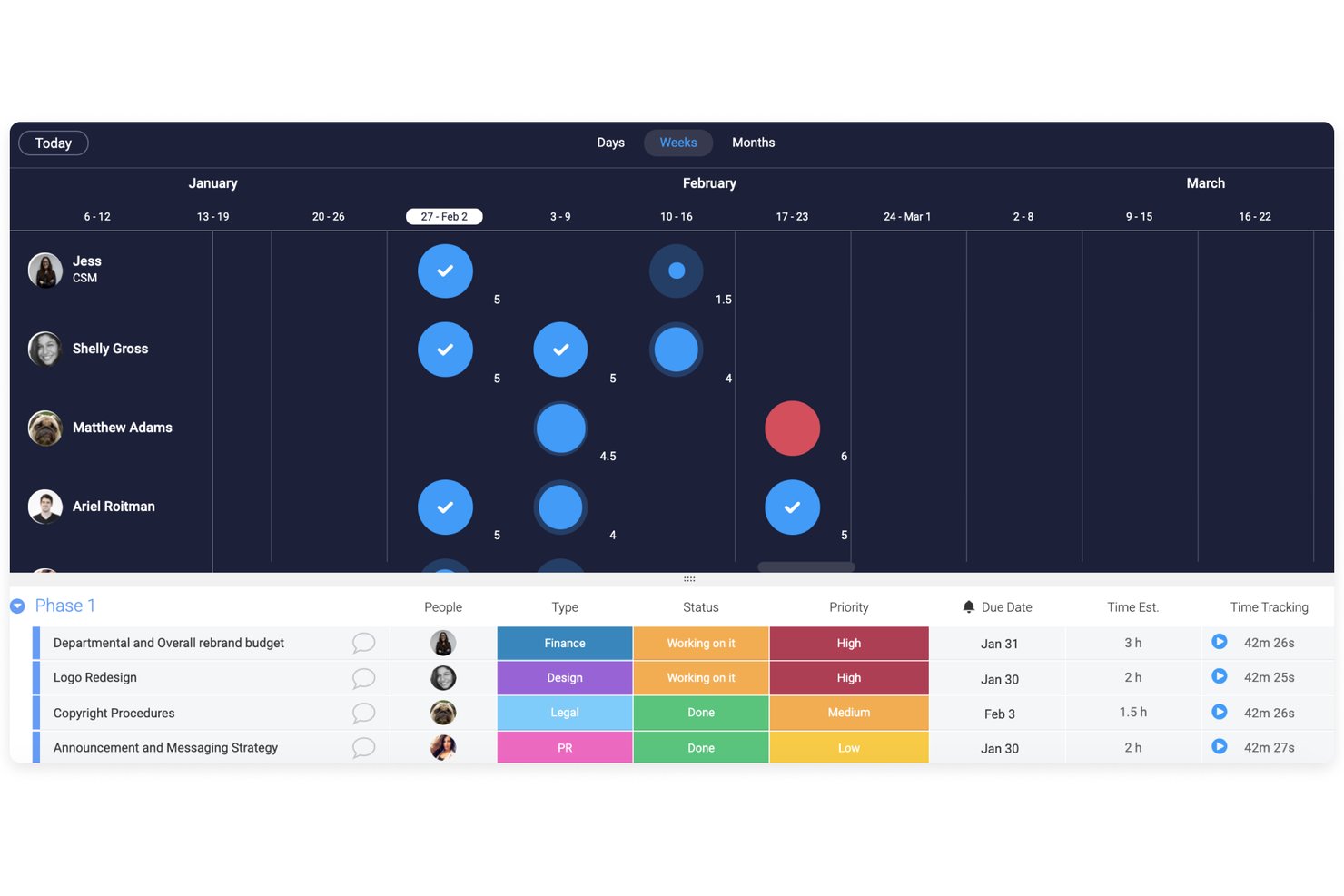
monday AI Workspace is a work management platform with AI-driven capacity planning features, including a Workload View, Workload Balancer AI agent, and pipeline-based demand forecasting across teams and projects.
Who Is monday AI Workspace Best For?
It's a strong fit for resource managers and team leads at mid-size to enterprise organizations that want workload balancing built into their existing work management setup.
Why I Picked monday AI Workspace
monday AI Workspace earns its spot on my shortlist because the AI agent can monitor team capacity continuously and redistribute assignments automatically when someone tips into overload. I also like the Workload View, which color-codes each member's allocation in real time so I can drag-and-drop tasks to rebalance without leaving the board. The AI forecasting layer surfaces resource gaps from pipeline data weeks before they affect delivery.
monday AI Workspace Key Features
- AI-powered capacity forecasting: Machine learning algorithms analyze historical work data and project pipeline inputs to project future resource needs.
- Real-time workload dashboards: Dynamic dashboards compare team capacity against project demand by skill, role, or time period.
- Time tracking integration: Tracks work hours alongside assignments, allowing granular utilization and availability analysis.
- 200+ project management integrations: Connects with Jira, Microsoft Teams, Salesforce, Slack, and other leading project or PMO platforms.
monday AI Workspace Integrations
monday AI Workspace offers hundreds of native integrations, including Jira, Salesforce, HubSpot, Slack, Google Workspace, Microsoft Teams, GitHub, Zendesk, Zoom, and Excel. An API is available for custom integrations.
Pros and Cons
Pros:
- Handles both project management and capacity planning
- Real-time color-coded workload view across teams
- AI Workload Balancer redistributes tasks automatically
Cons:
- Forecasting depth limited vs. dedicated capacity tools
- AI capacity features require higher-tier plans
New Product Updates from monday AI Workspace
monday AI Workspace Adds Human Approval Routing
monday AI Workspace adds a human-in-the-loop approval block to AI Workflows, sending approval requests and routing workflow paths based on responses. For more information, visit monday AI Workspace's official site.

Accelo
Best with real-time team utilization analysis

Accelo is a professional services automation platform that supports capacity planning through real-time utilization tracking, project scheduling, and unified operational reporting. It helps service-based teams manage resources, projects, and client work within a single system.
Who Is Accelo Best For?
Accelo is best suited for professional services teams and agencies that need visibility into team workloads, project timelines, and resource availability across multiple client engagements.
Why I Picked Accelo
I picked Accelo for its real-time team utilization tracking. The dashboard shows current workloads and availability, making it easier to spot overbooked or underused team members. Built-in forecasting tools highlight potential scheduling conflicts so teams can adjust assignments before deadlines are affected.
Accelo Key Features
- Automated project scheduling: Build timelines based on task dependencies and resource availability.
- Time tracking tools: Log hours directly against projects and tasks for accurate utilization reporting.
- Real-time utilization dashboards: Monitor team capacity and workload distribution.
- Client portal: Provide clients with visibility into project progress and communication.
- Integrated billing: Generate invoices from tracked time and project milestones.
Accelo Integrations
Accelo integrates with Google Workspace, Microsoft 365, Xero, QuickBooks Online, HubSpot, Salesforce, Mailchimp, Slack, Jira, and Zapier. An API is available for custom integrations.
Pros and Cons
Pros:
- Custom workflow automation for complex processes
- Unified view combines sales, projects, and billing
- Real-time dashboards show team utilization instantly
Cons:
- Gantt chart lacks deep scenario planning tools
- Minimum three-user subscription required
New Product Updates from Accelo

Accelo Rebuilds Mobile App for Project and Time Management
Accelo rebuilds its mobile app with task management, new work creation, and mobile timesheets for Forecast customers. This helps teams keep project and time data current while working away from a desktop. For more information, visit Accelo’s official site.

Best for enterprise agency workloads
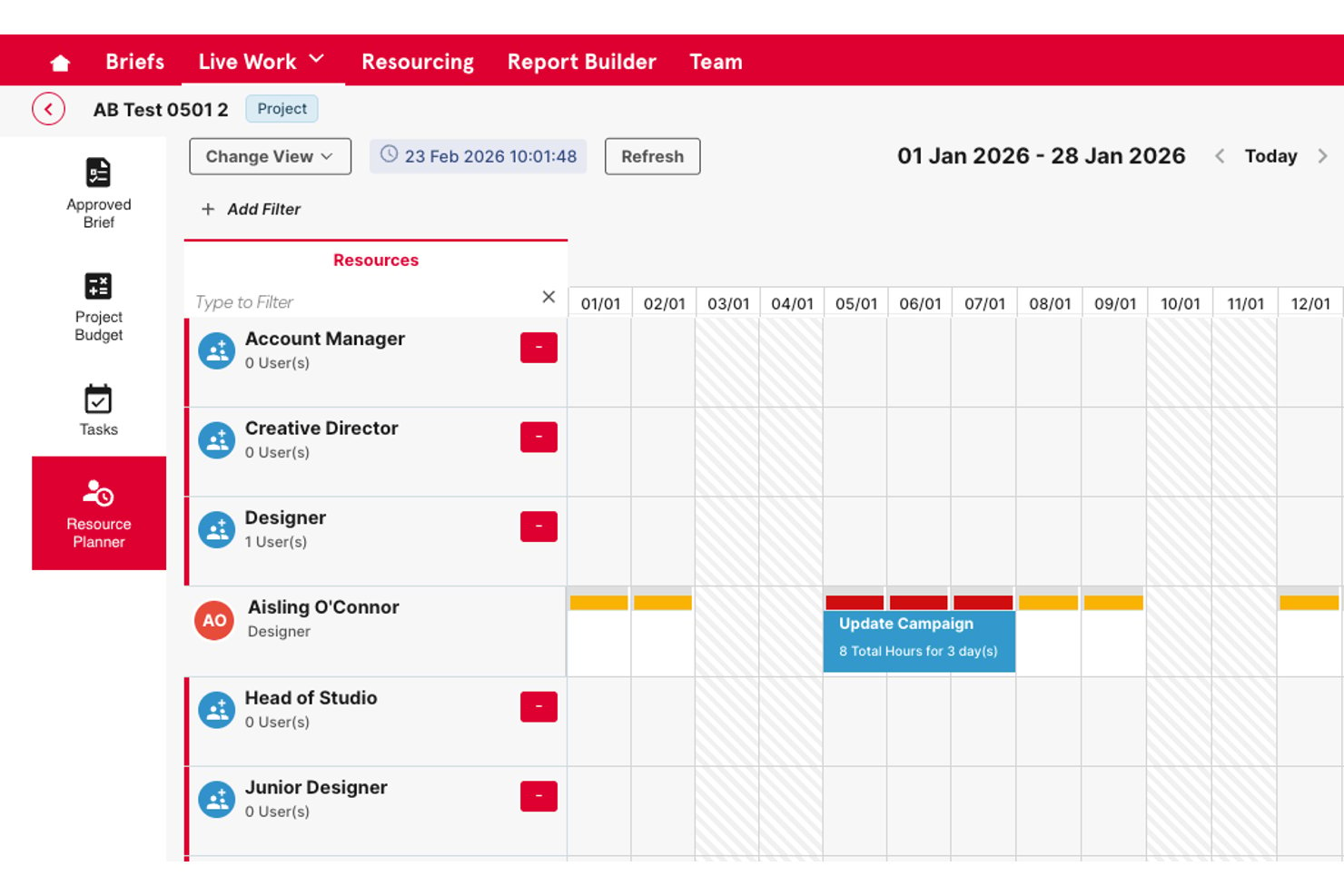
Screendragon is an enterprise work management platform that combines AI-powered resource scheduling, skills-based capacity planning, demand forecasting, and workflow orchestration for marketing and agency teams.
Who Is Screendragon Best For?
Screendragon is a strong fit for enterprise marketing teams and in-house agencies managing high volumes of work across large, distributed teams (50+ users).
Why I Picked Screendragon
I picked Screendragon as one of the best because its AI-powered resource scheduling goes beyond availability to match people by skill set, which matters when you're running parallel campaign workloads across multiple client accounts. I also like its predictive demand forecasting, which uses historical project data to flag capacity gaps 3-6 months out. In practice, that means I can see a resourcing crunch coming before it derails delivery.
Screendragon Key Features
- No-code workflow builder: Design, automate, and update complex project workflows without coding knowledge.
- Advanced approval routing: Tailor multi-step reviews and approvals with role-based controls and audit trails.
- AI-powered forecasting dashboard: Visualize upcoming resource needs and project demand using real-time and predictive analytics.
- Multi-system integrations: Connect with tools like Jira, Adobe, Salesforce, and Office 365 for live project and asset data sync.
Screendragon Integrations
Screendragon offers native integrations with HubSpot, Microsoft Power BI, Ziflow, Brandfolder, Workato, and Smartsheet. An API is available for custom integrations.
Pros and Cons
Pros:
- Handles high-volume enterprise workloads well
- Real-time capacity dashboards across teams
- Strong skills-based resource scheduling for agencies
Cons:
- AI features less mature than dedicated platforms
- Setup requires significant configuration time
New Product Updates from Screendragon
Screendragon Unveils New AI Hub
Screendragon introduced AI Hub, a new capability that lets teams build and manage AI agents directly within workflows. The update helps marketing teams automate tasks, maintain governance controls, and scale AI-driven operations more efficiently. For more information, visit Screendragon's official site.

Epicflow
Best for AI-driven capacity planning
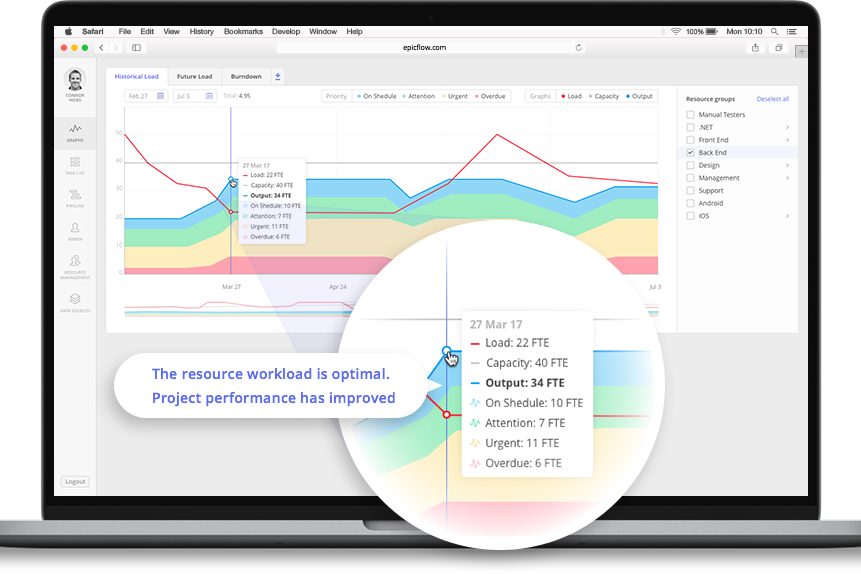
For businesses in need of an AI-powered solution to streamline capacity planning, Epicflow offers a sophisticated tool tailored for project managers and executives across industries like aerospace, telecommunications, and healthcare. This software addresses the challenge of optimizing resource allocation and ensures projects are delivered on time and within budget. By leveraging real-time data-driven decision-making, organizations can enhance project efficiency and profitability.
Why I Picked Epicflow
I picked Epicflow because of its unique AI-driven capabilities that directly cater to the needs of capacity planning. Its predictive analytics feature allows you to foresee potential project bottlenecks, ensuring that resources are allocated optimally. The real-time task prioritization ensures your team focuses on tasks that drive project success, while the semi-automated resource allocation feature balances workloads across your team. These functionalities collectively address the common challenge of bridging the gap between resource demand and supply.
Epicflow Key Features
In addition to its standout features, some other capabilities of Epicflow include:
- Virtual Assistant (Epica): This feature provides real-time project updates, assisting you in staying informed about project progress.
- What-if Analysis: Enables you to simulate different scenarios to predict project outcomes and make informed decisions.
- Historical Load Graphs: Offers insights into past project performance to help you understand trends and improve future planning.
- Competence and Attribute Management: Ensures that the right resources are matched to tasks according to their skills and attributes.
Epicflow Integrations
Integrations include Jira, MS Project, Oracle Primavera, and an API for custom integrations.
Pros and Cons
Pros:
- Portfolio-level resource visibility
- Advanced workload balancing tools
- AI-powered predictive analytics
Cons:
- Advanced features may require training
- Minimum 20-seat requirement

Best for linking bid pipeline to staffing
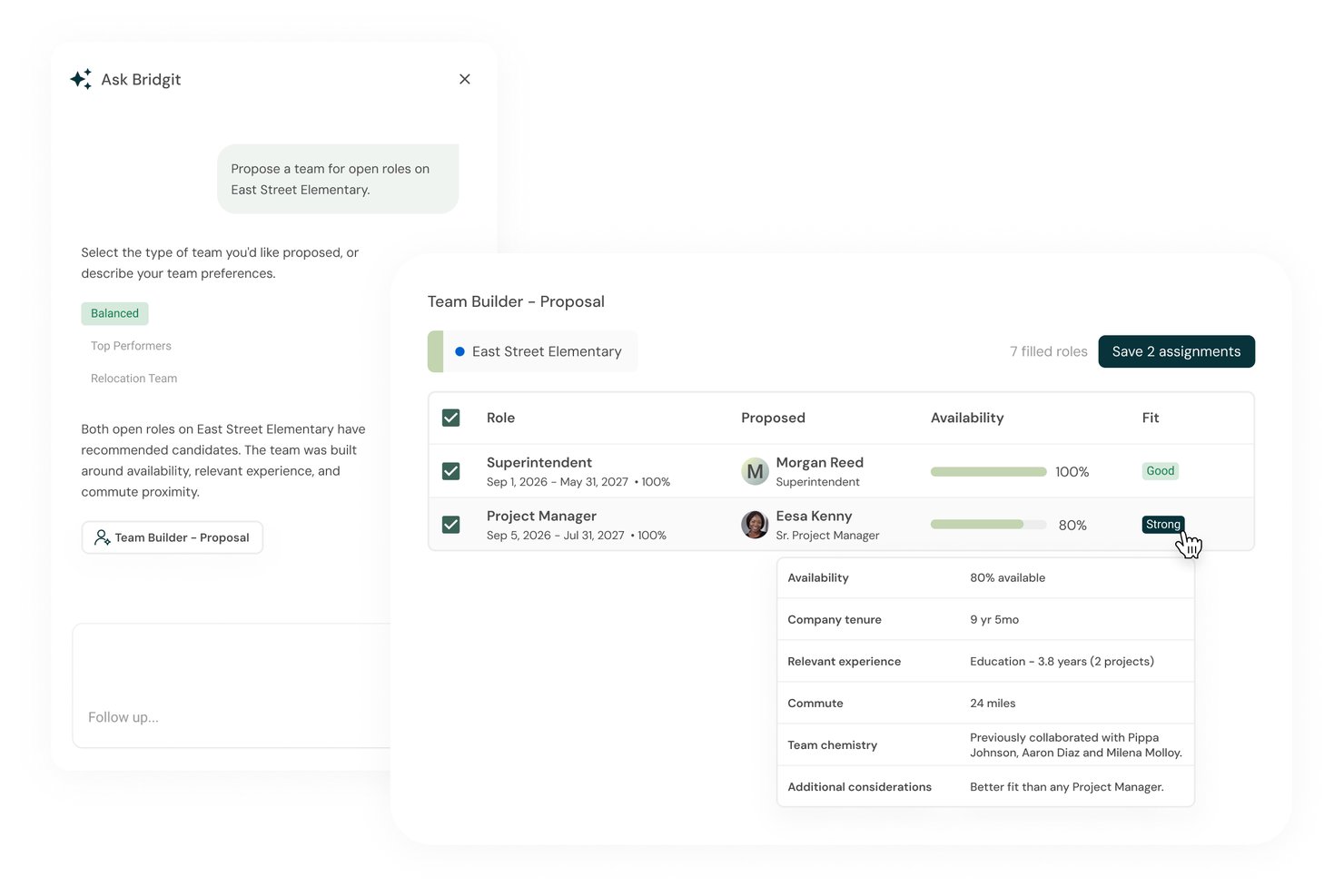
Bridgit is a construction-focused workforce planning platform that combines project staffing, supply-and-demand forecasting, skills-based matching, scenario planning, and AI-powered reporting to help contractors manage labor capacity across their project pipeline.
Who Is Bridgit Best For?
Bridgit is built for construction contractors whose workforce planning starts with the bid pipeline—particularly general contractors managing project pursuits alongside active staffing.
Why I Picked Bridgit
I picked Bridgit as one of the best because it's the only tool on my list that treats your bid pipeline as the starting point for capacity planning. When your team wins a pursuit, Bridgit's Scenario Planning lets you model how that project affects your staffing picture before you've committed a single person, and Smart Suggestions then ranks available staff by availability, proximity to the job site, and relevant project experience to fill those roles fast.
Bridgit Key Features
- Supply-and-demand forecasting: Compares your available workforce against active and upcoming project needs across a selectable 1- to 5-year timeframe.
- Bench Cost reporting: Calculates the dollar value of unallocated time by month using each team member's hourly cost rate, with filtering by people and project attributes.
- Certification tracking: Stores credentials with expiration dates, configurable warning windows, and supporting documents attached directly to staff profiles.
- Ask Bridgit: Answers plain-language questions about team availability, role history, and project experience, with support for follow-up questions and agent prompts.
Bridgit Integrations
Bridgit offers native integrations with Salesforce, HubSpot, Workday, BambooHR, UKG, Procore, Autodesk Build, and Snowflake. Its open API supports custom connections for projects, people, assignments, and forecasts.
Pros and Cons
Pros:
- Candidate rankings weigh availability, experience, and commute
- Gantt views clarify cross-project staffing needs
- Pursuit scenarios reveal future staffing gaps
Cons:
- Recommendations flag overload but don’t prevent it
- HRIS changes can still require manual updates

Mosaic
Best for tying staffing to project margin
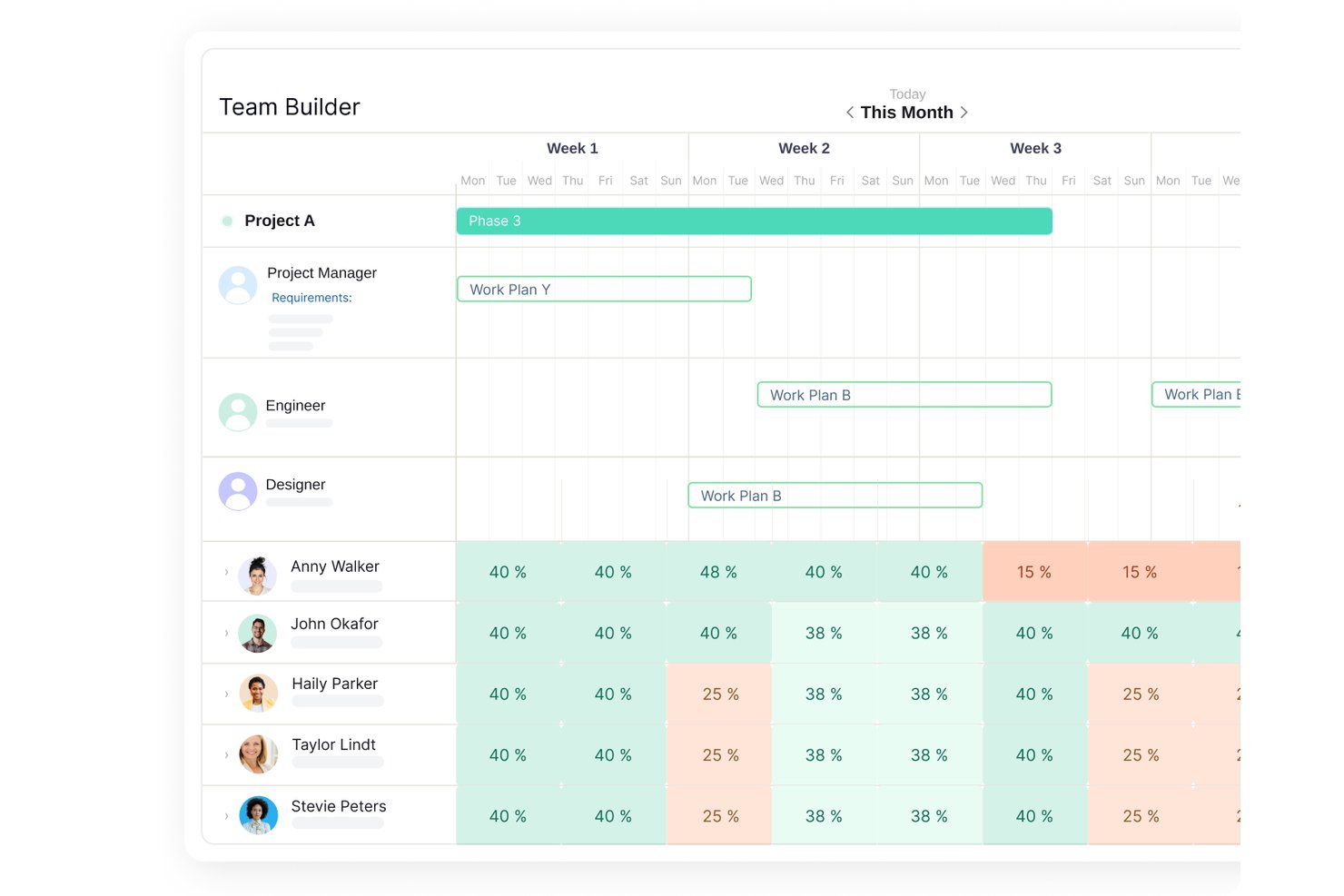
Mosaic is an AI-powered resource and capacity planning platform that combines workload forecasting, project staffing, budget tracking, and automated planning briefs in one place.
Who Is Mosaic Best For?
Mosaic is a strong fit for delivery and program managers at professional services firms who need to connect project staffing decisions directly to budget and margin outcomes.
Why I Picked Mosaic
I picked Mosaic as one of the best because it's the only tool on my list that ties capacity planning directly to project margin. The Profit Margin Report calculates margin from fee, budget, and actual time spent, and flags negative results in real time. Pair that with the Role Demand Report, which shows hiring needs in FTE equivalents before gaps hit delivery, and you get a clear line from staffing decisions to financial outcomes.
Mosaic Key Features
- Chello planning assistant: Ask questions about staffing, workload, deadlines, and project budgets directly in Mosaic or Microsoft Teams.
- Workload Report: Compare planned hours against capacity to surface over- and under-allocation across individual members, projects, or teams.
- Tentative work plans: Add placeholder assignments to the Planner to model upcoming project needs without committing resources.
- Skills Report: Rate team members from 1–5 across custom skill categories to support role matching and staffing decisions.
Mosaic Integrations
Mosaic integrations include HubSpot, Jira, NetSuite, Oracle, Procore, Workday, and Xero. It also provides an HTTP API with GET, POST, PUT, and DELETE operations, plus webhooks for custom integrations.
Pros and Cons
Pros:
- AI briefs flag stale plans and risks
- Workload reports expose overbooking and role gaps
- Margin reports tie staffing to project profitability
Cons:
- Scenario tools lack documented multi-scenario comparisons
- Role forecasts lack documented predictive modeling
Best for portfolio capacity and budget choices
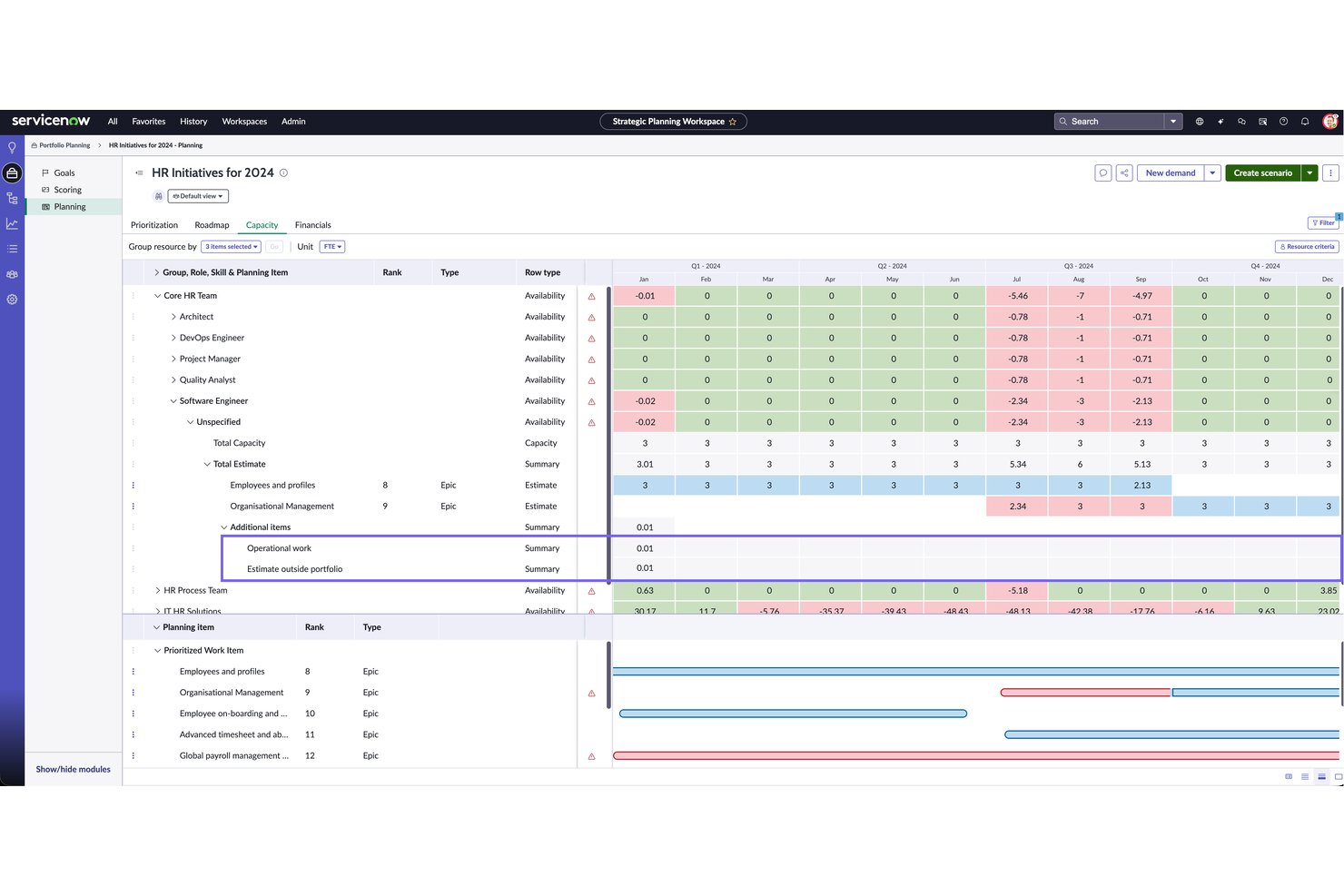
ServiceNow Strategic Portfolio Management is an enterprise portfolio management platform that connects strategic planning, demand management, and resource capacity planning with AI-assisted resource matching and scenario modeling tools.
Who Is ServiceNow Strategic Portfolio Management Best For?
ServiceNow Strategic Portfolio Management is a strong fit for enterprise program managers and portfolio leaders who need to connect resource capacity decisions directly to strategic investment priorities.
Why I Picked ServiceNow Strategic Portfolio Management
I picked ServiceNow Strategic Portfolio Management as one of the best because it's one of the few tools that lets you run side-by-side portfolio scenarios with real budget comparisons baked in, so you're not just modeling resource tradeoffs but also seeing the monetary impact of prioritizing one set of initiatives over another. The Resource Management Workspace surfaces capacity heatmaps, over-allocation flags, and unassigned work in one view, and the AI-assisted Resource Finder ranks candidates by skill, availability, and workload balance when Now Assist is enabled.
ServiceNow Strategic Portfolio Management Key Features
- Portfolio Planning scenarios: Build multiple what-if scenarios, adjust items and dates, and approve one as the live plan without disrupting the current portfolio.
- Demand pipeline management: Capture and assess business and IT requests in a centralized workspace, then transition approved demands directly into projects for execution.
- Goals Framework: Connect individual projects and initiatives to broader organizational strategy, supporting alignment across teams and planning cycles.
- Role-based resource boards: Filter and group resource assignments by group, role, skill, owner, or project, and view allocations weekly or monthly in hours, FTE, or person days.
ServiceNow Strategic Portfolio Management Integrations
Native integrations are not clearly documented. ServiceNow Strategic Portfolio Management offers an API for custom integrations.
Pros and Cons
Pros:
- AI ranks resource matches by skills and availability
- Heatmaps flag overloads and unassigned work
- Portfolio scenarios compare budget trade-offs
Cons:
- No documented proactive capacity alerts or scheduled reports
- Capacity details require manual regeneration

BigTime
Best for professional services

BigTime is a time and billing software tailored for professional services firms, offering tools for time tracking, invoicing, and project management. It caters to consulting, accounting, and engineering firms, providing AI-driven insights to optimize billing and resource allocation.
Why I picked BigTime: BigTime excels in serving professional services firms with its AI-driven billing and project tracking capabilities. Its AI features include predictive billing insights that help you forecast revenue and manage cash flow effectively. This ensures your team can focus on delivering services without worrying about financial management. With BigTime, you can allocate resources efficiently and maintain project profitability.
Standout features & integrations:
Features include advanced time tracking that helps your team capture billable hours accurately. The invoicing tool streamlines billing processes and ensures timely payments. The project management feature provides a complete view of project progress and resource utilization.
Integrations include QuickBooks, Salesforce, Slack, Zapier, Google Workspace, Microsoft Teams, Xero, HubSpot, Jira, and Asana.
Pros and Cons
Pros:
- Efficient resource allocation
- Advanced time tracking
- Predictive billing insights
Cons:
- May require specialized training
- Initial setup complexity

Wrike
Best for enterprise project management
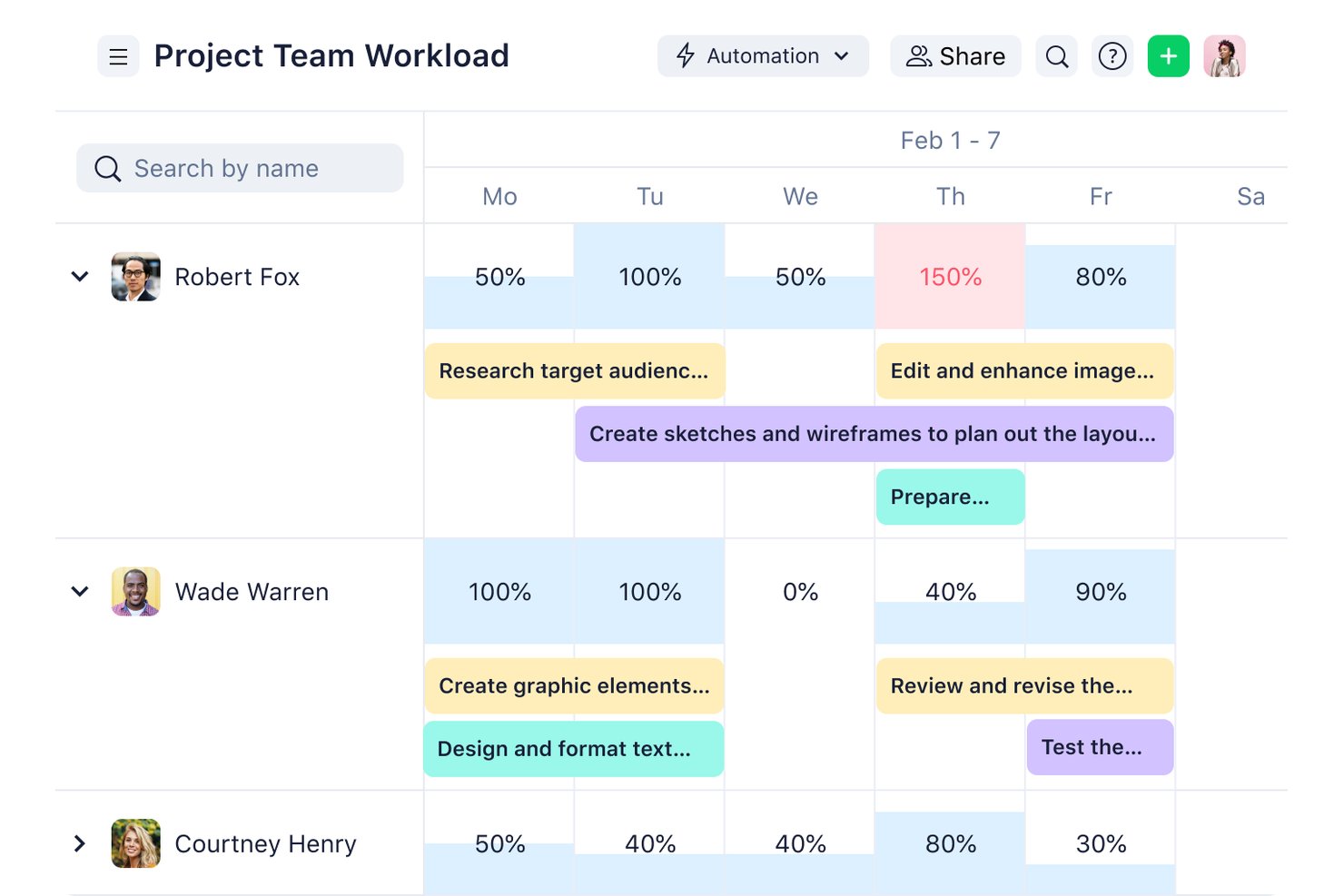
Wrike is a work management platform with AI-assisted resource allocation, workload charts, skills-based assignee matching, and capacity planning tools built for managing projects and teams at scale.
Who Is Wrike Best For?
Wrike is a strong fit for enterprise project and program managers who need to coordinate resource allocation, workload visibility, and capacity planning across large, cross-functional teams.
Why I Picked Wrike
I picked Wrike as one of the best because its workload charts and department allocation dashboard give enterprise teams a real, live picture of capacity before commitments are made—showing exactly which job roles are over-allocated and where hours are available across the portfolio. I also like that the AI-assisted MCP staffing tool proposes assignees based on skills, workload, and availability, and explains its reasoning so you can push back or adjust before anything is confirmed.
Wrike Key Features
- Resource bookings: Reserve a specific team member or job role, estimate project hours, and assess that resource's bandwidth before making a commitment.
- Assignee recommendations: Rank potential assignees by matching job roles and custom-field attributes, with availability indicators that account for active tasks, bookings, public holidays, and scheduled time off.
- Wrike Copilot: Ask natural-language questions about work and team utilization and get answers drawn from live project data.
- 400+ pre-built native integrations: Connect Wrike to tools like Slack, Jira, Salesforce, Tableau, and more, plus an open REST API and Wrike Integrate for custom no-code workflows.
Wrike Integrations
Wrike offers 400+ pre-built native integrations, including Slack, Jira, Salesforce, Google Calendar, and Tableau, supporting capacity planning and pipeline forecasting. It also provides an open REST API and Wrike Integrate for custom no-code workflows.
Pros and Cons
Pros:
- Reviewers value dashboards for progress visibility
- Staffing recommendations explain skill and availability matches
- Workload charts flag team over-allocation
Cons:
- Reviewers report setup complexity and reporting workarounds
- Forecasting lacks continuous resource-specific updates
New Product Updates from Wrike
Wrike Expands Gantt Planning, Approvals, and AI Work Intake
Wrike adds cross-project Gantt dependencies, flexible approval routing, and AI work intake through Wrike MCP. These updates give teams more control over planning, decision-making, and incoming work. For more information, visit Wrike’s official site.

Kantata
Best for industry-specific solutions
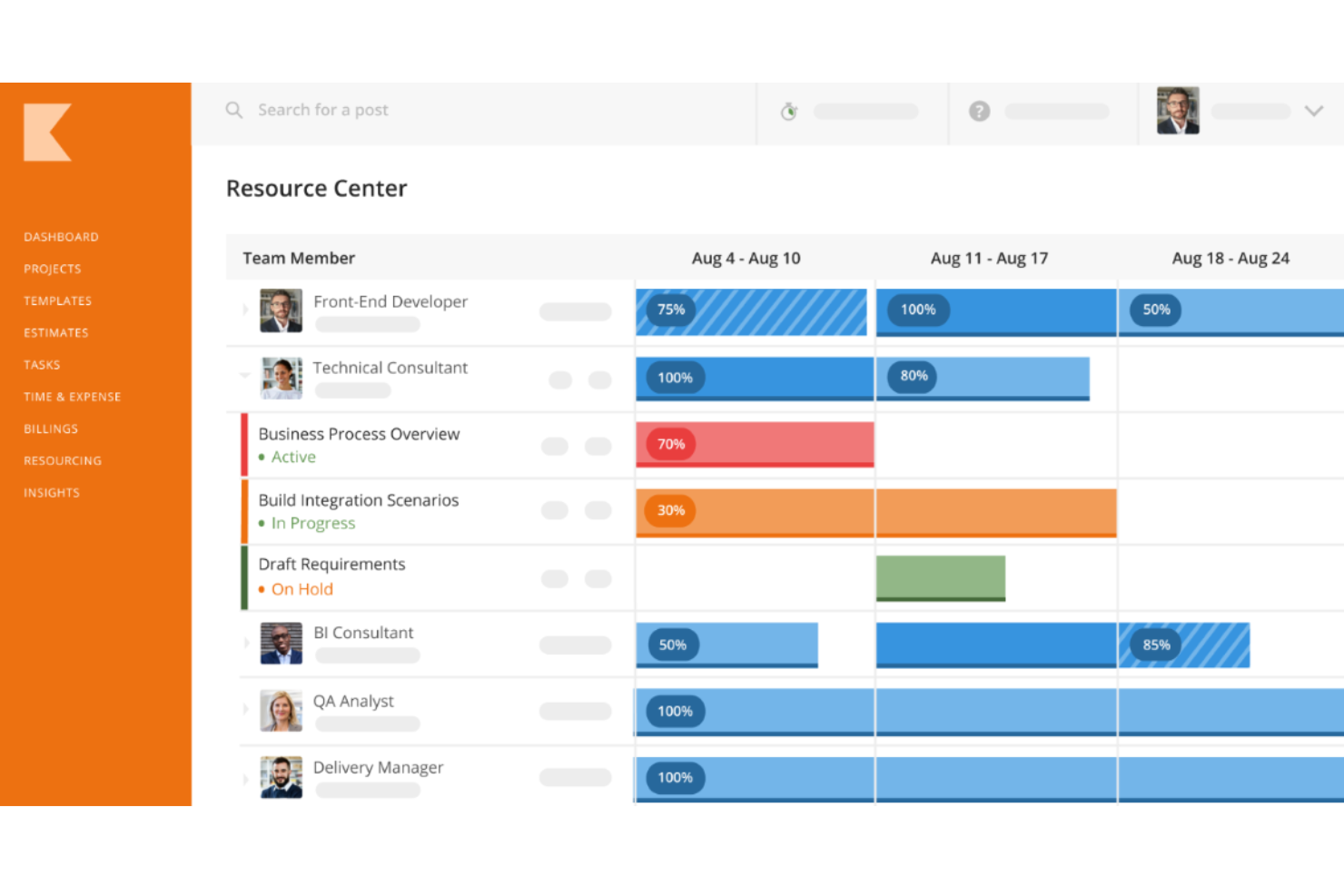
Kantata is a professional services automation software built for industries like consulting and IT services. It focuses on project management, resource planning, and financial management, leveraging AI to tailor solutions for specific industry needs.
Why I picked Kantata: Kantata is distinguished by its industry-specific solutions, offering AI-driven insights to customize workflows and project management practices. Its AI features include predictive resource allocation and tailored project templates that align with industry standards. This helps your team efficiently manage resources while adhering to industry-specific requirements. With Kantata, you can ensure that your projects align with best practices and achieve desired outcomes.
Standout features & integrations:
Features include advanced project scheduling that helps you align timelines with resource availability. The financial management tool provides insights into project profitability and cost control. The reporting feature offers customizable reports to suit your industry needs.
Integrations include Salesforce, QuickBooks, Xero, Slack, Microsoft Teams, Google Workspace, HubSpot, Jira, Asana, and Trello.
Pros and Cons
Pros:
- Customizable reporting features
- Predictive resource allocation
- Tailored project templates
Cons:
- May require industry-specific training
- Complexity in initial setup
New Product Updates from Kantata

Kantata Adds Access Group Change History
Kantata adds Access Groups History, letting account administrators track changes to group details, membership, and permissions in Recent History. The update also makes these events available through the Subscribed Events API for broader monitoring. For more information, visit Kantata’s official site.
 .
Outro software de planeamento de capacidade com IA
Eis algumas opções adicionais de software de planeamento de capacidade com IA que não integraram a minha lista restrita, mas que ainda assim vale a pena conhecer:
- Saviom
For pipeline-aware margin forecasting
- Retain
For specialist-skill capacity planning
- ClickUp
For task customization
- Anaplan
For linking capacity to financial plans
- VOGSY
For Google Workspace users
- Birdview
For project visibility
- Rocketlane
For auto-assigning resources
- NICE Workforce Management
For five-year contact center staffing
- Tempus Resource
For sales pipeline-driven staffing plans


How I Evaluate AI Capacity Planning Software
To make this list, AI must support project work, like forecasting demand and matching people to availability. From there, I evaluate three things. Core functionality carries most weight, like workload tracking and skills matching. Then I look at standout features, like explainable AI recommendations, and what a tool offers beyond its feature set, like project-history data quality.
Core Functionality (Table Stakes For This List)
When I'm selecting tools for my list, I score each one on a scale from 0 (does not offer the functionality) to 5 (excels in this area) for each core functionality listed below. I then convert the total into a percentage to help assess each tool's overall fit, with extra weight on any functionalities I’ve deemed essential.
- Predictive Demand Forecasting (Essential): I look for forecasts that use project history and current bookings to flag likely demand shifts before teams commit to new client work.
- Resource Allocation (Essential): Recommendations should account for skills, availability, and existing assignments when a new project overlaps with delivery deadlines.
- Scenario Modeling: I check whether planners can compare staffing, scope, or timeline changes and see how each scenario shifts team capacity.
- Capacity Risk Detection: The tool should surface likely overloads, idle capacity, and bottlenecks early enough to adjust assignments or delivery plans.
- Skills & Availability: I evaluate whether role and skill data can be matched against availability, such as finding a designer for a near-term project.
- Automated Insights: Look for alerts or summaries that explain utilization trends and capacity risks without requiring manual report assembly.
Once I have a list of tools that meet the criteria, I consider what sets each platform apart.
Differentiating Factors (What Sets Vendors Apart)
Here's how I compare and contrast different vendors:
Standout Features
I look for bench and burnout alerts that flag underutilized or overloaded team members before delivery risk builds. I also check whether the tool ties resource decisions to project margins through built-in billable-rate and profitability calculations. Hiring and pipeline planning matters too—tools like Kantata and Forecast translate demand gaps into headcount recommendations based on pipeline stages.
Beyond Features
I check how each vendor handles data migration and historical depth, since AI forecasting falls flat without clean timesheet and project data to learn from. Integration breadth matters just as much—tools with bi-directional connections to your PSA, HRIS, and billing systems keep capacity insights current as assignments shift. I also evaluate change management support, like embedded guidance and training resources, because teams used to spreadsheets won't trust AI recommendations overnight.
Como escolher software de planeamento de capacidade com IA
É fácil perder-se em listas extensas de funcionalidades e estruturas de preços complexas. Para o ajudar a manter-se concentrado enquanto percorre o seu processo específico de seleção de software, eis uma lista de verificação dos fatores a ter em conta:
| Fator | O que considerar |
|---|---|
| Escalabilidade | O software acompanhará as necessidades da sua equipa à medida que estas crescem? Considere se consegue lidar com um aumento do volume de dados e do número de utilizadores sem problemas de desempenho. |
| Integrações | A ferramenta liga-se aos seus sistemas existentes? Procure compatibilidade com o seu CRM, ERP ou outras ferramentas essenciais, para garantir um fluxo de dados contínuo. |
| Personalização | Pode adaptar o software aos seus fluxos de trabalho? Verifique se permite alterar painéis, relatórios e permissões de utilizadores para se adequar aos processos específicos da sua equipa. |
| Facilidade de utilização | A interface é intuitiva para a sua equipa? Evite ferramentas com curvas de aprendizagem acentuadas que possam atrasar a adoção e afetar a produtividade. |
| Implementação e integração inicial | Quanto tempo demorará a começar? Considere o tempo de configuração e os recursos necessários, incluindo materiais de formação e suporte, para pôr a sua equipa a trabalhar. |
| Custo | O preço enquadra-se no seu orçamento? Avalie tanto os custos iniciais como os recorrentes, incluindo taxas ocultas ou encargos por funcionalidades adicionais, para evitar surpresas. |
| Medidas de segurança | As suas necessidades de proteção de dados são satisfeitas? Certifique-se de que o software cumpre normas do setor, como o RGPD ou a HIPAA, e disponibiliza encriptação e controlos de acesso. |
| Disponibilidade do suporte | Obterá ajuda quando precisar? Verifique as opções de suporte 24 horas por dia, 7 dias por semana, os tempos de resposta e os canais disponíveis, como chat, e-mail ou telefone, para garantir uma assistência fiável. |
O que é o software de planeamento de capacidade com IA?
O software de planeamento de capacidade com IA é uma ferramenta que utiliza inteligência artificial para otimizar a alocação de recursos e a gestão de projetos. É geralmente utilizado por gestores de projetos, profissionais de TI e equipas de operações para melhorar a tomada de decisões e aumentar a eficiência. A análise preditiva, as sugestões automatizadas de recursos e a análise de dados em tempo real ajudam a antecipar as necessidades dos projetos e a ajustar os planos em conformidade.
Estas ferramentas proporcionam um valor significativo, garantindo que os recursos são utilizados de forma eficiente, reduzindo os custos e melhorando os resultados dos projetos.
Funcionalidades do software de planeamento de capacidade com IA
Ao selecionar um software de planeamento de capacidade com IA, procure as seguintes funcionalidades principais:
- Análise preditiva: Utiliza dados históricos para prever a capacidade e as necessidades futuras de recursos, uma prática conhecida como previsão da procura, ajudando as equipas a alocar os recursos de forma eficiente.
- Sugestões automatizadas de recursos: Recomenda alocações ideais de recursos com base nos requisitos dos projetos e nas capacidades das equipas.
- Análise de dados em tempo real: Fornece informações atualizadas sobre o desempenho dos projetos, permitindo ajustes rápidos e uma tomada de decisões informada.
- Planeamento de cenários: Permite aos utilizadores simular diferentes cenários de projetos do tipo “e se” para compreender possíveis resultados e riscos.
- Agendamento de tarefas orientado por IA: Ajusta automaticamente os prazos dos projetos com base nas alterações na disponibilidade dos recursos e nas prioridades das tarefas.
- Quadros personalizáveis: Permite aos utilizadores adaptar as vistas de dados para destacar métricas e informações importantes relevantes para as suas necessidades específicas.
- Integração com ferramentas de terceiros: Garante um fluxo de dados e uma comunicação consistentes entre várias plataformas, melhorando a eficiência geral.
- Relatórios baseados em IA: Gera relatórios detalhados que fornecem informações sobre a utilização dos recursos e o progresso dos projetos.
- Monitorização da conformidade: Garante o cumprimento dos regulamentos do setor através da automatização das verificações e dos relatórios de conformidade.
- Capacidades de aprendizagem automática: Melhora continuamente a precisão do planeamento de recursos ao aprender com os dados e resultados de projetos anteriores.
Vantagens do software de planeamento de capacidade com IA
A implementação de um software de planeamento de capacidade com IA proporciona várias vantagens para a sua equipa e para a sua empresa. Eis algumas das vantagens que pode esperar:
- Melhor alocação de recursos: As sugestões de recursos orientadas por IA garantem que os membros da equipa são atribuídos a tarefas correspondentes às suas competências e disponibilidade, otimizando a produtividade e a capacidade dos recursos.
- Melhor tomada de decisões: A análise preditiva fornece informações sobre as necessidades futuras de recursos, permitindo tomar decisões informadas e baseadas em dados.
- Maior eficiência: O agendamento automatizado de tarefas e a análise de dados em tempo real ajudam as equipas a adaptarem-se rapidamente a alterações de última hora, mantendo os projetos no caminho certo e preservando a eficiência operacional.
- Poupança de custos: As previsões precisas e a utilização eficiente dos recursos reduzem o desperdício e evitam a sobrealocação, em situações nas quais os recursos podem ser subutilizados, permitindo à sua empresa poupar dinheiro.
- Melhores resultados dos projetos: As ferramentas de planeamento de cenários permitem às equipas antecipar possíveis desafios e ajustar as estratégias em conformidade, conduzindo à conclusão bem-sucedida dos projetos.
- Garantia de conformidade: A monitorização automatizada da conformidade mantém os projetos alinhados com os regulamentos do setor, minimizando o risco de penalizações.
- Melhoria contínua: As capacidades de aprendizagem automática aperfeiçoam os processos de planeamento ao longo do tempo, melhorando a precisão e a eficácia com base em experiências anteriores.
Custos e preços do software de planeamento de capacidade com IA
A seleção de um software de planeamento de capacidade com IA exige uma compreensão dos vários modelos de preços e planos disponíveis. Os custos variam consoante as funcionalidades, a dimensão da equipa, os complementos e outros fatores. A tabela abaixo resume os planos comuns, os respetivos preços médios e as funcionalidades normalmente incluídas nas soluções de software de planeamento de capacidade com IA:
Tabela de comparação de planos para software de planeamento de capacidade com IA
| Tipo de plano | Preço médio | Funcionalidades comuns |
|---|---|---|
| Plano gratuito | $0 | Alocação básica de recursos, gestão limitada de projetos e relatórios básicos. |
| Plano pessoal | $10-$30/utilizador/mês | Gestão avançada de tarefas, informações orientadas por IA e integrações básicas. |
| Plano empresarial | $30-$75/utilizador/mês | Análise avançada, planeamento de cenários e quadros personalizáveis. |
| Plano empresarial avançado | $80-$150/utilizador/mês | Conjunto completo de integrações, monitorização da conformidade e suporte dedicado. |
Perguntas frequentes sobre software de planeamento de capacidade com IA
Eis algumas respostas a perguntas comuns sobre ferramentas de planeamento de capacidade com IA:
Como integro o software de planeamento de capacidade com IA nas minhas ferramentas existentes?
Para integrar o software de planeamento de capacidade com IA nas suas ferramentas existentes, comece por verificar a compatibilidade do software com os seus sistemas atuais, como plataformas de CRM ou ERP. Utilize a API fornecida ou as integrações nativas para as ligar. Se necessário, consulte o suporte ou a documentação do software para obter orientação. Na minha experiência, garantir que os seus dados circulam entre os sistemas pode melhorar significativamente a eficiência. Teste cuidadosamente a integração para garantir a precisão dos dados e resolva prontamente quaisquer problemas.
O software de planeamento de capacidade com IA consegue gerir equipas remotas?
Sim, o software de planeamento de capacidade com IA consegue gerir eficazmente equipas remotas. Estas ferramentas disponibilizam acesso a dados em tempo real e funcionalidades de colaboração, permitindo que os membros da equipa trabalhem em conjunto a partir de diferentes localizações. Utilize os painéis de controlo de projetos e as ferramentas de comunicação do software para manter todos alinhados. Os insights baseados em IA ajudam a distribuir as cargas de trabalho de forma eficiente, garantindo que as equipas remotas se mantêm produtivas. Reveja regularmente as métricas de desempenho e ajuste os planos conforme necessário para acomodar os desafios específicos do trabalho remoto.
Quão seguro é o software de planeamento de capacidade com IA?
O software de planeamento de capacidade com IA é geralmente seguro, mas é essencial verificar se cumpre os seus requisitos de segurança. Procure funcionalidades como encriptação, controlos de acesso e conformidade com normas do setor, como o RGPD ou a HIPAA. Avalie as certificações e as políticas de segurança do fornecedor. Na minha experiência, discutir as medidas de segurança com o fornecedor pode proporcionar garantias adicionais. Como boa prática, atualize e monitorize regularmente o seu sistema para proteger os dados sensíveis contra potenciais ameaças.