Os 10 melhores softwares de acompanhamento de recursos analisados para 2026

Lista restrita do melhor software de acompanhamento de recursos


O melhor software de acompanhamento de recursos oferece visibilidade em tempo real sobre a disponibilidade, as cargas de trabalho e a capacidade das equipas, para que possa atribuir as pessoas certas ao trabalho certo no momento certo. Estas ferramentas ajudam a evitar o esgotamento, a reduzir o tempo de inatividade e a tomar decisões mais inteligentes sobre a alocação de pessoal entre projetos.
Com mais de 10 anos de experiência na gestão de projetos digitais e no teste de mais de 40 ferramentas de planeamento de recursos ao longo dos anos, ajudei equipas dos setores governamental, da saúde, do retalho e dos transportes a encontrar melhores formas de equilibrar cargas de trabalho e prever as necessidades de recursos. Vi como a falta de visibilidade pode comprometer os prazos e como a ferramenta certa pode devolver o controlo.
Neste guia, vou falar-lhe das principais ferramentas que testei. Cada ferramenta inclui uma descrição destinada a dar-lhe uma ideia geral do que faz e das funcionalidades de destaque que oferece. Espero que isto o ajude a identificar a que melhor se adapta às suas necessidades.
Why Trust Our Software Recommendations
Our team has been testing and reviewing software since 2012. As project managers ourselves, we know how difficult—and important—it is to choose the right software.
For this guide, we evaluated tools using hands-on testing and independent research, scoring tools using our selection criteria. We also draw on insights from industry thought leaders and practicing project management experts.
Our reviews reflect our human editorial judgment, not a sales pitch.
Expert reviewers:
Tabela comparativa de software de acompanhamento de recursos
Esta tabela comparativa resume os detalhes de preços das minhas principais escolhas de software de acompanhamento de recursos:
| Tool | Best For | Trial Info | Price | ||
|---|---|---|---|---|---|
| 1 | Best for agency resource management | 14-day free trial | From $10/user/month (billed annually) | Website | |
| 2 | Best for real-time team performance data | Free plan + 14-day trial + demo available | From $10/user/month (billed annually) | Website | |
| 3 | Best for comprehensive resource planning | 14-day free trial | From $17/user/month | Website | |
| 4 | Best for smart resource tracking and reporting | Free demo available | Pricing upon request | Website | |
| 5 | Best for optimizing resource utilization | Free trial available | From $16/user/month (billed annually) | Website | |
| 6 | Best for people-centric resourcing | Not available | Pricing upon request | Website | |
| 7 | Best for workload information | Free plan + 14-day free trial + free demo available | From $9/user/month (billed annually) | Website | |
| 8 | Best for resourcing based on skills | 14-day free trial available | From $9/user/month (billed annually) | Website | |
| 9 | Best for testing staffing scenarios | 30-day free trial | Pricing upon request | Website | |
| 10 | Best for advanced scheduling | Free trial available | From $7/scheduled user/month | Website |


Visão geral do melhor software de acompanhamento de recursos
Eis uma breve descrição de cada ferramenta de acompanhamento de recursos, para demonstrar a minha experiência com a mesma e algumas funcionalidades dignas de nota.

Best for agency resource management

Productive is an all-in-one work management platform that caters to the needs of agencies. It covers resource planning and tracking in addition to project and task management, budgeting, and other key tools for keeping your agency running smoothly.
However, like any tool that covers too many things, it can lack specialization in certain features. Productive compensates for that with built-in flexibility on the platform. Talking to Fran Vizintin from Productive about the resource module, we learned that "With Productive, you can create custom fields, like skills, and assign them to resources for detailed planning."
Why I Picked Productive
The software's resourcing tools include visualizations of your team's workload and availability. You can group team members by skills, teams, or departments to facilitate resource allocation based on any of these factors. All of this helps you assign tasks effectively and distribute work evenly across your team.
Time tracking is built into the platform to help you monitor how employee time is being allocated across tasks and projects. This data can then be connected to your capacity management to help you forecast future needs.
Productive Key Features
Productive also offers a variety of other features that cater to different aspects of project and resource tracking.
- Resource Planning: You can efficiently manage resources with tools for time tracking and time off management.
- Project Management: This lets you use Gantt charts, documentation, and workload management to oversee projects effectively.
- Resource Placeholders: You can use placeholders to measure resource demand for upcoming projects, which helps you make decisions about hiring and workload distribution.
- Financial Management: With features like budgeting, invoicing, and revenue forecasting, you get comprehensive financial oversight so you can make sure your projects remain profitable.
Productive Integrations
Integrations include Jira, Outlook, Sage, Google Calendar, HubSpot, Slack, QuickBooks, and Xero.
Pros and Cons
Pros:
- Internal time logs and non-billable codes included
- Resource availability view helps scheduling across projects
- Live linking of time tracking to budget data
Cons:
- May be overkill for small teams
- Resourcing view lacks some advanced customization
New Product Updates from Productive
Productive Adds Voice Dictation, Slack Connector, Proposals, and Overtime
Productive adds voice dictation, a Slack Connector, proposal controls, and overtime tracking. These updates support faster AI interactions, client proposals, and time management. For more information, visit Productive’s official site.

Wrike
Best for real-time team performance data

Wrike is a cloud-based resource management platform that provides teams with the tools to collaborate on projects. It helps you stay organized, keep projects on track, and monitor progress from start to finish. You can assign tasks, set deadlines, manage workloads, and access real-time data about team performance.
Why I Picked Wrike
Wrike lets you measure performance over time by tracking time spent on tasks or money allocated for each project. This makes it easy to identify areas of improvement or waste to optimize processes and maximize productivity. Wrike also offers a variety of customization options that let you tailor the software to your exact needs. You can create custom fields for each project or task to make sure all relevant data is captured. Additionally, you can customize the look and feel of Wrike by choosing from a variety of themes and color schemes so that the platform reflects your brand identity.
Wrike's resource allocation feature gives you visibility into which resources are available for various tasks, so you can create realistic timelines with reasonable deadlines. It lets you analyze past projects, anticipate roadblocks related to resource saturation, and prepare teams for success. This insight helps you make accurate plans about personnel scheduling, tasking, workload realism, and project velocity.
Wrike Key Features
Wrike also offers a variety of other features that can help you and your team with resource tracking.
- Data-Rich Project Dashboards: This provides instant insights and visibility for all stakeholders so you can make sure everyone is on the same page.
- Simple Time Tracking: You can maximize productivity via timers and manual hour entries. This also makes it easier to manage project timelines.
- Personalized Kanban Boards: The customizable boards help you track plans and progress effectively and can adapt to your workflow needs.
- Adjustable Gantt Charts: This includes easy drag-and-drop functionality for adjusting priorities and managing dependencies so you can keep projects on track.
Wrike Integrations
Integrations include Microsoft, Google, Dropbox, Salesforce, and Marketo.
Pros and Cons
Pros:
- Granular role-based permissions let you control who sees what
- Multi-project planning to manage demand across portfolios
- Live workload charts help you see upcoming capacity
Cons:
- Smaller teams may find the resource module overkill
- Setup complexity may slow initial adoption
New Product Updates from Wrike
Wrike Expands Gantt Planning, Approvals, and AI Work Intake
Wrike adds cross-project Gantt dependencies, flexible approval routing, and AI work intake through Wrike MCP. These updates give teams more control over planning, decision-making, and incoming work. For more information, visit Wrike’s official site.

Scoro
Best for comprehensive resource planning

Scoro is an all-in-one business management software designed for agencies, consultancies, and other professional service businesses. It combines project management, sales and CRM, billing, and reporting in a single platform.
Why I Picked Scoro
Scoro's resource planning feature lets you allocate work based on your team's availability and skills. This helps in balancing workloads and avoiding overbooking or underutilization. With real-time visibility into who is working on what, you can make informed decisions to optimize your resources.
The capacity planning tool provides insights into your team's workload, helping you forecast future resource needs. By analyzing historical data, you can predict upcoming demands and adjust your plans accordingly. This proactive approach makes sure you have the right people available for each project.
Scoro Key Features
In addition to comprehensive resource planning, Scoro offers a variety of other features for project and resource management.
- Time Tracking: You can monitor both billable and non-billable hours with precision, which helps with accurate billing and profitability analysis.
- Task Management: You can easily assign tasks based on team members' skills and availability to make sure the right resources are allocated efficiently.
- Gantt Charts: This lets you visualize project timelines and task dependencies, so you can identify potential delays and reallocate resources as needed.
- Task Scheduling: The drag-and-drop scheduling feature lets you plan tasks based on team skills and availability so you can maintain alignment with project timelines.
Scoro Integrations
Integrations include Google Calendar, Microsoft Exchange, QuickBooks, Xero, Stripe, Jira, HubSpot, Salesforce, Dropbox, and Zapier.
Pros and Cons
Pros:
- Merge project, finance, and resource data for better forecasting
- Granular role-based permissions help control access
- Capacity planning provides visibility into team availability
Cons:
- Learning curve for customizing dashboards and reports
- Resource module may be too heavyweight for small teams
New Product Updates from Scoro

Scoro Adds Time Mobile App and ELI Improvements
Scoro adds the Scoro Time mobile app for iOS/Android to track time anywhere and expands ELI with attachments, smarter filtering, and trigger-based actions. For more information, visit Scoro's official site.

Best for smart resource tracking and reporting

For enterprise marketing teams and agencies seeking a resource tracking solution, Screendragon presents itself as a versatile choice. This no-code workflow management platform is tailored to streamline marketing and creative operations, providing tools that enhance productivity and decision-making. By automating workflows and offering real-time insights, Screendragon helps you tackle the intricacies of project management and resource planning, making it an attractive option for those aiming to optimize their marketing efforts.
Why I Picked Screendragon
I picked Screendragon for its unique ability to integrate automated workflows with real-time insights, which is crucial for effective resource tracking. The platform's visual workflow builder allows your team to customize processes without coding, ensuring that resource management aligns with your specific needs. Additionally, the dynamic custom forms feature supports tailored data collection, enabling precise tracking and management of resources. These functionalities address the complex challenges of resource allocation and utilization in marketing and creative environments.
Screendragon Key Features
In addition to the features already mentioned, Screendragon offers several other capabilities that enhance its utility as a resource tracking software:
- Digital Approval Management: Streamlines the approval process, ensuring that all necessary stakeholders can review and approve resources efficiently.
- Enterprise-Grade Security: Provides advanced security measures to protect sensitive resource data and maintain compliance with industry standards.
- Scalable Operations: Supports high workflow volumes, making it suitable for large-scale marketing teams needing reliable resource management.
- Integration with Collaboration Tools: Enhances team collaboration by connecting with tools you already use, facilitating seamless communication and data sharing.
Screendragon Integrations
Native integrations are not currently listed by Screendragon.
Pros and Cons
Pros:
- Enterprise-grade security and permissions
- Advanced approval and governance controls
- Customizable no-code workflow automation
Cons:
- Pricing not transparent publicly
- No native capacity scheduling focus
New Product Updates from Screendragon
Screendragon Unveils New AI Hub
Screendragon introduced AI Hub, a new capability that lets teams build and manage AI agents directly within workflows. The update helps marketing teams automate tasks, maintain governance controls, and scale AI-driven operations more efficiently. For more information, visit Screendragon's official site.

VOGSY
Best for optimizing resource utilization

VOGSY is designed to manage your projects, resources, and finances all in one place. It’s tailored for global project teams and makes it easier for you to handle projects across different countries and currencies.
Why I Picked VOGSY
I chose VOGSY for its strong resource management. You can track global resources, manage hours, set billability targets, and forecast utilization to reduce non-billable time. You can manage resources by aligning team members based on skills, availability, and cost rates, including intercompany rates in different currencies.
VOGSY's opportunity bookings let you forecast resource needs, so your team is always prepared for upcoming projects. Additionally, the mobile web app provides access to all functionalities on any device, which keeps your team productive from anywhere.
VOGSY Key Features
VOGSY also offers several other features that can help you better resource your projects.
- Time and Leave Tracking: VOGSY provides tools for timesheets and timers to simplify time tracking for both employees and contractors.
- Project Accounting: You can manage financial budgets, revenue recognition, and accounts receivable with detailed profit and loss reporting.
- Team Collaboration: This lets you assign employees to project teams, manage tasks, and facilitate real-time conversations linked to specific projects.
- Document Management: You can securely share project files using organized folders and use document templates for efficient document creation.
VOGSY Integrations
Integrations include QuickBooks, Deltek, Xero, Sage, Certinia, Oracle NetSuite, Exact, PHC-GO, Jira, and Trello.
Pros and Cons
Pros:
- Custom workflows, roles, and reporting dashboards
- Real-time visibility into billed vs planned hours
- Templates for repeatable projects reduce admin setup
Cons:
- Potential notification overload with many active projects
- Workflow customization has a steep learning curve
New Product Updates from VOGSY
VOGSY Adds Velocity Agent Verdicts for Quote Approvals
VOGSY adds Velocity agent verdicts for quote approval requests with risk levels, margin checks, discount analysis, and reasoning. This helps approvers assess quote risk before making a final decision. For more information, visit VOGSY’s official site.
 .

Kantata
Best for people-centric resourcing

Kantata is a resource tracking platform purpose-built for professional services teams that need visibility into how people are staffed across projects. Rather than focusing only on timelines or budgets, it places people at the center of resource management and helps orgs balance workloads, prevent burnout, and make sure every project gets the right mix of talent.
Why I Picked Kantata
What makes Kantata stand out is its ability to track both the big picture and the details of your workforce. Managers can quickly identify who is overbooked, who has availability, and where skill gaps exist. The software also includes scenario planning, so you can test different staffing models before committing and make the smartest decisions for your team and your clients.
For organizations that depend on highly skilled talent, Kantata’s role-matching features are especially valuable. They connect project demands with the unique strengths of your people, so designers, developers, consultants, or contractors are placed where they can contribute most effectively. This people-centric approach not only improves project outcomes but also creates opportunities for employee growth and retention.
Kantata Key Features
Kantata also offers a variety of other features for tracking resources and managing projects and teams.
- Real-Time Analysis and Reporting: This feature lets you access up-to-date data for identifying trends, comparing performance, and making timely decisions.
- Centralized Communication Interface: This allows for collaboration across departments via a unified platform for communication and asset sharing.
- Visual Project Planning Tools: This includes timelines and charts that improve project visibility and forecasting and provide deeper insights into project progress.
- Skills Inventory Management: You can track and manage the skills available within your team and make sure the right people are allocated to the right projects.
Kantata Integrations
Integrations include Salesforce, Jira, NetSuite, Xero, BambooHR, HubSpot, Slack, QuickBooks, and Sage.
Pros and Cons
Pros:
- Strong fit for mid-to-large teams with many projects and people
- Link employee hours to project budgets and margins
- Detailed financial data and time tracking in one system
Cons:
- Reporting customization may require advanced knowledge
- Performance issues when handling large data sets
New Product Updates from Kantata

Kantata Adds Access Group Change History
Kantata adds Access Groups History, letting account administrators track changes to group details, membership, and permissions in Recent History. The update also makes these events available through the Subscribed Events API for broader monitoring. For more information, visit Kantata’s official site.
 .

Best for workload information

monday.com is a project management platform designed to help teams of all sizes manage projects, tasks, and business operations. It offers a wide array of features that facilitate project planning, execution, and monitoring.
Why I Picked monday.com
I picked monday.com because it can help you manage project timelines and task assignments effectively. These features give you the tools to plan and monitor your team's workload and align tasks with project goals. This can help your team stay on track and meet deadlines. The collaboration tools boost visibility across different departments, which makes it easier for you to coordinate and communicate with your team members.
Another reason I chose monday.com is its customizable workflows, which let you tailor the platform to fit your specific needs. By having the flexibility to adjust workflows, you can create an environment that best supports your team's resource management needs.
monday.com Key Features
monday.com offers a range of other features for managing projects and tracking resources.
- Automations: You can set up custom automations to streamline repetitive tasks, which helps reduce manual workloads and increase efficiency.
- Gantt Charts: This feature lets you visualize project timelines, dependencies, and milestones, and keep projects on track.
- Kanban Boards: You can use Kanban boards to manage tasks visually and get a clear overview of project progress and team responsibilities.
- File Management: This lets you keep all relevant documents and files organized in one place to maintain easy access and collaboration across your team.
monday.com Integrations
Integrations include Slack, Gmail, Microsoft Teams, GitLab, Mailchimp, Outlook, Docusign, Google Drive, Trello, and Asana.
Pros and Cons
Pros:
- Flexibility in managing various projects and workflows
- Automation features reduce manual work and help productivity
- Visually appealing and user-friendly interface
Cons:
- Customization options can be overwhelming
- Setup can be time-consuming
New Product Updates from monday AI Workspace
monday AI Workspace Adds Human Approval Routing
monday AI Workspace adds a human-in-the-loop approval block to AI Workflows, sending approval requests and routing workflow paths based on responses. For more information, visit monday AI Workspace's official site.

Birdview
Best for resourcing based on skills

Birdview is a project and resource management platform that helps you improve the way you manage resources across your projects. It offers a suite of features aimed at boosting productivity and oversight, and can help you optimize operations.
Why I Picked Birdview
I picked Birdview for its unique ability to match resources based on skills and availability, which can help you optimize your team's potential. With features like real-time visibility into team workloads and automated workload adjustments, you can maintain a balanced distribution of tasks across projects.
Birdview lets you to define job roles and track proficiency levels, which helps you make informed staffing decisions improve overall project efficiency. This approach not only maximizes workforce capacity but also supports team development.
Birdview Key Features
Birdview also offers a wide array of other features that can further improve resource tracking and project management in your organization.
- Time Tracking and Budgeting: You can monitor time spent on tasks and manage project budgets, and analyze this data to get insights into resource allocation.
- Collaboration Tools: This lets you centralize communication for easier access to project-related discussions and approvals and keeps everyone on the same page.
- Financial Management: You can track expenses, implement flexible billing, and automate invoicing processes. This helps make financial oversight more straightforward.
- Business Intelligence: You get access to over 300 dashboards and reports that help you make informed decisions based on real-time data.
Birdview Integrations
Integrations include Microsoft Outlook, Jira, Office 365, Microsoft Teams, ServiceNow, QuickBooks, SharePoint, Microsoft Excel, and Microsoft Project.
Pros and Cons
Pros:
- User-friendly interface makes navigation straightforward
- Customizable fields allow for better organization and adaptability
- Supports simultaneous tracking for multiple projects
Cons:
- Lacks automatic reminders for incomplete project details
- Project filtering options can be confusing
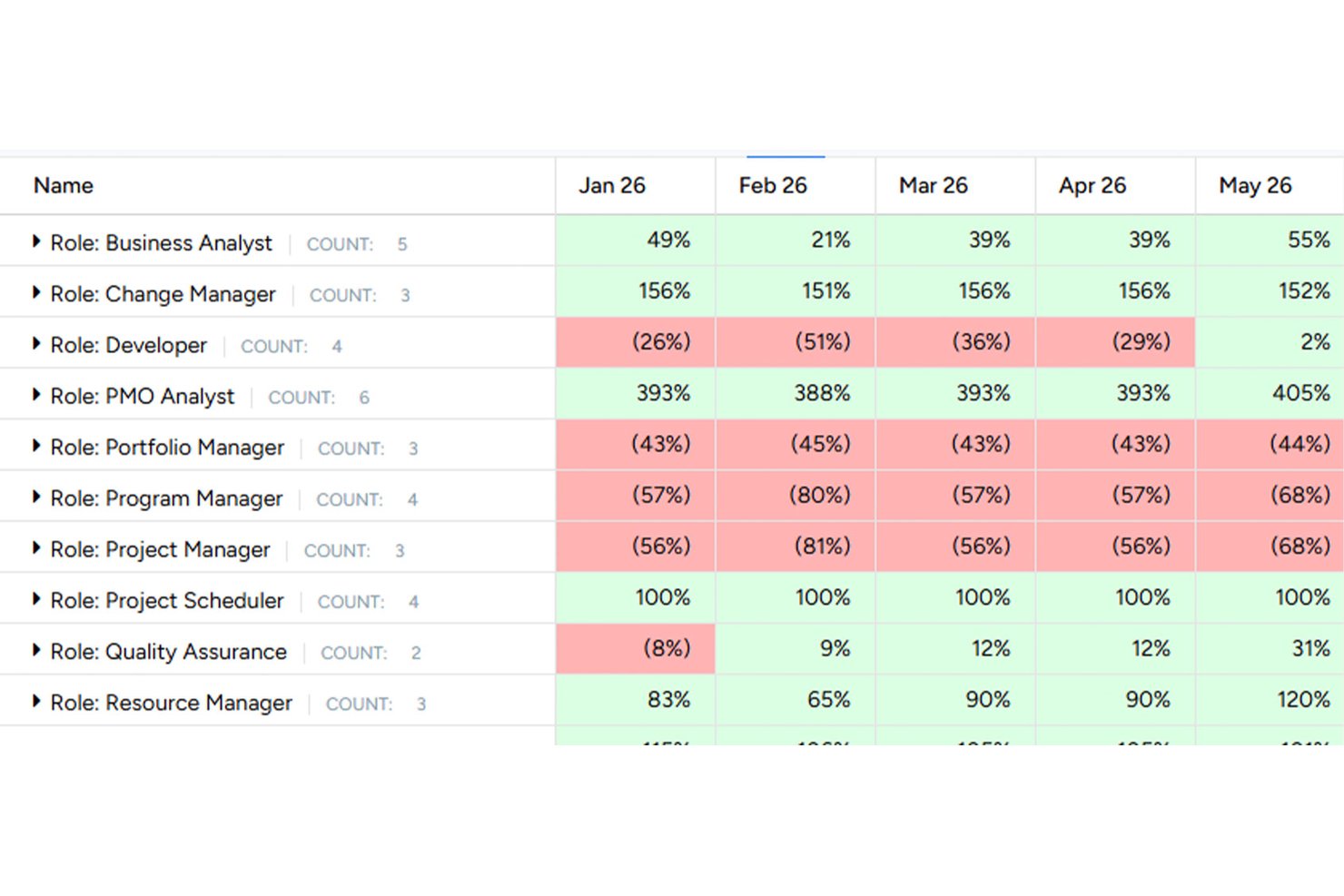
Tempus Resource by ProSymmetry is a purpose-built resource tracking tool that covers capacity planning, demand forecasting, workload visualization, skills tracking, scenario modeling, and timesheet management across projects and teams.
Who Is Tempus Resource Best For?
Tempus Resource is a strong fit for resource managers and project managers at mid-to-large enterprises who need to model staffing scenarios before committing to plans.
Why I Picked Tempus Resource
I picked Tempus Resource as one of the best because its What-If analysis is genuinely built for the moments that matter most: when a key person leaves, a new client project lands, or priorities shift mid-quarter. I can model those scenarios, including project sequencing changes, hiring decisions, and reassignments, without touching live data. The heatmaps and coolmaps then show me exactly where capacity breaks down by role, department, or skill before I commit to anything.
Tempus Resource Key Features
- Skills and competency tracking: Define skill sets with certifications, assessments, and proficiency ratings, then organize them into organization-wide or team-specific groupings.
- Resource request workflow: Submit, review, approve, or reassign resource requests with visibility into net availability, allocations in hours, FTE, or cost, and a team allocation matrix.
- Multiple report writers: Build reports using Pivot Grid, Pivot Chart, RAR Grid, RAR Chart, or RAR2 Chart formats, with export to Excel, CSV, or PDF.
- Timesheet management: Let employees log time against projects so managers can compare planned versus actual hours and review workload variances.
Tempus Resource Integrations
Tempus Resource offers native integrations with Smartsheet, Microsoft Teams, and its Jira app. It also provides an open REST API for connecting project, resource, and assignment data with tools such as Workday, ServiceNow, Azure DevOps, and SharePoint.
Pros and Cons
Pros:
- Forecasts staffing needs years ahead
- Workload reports support commitment discussions
- Scenario modeling protects live plans
Cons:
- Time-entry insights depend on employee data
- Report tailoring may need development

Float.com
Best for advanced scheduling

Float is a resource management software that can help you manage your team's resources, plan capacity, and track project profitability. It provides tools that align your resources with project needs to give you a clearer picture of how to improve operational efficiency.
Why I Picked Float
Float is a great choice for resource tracking because of its advanced scheduling and planning capabilities. It lets you allocate resources to various projects and track their utilization rates, so you're making the best use of your team's skills and capacity. This helps you make informed decisions about resource allocation and project timelines.
Another feature that stands out is its time tracking capability. With automated timesheets, you can easily compare scheduled hours against actual time spent on tasks. This keeps your projects on track and within budget and provides you with insights to adjust your plans as necessary.
Float Key Features
In addition to advanced scheduling, Float offers a variety of other features that make it an attractive choice for resource tracking software.
- Time Tracking: This lets your team log hours directly against project tasks to maintain accurate time management and reporting.
- Project Scoping: You can scope projects with financial considerations in mind and get insights into potential profits and budget management.
- Financial Insights: Float provides detailed financial insights that help forecast revenue and improve profit margins by analyzing project costs and resource utilization.
- Customizable Reporting: You can generate detailed reports that reflect your team's performance, resource allocation, and project progress, which helps with data-driven decision-making.
Float Integrations
Integrations include Linear, Outlook, Google Calendar, Slack, Zapier, Asana, Jira, Trello, Teamwork.com, Aprimo, Karbon, and NetSuite.
Pros and Cons
Pros:
- Flexible dashboards boost organization for complex projects
- Strong forecasting tools help long-term planning
- Visual resource schedule provides task and resource overview
Cons:
- Interface can be overwhelming for smaller or simpler projects
- Onboarding requires time investment
New Product Updates from Float.com

Float Adds Rate Cards and Multi-Currency Billing
Float introduced centralized rate cards to standardize bill rates across projects and added multi-currency support to bill clients consistently across regions. For more information, visit Float's official site.
Outras opções
Eis mais algumas opções que não entraram na lista principal, mas que merecem ser consideradas se quiser aprofundar a sua pesquisa.
- Saviom
For scalable enterprise resourcing
- Runn
For real-time resource planning
- Smartsheet
For project portfolio management
- Celoxis
For project cost and performance analysis
- Epicflow
For linking staffing to cash flow
- Resource Guru
For project forecasting reports
- Rocketlane
For onboarding project tracking
- Parallax
For resource analytics
- Hub Planner by Milient
For large companies
- Retain
For consolidated work views


How I Evaluate Resource Tracking Software
I split my evaluation into three parts, with the most weight on core functionality: assign people across projects, see capacity and workload, and catch overbooking. Next, I consider standout features such as scenario planning. Finally, I look beyond features at onboarding, support, and pricing value.
Core Functionality (Table Stakes For This List)
When I'm selecting tools for my list, I score each one on a scale from 0 (does not offer the functionality) to 5 (excels in this area) for each core functionality listed below. I then convert the total into a percentage to help assess each tool's overall fit, with extra weight on any functionalities I’ve deemed essential.
- Resource Scheduling (Essential): I look for assignments across concurrent projects, with dates and conflict visibility when deadlines overlap.
- Capacity & Utilization (Essential): I assess whether planned work shows remaining capacity over time, so leads can spot overload before accepting urgent work.
- Workload Views: Timeline or grid views should make uneven assignments visible by person and project as plans change.
- Skills & Availability: Searchable skills, roles, and availability help match a designer or engineer to upcoming work.
- Demand Forecasting: I look for views that compare pipeline work with team capacity and reveal staffing gaps before kickoff.
- Resource Reporting: Reports should let project managers compare utilization and allocation by project or team to guide staffing and budget decisions.
Once I have a list of tools that meet the criteria, I consider what sets each platform apart.
Differentiating Factors (What Sets Vendors Apart)
Here's how I compare and contrast different vendors:
Standout Features
I look for scenario-based what-if planning that lets you model staffing options before locking in assignments—like comparing two project timelines to see which avoids pulling a senior developer off another deliverable. Cross-project conflict alerts matter just as much, since I check whether a tool flags double-bookings automatically rather than waiting for someone to notice. I also evaluate financial and margin insights that tie resource costs to bill rates, giving you real-time visibility into whether a project is trending toward margin or toward trouble.
Beyond Features
I check whether a tool's licensing model scales without forcing you into an enterprise tier the moment your team grows. Agencies with fluctuating headcount need that flexibility. Integration depth matters just as much—I look for native connections to project management, finance, and HRIS platforms so time, scheduling, and billing data stays in sync without duplicate entry. I also evaluate onboarding support, since moving a team from spreadsheets to a shared resource tracker is a cultural shift that vendor-provided templates and training make far smoother.
Como escolher um software de acompanhamento de recursos
É fácil perder-se em longas listas de funcionalidades e estruturas de preços complexas. Para o ajudar a manter-se concentrado enquanto analisa o seu processo específico de seleção de software, eis uma lista de fatores a ter em conta:
| Fator | O que considerar |
|---|---|
| Escalabilidade | Procure software que possa crescer com a sua equipa. Deve conseguir lidar com um número crescente de recursos e projetos sem problemas de desempenho, garantindo a viabilidade a longo prazo. |
| Integrações | Certifique-se de que o software se integra com as ferramentas que já utiliza, como sistemas de gestão de projetos, CRM e sistemas financeiros, para simplificar os fluxos de trabalho e a partilha de dados. |
| Personalização | Verifique se o software oferece funcionalidades personalizáveis que se adaptem aos processos específicos da sua equipa, como painéis, relatórios e fluxos de trabalho. |
| Facilidade de utilização | Escolha uma ferramenta com uma interface intuitiva e uma curva de aprendizagem reduzida, para que a sua equipa possa adotá-la rapidamente sem formação extensa. |
| Orçamento | Analise os planos de preços para garantir que se enquadram no seu orçamento. Tenha em consideração quaisquer custos adicionais relativos a funcionalidades ou utilizadores à medida que a sua equipa cresce. |
| Medidas de segurança | Confirme se o software dispõe de medidas de segurança robustas, como encriptação de dados e controlos de acesso dos utilizadores, para proteger informações sensíveis contra violações e acessos não autorizados. |
Tendências no software de acompanhamento de recursos
Na minha investigação, consultei inúmeras atualizações de produtos, comunicados de imprensa e registos de lançamentos de diferentes fornecedores de software de acompanhamento de recursos. Eis algumas das tendências emergentes que estou a acompanhar:
- Informações baseadas em IA: A IA é cada vez mais utilizada para fornecer análises preditivas e informações úteis, ajudando as equipas a prever as necessidades de recursos e a otimizar as alocações. Os fornecedores estão a integrar a gestão de recursos com IA para melhorar a tomada de decisões, prevendo estrangulamentos nos projetos e sugerindo soluções.
- Colaboração em tempo real: As ferramentas estão a concentrar-se no reforço da colaboração em tempo real entre os membros das equipas. Funcionalidades como painéis partilhados e atualizações em direto estão a tornar-se padrão, permitindo que as equipas sincronizem instantaneamente e tomem decisões rapidamente.
- Otimização do trabalho remoto: À medida que o trabalho remoto se torna mais comum, o software está a adaptar-se, oferecendo funcionalidades que apoiam equipas distribuídas. Isto inclui a gestão virtual de recursos e ferramentas de monitorização remota, garantindo que as equipas se mantêm ligadas independentemente da sua localização.
- Acompanhamento da sustentabilidade: Existe um foco crescente no acompanhamento do impacto ambiental da utilização de recursos. Alguns fornecedores estão a integrar funcionalidades que permitem às empresas monitorizar e otimizar as suas práticas de utilização de recursos para cumprir objetivos de sustentabilidade.
- Melhorias na experiência do utilizador: Há um esforço para melhorar a experiência geral do utilizador, com interfaces mais simples e uma navegação mais intuitiva. Os fornecedores estão a investir em investigação sobre a experiência do utilizador para tornar as suas ferramentas mais fáceis de utilizar e mais acessíveis a um leque mais amplo de utilizadores.
O que é o software de acompanhamento de recursos?
O software de acompanhamento de recursos é uma ferramenta que ajuda a monitorizar equipamentos, espaços físicos, disponibilidade das equipas, atribuições de projetos e a capacidade geral em tempo real. É utilizado por gestores de projetos e de recursos para equilibrar cargas de trabalho, identificar lacunas e melhorar a rentabilidade através de decisões informadas sobre a afetação de pessoal.
O software de acompanhamento de recursos é essencial para evitar reservas excessivas, prever necessidades e manter os projetos no caminho certo.
Funcionalidades
Eis as principais funcionalidades que qualquer bom software de acompanhamento de recursos deve ter:
- Monitorização em tempo real: Pode obter atualizações em direto sobre a alocação, a utilização e a disponibilidade dos recursos para detetar imediatamente problemas ou oportunidades.
- Painéis personalizáveis: Isto permite-lhe criar apresentações visuais personalizadas para acompanhar os recursos mais importantes e obter informações rápidas, de relance, sem ter de analisar os dados em profundidade.
- Alertas automatizados: Receberá notificações instantâneas quando os recursos forem utilizados em excesso, subutilizados ou estiverem a aproximar-se de limites críticos, para poder agir rapidamente e manter os projetos no caminho certo.
- Relatórios detalhados: Pode gerar relatórios abrangentes que detalham a forma como os recursos estão a ser utilizados ao longo do tempo, detetar tendências, justificar orçamentos e fazer planos para o futuro.
- Controlo de acesso baseado em funções: Isto permite-lhe definir permissões para que apenas as pessoas certas possam ver ou modificar recursos específicos, mantendo as informações sensíveis seguras e reduzindo o risco de alterações acidentais.
- Capacidades de integração: Pode ligar-se a outras ferramentas, como plataformas de gestão de projetos ou de contabilidade, para que os dados fluam sem problemas e sem introdução manual.
- Acessibilidade móvel: Isto permite-lhe aceder e gerir informações sobre recursos a partir do telemóvel ou tablet, facilitando o acompanhamento da situação, independentemente do local onde se encontre.
- Previsão de recursos: Pode antecipar necessidades futuras com ferramentas preditivas e planear pessoal, inventário ou financiamento antes de chegar o período de maior pressão.
- Registos de auditoria: Isto permite-lhe consultar registos detalhados das alterações efetuadas aos dados dos recursos, facilitando o acompanhamento das responsabilidades e a manutenção da responsabilização.
Funcionalidades de IA a procurar no software de acompanhamento de recursos
O software de acompanhamento de recursos também inclui frequentemente capacidades baseadas em IA para o ajudar a trabalhar de forma mais inteligente:
- Análise preditiva: Pode utilizar a IA para prever as necessidades de recursos com base em dados históricos, tendências sazonais e calendários de projetos, bem como para planear proativamente.
- Agendamento automatizado: Pode permitir que a IA otimize a alocação e o agendamento de recursos, reduzindo conflitos e garantindo que os recursos estão disponíveis quando são necessários.
- Deteção de anomalias: Isto ajuda a identificar padrões invulgares ou potenciais problemas, como utilização excessiva, estrangulamentos ou subutilização, antes de afetarem os seus projetos.
- Recomendações inteligentes: Pode obter sugestões baseadas em IA para realocar recursos, ajustar calendários ou melhorar a eficiência, adaptadas ao seu fluxo de trabalho.
- Consultas em linguagem natural: Isto permite-lhe interagir com o software utilizando uma linguagem simples e conversacional para gerar relatórios ou encontrar informações rapidamente.
- Introdução automatizada de dados: Pode reduzir o trabalho manual permitindo que a IA extraia e introduza dados de recursos provenientes de e-mails, documentos ou outras plataformas integradas.
- Planeamento de capacidade: Pode utilizar a IA para simular diferentes cenários e recomendar as melhores formas de responder a necessidades futuras sem sobrecarregar a sua equipa ou o seu orçamento.
Perguntas frequentes
Encontre respostas a perguntas comuns que outras pessoas fazem sobre este tema.
Como pode o software de acompanhamento de recursos ajudar a prevenir o esgotamento da equipa?
O software de acompanhamento de recursos ajuda a prevenir o esgotamento ao fornecer informações detalhadas e atualizadas sobre a carga de trabalho de cada membro da equipa. Ao monitorizar as alocações, as horas extraordinárias e as tarefas sobrepostas, pode identificar quando alguém corre o risco de estar sobrecarregado. Com esta visibilidade, pode redistribuir tarefas, ajustar prazos ou negociar apoio adicional antes de o stress se tornar um problema.
Muitas ferramentas também fornecem relatórios sobre utilização e capacidade, permitindo identificar tendências prejudiciais na carga de trabalho e manter um ambiente de equipa mais equilibrado ao longo do tempo.
Que integrações devo priorizar ao escolher ferramentas de acompanhamento de recursos?
Priorize as integrações que ligam o acompanhamento de recursos aos seus sistemas essenciais — como ferramentas de gestão de projetos (por exemplo, Asana, Jira ou Microsoft Project), aplicações de controlo de tempo, plataformas de RH e canais de comunicação como o Slack ou o Microsoft Teams.
Estas integrações garantem que os dados dos seus recursos estão sempre sincronizados, reduzem o esforço manual e criam um fluxo de trabalho interligado. Por exemplo, a sincronização com a sua plataforma de gestão de projetos permite atualizar instantaneamente as alocações de recursos à medida que os planos dos projetos mudam, enquanto a ligação ao controlo de tempo mostra as horas efetivamente trabalhadas em comparação com as horas previstas, ajudando-o a identificar rapidamente falhas ou excessos.
O software de acompanhamento de recursos pode ajudar no planeamento de capacidade?
Sim, o software de acompanhamento de recursos é uma ferramenta poderosa para o planeamento de capacidade. Fornece uma visão clara dos compromissos atuais, da disponibilidade futura e dos conjuntos de competências individuais, permitindo-lhe planear os próximos projetos com confiança.
Ao analisar a forma como o tempo da sua equipa foi utilizado e ao prever as cargas de trabalho futuras, evita reservar em excesso os colaboradores e subutilizar os membros da equipa disponíveis. Muitos sistemas permitem modelar cenários hipotéticos, mostrando o impacto de novos projetos ou da alteração de prazos, para que possa otimizar o seu calendário de recursos e cumprir as suas promessas sem surpresas de última hora.
Como posso levar a minha equipa a adotar um software de acompanhamento de recursos?
Levar a sua equipa a adotar um novo software começa com uma comunicação aberta sobre a forma como este beneficiará todos. Eis alguns passos que pode seguir:
- Mostre à sua equipa como a ferramenta clarificará as suas tarefas, reduzirá os pedidos de última hora e a protegerá de cargas de trabalho impossíveis de gerir.
- Ofereça sessões de formação curtas e práticas e disponibilize documentação fácil de seguir.
- Comece com uma fase-piloto, recolha feedback e faça ajustes para que o processo se adapte à sua equipa.
- Envolva os membros da equipa na escolha das funcionalidades e na configuração, e destaque pequenas vitórias desde o início para criar confiança e incentivar uma utilização mais alargada.
O software de acompanhamento de recursos é adequado para equipas remotas ou híbridas?
Sim, o software de acompanhamento de recursos é especialmente valioso para equipas remotas ou híbridas. Quando nem todos estão no mesmo escritório, é fácil perder o controlo do trabalho que as pessoas estão a realizar ou da sua disponibilidade. Com um software centralizado, pode consultar os horários, as tarefas e as cargas de trabalho de todos os membros da equipa num só lugar, independentemente da localização. Isto facilita a coordenação entre fusos horários, evita a duplicação de esforços, permite partilhar atualizações e mantém todos alinhados com os objetivos do projeto, ajudando as equipas distribuídas a colaborar sem problemas.