

As 10 Melhores Ferramentas de Colaboração com IA Analisadas em 2026

10 Lista restrita das melhores ferramentas de colaboração com IA


As melhores ferramentas de colaboração com IA melhoram a gestão de projetos e permitem centralizar a comunicação, automatizar a coordenação de tarefas e cumprir prazos sem intermináveis atualizações de estado ou informações dispersas. Quando os ficheiros estão espalhados por várias plataformas, as atualizações ficam enterradas em conversas de chat ou não é claro quem é responsável pelas tarefas, os projetos ficam parados e as suas equipas perdem o foco.
nnA plataforma certa pode ajudar a simplificar os seus fluxos de trabalho, reduzir o esforço duplicado e manter as prioridades visíveis em tempo real. Testei e analisei mais de 20 ferramentas de colaboração com IA e selecionei as melhores opções. Encontre a solução certa para manter a sua equipa organizada, reduzir os obstáculos e concluir projetos.
nWhy Trust Our Software Recommendations
Our team has been testing and reviewing software since 2012. As project managers ourselves, we know how difficult—and important—it is to choose the right software.
For this guide, we evaluated tools using hands-on testing and independent research, scoring tools using our selection criteria. We also draw on insights from industry thought leaders and practicing project management experts.
Our reviews reflect our human editorial judgment, not a sales pitch.
Expert reviewers:
Tabela comparativa de ferramentas de colaboração com IA
Esta tabela comparativa resume os detalhes de preços das minhas principais escolhas de ferramentas de colaboração com IA:
| Tool | Best For | Trial Info | Price | ||
|---|---|---|---|---|---|
| 1 | Best for cross-departmental collaboration | Free plan + 14-day free trial + free demo available | From $9/user/month (billed annually) | Website | |
| 2 | Best with multi-channel messaging integration | 30-day free trial + free demo available | From $14/user/month (billed annually) | Website | |
| 3 | Best for complex projects | Free plan + 14-day trial + demo available | From $10/user/month (billed annually) | Website | |
| 4 | Best for design teams | Free plan available | From $3/user/month | Website | |
| 5 | Best for database projects | Free plan + free trial + free demo available | From $20/user/month (billed annually) | Website | |
| 6 | Best for project timelines | Free plan + 14-day free trial available | From $10/user/month (billed annually) | Website | |
| 7 | Best for video messaging | Free demo available | $18/month | Website | |
| 8 | Best for team inboxes | 14-day free trial | From $25/user/month (billed annually) | Website | |
| 9 | Best for freelancers | 7-day free trial | From $9/user/month (billed annually) | Website | |
| 10 | Best for knowledge management | Free plan + 7-day trial available | From $5.78/user/month | Website |


Análises das melhores ferramentas de colaboração com IA
Leia o meu resumo detalhado de cada uma das minhas escolhas para as melhores ferramentas de colaboração com IA. Abordo as principais funcionalidades, os prós & contras, as integrações e os casos de utilização ideais, para que possa encontrar a melhor opção para si.

Best for cross-departmental collaboration
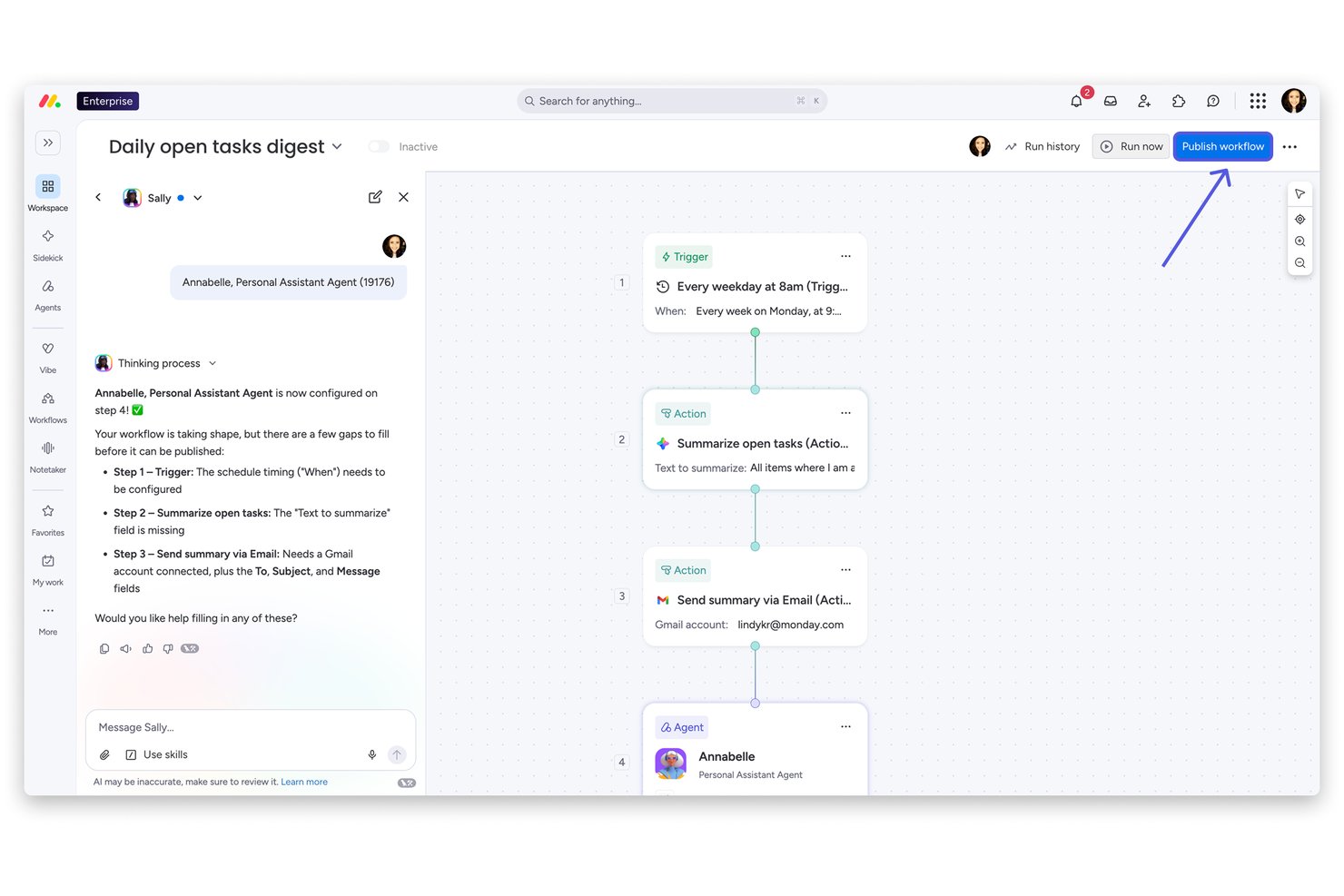
monday AI Workspace is an AI-powered work platform that brings together project management, document collaboration, workflow automation, and an AI agent workforce to connect teams across departments through a shared workspace.
Who Is monday AI Workspace Best For?
It's a strong fit for mid-to-large organizations running work across multiple departments who need a single platform to align teams without constant tool-switching.
Why I Picked monday AI Workspace
monday AI Workspace earns its spot on my shortlist because of how well it handles collaboration across departments that rarely share the same tools or workflows. I like that the AI agents lets marketing, engineering, and ops teams each deploy specialized agents that still feed into a shared board, so decisions don't get lost in handoffs. The AI Meeting Notetaker is one of my favorite features because it pulls action items directly from calls and routes them to the right board without any manual cleanup after the meeting.
monday AI Workspace Key Features
- AI Sidekick assistant: Generates task descriptions, summaries, and project briefs directly within your boards and docs.
- AI Columns: Automates repetitive data entry by generating field values and updates using workspace context.
- Portfolio and resource management: Lets you manage multiple projects, allocate resources, and track progress for the entire organization.
- MCP (Model Context Protocol) integrations: Connects external AI tools like Claude, Copilot, or ChatGPT for direct data and workflow sync.
monday AI Workspace Integrations
monday AI Workspace offers hundreds of native integrations through its built-in integrations and marketplace, including Slack, Jira, Salesforce, HubSpot, GitHub, Microsoft Teams, and Google Workspace. It also supports Zapier and provides an API for custom integrations.
Pros and Cons
Pros:
- Single workspace spans projects, docs, and dashboards
- AI meeting notes sync directly to project boards
- AI agents automate cross-departmental task routing
Cons:
- Board setup complexity grows with team size
- AI features gated behind higher-tier plans
New Product Updates from monday AI Workspace
monday AI Workspace Adds Human Approval Routing
monday AI Workspace adds a human-in-the-loop approval block to AI Workflows, sending approval requests and routing workflow paths based on responses. For more information, visit monday AI Workspace's official site.
Missive
Best with multi-channel messaging integration
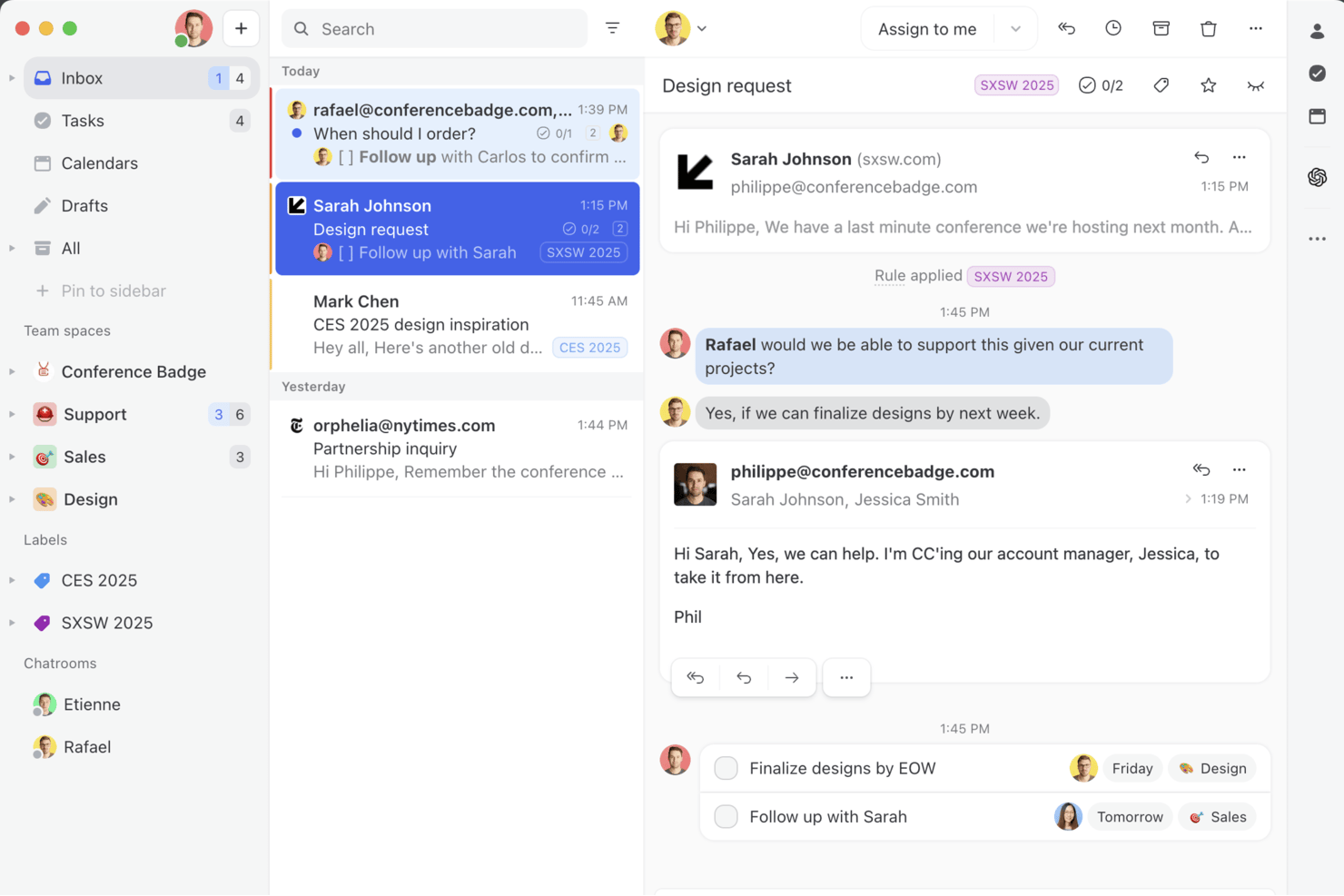
Missive is a collaborative shared inbox platform that unifies email, SMS, WhatsApp, and social messaging channels with AI-assisted drafting, thread summarization, automated task extraction, and team workflow tools in one workspace.
Who Is Missive Best For?
Missive is a strong fit for cross-functional team leads and communication-heavy teams who coordinate work across email, SMS, WhatsApp, and social channels in a single shared workspace.
Why I Picked Missive
Missive earns its spot on my shortlist because no other tool I've tested pulls email, SMS, WhatsApp, Facebook Messenger, and Instagram into a single shared workspace where your whole team can draft, assign, and summarize conversations together. I'm particularly impressed by how AI Summarization posts shared thread summaries as team-visible notes, so when a conversation is reassigned mid-thread, the next person picks up full context instantly. AI Rules take this further by auto-extracting action items directly from incoming emails and routing them to tools like Asana or ClickUp without manual triage.
Missive Key Features
- AI Rules engine: Automatically analyzes incoming emails using plain-language prompts to trigger routing, assignments, or escalations without manual triage.
- Collaborative drafting: Multiple team members can co-author a reply in real time within a shared thread before it's sent.
- BYOK AI provider support: Connect your own OpenAI, Anthropic, or Google Gemini API key to power AI features while controlling cost and model choice.
- Workload balancing: Distributes incoming conversations across team members using Round-Robin, Least Busy, All-at-Once, or Random assignment methods.
- MissiveMCP Server: Connect external AI tools (like Claude or ChatGPT) to query collaboration threads, check calendars, and draft replies—while keeping team review required before sending.
Missive Integrations
Missive offers native integrations with Asana, ClickUp, Trello, and Todoist, plus MCP connections to Linear and Notion. It supports OpenAI, Anthropic, and Google Gemini, has an API for custom integrations, and is available on Zapier.
Pros and Cons
Pros:
- Automates action item extraction from messages
- AI summarizes threads as shared team notes
- Unifies email, SMS, and social messaging
Cons:
- Lacks predictive project risk detection
- No AI meeting notes or voice support
New Product Updates from Missive

Missive Adds Multi-Step Automations With Timed Rules
Missive adds time-based rule steps that let automations run through multiple stages on the same conversation. This helps teams build follow-ups and SLA escalations without creating separate rules. For more information, visit Missive’s official site.
 .

Wrike
Best for complex projects

Wrike is a project management software designed to help your team manage projects through its automation and AI capabilities. It appeals to businesses and professionals who need efficient workflow solutions, offering features for creative production, marketing workflows, and agile planning.
Why I Picked Wrike
I picked Wrike for its AI-driven features that enhance collaboration for complex projects. Wrike's generative AI capabilities help your team draft project plans and summarize meeting notes, saving time and reducing manual workload. The platform also provides real-time dashboards offering analytics for informed decision-making, essential for teams needing to stay agile and responsive. These features make Wrike an ideal choice for businesses looking for a tool that facilitates collaboration and empowers teams with AI-enhanced insights.
Wrike Key Features
In addition to its AI-driven capabilities, I also found several other features that make Wrike a solid collaboration tool:
- Custom Request Forms: Streamline the intake process by allowing teams to create tailored forms for specific project needs.
- Online Proofing: Enhance collaboration by providing a space for teams to review and approve creative work directly within the platform.
- In-Platform Email Communication: Keep all project-related communications centralized by integrating email functionality within Wrike.
- Unlimited Workflows: Adapt to various project requirements by setting up as many workflows as your team needs.
Wrike Integrations
Integrations include Microsoft Teams, Google Workspace, Slack, Salesforce, Adobe Creative Cloud, NetSuite, QuickBooks, Jira, GitHub, and Box.
Pros and Cons
Pros:
- Comprehensive task management features improve team coordination.
- Customizable dashboards and workflows suit diverse needs.
- Dynamic file version comparison streamlines proofing processes.
Cons:
- Intricate workflows can take time to set up.
- Mobile app lacks features available in desktop version.
New Product Updates from Wrike
Wrike Expands Gantt Planning, Approvals, and AI Work Intake
Wrike adds cross-project Gantt dependencies, flexible approval routing, and AI work intake through Wrike MCP. These updates give teams more control over planning, decision-making, and incoming work. For more information, visit Wrike’s official site.

FigJam
Best for design teams

FigJam is a collaborative whiteboard tool that lets design teams and creatives brainstorm, plan, and work together visually. Designers and teams use it to sketch ideas, map out projects, and collaborate.
Why I picked FigJam: FigJam’s intuitive interface supports sketching and brainstorming sessions. Use FigJam’s AI to generate ideas, create diagrams, and summarize content on the board. Your team can combine sticky notes, shapes, and drawings with AI-generated inputs to move faster through workshops. The tool's ability to facilitate real-time collaboration lets your team work together seamlessly.
Standout features & integrations:
Features include templates that help you get started quickly, a voting feature so you can make decisions collaboratively, and a built-in timer to stay on track in meetings and sessions.
Integrations include Figma, Slack, Microsoft Teams, Zoom, Dropbox, Google Drive, Asana, Trello, Notion, and Jira.
Pros and Cons
Pros:
- Timer for meeting management
- Built-in voting feature
- Easy to sketch ideas
Cons:
- Complex for non-designers
- Requires stable internet connection
Airtable
Best for database projects

Airtable is a flexible database management tool that lets teams organize and collaborate on projects. It's used by marketers, project managers, and creatives who need a customizable solution for tracking and managing data.
Why I picked Airtable: Airtable can handle projects and databases with ease. It offers a user-friendly interface that lets you create customized tables and views. You can use Airtable’s AI features to generate content and suggest automations. The drag-and-drop functionality makes organizing data straightforward. In my experience, Airtable's ability to link records and automate workflows makes it useful for complex projects.
Standout features & integrations:
Features include color-coded records that make it easy to categorize and identify information quickly. You can also design custom interfaces to make complex data usable and accessible.
Integrations include Slack, Google Drive, Dropbox, Salesforce, and Zendesk.
Pros and Cons
Pros:
- Supports complex data relationships
- Visual project tracking
- Highly customizable fields
Cons:
- Advanced features require paid plans
- Limited offline functionality
Nifty
Best for project timelines

Nifty is a project management tool that helps teams manage timelines and tasks. Project managers and teams use it to keep track of project milestones and collaborate efficiently.
Why I picked Nifty: Nifty’s intuitive interface helps you manage project timelines and visualize project progress. The tool also offers milestone tracking to keep your team aligned on deadlines. Nifty’s AI features help you plan, prioritize, and execute tasks more effectively. Collaboration features like task discussions and file sharing helps improve communication and teamwork.
Standout features & integrations:
Features include time tracking to monitor the hours spent on tasks, which helps you manage resources better, and task dependencies help you organize and prioritize tasks effectively.
Integrations include Slack, Google Drive, Zoom, GitHub, Asana, Trello, and Notion.
Pros and Cons
Pros:
- Calendar sync feature
- Effective milestone tracking
- Intuitive timeline visualization
Cons:
- Occasional sync delays
- Limited advanced reporting

Loom
Best for video messaging

Loom is a video communication tool that lets your team create video messages. It's popular among remote teams, educators, and customer support for its ability to convey complex information visually.
Why I picked Loom: Loom excels in video messaging and lets you record your screen, voice, and face simultaneously. You can use AI to instantly clean up videos, generate transcripts, and repurpose recordings into text formats like messages or reports. The tool lets you share videos with a simple link and receive instant feedback through comments. Loom's speed and simplicity make it a favorite for teams that want to speed up communication and reduce lengthy emails.
Standout features & integrations:
Features include video trimming to edit out unnecessary parts, drawing tools to highlight key information, and a call-to-action button to direct viewers to a specific webpage.
Integrations include Slack, Gmail, Jira, Zoom, Notion, and Confluence.
Pros and Cons
Pros:
- High-quality video recording
- Easy sharing options
- Fast video processing
Cons:
- Basic analytics features
- Limited video customization

Front
Best for team inboxes

Front is a shared inbox platform that helps teams manage communications. It caters to customer support, sales, and operations teams who need to collaborate on email responses and manage team inboxes.
Why I picked Front: Front lets you manage team inboxes and centralize communications in one place. The AI features can help you draft replies, automate routing, and measure customer satisfaction without extra manual work. You can assign emails to specific team members, which maintains accountability and clear responsibility. The platform's internal comments feature lets your team discuss emails directly within the inbox. In my experience, Front's automated workflows help reduce repetitive tasks and improve productivity.
Standout features & integrations:
Features include email templates that save time, analytics for performance and email response times, and collision detection that prevents multiple people from responding to the same email.
Integrations include Salesforce, Slack, Asana, Trello, Zapier, HubSpot, Intercom, Aircall, and Dropbox.
Pros and Cons
Pros:
- Prevents duplicate email responses
- Assigns emails to team members
- Centralized communication hub
Cons:
- Requires stable internet connection
- Limited customization of templates
Best for freelancers

Bonsai Agency Software is a comprehensive platform that lets freelancers manage contracts, invoices, and projects. Independent professionals can use it to handle their business operations.
Why I picked Bonsai Agency Software: Bonsai’s AI features let you create proposals, contracts, and invoices faster with templates and automation, and you can customize the templates to fit your specific needs. The invoicing feature improves billing and lets you create and send professional invoices. Bonsai's project tracking helps you stay on top of deadlines, manage your workload, and collaborate with clients.
Standout features & integrations:
Features include task management and prioritization, time tracking so you can monitor hours spent on projects, and a client portal where clients can approve contracts and invoices.
Integrations include QuickBooks, Zapier, Xero, and Calendly.
Pros and Cons
Pros:
- Client portal for approvals
- Efficient invoicing process
- Customizable contract templates
Cons:
- Can be complex for new users
- Limited customization for reports
Confluence
Best for knowledge management

Confluence is a collaboration tool that helps teams create, share, and manage content. It's used by project managers, developers, and IT teams for knowledge sharing and documentation.
Why I picked Confluence: Confluence provides a centralized space for team documentation and collaboration. You can use Confluence’s AI features to generate content, summarize pages, and automate repetitive writing tasks.The page versioning feature lets you to track changes and revert to previous versions. The templates help you set up pages for use cases like meeting notes and project plans.
Standout features & integrations:
Features include a rich text editor for easy content formatting, a powerful search function to quickly find information, and permissions settings to control who can view or edit content.
Integrations include Jira, Trello, Slack, Google Drive, and Microsoft Teams.
Pros and Cons
Pros:
- Page versioning capability
- Customizable permissions
- Extensive template library
Cons:
- Complexity in setting permissions
- Can be slow with large data
Outras ferramentas de colaboração com IA
Eis algumas opções adicionais de ferramentas de colaboração com IA que não entraram na minha lista restrita, mas que vale a pena conhecer:
- Bit.ai
For document collaboration
- Roam
For collaborative idea sharing
- Zoho Projects
For task tracking
- Quickbase
For app building
- TaskRay
For Salesforce AI-powered collaboration
- Asana
For project planning
- Slack
For team communication
- ClickUp
For task management
- Miro
For online whiteboards
- Trello
For visual task boards


How I Evaluate AI Collaboration Tools
Every tool here has to go beyond a chatbot add-on—I look for AI that saves real time, like auto-extracting action items or surfacing blockers. I split my evaluation into core functionality a tool must have to qualify and differentiating factors that separate good options from great ones.
Core Functionality (Table Stakes For This List)
When I'm selecting tools for my list, I rank each one on a scale from 0 (does not offer the functionality) to 5 (excels in this area) for each core functionality listed below. Then, I calculate the tool's total score into a percentage. Each tool needs to achieve a minimum total score of 65% to be considered for inclusion.
- AI-Powered Content Generation: I look for tools that use generative AI to help teams draft meeting agendas, project briefs, or task descriptions directly inside the workspace.
- AI Summarization Capabilities: Long Slack threads and hour-long standups drain time, so I evaluate how well each tool condenses conversations and docs into clear takeaways.
- Real-Time Collaboration Features: Teams need shared surfaces to work together, so I check for co-editing, commenting, and async collaboration across docs, tasks, or whiteboards.
- AI Task & Action Extraction: I evaluate whether the tool can pull action items, owners, and due dates from meetings or chat threads without someone manually logging them.
- Project Management Integrations: Tools like Jira, Asana, and Monday are where project work lives, so strong two-way sync with these platforms is something I always check for.
- AI-Driven Insights & Search: Beyond basic keyword search, I look for semantic retrieval and surfaced insights—like flagging stale tasks or unanswered blockers across a workspace.
Once I have a list of tools that meet the criteria, I consider what sets each platform apart.
Differentiating Factors (What Sets Vendors Apart)
Here's how I compare and contrast different vendors:
Standout Features
An AI meeting copilot that joins calls and auto-generates follow-ups is a huge time-saver for PMs running back-to-back syncs across multiple workstreams. I also evaluate cross-tool context awareness, where the AI pulls relevant info from connected apps like Slack or Jira without manual input. Custom AI agents are worth looking at too—teams can configure them to handle recurring tasks like sprint reminders or weekly status rollups tailored to specific project workflows.
Beyond Features
AI governance matters a lot here—I check whether vendors are transparent about how they handle project data and whether customer content trains their models. Scalability is another big factor, especially for PMO directors managing multiple portfolios with dozens of guest collaborators. I also evaluate implementation support, since rolling out an AI tool across distributed teams requires solid onboarding resources and change management guidance to drive real adoption beyond a pilot group.
Como escolher ferramentas de colaboração com IA
nnÉ fácil perder-se em longas listas de funcionalidades e estruturas de preços complexas. Para o ajudar a manter o foco enquanto escolhe a ferramenta certa, eis uma lista de fatores a ter em conta:
n| Fator | O que considerar |
|---|---|
| Escalabilidade | A ferramenta acompanhará o crescimento da sua equipa? Considere as necessidades futuras e se a ferramenta consegue lidar com um aumento do número de utilizadores e de dados sem problemas de desempenho. |
| Integrações | Funciona com as suas ferramentas atuais? Verifique a compatibilidade com o software que a sua equipa já utiliza, como sistemas de CRM ou de armazenamento de ficheiros. |
| Personalização | Pode adaptá-la aos seus fluxos de trabalho? Procure opções para ajustar painéis, relatórios e definições de utilizador de modo a corresponder aos processos da sua equipa. |
| Facilidade de utilização | É intuitiva para todos? Avalie a curva de aprendizagem e a interface de utilizador. Uma ferramenta difícil de utilizar pode abrandar a sua equipa. |
| Implementação e integração inicial | Com que rapidez pode a sua equipa começar? Avalie os recursos disponíveis, como tutoriais e suporte, para garantir uma transição tranquila. |
| Custo | Encaixa-se no seu orçamento? Compare os planos de preços e considere os custos a longo prazo, incluindo eventuais taxas ocultas ou custos adicionais relativos a funcionalidades premium. |
| Medidas de segurança | Quão seguros estão os seus dados? Verifique as medidas de proteção de dados da ferramenta, as normas de encriptação e a conformidade com os regulamentos do setor, como o RGPD. |
| Disponibilidade do suporte | Que opções de suporte estão disponíveis? Verifique se existe suporte 24 horas por dia, 7 dias por semana, os tempos de resposta e o acesso a um gestor de conta dedicado, se necessário. |
O que são ferramentas de colaboração com IA?
As ferramentas de colaboração com IA são plataformas digitais que melhoram o trabalho em equipa e a comunicação através de funcionalidades de inteligência artificial. Estas ferramentas são geralmente utilizadas por gestores de projetos, líderes de equipa e trabalhadores remotos para melhorar a produtividade e a coordenação.
Funcionalidades como o chat em tempo real, o acompanhamento de projetos e a partilha de documentos ajudam a organizar tarefas, gerir prazos e facilitar uma comunicação eficaz. Isto simplifica a colaboração e ajuda a tornar a equipa mais eficiente.
Funcionalidades das ferramentas de colaboração com IA
Ao selecionar ferramentas de colaboração com IA, tenha em atenção as seguintes funcionalidades essenciais:
- Comunicação em tempo real: Disponibiliza mensagens instantâneas e chamadas de vídeo para manter os membros da equipa ligados e envolvidos.
- Gestão de tarefas: Permite atribuir, acompanhar e dar prioridade às tarefas para manter os projetos dentro do prazo.
- Partilha de documentos: Facilita o acesso e a colaboração em ficheiros e reduz a necessidade de trocar emails.
- Capacidades de integração: Liga-se às ferramentas e ao software existentes para criar um fluxo de trabalho coeso entre plataformas.
- Painéis personalizáveis: Permite personalizar vistas e relatórios para corresponder às necessidades e preferências específicas da sua equipa.
- Fluxos de trabalho automatizados: Simplifica tarefas repetitivas e liberta tempo para trabalho estratégico.
- Medidas de segurança: Protege dados sensíveis através de encriptação e cumpre os regulamentos do setor.
- Análise e relatórios: Fornece informações sobre o desempenho da equipa e o progresso dos projetos para fundamentar a tomada de decisões.
- Acesso móvel: Permite que os membros da equipa colaborem e acedam a informações a partir de qualquer lugar, a qualquer momento.
- Interface intuitiva: Oferece um design intuitivo que minimiza a curva de aprendizagem e aumenta as taxas de adoção.
Vantagens das ferramentas de colaboração com IA
A implementação de ferramentas de colaboração com IA proporciona várias vantagens à sua equipa e à sua empresa. Eis algumas das que pode esperar:
- Melhor comunicação: As mensagens em tempo real e as chamadas de vídeo mantêm a sua equipa ligada e reduzem os mal-entendidos.
- Organização melhorada: As funcionalidades de gestão de tarefas ajudam a acompanhar as atribuições e os prazos, para que nada fique esquecido.
- Maior produtividade: Os fluxos de trabalho automatizados tratam de tarefas repetitivas, permitindo que a sua equipa se concentre em trabalho de maior valor.
- Melhor tomada de decisões: A análise e os relatórios fornecem informações sobre o progresso dos projetos e o desempenho da equipa, para que possa tomar decisões fundamentadas.
- Maior flexibilidade: O acesso móvel permite que a sua equipa colabore a partir de qualquer lugar, e pode acomodar o trabalho remoto e as viagens.
- Maior segurança dos dados: As medidas de segurança protegem informações sensíveis, proporcionando-lhe tranquilidade quanto à segurança dos dados.
- Experiência personalizável: Os painéis personalizáveis permitem adaptar a ferramenta aos fluxos de trabalho e às preferências únicos da sua equipa.
Custos e preços das ferramentas de colaboração com IA
Os custos das ferramentas de colaboração com IA variam consoante as funcionalidades, o tamanho da equipa, os complementos e outros fatores. A tabela abaixo resume os planos comuns, os respetivos preços médios e as funcionalidades normalmente incluídas nas soluções de ferramentas de colaboração com IA:
Tabela de comparação de planos para ferramentas de colaboração com IA
| Tipo de plano | Preço médio | Funcionalidades comuns |
|---|---|---|
| Plano gratuito | $0/user/month | Gestão básica de tarefas, armazenamento limitado e ferramentas de comunicação essenciais. |
| Plano pessoal | $5-$15/user/month | Gestão de tarefas, partilha de documentos e integrações básicas. |
| Plano empresarial | $15-$30/user/month | Integrações avançadas, análise e relatórios, e melhores funcionalidades de segurança. |
| Plano empresarial de grande dimensão | $30-$50/user/month | Fluxos de trabalho personalizáveis, suporte prioritário e medidas de segurança avançadas. |
Perguntas frequentes sobre ferramentas de colaboração com IA
Eis algumas respostas a perguntas comuns sobre ferramentas de colaboração com IA:
Como é que as ferramentas de IA afetam a eficácia da comunicação das equipas?
As ferramentas de colaboração com IA podem analisar as suas mensagens, destacar conversas importantes e sugerir resumos ou próximos passos. Ajudam a sua equipa a evitar conversas duplicadas e mudanças de contexto. Pode utilizá-las para dar destaque às informações essenciais e, em seguida, responder de forma mais rápida e clara.
As ferramentas de colaboração com IA permitem garantir a conformidade e a privacidade dos dados?
As ferramentas de colaboração com IA protegem a privacidade através de acessos baseados em funções, registos de auditoria e encriptação para proteger dados sensíveis. Verifique se uma ferramenta cumpre os regulamentos da sua região, como o GDPR ou SOC-2. Deve também definir regras claras sobre a forma como as funcionalidades de IA podem utilizar conteúdos confidenciais.
Qual é a capacidade de expansão das ferramentas de colaboração com IA para equipas em crescimento?
As ferramentas de colaboração com IA são frequentemente dimensionadas permitindo ajustar os planos ou os níveis de desempenho (por exemplo, para mais utilizadores ou armazenamento). A arquitetura deve permitir adicionar utilizadores e funcionalidades sem exigir uma reformulação extensa. No entanto, deverá testar o desempenho à medida que a sua equipa cresce.
Quais são as armadilhas comuns ao implementar IA em ferramentas de colaboração?
As armadilhas comuns das ferramentas de colaboração com IA incluem a dependência excessiva da IA, que pode reduzir a capacidade de julgamento da equipa, e a possibilidade de a IA interpretar incorretamente informações vagas. A complexidade da integração com o conjunto de tecnologias existente (por exemplo, sistemas antigos) pode atrasar a adoção e a formação demora tempo, pelo que deve contar com um período de adaptação.
Como avalio o retorno do investimento das ferramentas de colaboração com IA?
Para avaliar o retorno do investimento das ferramentas de colaboração com IA, pode acompanhar o tempo poupado nas atualizações de estado, a redução do volume de mensagens de correio eletrónico, ciclos de decisão mais rápidos e um menor número de prazos falhados. Compare métricas anteriores e posteriores para projetos semelhantes. Pergunte à sua equipa se sente menos dificuldades de coordenação após a adoção.